Configure AKS applications with ConfigMaps, Secrets, and persistent storage
Externalize non-sensitive settings, protect credentials with Kubernetes and Azure services, and select durable storage with PVCs, CSI drivers, access modes, and StorageClasses for stateful AI workloads.
Suggested study time: 85 minutes • Intermediate • Complete original rewrite with a concise version of every topic, assessment review, and guided AKS configuration lab
By João Ricardo Dutra••Complete original content
1. Externalize state without losing security or reliability
An AI inference API often changes endpoints and feature flags between environments, authenticates to upstream model or data services, and writes embeddings, cached artifacts, conversation state, user uploads, or logs. Baking those values into the image couples releases to configuration, risks credential exposure, and loses data when a Pod is replaced.
separates these concerns. ConfigMaps hold non-sensitive settings, Secrets represent sensitive values, and PersistentVolumes with PersistentVolumeClaims provide storage outside the container filesystem. Together they support predictable rollouts, stronger governance, and stateful AI workloads whose Pods can restart or move nodes.
Inject ConfigMaps as environment variables or mounted files.
Reference Kubernetes Secrets or integrate with centralized Azure services.
Request durable capacity and access semantics through a PVC and StorageClass.
Apply and verify configuration, credentials, and persistence with kubectl.
Topic summary
Keep code and images stable while configuration, credentials, and durable data follow separate Kubernetes lifecycles.
2. Define ConfigMaps for non-sensitive application settings
A ConfigMap is a namespaced Kubernetes object whose data field stores string key-value pairs. It is appropriate for feature flags, service endpoints, tuning values, and text configuration, not passwords or tokens. Keys may use alphanumeric characters, dashes, underscores, and dots.
One ConfigMap is limited to 1 MiB. Use binaryData for base64-encoded binary values when necessary; use a persistent volume or external configuration service for larger content. This limit keeps synchronization to nodes and etcd storage efficient.
ConfigMaps externalize small, non-sensitive string or binary configuration; keep large files and confidential data in purpose-built stores.
3. Inject selected keys or every key as environment variables
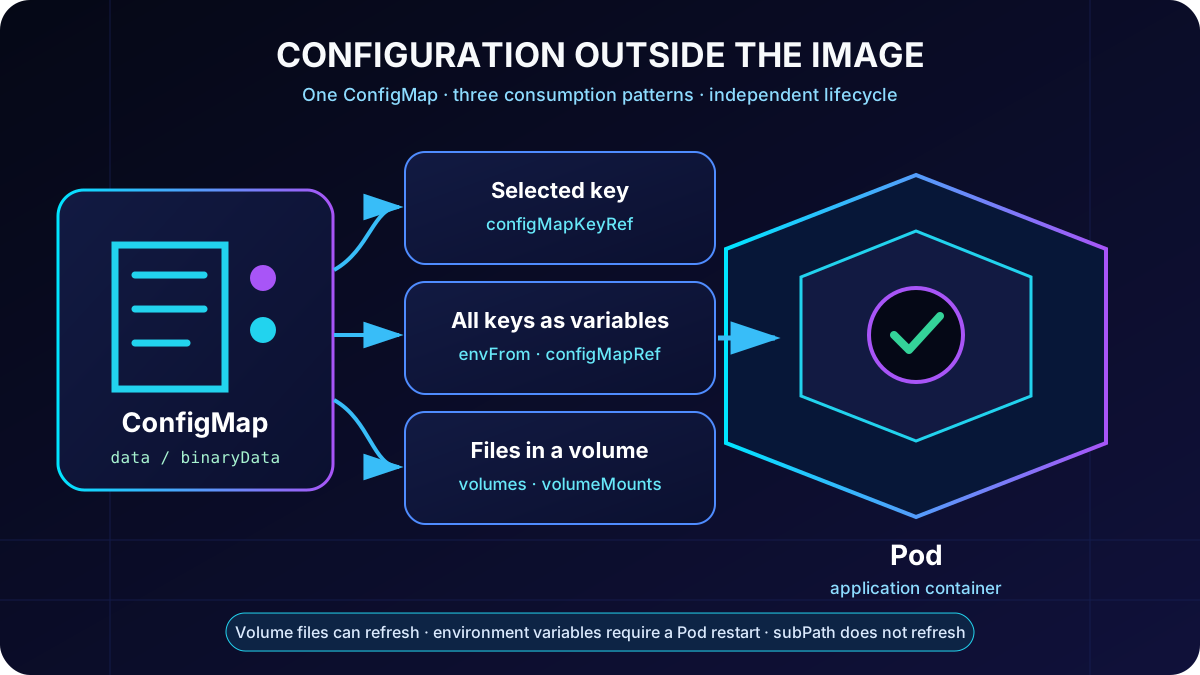
configMapKeyRef maps one ConfigMap key to one container environment variable. envFrom with configMapRef imports all keys in a single declaration and reduces repetitive YAML. Individual references are more explicit and let the application rename variables; bulk import is convenient when every key is intended for the process environment.
Environment variables are captured when the Pod starts. Updating the ConfigMap does not change the environment of existing containers, so a rollout or Pod restart is required. Validate mappings with kubectl describe pod, printenv through kubectl exec, and application logs without echoing confidential values.
Choose the consumption shape that matches how the application reads configuration.
Topic summary
Use configMapKeyRef for explicit keys, envFrom for bulk import, and restart Pods when environment-based settings change.
4. Mount ConfigMaps as files and understand refresh behavior
Applications that expect JSON, INI, or another file can mount a ConfigMap-backed volume. Each key becomes a file in the mount directory; items can select keys and rename the resulting paths. Mark the mount read-only because the ConfigMap is the source of truth.
The kubelet periodically refreshes normal ConfigMap volume content after a ConfigMap update. The application must watch or reread the file to use the new value. A subPath mount does not receive these automatic updates, and environment variables never update in place. Test the exact consumption pattern before relying on dynamic refresh.
Topic summary
Mount files when the application expects files, but distinguish normal volume refresh from static environment variables and non-refreshing subPath mounts.
5. Immutable ConfigMaps and centralized
immutable: true protects a ConfigMap from accidental data changes and lets Kubernetes close watches, reducing API-server load in large clusters. Immutability cannot be reversed and the data cannot be edited. Publish a new versioned ConfigMap, update the workload reference, and redeploy; deletion and recreation are required if reusing the name, while existing Pods retain their old mount until restart.
For settings shared across applications, environments, or clusters, the Azure Kubernetes Provider retrieves values and feature flags from and generates standard ConfigMaps. It can also resolve references. Applications continue consuming ordinary environment variables or mounted files while central operations gain a synchronized view.
Topic summary
Use immutable, versioned ConfigMaps for release-bound settings and for centralized cross-environment management and refresh.
6. Create and consume Kubernetes Secrets
A Kubernetes Secret keeps API keys, connection strings, and credentials out of the container image and ordinary configuration. Opaque is the common type for arbitrary strings; kubernetes.io/dockerconfigjson represents registry credentials and kubernetes.io/tls represents TLS certificates and keys. Secrets can come from literals, files, or manifests, but a manifest containing real values must not be committed.
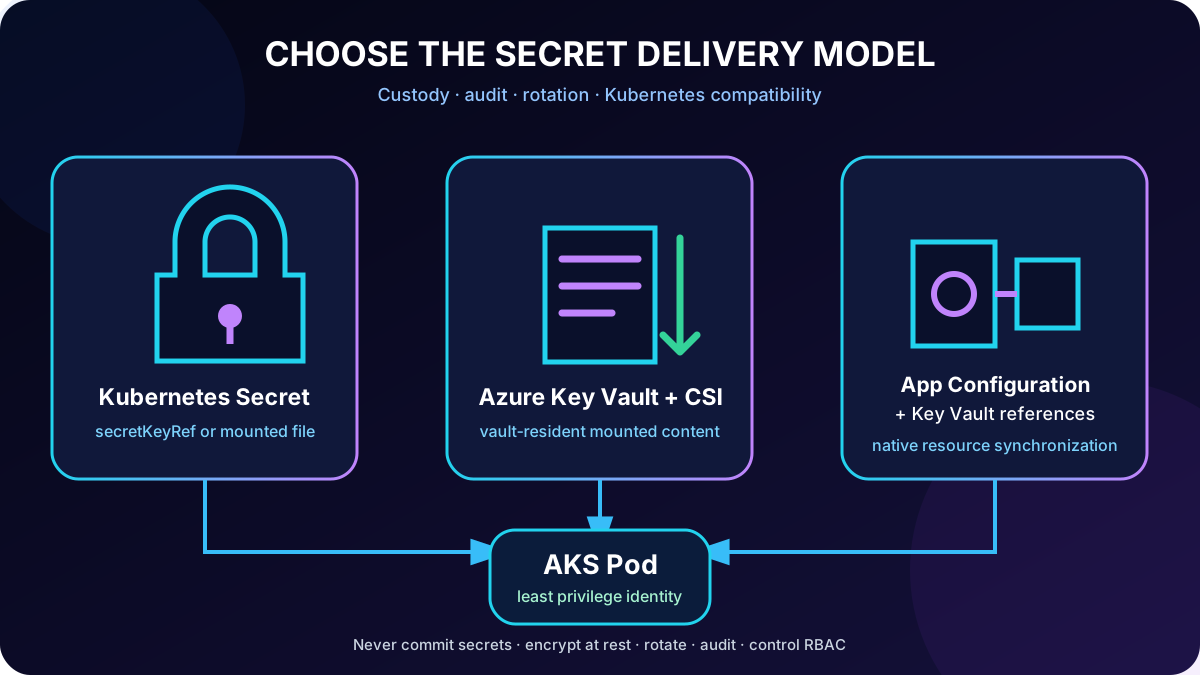
secretKeyRef injects a selected key when the Pod starts. The value is held in memory and is not written to disk by default. kubectl describe secret shows metadata and key names without printing the values; kubectl describe deployment confirms the reference. RBAC must restrict who and which service accounts can read or modify Secrets.
Topic summary
Choose the appropriate Secret type, reference values with secretKeyRef, validate names rather than printing data, and enforce least-privilege RBAC.
7. Rotation, encryption, and safe Secret operations
Base64 encoding is not encryption. Avoid literal Secret values in Git, shell history, logs, and diagnostics. Enable encryption at rest for Kubernetes data, limit namespace and API access, rotate credentials regularly, and trigger a Deployment rollout when environment-variable consumers need the new value.
Grant get, list, watch, create, update, or patch only where the workload or operator requires them.
Prefer managed identity and external secret stores for production credentials.
Audit access and rotation failures and rehearse emergency revocation.
Never use ConfigMap for a password merely because it is configuration.
Topic summary
Secure handling requires encryption, RBAC, rotation, rollout behavior, auditability, and disciplined avoidance of source control and log exposure.
8. Azure CSI or with references
The Azure provider for Secrets Store CSI Driver mounts secrets from directly into the Pod filesystem through a CSI volume. Secrets remain in the vault; managed identity or Workload ID grants access. Autorotation can refresh mounted content and an optional synchronized Kubernetes Secret. An application reading an environment variable still needs a Pod restart to receive a rotated synchronized value.
Direct integration is the stronger fit when secrets must remain exclusively in a dedicated vault and each access needs detailed audit, rotation, private networking, and compliance controls. The Kubernetes Provider can instead keep references centrally, resolve them, and generate native Kubernetes Secrets. Use this when central secret-to-application mapping and Kubernetes-native consumption matter.
Choose by custody, audit, rotation, and application consumption requirements - not by convenience alone.
Topic summary
Use direct CSI for vault-resident, audited secrets; use plus references for centrally managed mappings delivered as Kubernetes resources.
9. PersistentVolume, PersistentVolumeClaim, and StorageClass
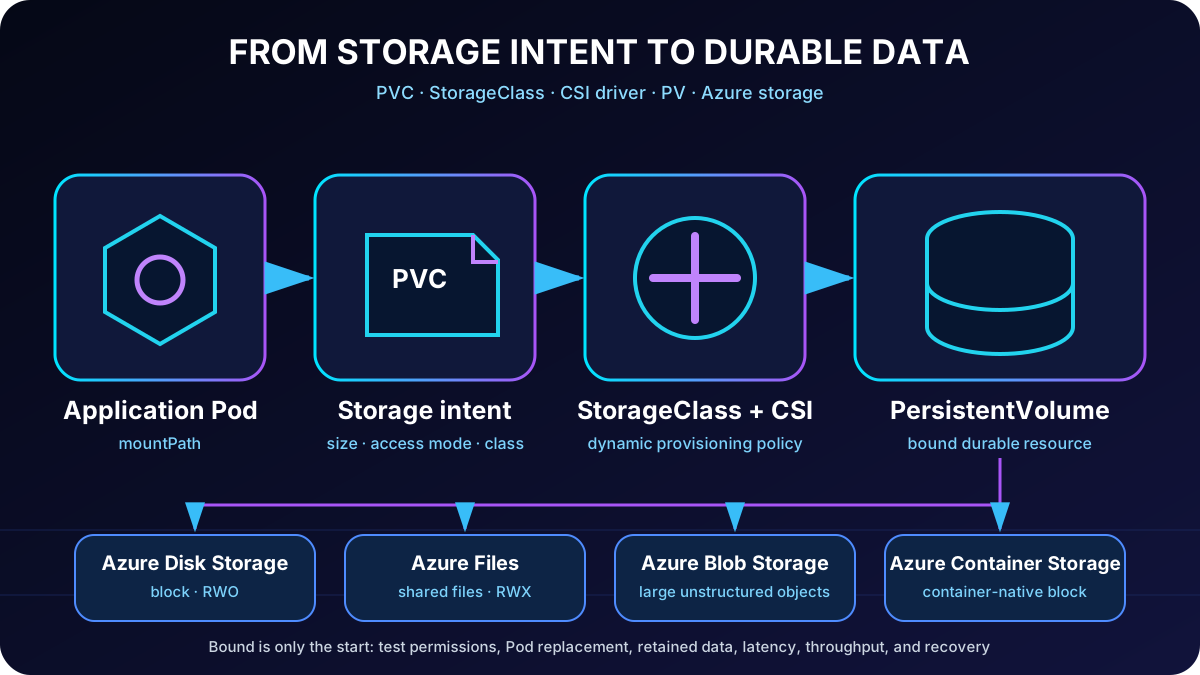
A container filesystem is ephemeral. A PersistentVolume (PV) represents durable cluster storage, a PersistentVolumeClaim (PVC) requests capacity and access behavior, and a StorageClass identifies the provisioning policy and backing technology. With dynamic provisioning, applying the PVC lets use the named class to create and bind suitable Azure storage; a manually authored PV is not normally required.
Right-size capacity but plan growth and supported expansion. A claim remains Pending when no class or volume can satisfy its size, access mode, topology, quota, or provisioning requirements. Binding does not prove application permission or sufficient performance.
The application requests intent; the StorageClass and CSI driver translate it into durable Azure storage.
Topic summary
PVC expresses application storage intent, StorageClass drives provisioning, and PV is the bound durable resource outside the Pod lifecycle.
10. Choose Azure Disk, , Azure Blob, or
CSI drivers expose Azure storage through standard Kubernetes patterns. Azure Disk provides block storage for one node and fits databases or single-node state. provides SMB or NFS shared file access across nodes and Pods. can be mounted for large unstructured datasets such as images, documents, logs, and media.
is a fully managed, container-native block-storage option for stateful workloads, with Kubernetes-native operations and fast attach/detach designs such as network block protocols. It can suit I/O-intensive or rapidly scaling stateful services. Validate the selected storage pool because local NVMe or local SSD configurations can be ephemeral even though other pools provide persistence.
decision matrix.
Option
Access shape
Typical AI use
Azure Disk
ReadWriteOnce; block storage
Single-node vector index, database, or cache requiring low latency.
ReadWriteMany; SMB/NFS file share
Shared models, uploads, logs, and content used by several Pods.
Object data mounted through CSI
Large image, document, media, or data-lake datasets.
Managed container-native block storage
Performance-sensitive stateful services and fast volume operations.
Topic summary
Match block, shared-file, object, or container-native storage to access concurrency, latency, data shape, durability, and cost.
11. Access modes and built-in CSI StorageClasses
ReadWriteOnce allows read-write mounting by one node, not necessarily one Pod; Pods on that node may share it if the application permits. ReadWriteMany supports concurrent mounts across nodes. Azure Disk classes therefore use ReadWriteOnce, while classes support ReadWriteMany.
Premium shared files for lower latency and higher throughput.
Topic summary
Choose RWO for node-scoped block storage and RWX for shared files, then select the Standard or Premium class from measured latency and throughput needs.
12. Mount and prove persistence across Pod replacement
The Pod spec declares a volume whose persistentVolumeClaim.claimName references the PVC. The container volumeMount gives it a mountPath. Confirm the image user can read and write that path; ownership, permissions, security context, protocol, and identity configuration can otherwise cause runtime failures.
Confirm the claim is Bound and the Pod is Running.
Write a recognizable file under /app/data.
Delete the Pod and wait for the Deployment to create another.
Read the file from the replacement Pod, then run a small I/O load test before production.
Topic summary
A Bound PVC becomes proven persistence only after a replacement Pod can remount it, read prior data, and meet the workload I/O target.
13. Guided lab: configure an API on
The approximately 30-minute exercise deploys and , builds and pushes a container image, configures non-sensitive settings with ConfigMaps, credentials with Secrets, and logs with a PVC, exposes the API through LoadBalancer, tests endpoints from a Python client, reads persisted logs, and removes resources.
Download the starter project and identify ConfigMap, Secret, PVC, Deployment, and Service placeholders.
Deploy Azure resources and publish the image to .
Update and apply YAML, then verify resource bindings and Pod configuration.
Call the API, inspect logs on the persistent volume, replace the Pod, and confirm the data remains.
Clean up all billable resources.
Prerequisites are an Azure subscription with deployment permission, , Python 3.12 or later, the latest Azure CLI, and kubectl. task runs may require pay-as-you-go or another paid plan because free credits may not cover them.
Topic summary
The lab proves configuration, secret delivery, public API access, and durable log storage in one end-to-end workflow.
14. Assessment review, production checklist, and references
Assessment decisions explained.
Scenario
Correct answer
Why
Password-bearing connection string
Kubernetes Secret
It is sensitive and must stay out of source control.
Feature flags and endpoints without rebuilding
ConfigMap plus configMapKeyRef
The values are non-sensitive and external to the image.
Apply a PVC with a valid StorageClass
dynamically provisions backing Azure storage
The class defines the CSI provisioning policy.
Expose Secret key as environment variable
valueFrom with secretKeyRef
It maps the selected sensitive key at Pod start.
Application expects JSON on disk
Mount ConfigMap as files through a volume
The file appears at the path the application reads.
Version configuration and document refresh/restart behavior.
Keep credentials in when custody and audit requirements demand it.
Validate RBAC, encryption, rotation, and managed identity.
Select storage by access mode, performance, durability, topology, and cost.
Test binding, permissions, replacement, data survival, and I/O before production.
Exam answers follow data sensitivity, application consumption mode, and storage intent; production adds identity, rotation, observability, performance, and recovery evidence.