Azure App Configuration for AI: Python, labels, feature flags, and Key Vault references
Externalize AI application settings, compose environment overrides, change behavior with feature flags, refresh consistently, and expose Azure Key Vault secrets through one configuration path.
Suggested study time: 120 minutes • Intermediate • Complete original rewrite with a concise version of every topic, assessment review, and guided Python lab
By João Ricardo Dutra••Complete original content
1. Scenario and learning objectives
An AI document pipeline uses for extraction, for documents, and for intake. Development, staging, and production differ in model endpoints, batch sizes, retry intervals, and connection details. When these values are split across JSON files, environment variables, and deployment scripts, one change can require a code commit, image rebuild, and redeployment—and a missed environment override can break a release.
Connect Python code to Azure with a managed identity.
Organize defaults and environment variants with keys, labels, selectors, and prefixes.
Control model or pipeline behavior with feature flags without redeployment.
Resolve Azure secrets through the same dictionary-like provider.
Classify every value by sensitivity, lifecycle, and access requirements.
Quick recap
The goal is a centralized configuration plane outside the codebase, with controlled runtime changes and a separate security boundary for credentials.
2. Why Azure fits AI workloads
Azure is a managed, cloud-hosted key-value store for application settings and feature flags. It separates operational choices from an application binary, so teams can tune batch sizes, retry counts, timeouts, model deployment names, and routing without rebuilding the container. Labels support environment variants; feature management controls activation; snapshots can preserve a point-in-time configuration; and references preserve a single loading path without moving secret values out of .
This separation helps meet zero-downtime configuration requirements and limits configuration drift. It does not make every change risk-free: operators still need validation, atomic publication patterns such as a sentinel, observability, and rollback.
Quick recap
centralizes nonsensitive runtime settings and feature state; safe operations still require validation, coordinated refresh, and rollback.
3. The setting data model
Properties of one setting
Property
Meaning and design use
Key
Case-sensitive Unicode identifier. Use : or / to create a readable hierarchy, such as DocPipeline:OpenAI:Endpoint.
Value
Unicode string containing text, JSON, or a reference. The combined key and value size cannot exceed 10 KB.
Label
Optional variant for an environment, region, or version. No label is the null label and commonly supplies the default.
Content type
Tells the provider how to interpret the value, such as application/json or a reference media type.
Tags
Optional metadata pairs used to filter and organize settings; they do not replace labels or access controls.
A valid JSON value with an application/json content type is deserialized into a Python object by the current provider. The store does not enforce a key hierarchy, so the naming convention is an architectural contract maintained by the team.
Quick recap
A setting is more than key and value: label, content type, and tags determine its variant, interpretation, and discoverability.
4. Install the Python provider and load settings
azure-appconfiguration-provider adds a high-level loader above the Azure SDK. load() returns AzureAppConfigurationProvider, which behaves like a Python mapping. azure-identity provides passwordless credentials, and featuremanagement evaluates feature flags. Loading a selected set once reduces network calls compared with fetching keys individually.
By default, load() retrieves every key-value with no label. The endpoint follows https://<store-name>.azconfig.io. Keep only the endpoint in ordinary configuration; do not embed a store connection string in source.
Quick recap
Install the provider and identity packages, connect to the store endpoint, and consume the result with normal dictionary operations.
5. Authenticate with and Azure RBAC
DefaultAzureCredential can use Azure CLI or credentials locally and a managed identity on , Azure Kubernetes Service, , or . authentication is recommended because the deployed application needs no stored connection string.
Least-privilege assignments
Caller
Role
Purpose
Runtime application
Data Reader
Read key-values, feature flags, and reference metadata.
Operator or controlled CI/CD
Data Owner
Create and modify settings; do not grant this to a read-only runtime.
Runtime resolving references
Secrets User on each referenced vault
Read the secret value behind a reference.
A connection string is a credential. If one is unavoidable, protect it in ; otherwise prefer an endpoint plus a managed identity and scope roles to the required store and vault.
Quick recap
Authentication identifies the workload; Azure RBAC gives the runtime read-only access to and, when needed, secret-read access to .
6. Select keys and trim application prefixes
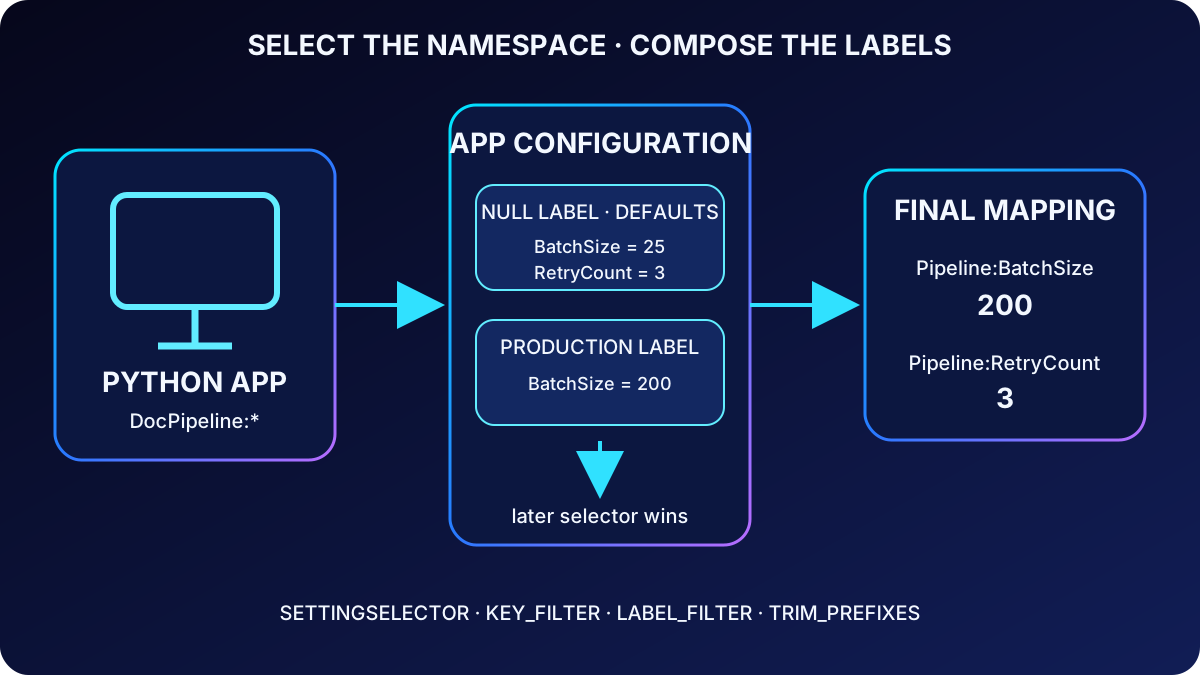
SettingSelector limits what the provider loads. key_filter accepts an exact key or a wildcard pattern such as DocPipeline:*, while label_filter chooses one variant. Filtering prevents unrelated applications in a shared store from consuming memory or colliding with the same short key names.
trim_prefixes removes a namespace after loading. A stored key DocPipeline:OpenAI:Endpoint can therefore become OpenAI:Endpoint in code. Keep a unique application prefix in the store, then trim it only at the application boundary.
Selectors control which namespace and label enter the process; later selectors override earlier values with the same trimmed key.
Quick recap
Filter at the store boundary and trim only the application namespace so shared stores remain organized while code stays readable.
7. Compose defaults and environment overrides with labels
The same key may carry Development, Staging, and Production labels. A null-labeled variant supplies the shared default. Load defaults first and the current environment second: when both selectors return the same key, the later value replaces the earlier one; keys without an override retain the default.
environment = os.getenv("APP_ENVIRONMENT", "Development")

config = load(
    endpoint=endpoint,
    credential=credential,
    selects=[
        SettingSelector(key_filter="DocPipeline:*", label_filter="\0"),
        SettingSelector(key_filter="DocPipeline:*", label_filter=environment),
    ],
    trim_prefixes=["DocPipeline:"],
)

# The environment-labeled value wins when both selectors return the same key.
batch_size = int(config["Pipeline:BatchSize"])
Selector order is therefore part of correctness. The application always reads Pipeline:BatchSize and does not need environment-specific variable names or branching. Labels can also distinguish regions or application versions, but avoid mixing too many independent dimensions into one ambiguous label scheme.
Quick recap
Null label first plus environment label second produces a complete configuration in which only intentional environment differences override defaults.
8. Design a self-documenting key namespace
Use one delimiter consistently and group by component: OpenAI:Endpoint, OpenAI:DeploymentName, OpenAI:MaxTokens, CosmosDB:DatabaseName, CosmosDB:ContainerName, Pipeline:BatchSize, Pipeline:RetryCount, and Pipeline:TimeoutSeconds. A service that needs only model settings can select OpenAI:* after its application prefix.
Prefer stable semantic names instead of embedding Prod or Dev in the key.
Use labels for environment differences and prefixes for application or component ownership.
Keep endpoint URLs, deployment names, dimensions, queue or container names, and routing rules as nonsensitive settings.
Treat tags as inventory metadata; use selectors and labels for runtime composition.
Quick recap
Consistent hierarchical names make the store browsable, support prefix selection, and keep environment identity out of application keys.
9. Refresh configuration consistently with a sentinel
Dynamic refresh is pull- and activity-driven, not a push into the process. Configure one or more WatchKey entries, then call config.refresh() from a request handler, worker loop, or scheduled callback. refresh_interval is the minimum time between checks; an earlier call returns without contacting the store.
from azure.appconfiguration.provider import WatchKey

config = load(
    endpoint=endpoint,
    credential=credential,
    selects=selects,
    refresh_on=[WatchKey("DocPipeline:Sentinel", label=environment)],
    refresh_interval=60,
)

# Call from an active request, worker loop, or scheduled callback.
# Before the interval elapses, this returns without contacting the store.
config.refresh()
The sentinel pattern lets an operator modify several values and update the sentinel last. When its ETag changes, the provider reloads the selected set so the application does not observe a partially published configuration. If refresh fails, the provider continues using its cached last-known configuration and can try again after the interval.
Quick recap
Publish settings first and the sentinel last; application activity calls refresh, which reloads the selected configuration only after the minimum interval.
10. Understand feature flags and their storage
A feature flag has a name, an enabled state, and optional filters or variants that decide when it applies. stores it under the reserved .appconfig.featureflag/ prefix with content type application/vnd.microsoft.appconfig.ff+json;charset=utf-8, but the provider and feature-management library hide that representation.
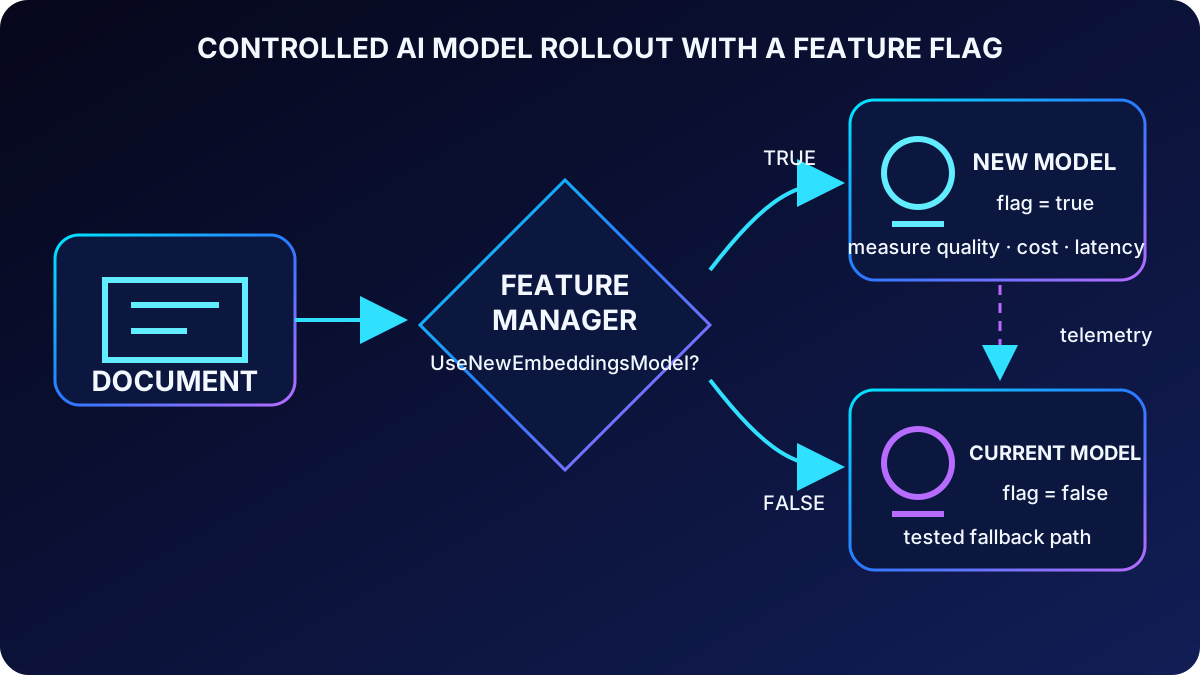
Flags separate feature lifecycle from deployment lifecycle. They can gate a new embeddings model, bypass a faulty classification stage, activate pipeline stages progressively, or route an experiment. A flag is operational control, not authorization: do not use it as a security boundary.
Quick recap
Feature flags let deployed code expose or suppress behavior at runtime, while authorization remains the responsibility of identity and access controls.
11. Evaluate and refresh flags with FeatureManager
With the current Python provider, enable loading with feature_flag_enabled=True and refreshing with feature_flag_refresh_enabled=True. This singular parameter name reflects the current Microsoft reference. FeatureManager receives the provider and is_enabled() evaluates the named flag whenever the application reaches the gated path.
from featuremanagement import FeatureManager

config = load(
    endpoint=endpoint,
    credential=credential,
    selects=selects,
    feature_flag_enabled=True,
    feature_flag_refresh_enabled=True,
    refresh_on=[WatchKey("DocPipeline:Sentinel", label=environment)],
    refresh_interval=30,
)

features = FeatureManager(config)
config.refresh()

if features.is_enabled("UseNewEmbeddingsModel"):
    process_with_new_model(document)
else:
    process_with_current_model(document)
Flag refresh and regular setting refresh are independent. A changed flag does not force ordinary settings to reload, and a changed setting does not force flags to reload; one call to config.refresh() advances whichever enabled cycle is due.
Quick recap
FeatureManager evaluates flags from the provider; enable flag loading and refresh explicitly, and remember that flags and ordinary settings maintain separate refresh cycles.
12. Apply controlled rollout patterns to AI systems
Runtime pattern
Pattern
AI use
Operational guardrail
Progressive model rollout
Gate traffic to a new embeddings or inference deployment.
Start with internal or limited traffic, compare quality and latency, then expand.
Kill switch
Skip a stage that produces invalid classifications or unsafe output.
Make the fallback path tested and observable before an incident.
A/B experiment
Route requests between current and experimental processing paths.
Record assignment, inputs, outputs, cost, and quality metrics.
Staged pipeline activation
Enable extraction, enrichment, indexing, and serving one stage at a time.
Verify each stage before activating the next and preserve rollback.
The same deployed artifact supports both paths; an operator changes exposure through configuration and observes the result.
Quick recap
Flags are most valuable when paired with a measured rollout, a tested fallback, and telemetry that proves whether the new path is safe.
13. Create and resolve references
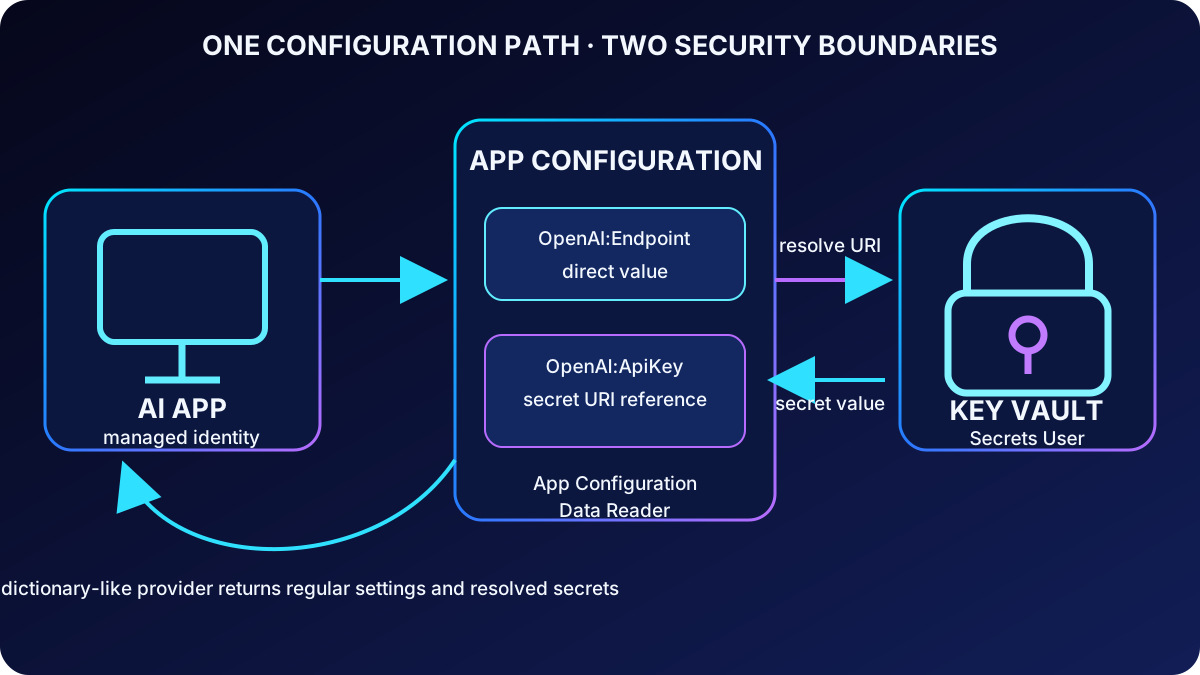
A reference is an key-value whose value contains a secret URI and whose content type is application/vnd.microsoft.appconfig.keyvaultref+json;charset=utf-8. stores the vault URI, secret name, optional version, and reference metadata—not an encrypted copy of the secret. The key can still have labels and participate in selectors and composition.
A versionless URI resolves the latest secret version and normally supports rotation without changing the reference. A versioned URI deliberately pins one version. The Python provider resolves references when keyvault_credential, vault-specific client configurations, or a secret resolver is supplied.
The application sees one mapping, while and retain separate role assignments and data responsibilities.
Quick recap
Store only the secret URI in , resolve it with an authorized identity, and omit the version when automatic adoption of rotated secrets is intended.
14. Authorize both services and refresh rotated secrets
The managed identity needs Data Reader on the store and Secrets User on every vault referenced. Access to only one service is insufficient. keyvault_client_configs can map different vault URIs to different credential configurations when one identity is not appropriate for all vaults.
secret_refresh_interval controls how often eligible config.refresh() calls re-resolve values, even when the reference URI itself is unchanged. This interval is independent of the ordinary refresh interval. Choose it from the credential rotation and tolerated-staleness window, and account for the aggregate request volume when many references or replicas exist.
Quick recap
Reference resolution is a two-service authorization path, and rotated secret freshness has its own interval and request-cost budget.
key or certificate, commonly accessed with the dedicated SDK
Encryption key, TLS certificate and private key.
Sensitivity is the primary test: if the value by itself grants resource access or enables an unauthorized operation, place it in . adds HSM-backed encryption, per-access diagnostic auditing, expiration, automated rotation, soft delete, and purge protection. uses store-level RBAC and is designed for values that govern behavior and benefit from labels, flags, snapshots, and higher configuration throughput.
Quick recap
Behavior belongs in ; access-granting values and cryptographic material belong in , connected by references where a unified path helps.
16. Complementary architecture and anti-patterns
Use as the application’s configuration entry point and as the secure backend for sensitive values. Operators can manage keys and references together; labels and selectors compose both; the application receives one mapping while the actual secret remains protected and audited in .
Do not store secrets directly in ; they lose -specific lifecycle, audit, and cryptographic protections.
Do not place every ordinary setting in ; labels, feature flags, snapshots, and configuration-oriented throughput are then lost.
Do not duplicate the same value independently in both services; copies drift. Keep one source of truth and a reference.
Do not hard-code configuration after adopting the services; that bypasses runtime updates and centralized governance.
Do not make aggressive refresh intervals without measuring request volume, throttling risk, and cost.
Quick recap
One entry point plus one secure secret source avoids duplicated values, mismatched controls, and needless redeployment.
17. Guided Flask exercise
The source exercise provisions an store and a with sample data, then completes a Python Flask starter that loads label-composed settings, resolves references, lists setting properties and metadata, and triggers sentinel-based refresh. Allow about 30 minutes and use an Azure subscription, , Python 3.12 or later, and the latest Azure CLI.
Download the project starter and create a Python virtual environment.
Create or deploy the store and with sample default and environment-labeled values plus one reference.
Grant the developer and application identities the required store and vault roles.
Complete the provider code: selectors, prefix trimming, DefaultAzureCredential, resolution, and refresh.
Run the Flask app, inspect values and metadata without printing credentials, and verify environment overrides.
Change multiple settings, update the sentinel last, trigger refresh, and confirm the application receives the new consistent set.
Rotate the referenced versionless secret, wait for or trigger the eligible secret refresh, and verify the value changes without modifying the reference.
Delete exercise resources and temporary role assignments when finished.
# Required environment
export AZURE_APPCONFIG_ENDPOINT="https://<store>.azconfig.io"
export APP_ENVIRONMENT="Development"

# Authenticate the developer identity locally.
az login

# Start the completed Python 3.12+ Flask starter.
python -m flask --app app run

# In another terminal, change one or more settings, then update Sentinel.
# Return to the app and trigger its refresh operation to observe the new set.
Quick recap
The lab proves the complete path: provision, authorize, load, compose, resolve, inspect, refresh, rotate, verify, and clean up.
18. Assessment review, checklist, and references
Assessment decisions
Question
Best answer
Why
Default and Production selectors return Pipeline:BatchSize
Production value
The later selector overrides the earlier value for the same key.
What is stored for a reference?
Secret URI plus reference metadata and content type
The secret value remains in .
Where does model deployment name gpt-4o belong?
Regular key-value
It controls behavior but does not grant access.
Which roles resolve a reference?
Data Reader plus Secrets User
The identity must read the reference and then the secret.
What makes sentinel refresh take effect?
The app calls refresh after the sentinel changes and the interval permits a check
Refresh is activity-driven, not pushed automatically.
Final design checklist
Use a stable hierarchy and labels instead of environment names in keys.
Load only the required application prefix and compose defaults before overrides.
Use , managed identity, and least-privilege store and vault roles.
Publish a configuration set before changing its sentinel.
Treat feature flags as operational controls with telemetry and fallbacks—not authorization.
Keep versionless references when automatic secret rotation adoption is desired.
Set ordinary, feature-flag, and secret refresh intervals from different freshness requirements.
Monitor refresh failures, stale configuration, flag exposure, resolution errors, throttling, and rollback readiness.
A complete design aligns data model, namespace, labels, flags, three refresh cycles, two-service RBAC, secret placement, operations, and rollback into one observable configuration system.