Deploy AI backends to Azure Container Apps: environments, YAML, secrets, registries, and verification
Build a repeatable deployment path for a containerized document-processing API, from the environment boundary and private image pull to revision-aware rollout, logs, and replica health.
Suggested study time: 70 minutes • Intermediate • Complete original rewrite with a concise version of every topic and a guided Azure CLI lab
By João Ricardo Dutra••Complete original content
1. Why an AI backend fits
Consider an API that receives documents, extracts text, calls an embeddings provider, and returns vectors for search. Its traffic is irregular, configuration differs by environment, credentials rotate, and a failed startup must be distinguishable from a model or network failure. runs this set of services on a serverless container platform while Azure operates the Kubernetes control plane and orchestration layer.
The deployment model combines built-in ingress, event-driven scaling, application-level secrets, managed identity, centralized logs, and immutable revisions. A team can test a new revision before moving production traffic instead of replacing the working version blindly.
Choose an environment boundary for networking, isolation, governance, and logs.
Deploy through the Azure CLI or a source-controlled YAML definition.
Keep runtime configuration and secrets outside the image.
Authenticate private image pulls and verify the result through app, revision, replica, and log state.
Topic summary
Container Apps provides a managed, revision-aware runtime for bursty containerized AI services without requiring the team to operate Kubernetes infrastructure.
2. Environment as the operational boundary
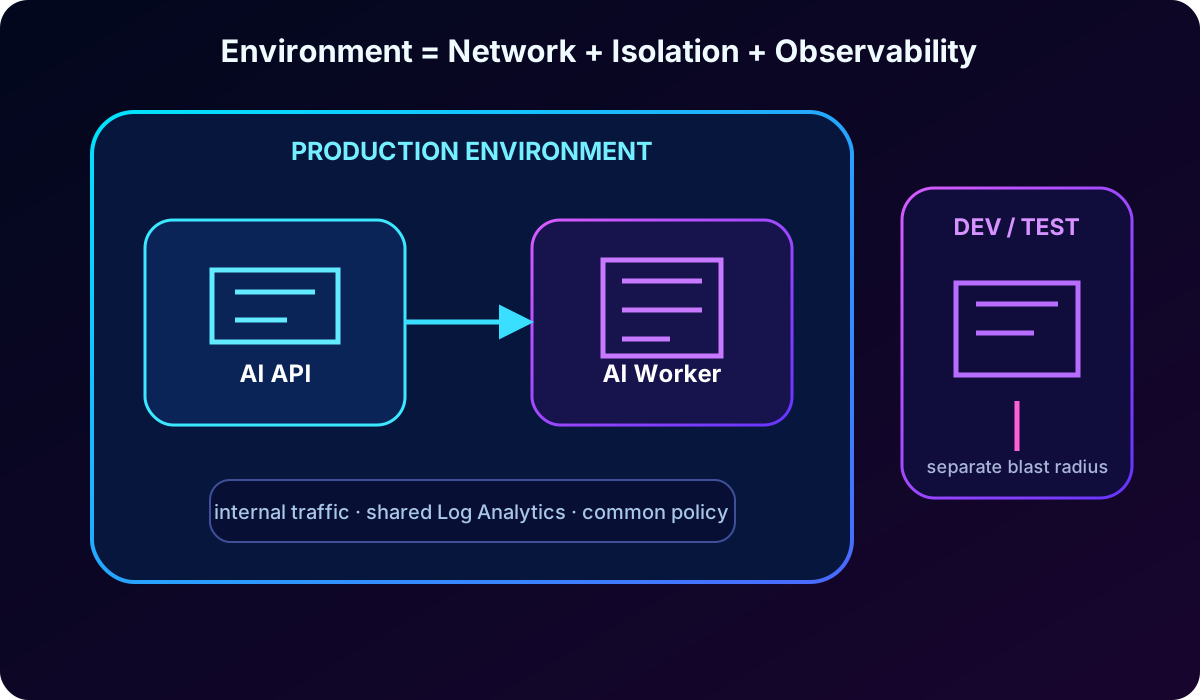
A Container Apps environment is a secure logical boundary around apps and jobs. Related API, worker, and event-processing components can share internal networking and a logging destination, while development, test, and production can use separate environments to limit the effect of changes. The environment is therefore an isolation and management decision, not merely a resource folder.
Environment design decisions.
Decision
Effect
Recommended use
Lifecycle boundary
Separates configuration and rollout risk.
Use distinct development, test, and production environments.
Network boundary
Controls private communication, virtual network integration, and reachability.
Group services that require the same private network path.
Observability boundary
Apps can publish console and system data to a common Log Analytics workspace.
Define destinations, retention, queries, and alerts before production.
Capacity model
Workload profiles environments support Consumption and Dedicated profiles; Consumption-only is legacy.
Prefer workload profiles for new designs unless a documented constraint says otherwise.
Use consistent names for groups, environments, and apps so scripts and incident tooling can discover them. More environments increase isolation but also multiply networking, policy, logging, and lifecycle work.
An environment groups apps that need the same network and observability boundary; lifecycle separation reduces blast radius.
Topic summary
The environment scopes shared networking and observability; split it by lifecycle and security boundary while balancing operational overhead.
3. Create, inspect, network, and observe an environment
Install or upgrade the Container Apps CLI extension and register Microsoft.App and Microsoft.OperationalInsights before provisioning. Creating the environment explicitly gives stable naming and lifecycle control when several apps will share it; az containerapp up can create supporting resources automatically for a faster prototype.
az login
az upgrade
az extension add --name containerapp --upgrade
az provider register --namespace Microsoft.App
az provider register --namespace Microsoft.OperationalInsights

az group create --name rg-ai200-aca --location centralus
az containerapp env create \
  --name aca-env-ai200 \
  --resource-group rg-ai200-aca \
  --location centralus

az containerapp env show \
  --name aca-env-ai200 \
  --resource-group rg-ai200-aca
App ingress can be external for a client-facing API or internal for a component reachable only inside the environment. This app-level choice must align with the environment accessibility and virtual network design. A custom virtual network is useful for private endpoints, network security groups, controlled outbound routing, , or , and its network type cannot simply be changed after environment creation.
integration centralizes stdout, stderr, scaling events, platform events, and optional Dapr output. Treat logging as part of environment design, because missing historical data cannot be reconstructed after an incident.
Topic summary
Prepare the CLI and providers, create the shared boundary deliberately, align ingress with network reachability, and establish centralized logs before accepting traffic.
4. Fast deployment and explicit deployment with the Azure CLI
az containerapp up is the shortest path from an image or local source to a running app and is useful for exploration. az containerapp create is more explicit: the team selects the existing environment, group, image, ingress type, and target port. Use a fully qualified, lower-case repository path to avoid image reference problems that can resemble authentication failures.
The returned fully qualified domain name is the first endpoint to probe. An internal app does not expose the same public path, so a failed external request can be correct behavior rather than an unhealthy container.
Topic summary
Use up for a rapid first deployment and create for a controlled deployment into known resources; make image, ingress, and target port unambiguous.
5. Revisions, YAML, and repeatable delivery
A revision is an immutable snapshot of revision-scoped settings. Changing the container image, environment variables, resources, or scale rules produces a new revision. Application-scoped settings—such as secrets, registry credentials, revision mode, and most ingress configuration—apply without creating one. This distinction explains why an update may or may not appear in the revision list.
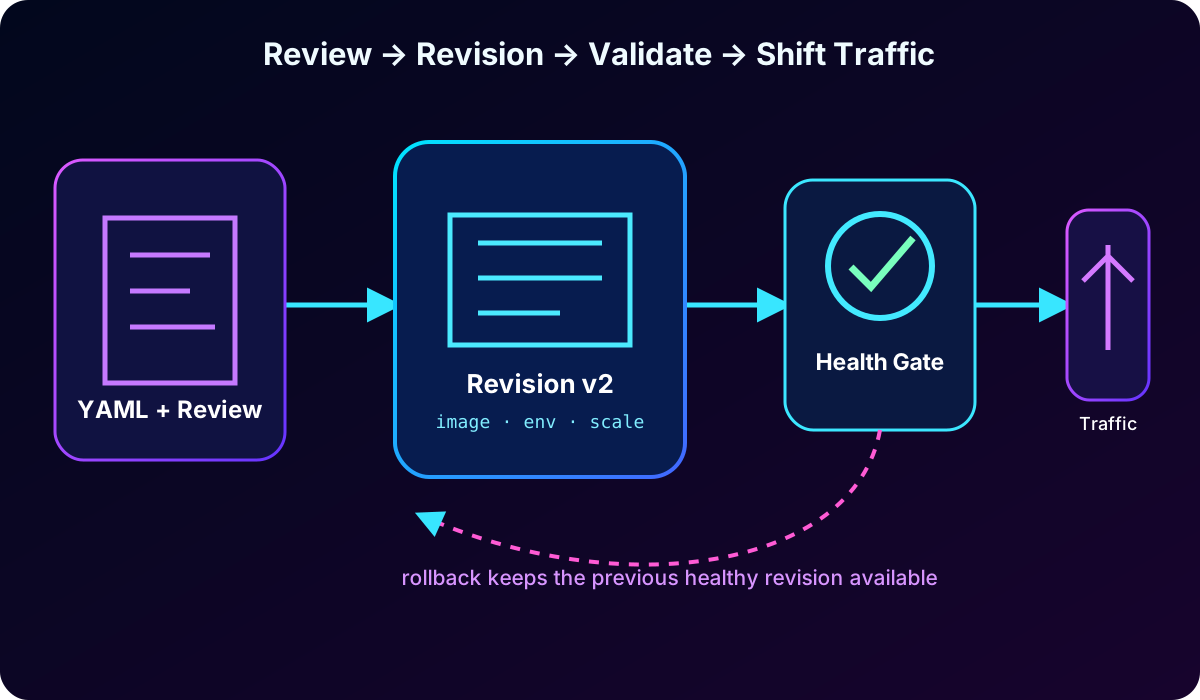
Single revision mode, the default, activates the healthy replacement and then moves traffic away from the previous revision. Multiple revision mode keeps several versions active and supports traffic splitting, blue-green validation, and controlled rollback. Validate the new revision before assigning all production traffic.
With --yaml, the file is authoritative for the properties it declares; avoid supplying competing property flags. Name, resource group, and environment still identify the target. Store nonsensitive declarations in source control and review them like code. Bicep, GitHub Actions, and the Azure portal are additional delivery options, but CLI and YAML remain valuable for understanding exactly which resource properties change.
Revision-aware delivery separates creation, validation, traffic movement, and rollback.
Topic summary
Use YAML to reduce drift and revisions to make configuration changes observable, testable, and reversible.
6. Environment variables for nonsensitive runtime configuration
Endpoints, log levels, feature flags, model choices, timeouts, and batch sizes belong in environment variables rather than the image. The same artifact can then run in every lifecycle environment. Set initial values with --env-vars and merge selected additions or changes with --set-env-vars; avoid duplicate names because the last occurrence wins.
Because environment variables live in the revision template, changing them normally creates a revision. This is useful for review and rollback, but a secret value should never be passed as a plain environment value or committed to YAML.
Topic summary
Keep portable images and inject only nonsensitive behavior through revision-scoped environment variables.
7. Application secrets and references
API keys, database passwords, and signing material belong in secrets. A secret is scoped to the container app rather than to one revision, and multiple revisions may reference it. Map the secret to an environment variable with secretref:<name> in the CLI or secretRef in YAML so frameworks can read configuration without revealing the value.
az containerapp update -n ai-document-api -g rg-ai200-aca \
  --set-env-vars LOG_LEVEL=debug FEATURE_EMBEDDINGS=true

az containerapp secret set -n ai-document-api -g rg-ai200-aca \
  --secrets embeddings-api-key="REPLACE_WITH_REAL_VALUE"

az containerapp update -n ai-document-api -g rg-ai200-aca \
  --set-env-vars EMBEDDINGS_API_KEY=secretref:embeddings-api-key
Adding, changing, or deleting a secret does not create a revision and does not automatically refresh an existing container that references a directly stored value. Create a revision or restart the current revision after a rotation. Remove all revision references before deleting an old secret.
For production, a reference makes the system of record. Enable a managed identity, grant the least-privilege Secrets User role, and reference the secret URI and identity. A versionless URI tracks the latest version and Container Apps periodically refreshes it; a versioned URI pins an exact value. Do not put the real value in source control, YAML, or shell history.
Topic summary
Store sensitive values at app scope, expose them through secret references, and use managed identity plus for auditable rotation.
8. Pull private images securely
A private registry reduces supply-chain exposure, restricts image access, and supports scanning and governance. Username and password work with broad registry types but create long-lived credentials. For , managed identity is the preferred production path because the app can authenticate through without storing a registry password.
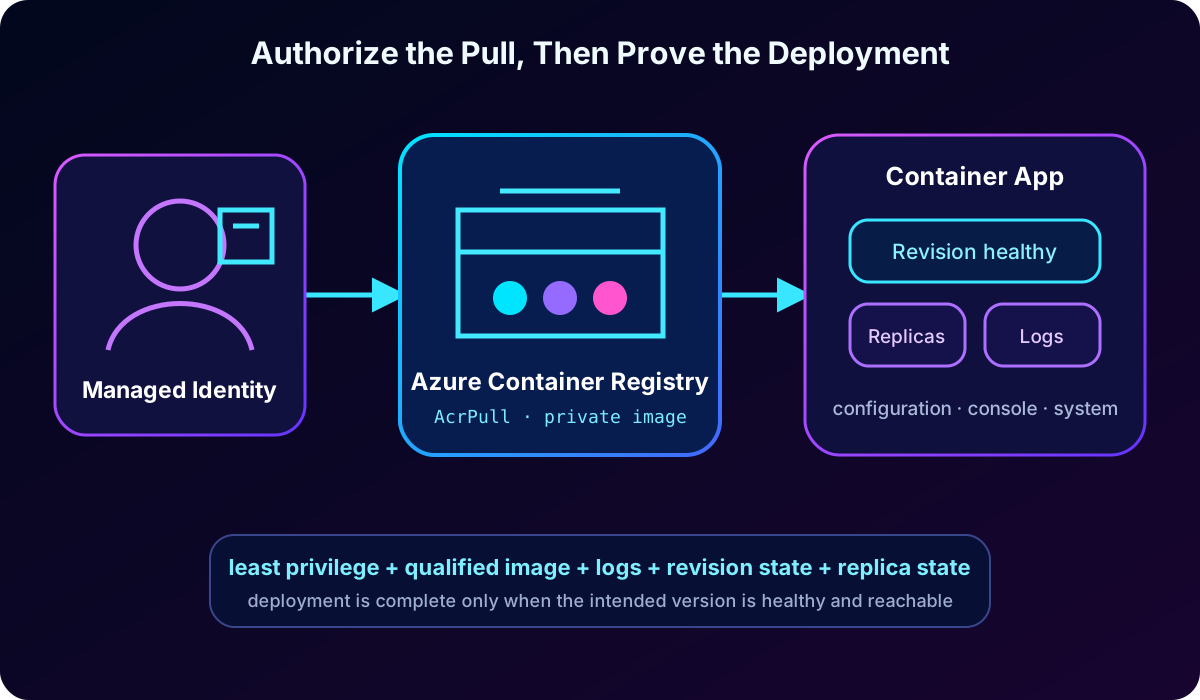
Grant the pull identity only AcrPull on a registry that uses the classic RBAC model, then associate that identity and the fully qualified registry hostname with the app. A user-assigned identity is convenient when authorization must exist before the first private image pull; a system-assigned identity follows the app lifecycle.
IDENTITY_ID=$(az identity show -g rg-ai200-aca -n id-ai200-pull --query id -o tsv)
PRINCIPAL_ID=$(az identity show -g rg-ai200-aca -n id-ai200-pull --query principalId -o tsv)
ACR_ID=$(az acr show -g rg-ai200-aca -n myregistry --query id -o tsv)

az role assignment create --assignee-object-id "$PRINCIPAL_ID" \
  --assignee-principal-type ServicePrincipal --scope "$ACR_ID" --role AcrPull

az containerapp identity assign -n ai-document-api -g rg-ai200-aca \
  --user-assigned "$IDENTITY_ID"

az containerapp registry set -n ai-document-api -g rg-ai200-aca \
  --server myregistry.azurecr.io --identity "$IDENTITY_ID"

az containerapp registry list -n ai-document-api -g rg-ai200-aca
Registry configuration is separate from application code and is application-scoped. Confirm it with registry list or registry show. During rollout, treat ImagePull failures as an authorization, hostname, DNS, or network-path problem until logs prove otherwise.
Private image delivery joins least-privilege authorization to post-deployment evidence.
Topic summary
Prefer managed identity and least-privilege pull access for ACR, use a qualified image name, and verify the registry association before diagnosing application code.
9. Start verification with configuration and logs
Verification compares deployment intent with the platform state. Inspect the app first to confirm provisioning state, latest revision, ingress type, target port, and FQDN. Then use console logs for application stdout and stderr, or system logs for platform events such as image pulls, revision provisioning, and scaling.
az containerapp show -n ai-document-api -g rg-ai200-aca \
  --query "{fqdn:properties.configuration.ingress.fqdn,latest:properties.latestRevisionName,state:properties.provisioningState}"

az containerapp logs show -n ai-document-api -g rg-ai200-aca --tail 30
az containerapp logs show -n ai-document-api -g rg-ai200-aca --follow --tail 30
az containerapp logs show -n ai-document-api -g rg-ai200-aca --type system

az containerapp revision list -n ai-document-api -g rg-ai200-aca --all -o table
az containerapp replica list -n ai-document-api -g rg-ai200-aca -o table
Recent logs provide quick feedback; --follow tails a running workload and --tail controls context. Typical AI API problems include a missing variable, wrong HTTP binding, failed downstream endpoint, invalid provider credential, application crash, or registry permission failure. Never emit keys, document contents, or personal data in diagnostic output.
Topic summary
Confirm configuration and reachability, then choose console or system logs according to whether the symptom comes from the container or platform.
10. Revisions, replicas, scaling, and safe rollout
The revision list proves that a versioned configuration was created, identifies active and inactive versions, and exposes health state. Include --all when a failed or deactivated revision is needed for diagnosis. A replica is a running instance of one revision; replica state reveals scale-to-zero, cold-start delay, crash loops, missing instances, and scale-out behavior.
Operational evidence and what it answers.
Evidence
Primary question
Typical response
App configuration
Is ingress and the selected revision what we intended?
Correct application-scoped settings or test from the right network.
Console logs
Did the process start and handle requests?
Fix binding, configuration, dependency, or application errors.
System logs
Could the platform pull and provision the image?
Fix registry authorization, DNS, network, capacity, or platform configuration.
Revision state
Did the update create and activate a healthy version?
Keep traffic on the previous revision or repair the new one.
Replica list
Are instances running and scaling?
Inspect scale rules, startup latency, or crash loops.
Automate repeatable checks with --query: verify provisioning, wait for a healthy revision, call a health endpoint, inspect logs, and only then shift traffic. Request-driven AI services should account for cold starts and downstream latency when setting minimum replicas and rollout gates.
Topic summary
Revisions describe versions; replicas describe running capacity. Use both, together with logs, before declaring a rollout successful.
11. Guided lab: deploy a containerized document API
Plan about 30 minutes. You need an Azure subscription with deployment and role-assignment permissions, a current Azure CLI, , and optionally Python 3.12 or later. ACR Tasks availability and free-credit eligibility can change, so confirm the current subscription and cost conditions before building in Azure.
Download or create a small API with /health and a test endpoint.
Create the resource group, , user-assigned identity, and Container Apps environment.
Build and push an explicit image version; grant the identity pull access.
Deploy with external ingress on the application port and identity-based registry authentication.
Set nonsensitive values, add an embeddings key as a secret, and reference it from an environment variable.
Call the FQDN and API endpoints, tail console output, and inspect system logs.
List revisions and replicas; deploy v2, validate it, and document rollback.
Delete only the lab resource group after confirming it contains no shared resources.
az containerapp update -n ai-document-api -g rg-ai200-aca \
  --image myregistry.azurecr.io/ai-document-api:v2

FQDN=$(az containerapp show -n ai-document-api -g rg-ai200-aca \
  --query properties.configuration.ingress.fqdn -o tsv)
curl -fsS "https://$FQDN/health"
az containerapp revision list -n ai-document-api -g rg-ai200-aca -o table
Topic summary
The lab joins infrastructure, private image authorization, external configuration, deployment, endpoint testing, logs, revision evidence, replicas, and cleanup.
12. Rewritten assessment with explanations
Check the decision, not memorized wording.
Scenario
Best answer
Why
Several apps need the same private network and log integration.
Place them in a Container Apps environment designed for that boundary.
Environment scope carries shared networking and observability.
Configuration must be source-controlled and reviewed.
Use create/update with --yaml and a reviewed YAML file.
The declaration becomes repeatable and drift is visible.
An embeddings API key must not appear in YAML.
Store a secret and map it with secretref/secretRef.
Only the secret name enters the revision definition.
A configuration update must be confirmed as a version.
Run az containerapp revision list.
The command shows the revision created for revision-scoped changes.
The new image does not start.
Begin with az containerapp logs show, including system logs when pull/provisioning is suspected.
Logs give the fastest evidence of application or platform failure.
Topic summary
Choose environment for shared boundaries, YAML for reviewed configuration, secrets for credentials, revisions for versions, and logs for immediate diagnosis.
13. Final review and Microsoft references
Environments establish secure networking and observability boundaries.
CLI and YAML support rapid and repeatable deployment.
Revision-scoped and application-scoped settings behave differently.
Environment variables hold nonsensitive behavior; app secrets and protect credentials.
Managed identity is the preferred ACR authentication mechanism.
App state, console/system logs, revisions, and replicas complete deployment verification.
A production-ready Container Apps deployment is declared, identity-based, externally configured, revision-aware, observable, and proven healthy before traffic moves.