Azure Container Registry for AI solutions: ACR Tasks, image tags, versioning, and lifecycle
Design a private container image supply chain for AI inference APIs and supporting services, build consistently in Azure, automate rebuilds, and deploy traceable, reproducible artifacts.
Suggested study time: 70 minutes • Intermediate • Complete original rewrite with a concise version of every topic and a guided Azure CLI lab
By João Ricardo Dutra••Complete original content
1. Why an AI solution needs a managed image registry
An AI service rarely consists of only a model file. A real solution can include an inference API, preprocessing workers, scheduled data jobs, and monitoring sidecars. If every developer builds those containers on a different workstation, dependencies drift, version history becomes unclear, and a rollback might not reproduce the image that previously worked.
(ACR) centralizes private artifacts and can move builds into Azure. The design target is a controlled path from source and Dockerfile to a traceable image, then to ,,, or another runtime. The chapter covers organization, cloud builds, automation, tagging, immutability, lifecycle maintenance, and Azure CLI operations.
Explain registries, repositories, artifacts, manifests, layers, tags, and digests.
Build and run images through ACR Tasks without a local Docker Engine.
Choose stable, semantic, unique, and digest-based references for the correct lifecycle stage.
Protect deployed images and clean obsolete content without breaking production.
Topic summary
A managed registry replaces workstation-dependent builds with a centralized and auditable container image supply chain for AI services.
2. capabilities and service tiers
ACR is a managed private registry compatible with Docker Registry and Open Container Initiative (OCI) formats. It stores container images, Helm charts, signatures, software bills of materials, and other OCI artifacts. Access stays under the organization’s Azure identity, role, network, and policy controls rather than depending on a public registry.
Capabilities that matter to AI workloads.
Capability
Architectural value
Private storage
Keeps inference, model-serving, preprocessing, and operational images inside the controlled Azure estate.
Azure integration
Provides a direct image source for ,,, and delivery pipelines.
Geo-replication
Synchronizes content to chosen regions and serves pulls through a global endpoint; it requires Premium.
OCI support
Stores images and related supply-chain artifacts in one registry.
Cloud execution
ACR Tasks builds, tests, runs, and maintains containers in Azure.
Basic is suitable for learning and lower-volume development. Standard raises included storage and throughput for many production workloads. Premium adds enterprise features such as geo-replication and private endpoints, along with higher limits. Select a tier from measured storage, pull/write rate, network isolation, and regional distribution needs rather than treating tiers as only a capacity choice.
The supplied module lists Docker Content Trust as a Premium capability. Current Microsoft guidance marks Docker Content Trust for retirement on March 31, 2028, and it cannot be newly enabled after May 31, 2026; new designs should follow Microsoft’s Notary Project transition guidance.
Topic summary
ACR combines private OCI storage, Azure deployment integration, optional regional distribution, and cloud task execution; Premium is required for advanced network and replication features.
3. Registry, repository, namespace, and artifact hierarchy
A registry is the top-level Azure resource. Its globally unique name becomes a login server such as contosoinference.azurecr.io. Authentication, role assignments, network rules, replication, and many lifecycle settings are governed at this level.
A repository groups artifacts with the same logical name and different tags. inference-api:v1.1.0 and inference-api:v1.2.0 belong to the inference-api repository. Forward slashes form namespaces such as production/inference-api, staging/inference-api, or ml-team/model-server. Namespaces make ownership and repository-scoped permissions easier to express.
An artifact is the actual stored image, chart, or OCI object. It includes content layers, configuration, and a manifest. One artifact can carry several tags, while every manifest has a content-derived digest.
The address narrows from the registry login server to a repository, then to a human-readable tag or an immutable manifest digest.
Topic summary
The registry controls the service, repositories and namespaces organize related content, and artifacts are the actual versioned objects stored beneath them.
4. Tags, layers, manifests, and SHA-256 digests
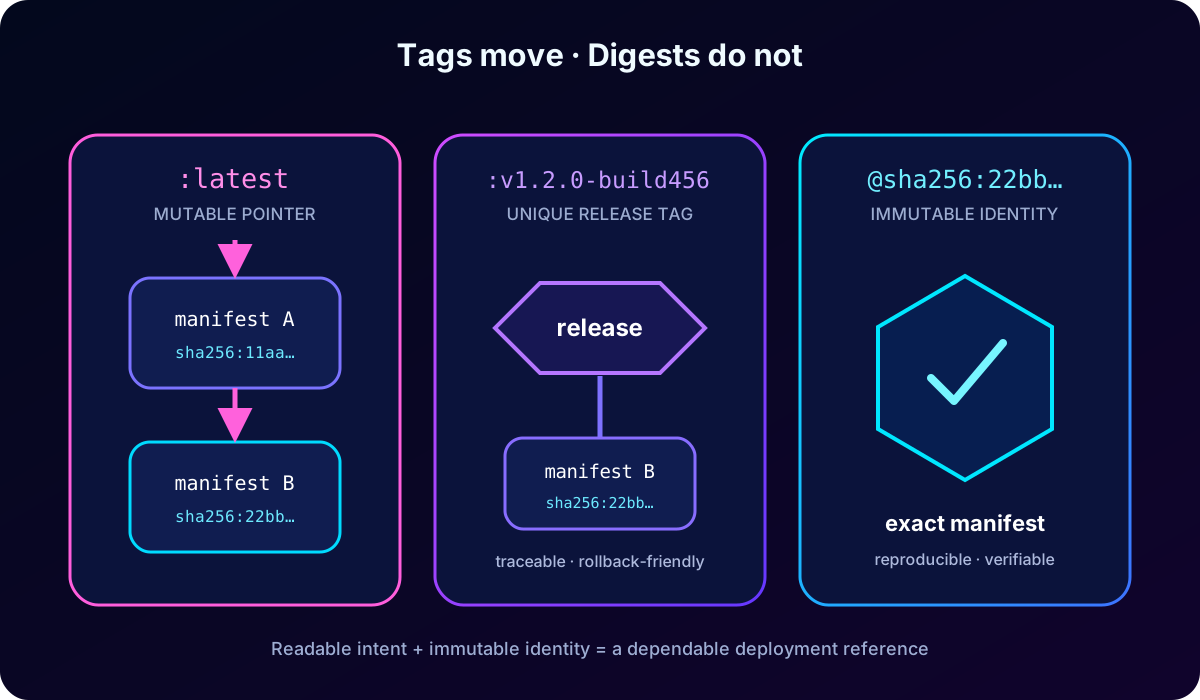
A tag is a readable pointer in repository:tag form. Docker uses latest when no tag is supplied. A single artifact can simultaneously be v1.2.0 and stable, but tags are mutable: pushing different content with an existing tag moves the pointer.
Images are built from content-addressable layers, usually created by Dockerfile instructions that change the filesystem. ACR deduplicates shared layers, so several AI images based on the same Python or machine-learning runtime do not need separate copies of identical content. Layer reuse also reduces the amount downloaded on later pulls.
The manifest lists the layers and image configuration. Its SHA-256 digest is derived from content and does not move. A digest such as sha256:0a2e… identifies one precise manifest, which makes it the strongest reference when every production node must run identical bytes.
Topic summary
Tags are convenient mutable pointers; layers hold reusable content; the manifest describes an artifact; and its SHA-256 digest is an immutable identity.
5. Addressing images and organizing repositories
Tag addressing is readable and useful when a consumer intentionally follows a moving version. Digest addressing is longer but reproducible. Production manifests can record both operational intent and exact identity by promoting an image with a unique tag and resolving or pinning its digest.
Use namespaces for teams, environments, products, or lifecycle boundaries.
Place the registry close to the runtime, and use Premium geo-replication for genuinely multi-region deployments.
Monitor storage, repository growth, pull latency, and throttling.
Apply Microsoft Entra-based, least-privilege repository access; do not use naming alone as a security boundary.
Keep images lean and arrange Dockerfile instructions to reuse cached layers.
Topic summary
Use tags for readable lifecycle intent, digests for exact reproducibility, namespaces for organization, and identity policies for actual authorization.
6. ACR Tasks: consistent cloud builds
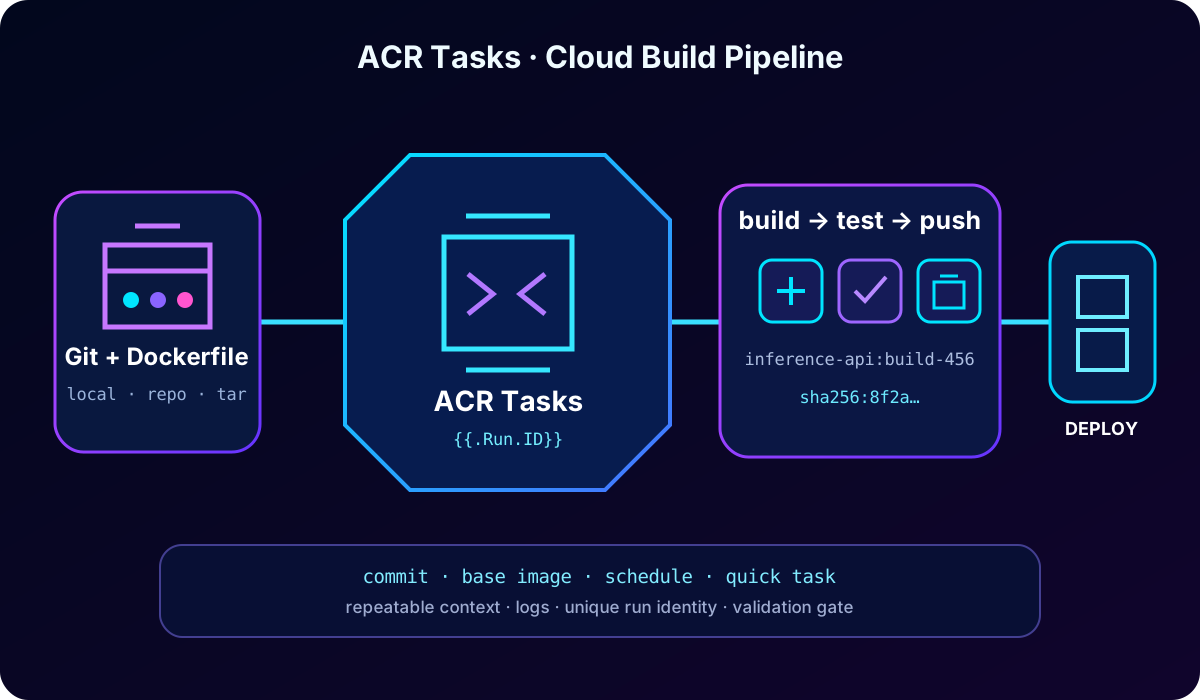
ACR Tasks moves container lifecycle work from developer machines to managed Azure execution. The same cloud environment can build Linux, Windows, AMD64, ARM, or ARM64 images, which reduces “works on my machine” differences and avoids requiring a local Docker installation.
Three ACR Tasks scenarios.
Scenario
Use
Quick task
Build and push an image on demand with az acr build.
Triggered task
React to a source commit or pull request, a base-image update, or a timer.
Multi-step task
Describe build, test, push, and command stages in YAML with dependencies, parallelism, and conditions.
Task runs produce logs. Interactive runs stream them to the terminal, while automatic runs store them for later inspection. ACR Tasks can participate in CI/CD, but identities, network reachability, source credentials, and logging exposure still require deliberate security design.
ACR Tasks turns source context into a built and tested artifact; unique run metadata makes the result traceable.
Topic summary
ACR Tasks provides repeatable cloud execution for on-demand builds, event-driven automation, and multi-step container workflows.
7. Quick tasks and build contexts
az acr build packages a context, sends it to ACR, runs the Dockerfile build in Azure, and pushes the successful result. A context can be a local directory, a GitHub or repository, or a remotely accessible tar archive. Use .dockerignore to omit secrets, build output, virtual environments, datasets, and other files that would slow or expose the upload.
az acr build --registry myregistry --image inference-api:v1.0.0 .

az acr build --registry myregistry \
  --image inference-api:v1.0.0 \
  https://github.com/myorg/inference-api.git
Quick tasks are a good fit for validating a Dockerfile, producing a one-off development image, testing a new dependency or base image, or serving as a simple build step in a wider pipeline. They are not a substitute for a release policy that records source, tests, approval, and deployment evidence.
Topic summary
A quick task is the shortest cloud path from a local, Git, or tar context to a pushed image; keep the context small and free of secrets.
8. Source, base-image, and scheduled triggers
A source trigger connects a persistent task to GitHub or and starts work on commits or pull-request activity. A webhook provides the event. Use a protected credential to access private source; never hardcode a personal access token in a repository, script, command URI, or diagnostic surface. Prefer a secure secret workflow such as and minimize token scope.
A base-image trigger tracks the image referenced by FROM. When a framework, operating system, CUDA, Python, or internal foundation image changes, dependent application images can rebuild automatically. ACR detects dependencies discovered during task builds; public upstream and private-registry behavior must be validated for the selected source and network design.
Timer triggers use cron expressions for nightly rebuilds, periodic patch uptake, tests, security maintenance, or cleanup. A timer provides cadence, not proof that the resulting image is safe to deploy, so tests and promotion gates remain necessary.
Triggers rebuild on source events, base-image changes, or schedules; credentials and resulting releases still need least privilege, testing, and promotion controls.
9. Multi-step workflows, run variables, and validation
A multi-step task uses YAML to coordinate build, push, and cmd steps. Steps can depend on prior success, run independently in parallel, or apply conditional logic. This makes it possible to build an image, execute unit or smoke tests in a container, and only then publish or promote the result.
Run variables such as {{.Run.ID}} and {{.Run.Date}} create traceable tags without reusing a pointer. az acr run can also execute a command in an existing image with /dev/null as the context, which is useful for startup checks, runtime inventory, framework verification, or health probes.
az acr run --registry myregistry \
  --cmd 'inference-api:v1.0.0 python --version' \
  /dev/null

az acr task logs --registry myregistry --name build-inference-api
Read task logs and retain them according to audit requirements.
Put slowly changing Dockerfile steps before rapidly changing application files to improve cache reuse.
Use run identities rather than embedded credentials.
Remember that command-line and URI values can be captured by diagnostics; do not place secrets there.
Topic summary
Multi-step YAML composes build, test, push, and command actions, while run variables and logs connect each artifact to one task execution.
10. Stable and unique tag strategies
Stable tags such as 1, 1.2, stable, or latest are deliberately reused. They fit serviced base images, development environments, or consumers that should follow updates. The cost is that two nodes pulling the same tag at different moments might receive different manifests.
A unique tag is never reused. Build IDs, full or short Git commit SHAs, UTC timestamps, and combined tags such as v1.2.0-build4567-abc123f provide different forms of traceability. A Git SHA alone does not distinguish a rebuild caused only by a changed base image, so production pipelines often combine source identity with a run or build identifier.
Tag selection by lifecycle.
Need
Recommended reference
Serviced base image
Stable major or minor tag, with automatic rebuild and validation.
Development convenience
Moving tag can be acceptable when change is expected.
Production rollout
Unique tag plus recorded digest.
Audit or rollback
Build/run metadata and immutable digest linked to source and tests.
Topic summary
Stable tags intentionally move; unique tags preserve deployment history. Production usually needs a unique tag and the corresponding digest.
11. Semantic versioning and the latest trap
Semantic versioning communicates compatibility with MAJOR.MINOR.PATCH. Increment MAJOR for breaking changes, MINOR for backward-compatible features, and PATCH for backward-compatible fixes or security changes. It can coexist with stable pointers: 1 follows the newest 1.x release, 1.1 follows the newest 1.1.x release, and 1.1.0 identifies one release line.
inference-api:1.0.0
inference-api:1.0.1
inference-api:1.1.0
inference-api:2.0.0

# Traceable production tag
inference-api:v1.2.0-build4567-abc123f
latest is only Docker’s default tag when none is provided; it is not evidence of recency, quality, approval, or compatibility. Avoid it in production manifests because it hides intent, permits silent change, and complicates incident reconstruction. Use an explicit unique tag or digest instead.
A tag can move between manifests; a digest remains bound to one manifest. A release policy should preserve both readable intent and immutable identity.
Topic summary
Semantic versions describe compatibility, unique build metadata supplies traceability, and latest should not be used as a production identity.
12. Locking production images
A deployed artifact should not disappear or be overwritten accidentally. ACR repository attributes can disable write operations for an image version or repository. This data-plane protection differs from an lock on the registry resource, which protects management operations but does not make repository content immutable.
# Lock one deployed tag
az acr repository update \
  --name myregistry \
  --image inference-api:v1.2.0 \
  --write-enabled false

# Restore update and delete operations when retiring it
az acr repository update \
  --name myregistry \
  --image inference-api:v1.2.0 \
  --write-enabled true --delete-enabled true
A complete lock strategy can separately control write, delete, and read attributes. Verify both the tag and its manifest attributes, because a tag reference and the underlying manifest are related but distinct objects. Unlock only through a controlled retirement process.
Topic summary
Use repository data attributes—not only a resource lock—to protect deployed images from overwrite or deletion, and manage unlocking as a release operation.
13. Untagged manifests, purge tasks, and retention
Repointing a stable tag can leave the former manifest without any tag. Its unique layers continue consuming storage. Deleting indiscriminately is dangerous because an untagged manifest might still be referenced by digest, so inventory running deployments and protect required manifests before cleanup.
# Preview filters before deleting in a real registry
az acr run --registry myregistry \
  --cmd "acr purge --filter 'inference-api:.*' --untagged --ago 30d --dry-run" \
  /dev/null

# A scheduled weekly purge can use the same filter after validation
acr purge runs as an ACR Task and can filter repositories, tags, age, and untagged manifests. A scheduled task makes maintenance repeatable. The Premium retention policy is a preview alternative for eligible untagged Docker manifests; current documentation says it applies only to manifests that become untagged after the policy is enabled and does not cover all OCI media types. Deletion is unrecoverable, so validate scope and locks first.
Topic summary
Untagged content still costs storage; use dry-run, deployment inventory, locks, scoped purge filters, or an eligible retention policy before permanent deletion.
14. Guided lab: build and manage an AI API image
The supplied exercise estimates about 30 minutes and expects an Azure subscription with deployment permission, , Python 3.12 or later, and the latest Azure CLI. ACR task runs are temporarily unavailable to Azure free-credit subscriptions, so use pay-as-you-go or another eligible paid subscription. Costs can be incurred; remove the lab resources afterward.
Download or create starter files containing an inference API, requirements, Dockerfile, and a small health or version test.
Sign in to Azure, select the intended subscription, and create a dedicated resource group.
Create a uniquely named Basic registry for the lab and capture its login server.
Run az acr build with a unique version tag; watch the cloud build and push logs.
List repositories, tags, and manifest metadata; record the digest produced by the build.
Use az acr run to execute a harmless validation command in the image.
Add a second unique tag or rebuild with task run metadata, then compare tags and digests.
Lock the promoted tag, verify that write is disabled, and document the rollback reference.
Delete the dedicated resource group after validation if it contains no shared resources.
RG=rg-ai200-acr-lab
LOCATION=eastus
ACR_NAME=<globally-unique-registry-name>

az group create --name $RG --location $LOCATION
az acr create --resource-group $RG --name $ACR_NAME --sku Basic
az acr build --registry $ACR_NAME --image inference-api:v1.0.0 .
az acr repository list --name $ACR_NAME --output table
az acr repository show-tags --name $ACR_NAME --repository inference-api --detail --output table
az acr manifest list-metadata --registry $ACR_NAME --name inference-api --output table
az acr run --registry $ACR_NAME --cmd 'inference-api:v1.0.0 python --version' /dev/null
Do not paste production tokens or secrets into commands, Docker build arguments, image layers, Git URLs, or task definitions. Use managed identities and secret stores in a real pipeline, and review task logs before considering the artifact deployable.
Topic summary
The lab creates a registry, performs a cloud build, verifies repository metadata and runtime behavior, records immutable identity, protects the release, and cleans up safely.
15. Rewritten knowledge check and answer rationale
Use the rationale to test the decision, not to memorize option order.
Question
Best answer
Why
How do you eliminate workstation-dependent build differences?
Use an ACR Tasks quick build or persistent task.
The build executes in a controlled Azure environment.
How do all production nodes pull exactly the same artifact after a tag moves?
Reference the manifest digest.
The SHA-256 digest is immutable; a tag is a pointer.
How should an application rebuild when its PyTorch foundation image changes?
Configure a base-image update trigger.
The task tracks the FROM dependency discovered during the build.
Which tag supports source traceability and rollback?
Use a unique tag containing commit and build/run identity.
It is not reused and links the artifact to source and pipeline evidence.
How do you stop an active production image from being overwritten?
Set the image’s write-enabled attribute to false.
Repository attributes protect the data object itself.
Topic summary
The core exam decisions are controlled cloud builds, digest pinning, base-image triggers, unique traceable tags, and repository-level image locking.
16. Final review and Microsoft references
Registry → repository/namespace → artifact is the organizational hierarchy.
Tags express human intent; manifests and digests establish exact identity.
ACR Tasks supports quick, triggered, scheduled, and multi-step execution.