Azure Functions for AI: hosting, scaling, triggers, bindings, security, and MCP
Design responsive serverless AI backends with the right hosting plan, independent event-driven scaling, local development, HTTP and messaging patterns, secure configuration, managed identities, and MCP tools.
Suggested study time: 130 minutes • Intermediate • Complete original rewrite with a concise version of every topic, assessment review, and guided MCP lab
By João Ricardo Dutra••Complete original content
1. Scenario and learning objectives
Imagine an intelligent document platform that receives an upload through an API, extracts text with an Azure AI service, classifies the content, and persists the result. Virtual machines sized for traffic peaks remain idle much of the day and still require patching and capacity management. replaces that fixed capacity with event-driven execution, automatic scaling, and billing tied to the selected plan.
Expose a low-latency HTTP ingestion endpoint.
Move long work to a queue-triggered processor.
Use bindings for data movement and SDK clients where no binding exists.
Protect configuration with ,, and managed identity.
Expose selected operations as MCP tools for agents.
A synchronous front door and an asynchronous worker can scale independently while the queue absorbs bursts.
Quick recap
The goal is a responsive, secure AI backend that pays for appropriate capacity and separates request acceptance from heavy processing.
2. Cold starts and why AI workloads magnify them
A cold start occurs when the platform allocates an instance, starts the Functions host and language worker, loads the application, and prepares dependencies before the first invocation. It can occur on any plan that scales to zero and is paid once per new instance—not on every request.
AI functions often import large SDKs, load model metadata, resolve configuration, obtain tokens, create network pools, or initialize inference libraries. Those steps make the first request slower than a lightweight handler. Initialize reusable clients at module scope, keep deployment packages lean, avoid unnecessary startup work, and measure startup separately from warm latency.
Quick recap
Cold start is per instance; dependency weight and initialization amplify it, while warm invocations reuse the prepared process.
3. Flex Consumption: the serverless default
Flex Consumption is the recommended Linux-based plan for new serverless function apps. It offers event-driven per-function scaling, virtual-network integration, configurable 512-MB, 2,048-MB, or 4,096-MB instances, and up to 1,000 on-demand instances. The 2,048-MB size is the general starting point; 4,096 MB provides more CPU and memory for heavier workloads, while 512 MB suits light processors.
Always-ready instances keep selected functions or scale groups warm. They reduce cold-start risk but create a baseline charge, so apply them to latency-sensitive endpoints rather than every background function. On-demand instances still expand beyond that floor.
Quick recap
Choose Flex Consumption for event-driven economics and per-function scale; add always-ready capacity only where first-request latency justifies it.
4. Premium and the remaining hosting choices
Hosting decision
Option
Best fit
Important trade-off
Flex Consumption
Bursty serverless APIs and independent triggers
Cold starts unless always-ready capacity is configured
Premium
Steady low latency, larger workers, VNet, or custom Linux images
At least one warm worker means baseline cost
Dedicated
Existing underused capacity or predictable load
You manage plan capacity and Always On
GPU, custom OS packages, or co-located container services
Container and replica design becomes part of operations
Legacy Linux Consumption
Existing workloads only
Retirement is scheduled after September 2028; migrate to Flex
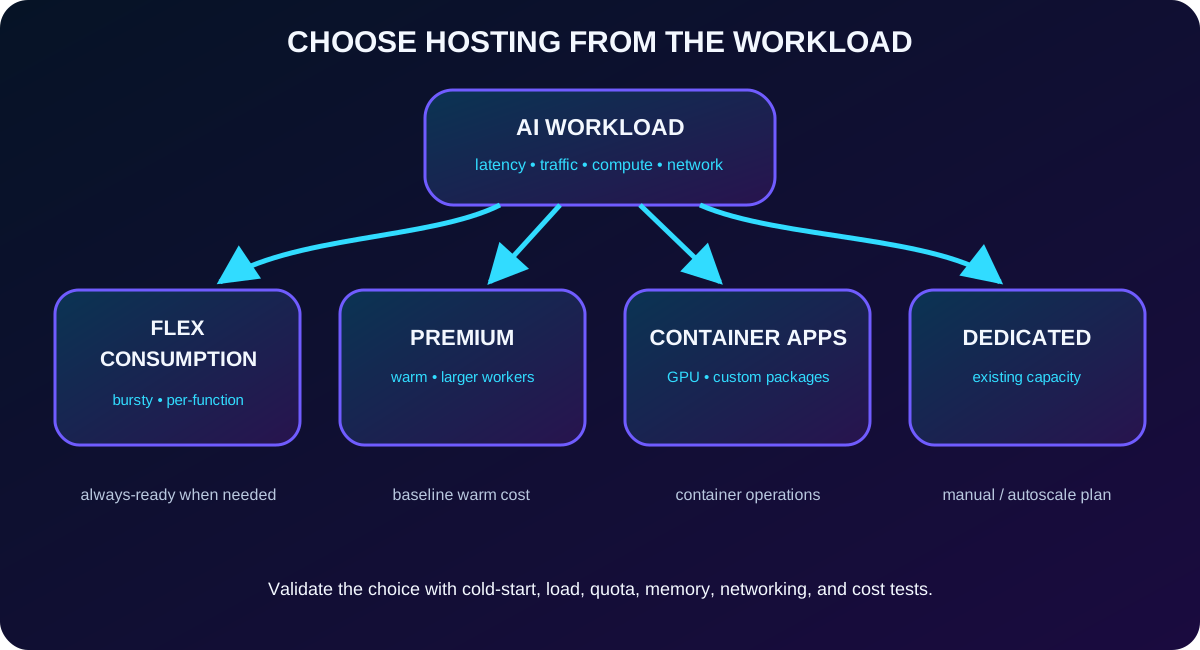
Select the plan from latency, workload shape, compute requirements, networking, and operational constraints—not from a single price number.
Quick recap
Premium trades a warm baseline for predictable startup and larger/custom workers; Dedicated and Container Apps serve specialized capacity or container requirements.
5. Per-function scaling, concurrency, and memory
In Flex Consumption, all HTTP triggers scale as one HTTP group, -based blob triggers form a blob group, and Durable Functions share a durable group. Most other triggers—such as , queues, and timers—scale independently. A document queue surge therefore does not have to consume the instances serving the HTTP front door.
Concurrency controls parallel executions per instance. Lower concurrency spreads expensive AI calls across more instances and gives each invocation more CPU and memory; higher concurrency reduces instance count but increases resource contention. Tune with load tests, downstream quotas, memory profiles, and end-to-end latency—not throughput alone.
Quick recap
Scale groups determine which functions share instances, while concurrency and instance memory decide how much work each instance accepts.
6. Long-running work and async request-reply
An HTTP-triggered function has about 230 seconds to return a response because of the Azure , regardless of a longer functionTimeout. Flex Consumption and Premium can run non-HTTP executions without a configured maximum, but scale-in and platform-update grace periods still apply.
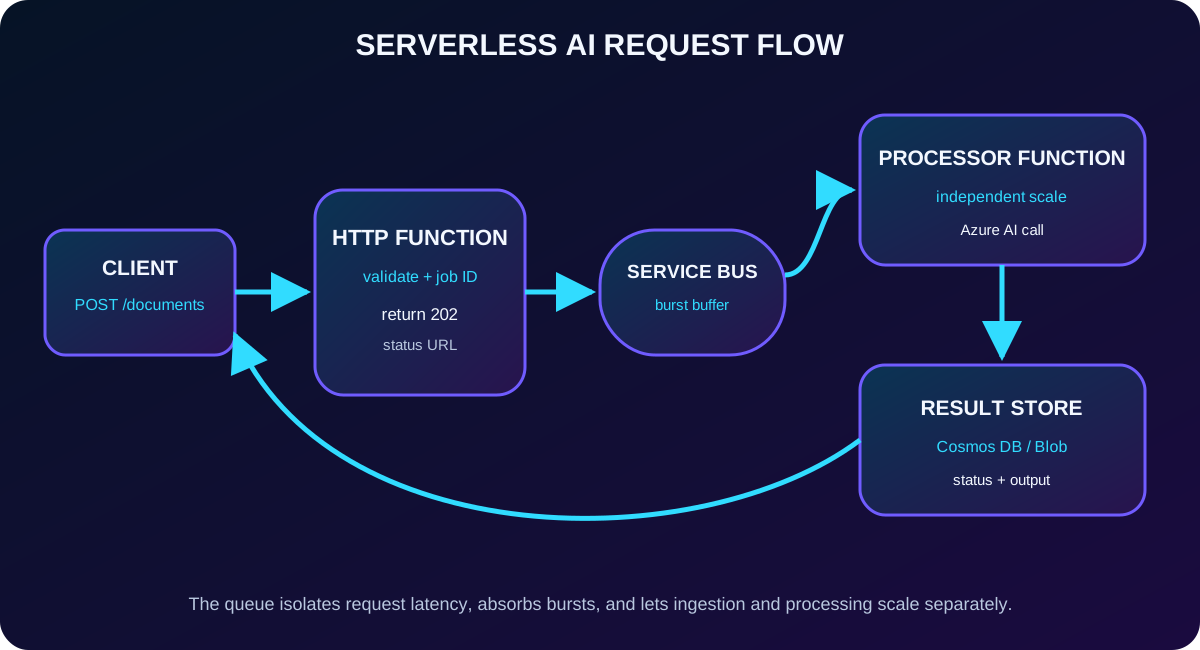
Validate the request and create a job identifier.
Write the work item to .
Return 202 Accepted with a status URL.
Process the message in a separate function.
Persist status and results for polling or notification.
A 202 response plus a queue decouples request latency from long AI processing and lets ingestion and workers scale separately.
7. Local tools and project creation
Core Tools v4 supplies the generally available local host and the func command. CLI v5 is currently preview. The extension for adds templates, F5 debugging, deployment, and settings synchronization. Start a project from the command palette or with func init, add a trigger with func new, and run it with func start.
Core Tools v4 or a supported Functions CLI workflow
plus the extension
A supported Python interpreter and isolated virtual environment
Azurite for local host storage
curl, an .http client, or another request tool
Quick recap
The local host executes the same trigger and binding model used in Azure, shortening the edit-test-debug loop before deployment.
8. Python v2 project structure
Files that matter
File
Purpose
function_app.py
Decorator-based entry point; register blueprints as the app grows
host.json
Global timeout, logging, extension bundle, and trigger concurrency
local.settings.json
Local app settings; never commit secrets
requirements.txt
Python dependencies installed locally and during deployment
.vscode/*
Shared debug, build task, and extension recommendations
.funcignore
Files omitted from the deployment package
Keep functions stateless, split large applications into blueprints, and commit the debug configuration but not local.settings.json. A smaller deployment package also reduces initialization work.
Quick recap
function_app.py and blueprints define behavior; host.json defines shared runtime behavior; local settings and dependency files define the environment.
9. AzureWebJobsStorage, Azurite, and local dependencies
AzureWebJobsStorage is not merely application storage. The host uses it for coordination, timer state, and function access keys. Missing or invalid configuration can leave non-HTTP triggers inactive. Locally, UseDevelopmentStorage=true points the host and supported bindings to Azurite implementations of Blob, Queue, and Table storage.
Use the emulator where appropriate, local PostgreSQL or Redis containers for compatible protocols, and isolated development values. Before release, test with real Azure services and never deploy UseDevelopmentStorage=true.
Quick recap
Azurite satisfies the local host-storage requirement; emulators speed development but do not replace final tests against managed services.
10. HTTP triggers and endpoint authorization
Every function has exactly one trigger. An HTTP trigger receives methods, headers, query parameters, and a request body, then returns an HttpResponse. Use anonymous only for intentionally public endpoints or health checks, function for a basic production barrier, and admin only for operations that genuinely require the master key.
Function keys are not caller identity. Put internet-facing APIs behind or Authentication when you need , OAuth 2.0 validation, quotas, transformations, or rate limits.
Quick recap
HTTP triggers create synchronous APIs; authorization levels select a key requirement but an identity-aware gateway provides real caller authentication.
11. triggers, locks, retries, and dead-lettering
A queue trigger receives work in PeekLock mode. Successful execution completes the message; failure abandons it for redelivery unless settlement is handled manually. maxConcurrentCalls controls parallel callbacks per instance, while maxAutoRenewDuration must cover the expected processing window so a long AI call does not lose its lock.
After maxDeliveryCount on the queue is exceeded, moves the poison message to its built-in dead-letter subqueue with diagnostic metadata. Monitor and reprocess it deliberately. For the most accurate target-based scale decisions, also grant the management read permission described by the binding documentation.
Quick recap
Set concurrency to match resource cost, renew locks long enough, and operate the dead-letter queue as part of the production workflow.
12. Input/output bindings and direct SDK clients
The trigger is also an input binding. Additional input bindings read data and output bindings write it without repetitive connection and serialization code. Blob suits processed files, suits structured results, and suits fan-out. Use SDK clients when the service has no suitable binding or when you need its complete API.
Create expensive credential and SDK client objects at module level so warm invocations reuse connection pools and token caches. Keep the handler focused on validation, orchestration, and business logic.
Quick recap
Bindings remove infrastructure boilerplate; SDK clients preserve full service control and should be initialized once per warm process.
13. Application settings and environment separation
Function app settings are encrypted at rest and injected as environment variables. Store endpoints, deployment names, thresholds, concurrency limits, and feature flags as focused key-value pairs. Python can use os.environ for required values and os.getenv for explicit defaults.
Keep development, staging, and production values separate. Manage production settings through infrastructure as code or controlled CLI workflows; fetching remote settings into local.settings.json can expose secrets and uploading local values can break production.
Quick recap
Code remains environment-neutral when configuration comes from environment variables and each stage owns its values.
14. references and secret rotation
A reference lets an app setting resolve a secret without changing application code. Grant the app identity the Secrets User role. A versionless reference follows the latest secret version within the platform cache window—currently up to 24 hours—while a versioned URI stays pinned. An app configuration change or explicit refresh can force re-resolution.
AI_SERVICE_KEY=@Microsoft.KeyVault(
  SecretUri=https://<vault>.vault.azure.net/secrets/AiServiceKey/)

from azure.appconfiguration.provider import load
from azure.identity import DefaultAzureCredential

credential = DefaultAzureCredential()
config = load(
    endpoint=os.environ["AZURE_APPCONFIG_ENDPOINT"],
    credential=credential,
    keyvault_credential=credential)
Quick recap
Keep secrets in , use versionless references for managed rotation, and grant only secret-read access to the function identity.
15. Azure and feature management
Azure centralizes non-secret values and feature flags shared by multiple function apps. Labels can select development, staging, or production configuration; the Python provider can refresh values and resolve references through DefaultAzureCredential.
Use for model routes, feature toggles, or thresholds; use for credentials. This layered design offers one configuration surface without turning a configuration store into a secret vault.
Quick recap
centralizes shared behavior and labels; remains the source of sensitive values.
16. Managed identity and least-privilege connections
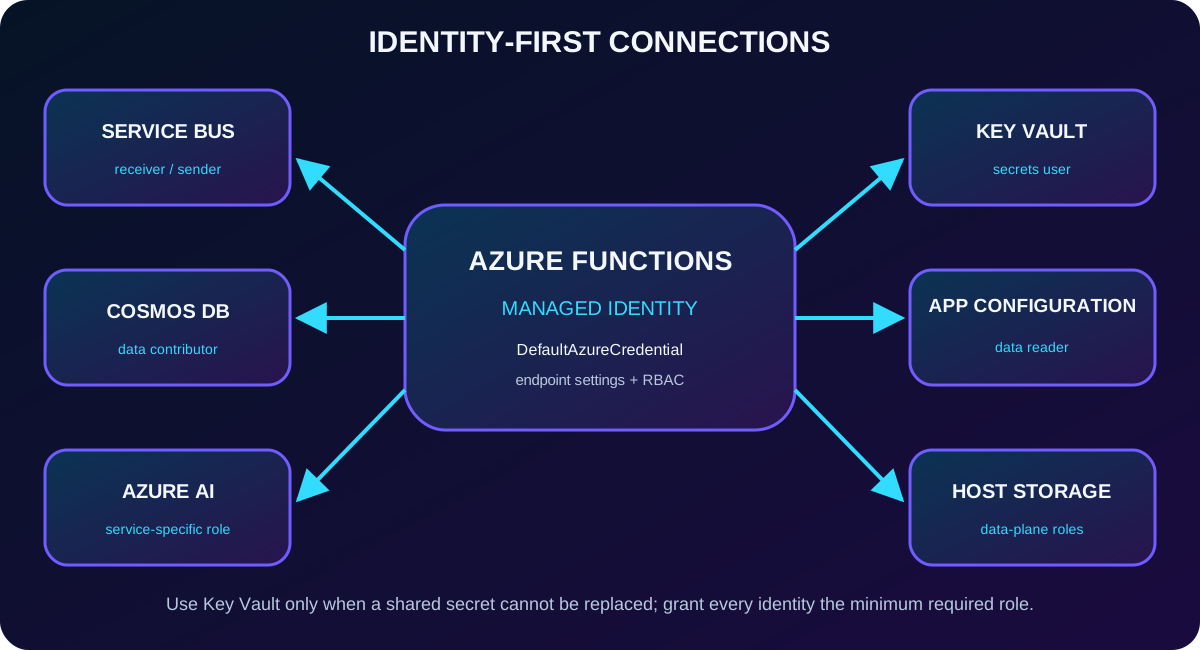
Identity-based connections replace connection strings with a named prefix and service endpoint. A system-assigned identity is the default; a user-assigned identity can be shared and prepared before deployment. The double-underscore settings form structured connection properties.
AzureWebJobsStorage__accountName=<storage-account>
ServiceBusConnection__fullyQualifiedNamespace=<namespace>.servicebus.windows.net
CosmosDBConnection__accountEndpoint=https://<account>.documents.azure.com:443/

# SDK client created once and reused on warm invocations
credential = DefaultAzureCredential()
client = DocumentIntelligenceClient(
    endpoint=os.environ["DOCUMENT_INTELLIGENCE_ENDPOINT"],
    credential=credential)
Representative minimum roles
Connection
Role
Host AzureWebJobsStorage
Blob Data Owner
Blob trigger using host storage
Also Queue Data Contributor and Account Contributor
trigger/output
Azure Data Receiver / Data Sender
output
Cosmos DB Built-in Data Contributor
reference
Secrets User
read/write
Search Index Data Reader / Search Index Data Contributor
Endpoints and role assignments replace embedded credentials; remains the fallback for unavoidable shared secrets.
Quick recap
Managed identity removes stored credentials; each target still needs a narrowly scoped data-plane role and correct connection-property suffix.
17. Access keys, API protection, and the MCP lab
Function keys apply to one function, host keys can invoke every HTTP function in an app, system keys belong to extensions, and the master key unlocks administrative endpoints. Treat all as secrets. adds policy and OAuth controls; Authentication can enforce Microsoft Entra sign-in.
The MCP extension can expose tool, resource, and prompt triggers. Current clients should prefer Streamable HTTP at /runtime/webhooks/mcp; SSE exists for compatibility. In Azure, the endpoint normally requires the mcp_extension system key. Python needs azure-functions 1.24.0 or later and local MCP work requires Core Tools 4.0.7030 or later.
The exam scenario joins hosting, scaling, local tooling, messaging, secure configuration, identity, and endpoint protection into one operational design.