Azure Key Vault for AI: objects, SDK access, rotation, and caching
Centralize secrets, keys, and certificates, authenticate without stored credentials, retrieve and version secrets with the Python SDK, rotate them without downtime, and cache values without losing operational freshness.
Suggested study time: 125 minutes • Intermediate • Complete original rewrite with a concise version of every topic, assessment review, and guided Python lab
By João Ricardo Dutra••Complete original content
1. Scenario and learning objectives
A retrieval-augmented generation pipeline creates embeddings with , reads vectors from , and writes processed documents to . Development, staging, and production need different credentials. Keeping connection strings and API keys in environment files checked into source exposes them to every repository reader, while changing a compromised value through a redeployment makes a four-hour, zero-downtime response target difficult.
Select the correct object for a secret, cryptographic key, or certificate.
Authenticate an application with and least-privilege Azure RBAC.
Retrieve metadata and values with synchronous or asynchronous Python SDK clients.
Use versions, rotation workflows, retries, and cache invalidation to change credentials safely.
Reduce traffic without extending the lifetime of a compromised credential.
Quick recap
The design replaces source-controlled credentials with a central audited store and makes rotation, application transition, and cache freshness part of the runtime architecture.
2. capabilities, tiers, and interfaces
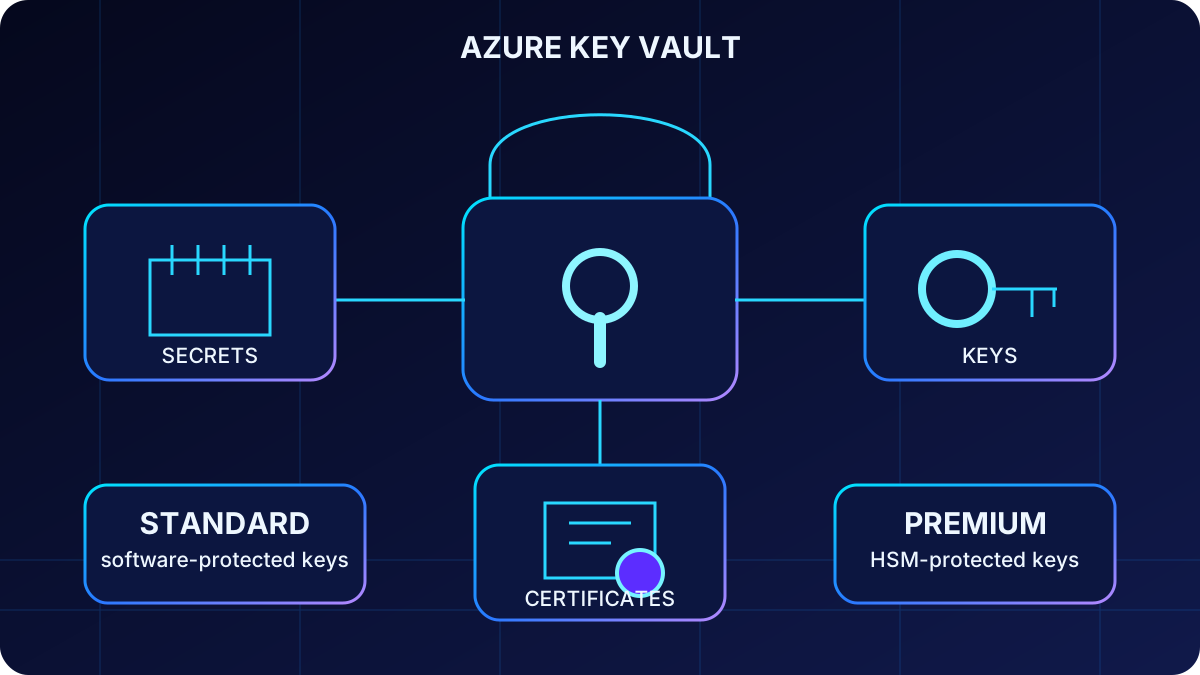
Azure stores three related object types—secrets, keys, and certificates—and encrypts its data at rest. authenticates callers, while Azure RBAC authorizes operations. Applications can use the REST API, Azure CLI, the Azure portal, or supported SDKs for Python, .NET, Java, JavaScript, and Go.
Protection choice
Vault option
Key protection
When to choose it
Standard
Software-protected RSA and elliptic-curve keys; FIPS 140-2 Level 1 software validation
Most application secrets and software-key workloads
Premium
Adds HSM-protected keys; new HSM key versions use the FIPS 140-3 Level 3 platform
Regulated workloads or policies that require HSM-backed key material
Managed HSM
A separate resource type that stores only HSM-backed keys
Dedicated high-scale or strict key-management scenarios; it is not a secret or certificate store
The object type selects the lifecycle and operations; the tier determines how cryptographic key material is protected.
Quick recap
Vaults hold secrets, keys, and certificates; Standard and Premium differ mainly in key protection, while Managed HSM is a separate keys-only service.
3. Secrets: opaque values plus useful metadata
A secret is an opaque string, up to 25 KB, for API keys, passwords, access tokens, connection strings, SSH private keys, or compact compound credentials. The service does not interpret the value. content_type, version properties, and tags help an application or operator understand ownership, environment, format, and rotation policy without exposing the value.
Do not turn into a general configuration or content database. Put endpoints, service names, feature flags, and other nonsensitive settings in , and put large payloads in Azure with suitable encryption. Tags are readable by principals that can list metadata, so a tag must never contain a credential.
Quick recap
Secrets are small sensitive strings; metadata describes them, but ordinary configuration and large customer content belong in other stores.
4. Keys: cryptographic operations without exporting material
Keys support encryption, decryption, signing, verification, and key wrapping. Server-side cryptographic operations let the private key remain inside the service boundary. Software-protected RSA keys support 2,048, 3,072, and 4,096 bits, while EC supports P-256, P-384, P-521, and secp256k1/P-256K. Premium also supports HSM variants; symmetric oct-HSM keys are currently a preview feature and should be treated with preview constraints.
Choose a key—not a secret—when another Azure service needs a customer-managed encryption key, when an application needs remote signing or wrap/unwrap operations, or when policy requires nonexportable key material.
Quick recap
A key exposes controlled cryptographic operations while its protected private material stays within the service boundary.
5. Certificates and the linked key and secret
A certificate manages an X.509 certificate and its private key. It can coordinate issuance, renewal, revocation, and certificate-authority integration for HTTPS or mutual TLS. Creating or importing a certificate also creates a corresponding key object and a secret representation, which is why permissions to read a certificate private key require careful role selection.
Use the certificate object for lifecycle-aware TLS credentials rather than storing a certificate bundle as an arbitrary secret. This preserves certificate policy, issuer, renewal, and version semantics.
Quick recap
Certificates add X.509 lifecycle management and create related key and secret objects; their private-key access must remain tightly scoped.
6. Vault boundaries, naming, and tags
A practical security boundary is one vault per application, region, and environment. Separate development, preproduction, and production vaults reduce blast radius and simplify role assignment. A compromised development identity should not discover production credentials.
Vault names are globally unique, 3–24 characters, begin with a letter, end with a letter or digit, allow alphanumerics and hyphens, and do not allow consecutive hyphens.
Use descriptive hyphenated object names such as cosmosdb-connection-string or openai-api-key.
A secret can have up to 15 tags; current limits are 512 characters for tag names and 256 for values.
Useful tags include environment, owner/team, application, rotation policy, and compliance classification—never the secret value.
Quick recap
Separate vaults establish security boundaries; consistent names and nonsensitive tags make large credential inventories searchable and operable.
7. Azure RBAC, control plane, and data plane
The control plane creates, configures, and deletes vault resources through . The data plane reads and changes secrets, keys, and certificates through the vault endpoint. Contributor manages the resource on the control plane but cannot read data-plane values.
Representative built-in roles
Role
Appropriate use
Secrets User
Read secret values, including the secret portion of a certificate with a private key; assign to runtime applications
Secrets Officer
Create, update, list, delete, recover, back up, restore, and purge secrets; assign to operators or controlled automation
Reader
Read vault and object metadata but not sensitive values or key material
Administrator
Perform all vault data-plane operations; cannot manage the vault resource or role assignments
Contributor
Manage the vault resource on the control plane only; no secret, key, or certificate data access
Use Azure RBAC instead of legacy access policies, scope roles at the vault where possible, use Privileged Identity Management for just-in-time administration, and avoid broad subscription-level grants. Current API versions make Azure RBAC the default model for newly created vaults.
Quick recap
Authentication proves identity; a narrowly scoped data-plane role authorizes the exact object operations, and control-plane Contributor does not read secrets.
8. Managed identity and the current credential chain
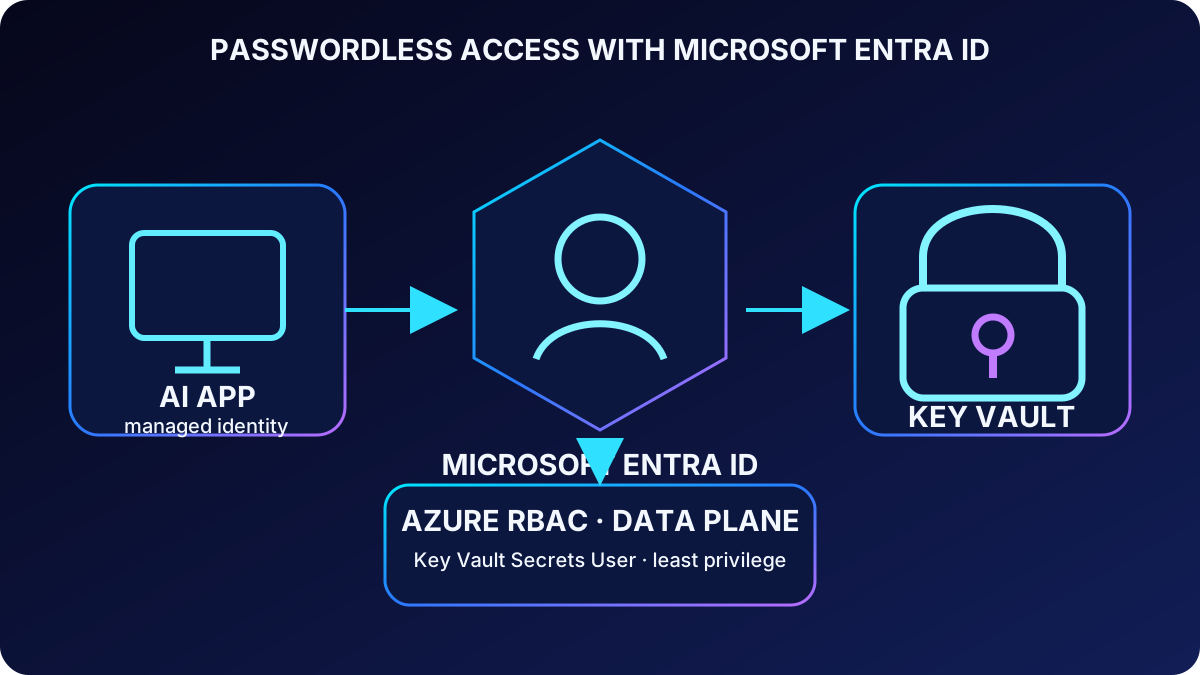
A managed identity lets ,,, Functions, or another Azure compute resource authenticate without a client secret in code or configuration. Assign that identity Secrets User when it only needs runtime reads.
DefaultAzureCredential helps the same code work locally and in Azure. The current Python chain can try Environment, Workload Identity, Managed Identity, Shared Token Cache, , Azure CLI, Azure PowerShell, Azure Developer CLI, an optional interactive browser, and broker authentication. The exact chain changes with library versions. For a production service, Microsoft recommends understanding the requirement and considering the specific ManagedIdentityCredential to reduce ambiguity and startup overhead.
Identity answers who the caller is; Azure RBAC answers what it may do on the selected vault.
Quick recap
Managed identity removes stored application credentials; DefaultAzureCredential bridges environments, but production chains should be explicit and observable.
9. Soft delete, purge protection, and recovery gaps
Soft delete is enabled by default and cannot be disabled after it is enabled. Deleted vaults and objects remain recoverable for a retention interval chosen at vault creation: 7–90 days, with 90 days as the default. That interval cannot be changed later.
Purge protection is an optional but strongly recommended production safeguard. Once enabled, even a privileged caller cannot permanently purge a soft-deleted vault or object before retention expires. Recovering a vault does not recreate its Azure RBAC assignments or subscriptions; recovery runbooks must restore those external relationships.
Quick recap
Soft delete creates a recovery window, purge protection enforces it, and a recovered vault still needs its roles and event subscriptions rebuilt.
10. Install the Python SDK and create SecretClient
azure-keyvault-secrets supplies SecretClient for secret lifecycle operations, while azure-identity supplies TokenCredential implementations. The vault URL follows https://<vault-name>.vault.azure.net/. Create the credential and client once, then reuse them so token and HTTP connection caches remain effective.
pip install azure-identity azure-keyvault-secrets

az keyvault show --name <vault-name> --query properties.vaultUri

from azure.identity import DefaultAzureCredential
from azure.keyvault.secrets import SecretClient

credential = DefaultAzureCredential()
client = SecretClient(
    vault_url="https://<vault-name>.vault.azure.net/",
    credential=credential,
)

client.set_secret(
    "openai-api-key",
    "<secret-value>",
    content_type="text/plain",
    tags={"environment": "production", "owner": "ai-platform"},
)
Quick recap
Install the identity and secrets packages, build one reusable SecretClient from the vault URL and a passwordless credential, and never log the value being stored.
11. Retrieve values, metadata, and inventories safely
get_secret(name) returns the latest enabled version when no version is supplied. The KeyVaultSecret contains value plus properties such as version, creation and expiration time, enabled state, content type, and tags. Log only the secret name and version—not its value.
list_properties_of_secrets() enumerates metadata without retrieving values. It is useful for startup validation, inventory, and checking that every required name exists before the service accepts traffic.
from azure.core.exceptions import (
    HttpResponseError, ResourceNotFoundError, ServiceRequestError
)

def read_secret(client: SecretClient, name: str) -> str:
    try:
        secret = client.get_secret(name)  # latest enabled version
        print(f"Loaded {name}, version={secret.properties.version}")
        return secret.value
    except ResourceNotFoundError as exc:
        raise RuntimeError(f"Missing secret: {name}") from exc
    except HttpResponseError as exc:
        raise RuntimeError(f"Key Vault rejected {name}: {exc.status_code}") from exc
    except ServiceRequestError as exc:
        raise RuntimeError("Network path to Key Vault failed") from exc

for props in client.list_properties_of_secrets():
    print(props.name, props.enabled, props.content_type, props.tags)
Quick recap
get_secret reads one value and its properties; metadata listing supports discovery and validation without disclosing secret contents.
12. Exceptions, async access, and client lifetime
ResourceNotFoundError usually means a wrong vault or secret name and needs a configuration fix. HttpResponseError covers authentication, authorization, throttling, and other service responses. ServiceRequestError indicates transport problems such as DNS, timeout, or connectivity and may be transient. Classify these cases before retrying so permanent configuration faults do not become retry storms.
The aio client avoids blocking the event loop in FastAPI, aiohttp, or another concurrent service. Both client and credential are asynchronous context managers. In a web app, create them during startup, reuse them across requests, and close them during shutdown.
from azure.identity.aio import DefaultAzureCredential
from azure.keyvault.secrets.aio import SecretClient

async def load_runtime_secret() -> str:
    async with DefaultAzureCredential() as credential:
        async with SecretClient(
            vault_url="https://<vault-name>.vault.azure.net/",
            credential=credential,
        ) as client:
            secret = await client.get_secret("openai-api-key")
            return secret.value

# In a web service, create and reuse one client during app startup,
# then close the client and credential during app shutdown.
Quick recap
Differentiate missing configuration, service rejection, and transport failure; high-throughput async applications should reuse one async client and close it cleanly.
13. Secret versions, expiration, audit, and rollback
Every set_secret call with an existing name creates a new immutable version identifier rather than overwriting the prior value. A versionless read returns the latest enabled version; a versioned read retrieves that exact historical value. Listing version properties exposes creation, expiration, and enabled state for rotation audits and rollback decisions.
expires_on is a lifecycle signal, not a hard access-control boundary: an expired secret can still be retrieved. Combine expiration with monitoring and rotation automation, and disable an old version only after all application instances have moved to the new value.
from datetime import datetime, timedelta, timezone

created = client.set_secret(
    "cosmosdb-connection-string",
    "<new-value>",
    expires_on=datetime.now(timezone.utc) + timedelta(days=90),
    tags={"rotation-policy": "90-days", "service": "cosmos-db"},
)

latest = client.get_secret("cosmosdb-connection-string")
exact = client.get_secret("cosmosdb-connection-string", created.properties.version)

for version in client.list_properties_of_secret_versions("cosmosdb-connection-string"):
    print(version.version, version.created_on, version.expires_on, version.enabled)

# Disable the previous version only after every instance has moved.
client.update_secret_properties(
    "cosmosdb-connection-string", "<old-version>", enabled=False
)
Quick recap
Versions let old and new credentials coexist; expiration triggers operations, while explicit disablement ends use only after a safe rollout or rollback window.
14. Manual, , and dual-credential rotation
Rotation strategy
Strategy
Flow
Best fit
Manual or CI/CD
Create the target credential, store a new secret version, then signal or restart the app
Infrequent third-party credentials with a controlled maintenance process
Event-driven
SecretNearExpiry is emitted 30 days before expiry; a Function or Logic App creates the target credential and stores a new version
Repeatable credentials whose target system exposes a rotation API
Dual credential
Create/regenerate the secondary key, publish it, wait for all instances, then regenerate the old primary
Services such as Azure or that support two active keys
Create the credential in the target service first.
Write it as a new version in .
Invalidate caches or notify application instances.
Confirm every instance uses the new value.
Disable or regenerate the old credential and record evidence.
SecretNewVersionCreated, SecretNearExpiry, and SecretExpired are current Azure event types. Expiry and notification do not rotate a third-party credential by themselves; the handler must update the target service and in a coordinated order.
Quick recap
Choose manual, event-driven, or dual-key rotation from the target service capability; a version is only one step in the end-to-end credential change.
15. Zero-downtime transition and retry-on-auth-failure
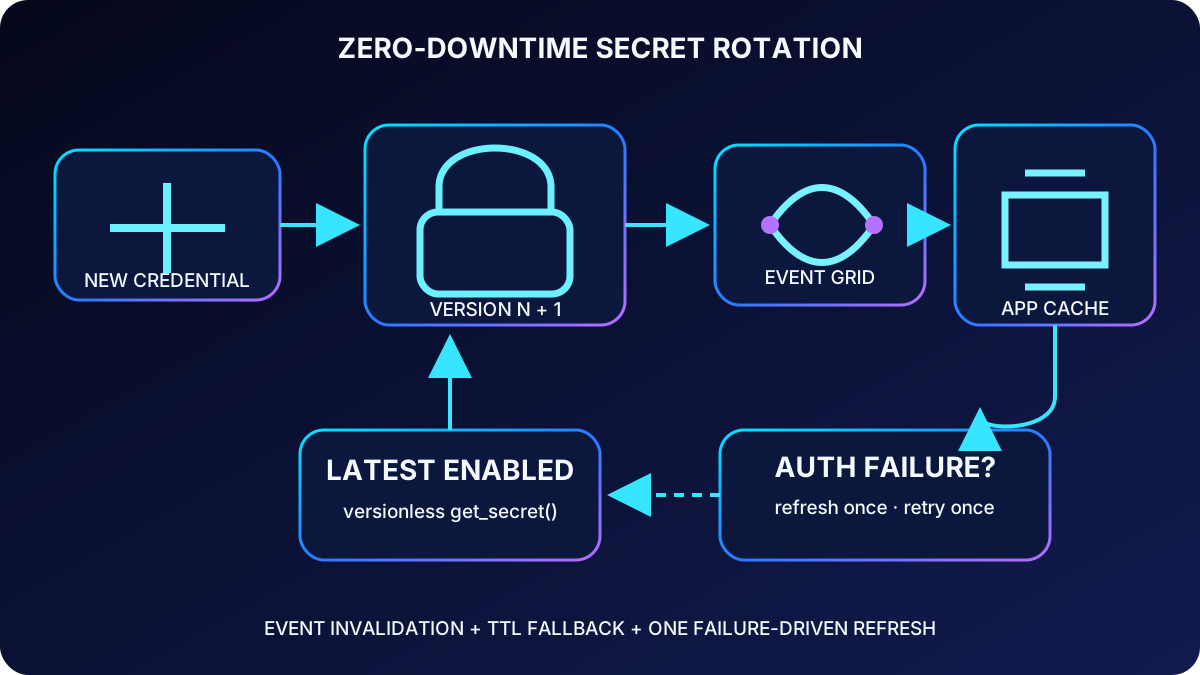
During rotation, different instances may temporarily hold different cached values. A resilient application calls the downstream service with the cached credential, interprets an authentication rejection as a possible rotation signal, fetches the latest enabled version, and retries once. The single retry avoids infinite loops and limits the extra read to a transition failure.
from azure.core.exceptions import HttpResponseError

def call_with_rotation_refresh(client, cache, name, downstream_call):
    value = cache.get(name)
    try:
        return downstream_call(value)
    except AuthenticationError:
        # One refresh and one retry: do not create an infinite loop.
        fresh = client.get_secret(name).value
        cache.put(name, fresh)
        return downstream_call(fresh)
TTL is the fallback freshness boundary; events and failure-driven refresh shorten the transition without polling on every request.
Quick recap
Keep old and new versions valid during rollout, refresh once when authentication fails, observe adoption, and revoke the old credential only after convergence.
16. Time-based cache, scope, and freshness budget
A remote vault call can take tens of milliseconds, while an in-process lookup is typically measured in microseconds. Reading for every AI request increases latency and can hit service limits. A monotonic-clock TTL cache fetches a value periodically and keeps wall-clock corrections from corrupting age calculations.
import time

class SecretCache:
    def __init__(self, client: SecretClient, ttl_seconds: int = 900):
        self.client = client
        self.ttl = ttl_seconds
        self.values: dict[str, tuple[str, float]] = {}

    def get(self, name: str) -> str:
        value = self.values.get(name)
        now = time.monotonic()
        if value and now - value[1] < self.ttl:
            return value[0]
        secret = self.client.get_secret(name)
        self.values[name] = (secret.value, now)
        return secret.value

    def invalidate(self, name: str) -> None:
        self.values.pop(name, None)
Cache scope
Scope
Advantage
Trade-off
Per process
Simple and fast; recommended starting point
Calls grow with replica count and each process has its own freshness window
Distributed cache such as
One refresh can serve many instances
Adds infrastructure and creates another protected location for the secret
Startup preload
No vault call on the request path and validates required names early
Needs periodic or event-driven refresh for credentials that rotate
Use the rotation requirement as a freshness budget: 5–15 minutes plus for frequent rotation, 30–60 minutes for monthly or quarterly changes, and startup preload with periodic refresh for low-rotation values. For an emergency compromise, invalidate immediately or restart instances instead of waiting for the normal TTL.
Quick recap
Cache in memory first, choose TTL from the allowed staleness window, and pair preload or distributed designs with an explicit refresh mechanism.
17. Event invalidation, limits, backoff, and guided lab
Subscribe to Microsoft.KeyVault.SecretNewVersionCreated and route it through a webhook, , or Azure Function. Validate the event source and type, then evict only the named secret. Keep a TTL as a fallback because event delivery and application handlers can fail.
Current per-vault, per-region limits allow 4,000 other secret/vault transactions in 10 seconds; CREATE secret, IMPORT certificate, and IMPORT key share a combined 300-per-10-seconds write category. The subscription aggregate is five times the per-vault limit. A 429 response requires exponential backoff with jitter. Persistent 429s indicate missing cache, a TTL that is too short, or a deployment thundering herd; stagger startup and reuse clients.
Guided Flask lab
Create or select a with Azure RBAC, soft delete, and purge protection; grant your developer identity Secrets Officer for the lab and the application identity Secrets User.
Download or clone a small Flask starter project, open it in , create a Python 3.12+ virtual environment, install azure-identity, azure-keyvault-secrets, and Flask, and authenticate locally with the latest Azure CLI and az login.
Complete the starter application with SecretClient, store sample secrets with content type and tags, and print only names, versions, and metadata.
Run the application operations: list metadata, read one value, create a second version, and confirm a versionless read follows the latest enabled version.
Add a 15-minute in-memory cache, retrieve repeatedly, rotate the secret, invalidate it, and verify the next request loads the new value.
Exercise the three exception paths and observe 429 retry logging without printing secret contents.
Remove lab resources and role assignments when finished.
Quick recap
Events accelerate cache freshness, TTL covers missed notifications, service limits reward caching, and the lab proves storage, metadata, versions, rotation, and invalidation end to end.
18. Assessment review, final checklist, and references
Assessment decisions
Question
Best answer
Reason
Runtime application only reads secret values
Secrets User
It grants secret read without lifecycle administration
Same code uses local Azure CLI and production identity
DefaultAzureCredential
Its chain bridges developer and deployed environments
get_secret(name) omits a version
Latest enabled version
The versionless URI follows the current enabled value
Target service supports two active keys
Dual-credential rotation
At least one valid credential remains throughout the transition
500 requests/second and a key rotates every 90 days
In-memory cache with a one-hour TTL
It removes per-request vault traffic while keeping a bounded freshness window
Final design checklist
Separate vaults by application, region, and environment.
Choose secret, key, or certificate from required operations—not convenience.
Use managed identity and least-privilege data-plane RBAC.
Enable purge protection and document recovery of roles and subscriptions.
Reuse SecretClient and never log values.
Treat versions, target-service changes, cache refresh, and revocation as one rotation workflow.
Use plus TTL and one auth-failure refresh.
Monitor access, expiry, 429 responses, rotation completion, and old-version disablement.