Deploy and expose AI inference APIs on Azure Kubernetes Service
Create Kubernetes Deployment and Service manifests, connect AKS to container images, publish stable endpoints, verify workloads with kubectl, and diagnose the failures that most often block production deployments.
Suggested study time: 80 minutes • Intermediate • Complete original rewrite with a concise version of every topic, assessment review, and guided AKS lab
By João Ricardo Dutra••Complete original content
1. From a container image to a highly available AI endpoint
operates a managed Kubernetes control plane on Azure. You supply cluster capacity and workload definitions while Azure manages the control-plane infrastructure. This makes suitable for containerized model-inference APIs, vector-search services, and other AI components that need repeatable deployment, resilience, scaling, and network access.
A containerized FastAPI inference service becomes an application only after Kubernetes knows what to run, how many copies to maintain, which resources and configuration it needs, and how clients reach it. YAML manifests describe that desired state; the cluster continuously reconciles reality with it.
A Pod is the smallest deployable unit and normally wraps one application container.
A Deployment creates and replaces Pods and maintains the requested replica count.
A Service gives changing Pods a stable IP or DNS endpoint and distributes traffic by label.
manages orchestration while Pods run containers, Deployments preserve the desired replica state, Services stabilize access, and kubectl controls and diagnoses the workload.
2. How Pods, Deployments, Services, and labels work together
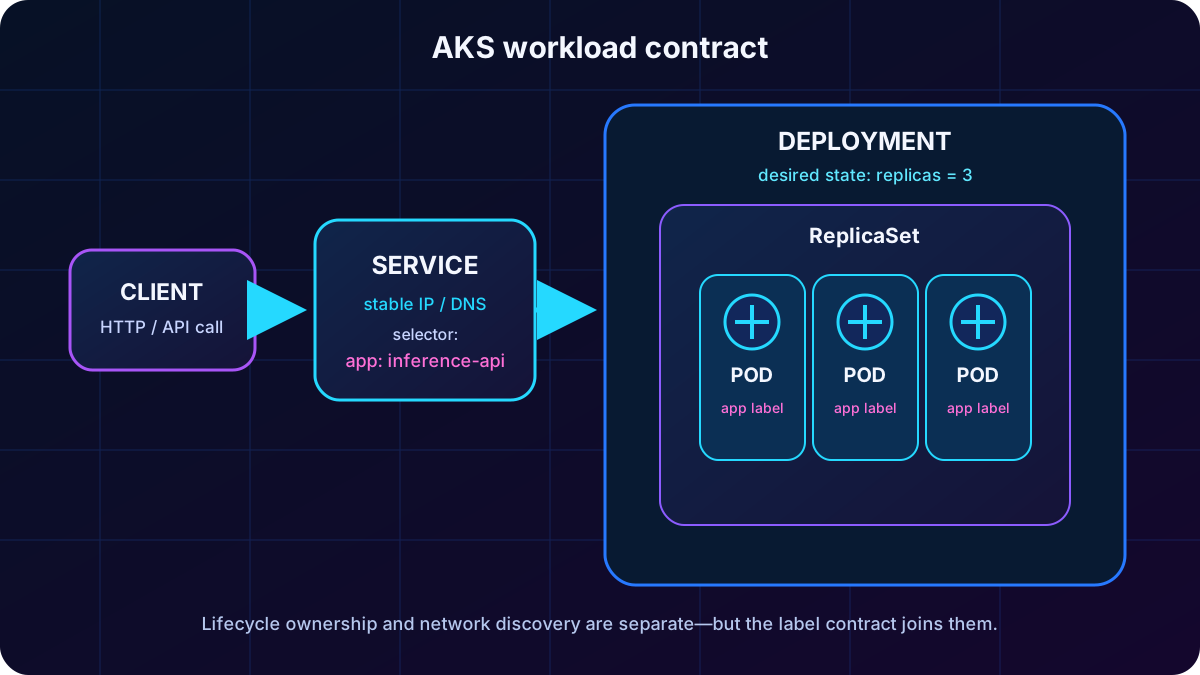
Running a Pod directly is possible but fragile. A Deployment owns a ReplicaSet, the ReplicaSet maintains Pods, and the Deployment replaces a failed Pod automatically. A Service does not point to fixed Pod addresses; its selector discovers Pods whose labels match and sends connections to those endpoints.
The label contract is critical. If the Pod template says app: inference-api but the Service selects a different value, the Service exists yet has no endpoints. Names of the Deployment and Service do not need to match, and Service port 80 may legitimately forward to container port 8080.
Deployments own lifecycle; Services discover matching Pod labels and provide stable connectivity.
Topic summary
The Deployment controls Pod lifecycle, while the Service independently finds Pods by matching labels; matching labels, not matching object names, connect the two.
3. Anatomy of a Kubernetes Deployment manifest
A Deployment uses apiVersion apps/v1 and kind Deployment. metadata names the object and may select a namespace. spec declares replicas, a selector, and the Pod template. The template repeats the selected label and contains the container definitions. This declarative file can be reviewed, versioned, and reapplied rather than reproducing manual commands.
The image reference follows registry.azurecr.io/repository:tag. Build and push the image before deployment, ensure it is accessible to the cluster, include application code and dependencies, and prefer an immutable version tag over latest when reproducibility matters.
Topic summary
A Deployment manifest combines identity, replica intent, matching labels, Pod template, container image, ports, resources, and configuration in one versionable desired-state document.
4. Replicas, availability, and resource requests and limits
Two replicas provide basic tolerance for a single Pod failure; three are a stronger production baseline; four or more should be justified by traffic and load testing because each copy consumes compute. Kubernetes restarts failed Pods, but several replicas let surviving Pods continue serving during that recovery.
Requests reserve the amount needed for scheduling. If no node has the requested CPU or memory, the Pod remains Pending. Limits cap consumption: CPU is throttled when constrained, while exceeding the memory limit can produce an OOM kill and restart. For a small inference model, 2–4 GiB plus roughly 20 percent headroom and one to two CPU cores may be a starting point, not a universal rule.
Resource fields and operational effect.
Field
Purpose
Failure signal
replicas
Simultaneous Pod copies
Too few reduce resilience and throughput.
requests.cpu / memory
Scheduler guarantee
Oversized requests leave Pods Pending.
limits.cpu
Maximum CPU share
Sustained pressure causes throttling and latency.
limits.memory
Maximum memory
Excess can terminate the container with OOMKilled.
Topic summary
Use replicas for resilience and measured throughput; set requests for schedulability and limits for containment, then refine all values from real model behavior.
5. Environment variables, Secrets, and registry access
Use literal environment variables for nonsensitive settings such as model names and API endpoints. Reference a Kubernetes Secret through valueFrom and secretKeyRef for API keys and credentials. Create it separately, for example: kubectl create secret generic api-secrets --from-literal=api-key=<value>. Never commit the secret value in a manifest or source history.
must also authenticate to . For a normal RBAC registry, -to-ACR integration grants AcrPull to the kubelet managed identity. An ABAC-enabled registry instead requires Container Registry Repository Reader. Private registries outside that integration can use an image pull Secret. Verify the applicable model rather than assuming image access is automatic.
Topic summary
Keep ordinary configuration in environment variables, sensitive values in referenced Secrets, and grant the kubelet identity the correct least-privilege registry pull role.
6. Choose the right Kubernetes Service type
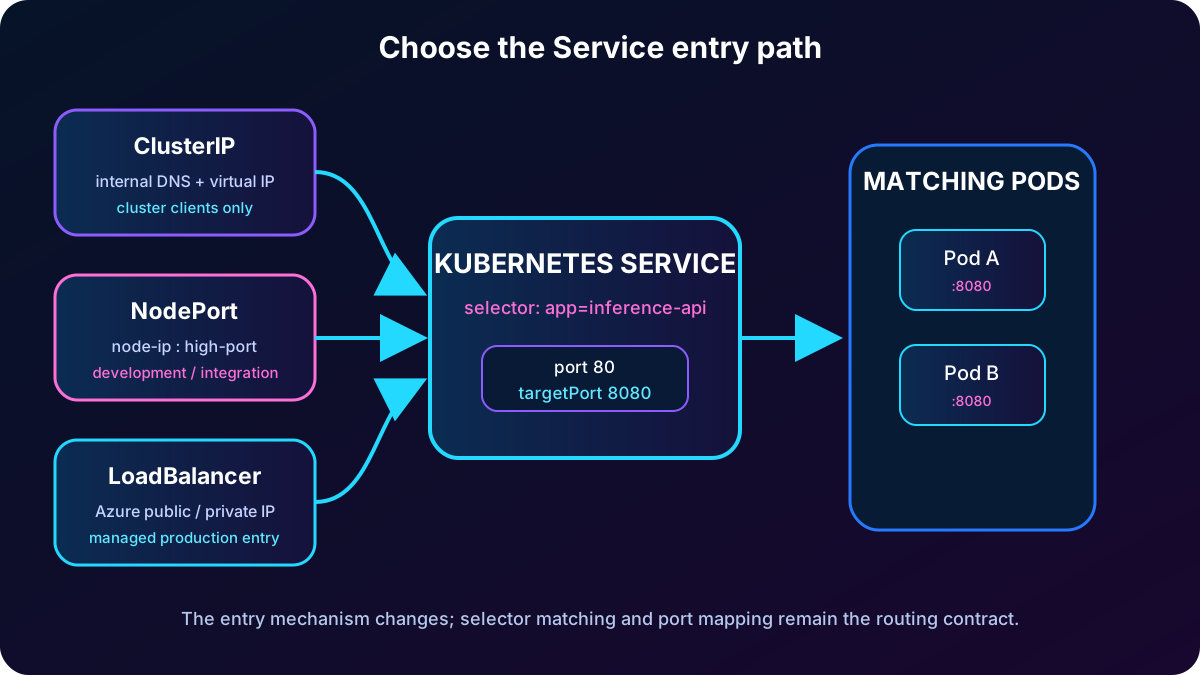
Pod IP addresses are ephemeral. A Service creates a persistent virtual endpoint and routes traffic to matching Pods even after replacements. The correct Service type depends on who should call the workload.
Kubernetes Service choices in .
Type
Reachability
Typical use
ClusterIP
Inside the cluster; default type
Back-end API, vector database, or service-to-service communication.
NodePort
High port on every node IP
Simple development access or an external load balancer integration; less common.
LoadBalancer
Azure-managed public or private load balancer
Internet-facing or privately exposed production API.
ExternalName
DNS alias to an external name; no proxy load balancing
Represent an outside dependency as a Kubernetes Service.
For production HTTP routing across several applications, TLS termination, or host/path rules, an Ingress design may be more appropriate than one public LoadBalancer per Service. The module focus remains the four Service types above.
Topic summary
Use ClusterIP internally, NodePort for limited direct-node scenarios, LoadBalancer for Azure-managed exposure, and ExternalName as a DNS alias to an external dependency.
7. Service manifest, selectors, and port mapping
The Service manifest uses apiVersion v1 and kind Service. type controls exposure, selector binds the Service to Pod labels, port is where clients connect, and targetPort is where the application listens inside each container. For HTTP, port 80 commonly forwards to FastAPI on 8080; HTTPS often uses port 443 when termination is configured.
The Service type changes the entry path, while selectors and targetPort keep the final Pod routing contract consistent.
Inside the cluster, DNS follows servicename.namespace.svc.cluster.local, such as inference-api-service.default.svc.cluster.local. NodePort clients use node-ip:nodeport, usually a port above 30000. LoadBalancer clients use the assigned external address shown by kubectl get svc.
Topic summary
A Service selector must match Pod labels, while port receives client traffic and targetPort forwards it to the application process.
8. Apply manifests and understand reconciliation
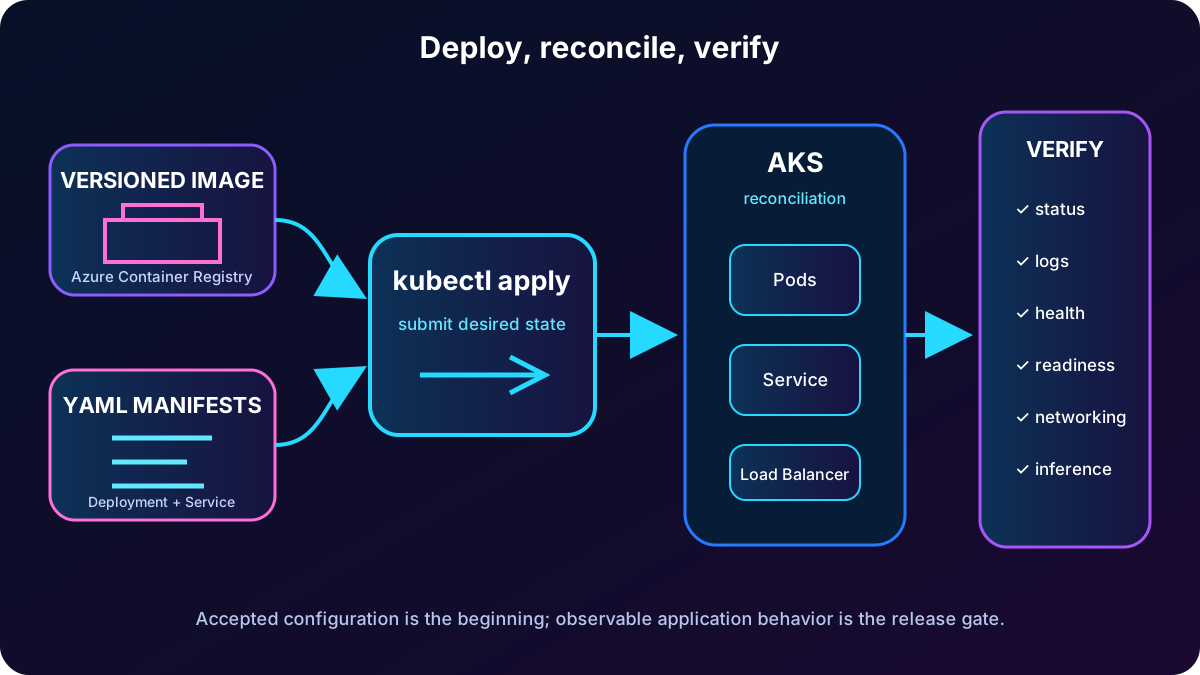
kubectl apply reads YAML and creates or updates the declared objects. Kubernetes then pulls images, schedules Pods, starts containers, creates the Service, and provisions networking. The command is asynchronous: a successful response means the desired state was accepted, not that every Pod or public IP is already ready.
Applying a directory is convenient but can submit unrelated YAML, so keep deployment artifacts scoped and review changes. Reapplying is idempotent at the declarative level: the control plane compares the submitted configuration with live state and reconciles the difference.
Topic summary
Use kubectl apply to create or update declarative resources, then separately observe reconciliation because Pods, image pulls, and provisioning finish asynchronously.
9. Verify Pods, Deployments, Services, logs, and connectivity
A healthy deployment shows the intended READY count, Running Pods, an AVAILABLE replica count that reaches the target, and a Service address appropriate for its type. Pending may be transient during image pulling or capacity waits; CrashLoopBackOff means repeated application startup failure. A LoadBalancer EXTERNAL-IP can remain pending while Azure provisions it.
kubectl get pods
kubectl get deployment
kubectl get svc inference-api-service
kubectl logs -l app=inference-api

# Test an internal ClusterIP Service
kubectl run -it --rm debug --image=alpine:latest --restart=Never -- sh
wget http://inference-api-service:80

# Test a public LoadBalancer address
curl http://<EXTERNAL-IP>
curl http://<EXTERNAL-IP>/predict -X POST -d '{"input":"test"}'
For internal access, launch a disposable debug Pod and call the Service name. For external access, test the public IP and a real inference endpoint. Health, readiness, and inference requests prove different layers: a process can be alive but not ready to serve a loaded model.
A deployment is complete only after the image, Kubernetes state, networking, and application behavior have all been verified.
Topic summary
Check object status and logs, wait for the appropriate Service address, and test health, readiness, and real inference rather than treating successful manifest submission as completion.
10. Diagnose ImagePullBackOff and CrashLoopBackOff
ImagePullBackOff means the node cannot retrieve the image. Inspect Pod events; verify registry host, repository, and tag; confirm the image exists with az acr repository list or show-tags; and validate the -to-registry role assignment. A manual docker pull can isolate an invalid image reference from a cluster permission problem.
CrashLoopBackOff means the container starts and repeatedly exits. Read current and --previous logs, then describe the Pod for events. Common causes include missing environment variables, unavailable Secrets, incorrect command or port, model startup failure, and unmounted configuration. Run the image locally to prove whether the fault is in the container or cluster configuration.
# Image pull or scheduling events
kubectl describe pod <pod-name>

# Current and previous-container logs
kubectl logs <pod-name>
kubectl logs <pod-name> --since=10m
kubectl logs <pod-name> --previous

# Capacity and Service selectors
kubectl get nodes
kubectl top nodes
kubectl get pods --show-labels
kubectl get pods -L app
kubectl describe svc inference-api-service
Topic summary
Use events for image and scheduling failures, current and previous logs for application crashes, and compare registry permissions, manifest configuration, and local container behavior.
11. Diagnose Pending Pods and Services with no endpoints
A persistently Pending Pod normally cannot be scheduled because requests exceed available CPU or memory, a node constraint cannot be met, or a node is unhealthy. Describe the Pod and nodes, inspect capacity with kubectl top nodes when Metrics Server is available, reduce unrealistic requests, or add cluster capacity with az aks scale after validating cost and quota.
A Service with Endpoints: <none> cannot forward traffic. Compare kubectl get pods --show-labels or -L app with kubectl describe svc. Correct either the Pod template label or Service selector and ensure the Pods are Ready. A Service object alone does not prove a working path.
Topic summary
Pending is primarily a scheduling-capacity investigation; no endpoints is primarily a label, readiness, or selector investigation.
12. Guided exercise: deploy an AI inference API
The source laboratory takes about 30–40 minutes. It deploys a model, , and an cluster; completes deployment.yaml and service.yaml with container settings, probes, resource limits, and load balancing; then uses a Python client to test health, readiness, and inference.
Download the starter project and review the application and manifest placeholders.
Deploy the Azure resources with an identity permitted to create the required services.
Complete container image, health probes, requests, limits, labels, selectors, and port mapping.
Apply both manifests, wait for Pods and the LoadBalancer address, and inspect failures before continuing.
Run the client tests against health, readiness, and model-inference endpoints; remove disposable resources afterward.
Prerequisites are an Azure subscription, , Python 3.12 or later, the latest Azure CLI, and kubectl. task runs may not be covered by Azure free credits, so the exercise can require pay-as-you-go or another paid plan.
Topic summary
The lab joins ,,, YAML, probes, resources, load balancing, and Python endpoint tests in one end-to-end deployment.
13. Assessment review and exam decisions
Why each assessment answer is correct.
Question
Correct answer
Reason
Internet exposure with Azure-managed balancing
LoadBalancer
It provisions an Azure load balancer and external address for the Service.
Requests exceed every node capacity
The Pod stays Pending
The scheduler cannot place it until sufficient capacity exists.
Deployment-to-Service routing contract
Pod template labels match the Service selector
Selectors discover endpoints by label.
Logs from a container that crashed and restarted
kubectl logs <pod-name> --previous
It reads the terminated container instance rather than only the current one.
replicas field
Number of simultaneous Pod copies
The Deployment controller maintains that desired count.
Topic summary
Remember the operational contract: LoadBalancer exposes, requests affect scheduling, labels connect Services to Pods, --previous retrieves crash logs, and replicas controls Pod copies.
14. Production checklist and official references
Use immutable image tags and verify -to-registry authentication.
Keep sensitive values out of Git and reference Secrets or an external secret solution.
Set realistic requests, limits, replicas, and health probes from load tests.
Match labels and selectors and validate every port-to-targetPort path.
Observe Pods, Deployment availability, Service endpoints, events, logs, health, readiness, and inference.
Prefer private exposure, TLS, Ingress, network policies, and least privilege when the architecture requires them.
Production readiness combines repeatable images, least-privilege access, resource and probe evidence, stable networking, and layered observability backed by current Microsoft documentation.