Operate Azure Container Apps safely: revisions, lifecycle, logs, health probes, and scaling
Learn the day-two workflow for containerized AI services: release immutable images, preserve rollback evidence, diagnose failing revisions, tune probes, and balance resources, latency, and cost.
Suggested study time: 75 minutes • Intermediate • Complete original rewrite with a concise version of every topic, knowledge review, and guided troubleshooting lab
By João Ricardo Dutra••Complete original content
1. Day-two operations for an AI workload
Frequent model, prompt, dependency, and routing updates make AI services change faster than many traditional APIs. Imagine a document pipeline with an HTTP API for PDF intake and a background worker for OCR and classification. Both run in , and the operating goal is to ship several times a day without sending users to a broken revision.
A reliable workflow joins artifact identity, revision state, traffic control, logs, probe signals, and capacity. It lets an on-call engineer diagnose a new revision that never becomes ready while the previous revision continues serving traffic, and it keeps old releases available only for as long as rollback and audit needs justify them.
Update images and manage activation, deactivation, rollback, and cleanup.
Use start, stop, restart, and scale-to-zero for the correct operational scope.
Investigate revision and runtime failures through logs rather than relying on shell access.
Tune startup, readiness, and liveness checks for model warmup.
Balance per-replica CPU and memory with replica limits and scale rules.
Topic summary
Day-two reliability comes from connecting releases, revision controls, observability, health checks, and capacity decisions into one repeatable runbook.
2. Tags, digests, and revision-producing updates
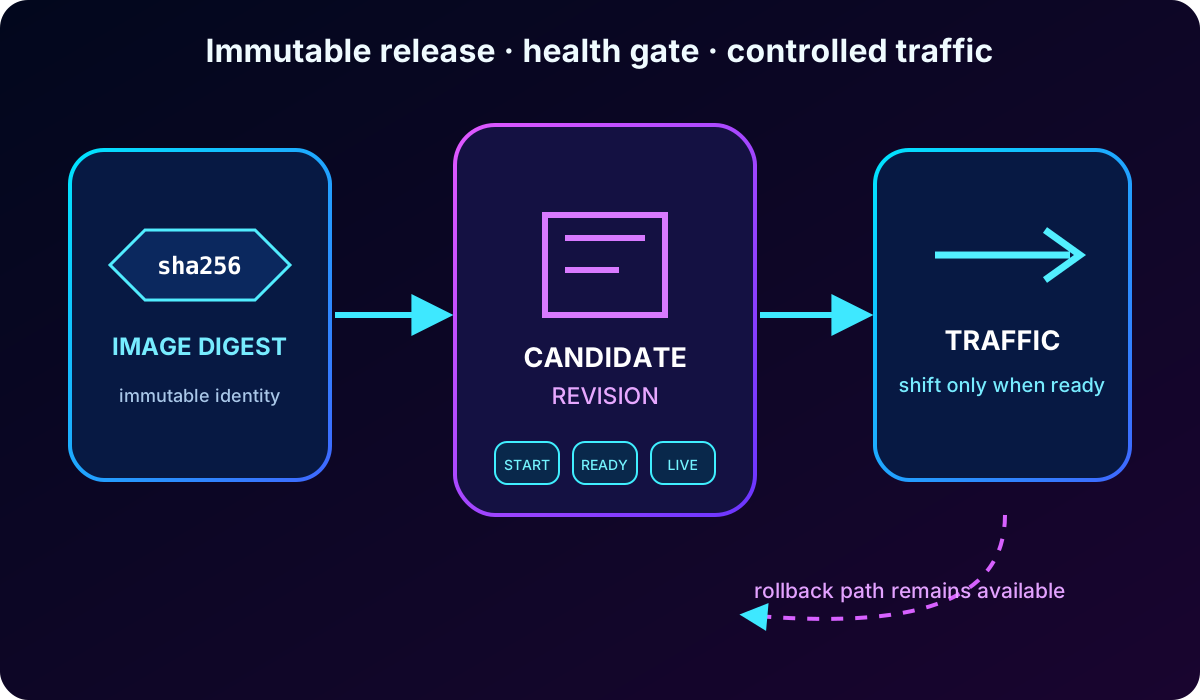
An image tag is a convenient movable name such as dev or staging. A digest identifies immutable content. Production releases should normally use the digest because an incident can then be correlated with the exact container and model build that served the request. A reused tag cannot offer the same proof.
Changes under the container app template - including the container image and scale configuration - are revision-scoped and produce an immutable revision. Application-scoped settings such as ingress traffic rules affect the app without rewriting an existing revision. After an update, inspect the stored template before considering the deployment complete.
az containerapp update \
  --name ai-document-api \
  --resource-group rg-ai200-aca \
  --image myregistry.azurecr.io/ai-document-api@sha256:<digest>

az containerapp show \
  --name ai-document-api \
  --resource-group rg-ai200-aca \
  --query properties.template.containers
A safe rollout separates creating a revision, proving health, shifting traffic, and retaining a rollback target.
Topic summary
Use digests for auditable releases, understand which changes create revisions, and verify the recorded template before routing traffic.
3. Revision modes, activation, traffic, and rollback
Single revision mode keeps operations simple: the old revision remains active until the replacement has provisioned, reached the expected replica count, and passed startup and readiness checks. If the new release fails, traffic stays on the working revision. Multiple revision mode keeps more than one revision active and enables weighted traffic, canary validation, A/B tests, and blue-green delivery.
Operational meaning of revision controls.
Control
Single mode
Multiple mode
Active revisions
One active revision after a successful transition.
Several revisions can be active at once.
Traffic
The platform moves traffic after readiness is proven.
Operators assign weights or labels to specific revisions.
Rollback
Return to a prior healthy configuration with a new update.
Move traffic to or reactivate a retained healthy revision.
Best fit
Straightforward production releases.
Canary, blue-green, A/B testing, or explicit traffic control.
Active means that a revision can run and receive traffic; it does not mean all traffic must be assigned to it. Inactive revisions keep configuration history without running replicas. Verify health and logs before changing weights, and use a small canary share when the new model requires real production validation.
Topic summary
Single mode automates a guarded transition; multiple mode provides explicit activation and traffic splitting for progressive delivery and quick rollback.
4. Inspect, deactivate, and retain revisions deliberately
List revisions to identify the active and unhealthy releases, then inspect the suspect revision to compare its image, environment, resources, and health with a known-good release. Deactivate a problematic revision before deleting it: deactivation removes its running replicas and traffic exposure while preserving evidence and a possible rollback path.
az containerapp revision list \
  --name ai-document-api --resource-group rg-ai200-aca --all -o table

az containerapp revision show \
  --name ai-document-api --resource-group rg-ai200-aca \
  --revision <revision-name>

az containerapp revision deactivate \
  --name ai-document-api --resource-group rg-ai200-aca \
  --revision <revision-name>
Delete stale revisions only after the incident and rollback window ends. retains up to 100 inactive revisions by default and purges the oldest beyond the configured limit; the maximum inactive revision count can be adjusted with maxInactiveRevisions or the matching CLI option. Define retention through audit, recovery, and operational clarity rather than letting history grow accidentally.
Topic summary
Investigate by revision, deactivate before destructive cleanup, and keep a documented retention window for rollback and evidence.
5. Start, stop, restart, or scale to zero
These actions solve different problems. Scale-to-zero is automatic and rule-driven, suitable for intermittent or event-driven work. Stop is an explicit app-wide pause that guarantees no replicas restart while an incident or upstream outage is contained. Restart recycles replicas to clear a transient runtime state or apply a change, but it can increase cold starts for services that load large models.
Start and stop are app-level actions, while the current Azure CLI restart command targets a named revision. If only one release is defective, deactivate or restart that revision instead of interrupting the whole app. A restart must be followed by log and health review because recycling a process can postpone rather than remove the root cause. Containers must also handle graceful termination and keep durable state outside the local filesystem.
az containerapp stop --name ai-document-api --resource-group rg-ai200-aca
az containerapp start --name ai-document-api --resource-group rg-ai200-aca
az containerapp revision restart \
  --name ai-document-api --resource-group rg-ai200-aca \
  --revision <revision-name>

az containerapp revision list \
  --name ai-document-api --resource-group rg-ai200-aca \
  --query "[].{name:name,active:properties.active,health:properties.healthState}" \
  -o table
Topic summary
Choose the narrowest action: scale-to-zero for idle demand, stop for a guaranteed app-wide pause, restart for transient recovery, and revision controls for a release-specific fault.
6. A repeatable failure checklist
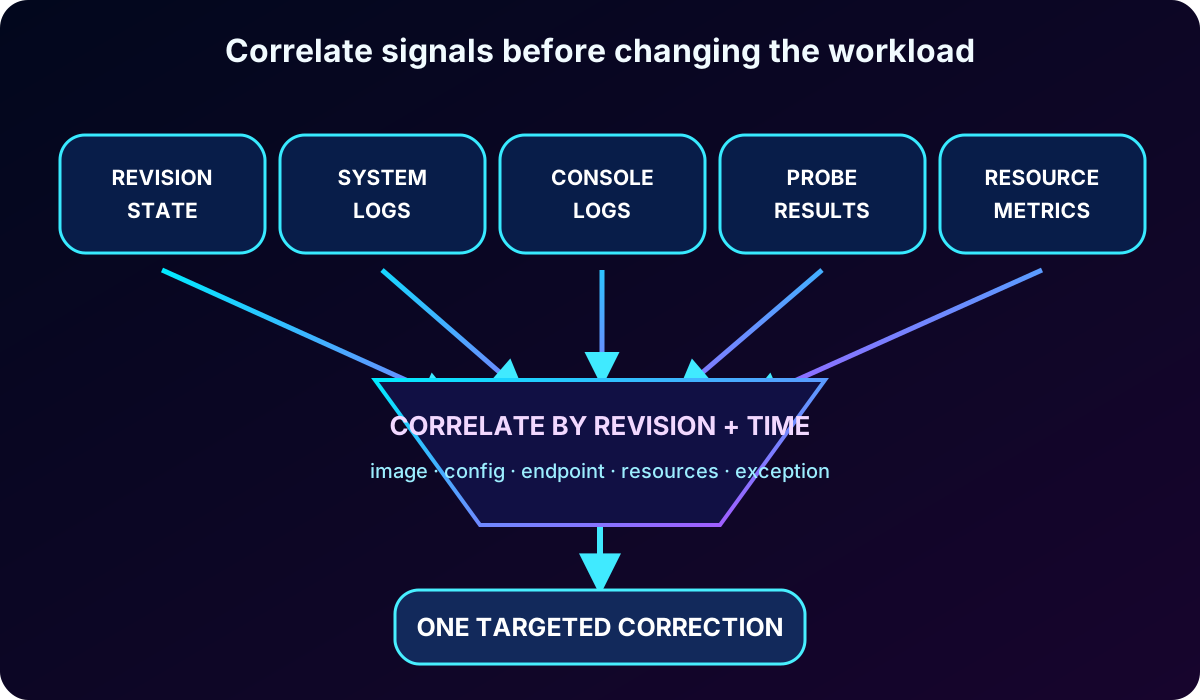
Begin by naming the failing revision and comparing its platform health with application logs. Check the most common layers in a fixed order so that a restart or resource change does not hide the actual defect.
Image pull: confirm the registry server, digest, managed identity or credential, and AcrPull authorization.
Port and ingress: confirm that the process listens on the target port and expected interface.
Configuration: compare required environment variables and secret references with the healthy revision.
Health checks: validate type, protocol, path, port, timing, and the endpoint response.
Resources: look for out-of-memory termination, CPU throttling, crash loops, or prolonged warmup.
Dependencies and code: only after platform configuration is proven, investigate runtime exceptions and downstream availability.
Correlating independent signals narrows a failure faster than repeatedly restarting the app.
Topic summary
Identify the revision first, then validate image, networking, configuration, probes, resources, and code in a consistent order.
7. Stream and retain the right logs
Container console logs come from stdout and stderr, system logs describe platform and revision events, and opt-in HTTP logs describe ingress behavior such as latency and 5xx responses. Log streaming is ideal for reproducing a startup crash or request exception in real time; Log Analytics provides historical correlation and repeatable queries. The environment must be configured with an appropriate log destination before the incident.
az containerapp logs show \
  --name ai-document-api --resource-group rg-ai200-aca \
  --follow --tail 50

az containerapp logs show \
  --name ai-document-api --resource-group rg-ai200-aca \
  --type system --tail 50
Useful structured fields include a request or correlation ID, revision or build identifier, image tag or digest, model deployment or version, total latency, and dependency timings. Record identifiers and metadata rather than raw PDFs, prompts, credentials, or personal data. This gives enough context to debug without creating a new data exposure.
ContainerAppConsoleLogs_CL
| where ContainerAppName_s == "ai-document-api"
| where RevisionName_s contains "<revision-name>"
| project TimeGenerated, RevisionName_s, Log_s
| order by TimeGenerated desc
Topic summary
Combine live console and system streams with retained data, and design structured logs that correlate requests, revisions, models, and latency without sensitive payloads.
8. Diagnose a revision-specific incident
Confirm the active, latest, and failing revision names.
Stream console and system logs while the failing revision starts or the request is reproduced.
Compare its image, environment variables, secret references, ingress, probes, and resources with a healthy revision.
Apply one targeted correction, producing a new revision when the template changes.
Wait for provisioning, startup, and readiness checks; then validate latency and error behavior before moving traffic.
Retain the previous revision until the rollback window expires, then clean up according to policy.
This workflow preserves causality: changing one variable at a time makes it clear which correction restored health. Avoid deleting history or increasing resources as the first reaction when evidence points to a wrong environment variable, port, or probe path.
Topic summary
Narrow scope, reproduce with logs, compare against a healthy baseline, correct one variable, and verify the next revision before shifting traffic.
9. Startup, readiness, and liveness probes
Purpose of each health probe.
Probe
Question answered
Platform response
Startup
Has the application completed its initial startup?
Protects slow initialization from premature liveness decisions.
Readiness
Can this replica accept traffic now?
Removes an unready replica from request routing.
Liveness
Is the process still responsive enough to run?
Restarts the replica after repeated failure.
AI APIs often load models, warm caches, or connect to dependencies before they are ready. Readiness must return success only after the service can handle requests. Liveness should detect deadlock or unrecoverable process failure, not temporary downstream slowness. supports HTTP(S) and TCP probes; exec probes are not supported, and only one probe of each type can be defined per container.
Use startup for slow initialization, readiness to guard traffic, and liveness to recycle a stuck process; configure each probe around real service behavior.
10. Troubleshoot probe failures without creating restart loops
Most probe failures come from a mismatched port or path, an unreachable endpoint, unsupported protocol assumptions, a timeout that is shorter than model warmup, or a required dependency that is unavailable. For HTTP probes, a response from 200 through 399 is successful; other status codes fail the check.
Match the probe port to the process and ingress target.
Expose separate lightweight endpoints for startup, readiness, and liveness when their conditions differ.
Increase initial delay, period, timeout, or failure threshold based on measured startup time rather than guesswork.
Avoid making liveness depend on every external system; a dependency outage should not necessarily restart every replica.
Correlate failure type and time with revision status, console logs, system logs, and the Diagnose and solve problems experience.
An aggressive liveness probe can restart a model-loading process before it can become healthy, producing an endless cold-start loop. A permissive readiness probe creates the opposite risk by sending users to a replica that cannot yet respond correctly.
Topic summary
Validate endpoint reachability and measured timing first, keep liveness independent of transient dependencies, and use logs plus revision diagnostics to explain every failure.
11. Size CPU and memory per replica
Per-replica CPU and memory determine both capability and unit cost. Too little CPU produces throttling and latency spikes; too little memory produces out-of-memory termination, restarts, and repeated model cold starts. Total cost combines the size of each replica with the number and duration of replicas needed under load.
Measure API latency under concurrency and background-worker throughput, then watch CPU, memory, restart, and readiness signals. Change one limit at a time and retest with the same workload. Model updates can change startup duration, memory footprint, and request latency, so a profile validated for one build is not permanent.
Select per-replica resources from measured bottlenecks, retest under representative concurrency, and reassess after every meaningful model or dependency change.
12. Scale synchronous APIs and background workers differently
uses declarative limits and KEDA-based rules to add or remove replicas. HTTP rules react to concurrent requests; TCP rules react to concurrent connections; custom rules can use CPU, memory, queues, Azure , Azure , Apache Kafka, Redis, and other supported event sources. A change to scale configuration is revision-scoped.
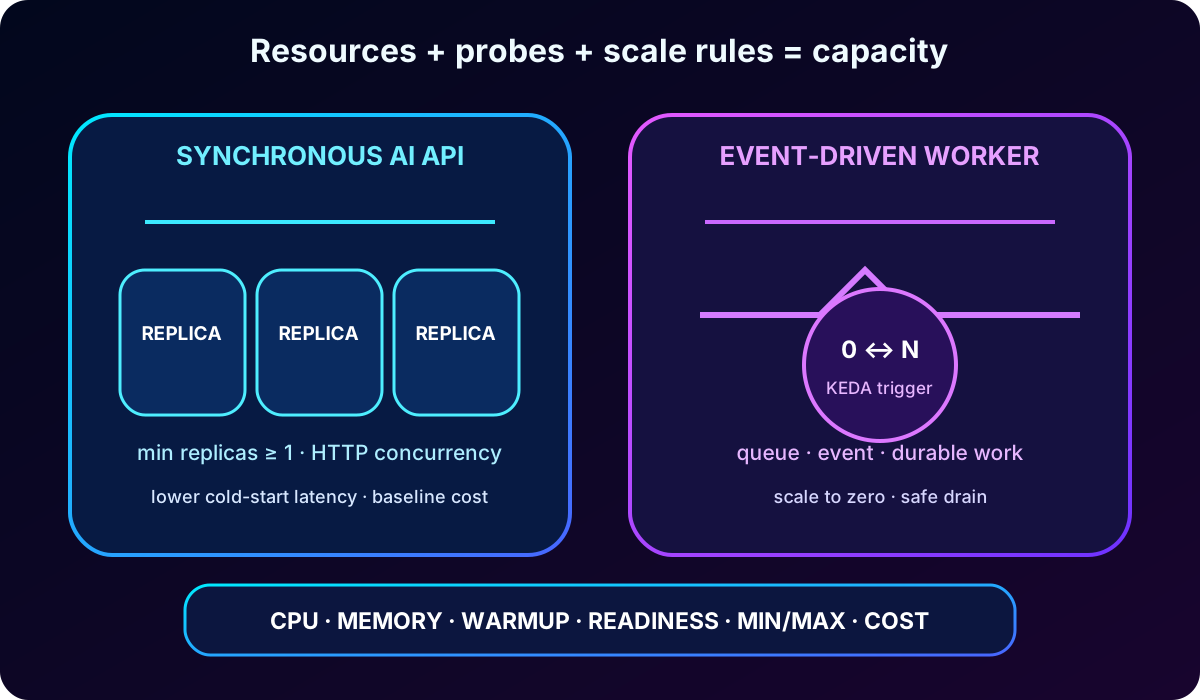
A latency-sensitive HTTP API may keep at least one replica to avoid cold starts and align concurrency targets with available CPU. An event-driven worker can often scale to zero if work is durable and shutdown drains safely. When ingress is disabled, define a custom rule or minimum replicas so the app has a way to wake. CPU- or memory-based rules cannot scale to zero because they need a running replica to observe those metrics.
Probe timing and scale behavior must agree: a new replica with slow model warmup should remain unready long enough to initialize, while rollout checks should not misclassify that expected warmup as failure. Minimum replicas improve responsiveness but increase baseline cost; maximum replicas protect budget and dependencies but can cap throughput.
Resource size, concurrency, scale rules, and probe timing form one capacity decision.
Topic summary
Keep warm capacity for latency-sensitive APIs, allow durable workers to scale to zero when safe, and tune KEDA rules, replica limits, resources, and probes as one system.
13. Guided lab: diagnose a failing document API
Use a paid Azure subscription with deployment permissions, a current Azure CLI, and ; Python 3.12 or later is optional. ACR Tasks may not run against Azure free credits, so verify billing eligibility before starting. Work in a disposable resource group and remove it after the lab.
Deploy a mock document-processing API to and record its active revision, FQDN, image digest, and healthy baseline.
Introduce a missing environment variable. Observe the new revision, stream logs, locate the startup error, and restore the setting.
Introduce an ingress target-port mismatch. Compare application listening output with ingress configuration and correct the port.
Add or temporarily misconfigure readiness. Use revision health and log timestamps to distinguish slow warmup from a wrong endpoint.
Query Log Analytics for historical console records by app and revision, then write a short incident timeline.
Apply a targeted fix, prove the replacement revision is ready, retain the healthy rollback revision, and remove only stale evidence after the exercise.
Expected evidence includes CLI output for revision state, console and system log excerpts with correlation fields, the corrected configuration, and a before/after latency or health observation. Never place real document content or credentials in the lab logs.
Topic summary
The lab practices two common faults - missing configuration and wrong ingress - and proves the fix through revision state, live logs, and historical Log Analytics data.
14. Knowledge review
Questions and explained answers.
Scenario
Best response
Reason
Production image identity
Deploy the immutable digest.
It proves the exact artifact used and prevents a tag from silently moving.
Investigate without traffic
Deactivate the suspect revision.
It stops replicas and traffic while retaining configuration and evidence.
Immediate readiness failure
Check probe port and path first.
Endpoint mismatch is a common configuration cause.
Exception in one revision
Stream logs for that revision while reproducing.
It confirms the runtime error without broad or destructive changes.
CPU throttling at peak
Increase per-replica CPU, then reassess scale rules.
It directly addresses the measured bottleneck before capacity is retuned.
Topic summary
The exam pattern favors immutable identity, narrow revision controls, evidence-first diagnosis, correct health endpoints, and resource changes tied to measured bottlenecks.
15. Operational checklist and Microsoft references
Before release: pin the digest, record the build and model version, confirm secrets and target port, and validate probe timing.
During rollout: watch provisioning, startup, readiness, console and system logs, replica count, latency, and errors before moving traffic.
During incident: isolate the revision, preserve evidence, compare with the healthy baseline, and change one variable.
After recovery: test rollback, document cause and signal, enforce retention, and reassess resources and scaling when workload behavior changed.