Autoscale Azure Container Apps with KEDA, right-sized compute, and revision-aware delivery
Design responsive and cost-aware containerized AI workloads with HTTP, TCP, resource, queue, stream, schedule, and custom metric triggers, then control how independently scaled revisions receive traffic.
Suggested study time: 90 minutes • Intermediate • Complete original rewrite with a concise version of every topic, assessment review, and guided KEDA lab
By João Ricardo Dutra••Complete original content
1. Scaling an AI workload without buying idle capacity
An order platform may face scheduled sales and unexpected campaign bursts. Fixed capacity wastes money overnight yet still produces slow checkouts at peak. A stronger design separates the synchronous API from the asynchronous fulfillment worker and gives each component a demand signal that represents its real work.
The target is not merely more replicas. It is a measurable balance: rapid HTTP response, queue drainage, scale-to-zero where cold starts are acceptable, guarded maximum cost, and deployment changes that do not put an unproven revision in front of every user.
Configure HTTP, TCP, CPU, and memory triggers.
Scale from queues, streams, schedules, and custom metrics through KEDA.
Choose CPU, memory, and a workload profile from observed demand.
Use revision modes, labels, and weighted traffic without forgetting that revisions scale separately.
Topic summary
Choose a signal per workload, define performance and cost limits, and treat scaling and deployment as one operating design.
2. Scale definitions: limits, rules, behavior, and billing
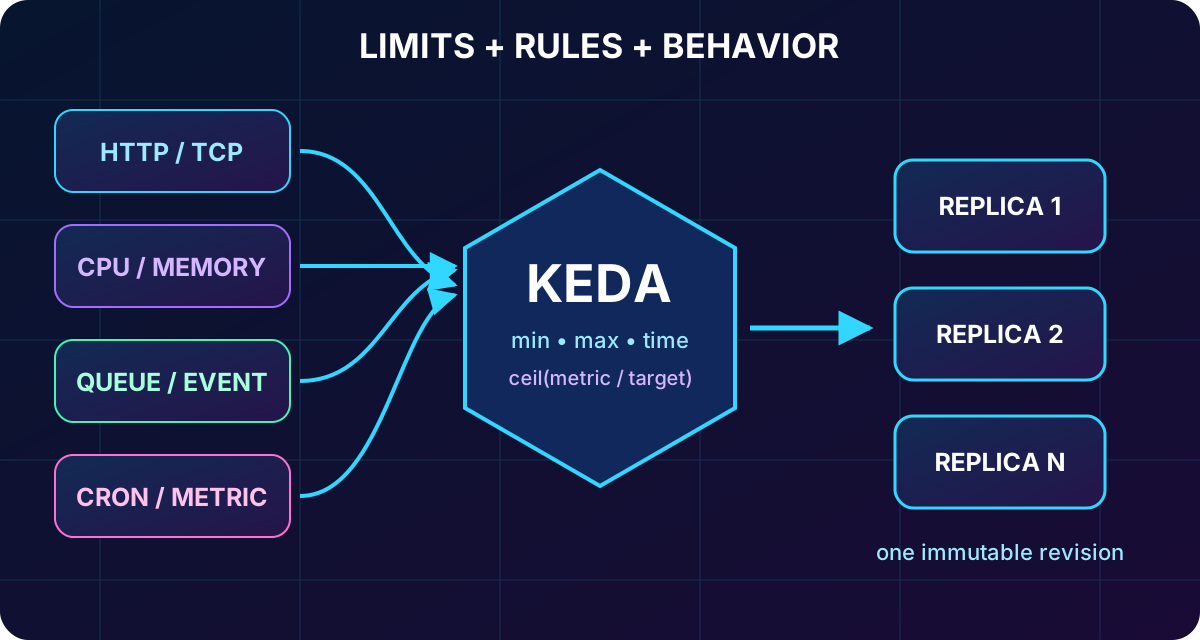
expresses horizontal scaling declaratively. Limits bound replicas per revision, rules describe the demand signals, and behavior controls how decisions evolve over time. KEDA translates supported signals into desired replica counts, and every replica is an independently running instance of one immutable revision.
Core parts of a scale definition.
Part
Question it answers
Design consequence
Minimum
What must stay warm?
Zero saves compute; one or more avoids a cold start.
Maximum
What is the capacity and cost ceiling?
Too low throttles throughput; too high can pressure dependencies.
Rules
Which signal represents demand?
HTTP, TCP, resource metrics, or event sources.
Behavior
How quickly can replicas change?
Polling, stabilization, cooldown, and step size limit oscillation.
With ingress and no custom rule, the default is zero to ten replicas using HTTP demand. With ingress disabled, an app that has neither a minimum nor a custom trigger can reach zero and has no signal to wake it. Scale-to-zero has no compute usage charge; an idle in-memory replica can be billed at a lower idle rate.
A scaling decision is the intersection of limits, rules, and time behavior - not a threshold alone.
Topic summary
Limits constrain capacity, rules detect work, behavior stabilizes decisions, and the minimum replica count sets the availability-versus-cost baseline.
3. HTTP and TCP concurrency rules
HTTP rules use average concurrent requests over a 15-second window. The default target is ten concurrent requests per replica. A lower target creates headroom and earlier scale-out; a higher target extracts more work from each replica but risks latency while new capacity starts. HTTP rules support scale-to-zero and suit APIs and web applications, but not Container Apps jobs.
TCP rules use concurrent connections over the same window. They fit WebSocket, gRPC, database-pool, and other long-lived connection patterns better than request-response traffic. When all connections close, the revision can return to zero after cooldown.
Use HTTP for request concurrency and TCP for persistent connections; tune the target from measured per-replica capacity and latency.
4. CPU, memory, and combined rules
CPU and memory rules are KEDA custom scalers that compare average utilization with a percentage target. CPU is useful for image processing, transcoding, JSON-heavy APIs, and model inference. Memory is a better signal for caches, aggregation, and large payloads.
Neither resource rule can activate an app from zero because a running replica is required to produce the metric. Keep at least one replica or combine the resource signal with HTTP or an event source. When several rules exist, scale-out begins as soon as any rule requires more replicas; the largest requested replica count wins.
Resource metrics protect compute-bound workloads, but an external trigger is needed for scale-to-zero; combine rules so either demand or pressure can add capacity.
5. Polling, cooldown, stabilization, and the scaling formula
Custom and event scalers are polled every 30 seconds; HTTP and TCP use their 15-second calculation window. The default cooldown and scale-down stabilization periods are 300 seconds, while scale-up stabilization is zero. Scale-out grows through steps such as 1, 4, 8, 16, and 32; scale-in can remove all replicas no longer needed at once.
KEDA starts from desiredReplicas = ceil(currentMetricValue / targetMetricValue), then applies minimum, maximum, and step constraints. For 50 queued messages with a target of five, the raw result is ten replicas. The delay before scaling down prevents a short lull from triggering repeated shutdown and cold startup.
Use at least one warm replica when latency is more important than idle savings.
Allow zero for truly intermittent workers whose event source can wake them.
Account for the five-minute default when estimating savings from short bursts.
Correlate trigger value and replica count in before changing a threshold.
Topic summary
A correct threshold still needs appropriate timing: fast scale-out, stabilized scale-in, and a cooldown compatible with the workload rhythm.
6. KEDA integration and Azure-native event sources
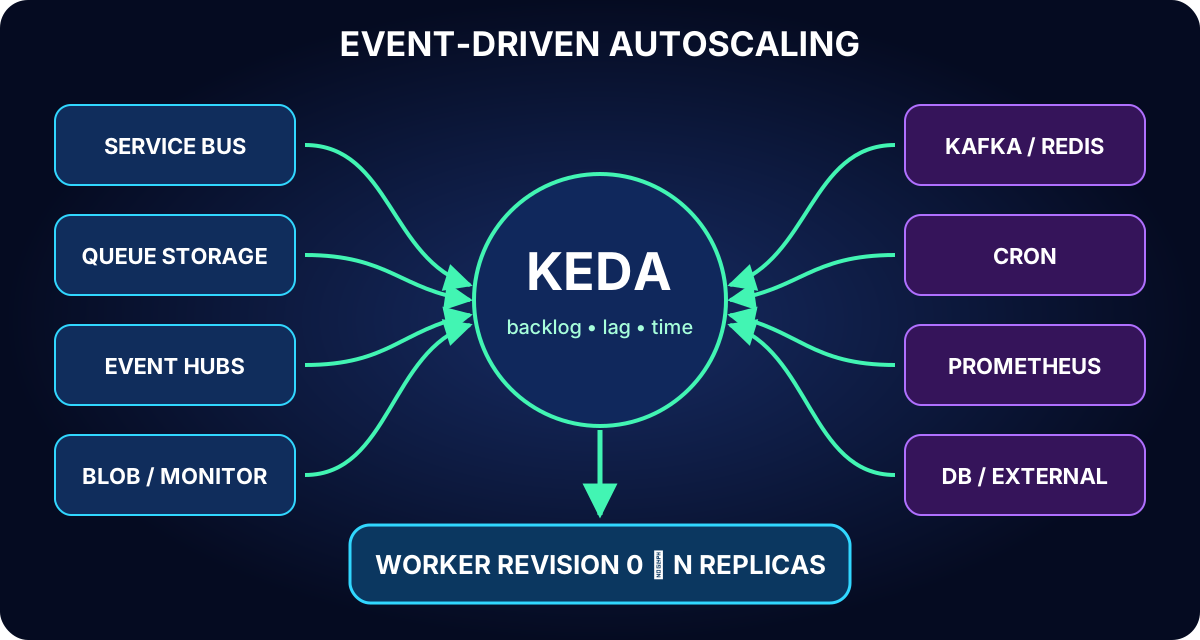
KEDA lets react to work that HTTP traffic cannot describe: queue depth, consumer lag, schedules, and business metrics. A custom rule identifies the scaler type, provides metadata for the metric and target, and supplies authentication. The platform represents this pattern without requiring you to operate a Kubernetes ScaledObject.
Microsoft provides first-party support for Azure , Azure , Azure ,, Azure Log Analytics, and scalers. Community scalers broaden the catalog, but their documentation and support maturity can differ.
Event-driven scaling maps durable backlog or a measured signal to worker replicas and can return to zero when the signal disappears.
Topic summary
KEDA converts external work signals into replica demand; prefer first-party Azure scalers for Azure services and assess support carefully for community sources.
7. and scalers
The Azure scaler monitors active messages in a queue or a topic subscription. queueName or topicName plus subscriptionName selects the backlog; namespace identifies the service; messageCount is the messages-per-replica target. Fifty messages with a target of five request ten replicas. Subscriptions scale independently because each has its own backlog.
Azure uses accountName, queueName, and queueLength against the approximate message count. It is a lower-cost fit for simple queues. Choose when sessions, dead-lettering, scheduled messages, richer messaging, or higher throughput matter.
Select for advanced messaging and for simpler queues, then calculate thresholds from processing time and desired parallelism.
8. partitions and secure scaler authentication
The scaler observes unprocessed events between each partition head and the consumer-group checkpoint. consumerGroup, unprocessedEventThreshold, and checkpointStrategy define the calculation; blobMetadata is the recommended checkpoint strategy when holds checkpoints. Effective parallelism cannot exceed partition count because one consumer in a group owns a partition at a time.
A scaler can reference a connection string or key stored as a Container Apps secret, but the team must rotate and protect it. When supported, prefer a managed identity and grant only the required Azure RBAC role, such as Azure Data Receiver. The identity removes stored credentials and is the recommended production answer.
Topic summary
Size workers no higher than useful partition parallelism and prefer least-privilege managed identity over long-lived connection strings.
9. Custom scalers and KEDA-to-Container-Apps mapping
ScaledObject-based sources include Apache Kafka, Redis Lists and Streams, Prometheus, Cron, PostgreSQL, MySQL, MongoDB, and external metric APIs. Before choosing one, verify its metric meaning, authentication options, required metadata, maintainer, support level, and how the target becomes a replica count. External scalers may require components that the built-in configuration does not deploy.
Map triggers[].type to --scale-rule-type or custom.type.
Map triggers[].metadata to --scale-rule-metadata or the YAML metadata object.
Replace TriggerAuthentication references with Container Apps secrets and auth mappings, or use --scale-rule-identity when supported.
Map minReplicaCount and maxReplicaCount to the Container Apps replica limits.
Test because not every native KEDA feature or custom interval has an exact Container Apps equivalent.
Topic summary
A migration preserves type, metadata, authentication, and limits, while explicitly checking features that Container Apps does not expose one-for-one.
10. Apache Kafka and Redis workload signals
The Kafka scaler measures consumer-group lag from partition end offsets to committed offsets. bootstrapServers, consumerGroup, topic, and lagThreshold define the rule; SASL/PLAIN, SASL/SCRAM, or TLS credentials can be stored as secrets. As with , extra replicas beyond the partition count do not increase parallel consumption.
Redis Lists scaling compares LLEN with listLength using address and listName. Redis Streams scaling instead tracks pending entries for a consumer group, including delivered but unacknowledged work, which better represents failure recovery. Choose the correct standard, Cluster, or Sentinel variant and its connection format.
Topic summary
Kafka scales from consumer lag and Redis from queued or pending entries; partition topology, acknowledgment semantics, and authentication cap useful parallelism.
11. Cron baselines and Prometheus business metrics
A Cron scaler requests desiredReplicas during a time window defined by timezone, start, and end expressions. Outside the window it stops influencing the count. Combine it with HTTP or event rules: pre-warm known business peaks, then let real demand request more. Container Apps follows the highest replica request from active rules.
The Prometheus scaler evaluates a PromQL query at serverAddress and divides the numeric result by threshold. metricName labels the signal. It is useful when concurrency or queue depth does not match work, for example active sessions, pending transactions, an SLO indicator, or another business metric that correlates with resource need.
Topic summary
Cron creates scheduled baseline capacity; Prometheus turns a meaningful application metric into demand. Combine predictive and reactive signals rather than substituting one for the other.
12. CPU, memory, failure modes, and total capacity
Resources are assigned per container in each replica. CPU is measured in cores and memory in GiB; memory must be at least twice the CPU value in GiB. The common starting allocation is 0.25 CPU and 0.5 GiB. In a Consumption profile, a general-purpose container can use up to 4 CPU and 8 GiB. A sidecar has its own allocation, and all containers count against environment capacity.
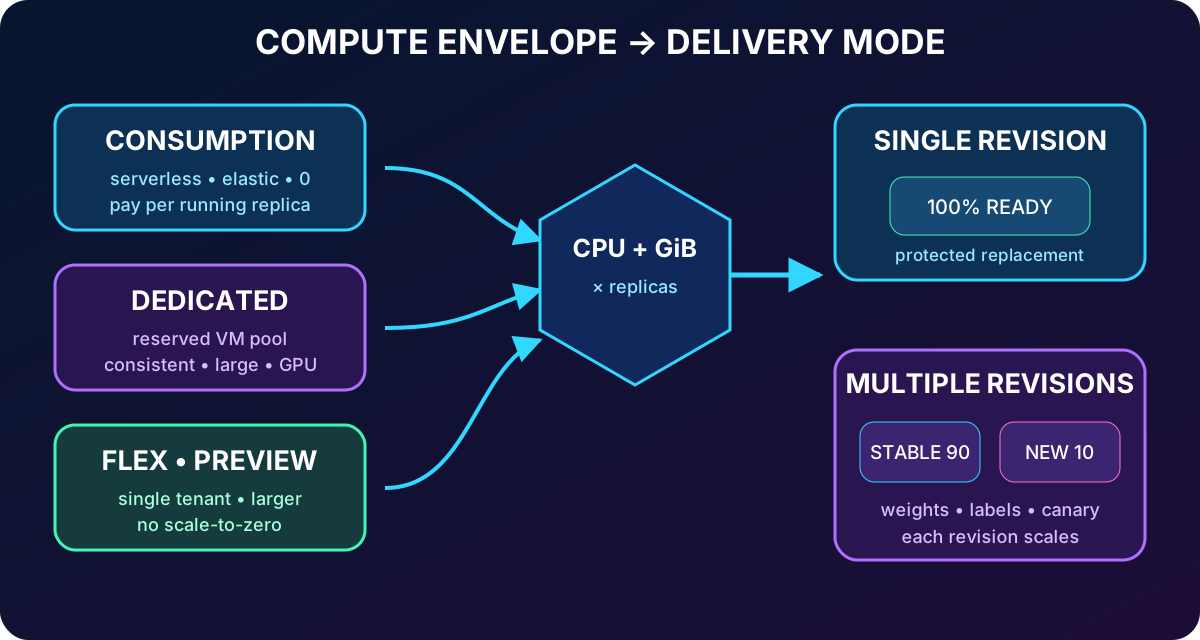
Exceeding memory causes termination and restart; exceeding CPU causes throttling and latency. Total peak capacity is per-replica resources multiplied by maximum replicas. Twenty replicas at 0.5 CPU provide up to ten cores. Larger replicas reduce replica count and scaling events but create coarser capacity steps; smaller replicas add finer scaling at greater management overhead.
Right-size each container from measured CPU and memory behavior, then multiply by maximum replicas to prove both peak capacity and the cost ceiling.
13. Consumption, Dedicated, Flex, cost, and performance
Consumption is serverless, pay-per-running-replica, and well suited to variable demand and scale-to-zero. Dedicated profiles reserve chosen VM capacity for steadier performance, larger allocations, isolation, or specialized hardware. Current Microsoft documentation also lists a Flex profile in preview: single-tenant compute with consumption-style billing characteristics, larger replica options, and no scale-to-zero. Preview availability and limits must be rechecked before design approval.
Start with defaults, load-test representative model and payload versions, and increase only after observing CPU throttling, out-of-memory restarts, latency, or timeouts. Keep a warm minimum for strict response-time objectives. should reveal sustained pressure or chronic underuse. A thousand replicas per revision is a service ceiling, not a capacity plan; dependencies and useful parallelism usually bind first.
Compute determines the performance and billing envelope; revision mode determines how versions share traffic and scale inside it.
Topic summary
Use Consumption for elastic demand, Dedicated for reserved consistency or larger resources, and assess Flex preview explicitly; validate every choice with load and cost evidence.
14. Immutable revisions and single versus multiple mode
A revision is an immutable snapshot. Template changes such as image, scale rules, environment variables, and container resources create another revision. Application-level changes such as secrets, ingress, traffic rules, labels, registry credentials, and revision mode apply without rewriting an existing revision.
Single mode is the default. The old revision serves traffic until the new revision provisions, reaches the required replica count, and passes startup and readiness probes; then traffic moves and the old revision deactivates. Multiple mode keeps several revisions active for canary, blue-green, and A/B patterns, but the operator must manage traffic and deactivation.
az containerapp update \
  --name order-api --resource-group rg-ai200-scale \
  --revision-mode multiple

az containerapp ingress traffic set \
  --name order-api --resource-group rg-ai200-scale \
  --revision-weight order-api--stable=90 order-api--candidate=10
Topic summary
Single mode automates a protected replacement; multiple mode adds controlled coexistence and therefore requires explicit traffic, monitoring, and cleanup.
15. Traffic weights, labels, and independent scaling
Weighted traffic across active revisions must total 100%. Routing is probabilistic, so short samples can deviate from configured percentages. Begin a canary at 5 or 10 percent, observe errors, latency, resources, and replicas per revision, increase briefly through an intermediate stage, then complete the transition or return traffic to the stable revision.
A label creates a stable, direct URL for one revision and works independently of the main traffic split. Labels start with a letter, use lowercase letters, numbers, and single dashes, and stay within 64 characters. They are useful for directed tests and blue-green names and can be moved atomically.
Each active revision scales against its own traffic and rules and maintains its own minimum. Two revisions at 50/50 can therefore cost more than one at 100% and can respond differently. Deactivate the old revision promptly after the rollout; inactive revisions cost no replica compute and remain available for rollback until retention removes the oldest after the 100-revision cap.
Topic summary
Weights govern the application URL, labels provide directed access, and every active revision scales independently - so monitor and retire rollout capacity deliberately.
16. Guided lab, assessment review, and Microsoft references
The 30-minute source exercise deploys a mock agent API, creates and Container Apps resources, configures HTTP concurrency through KEDA, generates concurrent load, watches replica changes, and reapplies rules with YAML. It requires an Azure subscription with deployment permission, a paid plan because ACR Tasks may be unavailable to free credits, , the latest Azure CLI, and Python 3.12 or later.
Record a healthy baseline, FQDN, revision, minimum, maximum, and replica count.
Apply an HTTP concurrency target and generate parallel requests.
Observe scale-out and correlate demand, replicas, latency, and revision state.
Change the rule in YAML, confirm that the template change creates a new revision, and validate again.
Remove disposable resources and avoid placing production secrets or data in the lab.
Assessment decisions explained.
Scenario
Correct design
Why
worker idle
minReplicas 0 plus azure-servicebus rule.
The durable backlog can wake the worker; HTTP and CPU do not represent it.
Five replicas before 8 AM, zero overnight
Cron plus HTTP.
Cron pre-warms; HTTP handles actual demand outside the baseline.
Validate 10% before rollout
Multiple revision mode plus weighted traffic.
Single mode cannot split traffic.
Production scaler authentication
Managed identity with scale-rule identity.
It removes stored credentials and supports least privilege.
The practical workflow proves a trigger under load, observes the resulting revision and replicas, and ties exam answers to the signal, rollout, and authentication requirements.