Deploy containers to Azure App Service: runtime, configuration, diagnostics, and troubleshooting
Run a private container image as a managed web application, configure its port and storage, separate secrets from the image, and build an operational path from deployment to diagnosis.
Suggested study time: 75 minutes • Intermediate • Complete original rewrite with a concise version of every topic and a guided Azure CLI lab
By João Ricardo Dutra••Complete original content
1. From a portable image to a production web application
A container makes an AI-enabled document processor behave consistently in development, test, and production, but the image alone does not provide infrastructure, scaling, routing, secrets, or diagnostics. Azure supplies that managed hosting layer. The team publishes one Linux image, injects environment-specific values at runtime, and operates the service without administering the underlying hosts.
The running example accepts documents, extracts text and metadata, and returns structured results. Demand rises during business hours, production uses Azure and downstream API credentials, and failures must be separated into image-pull, startup, configuration, health, and application errors.
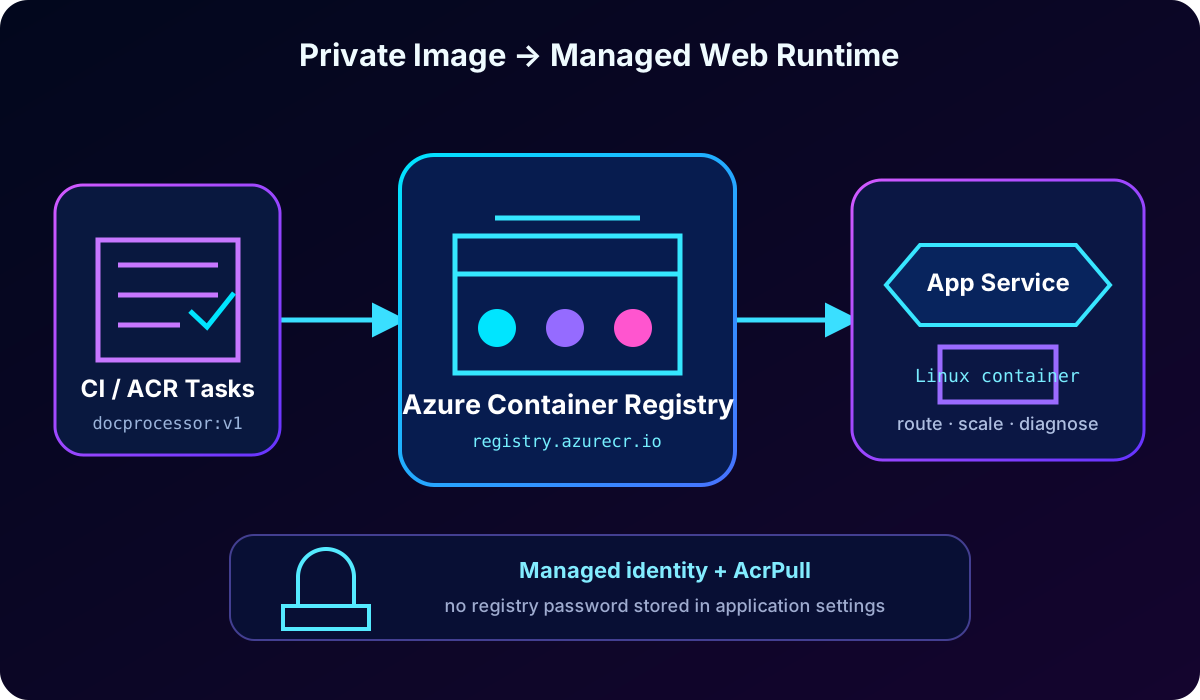
Deploy custom images from (ACR) or another compatible registry.
Configure startup commands, the HTTP port, shared storage, always-on behavior, and health checks.
Provide app settings, connection strings, slot-specific values, and references.
Use logs, the SCM/Kudu site, , and optional SSH for diagnosis.
Topic summary
turns a portable container image into an operated web application by adding managed compute, configuration, scaling, routing, and diagnostics.
2. Image sources and portal deployment
A pulls an image from a registry. ACR is the natural production source when Azure identity, private networking, geo-replication, scanning integrations, and role-based access are required. The generic private-registry option works with Docker Hub, GitHub Container Registry, or a self-hosted registry that exposes the Docker Registry HTTP API V2 over HTTPS; public images require no credentials.
Create or select the subscription, resource group, region, and globally unique web app name.
Choose Container as the publish model and Linux as the operating system.
Select or create an plan.
On the Container tab, select ACR or another registry, then specify authentication, repository, image, and an explicit tag.
Review the configuration, create the app, and validate its default hostname.
For ACR in the same subscription, the portal can list registries, repositories, and tags. For other private registries, supply the server URL, user, and password. Prefer a unique, tested tag instead of latest so the release is traceable.
The runtime pulls a selected image from the registry. Identity authorizes the pull; runtime and application settings are applied after the image is selected.
Topic summary
Choose a registry, a deterministic image reference, an plan, and an authentication method; provisions the web runtime and pulls the image.
3. ACR authentication with managed identity
Managed identity is the preferred production design because receives a Microsoft Entra identity and does not store registry passwords. A system-assigned identity follows the web app lifecycle. A user-assigned identity is an independent Azure resource that can be prepared before the app and shared by several apps when that ownership model is intentional.
Grant only the AcrPull role at the registry or narrower supported scope, then tell to use managed identity for image pulls. Admin credentials are convenient in constrained development scenarios but create a long-lived secret, require the ACR admin account, and add rotation and audit risk.
az webapp identity assign --resource-group myResourceGroup --name myDocumentProcessor

ACR_ID=$(az acr show --resource-group myResourceGroup --name myregistry --query id -o tsv)
PRINCIPAL_ID=$(az webapp identity show --resource-group myResourceGroup --name myDocumentProcessor --query principalId -o tsv)
az role assignment create --assignee $PRINCIPAL_ID --scope $ACR_ID --role AcrPull

az webapp config set --resource-group myResourceGroup --name myDocumentProcessor \
  --generic-configurations '{"acrUseManagedIdentityCreds": true}'

az webapp config container set --resource-group myResourceGroup --name myDocumentProcessor \
  --container-image-name myregistry.azurecr.io/docprocessor:v1
A registry protected by a private endpoint also needs virtual network integration, working DNS resolution, and vnetImagePullEnabled so image-pull traffic follows the virtual network path.
Topic summary
Managed identity plus AcrPull removes stored registry credentials; private registries additionally require correct networking and DNS.
4. CLI, VS Code, image updates, and continuous delivery
The Azure CLI is suitable for scripts and CI/CD because the resource, plan, image, and tag are explicit. with Docker and Azure extensions offers a guided development flow: build locally, push to a registry, and deploy the selected tag. Production still needs independently verified identity and role assignments.
When the image reference changes, restarts instances and pulls the new image. On every restart it performs a pull but downloads only changed layers when cached data is available. A new scale-out instance, host move, or pricing-tier change can require a complete pull, so image size directly affects readiness and cold-start time.
Reusing a tag does not by itself create a new release event. Either restart the app or configure continuous deployment so a registry push invokes the webhook. A mature pipeline builds and tests the image, publishes an immutable version, updates the app reference, waits for readiness, and preserves rollback metadata.
az webapp config container set -g myResourceGroup -n myDocumentProcessor \
  --container-image-name myregistry.azurecr.io/docprocessor:v2

az webapp deployment container config -g myResourceGroup -n myDocumentProcessor --enable-cd true
az webapp show -g myResourceGroup -n myDocumentProcessor --query defaultHostName -o tsv
Topic summary
Automate explicit version changes, understand when layers are repulled, and connect registry pushes to a tested, observable release process.
5. Startup command and HTTP port
normally honors ENTRYPOINT and CMD from the Dockerfile. A custom startup command can add environment-specific arguments, run initialization, start a process manager, or override framework defaults. It replaces CMD while ENTRYPOINT remains unless the image configuration itself changes. Use a shell only when operators such as && or variable expansion are required.
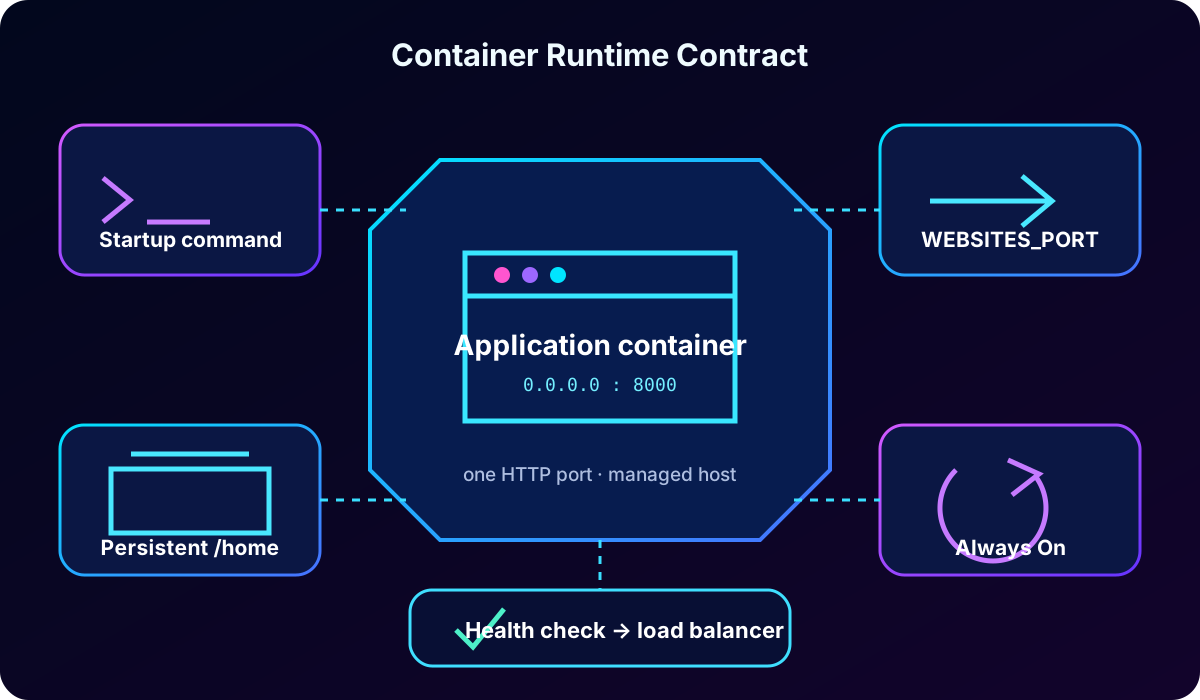
Current Microsoft guidance assumes that a custom Linux container listens on port 80. If the application listens elsewhere, set WEBSITES_PORT. terminates TLS and forwards HTTP traffic to one container port, so the process must bind to 0.0.0.0 rather than localhost. EXPOSE documents image intent but does not replace the port setting.
Typical internal HTTP ports.
Runtime
Common port
action
Node.js / Express
3000
Set WEBSITES_PORT=3000.
Python / Gunicorn
8000
Set WEBSITES_PORT=8000.
Java / Spring Boot
8080
Set WEBSITES_PORT=8080.
Container listening on 80
80
No alternative port setting is required.
az webapp config set --resource-group myResourceGroup --name myDocumentProcessor \
  --startup-file "gunicorn --bind=0.0.0.0:8000 --workers=4 app:application"

az webapp config appsettings set --resource-group myResourceGroup --name myDocumentProcessor \
  --settings WEBSITES_PORT=8000 WEBSITES_ENABLE_APP_SERVICE_STORAGE=true

az webapp config set --resource-group myResourceGroup --name myDocumentProcessor \
  --always-on true --generic-configurations '{"healthCheckPath":"/health"}'
Topic summary
Keep image defaults when possible; otherwise override CMD deliberately, bind to all interfaces, and make WEBSITES_PORT match the single internal HTTP port.
6. Persistent storage, always-on, and health checks
The writable container layer is ephemeral. A restart, host move, or replacement can remove files written outside a mounted location. For Linux custom containers, enabling storage makes /home persistent and shared by scaled-out instances; /home/LogFiles also holds platform-accessible logs. Plan quotas at the -plan level. Use an Azure mount when capacity, sharing, or I/O requirements exceed the built-in share.
Always-on prevents the app from idling and reduces user-visible cold starts. It is available from the Basic tier upward and is valuable for production APIs, large images, slow initialization, or background work. It does not remove scale-out startup, so small images and deferred heavy initialization still matter.
A health check periodically calls a path. Return 200 only when the instance can serve requests; repeated failures remove it from load-balancer rotation and prolonged failure can lead to replacement. The configured path must exactly match the application endpoint. Keep the check useful but fast, and apply changes carefully because configuration changes restart the app.
Runtime controls determine how the image starts, receives traffic, preserves selected files, stays warm, and proves readiness.
Topic summary
Use /home for intended persistence, always-on to reduce idle cold starts, and a matching health endpoint to protect traffic from unhealthy instances.
7. App settings and connection strings
App settings are encrypted name-value pairs injected as environment variables when the container starts. They let development, staging, and production use the same image. Keep setting names portable: letters, digits, and underscores are safest; Linux .NET nested keys use double underscores instead of colons, such as ConnectionStrings__DefaultConnection.
Connection strings add a database-type prefix. SQL Server becomes SQLCONNSTR_, becomes SQLAZURECONNSTR_, MySQL becomes MYSQLCONNSTR_, PostgreSQL becomes POSTGRESQLCONNSTR_, and custom values become CUSTOMCONNSTR_. Non-.NET runtimes often use ordinary app settings because they do not benefit from the prefix convention.
az webapp config appsettings set --resource-group myResourceGroup --name myDocumentProcessor \
  --settings STORAGE_ACCOUNT_NAME=mystorageaccount LOG_LEVEL=INFO MAX_DOCUMENT_SIZE_MB=50

az webapp config connection-string set --resource-group myResourceGroup --name myDocumentProcessor \
  --connection-string-type SQLAzure \
  --settings DefaultConnection="Server=myserver.database.windows.net;Database=mydb;..."

az webapp config appsettings set --resource-group myResourceGroup --name myDocumentProcessor \
  --settings API_KEY="@Microsoft.KeyVault(SecretUri=https://myvault.vault.azure.net/secrets/api-key)"
Topic summary
Inject environment-specific values rather than rebuilding images, and choose connection-string objects only when the runtime expects their type prefixes.
8. Bulk edits, deployment slots, and references
For many values, export app settings as JSON, review them as code, and reapply the file. The portal also offers advanced JSON editing. Never commit real production secrets to that file.
Deployment slots run separate versions on shared plan compute. A swap moves code and most configuration, but values marked as slot settings remain with their slot. Mark environment identifiers, endpoints, database connections, feature flags, verbose diagnostics, and most references as slot-specific when crossing environments would be unsafe.
A reference lets the app read a secret through the usual environment-variable name without code changes. Enable managed identity and grant secret-read permission, preferably the Secrets User role under Azure RBAC. A versionless reference follows the latest secret; refreshes cached references within 24 hours, and a configuration change or explicit refresh forces earlier resolution.
az webapp config appsettings list -g myResourceGroup -n myDocumentProcessor -o json > settings.json
az webapp config appsettings set -g myResourceGroup -n myDocumentProcessor --settings @settings.json

az webapp config appsettings set -g myResourceGroup -n myDocumentProcessor --slot staging \
  --settings ENVIRONMENT=staging API_ENDPOINT=https://api-staging.example.com \
  --slot-settings ENVIRONMENT API_ENDPOINT
Topic summary
Treat configuration as reviewed data, pin environment-sensitive values to slots, and place managed secrets in behind an authorized identity.
9. Container logs, log stream, and the SCM/Kudu site
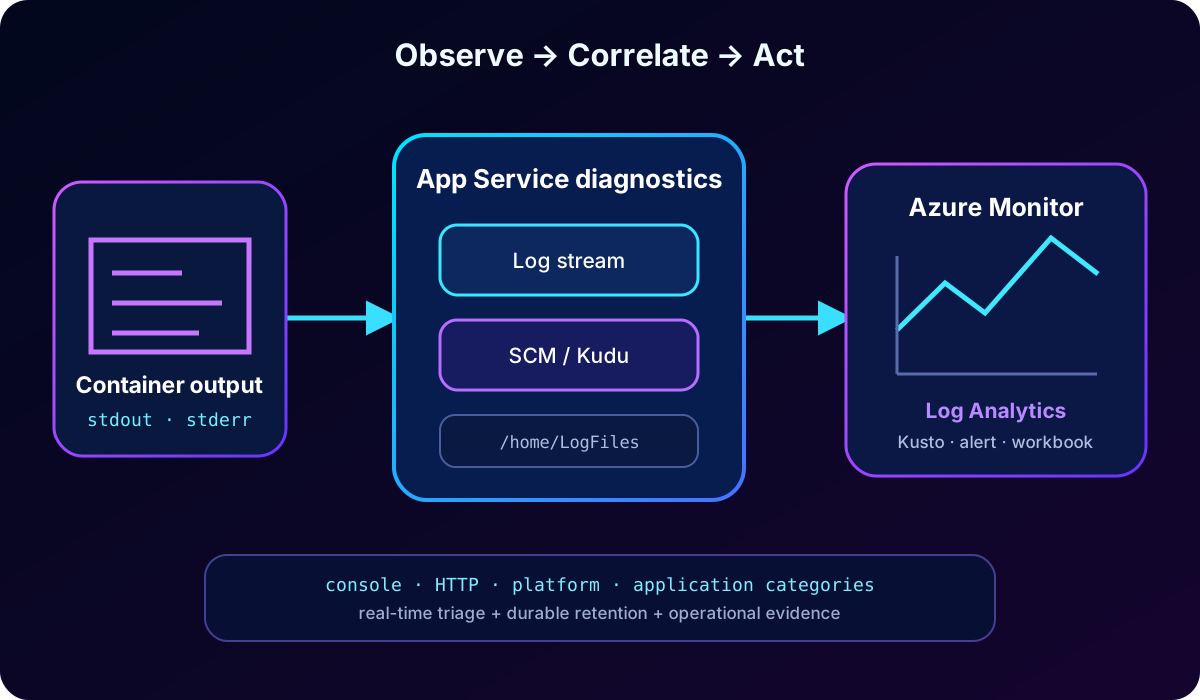
captures stdout and stderr, including application messages, exception traces, framework output, request information, and container lifecycle events. Configure the application to write structured, useful console logs without credentials or document contents. Filesystem logging exposes output under /home/LogFiles for short-term diagnosis.
az webapp log config --resource-group myResourceGroup --name myDocumentProcessor \
  --docker-container-logging filesystem

az webapp log tail --resource-group myResourceGroup --name myDocumentProcessor
Log stream shows new entries in real time and can aggregate output from scaled instances with identifiers. The SCM site at https://<app-name>.scm.azurewebsites.net provides the Environment view, a browser for mounted storage, log downloads, and diagnostic dumps. It is a companion site, not the application container, so its shell cannot inspect every process or ephemeral path inside the running image.
Topic summary
Send application output to stdout/stderr, stream it during incidents, and use Kudu for applied environment variables, mounted files, and diagnostic bundles.
10. , Log Analytics, and optional SSH
Filesystem logs are not a complete retention strategy. Diagnostic settings can route AppServiceConsoleLogs, AppServiceHTTPLogs, AppServicePlatformLogs, and configured AppServiceAppLogs to an Log Analytics workspace, , or a storage account. Centralized data supports Kusto queries, alerts, workbooks, dashboards, retention, and cross-instance correlation.
RESOURCE_ID=$(az webapp show -g myResourceGroup -n myDocumentProcessor --query id -o tsv)
WORKSPACE_ID=$(az monitor log-analytics workspace show -g myResourceGroup -n myWorkspace --query id -o tsv)

az monitor diagnostic-settings create --resource "$RESOURCE_ID" \
  --name appServiceDiagnostics --workspace "$WORKSPACE_ID" \
  --logs '[{"category":"AppServiceConsoleLogs","enabled":true},{"category":"AppServiceHTTPLogs","enabled":true}]'
AppServiceConsoleLogs
| where TimeGenerated > ago(1h)
| where ResultDescription has_any ("error", "exception", "failed")
| project TimeGenerated, _ResourceId, ResultDescription
| order by TimeGenerated desc
SSH is optional and must be designed into the image: install OpenSSH, listen on port 2222, use the -required configuration, and start the daemon beside the application. It provides an interactive session in one instance, but container-layer changes disappear after restart. Use SSH for targeted inspection, not as a deployment mechanism.
Real-time tools accelerate triage; centralized logs preserve history and support queries, alerts, and operational evidence.
Topic summary
Export diagnostic categories for durable analysis and alerts; reserve SSH for short-lived, in-container investigation when the image explicitly supports it.
Fix AcrPull/network access, dependency failure, or missing environment value.
Connection error or 404
WEBSITES_PORT, bind address, and application route.
Match the internal port, bind 0.0.0.0, and expose the expected path.
Files disappear after restart
Write location and storage setting.
Enable storage and write to /home, or mount Azure .
Health check removes instances
Configured path and endpoint status.
Make the paths identical and return 200 only when ready.
Settings appear missing
Portal/CLI save result and Kudu /Env.
Correct the name, slot, or identity/permission.
Slow first request
Image size, pull/start duration, and always-on.
Use smaller multi-stage images, optimize startup, and enable always-on.
Reproduce the container locally with equivalent nonsecret configuration, then move outward: image and registry, configuration, runtime readiness, request routing, and downstream dependencies. This order avoids treating every HTTP failure as an application-code defect.
Topic summary
Diagnose in layers: image pull, startup, configuration, port and binding, health, routing, storage, and downstream services.
12. Guided lab: private ACR image to
The supplied exercise estimates 30 minutes. It requires an Azure subscription with deployment and role-assignment permissions, current Azure CLI, , and optionally Python 3.12 or later. The source notes that ACR Tasks can be unavailable to free-credit subscriptions; verify current eligibility and expected charges before running the lab.
Download or create a small document-processing API with /health and a test endpoint.
Create a dedicated resource group and ACR, then build and push an explicit image tag with ACR Tasks.
Create a Linux plan and .
Enable system-assigned identity, grant AcrPull, and configure managed-identity image pull.
Set WEBSITES_PORT, environment variables, persistent storage if needed, always-on, and the health path.
Enable container logging and watch startup through log stream.
Call the default hostname and processing endpoint; validate nonsensitive settings in Kudu.
Push a new unique tag, update the app, verify readiness, and document rollback.
Delete the dedicated resource group if it contains no shared assets.
az group create -n rg-ai200-appservice-lab -l eastus
az acr create -g rg-ai200-appservice-lab -n <globally-unique-registry> --sku Basic
az acr build -r <globally-unique-registry> -t docprocessor:v1 .
az appservice plan create -g rg-ai200-appservice-lab -n plan-ai200 --is-linux --sku B1
az webapp create -g rg-ai200-appservice-lab -p plan-ai200 -n <globally-unique-app> \
  --container-image-name <registry>.azurecr.io/docprocessor:v1

# Then apply managed identity, AcrPull, runtime settings, health, and logging from the earlier sections.
Topic summary
The lab proves the complete path: cloud build, private pull, managed runtime, externalized configuration, health, logs, functional test, release update, and cleanup.
13. Rewritten knowledge check with explanations
Reason from the symptom to the platform control.
Scenario
Best decision
Why
The image listens on 8000 but requests cannot connect.
Set WEBSITES_PORT=8000.
must forward traffic to the actual internal port.
Generated files vanish after restart.
Enable storage and write to /home.
The ordinary container layer is ephemeral.
Staging and production use different API endpoints.
Mark API_ENDPOINT as a slot setting.
It remains with its environment during a swap.
The app has /healthz but instances fail health checks.
Configure the health path as /healthz.
The platform and application paths must match.
A developer needs to confirm injected settings.
Open the Kudu Environment page.
It shows and system-provided environment variables.
Topic summary
Map port, persistence, slot affinity, health-path alignment, and environment inspection to the corresponding control.
14. Final review and Microsoft references
pulls a selected image and manages the web runtime.
Managed identity with AcrPull is the preferred private ACR authentication.
Startup, port, storage, always-on, and health controls determine runtime behavior.
App settings and references keep environments and secrets outside the image.
Console logs, Kudu, , Log Analytics, and optional SSH form the diagnostic toolkit.
A release is complete only after readiness, functional verification, observability, and rollback evidence.