Information extraction from documents, audio, and video in Microsoft Foundry
Azure Content Understanding, OCR, schemas, analyzers, JSON, Foundry portal, API, and the Python SDK
Suggested study time: 48 minutes • Beginner level • Original rewrite based on Microsoft Learn objectives
By João Ricardo Dutra••Complete original content
1. Why extract information from unstructured content
Invoices, forms, receipts, contracts, recorded calls, and video meetings contain valuable data, but manually reading, typing, and checking every item is slow and error-prone. AI-assisted extraction turns this material into consistent, searchable data ready for automation.
Representative business value.
Input
Possible outcome
Scanned receipt
Vendor, date, items, and total populate an expense claim.
Support call
Transcript, summary, sentiment, contact details, and requested actions.
Operational image or video
People, location, events, time intervals, and evidence for capacity planning.
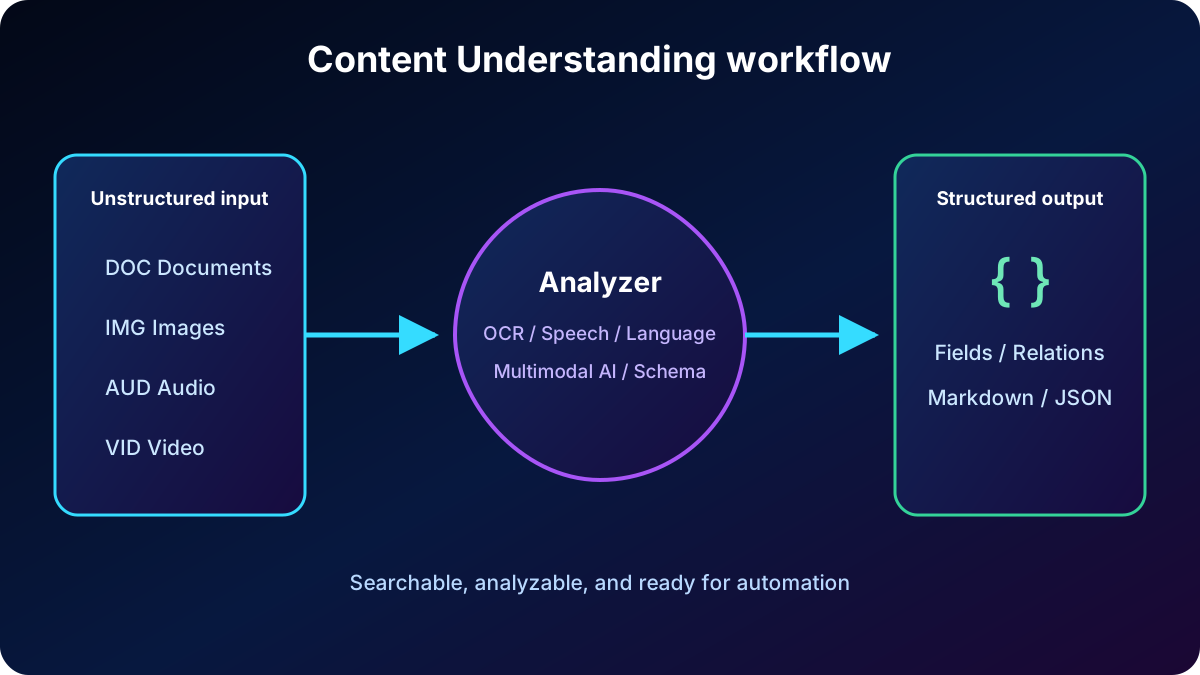
Documents, images, audio, and video pass through an analyzer and become structured output.
2. Azure Content Understanding in Foundry Tools
Azure Content Understanding in Foundry Tools is a resource tool that combines generative AI and specialized models to understand documents, images, audio, and video. It extracts content, entities, fields, relationships, and meaning into a user-defined format, typically JSON.
The workflow stays consistent: ingest the file; use OCR, speech recognition, language understanding, and multimodal models; apply a schema; and return machine-readable results for storage, search, analytics, or downstream systems. Current documentation also covers segmentation, classification, confidence scores, and grounding extracted fields in the source.
3. OCR, layout, and semantic understanding
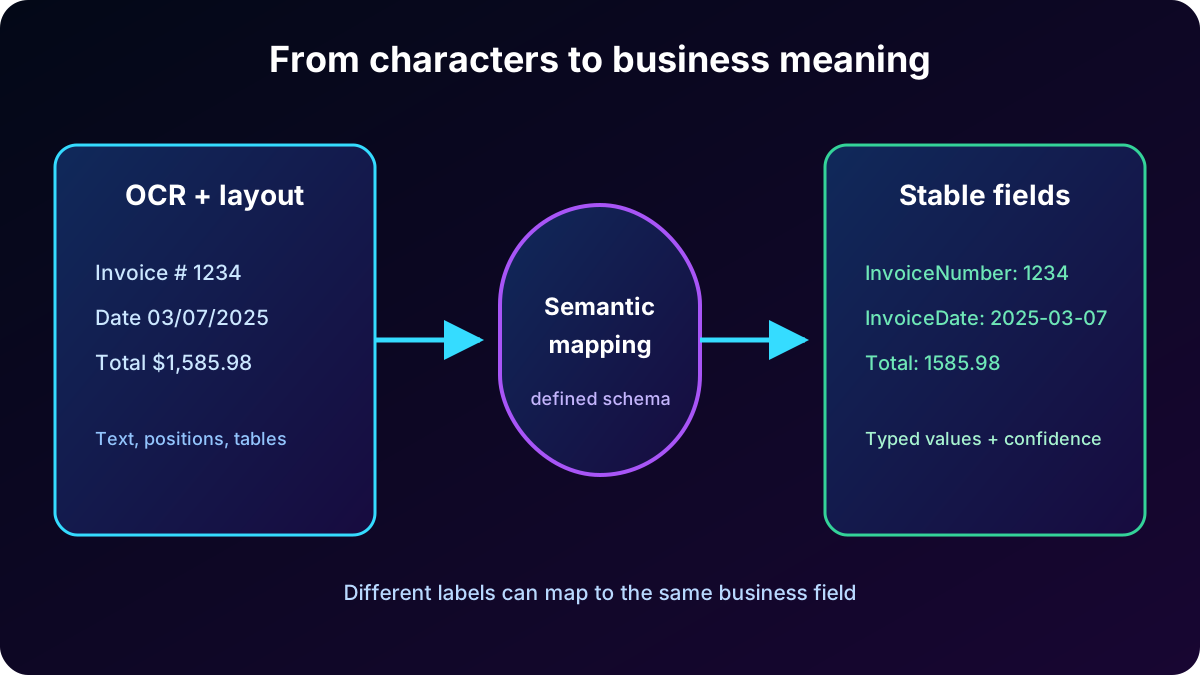
Optical Character Recognition (OCR) identifies characters in photographs and scans and turns them into editable, searchable text. Layout analysis preserves paragraphs, sections, tables, selection marks, formulas, and hierarchy. Those capabilities are essential, but they do not by themselves explain business meaning.
Content Understanding adds semantic interpretation and schema mapping. “Invoice No.,” “Invoice #,” or even an unlabeled number can therefore populate the same InvoiceNumber field. The result represents concepts, relationships, and predictable types instead of a flat string of words.
OCR recovers text and layout; the semantic layer associates values with application fields.
4. Invoice schema and nested fields
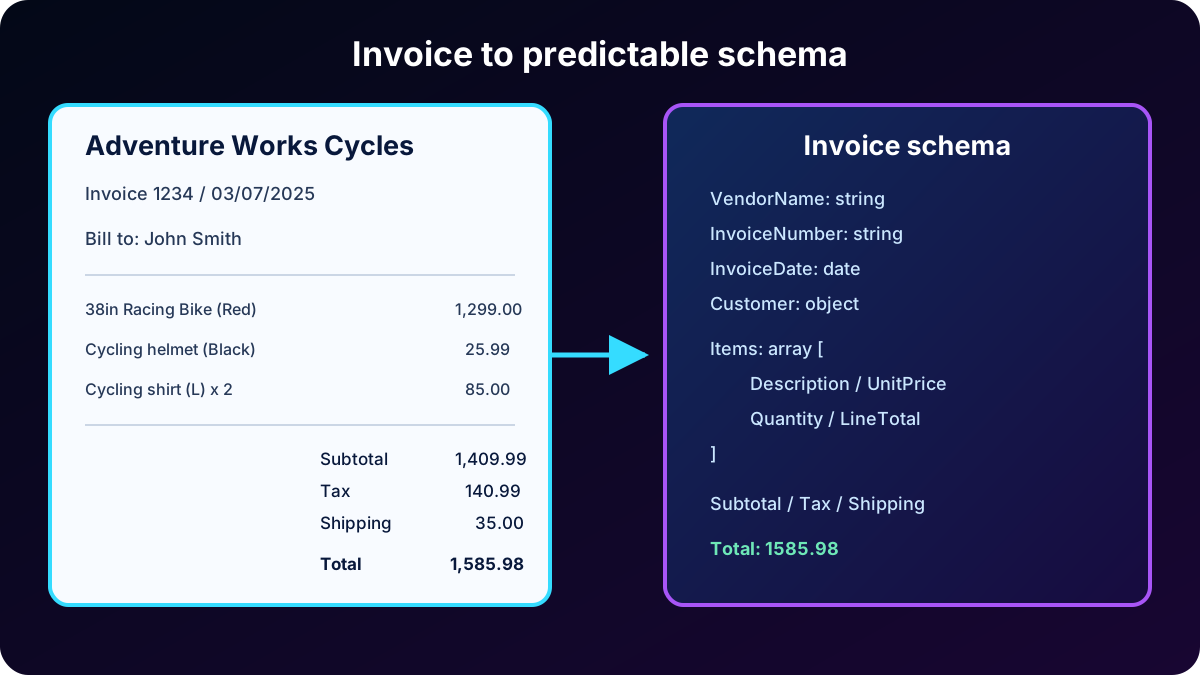
A schema describes exactly what a process must receive. For an invoice, simple fields can include vendor, invoice number, date, customer, address, subtotal, tax, shipping, and total. The Items collection contains nested objects for description, unit price, quantity, and line total.
The analyzer maps variable labels and positions into a stable structure, including the nested item list.
Values retained from the example.
Field
Value
Vendor / invoice / date
Adventure Works Cycles / 1234 / 03/07/2025
Customer
John Smith — 123 River Street, Marshtown, England GL1 234
Items
38″ red racing bike: 1 × 1,299.00; black cycling helmet: 1 × 25.99; cycling shirt (L): 2 × 42.50.
Totals
Subtotal 1,409.99; tax 140.99; shipping 35.00; total 1,585.98.
5. Prebuilt and custom analyzers
An analyzer is the reusable unit that determines modality, extraction behavior, field schema, output structure, and models. A prebuilt analyzer works without configuration for a known scenario; a custom analyzer applies an organization’s schema and rules.
prebuilt-invoice understands common invoice fields.
prebuilt-imageSearch describes images for search and retrieval.
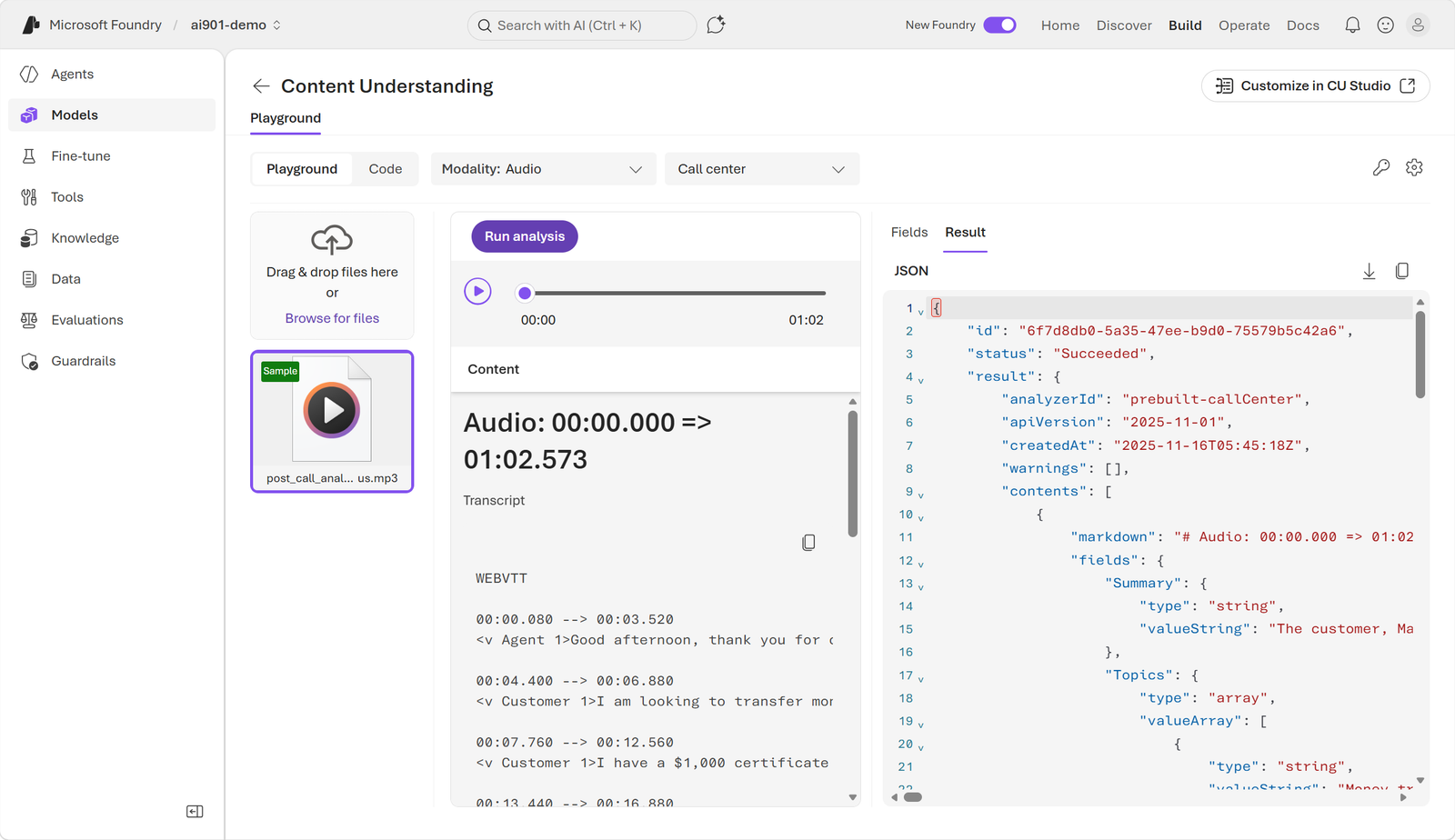
prebuilt-audioSearch transcribes audio, diarizes speakers, and generates conversational insights.
prebuilt-videoSearch combines frames, audio, time, and summaries.
Current documentation also lists base analyzers such as prebuilt-document, prebuilt-image, prebuilt-audio, and prebuilt-video.
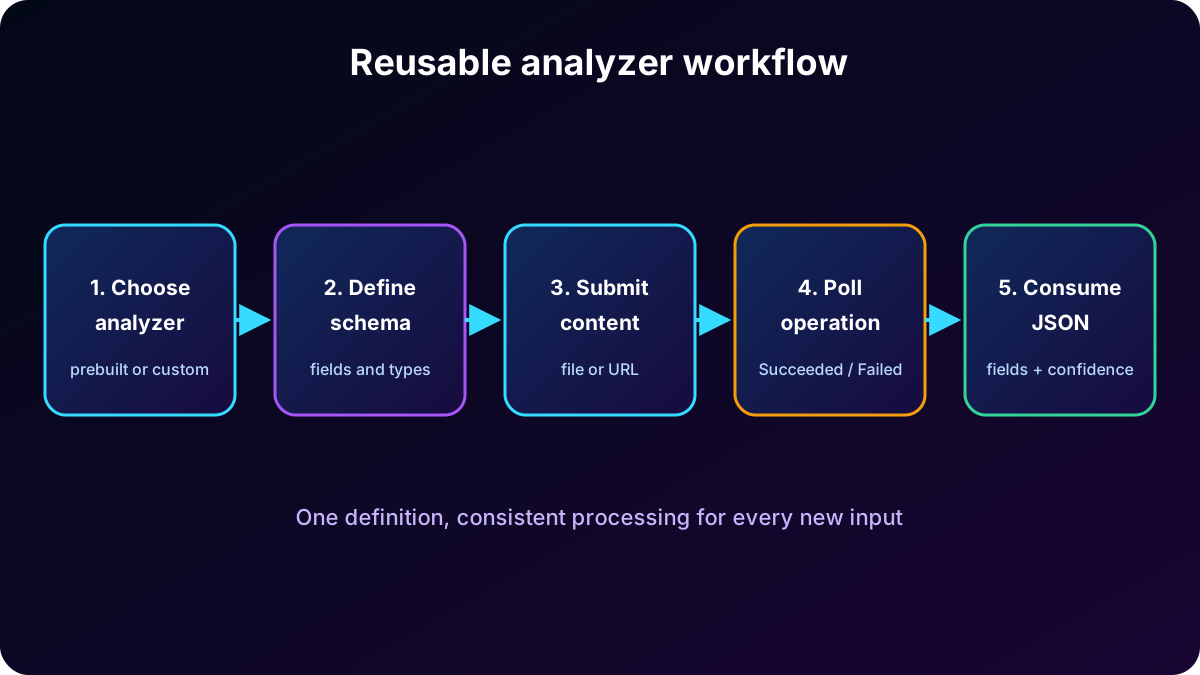
Choose or create an analyzer, define the schema, submit content, wait for analysis, and consume JSON.
6. Validate documents in the portal
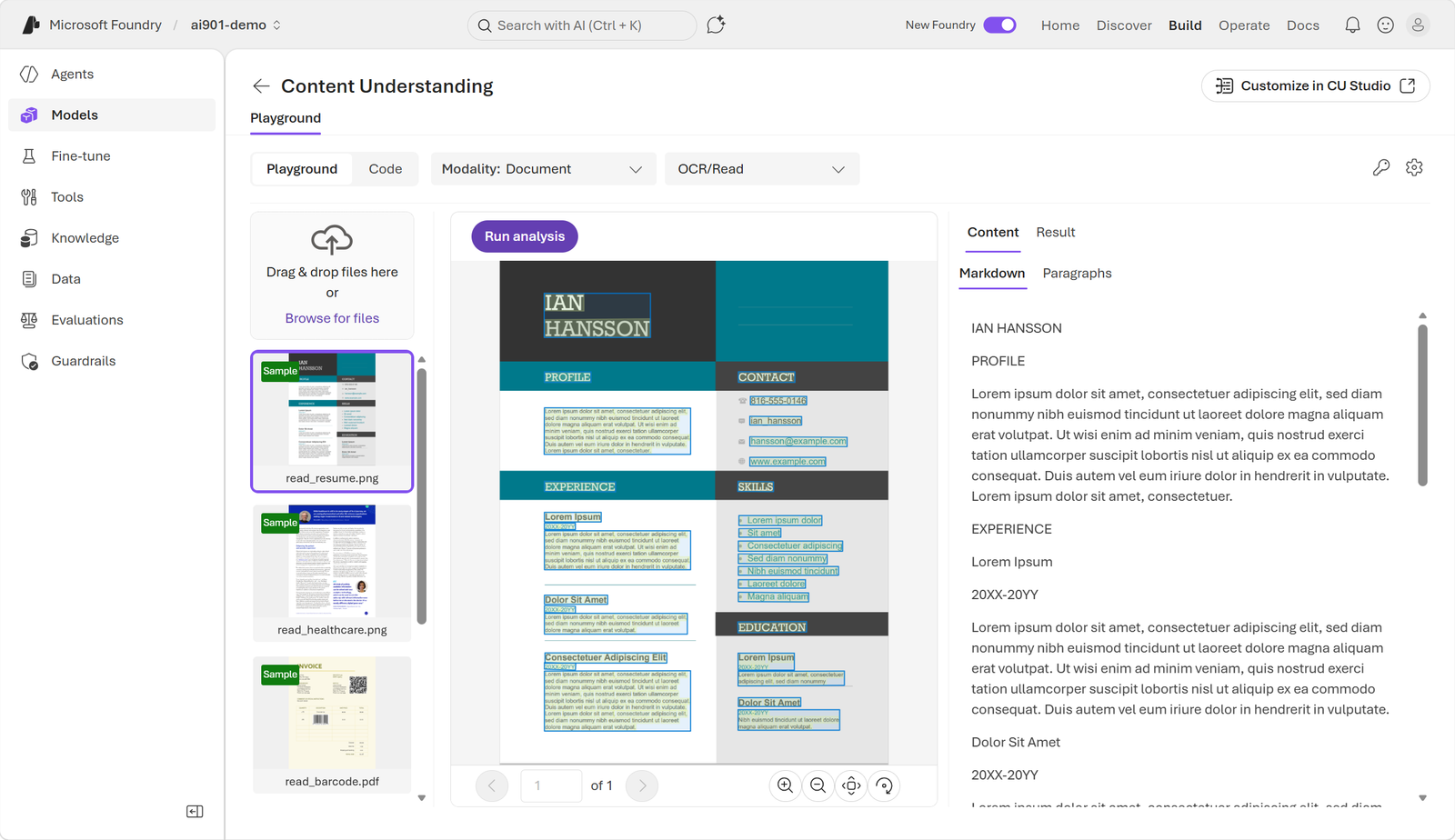
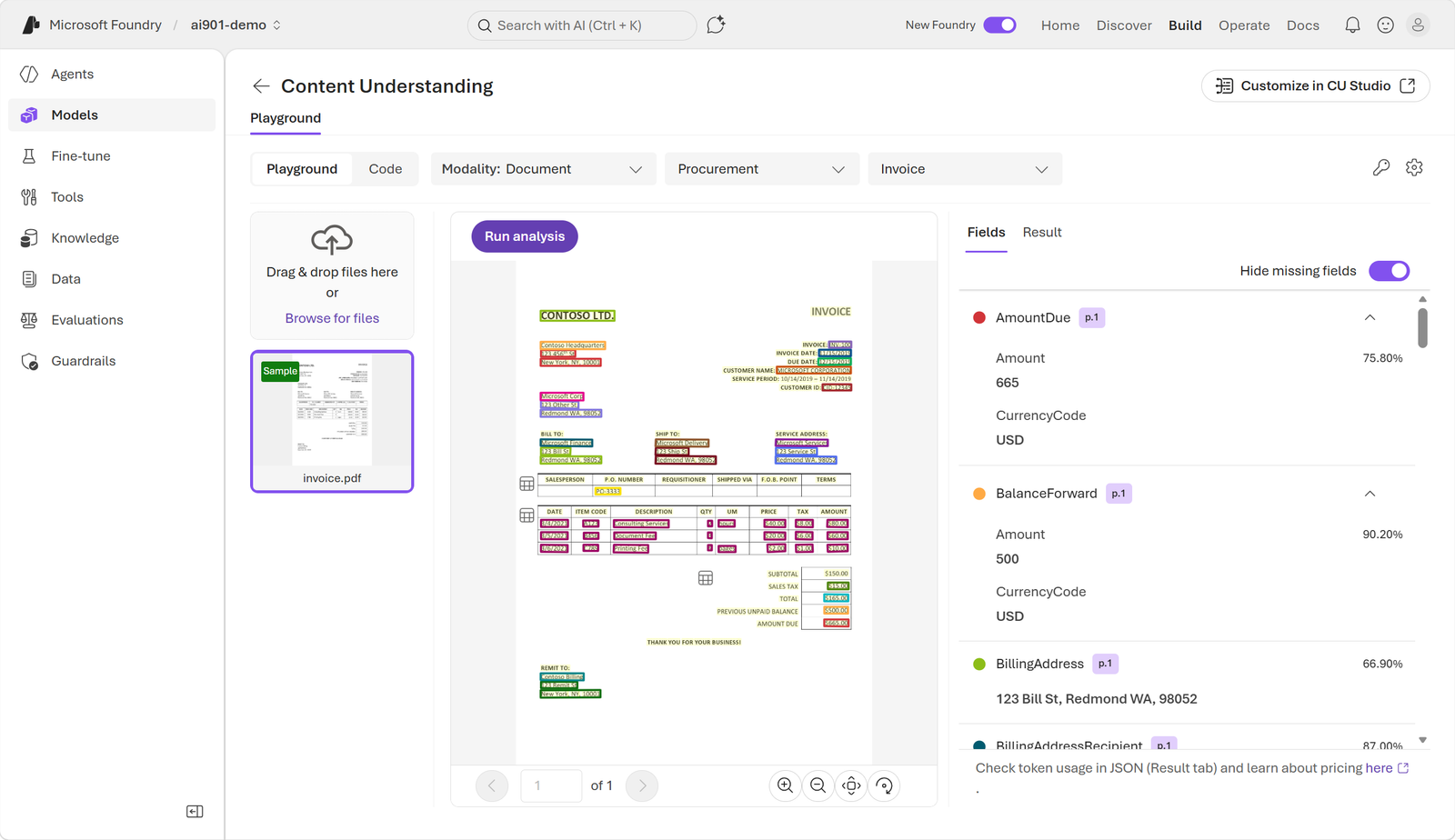
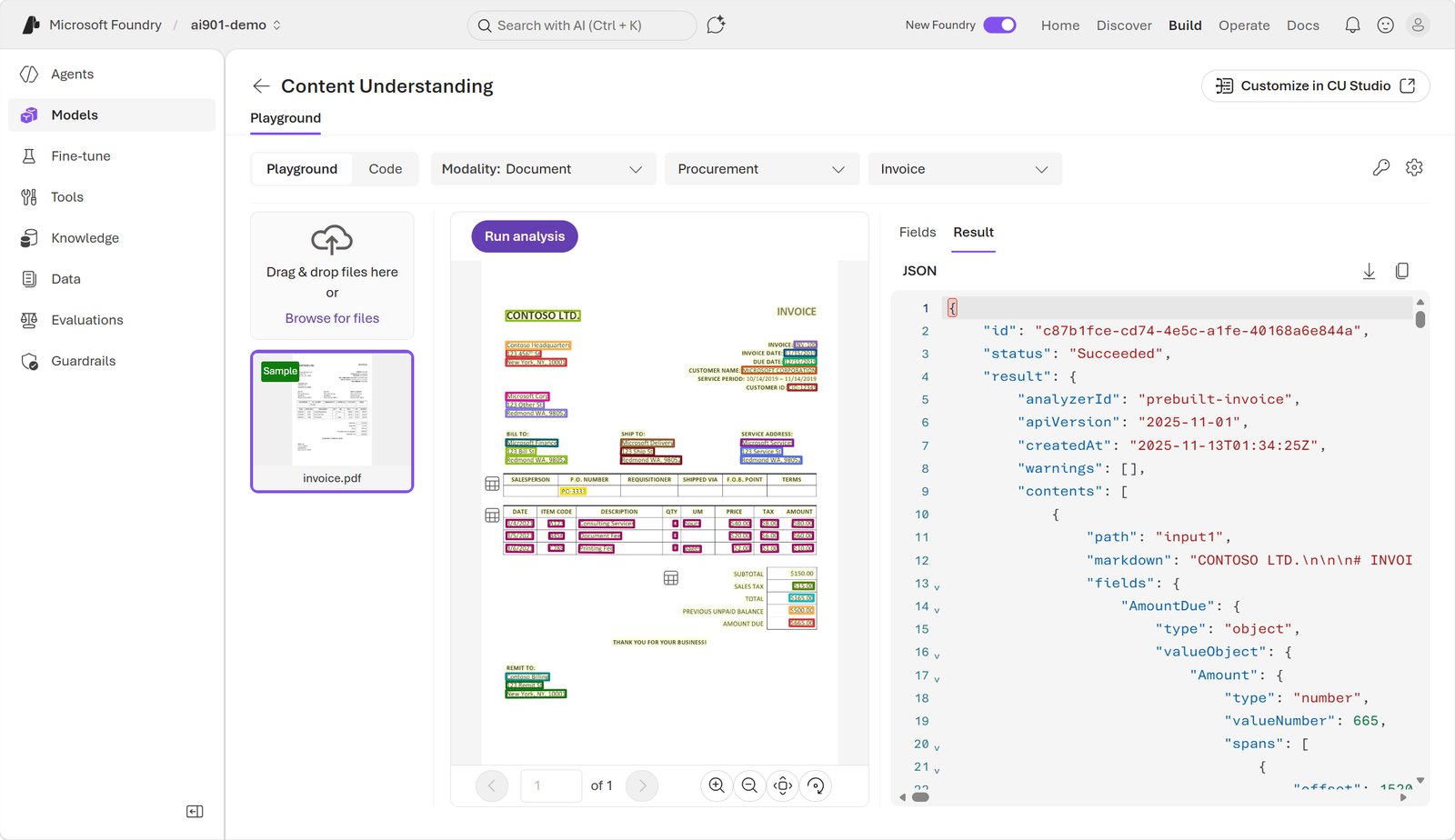
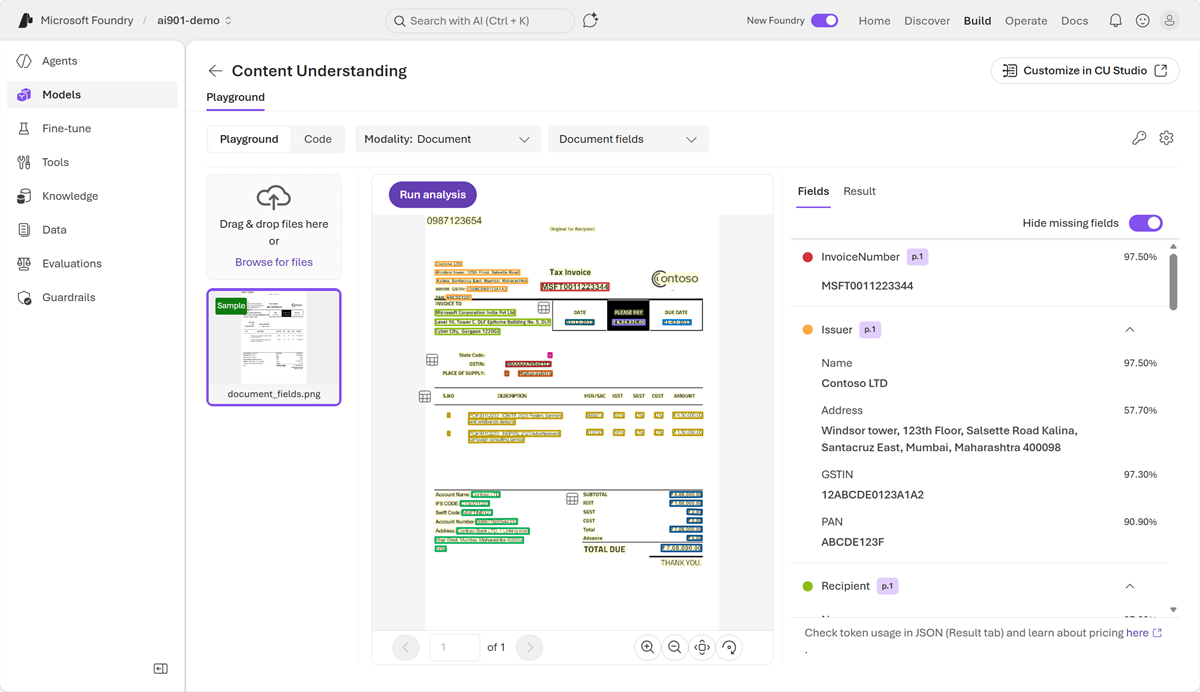
Before writing code, the portal lets you select an analyzer, use sample files or upload your own, and verify that text, layout, and fields match expectations. The new and classic portals look different but support the same experimentation purpose.
The content view shows text and structure detected in the document.The fields view maps invoice values to the analyzer schema.The same analysis can be inspected as JSON for downstream integration.
7. Document client application with the Python SDK
A client application authenticates to the endpoint, submits content, tracks the operation, and processes the result. The azure-ai-contentunderstanding package provides ContentUnderstandingClient. The endpoint follows https://<resource>.services.ai.azure.com/, and credentials can use AzureKeyCredential or when configured.
python -m pip install azure-ai-contentunderstanding

import os
from azure.ai.contentunderstanding import ContentUnderstandingClient
from azure.core.credentials import AzureKeyCredential

client = ContentUnderstandingClient(
    endpoint=os.environ['FOUNDRY_ENDPOINT'],
    credential=AzureKeyCredential(os.environ['FOUNDRY_KEY'])
)
poller = client.begin_analyze(
    analyzer_id='prebuilt-invoice',
    inputs=[{'url': os.environ['INVOICE_URL']}]
)
result = poller.result()

for content in result.contents:
    print(getattr(content, 'markdown', None))
    print(getattr(content, 'fields', None))
The response includes status, analyzerId, apiVersion, and contents. Fields may contain type, value, and confidence, while markdown preserves readable content for review or RAG. Keep secrets out of source code and review low-confidence values before sensitive decisions.
8. Asynchronous operation and JSON
Analysis can take time, so the API uses an asynchronous operation. The initial request returns an Operation-Location address, which the client polls until the status becomes Succeeded or Failed. The SDK wraps this cycle in the poller returned by begin_analyze and the result() call.
Submit a file or accessible URL to the analyzer.
Store the identifier or Operation-Location.
Poll at controlled intervals rather than in a tight loop.
After completion, read contents, markdown, fields, and confidence scores.
Handle failure, timeout, and unsupported content.
9. Structured extraction from audio
For audio, the service can produce transcription, speaker diarization, a summary, and schema-defined fields. A voicemail schema could request caller, message summary, actions, callback number, and alternative contact details.
Result for the sample voicemail.
Field
Extracted value
Caller
Ava from Contoso
Summary
Ava followed up on the prior meeting and said the company can meet the price expectations.
Action
Call back or send an email to discuss next steps.
Contacts
555-12345 and Ava@contoso.com
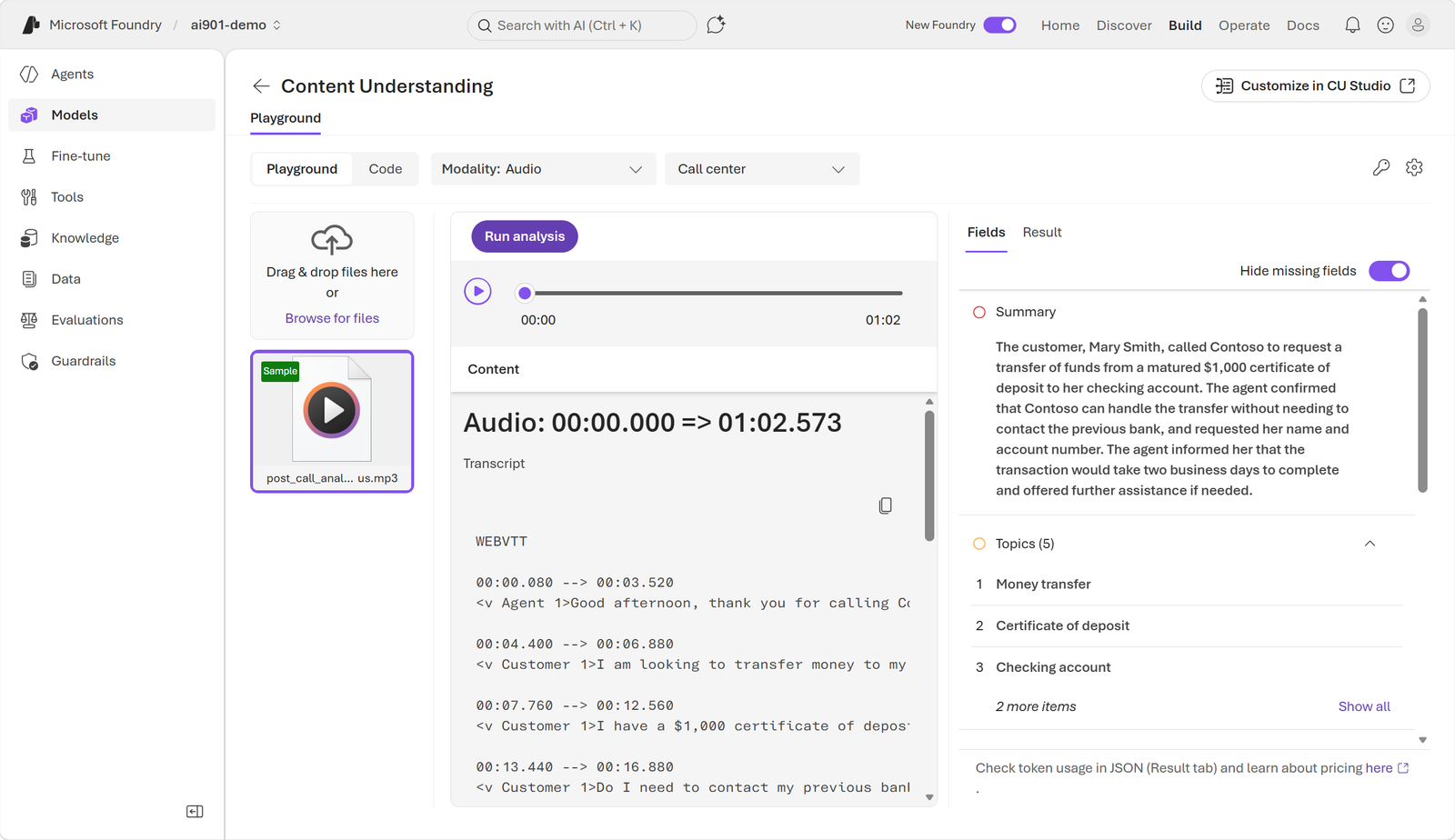
The prebuilt analyzer avoids listening to the entire call just to obtain the transcript.Call fields and insights are available for automated processing.
10. Structured extraction from video
Video combines visual cues, audio, and time. For a meeting, an initial schema might request location, in-person attendees, remote attendees, and total attendees. The sample frame depicts a conference room with one in-person and three remote participants, for a total of four.
A single frame reveals location and attendance; the full video adds temporal context.
A richer recording schema could count attendance at intervals, identify who spoke and what they said, summarize the discussion, and list assigned actions. Temporal relationships among frames, speech, and events distinguish full video analysis from inspecting one image.
11. Client for audio and video analyzers
The document-client pattern also works for media. Select prebuilt-audioSearch or prebuilt-videoSearch, provide an accessible URL, and wait for the poller. Depending on the analyzer and schema, contents can include transcript/markdown, fields, segments, and timing metadata.
analyzer_id = 'prebuilt-audioSearch'
inputs = [{'url': 'https://example.org/samples/voicemail.wav'}]

poller = client.begin_analyze(analyzer_id=analyzer_id, inputs=inputs)
result = poller.result()

for content in result.contents:
    print('TRANSCRIPT:', getattr(content, 'markdown', None))
    print('FIELDS:', getattr(content, 'fields', None))
12. Exercise and explained assessment
The approximately 25-minute exercise uses Azure Content Understanding in to analyze documents. It requires an Azure subscription; new accounts may include free credits for the first 30 days. Compare source content with fields and JSON before automating.
The lab guides the learner through running an analyzer and inspecting its output.
Content Understanding understands document structure and maps extracted data to a defined schema.
Primary analyzer role
Define how content is processed and what structured data is returned.
What follows SDK submission
The application polls the URL/operation until the asynchronous analysis job completes.
13. Summary and official references
Content Understanding applies one workflow to documents, images, audio, and video: ingest, extract content, reason with AI, map to a schema, and return structured data. Prebuilt analyzers accelerate common scenarios; custom analyzers add domain consistency; the portal, REST API, and Python SDK span validation through scaled automation.
Use OCR for text and layout; use schema and semantics for business meaning.
Model nested collections for repeated groups such as invoice items.
Test in the portal and integrate only after checking fields, JSON, and confidence.
Treat analysis as asynchronous and protect endpoints, keys, personal data, and recordings.