NLP, generative models, Azure Language in Foundry Tools, SDK, Responses API, agents, and MCP server
Suggested study time: 50 minutes • Beginner level • Original rewrite based on Microsoft Learn objectives
By João Ricardo Dutra••Complete original content
1. Text analysis and natural language processing
Natural language processing (NLP) brings together techniques that help computers interpret, understand, and respond to human language. Text analysis turns unstructured content into useful information by identifying sentiment, important words and phrases, entities, topics, and relationships.
The same capability supports very different scenarios. Customer-service teams examine reviews, tickets, and surveys for trends and dissatisfaction; healthcare organizations extract symptoms, medications, and diagnoses from clinical records; financial institutions find rates, parties, and compliance risks in contracts and loans; legal teams summarize cases, locate clauses, and classify documents by topic.
Distinguish flexible analysis with generative models from structured Azure Language operations.
Connect a client application through the Responses API or the Azure AI Text Analytics library.
Extend an agent with Azure Language MCP server for specialized tasks.
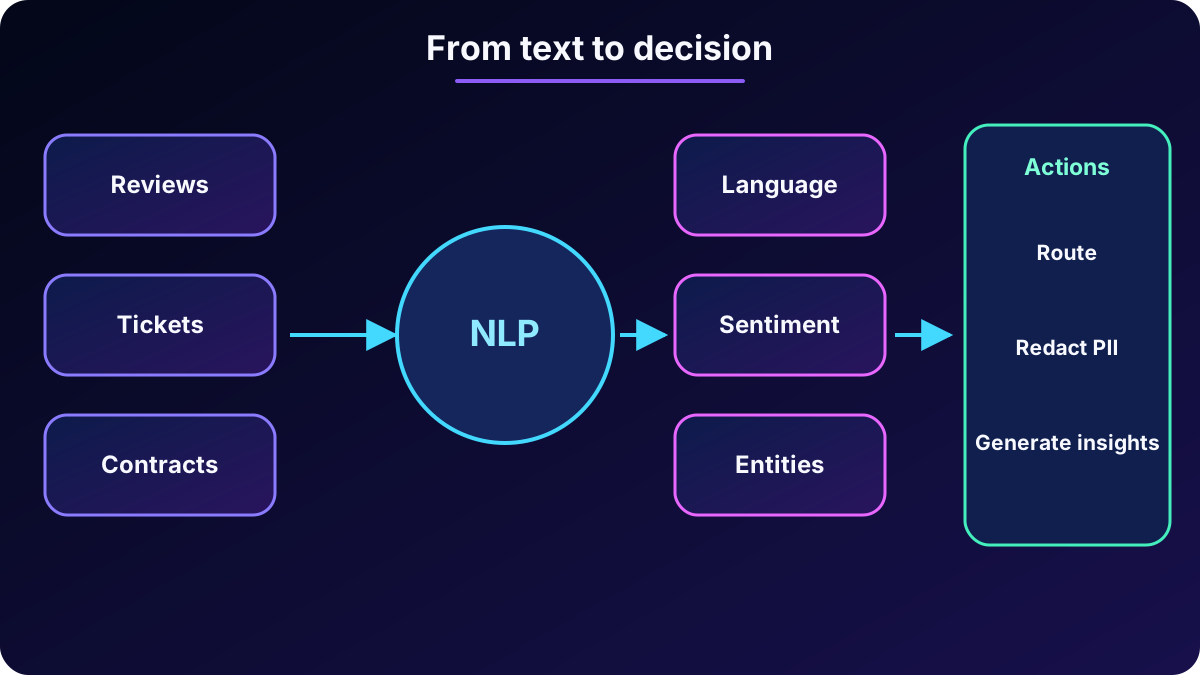
Reviews, documents, and messages pass through NLP to produce structured signals for people, applications, and agents.
2. and two analysis approaches
is the Azure platform for building AI applications and agents. Work starts with a Foundry resource, which provides access to services and models, and a Foundry project, the workspace that organizes deployments, playgrounds, connections, tools, and assets.
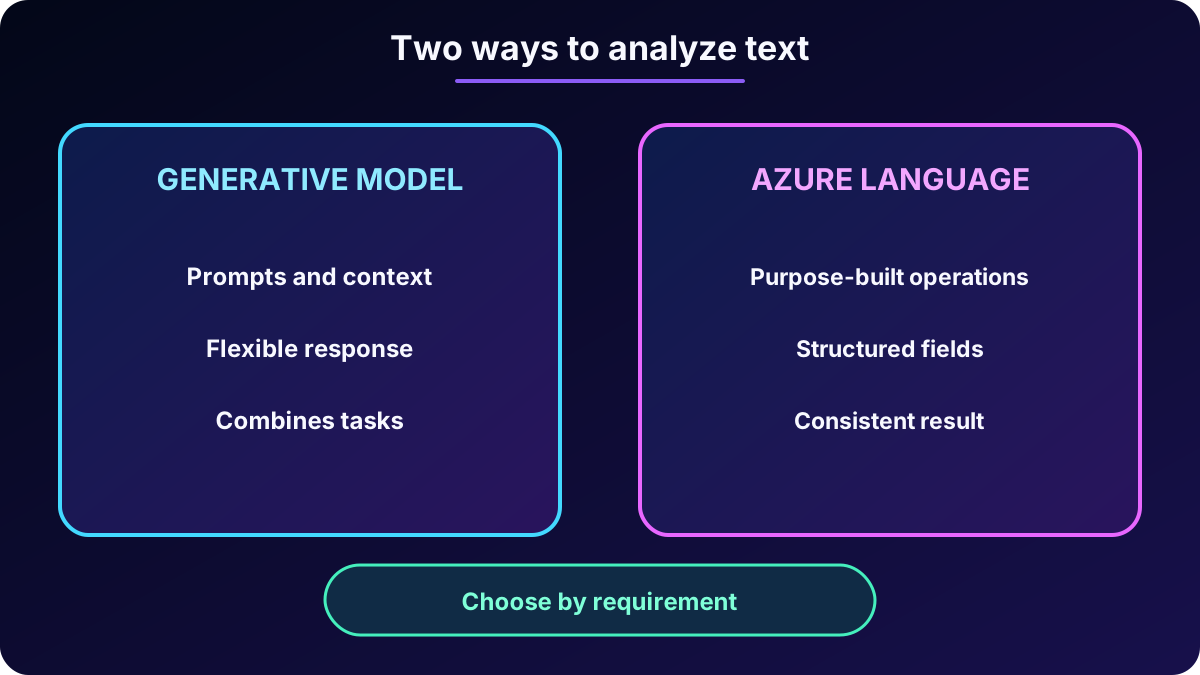
Two complementary approaches are available. A general-purpose generative model interprets prompts and combines tasks conversationally; it suits work where flexibility and natural language matter. provides specialized NLP functions with known response schemas and more consistent behavior for automated pipelines.
Comparison of the two text-analysis approaches.
Approach
Strength
Typical use
Generative model
Flexibility, context, and combined instructions
Exploration, open questions, summarization, translation, and compound analysis.
Structured, repeatable, automation-ready output
Language detection, entities, sentiment, key phrases, and PII redaction.
Choose according to the balance between conversational flexibility and deterministic output.
3. Flexible analysis with generative models
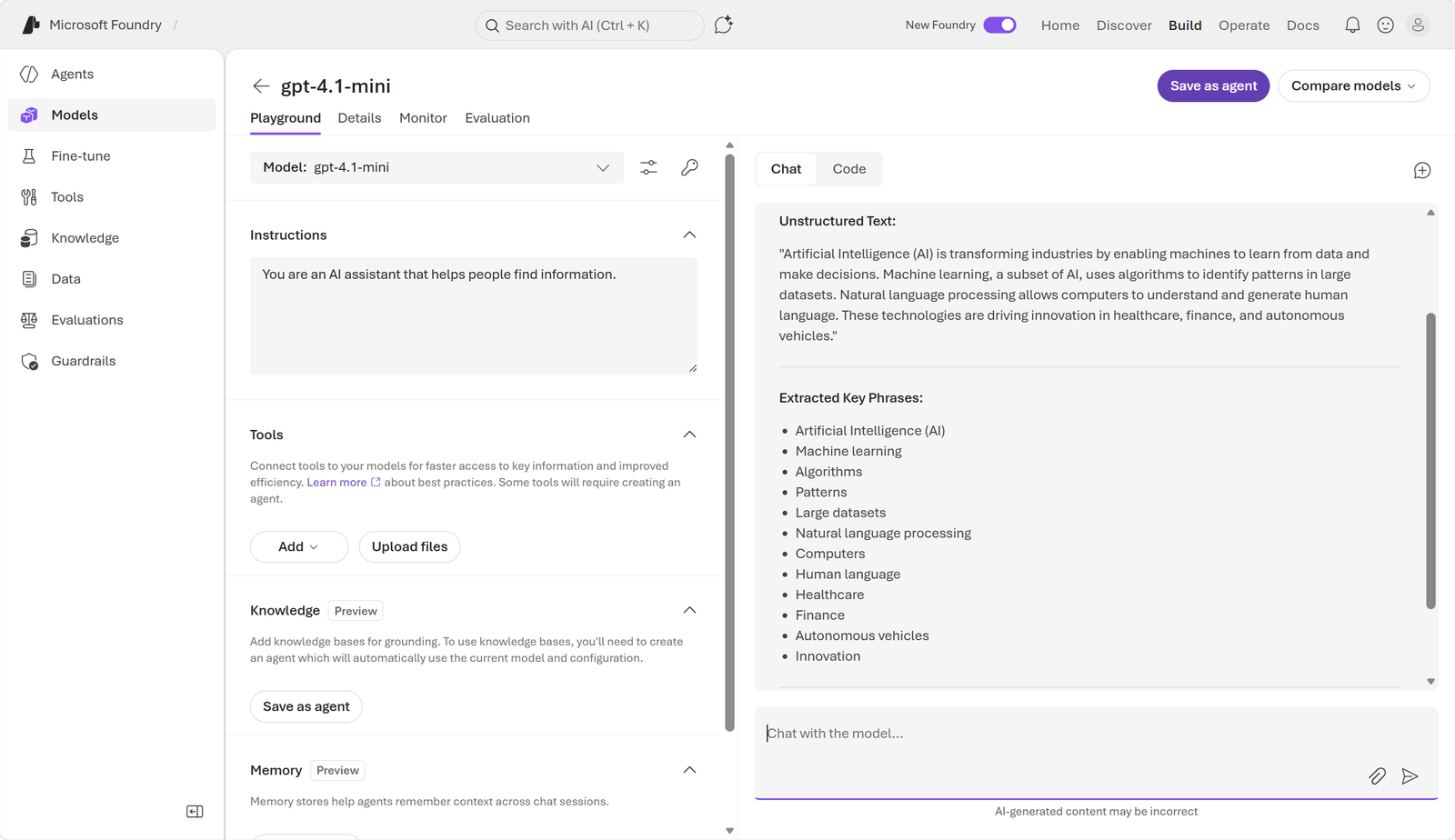
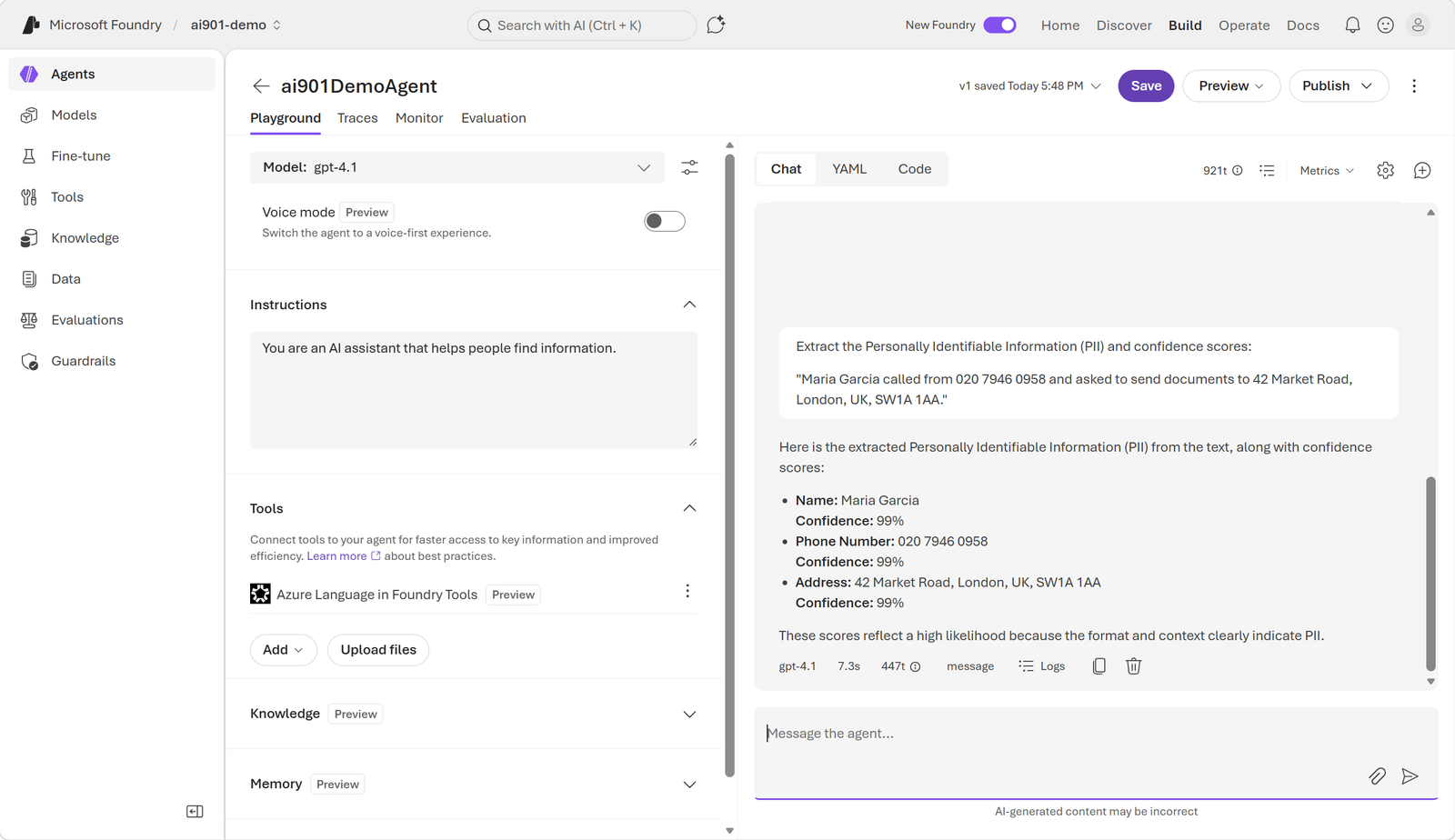
After deploying a model, the Foundry playground accepts a passage and a natural-language description of the required analysis. The same model can extract key phrases, recognize or link entities, classify sentiment, mine opinions, summarize, translate, answer questions, assign custom categories, or chain several of these tasks in one interaction.
For a restaurant review, a key-phrase request might surface references to the dinner, city, dishes, and service. In another passage, entity recognition can separate a person, location, organization, date, time, duration, percentage, number, and dimension. Entity linking can associate an ambiguous mention with a known identity.
Examples that an entity analysis can structure.
Category
Example
Person
John Smith
Location
New York
Organization
Microsoft
Date
May 2, 2017
Time
8:00 AM
Duration
3 hours
Percentage
25%
Number
40
Dimension
10 miles
Sentiment is commonly labeled positive, negative, or neutral, while opinion mining can explain what was praised or criticized. A generative response is probabilistic, so prompt wording matters: asking only for overall sentiment tends to produce a short answer, whereas requesting sentence-level evidence, reasons, and an output format produces a more detailed result.
The interface screenshot remains a PNG and demonstrates prompt-driven flexible analysis.
4. Purpose-built Azure Language capabilities
uses language models and statistical techniques designed for specific operations. Rather than freely composing an answer, a tool returns predictable fields and scores, which is valuable when another system must validate, store, or route the result.
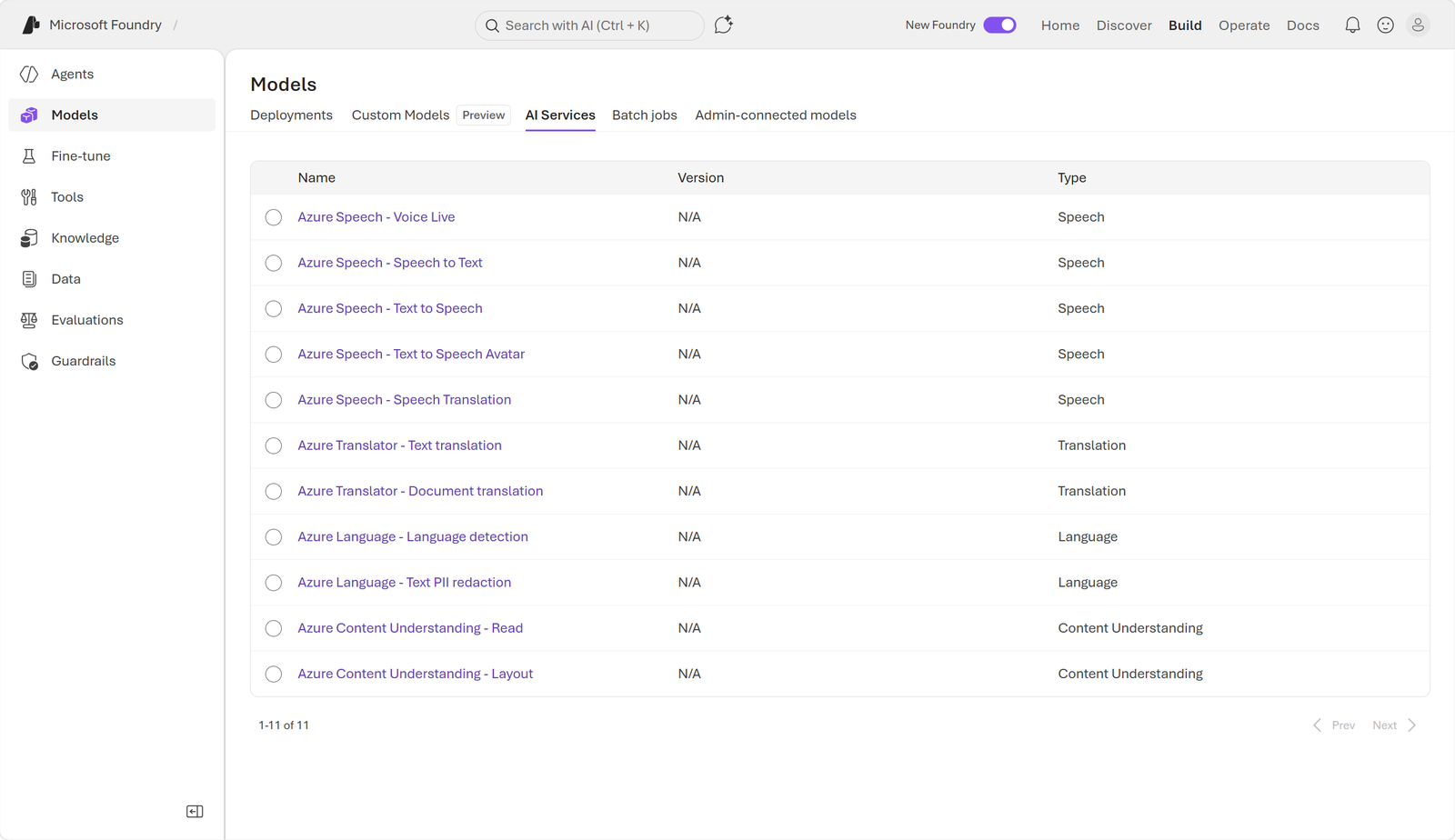
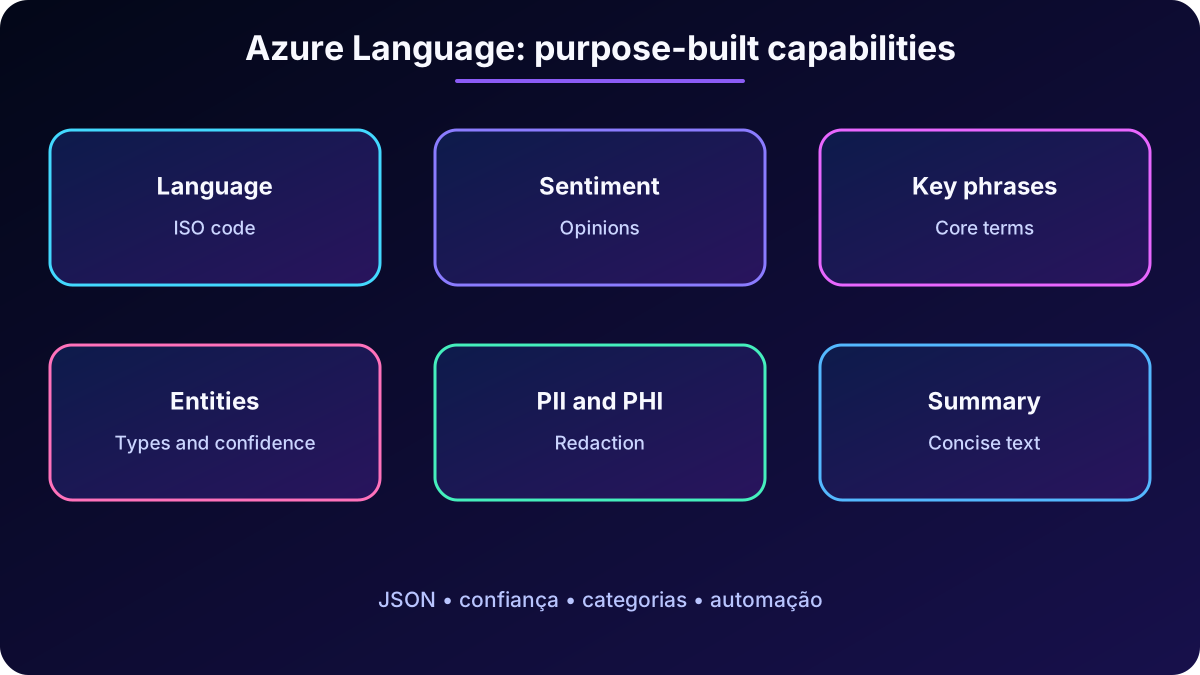
In the new Foundry portal, these capabilities appear under Build, Models, and AI services; the classic portal may look different. Features include language detection, sentiment and opinion analysis, key phrase extraction, named entity recognition, entity linking, PII and PHI detection, text analytics for health, custom classification, and summarization.
The AI services area collects specialized tools that can be explored in the portal.Purpose-built operations transform documents into language, sentiment, entities, key phrases, PII, and structured summaries.
5. Language detection and PII identification
Language detection
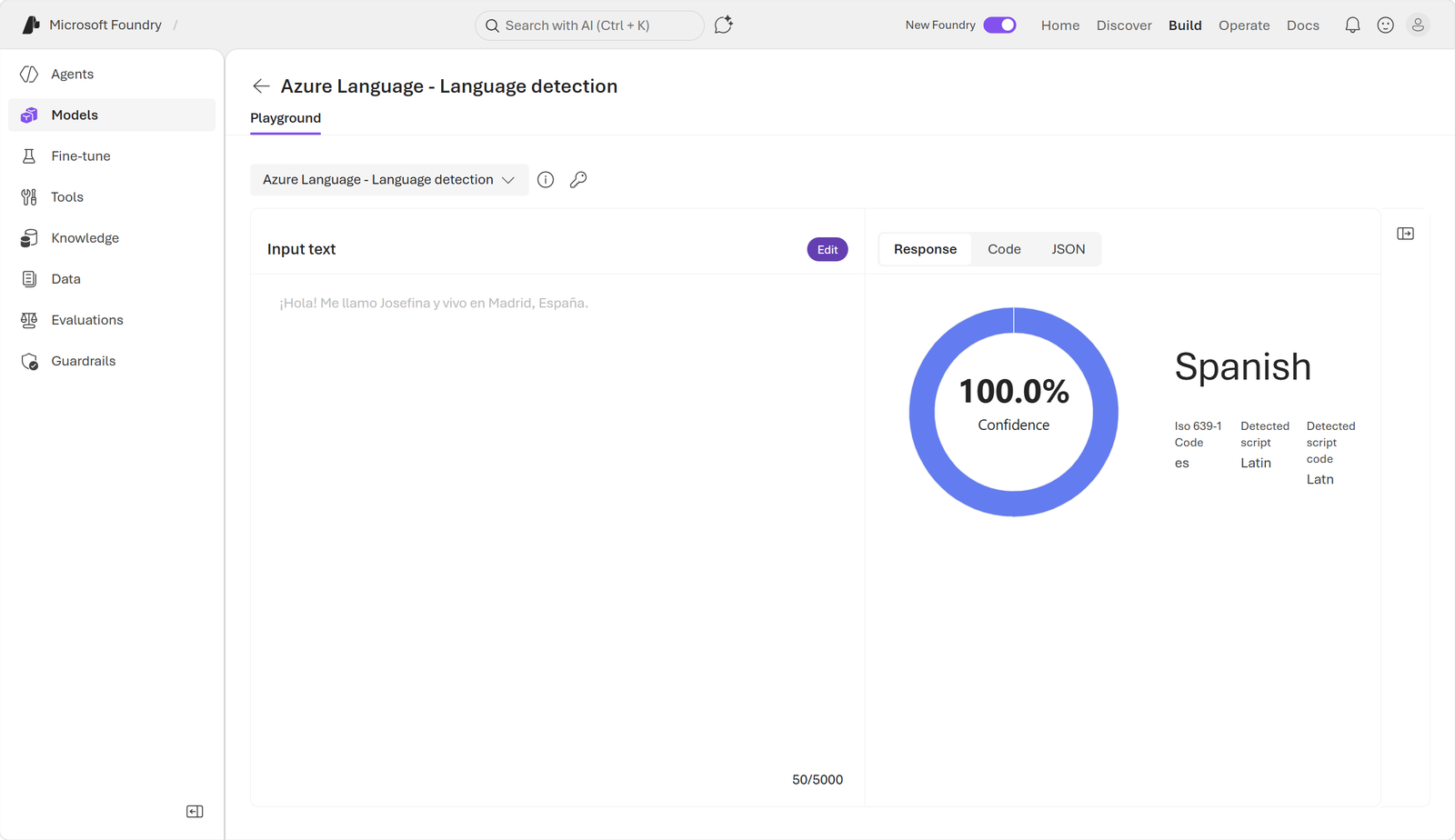
Language detection examines text and returns the predominant language, potentially including a regional variant, an ISO 639-1 code, and a confidence score. For “¡Hola! Me llamo Josefina y vivo en Madrid, España.”, the demonstrated result is Spanish, code es, and confidence 1.00. An application can use the output to route support, select translation, or choose a localized workflow.
The result identifies Spanish, the es code, and 100% confidence.
Personally identifiable and health information
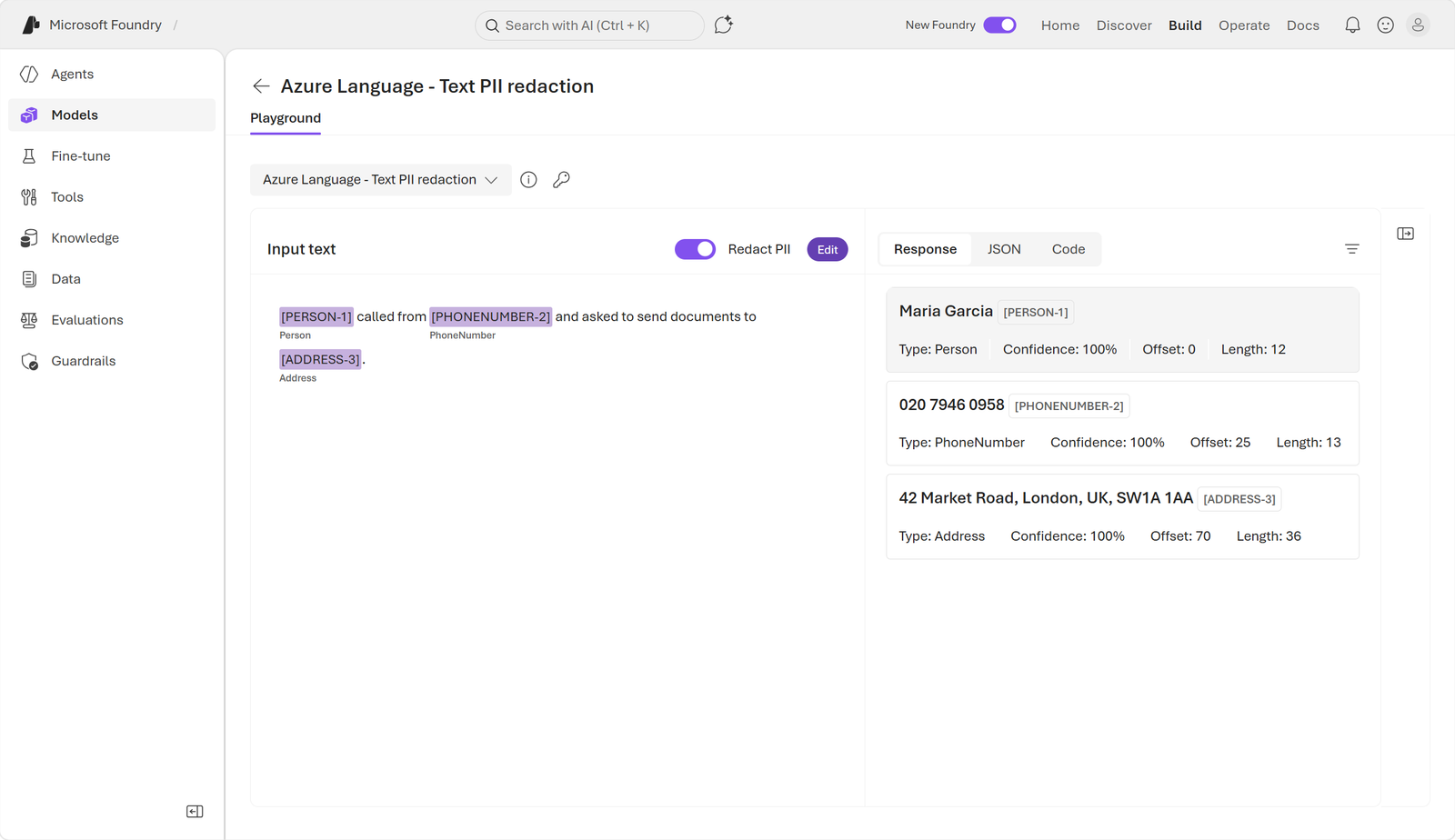
PII detection locates data that identifies a person, such as a name, phone number, email address, or street address. The same family of capabilities can recognize PHI in healthcare scenarios. Each occurrence receives a category and confidence value; the service can also produce a redacted copy that masks sensitive spans.
The playground marks a person, phone number, and address and shows a redacted copy.
6. Client applications, APIs, and libraries
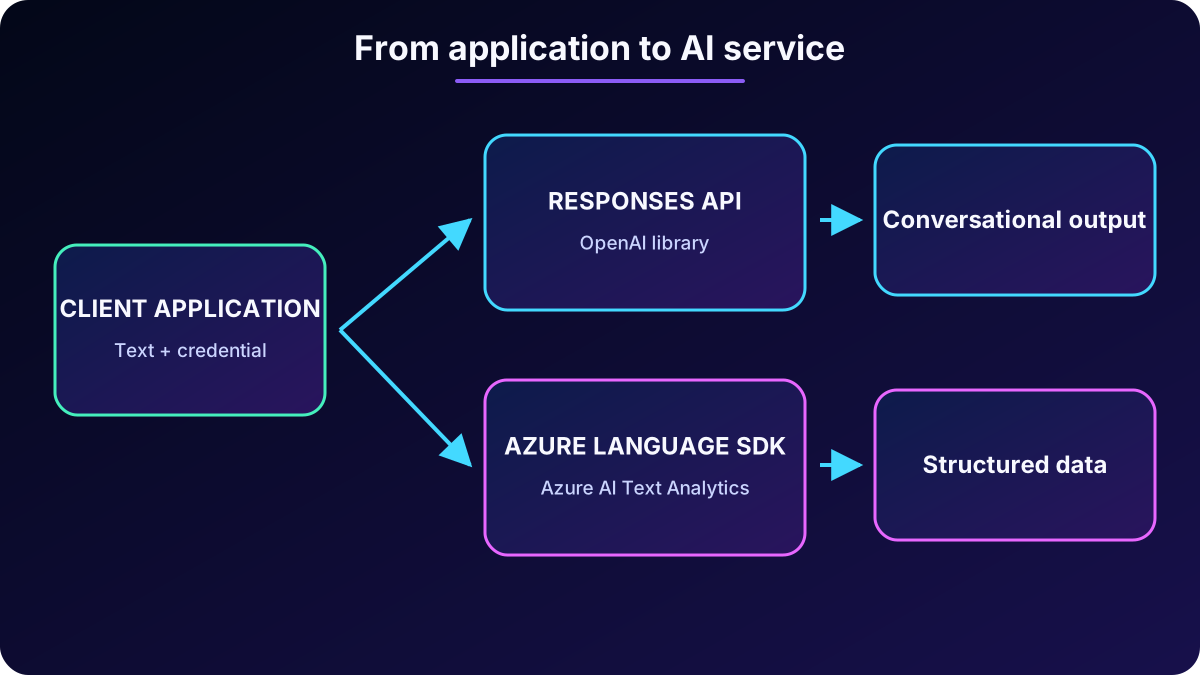
A client application gathers text, authenticates to a service, sends a request, and interprets the response. An API is the contract that defines how software exchanges data; a client library is ready-made code that represents that contract with language-specific classes and methods, reducing the need to construct raw HTTP requests.
For models deployed in , the resource endpoint and key enable an Azure OpenAI-compatible API. For specialized operations, the Azure AI Text Analytics library supplies Azure Language clients. Do not embed keys in source code: use environment variables, a secret store, or managed identity in production.
The client sends text to the appropriate endpoint and receives either flexible text or structured data.
7. Responses API with the OpenAI library
The Responses API is a modern unified interface for interactions with Azure OpenAI-compatible models. It works well for conversational and open-ended analysis, but does not by itself guarantee an identical rigid schema on every run. The OpenAI Python library wraps the communication so code does not have to assemble headers and JSON manually.
import os
from dotenv import load_dotenv
from openai import OpenAI

load_dotenv()
foundry_client = OpenAI(
    base_url=os.environ['AZURE_OPENAI_ENDPOINT'],
    api_key=os.environ['API_KEY']
)

analysis = foundry_client.responses.create(
    model=os.environ['MODEL_DEPLOYMENT_NAME'],
    input='Classify the sentiment and explain the main reasons in this review: ...'
)
print(analysis.output_text)
OpenAI is the class supplied by the library; foundry_client is an authenticated instance of that class. responses.create sends input to the named deployment. The deployment name can be chosen during deployment and may match the model name. Run the file from the terminal with python followed by the script name.
8. Azure Language SDK for structured results
When a workflow requires consistent categories and scores, the Azure Language SDK is the direct choice. The azure-ai-textanalytics package creates a TextAnalyticsClient from the resource endpoint and an AzureKeyCredential. Operations accept a list of documents even when the application analyzes only one passage.
import os
from dotenv import load_dotenv
from azure.core.credentials import AzureKeyCredential
from azure.ai.textanalytics import TextAnalyticsClient

load_dotenv()
language_client = TextAnalyticsClient(
    endpoint=os.environ['AZURE_LANGUAGE_ENDPOINT'],
    credential=AzureKeyCredential(os.environ['API_KEY'])
)

sample = 'Maria Garcia can be reached at maria@example.com.'
language = language_client.detect_language([sample])[0]
pii = language_client.recognize_pii_entities([sample])[0]

print(language.primary_language.name, language.primary_language.iso6391_name,
      language.primary_language.confidence_score)
print(pii.redacted_text)
for entity in pii.entities:
    print(entity.text, entity.category, entity.confidence_score)
detect_language provides the language name, ISO code, and confidence. recognize_pii_entities supplies redacted text plus entities with text, category, and confidence. This predictability simplifies rules, auditing, and storage; generative models remain useful when the task needs explanation or freely combined operations.
9. Agents, tools, and Model Context Protocol
An agent combines a model with instructions and tools to reason, plan, retrieve information, and call external services. Although a generative model can interpret text, free-form output is not always suitable for processes that require deterministic data. Adding Azure Language as a tool combines general reasoning with specialized analysis.
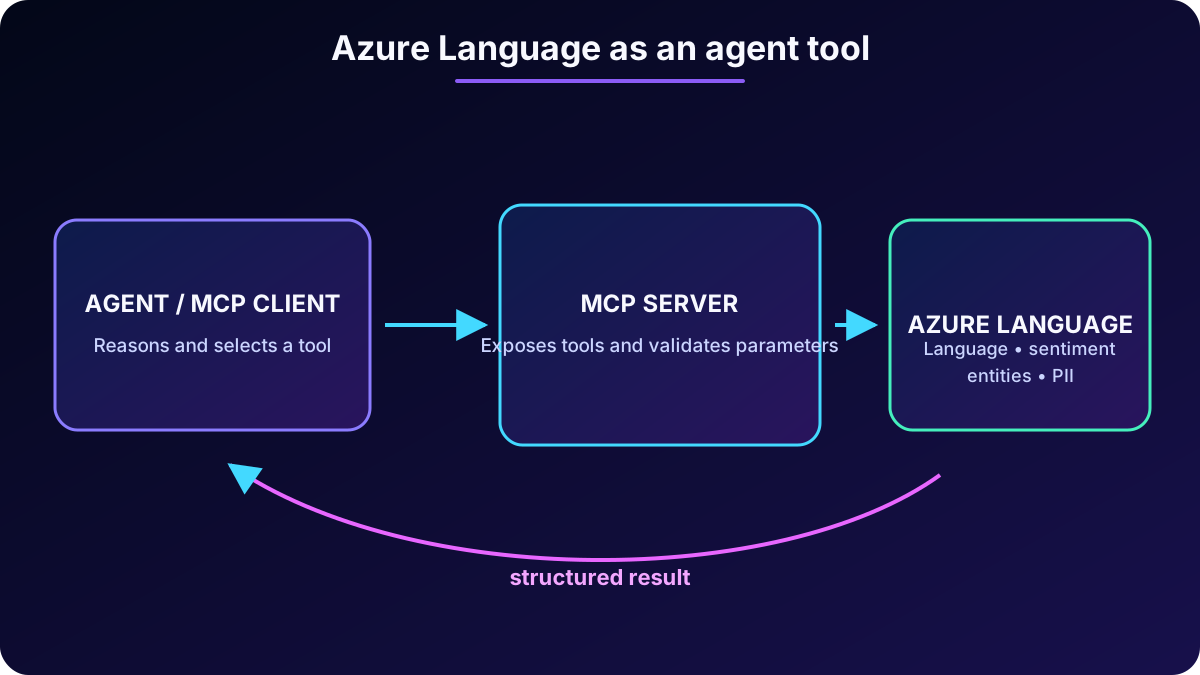
Model Context Protocol (MCP) is an open standard that acts as a common adapter between agents and tools. The MCP client—usually the agent or host application—discovers capabilities and sends calls. The MCP server publishes tools and data, receives parameters, runs the operation, and returns a structured result. This separation keeps agent logic clean and makes tools replaceable and extensible.
Azure Language MCP server is a managed bridge for language detection, sentiment, key phrases, entities, PII, and other capabilities. Agent code does not need to implement every REST call or manage service tokens directly. A server can also expose a compound action, such as processing a batch of documents.
The agent discovers and invokes tools; the server validates the call, runs Azure Language, and returns structured data.
10. Connect Azure Language to an agent
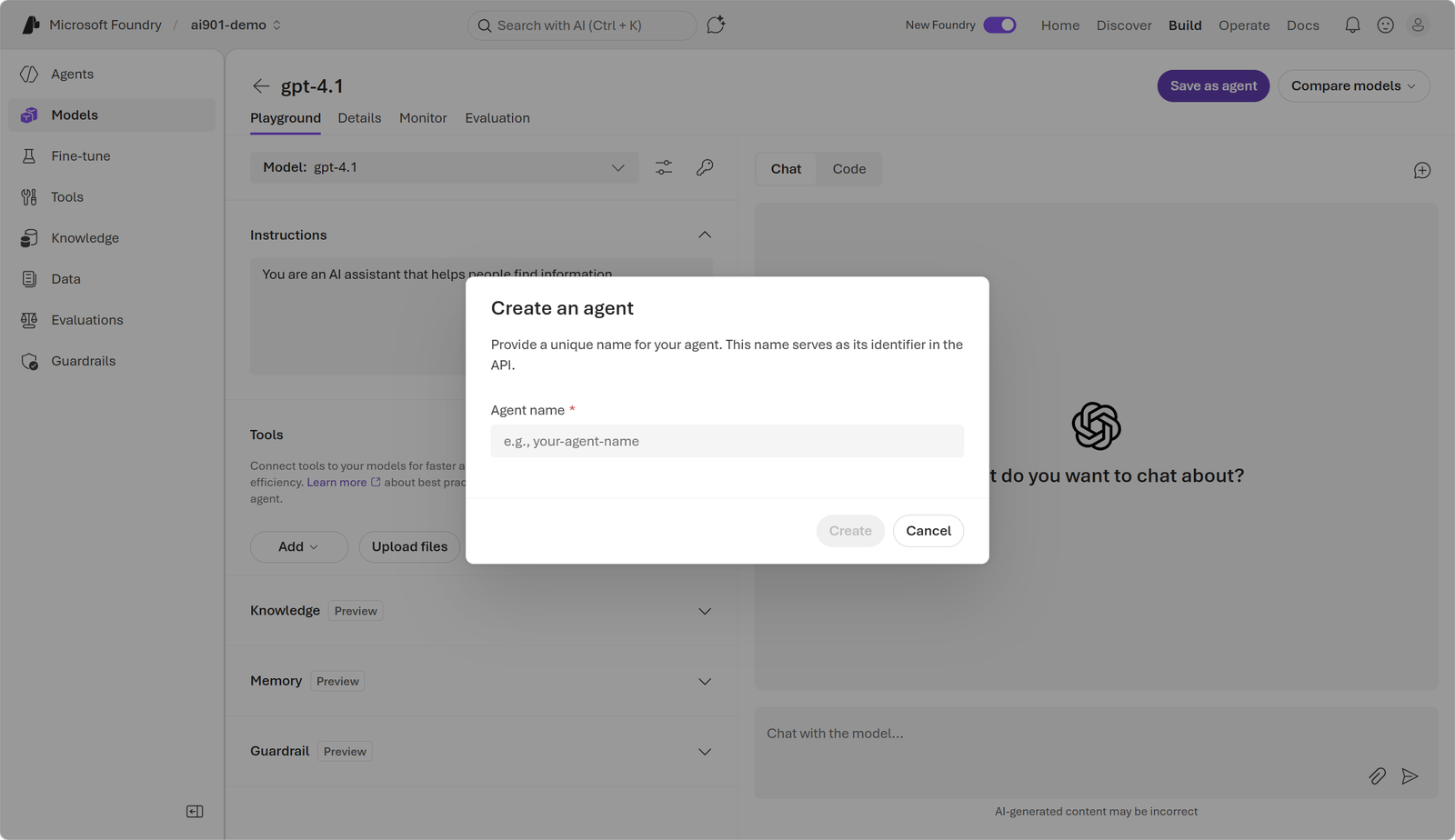
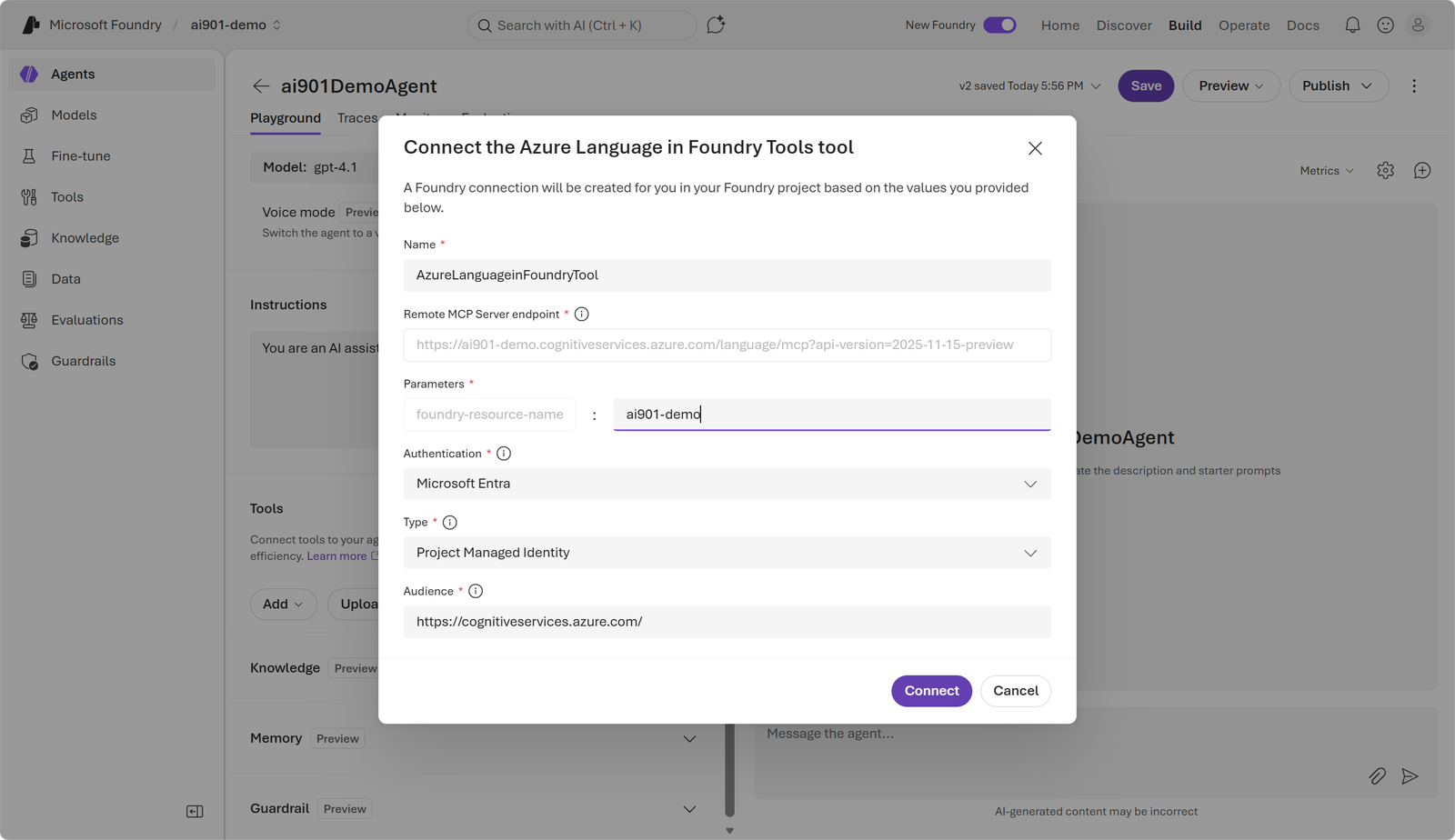
In the portal, deploy a model or choose an existing deployment and save the configuration as an agent. Add a tool, search for , and select its MCP server. The connection uses the Foundry resource name; because the resource already includes these tools in the demonstrated scenario, no separate Azure Language resource is required.
The playground configuration is saved under a reusable name.The tool is added from the catalog and connected to the Foundry resource.
Instructions should state when the tool is appropriate and what format is expected. The agent can detect a ticket language before routing it to the right team or redact PII before the rest of the workflow reads the message. The model selects the route; the tool performs the specialized analysis.
The result shows the tool invocation and its response integrated into the agent conversation.
11. Exercise: explore text analysis
The guided exercise compares a generative-model NLP workload and an operation in the same environment. Allow about 20 minutes and use an Azure subscription; new accounts may include credits for the first 30 days.
Open or create a project and select a model deployment.
Test a text-analysis prompt and observe how instruction changes affect the response.
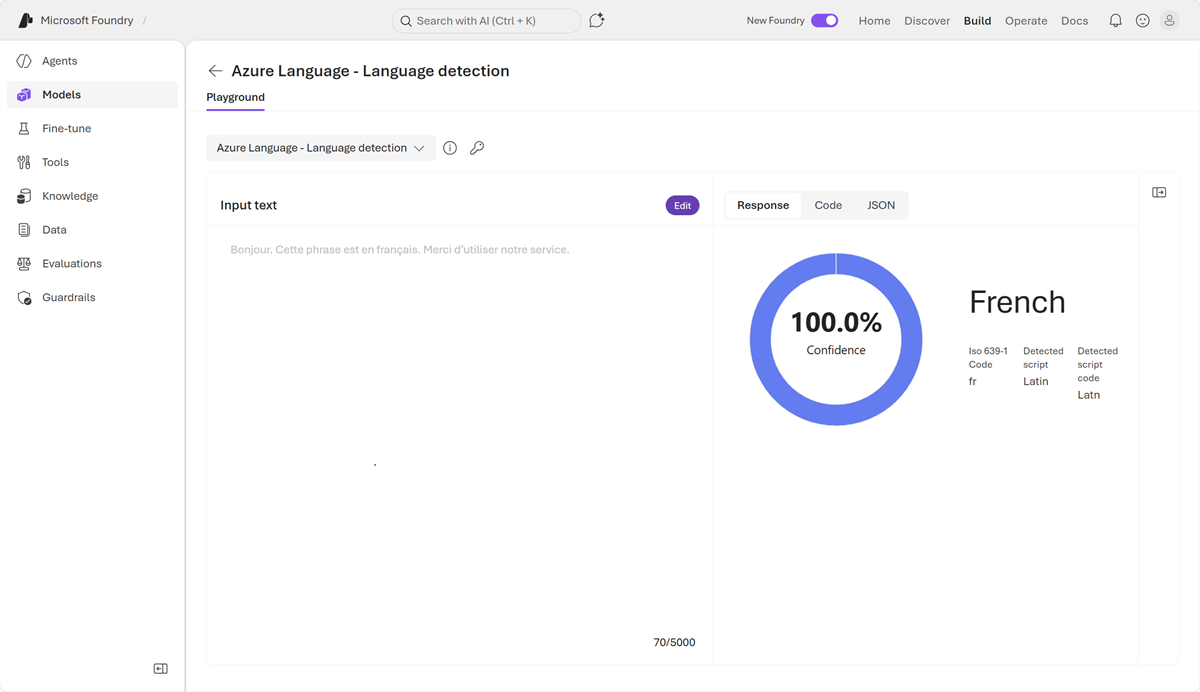
Open AI services, run language detection or another structured operation, and inspect its code, confidence, and fields.
Compare flexibility, repeatability, and format before choosing an application integration.
In the exercise, the tool identifies French with 100% confidence.