ARM templates: JSON structure, parameters, outputs, and deployment
Infrastructure as code, Azure Resource Manager orchestration, JSON sections, resource providers, local and linked deployments, secure parameters, outputs, idempotence, and a guided storage-account exercise.
Suggested study time: 35 minutes • Intermediate level • Original rewrite based on the supplied Microsoft Learn module
By João Ricardo Dutra••Complete original content
1. Introduction, scenario, and learning goals
templates, usually called , describe Azure infrastructure and configuration in reusable JSON. The template can live in the same source-control repository as the application, so infrastructure changes are reviewed, versioned, and released with the software they support.
Consider a team that builds an inventory platform for several partner companies. Every partner needs an independent Azure deployment, and storage policies can vary between deployments. Keeping separate click-by-click instructions would make those environments drift. A versioned ARM template provides a consistent baseline while parameters preserve the flexibility required for each partner.
Learning objectives
Implement a JSON ARM template with .
Explain declarative infrastructure as code and the structure of an ARM template.
Deploy a local template by using Azure CLI or Azure PowerShell.
Declare Azure resources through providers, resource types, API versions, and properties.
Make a template reusable with parameters, validation constraints, and outputs.
Run the storage-account exercise, inspect deployment history, and interpret validation results.
Prerequisites
Familiarity with Azure, including the , subscriptions, resource groups, and resource definitions.
An Azure account and permission to create the resources used in the exercise.
installed locally.
The latest Azure CLI or Azure PowerShell tools installed locally.
Microsoft recommends Bicep for people who are new to infrastructure as code on Azure because it offers the capabilities of JSON with a more concise authoring experience. This chapter still studies JSON because understanding the generated template structure remains valuable for AZ-104 administration and troubleshooting.
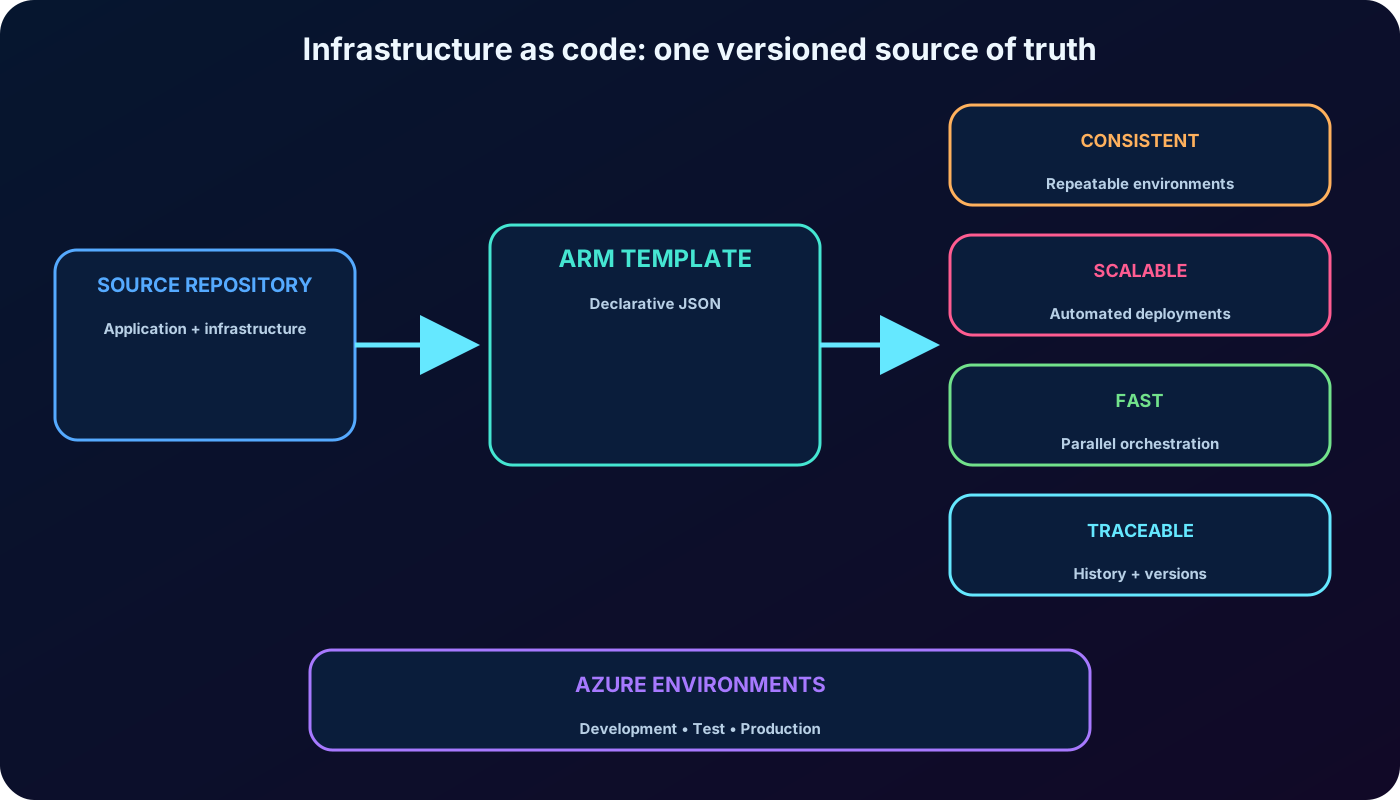
Infrastructure as code keeps the application and the environment definition versioned together, while one template can produce consistent development, test, and production deployments.
2. Infrastructure as code and declarative templates
Infrastructure as code, or IaC, expresses the infrastructure required by an application as code rather than as a sequence of manual portal actions. Application files and deployment definitions can share a central repository, a review process, and a version history.
Advantages highlighted by the supplied module.
Advantage
Operational effect
Consistent configurations
The same reviewed definition is used whenever an environment is created or updated.
Improved scalability
repeats the deployment without rebuilding the procedure for every partner or environment.
Faster deployments
Resource Manager can order dependencies and create independent resources in parallel.
Better traceability
Source history and Azure deployment history show what definition and values were used.
An ARM template is a JavaScript Object Notation (JSON) file. Its syntax is declarative: it states the resources and properties that should exist. It does not prescribe every control-flow step required to create them. An imperative script, by contrast, focuses on the ordered commands a computer must execute.
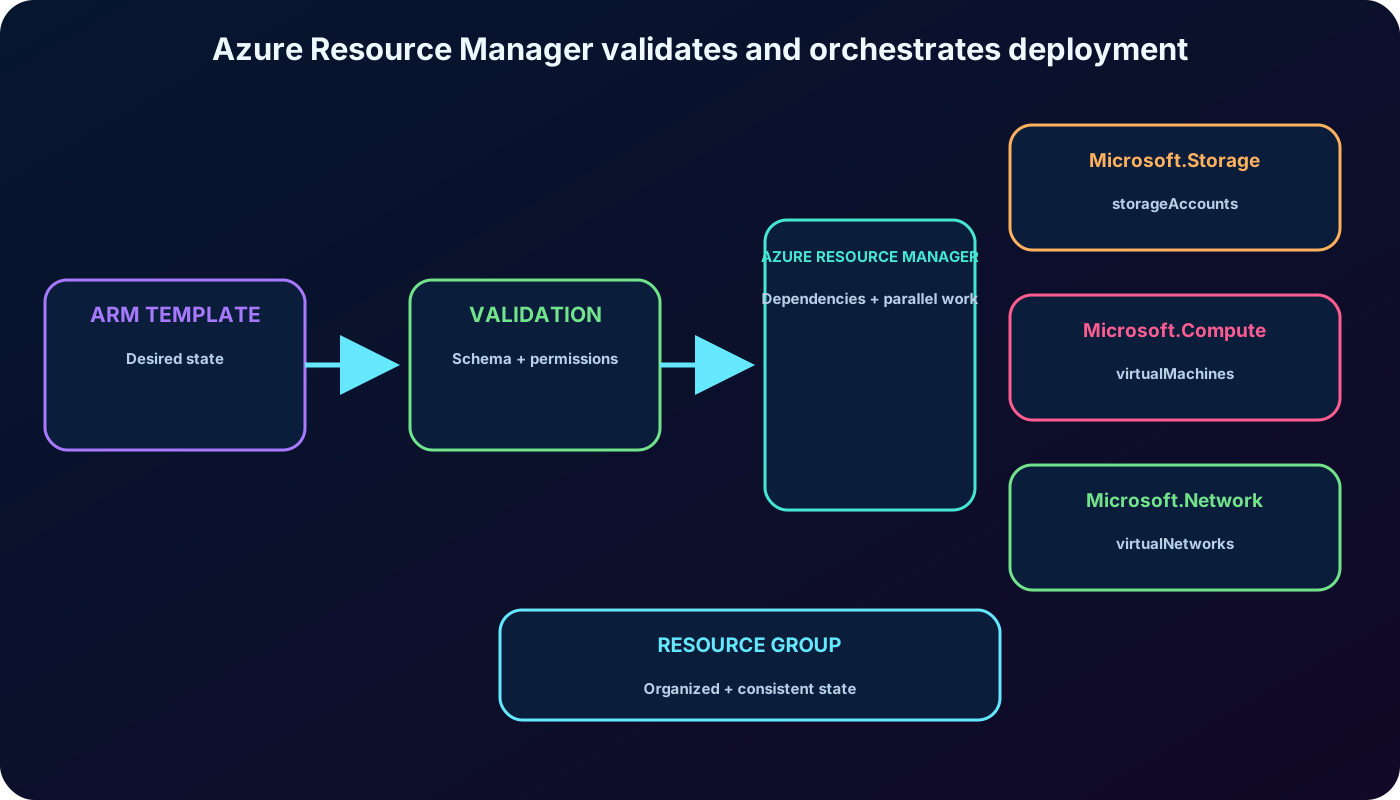
converts the declared desired state into deployment operations. This separation lets the author concentrate on the result while the platform handles validation, dependencies, ordering, and parallel work where possible.
3. Why are repeatable
: the template becomes part of the infrastructure and development project rather than an external checklist.
Version control: JSON files can be stored, compared, reviewed, and tagged like application code.
Idempotence: redeploying the same definition with the same inputs leaves existing resources in the same desired state instead of creating duplicates.
Dependency orchestration: Resource Manager creates resources in the correct order and performs independent work in parallel.
Predeployment validation: structural and deployment checks can fail before resource creation begins.
Modularity: large solutions can use smaller linked templates or nest templates inside other templates.
Auditability: the exposes deployment status, template information, parameters, and outputs.
CI/CD integration: , GitHub Actions, and workflows can build and deploy application and infrastructure updates together.
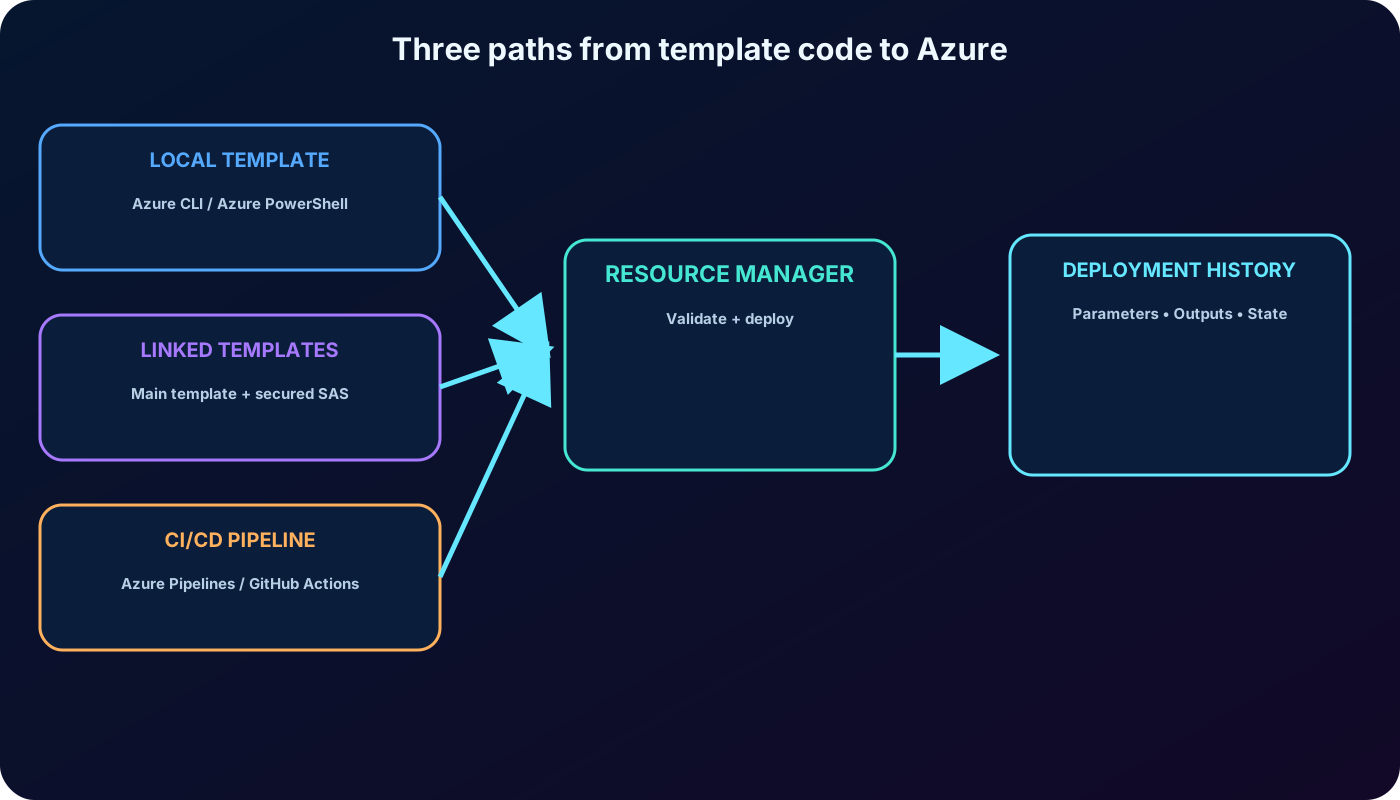
A linked template can be stored separately and invoked by a main template. For private content stored in Azure, a shared access signature (SAS) can protect the linked file. The deployment of the main template triggers the linked deployments.
Resource Manager validates the declaration, resolves dependencies, coordinates resource providers, and records the result in deployment history.
4. ARM template file structure
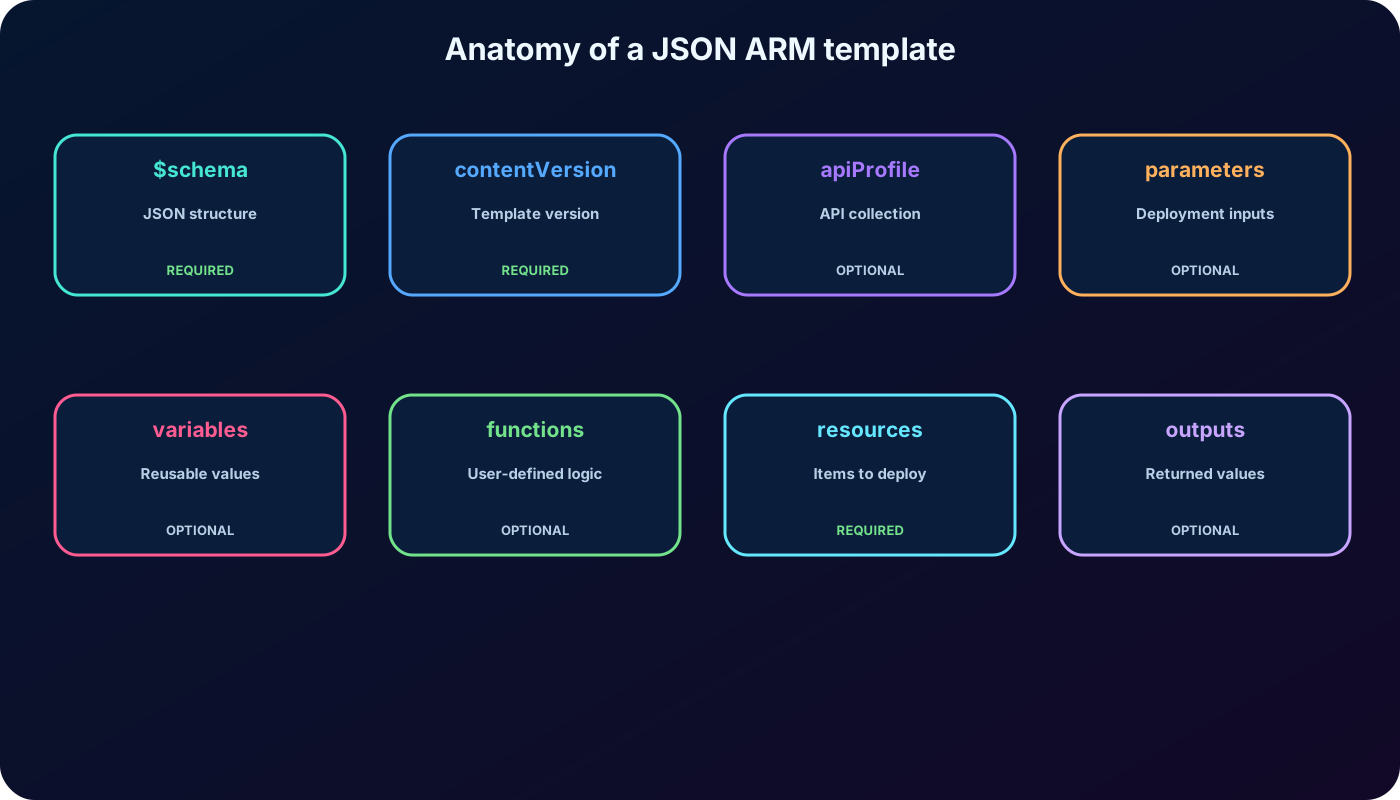
A JSON ARM template is organized into named top-level sections. Some are required for a standard resource-group template and others are added only when the solution needs them.
Sections represented in the supplied module.
Element
Required?
Purpose
$schema
Yes
URI of the JSON schema that describes the template structure. The schema depends on deployment scope and editor support.
contentVersion
Yes
Author-defined template version, such as 1.0.0.0, used to document meaningful changes.
apiProfile
No
A collection of API versions that can avoid declaring a version separately for each supported resource type.
parameters
No
Values supplied at deployment time through a parameter file, command line, or the .
variables
No
Reusable values that simplify template-language expressions.
functions
No
User-defined functions used to replace repeated or complicated expressions.
resources
Yes
Resources to create or update at the selected scope, such as a resource group or subscription.
outputs
No
Values returned after deployment. The exported table says output, while the actual JSON property is outputs.
The contentVersion value belongs to the author; Azure does not automatically increment it. Resource API versions are different: each resource declaration selects the contract used by its resource provider.
The structure separates deployment inputs, reusable expressions, resource declarations, and returned values so that each concern has a clear place.
5. Ways to deploy a template to Azure
The module identifies three deployment approaches: a local template, a linked template, and a continuous deployment pipeline. Its hands-on flow concentrates on a local file, which requires Azure CLI or Azure PowerShell on the workstation.
Prepare the resource group with Azure CLI
az login
az account list-locations --output table
az group create   --name rg-contoso-inventory   --location eastus
Azure CLI can store a default region with az configure --defaults location=<location>. Azure PowerShell exposes available regions through Get-AzLocation. After the target resource group exists, deploy the local file with the current group-scope command:
templateFile="azuredeploy.json"
az deployment group create   --name inventory-storage-v1   --resource-group rg-contoso-inventory   --template-file $templateFile
The older az group deployment create form is deprecated; use az deployment group create. The equivalent Azure PowerShell cmdlet for resource-group scope is New-AzResourceGroupDeployment.
Linked templates divide a complex solution into a main template and reusable child templates. A SAS token can secure linked files stored privately. For automated releases, and GitHub Actions can include validation and template deployment alongside application delivery.
Choose a descriptive deployment name because every run produces an entry in deployment history. Both deployment tools need the target resource group; some deployment scopes and commands also require a location. The portal then exposes state, supplied parameters, and output values.
A template can begin on a workstation, behind a secured link, or in a release pipeline; Resource Manager remains the deployment engine.
6. Declare resources with providers, types, and properties
Every Azure resource type belongs to a resource provider. A template combines the provider namespace and resource type as provider/type. For a storage account, the provider is Microsoft. and the type is storageAccounts, producing Microsoft./storageAccounts.
After selecting the type, consult the ARM template reference for the properties accepted by the intended API version. The reference is organized by provider, resource type, and API version. A resource definition usually includes type, apiVersion, name, location, and type-specific values such as sku, kind, and properties.
Hardcoding the name, region, and SKU makes this example easy to read but difficult to reuse. Parameters and template functions remove those fixed assumptions.
7. Parameters, constraints, and secret handling
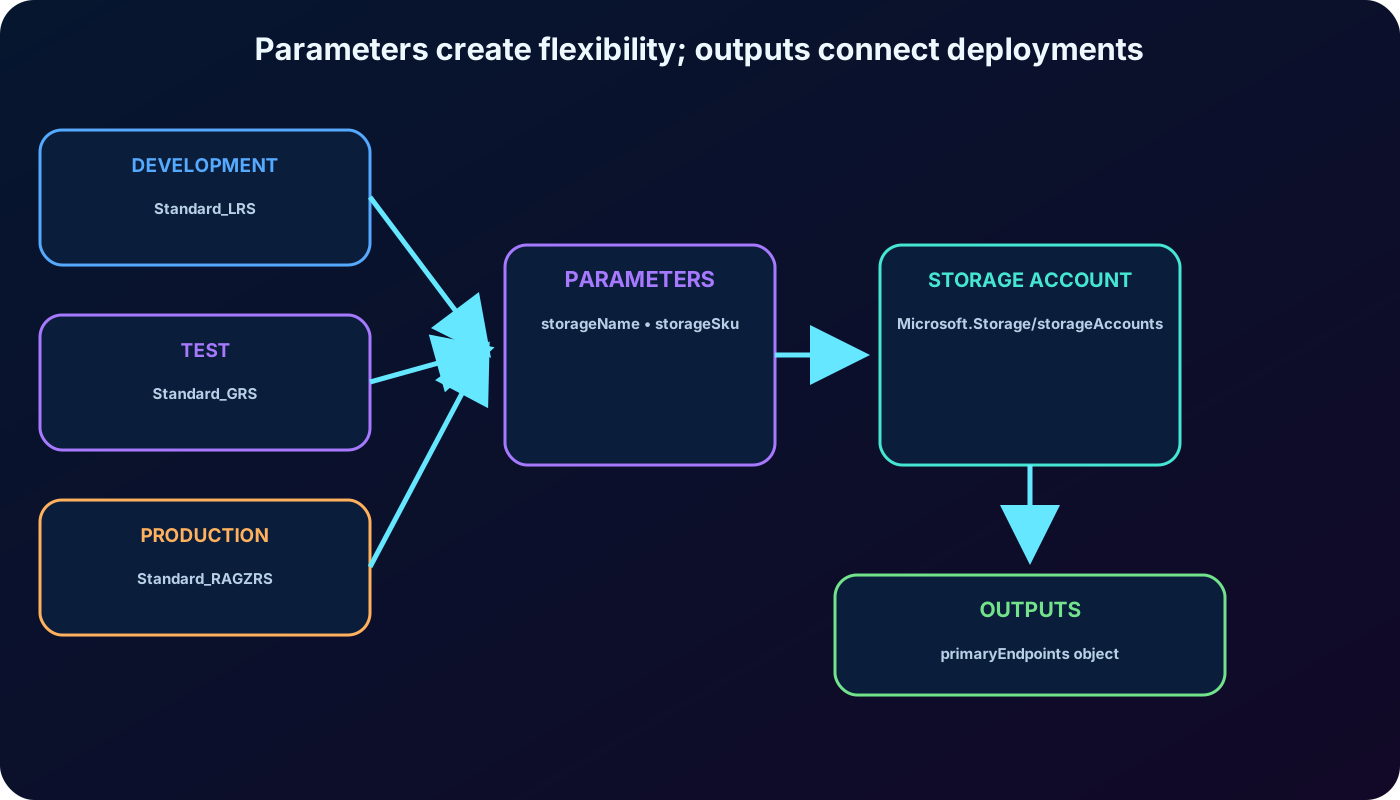
The parameters section defines inputs that are resolved before deployment operations begin. Different values let one template serve development, test, production, or separate partner environments. An ARM template supports up to 256 parameters, and most template functions can participate in their definitions.
Parameter properties covered by the supplied material.
Property
Purpose
type
Required data type for the input.
defaultValue
Value used when the deployment does not provide one.
allowedValues
Explicit list of accepted values.
minValue / maxValue
Inclusive numeric bounds for integer inputs.
minLength / maxLength
Inclusive length limits for strings or arrays.
metadata.description
Human-readable guidance shown to template users.
The classic parameter types represented in the module are string, secureString, int, bool, object, secureObject, and array. Use parameters for values that vary, such as SKU, capacity, size, region choices, and names governed by organizational conventions. Prefer clear descriptions and sensible defaults where a default is safe.
Never hardcode user names, passwords, or secrets, and do not assign secret defaults. Passwords and secret strings use secureString; sensitive JSON objects use secureObject. Secure parameter values are not retained in deployment history or logs. For reusable secrets, store them in Azure and reference them through a parameter file.
Reference a parameter with the parameters function. The name and displayName tag can use storageName, the SKU can use storageSku, and resourceGroup().location can keep the resource in the target resource group region.
Parameter values can come from the command line, a parameter file, or the . A CLI deployment can override the default SKU explicitly:
az deployment group create --name inventory-storage-test --resource-group rg-contoso-inventory --template-file azuredeploy.json --parameters storageName=contosoinventory001 storageSku=Standard_GRS
A default value reduces repetition when one choice is common, while allowedValues prevents template users from submitting choices that the resource definition should reject.
Parameters separate environment-specific inputs from the reusable resource definition; outputs expose information that later deployment steps can consume.
9. Outputs and safe redeployment
The outputs section returns values after a successful deployment. Outputs are useful when a later deployment stage, script, or application configuration needs information from a newly created resource.
Output definition elements.
Element
Required?
Meaning
output-name
Yes
A valid JavaScript identifier used to address the output.
type
Yes
The data type of the returned value.
condition
No
Boolean expression that decides whether the output is returned; the default is true.
value
No
Template-language expression evaluated and returned.
copy
No
Iteration definition used to return multiple output values.
The reference function reads the runtime state of the storage account and returns its primary endpoints, such as blob, file, queue, table, DFS, and web addresses when applicable. Current template limits allow up to 64 outputs.
Idempotence makes repeated deployment safe. If the template and inputs are unchanged, existing resources remain unchanged. If a parameter or property changes, Resource Manager applies the necessary update. It creates a resource only when it does not already exist in the target state.
10. Guided exercise: parameters, validation, and outputs
The supplied exercise evolves azuredeploy.json in small, observable steps. Format the JSON in with Alt+Shift+F, save after every edit, and use IntelliSense to reduce typing errors.
Step 1 - Parameterize the resource name
Add storageName as a string parameter with minLength 3, maxLength 24, and a description.
Use the parameter in both the resource name and the displayName tag.
Use a globally unique name. Current Azure rules allow only lowercase letters and numbers; the supplied export mentions hyphens, but that detail is no longer valid.
Reuse the same valid name to update the existing account instead of creating another account.
Add storageSku with a Standard_LRS default and the eight values listed in the supplied exercise: Standard_LRS, Standard_GRS, Standard_RAGRS, Standard_ZRS, Premium_LRS, Premium_ZRS, Standard_GZRS, and Standard_RAGZRS. accept // and /* ... */ comments, so the reason for the list can be documented beside it.
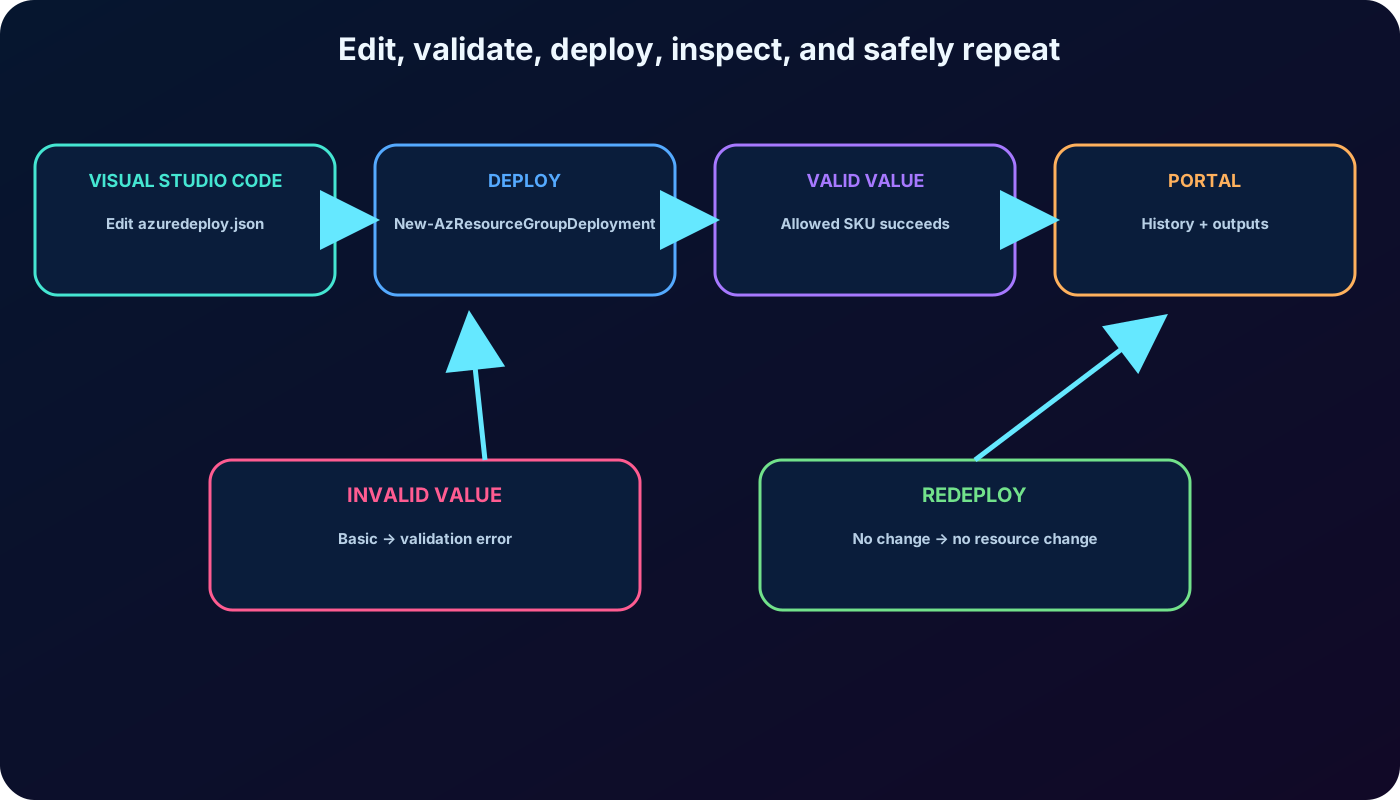
That deployment uses an allowed value and succeeds. Repeat it with -storageSku "Basic" to observe template validation reject a value outside allowedValues before the resource can use it.
Step 3 - Return and inspect the endpoints
Add storageEndpoints to outputs by calling reference(parameters('storageName')).primaryEndpoints. Deploy again with a permitted SKU. Azure PowerShell prints the returned object, and the same output is available under the deployment in the .
Open the target resource group in the portal and select the link for successful deployments.
Compare the separate deployment entries created for the base template, name parameter, SKU validation, and outputs.
Open the add-output deployment and review its Inputs, Outputs, and template details.
Confirm that the returned JSON contains the service endpoints exposed by the storage account.
The exercise makes every change observable: a valid SKU succeeds, an invalid SKU fails validation, outputs expose runtime endpoints, and a no-change redeployment preserves the resource.
11. Explained knowledge check
Assessment rewritten from the supplied module.
Question
Best answer
Why
What is an template?
A JSON file that defines the infrastructure and configuration for a deployment.
The template is a declarative resource definition, not a sequence of Azure CLI commands or a storage-management script.
Which choice is not a template element: idempotent, schema, or parameters?
idempotent
Idempotence is a behavioral property of ARM deployments. schema and parameters are template sections.
What happens when an unchanged idempotent template runs a second time?
Resource Manager makes no change to resources that already match the desired state.
It neither creates duplicate copies nor deletes and recreates the deployment without a declared change.
12. Chapter summary
JSON express Azure infrastructure through declarative, versionable infrastructure as code.
Resource Manager validates the template, resolves dependencies, calls resource providers, and records deployment history.
The template structure separates schema, version, parameters, variables, functions, resources, and outputs.
Local files can be deployed with Azure CLI or Azure PowerShell; linked templates and CI/CD pipelines handle more modular or automated scenarios.
Parameters make one template reusable and validate environment-specific values; secure parameter types protect secrets.
Outputs return runtime information, and idempotence allows the same desired state to be deployed repeatedly.
The exercise parameterizes a storage account, restricts its SKU, tests an invalid value, and returns its primary endpoints.