Azure App Service plans: pricing, scale up, scale out, and autoscale
Choose an App Service plan from workload evidence, understand its shared capacity and billing boundary, and scale web applications safely with manual, rule-based, scheduled, or HTTP-driven options.
Suggested study time: 70 minutes • Intermediate • Original rewrite based on the supplied Microsoft Learn module and checked against current Azure App Service documentation
By João Ricardo Dutra••Complete original content
1. Match a predictable hotel website to an elastic plan
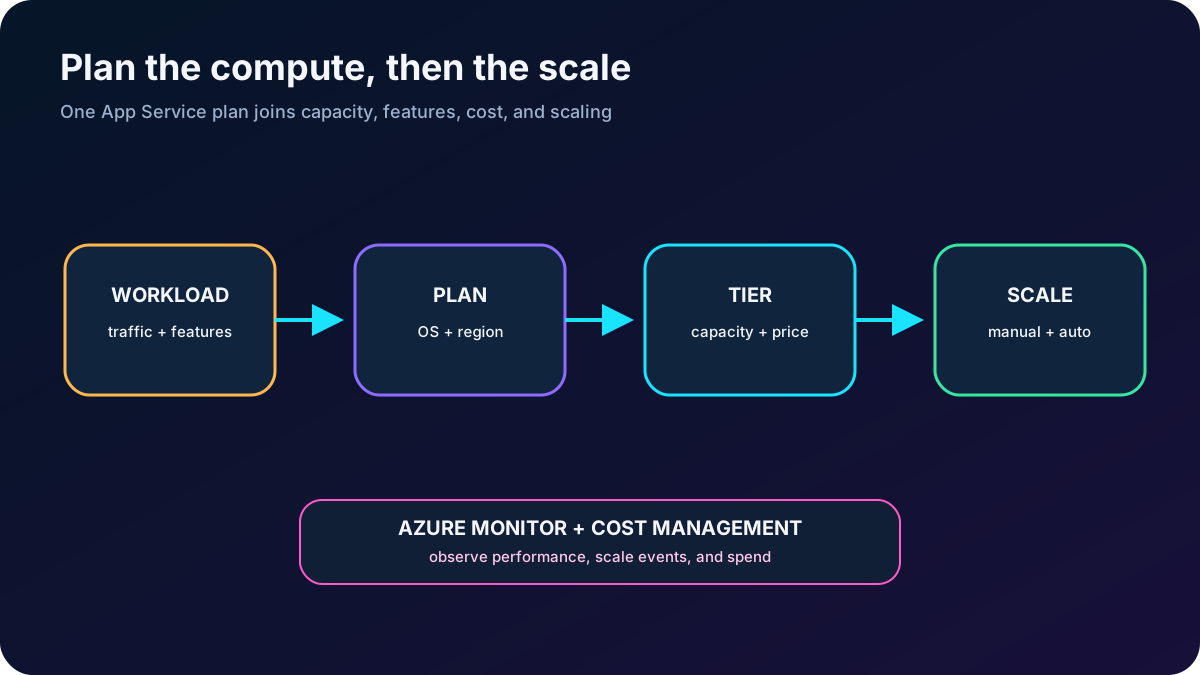
A hotel chain uses a website for reservations and booking details. Holiday traffic is high and predictable; quieter seasons need less capacity. Scaling must preserve responsiveness at the peak and remove idle resources when demand falls. The administrator therefore needs to choose an appropriate Azure plan pricing tier and know how to scale that plan.
The required background is basic scaling and performance knowledge plus familiarity with the . The chapter focuses on the AZ-104 decisions: what a plan controls, how tiers change capability and price, when applications should share or separate plans, and how manual, rule-based, scheduled, and HTTP-driven scaling differ.
The plan is the compute, capability, scaling, and billing boundary behind an app.
2. Treat the plan as a server farm boundary
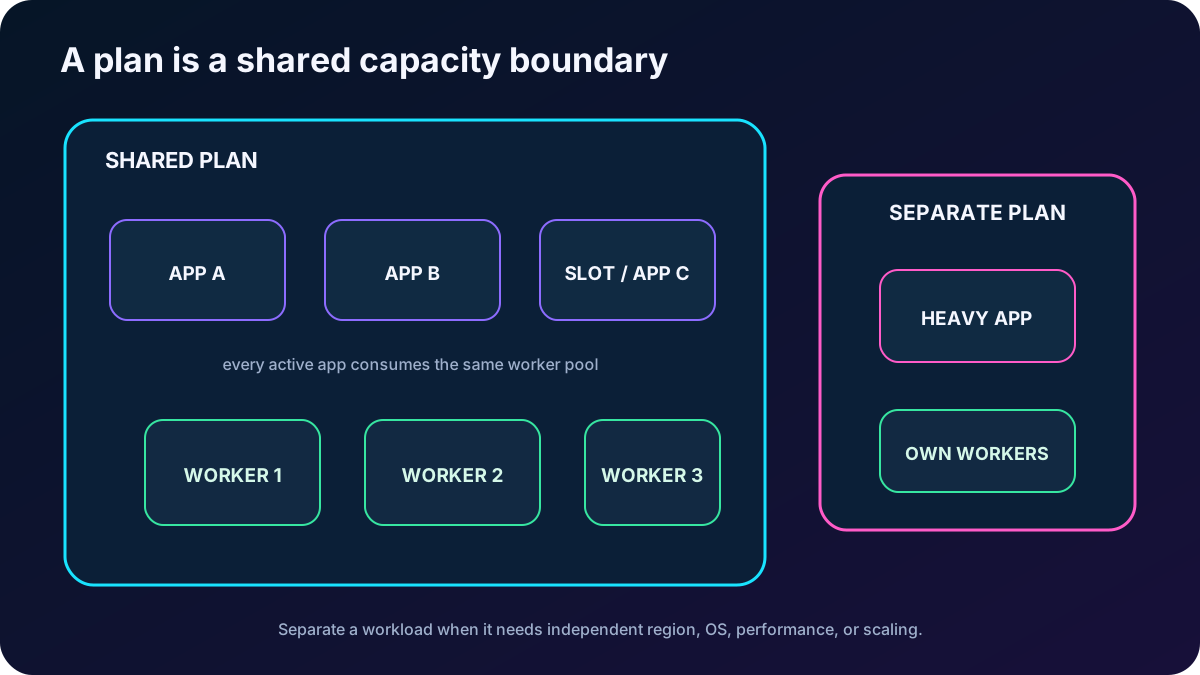
An plan defines the compute resources on which one or more applications run. It resembles a managed server farm: creating the plan in a region allocates a pool there, and every app assigned to the plan uses that pool. Azure manages the hosts while you choose the capacity and tier.
Settings defined by an plan.
Setting
What it controls
Design consequence
Operating system
Windows or Linux workers.
Available runtimes, container options, and pricing SKUs depend on the choice made at creation.
Region
Where the plan compute is created.
Apps placed in the plan run there; use another plan for a different geography.
Pricing tier / SKU
Hardware family, feature set, limits, and price.
Domains, TLS, slots, backups, autoscale, isolation, and zone support vary by tier.
VM instance count
How many workers serve the plan.
Manual or automatic scale-out changes this number.
VM instance size
CPU, memory, and remote storage capacity per worker.
Scale up or down changes the SKU/tier and capacity per instance.
In dedicated tiers, an app normally runs on every worker configured for the plan. Apps, deployment slots, WebJobs, diagnostics, and backup activity share the workers’ CPU and memory. Adding an app is therefore not free capacity merely because the plan already exists.
Apps in one plan share capacity and normally scale together under plan-level autoscale.
3. Share for efficiency; isolate for control
Share a plan when applications use the same operating system, region, lifecycle expectations, and can safely compete for the same workers. Consolidation can improve utilization and reduce cost.
Measure remaining CPU, memory, storage, network, and concurrency before adding an application. Overloading the plan can make both the new and existing applications unavailable.
Create a separate plan when an application is resource-intensive, must scale independently, requires a different region, needs a different operating system, or needs stronger performance and operational isolation.
Treat every active deployment slot as another active application competing for plan resources.
Dedicated compute is dedicated to the plan, not to each application inside it. If one noisy app starves another, scaling the shared plan might mask the design problem while increasing cost for every app. Moving the app to its own plan restores a separate capacity, scaling, and billing boundary.
4. Select the pricing category before the exact SKU
Current tier categories and their intended role.
Category
Tiers
Compute and use
Shared compute
Free and Shared
CPU quotas on workers shared with other customers; no scale-out; development and testing only; no financially backed SLA.
Dedicated compute
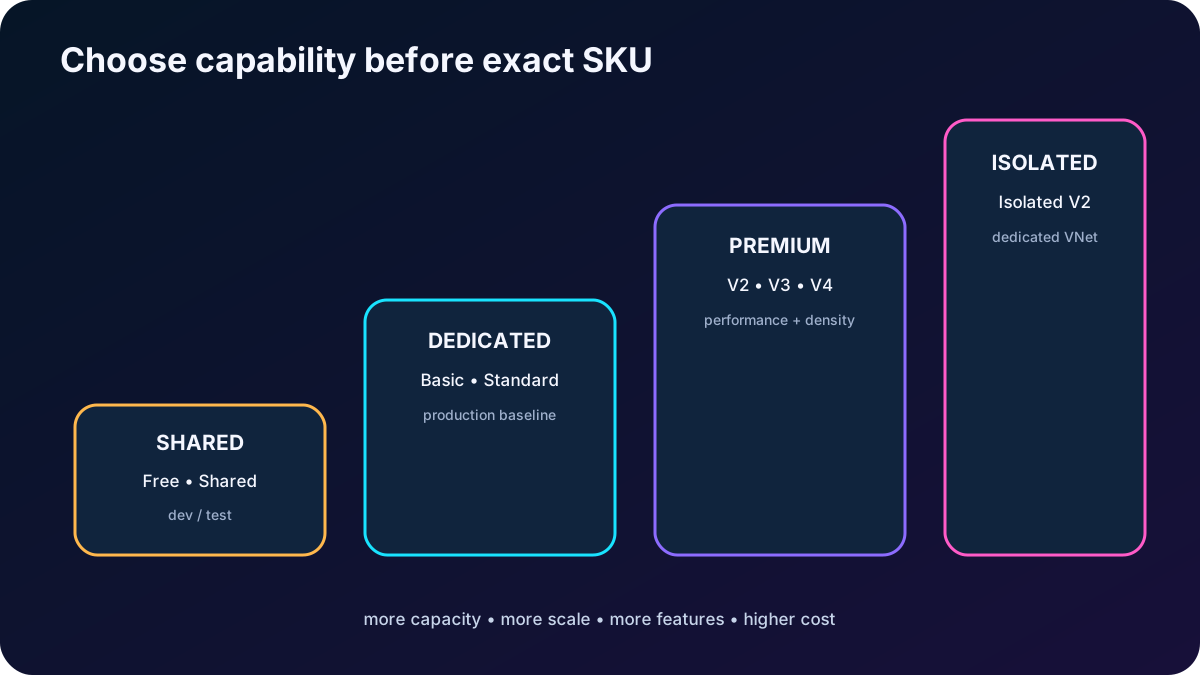
Basic, Standard, Premium, Premium V2, V3, and V4
Workers are dedicated to your plan but shared by its apps. Higher tiers add capacity, scale limits, slots, backups, and other features.
Isolated
Isolated V2 in Environment v3
Dedicated workers in a dedicated virtual network environment, adding network isolation and the largest scale envelope.
Limits that matter for the supplied scenarios; always recheck before deployment.
Capability
Free / Shared
Basic
Standard
Premium
Isolated
Maximum normal instances
1 shared
3
10
20 for v1; 30 for v2-v4
100 per plan; up to 200 total across an Environment v3
Deployment slots per app
0
0
5
20
20
autoscale
No
No
Yes
Yes
Yes
Custom scheduled backups
No
Up to 12/day
Up to 12/day
Up to 50/day
Up to 50/day
The export lists Premium V3 as the current Premium tier, recommends it for new deployments, and describes SSD-backed standard and memory-optimized SKUs. Current also includes Premium V4. Choose between current SKUs from actual CPU, memory, storage, feature, region, availability, and cost evidence rather than assuming the newest name is automatically the best fit.
Basic targets lower-traffic applications that do not need advanced autoscale or deployment slots, but it provides dedicated workers and built-in load balancing; Linux Basic also supports . Standard is the usual production baseline when rule-based autoscale and staging slots matter. Premium adds higher performance, density, and scale. Isolated V2 is for mission-critical network-isolated workloads in an Environment.
Scale up the tier to acquire capacity and features, not merely a different price label.
5. Understand the full pricing boundary
The plan’s SKU and worker count are the main compute charges. In Shared, each app is billed for its CPU quota. In Basic and higher, every plan instance is billed regardless of how many apps use it. In Isolated V2, workers are billed and the environment can add its own minimum or stamp-related cost. Related services such as , Azure , Azure Traffic Manager, monitoring, domains, certificates, or data transfer can add independent charges.
Consolidating compatible apps can save money because multiple apps use the same paid workers.
More apps do not increase plan cost immediately, but resource contention can force a larger SKU or more workers.
Use the pricing calculator, Cost Management budgets, alerts, forecasts, and usage metrics instead of memorizing a price.
Minimize idle scale-out instances. For predictable long-running Premium capacity, evaluate savings plans or reservations against the actual commitment and utilization.
Free, Shared, and development discounts are useful for nonproduction, but they do not supply a financially backed SLA.
In the portal, search for plans, create a plan, and use Explore pricing plans to compare hardware and features. Check CPU, memory, storage, maximum instances, slots, backups, zone redundancy, operating system, region availability, and container support together.
6. Separate scale up from scale out
The two scaling axes.
Operation
What changes
Use it when
Scale up / down
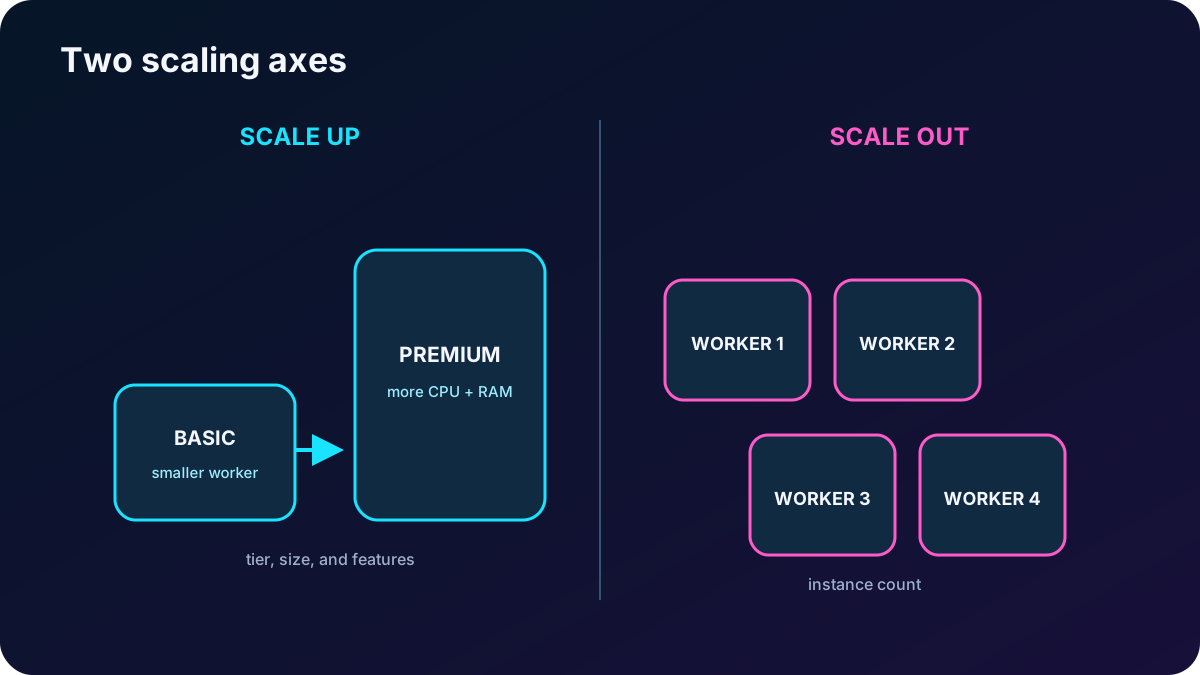
Pricing tier or worker size, changing CPU, memory, storage, and available features.
One worker needs more power, or the application needs features such as custom domains, TLS, slots, or autoscale.
Scale out / in
Number of worker instances that run the applications.
Traffic or concurrency needs more parallel capacity and the application can run correctly on multiple workers.
A common learning path starts on Free, moves to Shared for a custom DNS name, Basic for a TLS binding, Standard for staging slots, and then a larger size or Premium tier for more compute. The sequence can run backward when features are no longer needed. Current feature availability can change, so confirm the plan matrix rather than treating that sequence as a permanent entitlement table.
A scale setting typically applies within seconds and does not require changing code or redeploying the application, but the change affects every app in the plan. Stateless applications are safer to scale out; session state and uploaded data should live in shared services rather than a worker. Dependencies such as and Azure scale separately because the plan does not manage them.
Scale up changes each worker; scale out changes the number of workers.
7. Configure plan-level Azure autoscale
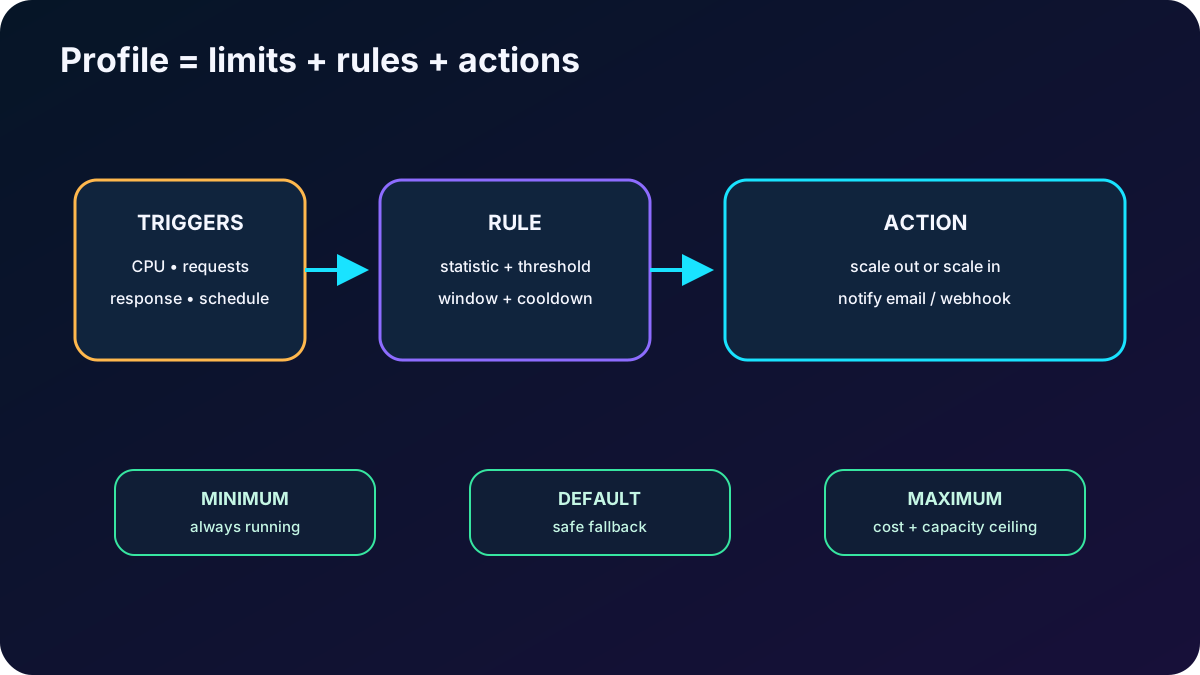
autoscale adjusts the plan instance count from rules and schedules. An autoscale setting contains profiles. Each profile defines instance limits and one or more rules; each rule has a trigger and a scale-out or scale-in action. Because this method targets the plan, its applications normally scale together.
Autoscale design elements from the module.
Element
Purpose
Safe choice
Minimum instances
Capacity that remains even with no load.
Keep the application running and retain enough redundancy for its availability target.
Maximum instances
Hard cost and capacity ceiling.
Leave useful margin above minimum but respect tier limit, quota, budget, and backend capacity.
Default instances
Fallback when metrics are unavailable and initial capacity for a profile.
Choose a safe count between minimum and maximum.
Metric trigger
Responds to signals such as CPU time, average response time, or requests.
Select Average, Minimum, Maximum, or Total intentionally; use sustained windows and cooldown.
Time trigger / schedule
Changes capacity before known daily, weekly, seasonal, or date-specific demand.
Specify time zone. Saturday at 08:00 is a time-based rule, not a metric rule.
Notification
Email or webhook when a scaling event occurs.
Notify operators about successful and failed actions and inspect run history.
Always pair scale-out with scale-in. Without scale-out, high load can degrade or fail the application. Without scale-in, low load can leave unnecessary cost. Use different thresholds, adequate evaluation windows, and cooldown to avoid flapping. A maximum of one while the rule tries to grow to three is still a maximum of one: limits, tier, quota, and backend readiness must agree with the rule.
Rules decide when to act; profile limits decide how far the plan may go.
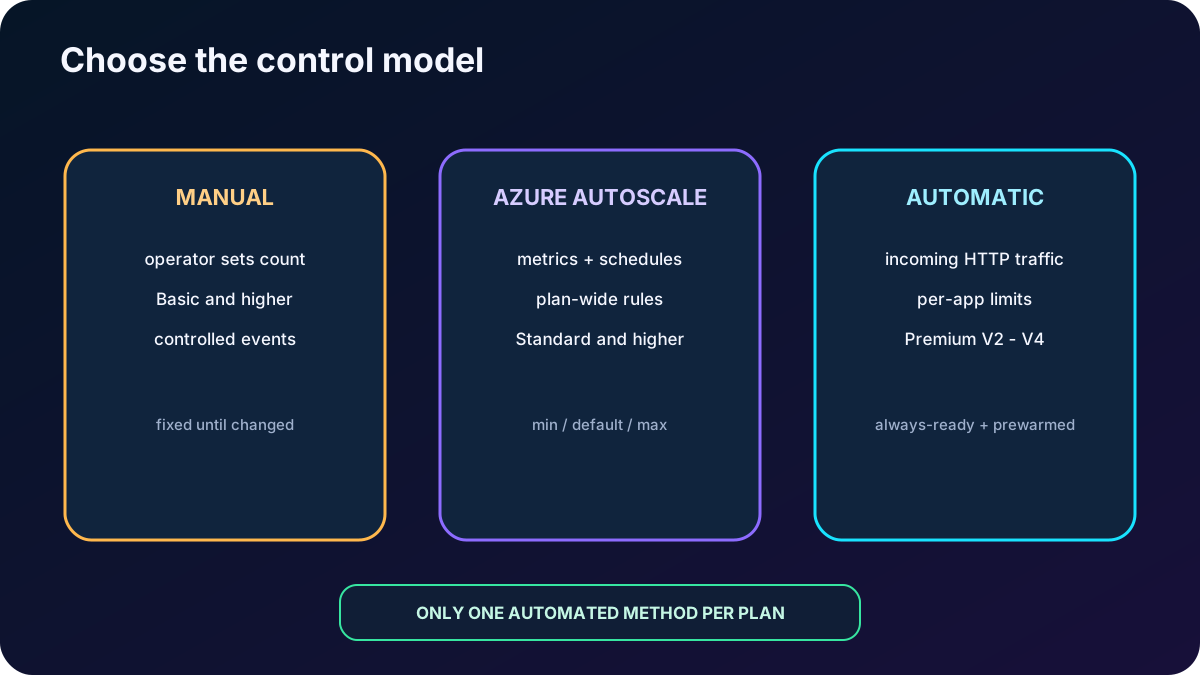
8. Distinguish autoscale from Automatic scaling
Two different automation models.
Capability
autoscale
Automatic scaling
Signal
Metrics, custom signals, and schedules.
Incoming HTTP traffic and platform observations.
Scope
Entire plan.
Configured per web app, with plan-level maximum burst.
Rules
You define thresholds, actions, profiles, and schedules.
The platform decides without custom rules.
Warm capacity
No special always-ready or prewarmed model.
Always-ready minimum plus a prewarmed buffer reduces cold-start delay.
Current tiers
Standard and higher.
Premium V2, V3, and V4.
Best fit
Custom logic, multiple metrics, CPU/memory/queue signals, or predictable schedules.
Unpredictable HTTP traffic, less rule management, and different app-level limits inside a plan.
Automatic scaling is also called elastic scaling in the supplied module. It can enforce an app-level maximum so a rapidly growing front end does not overwhelm a slower database. Maximum burst can reach 30 on supported Premium plans; the per-app maximum must fit inside it. Automatic scaling does not support deployment-slot traffic, and only one scaling method should be active for a plan.
Automatic scaling supports Windows and Linux apps deployed as code or containers. Disable ARR affinity for a stateless scale-out design, monitor AutomaticScalingInstanceCount, and account for active and prewarmed workers in performance and cost decisions. health checks can be used with this model.
Choose from the signal and control model, not from three similar names.
9. Module assessment explained
Answers to every supplied assessment item.
Question
Correct answer
Reasoning
More CPU, memory, or disk without adding VMs?
Scale up.
Changing tier or worker size increases capacity per instance; scale out adds instances.
Which listed plan supports 10 staging slots?
Premium V3 P1V3.
Basic has no slots and Standard supports five; Premium supports up to 20.
Trigger an event at 08:00 on Saturday?
A time-based rule.
The trigger is a schedule in a time zone, not a measured load signal.
10. Compact review of every topic
Short versions for active recall.
Topic
Remember this
Scenario
Match predictable hotel demand with enough peak capacity and lower off-peak cost.