Azure App Service apps: deployment, slots, security, domains, backup, and monitoring
Create and operate App Service web applications from runtime selection through CI/CD, staged releases, built-in authentication, custom domains, recovery, and live application telemetry.
Suggested study time: 90 minutes • Intermediate • Original rewrite based on the supplied Microsoft Learn module and checked against current Azure App Service documentation
By João Ricardo Dutra••Complete original content
1. Replace aging web infrastructure with a managed application platform
A consumer-research company runs web servers, databases, and new analytics workloads on aging on-premises hardware. Instead of refreshing every server, the organization wants Azure to reduce infrastructure administration and make its web, mobile, and API workloads easier to deploy, secure, recover, monitor, and prepare for AI-enabled experiences.
For AZ-104, the administrator must be comfortable with the Azure portal and basic cloud web hosting. The target skills are to recognize use cases, create an app, choose configuration and deployment options, work with deployment slots and custom domains, secure access, protect application data, and enable Application Insights.
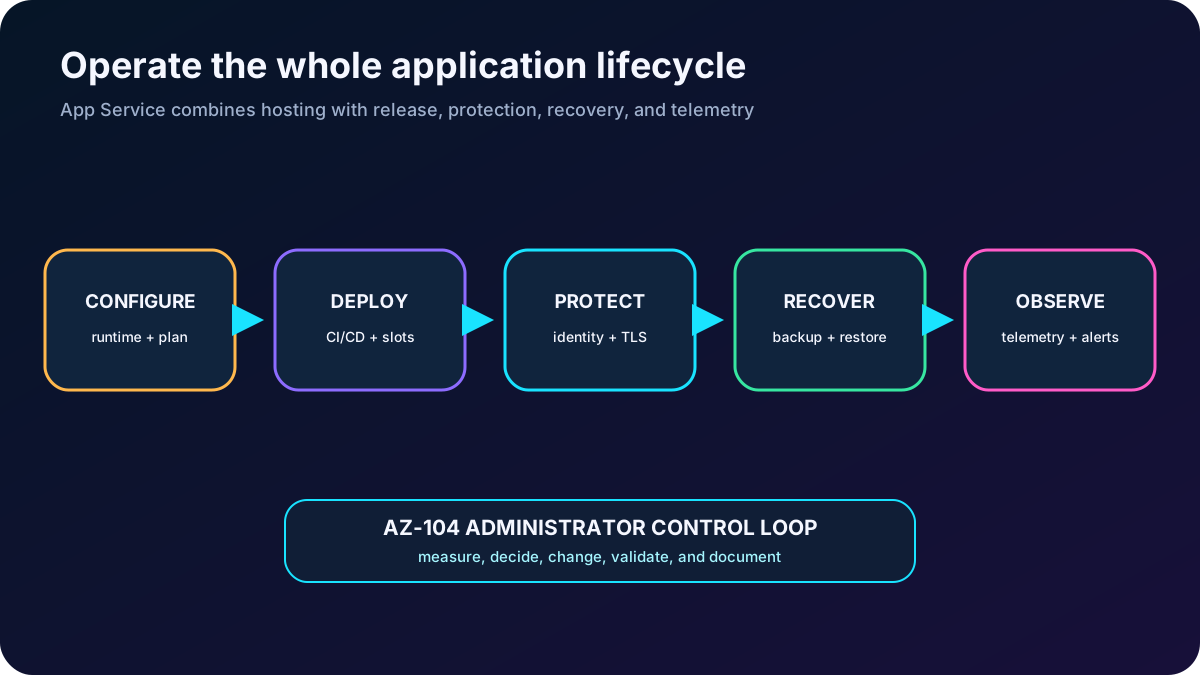
Operating an app is a lifecycle: configure, release, protect, recover, and observe.
2. Know what Azure provides
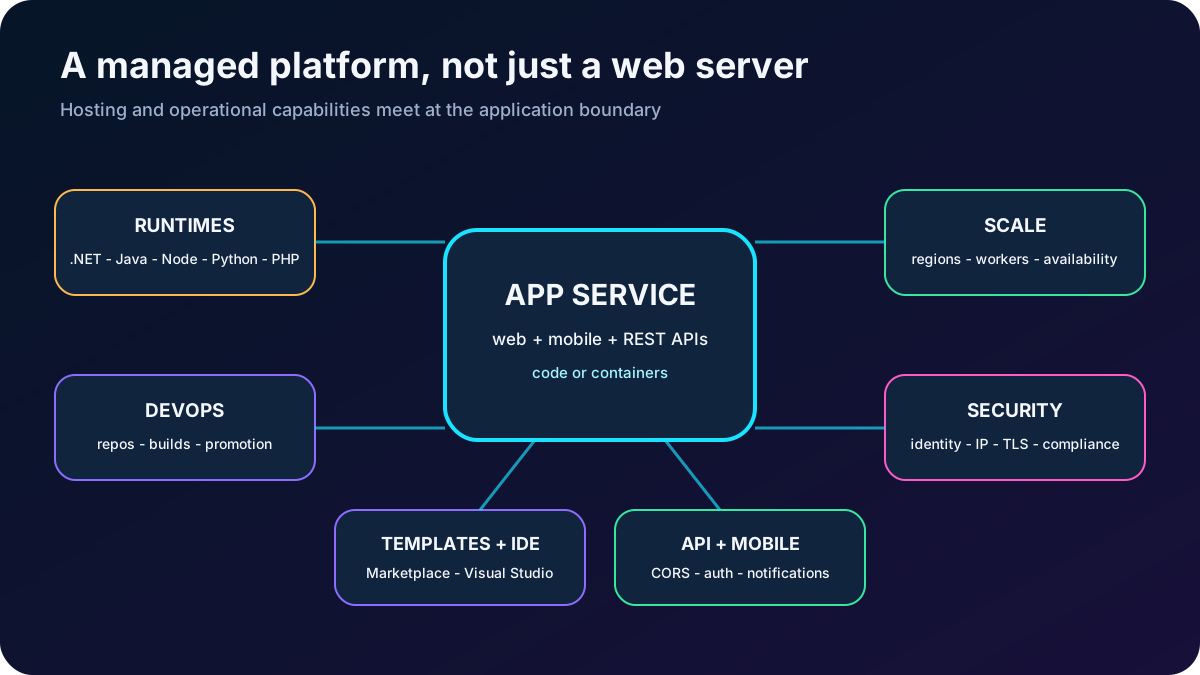
Azure is an HTTP-based platform for web applications, mobile back ends, and REST APIs. Microsoft manages the underlying hosts, patching, and platform integration while the team deploys code or containers. Apps can run and scale in Windows or Linux environments, subject to the runtime and plan selected.
Capabilities highlighted by the module.
Area
What contributes
Languages and frameworks
.NET and ASP.NET, Java, Node.js, Python, and PHP quickstarts; custom containers expand the runtime choice. PowerShell, scripts, executables, and WebJobs can perform background work.
DevOps
Continuous delivery from GitHub, , Bitbucket, Docker Hub, and ; promotion through test and staging; administration with Azure PowerShell or Azure CLI.
Scale and availability
Manual or automatic vertical and horizontal scaling across Microsoft datacenter regions, load balancing, deployment slots, and service-level commitments that depend on the selected tier.
Security and compliance
ISO, SOC, and PCI programs; and social sign-in providers; IP restrictions, managed identities, HTTPS, TLS, and network integration.
Developer experience
Azure Marketplace templates such as WordPress, Joomla, and Drupal, plus and other IDE deployment and debugging tools.
API and mobile features
Built-in CORS support, authentication, offline synchronization patterns, push-notification integrations, and API-oriented hosting.
removes server management, not application ownership. The team still controls runtime compatibility, secrets, identity, data, releases, capacity, resilience, telemetry, and cost.
The managed platform joins application hosting with operational capabilities.
3. Create the application from deliberate configuration choices
Core choices when creating an app.
Setting
Meaning
Administrator check
Name
Creates the globally unique default hostname under azurewebsites.net.
Choose a durable resource name; a custom domain can be mapped later.
Publish model
Runs application code or a custom container image.
Match the delivery artifact, registry access, startup behavior, and support model.
Runtime stack
Selects language, framework, and SDK version.
Verify current Windows/Linux availability and lifecycle support for .NET, Java, Node.js, Python, PHP, or the selected container.
Operating system
Uses Windows or Linux workers.
The choice affects stacks, commands, filesystem behavior, plan compatibility, and price.
Region
Locates the app and its plan.
Place compute near users and dependencies and confirm feature availability.
plan
Provides workers, tier features, scale limits, and the main compute charge.
Choose or create a plan with enough capacity and the required slots, backup, networking, and scaling features.
The Web Apps, Mobile Apps, and API Apps experiences all build on . After creation, the portal exposes deployment settings, environment variables, path mappings, runtime configuration, networking, identity, certificates, diagnostics, and other operational controls.
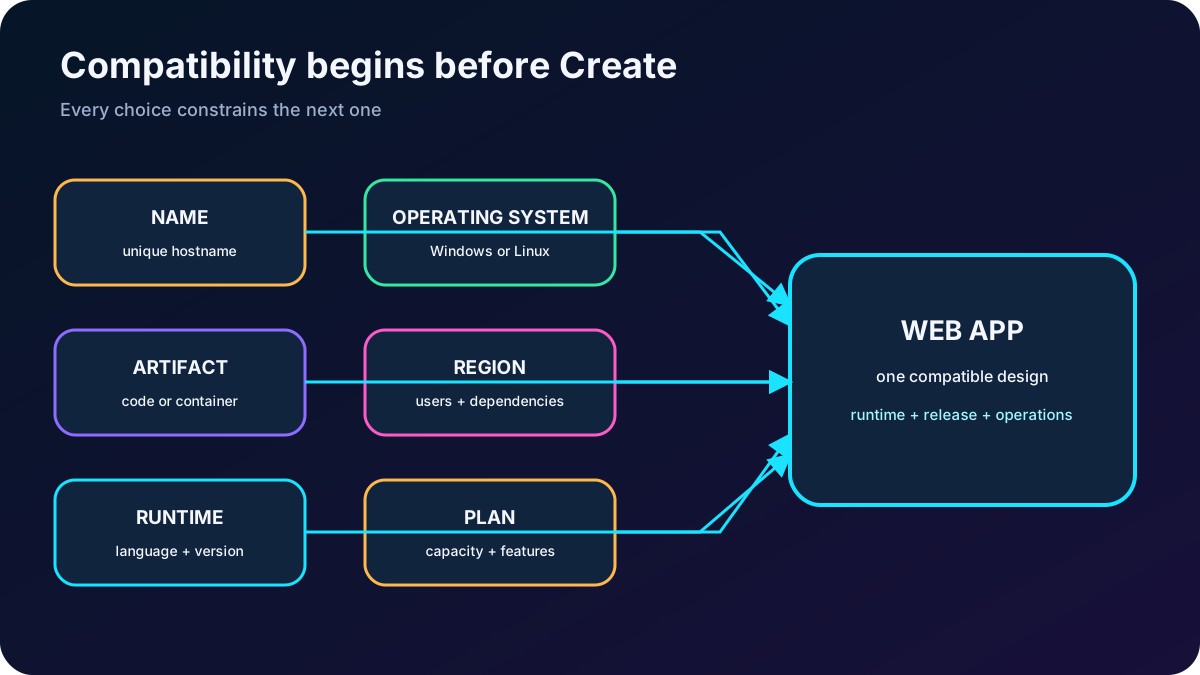
A valid app is the intersection of its artifact, runtime, operating system, region, and plan.
4. Configure runtime behavior after creation
Important application settings.
Setting
Behavior
When it matters
Always On
Keeps the app loaded when traffic is absent; the platform periodically probes it.
Required for continuous WebJobs and CRON-triggered WebJobs and useful when cold-start latency is unacceptable.
Session affinity
Uses a cookie to route one client to the same worker during a session.
Useful for stateful compatibility; disable it when a stateless app can distribute requests freely.
HTTPS Only
Redirects HTTP requests to HTTPS.
Enable to prevent users from remaining on unencrypted HTTP; also choose an appropriate minimum TLS version.
Startup command
Runs an optional command or startup file for Linux code and custom containers.
Use when the platform cannot infer the correct startup process.
Path mappings and storage
Maps virtual paths or mounted storage into the app.
Confirm persistence, permissions, and whether the setting swaps with a deployment slot.
Keep secrets in protected app settings or a secret store instead of source code. Treat changes to runtime versions, environment variables, startup commands, and path mappings as release-controlled configuration because they can restart the app or alter every request.
5. Choose a repeatable deployment path
Deployment Center connects a source, build pipeline, and deployment mechanism. Continuous integration and delivery compiles, tests, packages, and publishes each accepted change with little manual intervention. Manual deployment remains useful for controlled releases, experiments, or environments that cannot connect a hosted repository.
Deployment choices from the supplied module, with current context.
Mode
Sources or mechanisms
Operational implication
Continuous
GitHub with GitHub Actions or Build Service, Bitbucket, with , Local Git, and container registries such as Docker Hub or .
Every approved commit or image can trigger a consistent build and release. Prefer federated identity or managed identity over long-lived deployment secrets.
Manual
Remote Git push, ZIP deployment, FTP/WebDeploy, CLI, PowerShell, IDE tooling, or a manually triggered pipeline.
The operator controls timing but must preserve repeatability, provenance, testing, and rollback.
GitHub Actions is the default build provider when the portal creates GitHub continuous deployment. can also build source with its build service. can define custom build and release stages, and source repositories should contain the files the selected runtime expects.
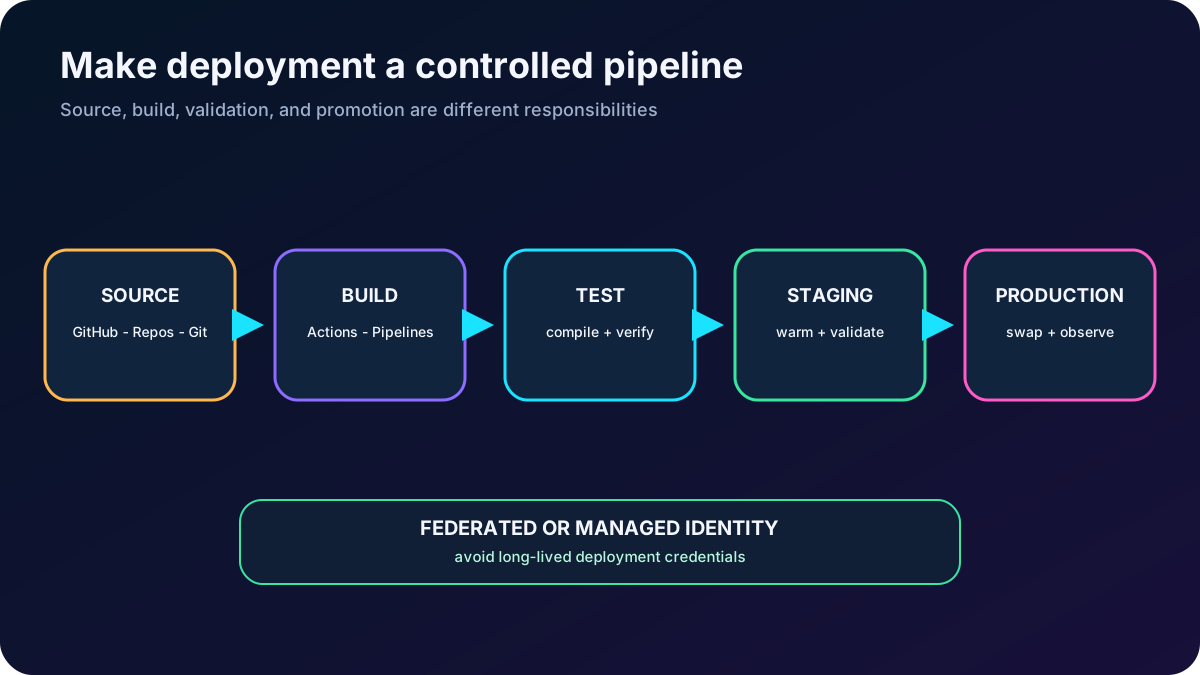
Separate source, build, deployment, validation, and promotion so a commit does not become an uncontrolled production change.
6. Stage releases with deployment slots
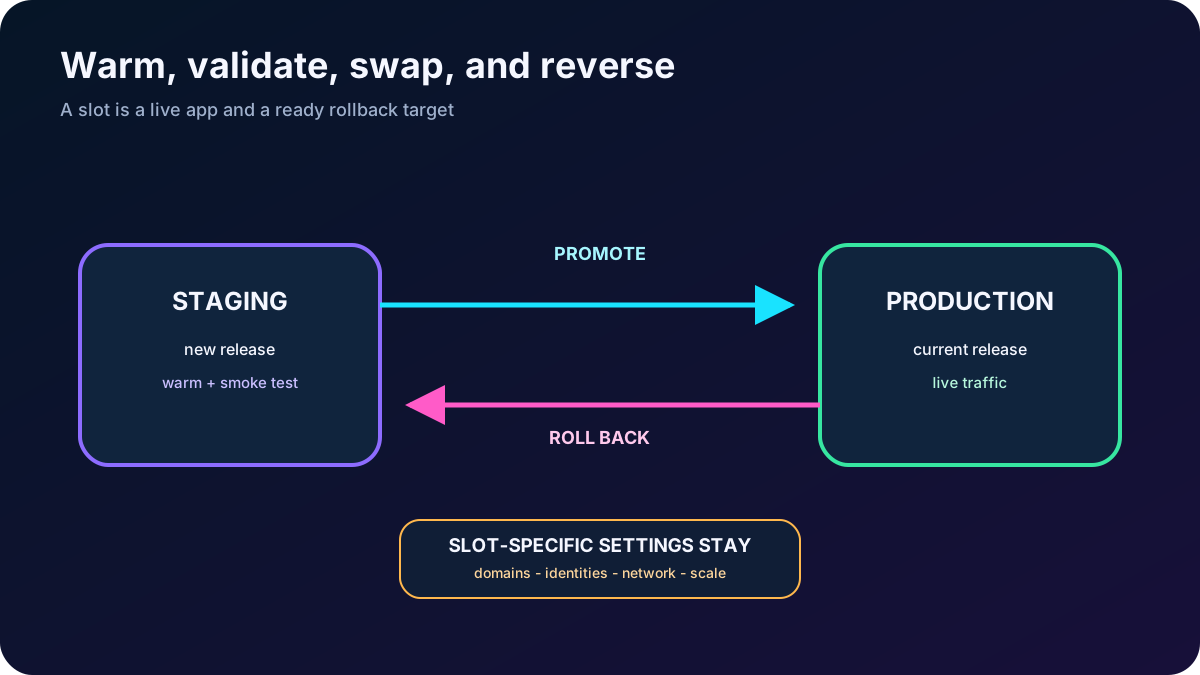
A deployment slot is a live app with its own hostname. Standard, Premium, and Isolated plans provide different slot limits. Production is the default slot; additional slots commonly represent development, test, staging, or another release candidate.
Deploy to staging and validate functionality, configuration, dependencies, and smoke tests before exposing the release to production traffic.
Swap a warmed source slot into production. The platform redirects traffic without dropping requests, greatly reducing deployment downtime and cold starts.
After a swap, the former production version resides in the other slot. Swap again to return quickly to the last known good release.
Use Auto swap when every deployment to a source slot should be warmed and promoted automatically; omit it when preswap approval or validation is required.
Remember that every active slot consumes the same plan workers and can affect capacity.
Slot swapping changes the production release while retaining a fast rollback target.
7. Predict which settings move during a slot swap
A new slot can start empty or clone another slot’s configuration. Cloning creates an editable copy; it does not make the two slots permanently identical. Settings must be classified as content-following, configurable as sticky, or inherently slot-specific before a swap.
Representative swap behavior.
Usually swaps with content
Can be marked slot-specific
Normally stays with the slot
Language and framework versions; 32/64-bit platform; WebSockets; handler and path mappings; public certificates; WebJobs content; hybrid connections and service endpoints.
App settings, connection strings, and mounted storage accounts can be configured to remain with a slot.
The current list is broader than the simplified export, so verify it before a high-risk release. A sticky database connection can keep staging on test data while production remains on production data. Conversely, a non-sticky connection string follows the application content, which is why “connection strings” is the correct answer in the supplied assessment.
8. Use built-in authentication without surrendering authorization design
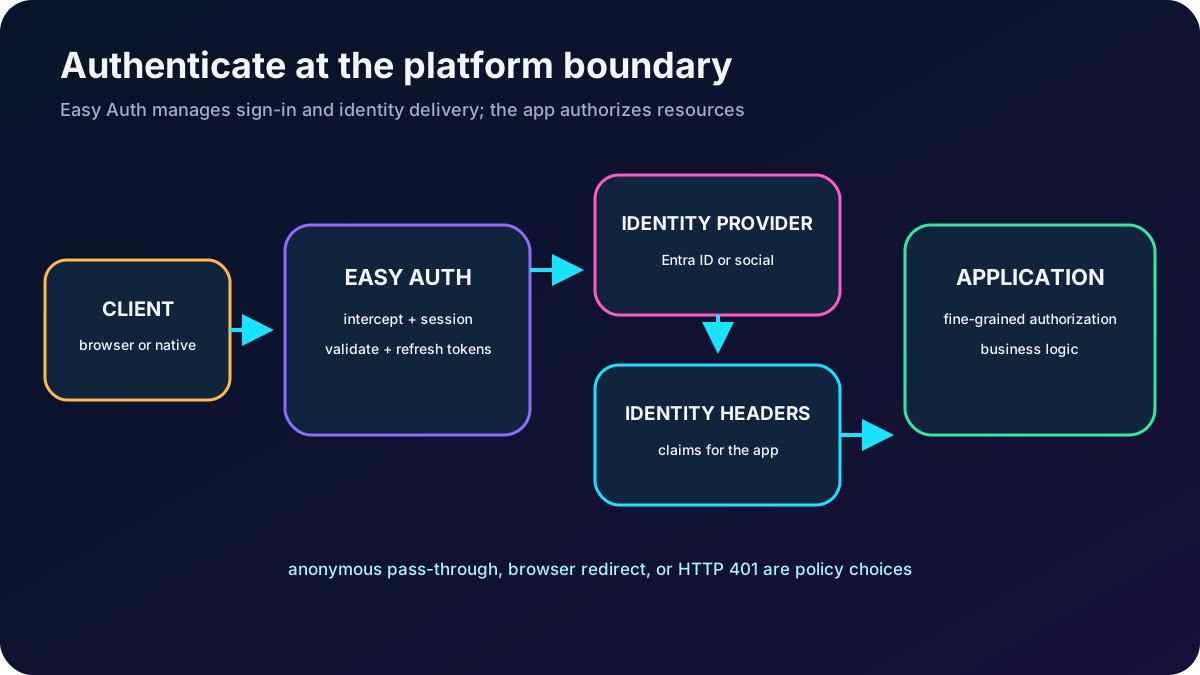
authentication and authorization, often called Easy Auth, runs alongside but separately from application code. It can protect web apps, APIs, mobile back ends, and without requiring a particular SDK or language. A framework or external identity solution can still be used when it better fits the application.
Easy Auth request processing.
Stage
Platform responsibility
Sign-in
Challenge unauthenticated users through a configured identity provider such as or supported social providers.
Token work
Validate tokens and manage token storage, refresh, and the authenticated session.
Identity delivery
Inject authenticated identity and claims into request headers for the application.
Access action
Allow anonymous requests to reach the app, redirect browser requests to sign-in, or return HTTP 401 to an unauthenticated native client.
Allow Anonymous leaves authorization to application code and supports public pages or multiple sign-in paths. Require Authentication protects all routes at the platform boundary, which can be inappropriate for a public landing page in a single-page application. Authentication proves identity; the application must still enforce resource-level authorization.
Use application logs and failed-request tracing to diagnose the module. The supplied material points to EasyAuthModule_32/64 entries; current telemetry and platform diagnostics should be reviewed together without logging tokens or sensitive claims.
The platform can authenticate and inject identity, while the application remains responsible for fine-grained authorization.
9. Map a custom domain and protect it with TLS
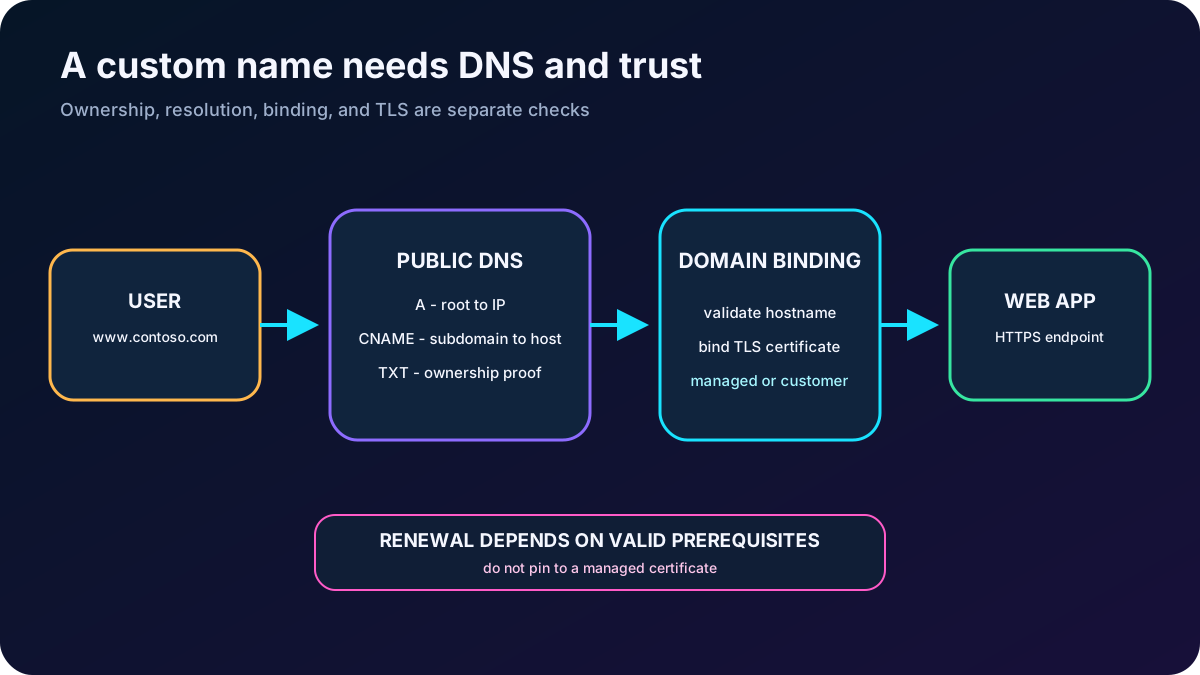
Every app receives a default azurewebsites.net hostname and a platform IP. A custom domain replaces the Azure-facing name with a branded address that users recognize. The operator must own the name, control its DNS records, validate ownership, bind the hostname to the app, and then secure it with TLS.
DNS choices for .
Record
Maps
Typical use
A
A hostname directly to the app IP address.
Root or apex domains. Update it if the IP changes.
CNAME
A hostname to the app default hostname.
Subdomains and wildcards; follows the target if its IP changes.
TXT verification
A domain verification identifier.
Strongly recommended to prove ownership and reduce subdomain-takeover risk.
The workflow is to reserve or purchase the domain, create the required DNS records, validate and add the custom domain in the portal, test resolution, and bind a certificate. Managed Certificates are free and renew automatically while prerequisites remain valid. They are not exportable and do not support every wildcard, private DNS, Environment, or certificate-pinning scenario; use another certificate option when those constraints matter.
DNS establishes the route; the domain binding and certificate establish trust and HTTPS.
10. Back up and restore the application deliberately
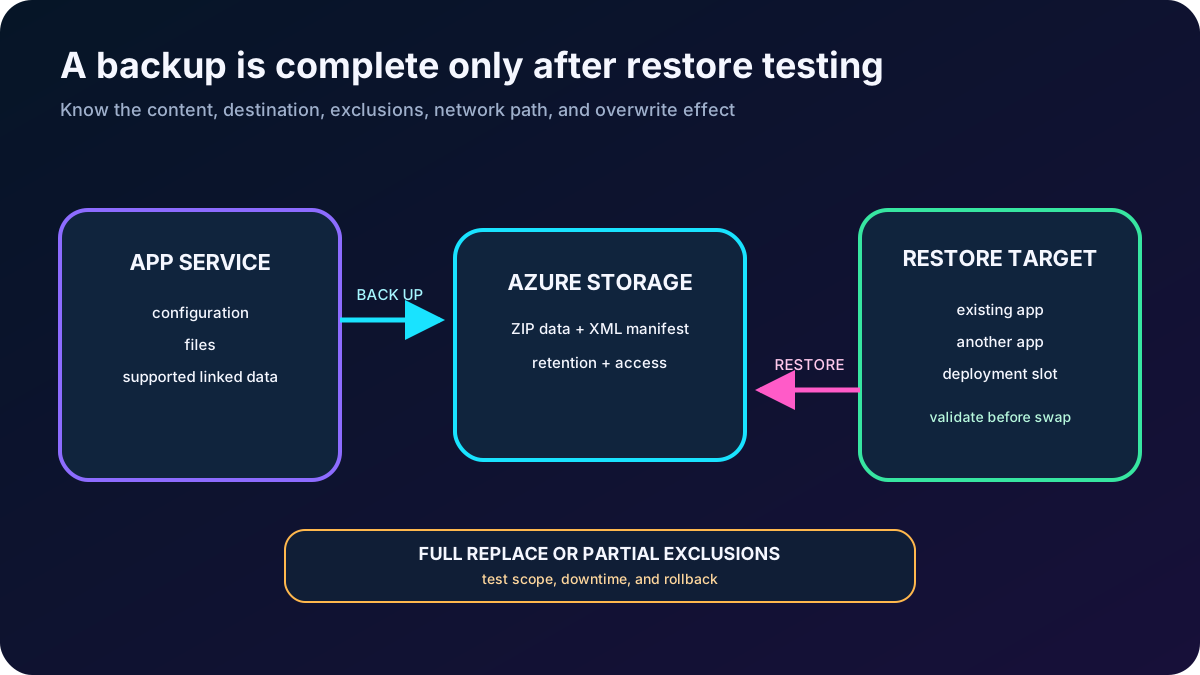
provides automatic and custom backups in supported paid tiers. Custom backups can run on demand or on a schedule and can be restored over an existing app, into another app, or into a deployment slot. Basic supports only the production slot; higher supported tiers add broader slot use.
Backup design details.
Area
What to remember
Destination
A custom backup uses an Azure storage account and container. The supplied module requires the same subscription; network and access rules must permit the operation.
Content
App configuration and file content are included. Custom backups can include supported linked databases, but Microsoft has announced removal of linked-database backup support on March 31, 2028. Protect databases with their native backup services.
Files
A ZIP holds backup data and an XML file describes the contents and metadata. The supplied limit is 10 GB for app plus database content.
Full and partial
Full is the default. Partial backups exclude named files and folders; excluded content remains when a partial backup is restored.
Restore effect
A full restore replaces target content; files absent from the backup are deleted. Restore to a slot first when production downtime and rollback risk matter.
Network protection
The older module warns that a firewall blocks a simple storage destination. Current backup over virtual network integration works when the app, slot, and storage network rules meet the documented prerequisites.
A backup is useful only after its scope and restore procedure are tested. Browse the ZIP and XML when inspection is enough, retain backups for the required period, and do not treat platform automatic backups alone as a cross-region disaster-recovery strategy.
Separate backup creation from restore validation and production promotion.
11. Observe live behavior with Application Insights
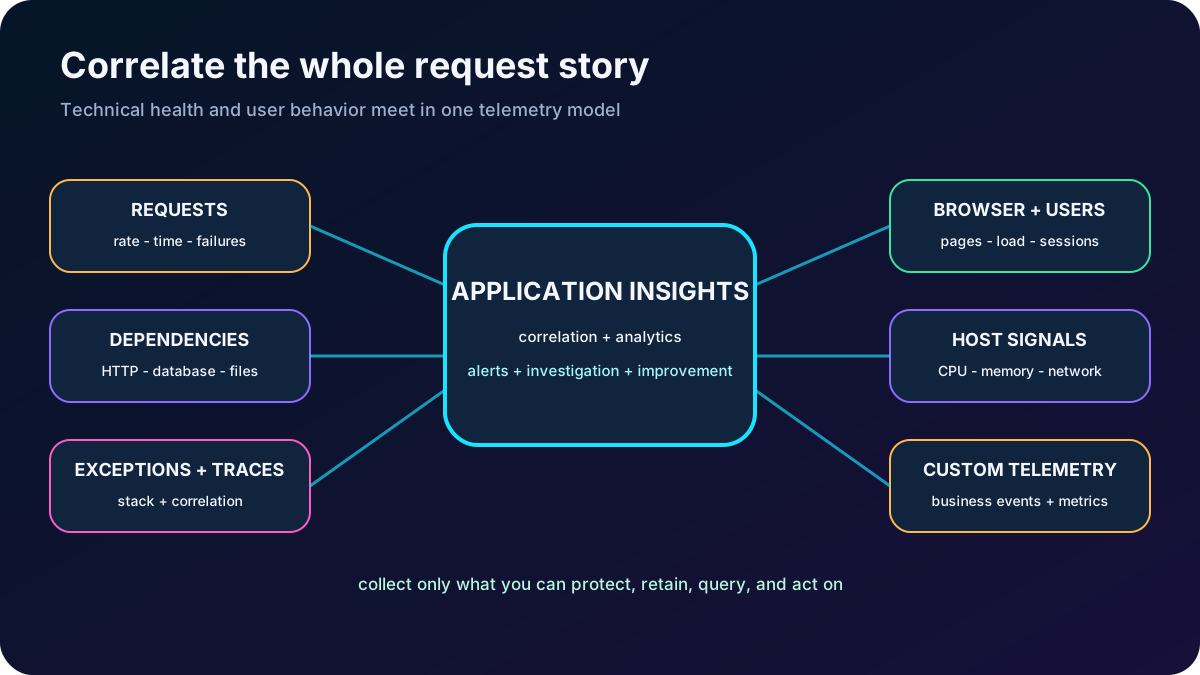
Application Insights is the application performance management capability in . It can automatically instrument supported stacks or accept code-based OpenTelemetry instrumentation when the team needs custom telemetry, unsupported scenarios, or greater control. It works for cloud, hybrid, and on-premises applications and integrates with delivery pipelines and development tools.
Telemetry questions from the module.
Signal
Question it answers
Requests, response time, and failures
Which routes are busy or slow, when failures rise, and whether load is exposing a capacity problem?
Dependencies
Is a database, HTTP service, file service, or other downstream call slowing or failing the application?
Exceptions and traces
Which stack trace and correlated request explain a server or browser failure?
Page views and load performance
Which pages users view and how quickly browsers render them?
Users and sessions
How many people and sessions use the application and how does usage change?
Performance counters and host diagnostics
What are CPU, memory, network, container, or host signals doing?
Custom events and metrics
Which business outcomes, such as items sold or games won, should be correlated with technical health?
Telemetry must lead to action: define alerts, correlate requests with dependencies and traces, manage sampling and retention, and avoid sending personal data or secrets. Application Insights can expose an anomaly; it does not replace capacity planning, secure logging, or incident response.
Correlated telemetry connects user experience, application code, dependencies, and infrastructure.
12. Rehearse the supplied web-app lab
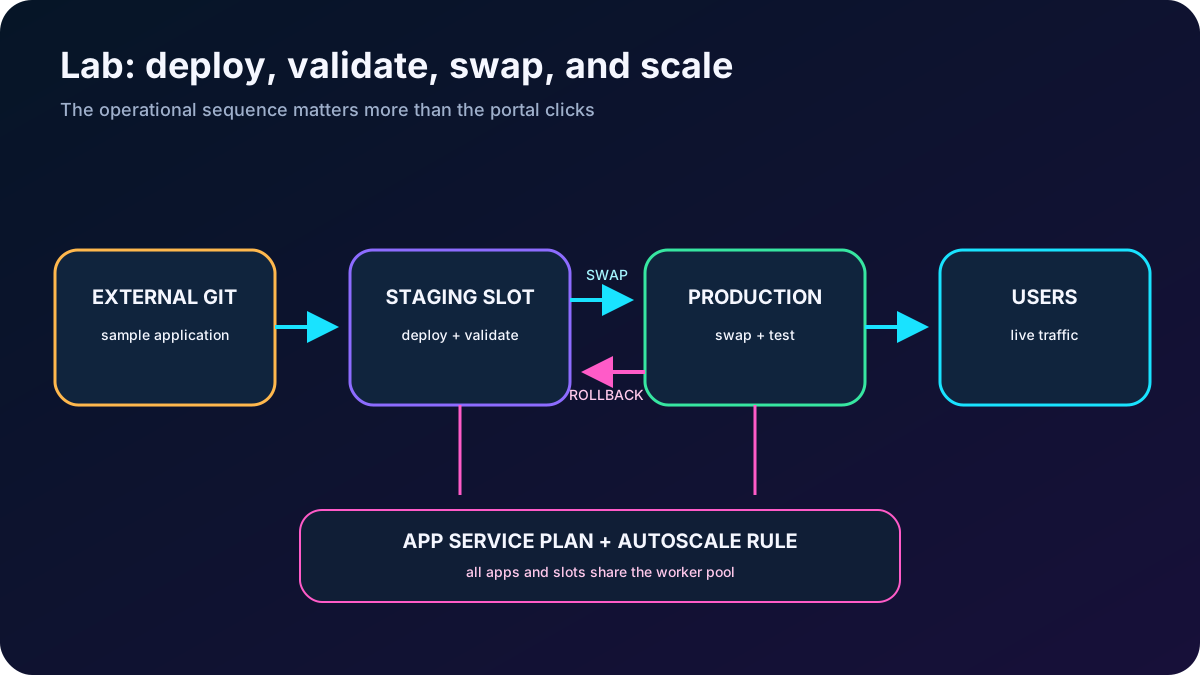
The lab migrates an on-premises website to an web app using a PHP runtime scenario and deployment slots. It requires an Azure subscription and estimates about 20 minutes of hands-on work, although provisioning and policy controls can change the duration.
Create the Azure web app and select the appropriate operating system, PHP runtime, region, and plan.
Create a staging deployment slot.
Configure deployment settings and connect an external Git source that supplies the sample application.
Deploy to staging and validate the site before production receives the release.
Swap staging with production, verify the result, and understand how to reverse the swap.
Configure and test an autoscale rule for the plan while remembering that all apps in the plan share its workers.
The exercise joins deployment, slot promotion, and capacity management in one operational flow.
13. Explain every module assessment answer
Assessment answers and reasoning.
Question
Correct answer
Why
Which cloned configuration follows content across a swap?
Connection strings.
They swap by default unless explicitly marked as slot-specific; custom domains and scale settings normally remain with the slot.
How should Marketing discover popular pages, busy times, and user locations?
Azure Application Insights.
Usage and performance telemetry answer those questions; deployment and basic application logging do not provide the same analytics model.
Which choice is a valid automated deployment source?
GitHub.
GitHub can trigger delivery through GitHub Actions or the build path; JavaScript is code and SharePoint is not one of the listed deployment sources.
14. Compact review of every topic
Short versions for active recall.
Topic
Remember this
Scenario
Move aging server-hosted web workloads to a managed, scalable, AI-ready platform.
Hosts web apps, APIs, and mobile back ends as code or containers on Windows or Linux.
Creation
Name, artifact, stack, OS, region, and plan form one compatible design.
Runtime settings
Always On, affinity, HTTPS Only, startup, paths, and environment variables affect behavior and restarts.
Deployment
A source, build pipeline, and deployment mechanism make continuous or manual delivery repeatable.
Slots
Deploy, warm, validate, swap, and reverse-swap to reduce downtime and rollback risk.
Swap settings
Some settings follow content, some can be sticky, and domains, identities, networking, scale, and diagnostics normally stay.
Easy Auth
The platform signs in users, manages tokens and sessions, and injects identity; the app still authorizes resources.
Custom domain
Own the name, create A/CNAME plus verification, bind it, and add the right TLS certificate.