Suggested study time: 95 minutes • Intermediate • Original rewrite based on the supplied Microsoft Learn module and checked against current Azure Backup documentation
By João Ricardo Dutra••Complete original content
1. Turn backup policy into recoverable business outcomes
Organizations depend on data, so storage, security, backup frequency, retention, and restore procedures must be designed together. Traditional local redundancy or off-site tape can protect copies, but transporting media back to a server room lengthens recovery. Those approaches can also leave gaps around ransomware, malicious administrators, accidental deletion, human error, and proof that a restore actually works.
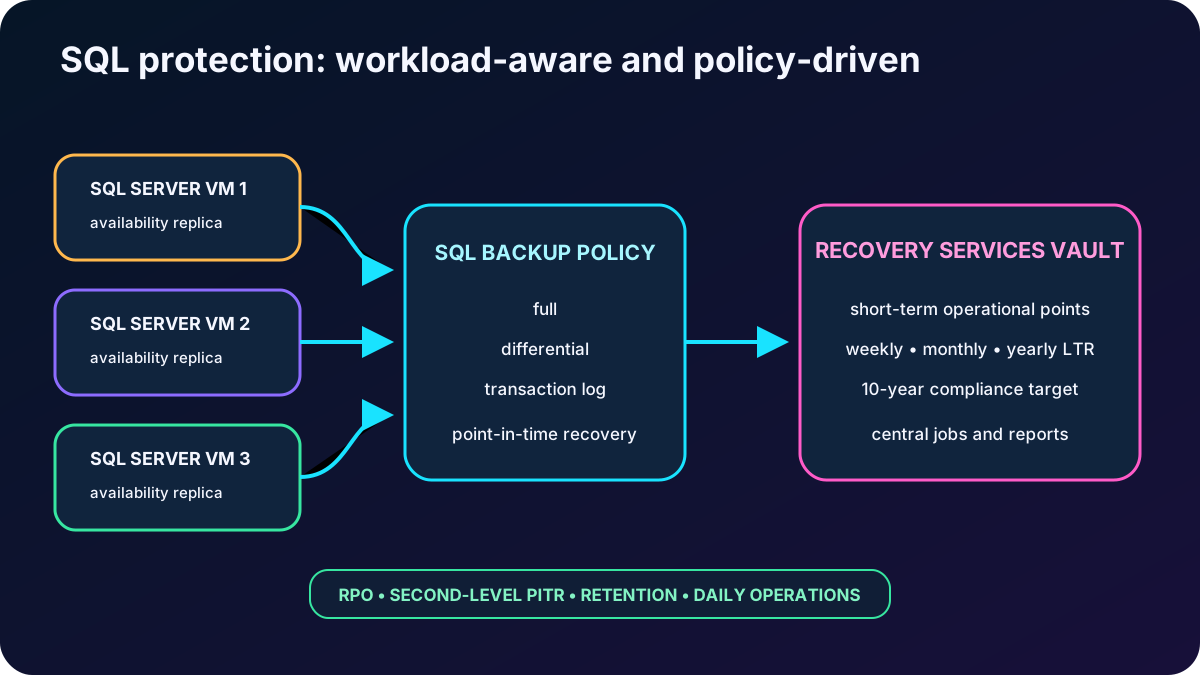
The study scenario uses SQL Server in an Always On availability group across three Azure virtual machines. The organization wants an Azure-native backup service, ten years of economical retention for audit and compliance, daily oversight of every database backup job, secure recovery, and centralized administration. The objective is to decide whether provides the required protection, retention, security, and restore model.
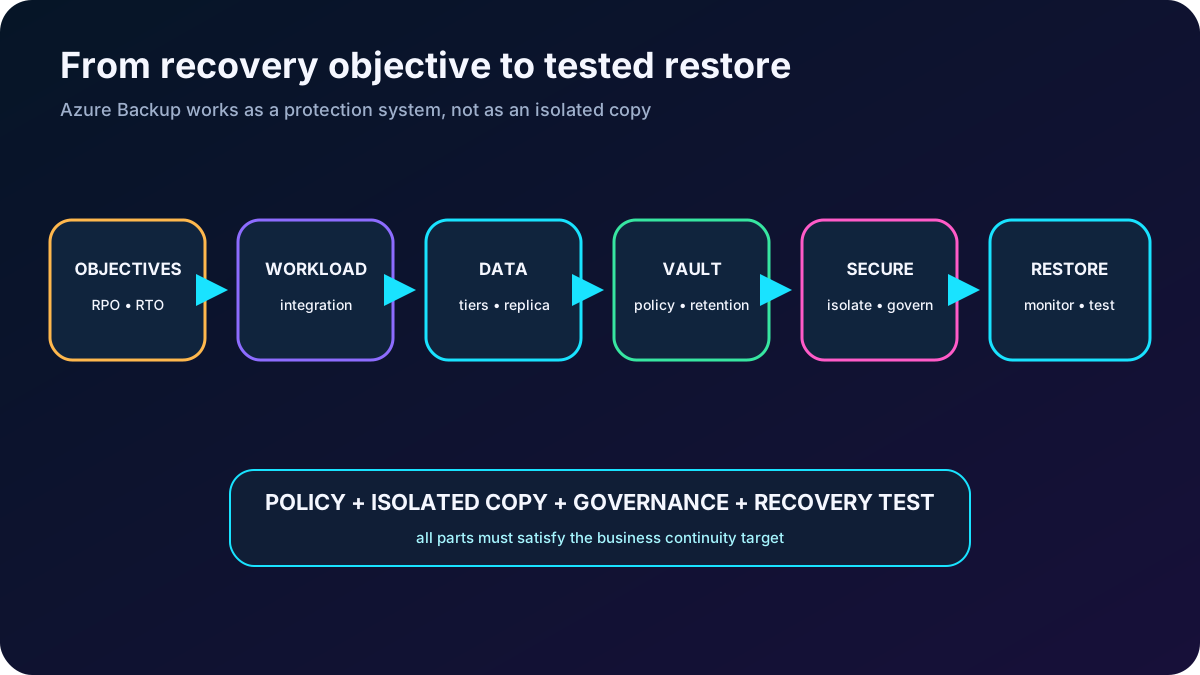
A backup succeeds only when policy, protected data, isolated copies, security, monitoring, and a tested restore form one system.
2. Define and its service boundary
is a managed Azure backup-as-a-service offering that protects supported Azure and hybrid data and restores it from Microsoft Azure. It removes the need to build a separate backup server and storage estate for many scenarios, automatically manages protected storage, and exposes policies, recovery points, jobs, security settings, and restore operations through Azure-native management surfaces.
Core service characteristics.
Characteristic
Operational meaning
Zero infrastructure
For supported cloud workloads, Azure operates the backup control plane and managed vault storage, reducing capital cost, patching, capacity planning, and storage administration.
Central management
Policies, vaults, APIs, Azure PowerShell, Azure CLI, SDKs, REST, , Resource Graph, , and cross-subscription views support governance and automation at scale.
Built-in security
Encryption in transit and at rest, Azure RBAC, private endpoints where supported, alerts, soft delete, immutability, Resource Guard, and multiuser authorization reduce accidental and malicious loss risk.
Independent recovery
A vault-standard copy can remain isolated from the source so data is recoverable even if the protected resource is deleted or compromised.
Pay for consumption
The service allocates backup storage automatically and charges according to protected instances, stored data, tier, redundancy, operations, and workload-specific rules.
3. Know which workloads can be protected
The supplied module lists the following protection scope. Support, regions, vault type, policy capabilities, and preview status differ by workload and must be checked before design approval.
Workloads covered by the module.
Location
Protected data or workload
Typical protection path
On-premises
Windows files, folders, and system state; Hyper-V, VMware, and supported applications through a backup server.
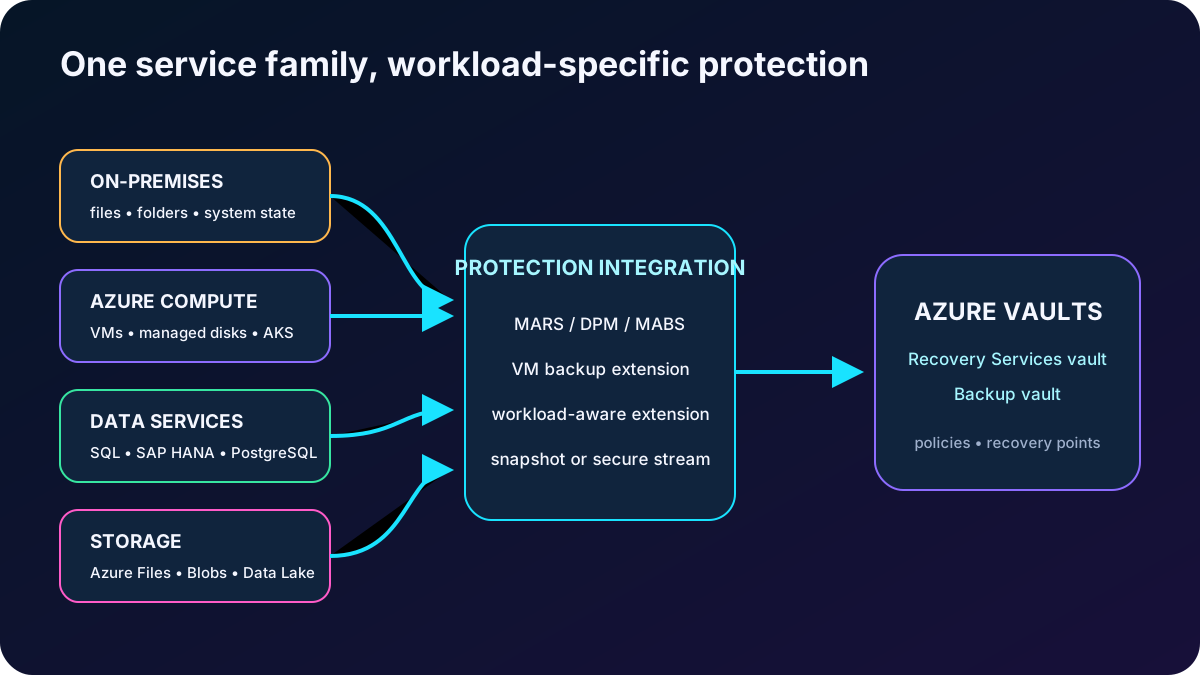
MARS agent directly to a Recovery Services vault, or DPM/MABS to local disk and then to the vault.
Azure compute
Windows and Linux Azure VMs and Azure Managed Disks.
VM backup extension for the complete VM; MARS for supported file/folder/system-state scenarios; Azure Disk Backup for disk snapshots.
Azure file and object data
shares and Azure Blobs.
Operational snapshots and, where supported, vaulted copies according to workload policy.
Databases in Azure VMs
SQL Server and SAP HANA.
Workload-aware streaming backup with database-level recovery.
Managed databases
, PostgreSQL Flexible Server, and MySQL Flexible Server as listed by the module.
Workload-specific Backup vault integration and support matrix.
Containers
Azure Kubernetes Service clusters.
backup extension and Backup vault for supported cluster state and persistent volumes.
Current Azure documentation additionally lists capabilities such as SAP ASE on Azure VMs, vaulted protection, and preview protection for services such as . Treat these as current additions, not as replacements for the module list, and validate availability before production use.
is one service family with different protection mechanisms for different data sources.
4. Translate business tolerance into RPO and RTO
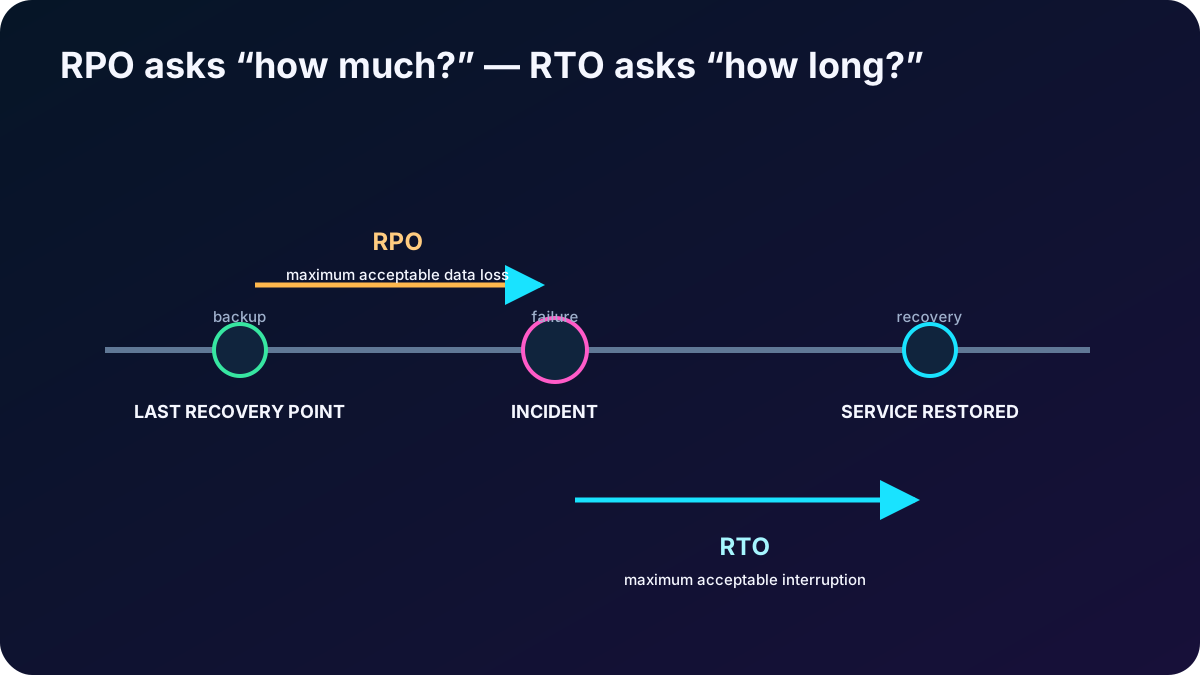
Recovery Point Objective (RPO) is the maximum tolerable data loss expressed as time. An RPO of one hour requires recovery points often enough that an incident loses no more than about one hour of changes. Recovery Time Objective (RTO) is the target duration for restoring the business process after disruption. An RTO of three hours means access should return within three hours to avoid unacceptable impact.
RPO and RTO drive different design choices.
Objective
Improved by
Common trade-off
Lower RPO
More frequent snapshots, log backups, or continuous/operational protection.
More recovery points, processing, storage, and workload-specific limits.
Faster tiers and retained local snapshots can cost more than deep archive.
Long retention
Monthly/yearly recovery points and archive-eligible copies.
Lower storage cost but slower restore and possible rehydration charges or minimum retention.
A policy schedule is not an RPO guarantee, and a retention setting is not an RTO. Account for job duration, failures, replication lag, restore preparation, application validation, dependent systems, and the time to resume service.
RPO limits how far back data may roll; RTO limits how long the service may remain unavailable.
5. Understand the four architectural layers
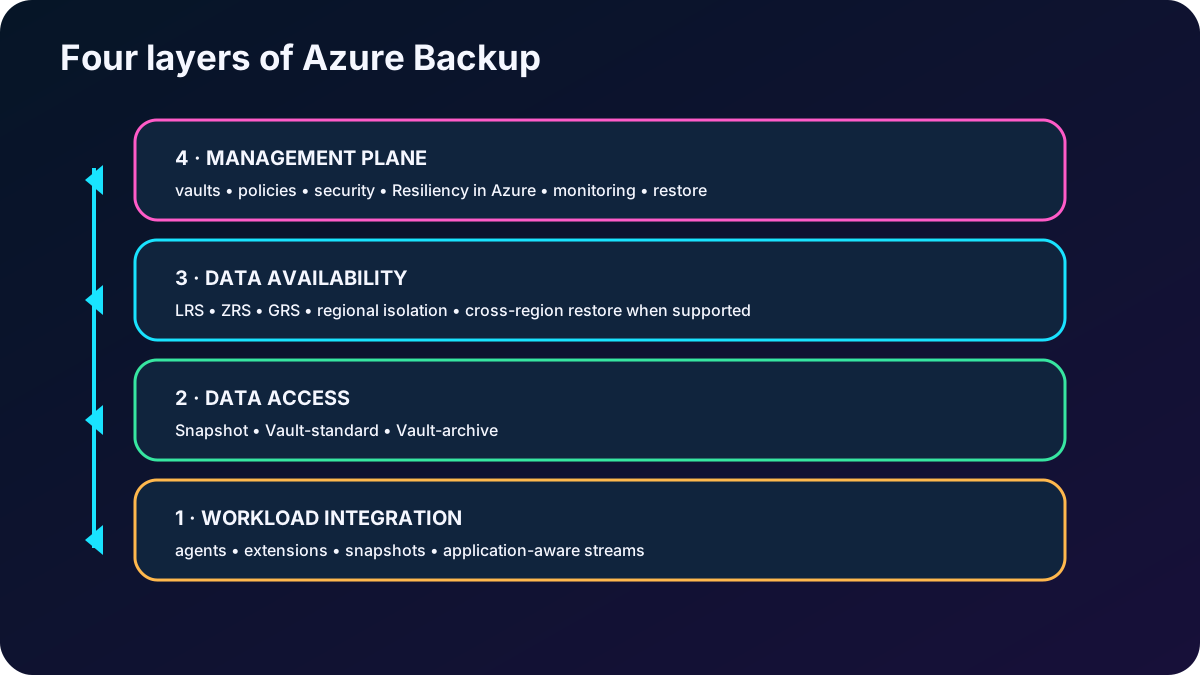
architecture from source to management.
Layer
Responsibility
Workload integration
An extension, agent, snapshot API, or workload-aware connector coordinates with the protected source and creates a snapshot or backup stream.
Data plane - access tiers
Operational/snapshot, Vault-standard, and Vault-archive storage provide different isolation, recovery time, retention, and price profiles.
Data plane - availability and security
LRS, ZRS, or GRS protects stored copies according to supported workload and region; encryption, Azure RBAC, network controls, soft delete, and immutability protect access and lifecycle.
Management plane
Recovery Services vaults and Backup vaults hold policies, recovery points or references, instances, jobs, and security configuration; centralized experiences aggregate the estate.
Protection flows upward from workload integration to isolated data and then to policy, governance, and monitoring.
6. Match each machine scenario to its agent or extension
Protection components for machines.
Component
Where it runs
What it protects
Azure VM backup extension
Installed through the Azure VM agent on the protected VM.
Coordinates a snapshot and protects the complete Azure VM. Current policies can use agent-based application/file consistency or agentless crash consistency where supported.
MARS agent
Individual supported Windows server or Azure VM.
Files, folders, volumes, and system state directly to a Recovery Services vault; it does not provide whole-VM Linux protection.
System Center DPM
A dedicated backup server, normally on-premises for on-premises protection.
Collects supported machines and applications to local disk, then uses MARS to send online recovery points to Azure.
Microsoft Server (MABS)
Dedicated on-premises server or Azure VM according to the protected estate.
DPM-derived application-aware and machine protection without a System Center license, with local disk plus vault protection.
Workload backup extension
Source VM or worker infrastructure for the supported workload.
Creates snapshots for services such as VM/Files or streams database backups such as SQL Server or SAP HANA.
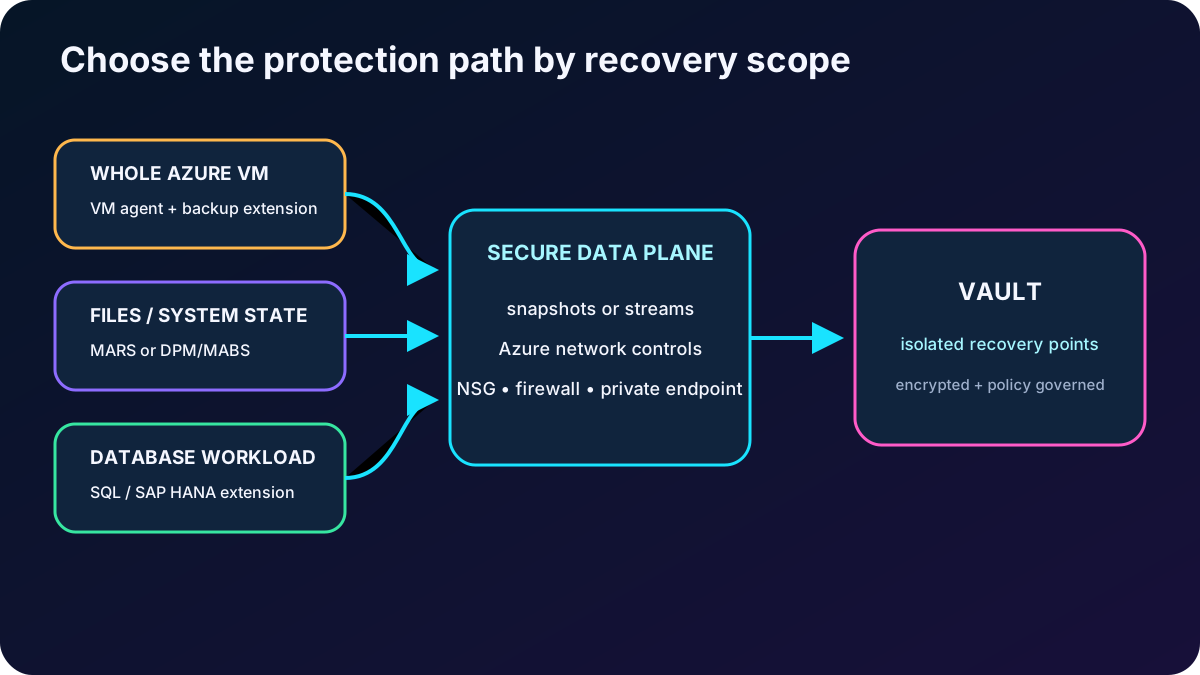
The extension is the integration mechanism, not the durable destination. Data moves over HTTPS and Azure networking, optionally using supported firewalls, network security groups, or private endpoints, into service-managed storage.
Choose the component from the recovery scope: whole VM, selected files and system state, or an application-aware database stream.
7. Distinguish full, incremental, differential, log, and selective protection
Backup types discussed in the module.
Type
Content and dependency
Usage
Full
Entire source or database plus enough log to recover it.
Initial protection; SQL Server supports at most one scheduled full per day, configured daily or weekly.
Incremental
Only blocks changed since the previous backup, without repeatedly sending unchanged data.
DPM/MABS disk protection and Azure-bound backups use incremental transfer for storage and network efficiency.
Differential
SQL changes since the latest full backup; depends on that full recovery chain.
At most one per day, and not on the same day as a full backup.
Transaction log
SQL log records that permit point-in-time restoration to a specific second.
Can be scheduled as often as every 15 minutes for supported SQL databases and recovery models.
Selective disk
A chosen subset of VM data disks is protected and a subset can be restored from an eligible recovery point.
Reduces cost when only critical disks need VM-level protection and another solution protects application data.
Multiple VM backups per day
Enhanced VM policy creates more than one recovery point per day.
Current enhanced policy supports intervals down to every four hours, unlike standard daily policy.
A backup chain must remain recoverable. Retaining a differential or log backup can keep its parent full backup longer than the visible full-backup retention because the dependent recovery points still need it.
8. Choose snapshot, Vault-standard, or Vault-archive deliberately
Backup access tiers.
Tier
Placement and purpose
Recovery profile
Snapshot or operational tier
A workload-specific snapshot remains near the source in the customer subscription or service data plane.
Fastest operational recovery because data does not first need to be copied back from a vault; it is less isolated from source-subscription compromise.
Vault-standard
An online, isolated copy resides in Microsoft-managed vault storage and can coexist with a snapshot copy.
Balanced recovery time and cost; preserves a copy when the original source or local snapshot is deleted or compromised.
Vault-archive
Eligible long-term retention points move to lower-cost storage for rarely accessed compliance data.
Lowest storage price but slower recovery, workload eligibility, minimum age/remaining-retention rules, and archive operation costs must be evaluated.
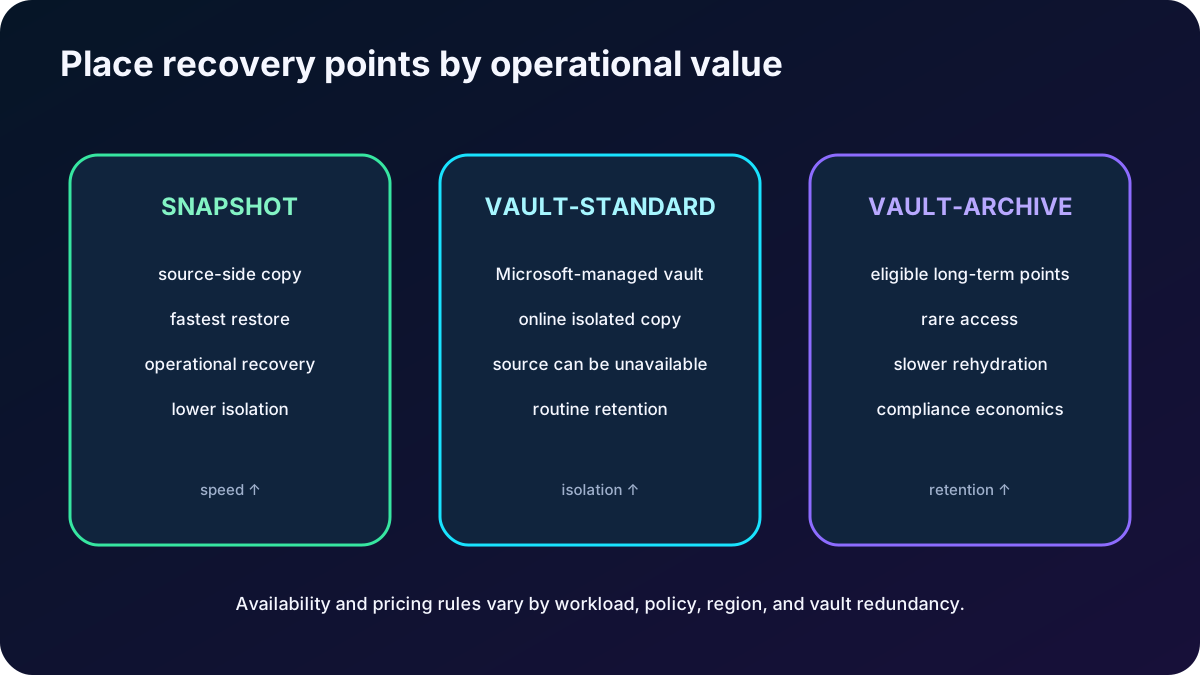
The source export describes the three concepts generically. Current support is workload-specific: for example, only eligible monthly and yearly recovery points for supported workloads can move to archive, and Archive tier is not supported with ZRS for a Recovery Services vault. Always use the current support matrix.
Keep recent operational points close, an isolated online copy in Vault-standard, and eligible long-term points in archive.
9. Select redundancy for the failure you must survive
Vault replication choices.
Option
Protection scope
Design note
LRS
Three copies within one datacenter in the primary region.
Lowest-cost vault redundancy; protects against rack and drive failures, not a regional loss.
ZRS
Copies across availability zones in the same supported region.
Improves zonal resilience and keeps data residency in-region; support varies by workload and region.
GRS
Replicates to a paired secondary region and is the Recovery Services vault default.
Supports regional durability; Cross Region Restore must meet workload, vault, permission, cost, and availability requirements.
Cross-region backup and cross-region restore are not the same capability. The supplied scenario correctly warns that most workloads cannot simply be backed up across arbitrary regions. A GRS Recovery Services vault can enable supported Cross Region Restore into its paired secondary region. For Azure VM backup, current guidance says secondary-region RPO can be as high as 36 hours in the worst case, so it cannot be assumed to equal the local backup schedule.
10. Secure recovery points against mistakes and attacks
Encrypt data in transit and at rest; use customer-managed keys where the workload, vault, and governance model require them.
Use Azure RBAC and separate backup administration from workload administration. Grant only the actions and scopes each role needs.
Use private endpoints and network controls for supported scenarios when backup traffic must avoid public endpoints.
Enable monitoring, alerts, and diagnostic settings so policy changes, failed jobs, restores, and destructive operations are visible.
Use soft delete to delay permanent removal after an explicit deletion. Current secure-by-default behavior retains deleted data for 14 days by default at no extra vaulted-backup charge and can support configurable retention up to 180 days, with charges beyond the free period.
Use immutable vault settings to block operations that would remove recovery points; locking can make the decision irreversible.
Use Resource Guard and multiuser authorization so critical operations require approval from a security administrator in a separate authorization boundary.
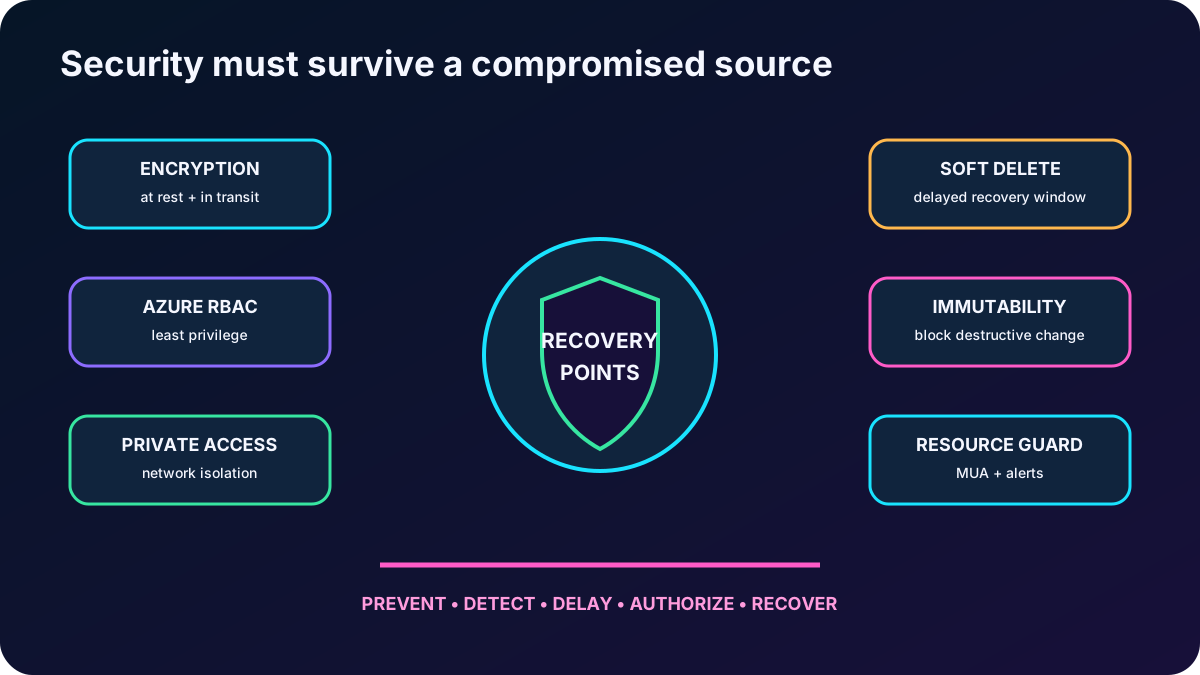
Soft delete does not replace policy retention, and immutability does not replace identity, monitoring, or recovery testing. Build defense in depth so one compromised administrator cannot disable protection and erase every usable copy.
Ransomware resilience comes from isolated data plus controls that prevent, detect, delay, and authorize destructive actions.
11. Organize policies and data with the correct vault
A vault is an Azure storage and management entity for backup instances, recovery points, policies, jobs, and security configuration. uses two vault families because workload architectures differ. A Recovery Services vault protects workloads such as Azure VMs, SQL Server/SAP HANA in Azure VMs, , MARS, DPM, and MABS. A Backup vault supports newer data-source protection such as Azure Disks, Azure Blobs, PostgreSQL Flexible Server, , and other workloads according to the current matrix.
Policy and vault design.
Decision
Guidance
Schedule
Define when protection runs and ensure frequency can meet the target RPO for that workload.
Retention
Define daily, weekly, monthly, and yearly recovery-point lifetimes; monthly/yearly retention commonly forms long-term retention.
Policy reuse
Assign one policy to many compatible items, while separating workloads with different recovery, compliance, or security requirements.
One or many vaults
A single vault can simplify a small estate. Multiple subscriptions, regions, security boundaries, quotas, delegated teams, or regulatory needs can justify multiple vaults.
Change impact
Policy retention changes can affect existing recovery points; evaluate the current documented retroactive behavior before shortening retention.
On-demand backup
Create a recovery point outside the schedule with custom retention when supported. Its retention is independent from the scheduled policy in the module scenario.
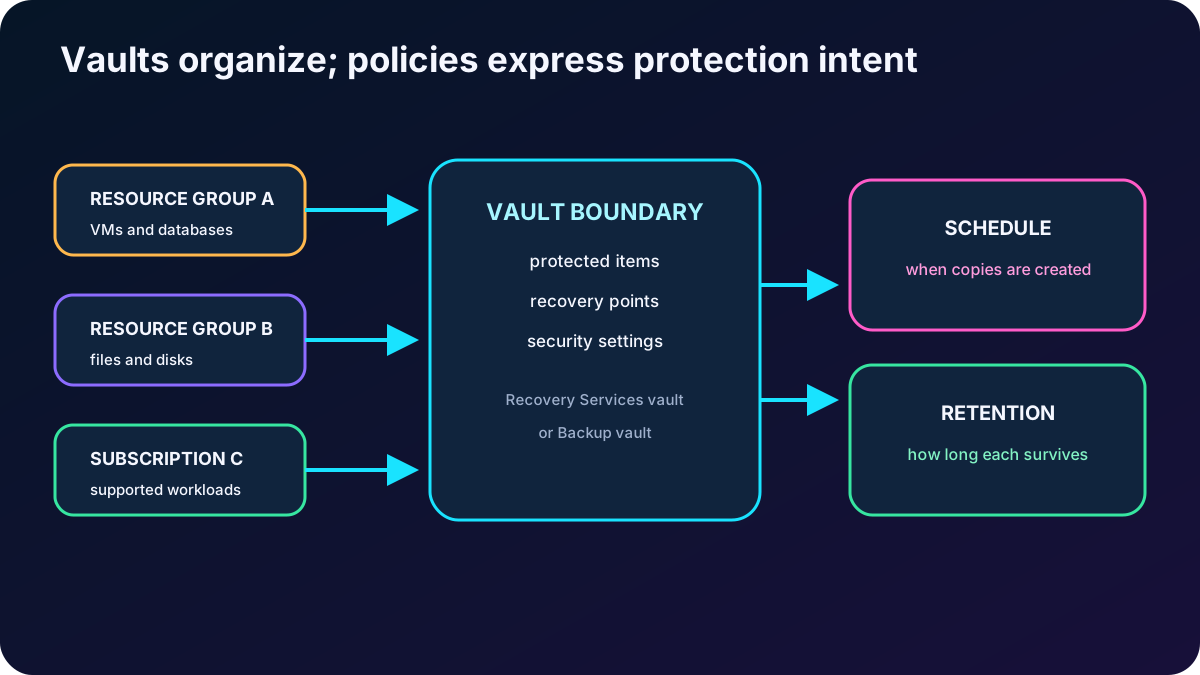
Vault boundaries organize protection, but policies express when recovery points are created and how long they survive.
12. Manage and monitor the backup estate at scale
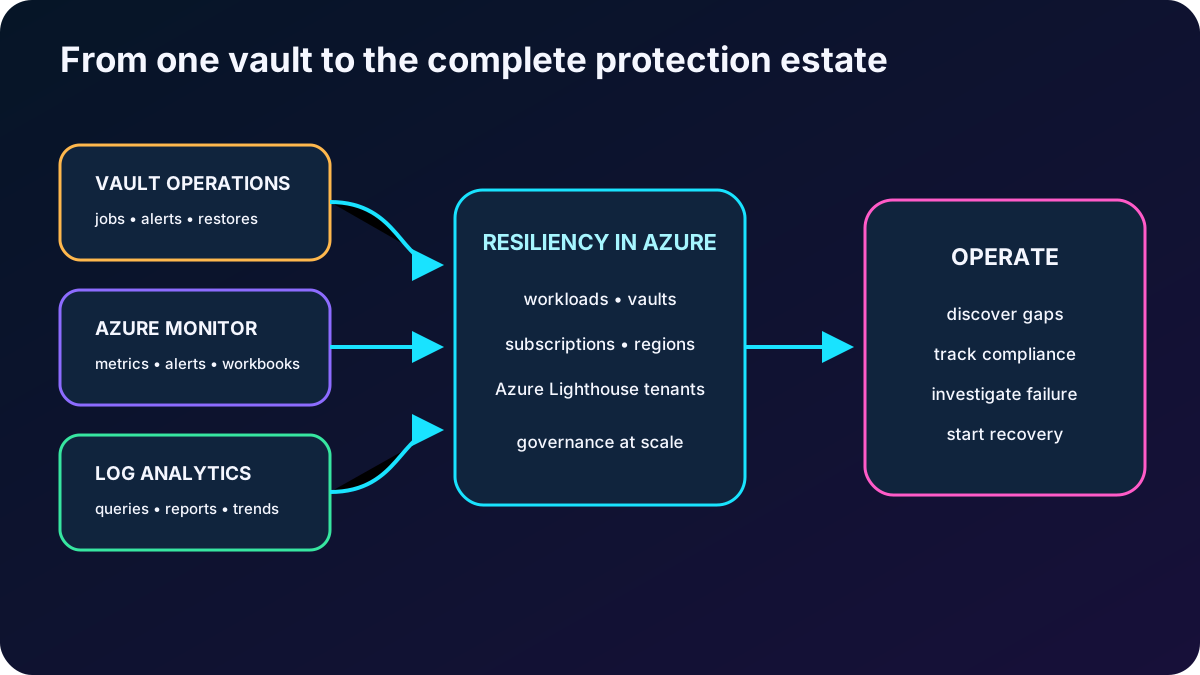
The supplied module centers on Backup center and Backup Explorer. Backup center aggregates workload types, Recovery Services vaults, Backup vaults, subscriptions, regions, and tenants so administrators can discover, govern, monitor, operate, and optimize protection without opening each vault. Microsoft has since moved the at-scale portal experience forward: Backup center is no longer found through portal search and is reached through Resiliency in Azure, the current successor to Azure Business Continuity Center.
Monitoring scopes and tools.
Scope
Tooling
Best use
Single vault
Built-in vault jobs, alerts, instances, policies, metrics, and dashboards.
Daily operation and troubleshooting within one administrative boundary.
Cross-vault estate
Resiliency in Azure and the evolved Backup center experience.
Central views across data sources, subscriptions, regions, and delegated tenants.
Historical reporting
diagnostic settings, Log Analytics, Logs, and Azure Workbooks/Backup reports.
Repeatable configuration, policy governance, discovery, and bulk operation.
The module calls Backup Explorer a built-in workbook for drill-down across tenants, locations, subscriptions, resource groups, and vaults. Preserve that exam concept, but navigate through the current Resiliency and reporting experiences when operating the live portal.
Local vault monitoring answers what happened here; the centralized resilience view answers what is happening everywhere.
13. Apply the design to SQL Server across three Azure VMs
The scenario can be protected at more than one layer. Entire Windows or Linux Azure VMs can be backed up with the VM extension. Supported Windows file, folder, and system-state recovery can use MARS. If the primary concern is SQL data, the workload-aware streaming solution for SQL Server in Azure VMs offers database-level protection without requiring a separate backup infrastructure.
SQL scenario requirements mapped to capabilities.
Requirement
response
Always On availability group
Discover and protect supported SQL databases on the participating Azure VMs according to the SQL support matrix and permissions.
Backup type
Combine weekly or daily full, eligible daily differential, and transaction-log backups as frequently as 15 minutes.
Granular recovery
Restore an individual database and use transaction logs for point-in-time recovery to a specific second.
Ten-year compliance
Use monthly/yearly long-term retention and move eligible older points to Vault-archive when supported and economical.
Central monitoring
Use vault jobs plus , Log Analytics, reports, and the centralized Resiliency experience.
Regional resilience
Choose supported GRS/Cross Region Restore deliberately; do not assume arbitrary cross-region backup or the same RPO as local protection.
Protect the database as a workload when database-level RPO, point-in-time restore, and long retention are the requirements.
14. Decide when is the right service
Decision criteria from the module.
Criterion
Questions to answer
Azure workloads
Is the exact VM, disk, file share, blob, database, server, or cluster configuration supported in its region and vault type?
Compliance
Can schedules, long-term retention, archive eligibility, geographic residency, encryption, immutability, and audit evidence satisfy policy?
Operational recovery
Can application administrators perform controlled self-service restores for accidental deletion or corruption without excessive privilege?
Availability
Do replication, snapshot and vault copies, RPO/RTO, regional restore, and recovery testing match business tolerance?
Security
Are identity separation, Resource Guard, multiuser authorization, alerts, private access, soft delete, and immutable retention sufficient?
Operations and cost
Can the team monitor at scale, automate policy, test restores, and forecast protected-instance, storage-tier, operation, and network cost?
is a strong fit when the workload is supported and the organization wants Azure-native policy, managed storage, secure recovery points, centralized governance, and workload-aware restoration. Another or complementary technology may be needed for unsupported sources, continuous replication, application failover orchestration, arbitrary-region copies, extremely low RPO/RTO, or portability outside Azure.
15. Explain every module assessment answer
Assessment answers and reasoning.
Question
Correct answer
Why
Which tier enables quick backup restore operations?
Snapshot tier.
The recovery point remains close to the source and avoids first copying data back from vault storage.
What manages backups across workloads, vaults, subscriptions, regions, and Lighthouse tenants?
Backup center.
That is the module answer and its centralized scope. In the current portal, use the evolved experience through Resiliency in Azure.
What must be present before backing up a whole Azure VM or its content?
Backup extensions.
The VM or workload integration extension coordinates protection; MARS is the specific agent for supported files, folders, and system state.
16. Compact review of every topic
Short versions for active recall.
Topic
Remember this
Problem
Backup design must address restore delay, ransomware, malicious administration, mistakes, retention, and proof of recovery.
Managed, secure, consumption-based backup with Azure-native policy, storage, restore, automation, and monitoring.
Scope
Protect supported on-premises data, VMs, disks, files, blobs, databases, flexible servers, and through workload-specific paths.
RPO/RTO
RPO limits tolerable data loss; RTO limits tolerable recovery time.
Integration
VM extension protects the whole VM; MARS protects Windows files/folders/system state; DPM/MABS add a backup server; databases stream.
Backup types
Full establishes the base, incremental sends changed blocks, differential depends on full, and logs enable point-in-time SQL recovery.
Tiers
Snapshot is fastest, Vault-standard is isolated online protection, and archive is for eligible long-term points.
Redundancy
LRS handles local hardware, ZRS handles zones, and GRS replicates to the paired region.