Learn to organize and protect blobs, choose Hot through Archive tiers, automate lifecycle actions, replicate block blobs, select transfer tools, estimate cost, and build public website storage.
Suggested study time: 90 minutes • Intermediate • Original rewrite based on the supplied Microsoft Learn module and corrected against current Azure Blob Storage documentation
By João Ricardo Dutra••Complete original content
1. Turn a media library into a governed object-storage workload
Imagine a media company whose video library is requested thousands of times each day. New clips need immediate performance, older material should become less expensive, expired content should disappear automatically, and selected objects should be copied to another region. supplies the object platform; the administrator designs its containers, access tiers, lifecycle, replication, recovery, and cost model.
The learning objectives are to explain the purpose and benefits of ; create and configure the supporting storage account; manage containers and blobs; optimize performance and scalability; automate movement and deletion with lifecycle policies; configure object replication; and choose a pricing approach.
Helpful foundations: virtualization, elasticity, pay-as-you-go cloud pricing, , storage accounts, virtual networks, filesystems, files, directories, and data replication.
Practical familiarity: or Azure CLI, plus optional PowerShell, Python, or another scripting language for repeatable administration.
Exam context: these decisions support the storage-management skills measured by AZ-104.
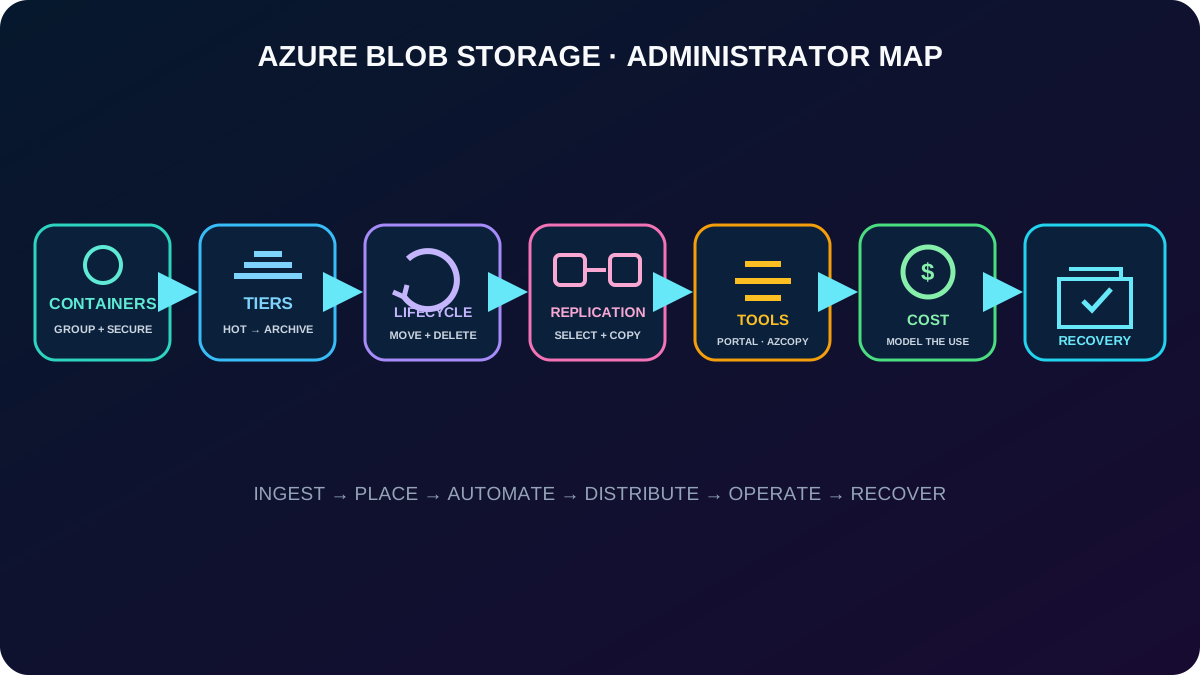
The chapter follows the same decisions an administrator makes from ingest through retention and recovery.
2. Blob holds massive amounts of unstructured object data
is Microsoft’s AI-ready cloud object-storage service for data that does not follow one predefined model. A blob—or binary large object—can contain text or binary content such as documents, images, video, audio, application installers, logs, backups, and analytic input. The service is also described as object or container storage.
Common patterns include serving images or documents directly to a browser, distributing installation files, streaming audio and video, appending logs, retaining backup and restore sets, supporting disaster recovery and archives, and exposing data to an on-premises or Azure-hosted analysis service.
Clients can use HTTP or HTTPS URLs, the Azure REST API, Azure PowerShell, Azure CLI, or language client libraries. Blob also underpins Gen2; hierarchical namespace, SFTP, and NFS 3.0 add specialized filesystem and transfer behavior when the account and feature matrix support them.
3. Account, container, and blob form the resource hierarchy
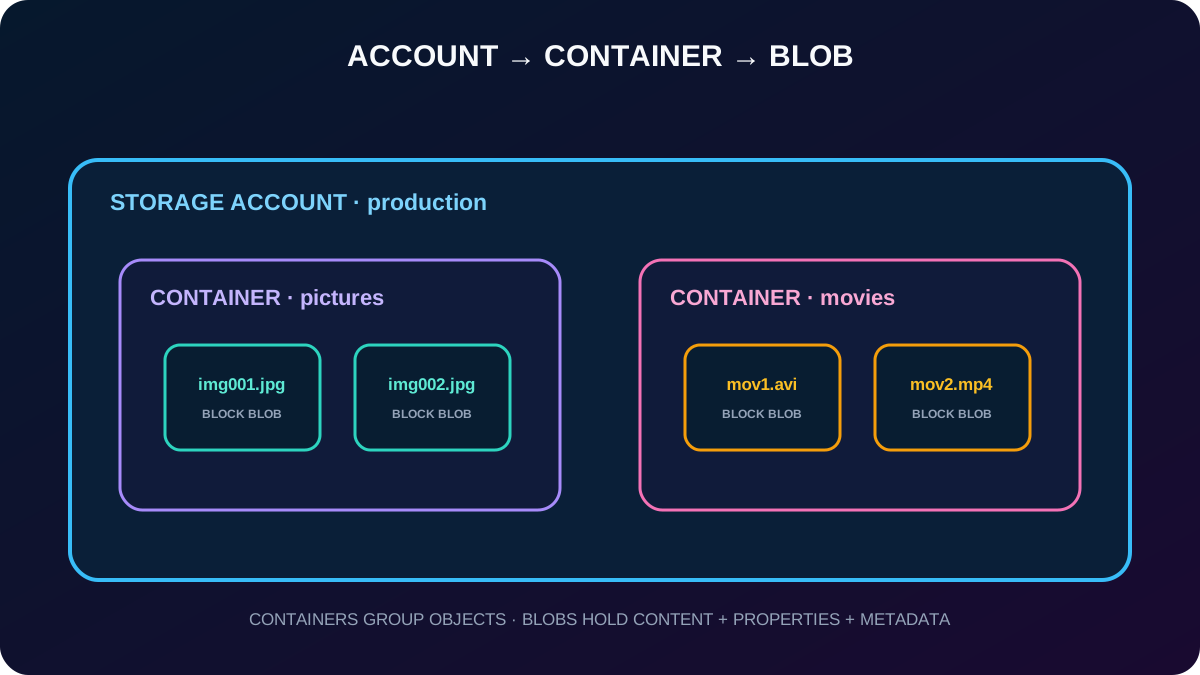
A blob cannot exist directly beneath the subscription or storage account. The account supplies the namespace and service boundary, a container groups related objects, and each blob holds the content plus properties and metadata. A storage account can contain an unlimited number of containers, and a container can contain an unlimited number of blobs, although account scalability limits still apply.
Design containers around security, lifecycle, ownership, naming, and operational boundaries. Virtual directory separators in blob names can make a flat namespace easier to browse, but they do not create nested containers.
The account is the service boundary, the container is the grouping boundary, and the blob is the stored object.
4. Container names and anonymous access are deliberate controls
A container name is unique within its storage account and becomes part of its DNS-addressable URI. It must contain 3–63 characters, start with a letter or number, use only lowercase letters, numbers, and hyphens, and avoid consecutive hyphens. Create the container before uploading blobs; containers cannot be nested.
Container anonymous-read options.
Portal choice
Anonymous capability
Effect
Private (default)
None
Every request to the container and blobs requires authorization.
Blob
Read blobs only
A caller with a blob URL can read it but cannot anonymously enumerate the container.
Container
Read and list container plus blobs
An anonymous caller can enumerate and read blob data in that container.
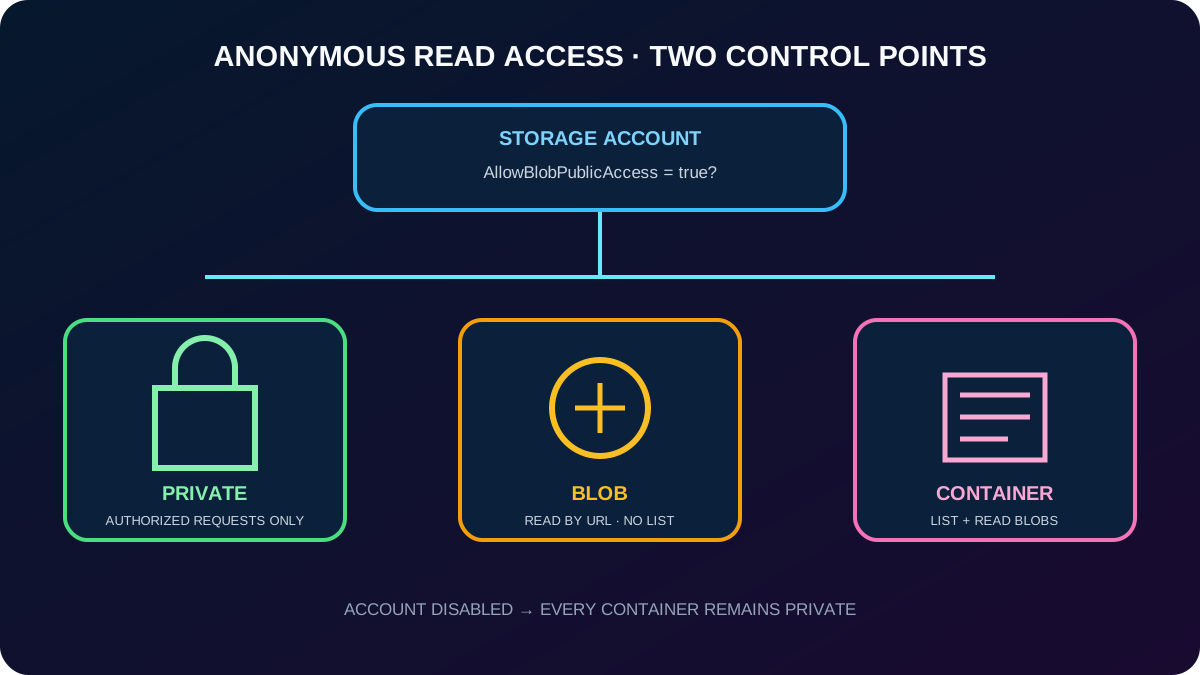
The container setting matters only when Allow Blob anonymous access is enabled on the storage account. If the account setting is disabled, all containers remain private. Microsoft recommends disabling anonymous access unless the workload intentionally serves public content; if it is required, isolate public containers in an account dedicated to that purpose.
For nonpublic data, prefer and Azure RBAC where supported. A shared access signature can delegate limited, time-bound access; Shared Key grants broader authority and should not be embedded casually in applications.
Public access needs both an account-level permission and an explicit container-level choice.
5. Access tiers trade storage price against access price and latency
Current characteristics of the four core access tiers.
Tier
Access pattern
Availability and latency
Minimum recommended retention
Hot
Frequently read or modified; active processing and staging
Online, millisecond first byte; 99.9% availability
None
Cool
Infrequent access but immediate retrieval; short-term backup and older media
Online, milliseconds; 99% availability
30 days in general-purpose v2
Cold
Rare access with immediate online retrieval
Online, milliseconds; 99% availability
90 days in general-purpose v2
Archive
Very rare access that can tolerate rehydration
Offline, hours; 99% availability
180 days
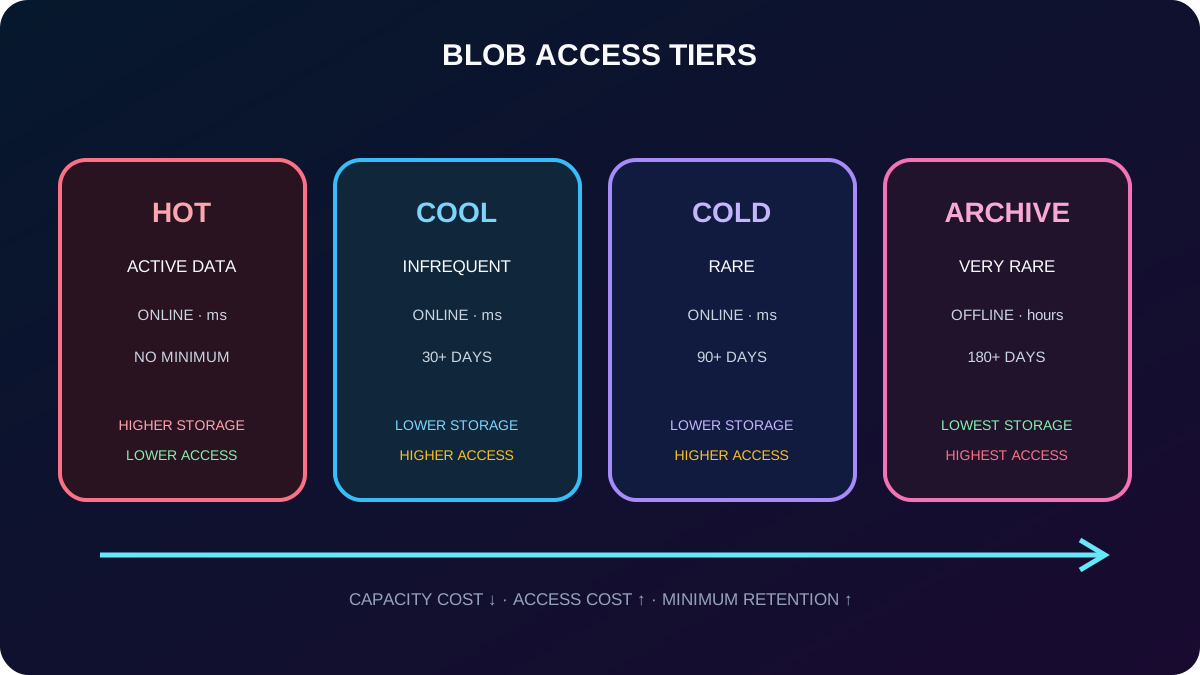
As the tier becomes cooler, per-GB capacity generally falls while read, retrieval, and transaction charges rise. Deleting, overwriting, or moving a cool, cold, or archive blob before its minimum duration can cause a prorated early-deletion charge. Access tiering applies to block blobs, not page or append blobs, and Premium block blob accounts do not use Hot/Cool/Cold/Archive tiering.
Hot, Cool, and Cold support all Azure redundancy options. Archive supports LRS, GRS, and RA-GRS, not ZRS, GZRS, or RA-GZRS. Capacity limits are account-level rather than a separate quota per access tier.
The module’s SLA comparison lists RA-GRS read availability of 99.99% for Hot and 99.9% for Cool, Cold, and Archive, versus 99.9%/99% standard availability. Current documentation also describes Smart tier, which can automatically place eligible data among Hot, Cool, and Cold; treat it as a cost-optimization option beyond the four manual tiers emphasized by the module.
Choose a tier from the actual read, write, retention, and recovery-latency pattern—not age alone.
6. Archive data must be rehydrated before use
Archive is offline: applications cannot read or modify the content until it returns to an online tier. Copy Blob is the recommended approach when you want to preserve the archived source and create a new Hot, Cool, or Cold destination. Set Blob Tier changes the existing blob in place.
Rehydration choices emphasized by the module.
Priority
Typical latency
Use
Standard
Up to about 15 hours
Normal retrieval at lower cost.
High
Usually within one hour for eligible blobs under 10 GB
Urgent disaster-recovery retrieval at a higher price.
Rehydration priority, region, object size, destination tier, transactions, retrieved capacity, and any early-deletion penalty all affect the bill. An archived copy does not become readable merely because its metadata is visible.
7. Lifecycle policies translate age and usage into automatic actions
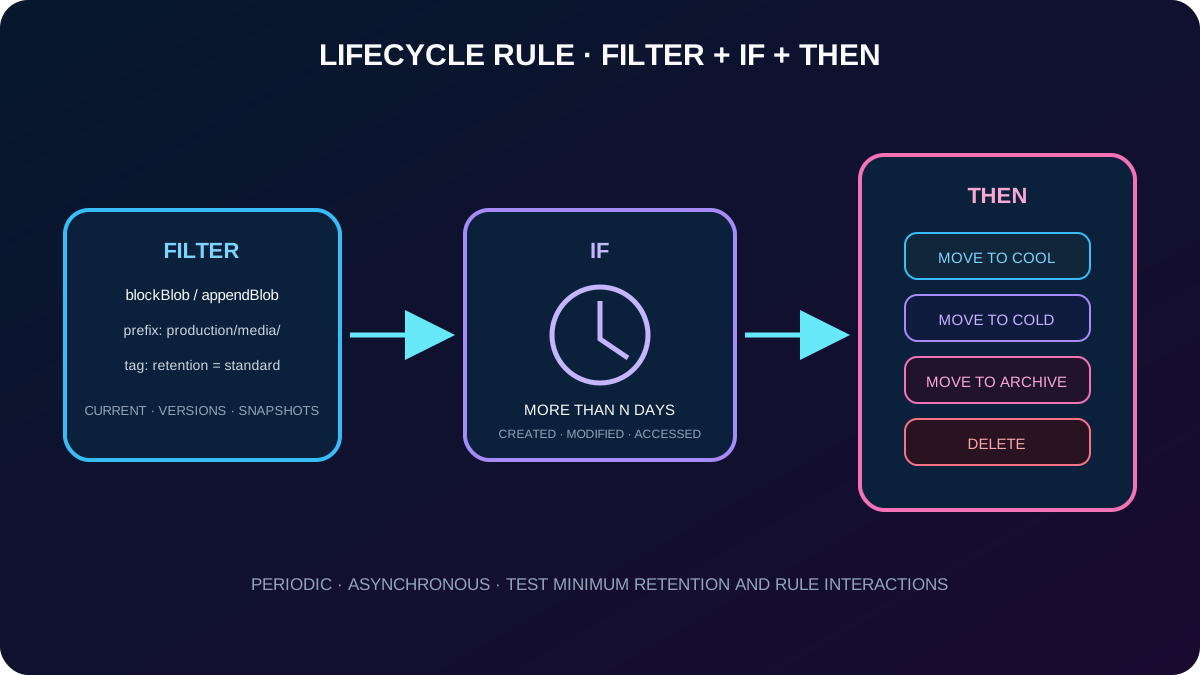
Data rarely has one access pattern forever. It may start in Hot, become occasional after two weeks, become archival after a month, and eventually expire. lifecycle management encodes that progression in rules for general-purpose v2 and Premium block blob accounts; legacy BlobStorage accounts are supported, but general-purpose v2 is the current recommendation for new standard deployments.
Move block or append blobs from Hot to Cool, Cold, or Archive and between supported cooler tiers.
Delete current blob versions, previous versions, or snapshots after their own lifecycle conditions are met.
Move a Cool blob back to Hot when it is accessed, where the supported rule option fits an unpredictable read pattern and avoids an early-deletion charge for that automatic move.
Apply a rule to the entire account or filter by container/blob-name prefixes and blob index tags.
Policies do not process blobs in system containers such as $logs and $web. They run asynchronously, not as a real-time scheduler, and Azure evaluates policies periodically. Lifecycle management optimizes one account; can perform large-scale data operations across multiple accounts.
8. Each lifecycle rule combines scope, condition, and action
A policy is a JSON document containing up to 100 named rules. A rule can be enabled or disabled and contains a filter set plus an action set. Filters identify blob types and can narrow the target with prefix matches or blob-index-tag conditions; multiple filters are combined with logical AND.
The portal’s If–Then model.
Part
Question
Examples
Scope/filter
Which objects are candidates?
All blobs, selected containers/prefixes, block or append blobs, index tags, current/previous versions, snapshots.
If
When does the rule qualify?
More than N days since creation, modification, last access, or version/snapshot creation, depending on the selected action.
Then
What should Azure do?
Move to Cool, Cold, or Archive; move Cool to Hot after access where supported; delete the qualifying object.
A last-access rule requires access-time tracking. Because tier changes themselves can alter the values used by another rule, test the full policy as a system. Avoid a rule that immediately returns a rehydrated blob to Archive, and account for minimum-tier duration so automation does not create avoidable penalties.
Lifecycle automation is a deterministic If–Then pipeline whose economics must be tested.
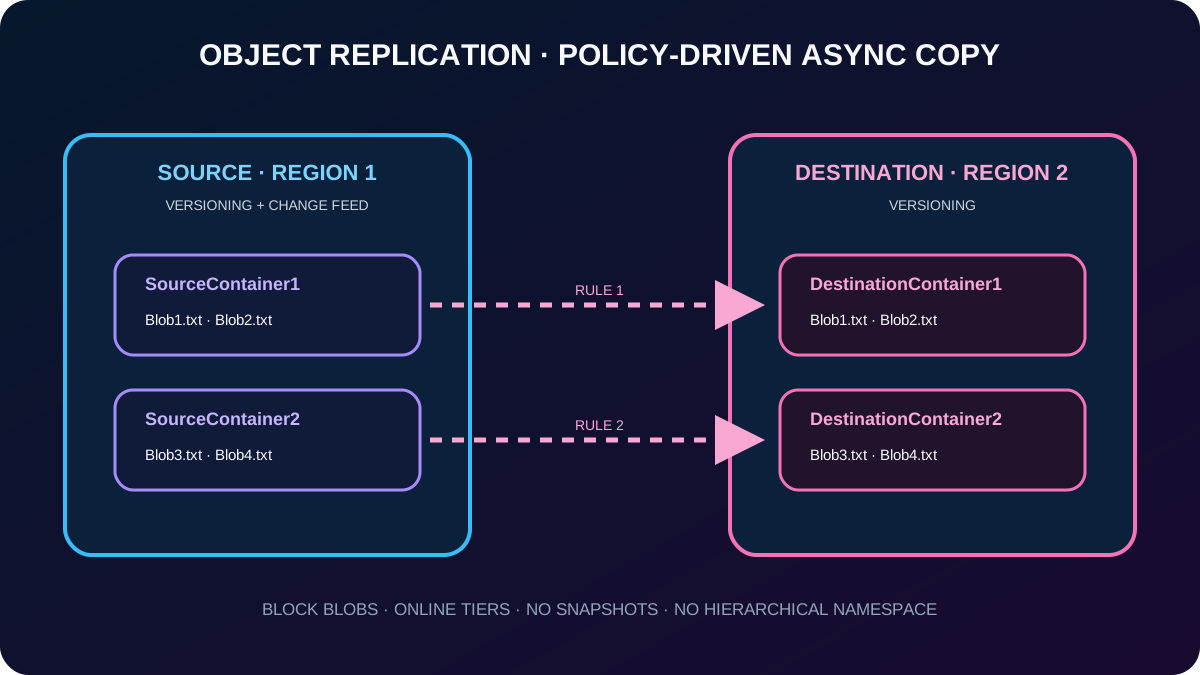
Object replication creates asynchronous copies of block blobs from a source container to a destination container, potentially in another region. A policy binds one source storage account to one destination account; each rule maps one source container to one destination container and can filter which eligible blobs are replicated. Content, metadata, properties, and versions are included according to service behavior.
Use general-purpose v2 or Premium block blob accounts. Hierarchical-namespace accounts are not supported.
Enable blob versioning on both source and destination accounts and change feed on the source. These supporting features can add cost.
Grant an Contributor role at storage-account scope or higher to configure the policy.
Source and destination can use different online tiers—Hot, Cool, or Cold—but Archive prevents replication for that blob.
Blob snapshots are not replicated. Rehydrating an archived blob alone does not restart replication; a later data update does.
Versioning lets an administrator retrieve earlier states after modification or deletion. It also generates retained data, so pair it with lifecycle rules when older versions should expire. Change feed provides the ordered record of source changes used by replication.
A replication policy selects containers and eligible block blobs; it is not an account-wide copy of every storage service.
10. Replication solves distribution—not every recovery problem
Object-replication benefits and boundaries.
Need
How object replication helps
Boundary to remember
Lower read latency
Serve a copy from a region physically closer to clients.
The application must choose and authorize the destination endpoint.
Regional compute efficiency
Run workloads over equivalent blob sets in separate regions.
Replication is asynchronous, so design for lag.
Controlled distribution
Analyze centrally and replicate only selected results.
Policy filters and container mappings define scope.
Cost optimization
Apply a different lifecycle policy to replicated data.
Archive only after replication completes; archived blobs no longer replicate.
Regional resilience
Keep another regional object copy.
Versioned asynchronous copies do not replace backup, immutability, or a tested failover plan.
Geo-redundant account replication protects all data in the account according to the selected redundancy mode and is operated by the service. Object replication is policy-driven and container-specific between accounts, so it supports selective distribution and independent destination policies.
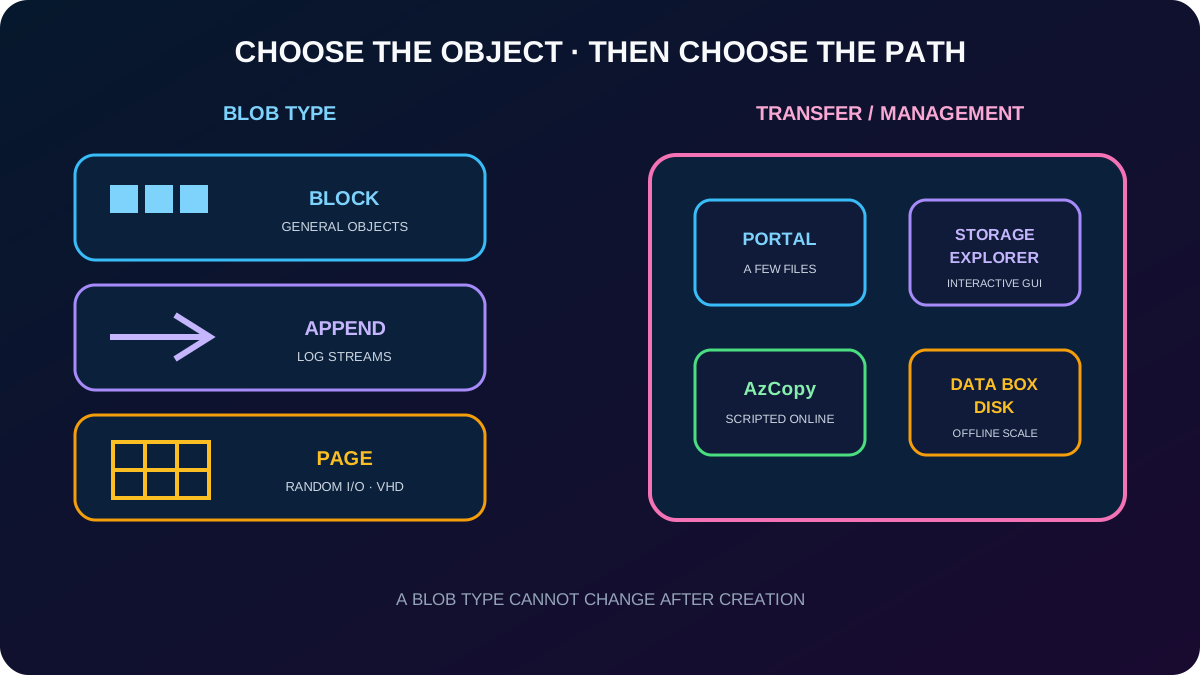
11. Block, append, and page blobs optimize different writes
Azure blob types.
Type
Organization and strength
Typical workload
Block blob
Individually uploaded blocks are committed into one object; default for most uploads.
Documents, images, video, backups, installers, and general text or binary objects.
Append blob
Blocks can be added efficiently to the end.
Logs and other append-only streams.
Page blob
512-byte pages support frequent random reads and writes; up to 8 TiB.
VHDs and the foundation used for Azure OS and data disks.
Select the type when the blob is created; it cannot be changed afterward. In the portal upload flow, an administrator also chooses the destination container or virtual folder, overwrite behavior, block size where applicable, access tier, and encryption scope.
12. Choose a management tool from volume, automation, and network constraints
Management and transfer choices from the module.
Tool
Best fit
Capabilities
A small number of files and direct configuration
Upload and inspect blobs; choose type, tier, overwrite behavior, destination, and encryption scope.
Microsoft Azure
Interactive desktop administration
Upload, download, preview, edit, and manage blobs, files, queues, tables, entities, managed disks, permissions, and access controls.
AzCopy
Fast, scriptable online transfer on Windows or Linux
Copy data to or from Blob , across containers, and across storage accounts.
Disk
Large on-premises datasets or constrained networks
Microsoft ships SSDs; copy locally, return the disks, and Microsoft uploads the data into Blob .
The current migration portfolio also includes managed online and offline services, but the exam decision remains straightforward: portal for a few objects, a graphical explorer for interactive work, AzCopy for repeatable network transfer, and Data Box when shipping media is more realistic than using the link.
First choose the object type; then choose a tool that matches scale and connectivity.
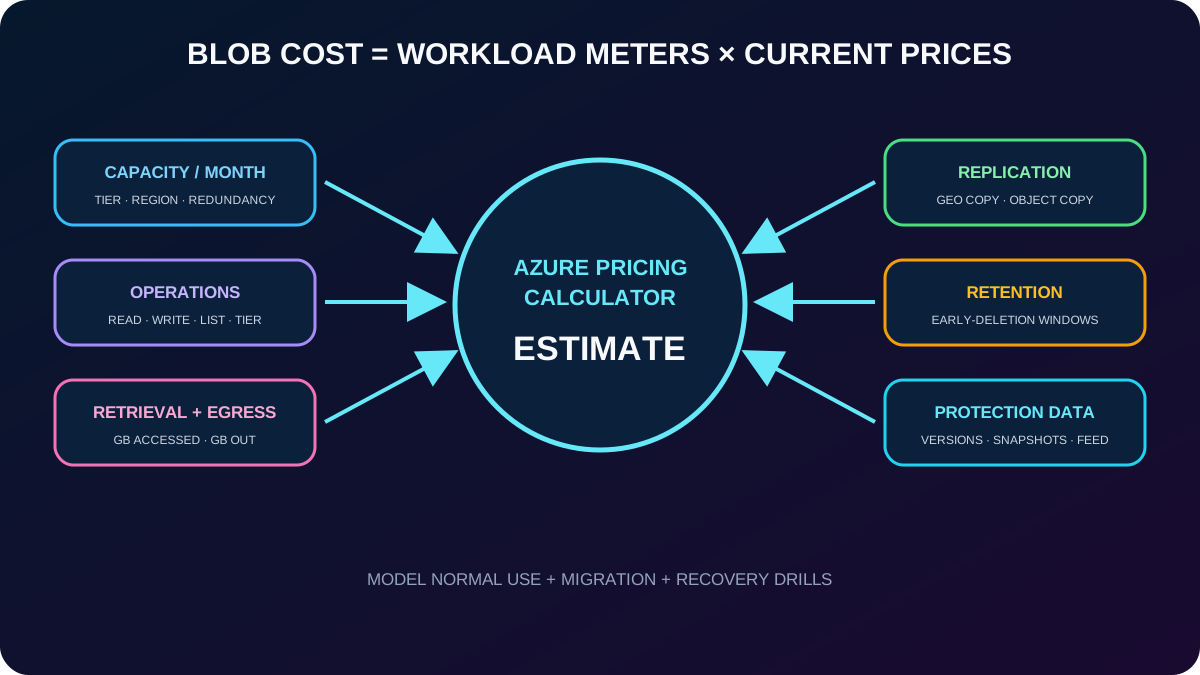
13. Blob cost is a workload equation, not just capacity
The Azure Pricing Calculator can model migration, monthly use, and future workload estimates. For block blobs, begin with stored capacity per month, the number and types of operations, data transfer, region, performance and access tier, redundancy, and retention behavior.
Important billing meters.
Cost driver
Effect
Capacity
Per-GB storage generally becomes cheaper toward colder tiers.
Read/retrieval
Cool, Cold, and Archive add per-GB retrieval charges; Archive rehydration also includes transactions and priority.
Transactions
Every tier bills operations, and cooler tiers generally have higher operation prices.
Geo-replication
Geo-replicated accounts charge per GB for replication data transfer.
Outbound transfer
Data leaving the applicable Azure boundary is billed per GB under bandwidth rules.
Tier changes
Cool-to-Hot at account level is billed like reading all data; Hot-to-Cool is billed like writing all data to Cool for GPv2. Per-blob moves can also create read/write, retrieval, and early-deletion charges.
Protection metadata
Versions, snapshots, soft-deleted data, change feed, and replication consume billable capacity or operations.
Prices vary by region, redundancy, currency, and date. Model operations and recovery drills rather than copying an example price into a production estimate.
The cheapest capacity tier can become the expensive choice when reads, moves, or early deletion are frequent.
14. Exercise: provide resilient storage for a public website
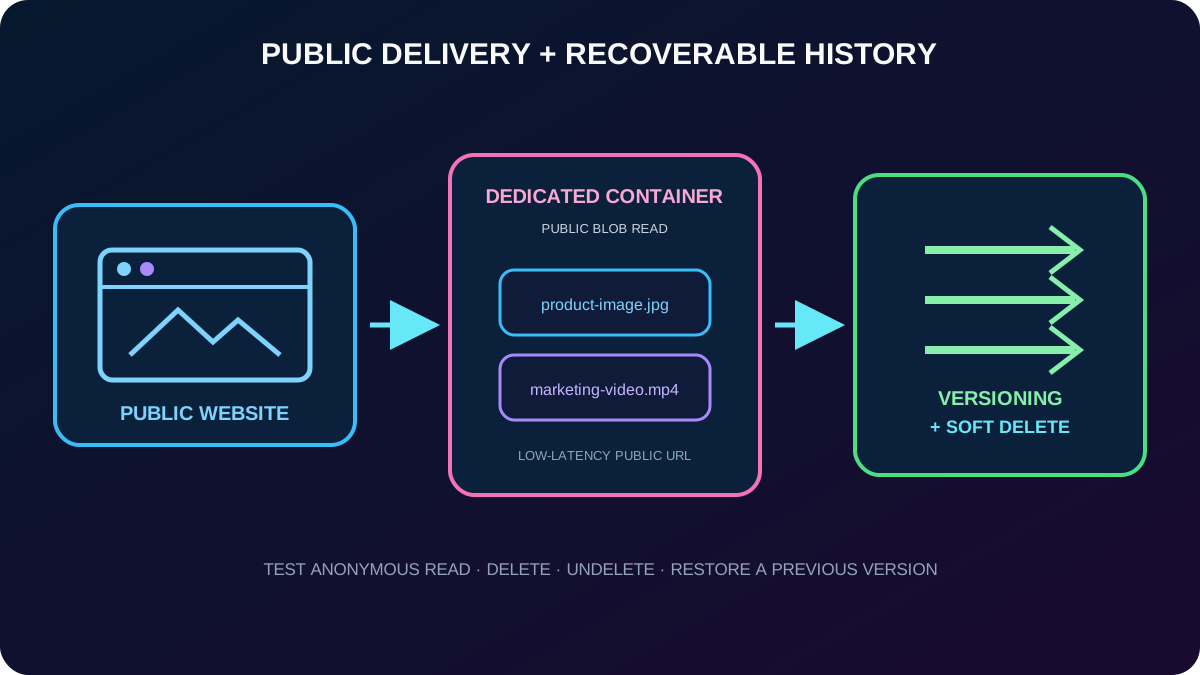
The practice scenario is a globally used company site containing product images, videos, marketing literature, and customer stories. The content is mission-critical, should load with low latency, must preserve document history, and needs quick recovery after deletion. An Azure subscription is required; the source estimates roughly 30 minutes.
Create a general-purpose v2 storage account in the required region and select a high-availability redundancy option that fits the lab instructions.
Enable Allow Blob anonymous access only because this lab intentionally serves public website assets. Keep unrelated data in private accounts.
Create a dedicated container, apply the required public blob or container read level, and upload the website documents.
Enable blob soft delete and choose a retention period so deleted content can be restored.
Enable blob versioning so overwrites retain earlier states; control version growth with lifecycle management.
Copy the public URL, test anonymous delivery in a private browser session, then test deletion, undelete, and version restoration.
For real mission-critical delivery, also evaluate a or , HTTPS custom domains, caching, network controls, monitoring, backup, and a recovery test. Soft delete and versioning are complementary: Microsoft recommends both for critical blobs because they cover accidental deletion and overwrite in different ways.
Public delivery and recoverability are separate controls; configure and test both.
15. Assessment review: connect each requirement to the mechanism
The supplied assessment estimates 10 minutes and reports whether each response is correct without giving answer-by-answer teaching feedback. Its questions and options were AI-generated and reviewed by a human author. The table below turns the same nine decisions into study feedback without reproducing the source wording.
Paraphrased answers to the supplied module assessment.
Requirement
Best answer
Reason
Archive-tier cost influence
Retrieval time and per-GB access cost
Archive minimizes capacity price but makes access slow and comparatively expensive.
Historical compliance data retained indefinitely and almost never read
Archive
It has the lowest capacity cost when hours of retrieval latency and long retention are acceptable.
Optimize performance and scale as data ages
Lifecycle policy
Automatic tier transitions align placement and cost with access patterns.
Video library edited frequently
Hot
Frequent reads and writes favor low access cost and immediate performance.
Object replication versus geo-replication
Selective container rules between accounts
Geo redundancy replicates account data automatically; object replication has explicit container mappings and filters.
Short-term backup, seldom read, immediately available
Cool
It is online and designed for at least a 30-day infrequent-access pattern in GPv2.
Replication versus a simple backup
Regional asynchronous copy
It distributes current eligible objects; it does not by itself provide an isolated immutable recovery history.
Lifecycle of previous versions
Blob versioning plus lifecycle rules
Versioning creates earlier states; a policy transitions or deletes them.
Availability through a regional outage
Object replication across regions in the choices given
It creates a destination-region copy, but production still needs a tested failover design.
16. Compact version of every topic
Fast revision.
Topic
Remember
Purpose
Blob is massive unstructured object storage for browser delivery, distribution, streaming, logs, backup, archive, and analytics.
Hierarchy
account → container → blob; containers cannot nest and must satisfy DNS naming rules.
Anonymous access
Account AllowBlobPublicAccess gates container Private, Blob, or Container access; private is the secure default.
Tiers
Hot = active; Cool = 30+ days; Cold = 90+ days; Archive = offline, 180+ days. Cooler capacity costs less but access costs more.
Rehydration
Copy Blob preserves the archive source; Set Blob Tier changes it in place; Standard is slower and High is urgent/costlier.
Lifecycle
Filter + time condition + action automates tiering and deletion for current versions, prior versions, and snapshots.
Replication
Block blobs only; versioning on both accounts, change feed on source, online tiers, no snapshots or HNS.
Blob types
Block = general objects; append = logs; page = random I/O and VHDs; type cannot change.
Tools
Portal for a few files, for GUI administration, AzCopy for scripts, Data Box Disk for offline scale.
Price
Model capacity, operations, retrieval, egress, redundancy, tier changes, protection data, and early deletion.
Recovery lab
Public account/container settings deliver the site; soft delete and versioning protect recoverable states.
17. Active recall and official resources
Microsoft Copilot can compare, recommend, explain, and research Azure products and services. Open Microsoft Edge and select Copilot in the upper-right corner, or visit copilot.microsoft.com, then verify any operational recommendation against the linked Azure documentation.
Active-recall prompts
Draw the account–container–blob hierarchy and state every container naming rule.
Explain why Archive is not simply a cheaper Cold tier.
Write an If–Then lifecycle policy for media that becomes Cool after 14 days, Archive after 30, and deleted after the retention requirement.
List every object-replication prerequisite and two limitations without looking them up.
Choose a blob type and transfer tool for website images, append-only logs, VM disks, a scripted migration, and an offline petabyte-scale import.
Ask Microsoft Copilot which Blob administration tasks are common and how Blob is priced, then validate its answer against the current official documentation.