Azure Load Balancer: Layer 4 distribution, health probes, NAT, and solution selection
Understand public and internal load balancers, five-tuple distribution, session persistence, health probes, HA ports, inbound NAT, explicit outbound rules, and when another Azure traffic service is the better choice.
Suggested study time: 60 minutes • Intermediate • Original rewrite based on the supplied Microsoft Learn module and corrected against current Azure Load Balancer documentation
By João Ricardo Dutra••Complete original content
1. Replace physical Layer 4 devices with a native Azure service
Adatum is moving several three-tier commerce applications from on-premises datacenters to Azure virtual machines distributed across virtual networks. Some applications must serve the public internet, while others should be reachable only from the company office in Sydney. The former hardware appliances balanced the web and processing tiers, stopped sending new work to failed servers, kept a client session on one server, and forwarded administrative connections to individual VMs.
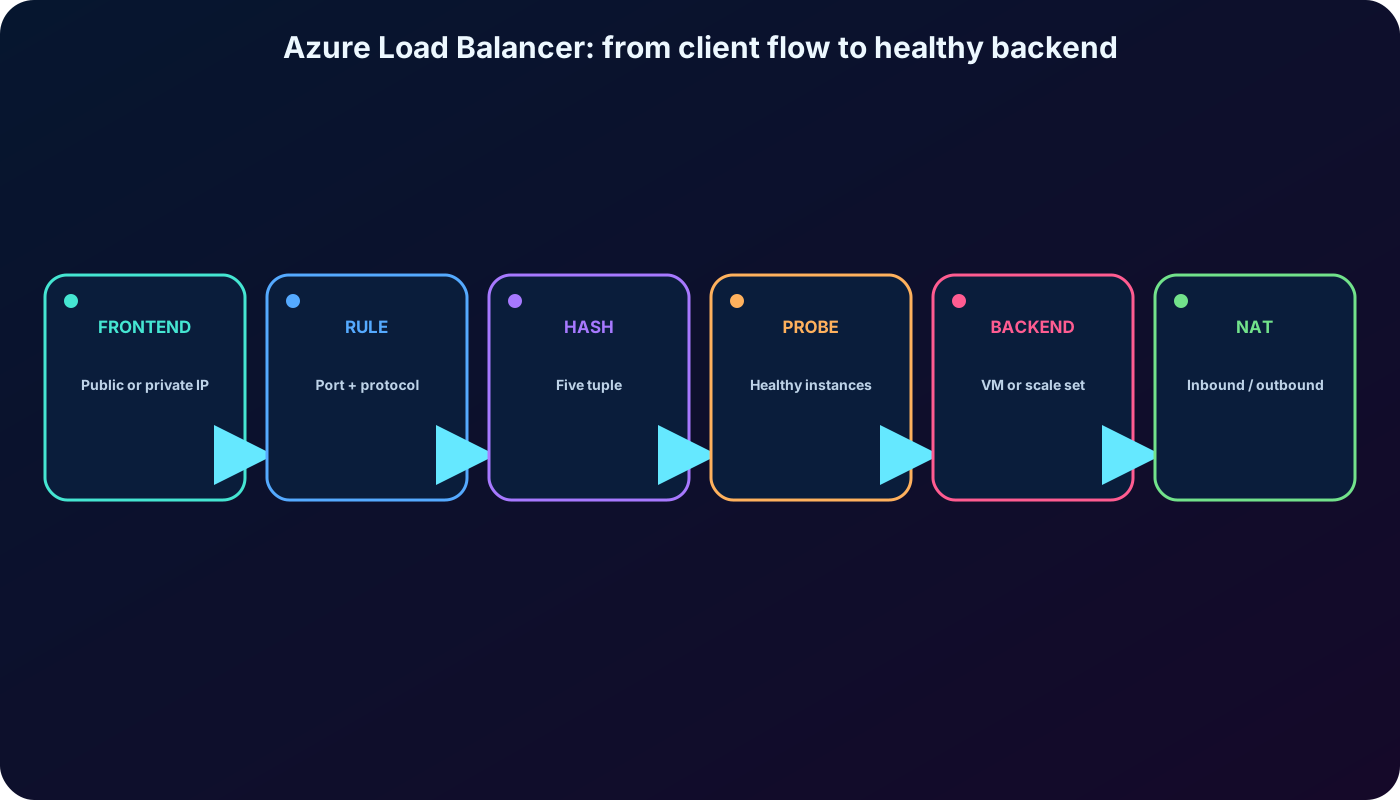
Azure can reproduce those transport-layer functions for Azure VMs and . This chapter explains the architecture, decision algorithm, probes, NAT features, outbound design, and the boundary between and the other Azure traffic services.
Explain what Azure does and the availability it provides.
Trace a connection through frontend, rule, health probe, and backend pool.
Choose public or internal placement and the appropriate distribution mode.
Distinguish load-balancing, inbound NAT, HA-port, and outbound rules.
Decide whether or another Azure service meets the workload need.
The only formal prerequisite is a basic understanding of IP networking, TCP, UDP, ports, virtual networks, and virtual machines.
A design joins a traffic decision, a health decision, and an explicit connectivity design.
2. Load balancing scales out instead of endlessly scaling up
A single powerful server can still become the bottleneck when requests grow. Load balancing spreads incoming work across several computers so no one instance must absorb the entire demand. A pool of modest instances can offer better throughput, resilience, and maintenance flexibility than one oversized machine.
Azure distributes network flows among backend Azure VMs or instances in a Virtual Machine Scale Set. Rules choose eligible destinations, while health probes prevent new flows from being assigned to an unhealthy endpoint. Adding redundant instances therefore improves both capacity and availability.
3. Azure is a regional Layer 4 flow distributor
operates at the transport layer of the OSI model. Its decisions use addresses, ports, and the TCP or UDP protocol rather than URLs, headers, cookies, or application content. Processing is performed per flow and the service does not act as an HTTP reverse proxy or store application data.
What Layer 4 can and cannot evaluate.
Can evaluate
Cannot evaluate
Source and destination IP addresses
URL path such as /images or /api
Source and destination ports
HTTP host or request header
TCP or UDP protocol
Cookie, identity, or application payload
Flow state and configured persistence hash
Web application firewall rules
Use this service when ultra-low latency, high throughput, and protocol-transparent TCP or UDP handling are more important than Layer 7 inspection.
4. Public and internal load balancers expose different frontends
The frontend IP determines the reachability model.
Type
Frontend
Typical use
Public
Public IP address
Accept internet traffic for a web tier and, with an explicit outbound design, translate backend private addresses for outbound connections.
Internal
Private IP address
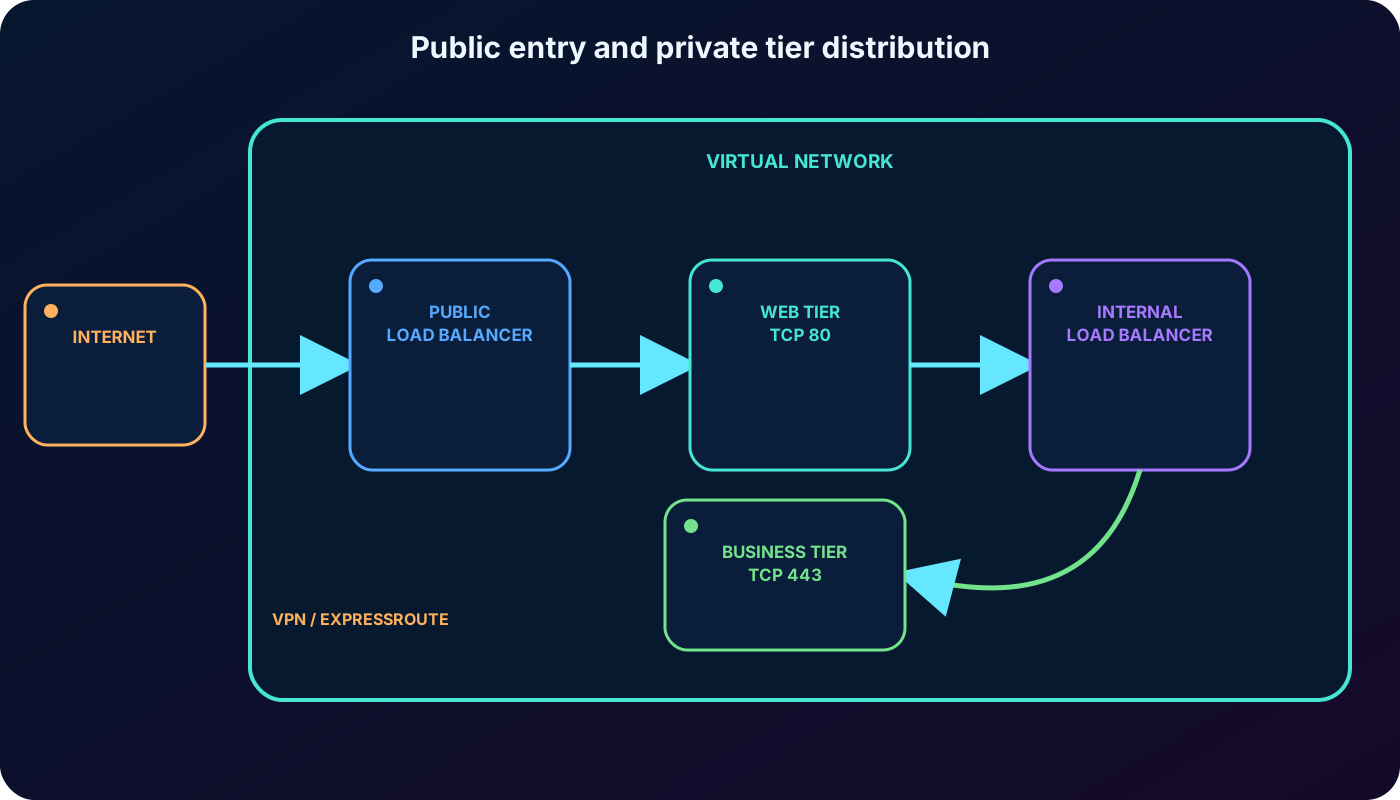
Distribute private traffic inside a virtual network or from connected on-premises networks through VPN or .
An internal frontend is never directly exposed as an internet endpoint. It fits traffic within one virtual network, hybrid access to private services, balancing from a public web tier to a private processing tier, and internal line-of-business applications. Public and internal designs can both handle large numbers of TCP and UDP flows.
Use a public frontend for internet entry and a private frontend for east-west or hybrid traffic.
5. Seven components cooperate in the data path
Core Azure components.
Component
Responsibility
Frontend IP configuration
The public or private address that clients contact.
Load-balancing rule
Maps a frontend IP, port, and protocol to a backend pool and backend port.
Backend pool
The VM or scale-set instances eligible to receive flows.
Health probe
Determines which backend endpoints may receive new flows.
Session persistence
Selects five-, two-, or three-tuple distribution behavior.
HA ports or inbound NAT rule
Balances every port for an internal NVA scenario or forwards one frontend port to one instance.
Outbound rule
Defines explicit outbound SNAT for members of a public Standard backend pool.
A working design needs more than a frontend address. A rule references a pool and a probe; security controls must permit the client traffic and the probe; and outbound access must be designed separately.
6. The frontend is the client-facing point of contact
Clients connect to a frontend IP configuration. A public frontend maps an internet-reachable IP and port to private backend addresses and maps response traffic back through the public tuple. An internal frontend uses a private address reachable only through the connected private network.
One can have multiple frontend IP configurations. Each can have its own rules, which lets a shared service publish several addresses or applications. Multiple frontends do not change the Layer 4 nature of the decision.
7. The backend pool is the scalable set of eligible instances
A backend pool contains VMs or Virtual Machine Scale Set instances that serve requests. Membership can be configured through NICs or IP addresses, and a public backend does not require each VM to have a public IP. Current supports multiple backend pools, but a rule targets one pool.
When instances are added or removed, the service reconfigures automatically and starts applying the existing rules to the changed pool. Backend resources for a rule remain within one virtual network; a single rule does not span two virtual networks.
8. A load-balancing rule joins frontend, backend, protocol, and probe
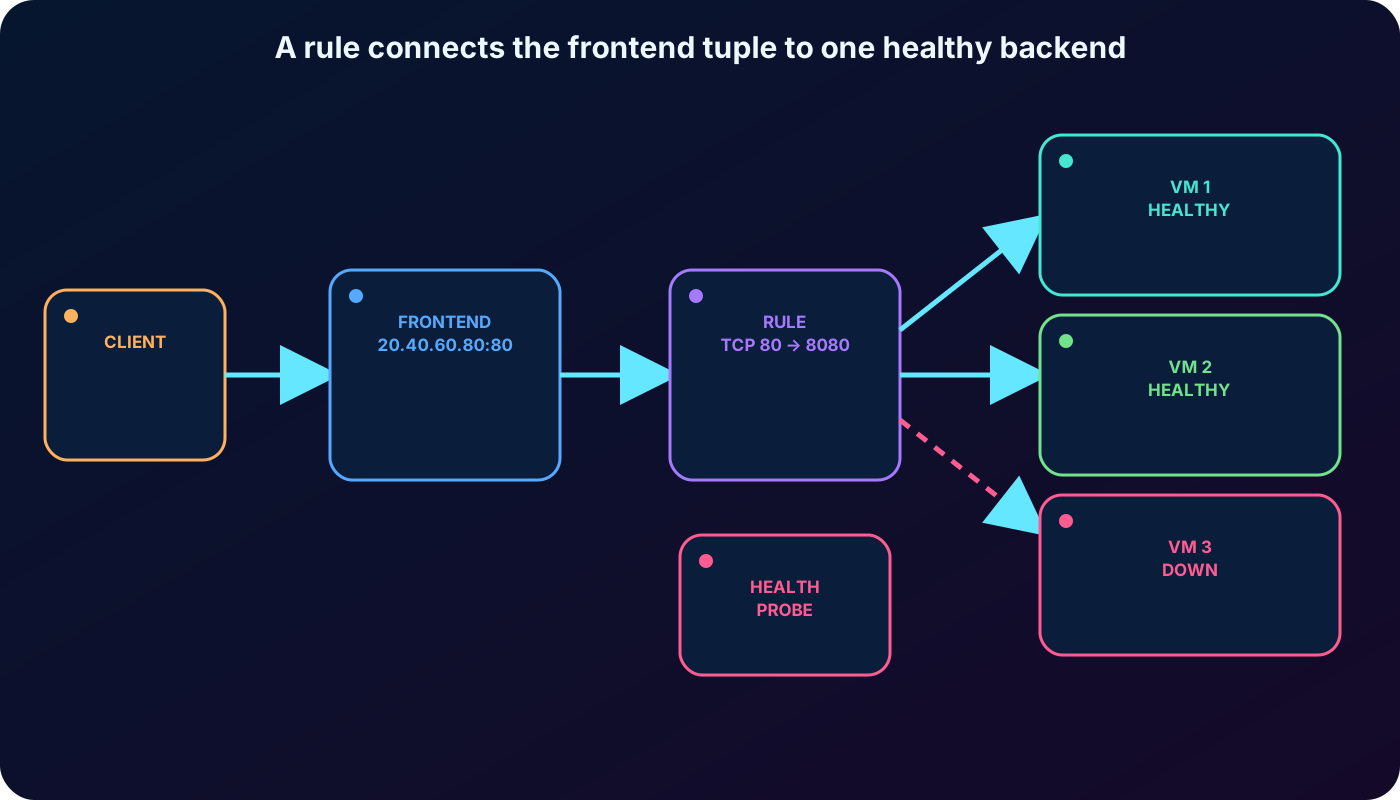
An inbound load-balancing rule maps one frontend IP and port combination to a backend pool and port for TCP or UDP. A rule might send public TCP port 80 to TCP port 80 on every healthy web VM, while another frontend or port uses another rule and pool.
Load-balancing rules distribute inbound flows; they are not outbound rules. Different rules may serve multiple ports, multiple frontend addresses, or both. With IaaS VMs, multiple frontend configurations can share one .
The rule is the contract connecting the frontend tuple to a healthy backend pool.
9. The default algorithm hashes a five-tuple per transport flow
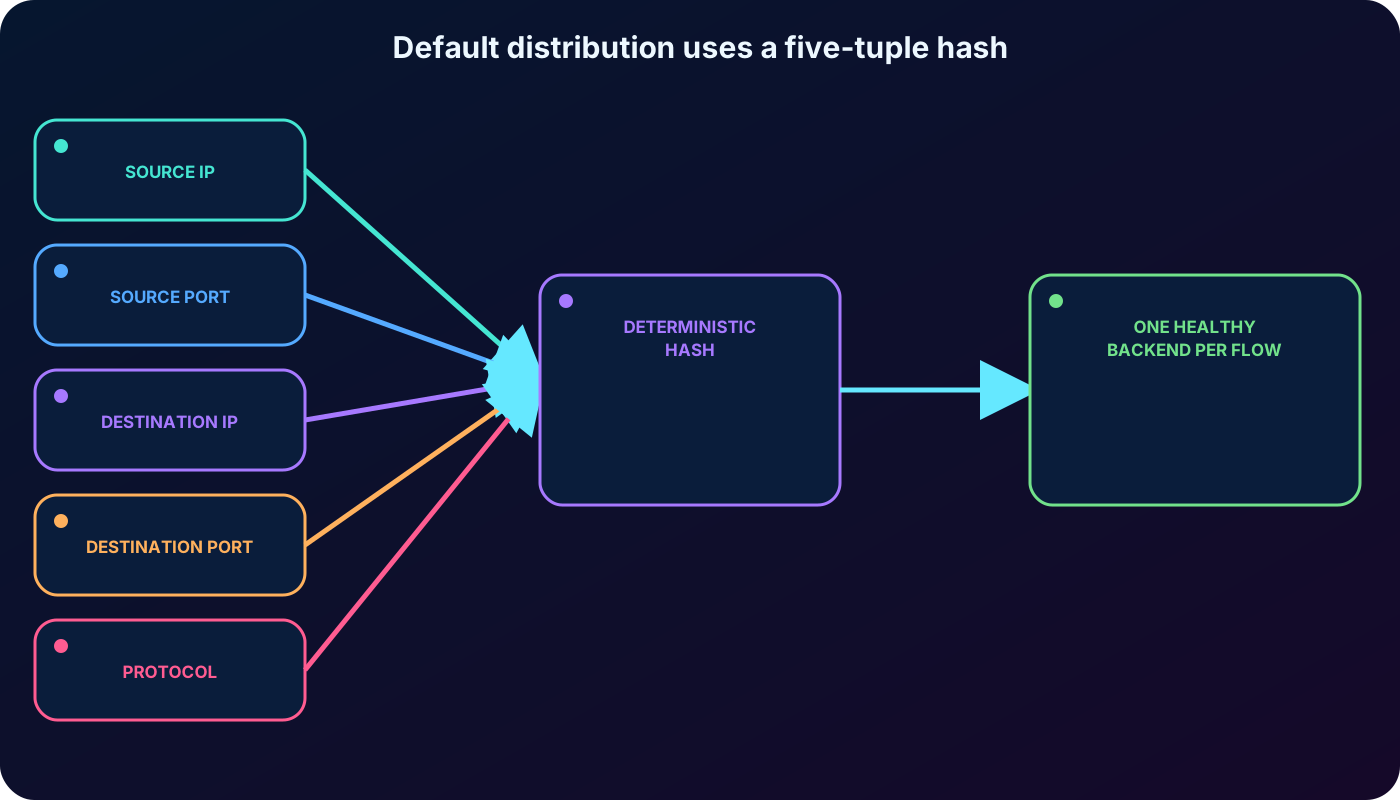
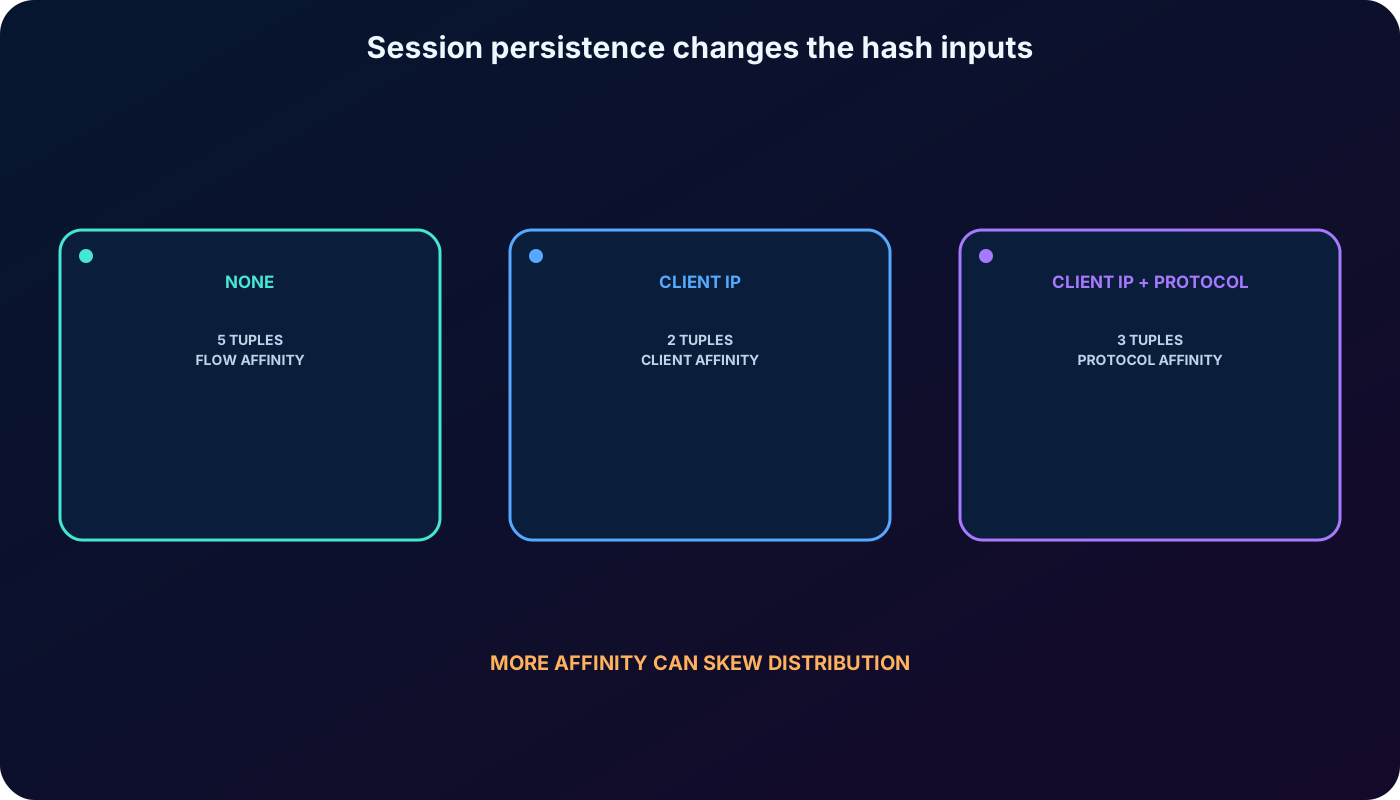
By default, calculates a hash from source IP, source port, destination IP, destination port, and protocol. The result selects a healthy backend for that flow. Packets in the same transport session keep the same tuple and therefore reach the same instance; a later connection can use another source port and land on another backend.
Source IP: address of the requesting client.
Source port: ephemeral or application port used by that client flow.
Destination IP: the frontend address contacted by the client.
Destination port: the frontend service port.
Protocol: TCP or UDP.
The service does not necessarily use simple round-robin distribution. When many clients appear behind the same SNAT device and expose little tuple variation, distribution can become uneven.
Default persistence lasts for the transport flow, not for every future request from the client.
10. Session persistence trades distribution quality for affinity
Distribution modes available on a rule.
Portal option
Hash inputs
Effect
None (default)
Five tuple
Any healthy backend may handle a new connection from the same client.
Client IP
Source IP + destination IP
Successive flows from one client IP remain on the same backend.
Client IP and protocol
Source IP + destination IP + protocol
Affinity is separated for TCP and UDP from the same client.
Session persistence is also called session affinity, source-IP affinity, or client-IP affinity. It is useful when application state cannot move between servers, but it can concentrate traffic when many users share a proxy or NAT address. Prefer stateless application design when possible.
Choose the smallest amount of affinity the application actually requires.
11. Health probes remove unhealthy instances from new-flow selection
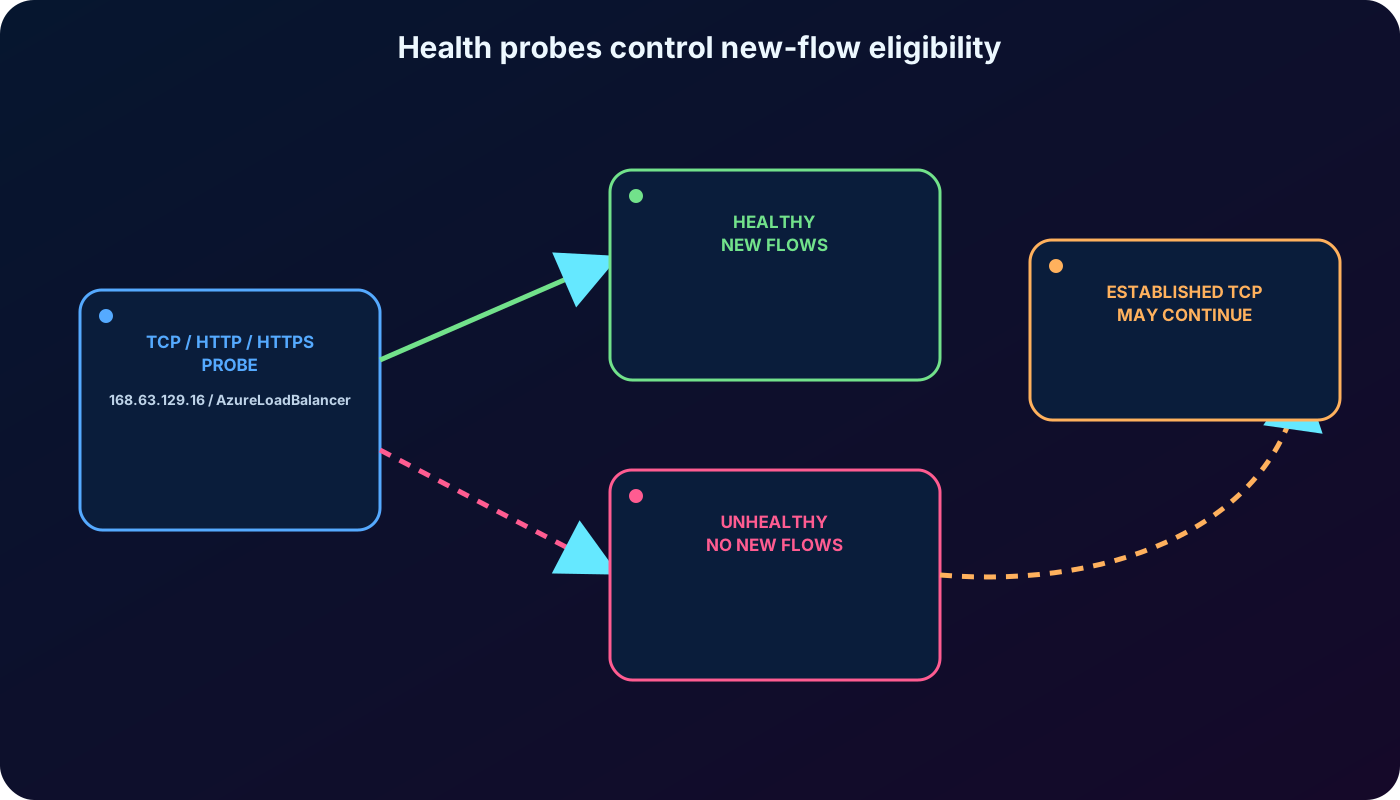
A health probe periodically tests a configured backend port. A rule uses the probe result to decide which instances may receive new inbound flows. When an endpoint crosses the unhealthy threshold, stops assigning new connections to it; outbound connectivity is not affected.
Probe types on Standard .
Probe
Healthy result
Failure examples
TCP
The configured listener completes a TCP handshake.
Timeout, no listener, or TCP reset.
HTTP
The configured path returns HTTP 200 within the timeout.
Non-200 status, timeout, or connection reset.
HTTPS
Like HTTP, with TLS and a certificate chain using at least SHA-256 signatures.
TLS, HTTP status, timeout, or connection failure.
Configure protocol, port, interval, path for HTTP(S), and consecutive success/failure threshold. Current portal defaults may differ from API defaults, so verify the deployed settings rather than memorizing the old exported values. Allow probe traffic from 168.63.129.16 or the AzureLoadBalancer service tag through NSGs and guest firewalls.
Probes test application availability, not merely whether the VM resource exists.
12. Existing connections and all-probes-down behavior matter
For one failed Standard backend, established TCP connections to that instance continue until the application ends the flow, the idle timeout expires, or the VM stops; new TCP connections use remaining healthy instances. Existing UDP flows can move to another healthy endpoint.
If every Standard backend probe is down, no new flow is sent to the pool, but established TCP flows can continue when the pool contains more than one instance. This distinction is important during planned maintenance and when interpreting a probe failure.
13. HA ports balance all ports for internal NVA designs
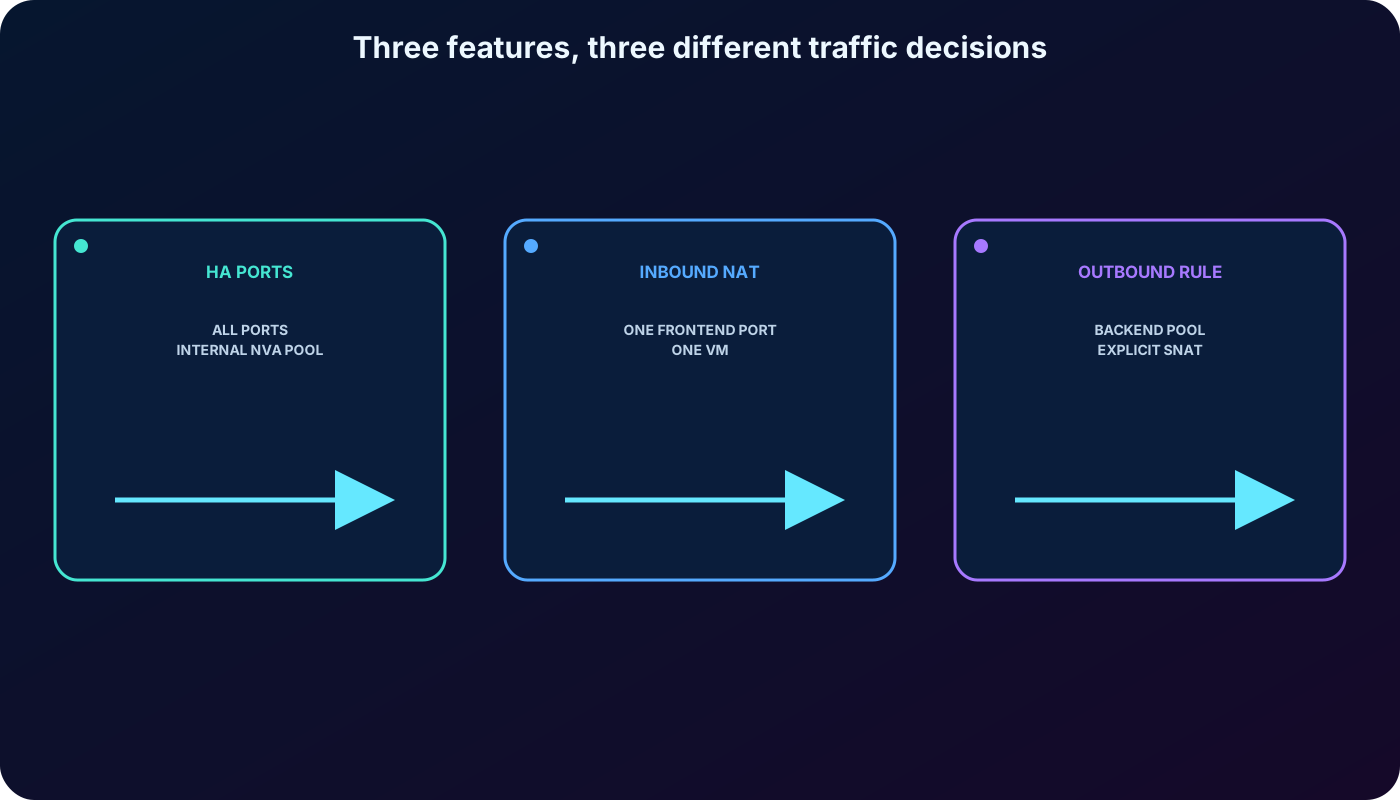
An HA ports rule uses protocol All and frontend port 0 to cover all TCP and UDP ports with one rule on an internal Standard . The per-flow five-tuple decision makes the feature suitable for highly available firewalls, VPN appliances, SD-WAN devices, and other NVAs that must process many ports.
HA ports are not a replacement for ordinary port-specific web rules and are not supported on public Load Balancers. They solve the operational problem of defining thousands of individual rules for an internal appliance tier.
14. Inbound NAT forwards one frontend port to one backend instance
An inbound NAT rule performs port forwarding from a frontend IP and port to a particular VM and backend port. For example, public TCP 50001 can map to TCP 3389 on one Windows VM, while another frontend port maps to another VM. This enables instance-specific administration without assigning each backend its own public IP.
NAT forwarding is different from a load-balancing rule: it deliberately selects one instance rather than spreading the flow across the pool. Restrict administrative exposure by source, prefer private management through Azure Bastion or a trusted network, and never assume NAT is an access-control policy.
15. Outbound rules define explicit SNAT for backend instances
An outbound rule on a public Standard translates private source addresses of backend members to one or more public frontend IPs. It controls which pool uses which frontend, TCP and/or UDP translation, SNAT port allocation, idle timeout, and optional TCP reset.
Outbound connectivity is a separate design from inbound load balancing. Default outbound access is retired for new VMs, and Basic was retired on September 30, 2025. Use Standard outbound rules, Azure , or an instance-level public IP as an explicit supported method. is often preferred for scalable, predictable subnet egress and reduced SNAT exhaustion risk.
HA ports, inbound NAT, and outbound rules solve different traffic directions and selection problems.
16. The Adatum design uses two load balancers for two tiers
For the migrated commerce application, place a public Standard in front of the web VMs. Its health probe removes failed web nodes and its distribution mode can preserve client affinity only if the application requires it. Place an internal Standard between the web tier and the data-analysis or transformation tier so the secondary VMs remain private.
Inbound NAT can provide controlled instance-specific administration, although Azure Bastion or private management is safer than broadly exposed RDP. Explicit outbound connectivity, NSGs, availability zones, monitoring, and at least two healthy instances complete the production design.
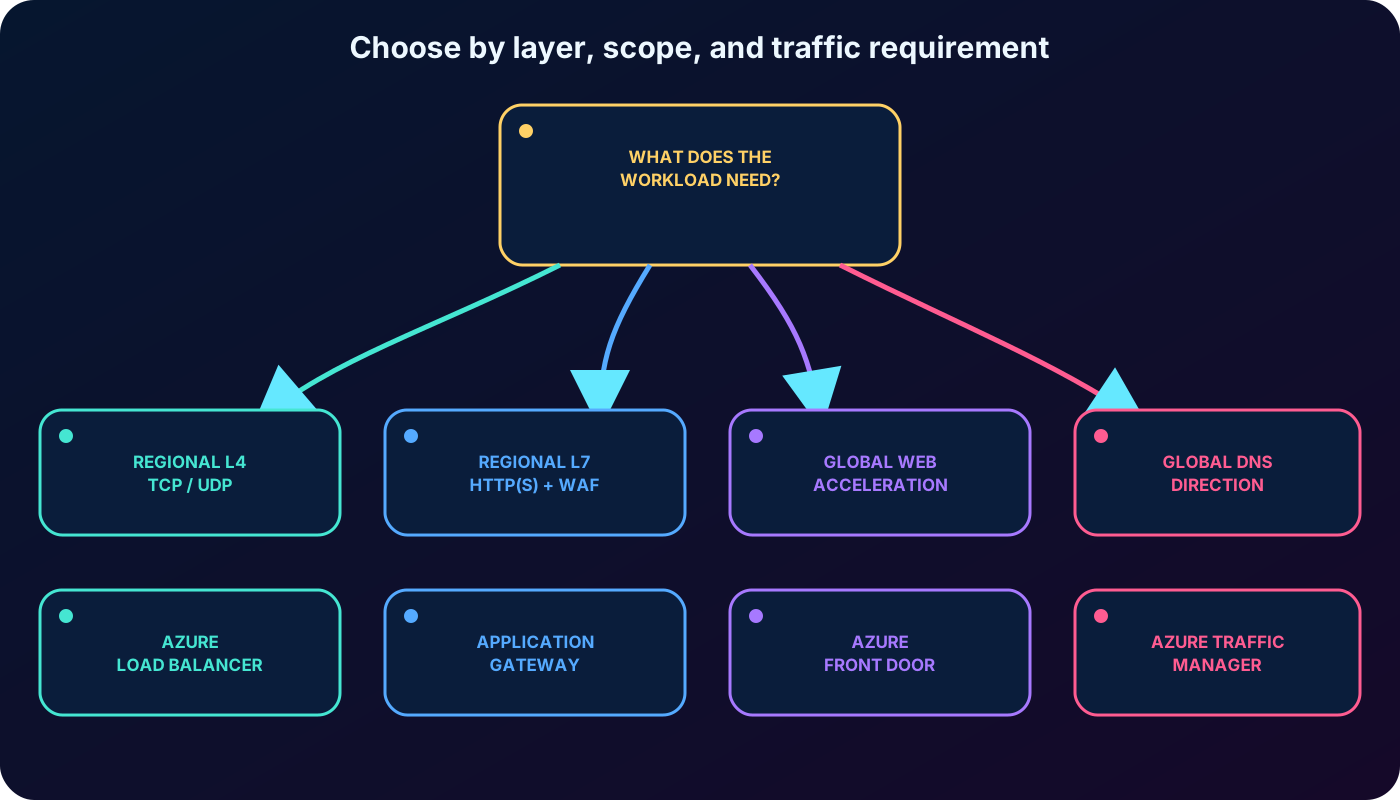
Choose by layer, scope, protocol, acceleration, and application-security requirements.
17. Use for high-performance TCP or UDP flows
Replace a physical Layer 4 appliance with a managed Azure flow distributor.
Expose a redundant IaaS VM or scale-set tier through a public frontend.
Balance private traffic between application tiers or from a hybrid network.
Use health probes to stop new flows to failed application instances.
Use session persistence when one client must remain on one backend.
Use HA ports for highly available internal NVAs with many TCP or UDP ports.
Use inbound NAT for tightly controlled instance-specific port forwarding.
Use explicit outbound rules when a public Standard is the selected egress design.
18. Do not add where there is no balancing need
A low-traffic application that competently runs on one VM gains little from a backend pool and load-balancing configuration unless availability or planned scaling justifies redundancy. is also the wrong tool when the routing decision depends on HTTP content, TLS termination, WAF policy, URL paths, global acceleration, or DNS-based endpoint selection.
The service is not a firewall, application gateway, DNS traffic director, or universal cross-VNet rule. Treat the architecture requirement first and the Azure product second.
19. Select the Azure traffic service by layer and scope
Comparison of the services named in the supplied module.
Service
Scope and layer
Choose it when
Azure
Regional Layer 4; TCP and UDP
You need ultra-low-latency flow distribution for VMs, private tiers, or NVAs.
Regional Layer 7 proxy
You need HTTP(S) routing, TLS termination, path or host decisions, or .
Global Layer 7 application delivery network
You need global web acceleration, edge routing, caching, rapid failover, and optional WAF.
Azure Traffic Manager
Global DNS-based traffic direction
You need DNS to direct clients among regional endpoints and can tolerate resolver caching and TTL behavior.
Architectures can combine services. can select a healthy region while or distributes traffic inside that region.
20. Knowledge-check answers and troubleshooting priorities
Assessment answers.
Question
Correct answer
Reason
At which OSI layer does Azure operate?
Layer 4
It evaluates transport-flow addresses, ports, and TCP or UDP.
What keeps a client on the same backend?
Session persistence
Two- or three-tuple affinity consistently selects the backend for that client.
What stops new TCP 443 flows to an unresponsive backend?
Health probe
The probe marks the endpoint unhealthy and removes it from new-flow selection.
Troubleshooting order
Confirm the frontend IP, rule protocol and ports, backend pool, and referenced probe are connected correctly.
Verify at least one backend is listening on the probe port and returns the required HTTP 200 when applicable.
Allow the AzureLoadBalancer service tag and 168.63.129.16 probe source through NSGs and local firewalls.
Check that client traffic is permitted by NSGs and the guest application is listening on the backend port.
Inspect health status, metrics, connection logs, idle timeout, TCP reset, and distribution mode.
For outbound failures, verify an explicit egress method and available SNAT ports rather than changing the inbound rule.
For uneven traffic, review persistence and the amount of visible source tuple variation.
21. Compact review, active recall, and official resources
Summarized version of every major topic.
Topic
Remember
Purpose
Distribute TCP or UDP flows across healthy VMs or scale-set instances.
Public vs internal
Public IP accepts internet traffic; private IP serves connected private networks.
Rule
Maps frontend IP, port, and protocol to a backend pool and probe.
Default distribution
Five-tuple hash gives affinity only within one transport flow.
Persistence
Two- or three-tuple modes keep one client on one backend but can skew load.
Health probe
TCP, HTTP, or HTTPS decides which endpoints receive new inbound flows.
HA ports
All ports and TCP/UDP through one internal Standard rule, mainly for NVAs.
Inbound NAT
One frontend port forwards to one specific backend instance.
Outbound rule
Explicit SNAT from a backend pool through public Standard frontend IPs.
Product choice
Use or Front Door for Layer 7; Traffic Manager directs through DNS.
Active-recall prompts
Name all seven core components and connect them in packet order.
Reconstruct the five tuple and explain why a new connection may choose another VM.
Compare None, Client IP, and Client IP and protocol persistence.
Predict what happens to new and established connections when one probe fails.
Explain the difference between a load-balancing rule, inbound NAT rule, and outbound rule.
Choose among ,,, and Azure Traffic Manager for four example workloads.