Azure Policy governance: definitions, effects, compliance, and safe deployment
Master Cloud Adoption Framework governance, Azure Policy scopes and resources, JSON definitions, effects, evaluation, remediation, compliance states, and deployment rings.
Suggested study time: 50 minutes • Intermediate • Original rewrite based on the supplied Microsoft Learn module, updated against current Azure Policy and Cloud Adoption Framework documentation
By João Ricardo Dutra••Complete original content
1. and the governance objective
turns organizational standards into definitions that Azure can assign, evaluate, and report at scale. A definition is expressed in JSON, matches resource properties or request context against business rules, and applies an effect such as audit, deny, modify, or deployment. This makes governance repeatable instead of relying on a manual review of every resource.
An initiative, also called a policy set, groups several definitions under one outcome. Initiatives simplify assignment and reporting for goals such as a security baseline, mandatory tagging, or a regulatory framework. Built-in and custom initiatives can be layered to create guardrails for public-sector, financial, and other regulated environments, including sovereignty-focused controls and compliance mappings.
Assign a policy that controls resources created in the future.
Create and assign an initiative so many definitions are tracked as one compliance objective.
Investigate and resolve a resource that is denied or reported as non-compliant.
Roll out a new policy across an organization with controlled exposure and measurable results.
is a technical control, not legal advice. Each organization remains responsible for identifying applicable laws, validating its implementation, and consulting qualified legal and compliance professionals.
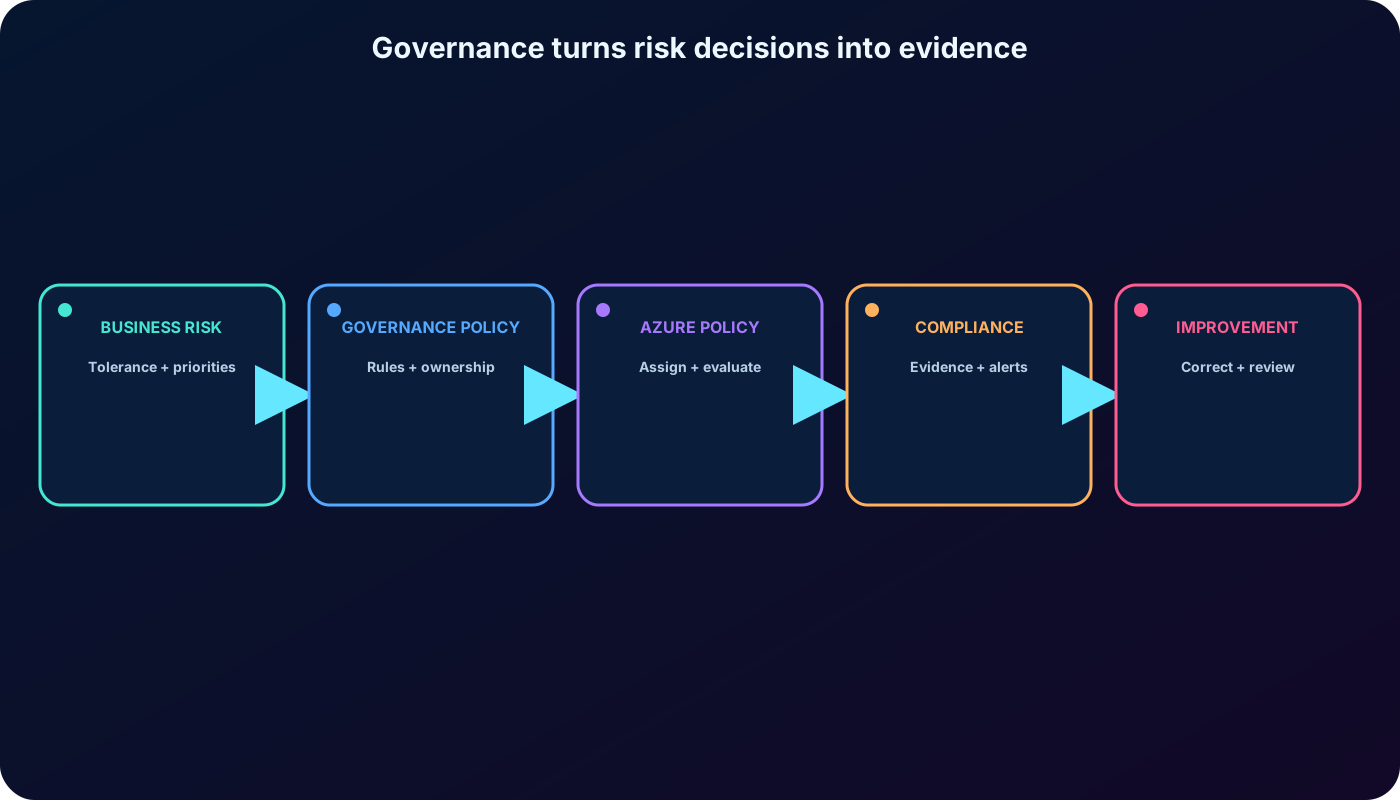
Governance begins with business decisions; automates selected controls and returns evidence for the next review cycle.
2. Cloud Adoption Framework and continuous governance
The Microsoft Cloud Adoption Framework for Azure provides end-to-end guidance, tools, documentation, and practices for cloud strategy, planning, readiness, adoption, governance, security, and management. In the Govern methodology, cloud governance means controlling acceptable cloud use through documented guardrails that support business outcomes while reducing regulatory, security, operational, cost, data, resource-management, and AI risks.
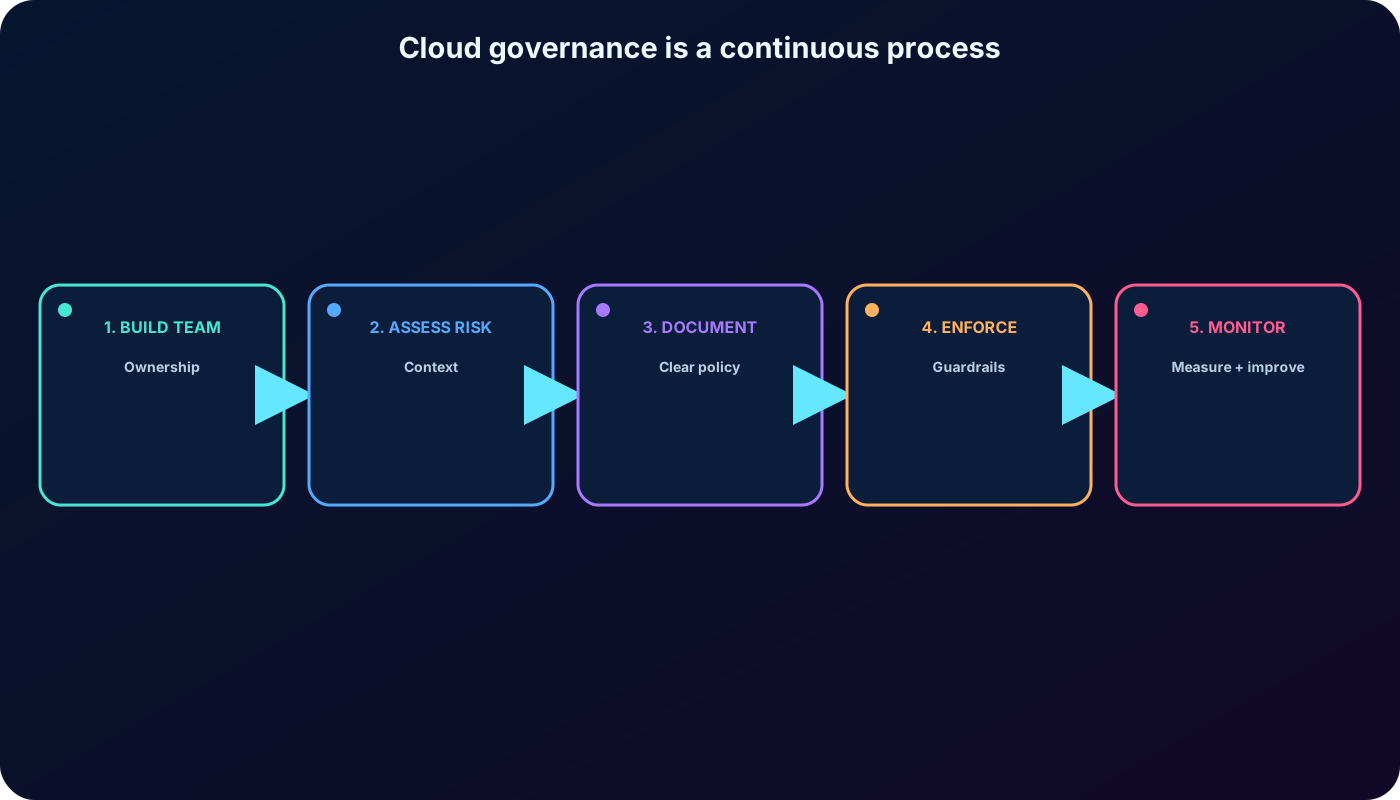
Governance is not a one-time implementation. Technology, organizational priorities, threat models, and regulations change. The framework therefore establishes ownership first and repeats risk assessment, policy maintenance, enforcement, and monitoring as a continuous operating cycle.
After the governance team is established, the remaining stages repeat as risks and cloud usage evolve.
3. The five steps of cloud governance
Build a cloud governance team. Give a dedicated team accountability for policy ownership, maintenance, stakeholder engagement, metrics, and reporting.
Assess cloud risks. Evaluate regulatory, security, operational, cost, data, resource, and AI risks in the organization's own context.
Document governance policies. State acceptable cloud use, scope, rationale, ownership, enforcement, exceptions, and the rules that reduce each material risk.
Enforce governance policies. Combine automated guardrails with manual controls where automation is unsuitable, and make accountability explicit across platform and workload teams.
Monitor cloud governance. Establish a compliance baseline, detect violations and drift, measure policy effectiveness, and feed findings into the next risk and policy review.
Complete all five steps to establish the operating model. Then revisit steps 2 through 5 regularly. Monitoring without a remediation owner produces reports but not governance; enforcement without risk context can block legitimate work.
4. From business risk to governance disciplines
A corporate governance policy starts with business risk and risk tolerance, informed by data classification and application criticality. Risk decisions become unambiguous policy statements, and processes define how violations are detected, escalated, corrected, accepted, and reviewed.
Five disciplines emphasized by the supplied module.
Discipline
Governance purpose
Cost management
Monitor cloud expenditure, adjust capacity to demand, allocate ownership, and improve the value obtained from technology investment.
Security baseline
Apply consistent minimum security requirements across cloud adoption efforts.
Resource consistency
Standardize resource configuration, onboarding, recovery, discoverability, and operational conventions.
Identity baseline
Apply identity, access, role-definition, and role-assignment standards consistently.
Deployment acceleration
Use centralized and standardized deployment templates and policies to deliver approved configurations faster.
The current Cloud Adoption Framework also treats regulatory compliance, operations, data management, resource provisioning, and AI as explicit governance domains. The five disciplines remain a useful study model, but a real governance program should cover the complete risk portfolio.
5. What can govern
provides centralized definitions, assignments, compliance results, change investigation, and remediation. Its dashboard can aggregate the environment and then drill down by assignment, definition, and resource. Because Policy is integrated into Azure, it can reduce external approval steps when an automated guardrail can safely replace a manual gate.
Restrict deployment to approved regions and implement data-residency guardrails.
Allow only approved virtual machine sizes or resource types.
Require and, with the correct effect, add or inherit standardized tags such as AppName.
Audit encryption, diagnostic settings, updates, network configuration, and security baselines.
Require diagnostic data to reach an Logs workspace.
Evaluate existing resources as well as resources created or resized after the policy is assigned.
Connect policy-as-code practices to or GitHub workflows before and after deployment.
The export mentions multifactor authentication for subscription accounts as a policy example. In current architecture, Microsoft Entra Conditional Access is the primary control for requiring multifactor authentication; mainly governs Azure resource properties and supported resource actions. Use the correct control plane for each requirement.
Policy design balances control and stability against delivery speed and business results. Test the effect, estimate operational impact, provide understandable non-compliance messages, and define a controlled exemption process before broad enforcement.
6. Governance hierarchy, scope, and inheritance
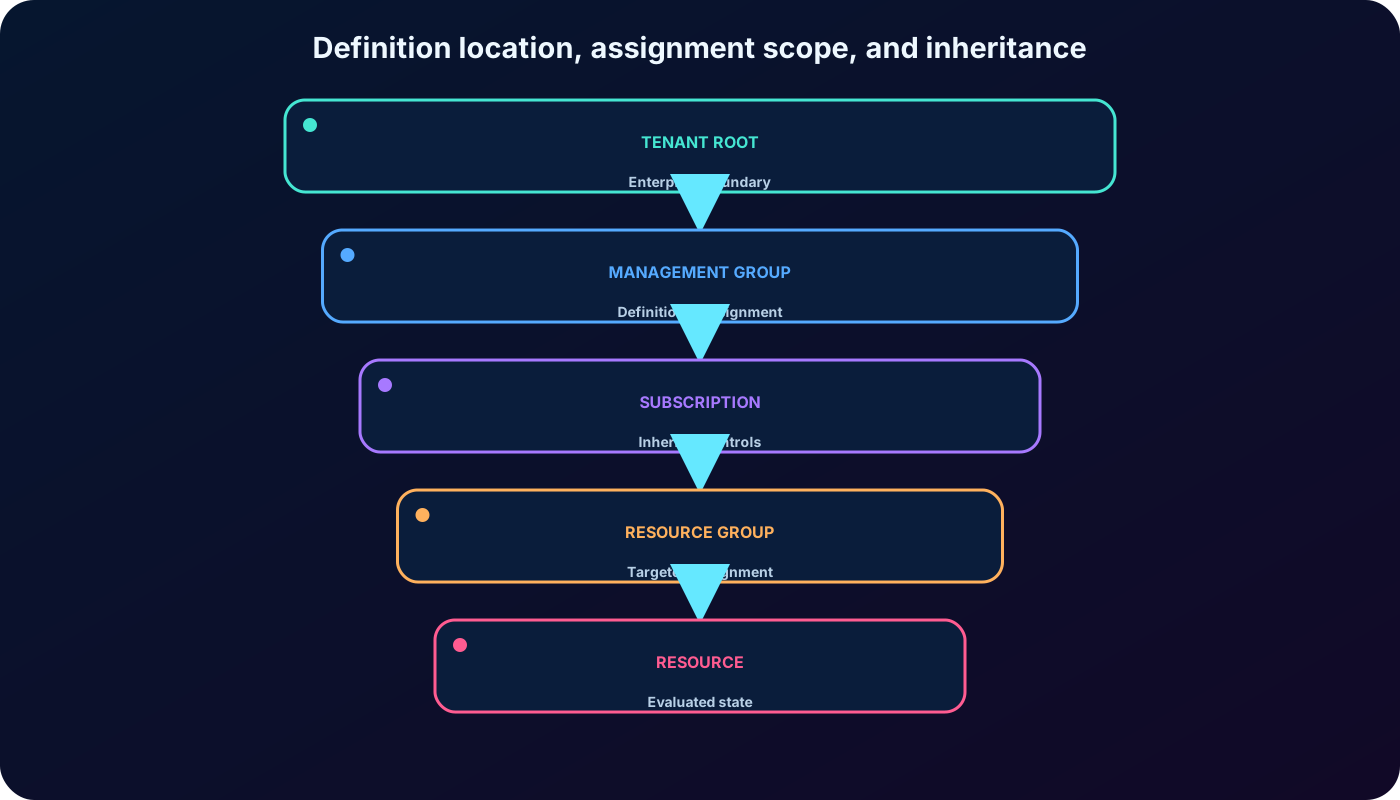
Azure provides a hierarchy of management groups, subscriptions, resource groups, and resources under the tenant root group. A resource belongs to one resource group; a subscription is a management, billing, quota, and scale boundary; management groups organize subscriptions so access and policy can be administered consistently at enterprise scale.
Assignments at a higher scope apply to eligible descendants unless a child is excluded or exempted. A policy assigned to a subscription can affect its resource groups and resources; a policy on one resource group does not automatically affect a neighboring group. Management groups can extend six levels below the tenant root group.
A policy or initiative definition is stored at a definition location: a management group or subscription. It can only be assigned to that container or descendants. Place a reusable definition at the lowest location that still contains every intended assignment scope.
Definition location controls where a definition is available; assignment scope controls which descendants are evaluated.
7. , control plane, and data plane
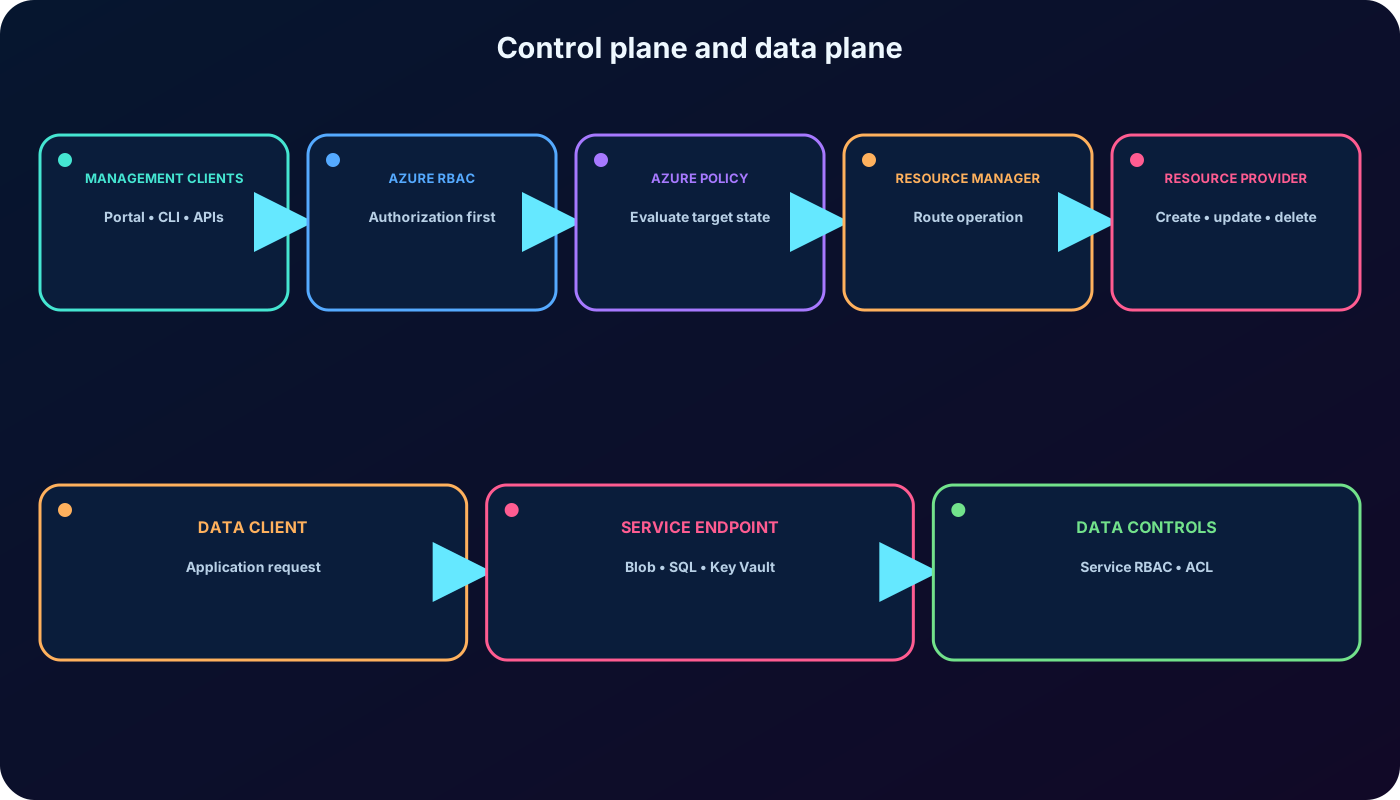
is the deployment and management layer for creating, updating, and deleting Azure resources. Portal, Azure PowerShell, Azure CLI, REST APIs, and client SDKs use the Resource Manager APIs, which authenticate and authorize a management request before forwarding it to the appropriate resource provider.
Template deployments, Azure role-based access control (Azure RBAC), auditing, monitoring, tagging, and Resource Manager-mode evaluation participate in the control plane. Azure RBAC is evaluated before : if the caller is not authorized to perform the operation, the request fails before policy evaluation.
The data plane handles service data directly, such as uploading a blob, querying a database, or reading a secret from Azure . These calls use service endpoints and service-specific RBAC or access control lists rather than passing through the Resource Manager control plane. Resource Provider policy modes extend into selected service data planes.
Resource Manager governs management operations; a service data plane handles the resource contents.
8. Resource Provider modes and supported data-plane scenarios
Resource Provider modes covered by the export and current documentation.
Mode
Purpose
Current status
Microsoft.Kubernetes.Data
Evaluate Kubernetes clusters and components such as pods, containers, and ingresses in Azure Kubernetes Service and -enabled Kubernetes.
Fully supported
Microsoft.KeyVault.Data
Govern vault and certificate configuration in Azure .
Fully supported
Microsoft.Network.Data
Manage dynamic custom network-group membership in Azure Manager.
Fully supported
Microsoft.ManagedHSM.Data
Govern Managed HSM keys.
Preview
Microsoft.DataFactory.Data
Deny outbound domain names that are not allowlisted; enforcement does not currently report public-preview compliance.
Preview
Microsoft.MachineLearningServices.v2.Data
Govern model deployments and report newly created or updated component compliance.
Preview
Microsoft.LoadTestService.Data
Restrict Azure Load Testing instances to private endpoints.
Preview; added by current documentation
Unless documentation explicitly says otherwise, Resource Provider modes support built-in definitions only and do not support component-level exemptions. Product status can change, so verify mode and effect support before designing a control.
9. Greenfield and Brownfield evaluation flows
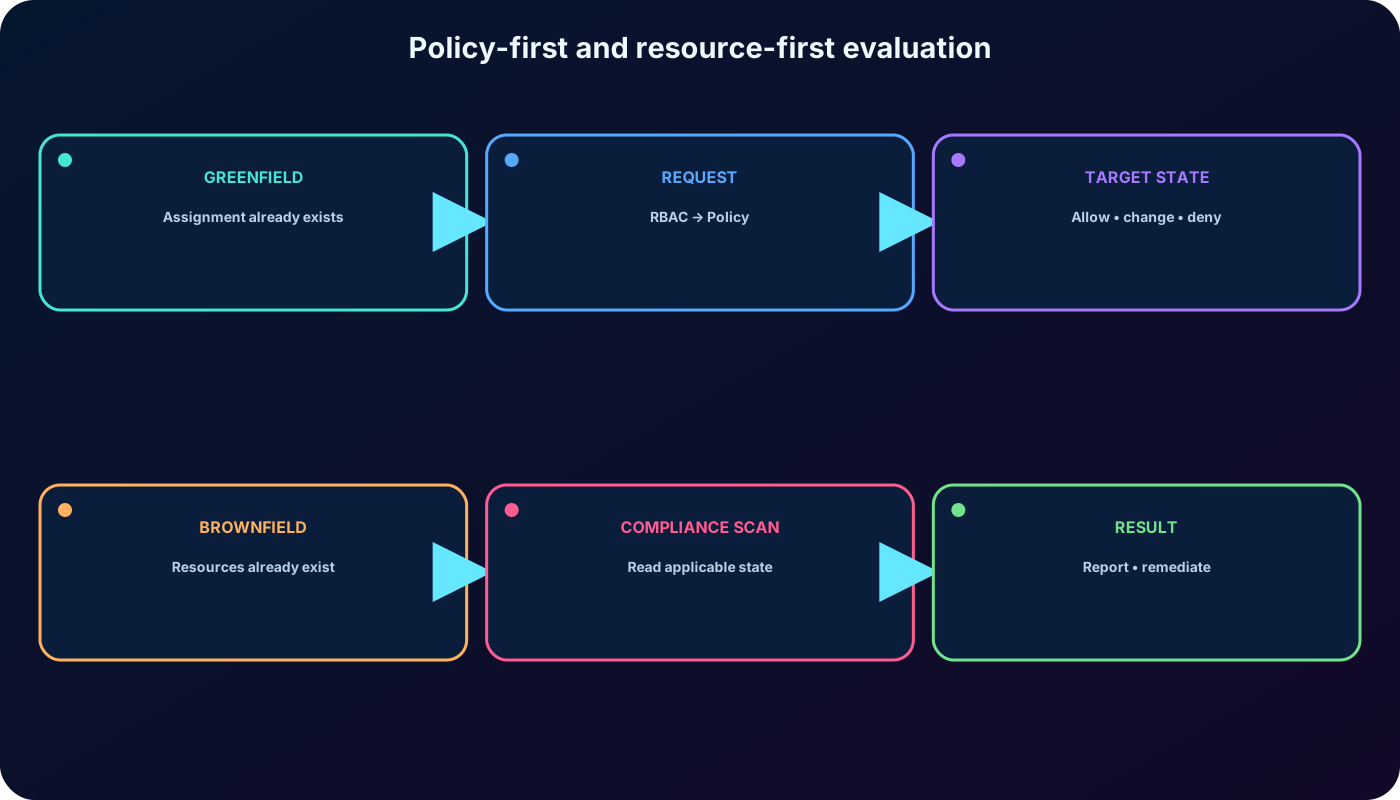
In a Greenfield, or policy-first, flow, an assignment already exists when a resource is created or updated. After authorization, evaluates the intended state. For an update request that contains only a delta, Policy reads the current resource, merges that state with the requested changes, and evaluates the resulting target state.
In a Brownfield, or resource-first, flow, resources already exist when a new assignment is introduced. A compliance scan reads applicable resources and records their state. A deny policy that permits only West Europe does not delete existing resources elsewhere; it marks them non-compliant and blocks later nonconforming create or update requests.
Policy-first controls the target state during a request; resource-first discovers the state already deployed.
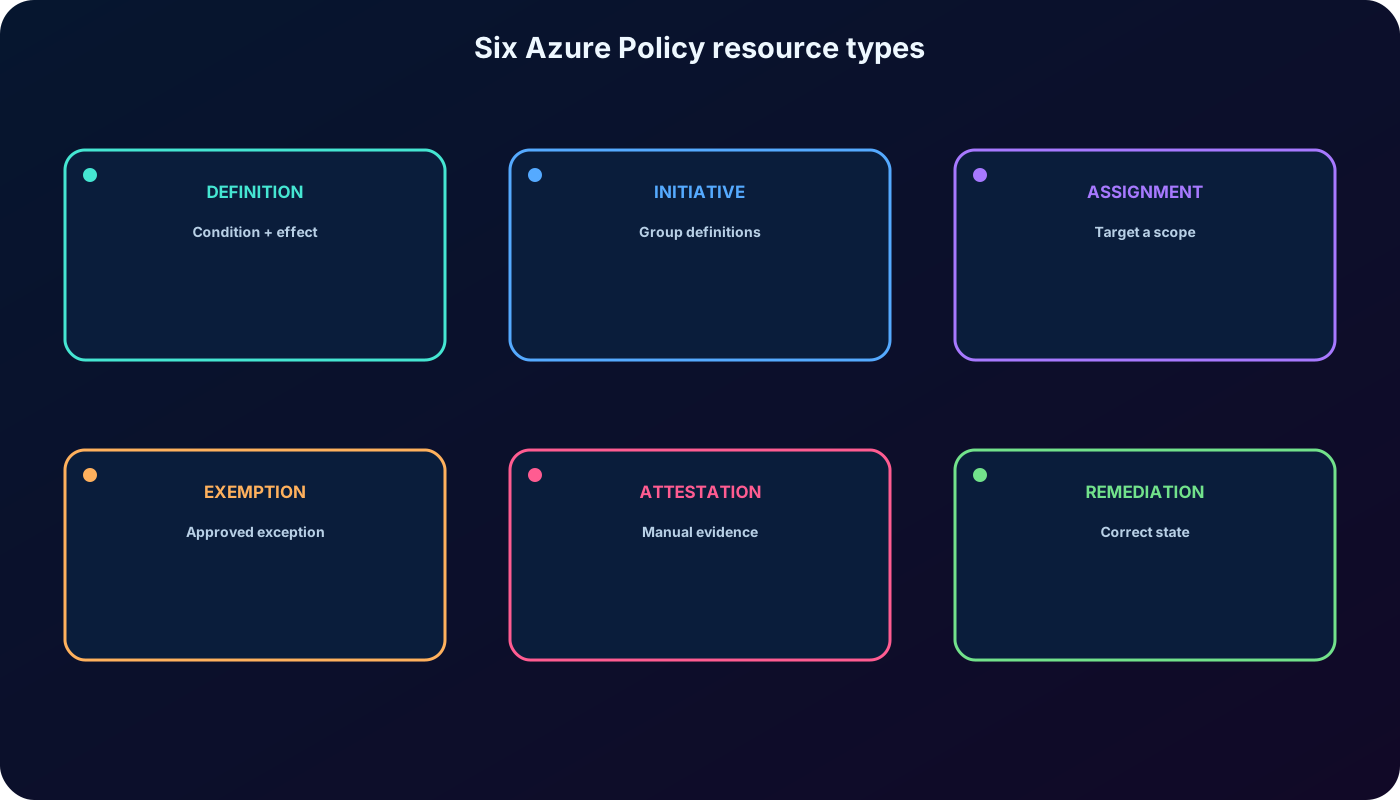
10. The six resource types
Core resources and their responsibilities.
Resource
Responsibility
Definition
Describes the compliance condition and effect in JSON.
Initiative
Groups definitions into one assignable and reportable objective.
Assignment
Connects a definition or initiative to a scope and supplies parameters and rollout behavior.
Exemption
Records an approved exception while keeping the resource visible in overall compliance.
Attestation
Sets the compliance state required by a definition with the manual effect.
Remediation
Applies modify operations or deployIfNotExists templates to applicable non-compliant resources.
Definitions say what to check; the other resources package, target, except, attest, or correct that rule.
11. Initiatives, assignments, and rollout controls
Built-in definitions and initiatives are provided by Azure resource providers. Custom definitions and initiatives cover requirements that have no suitable built-in. Microsoft for Sovereignty publishes additional initiatives and compliance mappings, and organizations can combine these with built-ins while validating their own obligations.
Assignments can be created through the portal, API, Azure PowerShell, or Azure CLI. Besides the target scope and definition, an assignment can include parameter values, a definition version, resource selectors for progressive exposure, effect or version overrides, enforcementMode, excluded scopes in notScopes, non-compliance messages, and a managed identity for modify or deployIfNotExists remediation.
Resource selectors gradually include resources by properties such as location or type without changing the assignment scope.
Overrides change an allowed effect or definition version for selected references without editing the underlying initiative.
An exclusion removes a descendant from the assignment scope; an exemption is a separate child resource that documents an approved exception.
Parameters let the same definition enforce different business values in different assignments.
System-assigned or user-assigned managed identity supplies the permissions needed by remediation effects.
12. Exemptions, attestations, and remediation
An exemption is created after assignment and can target a resource hierarchy or one resource. The exempt resource remains represented in compliance rollups but is not evaluated by the assignment. Use category Mitigated when another control satisfies the policy intent; use Waiver when the non-compliant state is temporarily accepted. Record owner, rationale, expiration, and compensating control.
The manual effect relies on attestations. Each applicable resource needs an attestation for each manual assignment, so manual definitions should target a scope whose boundary matches the evidence and ownership model.
A remediation task brings existing resources into compliance with modify or deployIfNotExists. Newly created or updated applicable resources can be corrected automatically; existing resources require discovery and a task. The assignment identity performs the operations, so grant only the required roles. A deployIfNotExists remediation task can still be started when enforcementMode is DoNotEnforce.
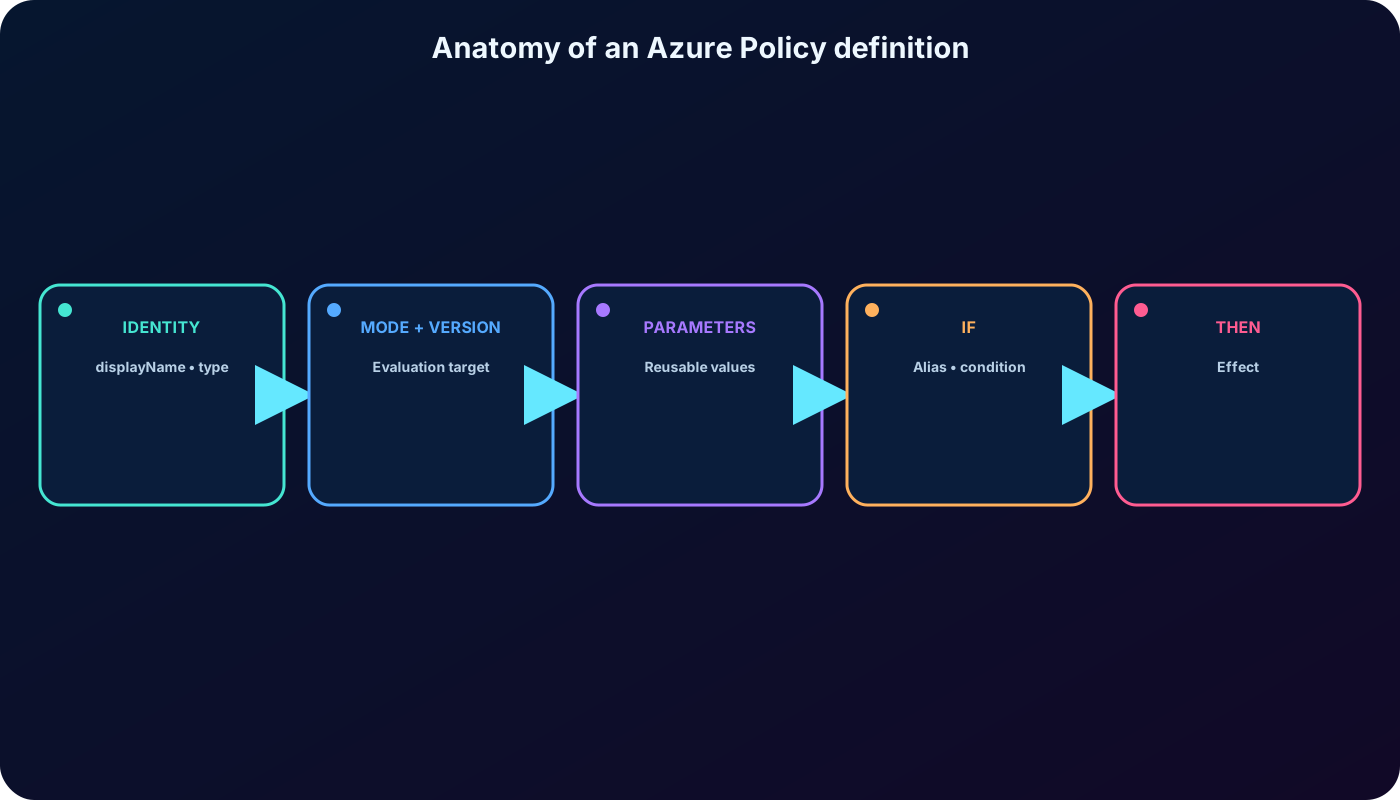
13. Anatomy of an definition
Important definition properties.
Property
Meaning
displayName / description
Identify the definition and explain when to use it. Current limits are 128 and 512 characters.
policyType
Read-only origin: Builtin, Custom, or Static for Microsoft-owned regulatory compliance definitions.
mode
Selects Resource Manager evaluation with all or indexed, or a supported Resource Provider mode.
version
Built-ins can expose multiple semantic versions; assignments can select a supported version.
metadata
Stores category, version, preview, deprecated, portalReview, or organization-specific information.
parameters
Make a definition reusable with String, Array, Object, Boolean, Integer, Float, or DateTime inputs plus metadata, defaults, allowed values, and schema.
policyRule
Contains an if block with conditions and a then block with the effect.
For Resource Manager modes, all evaluates subscriptions, resource groups, and every resource type. Indexed evaluates only resource types that support both tags and location. The supplied export incorrectly describes both modes the same way; current guidance recommends all in most cases and indexed mainly for tag or location rules. If a tag or location policy targets subscriptions or resource groups themselves, use all and explicitly test their resource type.
A definition version uses Major.Minor.Patch. Major changes can be breaking, minor versions can add compatible policy behavior or values, and patches normally change strings or metadata. Preview and deprecated metadata must be considered before production assignment.
The condition decides applicability; the effect decides the response.
14. Policy rule, aliases, logical operators, and conditions
The if block can inspect a resource field through an alias, compare a computed value, or count members of an array. Common fields include name, fullName, kind, type, location, id, identity.type, tags, named tags, and provider-specific property aliases. Array aliases and count expressions let a rule evaluate every relevant member.
Logical composition and condition families.
Group
Operators or expressions
Logical
not inverts one result; allOf requires every child condition; anyOf requires one or more. Operators can be nested.
contains, notContains, in, notIn, containsKey, notContainsKey.
Ordering and existence
less, lessOrEquals, greater, greaterOrEquals, and exists with supported date, string, integer, or Boolean values.
Array evaluation
field count or value count with where; current() exposes the member being evaluated.
A function or expression error can make evaluation fail and can produce an implicit deny during request-time evaluation. Test with enforcementMode disabled, validate types and empty values, and keep complex expressions readable.
This original example keeps globally located resources outside the regional check. A production definition should also account for resource types whose location semantics differ and should be tested against representative resources.
15. Policy functions
Policy rules can use many template functions, but user-defined functions and some policy-specific exceptions are not available. In Policy, utcNow() can be used outside defaultValue and returns the current UTC timestamp in ISO 8601 format.
Functions highlighted by the module.
Function
Use
addDays(dateTime, days)
Adds an integer number of days to an ISO 8601 timestamp.
field(fieldName)
Returns the selected field of the resource evaluated by if; often used by auditIfNotExists and deployIfNotExists.
requestContext().apiVersion
Returns the request API version for create or update; existing-resource scans use the latest version.
policy()
Returns assignmentId, definitionId, setDefinitionId, and definitionReferenceId for the current evaluation.
ipRangeContains(range, targetRange)
Tests whether one IPv4 or IPv6 range contains another; empty ranges or mixed IP families fail evaluation.
current(indexName)
Returns the current array member inside a count expression.
16. Effects and evaluation order
effects from the module plus current additions.
Effect
Behavior
Evaluation style
disabled
Stops evaluation of the definition for that assignment.
Synchronous gate
append
Adds fields to a create or update request; modify is preferred for many newer scenarios.
Synchronous
modify
Adds, updates, or removes supported properties or tags and can remediate existing resources.
Synchronous
deny
Rejects a nonconforming create or update request.
Synchronous
denyAction
Blocks a supported resource action at scale; the currently supported action is DELETE.
Synchronous action control
audit
Records non-compliance in the Activity log without blocking the request.
Asynchronous result
auditIfNotExists
Checks whether a related resource with required properties exists and records non-compliance.
After provider success
deployIfNotExists
Deploys a related resource through a template when the required related configuration is absent.
After provider success
manual
Uses an attestation to set compliance for resources or scopes.
Manual attestation
addToNetworkGroup
Adds matching virtual networks to an Azure Manager network group.
Microsoft.Network.Data only
mutate
Changes supported component data in Resource Provider-mode scenarios.
Provider-specific; current addition
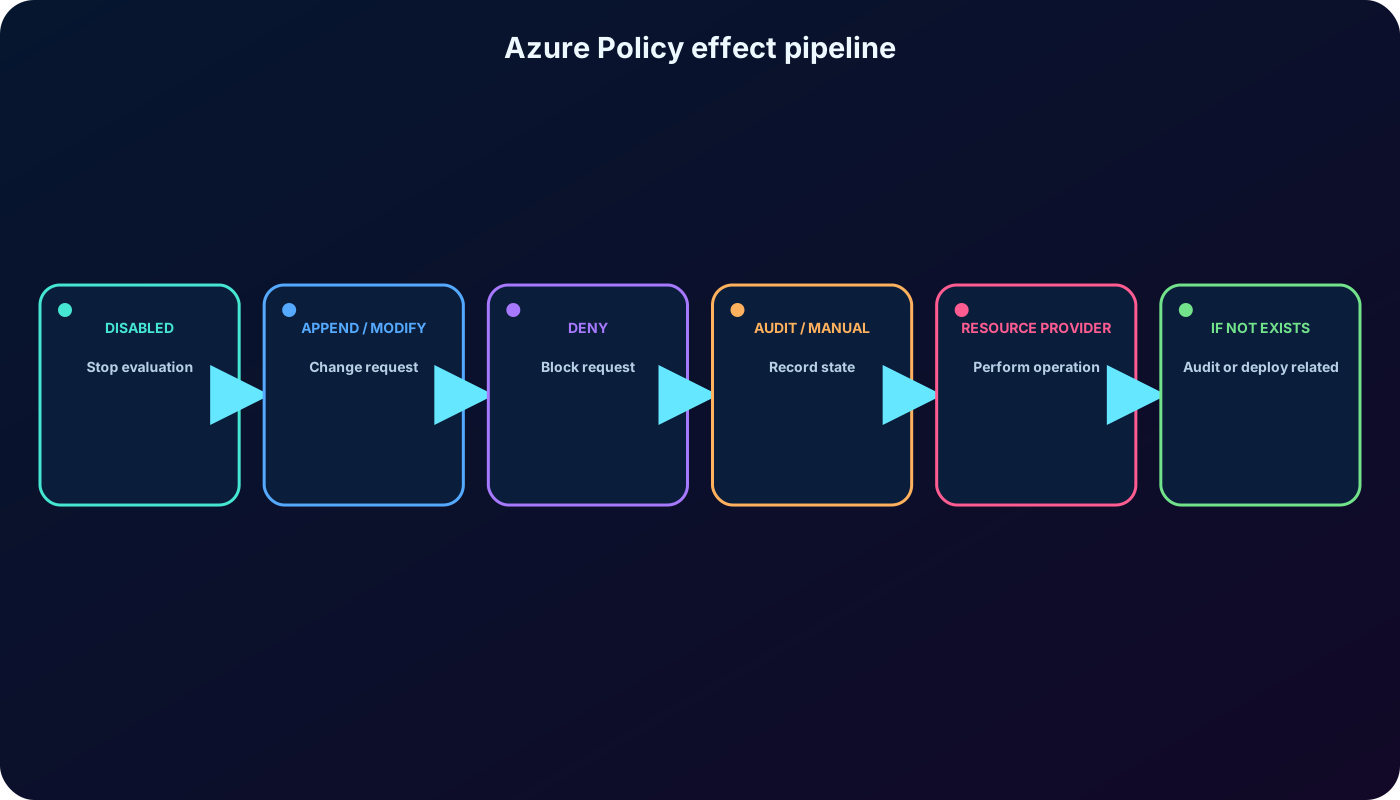
For Resource Manager requests, checks disabled first, then request-changing effects such as append and modify, then deny, audit, and other relevant effects. auditIfNotExists and deployIfNotExists run after the resource provider succeeds. Multiple assignments are evaluated independently, and their combined result is cumulative and generally most restrictive.
Audit, deny, and modify or append can often share a parameterized definition. auditIfNotExists and deployIfNotExists are commonly paired alternatives. Manual is not interchangeable, while disabled can deactivate any parameterized effect.
Effect order avoids unnecessary provider work and separates request-time controls from post-deployment checks.
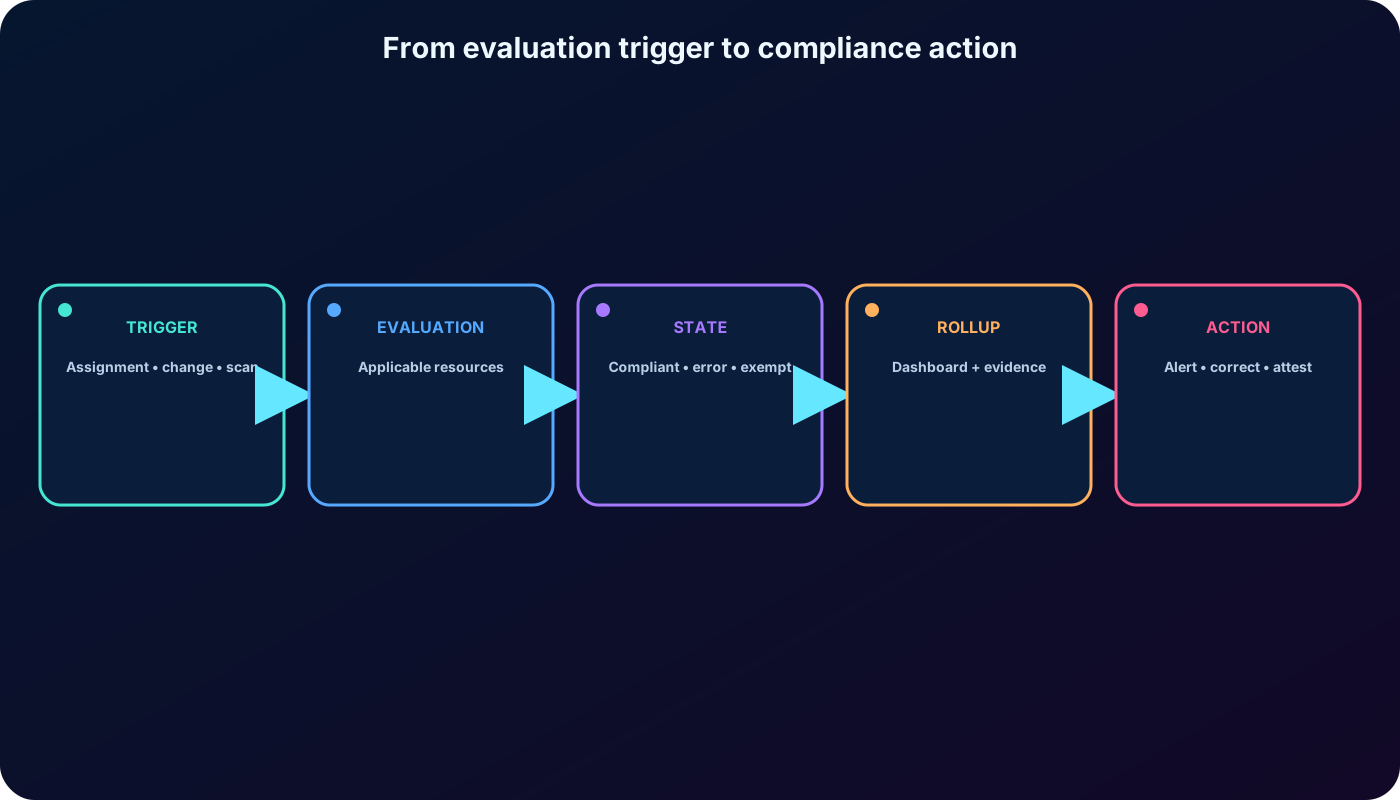
17. Evaluation triggers and timing
A policy or initiative is newly assigned, or an existing assignment is updated.
A resource is created or updated through , REST, or a supported SDK.
A subscription is created or moved within a management-group hierarchy targeted by an assignment.
The standard recurring compliance cycle runs, normally once every 24 hours.
An administrator or automation starts an on-demand scan.
The export says a new assignment can take up to 30 minutes to take effect and suggests signing out and back in to refresh a Resource Manager session cache. Current documentation gives more specific expectations: an assignment normally takes about five minutes to apply before evaluation begins; a create or update result can appear roughly 15 minutes later; subscription-targeted evaluation can take around 30 minutes. A large scope has no fixed completion time, and reauthentication is not a service-level guarantee.
Definition complexity, number of assignments, scope size, system load, and the low-priority nature of compliance scanning affect duration. Use the portal, Logs, Azure Resource Graph, PolicyStates, and PolicyEvents rather than assuming completion from elapsed time alone.
az policy state trigger-scan --resource-group "example-rg"
Start-AzPolicyComplianceScan -ResourceGroupName 'example-rg'
Azure CLI and Azure PowerShell can start on-demand scans. GitHub Actions can also trigger a compliance scan and use the result as a workflow gate.
18. Compliance states and rollups
Current compliance states.
State
Meaning
Non-compliant
The applicable rule finds a resource state that does not meet the requirement.
Compliant
The applicable rule finds that the requirement is met.
Error
A system, template, or evaluation error prevents a valid result.
Conflicting
Assignments at the same scope produce contradictory results, such as different appended values for the same tag.
Protected
The resource is covered by a denyAction assignment.
Exempt
An applicable resource is within an approved policy exemption.
Unknown
Default state for manual definitions until an attestation supplies a result.
Not registered
The Policy Insights provider is not registered or the reader lacks permission to retrieve compliance data.
Not started
The evaluation cycle has not begun for the policy or resource.
Rollups rank states so the most significant result wins; a non-compliant result can therefore dominate several compliant results inside an initiative. Not registered and Not started are not included in rollup calculations.
Current overall compliance percentage is calculated as (Compliant + Exempt + Unknown + Protected) divided by (Compliant + Exempt + Unknown + Non-compliant + Conflicting + Error + Protected). Always examine counts and assignment scope along with the percentage so exclusions and manual states do not hide risk.
A compliance percentage is an aggregate; resource-level evidence explains what must change.
19. enforcementMode and a safe what-if phase
enforcementMode is an assignment property. Enabled maps to JSON value Default and enforces the selected effect, supports manual remediation, and can create Activity log entries. Disabled maps to DoNotEnforce: the definition still evaluates and reports compliance, but the effect does not run and no effect entry is written to the Activity log.
This differs from the disabled effect. A definition whose effect is disabled is not evaluated; an assignment with enforcementMode disabled is evaluated as a what-if test. If enforcementMode is omitted, Default applies.
The two controls answer different questions.
Control
Evaluated?
Effect enforced?
Primary use
effect: disabled
No
No
Deactivate the definition for an assignment.
enforcementMode: DoNotEnforce
Yes
No
Observe applicability, compliance, and false positives safely before enforcement.
20. Safe deployment with rings and policy as code
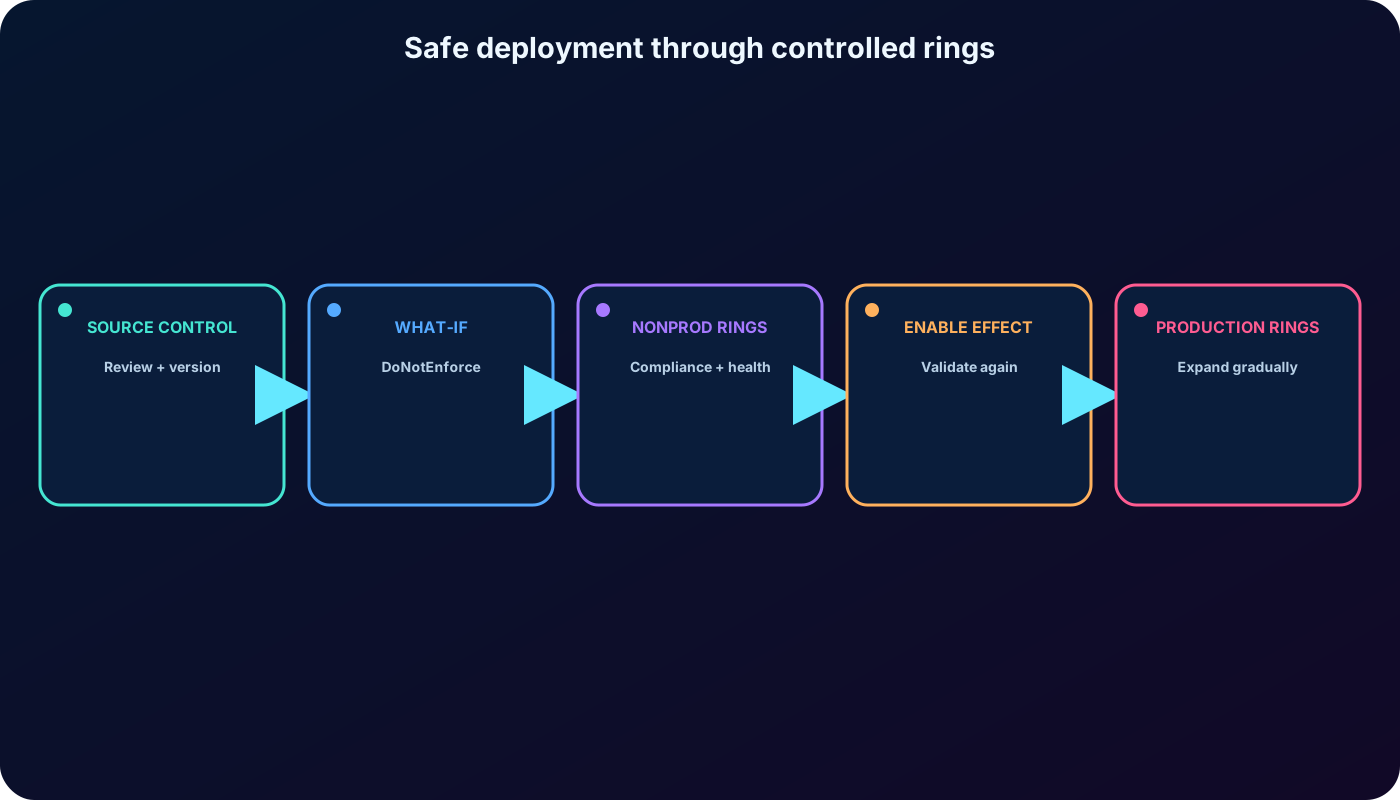
Treat definitions and assignments as code: version them, peer-review changes, test representative resources, automate validation, and promote through controlled environments. Begin deny, modify, and other impactful assignments with enforcementMode disabled, then expand exposure through deployment rings.
Create and validate the definition at an appropriate definition location.
Create an assignment with resource selectors for the first small nonproduction ring and set enforcementMode to DoNotEnforce.
Check both compliance results and application health; false positives and operational regressions are separate failure modes.
Repeat the checks for each nonproduction ring and update the definition or assignment when necessary.
Enable enforcement for a validated ring, then repeat compliance and health checks.
Progress through the remaining nonproduction rings.
Expand gradually to production, starting with the smallest and least critical subset.
Monitor state changes, remediation, support signals, and business impact throughout the rollout.
Resource selectors and assignment overrides support gradual rollout without duplicating definitions. Maintain an emergency rollback or effect-override procedure and document who can approve it.
Progressive exposure limits the impact of a faulty definition while producing evidence at each ring.
21. Reacting to policy state changes with
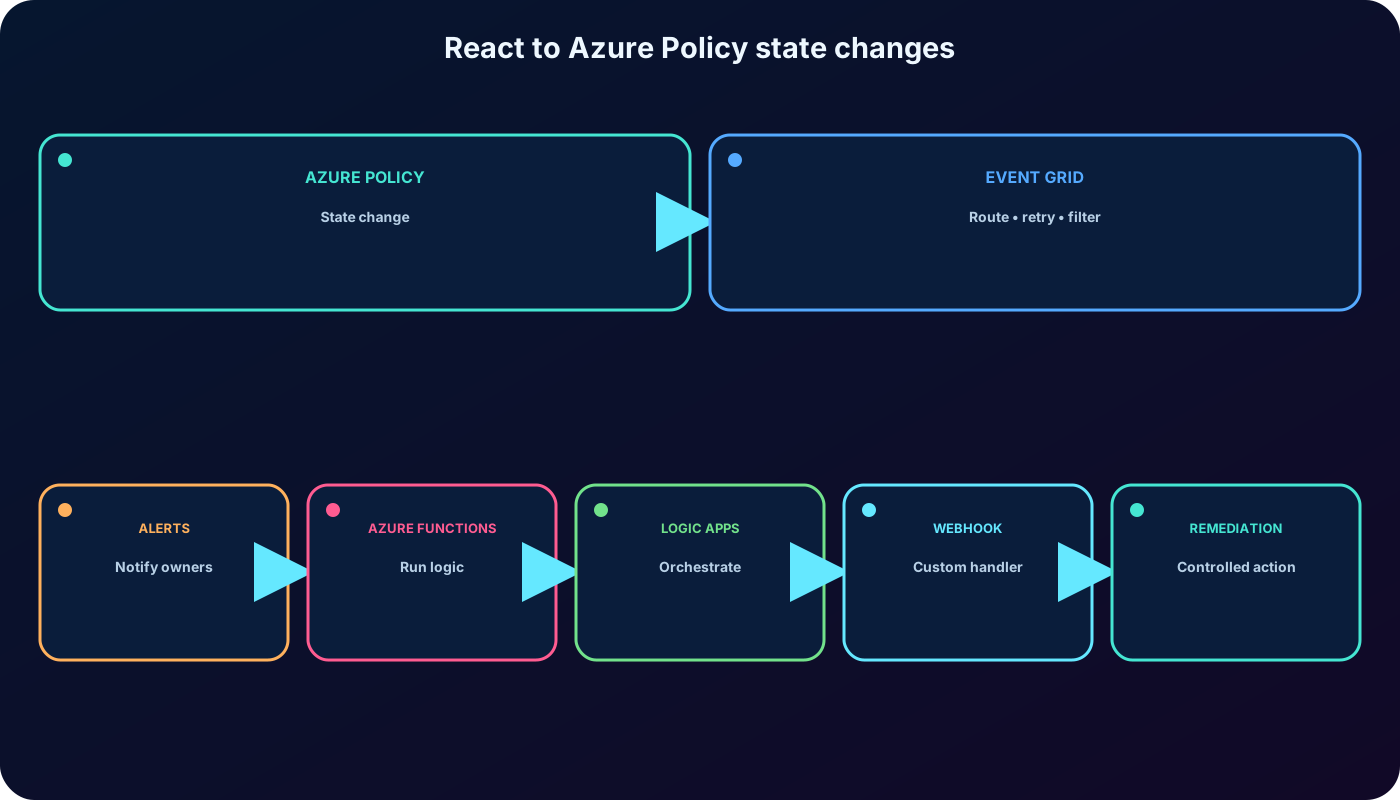
can publish state-change events through so applications react without inefficient polling. An subscription handles routing, filtering, retry, multicasting, and dead-letter delivery to the configured destination.
Event handlers can include ,, supported Azure services, custom HTTP listeners, and webhooks. Keep the handler idempotent, authenticate it, validate event scope, record correlation data, and separate an alert from an automatically approved remediation.
Event-driven governance turns a compliance result into a timely, auditable response.
22. Knowledge check explained
The five supplied questions, rewritten with their reasoning.
Question
Best answer
Why
What is for?
Assess compliance at scale and enforce organizational and regulatory standards.
It evaluates resource state and requests against centrally managed definitions.
What two practices make rollout safer?
Start with enforcementMode disabled and deploy through rings.
Evaluation of the outcome without initiating the effect.
Unlike effect: disabled, the resource is still evaluated.
What is 's role?
Provide the Azure deployment and management layer for creating, updating, and deleting resources.
Resource Manager receives control-plane requests and coordinates authorization, Policy, and resource providers.
At which levels can policies be assigned in the supplied assessment?
Management group, subscription, and resource group.
That is the intended option in the export. Current documentation also supports assignment directly to an individual resource, so treat the quiz option as incomplete for current operations.
23. Summary, active recall, and official resources
Connect policy decisions to business risk, clear ownership, enforcement, monitoring, and a review cycle.
Place definitions and assignments at scopes that provide deliberate inheritance without unnecessary blast radius.
Understand control-plane request evaluation, data-plane extensions, and the difference between policy-first and resource-first flows.
Use definitions, initiatives, assignments, exemptions, attestations, and remediation for distinct governance responsibilities.
Build rules from aliases, conditions, functions, and effects, and test function errors and edge cases.
Observe current compliance states and timing rather than assuming that assignment means immediate full evaluation.
Start with DoNotEnforce, validate compliance and application health, and promote through deployment rings.
Use for timely reactions while retaining approval, identity, and audit controls.
Prompts for active recall
Draw the full flow from a management request through Azure RBAC, ,, a resource provider, compliance data, and remediation.
Design an initiative for allowed regions, mandatory tags, diagnostic settings, and protection from accidental deletion. Identify the effect, scope, parameters, exclusions, and rollout rings for each definition.
Explain the difference among notScopes, exemptions, enforcementMode, effect: disabled, and a manual attestation without consulting the article.
Compare Greenfield and Brownfield evaluation and state which trigger updates compliance in each scenario.