Learn how to match data to Blob Storage, Azure Files, Queue Storage, or Table Storage; choose an account and redundancy model; construct endpoints; map a domain; and isolate access.
Suggested study time: 80 minutes • Intermediate • Original rewrite based on the supplied Microsoft Learn module and corrected against current Azure Storage documentation
By João Ricardo Dutra••Complete original content
1. Design storage for a high-traffic commerce workload
Imagine an e-commerce company that must retain and serve a very large catalog of product images. Traffic can surge, the objects must remain durable, and recovery after an outage must be fast. Azure supplies scalable cloud data services, but the administrator still has to select the right service, account type, redundancy, endpoint, and access boundary.
This chapter prepares an Azure administrator to identify storage-account capabilities and use cases, create the appropriate account, select a replication strategy, and secure network access to its data endpoints.
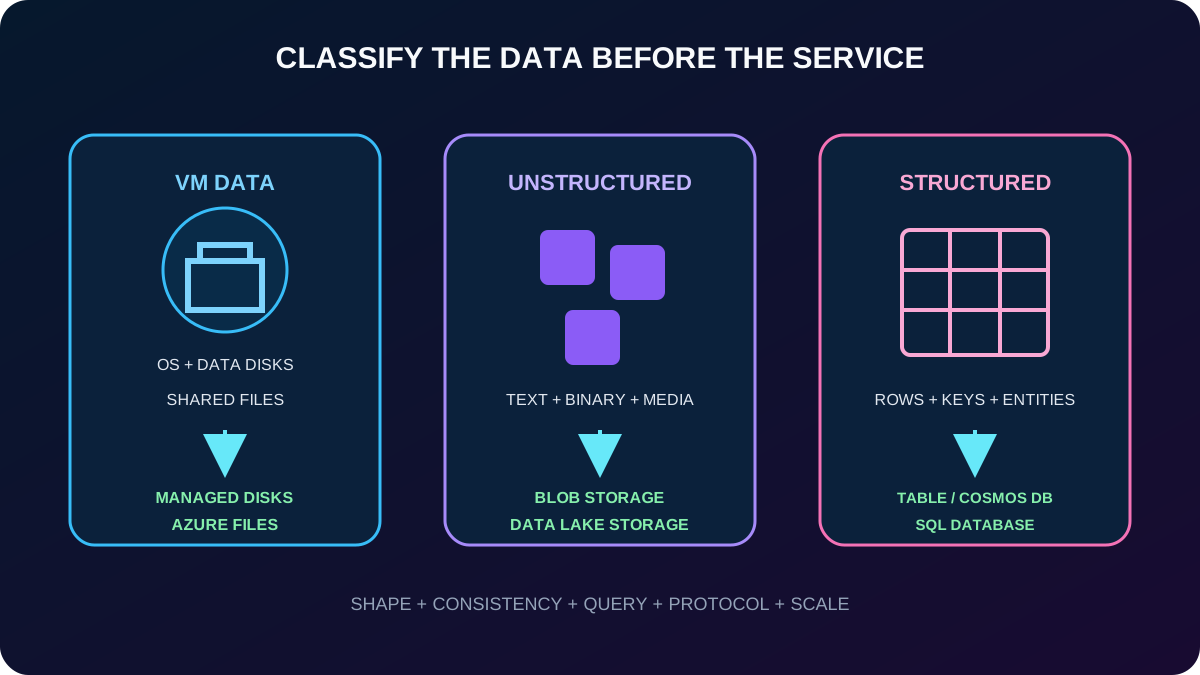
Classify virtual-machine, unstructured, and structured data.
Choose among Blob ,,, and .
Compare Standard and Premium account types and recognize legacy accounts.
Match LRS, ZRS, GRS, RA-GRS, GZRS, or RA-GZRS to a failure model.
Construct service URLs, map a custom domain, and choose public, service-endpoint, or private-endpoint access.
Prerequisites are experience with the Azure portal and familiarity with managing different forms of data storage.
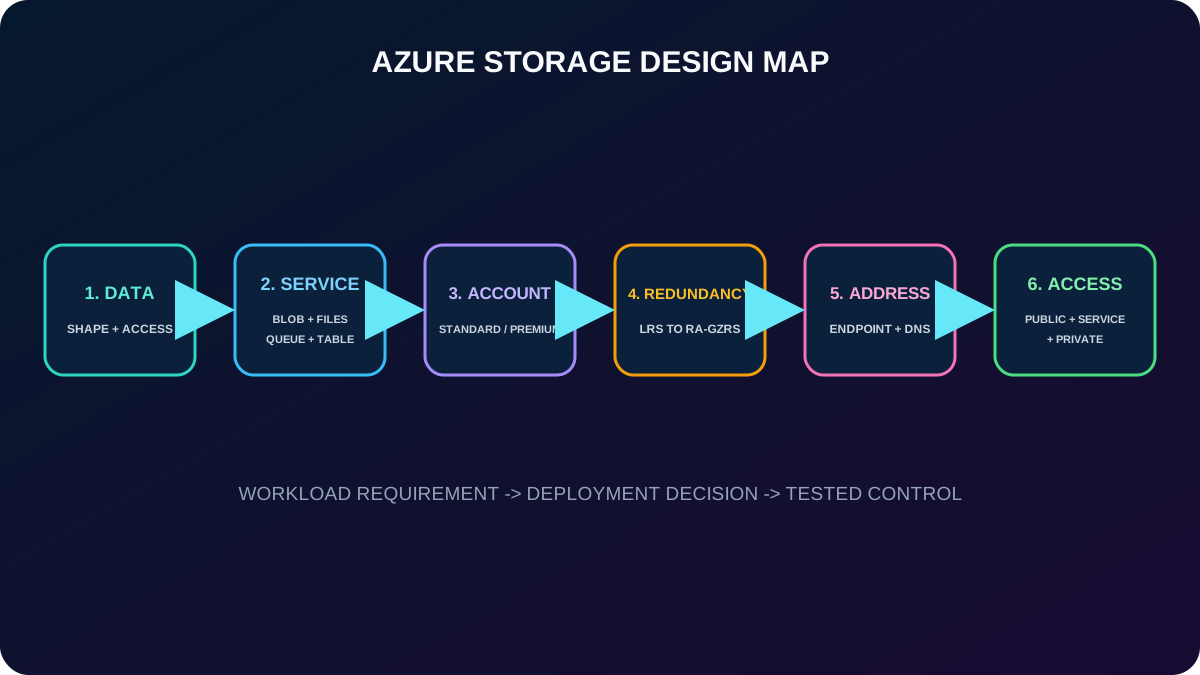
A sound design makes six linked decisions: data, service, account, redundancy, address, and access.
2. Azure is a managed platform for several data patterns
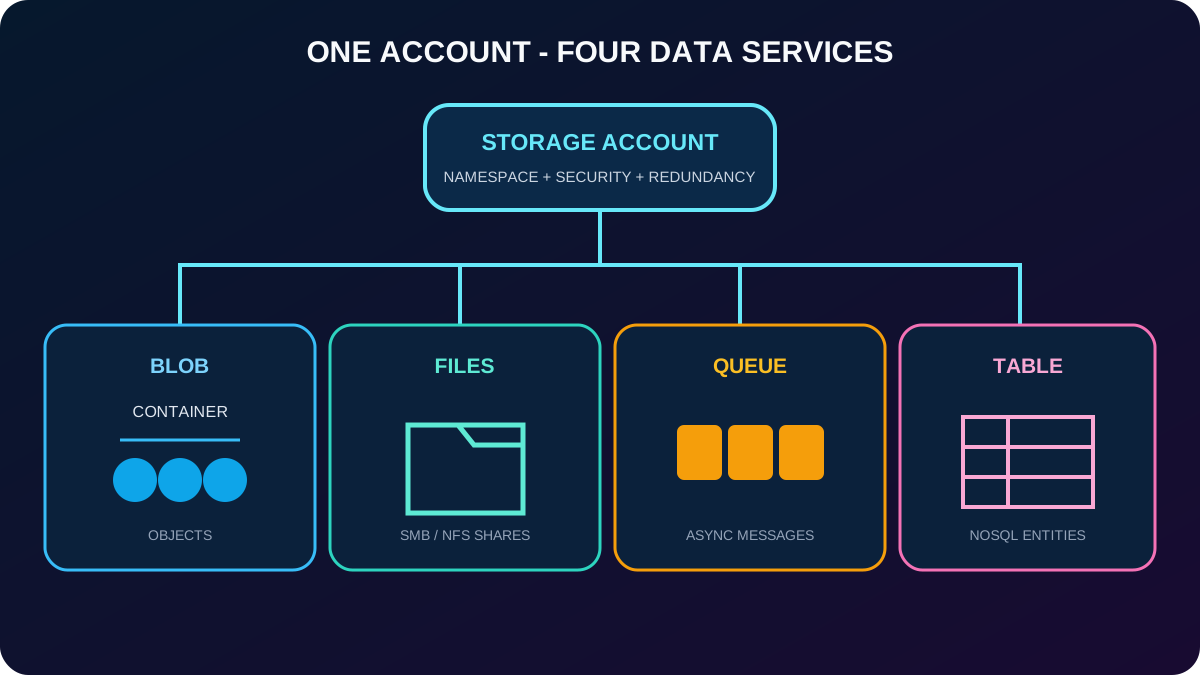
Azure is Microsoft’s cloud-storage platform for modern workloads. One storage account can expose a massively scalable object store, managed file shares, durable application messaging, and a schemaless NoSQL key/attribute store. It supports working data for websites, mobile and desktop apps, IaaS virtual machines, PaaS services, analytics, and AI-ready data pipelines.
The platform is designed around durability and availability, encryption, large-scale capacity and throughput, Microsoft-managed hardware and updates, and worldwide access over HTTP or HTTPS. Those properties do not remove design choices: the account, service, protocol, access tier, redundancy, and network rules still determine behavior and cost.
3. Start by classifying the data
Three categories emphasized by the module.
Category
Shape
Typical Azure choices
Virtual-machine data
Persistent disks and shared files used by Azure IaaS VMs.
Azure managed disks for OS/data disks; for managed shares. Data disks can hold database files, website content, or application code; the VM size limits their count.
Unstructured data
Nonrelational text, binary objects, media, backups, logs, or lake data without a shared tabular schema.
and . Data Lake adds Hadoop-compatible hierarchical file-system capabilities to Blob .
Structured data
Rows, columns, keys, or structured NoSQL entities.
Azure ,, and . is managed relational SQL; tables and Cosmos DB can serve NoSQL patterns.
Classify the shape and access pattern before selecting the service.
4. Access and protocol choices affect manageability and security
Applications can use the Azure REST API or client libraries for languages including .NET, Java, Node.js, Python, PHP, Ruby, and Go. Administrators can automate with Azure PowerShell and Azure CLI or work visually in the Azure portal and Microsoft Azure .
Blob can expose SFTP over port 22 for existing transfer tools when hierarchical namespace (HNS) is enabled. HNS can be selected on the Advanced tab during creation or enabled later through the account configuration workflow when the account is eligible. NFS 3.0 can let Linux clients mount a blob container like an NFS share and ease migration of Linux file workloads. Feature compatibility varies when HNS, NFS, or SFTP is enabled, so validate the current account matrix before deployment.
For authorization, prefer and least-privilege Azure RBAC where the protocol supports it. The portal can default data access to Microsoft Entra authorization instead of Shared Key. Disabling Shared Key is stronger than changing the portal default, but first verify application, , SAS, and tooling compatibility.
5. Four core services share the storage-account boundary
Core services and their native units.
Service
Unit
Best fit
Container → blob
Massive unstructured object data, streaming, backup, archive, and analytics.
File share → directory → file
Managed SMB or NFS file shares shared by cloud or on-premises clients.
Azure
Queue → message
Reliable asynchronous work backlogs and loose coupling between components.
The services share an account but expose different data models and endpoints.
6. Blob handles massive unstructured object data
is optimized for text and binary objects at very large scale. It is a natural choice for images or documents delivered to a browser, distributed files, audio and video streaming, logs, backup and restore, disaster recovery, archiving, and data analyzed by an on-premises or Azure-hosted service.
Clients reach blobs anywhere through HTTP or HTTPS using URLs, the Azure REST API, Azure PowerShell, Azure CLI, or a supported client library. Blob also underpins Gen2 when HNS is enabled.
7. supplies managed network file shares
exposes highly available shares through Server Message Block (SMB) and, for supported premium configurations, Network File System (NFS). Multiple VMs can read and write the same files, while REST and client libraries provide another access path.
Mount a share using the same drive letter expected by an on-premises application to reduce migration changes.
Centralize configuration files, development tools, and utilities so multiple VMs or developers use the same version.
Collect diagnostic logs, metrics, and crash dumps for later processing or analysis.
The supplied module describes account credentials granting mounted users read/write access. Modern designs should instead evaluate Microsoft Entra-based identity, Kerberos for SMB, share and file permissions, and least privilege rather than distributing storage-account keys.
8. decouples asynchronous processing
Azure retains messages for later processing. A message can be as large as 64 KB, and one queue can contain millions of messages. Producers and consumers can scale independently, which is useful for smoothing bursts and building reliable work backlogs.
In the module scenario, a customer uploads a picture and receives a quick response. The application adds a message to a queue; an Azure Function consumes it and creates a thumbnail later. Upload and image-processing capacity can then be tuned separately.
9. provides a schemaless key/attribute store
Azure stores structured, nonrelational data as entities and properties without enforcing one shared schema. The service scales with demand, the design adapts easily as an application evolves, and it can be faster and less expensive than relational SQL for appropriate key-oriented volumes.
for Table is the related alternative when the workload needs throughput-optimized tables, global distribution, automatic secondary indexes, or other Cosmos DB capabilities. Neither choice replaces when joins, relational constraints, or a SQL engine are fundamental.
10. Choose the service from the workload’s dominant operation
Fast service selection.
Requirement
Start with
Serve or stream large amounts of unstructured content; back up, restore, archive, or analyze objects
Share a familiar filesystem between VMs or migrate a file-share-dependent application
Create a large asynchronous backlog between independently scaled components
Azure
Store flexible structured NoSQL entities without joins or a fixed schema
Azure or for Table
Attach persistent OS/data storage to a VM
Azure managed disks rather than a general-purpose file share
11. Standard and Premium describe performance and workload intent
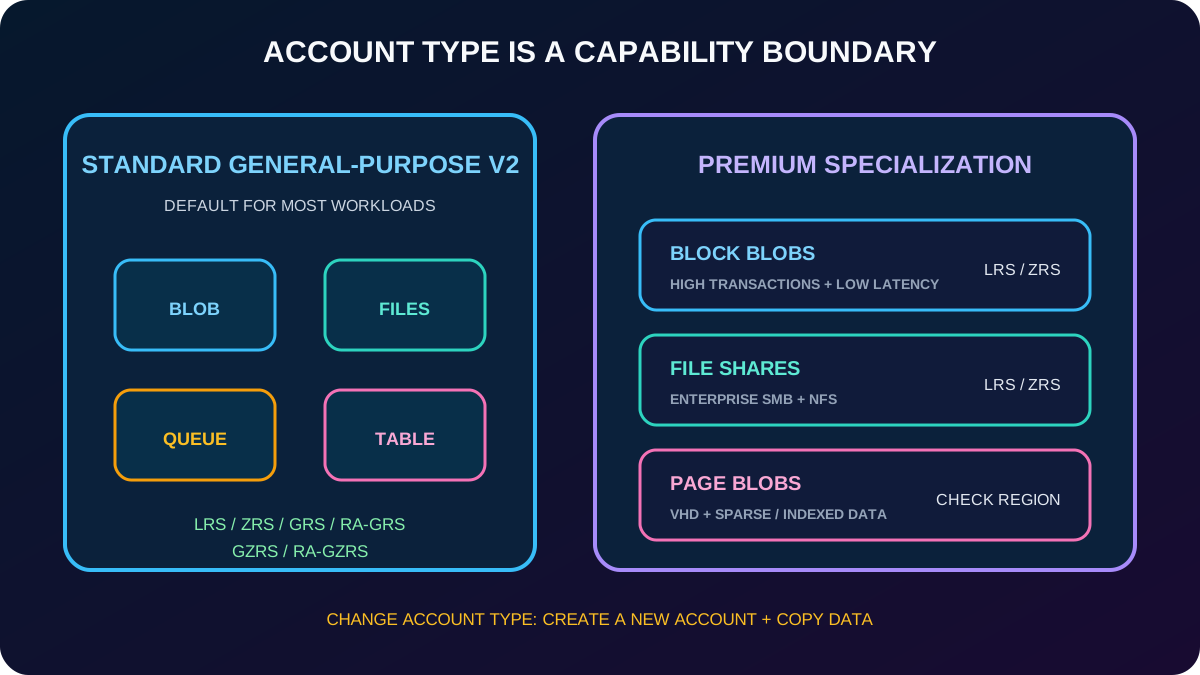
Standard is the default, cost-oriented performance option for general-purpose v2 accounts and most scenarios. The training module characterizes it as the choice for bulk or infrequently accessed data. Premium uses SSD-backed infrastructure for consistently low latency and high throughput and is divided by the optimized data service.
An existing storage account cannot be converted to another account type simply by switching Standard and Premium. Create a new account of the target type and copy the data. Regardless of type, Azure automatically applies service-side encryption to data at rest.
12. The account-type matrix limits services and redundancy
Recommended current account types.
Account type
Services
Redundancy baseline
Recommended use
Standard general-purpose v2
Blob, Data Lake , Queue, Table,
LRS, ZRS, GRS, RA-GRS, GZRS, RA-GZRS
Default for most blobs, shares, queues, and tables.
Premium block blobs
Block and append blobs; Data Lake capabilities
LRS or ZRS
High transaction rates, small objects, low and consistent latency.
Premium file shares
only
LRS or ZRS
Enterprise and high-performance SMB/NFS file shares.
Premium page blobs
Page blobs only
Creation matrix lists LRS; the overview also documents region-dependent ZRS support
Index-based or sparse data such as VHDs, VM data disks, and database files.
The exact redundancy options vary by account type and Azure region. Treat the portal and current documentation as the deployment-time source of truth rather than memorizing every combination as globally available.
Account type is a capability boundary, not only a price selection.
13. Legacy accounts should move toward general-purpose v2
Existing subscriptions can still expose general-purpose v1 and legacy BlobStorage accounts. They lack modern features or cost-management options and are not recommended for new deployment. Microsoft supports in-place upgrade to general-purpose v2 through the Azure portal, Azure CLI, or PowerShell; review costs and feature compatibility first because the upgrade cannot be reversed.
Classic Azure Service Management storage accounts were retired on August 31, 2024. Do not confuse an in-place GPv1-to-GPv2 upgrade with changing an account between Standard and Premium, which requires a new destination account and data copy.
14. Redundancy is a failure-model and access decision
Azure always keeps multiple copies to withstand planned and unplanned hardware, network, power, datacenter, zone, and regional events. The options trade cost against the failure boundary, replication latency, and whether clients can read a secondary region before failover.
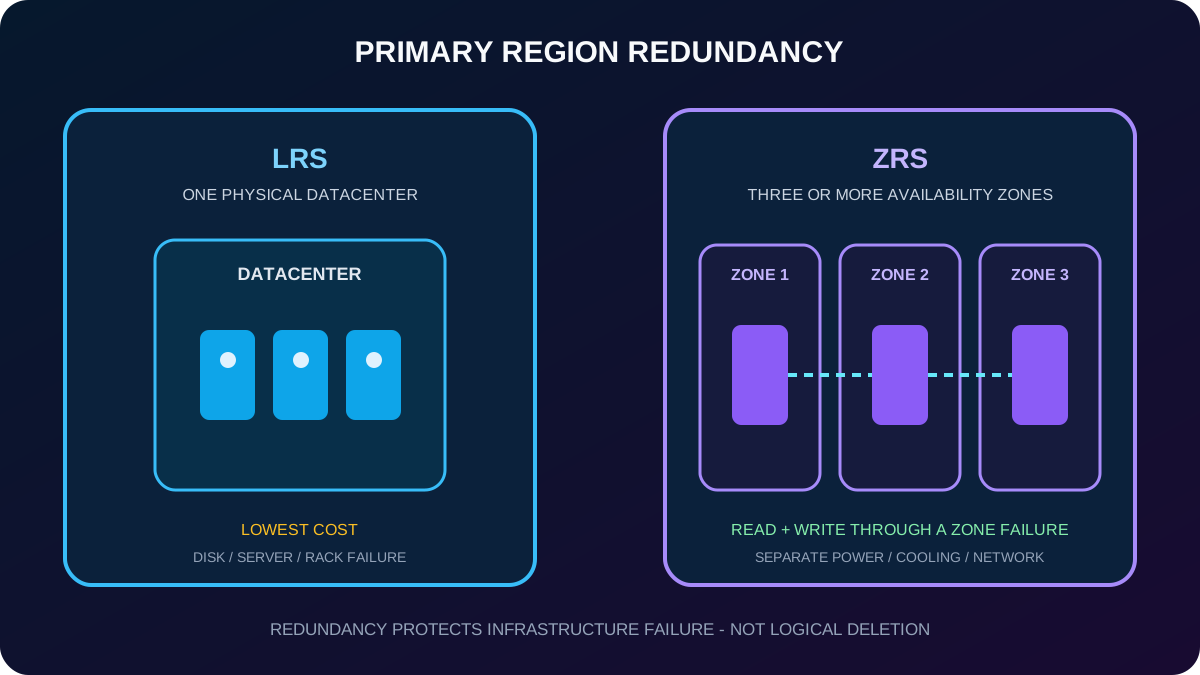
One redundancy setting applies to the storage services in an account. Separate resources into different accounts when their durability, residency, or read-access requirements differ. Redundancy is not backup: deletions and overwrites can replicate to every copy, so use soft delete, versioning, snapshots, or backup where recovery from logical error matters.
15. LRS keeps copies inside one physical datacenter
Locally redundant storage (LRS) synchronously maintains three copies within one datacenter in the primary region. It is the lowest-cost option and protects against disk, server, and rack failures, but a datacenter-wide fire, flood, or prolonged outage can make every replica unavailable or unrecoverable.
Use it when the data can be reconstructed after loss.
Consider it for rapidly changing feed data whose retention is not essential.
Use it when governance requires replication to remain within one location and the lower resilience is accepted.
16. ZRS survives an availability-zone failure in one region
Zone-redundant storage (ZRS) synchronously copies data across three or more availability zones in the primary region. Each zone has separate power, cooling, and networking. Reads and writes can continue if one zone becomes unavailable, with strong performance and low latency.
ZRS availability depends on region and account type. Moving from a single storage stamp to zonal placement can require a conversion and physical data movement. ZRS protects against a zone failure, not a disaster that permanently affects the entire region.
Primary-region redundancy changes the largest local failure that the account can tolerate.
17. GRS adds asynchronous replication to a secondary region
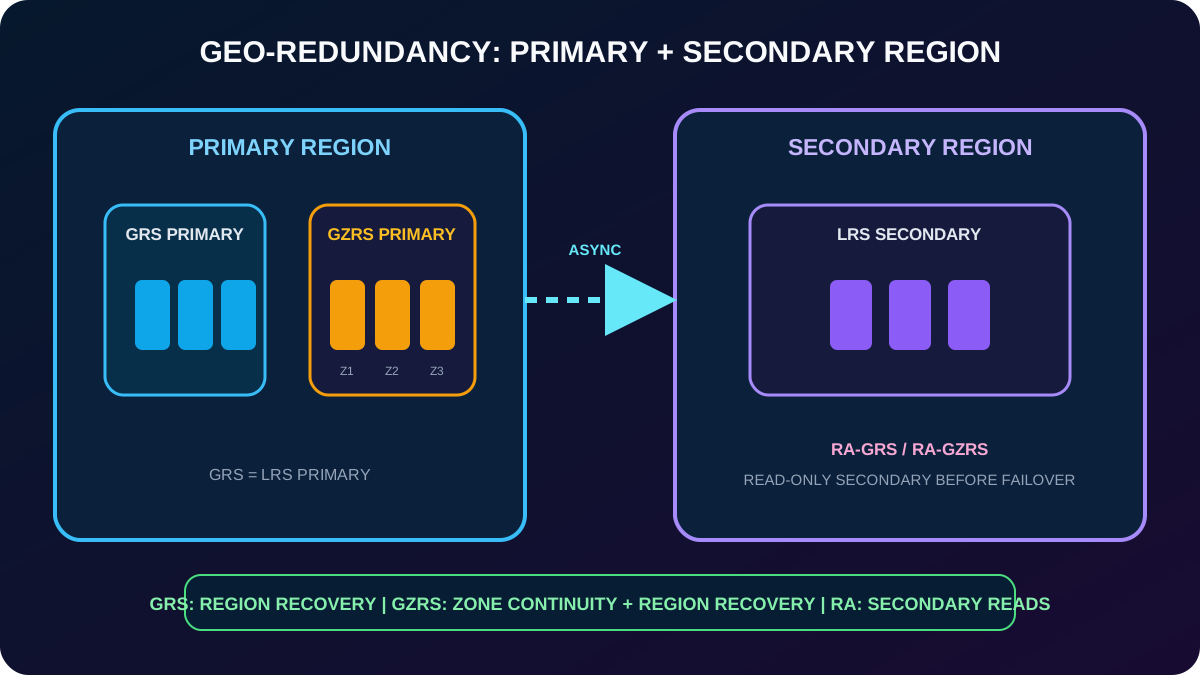
Geo-redundant storage (GRS) first commits data synchronously using LRS in the primary region, then copies it asynchronously to a geographically distant secondary region, where LRS creates local replicas. The primary and secondary storage scale units use separate fault and upgrade domains. GRS is designed for at least 99.99999999999999% durability—sixteen nines—over a year.
With GRS, secondary data becomes readable only after a failover. Read-access geo-redundant storage (RA-GRS) exposes a read-only secondary endpoint before failover, so applications can read the secondary during a primary-region problem. Because inter-region replication is asynchronous, the latest writes can lag; inspect last-sync time and design for a recovery point.
18. GZRS combines zone continuity with regional disaster recovery
Geo-zone-redundant storage (GZRS) uses ZRS across availability zones in the primary region and asynchronously replicates to an LRS-protected secondary region. Azure pairs the regions within the same geography. GZRS keeps primary-region reads and writes available through a zone failure, retains a disaster-recovery copy for a complete regional outage, targets the same scalability as the other redundancy modes, and is designed for sixteen nines of annual object durability.
Read-access geo-zone-redundant storage (RA-GZRS) additionally exposes the secondary copy for reading before failover. The module recommends GZRS when consistency, durability, availability, performance, and regional resilience all matter, and RA-GZRS when secondary read access is also required. does not support RA-GRS or RA-GZRS.
Geo replication protects the regional boundary; RA variants add pre-failover read access.
19. Compare redundancy by the outage that must remain serviceable
Failure coverage emphasized by the module.
Failure or requirement
Options that address it
A node inside a datacenter is unavailable
LRS, ZRS, GRS, RA-GRS, GZRS, RA-GZRS
An entire datacenter or availability zone is unavailable
ZRS, GRS, RA-GRS, GZRS, RA-GZRS
The primary region is unavailable and data must remain durable for failover
GRS, RA-GRS, GZRS, RA-GZRS
Clients must read the secondary before or during primary-region recovery
RA-GRS or RA-GZRS
Primary-region zone failure must preserve read/write service
ZRS, GZRS, or RA-GZRS
20. Every storage service exposes a distinct endpoint
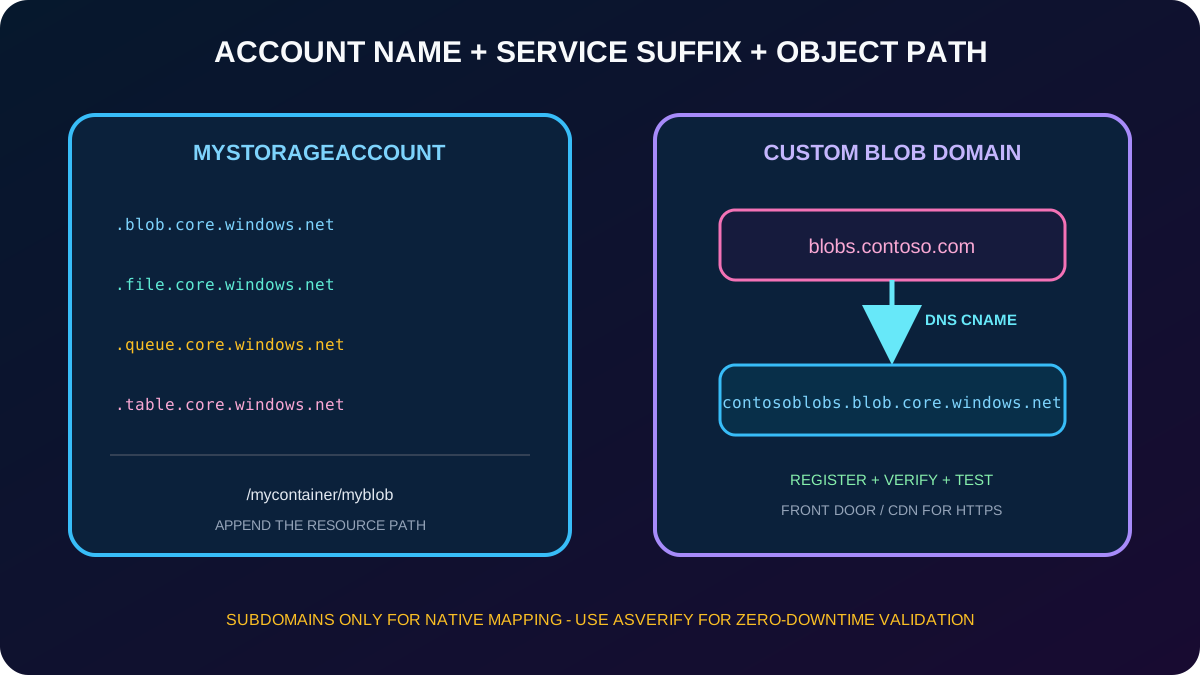
A storage account name forms the subdomain in each default endpoint. The service-specific DNS suffix completes the account endpoint; the object path is appended afterward.
Default public endpoints for an account named mystorageaccount.
Service
Endpoint
Blob/container
https://mystorageaccount.blob.core.windows.net
Table
https://mystorageaccount.table.core.windows.net
Queue
https://mystorageaccount.queue.core.windows.net
File
https://mystorageaccount.file.core.windows.net
A blob named myblob inside mycontainer therefore has the address https://mystorageaccount.blob.core.windows.net/mycontainer/myblob. The account namespace is globally unique, and current account names contain 3–24 lowercase letters or numbers.
The endpoint identifies the service; the remaining path identifies the object.
21. A custom domain maps a subdomain to a blob or static-website endpoint
Direct mapping creates a public DNS CNAME from a custom subdomain such as blobs.contoso.com to the storage hostname, for example contosoblobs.blob.core.windows.net. Register the custom domain with the storage account, allow DNS propagation, verify ownership, and test access to a known object.
The native mapping supports subdomains, not the zone apex. Direct mapping by itself is HTTP-only; use or Azure when the custom domain needs HTTPS or root-domain delivery. For a live domain that cannot tolerate interruption, use the asverify intermediary CNAME and indirect validation workflow before switching the production CNAME.
22. Firewall, service endpoints, and private endpoints solve different boundaries
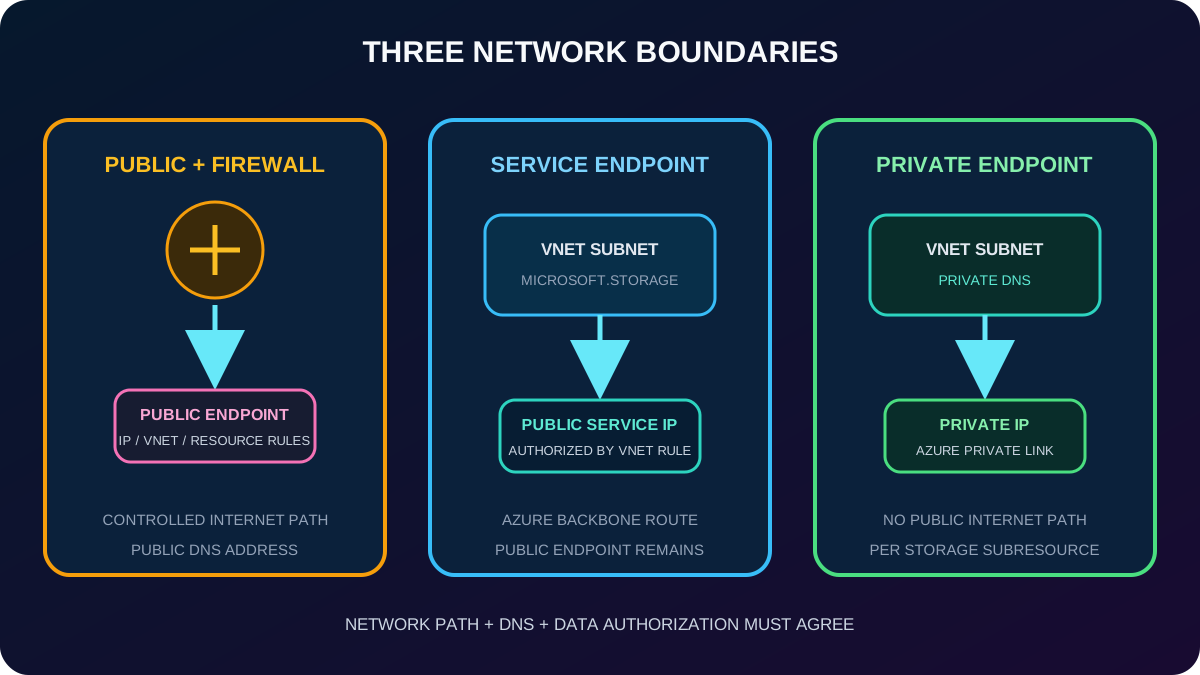
firewall rules govern the public endpoint. They can allow selected virtual-network subnets, public IP ranges, resource instances, or trusted-service exceptions and deny other sources. In the portal these controls appear under networking and public network access; test the result so an assumed rule does not leave the account exposed or block production.
Network access choices.
Choice
Address and path
Use
Public endpoint with firewall rules
Public service hostname; admit selected public IPs or other supported rule sources
Controlled public reachability and on-premises egress IPs.
Virtual network service endpoint
keeps its public endpoint; the subnet reaches the service over an optimized Azure backbone route and a VNet rule authorizes it
Simpler subnet restriction. Microsoft. targets the same region; Microsoft..Global supports any region.
Private endpoint with
A private IP from the VNet represents one storage subresource; DNS resolves the normal hostname to that private path
Production isolation, compliance, and traffic that must avoid exposure to the public internet.
A private endpoint does not automatically disable the public endpoint; configure public network access and firewall policy to match the isolation objective. Each storage subresource can require its own private endpoint and private DNS record. Use the normal connection string and hostname rather than connecting directly to a privatelink URL.
Select the network boundary first, then configure DNS, authorization, and firewall behavior consistently.
23. Assessment answers connect requirements to features
Paraphrased assessment review.
Requirement
Correct choice
Why
Low latency in the primary region plus cross-region durability
GZRS
It combines zonal primary replication with a secondary region.
Read the secondary region without waiting for GRS failover
RA-GRS
Read access distinguishes RA-GRS from GRS.
Give a VNet a private address to the account
Private endpoint
assigns a private IP to the storage subresource.
Map a blob hostname safely
Verify ownership and register a custom domain with a CNAME
Verification prevents an invalid or unauthorized mapping.
Restrict the public storage endpoint to selected subnets
networking/firewall and virtual network rules
These rules admit the selected subnet through a service endpoint.
Use a friendly name for blob content
Custom domain
It maps a subdomain to the blob or static-site endpoint.
Regional disaster resilience plus secondary reads
RA-GZRS
It adds readable secondary access to GZRS.
Keep all storage traffic off the public internet
Private endpoints and disabled/restricted public access
A private IP and Private Link provide the isolated data path.
Avoid a common custom-domain failure
Verify domain ownership before mapping
Azure must validate the domain and DNS record.
24. Compact version of every topic
Fast revision.
Topic
Remember
Data
VM data uses disks/files; unstructured data uses blobs/lakes; structured patterns use tables, Cosmos DB, or SQL.