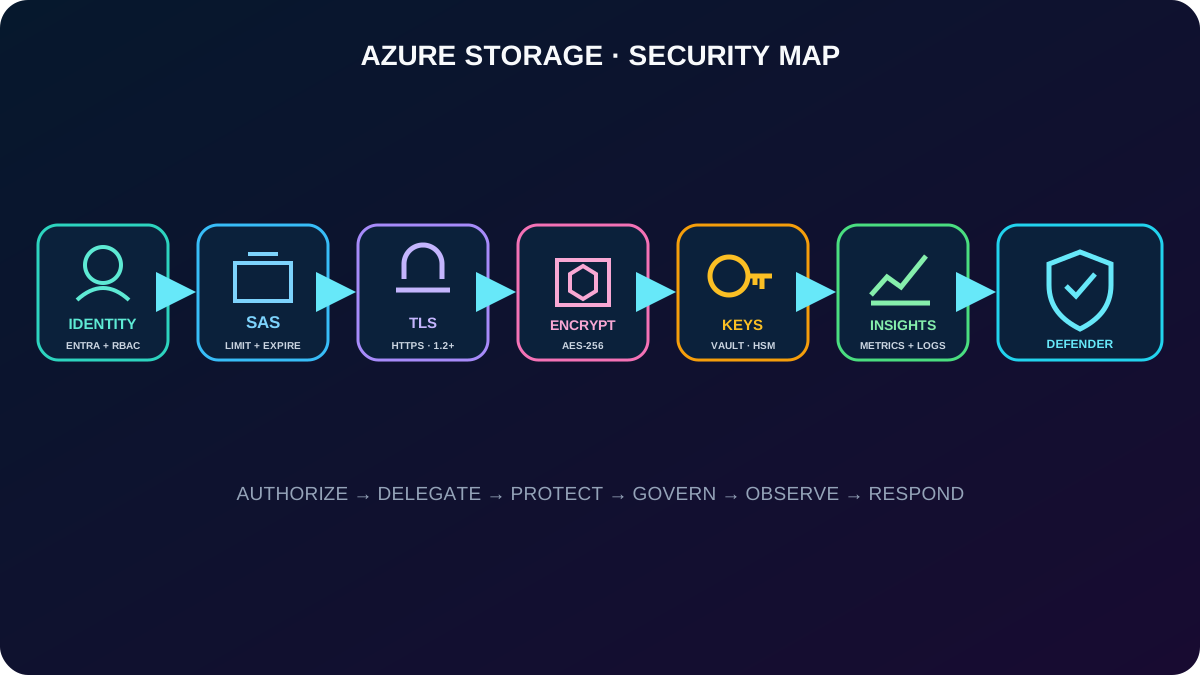
Design layered Azure Storage protection, delegate limited access with SAS, understand every SAS URI field, control encryption keys, monitor storage, and detect active threats.
Suggested study time: 90 minutes • Intermediate • Original rewrite based on the supplied Microsoft Learn module and corrected against current Azure Storage documentation
By João Ricardo Dutra••Complete original content
1. Protect sensitive storage without blocking legitimate work
A company keeps sensitive personal data in Azure . Internal developers need broad operational access, external developers need only narrow access to selected objects, and security teams need encryption, monitoring, and evidence. The administrator must combine identity, delegation, network and transport protection, encryption, key governance, and detection instead of trusting one control.
This chapter prepares you to choose an authorization method, create and interpret shared access signatures, configure encryption and customer-managed keys, monitor storage, apply defensive recommendations, and complete a lab with blobs and . Familiarity with navigation is the only stated prerequisite; the decisions map directly to AZ-104 storage administration.
A secure storage design authorizes the caller, protects the path and data, governs keys, and observes behavior.
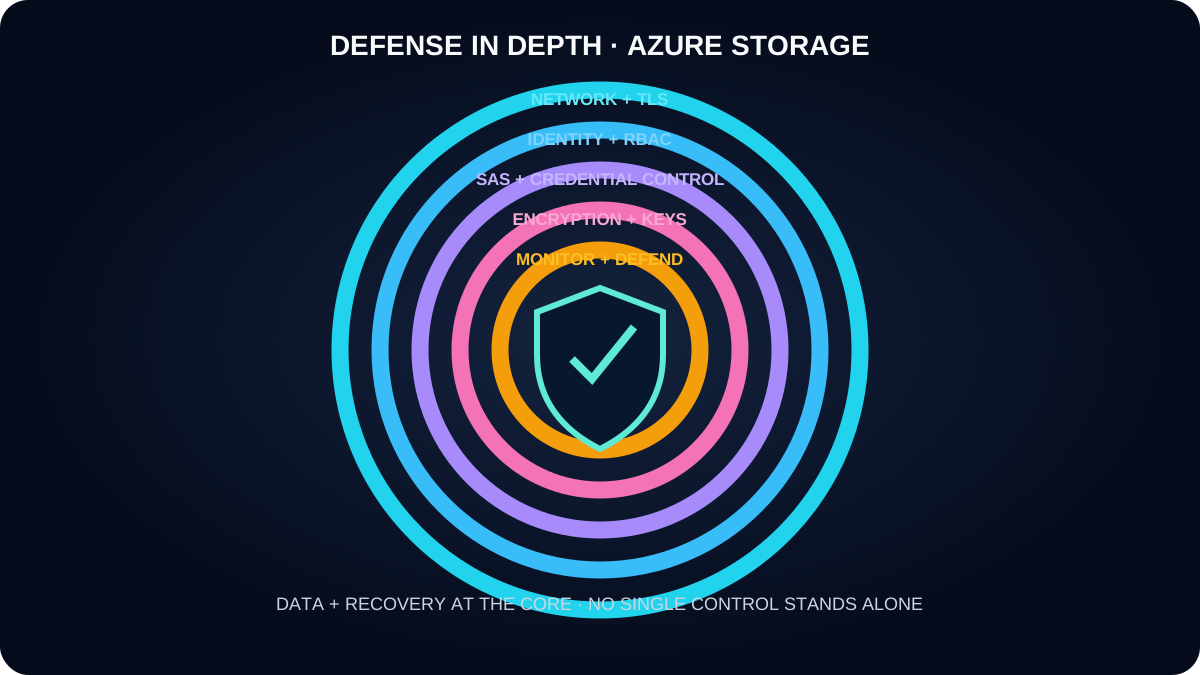
2. Defense in depth applies independent controls around the data
Azure security is a suite rather than one switch. Encryption protects content at rest and in transit; authentication establishes who or what calls; authorization limits allowed actions; credential controls govern keys and tokens; file permissions protect ; private endpoints and network rules restrict the path; logging records requests; and threat protection looks for hostile behavior.
At rest, Service Encryption encrypts every storage account automatically with AES-256 before writing and decrypts on read. It is transparent, cannot be disabled, adds no separate charge, and requires no application change.
In transit, require HTTPS and modern TLS. stopped accepting TLS 1.0 and 1.1 on February 3, 2026; use TLS 1.2 or later. TLS 1.3 is supported, although it cannot be selected as the account minimum.
For virtual machine disks, distinguish storage-service encryption from disk controls. Azure Disk Encryption is scheduled for retirement; plan migration to encryption at host or another supported disk-encryption design rather than starting a new dependency on the retiring feature.
Apply the Microsoft cloud security benchmark and use scoped Azure RBAC, network isolation, monitoring, and recovery controls as complementary layers.
A failure in one layer should not expose the storage workload by itself.
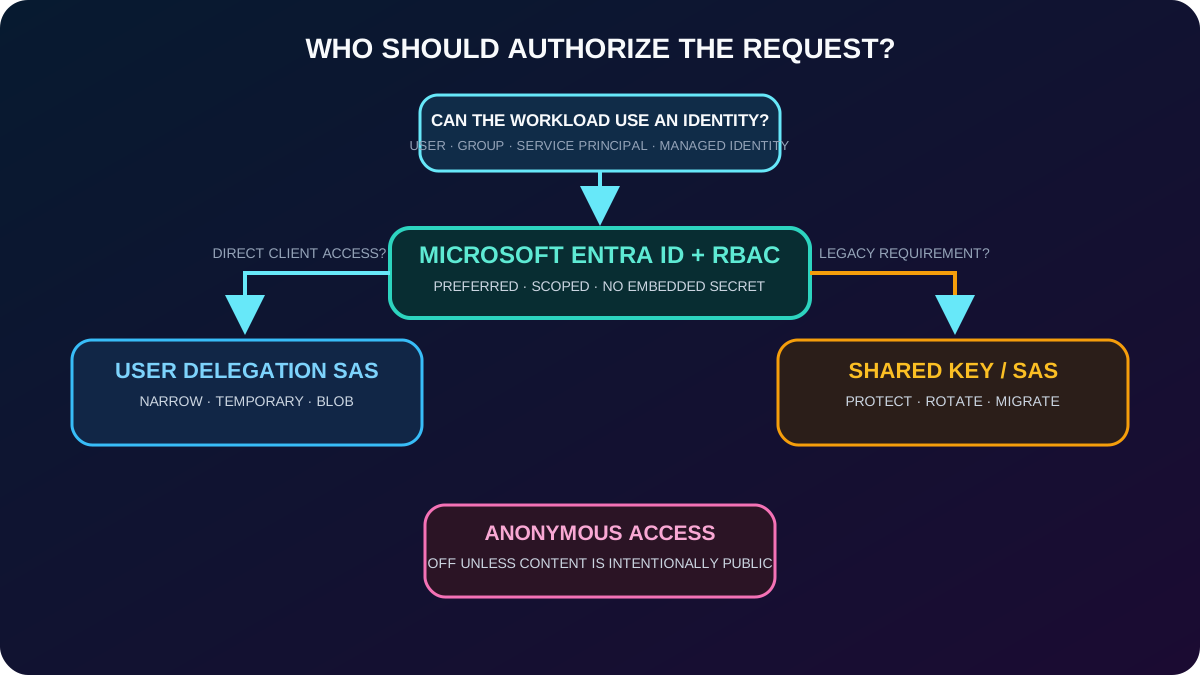
3. Prefer identity-based authorization over reusable secrets
Authorization approaches for Azure .
Method
How it works
Best use and caution
+ Azure RBAC
OAuth tokens represent users, groups, service principals, or managed identities; roles can be scoped to the account or a narrower supported resource.
Preferred for Blob, Queue, and Table data. Managed identities remove credentials from application code.
Shared Key
Either account access key signs requests and can authorize very broad data-plane access.
Needed by some legacy scenarios. Disable Shared Key when possible; store and rotate unavoidable keys through Azure .
Shared access signature (SAS)
A signed URI delegates selected services, resources, permissions, protocols, IP ranges, and time windows.
Useful for constrained client access. Treat the URI as a secret until it expires.
Anonymous access
The caller presents no identity or signature.
Disabled by default. Keep disabled for sensitive data and enable only for intentionally public blob content.
Analytics logging can capture request details for diagnosis and trend analysis. Authorization evidence also appears in resource and activity logs according to the operation. Use the smallest practical scope and separate management-plane permission from data-plane permission.
Identity is the default; delegation is narrow and temporary; broad reusable secrets are the exception.
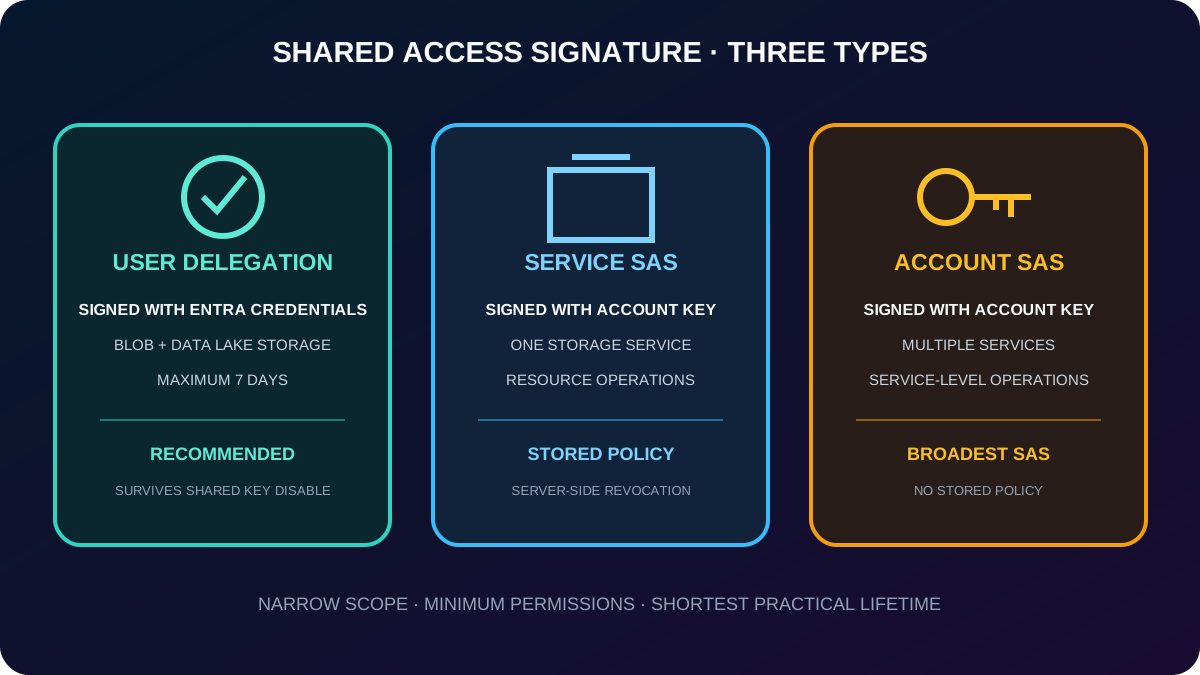
4. A SAS delegates a bounded slice of storage access
A shared access signature is a resource URI plus a signed query string. Anyone holding it can perform the encoded operations until the signature expires or becomes invalid, without receiving the storage account key. That makes SAS suitable when a browser, mobile client, partner, or short-lived process must read or write its own data.
Three SAS types.
Type
Signing authority
Scope and recommendation
User delegation SAS
A user delegation key obtained with Microsoft Entra credentials plus the permissions written into the SAS.
Blob and . Recommended because revoking or limiting the identity remains possible; maximum validity is seven days.
Service SAS
A storage account key.
Delegates access to a resource in one service, such as listing a container or downloading a file. It can reference a stored access policy.
Account SAS
A storage account key.
Can span one or more storage services and service-level operations, such as creating a file system, that a service SAS cannot grant.
A stored access policy adds server-side control over service SAS permissions and lifetime, allowing a group of signatures to be changed or revoked without rotating account keys. It does not apply to account SAS or user delegation SAS. Disallowing Shared Key rejects service and account SAS but still permits user delegation SAS.
Choose the narrowest SAS type; favor user delegation when Blob access supports it.
5. Design SAS as a short-lived bearer credential
SAS risk and the matching control.
Risk
Control
Interception
Create and distribute SAS only over HTTPS, and set spr=https. A person who captures a SAS can use it.
Excess lifetime
Use the nearest practical expiry. Configure a SAS expiration policy in Log or Block mode to audit or reject excessive intervals.
Clock skew
For immediate use, omit the start time or set it about 15 minutes in the past; client and service clocks may differ.
Excess privilege
Grant the minimum resource, service, operation, IP range, and time interval. Never add permissions “just in case.”
Difficult revocation
Use user delegation or a service SAS tied to a stored access policy. Ad hoc service/account SAS may require key rotation to invalidate.
Untrusted uploads
Validate, scan, rename, and isolate data written through SAS before another component consumes it.
Business rules or audit needs
Put a trusted middle tier in front of storage when every request needs application authorization, validation, throttling, or an audit record.
Completely public content
Use an intentionally public container instead of issuing a SAS to every reader, and keep public data isolated from private workloads.
Clients should renew a SAS before it expires and tolerate renewal failure. Older REST versions had a one-hour ceiling for an ad hoc SAS without a stored policy; modern designs should still keep ad hoc signatures brief. Give any stored policy a far-future expiry only when its server-side management is the intended revocation mechanism.
6. Read a SAS URI field by field
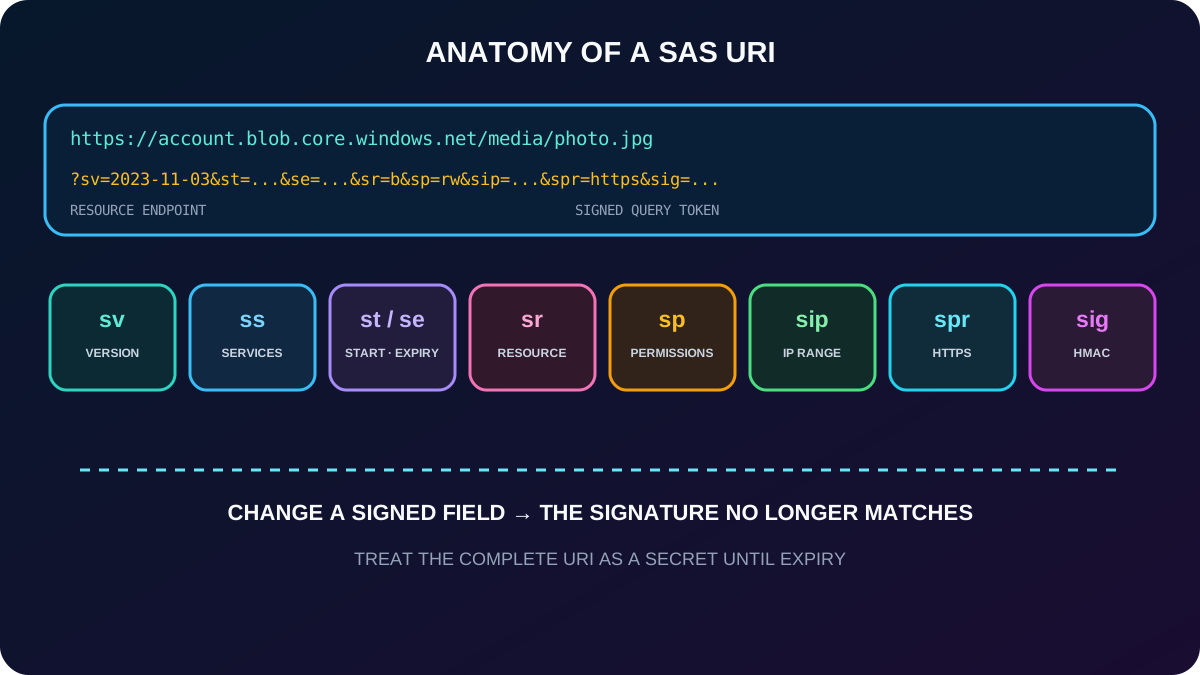
A SAS URI joins the resource endpoint and a token after the question mark. Each query parameter narrows the authorization or describes how the signature was calculated. The signature itself is an HMAC-SHA256 value encoded in Base64; changing any signed field invalidates it.
Common SAS URI parameters.
Field
Meaning
Example interpretation
Resource URI and operation query
The account, service, container, blob, file, or service endpoint; REST parameters can select an operation.
restype=service&comp=properties addresses service properties; GET retrieves and SET configures.
sv
service version used to construct the signature.
sv=2023-11-03
ss
Services authorized by an account SAS.
ss=bf means Blob and Files.
st
Optional UTC start time.
Omit for immediate validity or account for clock skew.
se
Required or policy-derived UTC expiry time.
Access fails after this instant.
sr
Signed resource.
sr=b identifies a blob.
sp
Ordered permission letters.
sp=rw grants read and write only.
sip
Allowed public IP address or range.
A request outside the range is rejected.
spr
Allowed protocol.
spr=https blocks plain HTTP.
sig
HMAC-SHA256 signature over the string-to-sign.
Treat the entire URI as a credential.
A SAS is both an address and a compact authorization policy.
7. Azure encrypts storage automatically before persistence
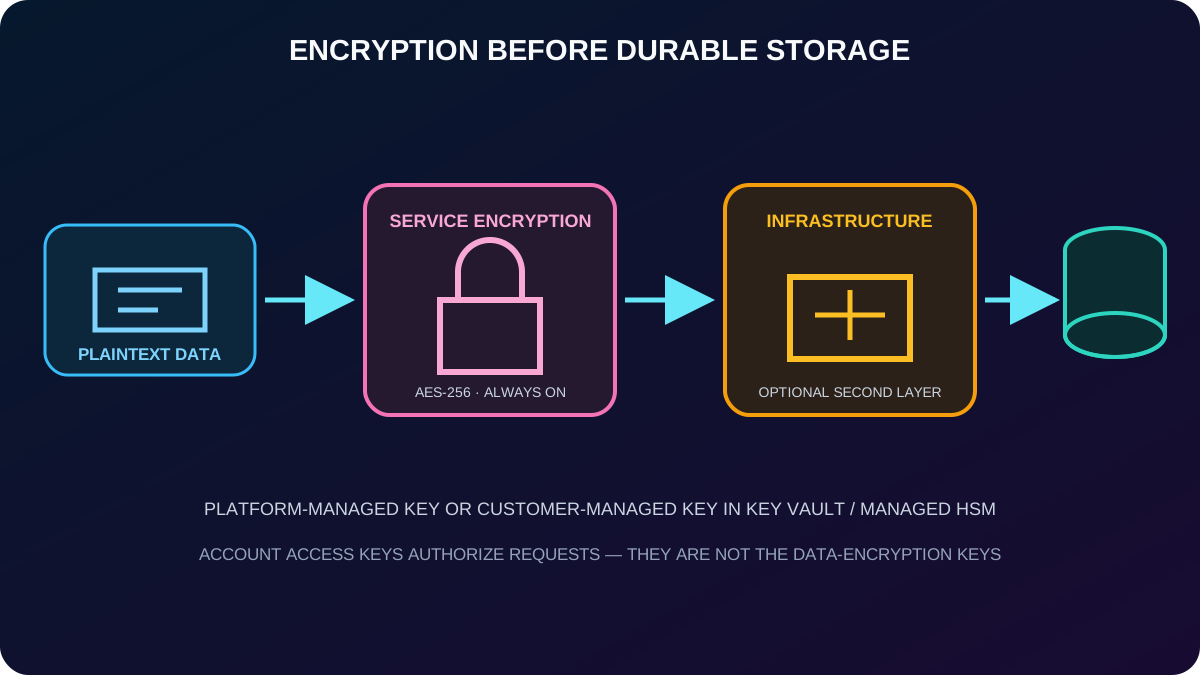
Service Encryption encrypts data before it reaches durable media and decrypts it when read. All existing and new storage accounts use AES-256, and administrators cannot turn the feature off. The default platform-managed keys are generated, stored, and rotated by Microsoft.
Azure also exposes two 512-bit account access keys for Shared Key authorization and SAS signing. These access keys are credentials, not the data-encryption keys. If a workload still needs them, protect and rotate them through Azure , monitor their use, and migrate to Microsoft Entra authorization where possible.
Key and encryption choices.
Choice
Key owner and placement
Important detail
Platform-managed keys
Microsoft creates and manages the service encryption keys.
Default, transparent, and appropriate when the organization does not require direct key control.
Customer-managed keys
The customer controls keys in Azure or Azure Managed HSM.
Supports creation, import/BYOK, rotation, disablement, access policy, and audit.
Customer-provided key
The client supplies an encryption key on an eligible Blob request.
Per-request control; the service does not persist the key.
Infrastructure encryption
A second encryption layer protects data at the service and infrastructure levels with separate keys and algorithms.
Configured for the account or an encryption scope where supported; provides double encryption.
At account level, customer-managed keys normally protect Blob and . Queue and Table require choosing account-scoped encryption keys when the storage account is created. Encryption scopes can isolate key choice for containers or individual blobs where supported.
Authorization keys, service encryption keys, and optional infrastructure keys solve different problems.
Use customer-managed keys when policy requires the organization to own the key lifecycle. Azure can generate a key, or the organization can import a key from its own HSM. Azure Managed HSM provides dedicated, highly controlled key custody. Level 3 validation is a core security property; verify the current certification cited by the service for a regulated deployment.
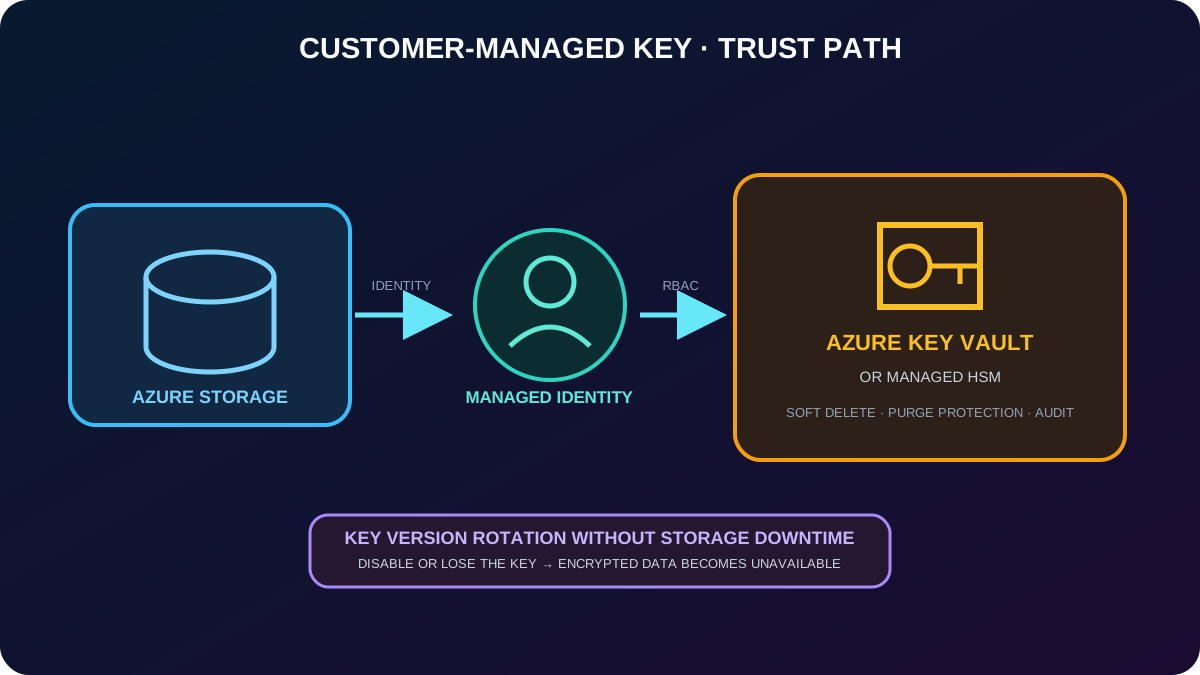
Enable soft delete and purge protection on the vault or managed HSM so a deleted key cannot be immediately destroyed.
Give the storage account a managed identity and grant it the Crypto Service Encryption User role at the narrowest appropriate scope.
A new storage account configured with customer-managed keys uses a user-assigned managed identity. Existing accounts can use a system-assigned or user-assigned identity.
The storage account and vault can be in different Azure regions or subscriptions, provided they are in the same Microsoft Entra tenant. Cross-tenant configuration needs an additional supported design.
Prefer automatic key-version update by referencing the key without a version. Rotation then moves to the newest version without storage downtime.
Disabling, deleting, or making the key unreachable makes the encrypted storage data unavailable. Alert on key and identity changes and rehearse recovery.
In , choose the encryption type managed by Microsoft or customer-managed keys, then select an existing vault and key or provide the supported key identifier. Governance must cover key creation, separation of duties, access review, rotation, backup, incident response, and deletion protection.
The identity retrieves key operations; the key itself remains under vault governance.
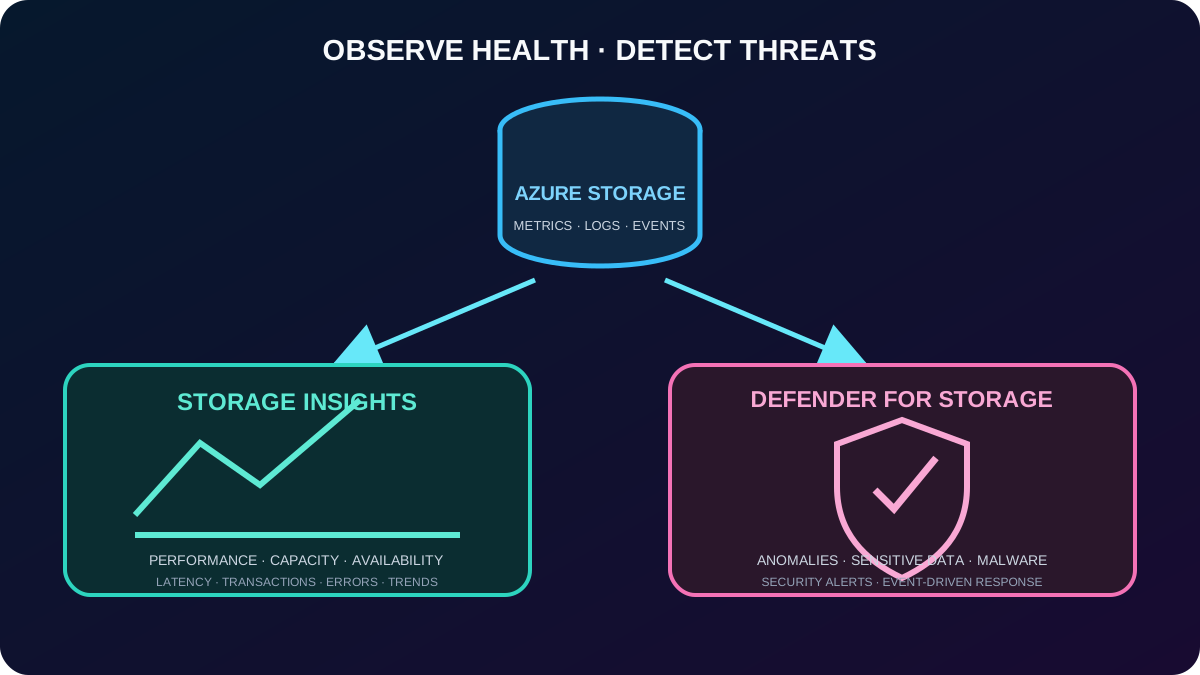
Azure Insights provides a unified view of account performance, capacity, availability, and operations through metrics, logs, diagnostic settings, workbooks, and alerts. It helps teams follow latency, throughput, utilization, transactions, failures, access patterns, and trends, then investigate a degraded or unexpected workload.
Microsoft Defender for adds proactive threat detection across ,, and . Activity monitoring looks for anomalous access, unusual download volume, suspicious operations, and known malicious indicators. Sensitive-data threat detection adds context around exposed personal data or credentials. Malware scanning can inspect blob uploads or run on demand; event-driven results can feed ,, or .
Insights is passive operational visibility; Defender for adds security analytics and content-aware protections. Malware scanning is billed by scanned data as an add-on, while sensitive-data threat detection is included with the current plan. Confirm current pricing and feature availability before rollout.
Operational telemetry and threat detection answer different questions over the same workload.
10. Apply a repeatable storage-security baseline
Use , Azure RBAC, and managed identities; disable Shared Key authorization where the workload permits.
When delegation is required, favor user delegation SAS, HTTPS only, minimum permissions, short lifetime, IP restriction where practical, and an enforced SAS expiration policy.
Disable anonymous access unless a dedicated container intentionally serves public content.
Require TLS 1.2 or later and use private endpoints, service endpoints, storage firewalls, or network security controls appropriate to the architecture.
Keep automatic encryption enabled, add infrastructure encryption only for a defined double-encryption requirement, and govern customer-managed keys with protected vaults and managed identities.
Collect metrics and diagnostic logs, define alerts, review access, rotate unavoidable credentials, and test SAS revocation and key recovery.
Enable Microsoft Defender for where threat detection and scanning justify the protection and cost.
Protect recoverability with redundancy, soft delete, versioning, backup or immutability according to workload requirements; encryption alone is not backup.
11. Exercise: manage secure blob and file storage
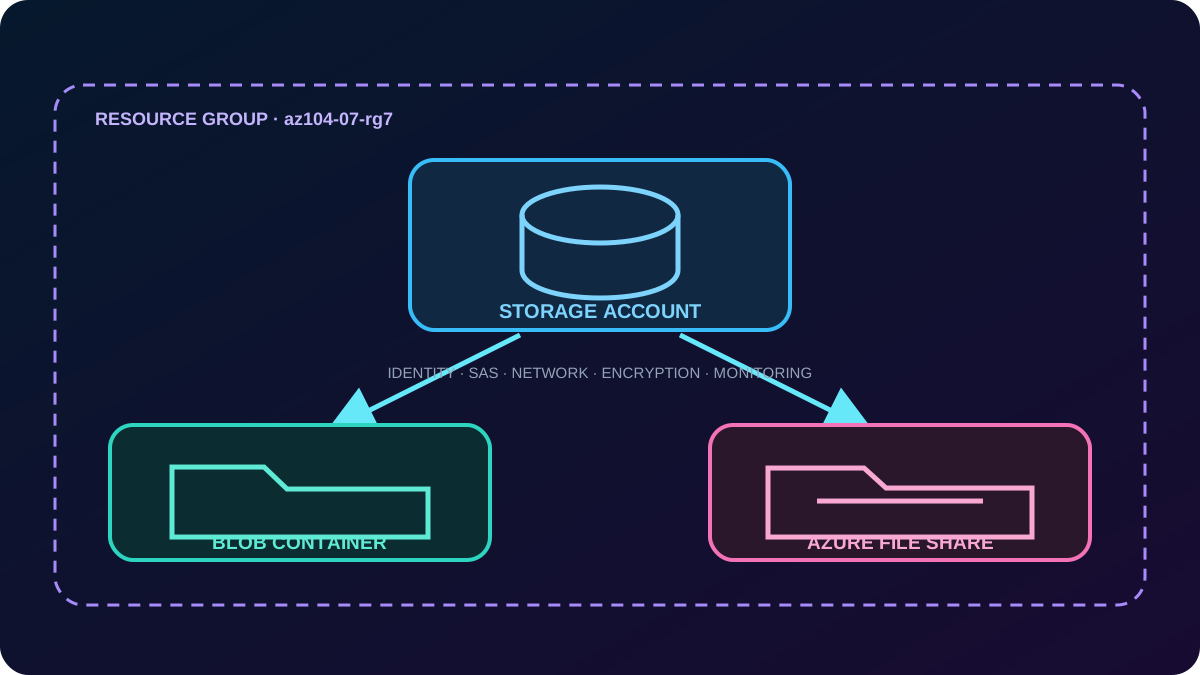
The supplied lab estimates about 50 minutes and requires an Azure subscription. In resource group az104-07-rg7, create the requested storage account, then build one blob container and one Azure file share. The goal is to practice configuration and security for both object and file data from the same service boundary.
Create and configure the storage account with an approved unique name, region, performance, redundancy, and secure-transfer settings.
Create the blob container, keep anonymous access disabled unless the lab explicitly requires public data, upload a test object, and inspect authorization and protection options.
Use browser in to create the Azure file share, add a directory and file, and review share quota, authentication, access, and endpoint behavior.
Review networking, encryption, access keys, SAS, Microsoft Entra roles, monitoring, and data-protection settings. Record which controls apply to the whole account and which apply only to Blob or Files.
Test access with the intended identity or narrowly scoped SAS, verify that broader access fails, inspect logs where configured, and remove temporary credentials and lab resources when finished.
The account is shared, but each data service has its own authorization and protection details.
12. Assessment review: choose the least risky mechanism
Paraphrased answer review from the supplied assessment.
Requirement
Correct choice
Why
Manage and rotate storage account access keys
Azure
It centralizes secret protection, access control, audit, and rotation workflows.
Recommended authorization for storage data
or a SAS, depending on the client and delegation need
Identity-based access or narrow delegation is safer than distributing account keys.
Give users read-only access to image assets for a limited time
A read-only SAS with a short expiry
The URI carries only the required resource, permission, and time window.
The assessment scenario includes many images, audio files, and videos. The correct pattern remains stable across object types: avoid exposing account keys, choose identity when possible, and encode the smallest temporary permission when direct delegated access is necessary.
13. Compact version of every topic
Rapid review.
Topic
Remember
Defense in depth
Identity, authorization, network, TLS, encryption, logs, threat detection, and recovery reinforce one another.
Authorization
Prefer + Azure RBAC; Shared Key is broad; anonymous is off; SAS is delegated access.
SAS types
User delegation = Entra-signed Blob access; service = one service and stored policy; account = multiple services and service operations.
SAS safety
HTTPS, brief expiry, least privilege, clock-skew allowance, optional IP limit, validation of uploads, and revocation plan.
SAS URI
Endpoint + sv, ss, st, se, sr, sp, sip, spr, and sig form a signed policy.
Encryption
AES-256 at rest is automatic and cannot be disabled; TLS protects transit; infrastructure encryption adds a second layer.
Keys
Platform keys are Microsoft-managed; customer-managed keys live in or Managed HSM and require identity, protection, rotation, and recovery.
Monitoring
Insights explains performance, capacity, availability, errors, and trends.
Threat protection
Defender for detects suspicious activity, adds sensitive-data context, and can scan malware.
Lab
One account hosts Blob and Files; configure each service, prove intended access, and reject excess access.
14. Active recall and official resources
Microsoft Copilot can compare, recommend, explain, and research Azure services. Open it from the upper-right corner of Microsoft Edge or visit copilot.microsoft.com. Useful prompts include “Compare the ways to secure Azure and give a use case for each” and “Explain how to configure a secure Azure SAS.” Validate operational instructions against current Microsoft documentation.
Active-recall prompts
Explain why an account key, a customer-managed encryption key, and a SAS token are not interchangeable.
Choose among user delegation, service, and account SAS for three workloads and justify the signer, scope, expiry, and revocation method.
Decode sv, ss, st, se, sr, sp, sip, spr, and sig without notes.
Draw the managed-identity path from Azure to Azure and list every prerequisite.
Compare Insights with Microsoft Defender for and name two signals from each.
Describe what breaks when Shared Key is disabled, when a customer-managed key is disabled, and when a SAS expires.