Azure Virtual Machines: planning, deployment, management, availability, and backup
Turn an on-premises server inventory into a secure Azure VM design, select compute and disks, automate deployment, build availability, and protect workloads with recovery and backup services.
Suggested study time: 100 minutes • Intermediate • Original rewrite based on the supplied Microsoft Learn module and corrected against current Azure Virtual Machines documentation
By João Ricardo Dutra••Complete original content
1. Move mixed servers one deliberate workload at a time
A medical-research company runs web, database, and analysis servers across aging sites. Its Windows and Linux configurations are unusual, local staffing is thin, and demand is rising. Replacing hardware everywhere would preserve the same operational problem. Azure offers an incremental IaaS path: migrate and test one server at a time while retaining control of the guest operating system and installed software.
The goal is not merely to click Create. You must translate the existing estate into networking, naming, location, size, disks, images, security, availability, automation, disaster recovery, and backup decisions. Azure operates the physical host; your team still configures, patches, secures, monitors, and supports the guest.
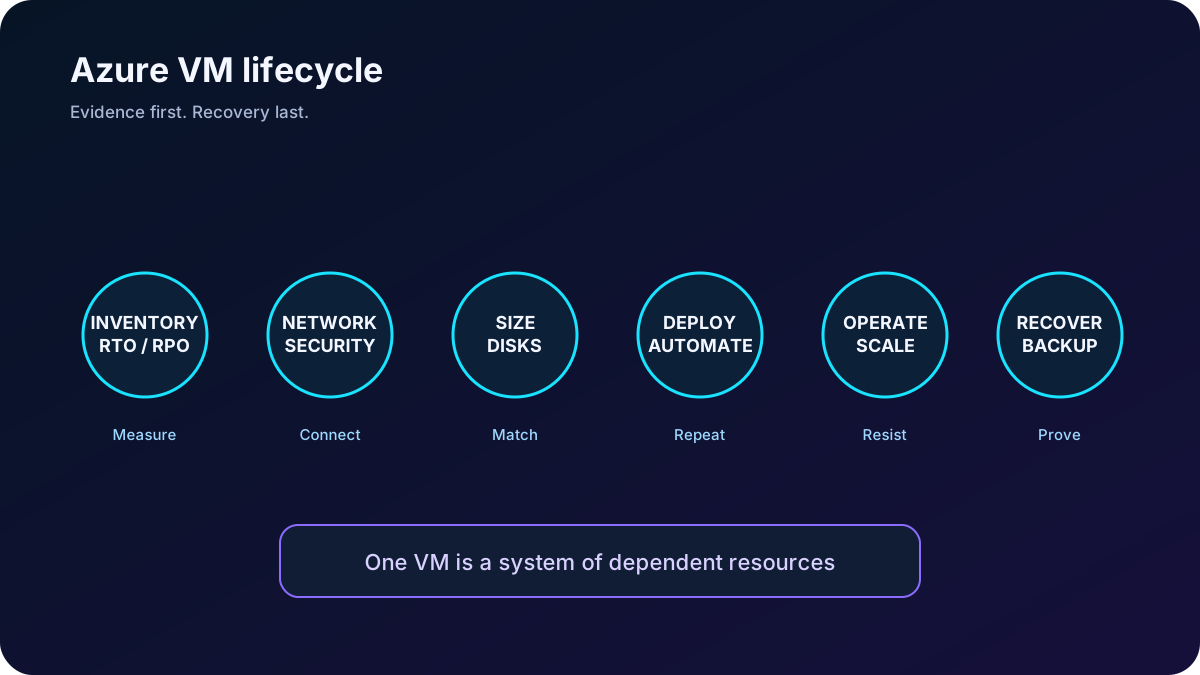
The VM lifecycle begins with workload evidence and ends with tested recovery, not with deployment.
2. Treat a VM as a resource graph, not one object
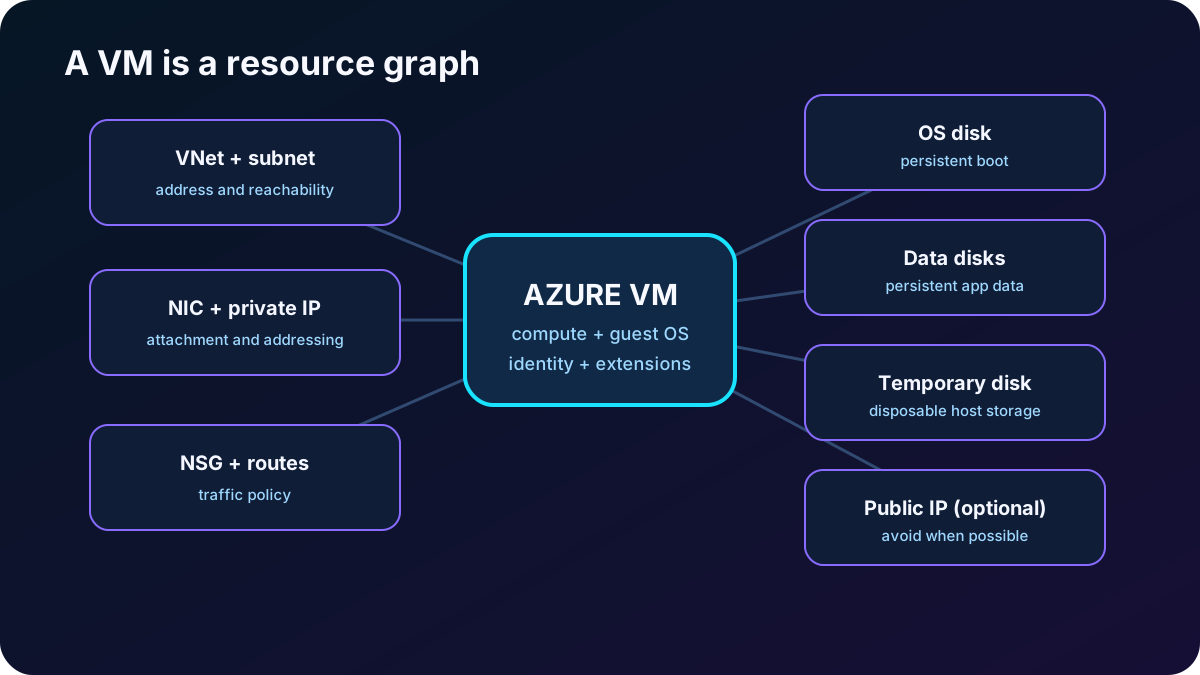
An Azure resource is a manageable item in Azure. A useful VM normally depends on several resources that Azure can create or that you can reuse. Naming, lifecycle, permissions, locks, tags, and cost therefore apply to the graph as well as to the compute object.
Core resources in an IaaS VM deployment.
Resource
Purpose
Design question
Virtual machine
CPU, memory, firmware profile, guest OS, extensions, and identity.
Which workload, security type, availability option, and management model?
OS and data disks
Persistent boot volume and separately managed application data.
Which capacity, performance, caching, encryption, and recovery behavior?
Temporary local disk
Host-local cache, page file, swap, buffers, or scratch data.
Can every byte be lost during redeployment, deallocation, or host movement?
Virtual network and subnet
Private address space and routing boundary.
How will the VM reach applications, platform services, on-premises networks, and administrators?
Network interface
Connects IP configurations and NSG rules to the VM.
How many NICs and IP configurations does the selected size support?
Private or public IP
Private communication and, only when justified, Internet reachability.
Can Azure Bastion, VPN, ExpressRoute, or a load balancer remove the public VM endpoint?
Network security group
Stateful inbound and outbound packet filtering.
Which minimum sources, destinations, ports, and protocols are required?
If Azure generates dependent resources, it often derives their names from the VM. Consistent names make inventory and incident response easier. Place resources together only when they share lifecycle and access boundaries; deleting a resource group deletes all resources within it.
A VM is the center of a dependency graph whose parts can have separate costs and failure modes.
3. Design the network before the machine
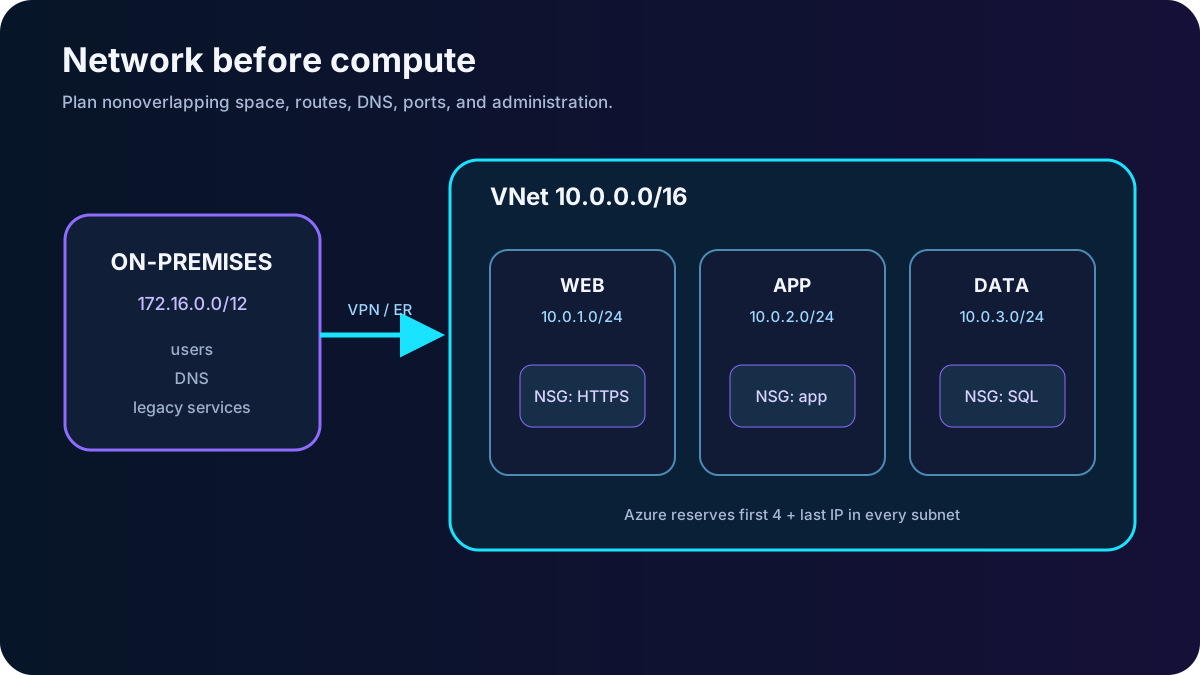
Start with communication: peers, destinations, protocols, ports, DNS, outbound dependencies, and administrative paths. A virtual network gives private connectivity to VMs and compatible Azure services. External access is denied unless routing and security controls permit it, but subnets are not security boundaries by themselves.
Choose nonoverlapping address spaces for every connected VNet and on-premises network. RFC 1918 ranges such as 10.0.0.0/8, 172.16.0.0/12, and 192.168.0.0/16 are common, but coordination matters more than the particular range.
Partition the space into subnets by function, trust, routing, or operations. The module illustrates distinct ranges for VMs, back-end services, and SQL Server VMs.
Azure reserves the first four and last IP address of every subnet. Size the subnet with that reservation and future scale in mind.
Apply NSGs at subnet and/or NIC level. Effective rules combine both scopes; allow only required traffic and remember the default rules.
Changing address plans after deployment is disruptive. Agree with the networking team before deploying workloads that must connect to other VNets or the corporate network.
Addressing, routing, DNS, and access paths constrain every VM that follows.
4. Inventory the workload, then name and place it
For each candidate server, record OS and version, installed software, used and growth storage, data classification and residency, CPU, memory, disk I/O, network flow, peaks, dependencies, RTO, and RPO. This evidence prevents both undersizing and expensive guesswork.
A naming convention can encode stable operational meaning.
Element
Examples
Why it helps
Environment
dev, test, qa, prod
Separates lifecycle and risk.
Region
eus, weu, jpw
Locates deployment without opening the resource.
Workload or service
research, portal, billing
Connects infrastructure to an owner and purpose.
Role
web, api, sql, msg
Distinguishes tiers.
Instance
01, 02
Makes horizontally repeated resources unique.
For example, prod-eus-research-web-01 is more useful than server1. The guest computer name has different limits: up to 64 characters for Linux and 15 for Windows in the module. Renaming after deployment is not a trivial substitute for a sound convention.
Choose a region close to users and dependencies while satisfying residency, compliance, service availability, capacity, disaster-recovery, and cost requirements. Hardware families and features vary by region, and an approved quota does not guarantee capacity in a particular region or zone.
5. Match VM size to workload behavior
Workload families from the module.
Family
Resource profile
Typical workloads
General purpose
Balanced CPU and memory.
Development, testing, small or medium databases, and low-to-medium traffic web servers.
Compute optimized
High CPU-to-memory ratio.
Network appliances, batch processing, application servers, and medium-traffic web servers.
Memory optimized
High memory-to-CPU ratio.
Relational databases, large caches, and in-memory analytics.
optimized
High local disk throughput and IOPS.
Big data and SQL/NoSQL or transactional database workloads.
GPU
One or more accelerators.
Rendering, video, model training, and inference.
High-performance compute
Fast CPUs and optional high-throughput/RDMA networking.
Tightly coupled scientific and engineering computation.
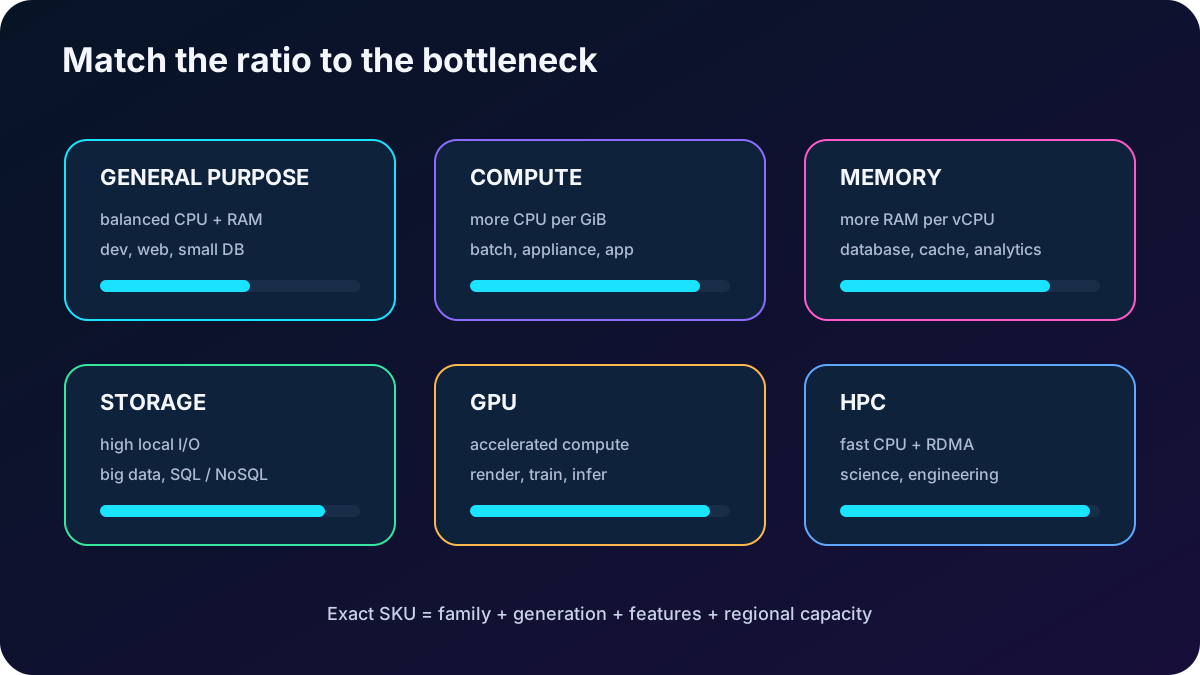
The size determines vCPUs, memory, disk and network limits, NIC count, supported accelerators, and price. Measure the current server and include peaks. A faster disk cannot exceed the VM throughput or IOPS ceiling, so compute and storage sizing must be evaluated together.
Resize when demand changes. A running VM can switch only to a size available on its current cluster and will normally restart. Deallocating releases the host and exposes all sizes available in the region, but it creates downtime and can change a dynamic public IP or temporary disk contents. Production resize therefore requires a maintenance and rollback plan.
Choose the family from measured bottlenecks, then validate the exact SKU limits in the target region.
6. Separate compute, storage, network, and license costs
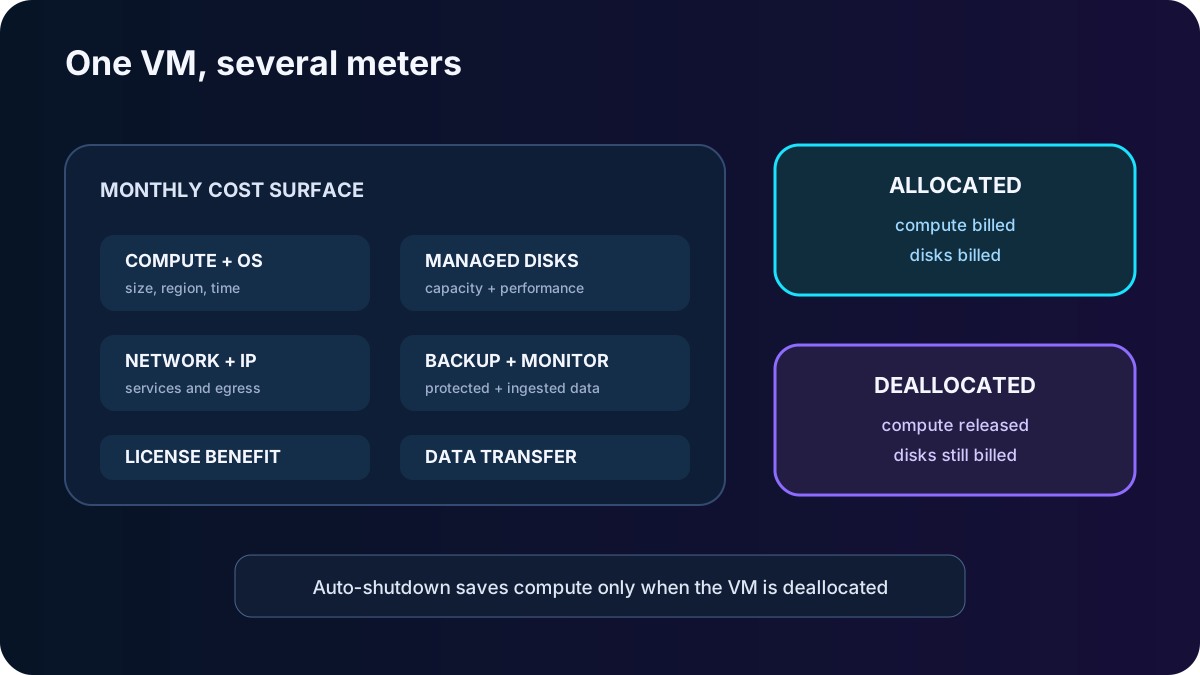
VM pricing is not one number. Compute is based on size, operating system, region, and usage time; disks remain billable independently; public IP, outbound data, backup, monitoring, and other services can add cost. VNet and NSG resources do not have a direct hourly charge, while attached services and traffic can.
Operational states and commitments.
Decision
Effect
Stopped but allocated
The guest is off, but the host allocation remains and compute charges continue.
Stopped and deallocated
The host allocation is released and compute billing stops; persistent disks and other retained resources still cost money.
Pay as you go
No long commitment; suitable for variable, short, or uncertain use.
Reservations / savings plans
Commitment can reduce predictable compute cost; validate scope, flexibility, and utilization.
Azure Hybrid Benefit
Eligible existing Windows Server or Linux subscriptions can reduce licensing cost.
Unused capacity at a discount, but eviction makes it appropriate only for interruptible workloads.
The export cites Reserved Virtual Machine Instances with historical savings of up to 72 percent. Discounts and products change, so calculate with current pricing rather than memorizing a percentage. Auto-shutdown can stop idle dev/test VMs on a schedule, but confirm whether the configured action deallocates them and remember that disks still accrue charges.
Deallocation removes compute cost, not the cost of retained disks and supporting services.
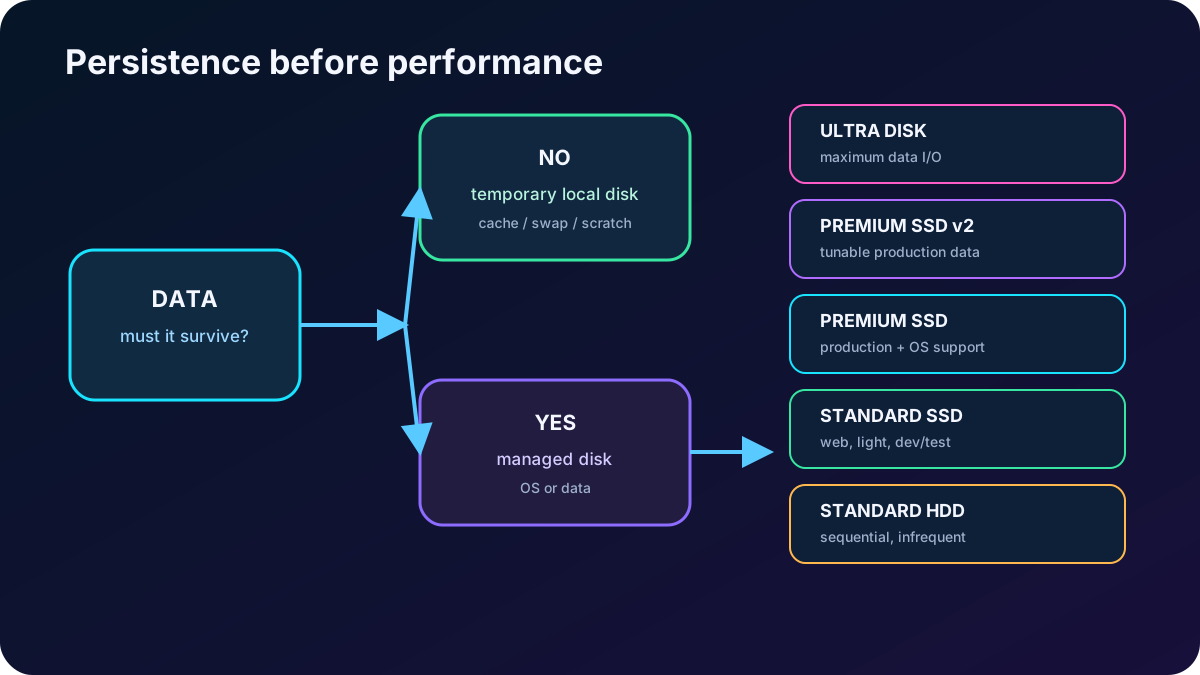
7. Place persistent data on managed disks
Every VM has an OS disk and may have a temporary host-local disk; application data belongs on managed data disks. Keeping data separate lets you detach a disk from a failed VM, attach it elsewhere, tune performance independently, and apply a recovery policy without coupling it to the guest image. The size controls how many data disks can attach; the module uses roughly two per vCPU as a planning shortcut, but the SKU documentation is authoritative.
Current five managed disk types and the module concepts they represent.
Disk
Best fit
Current headline limits and constraints
Ultra Disk
Top-tier transaction and I/O-intensive databases such as SAP HANA, SQL, or Oracle.
Up to 64 TiB, 400,000 IOPS, and 10,000 MB/s; data disk only.
Premium SSD v2
Production workloads needing independently tunable capacity, IOPS, and throughput.
Up to 64 TiB, 80,000 IOPS, and 2,000 MB/s; generally available, data disk only.
Premium SSD
Performance-sensitive production workloads and supported OS disks.
Up to 32,767 GiB, 20,000 provisioned IOPS, and 900 MB/s, with bursting options.
Standard SSD
Web servers, light enterprise applications, and dev/test.
Up to 32,767 GiB, 6,000 IOPS, and 750 MB/s.
Standard HDD
Sequential, infrequent, noncritical, or backup-oriented data.
Up to 32,767 GiB, up to 3,000 IOPS with Performance Plus, and 500 MB/s; OS-disk use retires September 8, 2028.
The supplied module labels Premium SSD v2 as preview and shows older Ultra and v2 throughput limits. Those labels are obsolete. Always verify regional availability, VM compatibility, caching, sector size, redundancy, and whether a disk can be an OS disk before deployment.
Persistence comes first; performance and price select the managed disk tier afterward.
8. Choose an image, then control image drift
Azure offers Windows and Linux base images. An Azure Marketplace image can bundle the OS with a prepared application stack, while a custom image captures the organization’s configuration. Licensing embedded in an image can affect the compute price.
Azure Compute Gallery stores, versions, and replicates custom images to regions so teams can create consistent development, test, and production VMs. Treat an image as a versioned artifact: scan it, patch it, document its publisher/offer/SKU or definition/version, test promotion, and retire vulnerable versions. For new Generation 2 VMs, also evaluate Trusted launch, Secure Boot, and vTPM instead of copying an old security profile blindly.
9. Use the portal exercise as a decision walkthrough
The optional exercise deploys an Ubuntu Server 24.04 LTS Gen2 VM in an existing or dedicated resource group. The sample uses Standard security, x64, Standard_D2s_v3, no Spot discount, SSH public-key authentication, and inbound SSH on port 22. Exact SKUs and interface labels can vary by subscription and region.
Open Create a resource, choose Virtual machine, select the subscription and resource group, and enter a meaningful VM name and nearby region.
Choose availability, security type, image, architecture, Spot behavior, and size; then create an administrator identity. Prefer SSH keys to passwords for Linux.
Expose no public inbound port unless the exercise or design requires it. In production, prefer private administration through Azure Bastion, VPN, ExpressRoute, or controlled jump access.
Review disks, networking, management, monitoring, advanced settings, and tags rather than accepting defaults without understanding them.
Run Review + create. Azure validates the request; correct the tab that contains an error, create the resource, download and protect the private key once, and monitor the deployment notification.
Open the VM Overview page, inspect the dependent resources and IPs, and connect only through the approved path. Delete the exercise resource group afterward to stop ongoing charges.
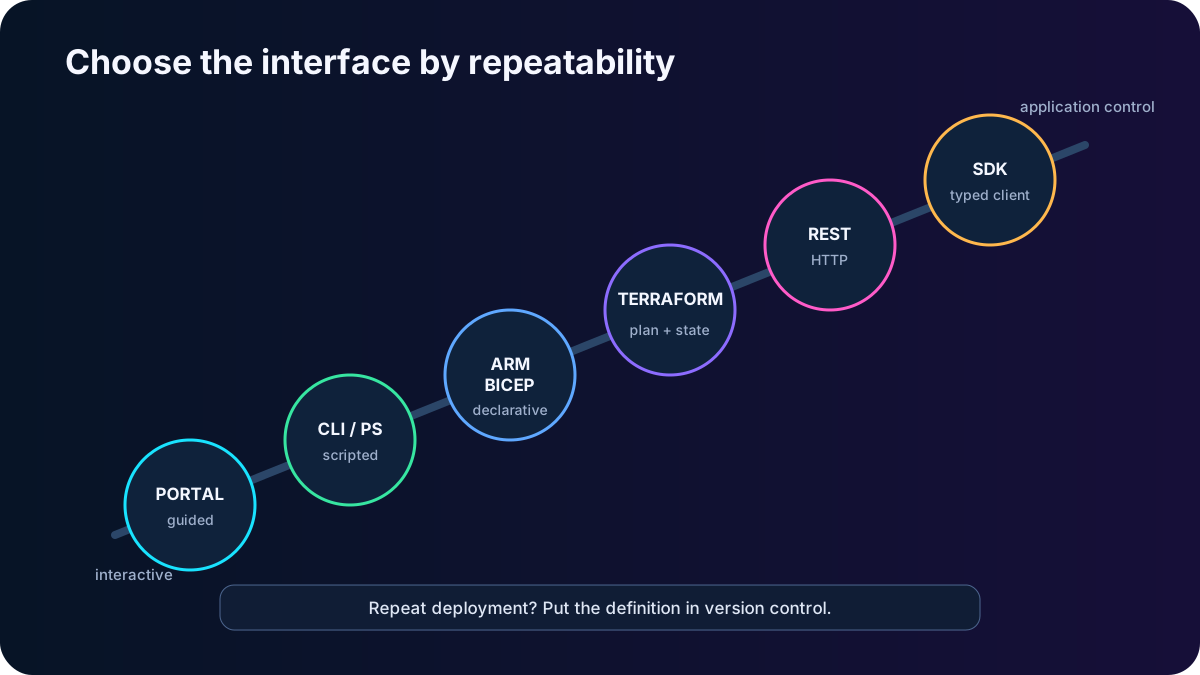
10. Select the deployment interface by repeatability
Creation and management options covered by the module.
Interface
Use it when
Key idea
Learning, discovery, or an occasional interactive task.
Guided validation is convenient, but manual repetition drifts.
ARM template or Bicep
Infrastructure must be declarative, reviewable, and repeatable across environments.
Parameterize names, networks, sizes, and images; redeployment converges resources to the declared state.
Azure CLI
Cross-platform shell automation and concise scripts.
Commands such as az vm create work locally or in .
Azure PowerShell
PowerShell-centered administration and automation.
Cmdlets such as New-AzVM expose required and optional parameters.
Terraform
A multi-cloud IaC workflow needs plan-before-apply behavior and state management.
HCL declares resources; review the execution plan before apply.
Azure REST API
A platform-neutral application needs direct control-plane operations.
HTTP GET, PUT, POST, PATCH, and DELETE target resource URIs.
Azure SDK
Complex application logic benefits from typed clients and language abstractions.
Use current Azure.ResourceManager libraries rather than the legacy Fluent snippets in the export.
Exporting a template from a working VM is a useful learning and replication starting point, not a guarantee of a clean production module. Remove generated noise, separate secrets, parameterize environment differences, and store IaC in version control. A VM image reproduces disk content; an ARM/Bicep/Terraform definition reproduces the broader resource graph.
The more often a deployment repeats, the stronger the case for declarative, version-controlled automation.
11. Configure and operate VMs after deployment
VM extensions are small packages that configure or automate a machine after provisioning. Common patterns include running scripts, installing monitoring or security agents, joining a configuration system, and supporting backup or update operations. Extensions are part of the deployment state: pin versions where appropriate, limit privileges, avoid secrets in plain settings, and monitor provisioning status.
Operational services and their current role.
Capability
Current use
Azure
Runbooks, schedules, watchers, and hybrid workers automate repeated processes and responses.
Azure Machine Configuration
Audit or enforce guest configuration and compliance through policy-oriented controls.
Microsoft Configuration Manager
Continues to manage enterprise endpoints and servers where that operating model is required.
Assess and patch Azure VMs and -enabled Windows or Linux servers without the retired Update Management solution.
Auto-shutdown
Schedule shutdown for noncontinuous workloads and optionally notify an owner before the event.
The source module groups process automation, configuration management, and Update Management under Azure . Process automation remains valid, but Azure Update Management retired in 2024. Use for current patch assessment and scheduling.
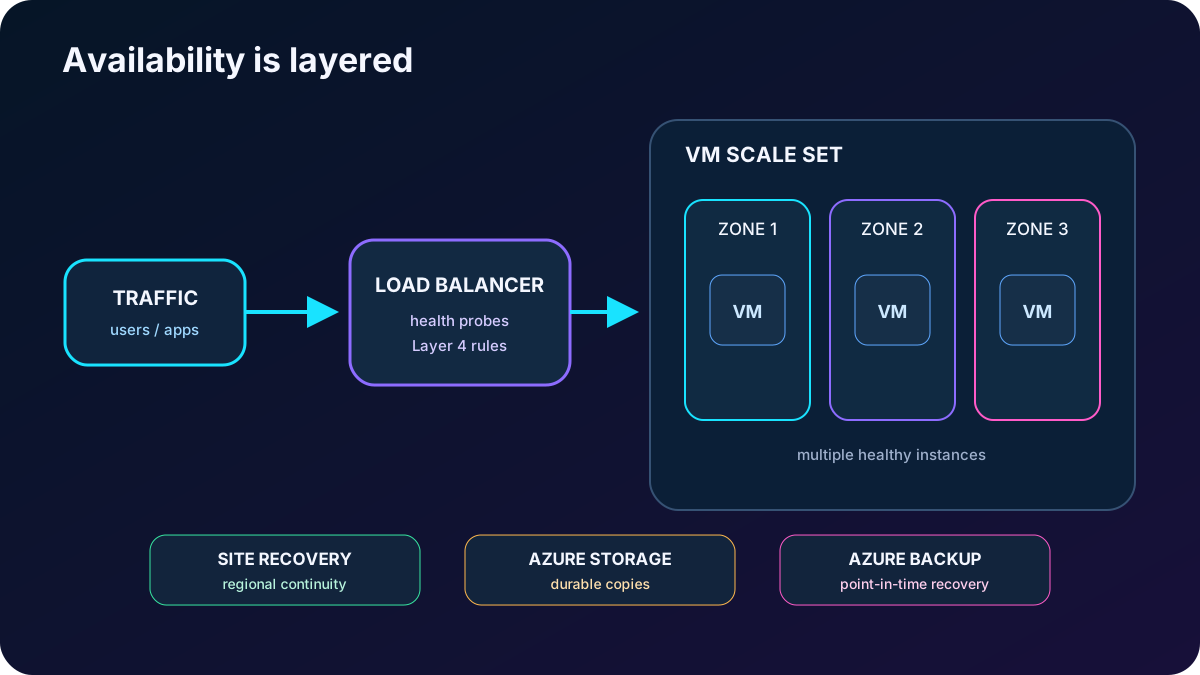
12. Engineer availability at several failure scopes
Availability is the percentage of time a service can be used. Azure can recover a VM onto a healthy host after hardware failure, yet restart or migration time still interrupts a single-instance application. Platform maintenance can also require a reboot. High availability therefore comes from multiple healthy instances and a design that distributes them across the failure scope you must survive.
Complementary availability and recovery controls.
Control
Failure scope or purpose
Availability zones
Physically separate power, network, and cooling domains within a supported region. Deploy two or more instances across zones for datacenter-level resilience.
Create and centrally manage consistent VM groups; scale instance count and distribute across zones or fault domains. Flexible orchestration is the current recommended high-availability model for the widest feature set.
Azure
Health-probe and distribute Layer 4 traffic across VM or scale-set back ends; make the front end zone resilient when required.
Azure redundancy
Keep multiple copies of persistent data; choose primary-region, zonal, geo-replication, and secondary read access according to failure and recovery needs.
Replicate and orchestrate failover/failback to a secondary site or region; run isolated test failovers and use recovery plans with scripts, runbooks, and manual steps.
Create independent recovery points for deletion, corruption, ransomware, audit, and point-in-time restore scenarios.
Scale sets have no separate management fee; VM, disk, network, and related resources are billed. A scale set alone does not protect against a datacenter failure unless its instances span zones. redundancy, Site Recovery, and Backup solve different problems: durable copies, workload continuity, and point-in-time recovery.
Match each control to host, rack, datacenter, region, or data-loss failure rather than calling every copy high availability.
13. Back up for recovery, not merely retention
is backup as a service for Azure and on-premises workloads. The module covers files and folders on Windows, VSS-aware application consistency, Microsoft server workloads such as SQL Server, SharePoint, and Exchange, Windows and Linux Azure VMs, and client or server protection through the appropriate agent or server component.
Automatic storage management allocates protected capacity without operating a backup storage server.
Azure scale and redundancy options support local, zonal, and geographic durability choices where supported.
Encryption protects backup data in transit and at rest; authorization, soft delete, immutability, and multifactor controls should also be part of the design.
Application-consistent recovery points capture the data required to restore an application coherently; crash-consistent and file-system-consistent points have different guarantees.
Policies define schedule and retention. Long retention is possible, but governance and cost still require deliberate limits and lifecycle review.
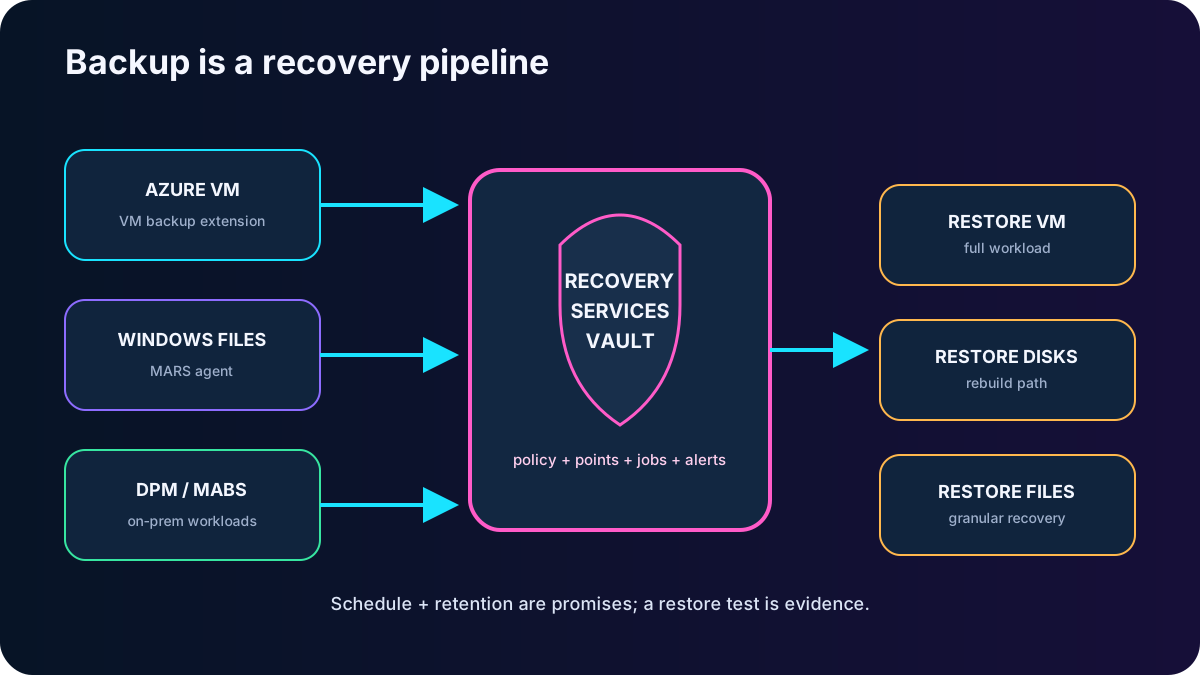
Protection components depend on the source: the MARS agent protects supported on-premises Windows files, folders, and system state; System Center Data Protection Manager or Microsoft Server can protect broader on-premises estates; Azure VM backup uses an extension through the VM agent. For Azure VMs, a Recovery Services vault manages recovery points, policies, jobs, alerts, and restores. Backup center adds centralized management across vaults.
Do not equate Backup and Site Recovery. Backup restores historical data or a VM after logical damage; Site Recovery maintains replicated workload continuity for an outage. Critical applications frequently need both, plus application-native protection and practiced runbooks.
A backup is complete only when its recovery point can satisfy a tested RTO and RPO.
14. Module assessment explained
Answers to every supplied assessment item.
Question
Correct answer
Reasoning
Which VM workload family fits a network appliance?
Compute optimized.
Network appliances commonly need a high CPU-to-memory ratio; the module lists them explicitly in this family.
Are Resource Manager templates JSON files?
True.
An ARM template is a declarative JSON document describing resources, dependencies, and values. Bicep compiles to an ARM template but uses its own authoring syntax.
15. Compact review of every topic
One-pass review for active recall.
Topic
Remember this
Why VMs
Choose IaaS when control of the guest OS and software is worth the continuing administration.
Resource checklist
VM, disks, VNet, subnet, NIC, IP, NSG, identity, monitoring, availability, and recovery form one design.
Network
Use nonoverlapping address spaces, account for five reserved subnet addresses, and make access explicit.
Inventory
Measure OS, dependencies, data rules, utilization, peaks, RTO, and RPO before choosing a SKU.
Name and region
Encode stable ownership and purpose; choose region for latency, compliance, capability, capacity, DR, and price.
Size and resize
Match the resource ratio to the bottleneck; resize can restart the VM, and deallocation expands size choice.
Cost
Compute stops only after deallocation; retained disks and services continue to cost money.
Temporary disk is disposable; OS and data disks are persistent; five managed tiers trade performance for price.
16. Practice active recall and verify current limits
Sketch the complete resource graph for a two-tier application and mark which resources keep billing after VM deallocation.
Given CPU, memory, IOPS, latency, and residency evidence, justify one region, VM family, exact size, and disk type.
Explain when you would choose a VM image, ARM/Bicep, Azure CLI, Azure PowerShell, Terraform, REST, or an SDK.
Design protection against host failure, datacenter failure, regional failure, accidental deletion, and application corruption without using one service for every problem.
Repeat the two assessment answers without looking, then explain why each distractor is wrong.