Back up and restore Azure virtual machines with Azure Backup
Design VM protection, select consistency and policy, enable Windows and Linux backups, monitor jobs, and restore VMs, disks, files, regions, subscriptions, and zones.
Suggested study time: 120 minutes • Intermediate • Original rewrite based on the supplied Microsoft Learn module and checked against current Azure Backup documentation
By João Ricardo Dutra••Complete original content
1. Design for a tested VM recovery outcome
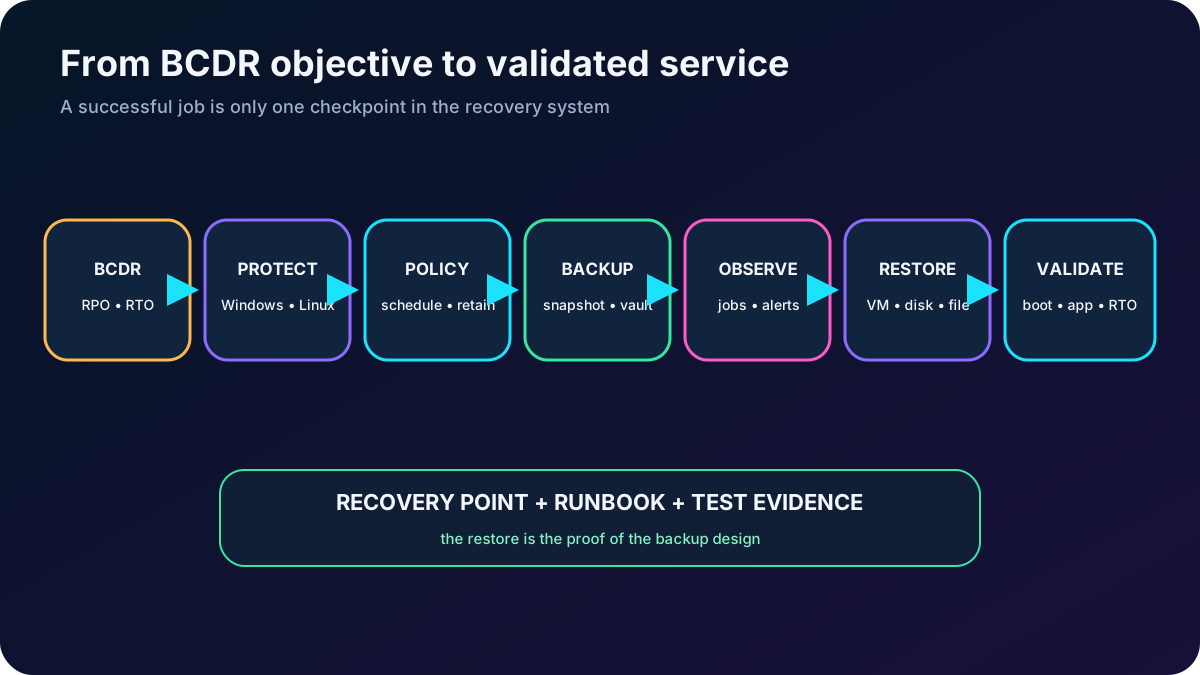
A company runs critical Windows and Linux virtual machines in Azure and needs proof that a corrupted or deleted server can be recovered. The administrator must select an appropriate protection model, enable scheduled and on-demand backups, verify jobs, restore the required scope, and test the complete business continuity and disaster recovery (BCDR) runbook.
This chapter assumes basic knowledge of Azure and managed disks. The optional lab uses an Azure subscription and creates billable resources, so use a sandbox when available and remove the lab resource group after validation.
Identify where fits among availability, replication, and disaster-recovery services.
Explain VM snapshots, consistency levels, Recovery Services vaults, policies, tiers, encryption, and the backup data path.
Protect Windows and Linux VMs through the Azure portal and Azure CLI, then monitor configuration and backup jobs.
Choose among whole-VM, disk, original-location, alternate-location, file-level, cross-region, cross-subscription, and cross-zone recovery.
Perform a controlled disk-replacement exercise and verify every restore subtask.
A useful backup strategy ends with a tested restore, not with a successful backup job.
2. Separate backup, availability, and disaster recovery
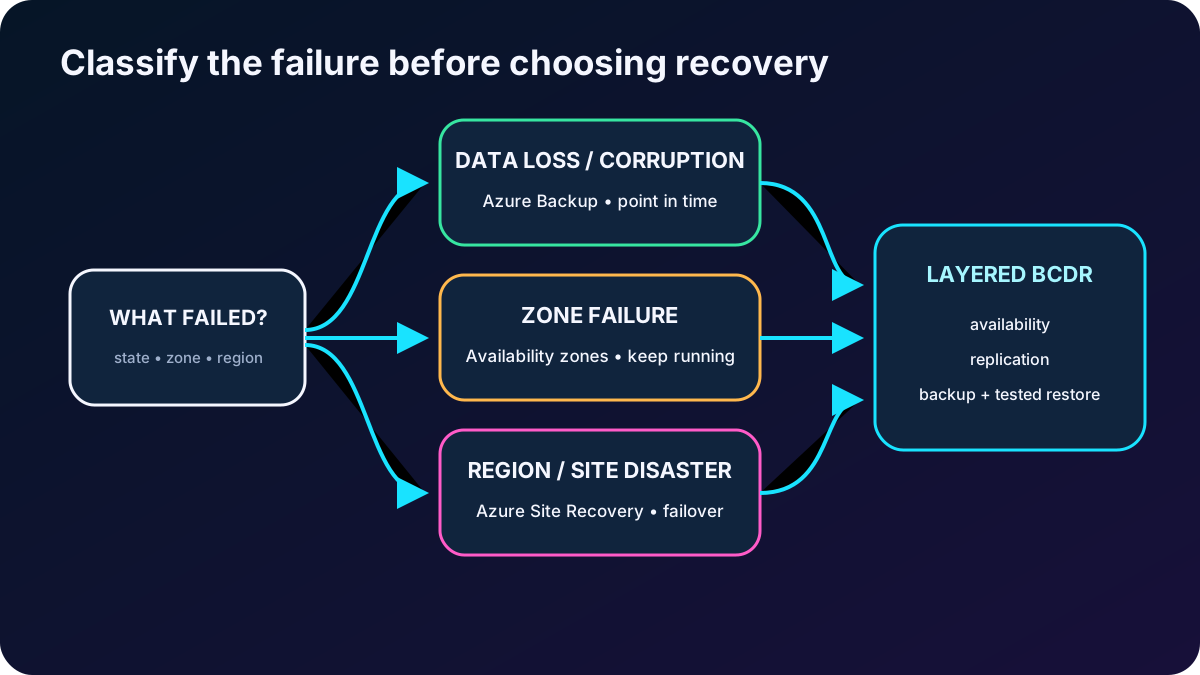
preserves point-in-time copies of stateful data so an administrator can move backward after deletion, corruption, ransomware, or an unwanted change. continuously or near-continuously replicates supported machines and orchestrates failover to another location. Availability zones reduce exposure to localized datacenter failures while the application continues running.
Select the resilience mechanism by failure mode.
Need
Primary Azure capability
Core behavior
Recover an earlier state
Creates retained recovery points and restores a VM, disks, or files.
Continue after a regional or site failure
Replicates machines and coordinates failover and failback.
Remain available through a zonal failure
Availability zones and application architecture
Distributes running instances across physically separate zones.
Meet complete BCDR objectives
Layered design
Combines high availability, replication, backup, security, monitoring, and rehearsed recovery.
The decision also depends on application criticality, RPO, RTO, retention, operational complexity, and cost. Backup and Site Recovery are complementary; neither substitutes for application-level high availability by itself.
Classify the event before choosing recovery technology.
3. Recognize capabilities and supported scenarios
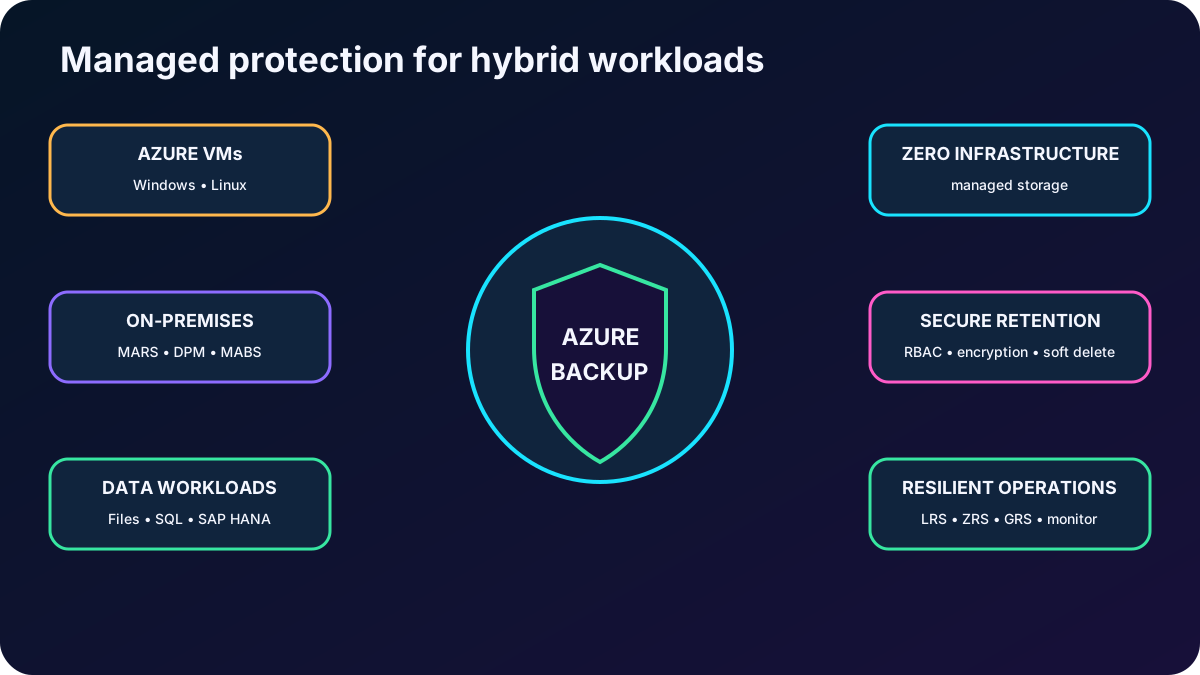
is an Azure-managed protection service. For supported workloads, it removes the need to deploy a separate backup storage estate, offers self-service backup and restore, manages capacity, and centralizes policies, jobs, recovery points, security, and reporting.
Why organizations use .
Capability
Operational value
Zero infrastructure
Azure manages service-side backup components and vault storage; administrators do not scale or patch backup servers for native VM protection.
Long-term retention
Daily, weekly, monthly, and yearly points can meet audit requirements, with automatic expiry according to policy.
Access separation
Azure RBAC makes the vault an authorization boundary and supports least privilege and separation of duties.
Encryption
Data is encrypted in transit and at rest with platform-managed keys, with customer-managed key options for supported vault scenarios through Azure .
Private Azure transfer
Azure VM backup traffic uses the Azure backbone and does not require explicit internet connectivity from the protected virtual network.
Deletion protection
Soft delete, enhanced soft delete, immutability, Resource Guard, alerts, and multiuser authorization can protect recovery points against mistakes and attacks.
Central operations
Recovery Services vaults, , Log Analytics, Workbooks, and Resiliency in Azure expose jobs, alerts, inventory, and compliance.
Representative workloads from the module.
Scenario
Protection mechanism
Windows or Linux Azure VM
Independent VM recovery points stored and managed through a Recovery Services vault.
On-premises files, folders, and system state
Microsoft Azure Recovery Services (MARS) agent.
On-premises Hyper-V, VMware, and supported workloads
System Center Data Protection Manager (DPM) or Microsoft Server (MABS), with vault integration.
-managed share snapshots and supported vaulted protection.
SQL Server or SAP HANA in Azure VMs
Workload-aware streaming backup with full, differential, log, low RPO, and point-in-time recovery options.
Vault backup storage can use locally redundant storage (LRS), zone-redundant storage (ZRS), or geo-redundant storage (GRS), subject to workload, region, and configuration support. Choose redundancy before protection begins because later changes can be restricted.
The service combines protection, isolation, security, and operations.
4. Understand VM backup architecture and the Recovery Services vault
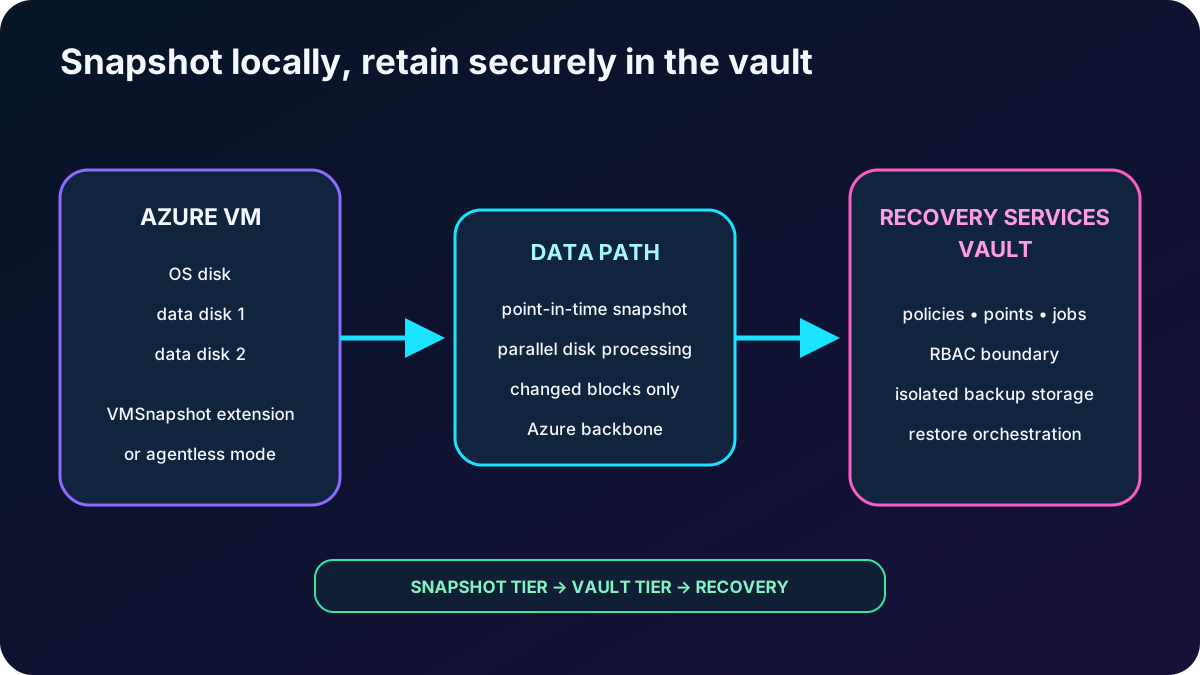
Azure VM backup coordinates a point-in-time snapshot of the selected managed disks and transfers protected data to service-managed storage associated with a Recovery Services vault. The vault is a management entity: it organizes policies, protected items, recovery points, jobs, alerts, security, and restore actions. You choose the vault rather than creating the underlying backup storage accounts yourself.
The vault must be compatible with the VM location and becomes an Azure RBAC boundary. Vault backup data is kept in infrastructure and fault domains separated from the source. A locally retained snapshot enables rapid operational recovery, while a vaulted copy provides longer retention and stronger isolation.
Snapshot and vault are two stages of one VM protection flow.
5. Distinguish application, file-system, and crash consistency
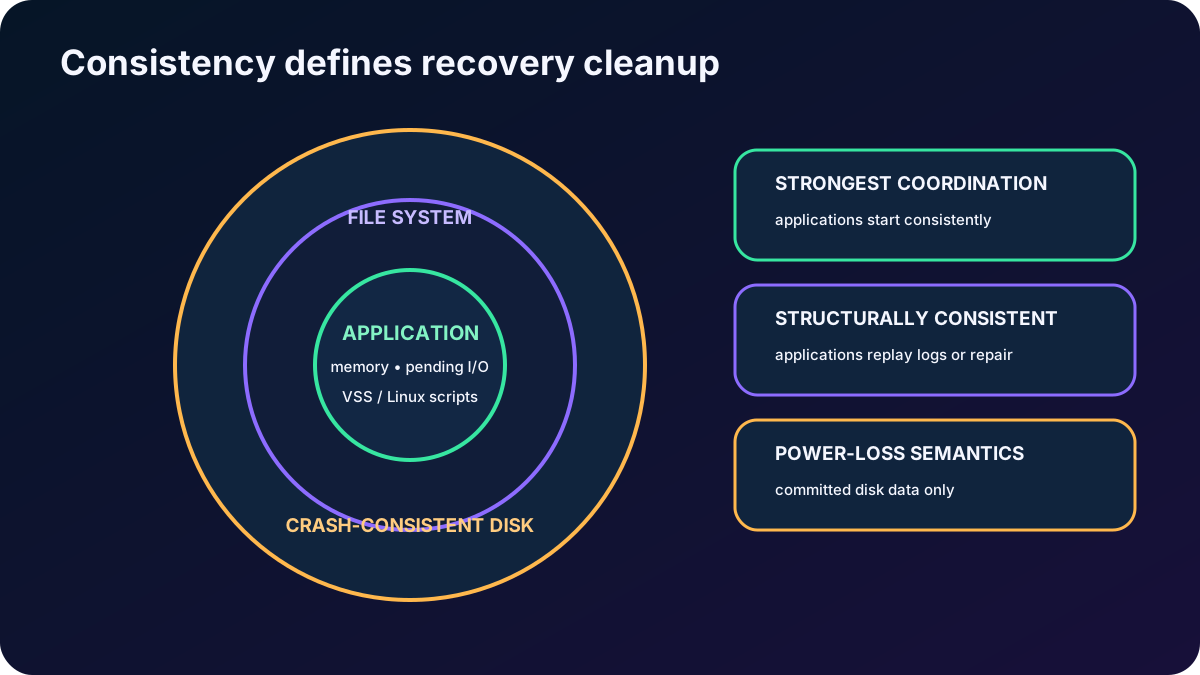
VM recovery-point consistency.
Level
What is captured
Recovery behavior
Application-consistent
Disk state plus coordinated pending I/O and application state. Windows uses Volume Shadow Copy Service (VSS) writers; Linux requires successful custom pre/post scripts for the application.
The VM and participating applications start in a consistent state, providing the strongest VM-level consistency.
File-system-consistent
Files are captured at the same point, but application memory and application transactions are not fully coordinated. It can result when VSS writers or Linux scripts are unavailable or fail.
The file system is structurally consistent; applications may run their own log replay or cleanup at startup.
Crash-consistent
Only data already committed to disk is included; memory, host-cache writes, and pending I/O are excluded.
The VM behaves as if power was lost and might run disk or application recovery. It is also used for stopped VMs or selected agentless crash-consistent protection.
For Windows, the VMSnapshot extension coordinates with VSS. For Linux, VMSnapshotLinux provides VM integration and administrators own the correctness of application scripts. A VM-level VSS copy does not replace workload backup when database-level log recovery or second-level point-in-time recovery is required.
Consistency determines how much repair the workload performs after restore.
6. Choose Standard or Enhanced VM backup policy and its tiers
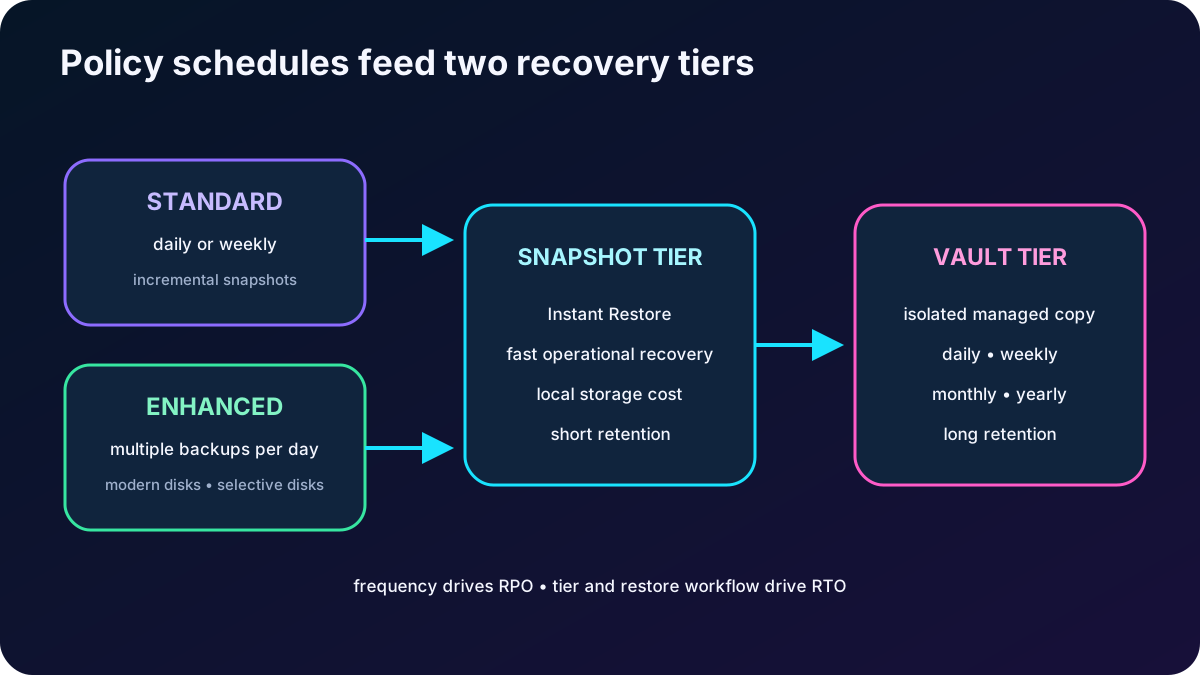
A VM backup policy defines when protection runs and how long each recovery-point class survives. Standard policy supports daily or weekly schedules. Enhanced policy supports multiple backups per day, intervals as frequent as every four hours, longer configurable snapshot retention, managed-disk features, and broader support for newer VM and disk capabilities.
Policy and tier decisions.
Feature
Standard policy
Enhanced policy
Schedule
One daily or weekly backup.
Multiple daily backups, with supported intervals down to four hours and a configurable operating window.
Instant Restore snapshot
Default two days; configurable from one to five days for daily schedules. Weekly behavior has specific fixed rules.
Default seven days; commonly configurable from one to 30 days, subject to schedule and support rules.
Snapshot implementation
Incremental operational snapshots.
Initial full managed-disk snapshot followed by incremental deltas.
Selective disks
Feature support is narrower and scenario dependent.
Supports include/exclude rules and restoring an eligible disk subset.
Modern VM/disk capabilities
Validate support before selection.
Required or preferred for capabilities such as Premium SSD v2, Ultra Disk, Trusted Launch migration, and zone-resilient snapshots where supported.
A snapshot-tier recovery point is available as soon as the snapshot succeeds and supports Instant Restore. After transfer, its type becomes snapshot and vault. Local snapshots improve RTO but incur snapshot storage cost. Vault-tier data provides longer retention and isolation. Instant Restore cannot be disabled, but retention can be reduced to the supported minimum.
Selective disk protection is useful when only specific data disks are critical, or when a database-aware solution protects the application and VM backup only needs the operating-system disk. Document excluded disks so a restore does not produce an incomplete machine.
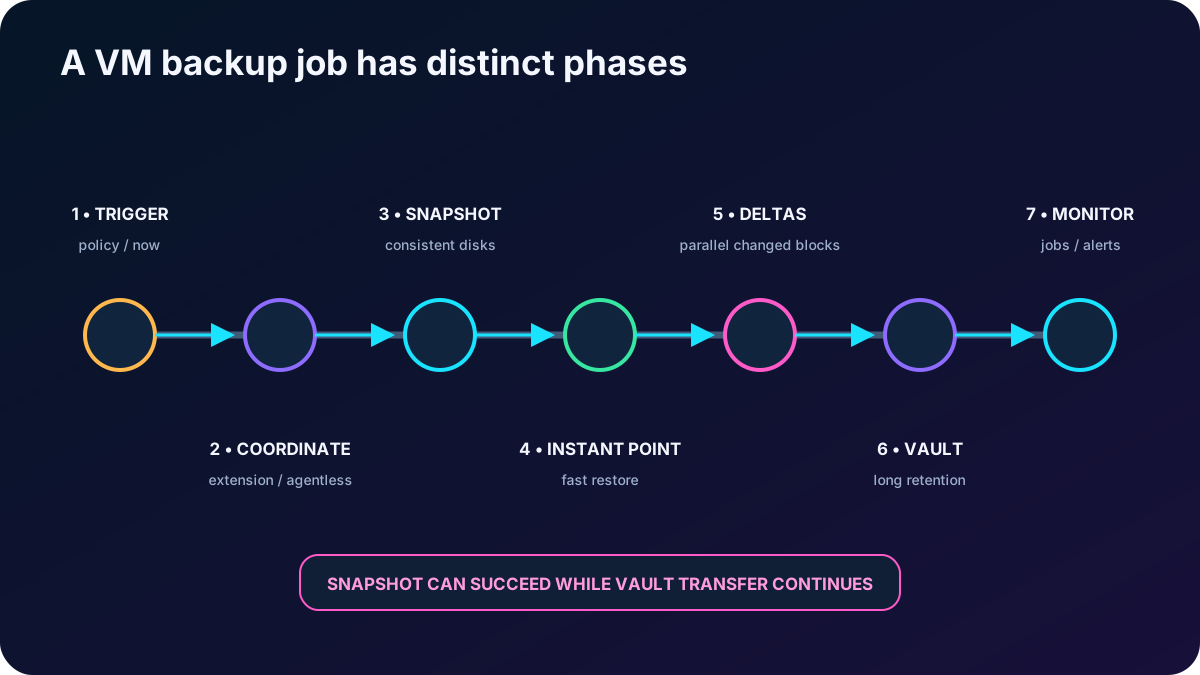
7. Follow the VM backup process from trigger to vault
starts the job according to policy or an on-demand request.
For agent-based application or file-system consistency, the first running-VM backup installs VMSnapshot on Windows or VMSnapshotLinux on Linux through the Azure VM agent. Supported agentless crash-consistent protection does not require the guest extension.
The extension coordinates VSS on Windows or the Linux snapshot framework, and the service creates a point-in-time disk snapshot.
A snapshot recovery point becomes available locally for Instant Restore.
Disks are processed in parallel. After the initial protected state, only changed blocks are identified and transferred to the vault.
Transfer can continue for hours at peak time; a daily VM backup normally completes in less than 24 hours, while the initial copy or a newly added disk can take longer.
The vault records the recovery point, retention, job state, and restore metadata. The current policy keeps protection running until it is explicitly changed or stopped.
Schedule different VMs at staggered times, monitor disk churn and extension health, and avoid overloaded target storage during restores. Customer-managed keys can protect supported vault data, while Service Encryption and Azure Disk Encryption support protect disks and encrypted VMs according to their respective support matrices.
Snapshot completion and vault transfer are separate job phases.
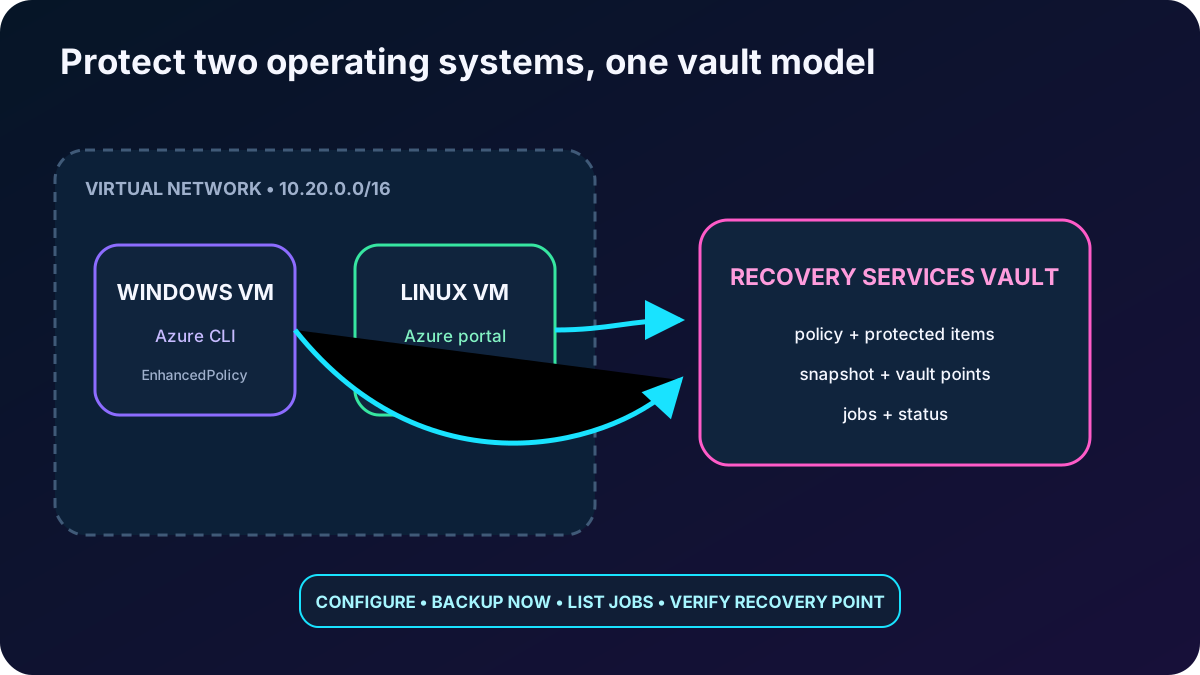
8. Lab: protect Windows and Linux VMs through portal and CLI
The source exercise proves that both Windows and Linux Azure VMs can be protected. The following equivalent lab uses neutral resource names and current navigation. Commands create billable resources; review current image availability, region quotas, security defaults, and prices before running them.
LAB_RG=$(az group create --name rg-az104-backup-lab --location westus2 --query name -o tsv)

az network vnet create \
  --resource-group "$LAB_RG" \
  --name vnet-az104-backup \
  --address-prefixes 10.20.0.0/16 \
  --subnet-name snet-workloads \
  --subnet-prefixes 10.20.1.0/24

az vm create \
  --resource-group "$LAB_RG" \
  --name vm-win-backup-lab \
  --image Win2022Datacenter \
  --size Standard_DS1_v2 \
  --admin-username azureadmin \
  --admin-password '<strong-password>' \
  --vnet-name vnet-az104-backup \
  --subnet snet-workloads \
  --public-ip-sku Standard

az vm create \
  --resource-group "$LAB_RG" \
  --name vm-linux-backup-lab \
  --image Ubuntu2204 \
  --size Standard_DS1_v2 \
  --authentication-type ssh \
  --generate-ssh-keys \
  --vnet-name vnet-az104-backup \
  --subnet snet-workloads \
  --public-ip-sku Standard
If the CLI reports that a security profile or image is invalid, check the current image offer, regional support, subscription feature registrations, and explicitly supported security type. Do not blindly repeat an old preview-registration command from a historical lab.
Portal path for the Linux VM.
Step
Action
1
Open Resiliency, choose Configure protection, and select Azure Virtual machines with ; alternatively open the VM and its Backup capability.
2
Choose or create a Recovery Services vault in the same region as the VM.
3
Select Standard or Enhanced policy, inspect schedule, Instant Restore retention, vault retention, redundancy, and security.
4
Enable backup, wait for deployment, then open the protected item and choose Backup now.
5
Choose the on-demand recovery-point retention date and confirm the operation.
Friendly names are accepted in common single-VM cases, but native container and item names may be required when names are ambiguous or for advanced cross-subscription operations. Discover them with az backup container list and az backup item list rather than guessing.
Portal and CLI configure the same underlying vault, policy, protected item, and job model.
9. Monitor configuration, snapshots, transfer, and jobs
At VM scope, inspect protection status, latest recovery point, policy, and last backup result. At vault scope, review protected items, storage consumption, alerts, and all backup jobs. The job detail separates Snapshot from Transfer data to vault, so a local restore point can exist while vault transfer is still running.
Monitoring surfaces.
Scope
What to verify
Protected VM
Protection state, policy, latest recovery point, last job result, extension state, and available restore actions.
Recovery Services vault
Inventory, jobs, alerts, recovery points, policy associations, storage, security posture, and restore history.
Resiliency in Azure
Cross-vault and cross-subscription protection inventory, gaps, jobs, backup and disaster-recovery posture.
az backup job list/show/wait for automation, polling, and runbook integration.
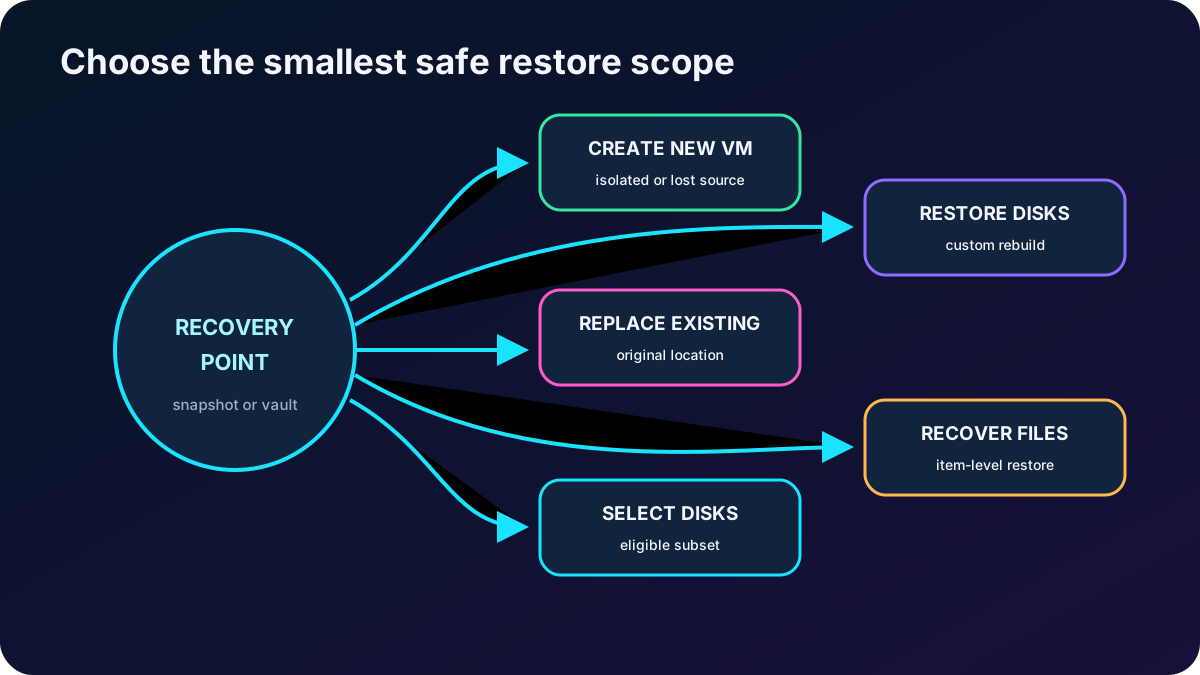
10. Choose the restore scope before launching a job
Core Azure VM restore choices.
Restore option
Use it when
Key behavior
Create a new VM
The source is missing or corrupt, a clone is needed, or a recovery drill must be isolated.
Creates a VM from a recovery point in a supported target. Alternate-location VMs need their own backup configuration.
Restore disks
You need customization, manual attachment, template edits, or controlled reconstruction.
Restores managed disks and VM configuration/template artifacts into the selected resource group.
Replace existing disks / Original Location Recovery
The original VM still exists and must return to an earlier state.
The VM must be stopped. snapshots current disks before swapping OS and selected data disks.
Item-level recovery
Only a file or folder is missing.
A recovery script mounts the selected recovery point as local volumes through the machine iSCSI workflow; copy required data, then unmount.
Selective disk restore
Only protected disks from an Enhanced-policy recovery point are required.
Restores an eligible subset without recreating every disk.
Instant Restore automatically uses the local snapshot when a recovery point has both snapshot and vault data. Vault restore is used when the snapshot is unavailable or ineligible. Restore duration depends on data size, tier, target IOPS and throughput, service queues, and the load on staging or target storage.
Restore the smallest scope that safely satisfies the incident.
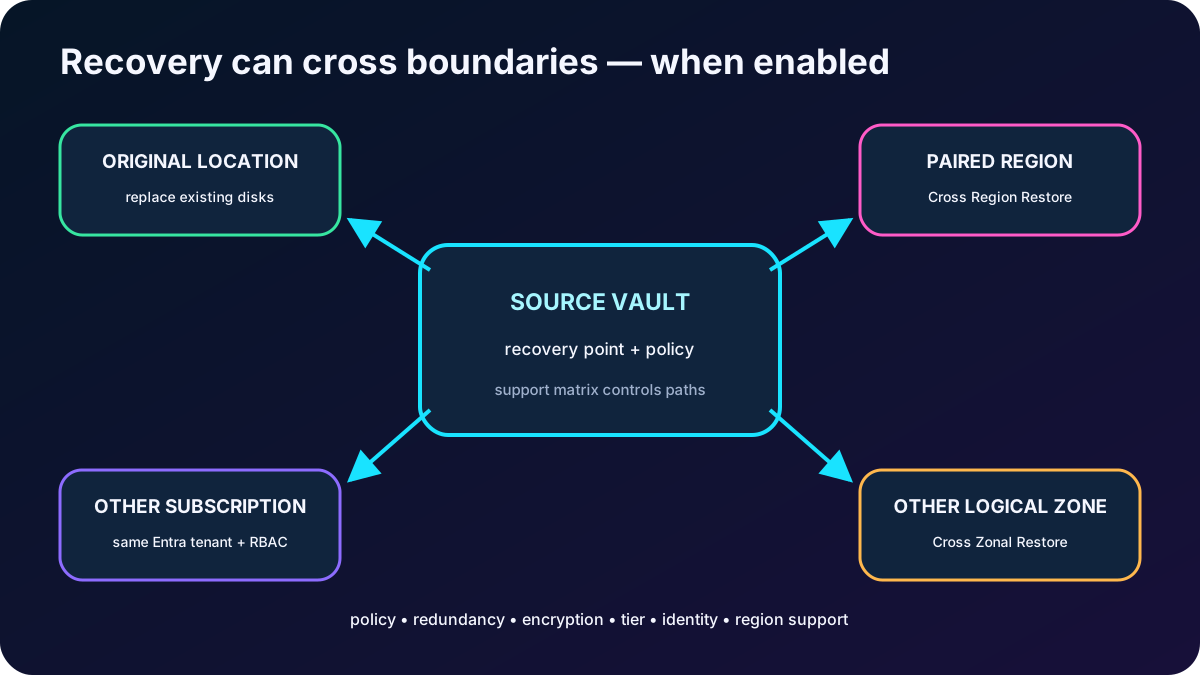
11. Understand cross-region, cross-subscription, and cross-zone restore
Boundary-changing restore capabilities.
Capability
Supported purpose
Important boundaries
Cross Region Restore
Create a VM or restore disks in the Azure paired secondary region for an outage or BCDR drill.
Requires supported GRS/vault configuration. Replace-existing is not the normal cross-region option, and secondary-region RPO differs from primary recovery points.
Cross Subscription Restore
Restore a managed VM or disks to another subscription in the same Microsoft Entra tenant under Azure RBAC.
The vault property must be enabled. Snapshot-tier points and encrypted/ADE scenarios have restrictions. It can combine with supported cross-region or cross-zone restore.
Cross Zonal Restore
Restore a managed VM or disks to another logical availability zone.
Requires supported ZRS or CRR/secondary-region conditions. Snapshot points and encrypted VMs have limitations. Zone numbers are logical per subscription.
Selective disk restore
Restore a subset of protected disks across supported boundaries.
Only disks included by policy and present in the recovery point can be selected.
Always consult the current VM backup support matrix because combinations of policy subtype, disk type, encryption, managed identity, zone, region, subscription, private access, and recovery tier evolve independently.
Cross-boundary recovery is a capability to enable and test, not an automatic property of every recovery point.
12. Recover files and encrypted virtual machines safely
For item-level recovery, select a recovery point and generate the recovery script. Run it on a compatible machine to connect the recovery volumes, browse and copy required files, and then unmount the recovery point. The original backup schedule continues; file recovery does not replace the protected item.
supports protected VMs encrypted with Service Encryption and supported Azure Disk Encryption configurations. Azure Disk Encryption uses BitLocker encryption keys (BEKs) and can use key-encryption keys (KEKs) stored in Azure . Authorized restore procedures might need to recover keys or secrets before the VM can be rebuilt.
File/folder recovery from an encrypted VM backup is not supported in the scenario described by the module; restore the VM or disks and copy the files afterward.
Encrypted VM recovery commonly restores disks first and uses the supported script, template, PowerShell, or CLI procedure to recreate the VM.
Replace-existing and cross-boundary options have additional encryption restrictions; verify the current matrix.
Only authorized identities should restore key material. Azure and unauthorized users cannot read protected keys and secrets.
13. Lab: replace corrupted VM disks and track the restore
The source lab creates a general-purpose storage account as a staging location, stops the Windows VM, selects a recovery point, chooses Replace existing, and watches the restore job. In current managed-disk workflows the storage account can hold configuration metadata and temporary artifacts; restored managed disks live in the target resource group.
Create a uniquely named storage account in the lab resource group and region, then wait for successful validation and deployment.
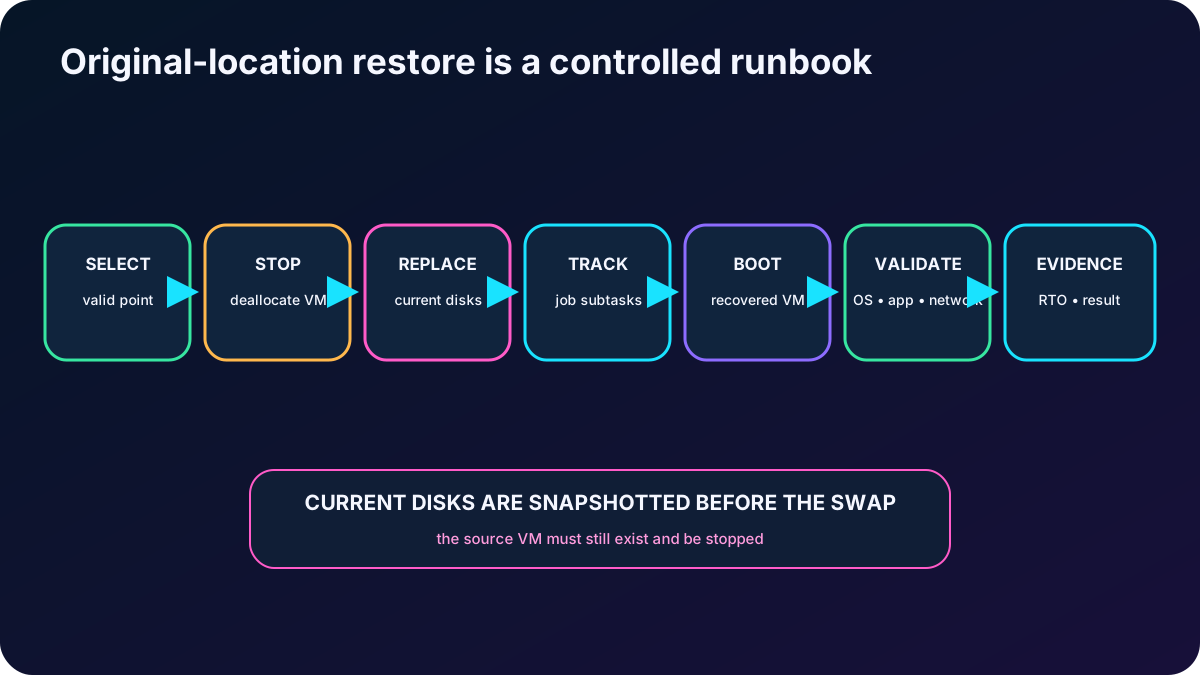
Open the source VM and stop/deallocate it. Disk replacement fails the precheck while the VM is running.
From the VM Backup page or the protected item in Resiliency/vault, choose Restore VM and select an appropriate successful recovery point.
Choose Replace existing or Original Location Recovery and provide the required staging/target settings.
Review the destructive scope: current OS and selected data disks will be replaced, although takes a pre-replacement snapshot of current disks.
Trigger Restore, open Jobs, and inspect job details, real-time state, and every subtask until completion.
Boot the VM, validate the operating system and application, confirm networking and extensions, and record the achieved RTO and selected recovery point.
The source VM must still exist for disk replacement. If it was deleted, create a new VM or restore disks instead. A powered-off VM can be recreated or have disks restored, but disk replacement requires the source VM to be stopped and available.
Recovery is complete only after service validation and documented evidence.
14. Explain the knowledge-check answers
Questions and reasoning.
Question
Correct answer
Reason
Which option replaces a disk on an existing VM?
Replace existing.
This is Original Location Recovery: swaps the source VM disks with those from the selected recovery point.
Why can replacement fail even when the recovery point is valid?
The source VM was deleted or is unavailable.
Replace existing requires the original VM resource. If it is gone, restore a new VM or restore disks.
What must also be true before disk replacement?
The VM is stopped/deallocated.
A running VM fails the restore precheck because its attached disks cannot be safely replaced.
15. Compact review of every topic
Short versions for active recall.
Topic
Remember this
BCDR goal
Protect both Windows and Linux VMs, prove backup jobs, and rehearse restoration.
Service choice
Backup goes backward in time; Site Recovery fails over a replica; zones keep distributed instances available.
The Recovery Services vault manages policies, recovery points, security, jobs, and restores and is an RBAC boundary.
Consistency
Application-consistent coordinates apps; file-system-consistent protects files; crash-consistent includes committed disk data only.
Policy
Standard is daily/weekly; Enhanced enables multiple daily points and broader modern VM/disk capabilities.
Tiers
Snapshot enables Instant Restore; vault provides isolation and long retention.
Process
Trigger, coordinate extension or agentless mode, snapshot, changed-block transfer, vault point, monitor.
Use Azure portal, Azure CLI, PowerShell, REST, and policy-driven operations.
Monitoring
Check the VM, vault, Resiliency in Azure, , Log Analytics, and job subtasks.
Restore choices
New VM, disks, replace existing, files, selected disks, region, subscription, or zone.
Encrypted VM
Preserve and authorize BEK/KEK recovery; expect file-level and replacement limitations.
Lab result
Stop the VM, choose a point, replace disks, track subtasks, boot, validate, and document RTO.
Knowledge check
Replace existing; the source VM must still exist and be stopped.
16. Practice, cleanup, and current resources
Build a decision table for accidental deletion, ransomware, zonal outage, and regional disaster, mapping each to Backup, availability, Site Recovery, or a combination.
Create Standard and Enhanced policies, then compare RPO, local snapshot retention, vault retention, supported disks, resilience, and cost.
Perform one file-level recovery and one isolated new-VM recovery before testing original-location disk replacement.
Capture evidence for recovery point, job result, restore subtasks, application validation, achieved RTO, and cleanup.
When finished, stop protection as intended, remove recovery points only with authorization, delete the vault in the correct order, and delete the lab resource group to avoid continued charges.