Azure containers: virtual machines, Container Instances, groups, and Container Apps
Compare isolation models, package images, deploy Azure Container Instances and multi-container groups, choose restart and networking settings, and decide when Azure Container Apps or AKS is the better platform.
Suggested study time: 90 minutes • Intermediate • Original rewrite based on the supplied Microsoft Learn module and checked against current Azure container documentation
By João Ricardo Dutra••Complete original content
1. Choose the right isolation model for a cloud migration
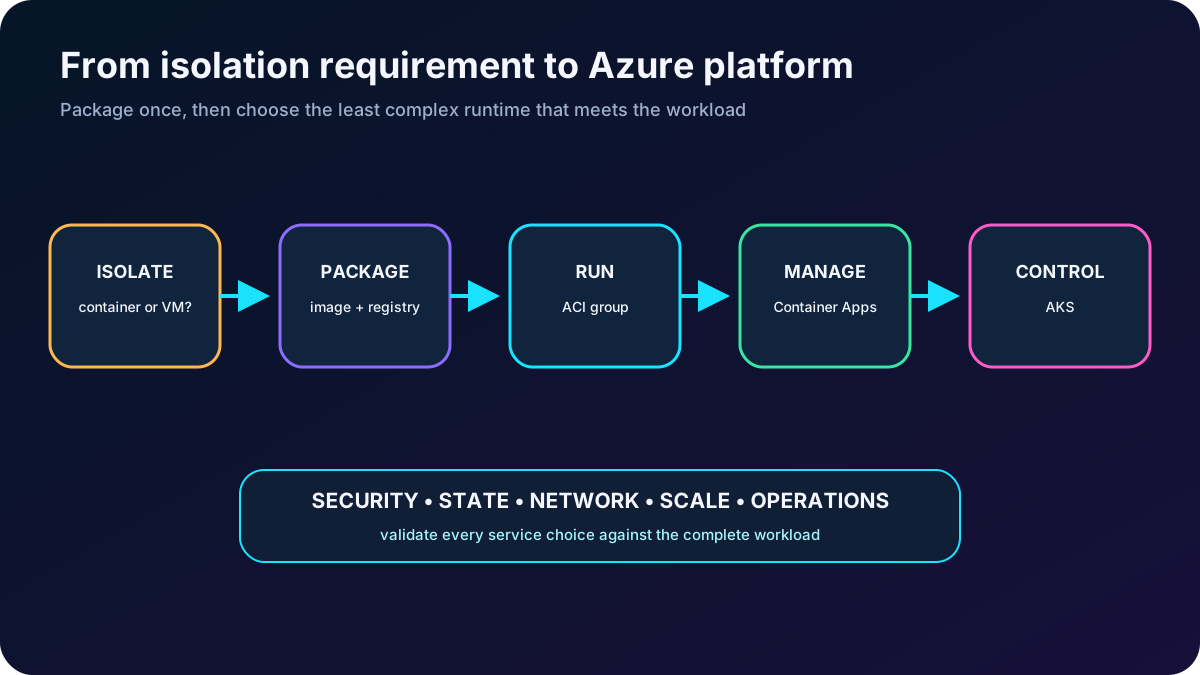
An organization is moving a web application from an on-premises virtual machine to Azure. It wants rapid startup, fewer servers to patch, simple application isolation, and a deployment unit that behaves consistently from development to production. The administrator must decide whether the workload still needs a complete virtual machine, can run as an isolated workload, or benefits from the managed application platform in .
The module assumes familiarity with container terminology, basic cloud concepts, and the Azure portal. Its objectives are to compare containers with virtual machines, recognize the capabilities and use cases of , understand container groups, evaluate , and deploy and verify a container instance.
Begin with the isolation requirement, then select the Azure service that provides only the orchestration and control the workload needs.
2. Compare operating-system and hardware virtualization
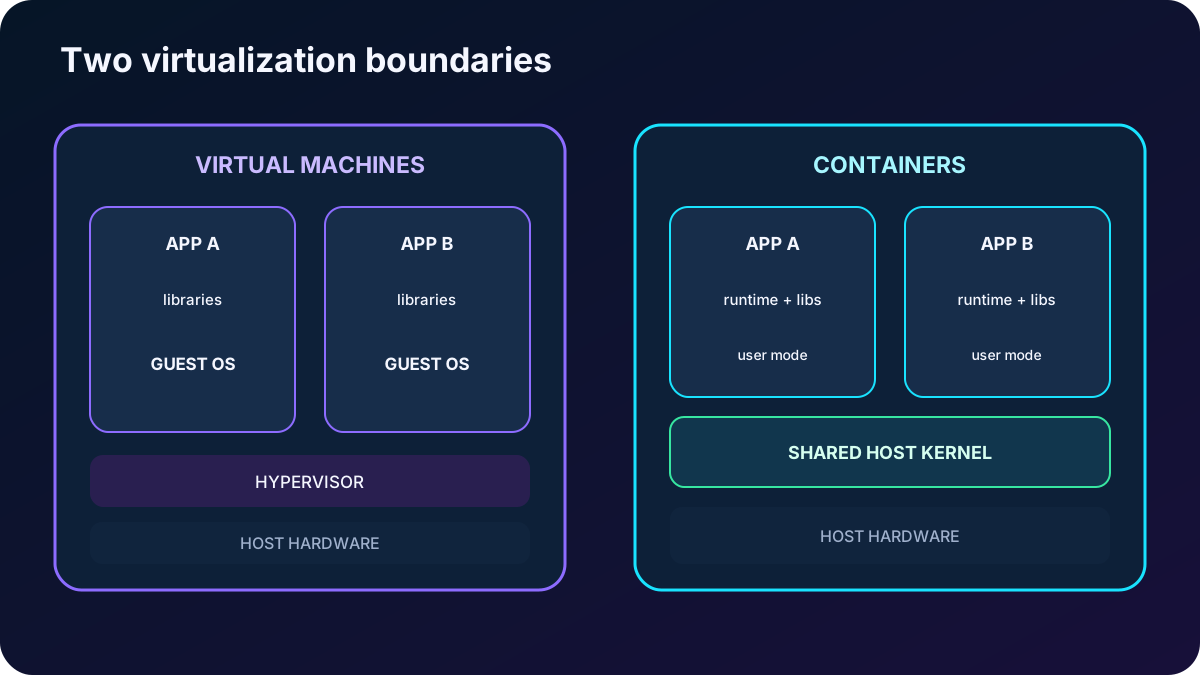
A virtual machine virtualizes hardware. Each VM receives virtual CPU, memory, disks, and devices and boots a complete guest operating system with its own kernel. A container virtualizes the operating system instead: isolated application processes share the host kernel while carrying only their user-mode files, libraries, runtime, and configuration. Running several containers inside a VM therefore resembles running several VMs on one physical server, but the boundary is lighter.
Containers and virtual machines solve different operational problems.
Dimension
Containers
Virtual machines
Isolation
Process and namespace isolation with a lightweight boundary. It is appropriate when the platform security model satisfies the workload.
A complete guest OS creates a stronger boundary, useful for incompatible kernels, legacy dependencies, or strict separation between tenants.
Operating system
Shares the host kernel and includes only the user-mode components the application needs.
Runs a full OS and kernel, so boot time and resource overhead are higher.
Deployment
Run an image with Docker-compatible tooling or use an orchestrator or managed platform for many replicas and services.
Create and manage individual VMs with portal, CLI, PowerShell, or Windows Admin Center; automate fleets with infrastructure tooling and management platforms.
Persistent storage
Depending on the platform, use Azure Disks for single-node attachment or over SMB for shared access; keep state outside the disposable container filesystem.
Use managed virtual hard disks or network shares attached to the guest OS.
Failure recovery
A platform can recreate a failed container rapidly on another available node.
Failover normally boots or restarts the full guest OS on another host.
Density
Small image and runtime overhead permit more application instances per host.
Each guest OS consumes additional CPU, memory, and storage.
A VM packages an operating system around the application; a container packages the application around a shared kernel.
3. Recognize why teams package applications as containers
Portability: an immutable image carries code, runtime, system tools, libraries, and settings so the same artifact can be promoted across compatible environments.
Speed: processes start without booting a guest operating system, which shortens deployment, scaling, testing, and recovery cycles.
Consistency: development, test, and production execute the same packaged dependencies, reducing environment drift.
Efficiency: sharing the host kernel increases workload density and can improve infrastructure utilization.
Isolation: applications and their dependencies remain separated even when they share a host, although this is not identical to a VM security boundary.
: registries, declarative definitions, CI/CD, and orchestrators make image delivery and replacement repeatable.
Containers are not automatically the best choice. Prefer a VM when the application needs host-level access, a different kernel, a full desktop or operating-system environment, drivers, unsupported legacy software, or a stronger isolation boundary. Containerize when the application can externalize state and accept an ephemeral, replace-not-repair operating model.
4. Understand images, registries, and running instances
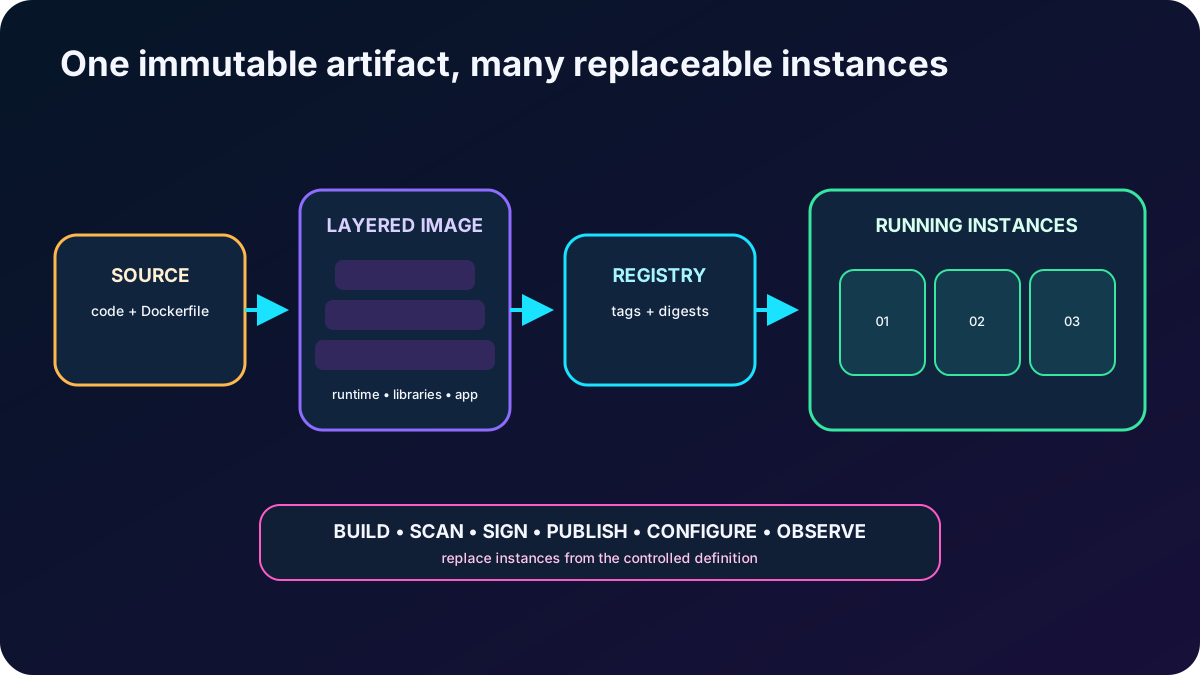
A container image is a read-only, layered package. It contains the application and everything required above the host kernel: runtime, libraries, tools, files, startup command, and defaults. A registry such as Docker Hub or stores versioned images. Pulling an image and starting it creates a mutable running container instance; replacing that instance from a known image is safer than making undocumented changes inside it.
A reliable image-to-runtime chain.
Stage
Administrator responsibility
Build
Use a minimal supported base image, pin versions, remove unnecessary tools, and scan for vulnerabilities.
Publish
Tag the artifact deliberately, push it to a trusted registry, and control pull permissions.
Configure
Supply CPU, memory, environment variables, secrets, command, networking, ports, storage, and restart behavior outside the image where appropriate.
Run
Observe events, logs, metrics, exit codes, health, and image provenance; replace failed or outdated instances from a controlled definition.
The image is the versioned artifact; the container is one execution of that artifact.
5. Use for direct serverless execution
(ACI) is the quickest Azure path from an image to an isolated Linux or Windows container without provisioning or patching a virtual machine and without adopting a complete orchestration platform. Microsoft operates the host and runtime infrastructure; the customer owns the image, application behavior, configuration, data, and diagnostic design.
Capabilities to associate with ACI.
Capability
What it means
Fast startup
Containers commonly start in seconds, making ACI useful for burst, build, test, rendering, automation, and other short-lived work.
Image sources
Pull from public or authenticated registries, including Docker Hub and .
Public access
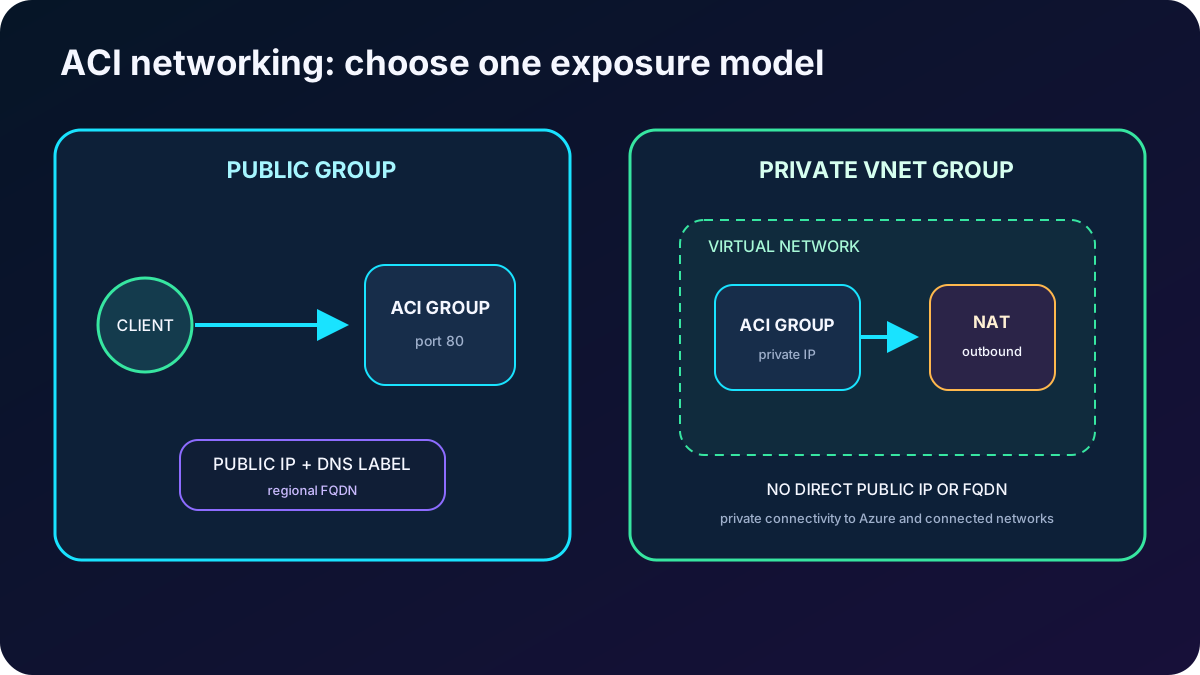
Expose a group through a public IP and a unique regional DNS label that forms an FQDN; secure application protocols yourself.
Private access
Deploy a group into a virtual network for private communication with Azure or connected resources. Current guidance requires a NAT gateway for supported outbound connectivity; a VNet-deployed group does not directly expose a public IP or FQDN.
Operating system
Choose Linux or Windows for the group; containers in a group share that OS type.
The writable container filesystem is ephemeral. Linux groups can mount for persistent SMB-backed data, subject to documented identity and root/CIFS limitations.
Sizing and quotas
CPU and memory are assigned to the group for its lifetime. The old module's 4-vCPU/16-GB example is no longer a universal maximum: current standard limits can reach 31 vCPUs and 240 GB, but region, OS, subscription quota, SKU, and available capacity still govern deployment.
Specialized options
Current ACI also documents confidential and Spot container options; preview features and regional availability require separate production review.
ACI does not automatically turn one container group into a highly available application. For production availability, deploy multiple groups and place an ingress service in front of them, or choose a platform with built-in replica management. If the workload needs continuous service discovery, revision traffic splitting, broad autoscaling, or complex orchestration, or is normally a better fit.
Public and VNet deployment are different networking modes; do not assume a private group also receives a public endpoint.
6. Treat the container group as the ACI deployment boundary
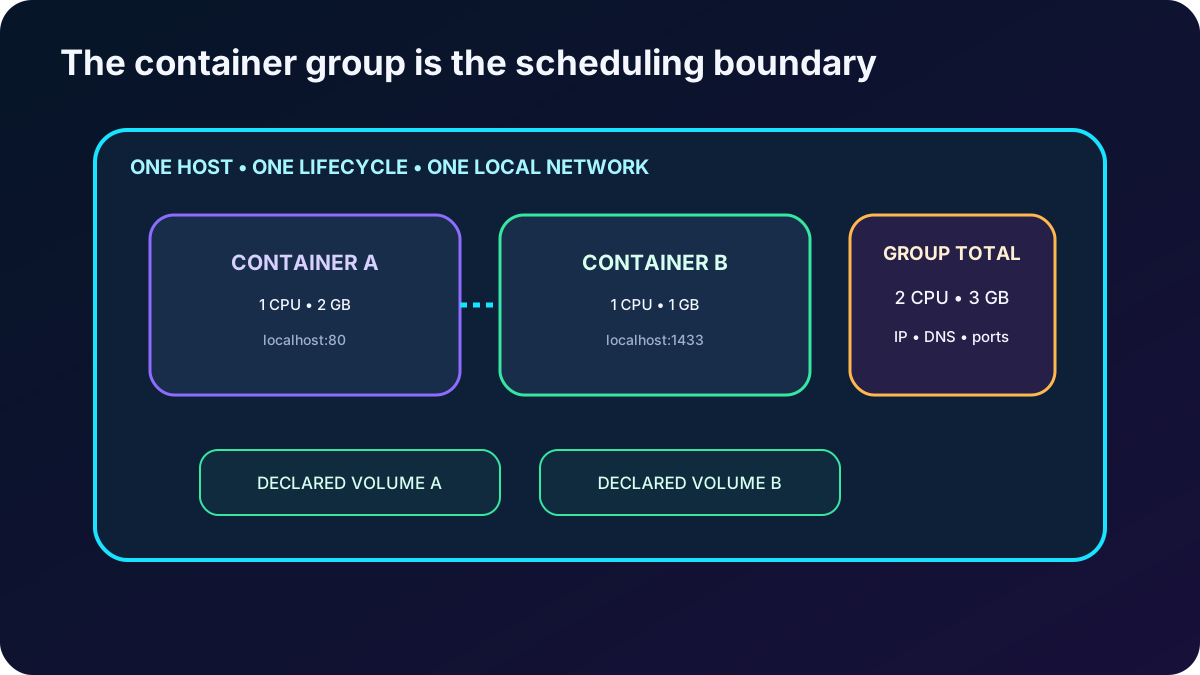
A container group is ACI's top-level resource and is conceptually similar to a Kubernetes pod. One or more containers are scheduled on the same host and share a lifecycle, local network, selected volumes, and the group's allocated resources. A one-container group is common; a multi-container group is appropriate when tightly coupled processes must be created, scaled, stopped, restarted, and deleted together.
Rules that define a multi-container group.
Area
Rule
Resources
ACI adds the CPU, memory, and supported accelerator requests of every container. Two containers requesting one CPU each require a two-CPU group.
Lifecycle
Start, stop, restart, and delete operate at group scope. A manual restart restarts every container and can change the group IP.
Local network
Containers communicate through localhost and share one port namespace. There is no per-container port mapping inside the group.
External network
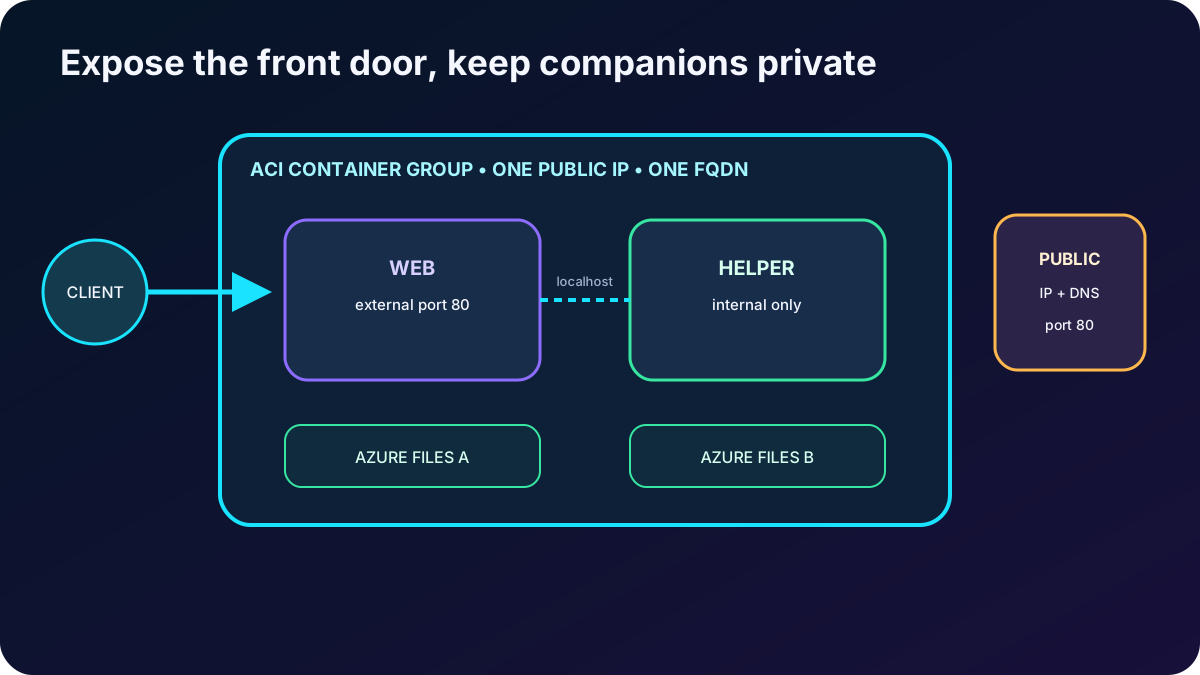
The group shares one public IP, optional DNS label/FQDN, and one or more exposed ports. A service is reachable only when its port is exposed in both the container and group definition.
Containers can mount common or separate declared volumes. Mounted external storage survives instance replacement; the local writable layer does not.
Deletion
Deleting the group releases its public IP and FQDN and removes ephemeral state.
Plan the group as one schedulable and billable unit, not as unrelated containers sharing a name.
7. Deploy single and multi-container definitions declaratively
Configuration methods mentioned in the module.
Method
Best fit
Azure portal, CLI, or PowerShell
Rapid creation and operation of a straightforward single-container group.
JSON template
Recommended by the supplied module when the same deployment also creates Azure resources such as an share.
Bicep
A concise Azure-native definition with type checking, IntelliSense, modules, and compilation to an ARM template.
YAML
A container-focused ACI definition that is convenient for multi-container groups; exported configuration can be a starting point.
Whichever format is used, declare the image digest or controlled tag, registry credentials or managed identity, requests, environment variables, secure values, command, restart policy, IP mode, DNS label, ports, volumes, and mounts. Keep the definition in source control and deploy it through an identity with least privilege.
8. Design networking and storage for a group
Imagine one group with a web front end and a supporting process. The group is placed on one host, receives one DNS label and one public IP, and exposes the web port. Internally, the services call each other through localhost. Each container can mount a different share, or they can share a declared volume when both need the same data. An internal database port need not be exposed publicly.
For persistent data, remember that ACI is stateless by default. A restart, crash, stop, or replacement can discard the local writable layer. Current mounts in ACI are for Linux containers, use CIFS/SMB, require the container to run as root, and do not currently authenticate the SMB mount with managed identity. Mounting over a nonempty directory hides the image files at that path for the lifetime of the mount.
Expose only the front-door port; keep related internal traffic on the group network and state in external storage.
9. Apply sidecar and companion-container patterns carefully
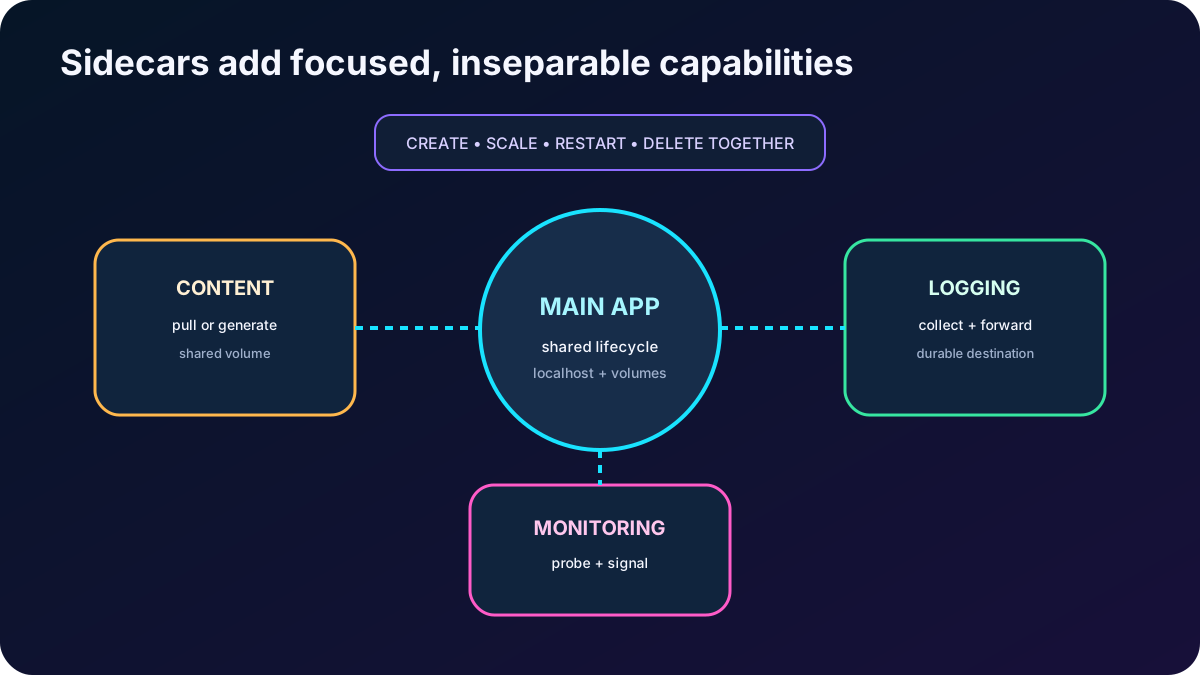
Common multi-container patterns from the module.
Pattern
Companion responsibility
Operational caution
Content updater
Pull or generate fresh web content for the main application.
Use a shared volume and coordinate atomic updates.
Logging sidecar
Collect logs or metrics and forward them to durable storage or monitoring.
Do not depend on the group's small local log buffer as the sole record.
Monitoring sidecar
Probe the main process and emit health or alert signals.
A sidecar cannot by itself provide multi-group availability or external load balancing.
Frontend and backend pair
Separate presentation and supporting processing while sharing localhost.
Couple them only if they truly require the same lifecycle and scale unit.
Multi-container groups simplify tightly coupled helpers but also couple resource allocation and failure handling. If components must scale independently, release separately, or discover many service replicas, move them into separate services on or use when native Kubernetes control is required.
A sidecar adds one focused capability to the main workload and should remain operationally inseparable from it.
10. Use restart policies that match the workload
ACI restart policies.
Policy
Behavior
Use
Always
Restarts containers after they exit and is the default.
Long-running services; avoid for a task that is expected to finish successfully.
OnFailure
Restarts when the process exits with a nonzero code.
and automation tasks that should retry failures but remain terminated after success.
Never
Runs each container at most once.
One-shot work where an operator or external workflow controls retries.
ACI bills task execution while compute is running, so a completion-aware restart policy matters. Use group events, current and previous state, exit code, restart count, logs, and integration to distinguish an application failure from an infrastructure event. Stopping a group deallocates resources and billing but preserves no container-local state.
11. Choose for managed applications and microservices
(ACA), called in the Portuguese product dictionary, is a serverless application platform for general-purpose containers, APIs, background services, event-driven processing, jobs, and microservices. It hides cluster administration while using Kubernetes and open-source technologies such as KEDA, Dapr, and Envoy under the platform.
Distinctive Container Apps capabilities.
Capability
Administrator view
Environment
One or more apps and jobs share a secure boundary, networking, logging, and platform operations such as upgrades, failover, and resource balancing.
Ingress and discovery
Managed HTTP or TCP ingress, service discovery, internal communication, custom domains, and application-oriented networking.
Revisions
Immutable application versions support controlled rollout, rollback, direct revision access, and traffic splitting in multiple-revision mode.
Autoscale
Declarative HTTP, TCP, CPU, memory, and KEDA event-source rules add or remove replicas and can scale many workloads to zero. A rule or a positive minimum is required when ingress is disabled.
Microservices
Optional Dapr building blocks support service invocation, state, pub/sub, bindings, observability, and secrets without exposing the cluster API.
Jobs
Finite tasks can start manually, on a schedule, or from an event; continuously running apps restart failed replicas.
Control boundary
The customer does not receive direct access to the underlying Kubernetes APIs or cluster management. Choose when that control is required.
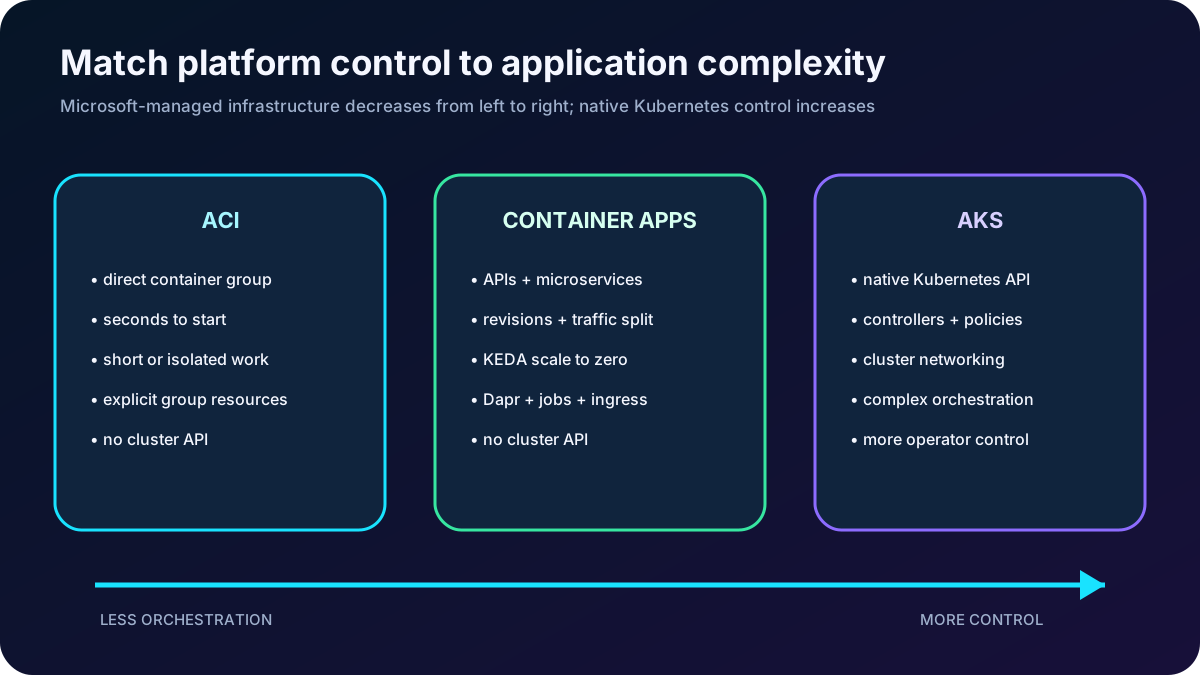
ACI runs direct isolated groups, Container Apps manages serverless applications, and exposes Kubernetes control for complex orchestration.
12. Select ACI, Container Apps, , or a virtual machine
A practical decision guide.
Need
Preferred starting point
Reason
One isolated container or tightly coupled group, fast startup, short-lived task, no cluster
Direct image execution with explicit group resources and minimal platform layer.
APIs, microservices, background services, revisions, traffic splitting, event scaling, scale to zero, or managed jobs
Application-level serverless platform without cluster administration.
Native Kubernetes APIs, custom controllers, cluster-level policies, complex networking, or maximum orchestration control
Managed Kubernetes control plane with customer responsibility for cluster and workload architecture.
Full OS, custom kernel boundary, drivers, host access, legacy middleware, or unsupported containerization
Azure
Complete guest operating system and broad infrastructure control.
This is a starting point, not a substitute for architecture review. Security boundary, availability, data durability, network integration, deployment frequency, scale model, team skills, compliance, regional support, quotas, and total cost can change the final choice.
13. Rehearse the supplied ACI lab
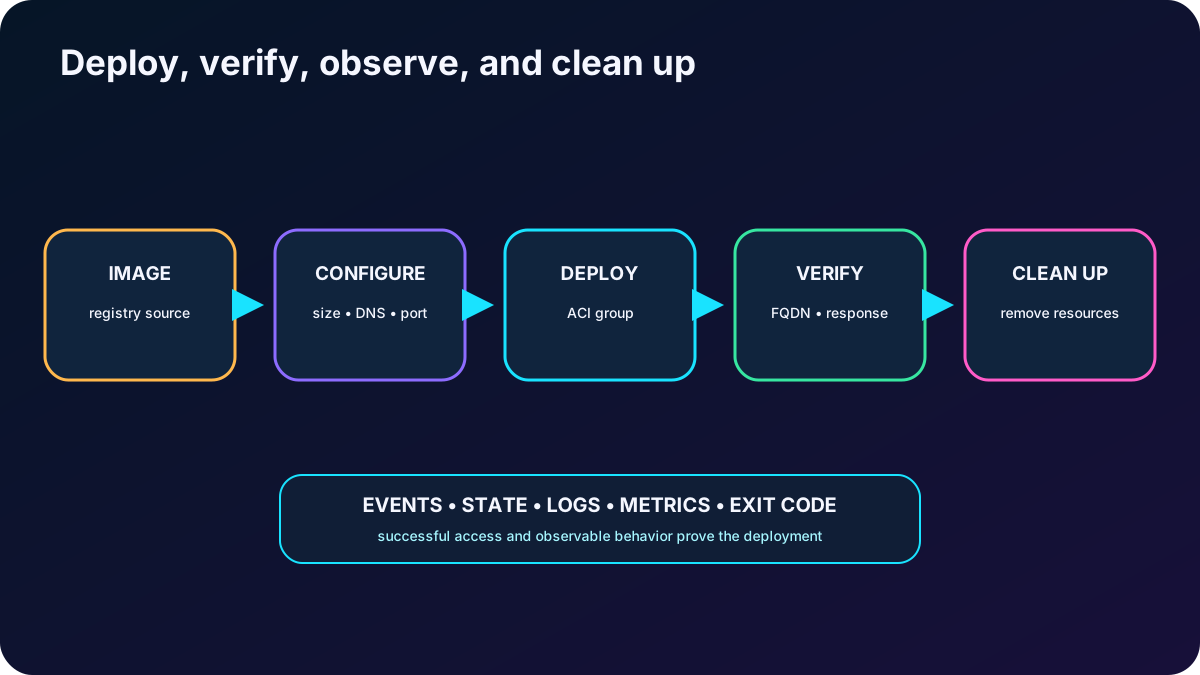
The exercise evaluates ACI and Docker as a replacement for an on-premises VM-hosted web application. It requires an Azure subscription and estimates about 15 minutes after the environment is ready.
Create or select the resource group and region for the experiment.
Deploy an Azure container instance from the supplied Docker-compatible image.
Set the group name, operating system, size, restart policy, networking mode, DNS label, and web port deliberately.
Wait for the group to reach Running and inspect provisioning state, events, resource requests, image, IP, and FQDN.
Open the FQDN or public IP to verify the application response.
Review logs and metrics, then remove the lab resources to stop charges.
The lab proves both deployment and observable application access; cleanup is part of the exercise.
14. Explain every module assessment answer
Assessment answers and reasoning.
Question
Correct answer
Why
What uniquely characterizes ACI among the listed choices?
Fast startup without managing virtual machines.
ACI runs an image directly on Microsoft-managed infrastructure; it neither requires a higher-level orchestrator nor exposes Kubernetes APIs.
Which method is recommended for a multi-container group that also creates Azure service resources?
ARM template.
The module recommends ARM JSON when the deployment includes resources such as an share; Bicep is the modern concise authoring option that compiles to ARM.
How are multi-container group resources allocated?
By adding every container's requests.
The group receives the sum of requested CPU, memory, and supported accelerators.
Why is ACI suitable for a web workload that must start quickly without VM management?
Fast startup.
It removes guest-OS provisioning and host administration.
Which technology improves workload density?
Containers.
They share the host kernel and include only required user-mode components.
When might a VM be preferred?
When the application requires complete isolation from the host.
A full guest OS offers a stronger boundary and broader OS control than a normal container.
What deploys containers that share resources and lifecycle on one host?
An Azure container group.
The container group is the ACI scheduling, networking, resource, and lifecycle boundary.
What is essential for external access to a container in a multi-container group?
A public IP plus the correct group and container port exposure.
Both layers must expose the port; containers do not each receive a separate DNS label.
Why can containers use resources more efficiently than VMs?
They run only the necessary user-mode components.
They avoid duplicating a complete guest OS for every application instance.
15. Compact review of every topic
Short versions for active recall.
Topic
Remember this
Virtualization
VMs virtualize hardware and boot full operating systems; containers share a kernel and isolate processes.
Container value
Images improve portability, startup speed, consistency, density, and automated replacement.
Image
A versioned package in a registry; a container is one running instance of it.
ACI
Direct serverless Linux or Windows container execution without managing VMs or a cluster.
ACI networking
Use public IP plus DNS/FQDN or private VNet placement; current private outbound networking requires .
ACI storage
Local state is ephemeral; Linux groups can mount with documented limitations.
Container group
One host, lifecycle, local network, declared volumes, summed resources, and shared endpoint.
Deployment
Portal/CLI for simple work; ARM, Bicep, or YAML for repeatable multi-container definitions.
Sidecars
Use tightly coupled helpers for content, logging, monitoring, or frontend/backend collaboration.
Restart policy
Always for services, OnFailure for retryable tasks, Never for one-shot work.
Container Apps
Managed serverless apps, revisions, ingress, KEDA scaling, Dapr, service discovery, and jobs.
Use when native Kubernetes APIs and cluster-level control are requirements.
Lab
Deploy an image to ACI, verify the endpoint and diagnostics, then clean up.
16. Practice and current resources
Draw one workload four ways—as a VM, ACI group, Container App, and deployment—and state what control and operational burden each adds.
Write a Bicep definition for two ACI containers sharing localhost and a volume, with only the front-end port exposed.
Choose Always, OnFailure, or Never for a web server, a nightly report, and a one-time migration, then predict state and cost behavior.
Design a Container Apps revision rollout that sends a small traffic percentage to a new version and can roll back safely.
Ask Microsoft Copilot to compare ACI task workloads with Container Apps jobs, then verify limits, regional support, and networking against current documentation.