Azure custom routes and network virtual appliances: UDR, BGP, and IP forwarding
Understand system and optional routes, choose next hops with UDRs or BGP, deploy a network virtual appliance, enable forwarding in Azure and the guest OS, and verify the path with traceroute.
Suggested study time: 80 minutes • Intermediate • Original rewrite based on the supplied Microsoft Learn module and corrected against current Azure routing documentation
By João Ricardo Dutra••Complete original content
1. Route traffic through inspection instead of trusting the default path
A retail organization has suffered a breach that exposed customer names, addresses, and payment data. Its remediation plan adds network virtual appliances so traffic can be inspected before it reaches sensitive systems. The infrastructure team must make Azure choose the inspection path consistently rather than allowing direct subnet-to-subnet communication.
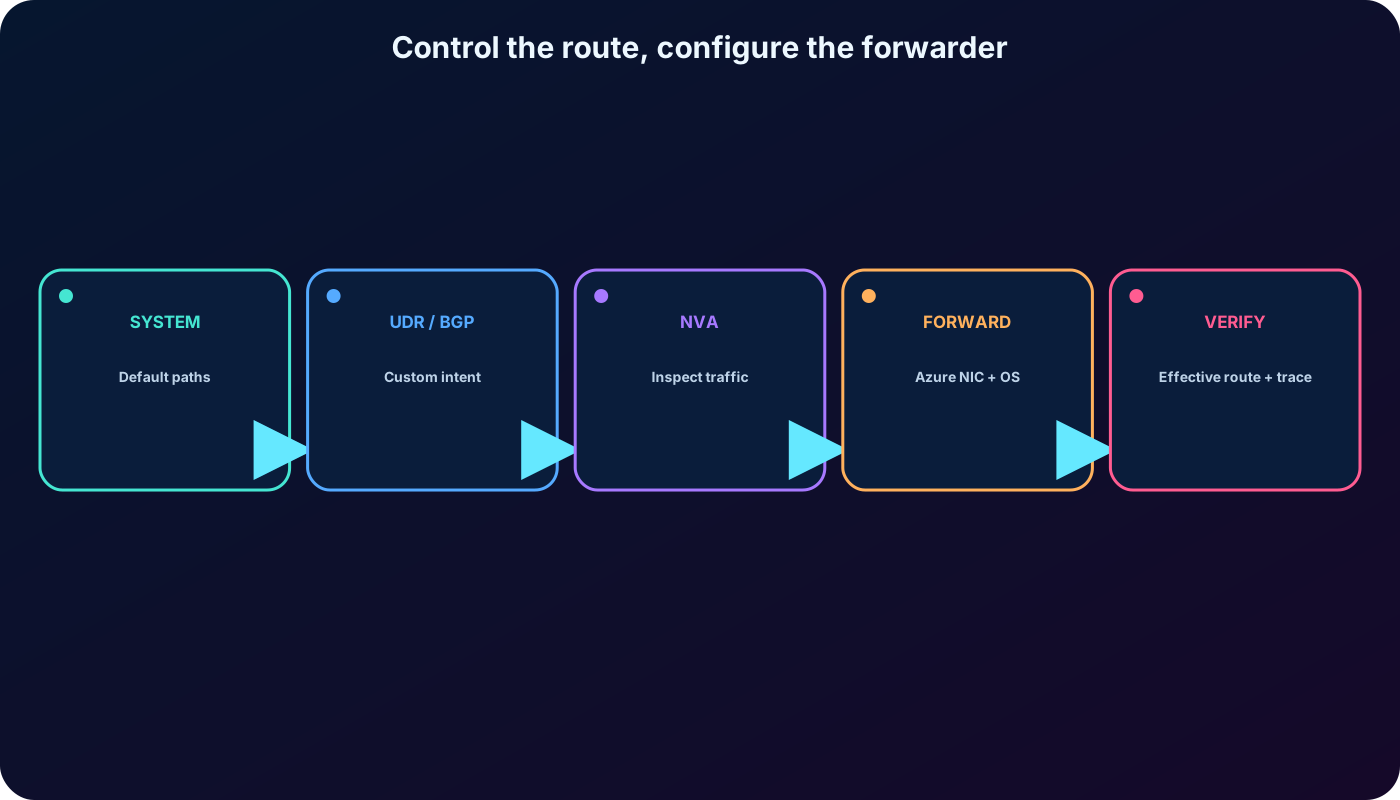
This chapter develops that solution from the routing table upward. You will distinguish system, optional, BGP, and user-defined routes; select a next hop; deploy a simple Ubuntu NVA; enable forwarding in two separate control planes; and prove the resulting asymmetric path with traceroute.
Identify Azure routing capabilities and default behavior.
Configure route tables and user-defined routes (UDRs).
Deploy a basic network virtual appliance and explain its security role.
Enable IP forwarding on the Azure NIC and inside the guest operating system.
Route public-subnet traffic through the appliance and validate every hop.
Prerequisites are subnetting, IP addressing, Azure , Azure CLI, SSH, and an authorized Azure subscription for the optional labs.
The administrator controls both the route decision and the forwarding device.
2. Azure automatically routes traffic when it leaves a subnet
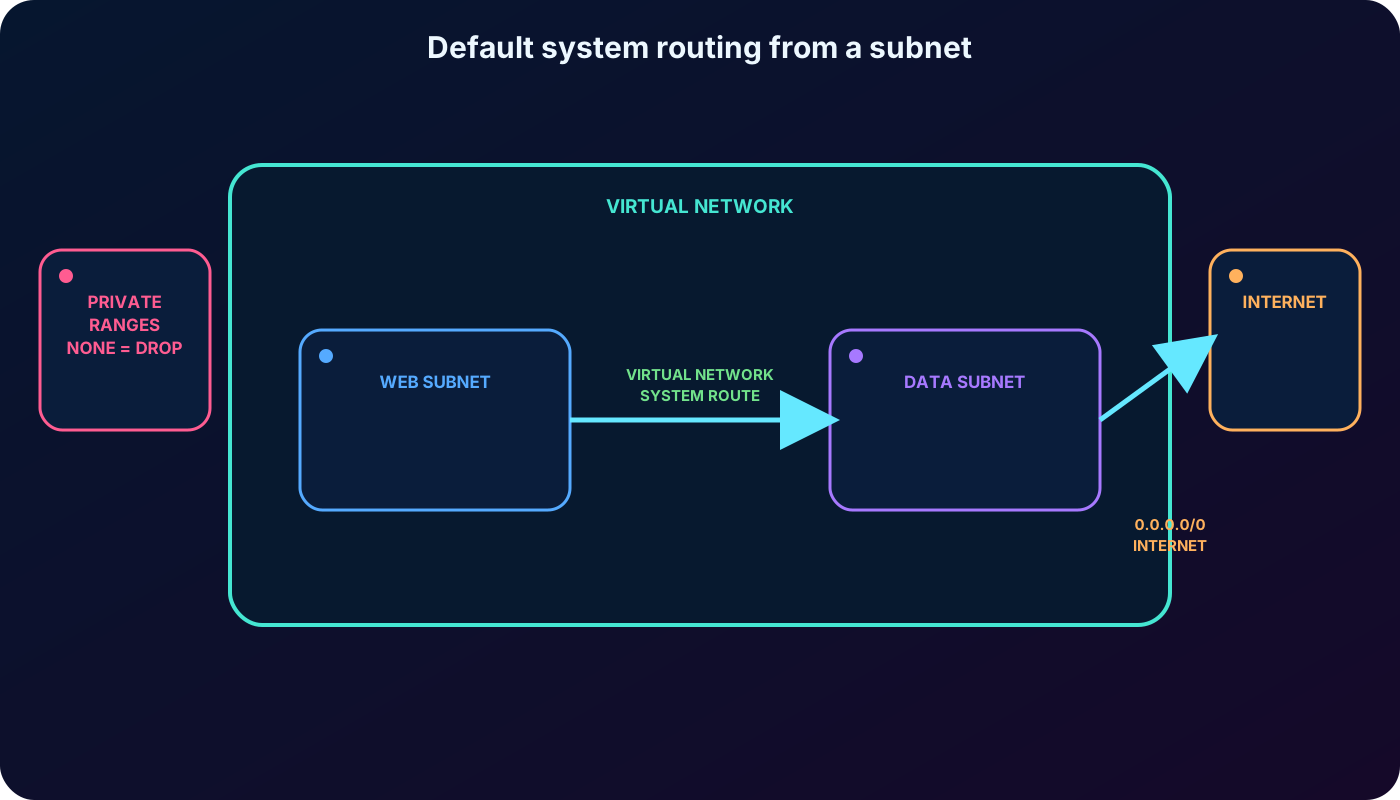
Every Azure subnet has an effective route table. Azure creates the initial system routes, combines them with optional platform routes, propagated gateway routes, and any associated UDRs, then evaluates the destination IP of each outbound packet. VMs in the same VNet can therefore communicate between subnets without a customer-managed router.
System routes cannot be created or deleted. Some can be overridden by a more specific route or a higher-priority custom route. A route expresses a destination prefix and a next-hop type; a virtual-appliance route also carries the private IP of that next hop.
3. Default system routes establish local, internet, and drop behavior
Default IPv4 system routes currently created for a subnet.
Destination prefix
Next hop
Meaning
VNet address range(s)
Virtual network
Route between addresses in the VNet. One route is created for each VNet address range.
0.0.0.0/0
Internet
Catch traffic not matched by a longer route. The existence of this route does not by itself guarantee outbound SNAT.
10.0.0.0/8
None
Drop RFC 1918 traffic unless that range is assigned to the VNet or overridden.
172.16.0.0/12
None
Drop another RFC 1918 private range by default.
192.168.0.0/16
None
Drop the third RFC 1918 private range by default.
100.64.0.0/10
None
Drop the shared address space defined by RFC 6598.
Additional platform-reserved prefixes
None
Current documentation also lists platform-reserved ranges such as 127.0.0.0/8 and selected Microsoft prefixes.
If one of the reserved private ranges becomes part of the VNet address space, Azure changes the applicable route to Virtual network. A None next hop discards packets; it is a routing drop, not an NSG denial.
System routes make a VNet usable before any route table is associated.
4. Azure capabilities add optional system routes
Capabilities that extend effective routing.
Capability
Route added by Azure
Virtual network peering
A Virtual network peering route for every address range in the remote VNet.
Virtual network gateway
Routes for configured or BGP-advertised on-premises prefixes, with the gateway as source and next hop.
Virtual network service endpoint
Service public prefixes with VirtualNetworkServiceEndpoint as the next hop on enabled subnets.
Service chaining
Customer UDRs can steer traffic in a peered topology through an NVA or supported gateway.
A service endpoint extends the subnet identity to a supported Azure service and creates optimized service-prefix routes. It does not make the platform-generated VirtualNetworkServiceEndpoint type available as a UDR choice.
5. A route table attaches policy to a subnet
A route table is an resource containing zero or more UDRs and a setting for virtual-network-gateway route propagation. One table may be associated with several subnets, but a subnet can have at most one route table. Its UDRs are merged with the subnet’s system and propagated routes.
Associate the table with the source subnet whose outbound decisions you want to change.
Do not place the NVA in the same subnet that uses a UDR pointing back to the NVA; this can create a routing loop.
Do not disable gateway route propagation on GatewaySubnet, because the gateway can stop functioning.
Use effective routes on a VM NIC to inspect the final active and invalid routes after all sources are combined.
6. Custom routes come from UDRs or BGP
A UDR is a static administrator-defined route stored in an Azure route table. BGP is a dynamic protocol that exchanges prefixes between an on-premises gateway and an Azure virtual network gateway. Both sources can override default behavior, but they differ in ownership and lifecycle.
Custom-route sources.
Source
Best fit
Operational characteristic
UDR
Force inspection, drop a prefix, choose internet or a VPN gateway, or restore a local-VNet path.
Explicit and static; the administrator owns each destination and next hop.
BGP
Exchange on-premises routes over ExpressRoute or a site-to-site VPN.
Dynamic; routers advertise and withdraw prefixes as connectivity changes.
7. UDR next-hop types express the intended action
Supported UDR next-hop concepts.
Portal concept
CLI value
Use
Virtual appliance
VirtualAppliance
Send traffic to a directly reachable private IP on an NVA NIC or supported internal load balancer.
Virtual network gateway
VirtualNetworkGateway
Send traffic to the VNet VPN gateway. This UDR use does not target ExpressRoute, Route Server, or a hub router.
Virtual network
VNetLocal
Override routing within the local VNet in specialized designs.
Internet
Internet
Explicitly use the internet path for a prefix; on a private subnet this next hop does not provide outbound access.
None
None
Discard traffic for the destination prefix.
Virtual network peering and VirtualNetworkServiceEndpoint are platform-generated next-hop types, not values that you can select in a UDR. A VirtualAppliance route requires a next-hop IP with direct connectivity; an invalid or unavailable next hop blackholes the flow.
8. Service tags reduce address-list maintenance
A UDR prefix can be an Azure service tag instead of a literal CIDR block. Microsoft maintains the set of service prefixes represented by tags such as , regional tags, and AzureCloud. This reduces route count and avoids hand-editing the table whenever a service changes addresses.
Current limits and precedence still matter. A route table supports a limited number of service-tag routes, and an exact IP-prefix route wins over a service-tag route for the same prefix. Among matching service tags, Azure evaluates more specific regional tags before their broader parent tags.
9. BGP propagates hybrid-network knowledge
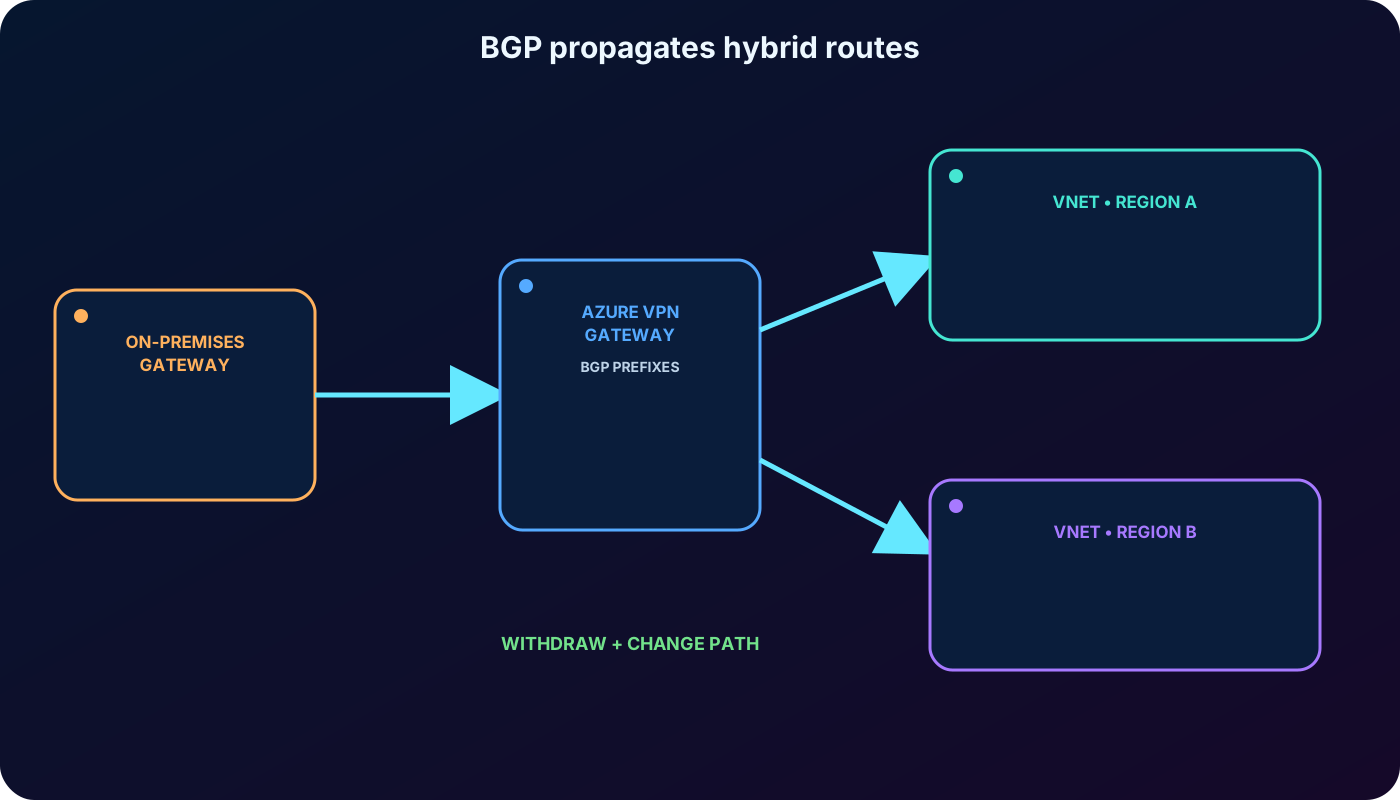
Border Gateway Protocol exchanges routing information between autonomous systems. ExpressRoute requires BGP between the on-premises edge and Microsoft; Azure can optionally use BGP for site-to-site connections. Each advertised prefix becomes a route on eligible VNet subnets with Virtual network gateway as its source and next-hop type.
Dynamic withdrawal lets routers choose another available path after a failure. Summarize on-premises routes where possible so gateways advertise fewer prefixes. A route table can disable propagation for selected subnets, but never do this on GatewaySubnet.
BGP supplies dynamic routes; the VNet gateway becomes the effective next hop.
10. Longest prefix match comes before route-source priority
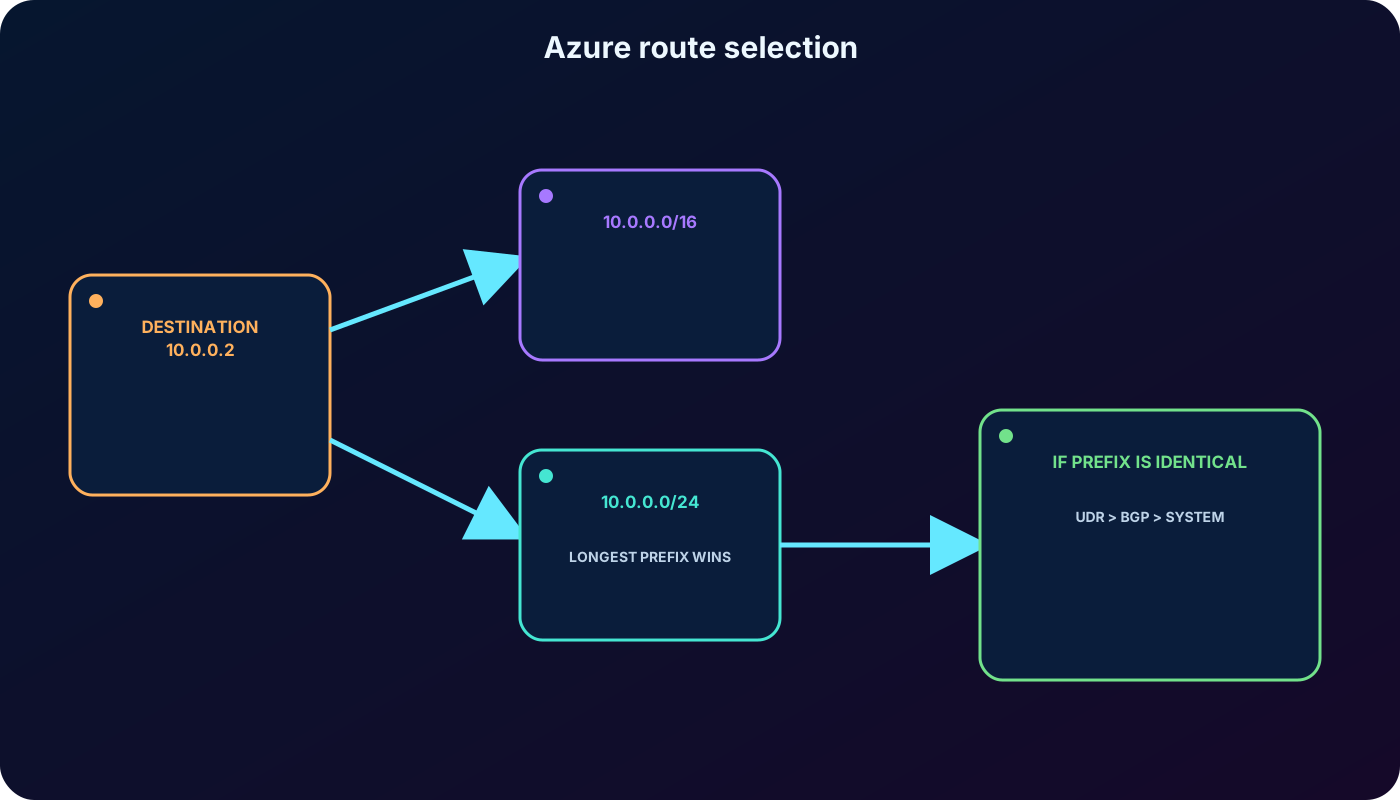
Azure first selects the route whose prefix most specifically contains the destination. For 10.0.0.2, a /24 route beats a /16 route regardless of which one appears first in a list. A longer prefix contains fewer possible addresses and therefore represents the more precise intent.
Only when candidate routes have the same prefix does the general source priority apply: user-defined route, then BGP, then system route. Preferred system routes for VNet, peering, and service endpoints have special platform behavior; service-endpoint routes cannot be overridden. Azure does not allow two UDRs with the same prefix in one table.
Prefix specificity is evaluated before the source hierarchy.
11. Current correction: an Internet system route is not an egress design
The 0.0.0.0/0 system route with Internet next hop still appears in every subnet’s route table. However, routing and source NAT are separate. For APIs released after March 31, 2026, new VNets default to private subnets, so workloads need an explicit outbound method to reach public endpoints.
Use Azure when a subnet needs scalable, predictable outbound-only internet connectivity.
Use an explicitly associated public IP when a specific VM must have one.
Use Standard outbound rules when that architecture is appropriate.
Use a UDR plus an NVA or firewall only when the appliance also supplies the required proxy or NAT behavior and a return path.
Do not treat an Internet UDR on a private subnet as a way to restore outbound access; the current platform blocks that path.
A 0.0.0.0/0 UDR to an NVA is forced tunneling. It can also redirect public Azure-service destinations unless a longer service-endpoint route applies, so evaluate dependencies such as activation, updates, DNS, and management before rollout.
12. An NVA is a VM that performs network functions
A network virtual appliance is a virtual machine or appliance image that controls traffic through routing and a network application. Common functions include firewalling, WAN optimization, application delivery control, routing, load balancing, intrusion detection or prevention, and proxying.
Azure Marketplace offers images from vendors such as Cisco, Check Point, Barracuda, Sophos, WatchGuard, and SonicWall. You can also build a learning NVA from Windows or Linux, but production support, patching, performance, licensing, and high availability must be intentionally designed.
Examples of NVA value.
Need
NVA role
Perimeter protection
Inspect inbound flows and pass only traffic that satisfies security policy.
East-west control
Inspect traffic between application tiers or microsegments.
Forced tunneling
Send internet-bound traffic through a central inspection and egress service.
Specialized networking
Provide vendor routing, WAN optimization, proxy, IDS/IPS, or application-delivery features.
13. Microsegmentation and NIC design shape the data path
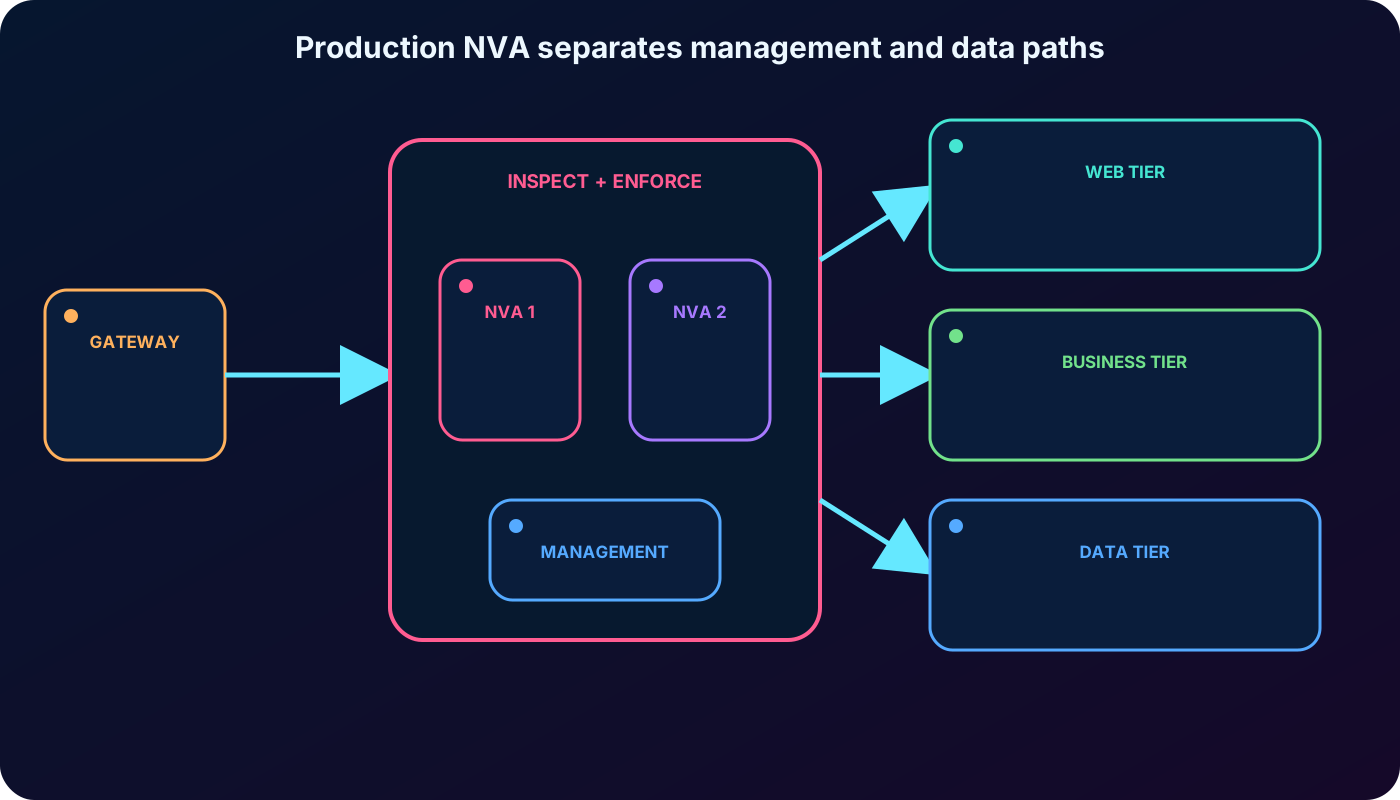
A simple design places the appliance in a perimeter or DMZ subnet and routes selected workload subnets through it. A finer-grained microsegmentation design separates web, business, data, management, and inspection tiers so policy can examine east-west flows. Layer 4 appliances reason about addresses, protocols, and ports; application-aware products can also inspect Layer 7.
Some appliances use a management NIC plus one or more data-plane NICs. The vendor architecture determines which interfaces receive, inspect, and forward a flow. UDRs must target the supported private frontend, and the return path must preserve the stateful appliance’s expectations.
Production NVA design separates management, inspection, and workload paths.
14. An NVA on the route becomes a critical dependency
When every permitted flow depends on an appliance, failure of that appliance becomes a network outage. A production design should use the vendor-supported high-availability pattern: multiple instances across availability zones or sets, health probes, resilient next-hop selection, state synchronization where required, and automated recovery.
An internal load balancer private IP can be used as a supported VirtualAppliance next hop in appropriate designs. Azure Route Server, gateway load balancer, or other patterns may fit particular vendors. The learning lab intentionally uses one VM and is not a production architecture.
15. Lab topology: three subnets and one directional inspection rule
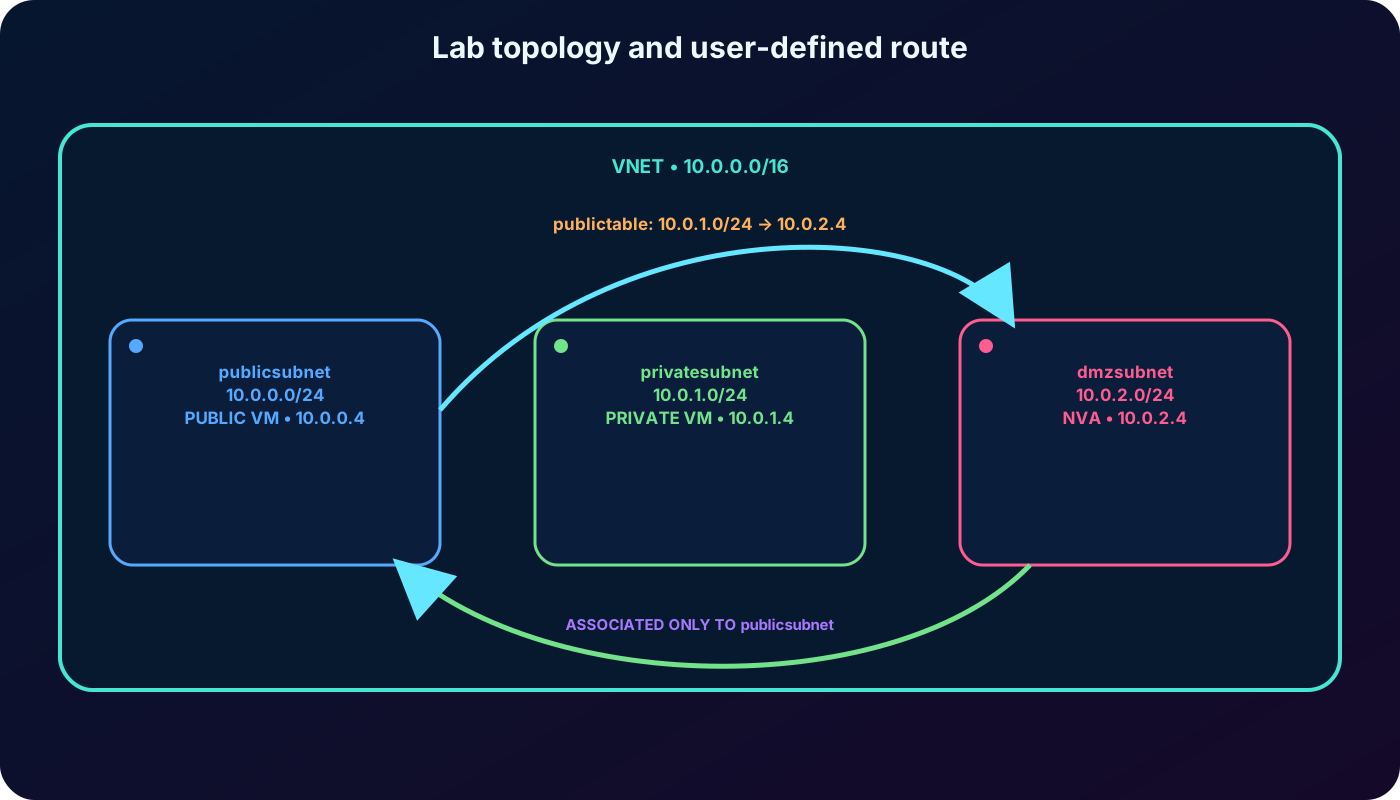
The optional labs build one VNet named vnet with address space 10.0.0.0/16. publicsubnet is 10.0.0.0/24, privatesubnet is 10.0.1.0/24, and dmzsubnet is 10.0.2.0/24. The NVA uses private IP 10.0.2.4. A route named productionsubnet sends destination 10.0.1.0/24 to that appliance and is associated only with publicsubnet.
Resulting learning environment.
Resource
Address or setting
public VM
publicsubnet; expected private IP 10.0.0.4
private VM
privatesubnet; expected private IP 10.0.1.4
nva VM
dmzsubnet; expected private IP 10.0.2.4
publictable
UDR 10.0.1.0/24 → VirtualAppliance 10.0.2.4
Association
publictable → publicsubnet only
Associating the table only with publicsubnet intentionally creates an asymmetric test.
16. Lab 1: create the route table and UDR
Run the lab only in an authorized subscription. Use a dedicated resource group, substitute its name for myResourceGroupName, verify the active subscription in , and clean up afterward. The old instruction to switch to “Classic” Cloud Shell reflects the exported interface and is not a routing requirement.
The first command permits normal gateway-route propagation. The second command changes only traffic whose destination belongs to privatesubnet; it does not send every publicsubnet flow through the NVA.
17. Lab 1: create the VNet, subnets, and association
Listing the subnets confirms the intended CIDRs before association. The update applies publictable to publicsubnet; privatesubnet keeps only its system and optional routes, which explains the later return-path behavior.
18. Lab 2: deploy the Ubuntu learning appliance
The supplied exercise deploys Ubuntu 22.04 LTS in dmzsubnet with an azureuser account. It uses a password placeholder for accessibility. In a real environment, prefer SSH keys, restrict the management source, avoid exposing appliance management directly to the internet, and follow the vendor’s hardening guidance.
19. Forwarding must be enabled in Azure and in the guest
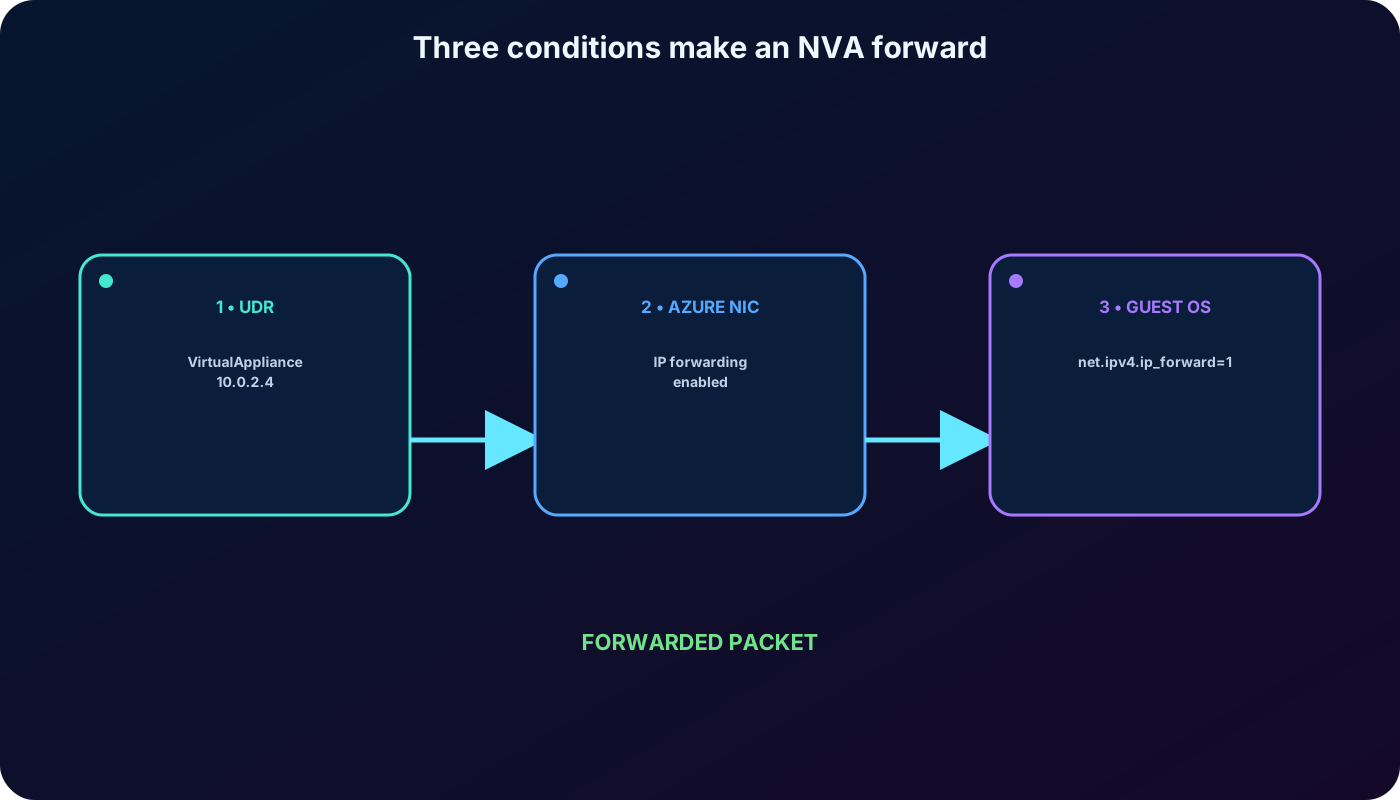
The NIC setting tells Azure to accept packets whose source or destination is not the NVA’s own address. The operating-system setting makes Linux act as a router. Enabling only one side is insufficient.
NICID=$(az vm nic list \
  --resource-group "myResourceGroupName" \
  --vm-name nva \
  --query "[].{id:id}" --output tsv)

NICNAME=$(az vm nic show \
  --resource-group "myResourceGroupName" \
  --vm-name nva \
  --nic $NICID \
  --query "{name:name}" --output tsv)

az network nic update \
  --name $NICNAME \
  --resource-group "myResourceGroupName" \
  --ip-forwarding true

NVAIP="$(az vm list-ip-addresses \
  --resource-group "myResourceGroupName" \
  --name nva \
  --query "[].virtualMachine.network.publicIpAddresses[*].ipAddress" \
  --output tsv)"

ssh -t -o StrictHostKeyChecking=no azureuser@$NVAIP \
  'sudo sysctl -w net.ipv4.ip_forward=1; exit;'
The `sysctl -w` change is runtime-only unless made persistent in the guest configuration. The lab’s disabled host-key check is convenient for a disposable environment but should not be copied into production automation.
UDR, Azure NIC, and guest OS are three separate requirements.
20. Lab 3: deploy test VMs with traceroute
Create cloud-init.txt so both test VMs install the ICMP-capable traceroute package. The exercise gives each VM a public address for SSH; that is a temporary learning convenience, not a recommended private-tier design.
cat > cloud-init.txt <<'EOF'
#cloud-config
package_upgrade: true
packages:
  - inetutils-traceroute
EOF

az vm create \
  --resource-group "myResourceGroupName" --name public \
  --vnet-name vnet --subnet publicsubnet --image Ubuntu2204 \
  --admin-username azureuser --no-wait \
  --custom-data cloud-init.txt --admin-password <password>

az vm create \
  --resource-group "myResourceGroupName" --name private \
  --vnet-name vnet --subnet privatesubnet --image Ubuntu2204 \
  --admin-username azureuser --no-wait \
  --custom-data cloud-init.txt --admin-password <password>

watch -d -n 5 "az vm list \
  --resource-group 'myResourceGroupName' --show-details \
  --query '[*].{Name:name,ProvisioningState:provisioningState,PowerState:powerState}' \
  --output table"
Continue only after every VM reports Succeeded and VM running; stop watch with Ctrl+C. If traceroute is initially missing, cloud-init may still be installing the package, so wait and retry rather than changing the route.
21. Lab 3: trace both directions and explain asymmetry
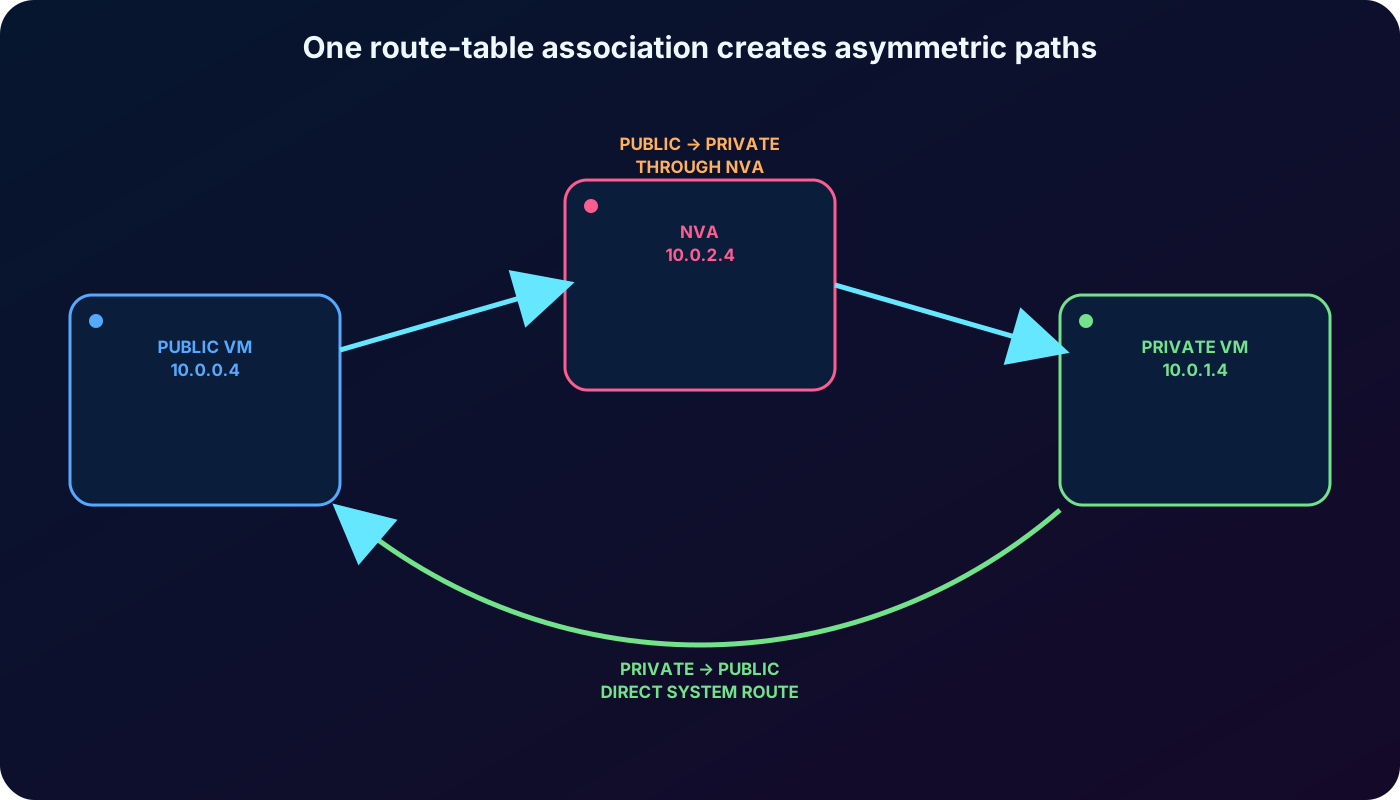
Public-to-private should show 10.0.2.4, the NVA, as hop one and 10.0.1.4 as hop two. Private-to-public should go directly to 10.0.0.4 because privatesubnet has no associated UDR. This is intentional proof that route tables are applied to the source subnet and that routing can be asymmetric.
Production stateful firewalls usually require symmetric paths. Add the appropriate reverse UDR or use a supported symmetric high-availability architecture; otherwise the return packet can bypass the appliance and the session can fail.
The two traceroutes reveal exactly where the route table is associated.
22. Knowledge-check answers and reasoning
Answers from both checks in the supplied module.
Question
Correct answer
Reason
Why use a custom route?
To control traffic flow inside the Azure virtual network.
A UDR changes the next hop; RDP, SSH, and load balancing solve different needs.
Why use VNet peering?
To connect VNets in the same or different supported regions.
Peering creates private connectivity and platform routes; it does not assign public IPs or run inventory reports.
Main NVA benefit?
Control incoming perimeter traffic and pass only flows that meet security requirements.
The appliance inspects and enforces policy before protected tiers.
How can an NVA be deployed?
Configure a forwarding-capable Windows/Linux VM with routes and subnets, or use a partner Marketplace image.
A plain public VM or an backend is not automatically an NVA.
23. Troubleshooting and current design checks
Confirm the route table is associated with the source subnet, not merely created.
Inspect effective routes and verify the expected UDR is Active and wins by longest prefix.
Confirm the VirtualAppliance next-hop IP is directly reachable and belongs to the supported frontend.
Enable IP forwarding on every participating Azure NIC and in the appliance OS or vendor configuration.