Microsoft Entra ID, AD DS, P1/P2, and Domain Services
Cloud identity fundamentals, tenant and subscription boundaries, AD DS comparison, SSO for cloud apps, Microsoft Entra ID P1 and P2, and managed domain services for legacy workloads.
Suggested study time: 32 minutes • Intermediate level • Original rewrite based on the supplied Microsoft Learn module, updated against current documentation
By João Ricardo Dutra••Complete original content
1. Introduction and learning objectives
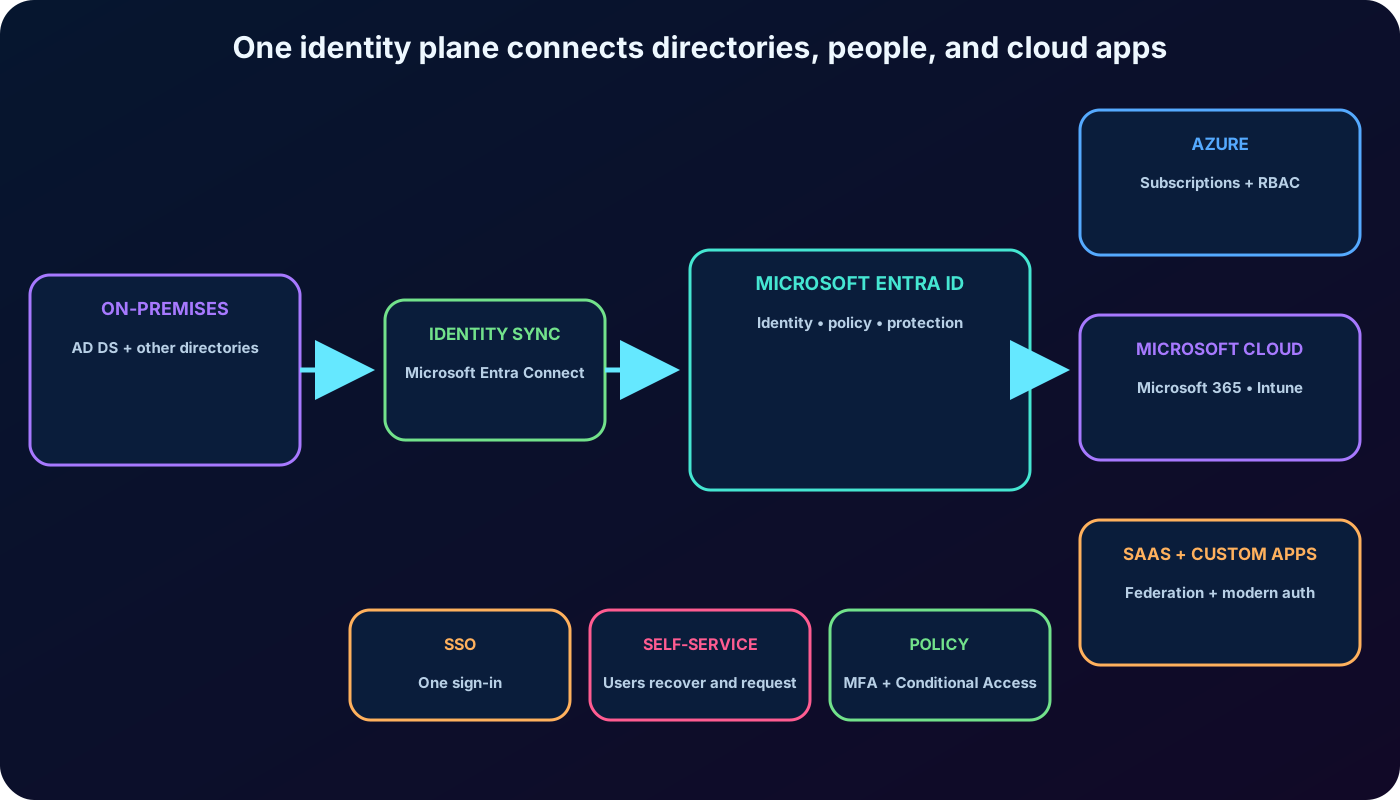
is Microsoft’s cloud identity and access management service. It stores identities, authenticates users and workloads, applies access policy, and helps protect applications and data in cloud and hybrid environments. For an Azure administrator, it is the identity plane behind subscriptions, role assignments, Microsoft cloud services, and many software as a service (SaaS) integrations.
After this chapter, you should be able to
Describe and the administrative problems it solves.
Distinguish from Active Directory Domain Services (AD DS).
Explain how one Microsoft Entra directory supports cloud applications and single sign-on (SSO).
Compare the intent of Free, P1, and P2 capabilities.
Recognize when is an appropriate bridge for traditional domain-dependent workloads.
The three directory choices are complementary rather than simple replacements: AD DS manages traditional domain infrastructure, is an identity as a service control plane for modern applications, and supplies a Microsoft-managed subset of classic domain capabilities inside Azure.
A hybrid identity can originate in an on-premises directory, become available in , and then reach many cloud services through one policy and sign-in plane.
2. Examine
AD DS runs on Windows Server domain controllers that an organization deploys and operates. is instead a Microsoft-managed platform service. Customers configure identities, applications, and policies, while Microsoft operates the underlying directory infrastructure. It is not a domain controller hosted in a virtual machine and it is not a customer-managed forest in Azure.
This service model reduces control over implementation details but also removes the need to size, patch, replicate, back up, and monitor directory servers. also provides capabilities that are not native to a basic AD DS deployment, including multifactor authentication (MFA), identity risk protection, self-service password reset, modern application federation, and policy decisions informed by users, devices, locations, and risk.
Common administrative uses
Create and manage users, groups, devices, applications, and workload identities.
Provision users and grant access to applications and Azure resources.
Configure SSO for Microsoft services and third-party SaaS applications.
Federate identities across organizations and external identity providers.
Detect unusual sign-in activity and respond with identity protection controls.
Require MFA and enforce Conditional Access for users and devices.
Extend an on-premises AD DS identity into the cloud with synchronization.
Publish selected on-premises web applications through Microsoft Entra application proxy.
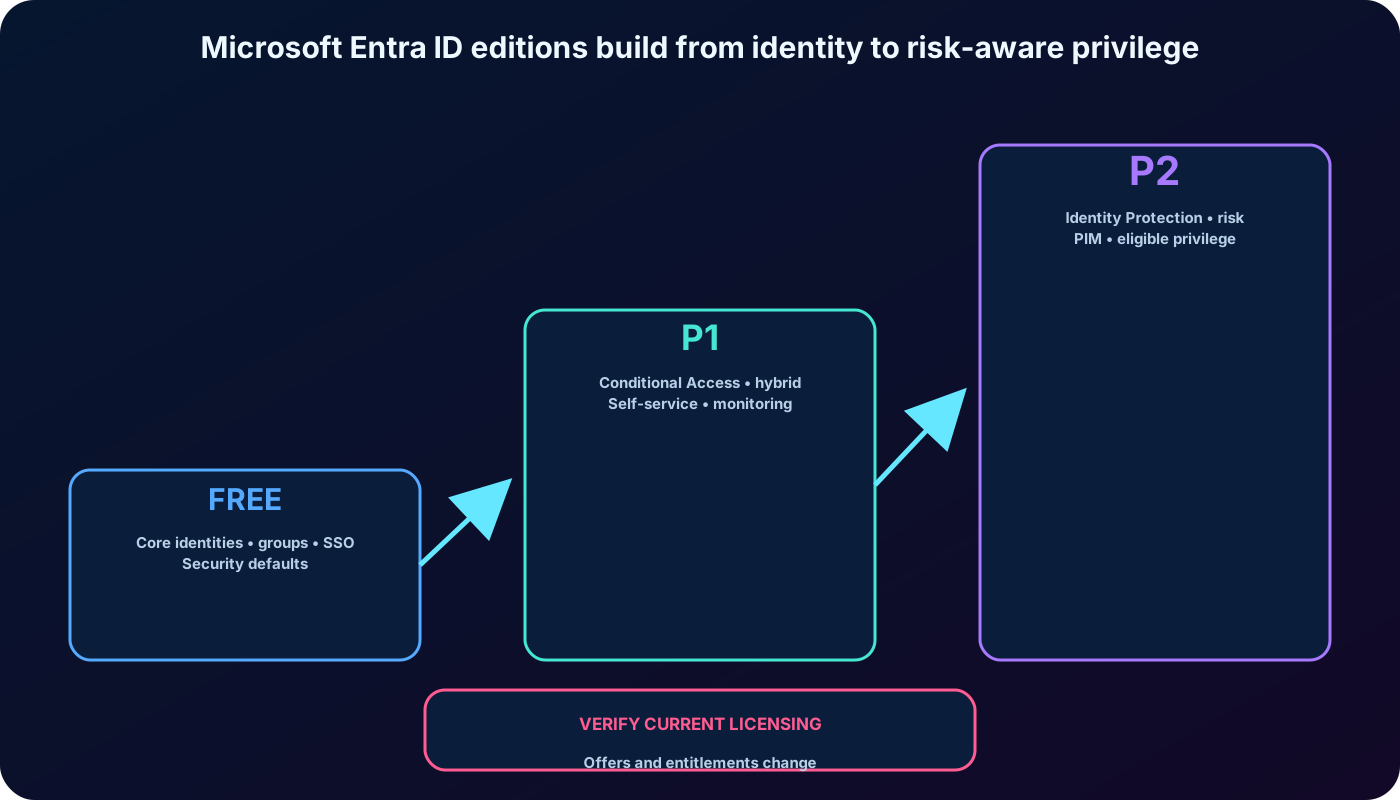
Every Azure subscription and subscriptions to services such as Microsoft 365 or Microsoft Intune have access to a Microsoft Entra tenant. The Free edition supplies the identity foundation; licensed capabilities add governance, access, monitoring, and risk controls. Because offers change, an administrator should confirm the current feature matrix before designing or purchasing licenses.
3. Tenants, subscriptions, domains, and directory objects
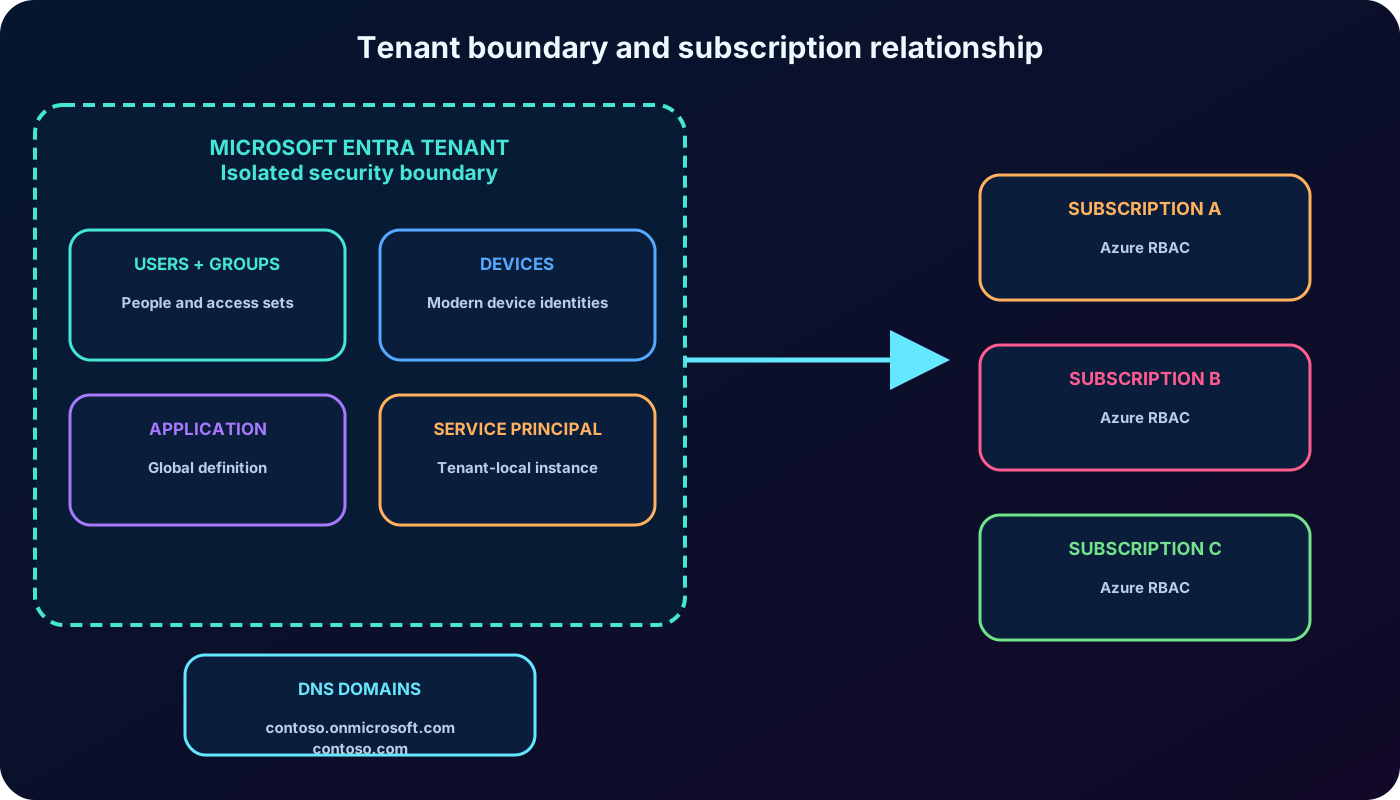
A tenant is an isolated instance of and usually represents an organization. is multi-tenant by design, but objects and policies in one tenant remain separated from another tenant. A company can create multiple tenants—for example, to isolate a laboratory—but each Azure subscription is associated with exactly one tenant at a time.
This isolation model lets the platform operate at global scale across very large numbers of directory instances and authentication requests. In the classic sign-up flow described by the module, creating a subscription with a Microsoft account could automatically provision a tenant displayed as Default Directory; administrators should identify it by tenant ID and verified domains rather than rely on that generic display name.
That association lets identities in the selected tenant receive Azure role-based access control (RBAC) assignments over the subscription’s resources. One tenant can support several Azure subscriptions, so the same users, groups, service principals, and policies can govern more than one subscription.
A new tenant receives an initial DNS name with a unique prefix and the onmicrosoft.com suffix.
Administrators commonly verify one or more custom DNS domains owned by the organization.
The tenant is both a security boundary and a container for users, groups, devices, applications, and other directory objects.
A subscription-to-tenant relationship is not the same thing as deploying AD DS in an Azure virtual machine.
The Microsoft Entra schema is flatter and contains fewer traditional object types than AD DS. It has a device class rather than the classic AD DS computer-domain model, and Microsoft Entra join differs from joining a computer to an AD DS domain. Schema extensions are reversible, but does not provide OUs or GPOs; modern device management and group-based targeting replace those mechanisms.
Applications use two related objects. An application object is the global definition of an application. A service principal is that application’s local identity and instance in a tenant. This split allows one application definition to be used by several tenants, each with its own service principal, consent, assignments, and local settings.
A subscription trusts one tenant at a time for identity, while one tenant can supply identities and role assignments to several subscriptions.
4. Characteristics of Active Directory Domain Services
AD DS is the traditional Windows Server directory service for an enterprise network. It is one member of a broader Active Directory family that has included Active Directory Certificate Services, Active Directory Lightweight Directory Services, Active Directory Federation Services, and Active Directory Rights Management Services.
It is a hierarchical, X.500-based directory.
DNS locates resources such as domain controllers.
LDAP is used to query and manage directory data.
Kerberos is the primary authentication protocol, with NTLM retained for compatible scenarios.
Organizational units (OUs) and Group Policy Objects (GPOs) structure administration and configuration.
Computer objects represent machines joined to the domain.
Domain and forest trusts support access and delegated administration across boundaries.
Running AD DS on an Azure virtual machine does not turn it into . It remains a self-managed domain controller. Microsoft recommends putting the AD DS database, logs, and SYSVOL on one or more Azure data disks rather than the operating-system disk, with host caching set to None for those disks. The organization remains responsible for domain-controller availability, patching, replication, backup, and recovery.
5. compared with AD DS
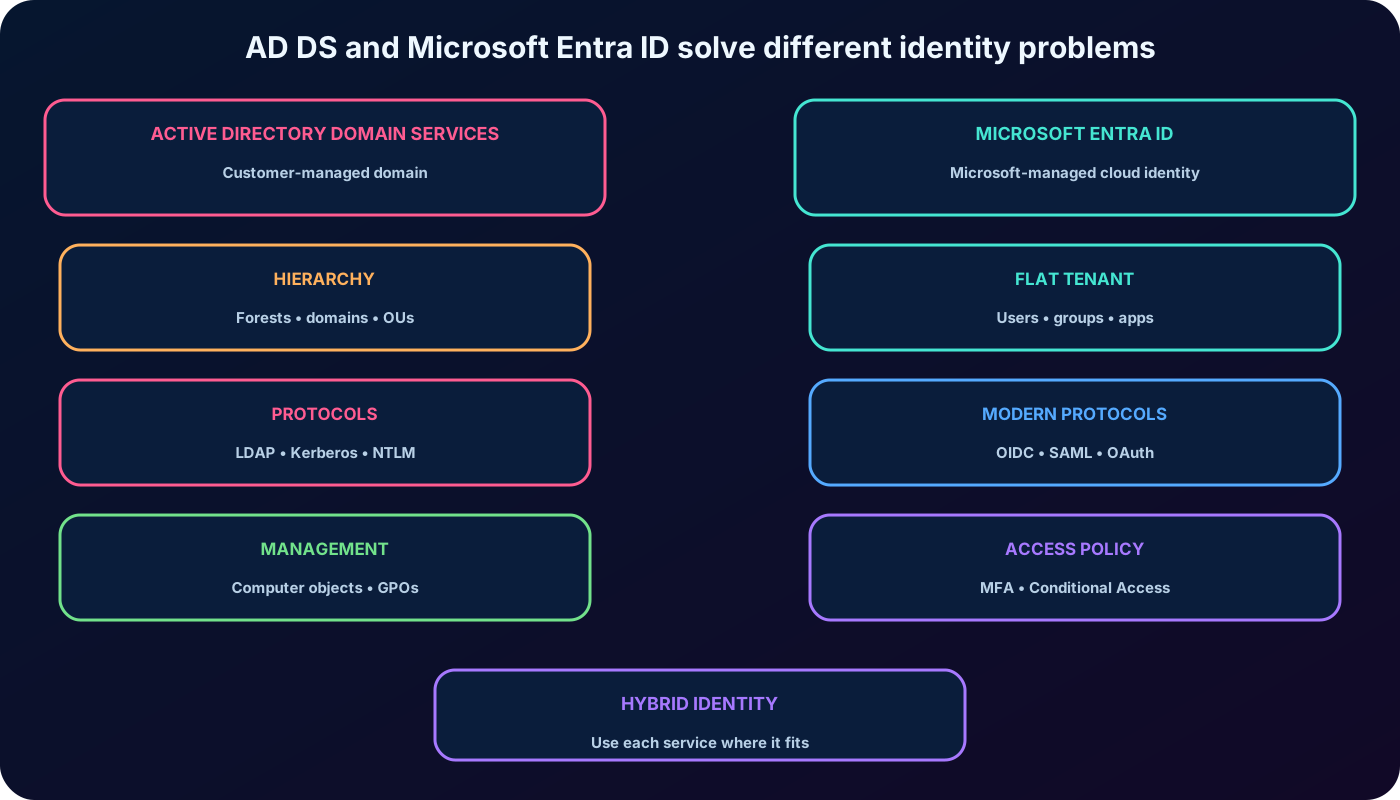
The services overlap in identity, but their protocols and management models target different workloads.
Dimension
Active Directory Domain Services
Primary focus
Corporate infrastructure, domain members, and traditional applications.
Identity and access for internet, cloud, SaaS, and modern applications.
Structure
Hierarchical forests, domains, and OUs.
Flat tenant with users, groups, devices, and applications; no OUs or GPOs.
Directory access
LDAP and DNS-centric discovery.
Microsoft Graph and REST APIs over HTTP/HTTPS.
Authentication
Primarily Kerberos; NTLM for compatibility.
Modern protocols such as SAML, WS-Federation, and OpenID Connect.
Authorization
Domain ACLs, groups, and infrastructure controls.
OAuth authorization, roles, application permissions, and Conditional Access.
Devices
Computer objects, domain join, and Group Policy.
Device identities, Microsoft Entra join, Microsoft Intune, and compliance signals.
External trust
Domain and forest trusts.
Application federation, B2B collaboration, and external identity providers.
Operations
Customer deploys and manages domain controllers.
Microsoft operates the directory platform.
is designed for internet communications over HTTP and HTTPS, normally ports 80 and 443. It does not expose an LDAP endpoint and it does not authenticate applications with Kerberos. The supplied module names OAuth as an authentication protocol in one assessment item; more precisely, OAuth is an authorization framework, while OpenID Connect adds authentication on top of OAuth 2.0.
Federation lets establish trust with Microsoft services, enterprise applications, and external identity providers. AD DS and are therefore often deployed together: AD DS continues to serve legacy infrastructure while synchronized identities and modern protocols provide access to the cloud.
Choose the directory model from application and management requirements, not from where a server happens to run.
6. One directory for cloud applications
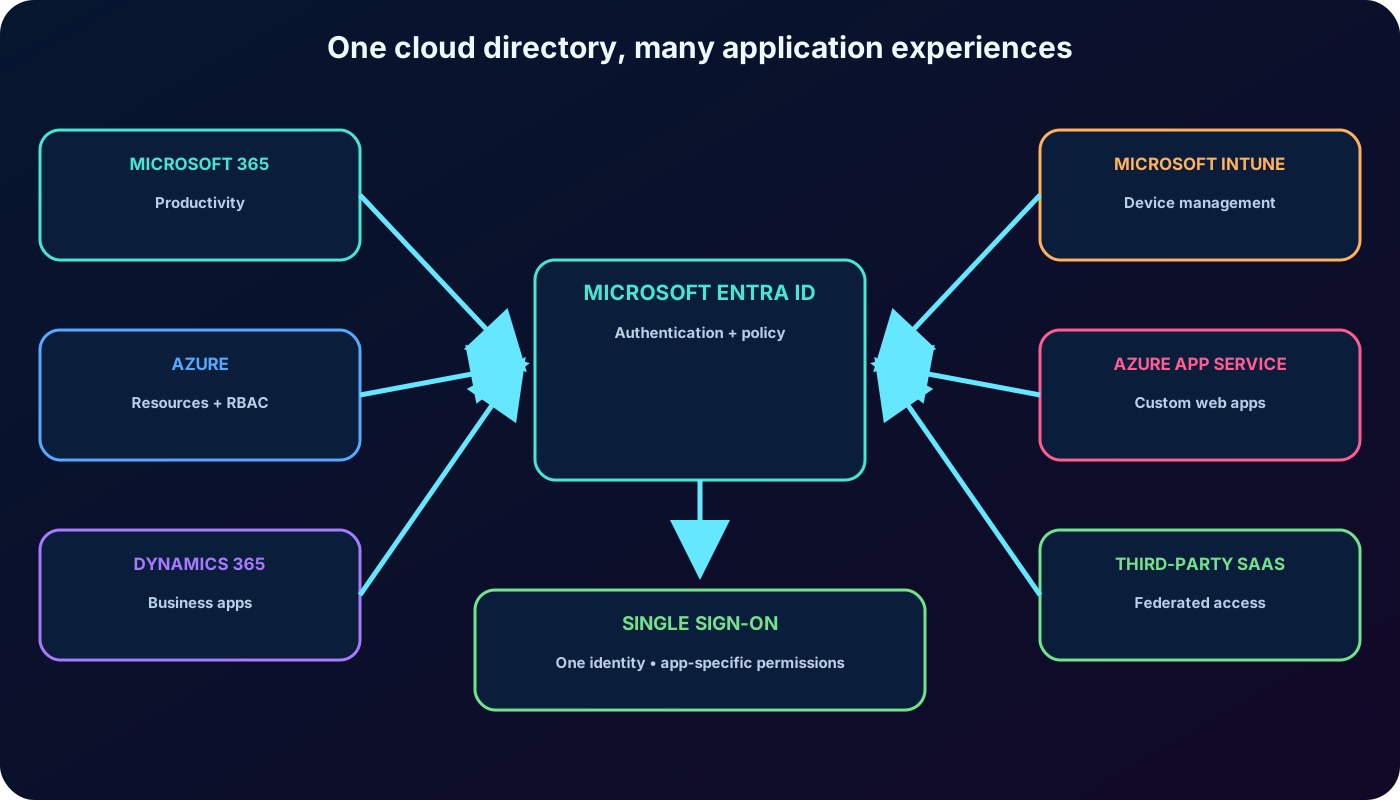
Microsoft 365, Azure, Microsoft Dynamics 365, Microsoft Intune, and other cloud services need a cloud directory for authentication and authorization. Separate directories for every service would multiply accounts and policies. Linking the services to one Microsoft Entra tenant gives an organization one identity plane and a more consistent SSO experience.
Developers can delegate authentication and authorization to rather than creating a credential store for every application. The tenant can also connect cloud identities with on-premises AD DS and federate with third-party providers, allowing a user to move among authorized applications without repeatedly maintaining separate passwords.
The supplied examples include identities from Facebook, Google services, and Yahoo. Provider availability and configuration can change, but the lasting concept is federation: accepts a trusted external identity and applies access rules to the target application.
The built-in authentication of Azure can add Microsoft Entra sign-in to a web application from the Authentication settings in the . The administrator selects or registers the identity provider, configures whether unauthenticated requests are allowed, and can require a valid identity from the intended tenant. Authentication settings are resources associated with the app and can be configured per deployment slot when environments need different behavior.
Modern tooling has replaced the export’s 2013-era workflow, but the architectural point remains: platform integration makes centralized identity easier than implementing the protocols directly inside every custom application.
A shared cloud directory centralizes identities and application access while each application still enforces its own permissions.
7. Free, P1, and P2: how to read the editions
Free is included with Microsoft cloud subscriptions such as Azure and Microsoft 365. P1 and P2 are per-user premium license levels that can be purchased separately or included in qualifying Microsoft 365 and Enterprise Mobility + Security offers. Trial availability and bundled products vary over time.
The export specifically describes an Enterprise Mobility + Security bundle that also carried and Microsoft Intune rights. Treat that as historical purchasing context, not a current package guarantee; use the current Microsoft product and service-plan tables for procurement.
The supplied material contrasts Free and older Office 365 or Basic editions with P1 and P2. Current licensing documentation should be the source of truth: old edition names and feature bundles change, and a feature can require both an Entra license and a license for the service whose signal or resource it uses.
A durable exam-oriented way to distinguish the levels.
Level
Identity design intent
Representative capabilities
Free
Core users, groups, authentication, and baseline protections.
Conditional Access, advanced group and self-service capabilities, password writeback scenarios, and additional monitoring/health features.
P2
Risk-based and privileged identity protection.
Protection risk policies and Microsoft Entra Privileged Identity Management (PIM), in addition to P1 capabilities.
8. Capabilities associated with P1
Self-service group management can let users request membership and let group owners approve requests and maintain membership, reducing routine administrator work.
Conditional Access evaluates signals such as user or group, application, device state, location, and—when licensed—risk before granting, blocking, or adding requirements to access.
Self-service password reset with writeback can apply an on-premises AD DS password policy and send the new password back to the local directory in supported hybrid designs.
Microsoft Entra Connect Health and licensed monitoring capabilities provide operational insight through alerts, performance, usage, and configuration information.
Microsoft Identity Manager licensing has historically been associated with P1/P2 hybrid identity scenarios and can connect stores such as AD DS, LDAP directories, Oracle systems, and line-of-business applications.
The exported module associates full MFA integrations with P1, including VPN or RADIUS-based access and Microsoft, Azure, and gallery applications. Modern clients use supported modern authentication rather than the export’s old warning about non-browser software such as Microsoft Outlook.
The export also names advanced reports, alerts, and Cloud App Discovery. Current reporting and application-discovery entitlements have evolved, so verify the present feature matrix instead of treating those historical labels as a purchasing checklist.
The source quotes a 99.9% enterprise SLA for premium editions and the discontinued Basic edition. Service-level terms can change independently of exam concepts; confirm the current SLA when designing a production commitment.
9. Capabilities associated with P2
P2 adds controls for identity risk and privileged access on top of the P1 foundation. Protection detects risk signals and enables user-risk and sign-in-risk policies through Conditional Access. Administrators can investigate risky users, risky sign-ins, and detections, then remediate, dismiss, or confirm them according to incident evidence.
Microsoft Entra Privileged Identity Management (PIM) replaces unnecessary permanent privilege with eligible, time-bound activation. A policy can require MFA, justification, approval, or a limited activation duration, and the audit history records assignments and activations. This is the key answer when an exam scenario asks how to manage temporary and permanent administrative role access.
Current licensing also offers Governance and Microsoft Entra Suite combinations. PIM and risk-based policies therefore must be checked against the actual product license assigned to each in-scope user; “P2” is a reliable study distinction but not the only modern package that can provide a capability.
P2 includes the P1 identity foundation and adds risk-aware and just-in-time privilege controls; always validate the current license matrix.
10. Examine
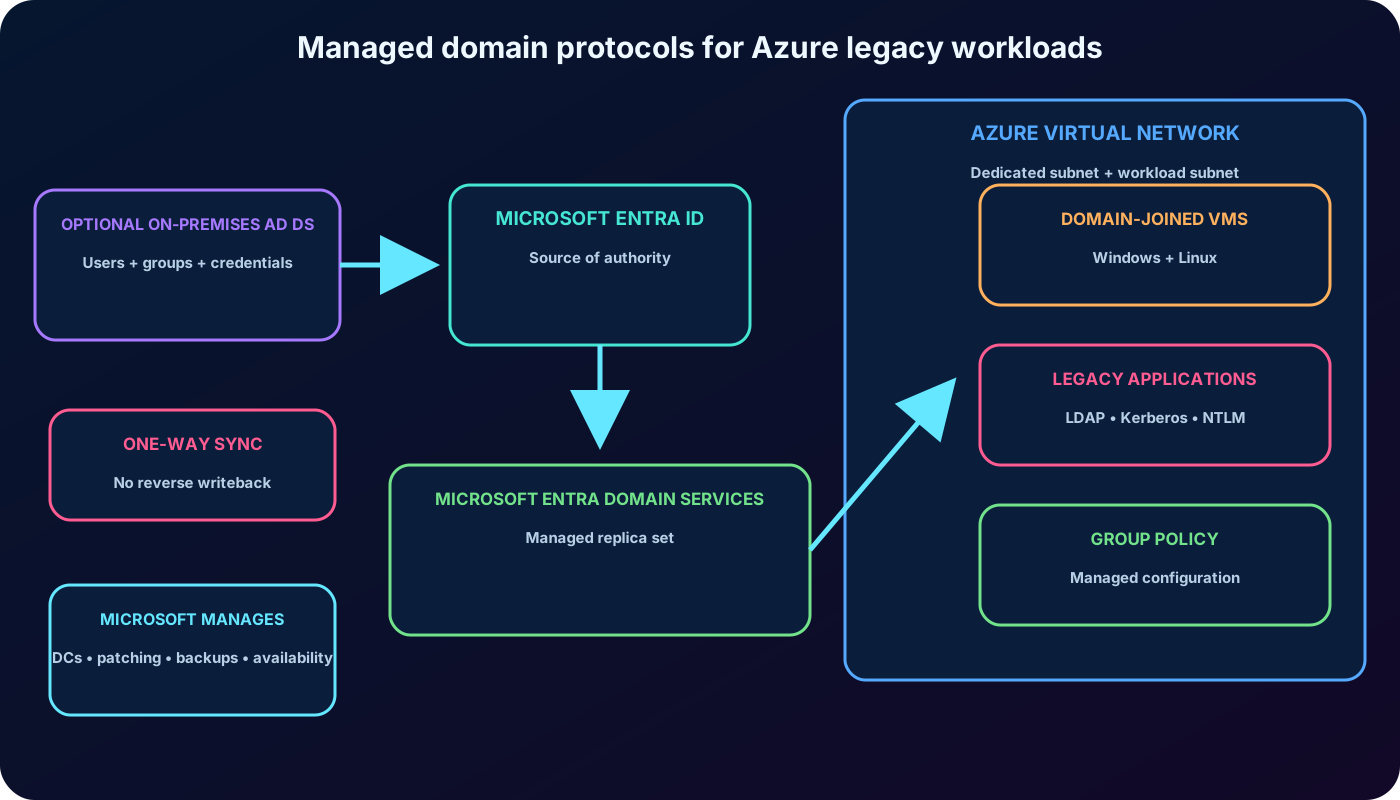
Many line-of-business applications still expect a domain join, LDAP, Group Policy, Kerberos, or NTLM. Moving them to Azure creates an identity decision. An organization can keep authentication on-premises across a site-to-site VPN, deploy replica AD DS domain controllers as Azure virtual machines, modernize the application, or use .
With a VPN-only design, authentication requests cross the VPN. With replica domain controllers in Azure, AD DS replication crosses the VPN while cloud authentication remains near the workload. Both designs add network or domain-controller operations. offers a managed domain inside an Azure without requiring the customer to deploy, patch, monitor, or back up its own cloud domain controllers.
The service supplies domain join, Group Policy, DNS, LDAP/LDAPS, and Kerberos/NTLM authentication. is the source of authority, and users, groups, memberships, and the credential hashes needed by the traditional protocols synchronize one way into the managed domain. A hybrid tenant can first synchronize identities from on-premises AD DS into ; a cloud-only tenant can use Domain Services without having an on-premises domain.
This pattern supports lift-and-shift migrations for applications such as workloads built around Microsoft SQL Server or Microsoft SharePoint Server. It can remove a VPN maintained only for authentication and can avoid customer-managed domain controllers in Azure, while new applications continue to use and modern authentication directly.
The managed domain brings traditional protocols close to Azure workloads; it is a separate managed domain, not a writable replica of or an automatic extension of the on-premises forest.
11. Benefits, boundaries, deployment, and cost
Microsoft manages the domain controllers, platform patching, availability, backups, and underlying replication.
Administrators do not receive Domain Admin or Enterprise Admin control over the managed domain; delegated tasks use the AAD DC Administrators group.
Synchronization from is one way. Changes to synchronized user attributes, passwords, or group memberships are made at the source, not written back from the managed domain.
The schema cannot be extended as it can in a fully customer-managed AD DS forest.
The managed domain supports built-in and custom OUs and Group Policy administration, but it does not provide every feature or unrestricted behavior of self-managed AD DS.
LDAP writes apply only to objects created inside the managed domain; synchronized objects remain largely read-only.
The managed domain is stand-alone. Forest trusts can support selected hybrid access scenarios, but it should not be described as a replica of the on-premises domain.
The export describes only a base computer object, a flat OU model, no nested OUs, one built-in user and computer GPO, and no OU, WMI, or security-group targeting. Those statements reflect an older service state. Current Microsoft documentation supports custom OUs and current Group Policy administration; validate each application’s schema, write, trust, and policy dependencies during migration rather than relying on the historical limitations list.
Create a managed domain through the Microsoft Entra admin center, select the Azure subscription, resource group, DNS namespace, SKU, Azure , and dedicated subnet, and then update the virtual network DNS settings as required. The platform deploys a managed replica set of domain controllers into the selected region.
Domain Services is not automatically included in P1 or P2. Current billing accrues hourly according to the selected SKU. SKU guidance considers directory object count, authentication volume, performance, and backup frequency; the older variable charge based directly on directory size is no longer the current model.
12. Explained module assessment
The nine supplied questions, rewritten and explained.
Question
Best answer
Reason
How does the basic organizational model differ?
is flat; AD DS uses a hierarchy with OUs.
organizes access with groups, roles, and modern policy rather than AD DS OUs and GPOs.
Which study-plan level is associated with advanced access policy and reporting?
P1.
P1 is the module’s policy-driven premium tier; current reporting entitlements still require a license check.
Which historical Domain Services limitation did the module emphasize?
A flat OU structure.
That was the exported answer, but the current service supports custom OUs, so do not generalize the old statement to a live design.
Which framework does use for authorization instead of AD DS protocols?
OAuth.
Kerberos authenticates traditional domain users and LDAP accesses directory data; OAuth delegates authorization.
Which plan is associated with user-risk and sign-in-risk policies?
Which answer did the module expect for internet application authentication?
OAuth.
For technical precision, OAuth authorizes; OpenID Connect performs authentication on top of OAuth 2.0.
Which P2 capability manages eligible, temporary, and permanent administration?
Microsoft Entra Privileged Identity Management.
PIM adds activation workflows, time limits, approvals, and audit history to privileged roles.
What is ’s primary focus compared with AD DS?
Identity management for web and cloud applications.
AD DS primarily manages domain infrastructure and traditional corporate applications.
Which capability is an advantage for cloud applications?
Multifactor authentication.
MFA is integrated into the cloud identity and policy plane rather than being a native basic AD DS feature.
13. Chapter summary
is a Microsoft-managed, multi-tenant identity and access service for cloud and hybrid resources.
A tenant is an isolated identity boundary; one tenant can serve several subscriptions, while each subscription trusts one tenant at a time.
AD DS supplies hierarchical domain infrastructure through DNS, LDAP, Kerberos, OUs, GPOs, computer objects, and trusts.
uses a flat model, REST and Microsoft Graph, modern federation, OAuth authorization, and protocols such as OpenID Connect and SAML.
One Microsoft Entra tenant can centralize SSO and application access across Microsoft cloud services, custom apps, and third-party SaaS.
P1 represents policy-driven and hybrid access capabilities; P2 adds identity risk protection and privileged identity management.
supplies managed LDAP, domain join, Group Policy, Kerberos, and NTLM for workloads that cannot yet use modern identity.
Licensing and managed-domain behavior evolve. Use current Microsoft documentation for purchasing and architecture while retaining the service distinctions needed for AZ-104.