Azure network security groups: effective rules, ASGs, and traffic control
Filter inbound and outbound traffic with NSGs, reason about priority and stateful evaluation, group workloads with ASGs, troubleshoot effective rules, and implement the supplied virtual-networking lab.
Suggested study time: 60 minutes • Intermediate • Original rewrite based on the supplied Microsoft Learn module and updated against current Azure network-security documentation
By João Ricardo Dutra••Complete original content
1. Turn the migration requirement into traffic policy
A company with several locations will move critical systems to Azure only if it can tightly control which computers reach its application servers and Azure services. A network security group (NSG) supplies distributed Layer 3 and Layer 4 filtering for resources in a . Its security rules allow or deny inbound and outbound flows.
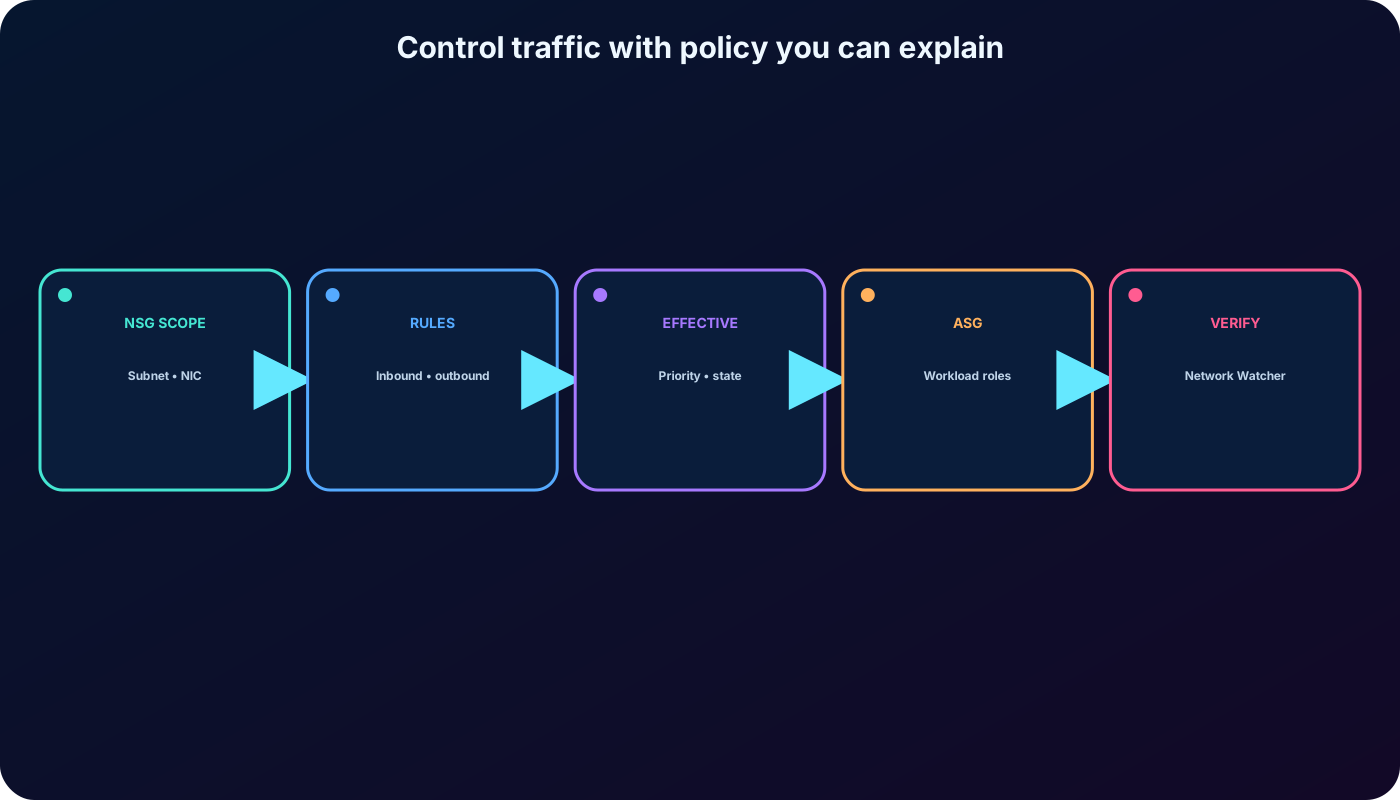
This chapter develops the complete administrative task: choose where an NSG belongs, design rules from the five-tuple, understand default and effective rules, organize changing workloads with application security groups (ASGs), run the supplied lab, and troubleshoot the result with current Azure tools.
Determine when to use an NSG and associate it with a subnet or network interface.
Create, prioritize, implement, and evaluate inbound and outbound security rules.
Explain augmented rules, service tags, stateful filtering, and effective rules.
Use ASGs to express application roles without maintaining individual IP addresses.
Implement the virtual-networking, NSG, ASG, and optional DNS laboratory.
Traffic control is a chain of scope, direction, priority, matching conditions, state, and every policy layer on the path.
2. What an NSG controls—and what it does not
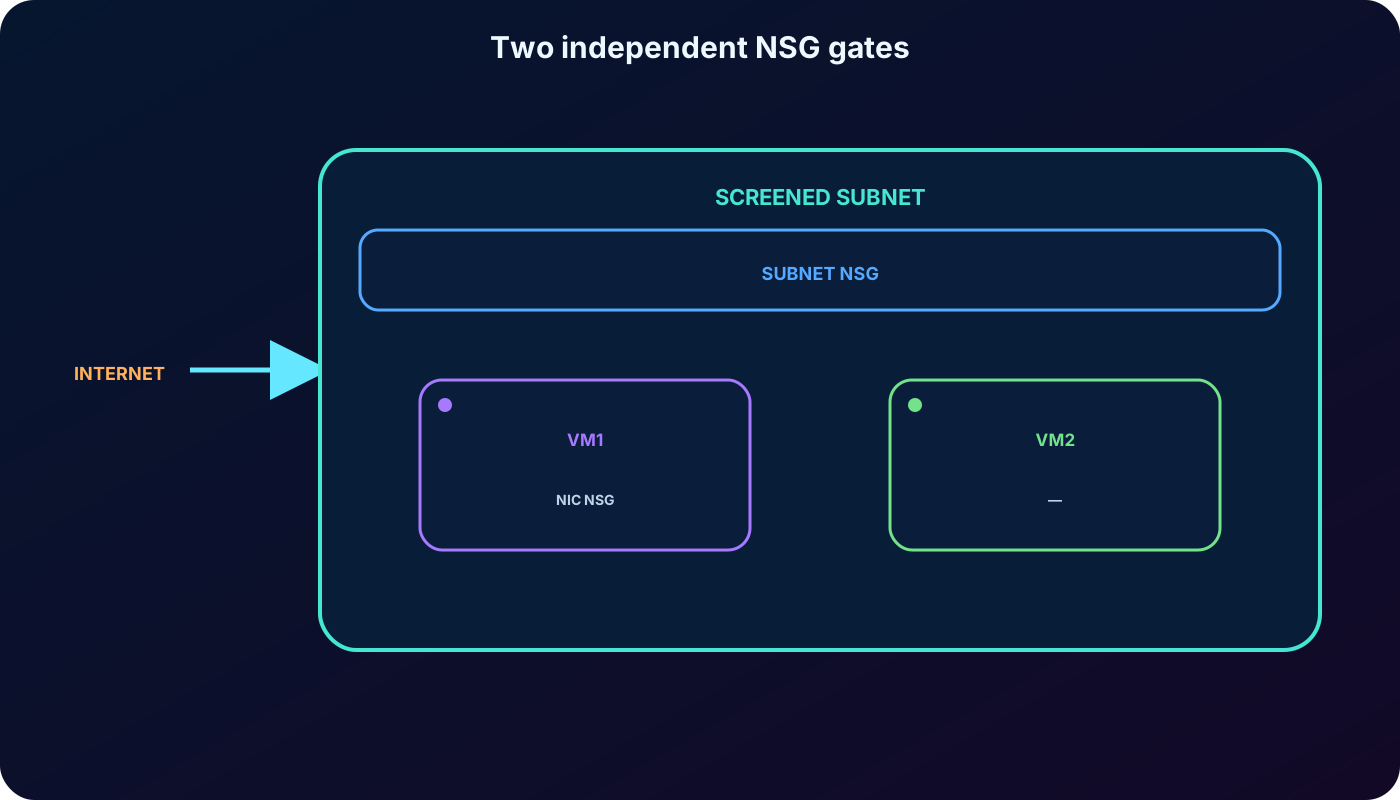
An NSG is a reusable collection of allow and deny rules. It can be associated multiple times, but each subnet and each network interface can have at most one directly associated NSG. A subnet association applies the policy to every supported resource in that subnet; a NIC association adds resource-specific filtering for traffic through that interface.
NSGs filter traffic; they do not create a route, public endpoint, DNS answer, or outbound translation path.
Rules operate on IP addresses, protocols, and ports, not URL paths, HTTP headers, user identities, or malware content.
The virtual-machine overview and the network resource pages show associated subnets, NICs, NSGs, and rules.
If no NSG is associated at a level, traffic is not filtered by an NSG at that level; other platform, route, firewall, and guest controls can still apply.
3. Subnet scope, NIC scope, and a screened subnet
Choose the narrowest maintainable scope that enforces the intended boundary.
Association
Effect
Typical decision
Subnet NSG
Filters flows for supported resources in the subnet.
Shared baseline for a web, app, data, management, or screened subnet.
NIC NSG
Filters flows through one network interface.
Exception or additional protection for a specific VM.
Both
Both NSGs are evaluated independently; the flow must be allowed at every applicable NSG layer.
Use only when the extra granularity justifies additional troubleshooting complexity.
A screened subnet, traditionally called a DMZ, buffers internet-facing resources from trusted internal systems. An NSG can restrict the screened subnet, while an or another inspection service supplies richer centralized policy when required.
A subnet NSG supplies the shared boundary, while a NIC NSG can add a second independent gate.
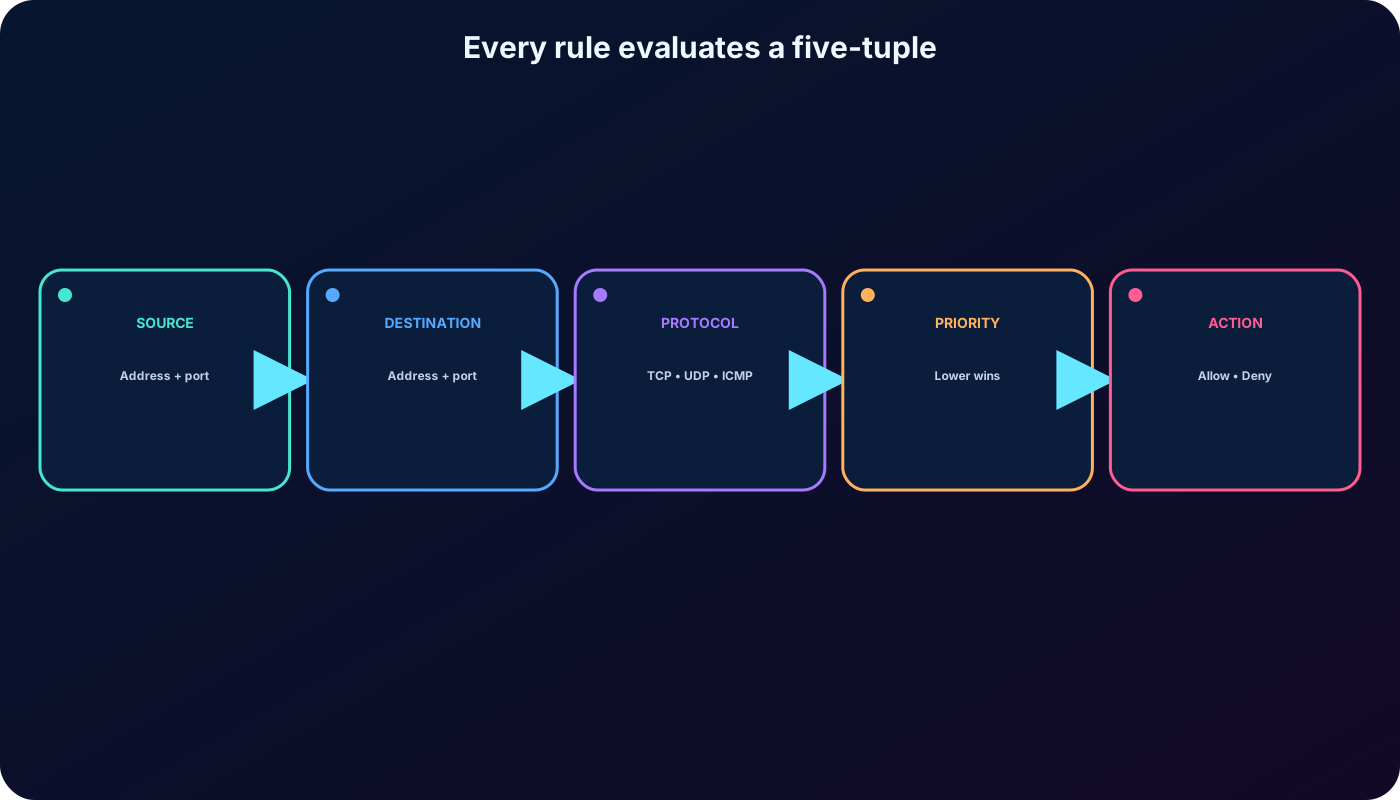
4. Every custom rule describes a five-tuple and a decision
Core NSG rule properties.
Property
Meaning
Name
Unique rule name in the NSG; current limit is 80 characters with documented character rules.
Priority
100 through 4096. Lower number is evaluated first. Priority must be unique within the same direction.
Source and source ports
Any, IP/CIDR, service tag, or ASG plus the originating port or range.
Destination and destination ports
Any, IP/CIDR, service tag, or ASG plus the service port or range.
Protocol
TCP, UDP, ICMP, ESP, AH, or Any. ESP and AH require or another supported nonportal interface.
Direction
Inbound or outbound relative to the protected resource.
Action
Allow or Deny. Processing stops at the first matching rule in that NSG.
Azure evaluates source address, source port, destination address, destination port, and protocol. For inbound traffic, public-to-private address translation occurs before NSG processing; use the destination’s private address when a rule targets a specific Azure resource. Outbound NSG processing happens before private-to-public translation.
Write each rule from the intended flow, not from a vague statement such as “open the server.”
5. Priority makes the first matching rule decisive
Custom rules are processed from the lowest priority number to the highest. When a packet matches, Azure applies the action and stops evaluating later rules in that NSG. Leave deliberate gaps such as 100, 200, and 300 so an urgent rule can be inserted without renumbering the policy.
A priority of 100 takes precedence over 110 or 200.
An Allow at 100 can make a broader Deny at 200 irrelevant for the matching flow.
A Deny at 100 blocks the flow even if a broader Allow exists at 300.
Priority values may be reused in the opposite direction; the conflict restriction is the same priority and direction.
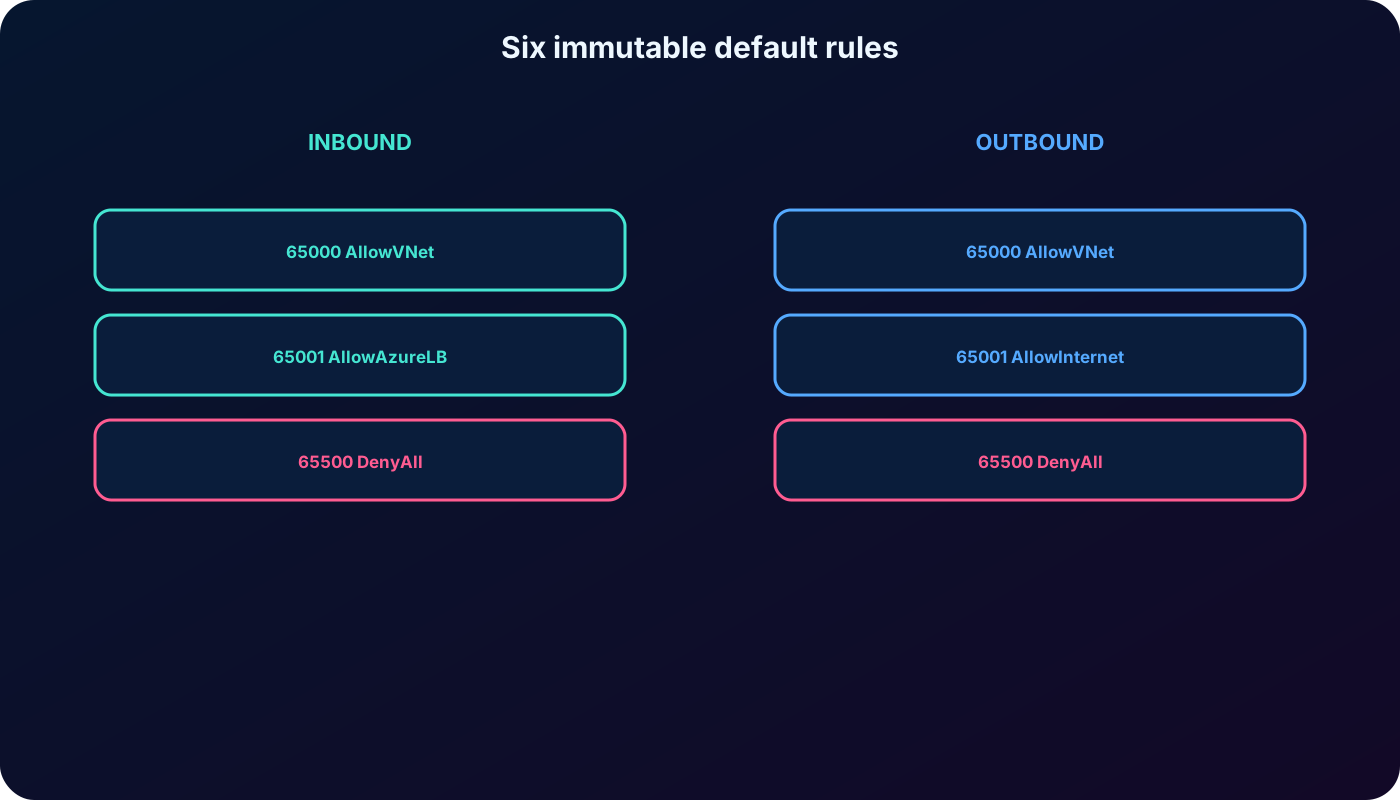
Default rules use 65000, 65001, and 65500, so any valid custom priority is evaluated first.
6. Default inbound rules establish a baseline
Default inbound rules created in every NSG.
Priority
Rule
Source
Destination
Access
65000
AllowVNetInBound
VirtualNetwork
VirtualNetwork
Allow Any
65001
AllowAzureLoadBalancerInBound
AzureLoadBalancer
Any
Allow Any
65500
DenyAllInBound
Any
Any
Deny Any
The result is deny-by-default for unsolicited inbound traffic except traffic represented by the VirtualNetwork and AzureLoadBalancer service tags. The VirtualNetwork tag is broader than a single subnet and can include peered and connected address spaces, so do not assume the default automatically provides workload isolation.
7. Default outbound rules permit policy, not connectivity
Default outbound rules created in every NSG.
Priority
Rule
Source
Destination
Access
65000
AllowVnetOutBound
VirtualNetwork
VirtualNetwork
Allow Any
65001
AllowInternetOutBound
Any
Internet
Allow Any
65500
DenyAllOutBound
Any
Any
Deny Any
These rules cannot be deleted, but a higher-priority custom rule can override them. AllowInternetOutBound means the NSG permits a matching flow; it does not supply NAT, a route, or a public address. A private subnet still needs an explicit outbound method such as ,, or a supported outbound rule.
Custom priorities 100–4096 are evaluated before the immutable default rules.
8. NSGs are stateful and rule changes affect new connections
An NSG keeps a flow record. If an outbound TCP connection to port 80 is allowed, the reply traffic does not require a separate inbound rule. Likewise, a response to an allowed inbound connection does not need a matching outbound rule. A rule is required when the connection is initiated in that direction.
Removing or tightening an Allow rule does not interrupt an already established connection. New and updated rules apply to new connections. During validation, close the session or generate a fresh flow before concluding that a rule change failed.
9. Effective evaluation across subnet and NIC scopes
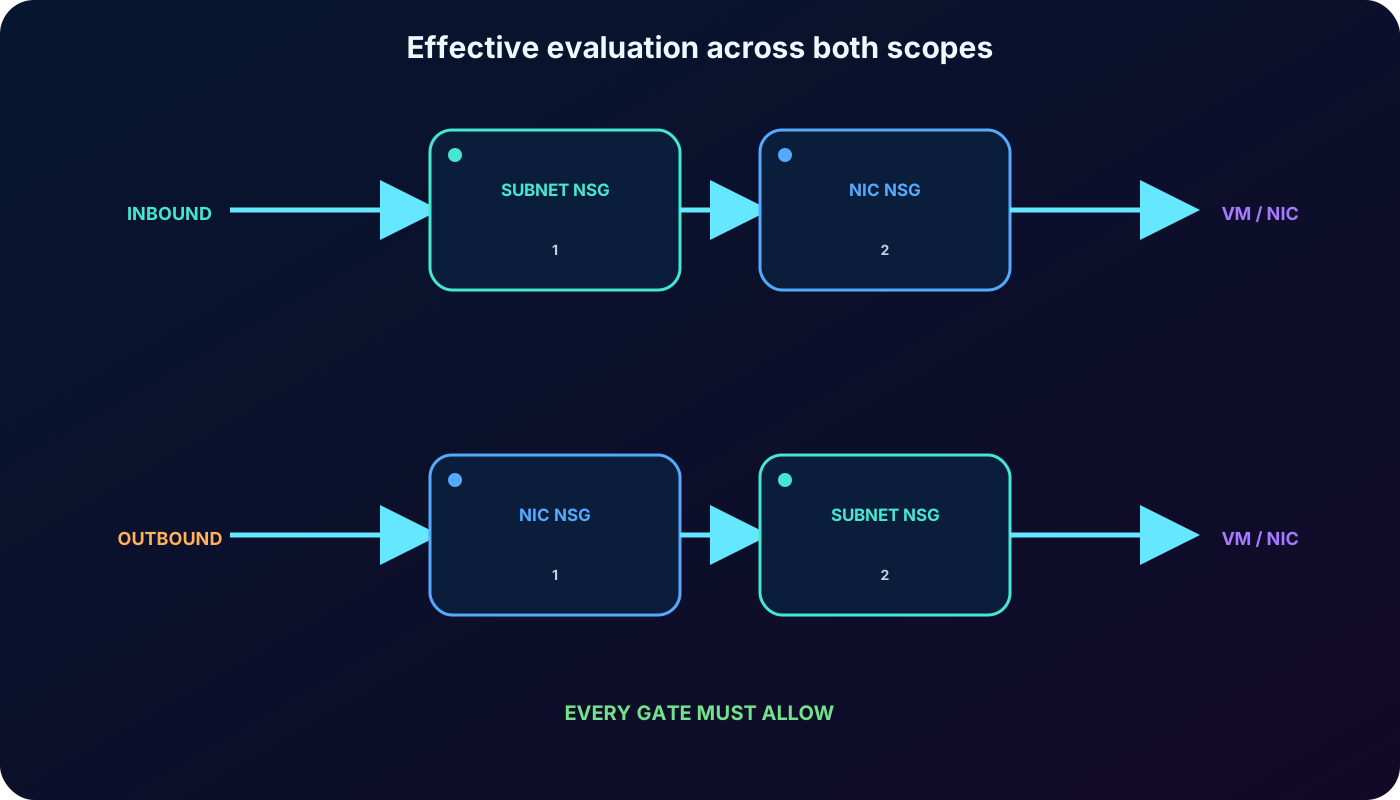
For the conceptual inbound path, Azure evaluates the subnet NSG and then the NIC NSG. For outbound traffic, it evaluates the NIC NSG and then the subnet NSG. Each applicable NSG is an independent gate: an Allow at one layer cannot override a Deny or missing Allow at another.
Inbound flow must be allowed by both the destination subnet NSG and destination NIC NSG when both exist.
Outbound flow must be allowed by both the source NIC NSG and source subnet NSG when both exist.
Subnet NSG rules can affect traffic between VMs in the same subnet, including traffic permitted by AllowVNetInBound.
To isolate same-subnet VMs, add deliberate higher-priority rules and test required exceptions in both directions.
Prefer one well-designed subnet NSG when per-NIC policy adds no business value.
When both scopes exist, the most restrictive effective result wins because every gate must allow the flow.
10. Effective security rules reveal the policy that actually applies
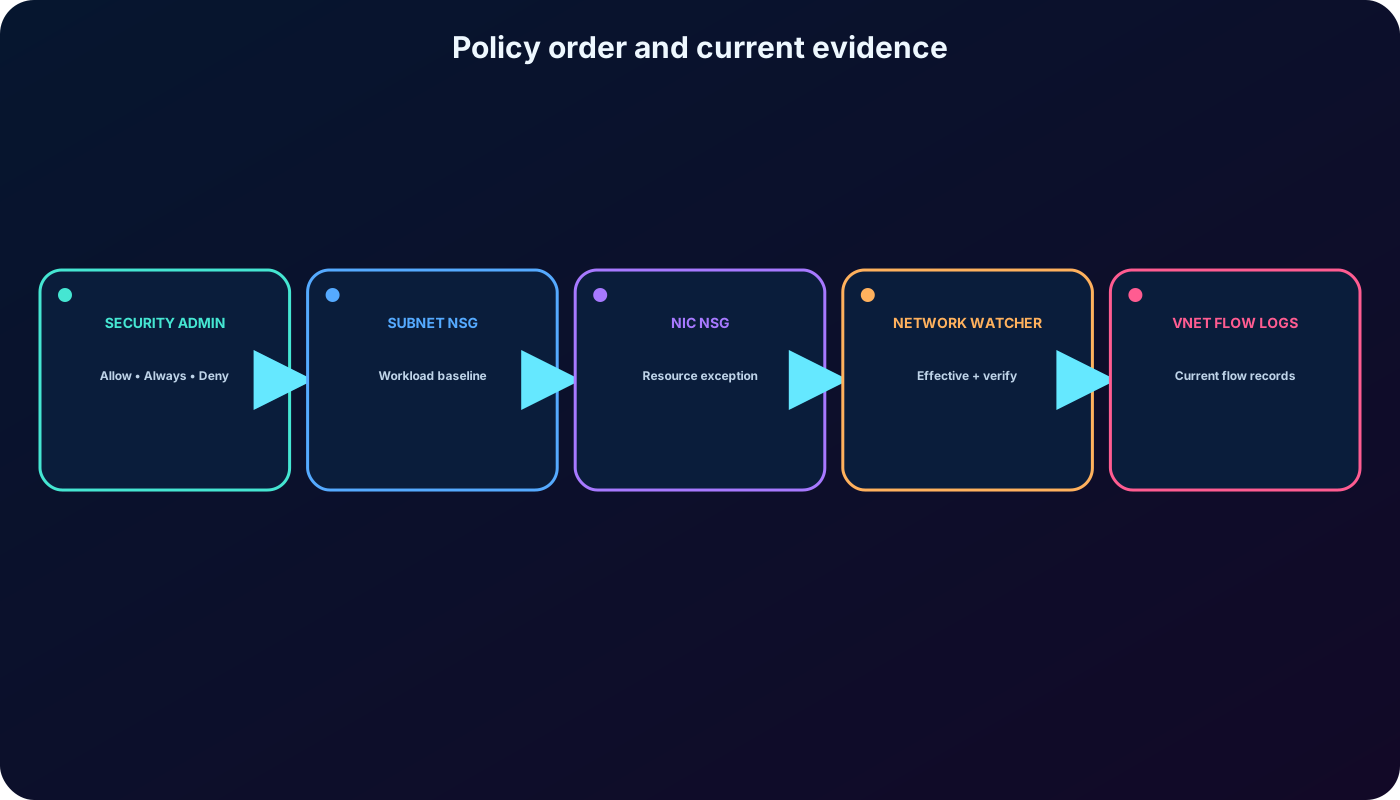
Azure Network Watcher’s Effective security rules view aggregates inbound and outbound rules from the NIC NSG, subnet NSG, and Azure Manager security admin rules for a selected network interface. The portal can download the result as CSV and expand the concrete prefixes behind sources and destinations.
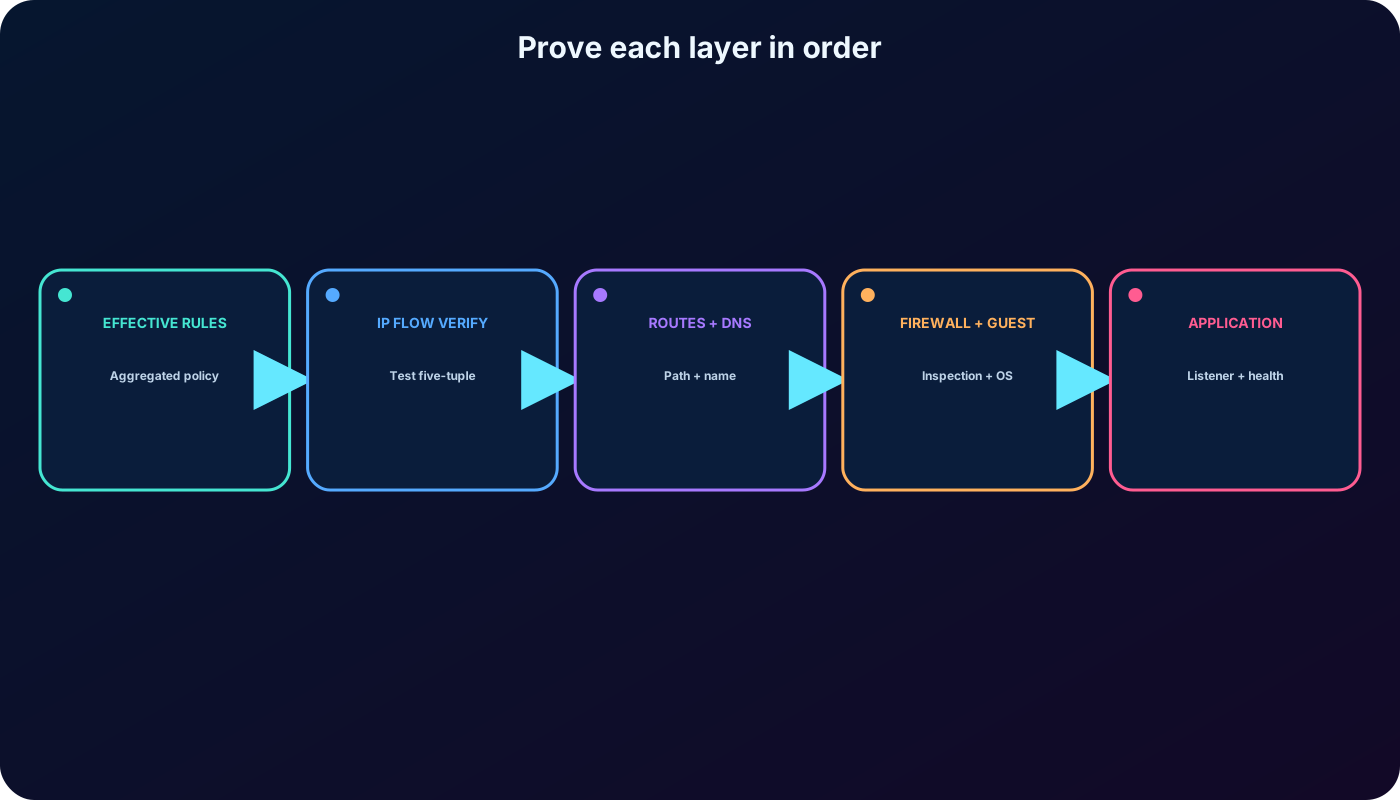
Use Effective security rules to audit the final policy, not to prove packet delivery.
Use IP flow verify to test a specific direction, protocol, local/remote address, and port against NSG and applicable security admin rules.
Then inspect effective routes, next hop, DNS, load-balancer health, firewall policy, and the guest operating-system firewall.
A successful NSG result means “not blocked here,” not “the application is healthy.”
Network Watcher correlates policy evidence, but connectivity still depends on every layer.
11. Security admin rules are evaluated before NSGs
Azure Manager can deploy global security admin rules to VNets in managed network groups. Central governance teams define broad guardrails; application teams retain NSGs for subnet and NIC-level policy. Security admin rules are evaluated before NSGs.
Security admin actions and downstream NSG behavior.
Action
Result
Allow
The flow continues to NSG evaluation, where an NSG can still deny it.
Always Allow
The flow is delivered without further NSG evaluation.
Deny
The flow stops before NSG evaluation.
Deployments use eventual consistency, and current exceptions apply to certain services and private endpoints. Effective security rules and IP flow verify help expose the combined policy instead of troubleshooting an NSG in isolation.
Global guardrails and workload-level NSGs are complementary policy layers.
12. Create a custom rule from the service requirement
In the Azure portal, open the NSG and choose Inbound security rules or Outbound security rules. Add a rule by translating the communication requirement into source, source ports, destination, service or destination ports, protocol, action, priority, and a meaningful name.
Use predefined services such as SSH or RDP only when their protocol and port exactly match the requirement.
Use Custom for ports such as 8080 or for a controlled list or range.
Prefer Any for ephemeral source ports unless the initiating application has a documented fixed source port.
Restrict management sources; do not publish SSH or RDP to Any merely to make a test pass.
Document the owner, purpose, approval, expected lifetime, and validation evidence for every exception.
13. Augmented rules reduce policy sprawl
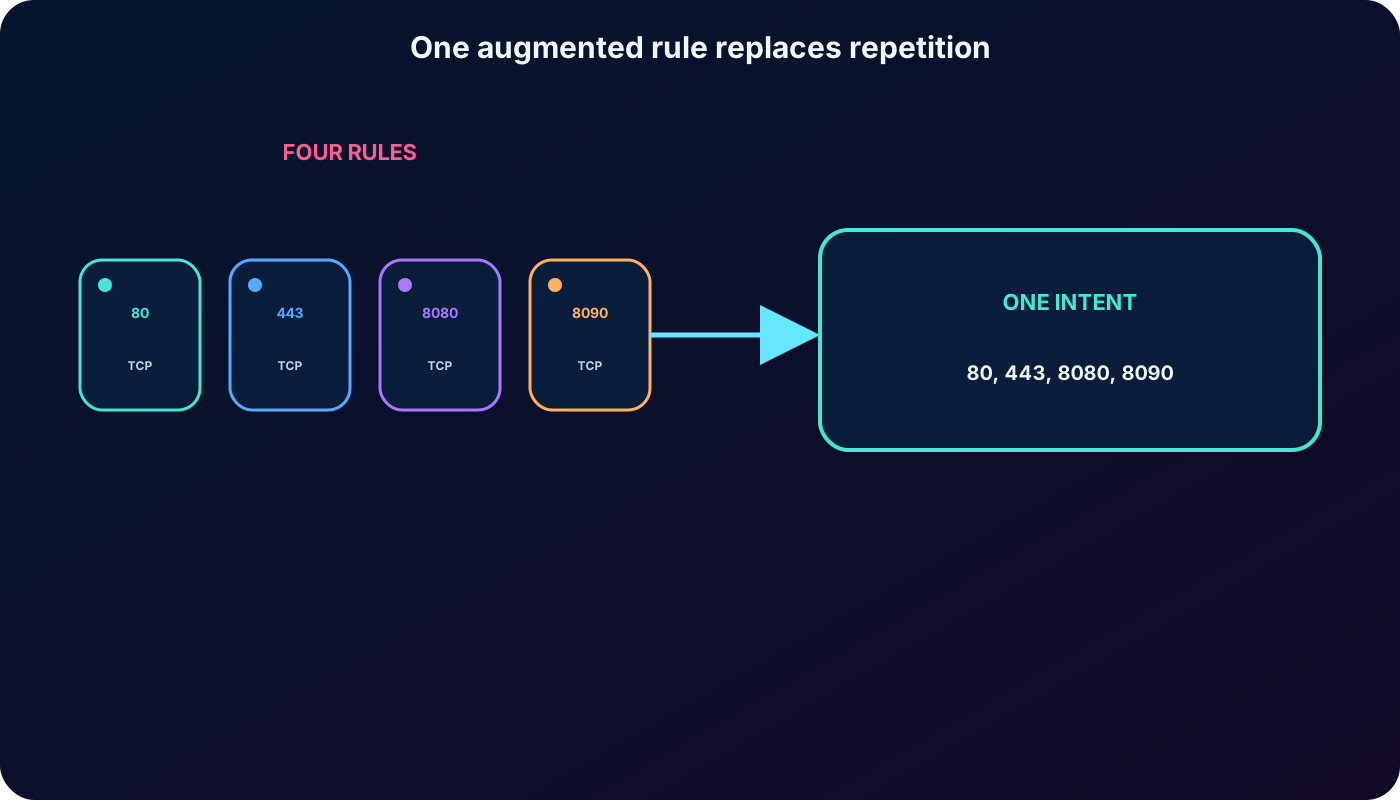
An augmented rule combines multiple explicit IP addresses, CIDR ranges, ports, or port ranges in one policy. For example, ports 80, 443, 8080, and 8090 can share one rule when the source, destination, protocol, direction, and action are otherwise identical.
Current guidance permits multiple explicit addresses and ports, but only one service tag per rule. ASG limits and valid combinations are subject to current platform limits. A shorter rule set is useful only if each rule still has one understandable purpose; do not combine unrelated flows merely to reduce the count.
Augmentation reduces repetition while preserving one clear traffic intent.
14. Service tags track Azure service address ranges
Common service tags used in NSG rules.
Tag
Represents
VirtualNetwork
The VNet plus connected spaces such as peered VNets, connected on-premises ranges, and service endpoints.
AzureLoadBalancer
Azure infrastructure load-balancer health probes.
Internet
Public address space outside the VirtualNetwork definition.
Azure prefixes, with supported regional variants.
AzureCloud
Public Azure datacenter prefixes, with supported regional variants.
Sql
Supported and related database-service prefixes.
Microsoft maintains the prefixes behind a service tag; customers cannot create custom service tags. Use a service tag for an Azure service, an ASG for workload NICs, and an explicit IP/CIDR only when the address itself is the policy identity.
15. Application security groups express workload roles
An ASG is a logical collection of network-interface IP configurations. Assign VM NICs to groups such as WebServers or AppServers, then use those groups as the source or destination of an NSG rule. The rule follows group membership when instances scale or addresses change.
All NICs referenced through ASGs in a rule must satisfy current same-VNet constraints.
ASGs do not filter traffic by themselves; an NSG rule must reference them.
A NIC can participate in more than one ASG where supported and useful.
ASGs can reduce dependence on subnet placement, but subnets remain important routing, delegation, and trust boundaries.
New members inherit the applicable NSG policy automatically.
16. ASG scenario: web tier to application/SQL tier
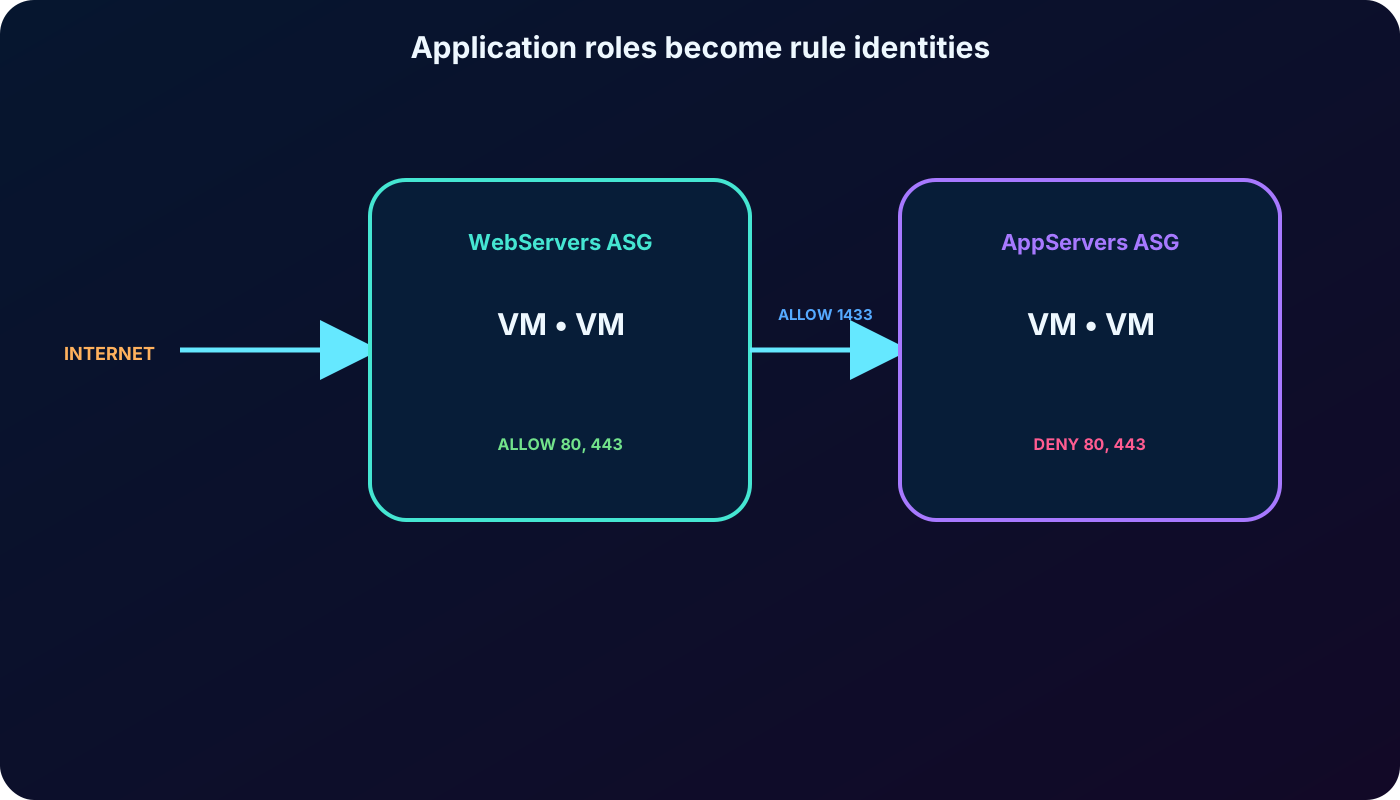
The supplied online-retailer scenario has WebServers that receive HTTP and HTTPS from the internet and AppServers that handle SQL requests from the web tier. Create one ASG for each tier, join every server NIC to its workload group, then create the NSG and its rules.
Source scenario policy.
Priority
Source
Destination
Ports
Action
100
Internet
WebServers ASG
TCP 80, 443
Allow
110
WebServers ASG
AppServers ASG
TCP 1433
Allow
120
Any
AppServers ASG
TCP 80, 443
Deny
Rule 100 keeps the public catalog reachable. Rule 110 permits the required tier-to-tier SQL flow. Rule 120 prevents direct web traffic to the application tier. The later default DenyAllInBound blocks other unsolicited inbound flows. In a production three-tier design, name the SQL destination group DataServers if it represents database servers; policy names should describe the real workload.
ASGs let rules describe application roles instead of changing IP-address lists.
17. Why ASGs simplify operations—and their limits
IP maintenance: scaling or replacement changes group membership, not every NSG rule.
Logical organization: web, application, data, and service roles remain visible even when they share a subnet.
Simplified rules: one group-based rule can apply to every current and future member.
Workload readability: policy is easier to review when names express business function.
Service tags remain distinct: they represent Microsoft-maintained Azure service prefixes, while ASGs represent your workload NICs.
ASGs are not a substitute for all subnet segmentation. Preserve subnet boundaries when routing, service delegation, blast radius, inspection, or lifecycle ownership requires them.
18. Laboratory architecture and job skills
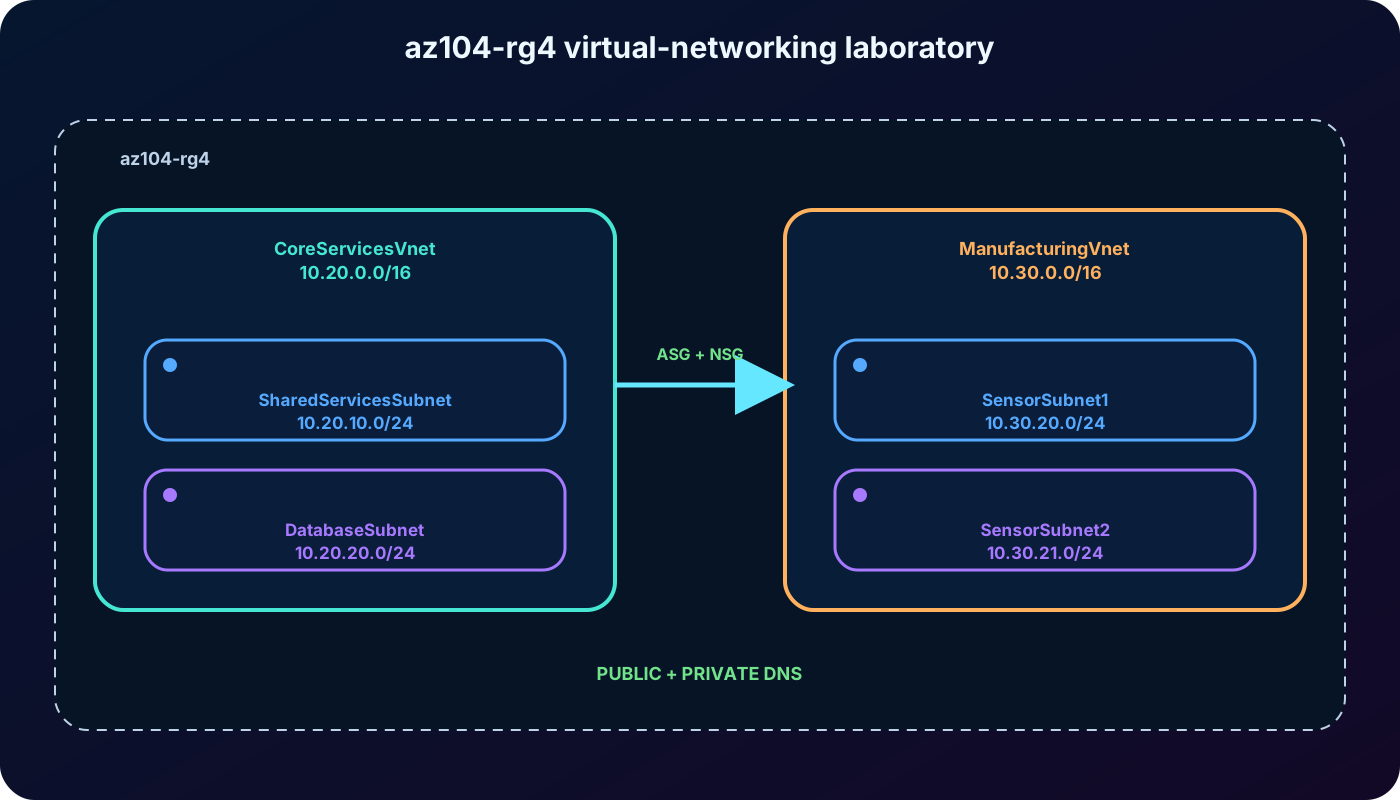
The supplied exercise uses resource group az104-rg4 and two VNets. CoreServicesVnet uses 10.20.0.0/16 with SharedServicesSubnet 10.20.10.0/24 and DatabaseSubnet 10.20.20.0/24. ManufacturingVnet uses 10.30.0.0/16 with SensorSubnet1 10.30.20.0/24 and SensorSubnet2 10.30.21.0/24.
Task 1: create a VNet and subnets through the portal.
Task 2: create a VNet and subnets from a template.
Task 3: create an ASG, an NSG, rules, associations, and the required communication.
Task 4: optionally configure a public zone such as contoso.com and a private zone such as private.contoso.com.
Allow approximately 50 minutes and use an Azure subscription where these resources are authorized.
The lab combines portal, template, workload grouping, traffic policy, and DNS administration.
19. Exercise sequence and validation
Create az104-rg4 in the selected region and implement CoreServicesVnet with its two nonoverlapping subnets.
Deploy ManufacturingVnet and its two subnets using the supplied or equivalent ARM template; review parameters before deployment.
Create the required ASG and assign the intended VM NIC IP configurations to it.
Create the NSG, add narrowly scoped inbound and outbound rules, and associate it with the intended subnet or NIC.
Test both an allowed flow and a denied flow with fresh connections. Record effective rules and IP flow verify results.
Optionally create and validate the public and private zones and the correct VNet link for private resolution.
Remove laboratory resources only after confirming the resource group contains no shared or production dependency.
20. Assessment answers with reasoning
Correct decisions from the nine-question module assessment.
Question
Answer
Why
Subnet and NIC both have NSGs
Both are evaluated independently; the most restrictive effective result applies.
Every applicable gate must allow the flow.
Group VMs by role for rules
Application security groups.
ASGs turn workload roles into NSG sources and destinations.
Manage workload-organized VM traffic
Application security groups.
Membership follows the workload instead of individual addresses.
Meaning of rule priority
A lower value is processed first.
First match in that NSG decides the action.
Only subnet A may reach subnet B
Apply an NSG to subnet B and allow only subnet A with higher-priority policy.
The destination boundary enforces the source restriction.
Logical business-function groups
Application security groups.
They group NICs by application role.
Allow one external destination and deny other outbound
Allow that destination first, then deny Any at a later priority.
The specific exception must match before the broad deny.
Processing-order factor
Priority value.
Names and creation dates do not determine order.
Source Any
Traffic from every source.
Any is the broad wildcard; scope it carefully.
21. Current corrections and AZ-104 traps
NSGs filter; they do not route, perform NAT, resolve DNS, or inspect application content.
Lower number means higher priority, and processing stops at the first match within that NSG.
The same priority can exist once per direction; it is not globally unique across inbound and outbound.
NSGs are stateful, so reply traffic does not need a mirrored rule and existing flows survive a rule change.
Default AllowInternetOutBound is permission, not proof of an outbound path from a private subnet.
Security admin rules from Azure Manager precede NSGs; Always Allow and Deny terminate evaluation.
ASGs group workload NICs; service tags represent Microsoft-maintained service prefixes.
New NSG flow logs cannot be created after June 30, 2025 and the feature retires September 30, 2027. Use virtual network flow logs for current designs.
Effective rules show policy; IP flow verify tests a five-tuple; neither proves application health on its own.
22. Compact review, active recall, and resources
Summarized version of every major topic.
Topic
Remember
NSG scope
One NSG per subnet and one per NIC; both scopes are independent gates.