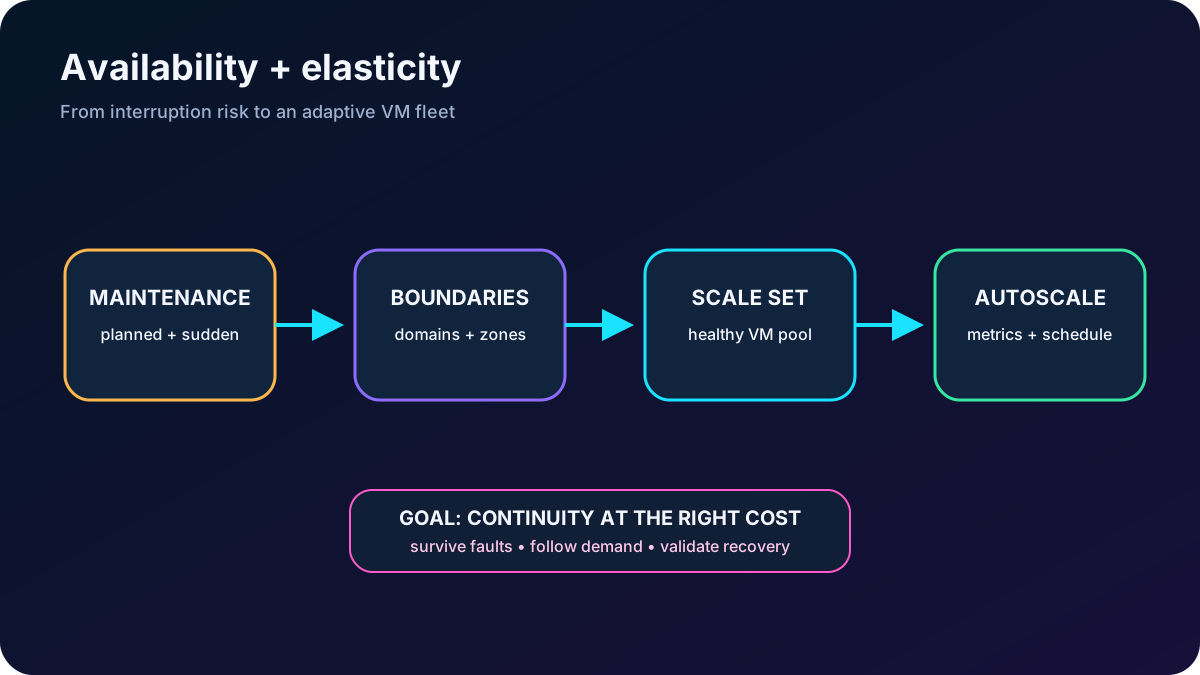
Design for maintenance and failures, distribute virtual machines across fault boundaries, and adapt capacity with Virtual Machine Scale Sets and autoscale.
Suggested study time: 85 minutes • Intermediate • Original rewrite based on the supplied Microsoft Learn module and checked against current Azure documentation
By João Ricardo Dutra••Complete original content
1. Build continuity into a variable-demand workload
Imagine a public website running on Azure virtual machines. Traffic changes by hour, weekday, and campaign, but the service must remain reachable when hardware fails or Azure performs maintenance. A sound design has two related goals: keep multiple instances across independent failure boundaries, and add or remove capacity without provisioning every possible peak in advance.
This chapter develops that design with availability sets, availability zones, update and fault domains, vertical and horizontal scaling, , and autoscale. You should already understand how to create and manage an Azure VM and the general reason for scaling a workload.
Distinguish planned maintenance, predicted hardware degradation, and unexpected failure.
Choose between availability sets and availability zones.
Explain update domains and fault domains.
Compare vertical and horizontal scaling.
Create and configure and autoscale.
Availability answers where instances run; scaling answers how many instances run.
2. Plan for maintenance and downtime
Events that can affect an Azure VM.
Event
Platform behavior
Expected impact
Unplanned hardware maintenance
Azure detects a component trending toward failure and live-migrates the VM to a healthy host when possible.
Usually only a short pause; performance can be temporarily reduced before or during the move.
Unexpected downtime
A sudden host, network, disk, power, or rack failure causes the platform to heal or recreate the VM on healthy infrastructure in the same datacenter.
The VM can reboot and be unavailable; temporary host-local data can disappear.
Planned platform maintenance
Microsoft rolls out platform changes that improve reliability, performance, or security.
Some operations are non-disruptive; others can reboot affected VMs. Distribution across update boundaries limits simultaneous impact.
Microsoft maintains the Azure host and platform, not the operating system and applications inside an IaaS VM. Guest patching, application updates, testing, and maintenance windows remain the customer’s responsibility. A single instance can therefore be interrupted even when Azure repairs it correctly; continuity requires redundancy above the VM.
3. Use availability sets for rack-level separation
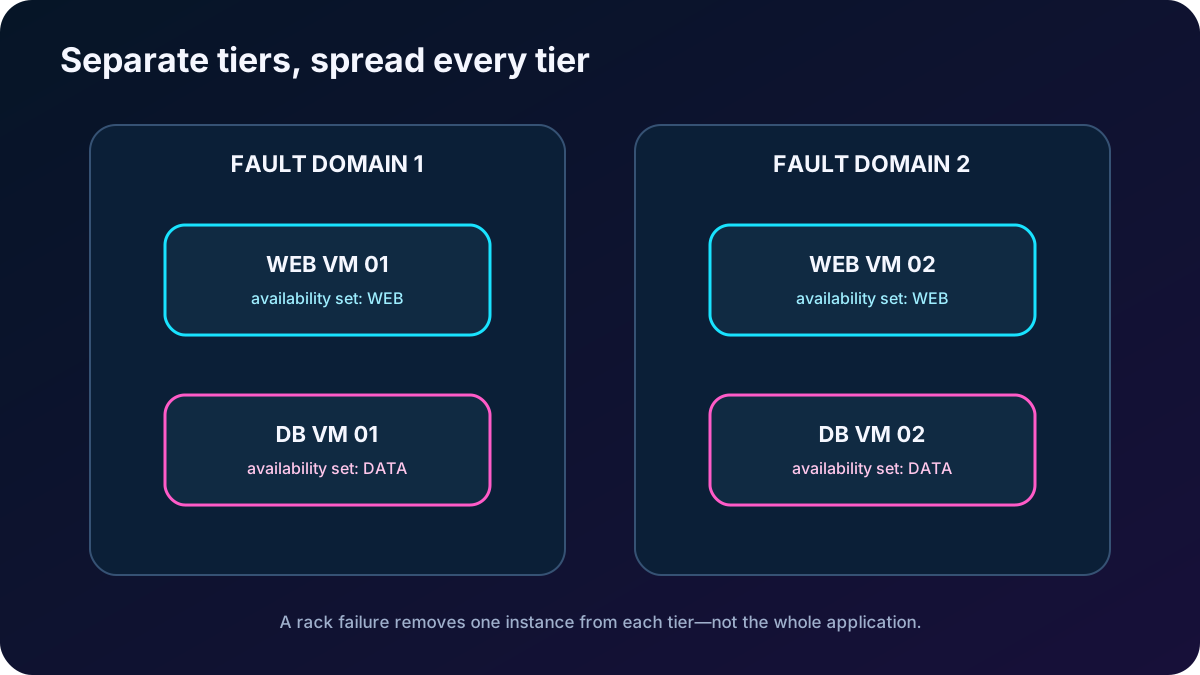
An availability set is a logical group for related VMs. Azure places members across physical servers, racks, storage, power, and network switches so one localized failure or planned update is less likely to affect all copies. Put machines that perform the same application function in the same set, such as two web servers, and use a separate set for another tier such as SQL Server.
Create the set before or while creating its VMs. A VM can join an availability set only at creation; changing the set requires recreating the VM.
Use the , ARM/Bicep, scripts, CLI, PowerShell, or the API to deploy it.
Deploy at least two instances and place Azure or another appropriate traffic distributor in front of them.
Use managed disks. Availability sets isolate infrastructure faults but do not cure guest OS or application failures.
Current guidance prefers availability zones for greater datacenter-level resilience, and recommends with Flexible orchestration when you need the broadest high-availability feature set. Availability sets remain useful in regions or scenarios without zone support and can offer lower VM-to-VM latency because instances are physically closer.
Separate each application tier into its own availability set, then spread each tier across failure boundaries.
4. Read update and fault domains correctly
The two boundaries assigned inside an availability set.
Boundary
Meaning
Exam consequence
Update domain
A group of VMs and underlying hardware that can restart together during planned platform maintenance.
Azure processes one update domain at a time, so only a subset should reboot. Up to 20 are supported; five is a common default.
Fault domain
A physical failure unit whose VMs share power and a network switch, commonly comparable to a rack.
Spread redundant instances so a rack-level outage leaves another copy alive. A set supports up to three, depending on region.
Domain counts are selected when the set is created and cannot be changed afterward. If there are more VMs than update domains, assignment wraps to an existing domain. Managed disks align with the VM’s disk fault domain. Avoid deallocating the first VM between sequential deployments when you need predictable spreading, because particular deployment sequences can cause shared fault-domain placement.
Exam trap: an update domain limits planned maintenance impact; a fault domain limits correlated physical failure. Neither protects against a whole datacenter outage, nor against a broken application deployed to every instance.
5. Use availability zones for datacenter resilience
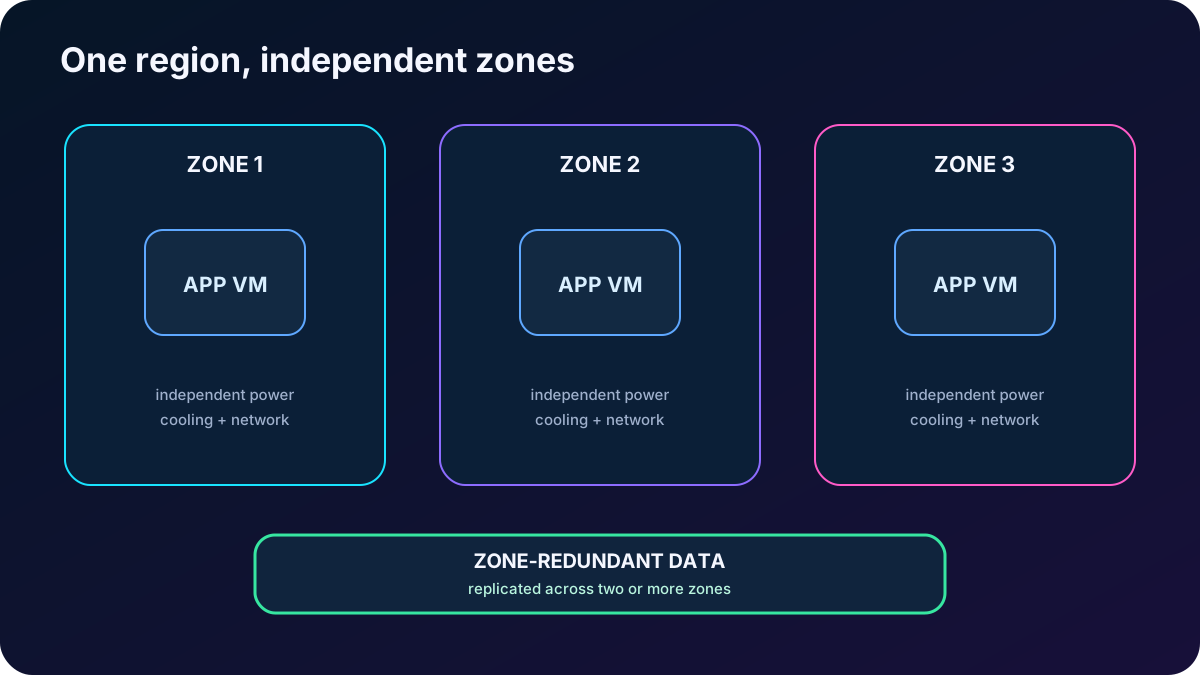
Availability zones are physically separated groups of one or more datacenters inside a region. Each zone has independent power, cooling, and networking. Deploying instances across zones lets the workload continue when one datacenter group fails. Azure also aims to update one zone at a time, but the application benefits only if it is already multi-zone.
How Azure services expose zones.
Pattern
Behavior
Examples and responsibility
Zonal resource
You pin the resource to one logical zone.
A VM or managed disk is isolated from other-zone faults, but you must deploy copies and orchestrate failover.
Zone-redundant resource
The service distributes or replicates across two or more zones.
Zone-redundant storage and supported data services can manage replication and failover for you.
Nonzonal resource
The resource is regional but not explicitly zone resilient.
Azure chooses placement; the resource can be affected by an outage in its physical zone.
Zone numbers are logical and can map to different physical facilities in different subscriptions. Standard public IP addresses can be zone-redundant, zonal, or nonzonal according to configuration and regional support. For critical workloads, combine multi-zone design with a deliberate multi-region and backup strategy; zones do not protect against a complete regional outage.
A zone-resilient service needs healthy capacity and data access after any one zone is lost.
6. Compare vertical and horizontal scaling
Two scaling directions.
Direction
Action
Trade-off
Vertical: scale up or down
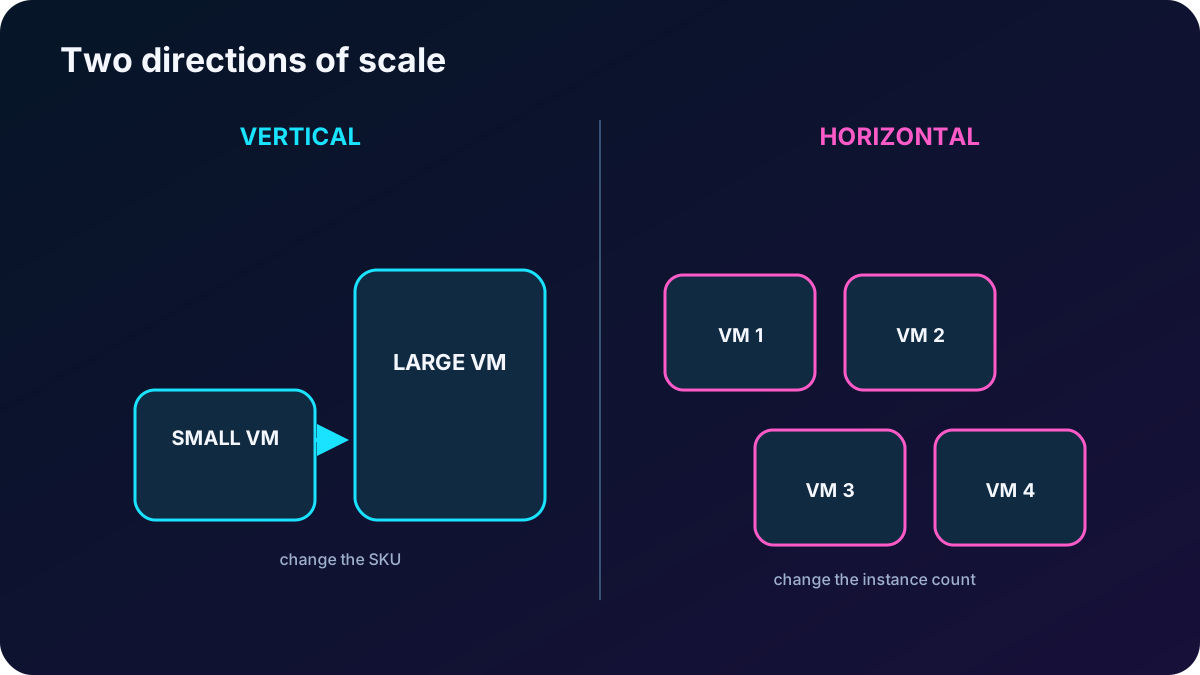
Change the VM to a larger or smaller SKU.
Simple for a single machine, but bounded by available hardware and often requires restart, deallocation, or reprovisioning. Plan downtime and data movement.
Horizontal: scale out or in
Add or remove VM instances.
More elastic and can reach hundreds or thousands of instances, but the application must distribute traffic and avoid machine-local state.
Vertical scaling can temporarily enlarge a server for a known busy period and shrink it later to save money. Horizontal scaling is usually the better response to fluctuating web demand because instances can be added without replacing the running fleet. Reprovisioning a vertical replacement can interrupt service and requires a migration and rollback plan.
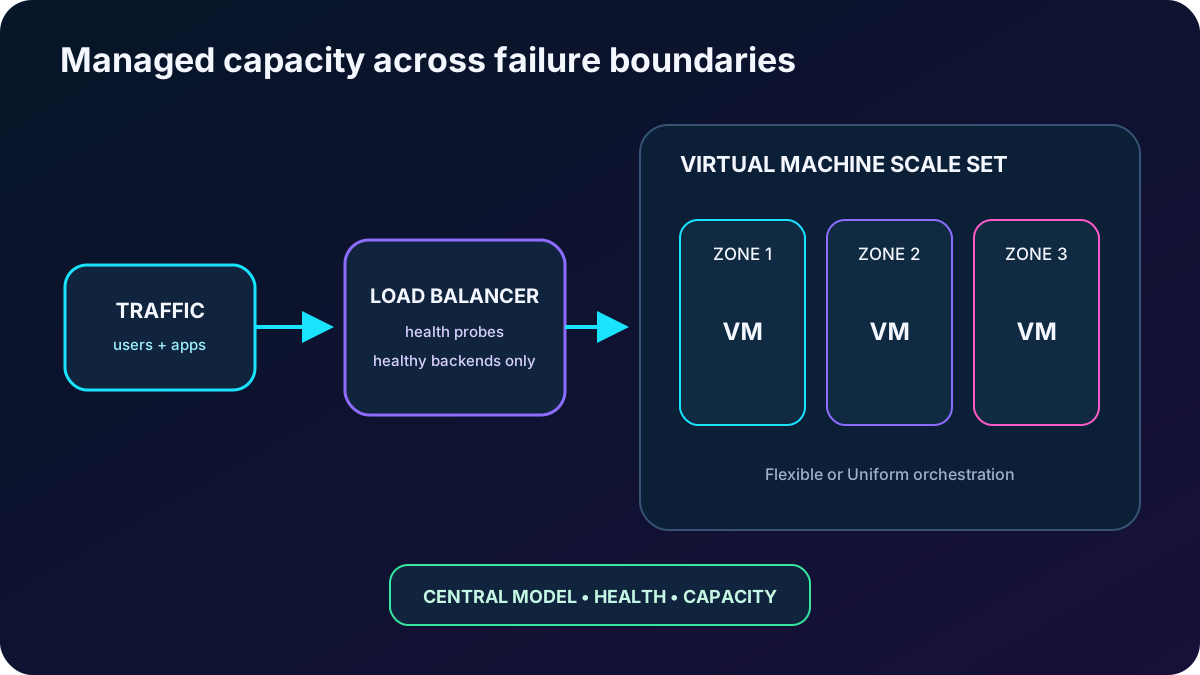
create and centrally manage a load-balanced group of VM instances. The group can scale manually, by schedule, by metric rules, or through predictive patterns. Multiple copies improve availability: if one instance fails or is updated, traffic can reach another healthy one. Typical uses include web tiers, large compute jobs, big-data processing, and container hosts.
Instances can be spread across fault domains or availability zones. A scale set by itself is not protection from datacenter failure unless the placement is multi-zone.
There is no separate scale-set management charge; compute, disk, network, and supporting resources are billed.
Current limits reach 1,000 instances with standard Marketplace or Azure Compute Gallery images and 600 with a managed image. Always verify the target region, quota, image, and mode.
Orchestration modes are fixed at creation.
Mode
Model
Choose it when
Flexible
Manages Azure VMs through a unified model and can mix sizes, images, Spot and on-demand capacity while preserving fault-domain isolation.
You need broad VM features, mixed instance types, stateful or quorum workloads, or the current recommended HA model.
Uniform
Instances follow one scale-set model and a consistent base image/configuration.
You need identical large-scale instances and behavior tied specifically to Uniform orchestration.
The supplied portal export presents Flexible as the default and recommended choice for new deployments. The mode cannot be converted later, so choose from workload behavior rather than accepting a screen default without analysis.
The scale set manages capacity; the traffic tier and failure placement keep that capacity useful.
8. Walk through scale-set creation choices
Select subscription, resource group, name, region, and orchestration mode in the .
Choose an image and CPU architecture. x64 offers the broadest compatibility; Arm64 can offer better price-performance for compatible images and applications, but benchmark the actual SKU and workload instead of assuming a fixed percentage.
Choose the VM size, administrator authentication, public inbound ports, disks, network, health checks, upgrades, and management settings.
Decide whether are acceptable. Their discount comes with eviction risk, so they fit interruptible capacity rather than the only copy of a critical service.
Set the initial instance count and load-balancing choice, then define whether placement spans zones.
For Uniform spreading, maximum spreading uses as many supported fault domains as possible; fixed spreading requires the requested count to be available. A fixed request can fail where maximum spreading can still deploy. Microsoft generally recommends maximum spreading unless the workload needs a specific topology.
Review and create, then verify instance health, placement, backend membership, and application readiness before sending production traffic.
Size sets CPU, memory, disk and network limits as well as hourly cost. The portal can show a range such as 0–1,000 instances, but service limit, quota, orchestration mode, image type, zone capacity, and subscription policy determine what can actually be deployed.
9. Implement autoscale deliberately
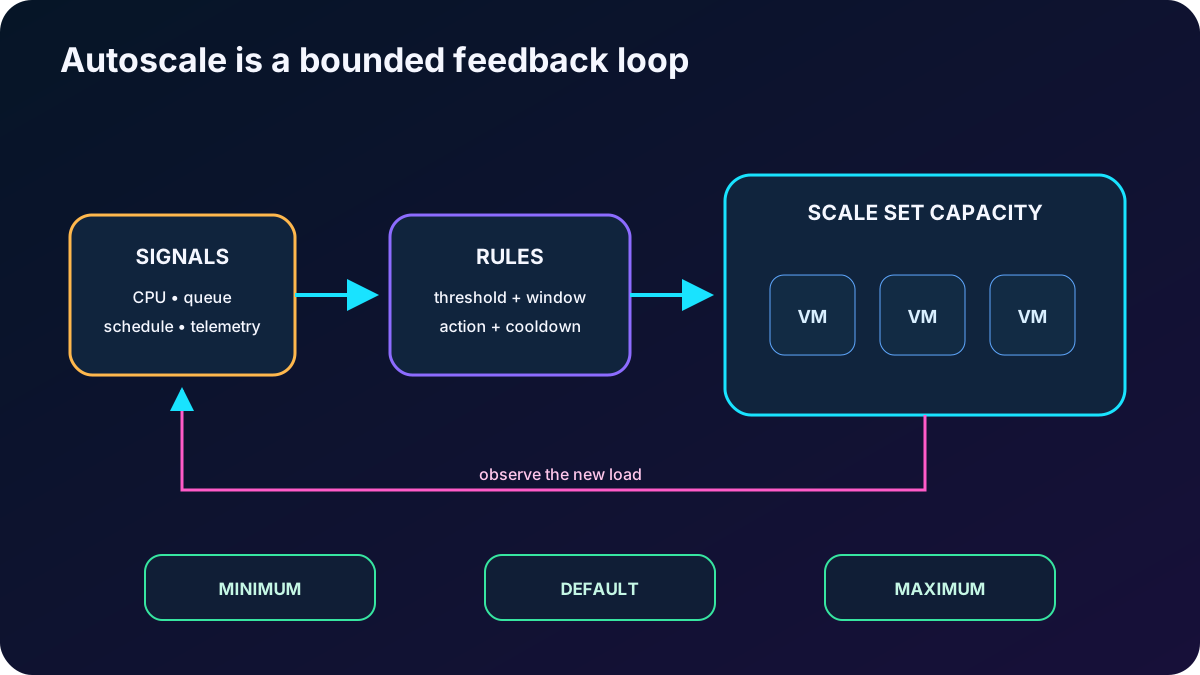
Autoscale changes the scale-set capacity so that sustained demand has enough instances and quiet periods do not keep unnecessary machines running. It can use schedules, host metrics, in-guest metrics, application telemetry, queues, or predictive patterns. Scaling on a short spike creates churn; a time window and cooldown let the signal prove that demand is persistent.
Core autoscale profile settings.
Setting
Purpose
Design note
Minimum
Lowest allowed instance count.
Keep enough capacity to survive normal failures and satisfy baseline traffic.
Maximum
Highest allowed instance count.
Too low is a common reason a scale set stops growing during a peak; quota and budget must also support it.
Default
Capacity used when a profile cannot read a metric or when its schedule becomes active.
Keep it within minimum and maximum and choose a safe fallback.
Scale-out rule
Adds a fixed count, a percentage, or grows to a target when a metric crosses a threshold.
Example: average CPU above the threshold for the evaluation window.
Scale-in rule
Removes a fixed count, a percentage, or reduces to a target when load stays low.
Use a separate lower threshold and a conservative window to avoid oscillation and lost work.
Schedule
Activates a profile at known dates, hours, weekdays, events, or business cycles.
Provision before a predictable campaign instead of waiting for user-visible latency.
Host signals include CPU percentage, network bytes, disk bytes and operations, and CPU credits for burstable sizes. More detailed guest counters can come from the Azure diagnostics extension; Application Insights exposes response time, page performance, and sessions; an Azure queue can represent queued work. Aggregation, comparison operator, evaluation window, action magnitude, and cooldown are all part of the rule.
Manual scaling directly sets capacity and remains useful for testing or controlled events. For scale-in, configure the deletion policy and make applications drain connections and externalize state. The source describes balancing deletion across zones and then favoring the highest instance IDs; confirm the exact policy supported by the selected orchestration mode.
Autoscale is a feedback loop bounded by capacity, time windows, and safe application behavior.
10. Configure a practical CPU profile
Open an existing scale set and select Scaling. Choose manual capacity or custom autoscale.
Define the default, minimum, and maximum count. The source interface permits values from 0 to 1,000, subject to real service and quota limits.
Create a scale-out rule: choose the metric source and aggregation, operator, CPU threshold, lookback duration, increase operation, instance amount, and cooldown.
Create a scale-in rule with a lower threshold and normally a longer or equally cautious time window. Ensure both rules cannot fight each other.
Add recurring or date-based profiles for weekdays, nights, seasonal demand, promotions, or other predictable events.
Save, watch the autoscale run history and metrics, test both directions under controlled load, and create alerts for scale actions or failures.
An autoscale configuration is incomplete until new instances pass health checks quickly and removed instances stop accepting work safely. Image startup time, extension failures, application warm-up, load-balancer probes, and quota exhaustion can all make a mathematically correct rule operationally ineffective.
11. Module assessment explained
Answers and reasoning for all nine supplied questions.
Scenario
Correct decision
Why
Minimize downtime from a datacenter failure.
Deploy across availability zones.
Zones use independent datacenter infrastructure inside a region.
Distribute VMs across multiple datacenters.
Use availability zones.
Availability sets distribute within a datacenter-scale placement, not across datacenter zones.
Reduce capacity every weekend.
Schedule autoscale to decrease the instance count.
The change is predictable and horizontal.
An online event can multiply demand tenfold.
Use horizontal scaling with autoscale.
The fleet expands and contracts with the event.
An e-commerce site has seasonal peaks.
Use dynamic horizontal autoscale.
Metric or scheduled profiles match varying demand without permanently oversized VMs.
What do update domains provide?
Only a subset reboots during planned maintenance.
Azure processes one update domain at a time.
Primary scale-set benefit in the module.
Simplified management of a group of VM instances.
The service centralizes deployment, configuration, capacity, and availability. Uniform emphasizes identical instances; Flexible also permits controlled variation.
Microservices need independent capacity.
Scale horizontally with separate VM or container pools.
Each service can change instance count without resizing the others.
The set does not scale out during a peak.
Check whether maximum capacity is too low.
Autoscale cannot exceed the profile maximum; then inspect quota, metrics, cooldown, and provisioning health.
12. Compact review of every topic
One-line summaries for fast revision.
Topic
Remember this
Maintenance
Predicted faults may use live migration; sudden faults can reboot a VM; customer controls guest updates.
Availability set
Groups same-tier VMs across rack-level fault and update boundaries; membership is chosen at VM creation.
Update domain
Planned maintenance restarts one group at a time.
Fault domain
A shared power and network failure unit; spread redundant copies.
Availability zone
Independent datacenter group; use multiple zones for zone-failure resilience.
Vertical scaling
Change VM size; bounded and often disruptive.
Horizontal scaling
Change instance count; elastic but requires distributed, externally stateful design.
Scale set
Centrally manages VM capacity, placement, updates, health, and load-balancer integration.
Flexible vs Uniform
Flexible supports broader VM variation; Uniform follows one model; mode is immutable.
Creation
Choose image, architecture, size, Spot risk, zones, health and spreading deliberately.
Autoscale
Bound capacity with min/default/max and use sustained metrics or schedules to scale out and in.
Operations
Test startup, probes, drain, quotas, alerts, and both scaling directions.
13. Practice and current resources
Draw two web VMs and two database VMs in separate availability sets, then label every fault and update domain.
Redesign the same workload across three zones and identify which resources must be zone-redundant or duplicated.
Explain why scaling up cannot replace scaling out for a service that must survive a VM restart.
Create an autoscale profile for weekdays, weekends, a marketing event, and unexpected CPU growth. Defend every threshold, window, and capacity boundary.
Use Microsoft Copilot or your own notes to compare Flexible and Uniform orchestration, then verify the answer against the current product documentation.