Azure virtual network peering: gateway transit, routing, and service chaining
Connect regional and global virtual networks over the Microsoft backbone, configure bidirectional peering and shared gateways, and extend hub-and-spoke designs with user-defined routes and service chaining.
Suggested study time: 70 minutes • Intermediate • Original rewrite based on the supplied Microsoft Learn module and corrected against current Azure networking documentation
By João Ricardo Dutra••Complete original content
1. Connect isolated networks without exposing their workloads
Imagine an engineering company that keeps core services, manufacturing systems, and other workloads in separate Azure virtual networks. Isolation provides clear administrative and security boundaries, but selected systems still need to exchange traffic. The design must use private addresses, avoid the public internet, and remain understandable as regions and subscriptions multiply.
Azure virtual network peering creates a direct logical relationship between virtual networks. This chapter explains when to use regional or global peering, how both directions become connected, how gateway transit shares hybrid connectivity, and how user-defined routes and service chaining turn a simple link into a hub-and-spoke architecture.
Recognize the features, benefits, requirements, limits, and cost model of virtual network peering.
Configure bidirectional peering and interpret Initiated and Connected states.
Share Azure or Azure Route Server through the correct transit settings.
Explain nontransitivity, hub-and-spoke routing, network virtual appliances, and service chaining.
Implement and validate the supplied intersite-connectivity exercise.
Helpful prerequisites are basic cloud networking, Azure , virtual machines, CIDR planning, and command-line connectivity tools. This material prepares the networking skills measured by AZ-104.
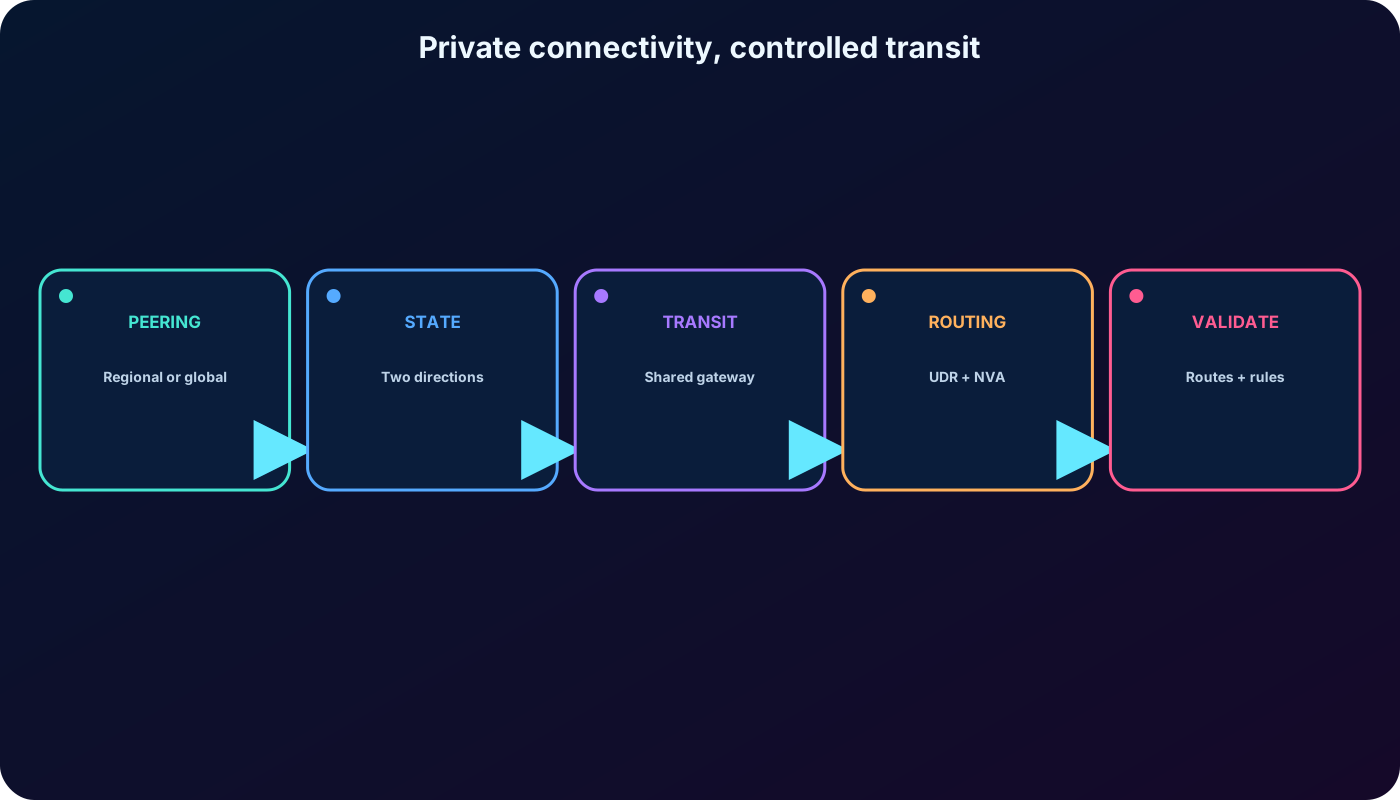
The chapter progresses from a direct private connection to a routed multi-network design.
2. Peering joins routing domains while resources stay separate
Peered virtual networks remain independent Azure resources. Each keeps its own address space, subnets, security controls, region, subscription, and lifecycle. The peering relationship simply lets resources use private IP addresses to reach the other network as though the address spaces belonged to one connected routing environment.
Traffic crosses the private Microsoft backbone rather than the public internet. A VPN gateway is not required just to join two VNets, and peering does not add a separate encryption tunnel. The platform provides the private path; network security groups, firewalls, application authentication, and encryption requirements still belong to the solution design.
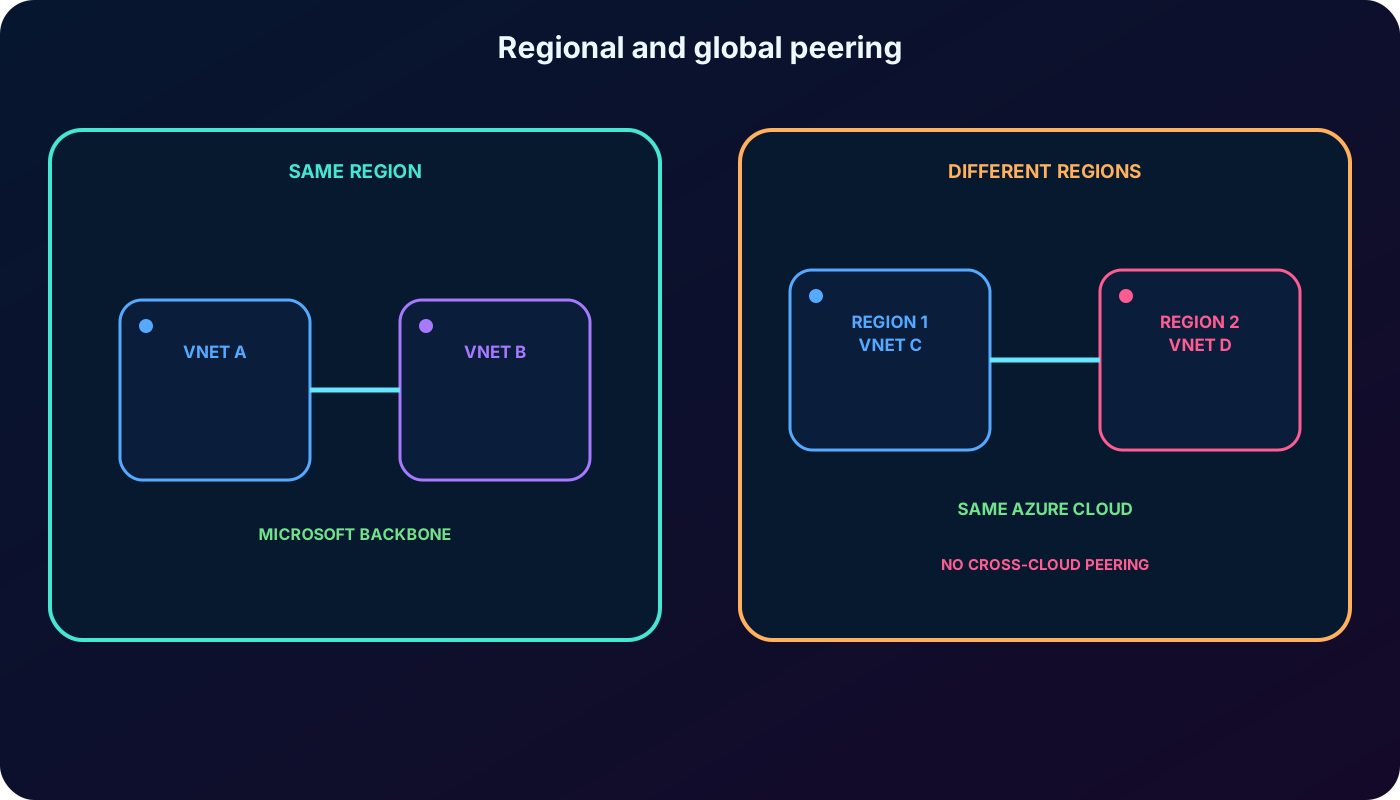
3. Regional and global peering solve different placement needs
Two peering types.
Type
Placement
Typical use
Virtual network peering
Both VNets are in the same Azure region.
Split application tiers, teams, or environments while retaining low-latency private communication.
Global virtual network peering
The VNets are in different Azure regions within the same Azure cloud.
Cross-region applications, disaster recovery, or shared services used from several regions.
Current Azure supports global peering across regions of the public cloud, Azure China, or Azure Government, but a peering cannot cross from one cloud boundary to another. For example, a public-cloud VNet cannot peer directly with an Azure Government VNet.
Region placement selects regional or global peering; a cloud boundary cannot be crossed.
4. Why administrators choose peering
Private connectivity: packets use private IP addresses and the Microsoft backbone instead of a public endpoint.
Performance: same-region latency resembles communication inside one VNet, and throughput is governed mainly by the VM or resource limits rather than a peering bandwidth cap.
Operational simplicity: no gateway or tunnel is required for the direct VNet-to-VNet path.
Flexible ownership: supported VNets may belong to different subscriptions and Microsoft Entra tenants when administrators on both sides have the required permissions.
Regional reach: global peering connects supported regions without building a separate VNet-to-VNet VPN.
Continuity: creating the relationship does not require workload downtime.
Peering traffic is billed for ingress and egress according to the Azure pricing model. “No gateway required” does not mean “no network charge.”
5. Address spaces, DNS, and current platform corrections
Address spaces must not overlap. Azure cannot choose an unambiguous route when both VNets advertise the same prefix.
The old rule that a peering must be deleted before any address-space change is obsolete. You can add, remove, or resize IPv4 and IPv6 ranges without downtime to the currently peered space, then synchronize every remote peering after each change.
Azure-provided default name resolution does not automatically resolve names across peered VNets. Use Azure Private DNS or a custom DNS design when workloads need cross-network names.
A point-to-site VPN client may need a freshly downloaded client package after peering changes so its learned routes include the remote prefixes.
The supplied material mentions Basic internal load-balancer limitations across global peering. Basic was retired on September 30, 2025; current designs should use Standard .
When two VNets have both a gateway-based VNet-to-VNet connection and peering, Azure prefers the peering route for direct traffic. Always inspect effective routes instead of assuming which path wins.
6. A peering is directional and needs two resource objects
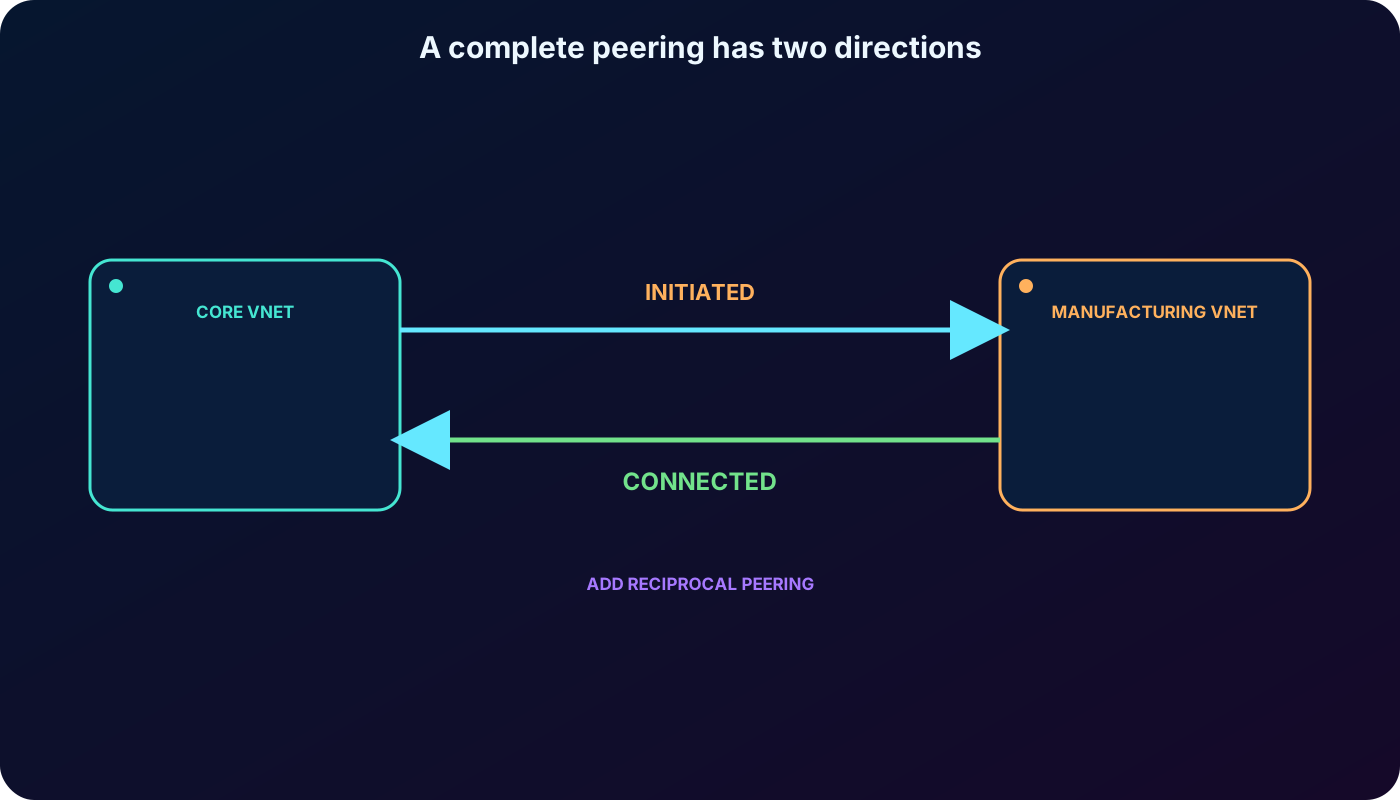
A complete connection has one peering object on each VNet. Creating only the Core-to-Manufacturing side produces an Initiated state because the reverse object is missing. After Manufacturing-to-Core is created and the properties agree, both objects show Connected.
Peering lifecycle states emphasized by the module.
State
Meaning
Administrator action
Initiated
One direction exists; the remote VNet has not completed its side.
Create or repair the reciprocal peering.
Connected
Both directional objects exist and Azure has established the relationship.
Validate routes, security, DNS, and application connectivity.
The portal can create both directions in one workflow when the operator has access to both VNets. Across subscriptions or tenants, two administrators may need to coordinate their respective sides.
Think of peering as two arrows, not one undirected line.
7. Permissions and creation tools
You can create and manage peering with the Azure portal, Azure PowerShell, Azure CLI, REST, or deployment automation. The built-in Network Contributor role contains the usual network actions; a custom role can instead grant only the required peering permissions. Authorization is needed for both virtual networks, even when they are in different subscriptions or Microsoft Entra tenants.
Confirm both VNets exist and their address spaces are unique.
Identify the local VNet and the remote VNet for the direction being configured.
Create the first direction and observe Initiated if the reciprocal object does not exist.
Create the reverse direction and wait for Connected on both sides.
Review the four access and transit settings instead of accepting them without understanding the traffic effect.
8. Read the four peering settings as traffic decisions
Current portal concepts for each direction.
Setting concept
Effect when enabled
Allow the peered VNet to access this VNet
Permits ordinary private-address communication over the peering, subject to NSGs and other controls.
Allow forwarded traffic from the peered VNet
Accepts traffic whose original source is not inside the remote VNet, such as packets forwarded by an NVA. It does not create the UDR or forwarding appliance.
Allow this VNet gateway or Route Server to forward to the peered VNet
Advertises the local gateway or Azure Route Server as a transit service to the remote side.
Enable this VNet to use the remote VNet gateway or Route Server
Lets the local side consume the remote transit service. A local gateway cannot coexist with use of a remote gateway.
Settings apply independently to each direction. A secure design enables only the flows it needs, then reinforces the result with NSGs, firewall policy, route tables, and workload controls.
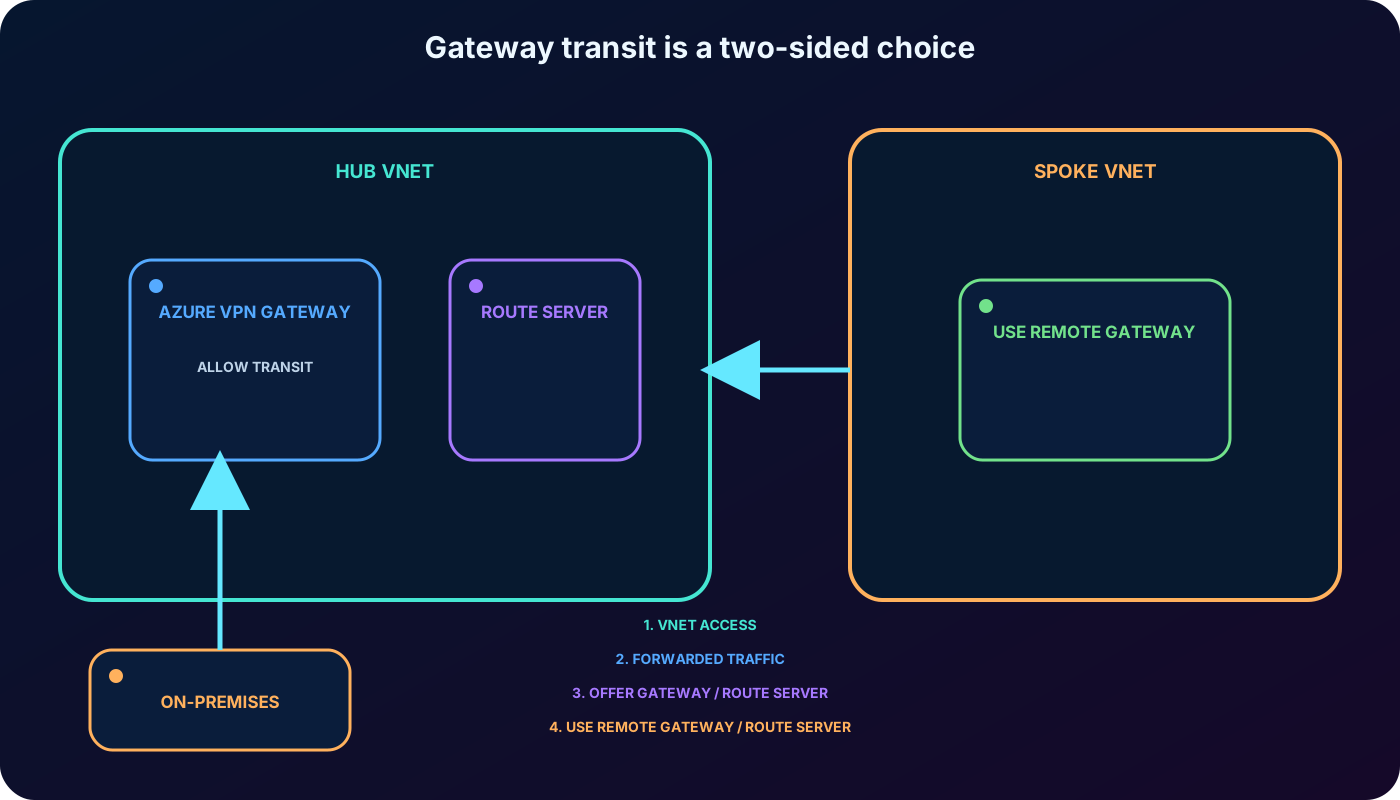
Transit works only when the hub offers its gateway and the spoke elects to use it.
9. Gateway transit shares hybrid connectivity
A hub VNet can host Azure and share it with peered spokes. The hub peering enables gateway transit; each consuming spoke enables use of the remote gateway. The arrangement avoids deploying and managing a separate VPN gateway in every spoke.
Site-to-site: the gateway connects the hub and an on-premises network through an IPsec tunnel.
VNet-to-VNet: a gateway-based tunnel connects virtual networks when peering is not the chosen path.
Point-to-site: individual client devices connect to the Azure network.
ExpressRoute: a shared ExpressRoute gateway can also participate in supported transit designs.
Regional and global peering support gateway transit. A spoke using the remote gateway cannot also have its own virtual network gateway, and only one remote gateway or Route Server peer can be selected. The remote side must explicitly allow the transit service.
10. Security still filters a reachable route
Connected peering creates system routes for the remote address spaces, but reachability is not the same as permission. Network security groups on both source and destination subnets or NICs can allow or deny the flow. A firewall, NVA, operating-system firewall, service endpoint policy, or application listener may add further conditions.
Use the effective routes of a VM network interface to confirm that each remote prefix has a next-hop type of virtual network peering. Use effective security rules to see the combined NSG result. This separates routing failures from filtering failures before you troubleshoot the application.
11. Peering does not provide transitive routing
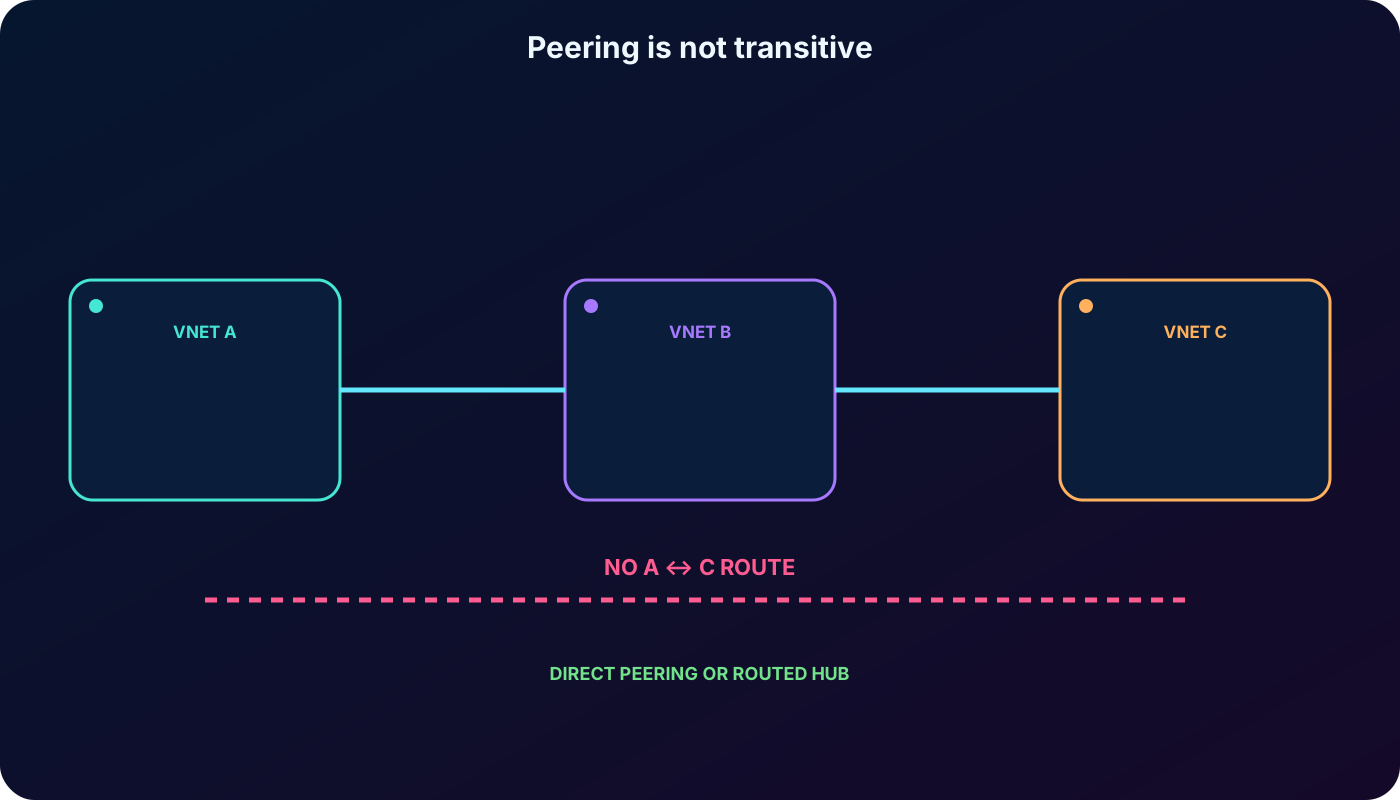
If VNet A peers with VNet B and B peers with C, Azure does not infer a route between A and C. Each peering supplies only its direct relationship. This nontransitive behavior is one of the most common AZ-104 traps.
To connect A and C, create a direct peering or deliberately route traffic through a hub service such as an NVA, , VPN gateway, or supported Azure Route Server design. The required forwarding settings, UDRs, and security policy must all agree.
Two connected peering relationships do not become a third relationship.
In a hub-and-spoke topology, each spoke peers with a central hub instead of every spoke peering with every other spoke. The hub commonly hosts shared DNS, or another NVA, Azure Bastion, VPN or ExpressRoute gateways, and operational tooling. Spokes host application or business workloads.
The model reduces duplicated infrastructure and gives security teams a consistent inspection point. It does not make spoke-to-spoke routing automatic: direct spoke peering or an intentional routed path through the hub is still necessary.
13. User-defined routes choose the next hop
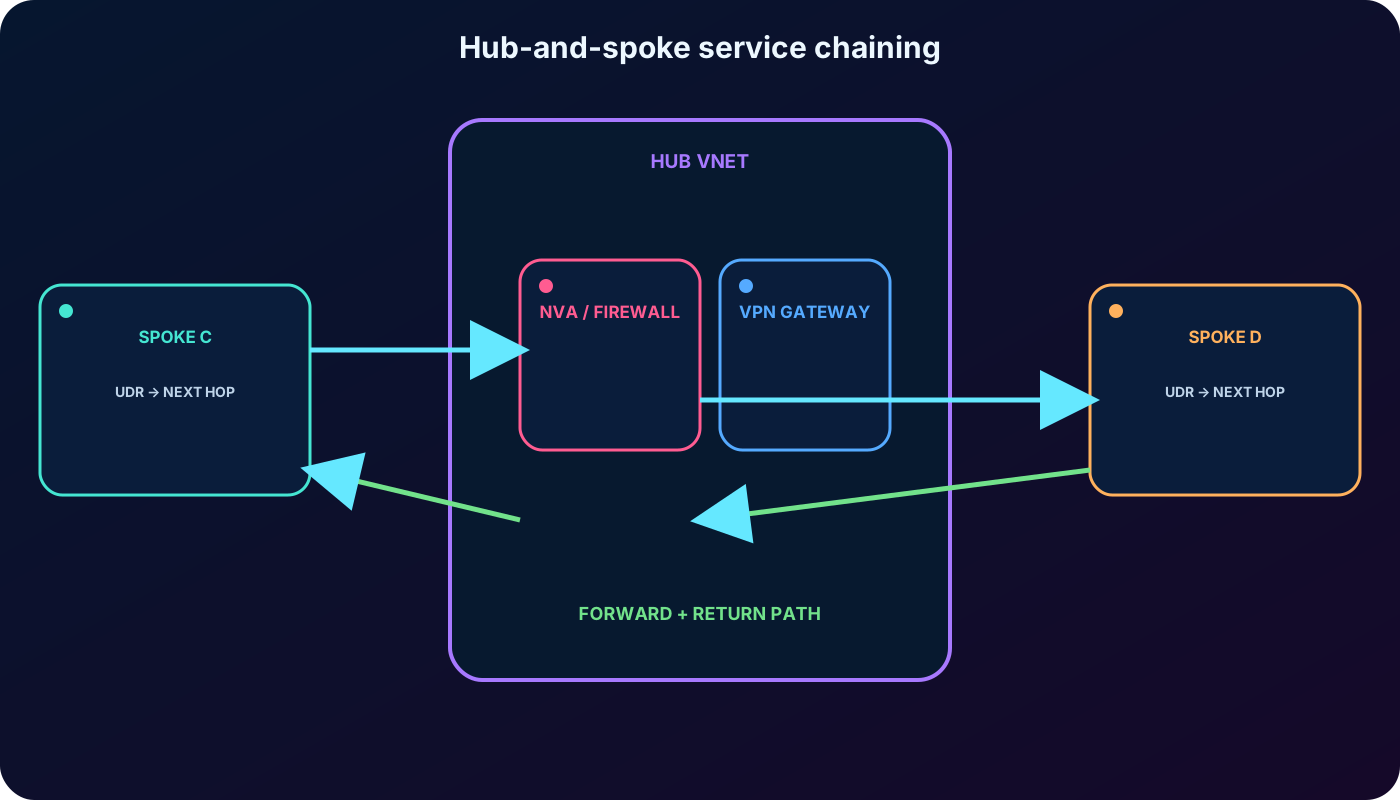
Azure creates system routes for local, peered, and gateway prefixes. A route table can add user-defined routes (UDRs) that override or refine the chosen path. For service chaining, a UDR on a spoke subnet can use the private IP of an NVA in the peered hub as the next hop. A UDR may also direct supported traffic toward a virtual network gateway.
Enable IP forwarding on an NVA NIC and configure the appliance operating system to forward and inspect packets.
Enable forwarded traffic on the relevant peering directions.
Associate each route table with the correct subnet and include a return path; asymmetric routing commonly breaks stateful inspection.
Do not use an gateway as the next-hop type of a UDR for routing between peered VNets.
Validate Azure routes and appliance policy separately.
14. Service chaining inserts an appliance or gateway
Service chaining means deliberately steering a flow through a network function before it reaches the destination. For example, a spoke’s UDR sends traffic to a firewall VM in the hub, the firewall inspects it, and another route carries permitted traffic to a second spoke or an on-premises network.
The chain is not produced by peering alone. It depends on peering reachability, forwarded-traffic settings, UDRs, appliance forwarding, security rules, and a valid return path. Troubleshoot the chain one hop at a time.
Peering provides adjacency; UDRs and the forwarding service provide transit.
15. Azure Manager scales topology management
Manually maintaining reciprocal peerings and consistent connectivity settings becomes difficult across many subscriptions and regions. Azure Manager provides centralized connectivity configurations for hub-and-spoke or mesh topologies and can automate the intended network relationships at scale.
Central management does not remove the need to plan CIDR, security, DNS, routing, or failure domains. It changes how the desired topology is deployed and governed.
16. Lab scenario and target architecture
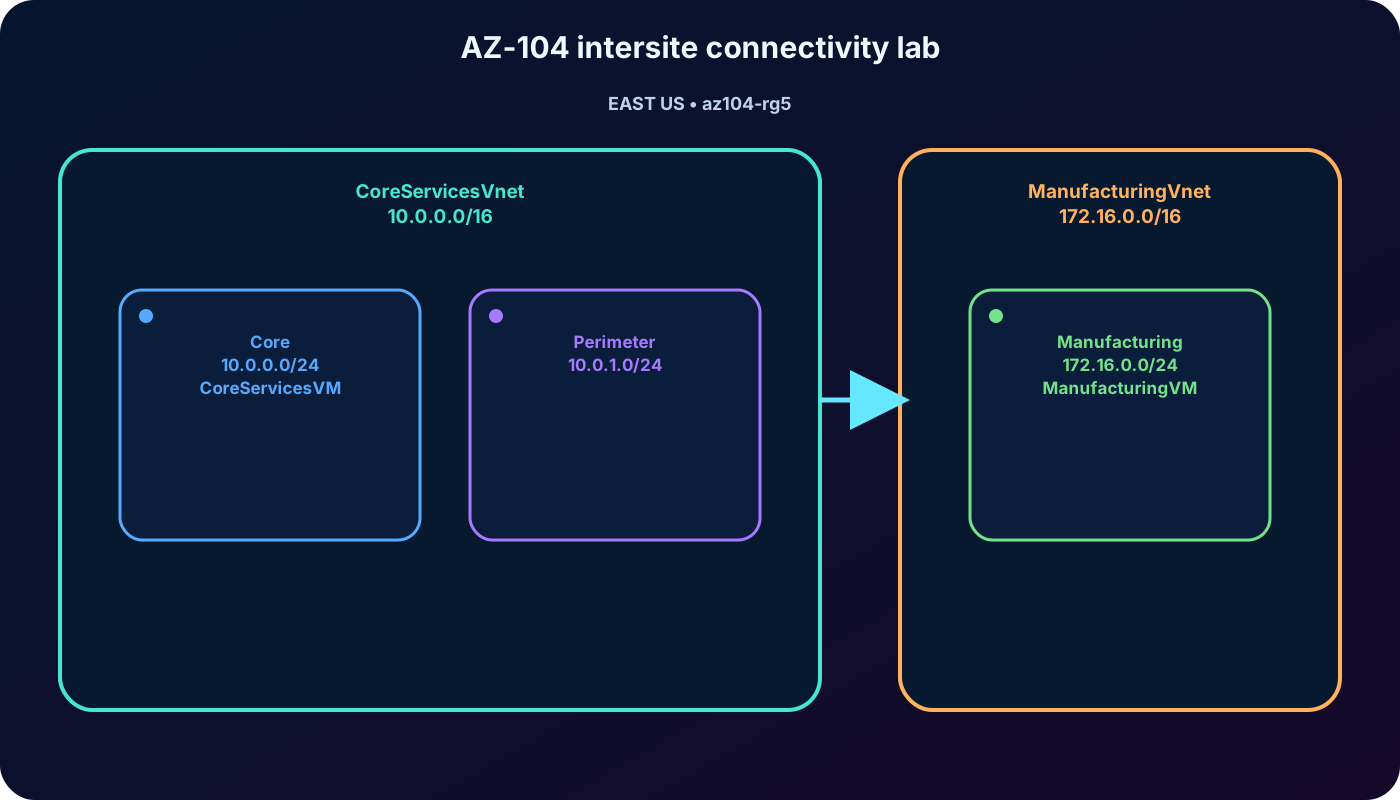
The supplied exercise separates core IT services from manufacturing resources. The same pattern can represent production versus development or independently governed subsidiaries. They are isolated by default, then peered only when the business flow requires it. Allow about 50 minutes and use an authorized Azure subscription.
Exercise topology in resource group az104-rg5, East US.
VNet
Address space
Subnet
Workload
CoreServicesVnet
10.0.0.0/16
Core — 10.0.0.0/24
CoreServicesVM
CoreServicesVnet
10.0.0.0/16
Perimeter — 10.0.1.0/24
Reserved for perimeter services
ManufacturingVnet
172.16.0.0/16
Manufacturing — 172.16.0.0/24
ManufacturingVM
The nonoverlapping address spaces can be peered without network address translation.
17. Lab tasks: build, observe failure, peer, and retest
Create CoreServicesVnet, its Core and Perimeter subnets, and CoreServicesVM.
Create ManufacturingVnet, the Manufacturing subnet, and ManufacturingVM.
Before peering, use Azure Network Watcher connection troubleshooting to demonstrate that the VMs do not have a route to one another.
Create CoreServicesVnet-to-ManufacturingVnet and the reciprocal peering. Confirm that both sides report Connected.
Use Azure PowerShell or another approved test method to verify private-IP connectivity after peering.
Optionally create a custom route to practice route-table association and next-hop reasoning without assuming that peering itself is transitive.
The exercise measures six job skills: creating core and manufacturing VMs, testing with Network Watcher, configuring both peerings, validating with Azure PowerShell, and optionally applying a custom route. Use restrictive test rules and delete only the dedicated lab resource group after confirming it contains no shared assets.
18. Troubleshoot from control plane to application
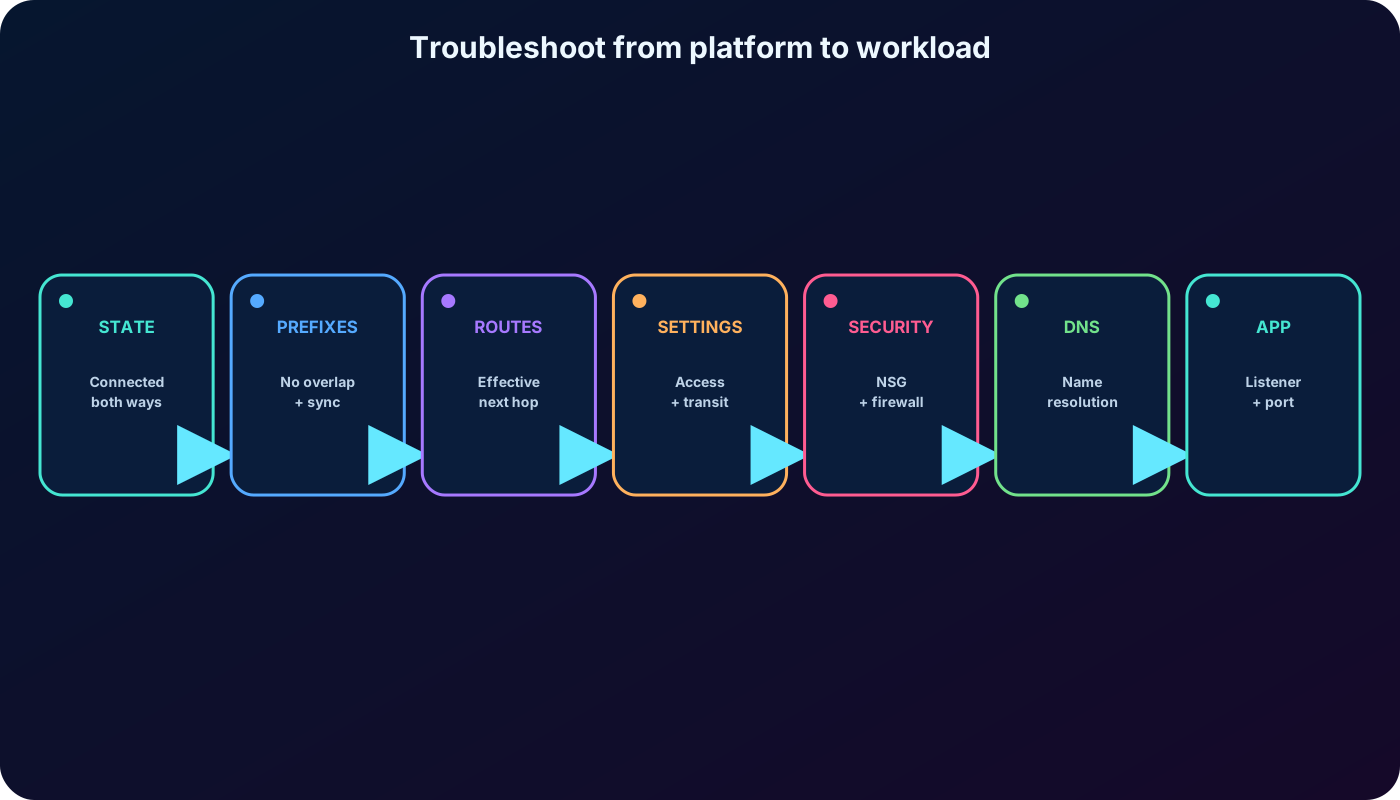
State: both peering objects must be Connected, not Initiated or Disconnected.
Prefixes: address spaces must not overlap, and peers must be synchronized after a resize.
Routes: inspect effective routes for the expected peering, UDR, gateway, or appliance next hop.
Settings: verify VNet access, forwarded traffic, gateway transit, and remote-gateway selection in both directions.
Security: inspect effective NSG rules, firewall policy, and the guest operating-system firewall.
Forwarder: validate IP forwarding, appliance health, policy, and symmetric return routing.
DNS: test the destination private IP first, then fix Azure Private DNS or custom DNS if only the name fails.
Application: confirm the process listens on the expected address and port.
Move from platform state toward the workload; each check eliminates a class of failures.
19. Answers to the supplied assessment
Module assessment with reasoning.
Question
Correct answer
Why
Which state confirms that peering is established on both VNets?
Connected
Initiated indicates that only one directional object exists or the reciprocal side is incomplete.
Which capability lets multiple VNets share a gateway and its connected resources?
Gateway transit
Point-to-site connects clients, while peering transitivity does not exist automatically.
Which statement best describes peering traffic?
It remains on the private Microsoft backbone.
Peering does not require the public internet and is not limited to one region when global peering is supported.
20. AZ-104 decision rules and exam traps
Same region means regional peering; different regions within one Azure cloud means global peering.
Peering is private and direct, but it is billed and does not replace NSGs or encryption requirements.
A complete relationship is two directional objects; Connected is the successful state.
Address spaces cannot overlap. After a supported resize, synchronize every peer instead of deleting the relationship.
A-B plus B-C does not equal A-C. Use direct peering or a deliberately routed hub.
Gateway transit requires the hub to allow transit and the spoke to use the remote gateway; the spoke cannot simultaneously own a gateway.
Allow forwarded traffic accepts forwarded packets but does not create routing or enable an NVA by itself.
Peering does not provide cross-VNet DNS name resolution by default.
Basic is retired; choose Standard for current architectures.
21. Compact review of every topic
Summarized study version.
Topic
Remember
Purpose
Private-IP communication between independent VNets over the Microsoft backbone.
Types
Regional in one region; global across regions inside the same Azure cloud.
Requirements
Nonoverlapping prefixes, permissions on both networks, and two directional objects.
State
First side is Initiated; both sides become Connected.
22. Active recall, Copilot prompts, and official resources
Active-recall prompts
Draw the two objects required for a Connected peering.
Explain why a direct private path can still fail because of routing, NSG, DNS, or application policy.
Configure the two settings required for a spoke to consume the hub VPN gateway.
Turn three nontransitively peered VNets into a routed hub-and-spoke design.
Explain what must happen after a peered VNet address-space resize.
Recreate the CoreServicesVnet and ManufacturingVnet lab and predict every effective route.
Useful Microsoft Copilot questions
Copilot can compare connectivity options, explain settings, and help investigate an Azure architecture. Useful prompts include: “What is Azure virtual network peering and what advantages does it offer?” and “Explain each peering configuration setting and when to enable it.” Verify generated guidance against the current configuration and official documentation.