Azure governance architecture: hierarchy, subscriptions, resource groups, tags, Policy, RBAC, and landing zones
Design an enforceable governance model across management groups, subscriptions, resource groups, resources, identity, policy, metadata, compliance, and code-based landing zones.
Suggested study time: 75 minutes • Intermediate • Complete original rewrite with a concise summary for every topic
By João Ricardo Dutra••Complete original content
1. Governance turns standards into enforceable control
Governance establishes rules and policies, assigns accountability, and verifies enforcement. It keeps cloud applications and resources aligned with industry requirements such as information security management and with organizational standards such as network encryption. It becomes especially important with multiple engineering teams, subscriptions, regulatory obligations, or platform-wide standards.
The architecture task is to determine requirements, prioritize initiatives, create the right resource hierarchy, and apply controls at the scope where they belong. This chapter covers management groups, subscriptions, resource groups, tags, , Azure RBAC, and Azure landing zones.
Topic summary
Governance is the operating system for cloud control: it converts requirements into owned, enforceable, and measurable rules across the estate.
2. Use a hierarchy to apply controls at scale
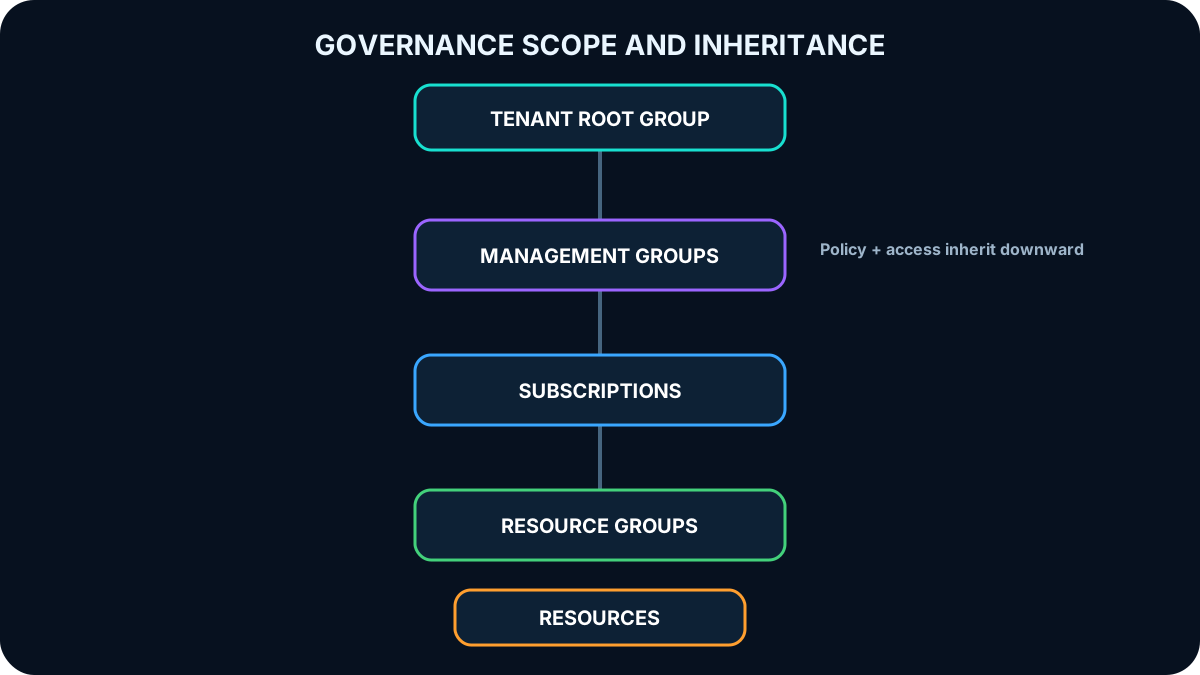
Azure governance normally follows four nested scopes: management groups, subscriptions, resource groups, and resources. Controls assigned higher in the hierarchy can flow to lower scopes. The design should place broad requirements high enough to avoid duplication while keeping workload-specific rules close to the workload.
The Azure hierarchy provides progressively narrower scopes so access, policy, compliance, billing, and lifecycle controls can be applied consistently.
3. Understand the tenant root group
Every management group and subscription belongs to one directory hierarchy. The tenant root group sits at the top and enables directory-wide and role assignments. Because its scope is extremely broad, assignments there should be rare, carefully reviewed, and reserved for requirements that genuinely apply everywhere.
Topic summary
The tenant root group governs the entire directory hierarchy, so only universal and well-reviewed controls should be assigned there.
4. Management groups govern multiple subscriptions
Management groups provide a scope above subscriptions for access, policy, and compliance. They can aggregate definitions and initiatives, restrict VM regions, grant inherited access across subscriptions, and simplify auditing. A tree supports up to six levels below the tenant root, excluding the root and subscription levels; each child has one parent, and new subscriptions initially appear under the root group.
Topic summary
Management groups create an enterprise governance boundary above subscriptions and make policy and access inheritance manageable at scale.
5. Keep the management-group hierarchy purposeful
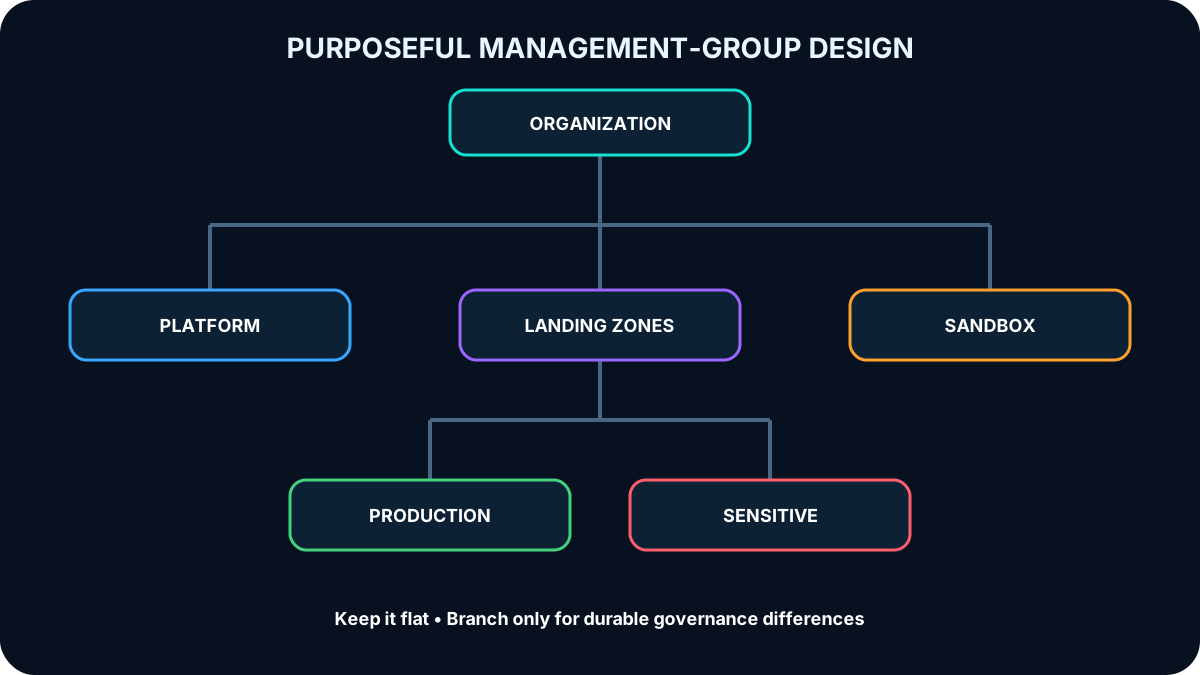
Design around governance needs, not a mirror of every reporting line. A reasonably flat structure - commonly three or four meaningful levels - is easier to understand and operate. Use a top-level platform scope for organization-wide controls, then separate scopes when departments, geographies, environments, or regulated workloads require different policy or access.
The hierarchy expresses durable governance differences, not temporary project structure.
Topic summary
A management-group branch is justified when its descendants share enduring policy, compliance, connectivity, or access requirements.
6. Include production, sandbox, and sensitive-data patterns
Use a production branch for controls shared by corporate products.
Provide an isolated sandbox where experimentation cannot weaken development, test, or production guardrails.
Use geographical branches when regional compliance genuinely differs.
Separate sensitive workloads when enhanced controls are required.
Avoid deep or mostly empty branches that add complexity without governance value.
Topic summary
Production, sandbox, geography, and sensitive-data branches are useful only when they represent materially different governance requirements.
7. Subscriptions are management, scale, and billing units
An Azure subscription is a logical container for creating and paying for Azure services. Enterprise Agreement, Pay-As-You-Go, and other offers differ commercially, but every subscription establishes a billing boundary, management boundary, and quota or scale boundary. Separate subscriptions can isolate development, test, production, or specialized workloads and make cost ownership clearer.
Topic summary
A subscription is simultaneously a billing container, an administrative boundary, a policy scope, and a unit for quotas and scale.
8. Align subscriptions to business and governance needs
Treat subscriptions as democratized units of management aligned to business priorities. Place subscriptions with the same policies and role assignments under a common management group. Do not create a management group only to hold a handful of subscriptions when subscription-level policy can provide the necessary isolation.
Topic summary
Subscription placement should follow shared governance and business accountability, not arbitrary technical convenience.
9. Design shared-services and high-scale subscriptions
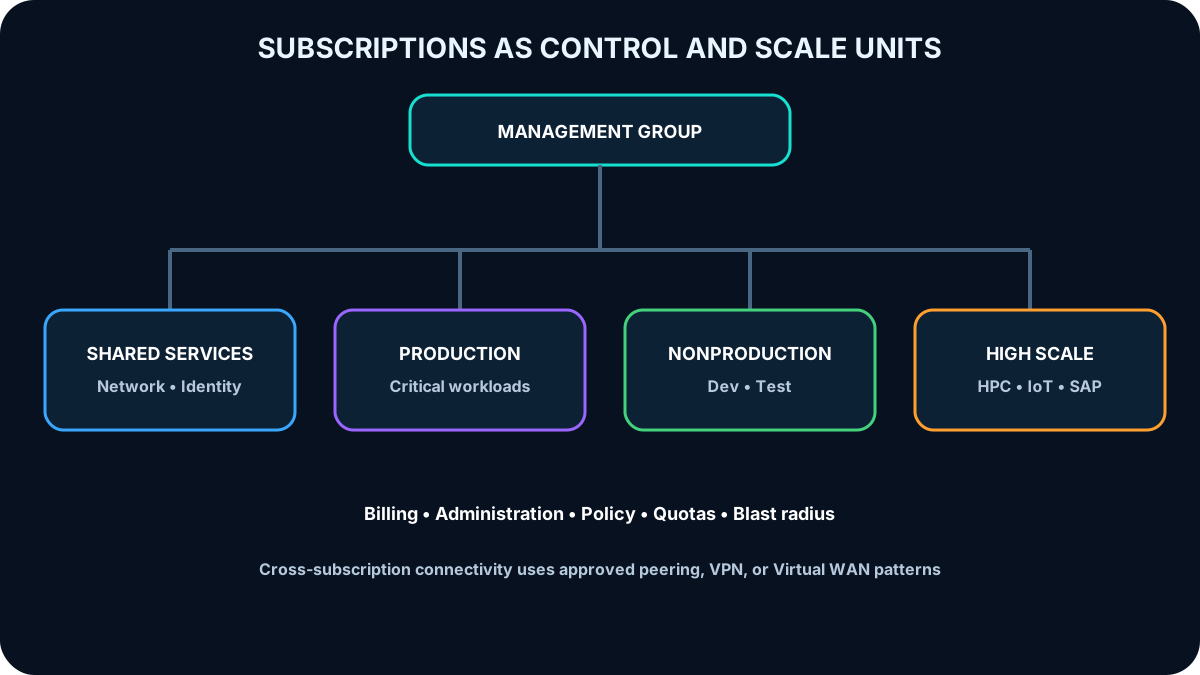
A dedicated shared-services subscription can isolate common connectivity and chargeback, including and Azure . Large specialized workloads such as HPC, IoT, SAP, or integration-heavy platforms might need separate subscriptions to avoid quotas and operational coupling. Confirm current service limits rather than assuming a historical number will remain unchanged.
Subscriptions separate billing, administration, policy, quotas, and blast radius while management groups provide shared guardrails.
Topic summary
Use dedicated subscriptions when shared services, workload scale, quota pressure, administrative separation, or cost ownership requires a distinct boundary.
10. Review administration and privileged access
A subscription can separate administrators and responsibilities. Make owners understand their duties and review privileged assignments quarterly or twice yearly with Microsoft Entra Privileged Identity Management and access reviews. Prefer eligible, time-bound elevation over permanent privilege where possible.
Topic summary
Subscription administration needs explicit owners, separation of duties, periodic access reviews, and controlled privilege elevation.
11. Consider policy and network topology before splitting
Both management groups and subscriptions are assignment boundaries. A regulated workload such as PCI can be isolated with a subscription instead of an extra management-group branch. Virtual networks are subscription-scoped resources, but workloads can communicate across subscriptions through virtual network peering, VPN gateways, Azure , or other approved patterns. Map communication needs before choosing boundaries.
Topic summary
Subscription design must account for policy isolation and cross-subscription connectivity, not only billing.
12. Resource groups align resources to lifecycle and control
A resource group is the logical container into which Azure resources are deployed and managed. It can group resources by application, lifecycle, type, location, department, or cost center; provide an Azure RBAC and scope; and carry resource locks that prevent accidental deletion or change.
Topic summary
Resource groups are lifecycle and management containers, not merely visual folders.
13. Know the resource-group constraints
The resource group has a region where its metadata is stored, while contained resources can use other regions.
If the metadata region is unavailable, existing resources continue running but management updates can be blocked.
A resource can communicate across resource groups and can often be moved, subject to service limitations.
Resource groups cannot be nested or renamed.
Every resource belongs to exactly one resource group at a time.
Topic summary
Resource-group region affects the management plane, and the one-group, no-nesting model makes lifecycle planning important.
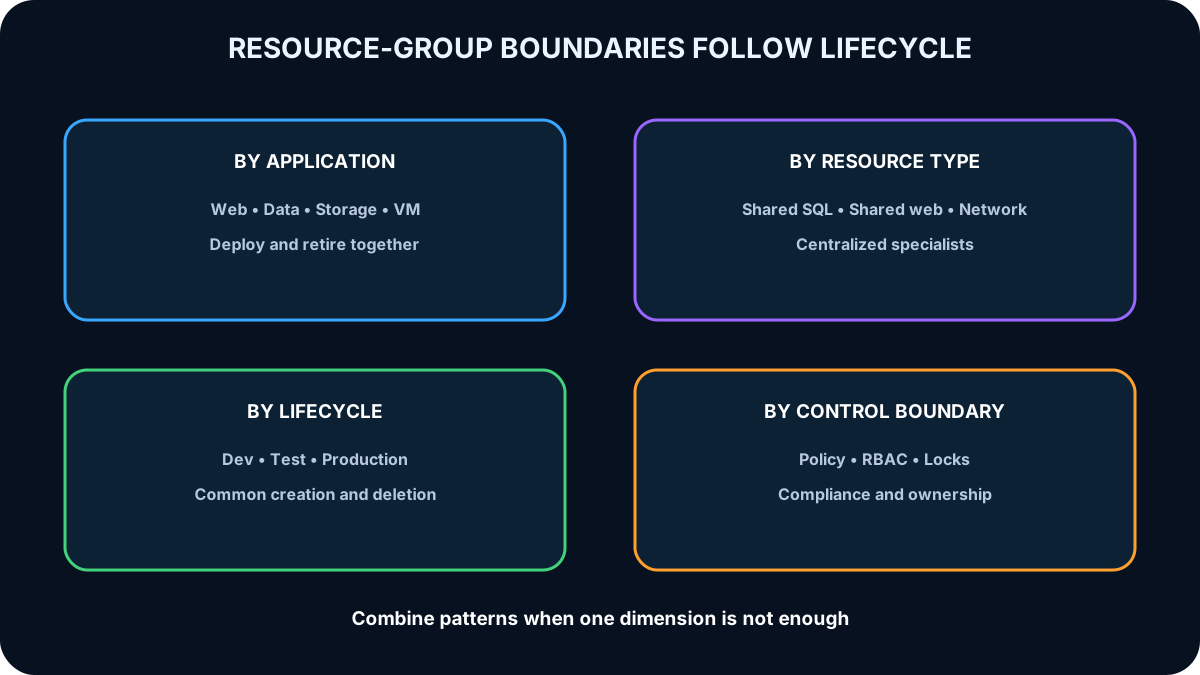
14. Choose a resource-group organization strategy
Group by application when resources share a lifecycle, policy, and ownership. Group by type for shared or on-demand services that are not tied to one application. Department, region, billing, or environment can be useful dimensions, but a combination usually fits real estates better than a single universal rule.
The strongest design groups resources that are deployed, updated, secured, and retired together.
Topic summary
The best resource-group boundary follows common lifecycle, administration, policy, and ownership.
15. Balance lifecycle, overhead, access, and compliance
Place resources together when they should be created, updated, and deleted together. Estimate the operational overhead of the number of groups and whether administration is centralized or decentralized. Apply roles, policy, and locks at the group scope, and choose the metadata region according to compliance and management-plane resilience requirements.
Topic summary
Resource-group design balances lifecycle coordination with administrative overhead, access control, locks, and compliance.
16. Tags add business and operational metadata
An Azure tag is a name-value pair such as env=production. Tags can be assigned to resources, resource groups, and subscriptions and managed with Azure PowerShell, Azure CLI, , REST, or the Azure portal. A tag placed on a resource group is not automatically inherited by its resources, so inheritance must be implemented through deployment logic or .
Topic summary
Tags enrich resources with searchable and automatable metadata, but resource-group tags do not inherit automatically.
17. Start tagging with a defined outcome and taxonomy
Define what tagging must achieve before creating keys: search, automation, cost allocation, confidentiality, ownership, or reporting. Align keys and allowed values with accepted organizational terminology. IT-aligned tags describe workload, application, tier, environment, and operations; business-aligned tags express ownership, cost responsibility, criticality, revenue, and business value.
Topic summary
A useful tag taxonomy begins with measurable outcomes, accepted vocabulary, and a deliberate mix of operational and business context.
18. Use five complementary tag categories
Common resource-tag categories.
Category
Purpose
Examples
Functional
Purpose within a workload
app, tier, webserver, env
Classification
Usage and protection expectation
confidentiality, SLA
Accounting
Billing and organizational association
department, program, region
Partnership
People affected by or accountable for the resource
owner, contactAlias, stakeholders
Purpose
Connection to business function and value
businessProcess, businessImpact, revenueImpact
Topic summary
Functional, classification, accounting, partnership, and purpose tags together connect technology to operation, protection, ownership, cost, and value.
19. Roll out and enforce tags incrementally
Prototype a small set of critical tags, measure whether they support their intended decisions, and expand after stakeholder feedback. Not every tag belongs on every resource; for example, an Impact tag might be required only for mission-critical assets. Use to require, add, inherit, or reapply tags when consistency is necessary.
Topic summary
A small, tested tag set with stakeholder ownership and policy enforcement is more effective than a large uncontrolled taxonomy.
20. governs resource state
creates, assigns, and manages rules that audit or control resource configuration. Individual definitions can be grouped into initiatives. Assignments inherit down the hierarchy and can evaluate Azure resources and supported -enabled resources. Built-in definitions accelerate common compliance scenarios, while custom definitions address organization-specific requirements.
can audit, deny noncompliant creation, modify configuration, deploy related compliant resources, and remediate existing resources. integration can evaluate controls before and after deployment.
Topic summary
evaluates and corrects resource state so configurations remain aligned with organizational rules regardless of who made the change.
21. Understand policy evaluation timing
Evaluation is triggered when an in-scope resource is created, updated, or deleted; when an assignment or initiative is created or updated; and during the regular compliance cycle, commonly about once every 24 hours. Because compliance reporting is not always immediate, architecture and operations must account for evaluation delay.
Topic summary
Policy evaluates on resource and assignment changes plus a recurring cycle, so dashboards can temporarily lag the latest state.
22. Use the compliance dashboard and remediation
The compliance dashboard aggregates posture across scopes and lets teams drill into definitions and resources. Choose an effect that matches the risk: deny, audit, modify, deploy related resources, or trigger remediation. Bulk remediation helps existing resources, while managed identities and remediation tasks can bring supported configurations into compliance.
Topic summary
The compliance dashboard explains posture; policy effects and remediation convert findings into prevention or correction.
23. and Azure RBAC solve different problems
Complementary control models.
Aspect
Azure RBAC
Question
Is the resource state compliant?
Who can perform which actions at which scope?
Focus
Resource properties and configuration
Authorization and access
Implementation
Definitions, initiatives, assignments, effects
Role definitions and role assignments
Default posture
Rules evaluate according to their configured effect
Access is denied unless an assignment allows it
Relationship
Can block a noncompliant result even for an authorized user
Can allow the action but does not guarantee the resulting state is compliant
Topic summary
Use RBAC to govern actions and to govern resulting state; mature designs use both.
24. Access follows an identity lifecycle
An identity starts with no resource access. Azure RBAC grants authorized actions, Microsoft Entra Conditional Access verifies contextual conditions, Protection monitors identity risk, and Microsoft Entra access reviews confirm that access remains necessary. Governance must cover granting, using, monitoring, reviewing, and removing access.
Topic summary
Resource access is a lifecycle that combines authorization, conditional verification, risk detection, review, and removal.
25. Azure RBAC is an allow model
Azure RBAC evaluates access requests against role assignments. A role definition contains allowed actions; an assignment connects that role to a user, group, service principal, or managed identity at a management-group, subscription, resource-group, or resource scope. Read access does not imply write access unless the role explicitly includes it.
Topic summary
RBAC grants only the actions expressed by assigned roles at the selected scope; ungranted access remains denied.
26. Design RBAC for least privilege and manageability
Define required actions first, then assign at the highest scope that meets the requirement without exposing unrelated resources.
Grant the least privilege needed and separate responsibilities.
Assign roles to groups instead of individual users where practical.
Use managed identities or service principals for applications rather than shared user credentials.
Create custom roles only when built-in roles cannot express the required permission set.
Topic summary
Effective RBAC minimizes scope and permissions, uses groups for administration, and gives applications nonhuman identities.
27. Calculate effective permissions across overlapping assignments
Azure RBAC is additive: effective permissions are the union of applicable role assignments. A Contributor assignment at subscription scope is not reduced by adding Reader at a child resource group. Architects must inspect inherited and direct assignments together and use deny assignments or privileged-access controls only where their documented behavior fits the requirement.
Topic summary
A narrower Reader assignment does not subtract broader Contributor rights because RBAC permissions normally add together.
28. Landing zones provide the cloud foundation before workloads
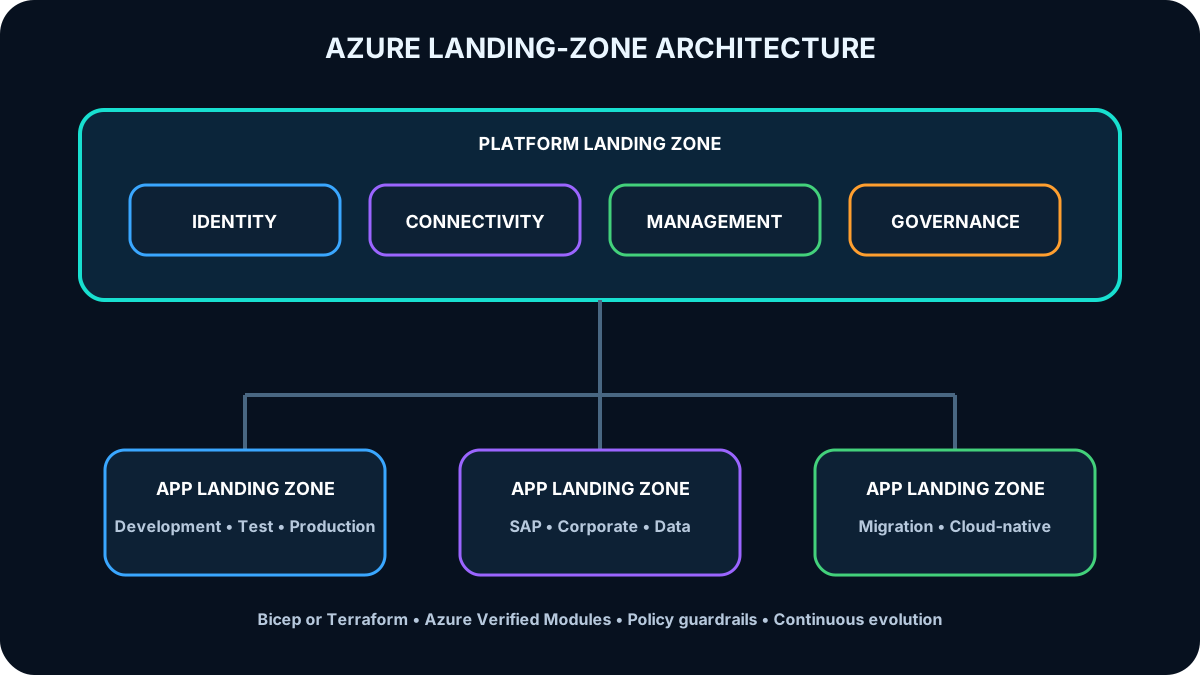
An Azure landing zone is an infrastructure environment prepared to host workloads. Like utilities installed before homes are built, identity, access, connectivity, policy, management, and monitoring must be ready before application migration or deployment. Landing zones use management groups and subscriptions to scale according to business priorities.
Topic summary
A landing zone pre-establishes the shared platform capabilities and guardrails workloads need to deploy safely and consistently.
29. Separate platform and application landing zones
The platform landing zone hosts shared identity, connectivity, and management subscriptions operated by a central platform team. Application landing zones host individual workloads and environments such as development, test, and production. maintains platform compliance while workload teams operate within guardrails.
Shared platform services and workload autonomy are separated but connected through policy, networking, identity, and observability.
Topic summary
Platform landing zones centralize shared capabilities; application landing zones give workloads governed spaces for their full lifecycle.
30. Deploy landing zones through code and evolve them
Pre-provision landing zones through infrastructure as code. The Azure landing zone IaC accelerator uses Bicep or Terraform through Azure Verified Modules; a portal-based accelerator can help organizations that lack IaC expertise. Treat the code as a product: review short- and long-term scenarios, refactor iteratively, and keep it aligned with the Azure platform roadmap.
Design for migrations and greenfield development across the full portfolio, prefer Azure-native services where they fit, and focus on application outcomes rather than pure VM lift-and-shift. Existing estates can introduce the accelerator in parallel within the same Microsoft Entra tenant and transition incrementally. Use an Azure landing zone review to identify investment areas.
Topic summary
Landing zones are versioned platform products deployed through code, reviewed continuously, and designed for both migration and new development.
31. Apply the governance scenario
Tailwind Traders assessment decisions.
Requirement
Recommended control
Why
Consistent VM policy across subscriptions
Place subscriptions in a management group and assign there
Inheritance standardizes the descendants
Geo-redundant storage
Assign an that requires the approved redundancy option
Tags and resource groups do not configure storage redundancy
Report product costs across departments
Apply a consistent product or cost-allocation tag
Cost data can be grouped across resource groups and subscriptions
Support ISO 27001 governance
Combine hierarchy, policy initiatives, assignments, templates, evidence, and ownership
Compliance requires coordinated technical and procedural controls
Topic summary
The assessment tests scope selection: management groups for cross-subscription policy, for configuration, and tags for cross-boundary cost reporting.
32. Final governance checklist and resources
Map standards and regulations to owners, scopes, controls, evidence, and review cadence.
Keep management groups stable and subscriptions aligned to billing, administration, scale, and policy.
Group resources by lifecycle and apply locks where accidental change would be harmful.
Use a controlled tag taxonomy for ownership, value, cost, automation, and classification.
Combine and Azure RBAC, monitor compliance, and review privileged access.
Deploy platform and application landing zones through code and improve them iteratively.
Microsoft Copilot can extend study by comparing hierarchy choices, proposing a tag taxonomy, explaining versus RBAC, or applying Well-Architected principles to a governance scenario. Validate generated recommendations against official Azure documentation and your requirements.