Design backup and recovery with Azure Backup, Storage, SQL, and Site Recovery
Turn business recovery objectives into layered protection for blobs, file shares, virtual machines, databases, and complete workloads.
Suggested study time: 78 minutes • Intermediate • Complete original rewrite with a concise summary for every topic
By João Ricardo Dutra••Complete original content
1. The architect converts disruption risk into a recovery design
Backup and disaster recovery prevent hardware failure, human error, malicious action, and a regional outage from becoming an unrecoverable business interruption. A cloud move does not remove this responsibility: the architect must decide what is protected, where recovery copies live, and how the service returns within agreed objectives.
Consider a retailer migrating websites, operational data, and video workloads from its own data centers. Procurement delays disappear in Azure, but each workload still needs an appropriate backup and recovery path. This chapter develops that decision for ,, Azure , services, , and .
Design backup and recovery requirements.
Select and secure its vaults.
Protect blob, file, virtual-machine, and SQL data.
Use for orchestrated workload disaster recovery.
Relate each choice to the AZ-305 business-continuity objective.
Recommended prerequisites are a conceptual understanding of business continuity and disaster recovery (BCDR), familiarity with object replication and recovery tools, and experience reasoning about recovery requirements.
Topic summary
A sound design connects business impact to a recoverable copy, a tested restoration path, and an accountable operating process.
2. Reliability and resiliency are workload properties
A reliable application remains available and healthy without significant downtime. Resiliency is its ability to absorb a failure, continue gracefully where possible, and return to a known state. More servers or storage can improve redundancy, but recoverability also requires protected data and practiced procedures.
Define business requirements and a resiliency plan before selecting a service. Mission-critical and noncritical workloads rarely justify the same architecture, retention, regional scope, or cost.
Topic summary
Reliability is not a product label; it is the measured result of redundancy, recoverability, operations, and testing.
3. Separate workloads and study their usage patterns
Treat each logical business capability as a workload. Even two applications using the same platform can have different availability, scalability, consistency, and disaster-recovery requirements. Map dependencies so that a restored front end is not declared healthy while its identity, database, DNS, or network path is unavailable.
Usage patterns establish criticality and geography. A revenue service may need redundancy across Azure regions; an internal low-impact utility may deliberately stay in one region to reduce cost.
Topic summary
Partition the estate by business workload and dependency, then assign protection according to real usage and impact.
4. MTBF and MTTR reveal the expected failure rhythm
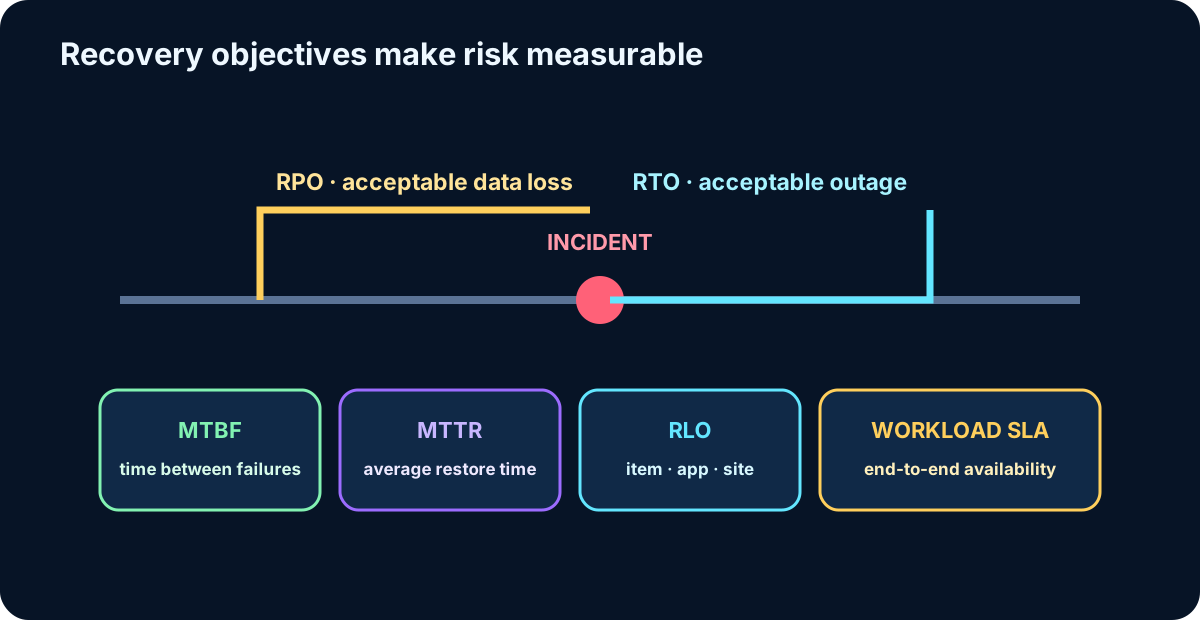
Mean time between failures (MTBF) estimates how long a component normally operates before another failure. Mean time to recover (MTTR) measures the average time needed to restore it after failure. Together they help determine redundancy, automation, spare capacity, and support coverage.
If the MTTR of a critical dependency is longer than the solution RTO, the architecture cannot meet the business promise. Remove the bottleneck, add a faster recovery path, or renegotiate the objective.
Topic summary
Use MTBF to understand failure frequency and MTTR to prove that every critical dependency can recover quickly enough.
5. RTO, RPO, and RLO define the recovery contract
Core recovery measurements.
Measure
Question answered
Architectural effect
RTO — recovery time objective
How long may the workload remain unavailable?
Constrains detection, decision, restore, startup, validation, and traffic switching.
RPO — recovery point objective
How much recent data may be lost?
Constrains backup frequency, replication lag, and recovery-point selection.
RLO — recovery level objective
At what granularity must recovery work?
Determines whether the unit is an item, database, application, site, or complete farm.
Assess the business cost and risk of both downtime and data loss. A fast full-site restore does not satisfy a requirement to recover one accidentally deleted file, while item-level recovery alone cannot rebuild a lost region.
Recovery metrics describe failure frequency, restoration speed, acceptable data loss, and required recovery granularity.
Topic summary
RTO limits outage, RPO limits data loss, and RLO defines the unit that must be recoverable.
6. Availability targets must include service dependencies
Set a target service-level agreement for each workload and account for cost, complexity, dependencies, and data replication. An Azure SLA describes Microsoft’s uptime or connectivity commitment for a service; it is an input to the workload target, not the end-to-end application guarantee.
A workload targeting 99.99% availability cannot depend on a single component whose design provides only 99.9%. Either improve that dependency, add an alternate path, or accept a lower overall target.
Topic summary
Calculate availability across the complete dependency chain and do not confuse an individual Azure SLA with the workload SLA.
7. Choose recovery technology only after the objectives are measurable
Once workload, failure scope, RTO, RPO, RLO, retention, compliance, and budget are known, select the protection mechanism. Local snapshots prioritize speed; vaulted backups improve isolation and retention; continuous replication reduces the recovery-point gap; and recovery plans orchestrate multi-tier service restoration.
No single feature covers every risk. Layer controls so that deletion, corruption, account compromise, infrastructure loss, and regional outage do not share one failure boundary.
Topic summary
Match each failure scenario to a control whose tested recovery characteristics satisfy the documented objectives.
8. covers cloud and on-premises data sources
Representative protection choices.
Data source
Protection approach
On-premises files, folders, and system state
Microsoft Azure Recovery Services (MARS) agent.
On-premises Hyper-V, VMware, and application workloads
System Center Data Protection Manager (DPM) or Microsoft Server (MABS).
Windows and Linux Azure VMs
Whole-VM backup through an extension, or selected files, folders, and system state through MARS.
Native file-share backup.
SQL Server or SAP HANA in Azure VMs
Workload-aware database backup.
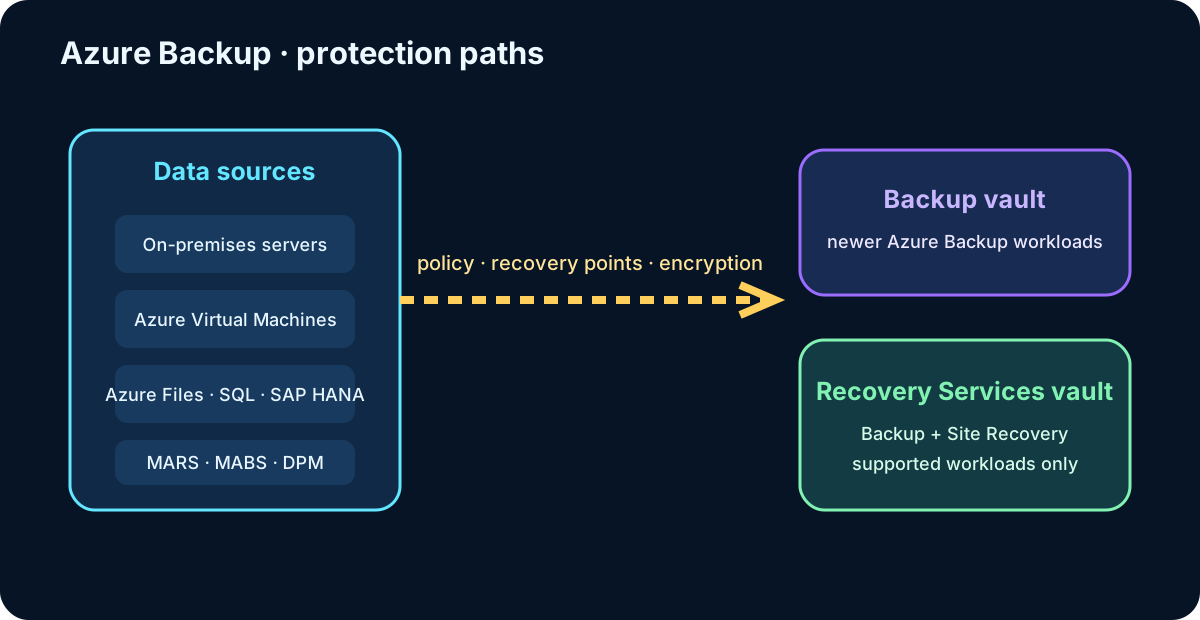
replaces physical media and many offsite backup operations with a managed, scalable, and pay-as-you-go service. The source and required restore type determine the component and vault.
protects multiple data sources, but the agent and vault type vary by workload.
Topic summary
Select the component from the protected data source, operating location, and required restore scope.
9. Backup vault and Recovery Services vault support different workloads
A vault stores backup configuration, recovery points, and policies. A Backup vault is used by newer scenarios. A Recovery Services vault supports workloads such as VMs and and also stores configuration.
Keep the workload support matrix central to the design; the word “vault” does not make the two resources interchangeable. Separating Backup and Site Recovery vaults can also clarify permissions, lifecycle, and operational ownership.
Topic summary
Choose the vault by supported workload and operational boundary, not by name alone.
10. Organize vaults, policies, and permissions deliberately
A single vault can be practical when one team, subscription, region, security boundary, and lifecycle apply. Multiple vaults are justified when subscriptions, regions, administrators, compliance boundaries, or backup and disaster-recovery responsibilities differ.
Scope each backup policy to the appropriate vault.
Use to propagate protection requirements at scale.
Use Azure role-based access control (Azure RBAC) and least privilege.
Separate policy administration from destructive or recovery operations where risk requires it.
Topic summary
Vault topology should reflect subscription, region, security, compliance, and ownership boundaries.
11. Redundancy and cyber-resilience protect the recovery copy
Vault resilience controls.
Control
Purpose
LRS
Keeps copies inside one data center for low-cost local redundancy.
ZRS
Spreads copies across availability zones in one region, where supported.
GRS
Replicates backup data to a paired secondary region.
Immutable vault
Prevents recovery points from being deleted before expiration; immutability can be locked.
Multi-user authorization and Resource Guard
Requires an additional authorization boundary for critical operations.
Resiliency in Azure
Provides a centralized view of backup, disaster recovery, security posture, alerts, and protection across scopes.
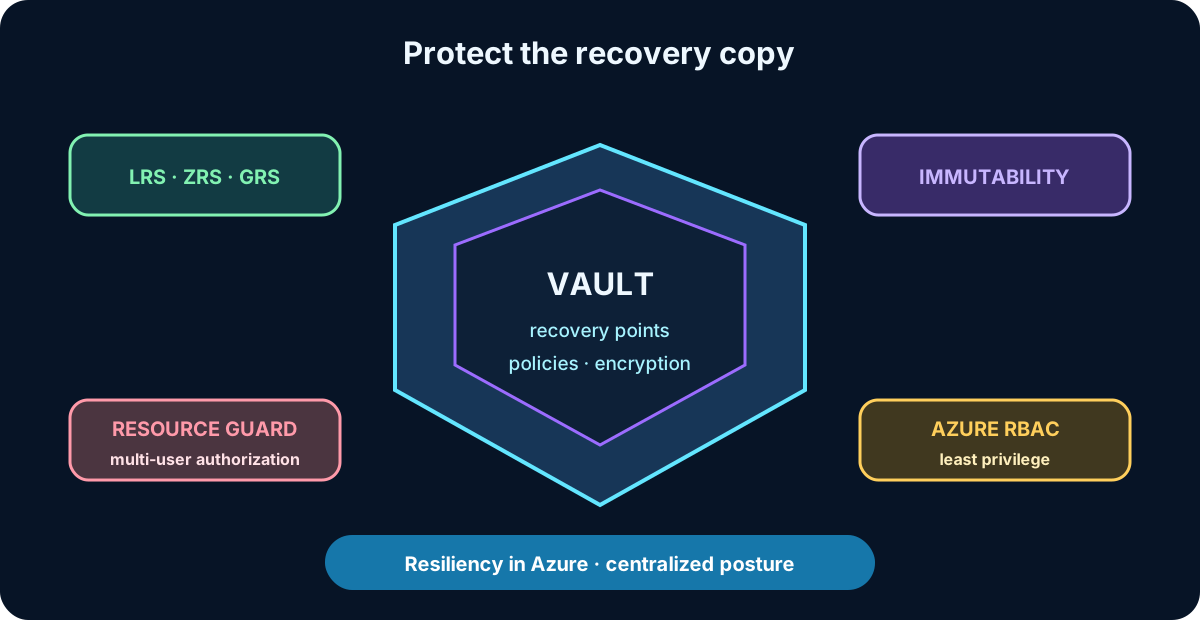
Choose redundancy before protection begins where a vault later restricts the change. Current Microsoft terminology calls the unified management experience Resiliency in Azure; it was formerly Azure Business Continuity Center.
The recovery copy needs geographic resilience, access control, immutability, and centralized monitoring.
Topic summary
A backup is trustworthy only when its storage, authorization, immutability, and monitoring resist the same incident as production.
12. Operational backup for blobs keeps recovery data in the source account
Operational backup for block blobs is continuous and local: backup data remains in the source storage account rather than being copied to a vault. There is no periodic backup schedule; Azure tracks changes during the configured retention window and can restore a selected earlier point.
This gives fast recovery from accidental deletion or corruption, but it shares the storage-account failure boundary. Use stronger isolation when account deletion, ransomware, or a compromised administrator is in scope.
Topic summary
Blob operational backup favors continuous, fast in-account recovery and must be complemented when account-level isolation is required.
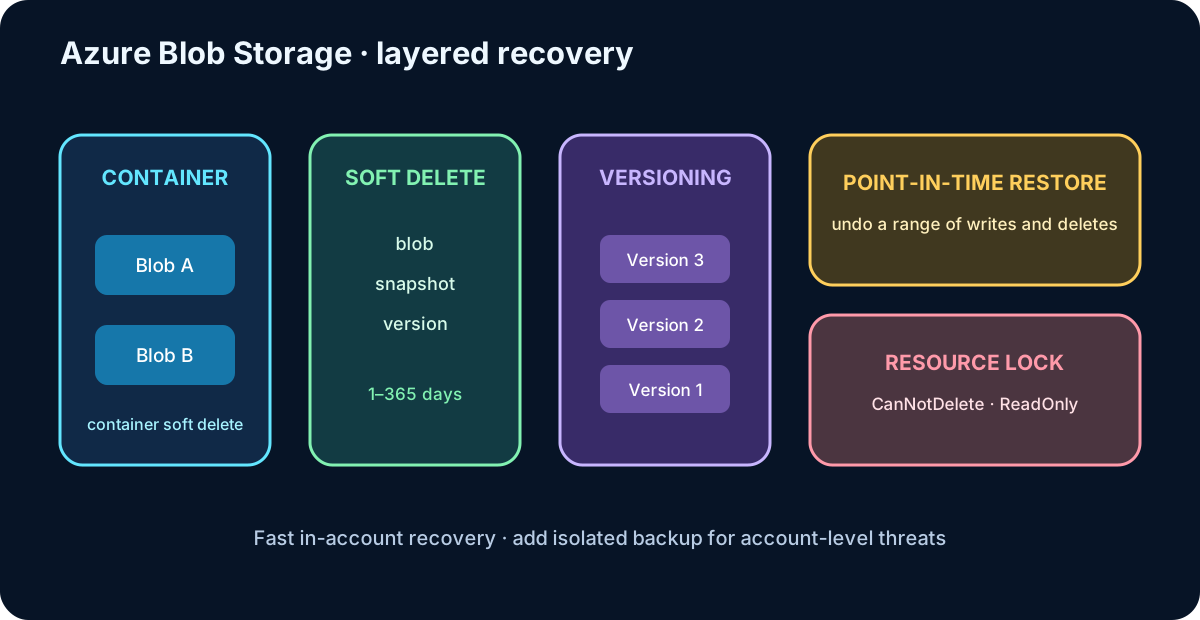
13. Soft delete and versioning preserve deleted or overwritten blobs
Blob soft delete retains a deleted blob, snapshot, or version for 1–365 days; the common default is seven days. Container soft delete can restore a deleted container and its contents, but it does not protect against deletion of the storage account.
Blob versioning automatically keeps earlier versions after writes. It is valuable when several authors modify the same object, but every new version consumes storage, so lifecycle management should remove obsolete versions according to policy.
In-account blob protection layers cover different deletion and modification scenarios.
Topic summary
Combine container soft delete, blob soft delete, and versioning to recover granular deletion and overwrite events.
14. Point-in-time restore and resource locks cover broader mistakes
Point-in-time restore for block blobs reverts one or more containers or blob ranges to an earlier state. It uses a management policy and requires change tracking; its retention must be shorter than the blob soft-delete retention. The feature is useful for returning a test dataset to a known state or undoing a broad sequence of writes and deletes.
A resource lock prevents accidental management-plane deletion or modification. CanNotDelete permits reads and changes but blocks deletion until the lock is removed; ReadOnly blocks changes as well. Locks are preventive controls, not historical copies.
Topic summary
Use point-in-time restore for broad rollback and locks to prevent destructive management actions; neither replaces an isolated backup.
15. snapshots provide incremental point-in-time copies
A file-share snapshot captures the complete directory tree at a point in time while storing only changed data. It can be created manually through the Azure portal, REST API, client libraries, Azure CLI, or Azure PowerShell, or automatically through an policy.
Snapshots are read-only and can restore a whole share or individual files. A share with snapshots cannot be deleted until its snapshots are removed. Because snapshots remain beside the source, they are useful recovery points but are not, by themselves, offsite backup.
Topic summary
snapshots are fast, incremental, immutable point-in-time views with file-level restore, but they share the source account boundary.
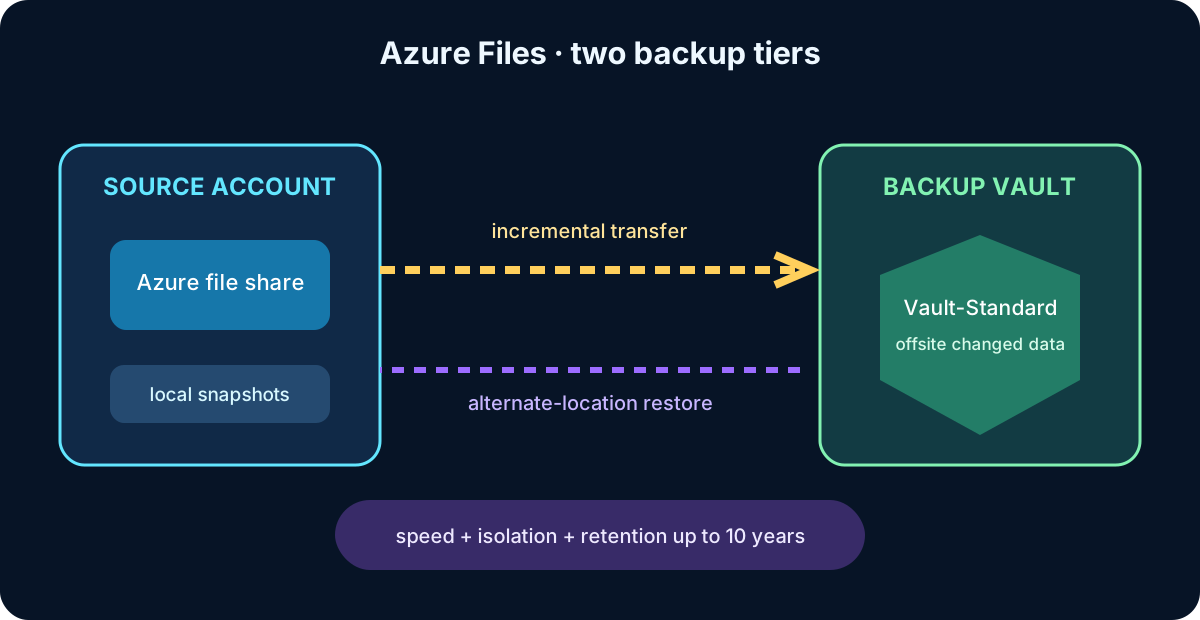
16. Snapshot and vaulted backup tiers trade speed for isolation
backup tiers.
Tier
Where data resides
Best fit and limitation
Snapshot tier
Snapshots remain in the source storage account; metadata is managed through a Recovery Services vault.
Fast restores and flexible daily, weekly, monthly, or yearly retention, but exposure to storage-account loss remains.
Vault-Standard tier
Changed file data is transferred to an offsite Backup vault.
Long-term retention up to 10 years and stronger protection from account deletion, ransomware, and a rogue administrator.
Vaulted backup for is now generally available. Microsoft recommends it for comprehensive protection; verify regional support and workload limitations before using it in a production design.
Snapshot backup optimizes rapid local restore; vaulted backup creates an isolated recovery copy.
Topic summary
Choose snapshot backup for local speed and vaulted backup for long-term, offsite cyber-resilience; combine them when both objectives apply.
17. File-share recovery needs policy, monitoring, and operational practice
Use instant restore to select a complete share or only required files.
Create on-demand recovery points before high-risk changes; scheduled policies may not run until later.
Use alerts and reports to identify failed or missing protection.
Enable self-service previous-version access through supported Windows/VSS integration when it fits the user workflow.
Classify public and internal shares so retention, access, and isolation match their business value.
Topic summary
File protection is an operating process: schedule it, monitor it, create pre-change points, and rehearse the restore experience.
18. Standard and Enhanced policies shape Azure VM backup
Azure VM backup policy comparison.
Policy
Characteristics
Standard
Normally one scheduled backup per day with standard instant-restore snapshots; appropriate for many established VM scenarios.
Enhanced
Backups as often as every four hours, ZRS instant-restore snapshots, longer operational retention, Trusted Launch support, Ultra Disk and Premium SSD v2 support, and agentless multi-disk crash-consistent snapshots.
Recent tooling adds limited Standard-policy support for some Trusted Launch operations, but Enhanced remains the broad recommendation for newer VM capabilities. Confirm the current support matrix before committing a design.
Topic summary
Use Enhanced policy when frequency, zone resilience, Trusted Launch, newer disks, or multi-disk consistency require capabilities beyond Standard.
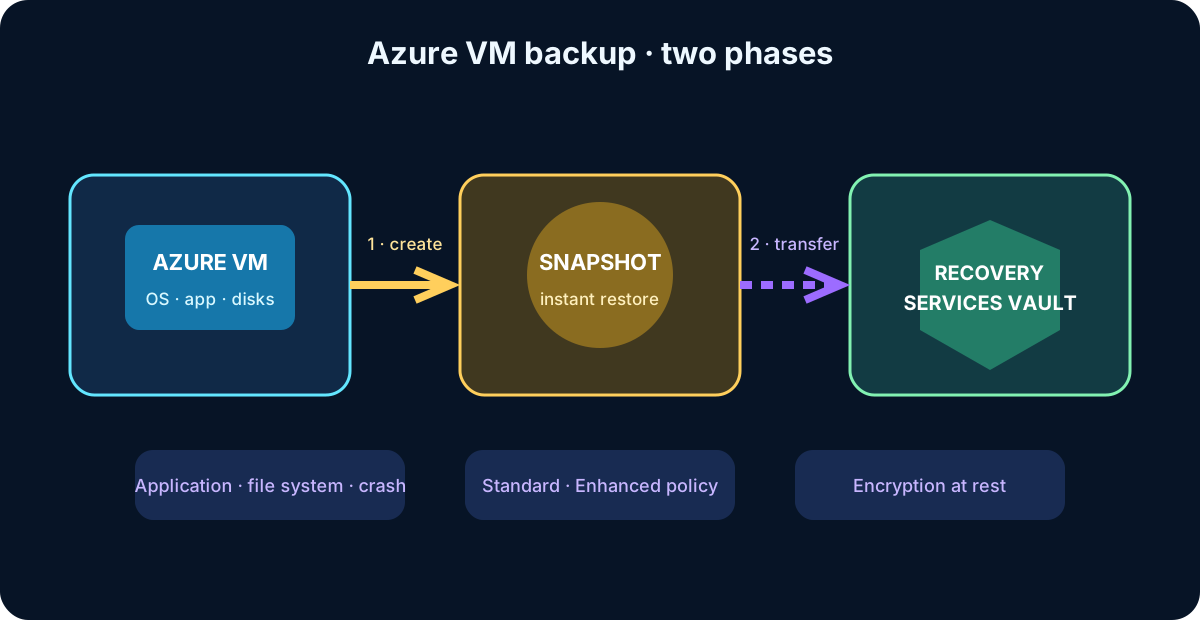
19. VM backup has a snapshot phase and a vault-transfer phase
An Azure VM backup job first creates a snapshot in the storage layer and then transfers protected data to a Recovery Services vault. The snapshot supports quick recovery; the vault supplies durable retention and isolation. Restore can rebuild the complete VM or recover selected disks and files from an eligible point.
Recovery points can be application-consistent, file-system-consistent, or crash-consistent. Choose the highest consistency that the workload can produce reliably. Backup data is encrypted at rest with Service Encryption, and VMs protected with Azure Disk Encryption are supported within documented constraints.
Azure VM backup separates fast snapshot creation from durable transfer to the vault.
Topic summary
Understand both backup phases and select a consistency level that allows the application—not merely the VM—to recover correctly.
20. Schedule, monitor, test, and distribute VM restores
Schedule backups outside peak processing and avoid overlapping jobs across dependent VMs.
Group VMs in a policy only when schedule, frequency, and retention truly match.
Use on-demand backup for exceptional recovery points.
Monitor every job and rehearse full-VM, disk, and file recovery.
Plan restore throughput; distributing restores across separate general-purpose v2 storage accounts can reduce throttling.
Enable Cross Region Restore on eligible GRS vaults when regional drills, audits, or disaster recovery require it.
Cross Region Restore is opt-in, has cost and workload-specific availability, and secondary-region recovery points can lag the primary. It also applies to supported SQL Server and SAP HANA backups in Azure VMs.
Topic summary
A VM backup design is complete only when frequency, job isolation, monitoring, restore capacity, and regional recovery are tested.
21. automated backups form a managed recovery chain
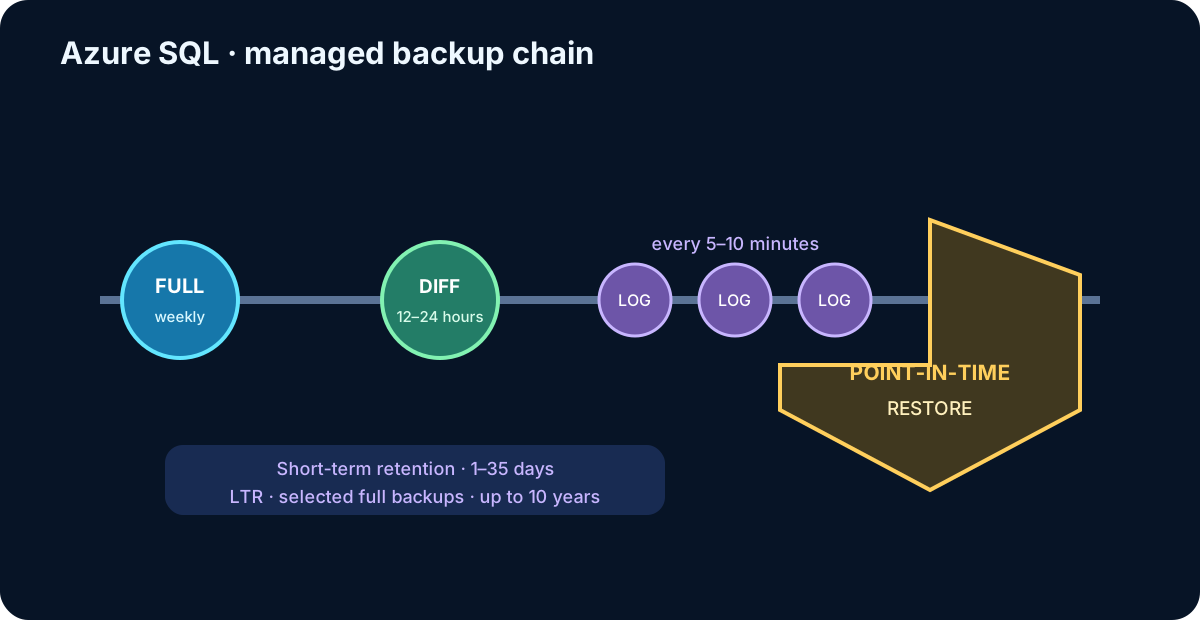
and automatically protect databases for point-in-time restore. The service typically creates a full backup weekly, differential backups every 12–24 hours, and transaction-log backups roughly every 5–10 minutes according to activity and compute.
During restore, Azure selects the necessary full, differential, and log backups. Administrators do not schedule that chain, but they remain responsible for retention configuration, restore authorization, regional strategy, and validation.
composes the required backup chain automatically for a selected recovery time.
Topic summary
Managed backup removes job scheduling but preserves architectural responsibility for retention, restore scope, access, and regional recovery.
22. offers point-in-time, deletion, geo, and long-term recovery
Point-in-time restore creates a new database on the same logical server or managed instance; use a different name and replace the original only after validation.
A deleted database can be recreated on the same server or managed instance at deletion time or another retained point.
Geo-restore creates a database on an available server or managed instance in another Azure region from geo-replicated backups.
Long-term retention (LTR) copies selected automated full backups to redundant for up to 10 years.
Short-term retention supports 1–35 days depending on the service configuration. LTR addresses regulatory or historical requirements and restores as a new database. If stricter regional RTO or RPO is required, combine backup with active geo-replication or failover groups rather than expecting geo-restore alone to behave like a hot replica.
Topic summary
Select recovery from the incident: recent point, deletion, regional loss, or multiyear retention—then validate the new database before cutover.
23. protects running workloads across locations
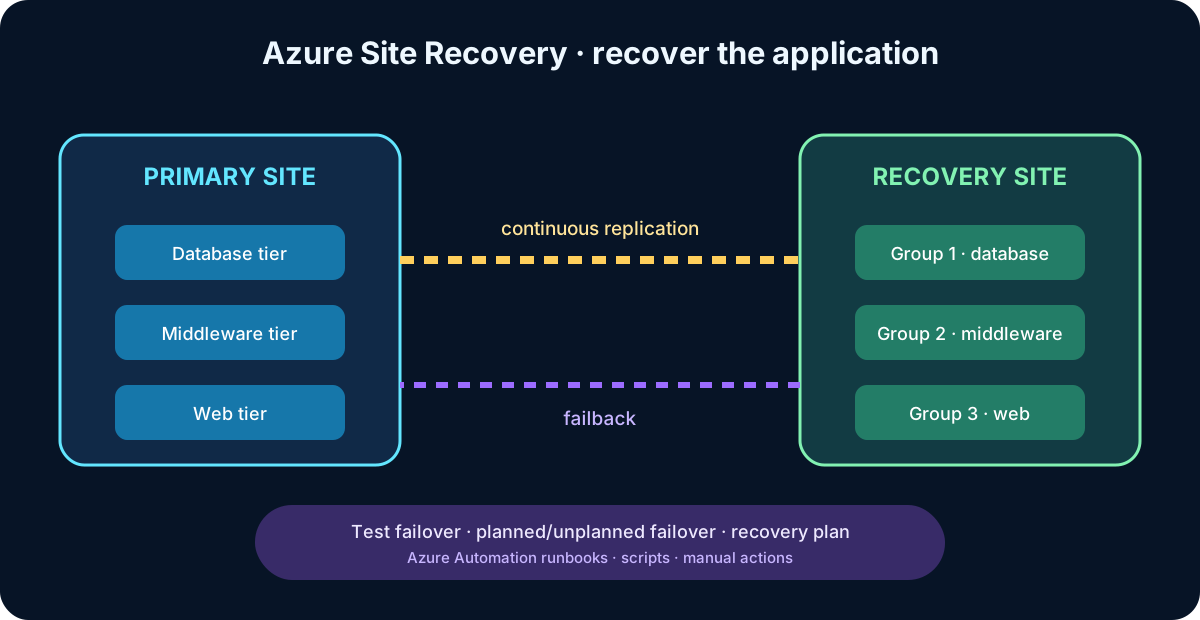
contributes to business continuity by replicating supported machines from a primary location to a secondary one and orchestrating failover and failback. Scenarios include Azure VM region-to-region recovery and supported VMware, Hyper-V, physical, Azure Stack, and other workloads into Azure.
The Azure portal provides one control plane for replication, health, tests, planned failover, unplanned failover, and reprotection. Site Recovery orchestrates data movement without interpreting application data; the target VM is built from replicated storage when failover occurs.
Topic summary
Site Recovery is a managed VM replication and orchestration service; application correctness still depends on workload-aware recovery and validation.
24. Continuous replication reduces RPO and application-consistent points improve recovery
Key Site Recovery capabilities.
Capability
Design value
Continuous replication
Azure and VMware VM changes are continuously replicated; Hyper-V frequency can be as low as 30 seconds.
Application-consistent recovery points
Capture disk state, memory, and in-process transactions through supported coordination.
Test failover
Exercises recovery without interrupting ongoing replication.
Planned failover
Coordinates an expected outage and aims for no data loss when the source is available.
Unplanned failover
Recovers from an unexpected event with data loss bounded by the available recovery point.
Failback
Returns the workload to the primary site after it is healthy.
Measure the actual application RTO and RPO. Replication health, change rate, network capacity, dependency startup, DNS, traffic switching, and validation all affect the result.
Topic summary
Replication frequency and recovery-point consistency reduce risk, but only end-to-end tests prove the application objectives.
A recovery plan groups machines and starts application tiers in a controlled order—for example, database first, middleware second, and web front end last. Machines inside one group can recover in parallel; groups proceed in sequence.
Plans can include Azure runbooks, scripts, and pauses for manual action. Site Recovery integrates with network operations and can coordinate with technologies such as SQL Server Always On. Run nondisruptive tests regularly and update plans as dependencies change.
A recovery plan turns replicated machines into an ordered, testable application-recovery workflow.
Topic summary
Recovery plans reduce manual error by encoding dependency order, automation, and validation for a complete application.
26. and Site Recovery solve complementary problems
Complementary protection roles.
Service
Primary purpose
Typical objective
Retain recoverable data and workload points over short or long periods.
Granular restore, corruption recovery, compliance, and protection from deletion.
Keep a running workload replica ready in another location and orchestrate activation.
Lower workload RTO and RPO during site or regional outages.
Use both when the business needs fast site recovery and historical or item-level recovery. Replication can reproduce corruption or malicious changes; backup preserves earlier recovery points. Backup alone may restore data safely but take longer to reconstruct a complete service.
Topic summary
Site Recovery accelerates workload continuity; preserves recoverable history. Layer them when both interruption and data-history risks matter.
27. Knowledge check
Choose the best service or feature for each requirement.
Requirement
Best answer
Replicate an Azure VM to another region under stringent workload RTO and RPO.
.
Protect an on-premises VM with managed, consumption-based backup.
through the appropriate agent or server.
Keep an elastic-pool database available if its primary region becomes unavailable.
Active geo-replication or a failover group, according to topology.
Recover critical video blobs after accidental deletion.
Blob soft delete, complemented by versioning and stronger backup isolation as risk requires.
The exam tests the recovery behavior, not keyword recognition. Distinguish a retained copy from a running replica and an in-account feature from an isolated recovery boundary.
Topic summary
Match replication to rapid workload recovery, backup to retained recovery points, geo-replication to regional continuity, and soft delete to accidental blob deletion.
28. Build a defensible backup and recovery architecture
Inventory workloads, data sources, dependencies, owners, and failure scenarios.
Agree on workload-level RTO, RPO, RLO, availability, and retention.
Select local, zonal, regional, or offsite copies so one incident cannot destroy production and recovery data.
Choose the correct vault, redundancy, policy, identity, RBAC, immutability, and Resource Guard controls.
Layer native data protection, , database replication, and Site Recovery according to risk.
Document restore order, capacity, network, DNS, traffic switching, and failback.
Monitor protection centrally with Resiliency in Azure and service alerts.
Run recurring restores and failovers; compare measured outcomes with the objectives and revise the design.
Topic summary
The final architecture is traceable from business impact to protected data, isolated recovery points, orchestration, and tested evidence.
29. Chapter synthesis and next study steps
You can now separate reliability metrics from product choices, distinguish local snapshots from isolated vault copies, design protection for blobs, shares, VMs, and , and position beside . These skills directly support the AZ-305 objective to recommend recovery solutions that meet business requirements in Azure and hybrid environments.
Practice by selecting one real workload, drawing all dependencies, assigning RTO, RPO, and RLO, and rehearsing both an item restore and a regional recovery. Record observed recovery time, data point, manual steps, and unexpected dependencies.
In Microsoft Edge, use Microsoft Learn with Copilot to compare Azure VM backup and recovery services and explain when each option fits.
Ask Copilot to contrast backup and recovery choices, then verify every recommendation against the linked service documentation.
For hands-on practice, protect a test Azure VM with and complete a restore without affecting production resources.
Topic summary
Mastery comes from proving that the complete workload—not just a configured resource—can be recovered within its business objectives.
Use current Microsoft Learn documentation to confirm regional availability, support matrices, limits, pricing, and implementation details before production deployment.