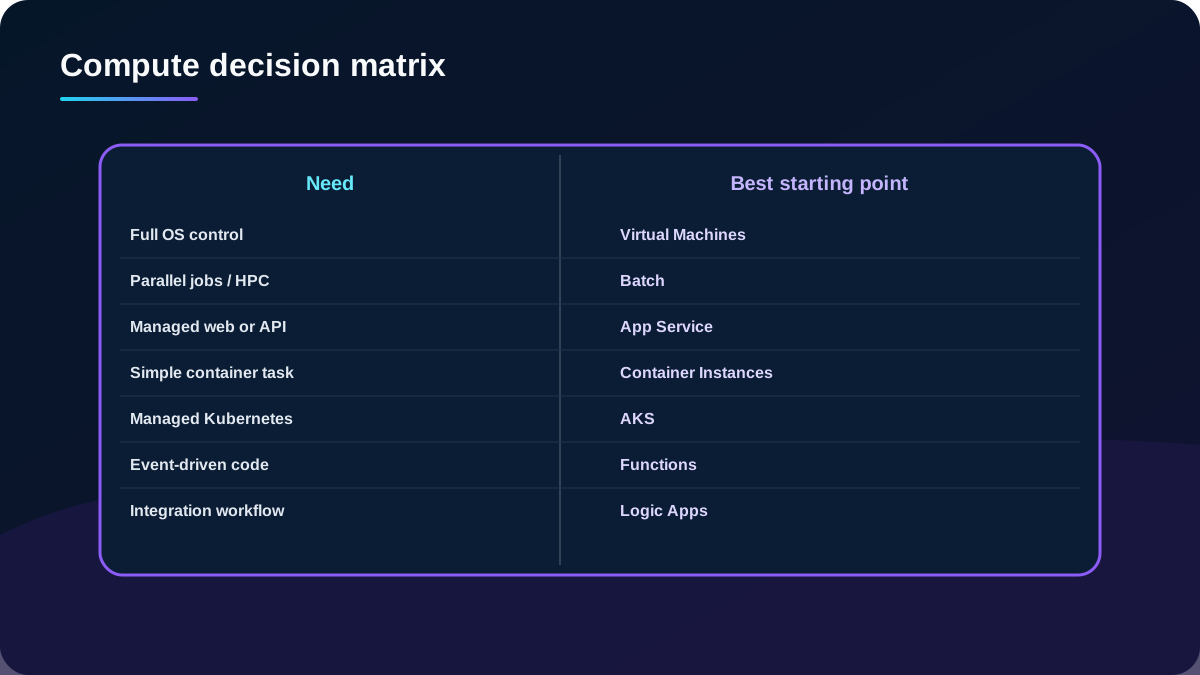
Select virtual machines, batch, web, container, Kubernetes, event-driven, and workflow platforms from workload evidence instead of product preference.
Suggested study time: 92 minutes • Intermediate • Complete original rewrite with a concise summary for every topic
By João Ricardo Dutra••Complete original content
1. Begin with the workload, not the compute product
Tailwind Traders, a fictional global retailer, must migrate existing development projects and optimize new ones for the cloud under tight departmental budgets. The architect must recommend fast, scalable, flexible compute while paying only for justified capacity.
Translate workload requirements into components of a compute architecture.
Prepare for the AZ-305 domain that covers infrastructure and compute design.
The module assumes conceptual knowledge of Azure compute and practical familiarity with virtual machines, containers, and managed application hosting.
Topic summary
Capture the workload, migration, control, scale, latency, operating model, and cost constraints before naming a service.
2. A decision tree produces a candidate, not a final architecture
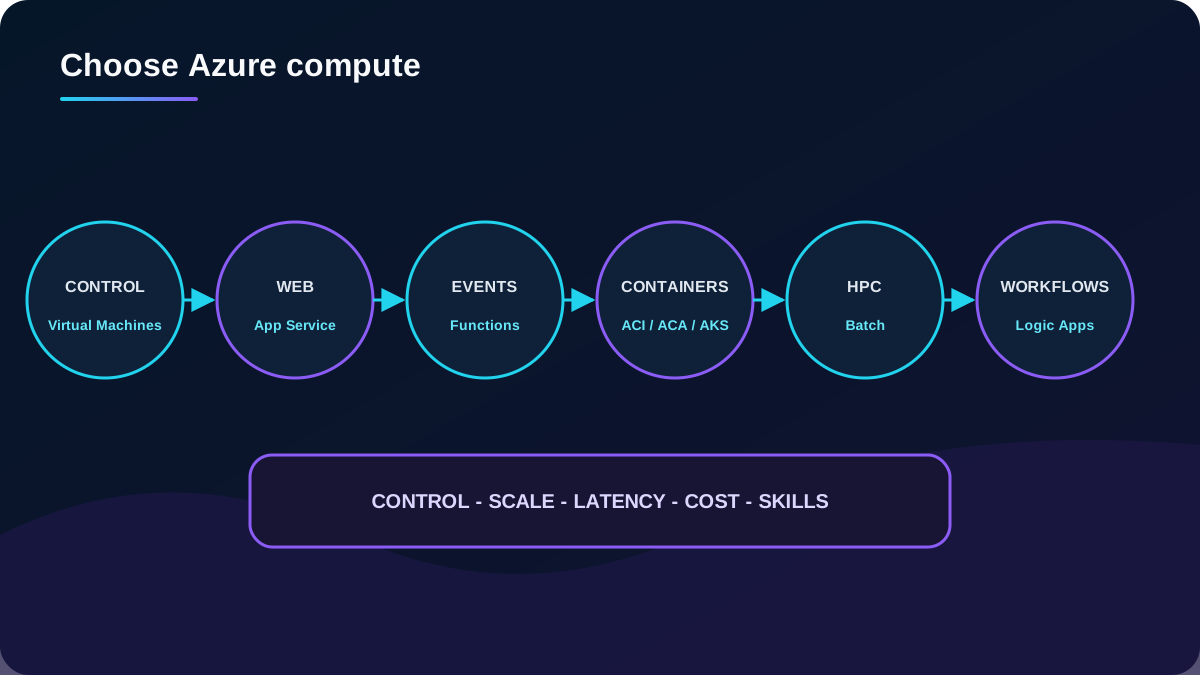
Azure compute guidance first separates migration from new development, then tests cloud optimization, lift-and-shift compatibility, full operating-system control, HPC, event-driven behavior, managed web hosting, containers, orchestration, and workflow integration. The output is a shortlist that still requires service limits, regional availability, networking, security, reliability, and cost validation.
Use the decision map as a starting hypothesis and validate every architectural quality attribute.
Topic summary
A service decision is defensible only after the high-level branch is checked against detailed nonfunctional requirements.
3. Know the primary responsibility of each compute option
Azure compute service map.
Service
Primary role
Typical fit
Azure
IaaS with guest operating-system control.
Rehosting, packaged software, custom agents, or specialized OS dependencies.
Azure
Managed scheduling over pools of compute nodes.
Parallel, compute-intensive, rendering, simulation, and HPC jobs.
Azure
Managed HTTP application platform.
Web apps, mobile back ends, REST APIs, and background WebJobs.
Run a container or co-scheduled container group without a cluster.
Short tasks, automation, build jobs, and simple isolated services.
Managed container platform with serverless scaling and revisions.
Microservices, event-driven apps, jobs, Dapr, and scale to zero without Kubernetes API access.
Managed Kubernetes control plane and API.
Container portfolios that need Kubernetes primitives and fine-grained orchestration.
Event-driven functions as a service.
Small code units activated by HTTP, queues, timers, or other events.
Azure
Design-first integration workflows.
Cross-system orchestration, connectors, B2B, schedules, and approvals.
Topic summary
Match the service to the dominant responsibility: machine, job, HTTP app, container, cluster, event handler, or integration workflow.
4. Hosting models trade control for operational abstraction
Responsibility spectrum.
Model
You primarily manage
Provider primarily manages
Examples
On-premises
Facilities through application.
Nothing in the local stack.
Private datacenter.
IaaS
Guest OS, middleware, application, data, and configuration.
Physical infrastructure and virtualization.
Azure .
PaaS
Application, data, identities, and service configuration.
OS, runtime platform, patching, and much of scaling.
Azure ,.
FaaS / serverless
Function or workflow logic and dependencies.
Provisioning and event-driven scale.
, Azure .
SaaS
Users, data governance, and product configuration.
The delivered application and underlying stack.
Microsoft 365.
“Serverless” does not mean no servers or no design work. It means the platform hides server provisioning; architects still own identity, networking choices, resilience, observability, limits, and cost behavior.
Topic summary
Choose the highest useful abstraction that still exposes the control, portability, and isolation the workload requires.
5. Migration shape and architecture narrow the choice
Lift-and-shift rehosting favors compute that accepts the application with minimal redesign, often or an appropriate container target. Cloud optimization deliberately refactors toward managed capabilities. COTS products may require supported VM or container environments. New workloads should evaluate event-driven, microservice, serverless, managed web, and HPC patterns directly.
Control: installed software, kernel or OS access, privileged agents, and custom networking.
Architecture: monolith, N-tier, microservices, orchestration, or workflow integration.
Operations: team skills, patching, upgrades, deployment, monitoring, support, and incident response.
Topic summary
Migration tolerance, architecture style, and the organization’s operating capability often eliminate more options than raw performance does.
6. Azure provide the broadest guest control
Azure are the core IaaS option for development, testing, cloud applications, and datacenter extension. They fit new workloads with specific machine requirements and lift-and-shift migrations that cannot yet use a higher abstraction.
That flexibility carries responsibility for guest OS configuration, patching, malware protection, software installation, backup agents, monitoring, scaling strategy, and application availability. A single VM is not automatically a highly available architecture.
Topic summary
Use when guest control or rehosting compatibility is necessary and the team can own the operating burden.
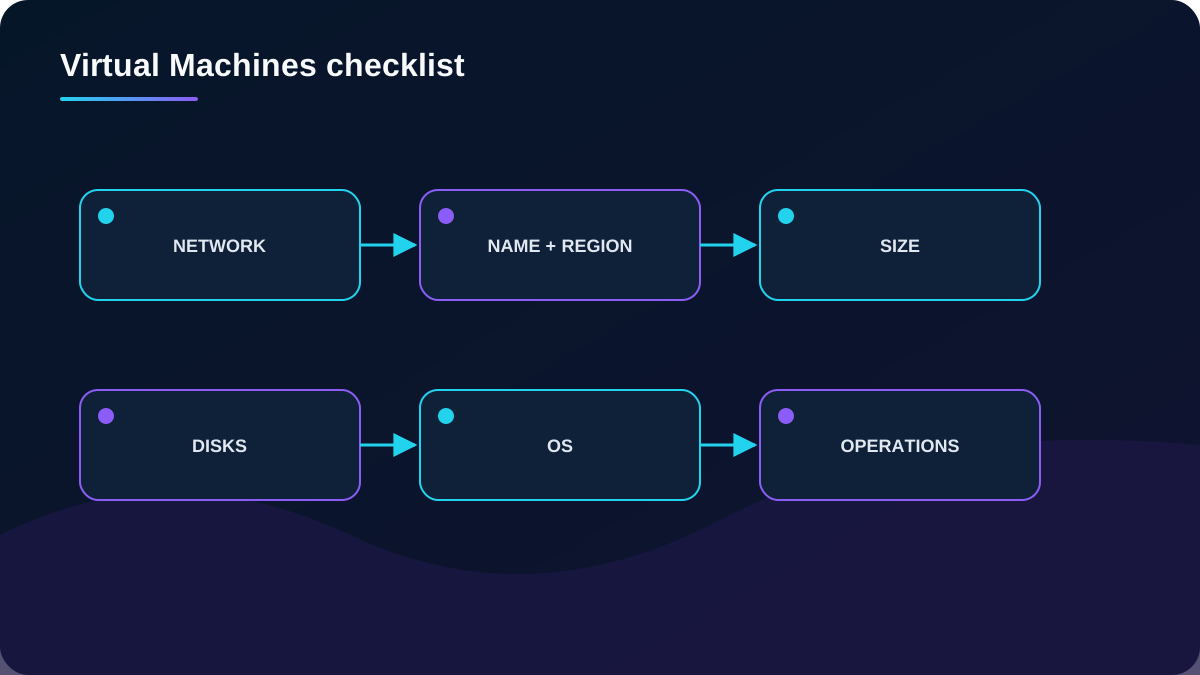
7. Network, naming, and region choices come before the VM image
Address spaces, subnets, routing, DNS, security groups, private connectivity, and hybrid topology are difficult to change after deployment. Define them before creating machines. Use meaningful, consistent resource and computer names because renaming can be disruptive.
Region affects latency, data residency, regulatory and tax obligations, price, quota, available VM series, zones, and capacity. Validate both quota and actual regional capacity; approved quota does not guarantee capacity in a specific zone.
A VM recommendation includes every supporting resource and lifecycle responsibility.
Topic summary
Treat network topology, naming, region, quota, and capacity as first-class VM design inputs.
8. Size the VM family for the workload profile
VM size families by workload tendency.
Classification
Resource emphasis
Representative workloads
General purpose
Balanced CPU and memory.
Development, small databases, and low-to-medium traffic servers.
Relational databases, large caches, in-memory analytics.
optimized
High local disk throughput and IOPS.
Data-intensive databases and warehousing.
GPU accelerated
Graphics or accelerator hardware.
Rendering, video, model training, and inference.
High performance compute
Fast CPUs and high-throughput interconnect.
Scientific and engineering workloads and tightly coupled HPC.
Benchmark the actual workload and include vCPU, RAM, disk throughput, IOPS, network bandwidth, accelerator, architecture, and availability constraints. Series and sizes vary by region.
Topic summary
Choose a VM family from measured resource behavior, then benchmark and confirm regional availability instead of sizing from labels alone.
9. VM cost includes compute, disks, licensing, and supporting resources
Compute price depends on size, operating system, region, and purchase model. Stopping inside the guest does not necessarily stop compute billing; deallocate the VM to release billable compute capacity. Managed disks, snapshots, public IPs, backup, monitoring ingestion, licenses, and outbound transfer can continue to incur charges independently.
Azure Managed Disks abstract storage-account management. Select disk type, size, performance, redundancy, encryption, and data-disk layout from workload needs. Choose a supported 64-bit Windows or Linux image from Azure Marketplace or a governed custom image, and account for license terms and Azure Hybrid Benefit where applicable.
Topic summary
Estimate the complete VM bill and lifecycle, not only the hourly machine price; deallocation and disk billing are separate concerns.
10. Production VM design adds availability, scale, security, and operations
Use availability zones or appropriate availability constructs and place a load-balancing layer where the workload needs multiple instances.
Use when horizontally scaling a consistent fleet.
Prefer managed identity, , least privilege, restricted management paths, Defender for Cloud, secure boot and vTPM where supported.
Automate images and configuration, patch through , monitor with , and test backup and recovery.
Separate OS and application data where it improves recovery, maintenance, performance isolation, and security.
Topic summary
A production VM solution is a managed fleet with tested availability, security, patching, monitoring, backup, and automation.
11. Azure is a scheduler for parallel and HPC work
Azure creates and manages pools of Windows or Linux compute nodes, installs applications, stages data, schedules jobs and tasks, detects failures, requeues work, and scales resources. It supports embarrassingly parallel workloads and tightly coupled HPC patterns such as Monte Carlo simulation, rendering, and image processing.
is commonly embedded behind a service or client application. The calling service submits and monitors work; supplies the compute platform rather than becoming the business application itself.
Topic summary
Choose when the central problem is scheduling and scaling many compute tasks, not serving an interactive application.
12. Pools, nodes, jobs, and tasks form the execution model
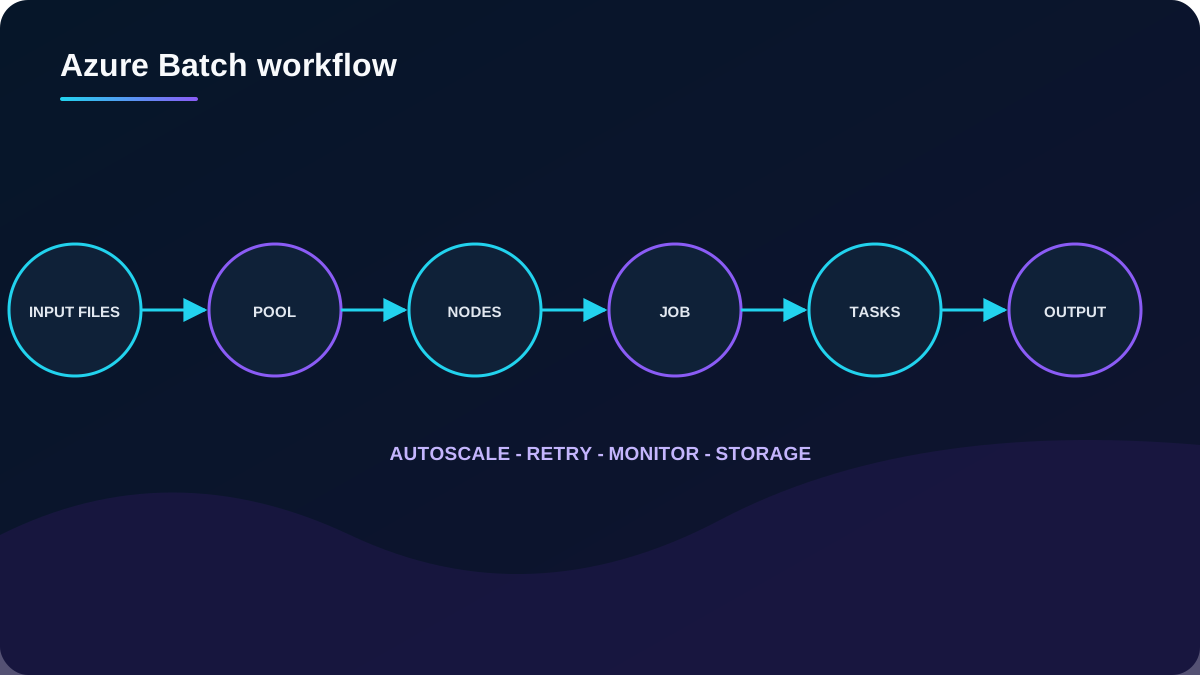
A typical flow uploads input data and application files to Azure , creates or reuses a pool, runs one or more jobs whose tasks execute on nodes, monitors progress, and writes output back to storage. Pools can use dedicated or Spot nodes and an autoscale formula.
Keep business orchestration separate from the managed compute pool.
Topic summary
Model explicitly as storage inputs, a pool of nodes, named jobs, granular tasks, monitoring, retries, and durable outputs.
13. efficiency depends on pool, node, and job strategy
Reuse or dynamically select pools for short tasks; repeatedly creating a pool can dominate runtime.
Avoid one universal pool that couples unrelated jobs and increases blast radius.
Assume individual nodes can disappear; use multiple nodes, retries, checkpoints, idempotent tasks, and durable outputs.
Use isolated VM sizes when compliance requires hardware isolation and verify availability.
Give jobs unique names and group tasks efficiently; a sensible job with many tasks is usually cheaper to operate than many tiny jobs.
Evaluate dedicated versus Spot nodes, autoscale formulas, data locality, startup packages, and containerized tasks.
Topic summary
architecture is reliable when tasks tolerate node loss, pools match workload classes, and startup and data movement do not erase parallel gains.
14. Azure is managed HTTP application hosting
Azure hosts web applications, mobile back ends, REST APIs, and background jobs on Windows or Linux without guest OS management. Supported stacks include .NET, Java, Node.js, Python, PHP, and custom containers. It supplies managed endpoints, load balancing, scaling, deployment integration, and high-availability features.
It is strongest when the workload is fundamentally an HTTP application and platform management is more valuable than operating-system control.
Topic summary
Use for managed web and API workloads whose dependencies fit the platform or a supported custom container.
15. The plan is the compute and cost boundary
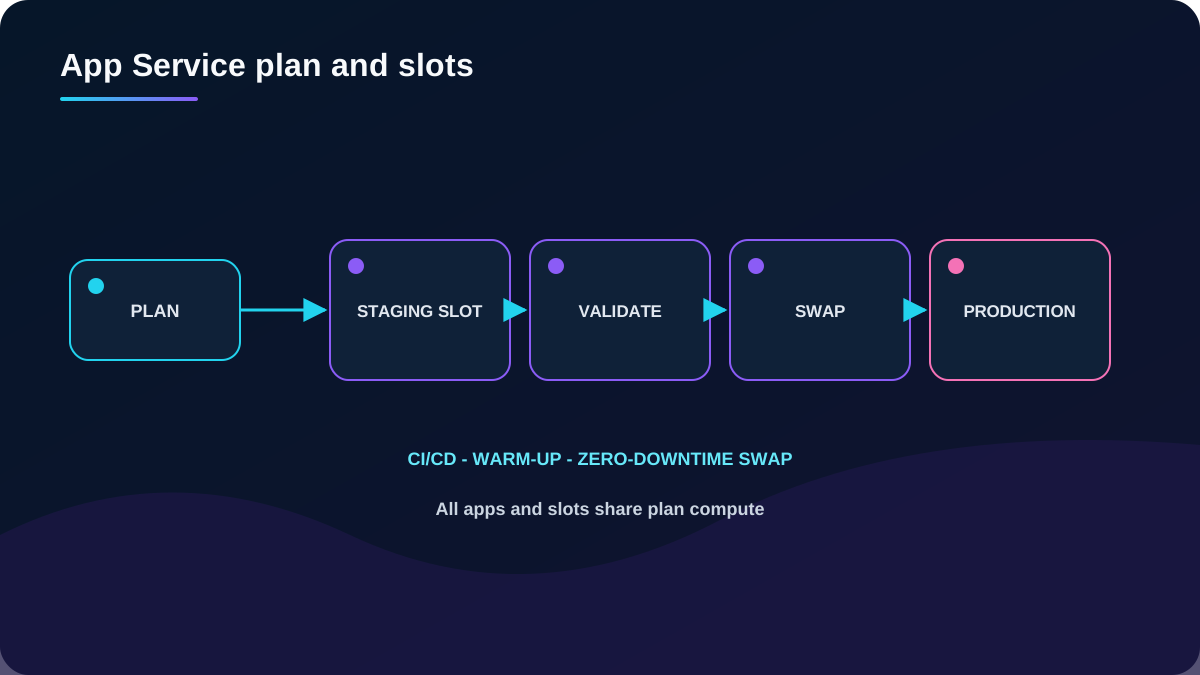
An plan defines region, operating system, VM size, instance count, and pricing tier. Apps, deployment slots, WebJobs, backups, and diagnostics in the same plan share its CPU and memory. Scaling the plan affects all apps it hosts.
Free and Shared tiers target development and testing. Dedicated tiers add features and dedicated VMs; Isolated tiers add dedicated network isolation. Separate apps with conflicting scale, security, lifecycle, or noisy-neighbor profiles into different plans.
Topic summary
Design the plan as a shared compute boundary and isolate workloads when their scaling, risk, or ownership differs.
16. Deployment slots support validated, low-downtime releases
integrates with GitHub, , and Git repositories for continuous delivery. On eligible tiers, deploy a build to a staging slot, validate and load-test it, then swap with production. The platform warms required workers and exchanges slot content, but architects must mark environment-specific settings as slot settings and protect separate identities and secrets.
Slots reduce release risk when configuration, identity, data compatibility, and rollback are designed deliberately.
Topic summary
Use slots as governed release environments, with explicit sticky settings, separate app registrations, validation, swap, and rollback.
17. capabilities cover web, API, jobs, and identity
Web apps: choose Windows or Linux and a supported runtime or custom container.
API apps: expose HTTP or HTTPS APIs with language choice and OpenAPI/Swagger support.
WebJobs: run scripts or programs continuously, on demand, or from a schedule or trigger.
Authentication and authorization: Easy Auth integrates providers such as , Google, Facebook, and X with little or no application code.
Scale and cost: select plans and instance counts from throughput, feature, network, and isolation needs rather than placing every app into one plan.
Topic summary
consolidates common web-platform capabilities, but the plan boundary, identity model, network path, and workload isolation remain architectural decisions.
18. runs containers without a cluster
provides fast startup, per-second billing, explicit CPU and memory sizing, Linux and Windows support, and optional mounts. It fits simple services, task automation, build jobs, burst workers, and lift-and-shift container execution that does not require full orchestration.
ACI does not provide the full scheduling, rollout, service discovery, and policy surface of Kubernetes. Confirm restart policy, networking, storage, image source, limits, and lifecycle before selecting it for a long-lived application.
Topic summary
Choose ACI for simple, isolated container execution when cluster orchestration would add more complexity than value.
19. A container group is the ACI scheduling and sharing boundary
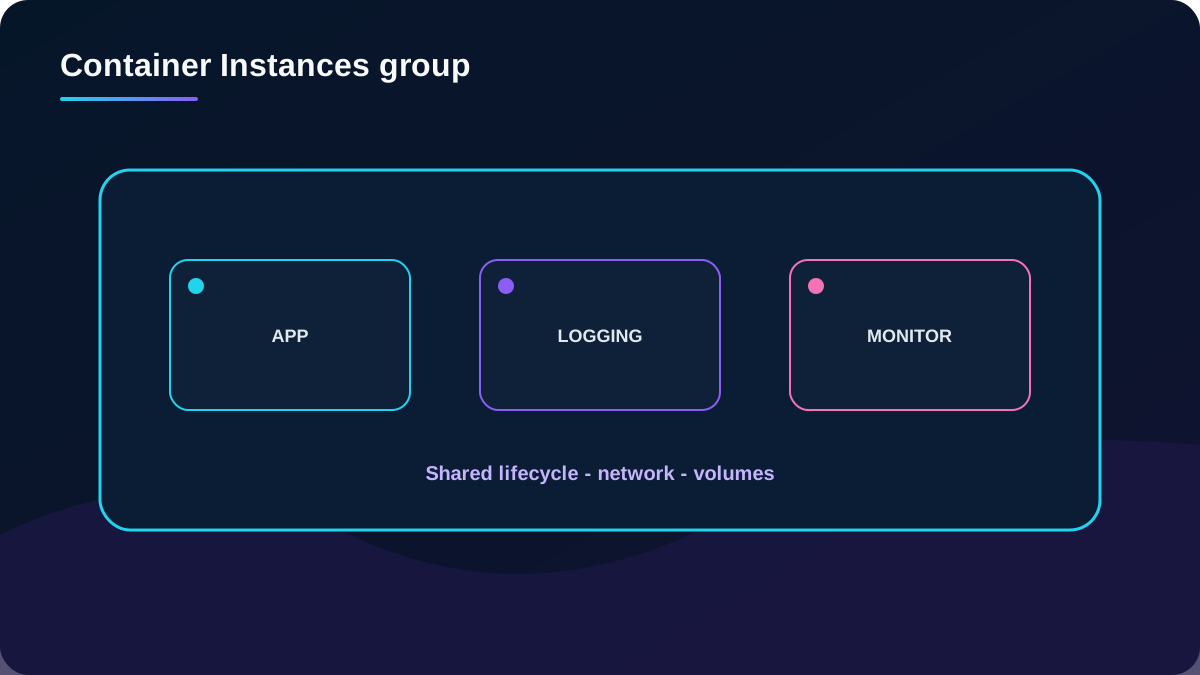
Containers in a group are scheduled on one host and share lifecycle, local network, resources, and mounted volumes. This supports sidecar patterns: an app with a content puller, log collector, health monitor, or closely coupled front end and back end.
Put only tightly coupled containers with the same lifecycle into one group.
Topic summary
Use a container group for components that must co-locate and share lifecycle; independently scaled services need a different boundary.
20. Container security starts with trusted images and observability
Prefer or another controlled private registry.
Scan and sign images, block vulnerable artifacts, minimize the production image set, and govern base-image updates.
Use managed identities and least privilege instead of embedding credentials.
Restrict network exposure and use private connectivity where supported and required.
Monitor files, network activity, resource consumption, logs, and container health.
Treat mounted data, secrets, restart behavior, and image provenance as part of the threat model.
Topic summary
A quick container launch is not a security model; govern image provenance, identity, network, storage, and runtime activity.
21. provides managed Kubernetes with direct API access
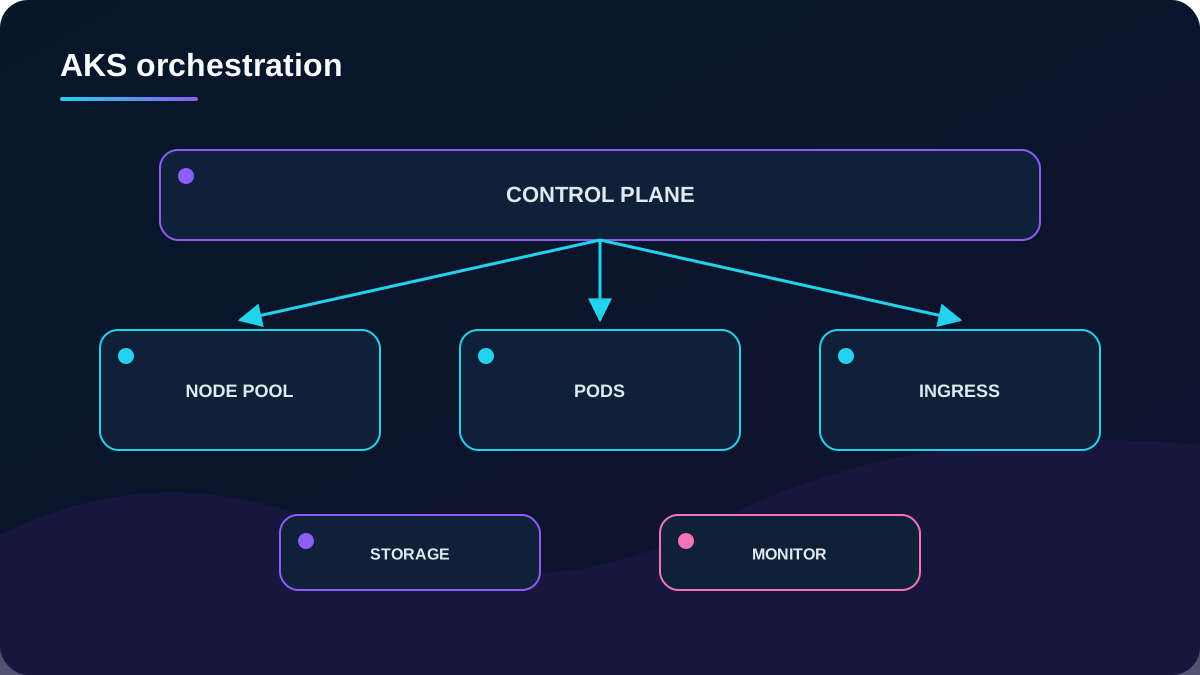
Kubernetes automates deployment, scaling, updating, and recovery for containerized applications. Azure Kubernetes Service manages the hosted control plane and integrates the cluster with Azure while preserving access to Kubernetes APIs and primitives.
reduces control-plane work but does not remove platform engineering. Workload teams still design node pools, upgrades, identity, policies, networking, ingress, storage, observability, backup, and application reliability.
Managed Kubernetes still requires an explicit cluster operating model.
Topic summary
Use when direct Kubernetes control and extensibility justify the cluster skills and operational overhead.
22. tiers and infrastructure as code set the support posture
offers Free, Standard, and Premium cluster-management tiers. Free has no control-plane charge or uptime SLA and suits development and testing. Standard adds an uptime SLA for production. Premium adds long-term support capabilities. Agent node virtual machines and related resources are charged separately in every tier.
Define clusters with Bicep or and version networking, Microsoft Entra integration, policy, monitoring, node pools, upgrade channels, and add-ons. Validate current tier and regional capabilities before committing a design.
Topic summary
Select the tier from SLA and support requirements, and make the entire cluster configuration reproducible as code.
23. operations span identity, scale, upgrades, storage, and networking
design considerations.
Capability
Design question
Platform response
Identity and security
Can existing Azure identities and groups be reused?
Integrate with , RBAC, managed identities, policy, and registry permissions.
Monitoring
How will cluster and workload health be observed?
Integrate , logs, metrics, alerts, and workload telemetry.
Scaling
Are pods constrained by demand or node capacity?
Use horizontal pod autoscaling and cluster autoscaler for distinct layers.
Upgrades
How will nodes be cordoned, drained, and updated?
Use managed upgrade capabilities, maintenance windows, and disruption budgets.
Do pods need durable state?
Use static or dynamic persistent volumes and test reattachment and recovery.
Networking and ingress
How do pods, clients, and on-premises systems connect?
Choose a network model, private cluster posture, egress, load balancing, and Gateway API/ingress strategy.
Images
Where are artifacts stored and authorized?
Integrate or another governed public/private registry.
Topic summary
A production choice is incomplete without ownership for every cluster lifecycle and workload-platform capability.
24. Choose ACI, Container Apps, or by orchestration needs
Container platform starting points.
Requirement
ACI
Container Apps
Run one task or co-scheduled group simply
Strong fit
Possible
Usually excessive
Serverless microservices, revisions, jobs, Dapr, scale to zero
Limited
Strong fit
Build and operate equivalents
Direct Kubernetes API, custom operators, service mesh, fine scheduling
No
No direct API
Strong fit
Operational effort
Very low
Low
High
Independent complex workload boundaries
Per group
Use separate environments where security boundaries differ
Namespaces, policies, and often separate clusters
Topic summary
Start with the simplest container platform that satisfies orchestration, security-boundary, networking, and API-control requirements.
25. executes event-driven code on demand
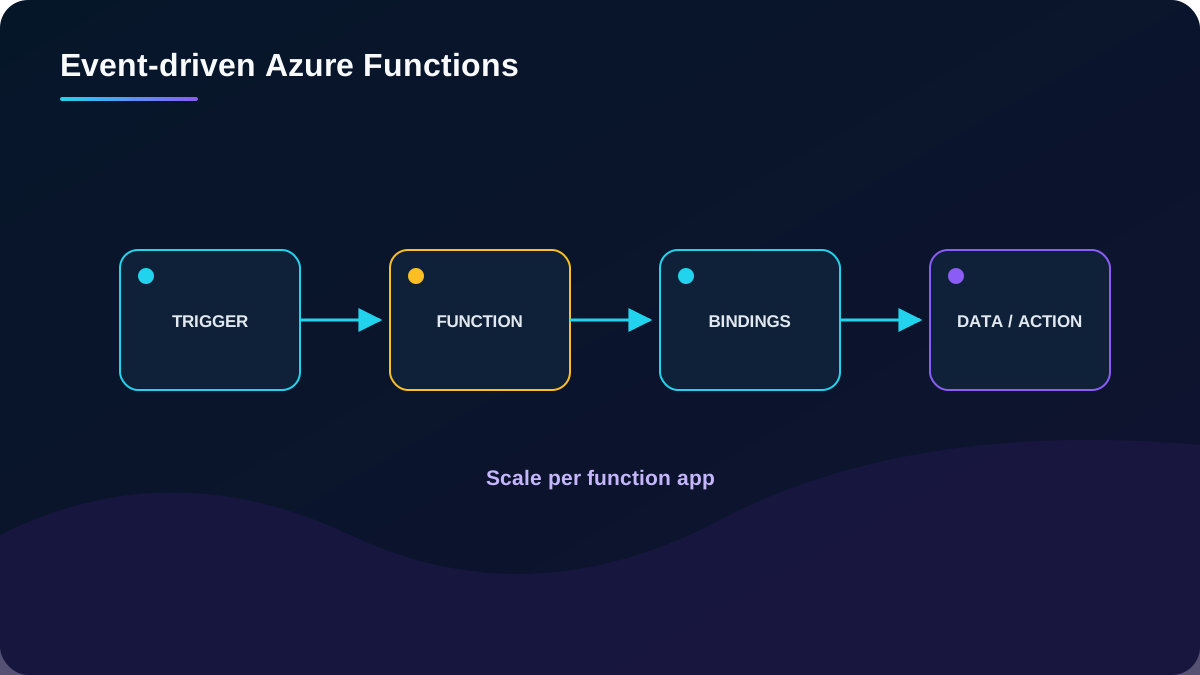
runs focused code in response to HTTP calls, queue messages, timers, storage events, or other triggers. Bindings connect inputs and outputs with less plumbing. Serverless plans add instances as events increase and can scale down when work disappears; other hosting plans provide different networking, performance, and cost behavior.
A function might process an API request, store data in , and emit an event that triggers a notification. Functions can be stateless or use Durable Functions for stateful orchestration.
Define trigger, concurrency, idempotency, output, retry, and poison-event behavior together.
Topic summary
Choose Functions for discrete event-driven code whose execution, scaling, and failure semantics can be clearly bounded.
26. Hosting plan, duration, and Durable Functions shape execution
Consumption and Flex Consumption are serverless options; Premium, Dedicated, and other supported hosting choices trade warm capacity, network features, scale, and billing differently. Function timeout is plan-dependent and configured through host settings, so avoid embedding old fixed timeout values in architecture decisions.
Break large operations into smaller steps. Durable Functions manages state, checkpoints, retries, and restart for patterns such as function chaining, fan-out/fan-in, async HTTP, monitoring, and human interaction. It does not excuse non-idempotent activity design.
Topic summary
Select a Functions hosting plan from scale, cold-start, duration, network, and cost needs; use Durable Functions when workflow state must survive execution boundaries.
27. Function app boundaries determine scale and blast radius
Separate functions with very different memory, throughput, deployment, security, or scaling profiles into different function apps.
Design for downstream failure, network interruption, throttling, duplicate delivery, retries, and dead-letter handling.
Use correlation, structured logs, metrics, traces, and alerts through Application Insights and .
Use a dedicated storage account for a high-volume function app when shared storage would create contention or an excessive blast radius.
Use managed identity and least privilege, and keep secrets outside code and configuration files.
Topic summary
Function app boundaries are deployment, configuration, scale, storage, identity, and failure boundaries - design them deliberately.
28. Azure orchestrates integration workflows
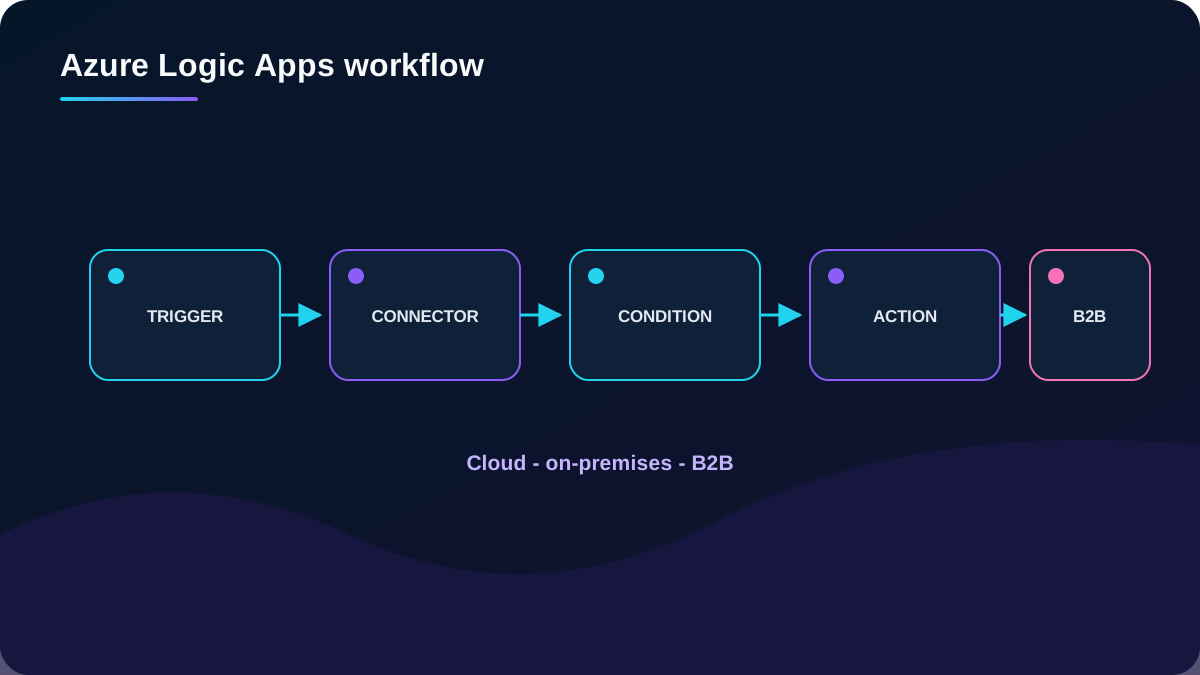
Azure is the design-first workflow platform in Azure Integration Services. It connects cloud, on-premises, hybrid, legacy, modern, and B2B systems through triggers, actions, control structures, and a large connector ecosystem.
Send a Microsoft 365 notification when a file or event arrives.
Route and process orders across cloud and on-premises systems.
Move files from SFTP or FTP to Azure .
Monitor social or operational signals, analyze them, and create review alerts or tasks.
is valuable when the solution exists to coordinate multiple systems.
Topic summary
Use when connector-rich orchestration and integration visibility are more important than writing every step as code.
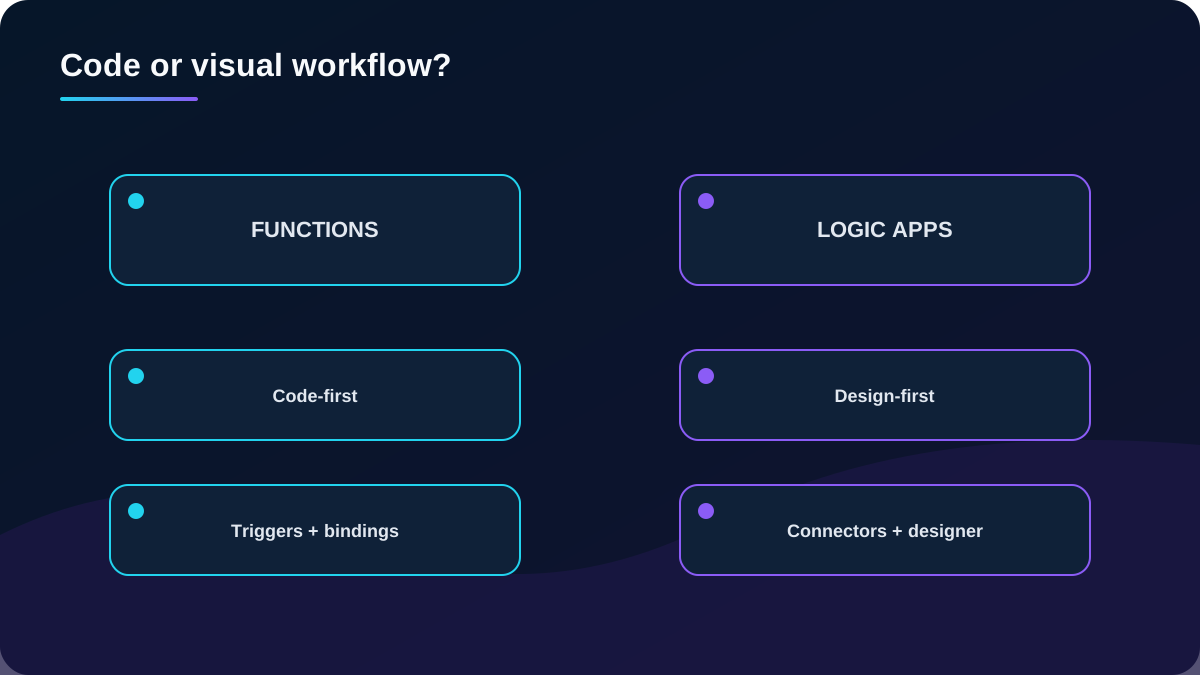
29. Functions is code-first; is design-first
Serverless compute comparison.
Dimension
Azure
Development
Code-first functions and Durable Functions extension.
Visual designer or workflow definition files.
Connectivity
Triggers and bindings; code for custom integration.
Large connector catalog, custom connectors, and Enterprise Integration Pack.
Best fit
Algorithms, transformations, event handlers, and reusable code.
Cross-system workflows, approvals, schedules, B2B, and integration operations.
Monitoring
Application Insights and .
Run history, Azure portal, and Logs.
Composition
Can call a logic app.
Can call an Azure function.
The services complement each other and can participate in the same orchestration.
Topic summary
Put custom computation in Functions and cross-system orchestration in , mixing them when that keeps each responsibility clear.
30. design includes connectors, performance, control, and hosting
Integration: avoid for an isolated application with no orchestration or external connections.
Performance: workflows scale and can process data in parallel, but do not assume hard real-time activation or deterministic execution latency.
Control flow: use conditions, Boolean expressions, switches, loops, scopes, retries, and compensation deliberately.
Connectors: confirm required managed connectors; create a custom connector for a suitable REST or SOAP API, or build the API first.
Boundaries: complex domain rules or nonstandard low-latency code may belong in Functions or an application service.
Hosting: Consumption is multitenant, pay-per-execution, and one workflow per resource; Standard is single-tenant, can host multiple workflows, supports dedicated capacity and richer network scenarios.
Topic summary
A recommendation must validate connector coverage, latency, control complexity, error handling, observability, network access, and hosting model.
31. Apply the requirements to the module assessment
Tailwind Traders assessment.
Requirement
Best response
Reason
Update inventory immediately and send reorder notifications from a current C# Windows service.
Refactor the action into event-driven code and compose database update and notification steps.
Move relational database servers hosted on datacenter VMs.
Memory-optimized Virtual Machine
The migration is VM-based and relational database engines commonly require a high memory-to-CPU ratio.
Run a small photo-processing container for a few seconds and write to .
Fast startup and per-second execution fit a short, isolated container task.
Topic summary
The assessment answers are Functions, a memory-optimized VM, and Container Instances because trigger model, resource profile, and execution duration drive the choices.
32. Consolidate the decision and continue with current guidance
Document the rejected alternatives and the evidence behind the selected starting point.
A strong AZ-305 answer identifies the dominant workload shape, selects a candidate service, and then proves it against scale, availability, security, networking, deployment, observability, recovery, cost, regional support, and team skills. Revisit the decision when those assumptions change.