Design data storage with Azure Storage, Blob Storage, Files, and managed disks
Translate data shape, access pattern, durability, performance, cost, and security requirements into a defensible Azure storage architecture.
Suggested study time: 86 minutes • Intermediate • Complete original rewrite with a concise summary for every topic
By João Ricardo Dutra••Complete original content
1. Start the design with data shape and access behavior
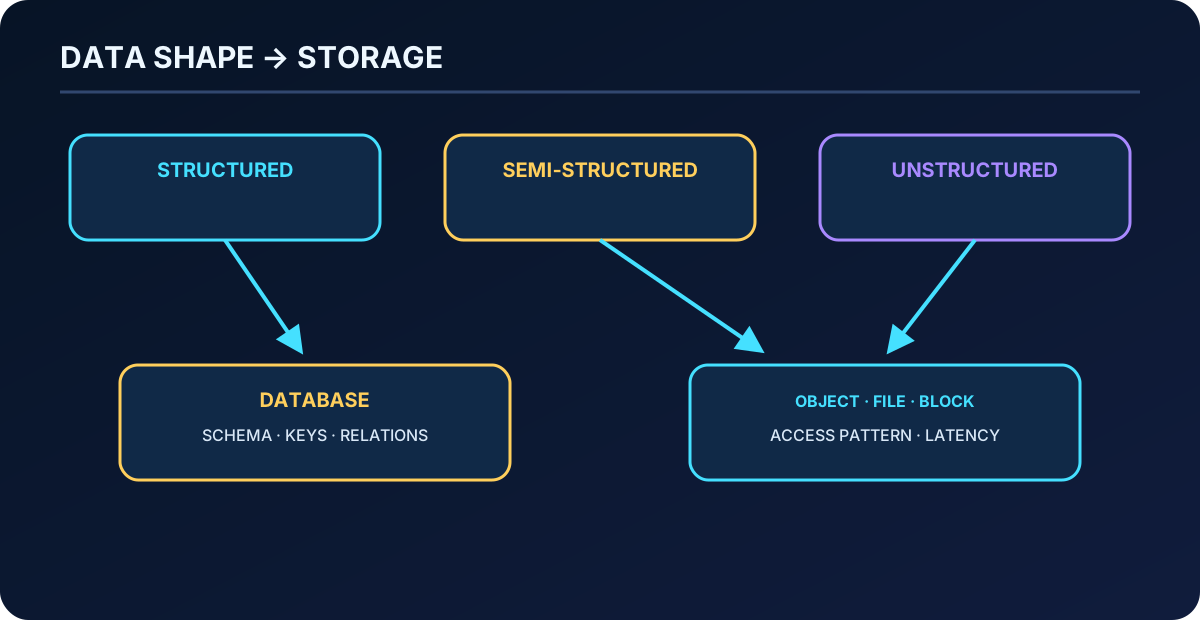
A storage design begins with the information, not with a product name. Highly organized configuration, invoices, and financial records behave differently from engineering drawings, videos, office documents, or files shared with partners. The architect must classify the structure, access path, latency, durability, retention, geography, security, and cost of each dataset.
Imagine a global home-improvement retailer consolidating product media, operational files, and virtual-machine data. The target must scale without losing control of residency, performance, protection, or spending. This chapter maps those requirements to Azure storage accounts, ,,,, and their security controls.
Classify structured, semi-structured, and unstructured information.
Select storage objects and account types.
Design primary and secondary redundancy.
Choose blob access tiers and immutability.
Design file shares and managed disks.
Protect storage identities, networks, transport, and encryption keys.
Recommended prerequisites are familiarity with Azure subscriptions, storage accounts, blobs, file shares, virtual machines, and basic data-protection concepts.
Topic summary
Classify data and its operating requirements before comparing Azure storage services.
2. Structured data shares a fixed schema
Structured data follows a common model: tables expose rows, columns, data types, keys, and relationships that are known before records are written. Medical records, directories, account ledgers, and commerce transactions are typical examples. A relational database is normally the first candidate when consistency, joins, and transactional queries dominate.
Topic summary
A stable schema and explicit relationships usually point to a relational data platform rather than object or file storage.
3. Semi-structured data carries its own organization
Semi-structured information does not fit one rigid table, yet tags or fields describe its meaning. HTML, JSON, and XML documents are common examples. The schema can vary between records, which favors document, object, or analytical stores that accept evolution without redesigning every row.
Topic summary
Semi-structured data has recognizable fields, but its flexible schema should not be forced into an unnecessarily rigid model.
4. Unstructured data has no uniform relational model
Photos, audio, video, PDFs, text, Word documents, and presentations contain useful information without a consistent row-and-column relationship. They are commonly addressed as objects or files. “Unstructured” does not mean unmanaged: metadata, indexing, retention, classification, and authorization still determine how the content is governed.
Data structure narrows the candidates; access semantics and performance complete the selection.
Topic summary
Unstructured content still needs metadata and governance, but object or file storage normally fits its access model better than relational tables.
5. Match storage objects to workload semantics
Core Azure storage objects.
Object
Best fit
Access behavior
Massive volumes of unstructured text and binary objects such as documents, images, audio, and video.
Object APIs, sequential or analytical access, lifecycle tiers.
Shared directories and lift-and-shift applications.
SMB, NFS, or REST; simultaneous mounts from supported clients.
Azure managed disks
OS and data volumes for Azure .
Low-latency block I/O presented as virtual disks.
Durable asynchronous messages and work backlogs.
Producers and consumers exchange independently processed messages.
Large key/attribute datasets without relational joins.
NoSQL key-value access.
Do not infer that every structured payload belongs in a file share or every unstructured byte belongs in a blob. Native file-system APIs, random block I/O, messaging behavior, and query needs can outweigh shape alone.
Topic summary
Choose the object whose access semantics match the application: object, shared file, block disk, queue, or key-value table.
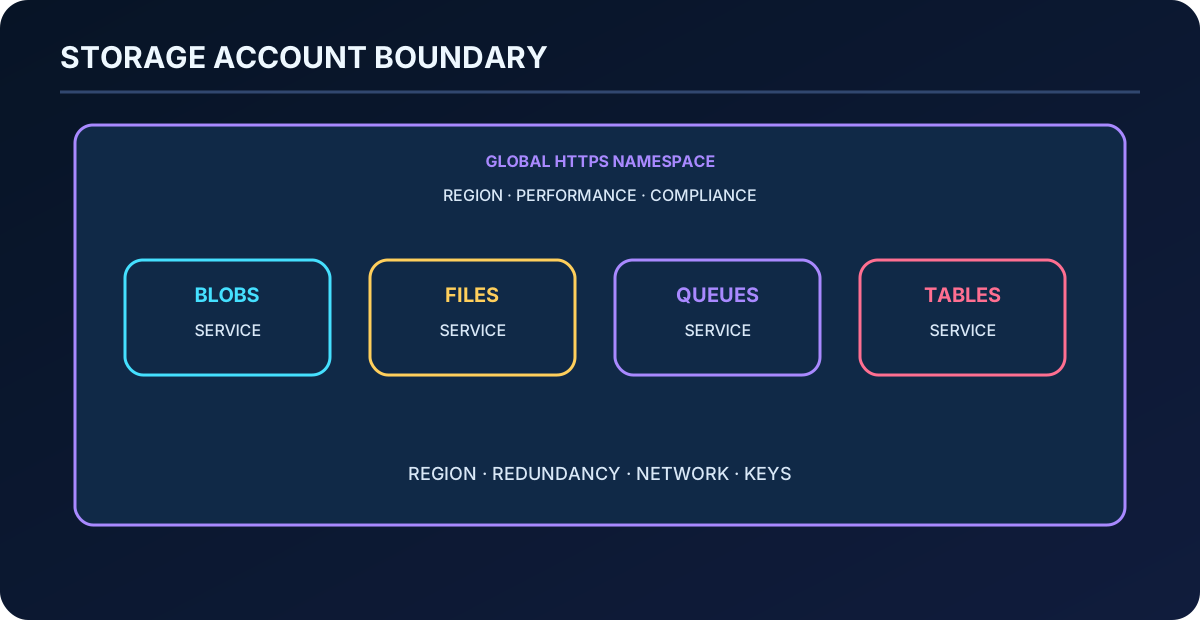
6. A storage account is a namespace and governance boundary
A storage account groups supported Azure services and exposes a globally unique namespace over HTTP or HTTPS. Its region, redundancy, performance, network access, encryption, and many limits apply to the data inside it. Multiple accounts are appropriate when datasets need different regions, compliance boundaries, performance classes, public exposure, administrators, or lifecycle policies.
The account itself has no fixed base charge; cost comes from stored capacity, transactions, retrieval, replication, data transfer, and selected service features. Too few accounts can couple unrelated limits and risk. Too many increase policy, inventory, and operational overhead.
A storage account combines a data namespace with shared configuration, limits, and security boundaries.
Topic summary
Use storage accounts to create intentional boundaries for geography, performance, security, ownership, limits, and cost.
7. Select the account type from workload behavior
Recommended Azure storage account types.
Account type
Services
Design use
Standard general-purpose v2
Blob including ,,, and .
Default for most standard-performance scenarios and the broadest feature set.
Premium block blobs
Block and append blobs.
High transaction rates, small objects, or consistently low blob latency.
Premium file shares
.
Enterprise and high-performance SMB or NFS shares.
Premium page blobs
Page blobs.
Sparse, indexed page data and specialized page-blob workloads.
Validate supported regions, redundancy combinations, hierarchical namespace, and protocol requirements. A preferred storage type in the Azure portal provides guidance but does not necessarily prevent other compatible services from using a general-purpose v2 account.
Topic summary
General-purpose v2 covers most designs; use a premium specialization only when the workload justifies its narrower, low-latency profile.
8. Account placement balances residency, latency, cost, and operations
Region: place data near consumers and dependent compute while meeting service availability.
Compliance: honor residency, sovereignty, audit, and industry requirements.
Cost: model capacity, operations, retrieval, egress, and replication—not only price per GiB.
Administration: separate teams or policies only when the operational benefit exceeds account sprawl.
Sensitivity: isolate confidential data and private connectivity from content that intentionally uses public endpoints.
Chargeback: use account, subscription, resource-group, and tag boundaries that make ownership measurable.
Topic summary
Account placement is a multidimensional decision across geography, compliance, performance, cost, administration, and sensitivity.
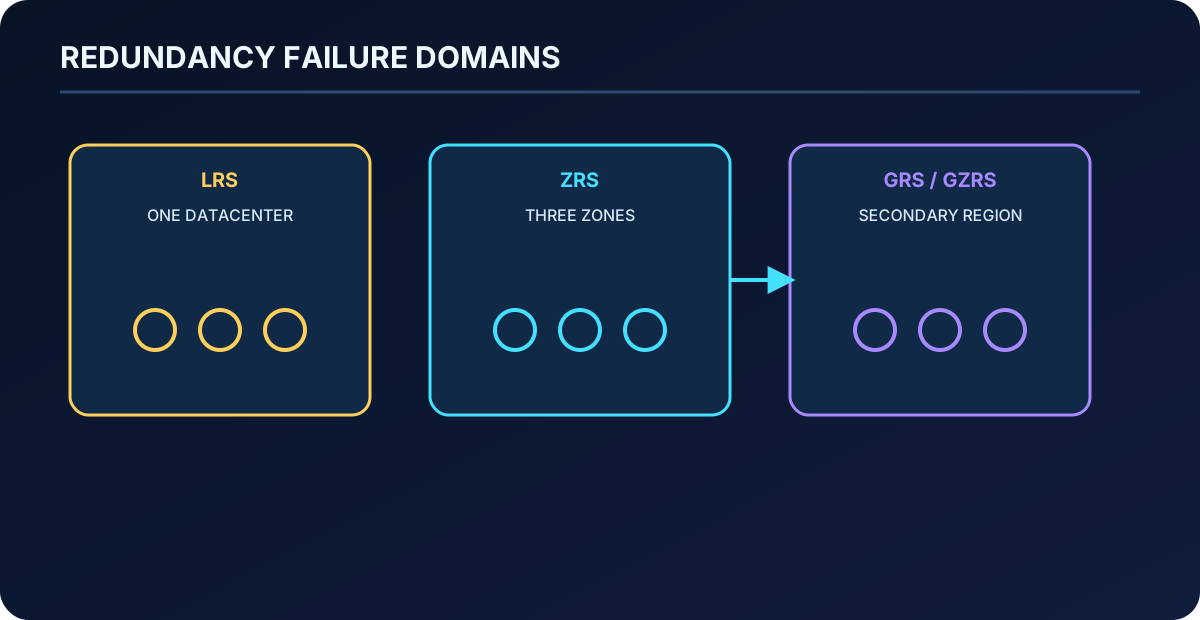
9. Redundancy protects against different failure scopes
Azure always keeps multiple copies. The redundancy option determines whether copies stay in one datacenter, span availability zones, or are asynchronously reproduced in a distant secondary region. Durability and availability improve as the failure boundary expands, but price and operational trade-offs also change.
Select redundancy according to the largest failure the workload must survive.
Topic summary
Redundancy is a failure-domain choice: rack, datacenter, zone, or entire region.
10. LRS is economical local protection
Locally redundant storage (LRS) synchronously keeps copies in one physical location in the primary region. It protects against drive and rack failures at the lowest redundancy cost, but a datacenter-wide disaster can make all copies unavailable or unrecoverable. Use it for rebuildable data, constrained governance scenarios, or workloads whose recovery strategy supplies another independent copy.
Topic summary
LRS handles local hardware faults economically but does not protect against loss of the hosting datacenter.
11. ZRS survives an availability-zone failure
Zone-redundant storage (ZRS) synchronously spreads data across three availability zones in the primary region. Reads and writes can continue when a zone becomes unavailable. It is a strong choice when regional data residency and high availability matter, but it does not create a disaster-recovery copy outside the region.
Topic summary
ZRS removes a single-zone dependency while keeping all copies inside one Azure region.
12. GRS and GZRS add a secondary region
Geo-redundant storage (GRS) uses LRS in the primary region, while geo-zone-redundant storage (GZRS) uses ZRS there. Both asynchronously replicate to a fixed secondary region where copies are locally redundant. Asynchronous transfer means the secondary can lag the primary, so a regional event can expose a nonzero recovery point objective.
With standard GRS or GZRS, applications cannot read the secondary until failover. Read-access variants—RA-GRS and RA-GZRS—expose a read-only secondary endpoint before failover. Design applications to use it deliberately; enabling the endpoint alone does not create graceful failover logic.
Topic summary
GRS and GZRS add regional durability; RA variants add pre-failover reads, but asynchronous replication still creates potential data loss.
13. Archive tier constrains the redundancy design
Archived blobs are supported with LRS, GRS, and RA-GRS—not ZRS, GZRS, or RA-GZRS. Rehydrate archived objects to an online tier before moving the account to a zone-redundant configuration. Because rehydration can take hours and incur charges, decide regional topology and archival lifecycle together instead of treating them as independent settings.
Topic summary
Archive is an offline economic tier whose current redundancy restrictions must be resolved before the account topology is finalized.
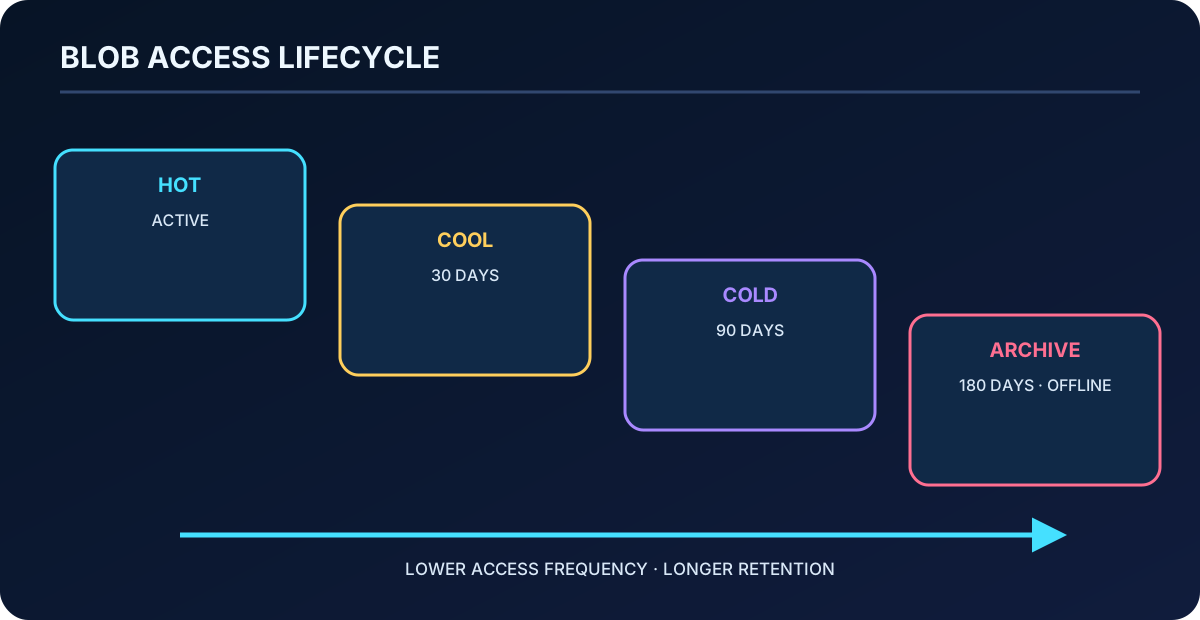
14. Blob access tiers exchange storage cost for access cost
Block blob access tiers.
Tier
Access and minimum duration
Typical use
Hot
Online, millisecond access, no minimum retention.
Frequently read or modified data and processing stages.
Cool
Online, millisecond access, 30-day minimum in general-purpose v2.
Infrequent data that still needs immediate availability.
Cold
Online, millisecond access, 90-day minimum in general-purpose v2.
Rare access with immediate retrieval requirements.
Archive
Offline, hours to rehydrate, 180-day minimum.
Long-term backup, raw source, legal, and archival content.
Moving or deleting a cool, cold, or archived blob before its minimum period can trigger a prorated early-deletion charge. Cooler tiers reduce capacity price but increase transactions and retrieval. Lifecycle management can move block blobs to cooler tiers or expire them under rule-based policy. Smart tier can automatically move eligible data among hot, cool, and cold according to observed usage.
For the standard storage reference SLA, the published availability is 99.9% for hot and 99% for cool, cold, and archive; read availability with RA-GRS is 99.99% and 99.9%, respectively. Treat these service figures as inputs and confirm the current SLA for the exact account and redundancy before setting a workload target.
The coldest tier is not automatically cheapest once retrieval, transactions, minimum duration, and business latency are included.
Topic summary
Choose a blob tier from the complete lifecycle cost and required retrieval time, not from capacity price alone.
15. Hot, cool, and cold remain online
The hot tier is the general-purpose default for active data. Cool and cold provide lower capacity cost for data read less often while preserving online millisecond retrieval. They have slightly lower availability and higher access charges than hot. Older catalogs, short-term backup, disaster-recovery material, and accumulating analytical datasets are candidates when their access rate supports the economics.
Topic summary
Cool and cold reduce storage price without taking data offline, but frequency, availability, and early-deletion charges must justify the move.
16. Archive requires an explicit rehydration plan
An archived blob cannot be read or modified until it is rehydrated to hot, cool, or cold. Rehydration can take up to 15 hours and priority affects time and cost. Archive therefore fits content whose recovery deadline is flexible: secondary backups, preserved raw input, and long-term compliance records. Metadata remains readable, but the payload is offline.
Topic summary
Archive minimizes long-term capacity cost only when the business accepts offline data, rehydration delay, and higher retrieval expense.
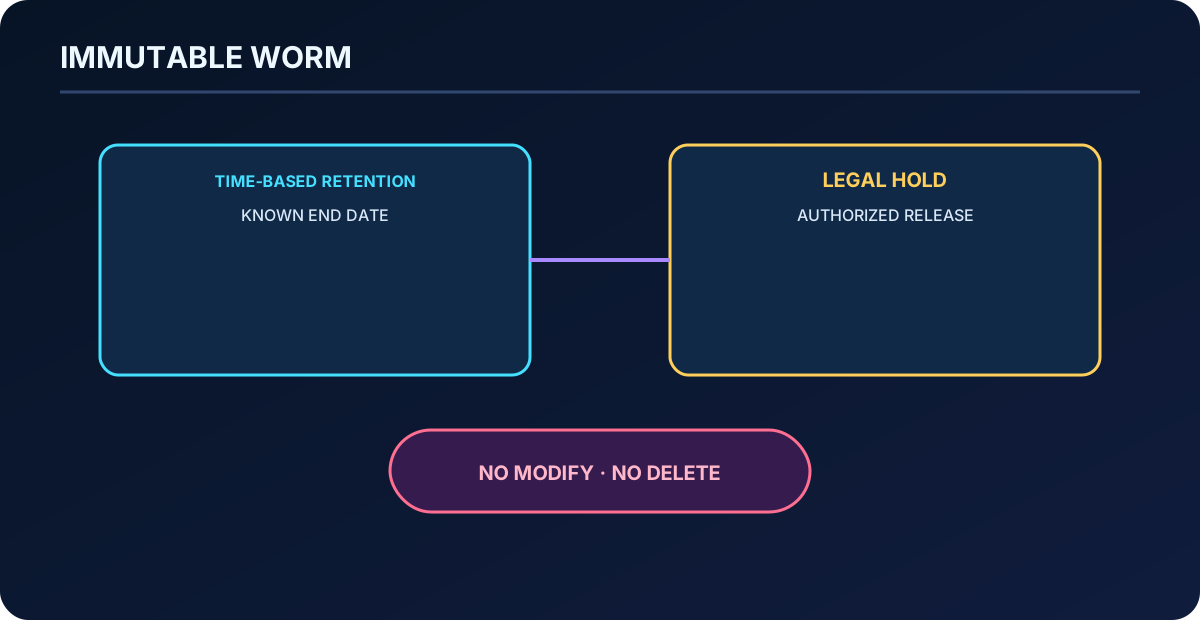
17. Immutable Blob enforces WORM retention
Write once, read many (WORM) policies prevent protected blobs from being changed or deleted. A time-based retention policy keeps content immutable for a defined interval; after expiration it can be deleted but existing bytes still are not overwritten. A legal hold remains until authorized tags are cleared and has no predetermined expiry.
Policies can be scoped at container or version level according to account capability. Test carefully before locking a time-based policy because a locked policy cannot simply be removed. All blob access tiers support immutable storage, but active VM page blobs are poor candidates because normal writes would be blocked or create excessive versions.
Time-based retention expires on schedule; legal hold ends only through an authorized decision.
Topic summary
Use immutable storage when evidence or backups must resist deletion and alteration, and govern policy locking as a high-impact operation.
18. Blob design combines availability, latency, and total cost
Availability: online tiers are immediately accessible; archive is not.
Latency: premium block blob accounts target consistently low latency; archive retrieval is measured in hours.
Cost: include capacity, operations, retrieval, early deletion, replication, transfer, and lifecycle changes.
Durability: choose local, zonal, or geo copies based on the failure model.
Immutability: select time-based retention or legal hold according to the governing event.
Operations: automate tier transitions and deletion with tested lifecycle rules.
Topic summary
A defensible Blob design explains access tier, account type, redundancy, immutability, lifecycle, and total cost together.
19. delivers managed shared file systems
exposes managed file shares through SMB, NFS, and REST according to share type and tier. Supported Windows, Linux, and macOS clients can mount a share concurrently. The service can replace or complement file servers and NAS appliances, host shared configuration and development tools, and support applications that expect normal file-system paths.
No file-server hardware or operating-system patching.
Encryption at rest and configurable encryption in transit.
Redundancy choices and share snapshots.
Native protection through .
Cloud and on-premises access with appropriate network design.
Topic summary
is serverless shared storage for applications and users that need file-system semantics rather than object APIs.
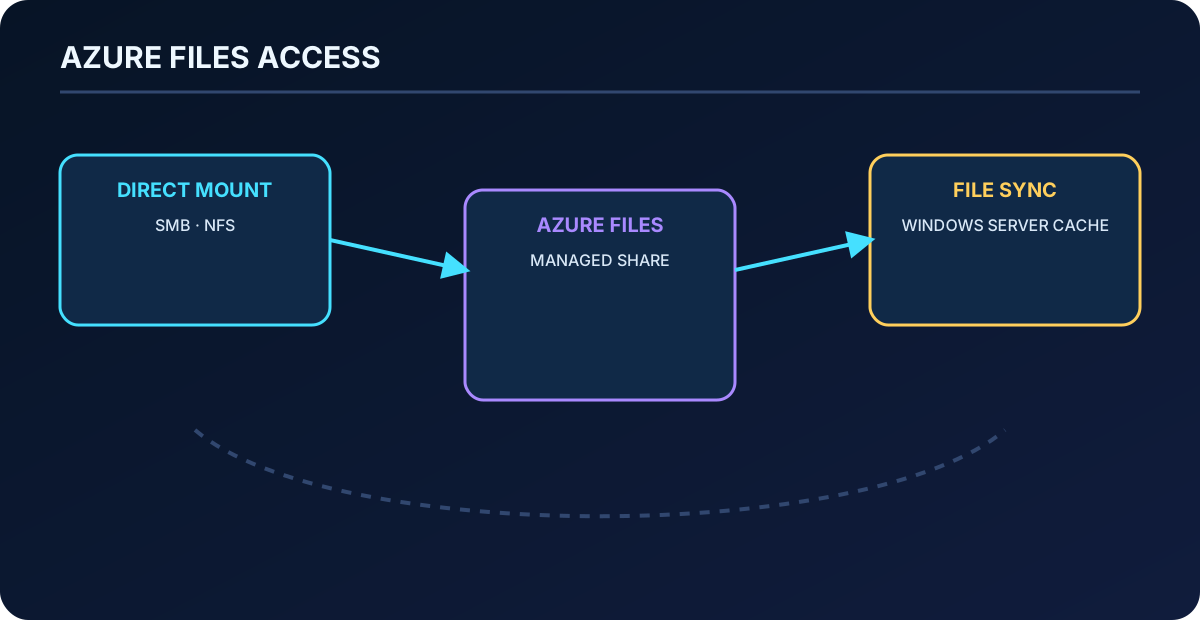
20. Direct mount and Azure File Sync solve different needs
Direct mount connects clients to the Azure share with a standard SMB or NFS client, eliminating the file server. Azure File Sync centralizes SMB data in while a Windows Server remains a fast local cache, preserving local compatibility and reducing latency for branch users.
Choose direct mount when clients can reach Azure reliably and no local server semantics are required. Choose Azure File Sync for hybrid caching, cloud tiering, and gradual file-server modernization. Plan identity, DNS, firewall, private connectivity, and protocol ports for either model.
Direct mount removes the server; Azure File Sync retains Windows Server as a local cache of the cloud share.
Topic summary
Direct mount is serverless access; Azure File Sync is a hybrid SMB cache and synchronization architecture.
21. media tiers and access tiers address separate trade-offs
SSD shares provide consistently high performance and low latency for databases, web hosting, development, and I/O-intensive workloads. HDD shares optimize general-purpose economics. In the classic pay-as-you-go model, transaction optimized, hot, and cool access tiers use HDD but price stored data and transactions differently. Do not confuse the underlying media tier with a workload access tier.
SSD supports SMB and NFS with compatible resource and billing models. Geo-redundant options are associated with supported HDD configurations, while SSD uses local or zone redundancy. Always validate protocol, region, billing model, and redundancy as one compatibility matrix.
Topic summary
Choose SSD or HDD for performance, then choose any available access tier and redundancy within that media and billing model.
22. has three billing models
billing choices.
Model
How it works
Guidance
Provisioned v2
Provision storage, IOPS, and throughput independently.
Recommended for new deployments; supports SSD and HDD in compatible configurations.
Pay as you go
Pay for used storage, operations, and transfer.
HDD only; useful for unpredictable use but budgeting can be harder.
Provisioned v1
Provision capacity while performance scales at a fixed relationship.
Legacy SSD model; use v2 unless a specific requirement prevents it.
Topic summary
Provisioned v2 is the current default design because capacity, IOPS, and throughput can be sized independently.
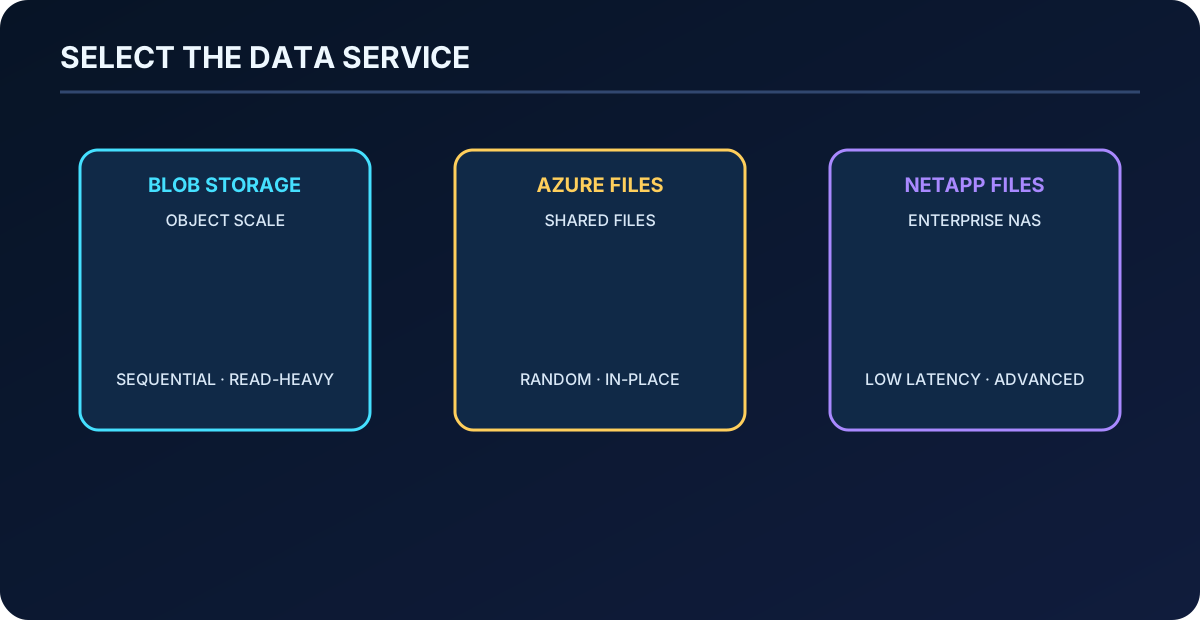
23. Compare Blob ,, and
Data-access service comparison.
Service
Access pattern
Representative fit
Large-scale, read-heavy, sequential object access; NFS 3.0 or REST in supported configurations.
Analytics, HPC throughput, media, raw data, backup, and archive at low total cost.
Random shared-file access and in-place updates through SMB, NFS 4.1, or REST as supported.
Lift-and-shift file shares, home directories, CMS, ERP, development, and container persistent volumes.
High-performance enterprise NAS with SMB, NFS, dual protocol, and advanced data management.
Latency-sensitive databases, SAP HANA, demanding HPC, and enterprise NAS migrations.
Published performance limits evolve and depend on tier, resource model, volume size, and region. Benchmark the real I/O profile instead of choosing from a single maximum number.
Object scale, general managed shares, and premium enterprise NAS occupy different design positions.
Topic summary
Use Blob for object economics, for managed shared files, and for demanding enterprise NAS behavior.
24. Managed disks provide block storage for Azure VMs
Azure managed disks are virtualized block volumes used as operating-system and data disks by Azure . Azure handles the underlying storage accounts, page blobs, and availability. VM size still limits the number and types of attachable disks, IOPS, and throughput, so the fastest disk cannot exceed the VM’s storage ceiling.
Azure managed disk types.
Type
Representative workload
Ultra Disk
Top-tier, transaction-heavy, I/O-intensive databases such as SAP HANA, SQL, and Oracle.
Premium SSD v2
Production workloads needing independently tunable low latency, IOPS, and throughput.
Premium SSD
Production and performance-sensitive general workloads.
Standard SSD
Web servers, lightly used enterprise applications, and development or test.
Standard HDD
Backup and noncritical, infrequently accessed data.
Ultra Disk and Premium SSD v2 are data-disk choices rather than OS disks. Standard HDD OS disk support retires on September 8, 2028, so new designs should select an appropriate SSD OS disk and migration plans must remove existing dependence.
Topic summary
Select the disk and VM together from latency, IOPS, throughput, regional support, cost, and OS/data-disk constraints.
25. Disk encryption layers protect different paths
Server-side encryption automatically protects managed OS and data disks at rest with platform-managed keys by default, or customer-managed keys through a disk encryption set. Azure Disk Encryption performs guest-level volume encryption with BitLocker or DM-Crypt. Encryption at host protects temporary disks, caches, and data flows from the VM host toward .
These mechanisms overlap but are not identical. Choose from compliance requirements, key ownership, VM and disk support, backup compatibility, and operational complexity. Do not repeat the obsolete claim that encryption at host disables server-side encryption; current managed-disk data remains encrypted at rest.
Topic summary
Separate storage-side, guest-level, and host-level disk encryption, then select the supported combination required by policy.
26. Host caching must match the I/O pattern
The usual default is ReadWrite caching for the OS disk and ReadOnly for data disks. ReadOnly can accelerate read-heavy access; None fits write-only or write-heavy data; ReadWrite should be used only when the application safely persists cached writes. Host caching is unavailable for disks of 4 TiB or larger and for Ultra Disks.
Changing a disk cache setting detaches and reattaches the disk; changing the OS disk setting restarts the VM. Schedule the operation and quiesce affected services to avoid corruption.
Topic summary
Caching can improve latency but must respect data integrity, disk-size support, application behavior, and maintenance impact.
27. security is layered
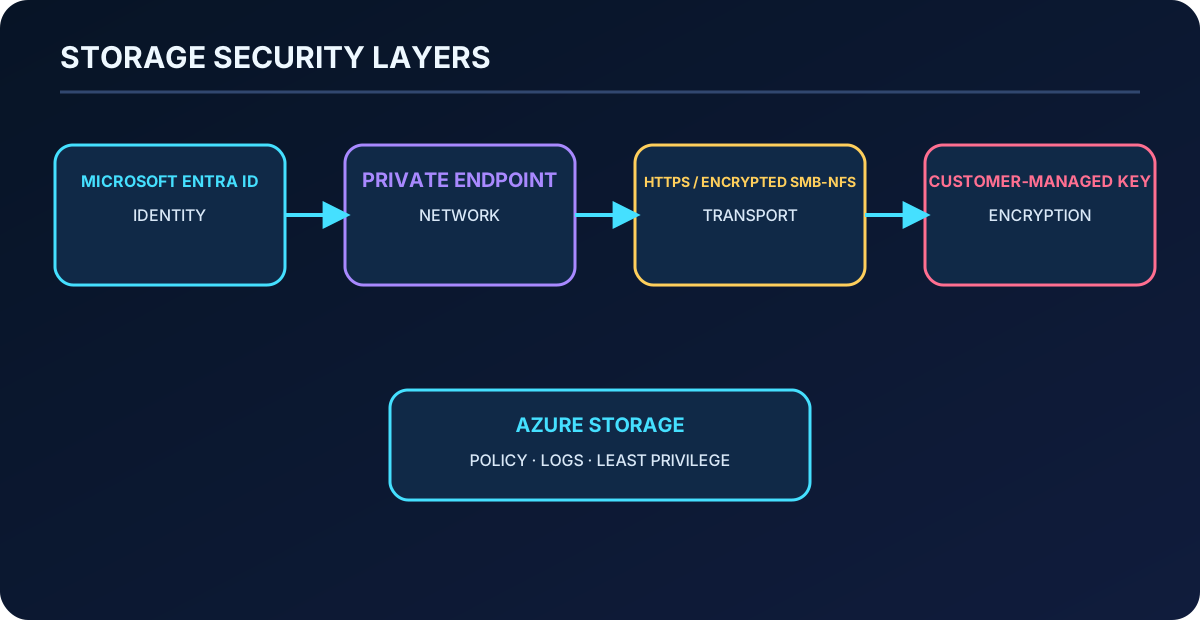
Start from the Azure security baseline and reduce standing access. Prefer Microsoft Entra authorization and Azure RBAC where supported. A shared access signature (SAS) delegates limited resource, permission, protocol, IP, and expiry scope without disclosing the account key; use a user-delegation SAS for Blob when feasible and protect every SAS like a credential.
Identity: , managed identities, Azure RBAC, and least privilege.
Network: firewalls, selected networks, service endpoints, and private endpoints.
Transport: require secure transfer and current SMB/NFS encryption settings.
At rest: platform-managed encryption or customer-managed keys in Azure or managed HSM.
Governance: , logging, key rotation, revocation, and access review.
Topic summary
Protect authorization, network reachability, transport, encryption keys, and governance as independent security layers.
A private endpoint places a network interface for an Azure subresource inside a . Client traffic stays on the Microsoft backbone and can arrive from connected on-premises networks through VPN or ExpressRoute private peering. Private DNS must resolve the service name to the private address.
Creating a private endpoint does not automatically disable the public endpoint. Explicitly set public network access and firewall rules so the remaining exposure matches the design. Separate private endpoints may be required for blob, file, queue, table, and other subresources.
A private route, strong identity, encrypted transport, and controlled key establish complementary boundaries.
Topic summary
Private Link provides a private route; DNS and public-endpoint policy determine whether the account is actually private-only.
29. Secure transfer and customer-managed keys add control
Secure transfer required rejects insecure Azure REST requests and is enabled by default for new accounts. Current settings let architects control SMB and NFS encryption requirements per protocol. Preserve the setting unless a documented legacy dependency creates a controlled exception.
Azure encrypts at rest automatically with Microsoft-managed keys. Customer-managed keys add control over lifecycle and access through Azure or managed HSM, but also create availability and rotation responsibilities. Key deletion, permission loss, or an unavailable key store can make data inaccessible.
Topic summary
Require encrypted transport by default; use customer-managed keys only with an operating model that protects key availability and rotation.
Choose object, file, block, queue, table, or database semantics before the account SKU.
Partition accounts by region, compliance, performance, sensitivity, ownership, limits, and lifecycle.
Document LRS, ZRS, GRS, GZRS, or read-access behavior and the expected regional RPO.
Model tiering, retrieval, transactions, early deletion, replication, and egress.
Select immutable retention or legal hold and govern policy locking.
Benchmark ,, and managed disks with the real workload.
Prefer Entra authorization, least privilege, private connectivity, encrypted transport, and monitored key management.
Test restore, failover, rehydration, key rotation, and access revocation.
For further practice, ask Microsoft Copilot to compare hosting options for one unstructured dataset, propose a migration path, explain replication trade-offs, find cost reductions, and group ten storage-security practices by implementation effort. Treat the response as a hypothesis and verify it against current Microsoft Learn documentation and a controlled proof of concept.
Topic summary
A complete AZ-305 design makes data, service, account, redundancy, lifecycle, performance, security, cost, and recovery decisions traceable to requirements.
Recheck support matrices, regional availability, limits, security defaults, and pricing in the official documentation before production implementation.