Design database solutions with Azure SQL and Azure Cosmos DB
Turn compatibility, scale, availability, security, management, and cost requirements into an accountable Azure database architecture.
Suggested study time: 82 minutes • Intermediate • Complete original rewrite with a concise summary for every topic
By João Ricardo Dutra••Complete original content
1. Begin with the workload and the business outcome
Many organizations are replacing aging or undersized data platforms, reducing datacenter overhead, and preparing applications for cloud and AI capabilities. The architecture must begin with a workload inventory and a migration outcome—not with a preferred database product.
Consider Tailwind Traders, a fictional global home-improvement retailer. Its on-premises SQL Server stores customers, order history, product catalogs, and data for an internal training portal. As its CTO, you need a cost-efficient cloud design with low latency, high availability, controlled migration risk, and appropriate data protection.
Design for .
Design for .
Design for SQL Server on Azure .
Recommend database scalability and availability.
Protect data at rest, in transit, and in use.
Design for and for Table.
Useful prerequisites are conceptual SQL Server knowledge and practical experience with database solutions. The topics map directly to Exam AZ-305 design decisions.
Topic summary
Translate the business outcome, compatibility constraints, service levels, security, and cost into requirements before selecting a database service.
2. offers a management and compatibility spectrum
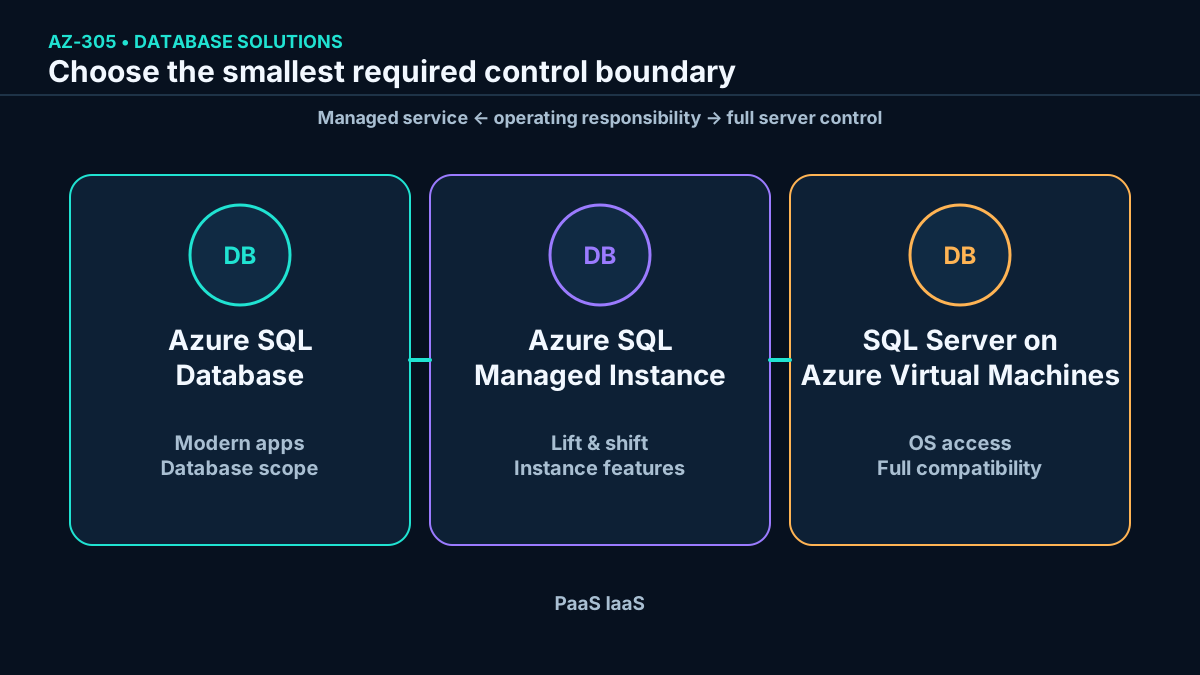
Relational data follows a shared schema of tables, rows, columns, keys, and relationships. Azure can host that data through several deployment options. The central design trade-off is how much platform management to delegate versus how much instance and operating-system compatibility to retain.
Core relational deployment choices.
Option
Management boundary
Strongest fit
Microsoft manages the database platform, engine updates, backups, and availability.
Modern applications, single databases, elastic pools, serverless, and Hyperscale.
Microsoft manages a SQL Server–compatible instance inside native virtual networking.
Lift-and-shift workloads that need instance-scoped SQL Server features.
SQL Server on Azure
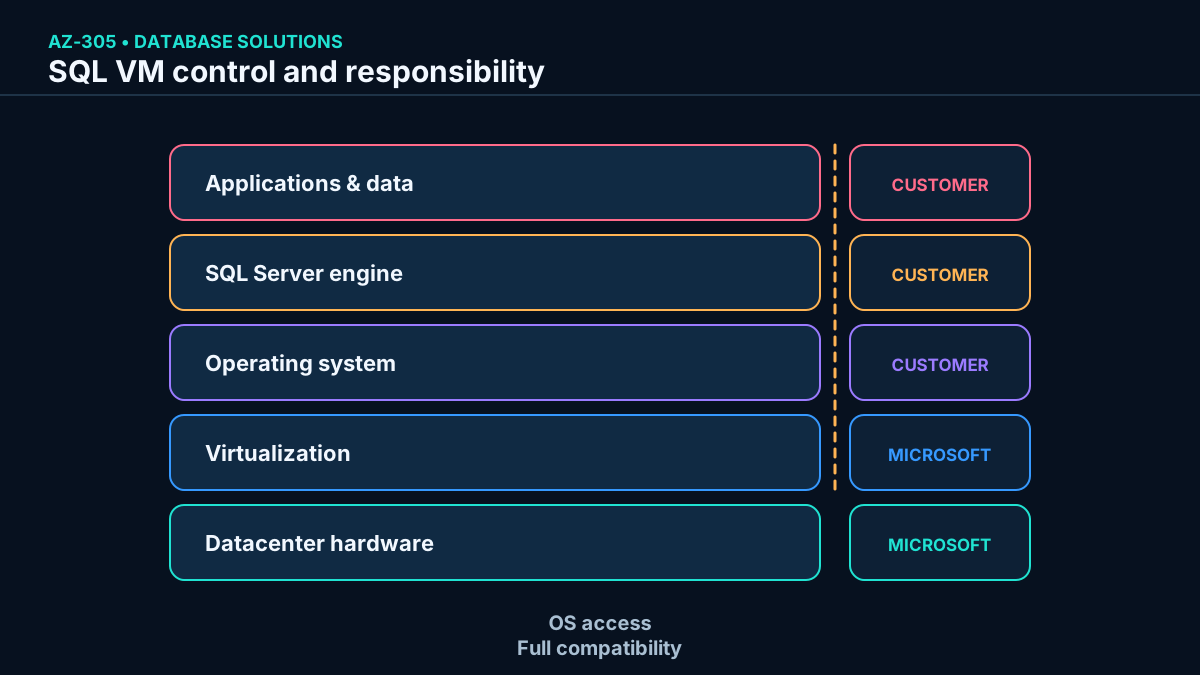
Azure manages physical infrastructure; the customer manages the VM operating system and SQL Server.
Fast migration, exact version needs, OS access, and full SQL Server control.
More compatibility and control also transfer more operating responsibility to the customer.
Topic summary
Choose the highest managed option that satisfies required engine, instance, network, and operating-system compatibility.
3. is a fully managed PaaS database
abstracts the operating system and SQL Server instance. Microsoft handles engine upgrades, patching, backups, health, and built-in high availability. Teams can concentrate on schema, queries, security policy, and application behavior instead of maintaining a server.
It is a scalable, intelligent relational service for cloud applications and existing structured workloads. Current capabilities include single databases, elastic pools, serverless compute, and the Hyperscale service tier. The correct choice depends on isolation, utilization pattern, storage growth, latency, and recovery objectives.
Topic summary
removes server and instance administration while retaining a relational SQL platform for modern applications.
4. Single databases, elastic pools, and Hyperscale solve different shapes
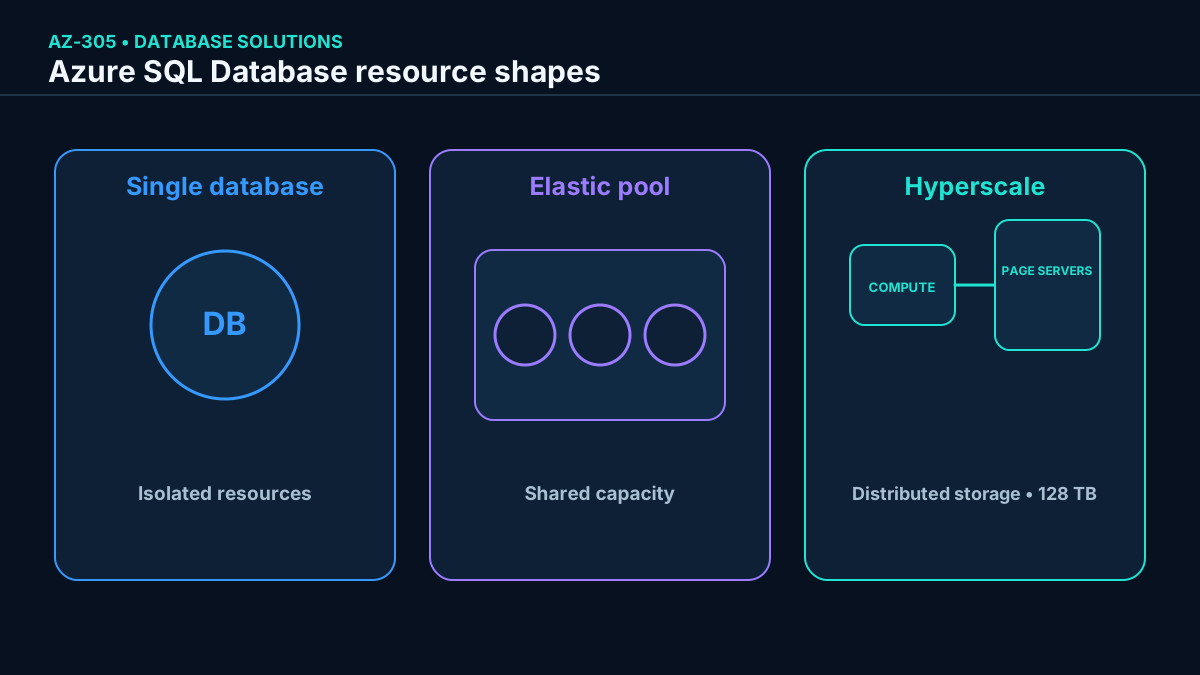
resource shapes.
Shape
Resource behavior
Use when
Single database
Dedicated service objective and isolated resource limits.
One database has predictable or independently managed demand.
Elastic pool
Multiple databases share purchased compute and storage within per-database limits.
Many databases have staggered, variable peaks and low average utilization.
Hyperscale
Cloud-native distributed storage, rapid snapshots, read replicas, and storage growth up to 128 TB.
Very large or fast-growing databases need independent compute and storage scale.
Hyperscale is available for single databases and elastic pools in the vCore model. It is not a DTU tier. A design should not treat “large” as the only reason to select it; fast backup and restore, read scale-out, configurable high-availability replicas, and rapid compute scaling can also justify it.
Isolation, shared utilization, and distributed scale are distinct design patterns.
Topic summary
Use single databases for isolation, elastic pools for shared variable demand, and Hyperscale for distributed storage, fast operations, and large scale.
5. DTU and vCore are different purchasing models
A database transaction unit (DTU) bundles compute, memory, storage, and I/O into preconfigured service objectives. It simplifies initial sizing when teams prefer an integrated measure. DTU purchasing applies to , not .
The vCore model exposes virtual cores and lets architects reason more directly about compute, memory, storage, and I/O. It supports Azure Hybrid Benefit for qualifying SQL Server licenses and reserved capacity. Microsoft recommends vCore for most new designs because it offers greater resource transparency and independent choices.
Purchasing-model decision.
Requirement
Prefer
Simple bundled sizing and existing DTU performance history.
DTU.
Independent compute and storage choices, serverless, Hyperscale, license benefit, or reserved capacity.
vCore.
.
vCore; DTU is unavailable.
Topic summary
DTU is a convenient bundle; vCore is the more transparent and flexible model for current architecture and cost optimization.
6. Serverless and free offers target intermittent or evaluative use
The serverless compute tier automatically scales within configured limits and bills compute per second of use. Auto-pause can reduce cost for idle workloads, but the first request after a pause experiences resume latency. Serverless is available in supported General Purpose and Hyperscale vCore configurations, so validate hardware and feature compatibility.
The free offer currently allows up to ten General Purpose databases per subscription. Each receives 100,000 vCore-seconds of compute, 32 GB of data, and 32 GB of backup storage per month for the lifetime of the subscription. When a free limit is reached, the database can pause until the next month or continue with billable use, according to configuration.
Topic summary
Use serverless for variable idle-heavy demand and the free offer for development or evaluation, while accounting for resume latency and published limits.
7. fits teams that want to build, not operate servers
AccuWeather selected alongside and so its teams could deliver internal prediction applications without administering databases. The transferable lesson is not the company name: when the application can use database-scoped features and the priority is rapid delivery with automated platform operations, SQL Database is a strong default.
Confirm database-scoped feature compatibility.
Select single database or elastic pool.
Choose DTU or vCore and provisioned or serverless compute.
Select General Purpose, Business Critical, or Hyperscale from latency, availability, scale, and cost.
Test migration, performance, connectivity, and recovery before cutover.
Topic summary
Select when application compatibility permits and managed operations, rapid provisioning, and database-level scale are priorities.
8. preserves instance semantics as PaaS
supplies a fully managed SQL Server–compatible instance while removing most virtual-machine administration. It supports a single managed instance or an instance pool and is designed for migrations that would otherwise require substantial application redesign.
Native virtual-network integration and broad SQL Server surface-area compatibility make it suitable for lift-and-shift workloads. Microsoft handles patching, engine updates, automated backups, and built-in availability; customers retain responsibility for databases, logins, permissions, queries, and workload design.
Topic summary
Managed Instance is the PaaS bridge for workloads that need instance-level SQL Server behavior without operating a VM.
9. Instance-scoped features are the decisive compatibility test
Common reasons to choose include SQL Server Agent, Common Language Runtime (CLR), Database Mail, distributed transactions, linked servers, Service Broker, and other instance-scoped capabilities. Most SQL Server engine features are supported, but “most” is not “all”; run an assessment against the exact version and dependencies.
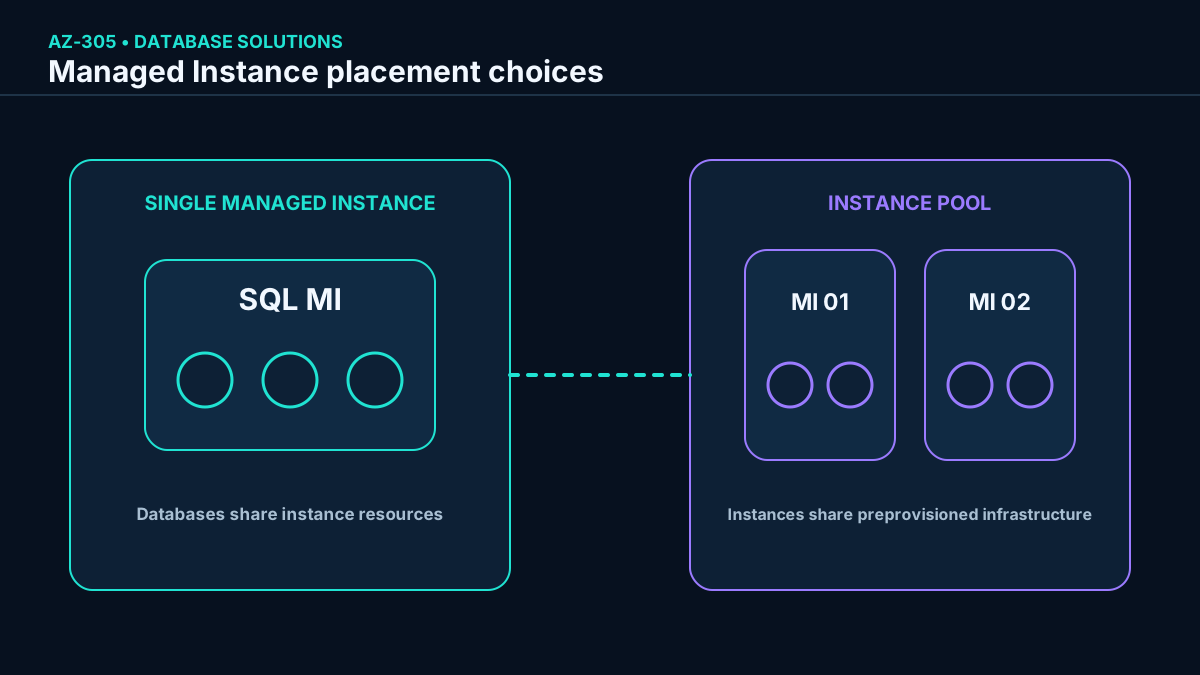
The vCore model defines the instance compute and storage envelope, and every database in that instance shares those resources. An instance pool preprovisions infrastructure that can host smaller managed instances, improving placement speed and cost efficiency for multiple migrations.
A managed instance shares resources across its databases; an instance pool shares preprovisioned infrastructure across instances.
Topic summary
Choose Managed Instance for required instance-scoped features, then size shared resources and decide whether an instance pool improves consolidation.
10. Managed Instance capacity and the evaluation offer have explicit limits
The free offer runs for 12 months and currently includes one General Purpose instance per subscription, four vCores, 720 vCore-hours per month, 64 GB of data storage, and automatic backups retained for up to seven days. It is intended for evaluation, proofs of concept, and compatibility testing—not production continuity.
Next-gen General Purpose can support up to 500 user databases and 32 TB of storage per instance, with compute, storage, and I/O scaling choices that improve on the original General Purpose architecture. Regular General Purpose and Business Critical have different database and storage limits. Confirm the current regional support, hardware, service tier, and resource-limit table before committing a consolidation ratio.
Topic summary
Treat free and maximum-capacity figures as service-tier constraints to verify, not as guaranteed usable workload density.
11. Komatsu demonstrates the lift-and-shift value of Managed Instance
Komatsu wanted to consolidate mainframe-connected applications and preserve a broad set of SQL Server features. It moved about 1.5 TB while gaining automated patching, version updates, backups, availability, and lower management overhead. This pattern favors Managed Instance when rearchitecture cost is higher than the value of moving immediately to a database-scoped platform.
The architect must still validate performance, networking, authentication, unsupported features, maintenance behavior, recovery targets, and total cost. A compatible destination does not eliminate migration testing.
Topic summary
Managed Instance reduces rework for feature-rich SQL Server estates, but successful lift-and-shift still requires assessment and rehearsal.
12. SQL Server on Azure maximizes control
SQL Server on Azure provides a full SQL Server installation on an Azure VM. Architects can choose supported SQL Server and operating-system versions, access the OS, install agents, customize files and storage, and retain features not available in PaaS.
That control preserves customer responsibility for OS and SQL Server patching, version upgrades, instance configuration, availability architecture, backup validation, and capacity. Azure can automate selected backups, patching, licensing, and management tasks, but the IaaS boundary remains.
OS-level control is paired with OS-level operational responsibility.
Topic summary
Use SQL Server on Azure when exact compatibility or OS access is mandatory and the organization can operate the full stack.
13. Migration speed, automation, and licensing shape the VM decision
Allscripts used to move acquired healthcare applications running on roughly 1,000 VMs to Azure in about three weeks. The pattern illustrates how infrastructure replication can accelerate migration when applications are tightly coupled to their servers.
Server access: preserve OS-level tools, authentication, versions, and file layouts.
Automated management: use the SQL IaaS Agent extension and Azure services where supported, but verify every configured operation.
Azure Hybrid Benefit: apply eligible Windows Server and SQL Server licenses to reduce cost.
Availability: design zones, availability sets, clustering, availability groups, storage, load balancing, and recovery according to the workload.
Topic summary
A SQL VM is often the fastest compatibility path, but its business case must include operations, availability engineering, and license optimization.
14. Compare the three deployment options explicitly
Deployment-option comparison.
Decision axis
SQL Server on Azure
Primary scenario
Modern apps, single databases, elastic pools, serverless, Hyperscale.
Most lift-and-shift migrations requiring instance features.
Fast migration or applications requiring OS access.
Management
Fully managed database PaaS.
Fully managed instance PaaS.
Customer-managed SQL Server and OS on IaaS.
Compatibility
Database-scoped features.
Broad SQL Server surface and native virtual network.
Full supported SQL Server and OS capabilities.
Scale unit
Database or elastic pool.
Managed instance or instances in a pool.
VM, disks, and SQL Server architecture.
Special examples
Hyperscale, serverless, elastic pools.
SQL Server Agent, CLR, Service Broker, linked servers.
DTC, FILESTREAM, Simple recovery model, SSIS, SSRS, SSAS, custom agents and OS configuration.
Topic summary
Make compatibility and operating responsibility visible; do not compare services only by headline price or maximum size.
15. Dynamic scalability changes resources without buying hardware
can change CPU, memory, I/O throughput, and storage through service objectives with minimal application disruption. A single database receives defined DTUs or vCores; an elastic pool receives a shared envelope plus per-database minimum and maximum limits.
Scaling operations are online but not impact-free. Connections can be interrupted during transitions, and some tier changes require data movement. Applications need retry logic, maintenance planning, monitoring, and performance tests at both normal and peak demand.
Topic summary
Cloud scaling is an online architecture capability, not permission to ignore transient connections, transition time, and application resilience.
16. Vertical scaling changes the resources of one database
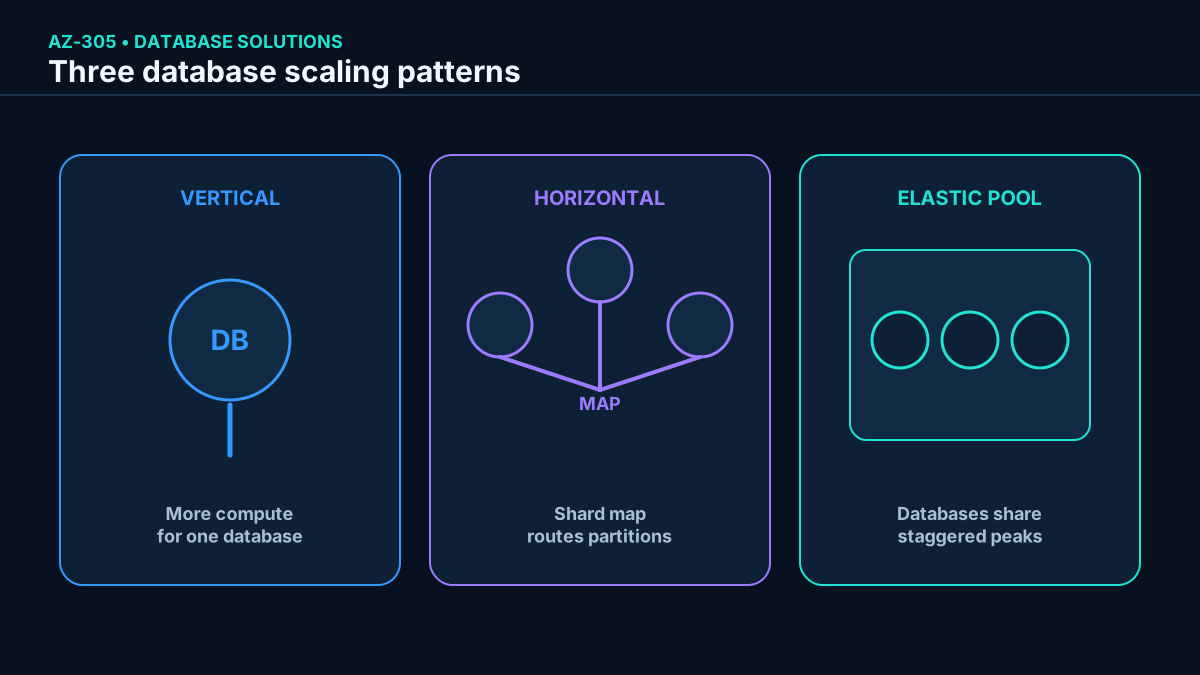
Vertical scaling, or scaling up and down, changes the compute size or service objective of a database or elastic pool. It is straightforward when a workload fits inside one database and demand can be met by a larger resource envelope.
For many databases with low average utilization and occasional peaks, an elastic pool supplies enough aggregate capacity to absorb staggered spikes. If every member peaks simultaneously, the pool must still be sized for that concurrency.
Topic summary
Scale vertically when one database can meet demand with a larger resource envelope; use a pool when many databases can share nonconcurrent peaks.
17. Horizontal scaling partitions load or offloads reads
Horizontal scaling, or scaling out, adds databases or replicas. Sharding partitions records across databases using a sharding key; a shard map manager helps the application locate the correct database. This supports geographic separation, very large datasets, and independent scaling, but introduces routing and cross-shard complexity.
Read scale-out directs read-only work to supported secondary replicas. It improves read capacity and workload isolation but does not scale the primary write path. The architecture must define consistency expectations, replica availability, routing intent, and behavior during lag or failover.
Scale up changes one resource envelope; scale out distributes work; pooling exploits staggered demand.
Topic summary
Use sharding for partitionable write and data scale, and read replicas for read scale; both require application-aware routing.
18. Elastic database tools support cross-database designs
Elastic database pools reduce cost and simplify performance management when many databases have variable demand. Elastic database tools help implement sharding, while elastic query lets T-SQL access remote tables across multiple databases for reporting and aggregation.
This pattern can feed Excel, , Tableau, and data-integration tools with rows from multiple databases. The source module highlights elastic query in the Standard tier; current support still varies by tier and query pattern, so validate limitations, predicate pushdown, security, and performance rather than treating distributed queries like local joins.
Topic summary
Pools share resources; elastic tools distribute data; elastic query aggregates across databases. Each solves a different part of scale-out.
19. Match the scalability pattern to the scenario
Scalability recommendations.
Scenario
Recommended pattern
Reason
Many location databases have unpredictable, nonconcurrent peaks.
Elastic pool plus vertical sizing.
Databases share a purchased capacity envelope.
Data must reside in separate geographic databases for compliance.
Horizontal sharding and a shard map.
Partitions remain independently located and scaled.
Commercial BI tools need one result assembled from many databases.
Elastic query and supported elastic database tools.
Remote T-SQL can expose a consolidated analytical result.
Read-heavy mission-critical database.
Business Critical read scale-out or Hyperscale replicas.
Read-only workloads leave the primary replica.
Topic summary
Select pooling, vertical scale, sharding, distributed query, or read replicas from demand concurrency, data placement, and query behavior.
20. The service tier determines the availability architecture
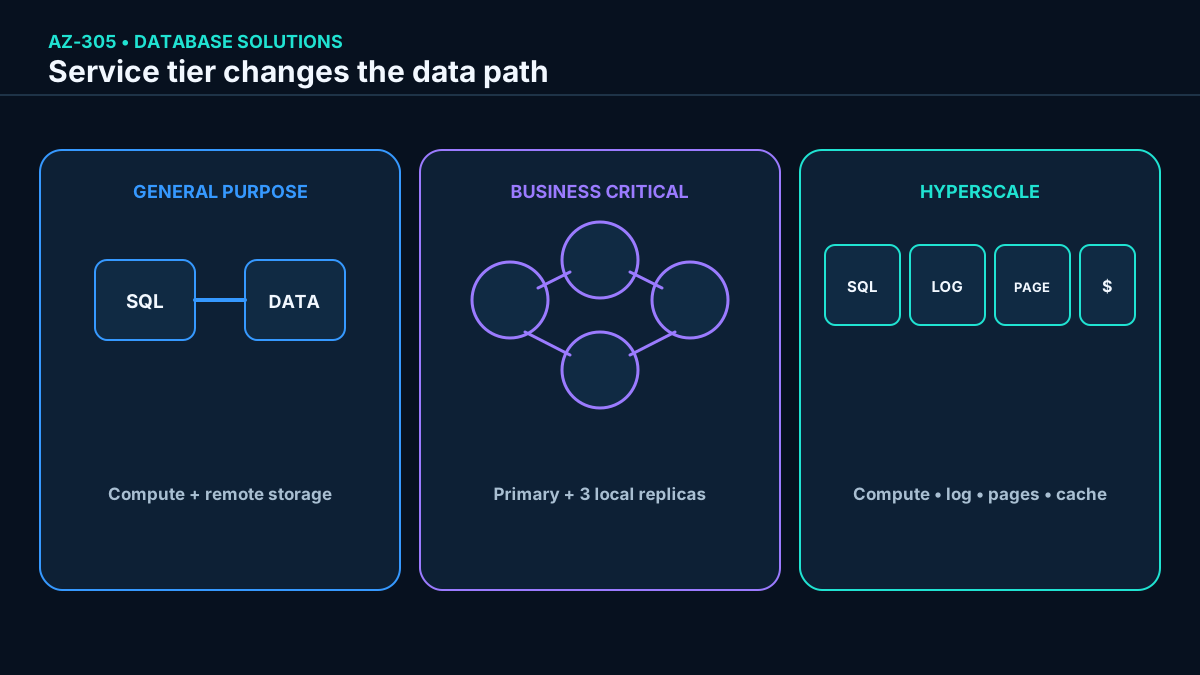
availability is not one universal implementation. General Purpose separates compute from remote storage; Business Critical maintains a quorum of engine replicas with local SSD; Hyperscale separates compute, log, cache, and page-serving layers. The architecture changes latency, failover, read scale, storage growth, and price.
Availability zones can increase resilience against a datacenter outage in supported regions and configurations. Applications still require retry logic and, for regional continuity, failover groups or geo-replication plus tested operational procedures.
Topic summary
Choose the service tier from its architecture and failure behavior, then add zonal and regional continuity controls as required.
21. General Purpose separates stateless compute from durable storage
In General Purpose—corresponding broadly to Basic or Standard in the DTU model—the gateway directs connections to a compute node. Temporary data such as tempdb uses locally attached SSD, while data and log files reside in replicated remote Azure storage. The learning architecture identifies Azure Premium with local redundancy for those files and Azure Standard with RA-GRS by default for backups; current deployments expose configurable backup redundancy, which must be verified for the selected database.
If the compute node fails, starts the database engine elsewhere, attaches the durable files, runs recovery, and updates routing. This resembles a managed failover-cluster pattern. It offers balanced compute and storage for common workloads, with higher storage latency than local-SSD tiers.
Topic summary
General Purpose favors balanced cost through separated compute and storage, accepting failover recovery and remote-storage latency.
22. Business Critical uses a quorum of local-SSD replicas
Business Critical—comparable to Premium in the DTU model—places data and logs on local SSD across a primary and three secondary replicas. Synchronous replication and quorum allow rapid failover; a commit completes after the required replica acknowledgments. One secondary can serve read-only queries without an additional database charge.
This tier fits mission-critical applications that need consistently low I/O latency, high failure resilience, fast recovery, and integrated read scale. Zone redundancy can distribute replicas across availability zones in supported regions.
Topic summary
Business Critical pays for replicated local-SSD compute to obtain low latency, fast failover, and a readable secondary.
23. Hyperscale distributes storage and makes snapshots central
Hyperscale uses compute replicas, a log service, page servers, and layered caches. can grow to 128 TB independently of the compute size. Snapshot-based continuous backup makes backups effectively independent of database size and usually restores in minutes rather than hours or days.
Compute changes are rapid because data does not need to be copied onto a new compute node. Architects can configure zero to four high-availability replicas and add named replicas for independent read workloads. At least one HA replica is required for automatic compute resilience, and every additional replica affects cost.
The service tier changes the physical path to data and therefore latency, scale, and failover behavior.
Topic summary
Hyperscale combines distributed storage, fast snapshots, rapid scaling, and configurable replicas for large or operationally demanding databases.
24. Availability-tier selection is a requirement trade-off
Availability-oriented tier comparison.
Tier
Architecture
Select when
General Purpose / DTU Basic or Standard
Stateless compute over remote durable storage.
Balanced cost and performance for typical business workloads.
Business Critical / DTU Premium
Primary plus synchronous local-SSD replicas.
Low latency, rapid failover, high resilience, and one readable secondary.
Hyperscale / vCore only
Distributed compute, log, cache, and page servers.
Large or growing storage, fast backup/restore, rapid compute scale, and multiple read scenarios.
The database SLA, zone configuration, replica count, backup redundancy, geo-replication, and application retry behavior must be evaluated together. A service-tier label alone does not satisfy an end-to-end availability target.
Topic summary
Select a tier from latency, storage, failover, read scale, zone, regional recovery, and cost requirements—not from a single SLA number.
25. Security starts with discovery, classification, and protection
Customer databases can hold contact details, orders, credentials, and payment information. Discovery identifies sensitive data, classification records its business meaning and risk, and protection applies access, encryption, masking, monitoring, and governance appropriate to that classification.
A useful design maps controls to the data lifecycle: where bytes are stored, how they move, and where they are processed. Encryption is necessary but does not replace identity, least privilege, network controls, auditing, threat protection, retention, or secure application logic.
Topic summary
Classify the data and its lifecycle first, then layer encryption with identity, network, monitoring, and governance controls.
26. Data at rest, in transit, and in use have different exposure
Data states and representative controls.
State
Meaning
Primary controls
At rest
Stored database files, logs, and backups not currently moving.
Transparent Data Encryption, storage encryption, key governance, backup protection.
In transit
Traffic between clients, services, replicas, or regions.
TLS 1.2 or later, certificate validation, private connectivity, secure drivers.
In use
Values being queried or processed in memory or an application.
Always Encrypted, secure enclaves where appropriate, access control, and masking for output exposure.
Topic summary
Apply a control designed for each data state; one encryption mechanism does not cover storage, network, and processing exposure.
27. Transparent Data Encryption protects files and backups at rest
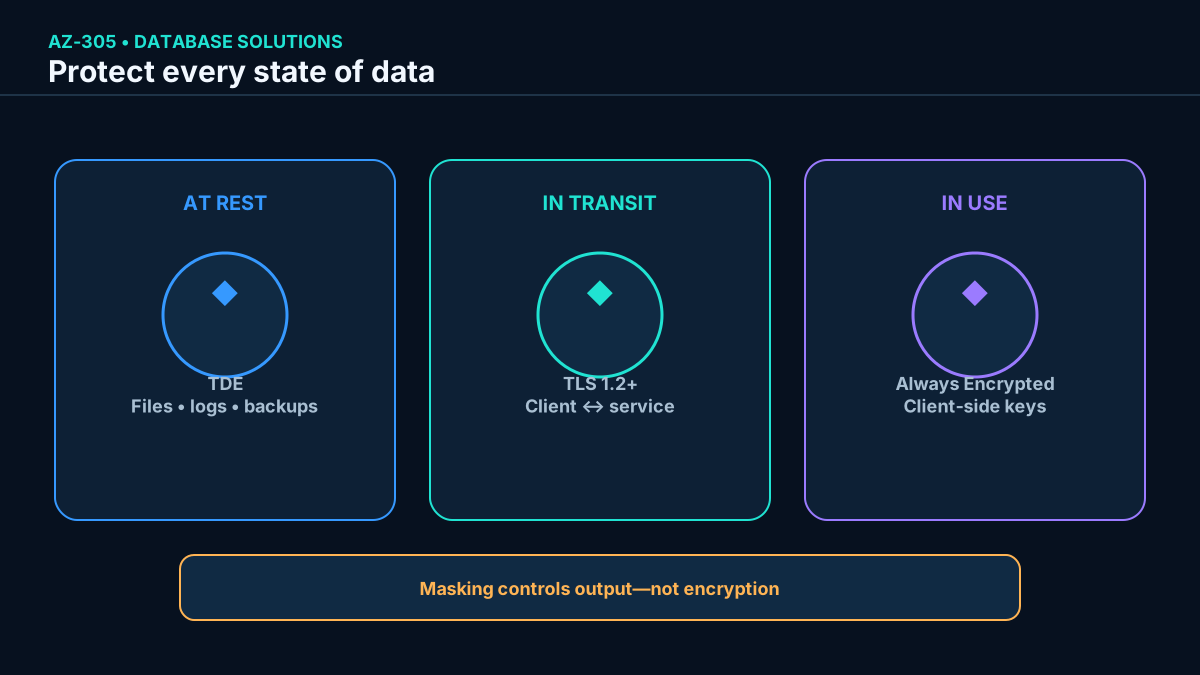
Transparent Data Encryption (TDE) performs real-time encryption and decryption of database pages, transaction logs, and backups. It protects ,, and against malicious offline access to storage media. New databases have TDE enabled by default.
TDE requires no application changes, but it does not prevent an authorized database principal from reading rows. Platform-managed keys simplify operations; customer-managed keys in Azure add control and separation of duties while also creating key-availability and rotation obligations.
Topic summary
TDE protects database files, logs, and backups from offline exposure; authorization and optional customer-managed keys solve different risks.
28. TLS protects database connections in transit
,, and require TLS 1.2 or later for supported connections. TLS encrypts the Tabular Data Stream between client and server and helps authenticate the endpoint. TLS 1.0 and 1.1 are retired.
Use current Microsoft-supported drivers, validate certificates and server names, disable insecure client fallbacks, and combine TLS with private endpoints or controlled network paths when the threat model requires private reachability.
Topic summary
TLS 1.2 or later encrypts the connection; secure drivers, certificate validation, and network design complete transport protection.
Dynamic data masking changes how designated values appear in query results for users without UNMASK permission while leaving stored data unchanged. It can show only the last digits of a card or obscure part of an email address with minimal application impact. It reduces accidental exposure but is not an encryption boundary and must not be the only defense against a hostile user who can query the database.
Always Encrypted encrypts sensitive values in the client so the database engine does not receive plaintext keys. Secure enclaves can enable richer operations on protected data in supported configurations. Use masking for presentation control and Always Encrypted when the requirement is cryptographic protection of selected values during use.
Masking and encryption solve different risks and should not be described as equivalent controls.
Topic summary
Mask query output with dynamic data masking; use Always Encrypted when sensitive values must remain cryptographically protected from the database engine.
30. is a managed NoSQL platform for global applications
is a fully managed NoSQL database for modern applications, including AI solutions. The platform handles infrastructure, patching, backups, and capacity, with serverless and autoscale models. It provides globally distributed data, tunable consistency, automatic indexing, and single-digit-millisecond performance backed by service objectives for supported operations.
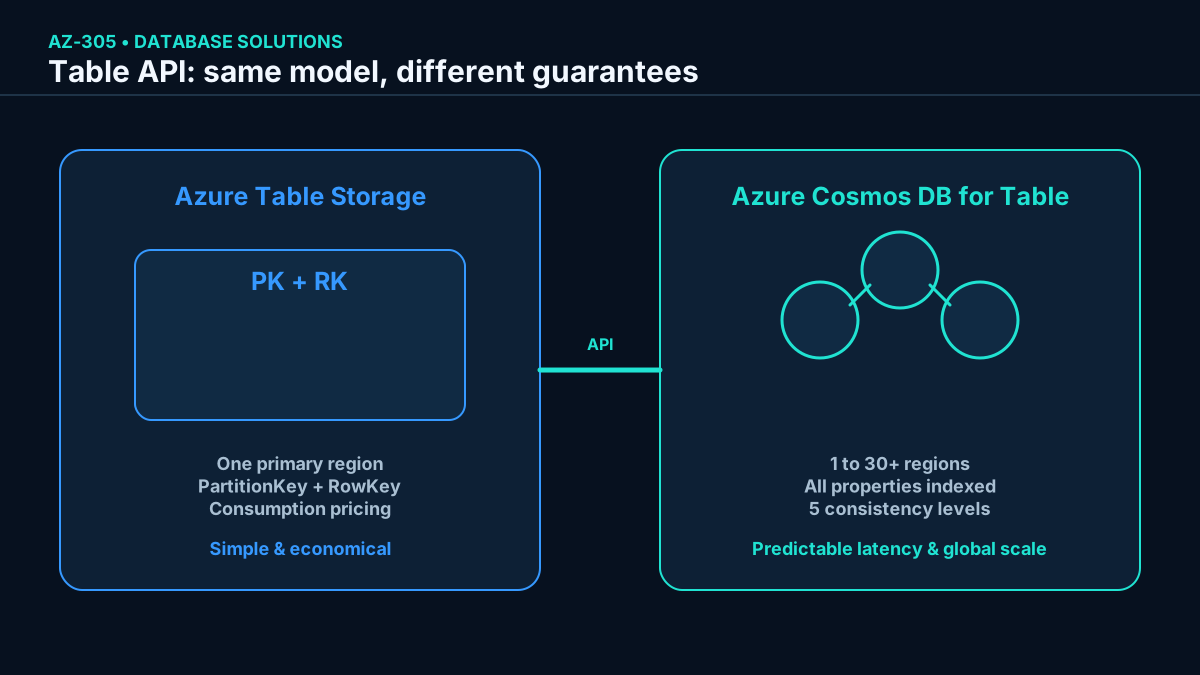
for Table stores flexible key-value entities addressed by PartitionKey and RowKey and uses familiar Azure Tables operations. Applications built for Azure can often move with few or no SDK changes, but throughput, consistency, distribution, and billing must still be redesigned intentionally.
Topic summary
Choose for globally distributed, elastically scalable NoSQL workloads; the Table API preserves the Azure Tables data model.
31. Azure and for Table trade cost for guarantees
Current service comparison.
Feature
Azure
for Table
Latency
Fast, without an upper latency bound.
Reads below 10 ms and writes below 15 ms at the 99th percentile under SLA conditions.
Throughput
Variable; scalability target of 20,000 operations/s per table.
Reserved throughput with no account-wide upper bound and over 10 million operations/s per table in provisioned mode.
Distribution
One primary region and an optional readable secondary.
Turnkey distribution across one to 30+ regions with managed or manual failover.
Indexing and query
Primary index on PartitionKey and RowKey; scans otherwise.
Automatic indexing of all properties and indexed property queries.
Consistency
Strong in the primary, eventual in the secondary.
Five tunable consistency levels.
Pricing
Consumption based.
Consumption-based serverless or provisioned capacity.
Availability
99.99%.
99.99% for single-region and eligible multi-region accounts; up to 99.999% read availability for qualifying multi-region accounts.
emphasizes simple consumption economics; Cosmos DB for Table adds global distribution, indexing, tunable consistency, and stronger guarantees.
Topic summary
Stay with for simple economical key-value storage; use Cosmos DB for Table when global scale, indexed queries, predictable latency, or tunable consistency justify it.
32. Knowledge check: select the database from its hard constraints
Assessment answers and rationale.
Scenario
Best answer
Rationale
Inventory application requires Windows authentication, full customization, and OS access.
SQL Server on Azure .
Only the VM option provides operating-system access and full instance control.
HR application needs less administration but depends on CLR and Service Broker.
.
It preserves required instance-scoped features as a managed PaaS service.
On-premises SQL Server databases contain 40–80 TB.
Hyperscale.
Hyperscale supports databases up to 128 TB with distributed storage.
The exam pattern is to find the nonnegotiable constraint first: OS access, instance compatibility, or scale. Optimize cost and management only among candidates that satisfy that constraint.
Topic summary
Hard compatibility and capacity requirements eliminate options before softer preferences such as convenience or price are considered.
33. Architecture checklist and chapter synthesis
Inventory schemas, sizes, growth, dependencies, authentication, instance features, OS integrations, and network paths.
Select SQL Database, Managed Instance, or SQL VM from the minimum compatibility and control required.
Choose single database, elastic pool, instance pool, sharding, or replicas from utilization and scale behavior.
Select DTU or vCore, provisioned or serverless, and model license benefits and reservations.
Match General Purpose, Business Critical, or Hyperscale to latency, storage, failover, read scale, and cost.
Protect data at rest with TDE, in transit with TLS, and selected values in use with Always Encrypted; use masking only for display control.
Choose Azure or for Table from distribution, latency, indexing, consistency, throughput, and pricing.
Rehearse migration, performance, recovery, key rotation, failover, and rollback before production cutover.
For further study, open Microsoft Copilot in Microsoft Edge or at copilot.microsoft.com. Ask it to compare relational services for a concrete workload, propose scaling examples, contrast with including pros and cons, and list Cosmos DB scalability limits. Treat the output as a design hypothesis and verify it against Microsoft Learn, pricing, regional availability, and a proof of concept.
Topic summary
A defensible database architecture makes compatibility, management, scale, availability, security, cost, and recovery decisions traceable to workload evidence.