Identity and access architecture: Microsoft Entra, B2B, CIAM, Conditional Access, workloads, and Key Vault
Design authentication, authorization, workforce and external identities, risk-aware access, entitlement reviews, application identities, managed identities, and secure secret storage.
Suggested study time: 85 minutes • Intermediate • Complete original rewrite with a concise summary for every topic
By João Ricardo Dutra••Complete original content
1. Authentication and authorization protect different decisions
Authentication establishes whether a user, workload, or process is the identity it claims to be. Authorization starts after authentication and determines which resource that identity can use and which operation - read, write, administer, or another action - is permitted. A sound Azure architecture treats the two controls as complementary rather than interchangeable.
The design objective is to control access to organizational resources, protect passwords and secrets, and connect user and application identities to . For AZ-305, this means recommending identity management, authentication, Azure and on-premises authorization, and protection for secrets, certificates, and keys.
Topic summary
Authentication verifies identity; authorization evaluates permitted actions on a resource. Both are required for a complete access design.
2. A strong IAM solution serves people, applications, and devices
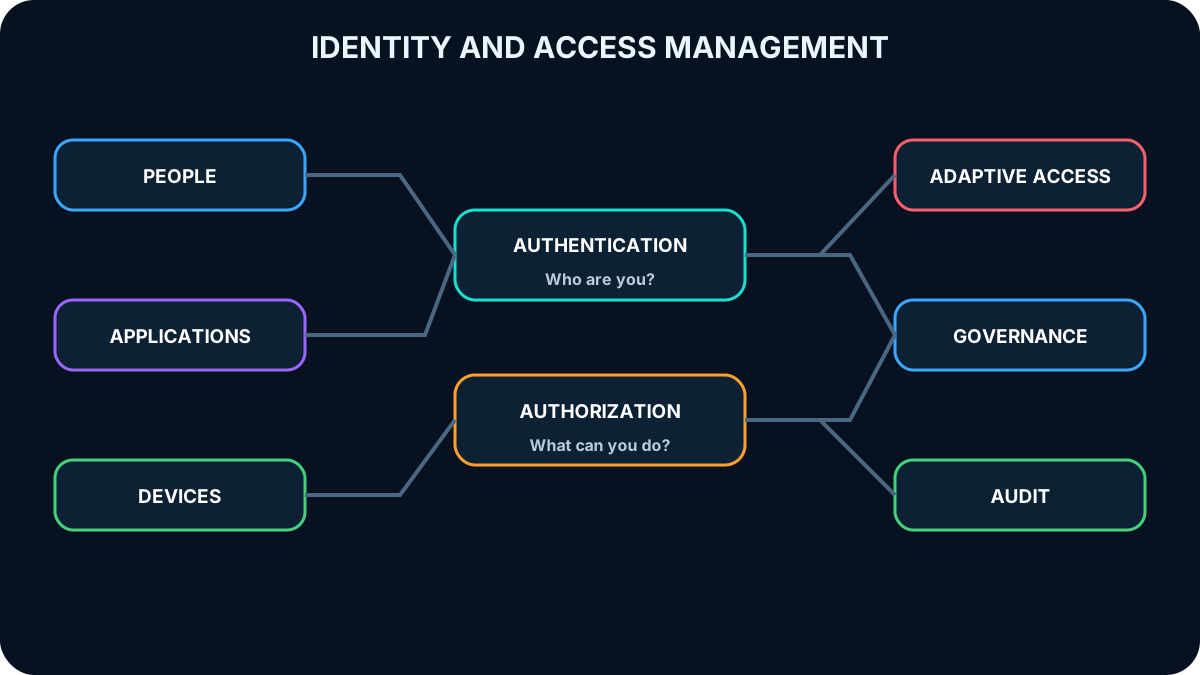
Identity and access management (IAM) must cover every human and workload identity across cloud and on-premises environments. Four qualities shape a robust solution: unified administration, a low-friction sign-in experience, adaptive access that responds to risk, and automated governance that continuously limits access to authorized subjects.
IAM unifies identity, access decisions, risk signals, and governance for every subject and resource.
Topic summary
Effective IAM centralizes identities, keeps sign-in usable, adapts to risk, and governs access throughout its lifecycle.
3. Select the identity model that matches the audience
Identity solution decision guide.
Audience
Primary design
Purpose
Employees and internal workloads
Cloud or hybrid workforce identity, application access, and identity protection
Partners, suppliers, and guests
B2B collaboration in
Secure collaboration while external users retain their source identities
Consumers and business customers
in an external tenant
Customer identity and access management (CIAM), sign-up, sign-in, profiles, and branded journeys
Existing legacy customer deployments
Azure AD B2C
Continue supported deployments while planning toward
Topic summary
Workforce, partner, and customer identities have different lifecycle and isolation needs, so the audience determines the appropriate tenant and collaboration model.
4. provides cloud and hybrid identity
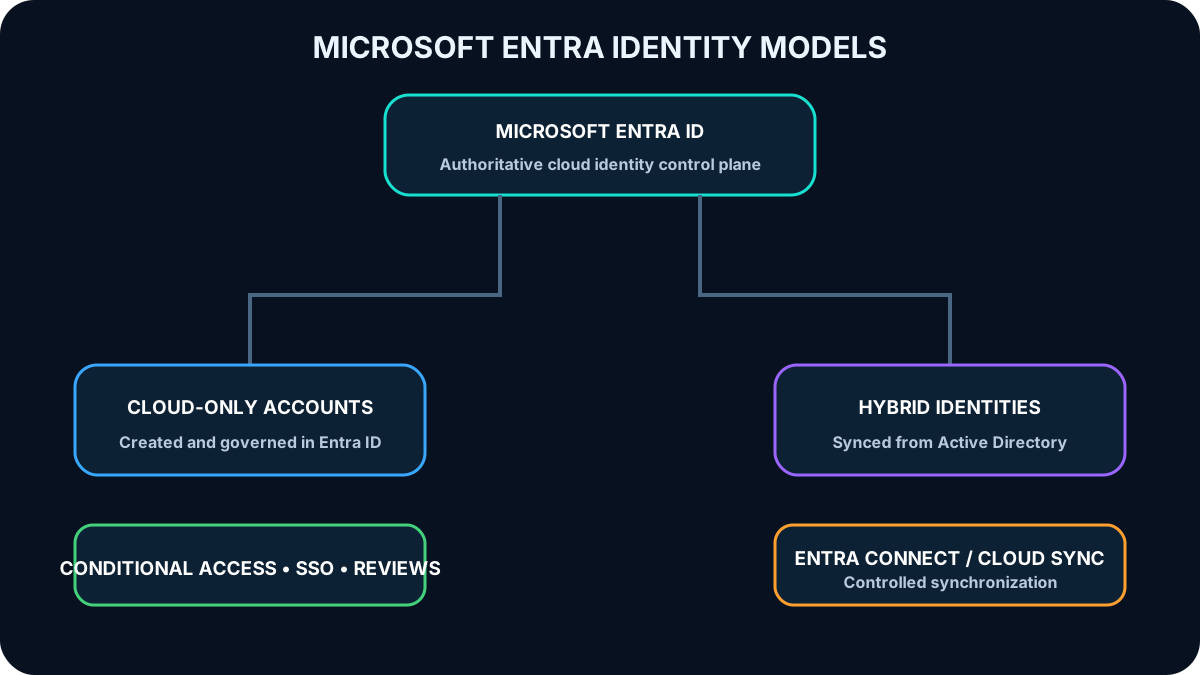
is a multitenant, cloud-based directory and IAM service that combines directory capabilities, application access management, and identity protection. A cloud-only model manages employee accounts directly in . A hybrid model extends on-premises Active Directory identities to the cloud with Microsoft Entra Connect or Microsoft Entra Cloud Sync.
Once synchronized identities are represented in , they can use centralized application access, Azure RBAC, Conditional Access, and access reviews. Integration reduces duplicate administration and gives users a common identity for cloud and on-premises resources.
A single authoritative directory model reduces duplicate identities and creates a consistent control plane.
Topic summary
supports cloud-only and hybrid identity, with synchronization connecting on-premises accounts to cloud protection and access controls.
5. Centralize identity without synchronizing privileged cloud accounts downward
Use a single authoritative Microsoft Entra directory for corporate identities whenever organizational and regulatory boundaries allow it.
Integrate cloud and on-premises directories to reduce duplicate account administration and inconsistent lifecycle actions.
Do not synchronize highly privileged cloud-only accounts back to on-premises Active Directory; Microsoft Entra Connect filters many such accounts by default to reduce cloud-to-on-premises pivot risk.
Prefer passwordless, phishing-resistant credentials such as security keys and passkeys that use origin-bound public-key cryptography and can satisfy multifactor requirements in one step.
Use single sign-on and group-driven provisioning and deprovisioning to reduce password reuse and access drift.
Topic summary
Centralized identity improves consistency, but privileged cloud identities need isolation and all users benefit from phishing-resistant sign-in, SSO, and automated lifecycle management.
6. B2B collaboration lets guests retain their own identities
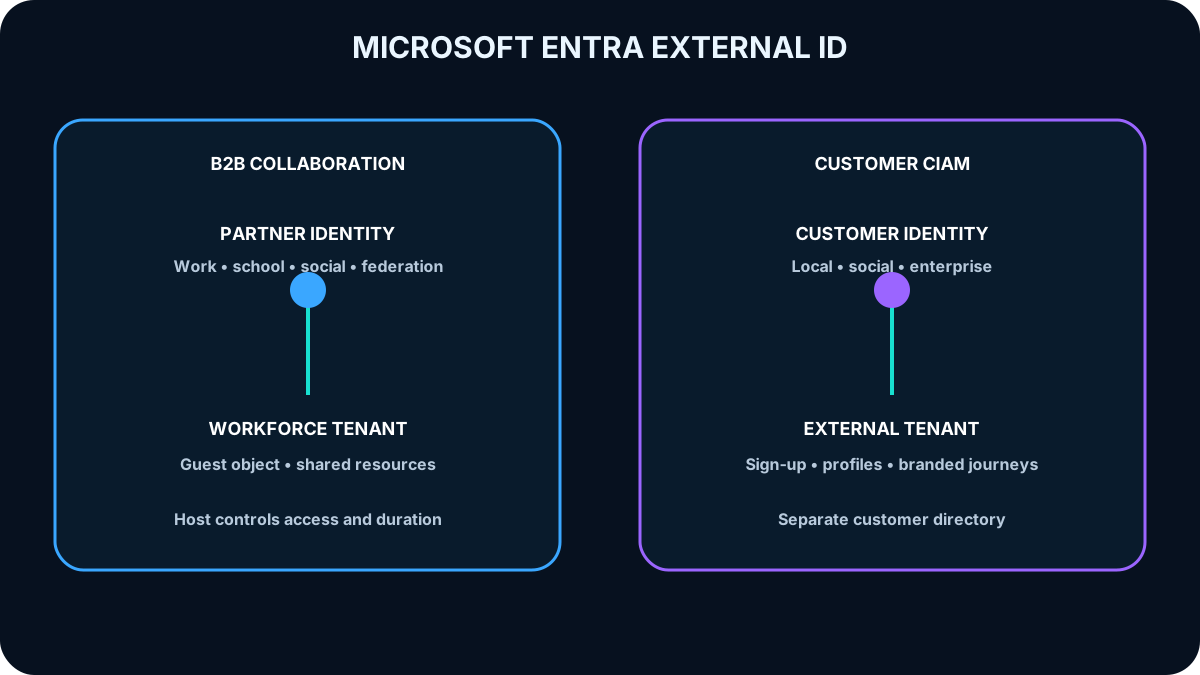
B2B collaboration is part of and enables partners, vendors, and other guests to access selected organizational resources. The host organization controls the resources and duration of access, while the external organization or identity provider continues to manage the user account, password, and primary lifecycle.
Guests can authenticate with work, school, Microsoft, social, or federated identities. The host does not need to create a separate password store or synchronize each partner account.
Topic summary
B2B collaboration separates identity ownership from resource authorization: guests keep their credentials while the host controls access.
7. Guest onboarding follows invitation, consent, verification, and access
A typical flow starts when an application owner or administrator invites the external user. The guest follows the invitation, consents to required permissions, completes any MFA or other access challenge, and then sees only the applications and services shared with that identity. Shared resources can be cloud-based or on-premises.
B2B guests enter the workforce tenant for collaboration; CIAM customers use an isolated external tenant for customer applications.
Topic summary
B2B onboarding is a controlled sequence that establishes consent and applies the same policy-driven checks used for other organizational access.
8. Delegate B2B ownership and enforce contextual controls
Delegate guest access decisions to application owners who understand the business need and resource sensitivity.
Apply Conditional Access, device, location, and MFA requirements according to the risk of the shared resource.
Federate with supported social and enterprise identity providers so guests can use existing credentials.
Offer self-service sign-up flows when external users should request access, collect profile attributes, and choose an approved identity provider.
Review and remove guest access when the partnership or business purpose ends.
Topic summary
Secure B2B collaboration combines delegated ownership, Conditional Access, federation, controlled self-service onboarding, and periodic removal of stale access.
9. Use for new customer identity projects
Customer identity and access management (CIAM) controls how consumers and business customers register, sign in, recover access, and manage profiles. New projects should use with an external tenant, which is separated from the workforce tenant and can provide branded customer journeys.
Azure AD B2C is a legacy CIAM solution. It has not been available for purchase by new customers since May 1, 2025, while existing deployments remain supported until at least May 2030. Architects must distinguish continued support for an existing tenant from the recommended platform for a new design.
Topic summary
is the direction for new CIAM solutions; Azure AD B2C remains relevant to the exam as a supported legacy architecture.
10. Customer identity needs reusable journeys and a separated directory
Customer tenants keep customer accounts separate from employee and partner identities. User flows implement repeatable journeys such as sign-up, sign-in, profile editing, and password recovery. A consistent flow can be reused across multiple applications while each application retains its own branding and authorization model.
Allow approved social, enterprise, government-issued, or local identities according to audience needs.
Customize the interface with templates or controlled HTML and CSS so customers recognize the brand.
Collect built-in and custom attributes needed by the application without collecting unnecessary personal data.
Integrate an external CRM or loyalty store when it should remain the source of truth for customer data.
Use third-party verification or proofing when account creation requires validation, trust scoring, or approval.
Topic summary
CIAM separates customer identities and builds repeatable, branded user journeys that can integrate social identities, external data stores, and identity proofing.
11. Compare B2B collaboration with customer CIAM
B2B and customer identity solve different problems.
Dimension
B2B collaboration
External-tenant CIAM / legacy Azure AD B2C
Primary relationship
Partner, supplier, vendor, or guest collaboration
Consumer or business customer using an application
Directory placement
Guest representation in the workforce directory
Customer account in a separate external or B2C directory
Profile management
Host governance plus source identity ownership
Customer self-service and application-owned attributes
Discoverability
Guests can be discoverable for collaboration
Customer identities are isolated from one another
Identity providers
Work, school, email, SAML, WS-Fed, and enabled social identities
Local, social, enterprise, and supported government identities
Branding
Primarily the inviting organization experience
Fully customer-facing and customizable per application or tenant
Topic summary
B2B is collaboration inside the workforce environment; CIAM is an isolated, customer-facing identity system with stronger journey and branding requirements.
12. Conditional Access evaluates signals before granting access
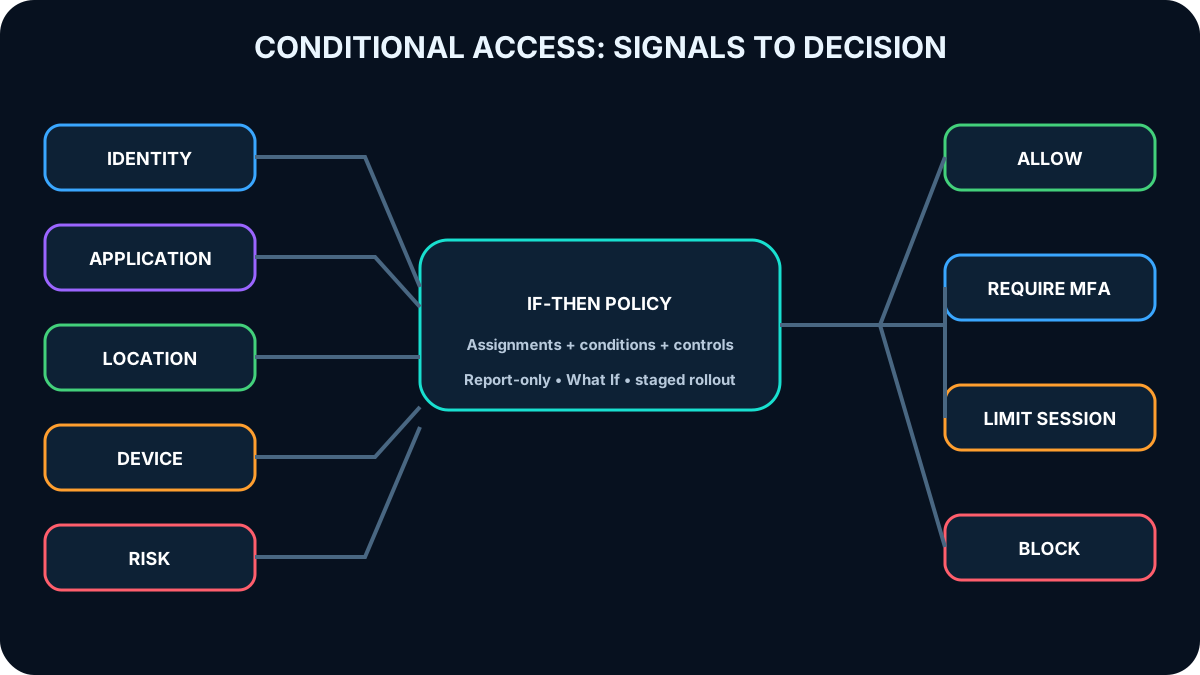
Microsoft Entra Conditional Access implements policy-driven if-then decisions. It evaluates signals such as identity, application, location, device state, client application, and risk. The policy can allow access, require controls such as MFA or a compliant device, limit sessions, or block access.
Conditional Access converts contextual signals into an enforceable access decision.
Topic summary
Conditional Access combines identity and context signals to decide whether access is allowed, challenged, restricted, or blocked.
13. Design Conditional Access around concrete scenarios
Require MFA selectively, such as when a user signs in from an unknown location or to a sensitive application.
Block named geographic locations that have no legitimate business use, while protecting emergency and administrative access from accidental lockout.
Require managed or compliant devices for resources that cannot accept an unknown security posture.
Allow mobile access only through approved client applications or application-protection controls when the organization manages corporate data rather than the whole device.
Block legacy authentication protocols that do not support modern controls and are frequently abused in password-spray attacks.
Use separate risk-based policies to require MFA or a secure password change for compromised accounts.
Topic summary
Conditional Access policies should express a documented business risk and apply the smallest effective control to users, devices, locations, apps, and protocols.
14. Test Conditional Access before enforcement
Conditional Access generally requires P1 or P2, and is also included in Microsoft 365 Business Premium. Use report-only mode and the What If tool to predict impact before enforcement. Exclude emergency access identities from policies that could lock out the tenant, deploy in stages, and review the per-policy impact graph in the Microsoft Entra admin center.
Microsoft-managed policies can address common controls such as legacy authentication and device code flow. The Conditional Access Optimization Agent can identify gaps and recommend corrections when the required Microsoft Entra and Microsoft Security Copilot capacity is available. AI recommendations still require governance and human validation.
Topic summary
Safe deployment uses report-only analysis, What If testing, staged rollout, emergency-access protection, impact reporting, and governed review of managed or AI-generated recommendations.
15. Identity Protection turns risk detections into remediation
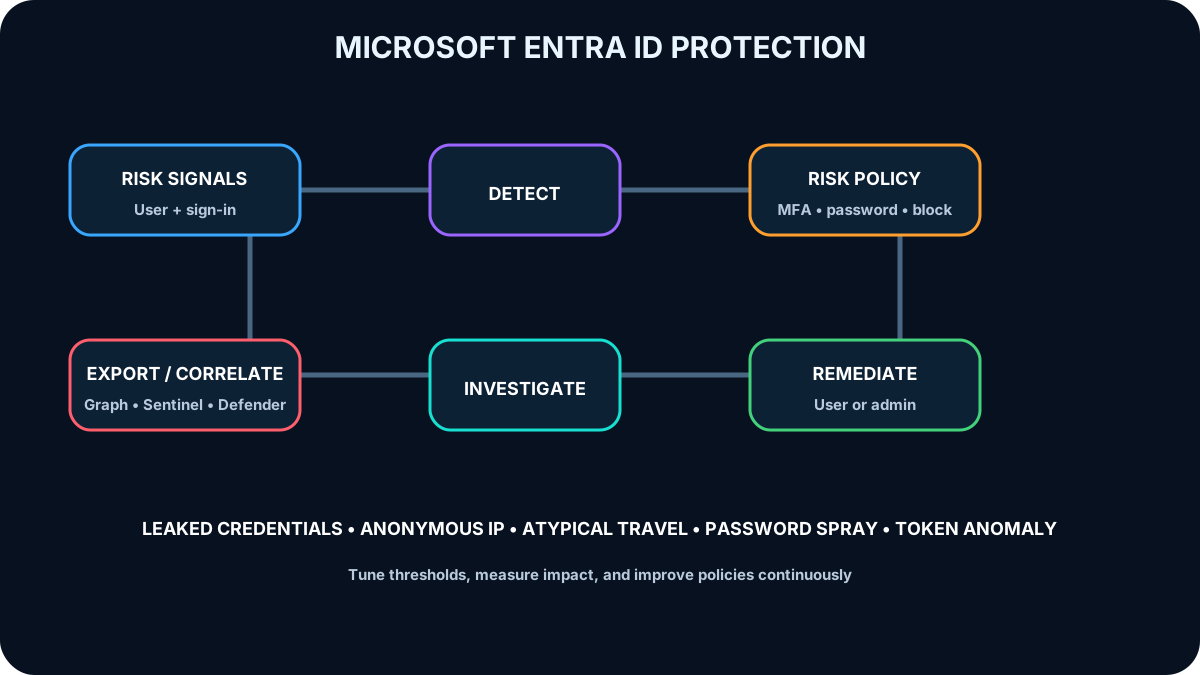
Protection detects, investigates, and helps remediate identity-based risk. Administrators configure risk-aware policies, signals identify suspicious behavior, and controls such as MFA or secure password reset can let the user remediate the event. Risk data can be investigated in Microsoft Entra, queried through Microsoft Graph, or exported to for SIEM correlation.
Risk protection is a closed loop: detect, decide, remediate, investigate, and improve.
Topic summary
Identity Protection operationalizes identity risk by connecting detections to access policy, self-remediation, investigation, and security analytics.
16. User risk and sign-in risk answer different questions
Identity Protection risk types.
Risk
Question
Examples
User risk
How likely is the identity itself compromised?
Leaked credentials and activity that matches known attack patterns
Sign-in risk
How likely is this authentication attempt unauthorized?
Anonymous IP, atypical travel, malicious IP, password spray, anomalous token, or verified threat-actor IP
User risk is typically calculated from broader evidence about the account, sometimes offline. Sign-in risk can be evaluated in real time or after additional evidence arrives. They should be understood and governed separately.
Topic summary
User risk estimates account compromise; sign-in risk estimates whether a particular authentication attempt belongs to the legitimate identity owner.
17. Know the major risk detections
Leaked credentials found in underground, paste, or other intelligence sources and matched to valid directory credentials.
Behavior that Microsoft threat intelligence identifies as unusual for the user or consistent with known attack patterns.
Anonymous or anonymized IP addresses, including Tor and some VPN infrastructure.
Atypical travel between geographically distant sign-ins that conflicts with established behavior.
Malicious IP reputation or unusually high failure activity.
Password spray attempts that test common passwords across many identities.
Anomalous token properties or token replay from an unfamiliar location.
IP addresses associated with verified nation-state or cybercriminal actors.
Topic summary
Identity Protection combines credential intelligence, behavior analytics, network reputation, attack patterns, and token anomalies to detect risk.
18. Set risk thresholds to balance protection and user impact
A common design uses a high threshold for user risk and medium-and-above for sign-in risk, because secure password change and MFA can offer lower-friction self-remediation than an immediate block. The correct threshold still depends on workload sensitivity, threat profile, licensing, and business tolerance.
Investigate events in Microsoft Entra, export reports when needed, automate through Microsoft Graph, and connect Identity Protection to . Unified identity scoring can also incorporate Microsoft Defender signals, helping security teams correlate identity and endpoint evidence.
Topic summary
Risk policies must balance security with interruption, favor automated self-remediation where safe, and integrate identity evidence into the wider security operation.
19. Access reviews remove entitlement drift
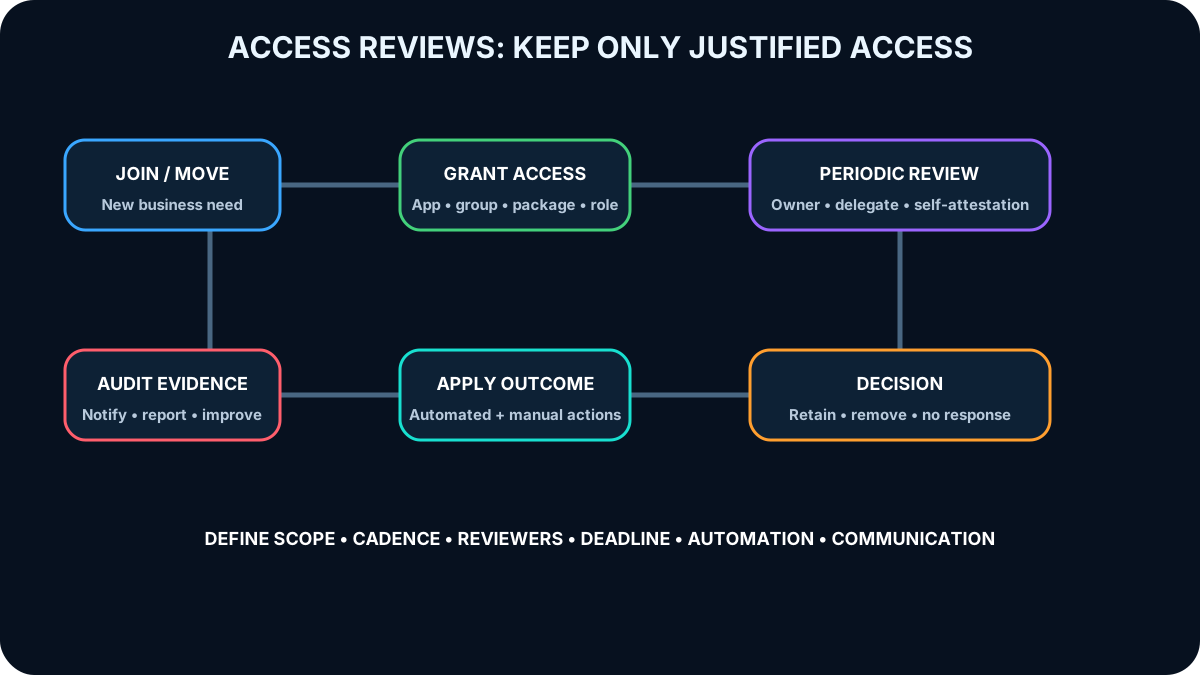
Users accumulate permissions as they join, change roles, collaborate, and leave. Microsoft Entra access reviews provide planned recertification of access needs, rights, and history. They reduce the risk of stale access and produce evidence that authorization controls are operating.
Access reviews keep entitlement aligned with the current business relationship and role.
Topic summary
Access reviews periodically verify that each identity still needs its assigned access and remove permissions that no longer have a business justification.
20. Review applications, groups, packages, and privileged roles
Reviews can cover applications integrated with for SSO, Microsoft Entra and Microsoft 365 group memberships including Microsoft Teams, access packages that bundle groups, applications, and sites, and Microsoft Entra or Azure resource roles managed in Privileged Identity Management (PIM).
The review creator selects the reviewers before the review starts: resource owners, delegated reviewers, managers where supported, or users who self-attest. This choice cannot be changed after the review begins, so independence, knowledge, and accountability matter.
Topic summary
Choose the review scope and reviewer based on who understands the resource, the business need, and the risk of retaining access.
21. A review plan needs cadence, deadlines, notifications, and actions
A complete plan defines the resources, frequency, reviewers, notification timing, completion window, automatic actions, manual overrides, and communication to affected users. For a monthly business-application review, for example, program managers might receive an advance notification, have a short decision window, and automatically remove users with no interactive sign-in during a defined period or with no decision by the deadline.
Automated removal can update a security group, while reviewers retain the ability to approve an earlier removal. Users should be told why access was removed and how to request it again. The process must be measurable and auditable.
Topic summary
An access review is an operational control, not just a questionnaire: cadence, reviewers, evidence, deadlines, automatic outcomes, exceptions, and user communication must all be designed.
22. Application objects and service principals have global and local roles
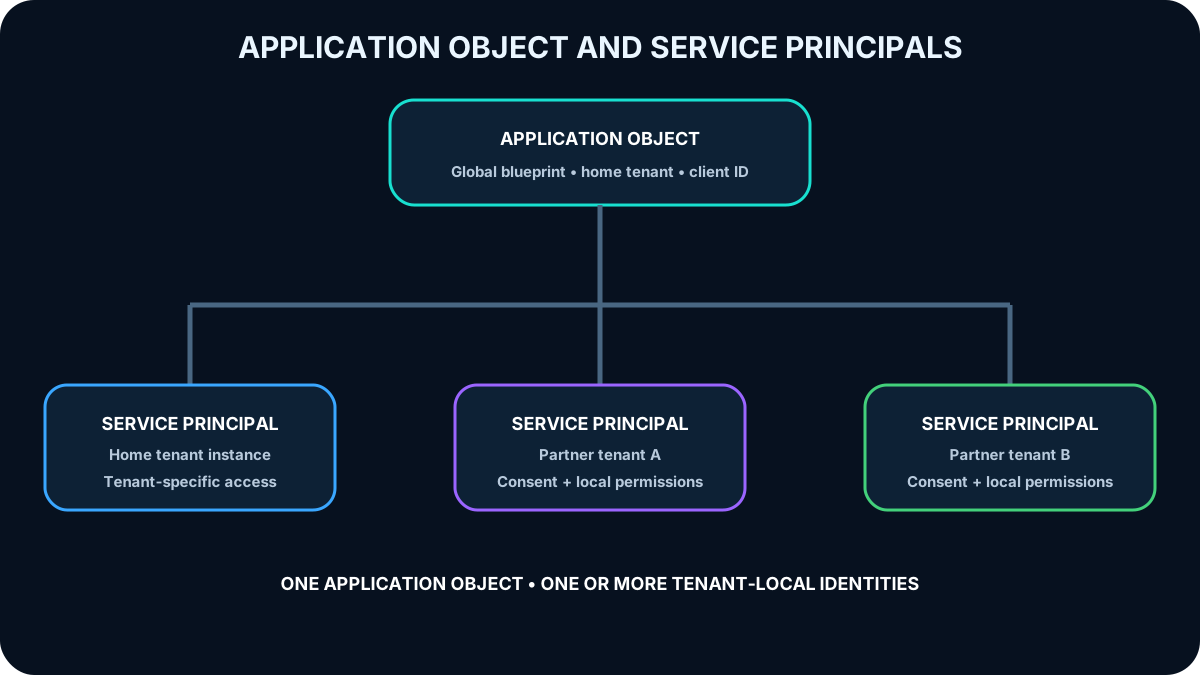
An application object is the global definition of an application in its home tenant. It describes how tokens can be issued, which resources the application might request, and other registration properties. A service principal is the local representation of that application in a tenant and defines what the application can actually do there.
The application object is the blueprint; each service principal is a tenant-local instance and authorization subject.
Topic summary
An application object is the reusable global definition, while a service principal is the concrete tenant-local identity used for access.
23. Understand the three service-principal types
Service-principal types.
Type
Purpose
Key behavior
Application
Local instance of a registered application
References the global application object and defines tenant-specific access
Managed identity
Credential-free identity for an Azure workload
Created when the managed identity is enabled; permissions can be assigned but the principal is not edited directly
Legacy
Representation created before modern app registrations or by legacy experiences
Has no associated app registration and works only in its creation tenant
Topic summary
Application, managed-identity, and legacy principals share the role of nonhuman authorization subjects but differ in lifecycle and management.
24. Map application tenancy before granting access
An application has at most one application object in its home directory and a one-to-many relationship with service principals. A single-tenant application normally has one service principal in its home tenant. A multitenant application gains a service principal in every tenant where it is consented to and used. Each tenant therefore controls its local instance and permissions.
Client ID identifies the application registration. Object ID identifies the specific directory object, such as the service principal representing a managed identity. Do not treat these identifiers as interchangeable.
Topic summary
Tenant topology determines how many service principals exist, while client and object identifiers refer to different layers of the identity model.
25. Create service principals through registration, consent, or automation
Registering an application in the Azure portal normally creates the application object and a service principal in the home tenant. Granting or consenting to tenant access creates a local service principal where required. Azure PowerShell, Azure CLI, Microsoft Graph, and other automation can also create and manage the tenant representation.
Use a conventional service principal when an external application must authenticate to Azure or when the architecture deliberately manages its credential. Prefer a managed identity for an Azure-hosted workload when the target supports Microsoft Entra authentication.
Topic summary
Service-principal creation can be interactive or automated; the workload location and credential-management requirement determine whether a conventional principal or managed identity is appropriate.
26. Request the least permission and govern user consent
Request only permissions required by implemented functionality, not permissions for hypothetical future features.
Choose the least-privileged permission; an application that only reads email should not request write access.
Handle denied consent gracefully and explain how the user or administrator can resolve missing access.
Restrict user consent to applications from verified publishers and to approved low-risk permissions.
Centralize higher-risk consent with security and identity administrators while maintaining a documented path for business-critical applications.
Topic summary
Application consent is an authorization boundary: minimize permissions, constrain who can consent, and design a safe process for exceptions.
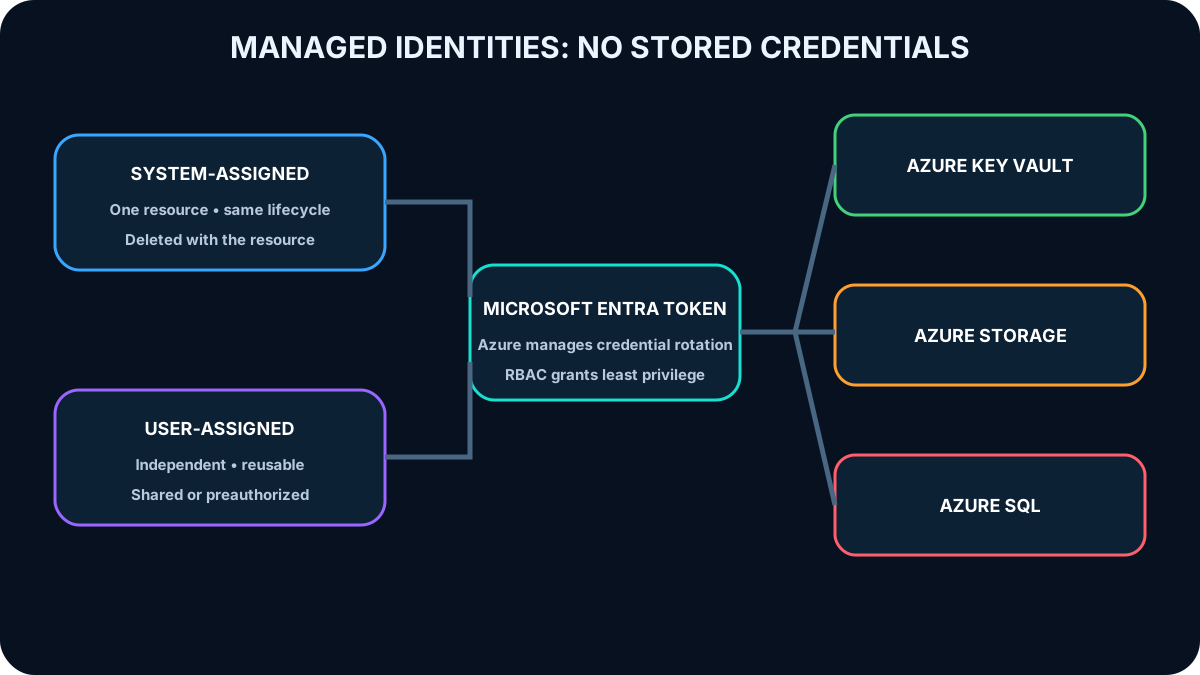
Managed identities are a capability available across editions without a separate identity charge. Azure creates and rotates the underlying credential, and the workload requests a Microsoft Entra token instead of storing a username, password, certificate, or client secret in code or configuration.
The token can authorize access to any supported target, such as Azure , Azure , or . Azure RBAC grants the identity only the required actions. Activity and sign-in logs provide an audit trail.
Topic summary
Managed identities replace stored workload credentials with Azure-managed identity lifecycle, token acquisition, RBAC, and auditable access.
28. Choose system-assigned or user-assigned lifecycle
Managed identity selection.
Type
Lifecycle
Best fit
System-assigned
Bound to one Azure resource and deleted with it
A workload contained in one resource that needs an independent identity
User-assigned
Independent Azure resource assigned to one or more workloads
Shared identity, preauthorization before deployment, frequently recycled resources, or permissions that must outlive one compute instance
Identity lifecycle should follow the workload architecture and permission lifecycle.
Topic summary
System-assigned identities follow one resource; user-assigned identities are reusable and independently governed.
29. Match supported hosts to Microsoft Entra-enabled targets
Azure , Azure ,,, Azure Kubernetes Service, Azure , Azure , and other supported hosts can use managed identities. Targets include applications and services that accept Microsoft Entra tokens, such as Azure , Azure , and .
For a migrated virtual-machine application, removing hard-coded credentials and using a managed-identity token reduces leakage and rotation risk. The Azure Instance Metadata Service exposes a token endpoint only from within the virtual machine, enabling the workload to request a token without distributing a secret.
Topic summary
Managed identities are most useful when an Azure-hosted workload and its target both support Microsoft Entra authentication.
30. Combine managed identity with Azure
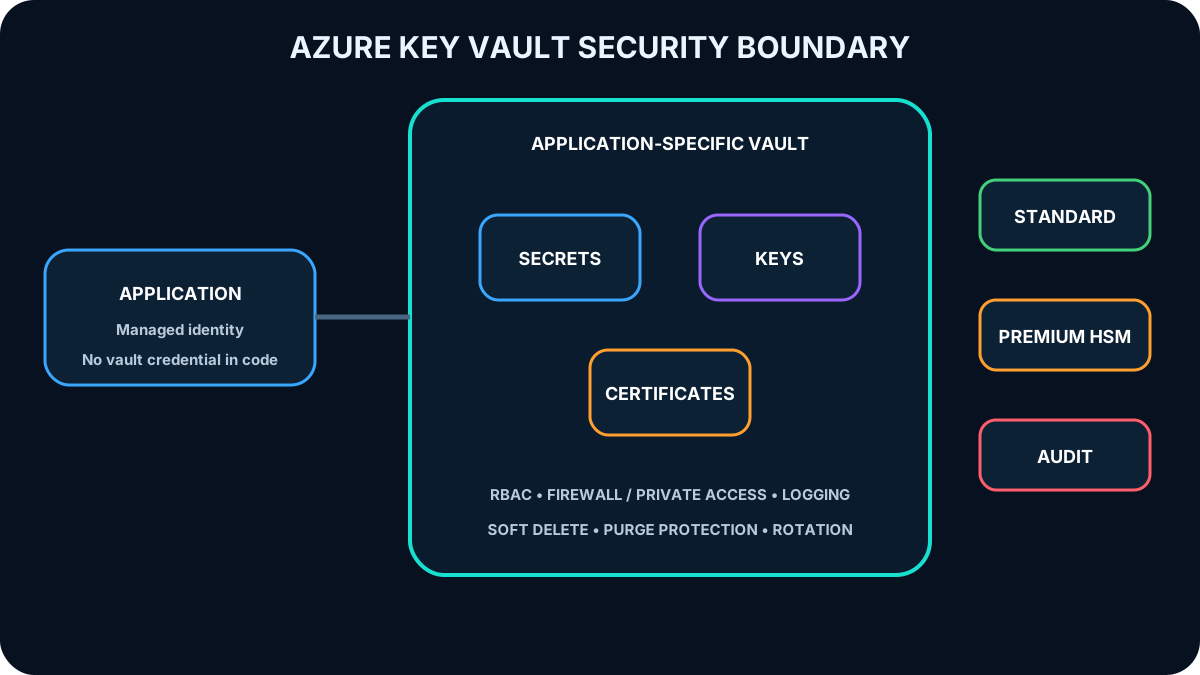
Applications still need connection strings, API keys, and other secret configuration when a downstream system cannot use Microsoft Entra directly. Store those values in Azure and let the application authenticate with its managed identity. The application keeps no vault credential in source control or configuration; Azure establishes the workload identity, and authorization limits which objects and operations it can use.
Topic summary
Managed identity authenticates the workload, while protects unavoidable secrets and returns only the values that identity is authorized to access.
31. Azure protects secrets, keys, and certificates
Azure centralizes sensitive material and separates it from application code. Secrets can hold tokens, passwords, connection strings, API keys, and shared access signature values. Keys support signing and encryption without exposing key material to the application. Certificate features provision, manage, and deploy public or private TLS/SSL certificates.
The Standard tier protects keys with validated software cryptography. The Premium tier adds hardware security module (HSM)-protected keys for requirements that need a stronger cryptographic boundary. Logging and monitoring show how and when vault objects are accessed.
Topic summary
provides centrally governed secret, key, and certificate management, with Standard and HSM-backed Premium protection options.
32. Design vault boundaries and deletion protection
A vault is a security boundary. Separate vaults by application, environment, ownership, or sensitivity when sharing would increase blast radius. Grant least privilege with Azure RBAC or an appropriate vault access model, allow only authorized identities, and restrict network exposure with firewall rules, private access, or approved virtual-network paths.
Enable soft delete so accidentally deleted vaults and objects remain recoverable during the retention period. Enable purge protection so even a malicious or mistaken privileged action cannot permanently remove protected material before retention expires. Centralized storage then lets teams rotate a value in one place without distributing it through source repositories.
A secure vault design limits identity, network, operation, and deletion paths.
Topic summary
Reduce vault blast radius with separation, least privilege, network controls, audit logs, soft delete, and purge protection.
33. Apply the architecture to exam scenarios
Scenario reasoning from the module assessment.
Requirement
Best design
Why
Retail employees can use company apps only from approved tablets
Conditional Access requiring an approved or managed device
The decision depends on device state, not merely user authentication
Employees changed roles after a reorganization
Run an access review and remove obsolete entitlements
A review validates current job need and addresses permission drift
Five partner developers need temporary data access
Invite them as B2B guest users
They keep their identities while the host governs the shared resources
Anonymous IP and unusual-location sign-ins require MFA
Sign-in risk policy
The detected risk belongs to specific authentication attempts
Topic summary
Exam questions often become straightforward when you classify the requirement as device context, entitlement lifecycle, external collaboration, or authentication risk.
34. Connect the identity controls into one architecture
supplies the identity control plane. Conditional Access evaluates contextual access, Identity Protection contributes risk, access reviews recertify entitlements, service principals represent applications, managed identities remove workload credentials, Azure RBAC authorizes Azure actions, and Azure protects secrets, keys, and certificates. The architecture is strongest when these controls share lifecycle ownership, telemetry, and least-privilege principles.
Topic summary
Identity architecture is a connected system of directory, context, risk, entitlement review, workload identity, authorization, and secret protection.
35. Continue with official documentation and guided exploration
Use the following official references to verify licensing, supported services, migration guidance, and features that change over time. Microsoft Copilot can help compare options, but its output should be checked against current documentation and organizational policy.