Design Azure migration solutions for workloads and data
Plan, assess, execute, and operate migrations with the Cloud Adoption Framework, Azure Migrate, database services, and online or offline data-transfer tools.
Suggested study time: 92 minutes • Intermediate • Complete original rewrite with a concise summary for every topic
By João Ricardo Dutra••Complete original content
1. Start from business evidence, not a migration product
An Azure architect must recommend how virtual machines, databases, applications, and files move and how they will be governed afterward. Imagine Tailwind Traders, a fictitious worldwide retailer whose website, operational data, and streaming media remain in company datacenters. Hardware purchasing and manual software delivery slow change, so the target outcome is faster delivery without losing security, resilience, or operational control. Basic Azure and virtual-machine knowledge is the recommended starting point.
Evaluate migration through the Cloud Adoption Framework.
Build an ordered migration plan and assess on-premises dependencies.
Match each workload and data type to a migration service.
Choose online or offline transfer from volume, bandwidth, downtime, and security constraints.
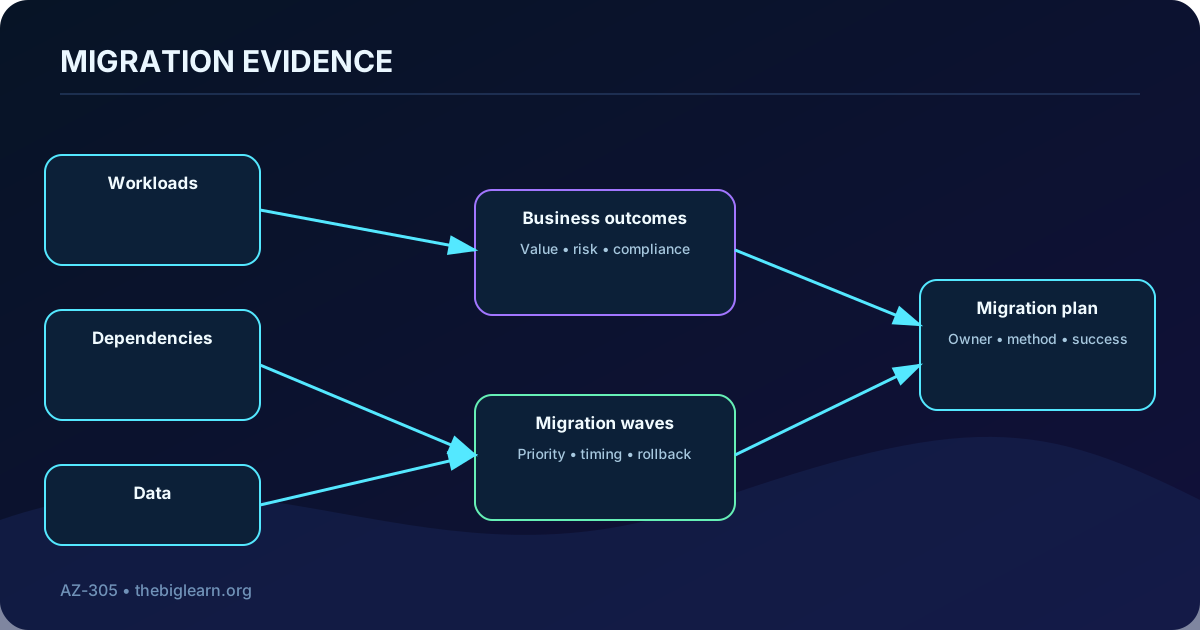
A defensible recommendation connects business outcomes to measured technical evidence.
Topic summary
Define the outcome, scope, stakeholders, dependencies, downtime tolerance, recovery needs, regulation, skills, and budget before selecting a tool.
2. Use the Cloud Adoption Framework as the operating map
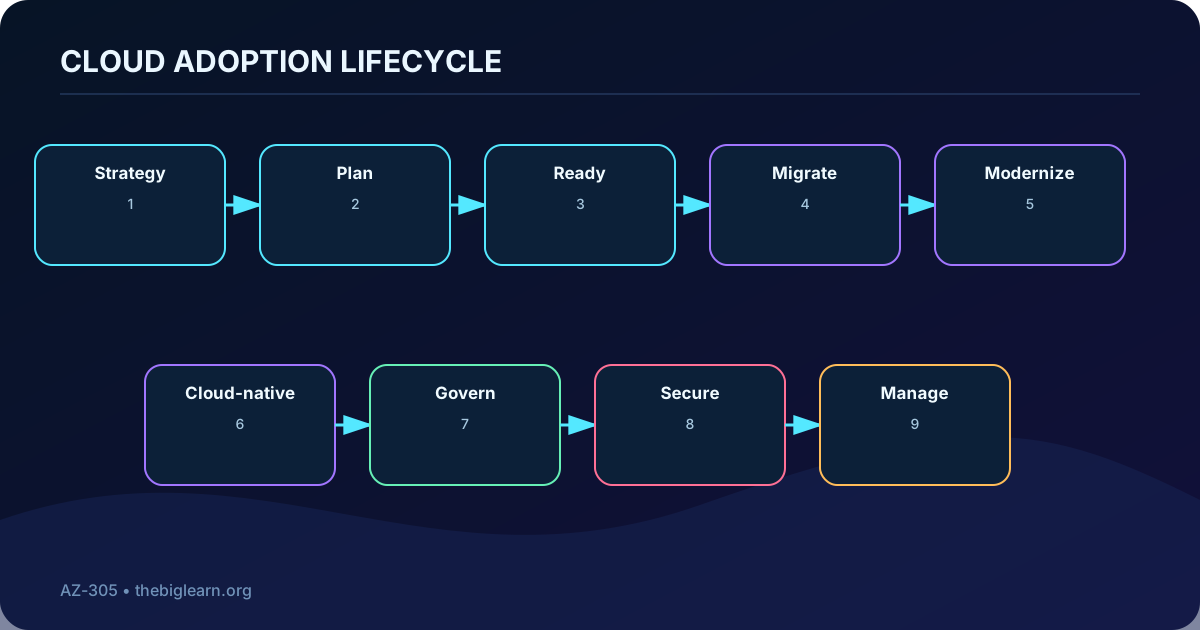
The Microsoft Cloud Adoption Framework organizes cloud adoption into Strategy, Plan, Ready, Migrate, Modernize, Cloud-native, Govern, Secure, and Manage guidance. Strategy clarifies motivation and outcomes; Plan turns the portfolio into waves; Ready establishes landing-zone foundations. The implementation choices then lead to migration, modernization, or cloud-native construction, while governance, security, and management remain continuous responsibilities.
Source material may call the assistance offer the Azure Migration and Modernization Program. Microsoft now brings migration and AI assistance together under Azure Accelerate. Preserve the architectural idea—expert guidance, assessments, funding, and implementation assistance—while using the current program name when engaging Microsoft.
Adoption is a managed lifecycle rather than a one-time data-copy event.
Topic summary
Use the framework to connect executive intent, platform readiness, workload delivery, and the long-term controls that make adoption sustainable.
3. Convert the portfolio into waves and workload iterations
A migration plan records which workloads move, when they move, which approach and Azure target each uses, who owns every decision, and how success or rollback will be judged. Group applications with their servers, data, identities, network paths, certificates, jobs, monitoring, and third-party dependencies. Sequence waves so foundational services and low-risk pilots prepare the path for critical systems.
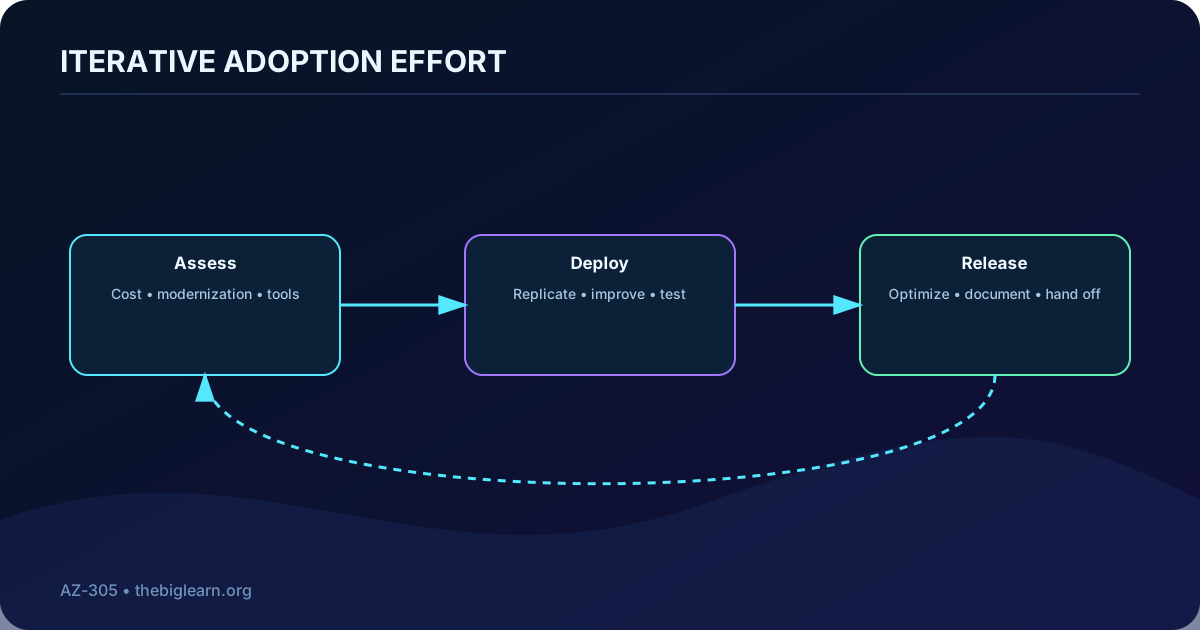
Inside each wave, repeat an Assess–Deploy–Release cycle. Assessment validates readiness and creates a backlog; deployment builds and tests the target; release cuts over, validates the business journey, and hands ownership to governance, operations, and security teams.
Each wave produces evidence for the next and contains a tested rollback boundary.
Topic summary
A useful plan includes dependency groups, waves, owners, target architecture, acceptance gates, communications, cutover, rollback, and post-release ownership.
4. Run the four-stage migration framework
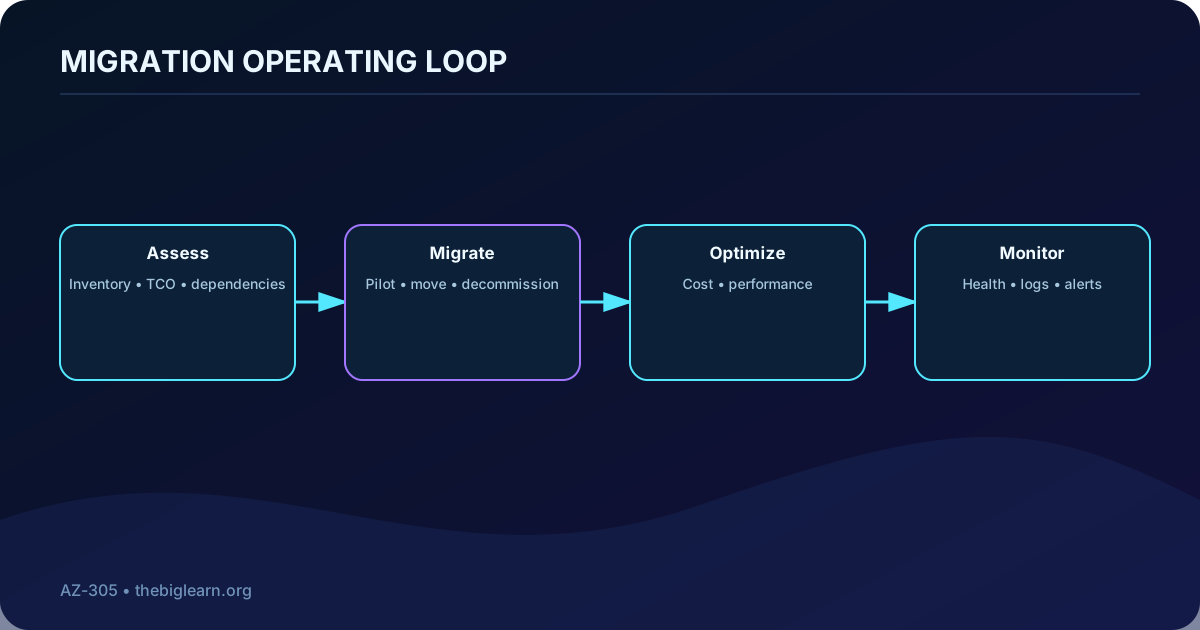
Organize delivery into Assess, Migrate, Optimize, and Monitor. Assessment discovers scope and selects targets. Migration provisions Azure resources, replicates or transfers data, pilots a noncritical workload, validates it, and cuts over. Keep required backups or archives in before decommissioning a source. Optimization rightsizes cost and performance after real usage appears. Monitoring supplies health, logs, metrics, alerts, and automation throughout the new operating state.
Migration is complete only when the Azure workload is operable, observable, and economically governed.
Topic summary
The four stages prevent the move itself from eclipsing assessment quality, post-cutover tuning, and ongoing operations.
5. Choose among rehost, refactor, rearchitect, and rebuild
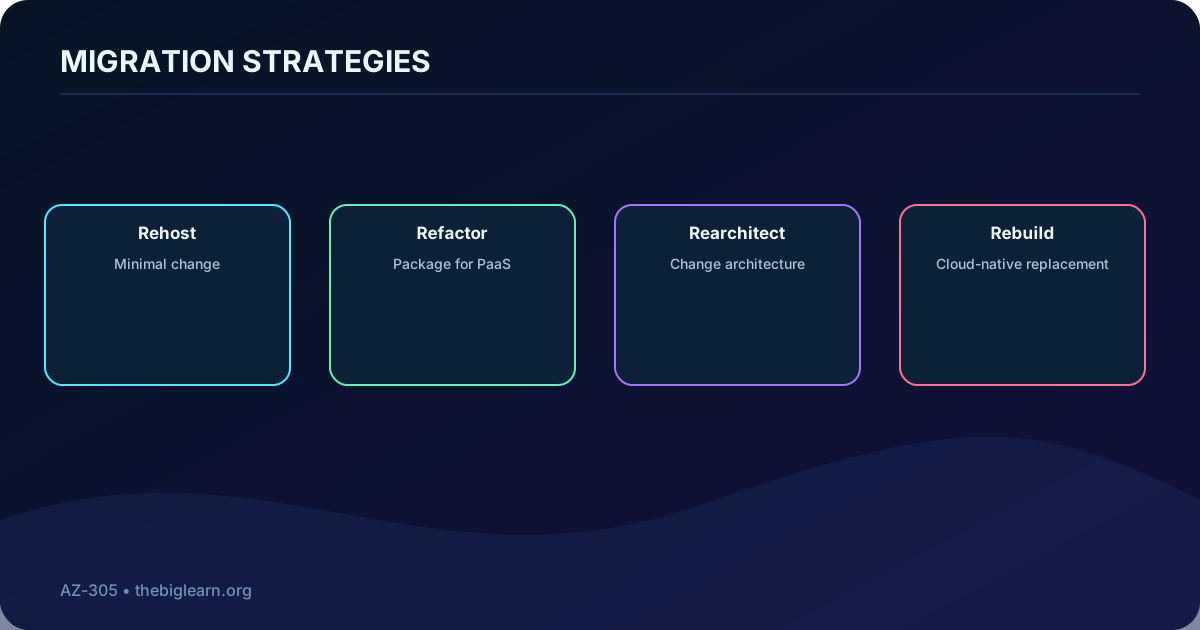
Rehost moves a workload with little or no code change, which shortens delivery but retains more legacy design. Refactor, sometimes called repackage, makes limited changes so managed services such as ,,,,, or can replace infrastructure responsibilities.
Rearchitect changes application or data design substantially—for example decomposing a monolith and using managed databases—to improve scale and agility. Rebuild creates a new cloud-native solution with services such as , AI capabilities, , or when the existing implementation cannot meet the future outcome.
More transformation can unlock more cloud value, but it also increases delivery effort and risk.
Migration strategy trade-offs.
Strategy
Change
Typical objective
Important caution
Rehost
Minimal
Move quickly and exit a facility
Legacy cost and constraints remain
Refactor
Targeted
Adopt PaaS with limited code work
Compatibility and regression testing
Rearchitect
Substantial
Improve scale, resilience, or release velocity
Complexity and longer delivery
Rebuild
New implementation
Create a cloud-native product
Feature parity, data transition, and adoption
Topic summary
Select a strategy per workload from business value, time, technical debt, compatibility, skills, risk, and operating model—not from a blanket portfolio rule.
6. Build a discovery and assessment baseline
Create an inventory of applications, servers, databases, storage, networks, identities, integrations, and owners. Map runtime dependencies and traffic so a server is not moved away from a database or shared service it still needs. Capture cores, memory, disk capacity, IOPS, throughput, network output, utilization, operating system, support status, licensing, data classification, and peak or seasonal behavior.
Use the Azure pricing and total-cost tools to compare the current estate with target options, but document assumptions. Engage application, infrastructure, security, finance, and business stakeholders to confirm criticality, RTO, RPO, maintenance windows, and acceptance criteria.
Topic summary
Assessment turns an uncertain estate into a dependency map, measured sizing model, risk register, target recommendation, and migration backlog.
7. Discover and size workloads with
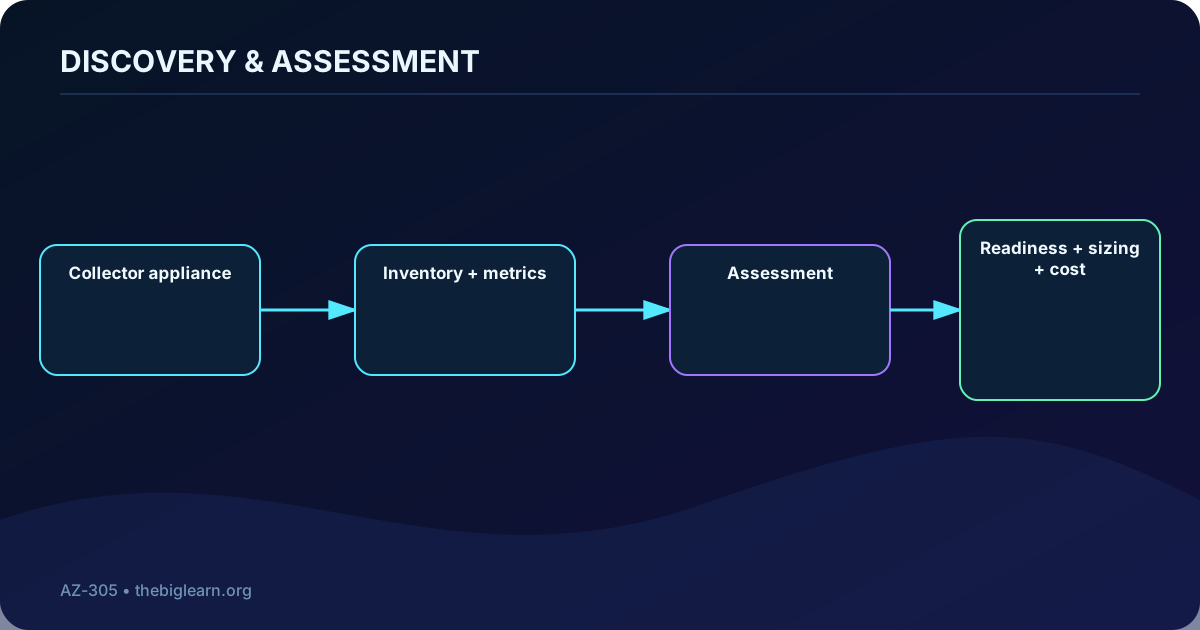
provides a unified experience for discovering, assessing, and moving servers, databases, web applications, virtual desktops, and data with Microsoft and partner tools. Server discovery can be agentless; optional agents or appliance capabilities add deeper dependency evidence where required. Supported estates include VMware, Hyper-V, and physical or other virtualized servers running Windows or Linux.
For Discovery and assessment, deploy and configure the appliance, start discovery, group interdependent machines, create assessments, and review readiness, sizing, cost, and dependency findings. Performance-based sizing uses observed CPU, memory, disk IOPS and throughput, and network output instead of copying oversized on-premises specifications.
Observed demand and dependencies produce a more credible target than installed capacity alone.
Topic summary
centralizes portfolio evidence and recommendations; collect representative performance windows and validate every generated assumption.
8. Select the right migration capability
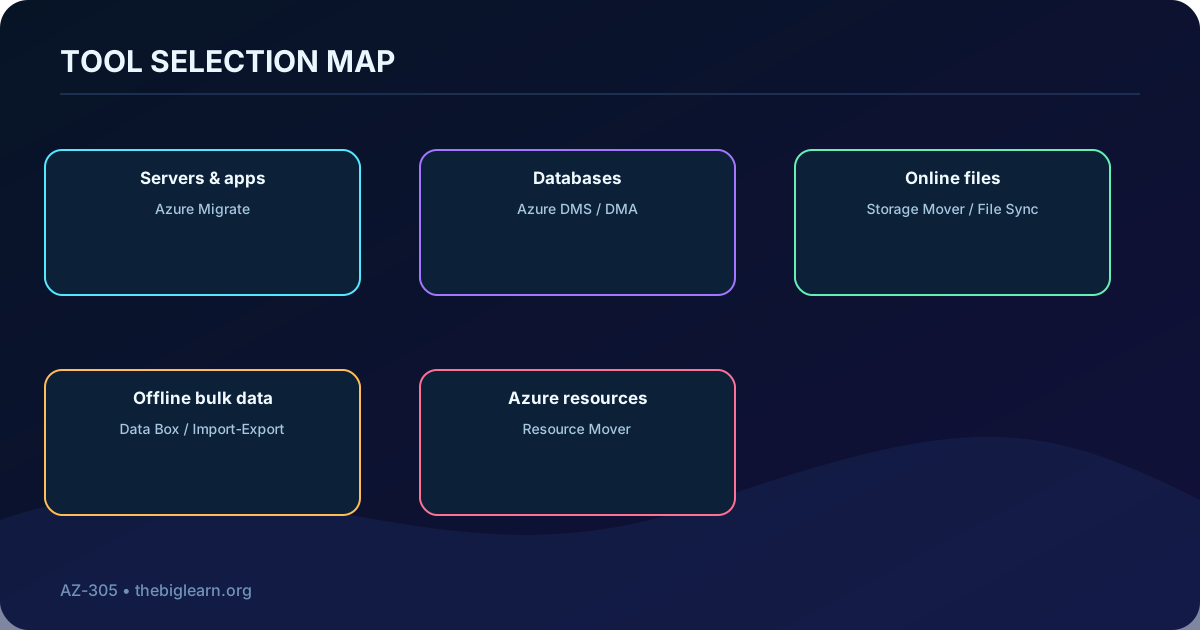
Primary tools and their roles.
Need
Capability
Role
Servers
: Migration and modernization
Replicate and migrate VMware, Hyper-V, physical, and cloud VMs
Web applications
Migration Assistant
Assess and migrate compatible web apps to
Relational databases
Data Migration Assistant and
Assess compatibility and move schemas/data
data
Current migration tools
Move supported NoSQL data into the selected API
Virtual desktops
assessment and migration guidance
Plan host pools, profiles, identity, and user transition
Large offline datasets
Ship a Microsoft-managed encrypted appliance
Regional Azure resources
Coordinate supported cross-region moves
One business application can require several coordinated migration capabilities.
Topic summary
Select tools by workload type and target, then coordinate them under one dependency-aware wave and cutover plan.
9. Move Azure resources across regions deliberately
provides a central workflow to move supported resources between Azure regions. It identifies dependencies, prepares and initiates a move, permits testing before commit, and supports cleanup of source resources after validation. Moving between resource groups or subscriptions uses move operations rather than the cross-region workflow.
Before any move, verify support, quotas, identities, role assignments, policies, DNS, private endpoints, encryption keys, backups, and dependent services in the target. Afterward, test the complete application, commit the move, and remove source artifacts only when recovery requirements allow it.
Topic summary
A resource move is a dependency and lifecycle operation; region, subscription, and resource-group moves use related but distinct Azure mechanisms.
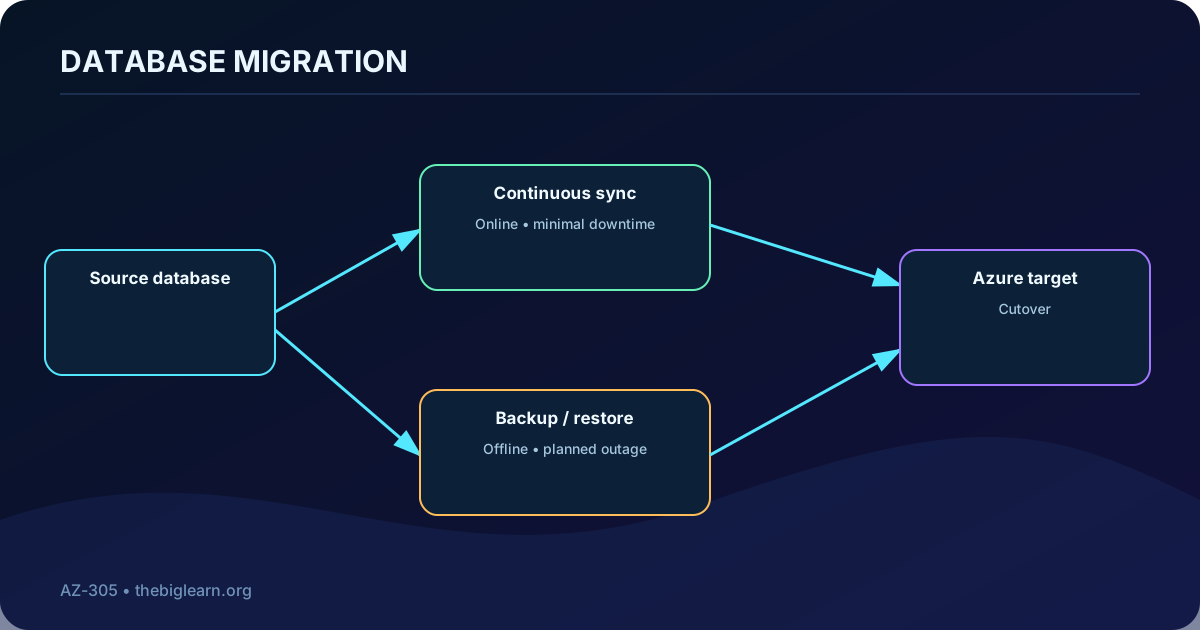
10. Migrate databases with
is a fully managed service for supported migrations to targets such as ,, SQL Server on Azure ,,, and . Availability depends on the exact source, target, version, region, and migration extension, so confirm the current support matrix during design.
An offline migration stops source updates while the final copy completes and usually permits a simpler process at the cost of a longer outage. An online migration continuously synchronizes changes and performs a short final cutover, reducing downtime while increasing prerequisites and operational coordination. The supplied learning example distinguishes online and offline options for SQL Server to managed instance or SQL VM and an offline path to ; current tooling can evolve beyond that snapshot.
Downtime tolerance, compatibility, transaction consistency, and cutover control determine the mode.
Topic summary
Use the current support matrix, a compatibility assessment, representative rehearsal, and a validated cutover and rollback plan for every database migration.
11. Prepare database compatibility and cutover
Assess engine and feature compatibility, blocked or deprecated features, collation, extensions, and dependencies.
Choose the target service tier and capacity from measured utilization and growth.
Transfer schema, users, logins, roles, credentials, jobs, linked services, and application connection settings.
Automate repeatable provisioning and migration steps; protect secrets and encryption keys.
Select online or offline mode, rehearse duration, define a write freeze, validate row counts and business transactions, and test rollback.
Plan monitoring, backups, high availability, maintenance, security, and cost in the target operating model.
Topic summary
Data copy is only one part of database migration; compatibility, security objects, automation, application cutover, validation, and operations determine success.
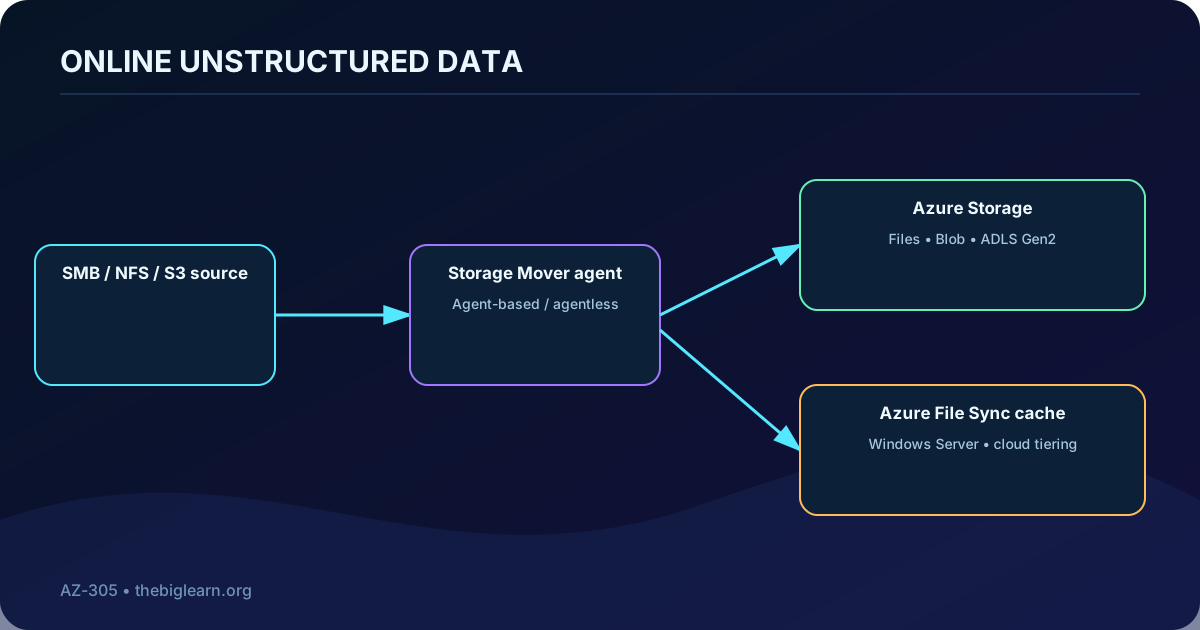
12. Plan online transfer for unstructured data
Files, shares, and object data may need to remain available while terabytes or petabytes move. Measure namespace size, file count and size distribution, change rate, metadata and ACL fidelity, protocol, source platform, target storage, bandwidth, throttling, latency, encryption, cutover window, and whether repeated synchronization is required.
An initial bulk copy can run online, or can seed the target when the network is the bottleneck. A later online delta then captures changes before the final cutover.
Topic summary
Choose an online pattern only after quantifying the data, network, metadata, change rate, synchronization, validation, and cutover requirements.
13. Use Azure Mover for managed migrations
Azure Mover is a managed migration service for repeatable transfers into Azure . Current capabilities cover supported SMB and NFS sources—including on-premises storage and selected AWS S3 scenarios—and targets such as ,, and . Validate the source-target matrix because protocol and feature support evolves.
A migration project defines endpoints and jobs. An agent placed near the source performs transfers for agent-based scenarios; supported agentless scenarios remove that appliance requirement. The service preserves supported file and folder metadata such as timestamps, attributes, ACLs, and NFS metadata. For very large estates, seed with Data Box and use Mover to synchronize the remaining delta.
Use a migration service for controlled transfer and a synchronization service when ongoing local access is part of the design.
Topic summary
Mover supplies centrally managed, repeatable jobs; confirm protocol, endpoint, metadata, agent, scale, and delta-copy support for the exact scenario.
14. Use Azure File Sync for a hybrid file operating model
Azure File Sync centralizes Windows file shares in while keeping caches on Windows Server close to users and applications. Users continue using familiar local protocols and paths, while cloud tiering can retain frequently used files locally and replace colder content with placeholders. This can supplement or replace file servers and NAS devices and can simplify branch distribution or a DFS-based design.
Suitable scenarios include gradual lift-and-shift, distributed caches, branch consolidation, backup and disaster-recovery preparation, and rapid restoration of a failed server by reconnecting to the cloud namespace. Applications reach the local server through SMB or any other protocol it exposes, such as supported NFS or FTPS services, while synchronization to Azure remains controlled by File Sync. Plan identity—including supported scenarios—network access, endpoints, tiering, recall performance, conflicts, backup, and monitoring.
Topic summary
Choose File Sync when is the authoritative namespace and local Windows Server performance or compatibility must continue after migration.
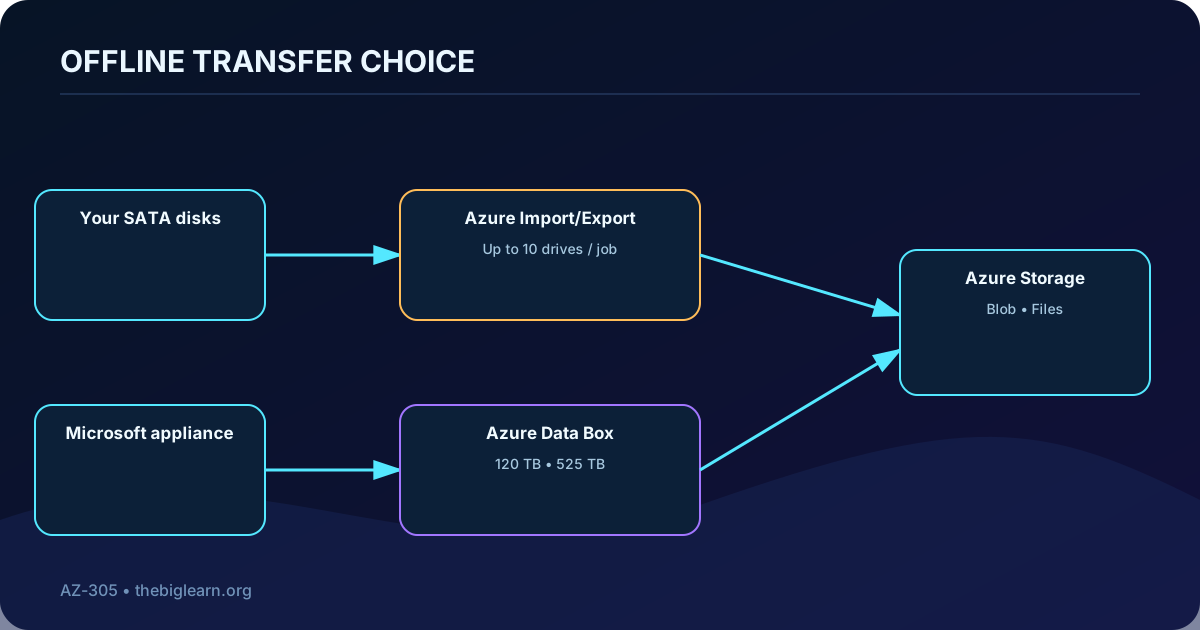
15. Transfer with Azure Import/Export and your own disks
Azure Import/Export moves data by shipping customer-supplied SATA HDDs or SSDs. For import, create a job, prepare and write the drives with the required tooling, ship them to the assigned facility, and let Microsoft copy data into or . For export, send blank drives; Microsoft writes Azure Blob data and returns them. Export does not support .
Drives are protected with BitLocker, jobs require supported media and a carrier account, and one job accepts up to ten drives. Use the service for migration, offline backup or recovery, and distribution when shipping time is more practical than network transfer.
Offline transfer replaces bandwidth constraints with physical logistics, custody, and validation requirements.
Topic summary
Import/Export is the customer-disk option: check drive requirements, supported import/export targets, encryption, carrier logistics, job limits, and secure data erasure.
16. Use for managed offline capacity
provides a Microsoft-managed, tamper-resistant appliance ordered through Azure. Connect it to the local network, unlock and configure it through its local interface, copy the data, return it with tracked shipping, and Microsoft uploads the encrypted contents to the designated storage accounts. Customer-managed keys and chain-of-custody controls can be incorporated.
Current next-generation capacities are 120 TB and 525 TB. Older 80-TB devices and Data Box Heavy have retirement timelines, so design from the current regional catalog. Data Box is appropriate for more than about 40 TB, limited or expensive connectivity, datacenter exit, one-time bulk transfer, periodic media or IoT uploads, or seeding before an online incremental sync.
Topic summary
Data Box is the managed-appliance path for high-volume offline transfer; verify available capacity, region, target, encryption, shipping, copy speed, validation, and retirement status.
17. Compare online, disk, appliance, and client tools
Data-transfer selection guide.
Option
Best fit
Ownership and transport
Key limitation
Azure Mover
Repeatable online file/object migration
Microsoft control plane plus agent or supported agentless path
Network duration and source-target support
Azure File Sync
Ongoing plus local Windows cache
Synchronization over network
Not a generic one-time object migration tool
Azure Import/Export
Moderate offline jobs with available disks
Customer disks and shipping
Up to ten drives; export is Blob only
Large managed offline transfer
Microsoft appliance and shipping
Regional availability and physical lead time
AzCopy /
Moderate online ad hoc transfers
Client-managed network transfer
Client host, bandwidth, and retry operations
Import/Export is based on customer-owned media and does not provide a custom Microsoft appliance or partner-integrated appliance workflow. Data Box supplies the managed appliance, Microsoft shipping, and supported integration ecosystem.
Topic summary
Estimate transfer duration and total operational effort; the lowest service price is not always the lowest-risk migration path.
18. Optimize after the first production evidence
Once real Azure utilization exists, compare it with assessment assumptions. identifies spend and budgets, while recommends opportunities involving cost, reliability, security, operational excellence, and performance. Rightsize compute and databases, remove idle resources, select reservations or savings options where stable usage justifies them, and tune storage tiers and network paths.
Optimization must preserve service objectives. Record each change, test it, and keep architecture, financial ownership, and capacity forecasts current.
Topic summary
Treat optimization as an evidence-driven feedback loop across cost, performance, resilience, security, and operations—not as indiscriminate cost cutting.
19. Monitor, alert, secure, and operate the migrated estate
collects platform and guest evidence for Windows and Linux resources. Design metrics, logs, workspaces, dashboards, health models, and alerts for user journeys and dependencies rather than monitoring isolated servers only. Alerts can respond to metric thresholds, log-query results, resource health events, or supported autoscale conditions.
can correlate security signals and support investigation and response. Complete the handoff with runbooks, escalation, patching, backup and recovery tests, capacity management, cost ownership, access reviews, and decommissioning of sources only after retention and rollback obligations expire.
Topic summary
A migrated workload becomes production-ready when observability, security response, recovery, ownership, runbooks, and lifecycle controls are tested.
20. Apply an end-to-end architecture decision process
Frame business outcomes and guardrails.
Inventory workloads and map dependencies.
Assess readiness, compatibility, sizing, cost, RTO, and RPO.
Choose rehost, refactor, rearchitect, rebuild, or retire per workload.
Select Azure targets and migration tools from the current support matrices.
Prepare landing-zone, identity, network, security, backup, and monitoring prerequisites.
Optimize, monitor, govern, secure, and formally hand ownership to operations.
Knowledge check: for minimal application change choose rehost; for a unified discovery and assessment portal choose ; for a very large transfer with inadequate bandwidth choose . These answers are useful only when their underlying constraints are explicit.
Topic summary
A sound recommendation is traceable from requirement to evidence, strategy, target, tool, cutover, validation, rollback, and steady-state ownership.
21. Chapter recap and current resources
You can now evaluate a migration with the Cloud Adoption Framework, organize a migration plan, assess on-premises workloads, choose and specialized tools, migrate structured databases, and select online or offline paths for unstructured data. Practice explaining why one option fits and which evidence would cause you to change it.
Practice with Microsoft Copilot
Ask for a dependency-aware migration checklist for a specific application.
Compare targets using workload compatibility, downtime, availability, operations, and cost.
Compare online and offline transfer for a stated dataset, network rate, change rate, and cutover window; verify every recommendation against current documentation.
The exam skill is architectural judgment: connect business goals and measured constraints to a migration strategy, service combination, cutover, and sustainable Azure operating model.