Suggested study time: 48 minutes • Beginner level • Aligned with the Azure architecture and services domain of AZ-900
By João Ricardo Dutra••Complete original content
1. Azure architecture and the purpose of this chapter
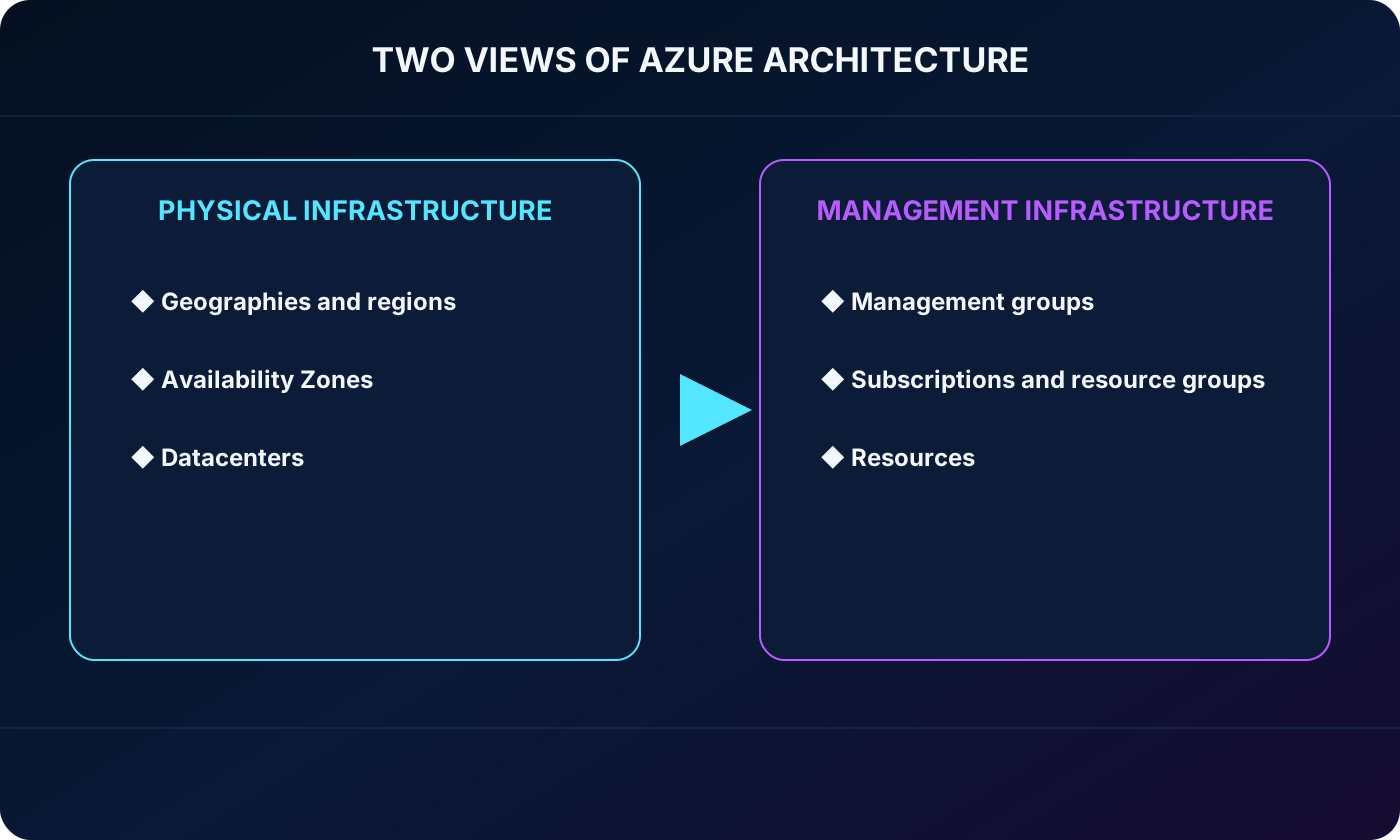
Azure can be understood through two complementary views. The physical view explains where cloud capacity runs: datacenters, Availability Zones, regions, geographies, and isolated sovereign clouds. The management view explains how customers organize and govern what they deploy: resources, resource groups, subscriptions, and management groups.
Learning objectives
Describe Azure datacenters, regions, Availability Zones, region pairs, and sovereign regions.
Explain Azure accounts and subscriptions, including common ways to start using Azure.
Describe resources, resource groups, subscriptions, and management groups.
Explain how the management hierarchy supports access, policy, billing, and cost organization.
Apply the physical and management hierarchies to architecture and exam scenarios.
Two views of Azure architecture: physical infrastructure and management infrastructure.
2. What Microsoft Azure is
Microsoft Azure is a continuously expanding cloud platform for building, deploying, and managing solutions over Microsoft’s global network. Teams can use their preferred languages, tools, and frameworks while consuming services that range from raw computing capacity to managed data, integration, Internet of Things, analytics, and artificial intelligence capabilities.
Its value can be summarized in three ideas: create without being limited to one technology path, connect cloud and existing environments through an integrated platform, and innovate on a foundation designed for security, reliability, and responsible operation. Azure can host an existing application on , but its scope is much broader than virtual servers.
Azure AI services, , and support intelligent and generative-AI solutions.
Internet of Things (IoT) services connect and process signals from devices and equipment.
and compute capacity can grow or shrink with workload demand instead of being fixed to purchased hardware.
3. Service categories and progressive modernization
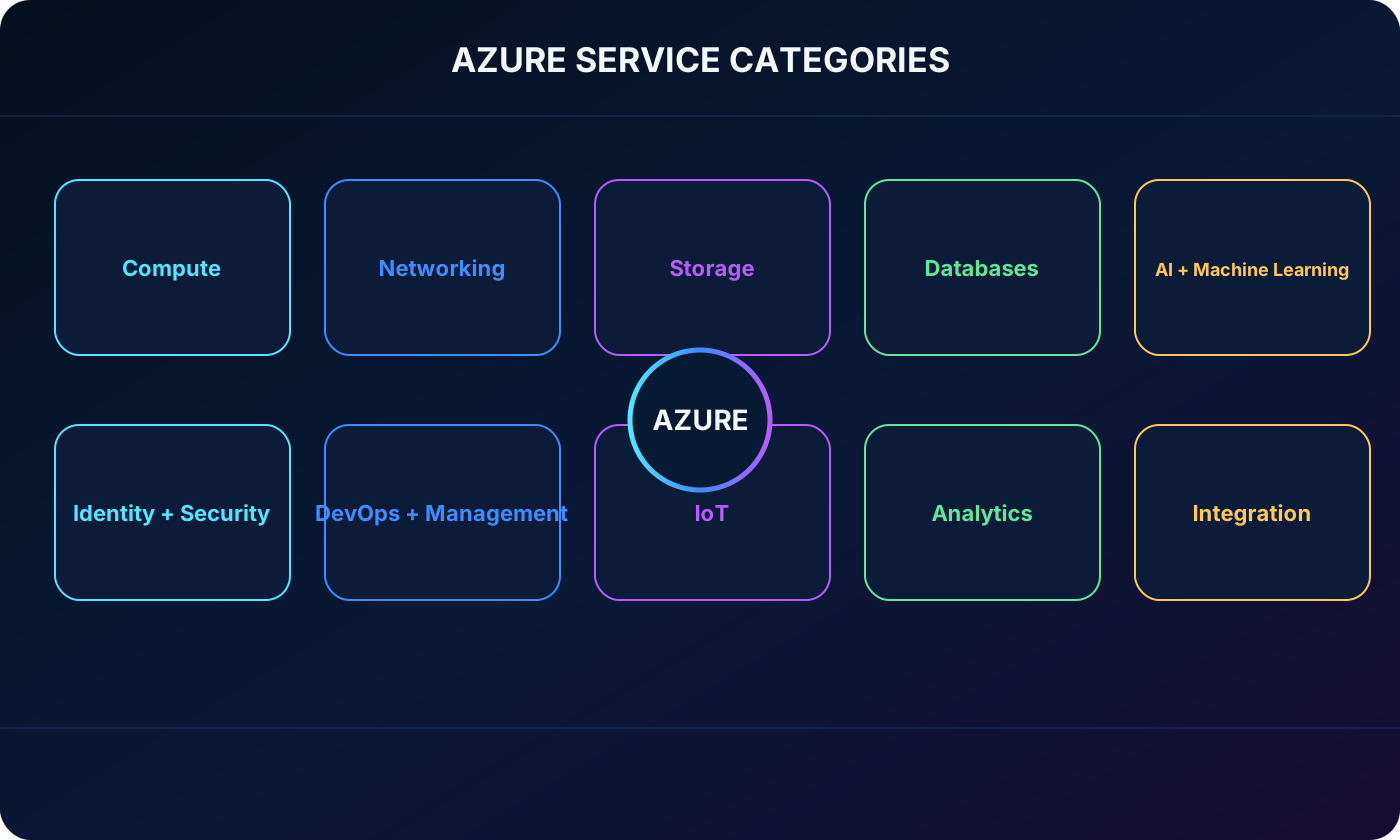
Azure groups hundreds of services into broad categories. The exact catalog changes over time, but the architecture vocabulary remains useful: Compute, Networking, , Databases, AI + Machine Learning, Identity + Security, DevOps + Management, IoT, Analytics, and Integration.
Ten Azure service categories surrounding a cloud platform.
A cloud journey does not need to modernize every workload at once. An organization might first move an application to , then replace a self-managed database with , move a web tier to , and introduce for event-driven work. Each step transfers more platform operation to managed services.
For seasonal demand, the application tier can scale out during a peak and scale back afterward, the database can use a managed service, and operations can be observed from a centralized dashboard. The design pays for the capacity it uses while avoiding a permanent on-premises build sized only for the busiest period.
4. Azure accounts, subscriptions, and ways to start
An Azure subscription is required to create and use Azure services. Creating an Azure account normally establishes an initial subscription, and the same account can later be associated with additional subscriptions. Resources are deployed inside a subscription, which becomes both an administrative scope and a billing unit.
Azure can be purchased directly from Microsoft, with help from a Microsoft representative, or through a Microsoft partner. Cloud Solution Provider partners can combine Azure with management and support services. Free and student offers are designed for exploration, but their credits, eligible services, durations, verification requirements, and regional availability can change; always confirm the current offer before relying on a limit.
At the time represented by the source module, the standard free account included USD 200 credit for the first 30 days, selected popular products free for 12 months, and more than 65 services with ongoing free quotas.
The standard offer required a phone number, a Microsoft or GitHub account, and a payment card for identity verification. The module states that the card is not charged until the account holder explicitly upgrades to paid use.
For eligible students, the source described USD 100 credit for the first 12 months, selected services free for 12 months, and free developer tools, without requiring a payment card.
Monitor consumption and remove resources that are no longer needed so a learning environment does not become an unexpected bill.
5. From an account to a running resource
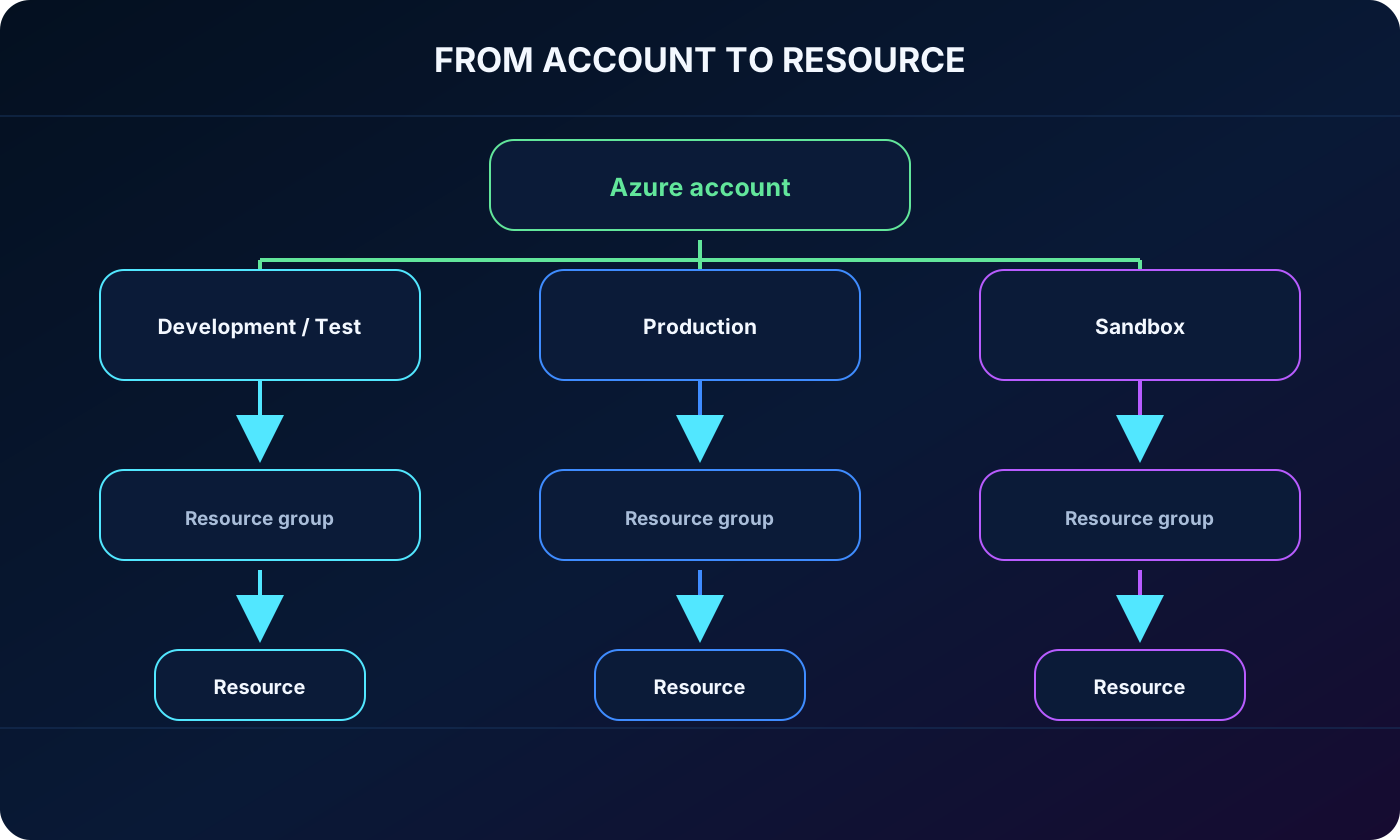
A practical hierarchy begins with an identity-backed Azure account. The account can access one or more subscriptions, such as development/test, production, and sandbox. Each subscription contains resource groups, and each resource group contains deployable resources.
Azure account hierarchy from subscriptions to resource groups and resources.
Example organization of an Azure account.
Subscription
Resource group
Possible resources
Development and test
Web
and test
Production
Data
and
Production
Application
and APIs
Sandbox
Network
, public IP, and network security group
6. Datacenters: the physical foundation
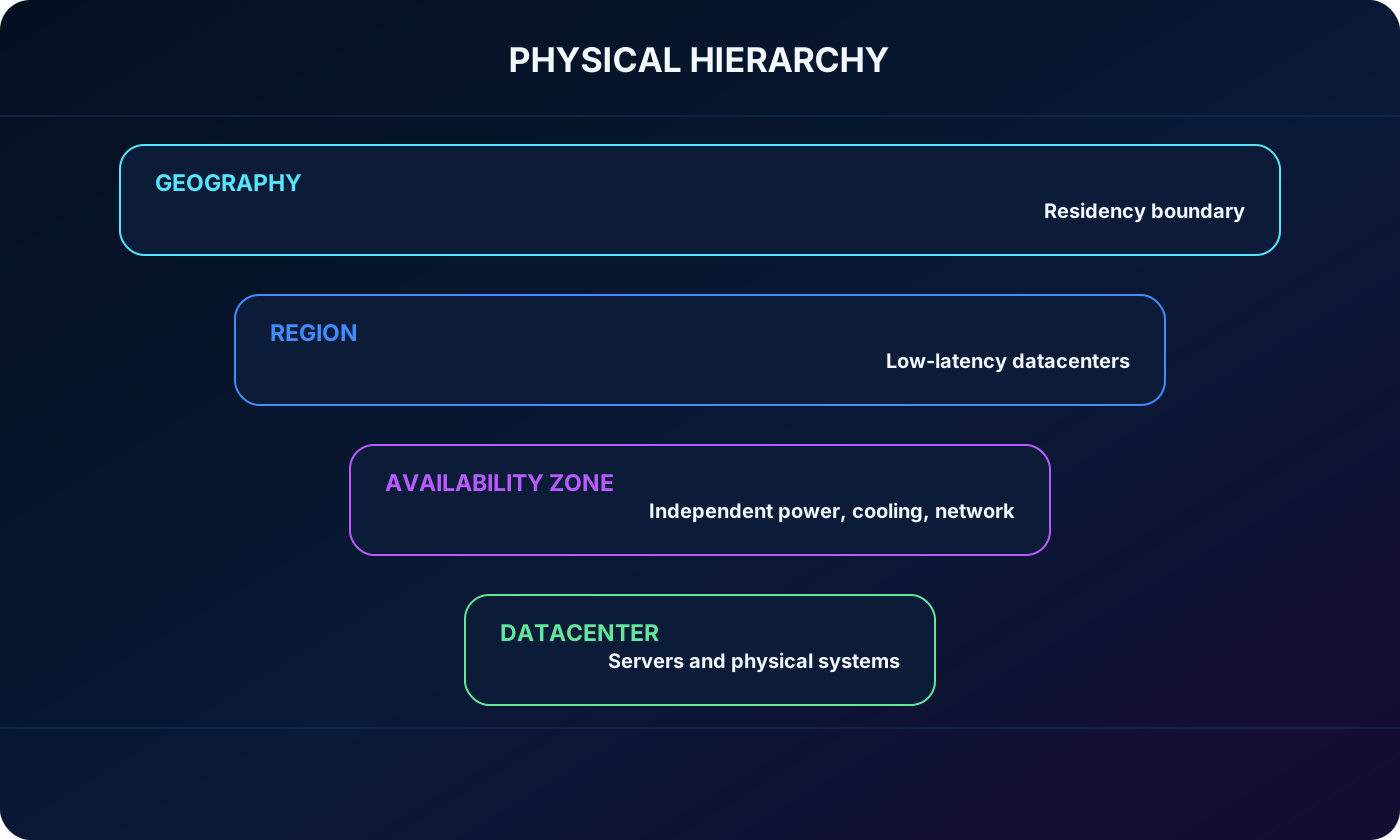
Azure datacenters contain racks of servers plus storage, networking, power, cooling, and physical-security systems. Microsoft operates these facilities at global scale. Customers do not normally choose or manage an individual building; Azure groups facilities into higher-level constructs that expose location and resiliency choices.
This abstraction lets an architect choose a region or zone without operating generators, cooling systems, physical links, or server replacement. The physical hierarchy can be visualized as geography, region, Availability Zone, and datacenter, although not every region exposes zones.
Physical Azure hierarchy from geography to region, Availability Zone, and datacenter.
7. Azure regions and resource location
An Azure region is a geographical area containing one or more nearby datacenters connected by a high-capacity, fault-tolerant, low-latency network. Azure controls resource placement and balances capacity within the region. Most deployments ask for a region because location affects service availability, latency, data residency, price, and disaster-recovery options.
Not every service, feature, or Virtual Machine size is offered in every region. Architects should check the current products-by-region catalog before committing to a location. Some services are global and do not require a regional selection, including , Azure Traffic Manager, and .
Choose regions close enough to users and dependent systems to meet latency requirements.
Check data-residency, sovereignty, and regulatory boundaries before placing data.
Confirm that required service tiers, VM sizes, storage types, zones, and recovery options are available.
Treat the region choice as an architecture decision, not merely a deployment-form field.
8. Availability Zones and isolation inside a region
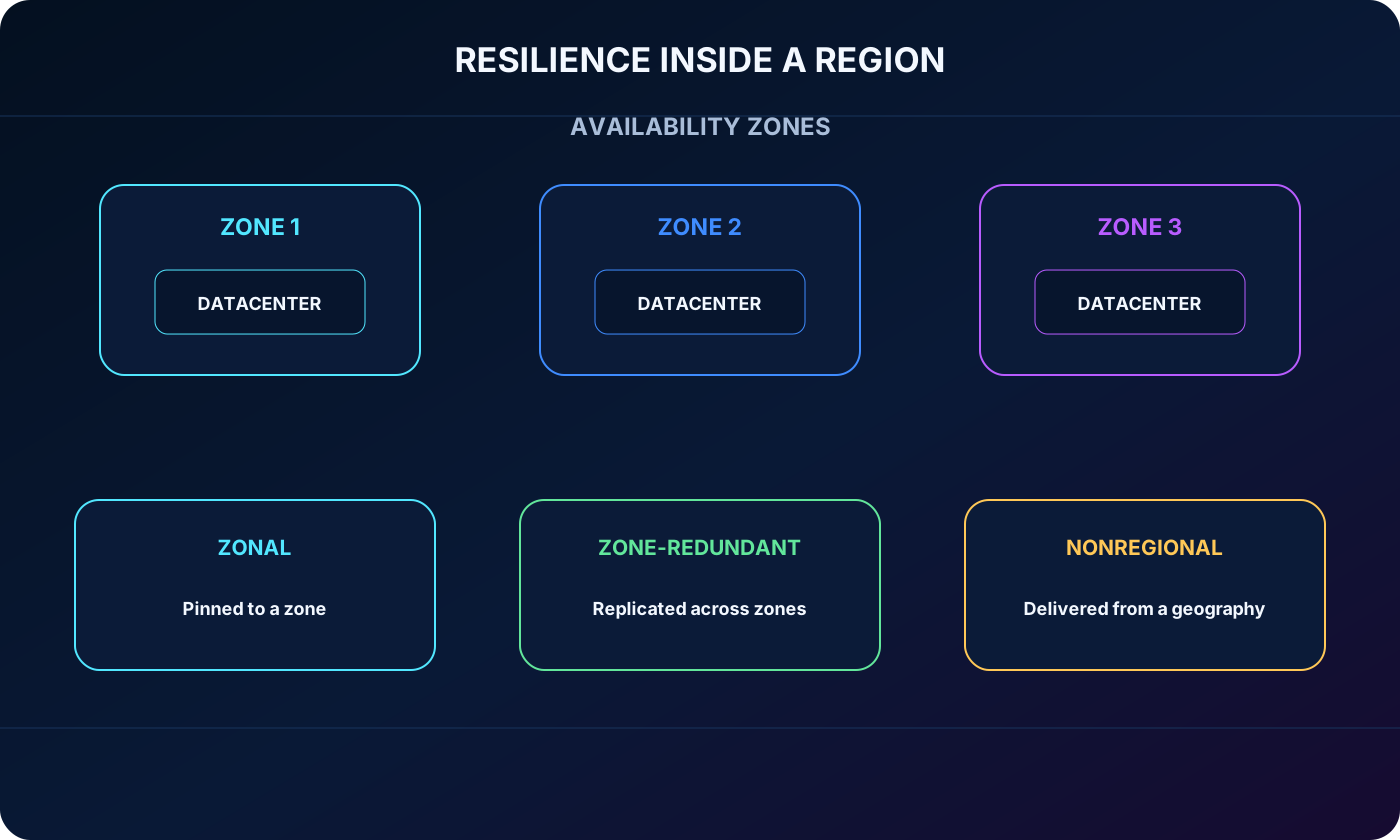
An Availability Zone is a physically separate group of one or more datacenters within a region. Each zone has independent power, cooling, and networking, and zones are connected by a high-speed private network. This separation creates an isolation boundary: a local failure can affect one zone while workloads in other zones continue operating.
Regions that support Availability Zones have at least three separate zones, but not every Azure region has them. A zone improves resilience only when the workload actually uses more than one zone or consumes a zone-redundant service. Duplicating resources can add cost. Older training wording also warned about inter-zone transfer charges; the current Azure reliability documentation states that data transfer between Availability Zones in the same region is not charged, so always verify the pricing policy in force.
Three ways Azure services relate to Availability Zones.
Category
Behavior
Examples
Zonal resource
The customer places the resource in a selected zone and designs replication or failover.
, managed disks, and IP addresses in supported configurations
Zone-redundant resource
Azure automatically distributes or replicates the service across zones in the region.
Zone-redundant storage and supported configurations
Nonregional service
The service is delivered from a broader geography and is resilient to regional or zonal failure by design.
Selected global Azure services
Availability Zone isolation and zonal, zone-redundant, and nonregional service models.
9. Region pairs and multi-region resilience
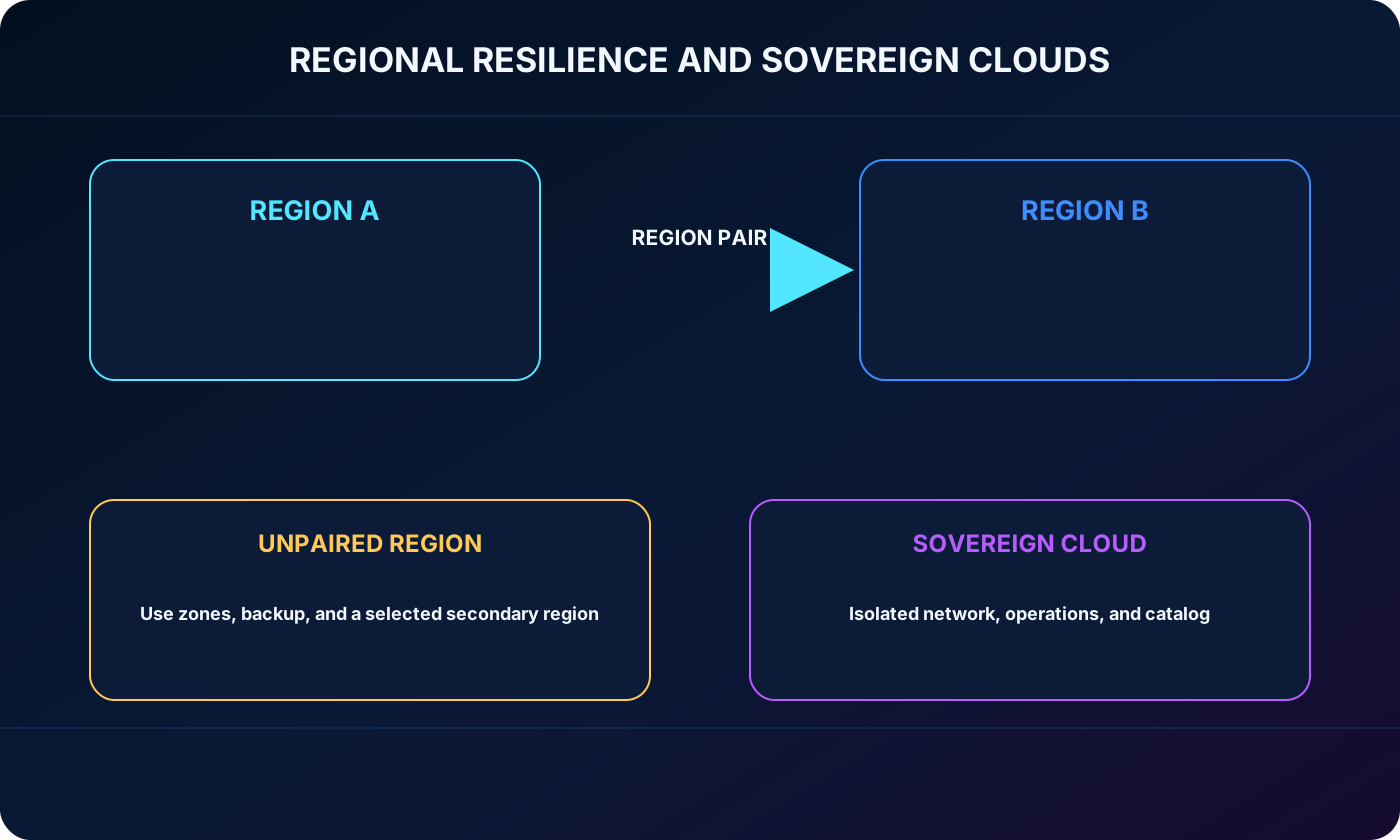
Many Azure regions have a designated region pair in the same geography. The source module describes paired regions as being at least 300 miles apart to reduce the likelihood that one disaster, power failure, network interruption, or civil disruption affects both. Common examples include West US with East US and Southeast Asia with East Asia.
Pairing supports platform recovery priorities, sequenced planned updates, and data-residency patterns, but it does not mean every service automatically copies data or fails over. Customers must verify each service and configure replication, backups, traffic routing, recovery objectives, and failover when required.
Planned Azure updates are generally sequenced so paired regions are not updated at the same time.
If a broad outage affects both, one region in a pair can receive restoration priority.
Regional pairings normally keep data within the same geography. Brazil South is paired one-way with South Central US; South Central US is not paired back with Brazil South.
Some newer regions, including Italy North, Poland Central, and Israel Central, do not have a traditional pair. Availability Zones, geo-redundant storage, backups, and a deliberately selected secondary region are alternative design tools.
Paired Azure regions, an unpaired region, and isolated sovereign regions.
10. Sovereign regions
Sovereign regions are isolated Azure environments built for particular legal, government, compliance, or residency requirements. They are not simply ordinary public regions with a different name: they can use separate networks, operational controls, personnel requirements, portals, endpoints, credentials, and service catalogs.
Azure Government regions such as US DoD Central, US Gov Virginia, and US Gov Arizona are physically and logically isolated for eligible United States government customers and partners, with screened United States personnel and additional compliance certifications. China East and China North are examples from Azure operated by 21Vianet, delivered through Microsoft’s partnership with 21Vianet; Microsoft does not directly operate those datacenters.
A sovereign cloud can satisfy a jurisdictional requirement but may offer fewer or later service features than global Azure. Confirm eligibility, available products, identity boundaries, connectivity, and data-transfer rules before selecting it.
11. Azure resources
A resource is the basic manageable item in Azure: anything that is created, provisioned, or deployed. A Virtual Machine, managed disk, , database, storage account, public IP address, application, and Azure AI service instance are all resources.
Resources have a subscription, a resource group, a region when the service is regional, a type, a provider namespace, a name, and a unique identifier. They can also carry tags and be governed through access assignments, locks, and policy. Thinking in resources turns a solution diagram into units that Azure can deploy and manage.
12. Resource groups and their rules
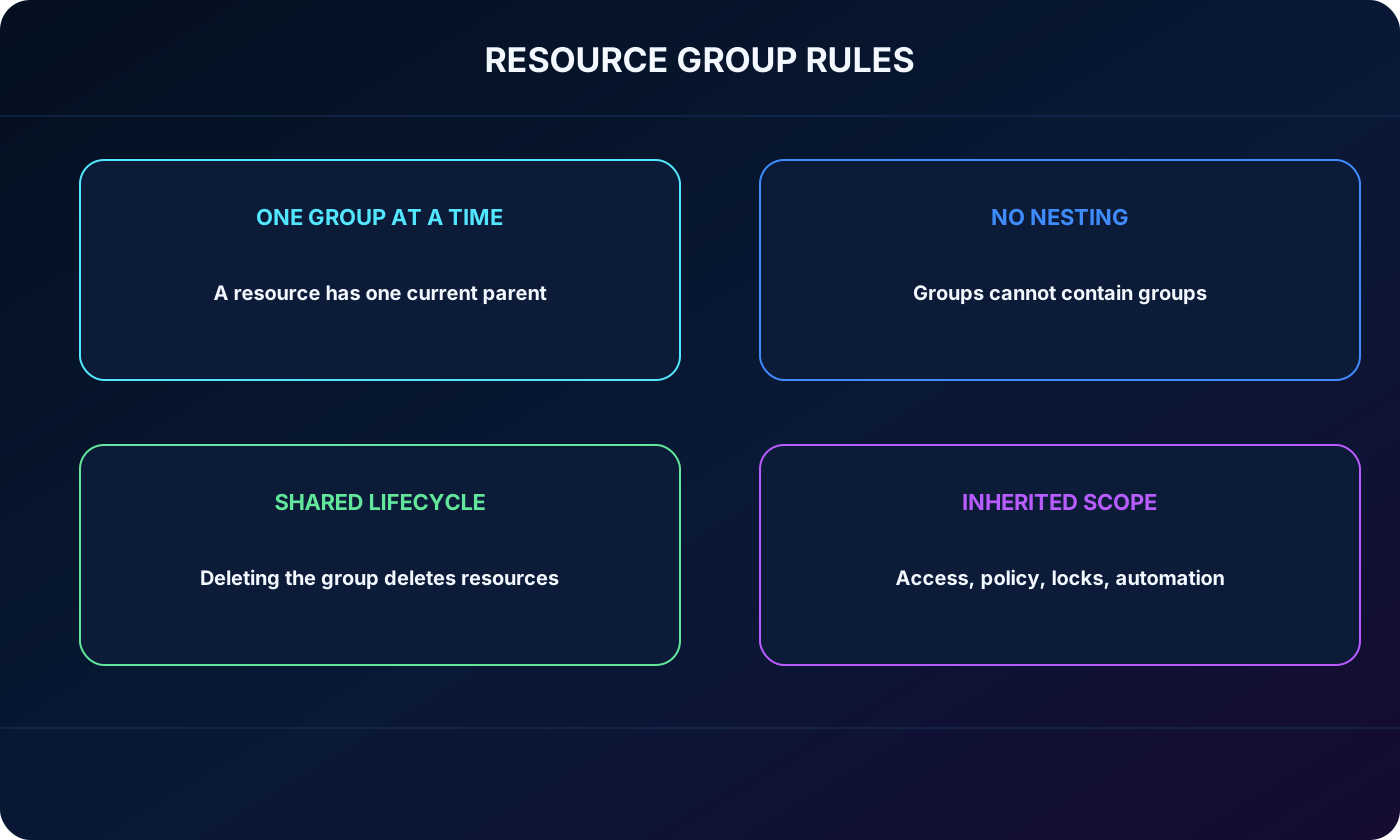
A resource group is a logical container for resources that should be managed together. It is not a billing account or a physical location. Teams commonly group resources by workload, lifecycle, environment, owner, or operational boundary.
A resource belongs to exactly one resource group at a time.
Resource groups cannot be nested inside other resource groups.
Some resource types can be moved between groups or subscriptions, subject to supported-move rules and dependencies.
A resource group cannot be renamed after creation, so a durable naming convention is valuable.
Deleting a resource group deletes the resources it contains; verify scope and dependencies before deletion.
Access, policy, locks, or automation applied at the group scope can affect every current resource and, when inherited, future resources in that group.
A temporary development environment can live in one resource group so the complete environment can be removed together. A large application might instead separate networking, data, and application resources when their owners, lifecycles, or permissions differ. Azure does not impose one universal grouping model.
Resource group rules, lifecycle boundary, and inherited management scope.
13. Subscriptions as billing and access boundaries
A subscription is linked to an Azure account identity in or another trusted directory. At least one subscription is needed to use Azure, and an account can access multiple subscriptions. The subscription groups resource groups while establishing limits, billing records, and a major governance scope.
Two foundational subscription boundaries.
Boundary
Purpose
Example
Billing boundary
Produces distinct usage and cost reporting and can separate invoices or chargeback.
A production subscription is reported separately from a sandbox.
Access-control boundary
Allows permissions, policies, budgets, and controls to differ by subscription.
Developers administer development resources but receive read-only access to production.
Organizations often create additional subscriptions for development, test, production, isolated teams, regulated workloads, or clearer cost ownership. More subscriptions improve separation, but each one must still be governed consistently.
14. Management groups and inherited governance
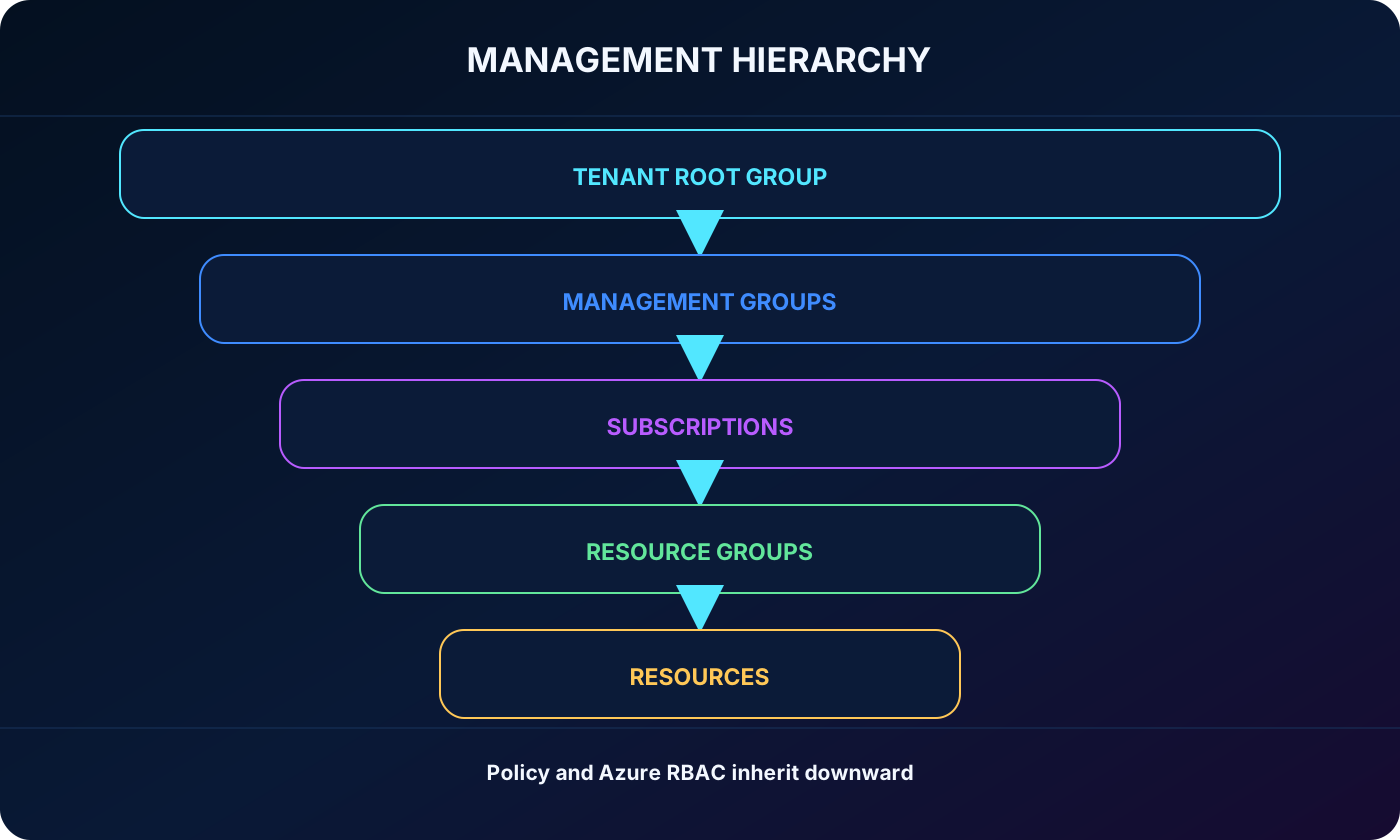
Management groups organize subscriptions above the subscription level. A policy or Azure role-based access control (Azure RBAC) assignment at a management-group scope is inherited by descendant management groups, subscriptions, resource groups, and resources. This provides consistent governance without repeating the same assignment in every subscription.
Each Microsoft Entra tenant has one top-level Tenant Root Group. Management groups can form a hierarchy beneath it; a management group or subscription has one parent. Current Azure limits allow up to six management-group levels below the root and up to 10,000 management groups in a directory.
Azure management hierarchy from Tenant Root Group to management groups, subscriptions, resource groups, and resources.
A production management group can require approved deployment locations across all child subscriptions.
An Azure RBAC role assigned at a parent can grant the same access throughout its descendants.
Subscription owners cannot override an inherited requirement merely because they own the subscription.
Design the hierarchy around durable governance needs rather than a frequently changing organization chart.
15. Putting the physical and management hierarchies together
Suppose a retailer operates a seasonal web application. Its production subscription contains separate resource groups for networking, the application, and data. and are deployed in a chosen region with zone-redundant configurations where supported. A second-region recovery design handles a regional outage, while Azure Traffic Manager or another routing layer can direct users during failover.
The production subscription sits under a production management group that enforces allowed locations, required tags, and baseline access. A separate development subscription inherits development controls and uses smaller resources. The physical architecture delivers locality and resilience; the management architecture delivers ownership, policy, access, and cost separation.
Architecture question to Azure construct.
Question
Construct
Where does the workload run and how is it isolated from facility failure?
Region and Availability Zones
How is the workload protected from a regional event?
Multi-region design, region pairing where applicable, replication, backup, and routing
Which items share lifecycle and permissions?
Resource group
Where are billing and major access boundaries?
Subscription
Where should policy and roles be inherited across subscriptions?
Management group
16. Scenario review and module assessment
Paraphrased assessment with explained answers.
Question
Answer
Explanation
How many resource groups can one Azure resource belong to at the same moment?
One
A resource has exactly one current resource-group parent, although supported resources may be moved.
What happens when an action or inherited setting is applied at resource-group scope?
It affects resources in that scope
Current resources are affected, and inherited controls can also apply to resources added later.
Which Azure concept is designed to relate geographically separated regions for resilience?
Region pairs
Paired regions support coordinated platform resiliency, though workload replication and failover still depend on the service and customer configuration.
Where should one policy govern many subscriptions?
Management group
Assignments at the parent are inherited by the hierarchy below it.
What protects a workload from a single datacenter or zone failure inside one region?
Multi-zone architecture
Use zonal replicas or zone-redundant services in a region that supports Availability Zones.
17. Chapter summary
Azure provides a global service platform on top of datacenters organized into regions and, in supported regions, Availability Zones. Region pairs and deliberately selected secondary regions address wider failures, while sovereign regions serve specialized jurisdictional requirements.
Customers deploy resources into resource groups inside subscriptions. Subscriptions establish billing and access boundaries; management groups apply policy and roles across subscriptions. These layers form the chain Tenant Root Group → management group → subscription → resource group → resource.
A zone is an isolation boundary inside a region; a region is a deployment location inside a geography.
A region pair is a platform relationship, not a guarantee that every workload automatically replicates or fails over.
A resource is in one resource group at a time, and groups are not nested.
Deleting a resource group deletes its contained resources.
Governance and access flow down the management hierarchy through inheritance.
18. Explore with Copilot Chat
Use Copilot Chat to rehearse architecture decisions, then validate product availability, limits, pricing, and resiliency behavior against current Microsoft documentation.
Create a concept map connecting geographies, regions, Availability Zones, datacenters, resources, resource groups, subscriptions, and management groups.
Design a subscription and management-group hierarchy for development, production, multiple departments, and one regulated workload. Explain policy inheritance.
Compare Availability Zones, region pairs, unpaired regions, and sovereign regions for a workload with strict data-residency and recovery requirements.
Quiz me with AZ-900 scenarios about choosing the correct physical or management scope, then explain each answer.