Microsoft Entra, authentication, external identities, Conditional Access, Azure RBAC, Zero Trust, layered defense, encryption, and cloud protection
Suggested study time: 78 minutes • Beginner level • Aligned with the Azure architecture and services domain of AZ-900
By João Ricardo Dutra••Complete original content
1. Identity, access, and security objectives
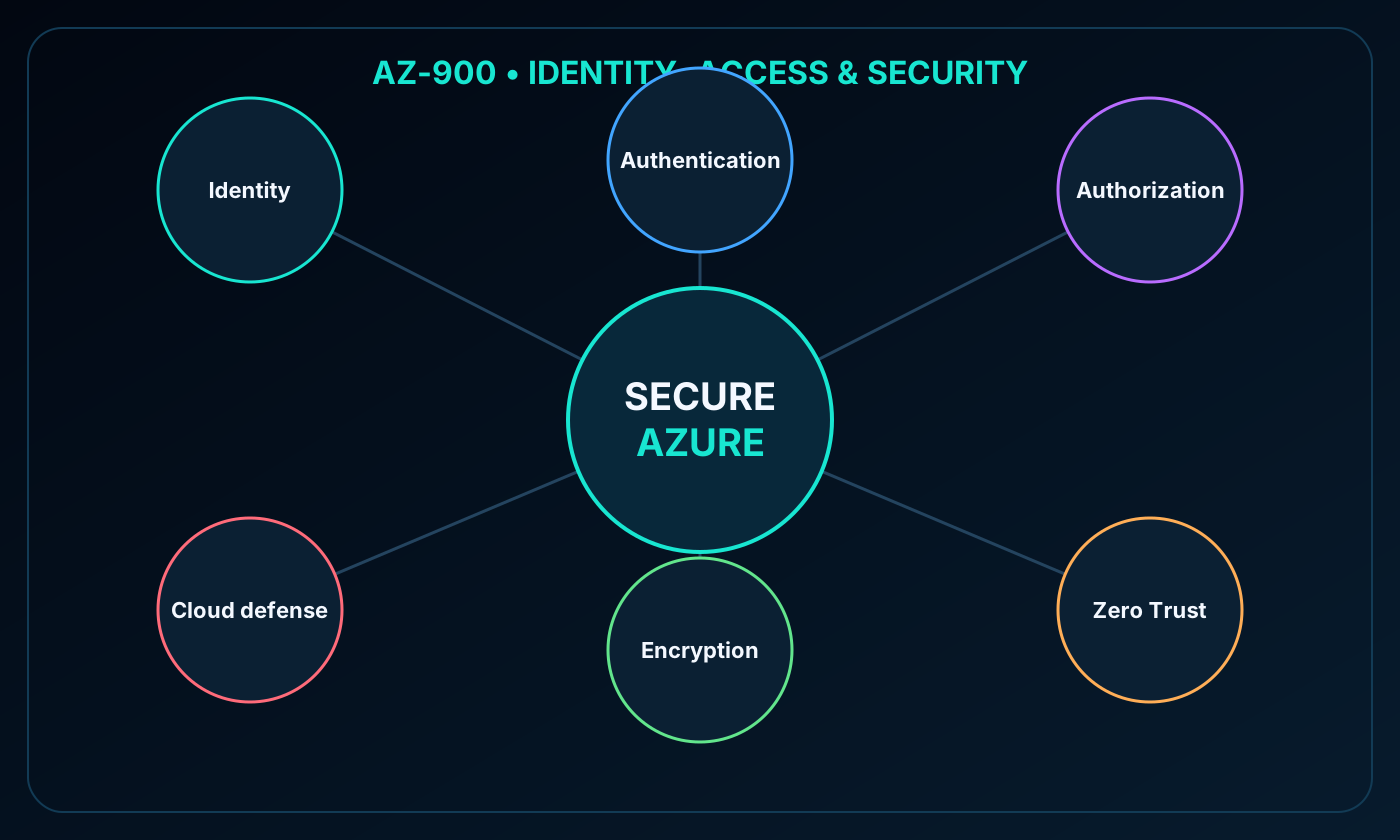
This chapter connects Azure identity services, authentication, authorization, security architecture, encryption, key management, and cloud posture protection. The goal is to understand how these controls reinforce one another instead of treating them as isolated features.
Differentiate ,, and hybrid identity.
Compare SSO, MFA, and passwordless authentication methods.
Explain external identities, Conditional Access, and Azure RBAC.
Apply the Zero Trust and defense-in-depth models.
Recognize encryption, Azure , and capabilities.
Map connecting identity, authentication, authorization, Zero Trust, defense in depth, encryption, and cloud protection.
2. as the cloud directory
is Microsoft’s cloud identity and access management service. It authenticates identities for Microsoft services, third-party SaaS applications, and applications an organization builds. Customers control accounts and policies while Microsoft operates the globally available directory platform.
Connecting an on-premises Active Directory environment to adds cloud intelligence to identity operations. The cloud service can evaluate sign-in behavior and identify suspicious attempts, such as activity from unfamiliar devices or unexpected locations.
3. Who uses and what it provides
Identity audiences and common tasks.
Audience
Typical use
IT administrators
Control access to applications and resources according to workload and security requirements
Application developers
Add standards-based authentication, SSO, and reuse of existing organizational credentials
Users
Maintain their identity and perform self-service password reset
Online service subscribers
Authenticate to Microsoft 365, Azure, and Microsoft Dynamics services
Authentication capabilities include self-service password reset, MFA, banned-password lists, and smart lockout.
Application management includes Application Proxy, SaaS integration, and the My Apps portal.
Device management supports registration and Microsoft Intune integration.
Device state can become a signal in Conditional Access policies.
4. Hybrid identity with Microsoft Entra Connect
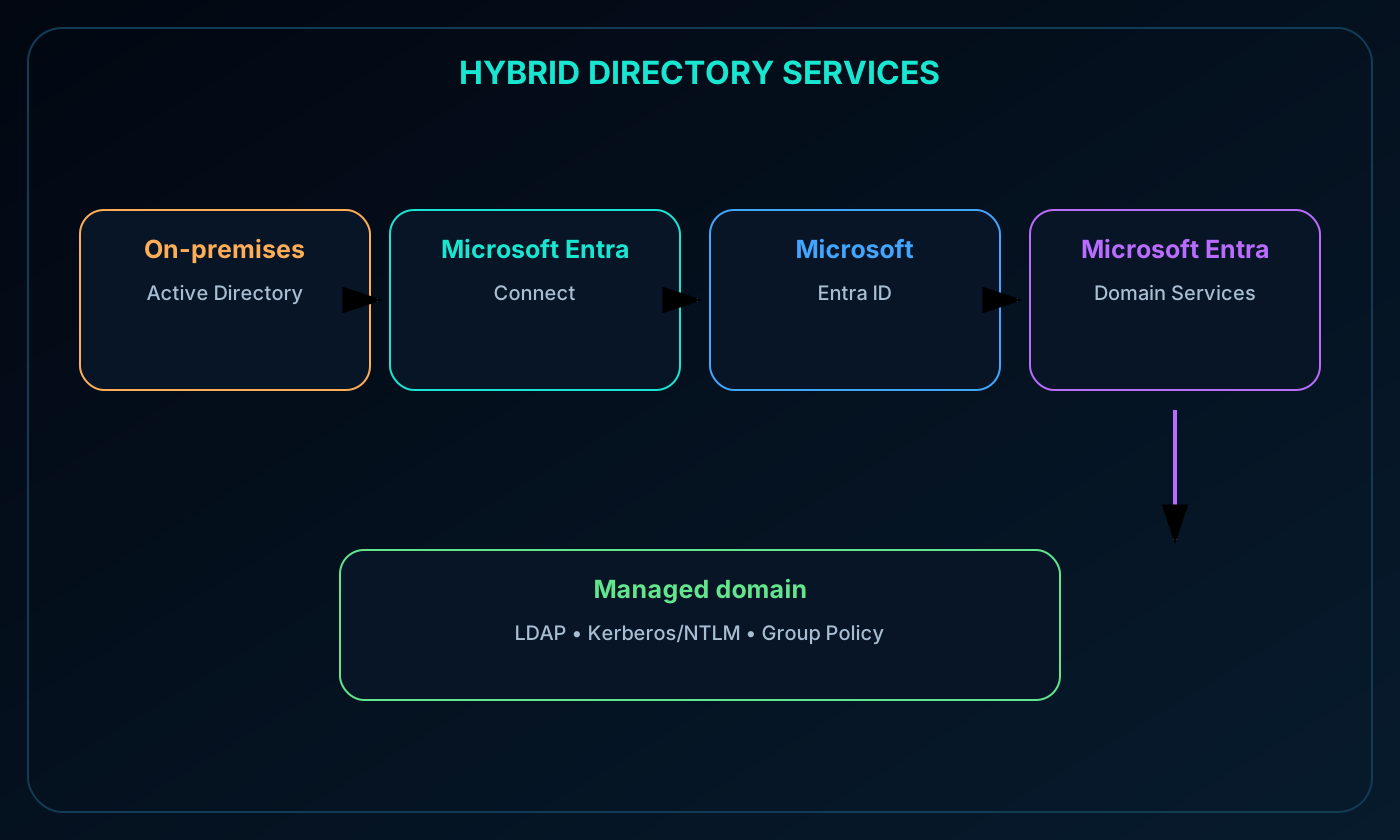
Without integration, an on-premises directory and require separate identity sets. Microsoft Entra Connect synchronizes identity information between Active Directory Domain Services and so users receive a more consistent sign-in experience across local and cloud resources.
The hybrid design can extend SSO, MFA, and self-service password reset while retaining the local directory for workloads that still depend on it. Synchronization must be planned with clear sources of authority and protected administrative accounts.
Hybrid directory flow from on-premises Active Directory through Microsoft Entra Connect to and .
5.
supplies managed domain join, Group Policy, LDAP, and Kerberos or NTLM authentication. Organizations can move legacy applications that cannot use modern authentication into Azure without deploying and maintaining their own cloud domain controllers.
Users and groups from the existing Microsoft Entra tenant become available to the managed domain, allowing people to use familiar credentials. This reduces migration friction for applications that expect traditional domain services.
6. Managed domain operation and synchronization
A managed domain starts with a unique DNS namespace. Azure deploys two Windows Server domain controllers in the selected region as a replica set and operates their configuration, updates, backups, and at-rest disk encryption.
Synchronization from to the managed domain is one-way. Objects created only in the managed domain do not flow back to . In a hybrid topology, Microsoft Entra Connect first synchronizes the on-premises directory to , which then supplies identities to the managed domain.
7. Authentication strength and single sign-on
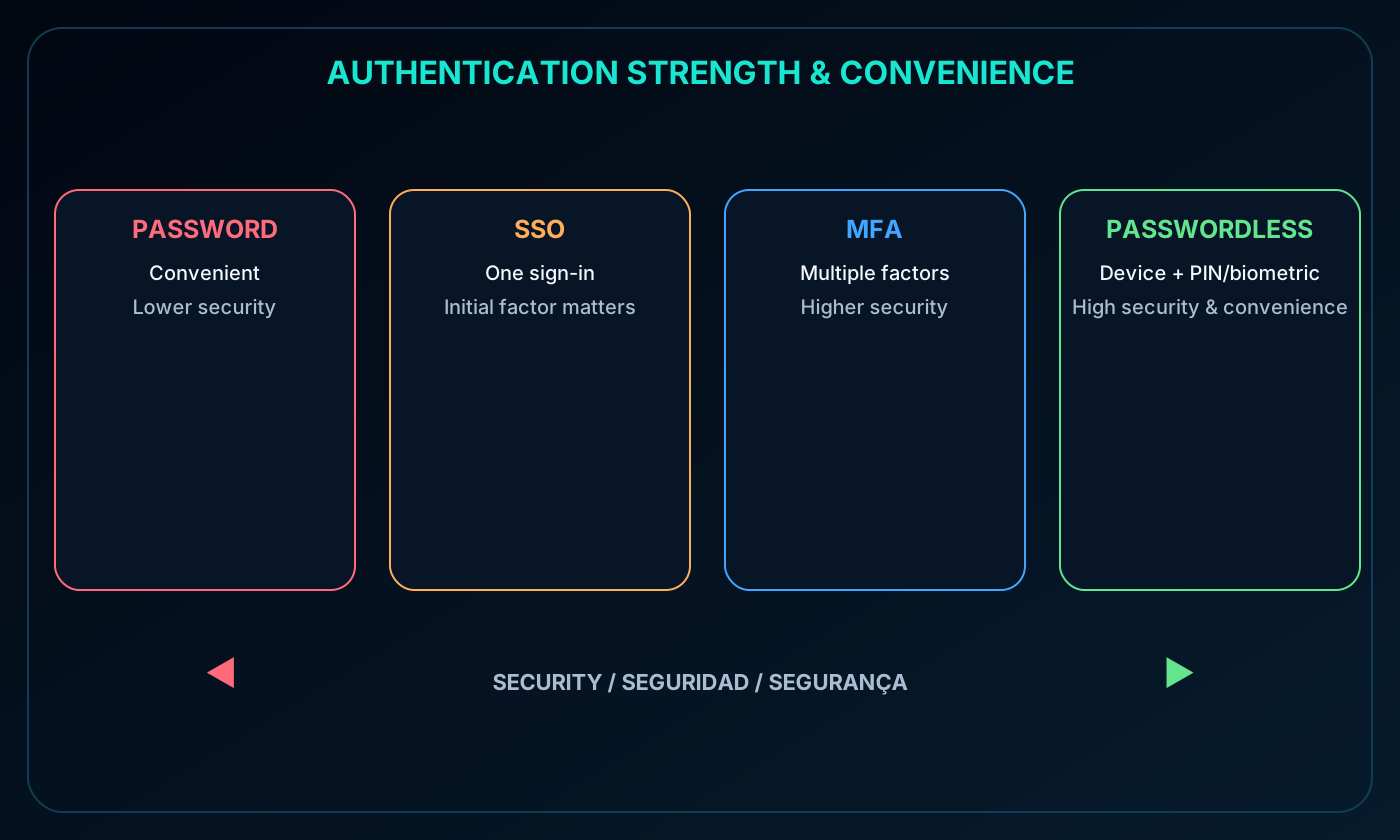
Authentication proves the identity of a person, service, or device through credentials. Passwords, SSO, MFA, and passwordless methods offer different balances of convenience and resistance to attack. Passwordless methods generally combine strong security with a simpler user experience.
SSO lets one identity open multiple trusted applications after one sign-in. It reduces password sprawl, lockouts, resets, and lifecycle work because access remains tied to a central identity. Its security still depends on the initial authenticator: every downstream session inherits that trust.
Authentication spectrum comparing passwords, single sign-on, multifactor authentication, and passwordless methods.
8. Multifactor authentication
MFA asks for an additional proof so a stolen password alone cannot complete sign-in. Factors come from something the user knows, something the user has, or something the user is. Combining categories is stronger than requesting two versions of the same type.
Authentication factor categories.
Category
Examples
Something known
Password, PIN, or challenge response
Something possessed
Registered phone, application notification, or hardware key
Something inherent
Fingerprint or facial recognition
Microsoft Entra multifactor authentication can request a phone call, Microsoft Authenticator notification, security key, or another registered method. Conditional Access can invoke MFA only when identity, device, location, application, or risk signals justify it.
9. Passwordless authentication in
Passwordless authentication removes the password from normal sign-in and relies on a trusted device together with a PIN or biometric gesture. After registration, the user proves possession locally; the secret is not sent to or stored by the remote service in the same way as a reusable password.
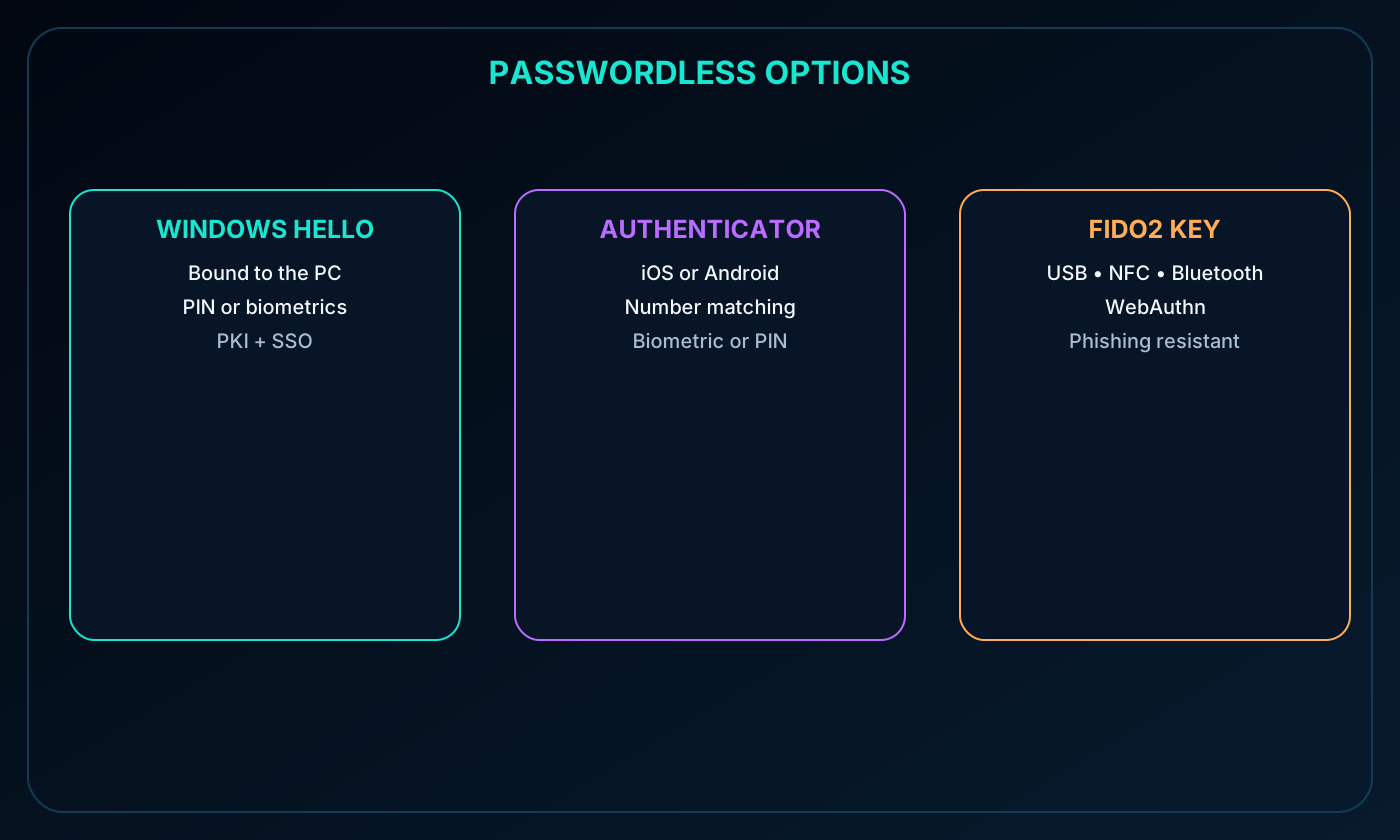
The module highlights three options: Windows Hello for Business, the Microsoft Authenticator app, and FIDO2 security keys. Each is designed to improve usability while reducing password guessing, reuse, theft, and phishing exposure.
10. Windows Hello, Microsoft Authenticator, and FIDO2
Passwordless methods.
Method
How it works
Best fit
Windows Hello for Business
Binds a PIN or biometric credential to the user’s Windows PC and can integrate with PKI and SSO
Information workers with assigned Windows devices
Microsoft Authenticator
Sends a number-matching prompt to iOS or Android and confirms it with device biometrics or PIN
Mobile-first passwordless sign-in
FIDO2 security key
Uses an unphishable WebAuthn hardware authenticator over USB, NFC, or Bluetooth
Portable, high-assurance access without username or password entry
A FIDO2 key is registered to the user and selected as the primary method during sign-in. Because the hardware performs the cryptographic proof, there is no reusable password for an attacker to expose or guess.
Comparison of Windows Hello for Business, Microsoft Authenticator, and FIDO2 security keys.
11. External identities and the tenant boundary
An external identity belongs to a person, device, or service outside the organization’s tenant. lets partners, suppliers, contractors, customers, and consumers use identities they already own while the resource tenant continues to control authorization and policy.
The identity provider performs authentication. The organization grants only approved access through or customer identity capabilities. External users may bring work accounts, social identities such as Google or Facebook, Microsoft accounts, or supported government-issued digital identities.
12. B2B collaboration, direct connect, and customer identity
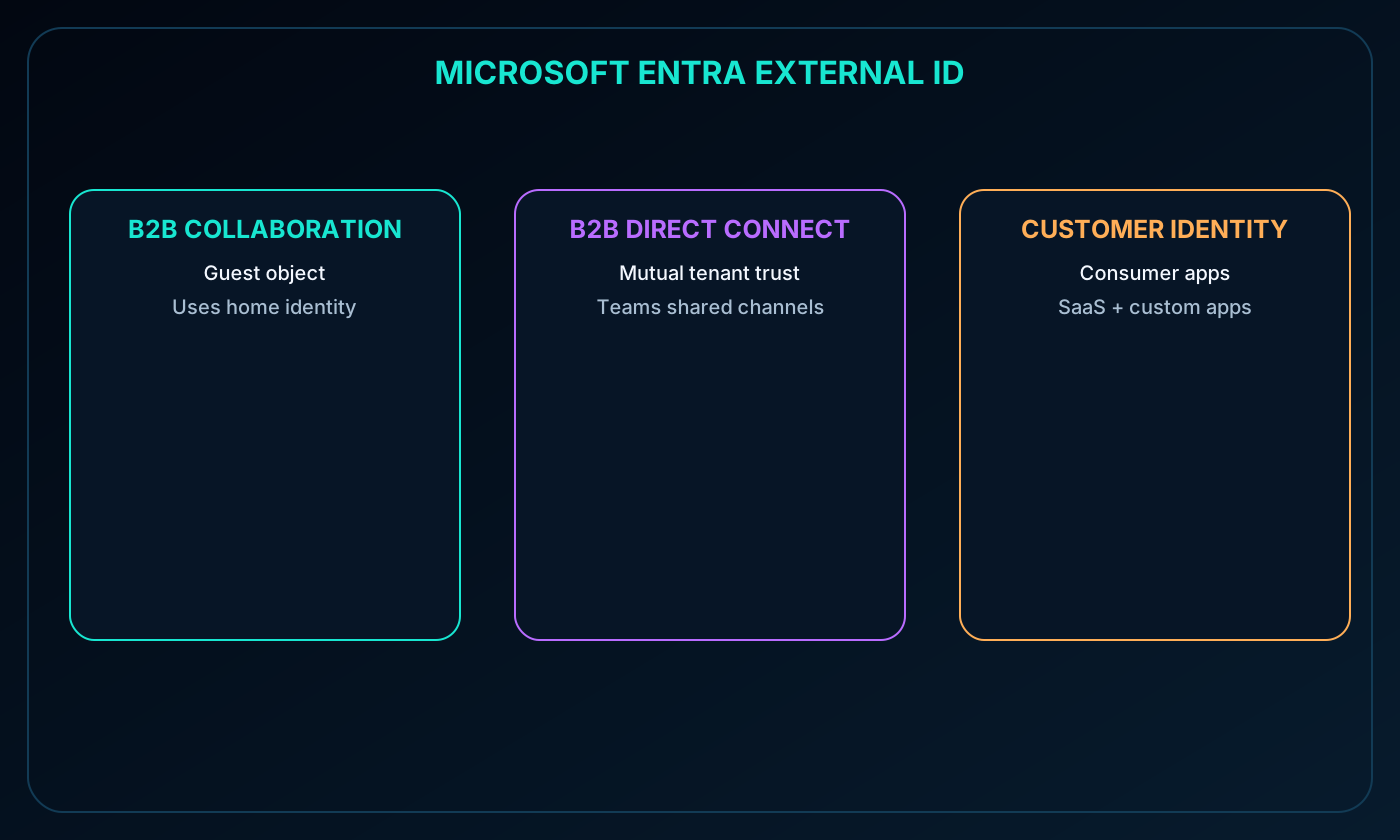
External identity capabilities.
Capability
Representation and scenario
B2B collaboration
External users sign in with a preferred identity and normally appear in the directory as guests
B2B direct connect
Two tenants establish mutual trust for Teams shared channels; users remain in their home tenant and are not guest objects in the resource directory
for customers
Provides identity and access management for consumer-facing SaaS or custom applications rather than Microsoft applications
Direct-connect participants are visible inside the Teams shared channel and in Teams admin reports. The capabilities can be combined according to the collaboration model and the resources being shared.
External identity models for B2B guests, direct connect, and customer applications.
13. Governing guest access over time
Authorized users or administrators can invite guests from other tenants and supported social identities. Access should not remain indefinitely simply because a project once required it.
Access reviews ask guests or designated decision makers to attest whether access is still necessary. can provide recommendations; after the review, administrators retain, adjust, or remove access for users who no longer need it.
14. Conditional Access: signals, decisions, and enforcement
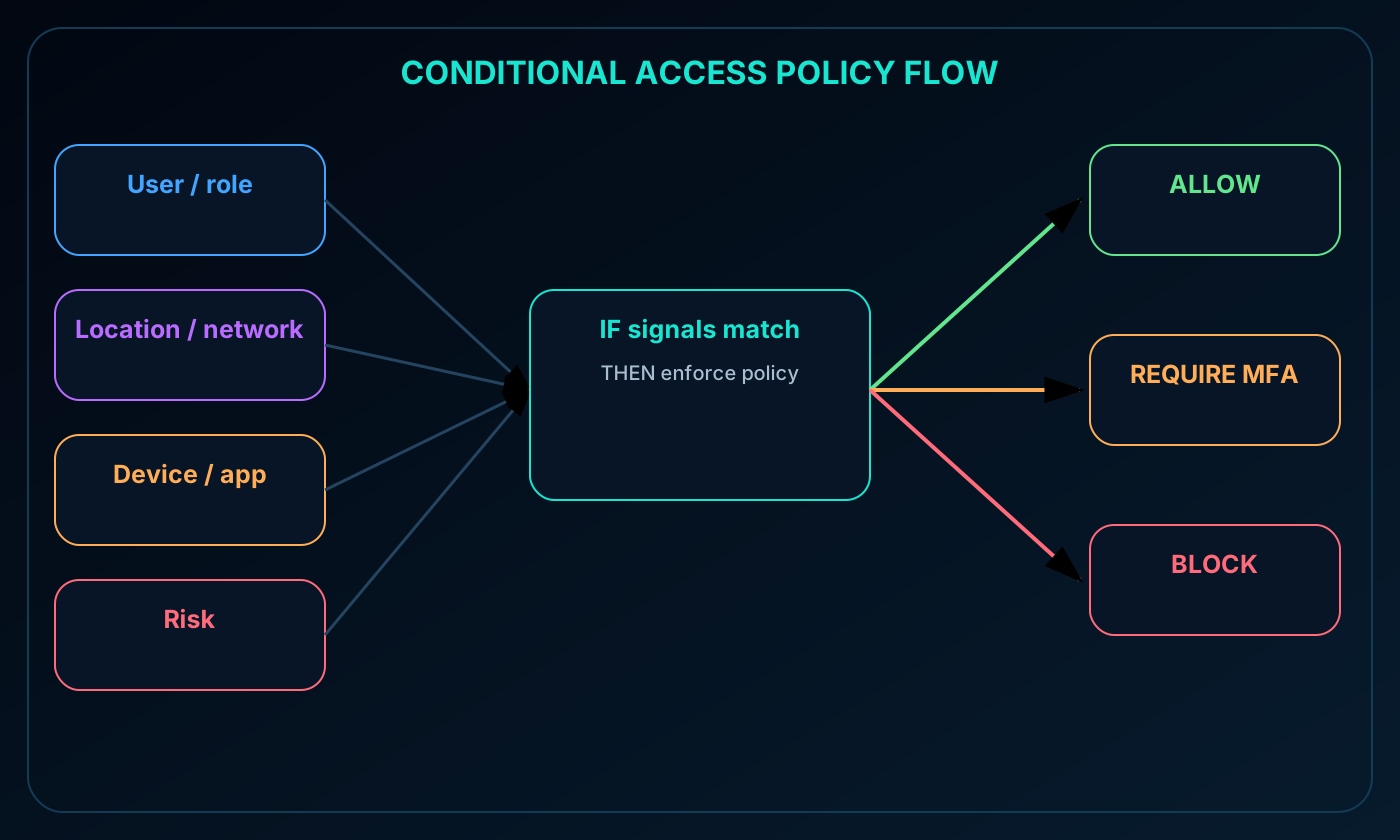
Microsoft Entra Conditional Access evaluates identity signals such as the user, role, location, device, application, network, and risk. During sign-in it gathers context, makes a policy decision, and enforces the result by allowing access, blocking it, or requiring an additional control such as MFA.
A routine request from a compliant device and known location might proceed without interruption. An unusual location, unmanaged device, privileged role, or risky sign-in can trigger stronger authentication or a complete block.
Conditional Access flow from identity signals through policy decisions to allow, block, or MFA enforcement.
15. Common Conditional Access scenarios
Require MFA for administrators, privileged roles, sensitive applications, or requests outside trusted networks.
Permit a service only through approved client applications.
Require devices to meet the organization’s management, security, and compliance standards.
Block unknown locations, unexpected networks, risky sign-ins, or other untrusted sources.
Conditional Access supports productivity and asset protection by applying friction only where context warrants it. Policies should be tested carefully so emergency access accounts and critical workloads are not unintentionally locked out.
16. Azure RBAC and least privilege
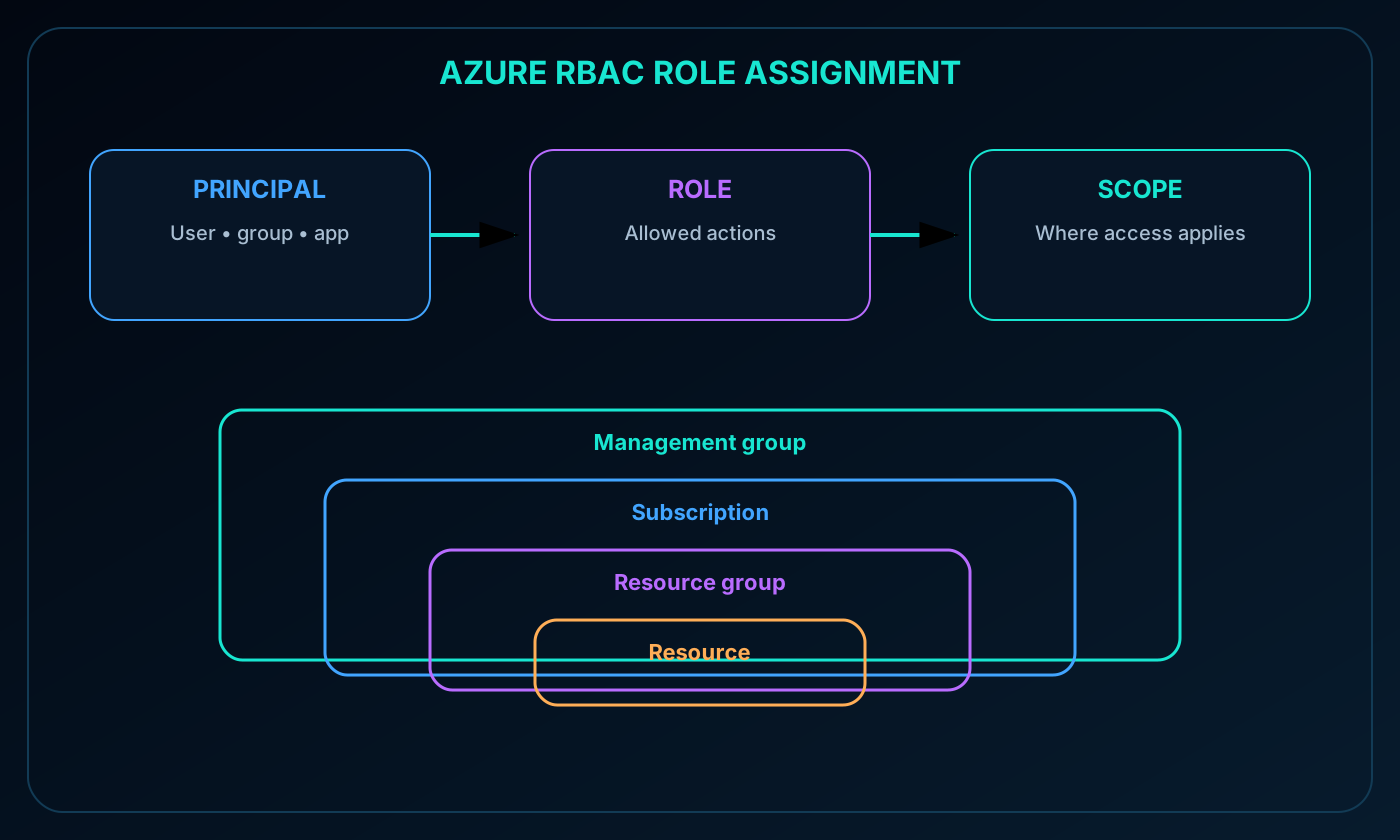
Azure role-based access control (Azure RBAC) implements authorization for Azure resources. It supports least privilege by defining what a security principal may do and where. Built-in roles cover common patterns, and custom roles can represent specialized duties.
Assigning roles to groups simplifies onboarding and changes: a new engineer inherits the group’s permissions, and the same assignments can apply to newly added resources. Roles may grant broad management rights, read-only visibility, or narrowly defined actions.
17. Azure RBAC scopes and inheritance
Scope hierarchy from broadest to narrowest.
Scope
Inheritance effect
Management group
Assignment flows to its subscriptions, resource groups, and resources
Subscription
Assignment flows to every resource group and resource in that subscription
Resource group
Assignment flows to resources in the group
Resource
Assignment applies only to the selected resource
For example, Owner at a management group can administer its descendant subscriptions, while Reader at a subscription can view all contained groups and resources. Scope selection is as important as role selection.
Azure RBAC role assignment composed of principal, role, and hierarchical scope.
18. How Azure RBAC is enforced
Azure RBAC evaluates management actions that pass through , whether initiated from the Azure portal, , Azure PowerShell, or the Azure CLI. It does not automatically secure an application’s own authorization model or every data-plane operation.
The model is additive and allow-based. If one assignment grants read and another grants write at the same effective scope, the principal receives both permissions. Good governance therefore reviews the combined result of all assignments and inherited scopes.
19. Zero Trust principles
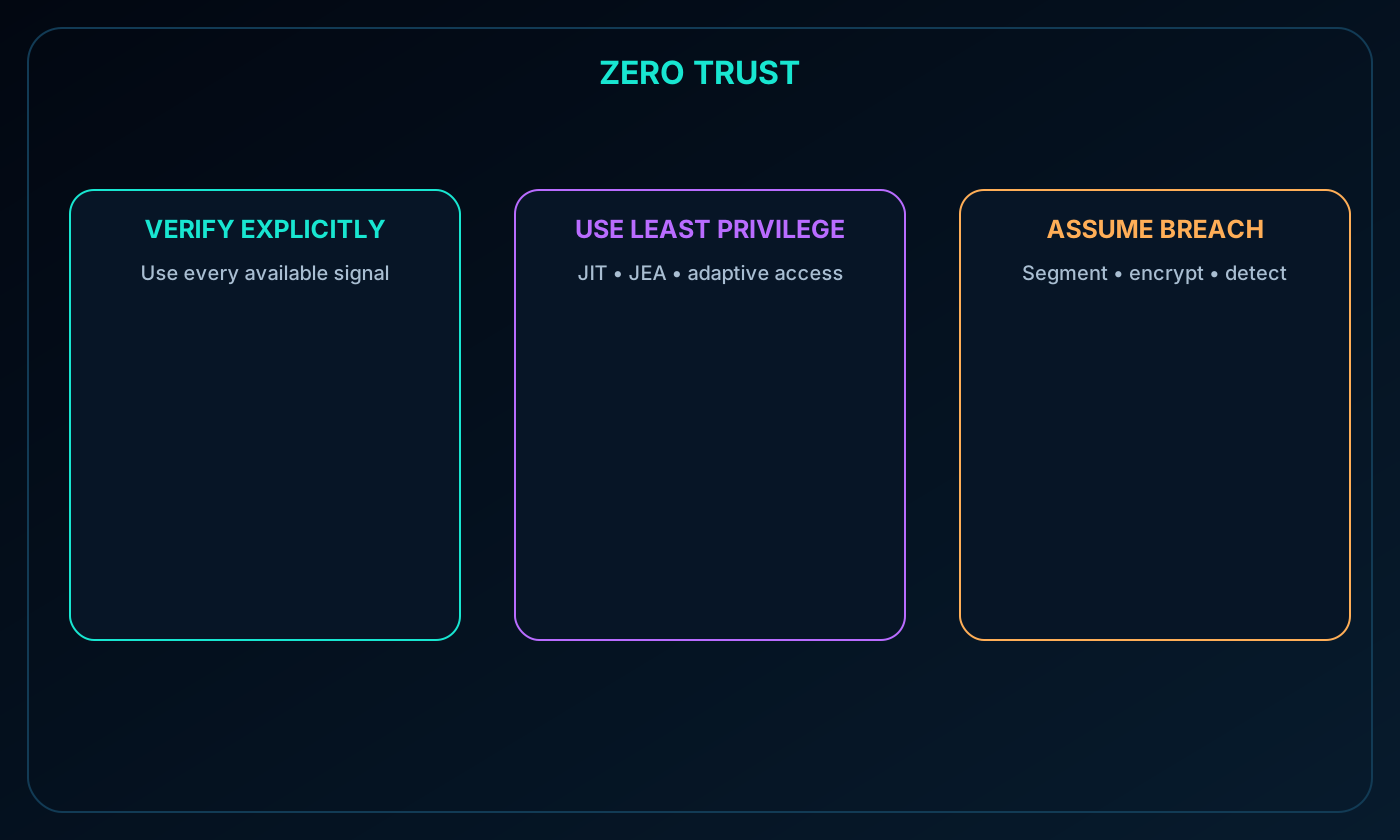
Zero Trust starts from the assumption that breach is possible and treats every request as if it came from an uncontrolled network. It adapts to mobile work and distributed people, devices, applications, and data instead of granting trust merely because something is inside a network perimeter.
Three Zero Trust principles.
Principle
Practical meaning
Verify explicitly
Authenticate and authorize using all relevant identity, device, location, service, and risk data
Use least privilege
Limit access with just-in-time, just-enough, adaptive, and data-protection controls
Zero Trust principles: verify explicitly, use least privilege, and assume breach.
20. Zero Trust in practice
Traditional designs often treated managed computers on an internal network as safe and tightly restricted VPN or personal-device access. Zero Trust replaces location-based confidence with continuous, contextual evaluation.
A user on an unmanaged device and public network might receive low-risk application access, be challenged with MFA for sensitive systems, or be blocked when risk is unacceptable. The decision can change as identity, device health, workload sensitivity, or threat signals change.
21. Defense in depth and its layers
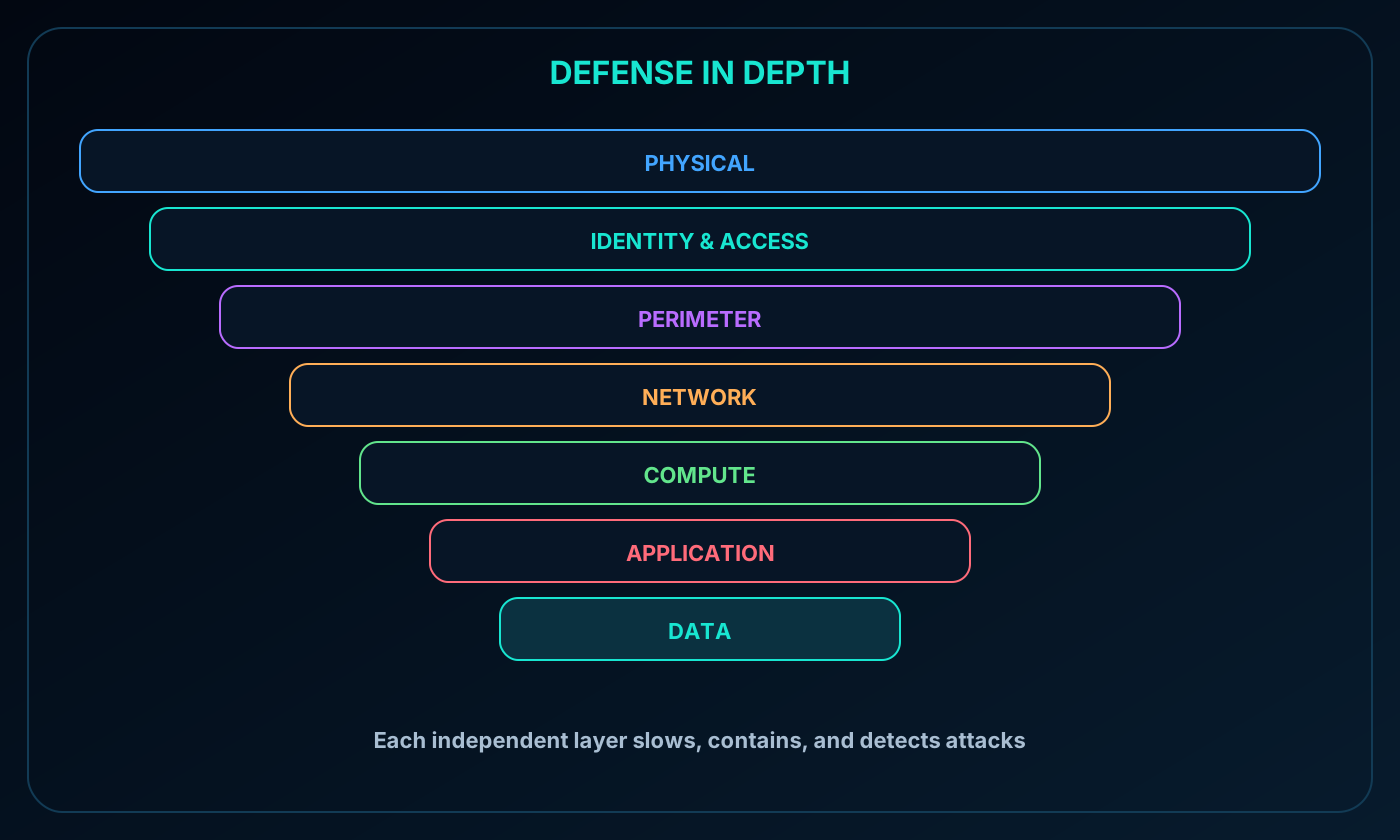
Defense in depth places multiple independent safeguards between an attacker and protected data. If one control fails, the next layer slows movement, reduces exposure, and creates signals that responders or automation can act on.
The model includes physical security, identity and access, perimeter, network, compute, application, and data. It is a decision framework rather than a single product and avoids relying on one defensive boundary.
Seven defense-in-depth layers protecting data at the center.
22. Physical, identity, and perimeter defenses
Physical security protects buildings, datacenter hardware, and assets from unauthorized physical access, theft, or loss.
Identity and access protects accounts, limits infrastructure and change-control permissions, uses SSO and MFA, and audits sign-ins and changes.
Perimeter controls identify network attacks, use DDoS protection to absorb large-scale denial-of-service traffic, and use firewalls to block and alert on malicious activity.
23. Network and compute defenses
Network controls segment resources, deny by default, restrict inbound internet exposure, limit outbound access where appropriate, and secure on-premises connectivity.
Compute controls secure virtual-machine access, deploy endpoint protection, remove malware, and keep operating systems and workloads patched.
Segmentation reduces the chance that compromise of one system spreads laterally to other workloads. Secure administration paths and current patches shrink the number of exploitable entry points.
24. Application and data defenses
Application security begins in the development lifecycle, treats secure defaults as a design requirement, removes vulnerabilities, and stores secrets outside code.
Data security protects confidentiality, integrity, and availability under business and regulatory requirements and uses encryption both at rest and in transit.
Attackers commonly target databases, virtual-machine disks, SaaS platforms such as Microsoft 365, and cloud storage. Data protection is therefore the center of the layered model.
25. Encryption at rest and in transit
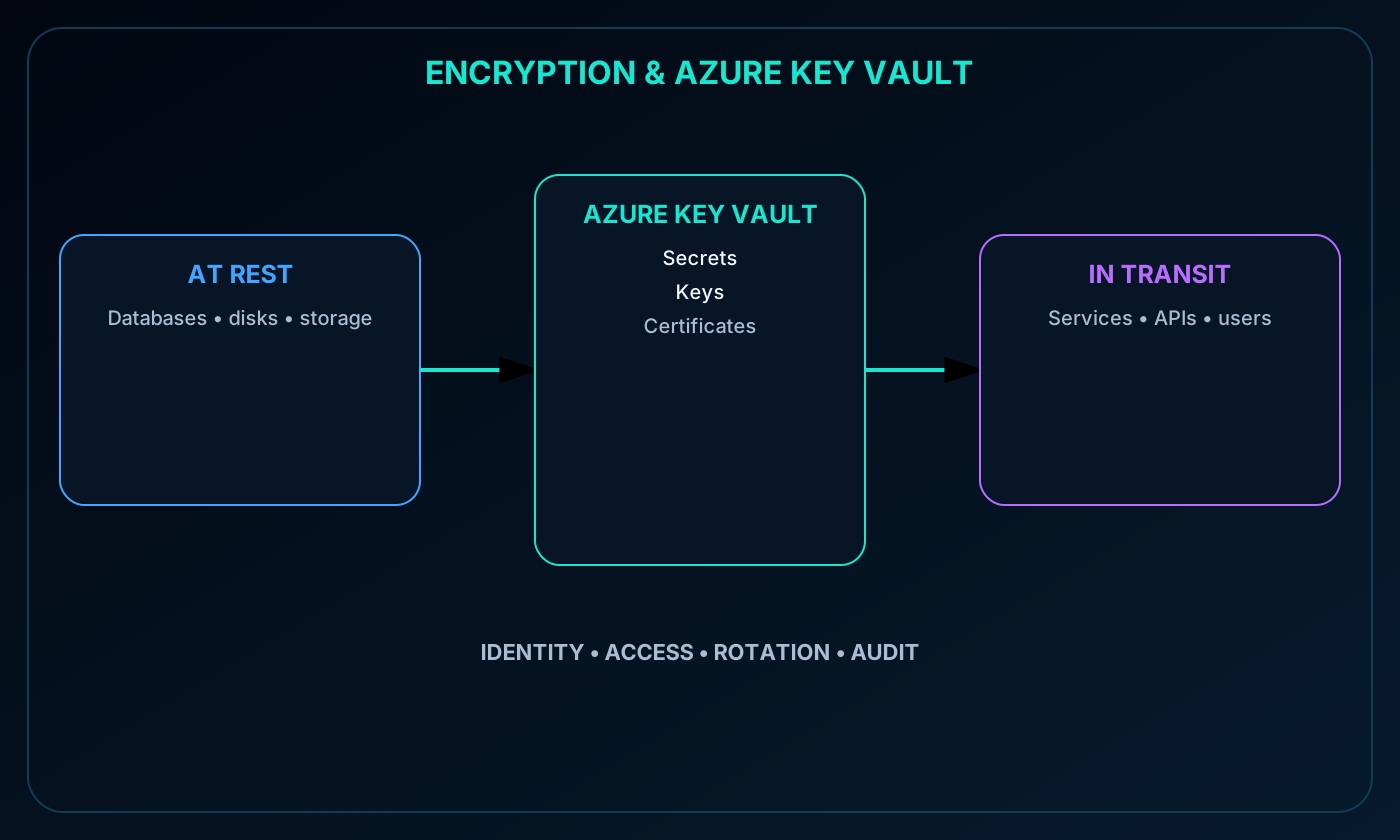
Encryption transforms readable information so unauthorized parties cannot interpret it. Encryption at rest protects databases, disks, and storage accounts; encryption in transit protects data moving among services, applications, APIs, and users. A sound design uses both.
For a business application using Azure and , customer records should remain encrypted while stored and while crossing application tiers or user connections. Encryption supports confidentiality but still depends on sound identity, authorization, and key practices.
26. Key and secret management with Azure
Azure centralizes secrets such as passwords and connection strings, encryption keys, and certificates. Applications can retrieve these values at runtime rather than embedding credentials in source code or configuration files.
Control and audit who can view or use keys and secrets.
Separate the duties of viewing, using, and rotating key material.
Rotate keys and alert before expiration to preserve hygiene and avoid outages.
Use managed identities so applications authenticate to the vault without hard-coded credentials.
Encryption at rest and in transit with centralized secrets, keys, and certificates in Azure .
27. coverage
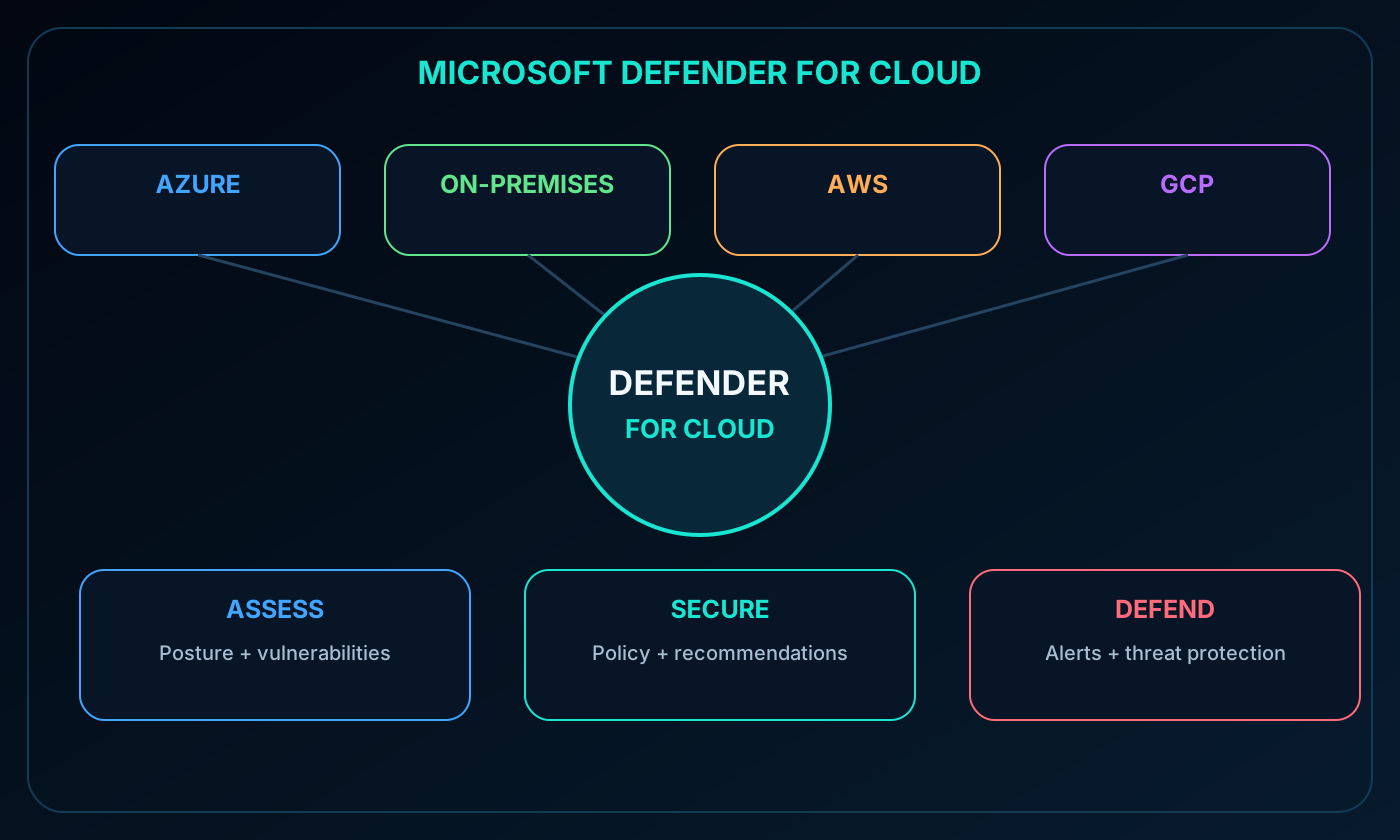
combines cloud security posture management and workload threat protection. It monitors Azure, on-premises, hybrid, and multicloud resources, then recommends hardening actions and raises alerts when it detects threats.
Azure-native services often require no extra deployment; data collection components can be added when deeper signals are required.
extends Defender plans to non-Azure servers, while agentless CSPM can assess multicloud resources.
Coverage includes ,, Azure , virtual machines, networks, container platforms, and other workloads.
Connected AWS environments can receive posture recommendations, Defender for Containers coverage for Amazon EKS, and Defender for Servers coverage for EC2; GCP resources can also be assessed and protected.
coverage across Azure, on-premises, AWS, and GCP.
28. Assess, secure, and defend
Three Defender for Cloud functions.
Function
Capabilities
Continuously assess
Track posture and vulnerabilities in virtual machines, container registries, SQL servers, data, and infrastructure
Secure
Use , the Microsoft cloud security benchmark, prioritized recommendations, security controls, and secure score
Defend
Generate alerts and advanced threat protection for machines, databases, containers, web apps, and networks
Defender for Servers can integrate natively with Microsoft Defender for Endpoint and surface findings from Microsoft Defender Vulnerability Management. Policies can be scoped at management group, subscription, or tenant level so new resources are continuously evaluated.
Alerts identify affected resources, suggest remediation, may trigger a logic app, and can be exported. Kill-chain analysis correlates related alerts into an attack story. Advanced protections include just-in-time VM access, restrictive port policies, and adaptive application controls.
29. Module assessment with explained answers
Paraphrased knowledge check.
Question
Answer
Why
Which Microsoft Entra control changes sign-in requirements according to location and other signals?
Conditional Access
It evaluates context and enforces allow, block, or additional authentication.
Which model begins by assuming the worst-case security condition?
Zero Trust
It assumes breach and verifies every request explicitly.
A principal receives read, write, and read/write through different Azure RBAC roles. What is effective?
Read and write
Allow-based role assignments combine at the effective scope.
Which Azure service securely stores application secrets, certificates, and encryption keys?
Azure
It centralizes protected key material and controlled runtime access.
30. Chapter summary and Copilot practice
Microsoft Entra services establish and authenticate identities; Conditional Access and Azure RBAC decide under what conditions and at what scope work can occur. Zero Trust and defense in depth guide the architecture, encryption and Azure protect information and key material, and continuously assesses and defends workloads.
The source recommends Microsoft Certified: Security, Compliance, and Identity Fundamentals for deeper study. It also references pay-as-you-go and a free Azure trial of up to 30 days; verify the current offer before relying on those terms.
Explore with Copilot Chat
Create one end-to-end scenario showing how SSO, MFA, Conditional Access, and Azure RBAC reinforce a Zero Trust design.
Compare ,, and external identities with practical workload examples.
Simulate an incident and explain how encryption, key management, defense in depth, and reduce impact.
31. Glossary and official references
Essential terms.
Term
Definition
Authentication
Verification of a person, device, service, or workload identity.
Authorization
Decision about what an authenticated principal may do and at which scope.
Tenant
Dedicated Microsoft Entra boundary containing identities, applications, and policies.
Conditional Access
Context-aware policy engine that maps sign-in signals to enforcement.
Azure RBAC
authorization system based on role assignments and scopes.
Zero Trust
Model that verifies explicitly, limits privilege, and assumes breach.
Defense in depth
Layered safeguards that prevent one failed control from exposing data.
CSPM
Cloud security posture management for configuration, risk, and compliance visibility.