Core Data Concepts: Formats, Storage, and Processing
Data forms, file formats, relational and NoSQL databases, OLTP, ACID, analytics, lakehouses, Microsoft Fabric, Azure Databricks, Microsoft Purview, and Power BI
Suggested study time: 95 minutes • Beginner level • Aligned with the DP-900 study guide and official Microsoft Learn documentation
By João Ricardo Dutra••Complete material
1. Why data fundamentals matter
Systems, applications, sensors, and connected devices produce more data every year. Collection and storage are less expensive than in the past, so organizations of every size can use information to improve products, operations, revenue, and risk decisions. The value does not come from accumulation alone: data must be represented, stored, processed, and interpreted appropriately.
A sound architecture starts by asking what the data describes, how quickly it changes, who consumes it, and whether the workload records live events or studies history. These questions determine whether a file, database, transactional engine, or analytical platform is the better fit.
Topic summary
Data becomes useful when an organization can capture it, keep it reliably, and analyze it in a form suited to the business question.
2. Entities, attributes, and the four broad data forms
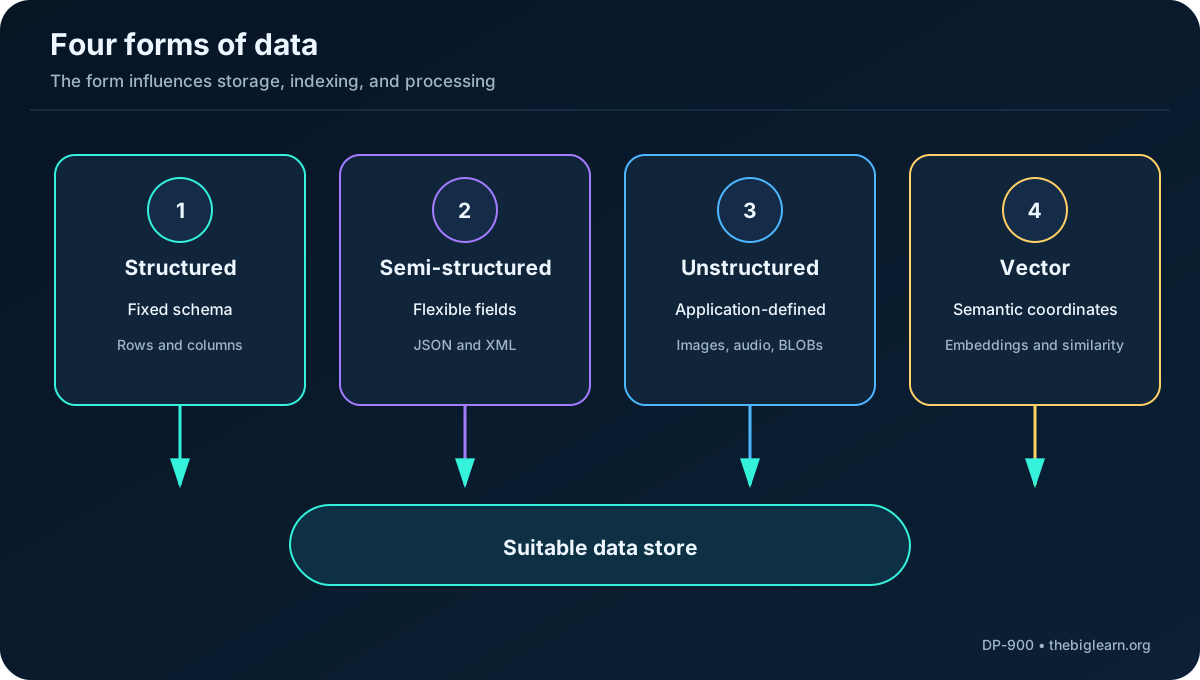
Data records facts, descriptions, measurements, and observations. Business data commonly represents entities such as customers, products, orders, or devices. An entity instance has attributes: a customer may have a name, postal address, telephone numbers, and contact preferences.
Data form
Defining trait
Typical examples
Structured
Every instance follows a fixed schema
Customer rows, product tables, account balances
Semi-structured
A recognizable structure exists, but fields can vary
JSON documents, XML messages, event payloads
Unstructured
No application-independent tabular or document schema
Images, audio, video, PDFs, binary documents
Vector data
Numeric embeddings encode semantic similarity
Document chunks used for natural-language retrieval
Figure 1 - Data form is one of the first signals used to select storage and processing.
Topic summary
Identify the entity and its attributes first, then determine whether the representation is fixed, flexible, free-form, or an embedding.
3. Structured data and fixed schemas
Structured data conforms to a predefined schema. A tabular representation uses rows for entity instances and columns for attributes. Because each row exposes the same fields and compatible data types, applications can validate, sort, join, aggregate, and query the data predictably.
Structured data is frequently stored in relational databases, where tables reference one another through key values. A fixed schema improves consistency, but schema changes must be managed because producers and consumers rely on the agreed shape.
Topic summary
Structured data trades flexibility for consistency and predictable querying.
4. Semi-structured data and JSON
Semi-structured data retains organization without requiring every instance to contain identical fields. One customer can have two telephone numbers, another only an email address, and a third an apartment number. The document still follows recognizable names and nesting, but optional and repeated elements are allowed.
JavaScript Object Notation (JSON) is a widespread representation for this model. Objects use braces, collections use brackets, and attributes appear as name-value pairs. JSON can also represent fully structured data; its key characteristic is the ability to express hierarchy and variation.
Topic summary
Semi-structured representations preserve machine-readable organization while allowing records to differ.
5. Unstructured data, BLOBs, and vector embeddings
Documents, images, audio, video, and application-specific binary files do not necessarily expose a shared schema that a database engine can interpret directly. They are often stored as Binary Large Objects (BLOBs) and rendered or decoded by an application.
AI solutions increasingly create embeddings: arrays of numbers that capture semantic characteristics of text, images, or other content. A vector database can compare these embeddings by similarity, enabling an assistant to retrieve relevant document passages before answering a natural-language question. The original file remains unstructured even though its embedding is a structured numeric representation.
Topic summary
BLOB storage keeps raw content; vector storage keeps embeddings that make semantic retrieval efficient.
6. Choosing between file stores and databases
File stores organize and retrieve complete files. Databases manage records and expose query, indexing, integrity, and concurrency capabilities. The boundary is not absolute - a file system is technically a form of data store, and modern lakehouses add database-like table semantics over files - but the distinction is useful for architecture decisions.
Requirement
Likely starting point
Exchange human-readable tabular data
CSV or another delimited file
Keep images and videos at large scale
Cloud object or blob storage
Enforce relationships and transactions
Relational database
Store variable JSON documents
Document database or file storage
Analyze large historical datasets
Data lake, warehouse, or lakehouse
Retrieve content by semantic similarity
Vector database or vector index
Topic summary
Select storage from access patterns, integrity requirements, scale, latency, and data form - not from file extension alone.
7. File storage from local disks to the cloud
Files can live on personal disks, removable media, shared network systems, or cloud storage. Organizations increasingly centralize important files in cloud services to gain elastic capacity, durability, security controls, and cost-effective storage for large volumes.
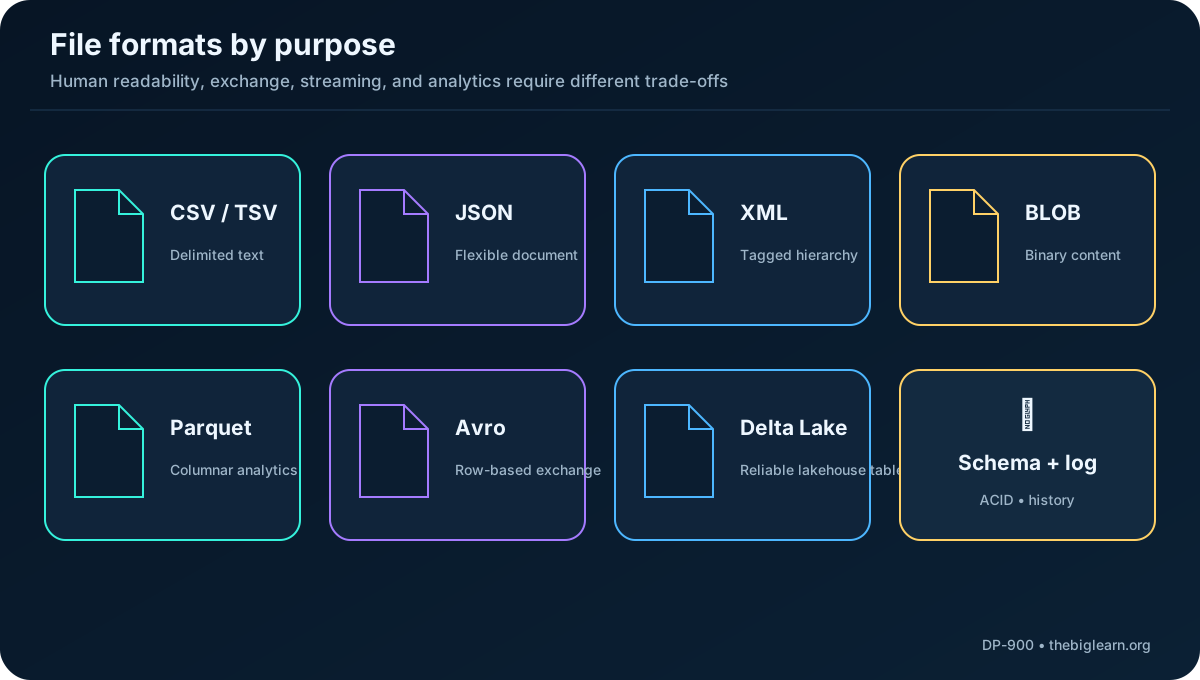
Format selection depends on who reads and writes the data, whether people need to inspect it, and whether compact storage and fast processing are more important than readability. A format suited to data exchange might be inefficient for analytics, while a columnar format might be awkward for a streaming producer.
Topic summary
Centralized cloud file storage improves scale and reliability, while format choice determines interoperability and processing efficiency.
8. Delimited and fixed-width text
Delimited text separates fields and rows with agreed characters. Comma-separated values (CSV) commonly uses commas between fields and line breaks between records; a header row can name the columns. Tab-separated values (TSV), space-delimited data, and fixed-width records are alternatives.
These formats are portable and readable, but escaping delimiters, character encoding, null values, dates, and data types require explicit conventions. Fixed-width files avoid delimiter ambiguity but waste space and are less adaptable to schema changes.
Topic summary
Delimited text is excellent for broad interchange, provided producers and consumers agree on encoding, delimiters, headers, and data types.
9. JSON, XML, and binary files
JSON expresses nested objects and collections with relatively little syntax, making it common for APIs, configuration, and event messages. Extensible Markup Language (XML) uses elements and attributes enclosed by tags. XML is more verbose but remains important in established enterprise systems and standards.
Text formats map bytes to characters through encodings such as Unicode. Binary formats store bytes that an application must interpret, such as a JPEG image, audio stream, video, archive, or proprietary document. Data professionals often call these binary files BLOBs.
JSON and XML describe hierarchical data; binary formats prioritize application-specific representation rather than human readability.
10. Parquet: columnar analytics storage
Apache Parquet is a columnar format and a de facto standard for modern lakehouses. A file is divided into row groups, and values from each column are stored together within a group. Metadata describes the chunks, allowing an engine to skip irrelevant data and read only the requested columns.
Columnar layout enables efficient compression and encoding, particularly when adjacent values share characteristics. Parquet also handles nested data. It is optimized for analytical scans, not for people to read in a text editor or for frequent single-record updates.
Topic summary
Parquet reduces analytical I/O by organizing and compressing data by column.
11. Avro and Delta Lake
Apache Avro is row-based. Each file contains a header that describes the schema in JSON and binary blocks containing the records. Keeping each record together makes Avro useful for data exchange, streaming, compact serialization, and minimizing network bandwidth.
Delta Lake is an open-source table format built on Parquet. A transaction log records table changes and adds ACID transactions, reliable updates, schema management, versioning, and time travel over files in a data lake. Parquet provides the data files; the Delta log provides table history and transactional coordination.
Topic summary
Avro favors row-oriented exchange; Delta Lake turns Parquet files into reliable, versioned lakehouse tables.
12. What a database adds
In professional data work, a database is a dedicated system for storing, managing, and querying records. Beyond persistence, it can provide indexes, constraints, concurrency control, security, backup, recovery, and query optimization. These capabilities distinguish a database management system from a directory of files.
Topic summary
A database manages records and their behavior, not only the bytes that store them.
13. Relational databases, keys, normalization, and SQL
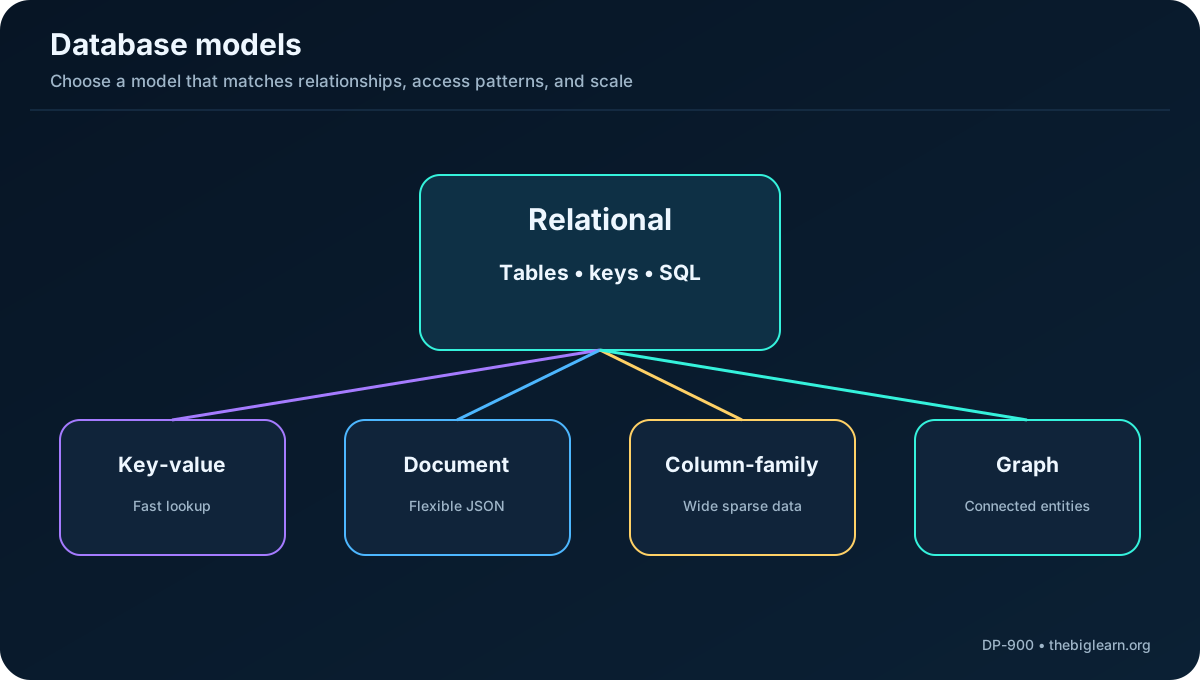
A relational database stores structured entities in tables. A primary key uniquely identifies each row, and a foreign key references a row in another table. These relationships let an order identify its customer without repeating the full customer record.
Normalization separates related entities to reduce duplication and update anomalies. It improves transactional consistency, although analytical schemas may deliberately denormalize data to accelerate queries. Structured Query Language (SQL) is based on ANSI standards, so its core ideas are similar across database products even when implementations add extensions.
Figure 3 - Database models optimize different shapes and access patterns.
Topic summary
Relational databases use tables, keys, constraints, normalization, and SQL to preserve structured relationships.
14. Four common nonrelational models
Nonrelational databases do not require a relational schema and are often grouped under the term NoSQL, even though some offer SQL-like query languages. They are selected for flexible schemas, distribution, specialized relationships, or very high scale.
Model
Representation
Good fit
Key-value
A unique key maps to an arbitrary value
Sessions, caching, profiles, fast lookups
Document
The value is a queryable JSON document
Catalogs and entities with variable attributes
Column-family
Rows contain related groups of columns
Large sparse datasets and distributed workloads
Graph
Entities are nodes and relationships are edges
Fraud paths, social relationships, recommendations
Topic summary
NoSQL is a family of models; match key-value, document, column-family, or graph storage to the dominant query pattern.
15. Transactional processing, OLTP, and CRUD
A transaction is a small, discrete business event, such as paying for an order or transferring money. Online Transaction Processing (OLTP) systems support live line-of-business applications and can handle millions of events while keeping data available with low latency.
OLTP databases are optimized for both reads and writes. Applications create, retrieve, update, and delete records - the CRUD operations - while the database protects integrity under concurrent activity. Schemas are often normalized so each transaction touches a small number of precise records.
Topic summary
OLTP records current business events through fast, reliable reads and writes.
16. ACID transaction guarantees
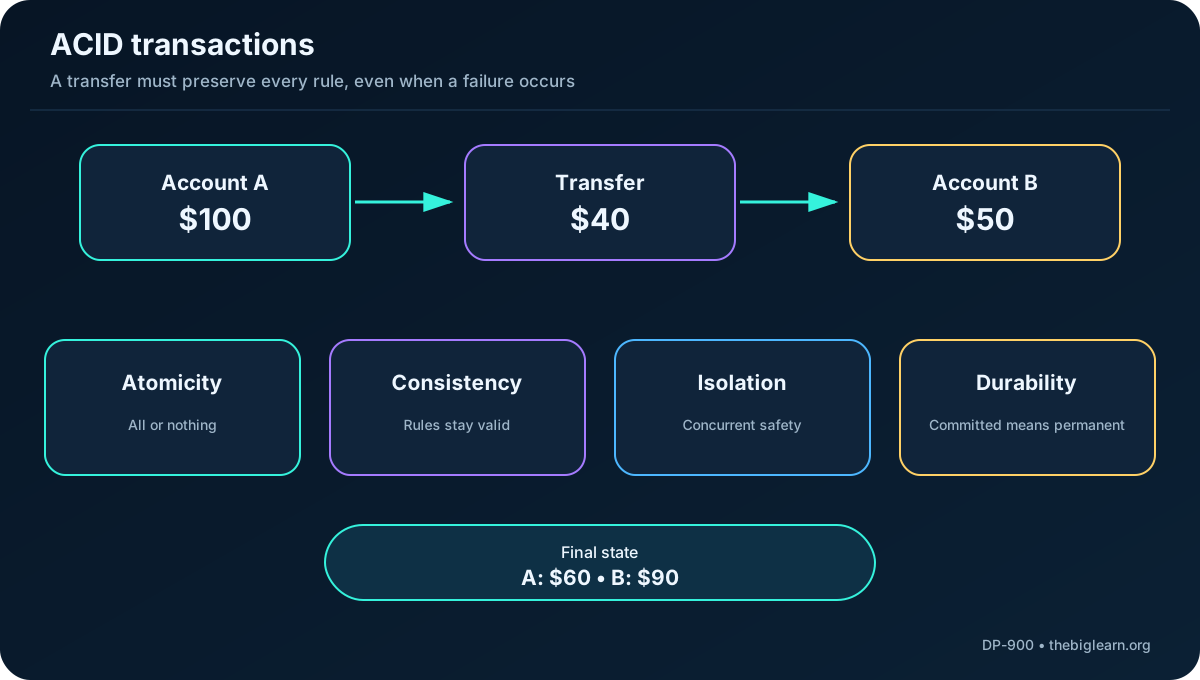
Consider transferring $40 from Account A, initially $100, to Account B, initially $50. The correct result is $60 and $90, and no observer should see a permanently partial transfer.
Property
Guarantee in the transfer
Atomicity
Debit and credit succeed together or both roll back
Consistency
Rules remain true and the total balance stays $150
Isolation
Concurrent readers do not combine before-and-after values
Durability
After commit, the new balances survive a restart
Figure 4 - ACID prevents partial, invalid, mixed, or lost transaction states.
Topic summary
ACID makes a transaction indivisible, valid, isolated from interference, and permanent after commit.
17. Analytical processing, ETL, and ELT
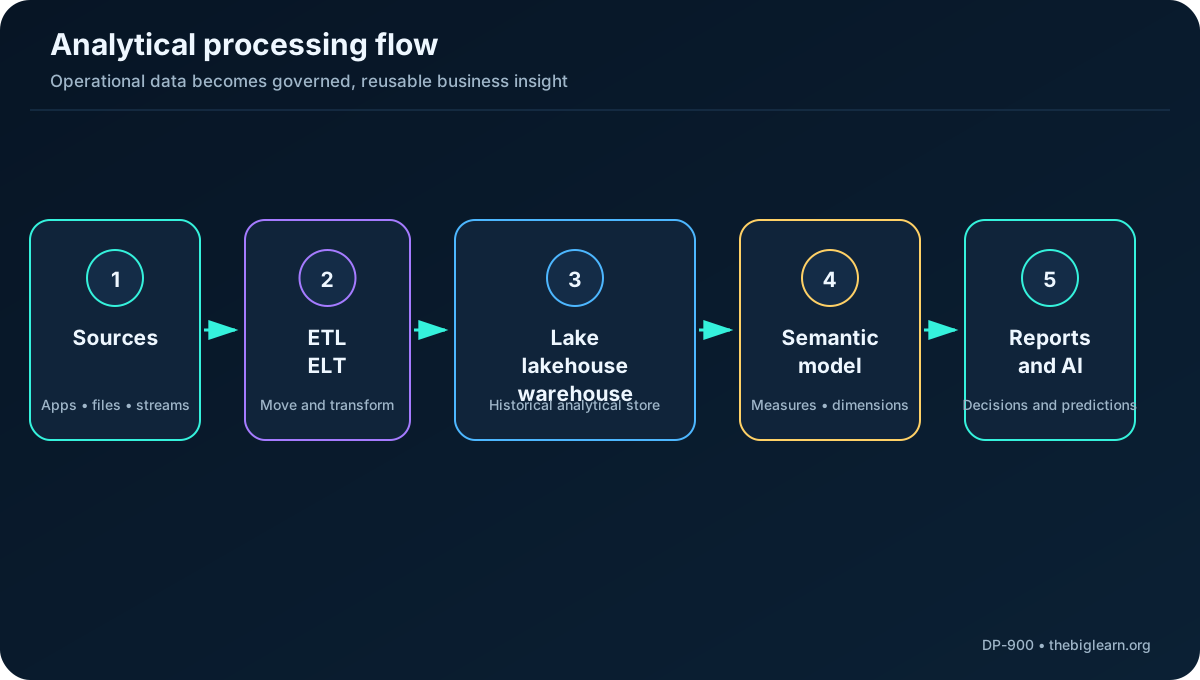
Analytical systems are read-mostly and hold historical data or business metrics. They may analyze a single snapshot or a time series of snapshots. Operational data is commonly extracted, transformed, and loaded (ETL), or extracted and loaded before transformations are applied (ELT), a pattern common in modern lakehouses.
Ingest operational files, events, and database records.
Clean, standardize, join, and enrich the data before or after loading.
Organize data into lakehouse or warehouse tables.
Build aggregations and semantic definitions.
Deliver reports, visualizations, dashboards, data science, and AI workloads.
Figure 5 - Analytics separates operational capture from historical analysis.
Topic summary
ETL transforms before loading; ELT loads first and uses the destination platform for transformation.
18. Data lake, warehouse, and lakehouse
Store
Core characteristic
Typical use
Data lake
Scalable file-based storage for raw and curated data
Exploration, data science, diverse formats
Data warehouse
Relational schema and SQL engine optimized for reads
Governed reporting and business intelligence
Data lakehouse
Lake flexibility plus reliable tables and relational query semantics
Unified engineering, analytics, and AI
Analytical schemas often denormalize data from OLTP sources. Some duplication can reduce joins and improve read performance. This is a deliberate trade-off: transactional models optimize updates and integrity, while analytical models optimize broad scans, aggregations, and reporting.
Topic summary
Lakes prioritize flexible files, warehouses prioritize relational analytics, and lakehouses combine both approaches.
19. OLAP, semantic models, facts, dimensions, and users
An Online Analytical Processing (OLAP) model - now commonly called a semantic model and historically called a cube - stores or defines aggregations for fast analysis. Numeric measures from fact tables are evaluated across dimension tables such as date, customer, product, and geography. Hierarchies allow drill-down from region to city to address and drill-up in the opposite direction.
semantic models are a common example. Data scientists may explore files directly in a lake, data analysts may query warehouse tables and build visualizations, and business users typically consume curated metrics through reports and dashboards.
Topic summary
Semantic models translate stored data into consistent measures, dimensions, hierarchies, and business-ready analysis.
20. Modern platforms and the medallion architecture
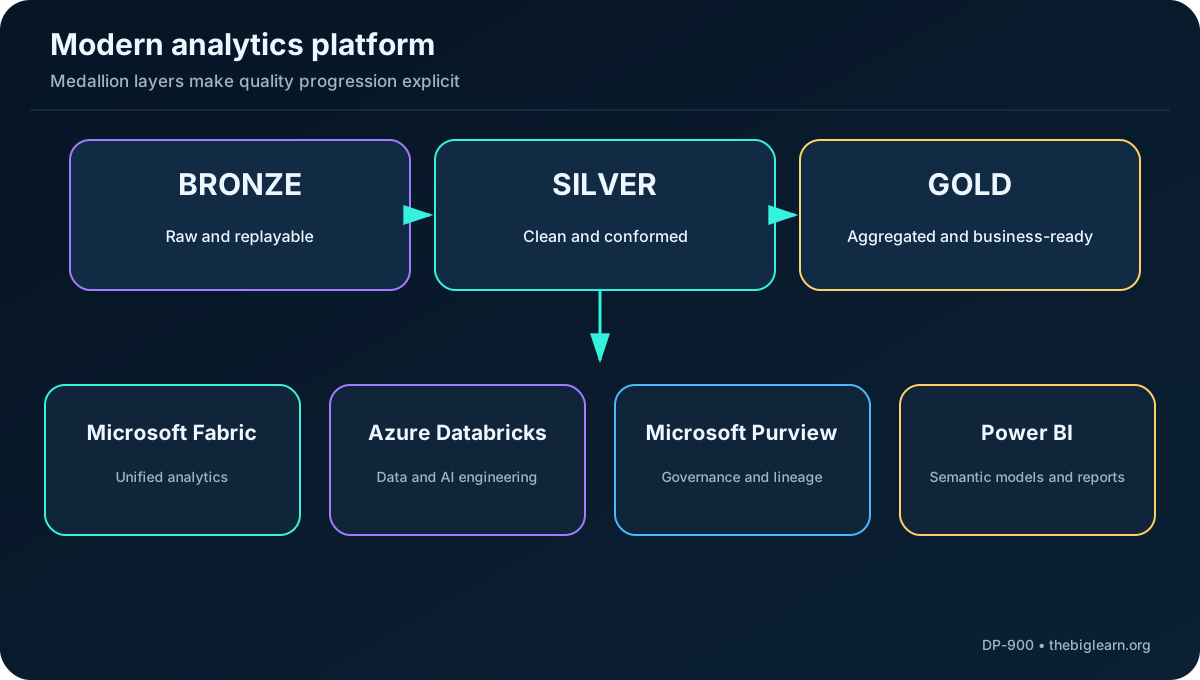
is a unified SaaS analytics platform that brings storage, data engineering, warehousing, data science, real-time capabilities, and reporting into a shared environment. supports large-scale data engineering and data science and uses Delta Lake as a standard table format. supplies unified data security, governance, and compliance across sources. provides semantic modeling, visualization, and business intelligence experiences.
A medallion architecture creates explicit quality boundaries. Bronze retains raw source records for traceability and reprocessing. Silver contains cleansed and conformed data with duplicates removed and types standardized. Gold contains aggregated, business-ready models for reports and analytics. and also provide Copilot experiences for natural-language exploration.
Figure 6 - Modern platforms apply engineering, governance, and consumption around medallion quality layers.
Topic summary
Fabric and Databricks process analytics, Purview governs data, serves business insight, and medallion layers make quality progression explicit.
21. Integrated retail scenario
A retailer records orders and inventory changes in a normalized relational OLTP database. Product images are kept in blob storage, flexible catalog attributes in JSON documents, and application events in Avro. The analytical platform ingests these sources into Bronze, standardizes customers and products in Silver, and publishes sales and inventory measures in Gold.
Parquet and Delta Lake support efficient lakehouse tables. A semantic model defines revenue, margin, units, dates, stores, and products for . Data scientists can use lakehouse files for forecasting, while business users view dashboards. helps discover, classify, protect, and govern the participating sources.
Topic summary
Real solutions combine storage models: OLTP for current events, object storage for files, document data for flexibility, and a governed analytical platform for trends.
22. Module assessment with explanations
Natural-language retrieval over documents: choose a vector database because it searches embeddings by semantic similarity.
Large images and videos: choose blob storage rather than a relational or column-family database.
High-volume transactional reads and writes: choose a relational OLTP database when relationships and ACID integrity are central.