Microsoft Defender for Cloud, ,,, security recommendations, AI security, multicloud workload protection, and Defender for DevOps
Suggested study time: 38 minutes • Beginner level • Aligned with the SC-900 study plan and official Microsoft Learn documentation
By João Ricardo Dutra••Complete material
1. Introduction: from punctual controls to continuous posture
Early security programs focused on protecting networks and installing isolated tools: antivirus on servers, firewalls at the edge, and periodic compliance checks. Cloud computing changed the scale and speed. Resources can be created by code in minutes, permissions are continuously altered, and applications come to depend on dozens of managed services. In this environment, an annual snapshot no longer represents the real risk. Thus arose the need to continuously assess the security posture while simultaneously protecting running workloads.
This evolution benefits organizations and society because essential digital services depend on correct configurations and quick responses to threats. An exposed administrative port, a public bucket, or an identity with excessive privileges can create risks even when there is no malware. By making these deviations visible and prioritizable, posture management helps prevent incidents; by detecting malicious behavior in workloads, threat protection reduces the impact when prevention is not enough.
Microsoft Defender for Cloud brings together these two perspectives. It answers different questions: 'How is the environment configured?' and 'Are there signs of attack or suspicious behavior in a protected workload?'. Throughout the chapter, you will see why is not an antivirus, why a is not the same as an alert, and why and need to work together.
Guiding question
A virtual machine without proper presents a posture problem. An attempt at malicious execution on this machine can trigger a threat alert. Both signals are important, but they represent different moments and responses.
Figure 1 - Complementary fronts of Microsoft Defender for Cloud.
2. What is Microsoft Defender for Cloud
Microsoft Defender for Cloud is a cloud-native application protection platform () that brings posture management, workload protection, and DevOps security into one service. It consolidates visibility and controls for Azure resources, connected AWS and Google Cloud environments, and integrated on-premises or other cloud resources. It also extends posture and runtime protection to applications. The product does not replace every identity, network, data, or operational control; it organizes signals, assessments, recommendations, and detections so teams can reduce exposure and respond to threats.
2.1 Three perspectives that connect
Perspective
Main question
Typical outputs
Which settings, exposures, and relationships increase the risk?
Recommendations, , attack paths, compliance, and governance.
What is happening inside or around the protected workloads?
Alerts, evidence, vulnerabilities, detections, and responses specific to each workload.
Can the risk be corrected before reaching production?
Discovered in repositories, pipelines, dependencies, secrets, and infrastructure as code.
2.2 Posture, vulnerability, alert, and incident
Term
Practical meaning
Safety posture
Aggregated state of settings, controls, disclosures, and adherence to best practices.
Incorrect configuration
Configuration that increases risk, such as an exposed port, disabled , or excessive privilege.
Vulnerability
Exploitable technical weakness, often associated with software, image, package, or operating system.
Actionable guidance generated from an assessment to reduce an identified risk.
Security alert
Sign of possible malicious activity or detected threat.
Incident
Investigative grouping of related alerts and evidence, usually addressed in security operations.
Central distinction: is predominantly preventive and continuous; adds workload behavior-oriented protection and detection. They overlap in context, but are not synonymous.
2.3 Unified portal and AI-assisted remediation
Defender for Cloud is integrated with the Microsoft Defender portal, bringing cloud posture and workload signals closer to the wider Microsoft security ecosystem. This unified experience reduces context switching: analysts can move from a or cloud alert to related evidence without treating Azure, hybrid environments, code, and other clouds as isolated silos.
Organizations onboarded to can use natural-language within Defender for Cloud to understand the context of a , summarize findings, estimate the effect of a fix, obtain guided remediation steps, and delegate work to the resource owner. Copilot accelerates analysis, but permissions, licensing or capacity, and human validation still govern what can be seen and changed.
3. Cloud Security Posture Management ()
is the discipline of discovering assets, assessing configurations and relationships, comparing the observed state with security standards, and guiding remediation. Defender for Cloud performs continuous assessments on the resources in scope and produces a consolidated view of the posture. The goal is not just to list problems, but to turn a large number of findings into understandable priorities.
3.1 The laying cycle
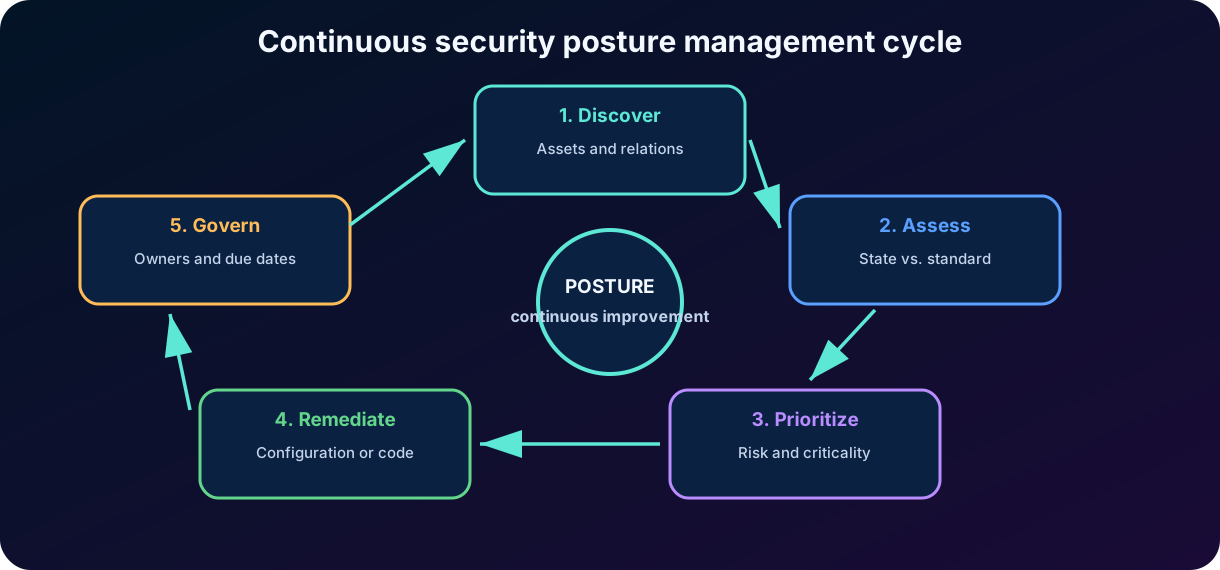
Figure 2 - Posture management is a continuous cycle.
The cycle begins by discovering assets and their relationships, continues by assessing the observed state against expected policies and standards, and then prioritizes findings according to exposure, criticality, and impact. Remediation changes the resource or the responsible control; a new assessment verifies the result, while governance, owners, deadlines, and exceptions keep the process continuous. Posture is therefore not a snapshot and does not end when a is closed: environmental changes, new threats, and new assets restart the cycle.
3.2 Discovery and context
Before protecting, it is necessary to know what exists. Defender for Cloud gathers connected assets, resource types, environment, subscription or account, open recommendations, plan coverage, and relevant relationships. In advanced capabilities, the platform considers internet exposure, permissions, sensitive data, vulnerabilities, and criticality to explain why two seemingly similar issues may have different priorities.
3.3 Expected state and observed state
An assessment compares a real property of the resource with a desired condition. For example: a storage account must prevent public access; a machine must have certain protection; a database must use a secure configuration. When the observed state does not meet the control, the platform records a finding and provides a . This logic turns abstract policies into concrete actions.
Think like an architect
The same mistake can have different risks. An open port on an isolated laboratory machine does not have the same impact as the same port on a critical server exposed to the internet. Context is what makes prioritization useful.
4. Policies, initiatives, standards and recommendations
Defender for Cloud uses security policies and standards to define how resources will be assessed. In Azure, many assessments rely on Azure Policy. a policy definition expresses a rule; an initiative groups related definitions; a security standard organizes controls and assessments into a coherent framework. The scope determines where the policy will be applied, such as a management group or subscription.
Figure 3 - Relationship between policy, evaluation, and .
4.1 Components of a
Component
What it informs
Description
What unsafe condition was found and why it matters.
Affected resources
Which assets failed the evaluation.
Severity and risk
Technical urgency and, when available, context of exposure and impact.
Correction steps
Suggested changes to reduce the risk.
Effect on the score
When applicable, how the correction can influence the score.
Compliance context
Which controls or standards relate to the finding.
4.2 Manual, automatic, and in-code correction
Some recommendations require manual changes; others may offer quick fixes, automation, or governance workflow. In mature environments, the cause is corrected in the infrastructure as code template or in the pipeline, preventing the problem from reappearing in each deployment. Legitimate exceptions must have justification, deadline, and responsible party, instead of remaining indefinitely ignored.
Trap of evidence
Policy defines the desired condition. indicates that a resource does not meet this condition and suggests correction. Alert indicates a possible threat. Do not confuse these three concepts.
5. : measuring trend and priority
aggregates security findings into a measure that makes it easier to track posture. In general terms, a higher score represents lower identified risk and greater implementation of the evaluated controls. The value is useful for communicating trends, comparing scopes, and guiding improvements, but it does not certify that the environment is invulnerable. New assets, new recommendations, and model changes can alter the score even without operational deterioration.
5.1 How to interpret correctly
Use punctuation as a guide, not as an isolated goal.
Observe which recommendations support the value and which critical assets are involved.
Prioritize impact and exposure, not just easy points to recover.
Track trends over time and explain scope changes.
Do not directly compare scores of different products or domains without understanding the model.
5.2 Classic and risk-based experience
The current documentation distinguishes scoring experiences in the Azure portal and in the Microsoft Defender portal. The latest Cloud experience incorporates risk and asset criticality factors to provide a more contextual view. For SC-900, retain the stable principle: the score summarizes posture and improves as relevant recommendations are addressed; it does not replace risk analysis, alerts, or investigation.
Incorrect interpretation
Correct interpretation
"100 points mean no risk."
It means maximum adherence to the set evaluated in that model and scope, not absolute guarantee.
“Every grants the same number of points.”
Weight and eligibility depend on the model, the control, and the context.
“The score detects attacks in real time.”
Threat detection and alerts belong to workload protection and security operations.
"A drop in the score always indicates deterioration."
Scope changes, new assessments, or multi-cloud expansion can also change the value.
Phrase to memorize: answers 'how strengthened is the assessed posture?'. Alerts answer 'are there signs of possible malicious activity?'.
6. Prioritization of risks and attack paths
Extensive lists of recommendations can paralyze teams. Risk-based prioritization combines the severity of the finding with the asset context: internet exposure, privileges, vulnerabilities, data sensitivity, business criticality, and possibility of . Thus, the platform highlights issues with a higher likelihood of exploitation and greater potential impact.
6.1
An is a sequence of relationships and weaknesses that can allow an attacker to advance to a critical asset. A conceptual example: vulnerable public service -> identity managed with excessive privilege -> access to sensitive vault or bank. Each isolated link may seem moderate; together, it forms a compromise route. Path analysis helps to fix points that interrupt multiple routes at the same time.
6.2 Recommendations Governance
Governance transforms discovery into execution. Recommendations can be assigned owners, deadlines, monitoring rules, and completion criteria. This discipline prevents important findings from remaining open without an owner. In large organizations, the central team defines policies and priorities, while product teams fix the resources under their responsibility.
Context factor
Why does the priority increase
Public exhibition
It increases the possibility of an exploitation attempt.
Critical asset
Failure can interrupt an essential process or cause a significant impact.
Sensitive data
Compromise can lead to leakage and regulatory obligations.
Elevated privileges
Allows for expanded access and .
Explorability
Known and accessible weakness tends to require a faster response.
Relations with other assets
A resource can serve as a bridge to more valuable targets.
Defender Advanced capabilities such as risk prioritization, attack paths, and governance are associated with the Defender plan. The exact set of features may evolve; always check the current documentation and licensing.
6.3 Advanced exploration, data posture, and AI posture
Advanced Defender capabilities complement the list. Cloud Security Explorer lets teams ask graph-based questions about assets and relationships. Data security posture management () discovers datastores that contain sensitive information and highlights exposure or weak protection. Governance assigns recommendations to resource owners and tracks due dates, while attack-path analysis shows how separate weaknesses can combine into a route toward a valuable asset.
AI security posture management () applies the same contextual approach to . It builds an AI Bill of Materials () containing discovered models, applications, services, data connections, and related components; evaluates their configuration; produces AI-specific recommendations; and uses attack-path analysis to show how an exposed AI application could lead to sensitive data. is associated with Defender , although availability and licensing can change.
Figure 7 - AI security combines posture management with runtime threat protection.
7. Inventory, incorrect configurations, and vulnerabilities
7.1 Asset Inventory
The inventory provides an overview of connected resources and their security health. It allows filtering by environment, resource type, subscription or account, open recommendations, coverage, and other properties. The utility is not just in counting machines: the inventory helps find unknown assets, unprotected resources, critical workloads, and risk concentrations.
7.2 Misconfiguration is not a software vulnerability
Category
Example
Typical treatment
Incorrect configuration
Public storage, exposed port, or disabled .
Change configuration, policy, or architecture.
Vulnerability
Package with known on server or container image.
Update, fix, remove dependency, or apply mitigation.
Exposure of a secret
Token or credential found in repository or pipeline.
Revoke, rotate, remove, and prevent recurrence.
Active threat
Suspicious behavior detected in protected workload.
Investigate, alert, contain, eradicate, and recover.
7.3 Software and images
Depending on the enabled plans, Defender for Cloud can present software inventory and vulnerability assessments of machines and images. In containers, image analysis helps identify vulnerable packages before or after deployment. On servers, protection and scanning integrations expand the understanding of the operating system and installed applications.
7.4 Asset criticality
Criticality represents the value of the asset to the business or to the attack chain. a database that supports payments should receive different treatment than a temporary resource without real data. The classification can use technical context and information provided by the organization. Without this context, teams tend to fix what is easy, not what is most important.
Practical question
Do you know which resources exist, which are exposed, which contain sensitive data, and which have no coverage? If the answer is 'no,' the first problem is visibility.
8. Benchmarks, standards, and regulatory compliance
Defender for Cloud represents benchmarks and regulatory standards as security standards associated with scopes. The Microsoft Cloud Security Benchmark () is applied as the default reference when Defender for Cloud is enabled and provides principles and technical guidance for cloud environments. Its controls map to widely used frameworks such as CIS, NIST, and PCI DSS, helping teams reuse evidence and remediation work. Other standards can be added as needed, depending on licensing and environment.
8.1 Control, evaluation, and evidence
A standard contains controls; controls group related assessments. The compliance panel shows which assessments can be automatically checked and which resources are compliant or non-compliant. Some requirements depend on process, documentation, or human judgment and cannot be decided solely by telemetry. Therefore, a high percentage on the panel does not automatically equate to formal certification.
Concept
Description
Security benchmark
Technical baseline of good practices, like .
Regulatory standard
Structure associated with legal, sectoral, or certification requirements.
Control
Objective or logical group of related requirements.
Evaluation
Checking a condition in resources in scope.
Automatic compliance
Result that the platform can determine based on the observed configuration.
Manual or shared responsibility
Part that requires process, human evidence, or action by more than one party.
8.2 Compliance is not synonymous with safety
Organizations can add standards such as ISO 27001, 2, NIST SP 800-53, and PCI DSS to the regulatory compliance dashboard. One remediation may improve several mapped controls at once—for example, requiring for privileged accounts can support identity and access requirements across multiple frameworks. The dashboard reports the assessments that Defender for Cloud can evaluate; it does not replace the remaining organizational evidence.
Compliance helps demonstrate adherence to requirements, while security seeks to continuously reduce risk. A feature can meet a specific control and still present another risk; an organization can implement excellent security and still need to produce formal evidence. The panel supports assessment and preparation, but does not replace independent auditing or legal and governance work.
Trap of evidence
Defender for Cloud helps assess and monitor compliance. It does not automatically grant certifications to an organization.
9. Hybrid and multicloud environments
Companies rarely operate on a single platform. Defender for Cloud connects Azure subscriptions, AWS accounts, and Google Cloud projects to provide a centralized view. On-premises resources and servers from other clouds can be integrated, often through , which projects these servers as manageable resources in the Azure control plane.
Figure 4 - Consolidated visibility for Azure, AWS, GCP, and on-premises environments.
9.1 Connectors and assessments
Cloud connectors establish the necessary trust and permissions to read configurations, collect context, and, as planned, enable protections. Various capabilities are : they use provider APIs to assess resources without installing software on each asset. Runtime protections and specific resources may require agents, extensions, sensors, or additional integrations.
9.2
enables servers outside of Azure to be represented and managed as Azure resources. This facilitates policy assignment, inventory, and enabling of Defender for Servers capabilities. Arc does not “move” the machine to Azure; it creates a management and telemetry bridge. The exact coverage depends on the integration method and the enabled plan.
9.3 Consistency and particularities
A unified view does not eliminate differences between providers. Services, identities, networks, and accountability models vary. Defender for Cloud applies common principles but uses connectors and assessments tailored to each platform. Architects must consider permissions, costs, regions, , and limitations of each integration.
10. Cloud Workload Protection Platform ()
gathers specific protections for running workloads. While seeks to reduce the likelihood of compromise through secure configurations and relationships, monitors signs and behaviors that may indicate attack, abuse, or exploitation. In Defender for Cloud, the Microsoft Defender plans add threat protection capabilities for specific resource types.
Figure 5 - Specialized planes protect different types of workloads.
10.1 Alerts and context
When a detection identifies suspicious activity, Defender for Cloud can generate an alert with affected resource, severity, description, evidence, and response recommendations. Alerts can be forwarded to security operations platforms and correlated with other signals. The quality of the response depends on coverage, telemetry, configuration, and the human investigation process.
10.2 Prevention, detection, and response
Phase
Examples of capacity
Prevention
Hardening, vulnerability assessment, recommendations, and exposure reduction.
Detection
Signal analysis, anomalous behavior, threat intelligence, and specific telemetry.
Investigation
Asset context, evidence, relationships, history, and enrichment.
Answer
Correction, containment, automation, isolation, or integration with incident flow.
Key concept Enabling does not mean that all workloads have advanced threat protection. plans are enabled by resource type and have their own licensing.
11. Main workload protection plans
11.1 Defender for Servers
Protects Azure virtual machines, -enabled servers, and, according to integration, machines in other clouds. It may include integration with Microsoft Defender for Endpoint, vulnerability assessment, operating system recommendations, monitoring, and other capabilities that vary by plan. It can also reduce the attack surface with () access to VM management ports and workload-aware application controls that help form allow lists and block lists. For on-premises environments, is the recommended path to achieve more complete integration.
11.2 Defender for Containers
It covers the container chain: registries, images, clusters, and runtime. The posture checks Kubernetes configurations and exposure; the image assessment identifies vulnerabilities; the runtime protection looks for suspicious activities. The goal is to reduce risks from the image to the production cluster.
11.3 Defender for Databases
Database plans use specific signals from protected services to detect suspicious activities, anomalous accesses, and possible attacks. The family can cover different technologies and providers. It does not replace basic controls such as strong authentication, , segmentation, backups, and least privilege.
11.4 Defender for Storage
Protects storage accounts against suspicious patterns, anomalous accesses, and, in compatible capacities, malicious content. It is important to distinguish between runtime threat and posture: preventing improper public access is a configuration; detecting a suspicious access sequence is a detection.
11.5 Other plans
Plan or area
Example of focus
Defender for App Service
Threats against applications hosted on Azure App Service.
Defender for Key Vault
Suspicious operations and anomalous attempts involving safes.
Defender for Resource Manager
Suspicious activities in the control plan and administrative operations.
Defender for APIs
Discovery of posture and protection of compatible APIs, according to plan and availability.
Defender for AI Services
Runtime threat protection for applications and agents, including AI-specific attacks.
Continuous update Names, plans, and capabilities change frequently. In the examination, prioritize the principle: each plan adds protection oriented to the type of workload.
11.6 Protecting workloads
Defender for AI Services is the plan for threats aimed at supported AI services. It monitors activity in real time and combines Microsoft Threat Intelligence with Azure AI Content Safety signals to identify injection, sensitive-data leakage through model responses, data poisoning, credential or token theft, and anomalous use. These are runtime detections, which differ from the configuration and exposure findings produced by .
AI threat alerts can be correlated in Microsoft Defender with signals from endpoints, identities, and applications. The Data and AI security dashboard provides a consolidated view of AI resources, risks, and protection status. The exam distinction is straightforward: discovers and hardens workloads; Defender for AI Services detects and responds to threats while those workloads run.
12. DevOps Security Management and
Production problems often originate in the repository or in the pipeline: a secret was committed to the code, a dependency has a vulnerability, a template creates a public resource, or a service connection has excessive privileges. incorporates security into the development cycle so that risks are found and fixed before deployment.
Figure 6 - Integrated security from the repository to the runtime.
12.1 Integrations and discoveries
Defender for Cloud can connect environments such as GitHub, Azure DevOps, and GitLab, according to current support, offering inventory and posture of organizations, repositories, and pipelines. Findings may include exposed secrets, vulnerable dependencies, infrastructure as code issues, and insecure DevOps environment configurations. The value increases when the discovery is correlated with the cloud resource that the code deploys.
12.2 Correction at the point of origin
Fixing only the resource in production may resolve the symptom and allow the next deployment to restore the failure. The ideal flow fixes the template, the policy, or the pipeline and validates the change before the merge. Notes in pull requests and automated gates help, but they should be calibrated to avoid indiscriminate blockages and alert fatigue.
12.3 DevOps platform security
In addition to examining the code, the DevOps posture assesses organizations, repositories, builds, variables, secure files, and service connections. Broad tokens, secrets accessible by all pipelines, and weak reviews can allow supply chain tampering. Therefore, also protects the mechanism that produces the software.
Code for cloud
The most valuable correlation answers: which line, template, or pipeline generated the exposed resource? This turns a into recurrence prevention.
12.4 for AI development pipelines
AI applications use repositories and delivery pipelines just like other software, so they inherit the same supply-chain risks. Defender for DevOps can reveal an AI service API key committed to a repository, an open-source dependency with a known vulnerability, or an infrastructure-as-code template that deploys an AI endpoint without adequate authentication. Pull-request annotations and assigned workflows help developers correct the source before production, where the same flaw would be more expensive and harder to contain.
13. Foundational , Defender and paid plans
Defender for Cloud combines features included at no additional plan cost with licensed advanced capabilities. Foundational is enabled for integrated environments and provides basic posture elements, such as core recommendations, centralized policy, , and multi-cloud visibility. Defender adds advanced context, prioritization, and governance features. plans are contracted to protect specific types of workloads.
Layer
Objective
Conceptual examples
Foundational
Establish visibility and basic posture hygiene.
Policies, key recommendations, , and posture overview.
Defender for Servers, Containers, Storage, Databases and other plans.
DevOps Security
Reduce code risks at deployment.
Repository/pipeline posture, secrets, , and code-to-cloud correlation.
13.1 Cost and coverage assessment
The licensing decision must consider criticality, attack surface, regulatory requirements, operational maturity, and the ability to respond to alerts. Enabling everything without a process can generate cost and noise; enabling too little in critical workloads can leave gaps. Coverage inventory helps identify eligible resources that are not yet protected.
13.2 Viewing resources in the portal
Defender for Cloud experiences are available in the Azure portal and, progressively, in the Microsoft Defender portal, which unifies cloud posture with other exposure areas. The interface may change, but the concepts remain: overview, inventory, recommendations, compliance, coverage, alerts, and investigation.
Don't confuse 'free' with 'without operating cost'
Even included resources require people, governance, and correction. Likewise, a paid plan generates value only when alerts and recommendations are addressed.
14. Integrated practical scenario
A retail company runs applications on Azure, a Kubernetes cluster on AWS, on-premises servers, and repositories on GitHub. The security team receives hundreds of findings, does not know which assets are critical, and discovers vulnerabilities only after deployment. The goal is to create visibility, prioritize risk, and protect workloads without losing the connection with the code.
14.1 Solution design
Need
Proposed capacity
Expected result
Unify environments
Connect Azure, AWS, and on-premises servers; enable where necessary.
Consolidated inventory and posture.
Establish baseline
Apply and organizational policies to the appropriate scopes.
Consistent evaluations and recommendations.
Prioritize
Classify critical assets and enable advanced Defender features.
Focus on displays and attack paths with greater impact.
Protect runtime
Enable plans for servers, containers, storage, and critical databases.
Alerts and specific protection per workload.
Correct at the source
Connect GitHub and handle , secrets, and dependencies.
Less recurrence of insecure configurations.
To govern
Assign responsibilities, deadlines, and trend metrics.
Findings stop being a list without an owner.
14.2 Recommended sequence
1. Define scopes, owners, and critical assets before comparing scores. 2. Connect environments with the minimum necessary set of permissions and validate coverage. 3. Review inventory, fundamental recommendations, and public exposure. 4. Create a backlog prioritized by risk, criticality, and effort. 5. Enable Defender and plans on workloads that justify advanced protection. 6. Integrate repositories and pipelines to fix root causes in the code. 7. Forward alerts to the security operations process and test response. 8. Track , risk, compliance, and remediation time without turning a single metric into an absolute goal.
14.3 Example of prioritization
The platform identifies a vulnerable container image used by a public service that accesses customer data through an identity with excessive privileges. Although there are dozens of more severe vulnerabilities in isolated labs, this set forms a more relevant . The company fixes the dependency in the repository, reduces the identity's permission, rebuilds the image, and validates the runtime. ,, and act as a single chain.
Expected result
The goal is not to 'eliminate recommendations,' but to systematically reduce the probability and impact of incidents in the most important processes.
15. Conceptual traps and review for the SC-900
Misleading statement
Correction
“ detects malware.”
reviews posture; threat detections appear as protection alerts.
"A proves that an attack occurred."
normally indicates configuration, exposure, or vulnerability to fix.
" and are the same thing."
manages posture; protects workloads against specific threats and risks.
“ migrates the server to Azure.”
Arc connects the server to the management plane; the machine stays where it is.
"The compliance panel grants certification."
He helps to evaluate controls and evidence; certifications require a formal process.
“Activating Defender for Cloud automatically protects all types of resources.”
Advanced coverage depends on the enabled plans and eligible resources.
"Correcting production is enough."
If the cause is in or the pipeline, the failure may return in the next deployment.
15.1 Quick review
Defender for Cloud brings together , workload protection, and DevOps security.
The posture cycle continuously discovers, assesses, prioritizes, remediates, and verifies; governance maintains owners, deadlines, and exceptions.
Policies and standards assess resources; failures generate actionable recommendations.
helps track posture, but does not guarantee absence of risk.
is the standard benchmark for cloud security assessments.
Inventory shows assets, health, coverage, and context for prioritization.
connects servers outside of Azure to the management plan.
plans protect servers, containers, databases, storage, and other workloads.
DevOps Security Management connects code risks to the deployed environment.
inventories and hardens workloads; Defender for AI Services protects them at runtime.
Test strategy
Identify the noun in the question: posture, , score, compliance, alert, workload, local server, or pipeline. Then select the most specific capability.
16. Conclusion
Microsoft Defender for Cloud turns cloud security into a continuous process. discovers assets, assesses configurations, compares the environment with benchmarks, generates recommendations, and helps prioritize remediations. adds detection and protection specific to workloads. and Defender for AI Services extend those two perspectives to . brings remediation to the repository and pipeline, while and multicloud connectors extend visibility beyond a single subscription or provider.
In my assessment, the greatest value of the product is not in generating more alerts, but in connecting context. A vulnerability, a privileged identity, and a public exposure become much more important when they impact the same critical asset. This perspective helps teams move away from volume-based remediation and adopt risk-based remediation. For the SC-900, understanding the boundaries between posture, protection, and compliance is more important than memorizing each menu item.
17. Review questions
1. Which capability of Microsoft Defender for Cloud continuously evaluates configurations and generates recommendations to improve posture?
A) Azure Bastion B) C) D) Microsoft Purview Audit
Answer with explanation
Correct answer: B. discovers and assesses resources, identifies configurations and risk exposures, and produces posture recommendations.
2. Which statement best describes ?
A) It is proof that there are no threats. B) It is an antivirus for servers. C) It is an aggregated measure that helps monitor posture and the implementation of recommendations. D) It is a regulatory certification.
Answer with explanation
Correct answer: C. The score helps to track posture and trend, but it does not guarantee absence of risk nor does it replace alerts and investigation.
3. A company needs to include on-premises servers in the view and protection of Defender for Cloud.
Which technology is normally used for more complete integration?
A) B) Microsoft Intune C) Azure Front Door D) Microsoft Priva
Answer with explanation
Correct answer: A. connects servers outside of Azure to the management plane and enables integration with policies and capabilities of Defender for Servers.
4. Which scenario is more related to than to ?
A) Identify that a storage account allows public access. B) Measure adherence to the . C) Detect suspicious activity on a protected server. D) Assign a responsible party to a .
Answer with explanation
Correct answer: C. protects running workloads and generates alerts for potential threats; the other examples are mainly related to posture and governance.
5. Which capability inventories applications and models, checks whether they are securely configured, and produces posture recommendations?
A) AI security posture management () B) AI threat protection C) Cloud Security Explorer D) Defender for Servers
Answer with explanation
Correct answer: A. creates an , evaluates the posture of discovered workloads, and surfaces recommendations and attack paths. AI threat protection focuses on malicious activity during runtime.
18. Essential Glossary
Term
Definition
Continuous management of the security posture of cloud environments.
Protection platform for running workloads, with specific capabilities by technology.
Aggregate indicator used to monitor posture and progress of corrections.
Actionable guidance resulting from a security assessment.
Microsoft Cloud Security Benchmark, baseline of security principles and guidelines.
Sequence of relationships and weaknesses that can lead to a higher value asset.
Technology that connects resources outside of Azure to the Azure management plan.
Assessment conducted by APIs and snapshots, without a permanent agent on the resource.
Security integration into the software development and delivery lifecycle.
Infrastructure as Code: definition of infrastructure through versioned and automatable files.
Unified cloud-native application protection platform that combines posture, workload, and development security.
Security posture management for workloads, including discovery, recommendations, and attack paths.
Inventory of models, applications, services, data connections, and related components.
AI-powered security assistant that helps analyze, summarize, remediate, and delegate recommendations through natural language.
19. Official references for further study
Microsoft Learn - Study guide for Exam SC-900: Microsoft Security, Compliance, and Identity Fundamentals.
Microsoft Learn - Microsoft Defender for Cloud overview.
Microsoft Learn - What is Cloud Security Posture Management ().
Microsoft Learn - in Microsoft Defender for Cloud.
Microsoft Learn - Security policies in Microsoft Defender for Cloud.
Microsoft Learn - Review security recommendations.
Microsoft Learn - Risk prioritization.
Microsoft Learn - Cloud asset inventory.
Microsoft Learn - Regulatory compliance standards and Microsoft Cloud Security Benchmark.
Microsoft Learn - Review workload protection in Microsoft Defender for Cloud.
Microsoft Learn - Defender for Cloud DevOps security overview.
Microsoft Learn - AI security posture management in Microsoft Defender for Cloud.
Microsoft Learn - AI threat protection and Defender for AI Services.
Microsoft Learn - in Defender for Cloud.
Microsoft Learn - Plan multicloud protection and -enabled servers.
Note about update
The documentation was reviewed in August 2026. Cloud products evolve continuously; for prices, regions, plans, preview status, and available features, refer to the most recent official documentation.