Compliance, Retention, Auditing, and Investigations
Compliance Manager, , Data Lifecycle Management, Records Management, eDiscovery, Microsoft Purview Audit, and AI-assisted compliance workflows
Suggested study time: 62 minutes • Beginner level • Aligned with the SC-900 study guide and official Microsoft Learn documentation
By João Ricardo Dutra••Complete material
1. Introduction: from documentary obligation to continuous compliance
For much of corporate history, compliance meant filing documents, filling out checklists, and preparing folders for periodic audits. The digitalization of business has altered this model. Emails, messages, cloud files, meetings, identities, and administrative actions began to generate evidence at a continuous pace, making an approach based solely on manual controls and annual reviews insufficient.
The growth of data protection laws, sectoral rules, internal investigations, and litigation has also increased the need to demonstrate not only that a policy exists, but that it has been implemented, tested, monitored, and documented. In this context, compliance platforms have emerged that are capable of connecting requirements, controls, retention, auditing, and investigation.
For the reader, understanding this ecosystem helps answer practical questions: how long should a document be kept? Who changed a setting? How to preserve evidence when an investigation begins? How to prevent communication between areas with a conflict of interest? How to measure progress in relation to a standard? These decisions protect organizations, citizens, clients, and the very reliability of digital services.
Central idea
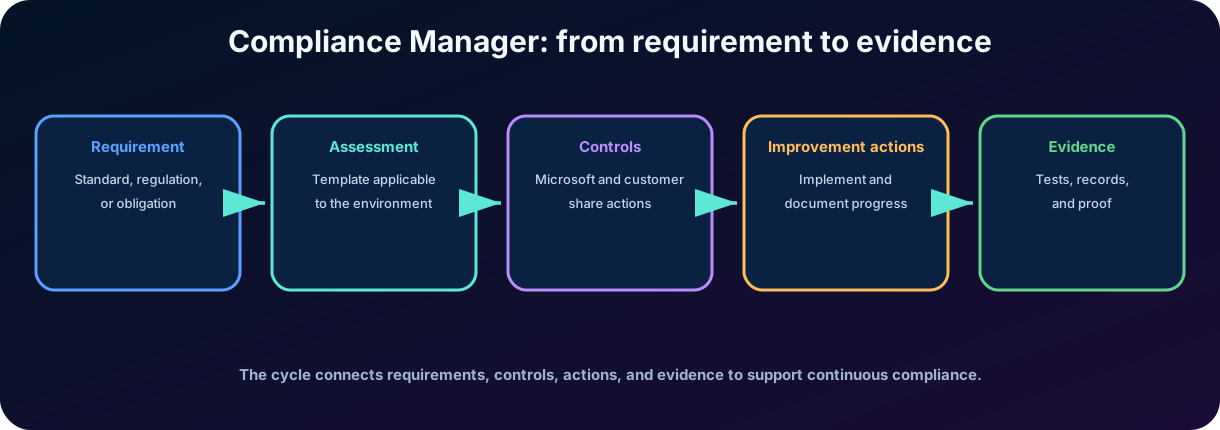
Compliance is not a permanent state. It is a continuous process of interpreting requirements, implementing controls, producing evidence, monitoring activities, and correcting deviations.
Figure 1 - The Compliance Manager organizes requirements, controls, actions, and evidence in a continuous flow.
2. Overview of Microsoft Purview compliance solutions
Microsoft Purview brings together security, compliance, risk, and data governance capabilities. In this chapter, the focus is on solutions that help assess obligations, communications, manage the information lifecycle, preserve evidence, and investigate activities.
2.1 How the Microsoft Purview portal organizes solutions
Core includes shared capabilities such as Audit, , Settings, and Workflows.
Risk & Compliance includes , Compliance Manager, eDiscovery, , and Records Management.
Data Governance includes Data Catalog, Data Lifecycle Management, and Data Policy.
Data Security includes ,, and .
Solution
Main question
Expected result
Compliance Manager
What requirements and actions need to be met?
Assessments, controls, evidence, , and risk-based scoring.
Are there communications that indicate a breach of conduct or regulatory rule?
Alerts, contextual review, and corrective actions.
Which groups can or cannot communicate and collaborate?
Separation between segments due to conflict of interest or confidentiality.
Data Lifecycle Management
What should be kept or eliminated and for how long?
and labels.
Records Management
Which items require formal treatment as records?
Immutability, file plan, retention by event, and controlled disposition.
eDiscovery
Which data should be preserved, searched, reviewed, and exported?
Cases, , searches, , and evidence packages.
Audit
Who did what, when, where, and in which service?
Searchable records for investigation, security, and compliance.
Do not confuse Compliance Manager organizes compliance posture. Retention governs the lifecycle. eDiscovery preserves and collects evidence for a case. Audit records activities. The solutions complement each other, but they are not interchangeable.
2.2 and the investigation flow
Microsoft Purview correlates signals related to identities, activities, and data to identify patterns that may represent insider risk, while retaining privacy controls and human review. A policy defines the indicators and users in scope; signals can generate alerts, which are triaged and, when necessary, escalated to cases for investigation. It does not replace Audit, eDiscovery, or : Audit provides activity records, eDiscovery preserves and collects content for a case, and enforces protection controls. Its detailed relationship with data protection and is presented in Chapter 9.
3. Microsoft Purview Compliance Manager
The Compliance Manager is a solution to assess and manage compliance in cloud and multicloud environments. It offers pre-built assessments for standards and regulations, allows custom assessments, and centralizes tracking of the work needed to reduce data protection risks and demonstrate progress.
The tool does not interpret laws on behalf of the organization nor does it replace legal experts, auditors, or risk managers. Its role is to transform abstract requirements into an operational framework: controls, actions, responsible parties, tests, evidence, notes, and status.
Fundamental elements
Regulation or standard: source of requirements, such as a law, certification, norm, or internal policy.
Regulatory model: reusable structure that maps requirements to controls and actions.
: grouping of controls applicable to a standard and the selected scope.
: requirement that defines a technical, organizational, or procedural measure.
: recommended activity to implement, test, or document a .
Evidence: documentation, capture, report, or other material that supports the conclusion about the action.
: risk-based indicator that measures progress in .
Shared responsibility
The Compliance Manager differentiates controls managed by Microsoft, controls managed by the customer, and shared controls. This distinction follows the cloud responsibility model.
4. Evaluations, regulatory models, and controls
An is the space in which an organization monitors its position regarding a regulation, standard, or policy. It brings together controls, in-scope services, actions, scoring, and evidence. A company can maintain separate assessments for different regions, business units, or environments, as long as the structure represents the actual scope.
Regulatory models provide a reusable foundation. Some are provided by Microsoft; others can be customized for internal policies or specific requirements. The availability of models depends on licensing. In current scenarios, it is also possible to build custom models from regulatory documents, but all mapping must be reviewed by responsible experts.
Compliance Manager provides more than 360 regulatory templates for quickly creating assessments. It also includes templates for emerging AI regulations and standards, helping organizations evaluate controls for AI applications, monitor AI interactions, and reduce data-loss risks without separating AI governance from existing obligations.
Type of
Main responsible
Conceptual example
Managed by Microsoft
Microsoft
Operation and audit of service cloud infrastructure controls.
Managed by the client
Client organization
Set internal policy, configure retention, train users, or review accesses.
Shared
Microsoft and client
Microsoft protects the platform; the customer configures and governs the use of the service.
The same can appear in several assessments. The Compliance Manager seeks to avoid artificial counting of repeated work, linking actions and controls so that progress is monitored more consistently. Even so, the organization must verify whether an implementation truly satisfies each regulatory context.
Test point
The presence of a in the catalog does not mean it has been implemented. It is necessary to assign responsibility, status, test, gather evidence, and review periodically.
5. and
are recommended tasks that help implement controls. They can be technical, such as changing a configuration, or non-technical, such as creating a procedure, conducting training, or producing documentation. Each action can have an owner, deadline, notes, evidence, and test status.
When an action offers an automatic test, the Compliance Manager can use signals from connected services to verify if the configuration has been implemented. Automation reduces manual work, but it does not eliminate the need to validate scope, exceptions, and operational effects.
How to interpret the
The adds points for considering risk factors and type of action. The score helps prioritize efforts, compare progress, and show areas that need attention. It starts from a data protection baseline and changes as actions are implemented and tested.
The total combines your points, earned from customer-managed completed by the organization, with Microsoft-managed points for actions Microsoft has already completed as the cloud service provider. The initial score is calculated from the data protection baseline.
Correct interpretation
Incorrect interpretation
Progress indicator and risk-based prioritization.
Automatic certificate of legal compliance.
View that depends on the scope, actions, and registered evidence.
Proof that no requirement was violated.
Management tool to support audits and continuous improvement.
Independent auditor substitute or legal opinion.
Score that can change with product, configuration, and requirements.
Universal number comparable between companies without context.
Examination trap A high score does not guarantee compliance. It represents progress in completing recommended actions and should be interpreted within the scope of the .
6.
Microsoft Purview helps detect, capture, review, and address communications that may be inappropriate or inconsistent with internal and regulatory requirements. Scenarios include sharing confidential information, offensive language, harassment, threats, conflicts of interest, and communications subject to financial market rules.
Policies can evaluate messages in supported channels, including Exchange, Teams, and other integrated services. Current features may also cover interactions with generative artificial intelligence applications, depending on connectors, licensing, and availability.
Coverage includes text and image-based messages from Microsoft Teams, Viva Engage, Outlook, Copilot, Copilot Chat, and connected non-Microsoft sources such as WhatsApp. monitoring can analyze and responses from Copilot, apps built with Microsoft Copilot Studio, and AI applications connected through Microsoft Entra or Microsoft Purview connectors.
Privacy by design
Pseudonymization of user names by default in review experiences.
Role-based access to separate administration, analysis, and investigation.
Reviewers need to be explicitly defined in the policy.
Review and remediation actions are audited.
Policies must have a legitimate purpose, proportional scope, and documented governance.
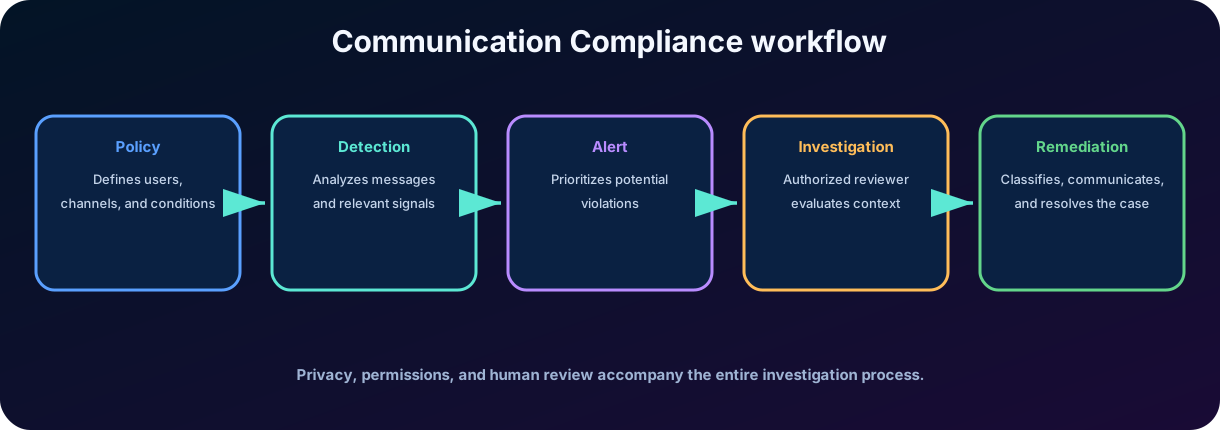
Figure 2 - converts policy matches into a controlled flow of analysis and remediation.
7. Policies and investigations in
A policy defines who is in scope, which channels will be analyzed, what conditions generate a match, and what percentage of the content will be presented for review. Microsoft provides templates for common scenarios, and organizations can create custom policies.
Component
Function
Users and groups in scope
They determine which communications can be evaluated.
Channels
They define origins such as email, chat, collaboration, or connected applications.
Conditions
They can use types of confidential information, classifiers, words, domains, and other signals.
Sampling
Controls the amount of content presented for review.
Reviewers
People authorized to analyze alerts and corresponding items.
Actions
Notify, flag, document, remove messages in supported scenarios or escalate to eDiscovery.
Alerts are generated when messages meet the conditions. The reviewer analyzes the context, classifies the item, records notes, and chooses a proportional action. In more serious cases, the content may be escalated to a formal investigation in eDiscovery.
7.1 Configure, investigate, remediate, and maintain
Configure the applicable requirements, users, channels, classifiers, and policies.
Investigate policy matches with alerts, filters, user history, issue management, and document review.
Remediate by resolving or tagging the item, notifying the user, escalating it, marking a , or removing a supported Teams message.
Maintain the program with dashboard indicators, exported logs, and events written to the .
The embedded experience can summarize a flagged message and its attachments in the context of the classifier conditions and answer follow-up questions. Integration with can correlate inappropriate communications with broader workplace risk signals.
Difference for
controls the use and transfer of sensitive data. analyzes risks present in communications and provides a review flow for conduct or regulatory obligations. A message can trigger both solutions for different reasons.
8.
is a compliance solution that restricts communication and collaboration between groups and users. It is common in organizations subject to conflict of interest rules, segregation of duties, or the need to prevent teams involved in sensitive operations from exchanging information.
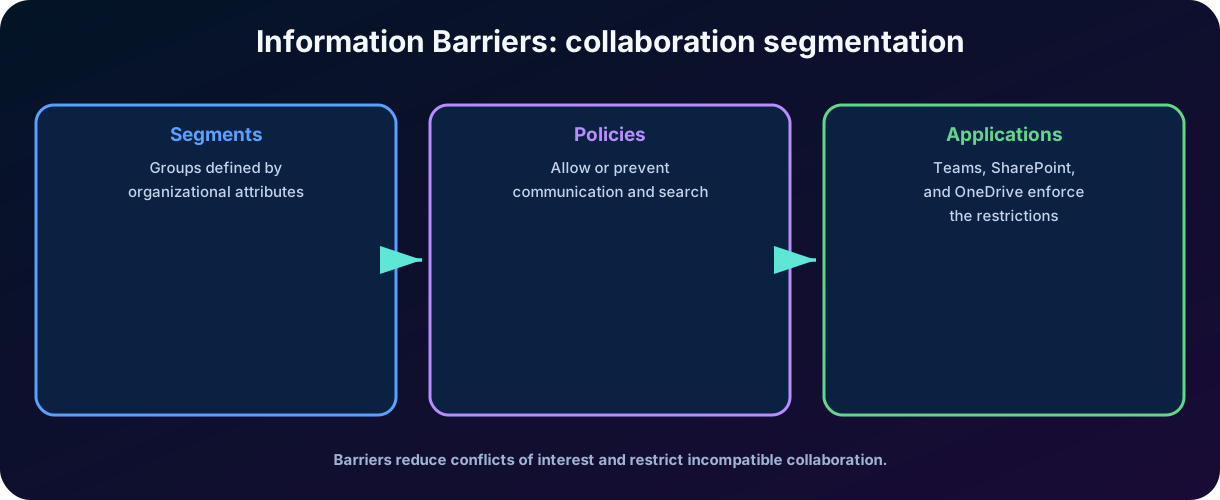
The model starts with segments defined by account attributes, such as department, location, role, or team. Next, policies such as block or allow determine which segments can interact. Once configured and activated, the policies are applied to the supported services.
Figure 3 - Segments and policies turn separation requirements into technical constraints on communication and collaboration.
Concept
Objective description
Segment
Set of users or groups defined by organizational attributes.
Blocking policy
Prevents communication between specified segments.
Permission Policy
Allows a segment to communicate only with defined segments.
Application
Process that distributes and implements policies in the services.
Organization mode
Define capabilities as support for one or multiple segments per user.
Operational principle Use the fewest number of policies necessary and test the effects. A poorly designed rule can prevent legitimate collaboration, meetings, file sharing, or people discovery.
9. Data Lifecycle Management
Microsoft Purview Data Lifecycle Management provides features to retain necessary content and eliminate content that has lost value. Retention meets regulatory, contractual, historical, and operational obligations; controlled deletion reduces cost, exposure to attacks, and liability associated with data kept without need.
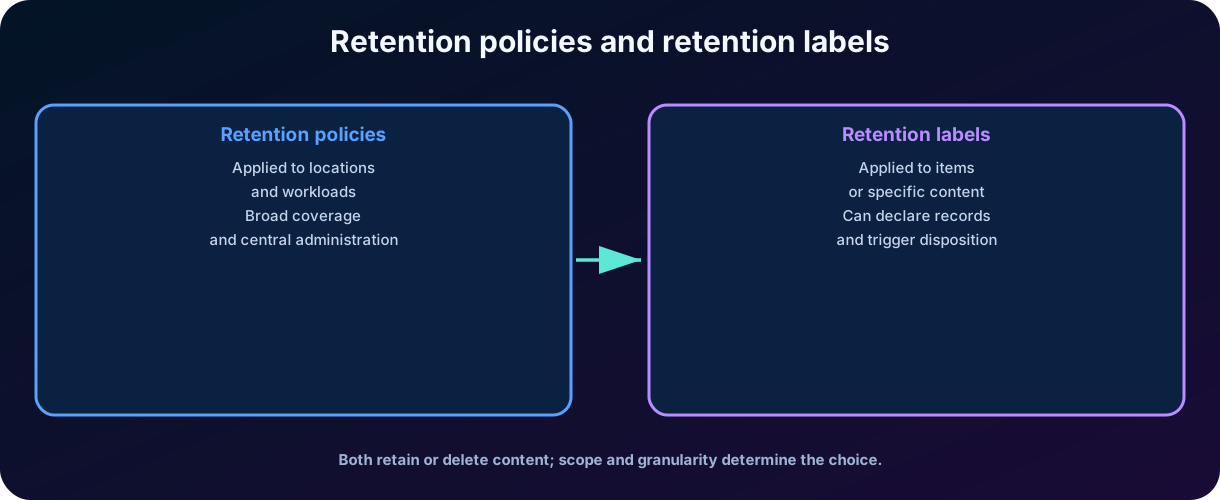
are the central mechanism for applying broad rules in workloads such as Exchange, SharePoint, OneDrive, Teams, and other supported services. allow more granular decisions at the item level.
Supported workloads include SharePoint, OneDrive, Microsoft Teams, Viva Engage, and Exchange. Content normally remains in its original location and stays usable; if a person edits or deletes an item subject to retention, the service preserves a copy in a protected location that is hidden from most users and available to eDiscovery.
Possible results of a retention setup
Retain for a period and allow deletion after that period.
Retain for a period and automatically delete at the end.
Retain indefinitely as long as there is an obligation.
Delete content after a period, without requiring a minimum retention.
Start the period from creation, modification, labeling, or business event, depending on the feature. When users edit or delete content subject to retention, the service preserves a copy in a protected location. In SharePoint and OneDrive, this may involve the Preservation Library; in Exchange, the Recoverable Items area; in Teams messages and other services, hidden retention locations maintain the necessary evidence.
Retention is not backup
Backup seeks to restore data after failure or loss. Retention applies the obligation to preserve or delete content according to policy. One resource does not automatically replace the other.
10.
A applies the same setting at the level of a container or location. Examples: all messages from certain mailboxes, all documents from certain sites, or all messages from selected channels.
Static and adaptive scopes
Static scopes are defined directly in the policy and change when an administrator alters the selection. Adaptive scopes use attributes and queries to dynamically include or remove users, groups, or sites. This reduces maintenance in organizations with frequent changes, but requires reliable attributes and careful testing.
Characteristic
Application unit
Container or location.
Inheritance
Content in the container receives the configuration automatically.
Typical use
Broad and uniform rule by workload, group, user, or site.
Application by the user
Normally invisible and automatic.
Limitation
Lower granularity for items with different business values in the same container.
A policy can be configured to retain, delete, or retain and then delete. The exact behavior varies by workload, item type, and when the period starts. In a real deployment, it is essential to validate the specific documentation for Exchange, SharePoint, OneDrive, Teams, and other services.
Example
A policy can retain all mailbox content from a regulated area for seven years. It does not require each user to label each message.
11. and label policies
apply rules at the level of documents, emails, or other supported items. They allow different content in the same location to have distinct periods, triggers, and outcomes. A contract can be retained by one rule, while a temporary draft on the same site follows another.
Figure 4 - act broadly by location; labels act with item-level granularity.
Create, publish, and apply
Creating the label defines retention and deletion behavior. Publishing the label through a policy makes it available to selected users and locations. The application can be manual, default for a location, or automatic based on information types, keywords, searchable properties, , and other supported mechanisms.
Element
Paper
Contains the rule applied to the item.
Publishing policy
Makes labels available for users and locations.
Automatic application policy
Finds content that meets conditions and applies the label.
Standard label
Applies a label to new items in a configured location, according to support.
Withholding per event
The period begins when a business event occurs, such as the termination of a contract.
Do not confuse classifies and can protect access. controls the lifecycle and can declare a . An item can receive both.
11.1 Additional lifecycle capabilities
Mailbox archiving supplies additional storage, including auto-expanding archives when the standard limit is insufficient.
Inactive mailboxes retain mailbox content after an employee leaves when the mailbox is placed on before the account is deleted.
can automatically apply according to dynamic risk signals from .
and responses from AI applications, including Copilot, are stored in the user's Exchange mailbox and can be retained or deleted with .
12. Records Management
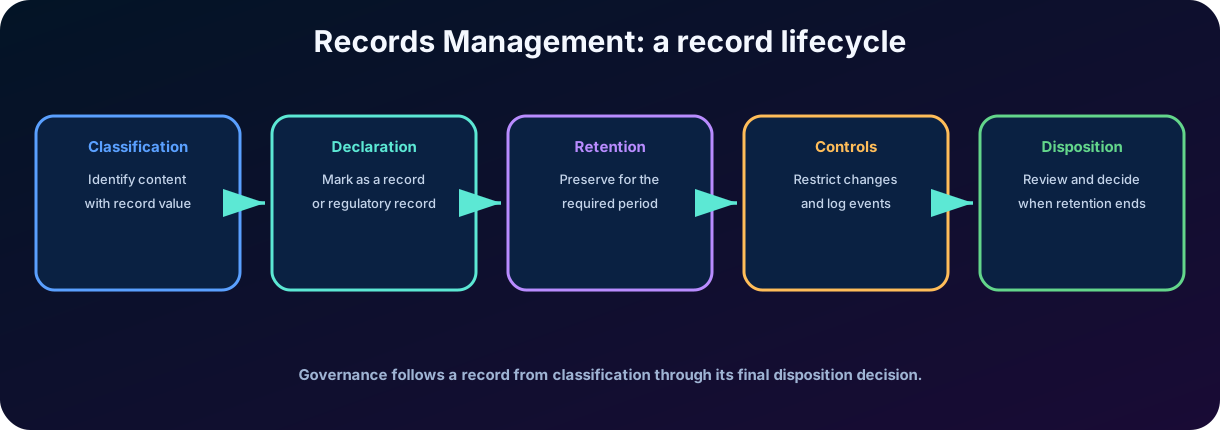
Records Management extends retention for content that must be treated as formal records. A represents evidence of business activity or decision and requires stricter controls on alteration, deletion, traceability, and disposition.
Figure 5 - Records Management connects classification, immutability, retention, and controlled disposition.
Main capabilities
Declare items as records or regulatory records by .
Organize labels and requirements in a file plan.
Apply withholding based on business events.
unlocking, editing, moving, or deleting according to the type of .
Perform disposition reviews before permanent deletion.
Maintain proof of disposition and auditable trail. Regulatory records receive stronger restrictions and should only be used when required. Improper configuration can prevent legitimate deletions or generate excessive retention. Therefore, legal, records managers, security, privacy, and should participate in the taxonomy.
Essential distinction
Every may be held, but not every held item is a . Records Management adds formal classification, immutability , and disposition process.
12.1 Regulatory records, events, and file plans
A regulatory has stricter and potentially irreversible controls: its label cannot be removed by any user, including a global administrator, and its retention period cannot be shortened after application. Because this option can have permanent consequences, it is disabled by default and must be enabled by an administrator through PowerShell.
Event-based retention starts the countdown from a business event such as an employee departure, product discontinuation, or contract expiration, rather than only from creation or modification.
lets designated reviewers approve deletion or extend retention before permanent disposal, while proof of disposition records how and when deletion occurred.
A file plan can import an existing retention schedule, centralize , and add metadata such as regulatory authority and business function.
Labels can be applied manually, automatically, as defaults for SharePoint libraries or folders, or through supported Outlook rules for email.
13. Precedence, conflicts, and legal
The same item may be subject to multiple policies, labels, and . resolves conflicts according to preservation principles: retention tends to prevail over deletion, and the longer period usually wins when multiple settings require preservation. Explicit and granular settings may take precedence in specific scenarios.
For the SC-900, it is more important to understand the logic than to memorize all the rules: the service aims to prevent a deletion setting from destroying content still required by another retention or investigation obligation.
Mechanism
Main purpose
Typical scope
Continuous governance of the life cycle.
Locations, users, groups, and workloads.
Granular governance by value or item type.
Document, email, or item.
eDiscovery
Preserve relevant content for a specific investigation.
Sources and consultations of the case.
Exchange Litigation
Preserve mailbox content in a legal scenario.
Mailbox.
Backup/recovery
Restore content after incident or error.
It depends on the service and the continuity strategy.
Be careful when closing cases Closing or deleting an eDiscovery case may release associated . Before closing, confirm if any other obligation still requires preservation.
14. Microsoft Purview eDiscovery
Electronic discovery, or eDiscovery, is the process of identifying, preserving, collecting, reviewing, and delivering electronically stored information as evidence in legal, regulatory, security, or internal investigations. The quality of the process depends on a defensible scope, access , proper preservation, and documentation of decisions.
Microsoft Purview eDiscovery searches data in services such as Exchange Online, SharePoint, OneDrive, Teams, Groups, and other supported locations. The classic experience of Content Search, eDiscovery Standard, and eDiscovery Premium was retired in August 2025. The current experience is unified in the Microsoft Purview portal, with basic or premium capabilities enabled according to licensing and case configuration.
And the term custodian?
In investigations, a custodian is the person who owns or controls potentially relevant data. In the classic product model, custodians were central objects in the Premium flow. In the current experience, the case is the central unit, and people, groups, and locations are added as data sources. The legal concept remains valid, but technical management has changed.
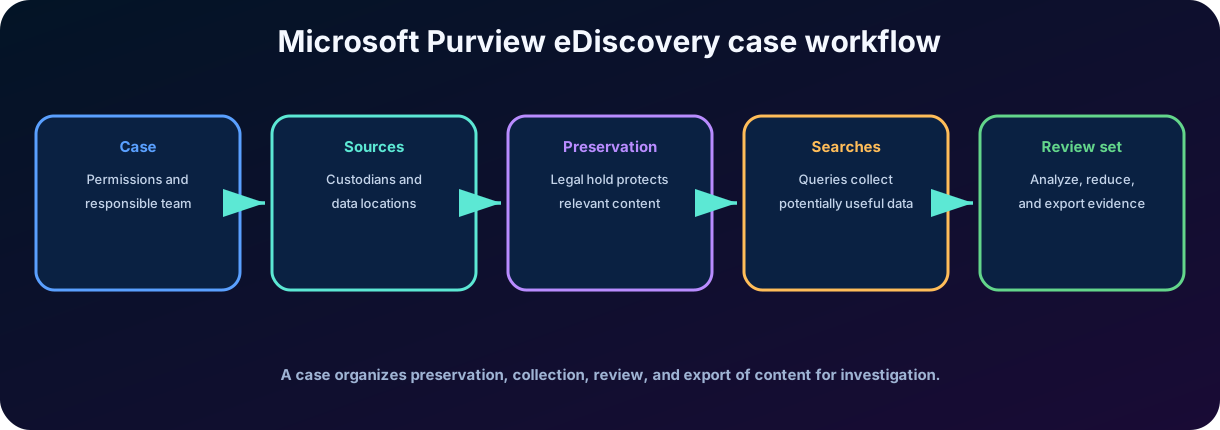
Figure 6 - The current case focuses on sources, preservation, search, review, and export.
15. Cases, permissions, data sources, and
A case brings together all the elements related to an investigation: members, roles, searches, data sources, ,, processes, and exports. Access must follow the principle of least privilege, because the content may include private communications, personal data, intellectual property, and confidential information.
Data sources
Data sources represent people, groups, and locations related to the case. By selecting a user or group, eDiscovery can identify mailboxes, OneDrive, sites, groups, and other associated locations. The investigator refines the selection to reduce unnecessary collection.
A preserves content to prevent permanent deletion while the investigation is active. It can be broad or based on a query. Preservation occurs in the source services, keeping versions or copies in protected locations. should be reviewed throughout the case to avoid excessive scope or loss of evidence.
Stage
question
Create case
Which fact, request, or alert justifies the investigation?
Set members
Who can administer, search, review, and export?
Add fonts
Which users, groups, sites, and mailboxes may contain relevant ?
Apply
Which content should be preserved and for how long?
Audit the case
Are the actions, changes, and exports documented?
Proportional preservation Preserving everything can increase cost and privacy risk; preserving too little can destroy evidence. The scope must be justifiable and reviewed.
16. Searches, , analysis, and export
Searches locate items by keywords, properties, participants, dates, item types, and other conditions. A well-designed query reduces and facilitates a defensible review. Samples and query reports help adjust the scope before collecting large volumes.
Results can be exported directly or added to a when premium features are available. The copies items and metadata to Microsoft-managed storage, isolated by case, offering filters, viewers, tags, near-duplicate detection, email threading, themes, and other analyses.
Premium processing can add optical character recognition to searchable image text, preserve entire Teams and Viva Engage conversation threads, decrypt supported messages and attachments protected with Microsoft Purview Message or sensitivity labels, and use predictive coding to estimate relevance. eDiscovery can also search for and delete harmful or high-risk email, chat, Copilot, and AI application data across the organization.
Component
Use
Search
Identify responsive content in the sources.
Preserve relevant data at the source.
Gather a processed copy for analysis and marking.
Tag
Classify items by relevance, privilege, subject, or decision.
Analytics
Reduce volume and group similar or related content.
Export
Generate a package of items and reports for delivery or external analysis.
Process
Monitor search, collection, analysis, and export tasks.
Exports must preserve metadata and reports necessary for the chain of custody. The team needs to document who initiated the process, which filters were used, what was included, how the package was transferred, and who received access.
Search is not isolated proof
An item found needs to be interpreted in context. Authenticity, completeness, chronology, legal privilege, and chain of custody continue to be responsibilities of the investigative process.
16.1 in eDiscovery
The embedded experience can summarize documents, meeting transcripts, attachments, and other review-set evidence, then answer contextual follow-up questions. It can also translate natural-language into Keyword Query Language (KeyQL) queries that investigators can review, save, and run. cases that require legal review can be escalated directly into a new eDiscovery case.
17. Microsoft Purview Audit
Microsoft Purview Audit offers an integrated solution to search for user and administrator activities across various Microsoft services. The captures thousands of operations, such as access, creation, deletion, sharing, configuration changes, administrative actions, and investigation events.
Audit helps security, IT, compliance, internal risk, and legal teams answer questions such as: who accessed a file? Who changed a policy? When was a message forwarded? Which administrator performed an action? At which IP address or application did the event occur?
Conceptual anatomy of an event
Field
Example of information
Actor
User, administrator, application, or service that performed the action.
Activity
Operation performed, such as access, download, deletion, or modification.
Date and time
Recorded moment, usually in UTC.
Service
Exchange, SharePoint, Entra, Teams, Purview, or another service.
Object
File, message, account, policy, site, or affected resource.
Context
IP, client, identifiers, result, and additional properties.
Searches can be filtered by period, users, activities, services, and other attributes. Results can be exported for analysis. Retention and the types of events available vary by license, service, and policy.
17.1 Ways to search and retrieve audit records
Use the audit search tool in the Microsoft Purview portal and export results to CSV for Microsoft Excel or Power Query.
Use the Audit Search Microsoft Graph API for programmatic access to the unified search experience.
Use the Search-UnifiedAuditLog Exchange Online PowerShell cmdlet for scripts and automated reporting.
Use the Office 365 Management Activity API to ingest audit records into and broader detection workflows.
Audit and monitoring
Audit records activities for investigation. It does not replace , real-time alerts, , or preventive controls, although these systems can consume audit events.
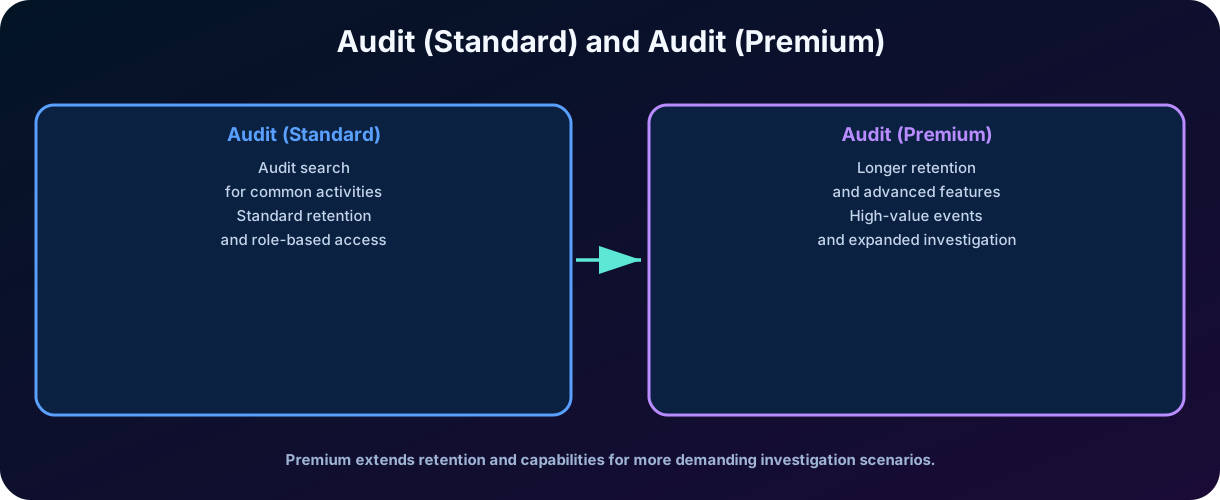
18. Audit (Standard) and Audit (Premium)
Figure 7 - Audit (Premium) includes the features of Standard and expands retention, events, and investigation.
Capacity
Audit (Standard)
Audit (Premium)
Yes
Yes
Portal search and export
Yes
Yes
Thousands of searchable events
Yes
Yes
General standard retention
180 days for supported events
Includes Standard
Default retention of Entra, Exchange, OneDrive, and SharePoint
According to standard capacity
One year for covered events and licensed users
Custom
No
Yes
Retention of up to ten years
No
With additional leave and policy; it is not retroactive
High-value events and insights
Limited
Expanded
Greater API access capacity
No
Yes
In Premium, custom policies can set retention by service, activity, or user and use priorities. Records prior to the creation of a ten-year policy are not preserved retroactively. For investigations, this reinforces the importance of planning retention before an incident.
18.1 Copilot audit logging
Copilot and responses are automatically written to the as CopilotInteraction events across supported apps, including references to the service and files involved. logging requires a Copilot owner to opt in; after it is enabled, Microsoft Purview processes and stores administrative actions, user actions, and Copilot responses, including data from Microsoft and non-Microsoft integrations, in the data region.
Exam trap
Audit (Premium) is not a separate product that replaces Standard; it includes the capabilities of Standard and adds more advanced retention, events, and investigation features.
19. Integrated practical scenario
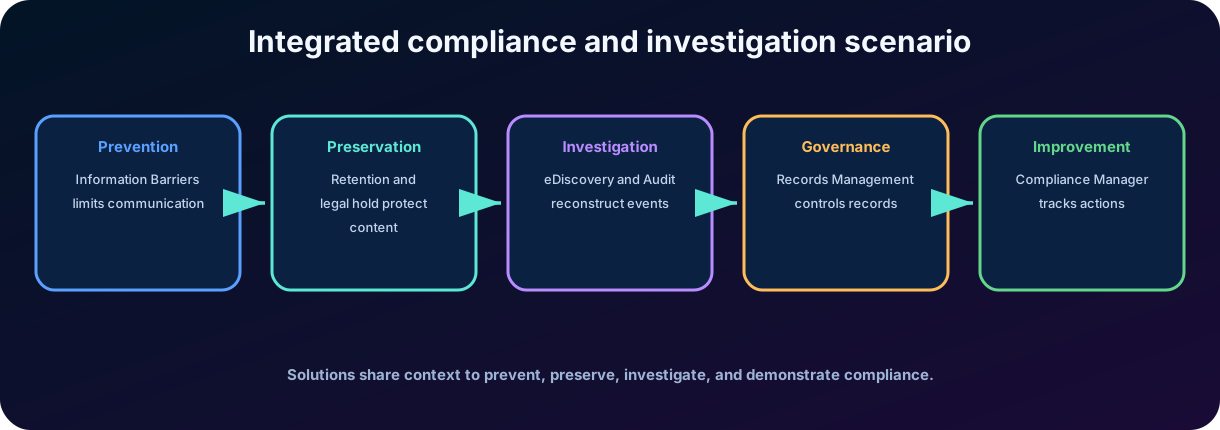
Consider a financial institution that is preparing an acquisition operation. The investment banking and market analysis teams need to be separated to avoid conflicts of interest. A message in Teams seems to contain project data sent to an unauthorized group. The organization needs to investigate without destroying evidence and without exposing content to unnecessary people.
Figure 8 - Different solutions contribute to prevention, preservation, investigation, and governance.
Step-by-step application
restrict communication between the defined segments and reduce new improper exchanges.
generates an alert because the message matches the confidential information or conflict of interest policy.
The reviewer confirms relevance and escalates the case to eDiscovery.
eDiscovery creates the case, defines members, adds users and locations as sources, and applies to preserve content.
Searches identify messages, files, and meetings; relevant items are added to the for analysis and tagging.
Audit reconstructs accesses, shares, changes, and administrative actions.
Retention and Records Management maintain mandatory records and allow controlled disposal at the end of the deadlines.
Compliance Manager records , responsible parties, and evidence generated after the investigation.
Result
The organization reduces immediate risk, preserves the chain of evidence, limits access to the investigation, and turns the conclusions into verifiable improvements.
20. Comparisons and pitfalls of the SC-900
Confused concepts
Difference
vs certification
Score measures progress in actions; it does not certify compliance.
vs
reviews communication and conduct; controls data movement.
vs
IB restricts communication between segments; defines permissions over resources.
Sensitivity vs.
Sensitivity protects/classifies; retention governs keeping and excluding.
vs label
Policy acts by location; label acts by item.
Retention vs eDiscovery
Retention is continuous governance; is preservation related to investigation.
eDiscovery vs Audit
eDiscovery locates and preserves content; Audit records activities.
Audit (Standard) vs Premium
Premium includes Standard and adds extended retention and investigation.
Classic custodian vs. current source
Custodian is a person of interest; the current experience centralizes sources and data in the case.
Records Management vs. inactive file
Records Management applies formal controls, immutability, and audited disposition.
Statements that deserve suspicion
“A of 100% ensures legal compliance.”
“ replaces and labels.”
"All retained content is automatically a ."
“Deleting a file removes the copy protected by retention or .”
“Audit (Premium) only changes the interface.”
“eDiscovery is just a search for keywords.”
“ should remain indefinitely, even after the obligation is closed.”
21. Quick review for the SC-900 exam
Term
Objective memorization
Compliance Manager
Evaluations, controls, , evidence, and score.
Risk-based progress; not a guarantee of compliance.
Detects and treats risks in communications.
Restricts communication and collaboration between segments.
Correlates identity, activity, and data signals; alerts can be triaged and escalated to cases with privacy controls and human review.
Data Lifecycle Management
Retains what is necessary and eliminates what has lost value.
Broad rule applied at the location or container level.
Granular rule applied at the item level.
Records Management
Manages records, immutability, file plan, and disposition.
eDiscovery
Preserves, searches, reviews, and exports in cases.
Prevents permanent deletion of relevant content.
Space for analysis, tagging, and analytics of collected items.
Audit (Standard)
Event search and standard retention.
Audit (Premium)
Extended retention, policies, events, and advanced investigation.
Final mind map Evaluate = Compliance Manager. Communicate responsibly = . Separate groups = . Retain and delete = Data Lifecycle. Formalize records = Records Management. Preserve and collect = eDiscovery. Reconstruct actions = Audit.
22. Conclusion
Modern compliance depends on an integrated set of capabilities. The Compliance Manager transforms requirements into assessments, controls, and actions. and reduce communication risks. Data Lifecycle Management and Records Management govern retention and disposition. eDiscovery preserves and organizes evidence. Audit provides the timeline of activities.
The main takeaway is that none of these solutions, on their own, proves compliance. An organization needs to interpret obligations, set scopes, assign responsibilities, test controls, protect the privacy of investigated individuals, maintain evidence, and review policies. Technology makes the process more consistent, but governance and human judgment remain indispensable.
In my , the greatest value of Microsoft Purview lies in connecting activities that previously existed in separate tools and teams. When legal, security, privacy, IT, and business share criteria and evidence, compliance ceases to be a rushed preparation for audits and becomes part of the organization's daily operations.
Next step on the trail
As a next step, review the topic summaries and complete timed SC-900 practice tests. Future modules extend data governance and discovery with Microsoft Purview and .
23. Review questions
Question 1: Which statement correctly describes the ?
A) It is an automatic legal certification. B) Measures progress in based on risk. C) Replaces external audits. D) Measures only the quantity of retained documents.
Commented answer
Correct answer: B. The helps prioritize and track actions, but it does not guarantee absolute compliance.
Question 2: Which feature is most suitable for applying the same retention rule to all
mailboxes of a group?
A) B) C) D)
Commented answer
Correct answer: A. operate at the site or container level and are suitable for broad rules.
Question 3: What is the main purpose of an eDiscovery ?
A) Increase the . B) Block communication between departments. C) Preserve relevant content to prevent deletion during an investigation. D) Encrypt all exported files.
Commented answer
Correct answer: C. The preserves content from case sources while the investigative obligation exists.
Question 4: What capability is characteristic of Audit (Premium) compared to Standard?
A) No event search. B) Extended retention and custom audit . C) eDiscovery replacement. D) Creation of sensitivity labels.
Commented answer
Correct answer: B. Audit (Premium) includes Standard and adds longer retention, policies, and advanced investigation features.
Question 5: Which solution detects offensive, harassing, or policy-breaking business communications?
A) Microsoft Teams B) C) Compliance Manager D) Data Lifecycle Management
Commented answer
Correct answer: B. evaluates supported communications for policy matches and gives designated reviewers a controlled investigation and remediation workflow.
Question 6: What happens when a declares content as a ?
A) It becomes public. B) It is immediately deleted. C) Restrictions are enforced, activities are logged, and proof of disposition is retained. D) Its is removed.
Commented answer
Correct answer: C. declaration adds restrictions and traceability throughout retention and preserves evidence of final disposition.
24. Essential Glossary
Term
Meaning
Grouping of controls for a standard, regulation, or policy.
Risk-based scoring to track .
Technical, organizational, or procedural measure related to a requirement.
Recommended task to implement or test a .
Solution to detect and address risks in communications.
Policies that restrict collaboration between segments.
Retention rule applied to location or container.
Retention rule applied to the item.
Formal content subject to controls.
Review before permanent deletion of records.
Electronically stored information used as evidence.
Preservation to prevent deletion during investigation.
Set processed for review, marking, and analysis.
Searchable repository of user and administrator activities.
Official references consulted
Microsoft Learn - Study guide for Exam SC-900: Microsoft Security, Compliance, and Identity Fundamentals. Skills measured as of July 28, 2026.
Microsoft Learn - Microsoft Purview Compliance Manager; Compliance Manager scoring; Working with .
Microsoft Learn - Microsoft Purview data compliance solutions.
Microsoft Learn - Microsoft Purview overview, policies, alerts, and cases.
Microsoft Learn - overview, planning, configuration, and investigation.
Microsoft Learn - overview and policy configuration.
Microsoft Learn - Data Lifecycle Management; and .
Microsoft Learn - Records Management, file plan and .
Microsoft Learn - eDiscovery overview, workflow, cases, data sources, , searches, and export.
Microsoft Learn - Audit solutions overview; Audit (Standard) and Audit (Premium).
Note about update
The classic eDiscovery experience was retired on August 31, 2025. Features, names, licensing, retention periods, and portals may change. For actual deployment, always check the current documentation and applicable legal obligations.