Conditional Access, RBAC, and Secure Resource Access
, Zero Trust signals, assignments, conditions, grant and ,, Microsoft Entra roles, Azure , scopes, least privilege, , Microsoft Entra Internet Access, and Private Access
Suggested study time: 41 minutes • Beginner level • Aligned with the Describe access management capabilities of Microsoft Entra module of the SC-900 exam
By João Ricardo Dutra••Full material
Introduction
Early corporate environments protected resources mainly with physical and network boundaries. Being connected to the internal network often meant receiving a high level of trust. With the expansion of the internet, cloud computing, remote work, and mobile devices, this assumption became fragile: legitimate users access resources from anywhere, while attackers can operate from inside a compromised account. The modern response was to move the access decision to a set of identity, device, risk, and context signals.
For the reader, mastering this topic means learning to turn a successful authentication into an access decision proportional to risk. For society, adaptive controls reduce fraud, leaks, and disruptions without forcing everyone to face the same level of friction in every situation. Instead of blindly trusting a location, the organization can explicitly verify each request and grant only what is necessary.
Throughout this chapter, three questions will guide the reading: who can sign in, what that identity can administer, and by which path the resource will be accessed. answers the first question with contextual policies; answers the second with roles and scopes; extends the third by converging identity and network security. This separation is the key to understanding the topic and getting scenario questions right on the SC-900.
1. From network trust to identity-driven access
In the traditional model, firewalls, internal segments, and concentrated protection at the network boundary. Once inside, the user often reached multiple systems. This design worked better when applications and workstations were in the same building or data center. In the cloud, resources can be distributed across , Azure, SaaS applications, on-premises data centers, and other clouds. The network address alone no longer proves who is using the device nor whether the session remains secure.
The Zero Trust model replaces implicit trust with three principles: verify explicitly, use least privilege, and assume breach. Verifying explicitly means considering identity, authentication method, device, application, network, risk, and resource sensitivity. Least privilege limits what the identity can do. Assume breach leads to monitoring sessions and reducing the reach of a compromised credential or token.
Central idea
The network remains important, but it stops being the only boundary. The modern decision combines identity, context, and resource, and it can change according to the risk of the request.
2. Authentication, , and authorization
Authentication confirms identity. evaluates whether the request should proceed and which additional requirements must be met. Authorization determines the actions allowed on the resource. These mechanisms complement each other, but they are not equivalent. A user can prove who they are, satisfy , and still receive read-only access because of their role. They can also have an administrative role but be blocked because the device is not compliant.
Complementary layers that decide who signs in, what they can do, and how access is maintained.
Layer
Question
Example
Authentication
Who are you and how do you prove it?
Password, Microsoft Authenticator, .
Under which conditions can this sign-in continue?
Require , a compliant device, or block.
Authorization /
What can you do and in which ?
Reader on a resource group.
Session
How will access be maintained and limited?
Sign-in frequency, download restriction.
Secure network
By which path will the resource be reached?
Internet Access or Private Access.
3. What is Microsoft Entra
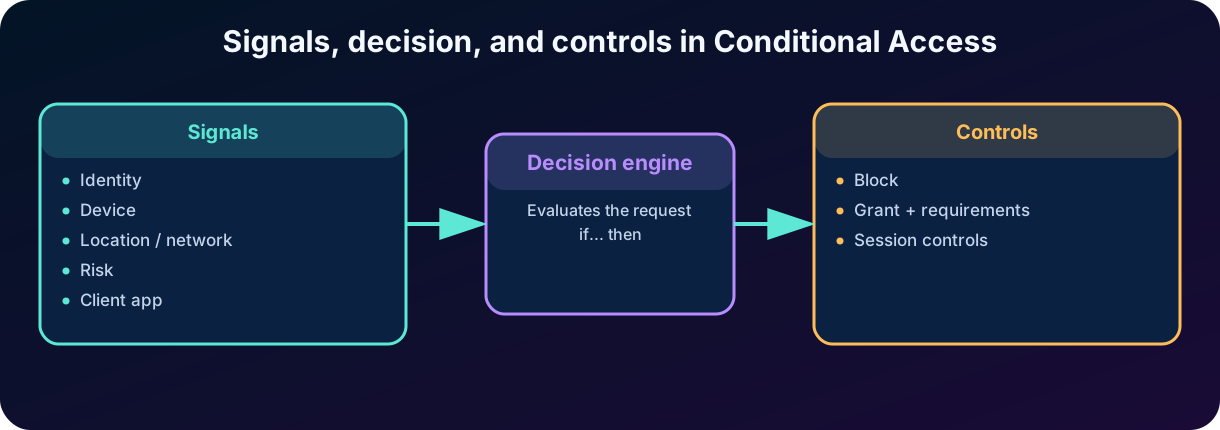
Microsoft Entra , or , is the Zero Trust policy engine of Microsoft Entra ID. It gathers signals about the request, makes a decision, and applies controls. The simplest way to describe it is an "if... then..." statement: if a given identity tries to access a given resource in a certain context, then block, grant with additional requirements, or limit the session.
The evaluation happens after first-factor authentication is completed. This means does not replace credentials nor act as a primary defense against denial-of-service attacks. It uses the already presented identity and other signals to decide whether the sign-in can continue. This order matters on exam questions: first there is an authenticated attempt; then policies are evaluated; finally the resource applies authorization and .
Figure 1 — Signals, decision, and controls in .
4. Anatomy of a policy: assignments and controls
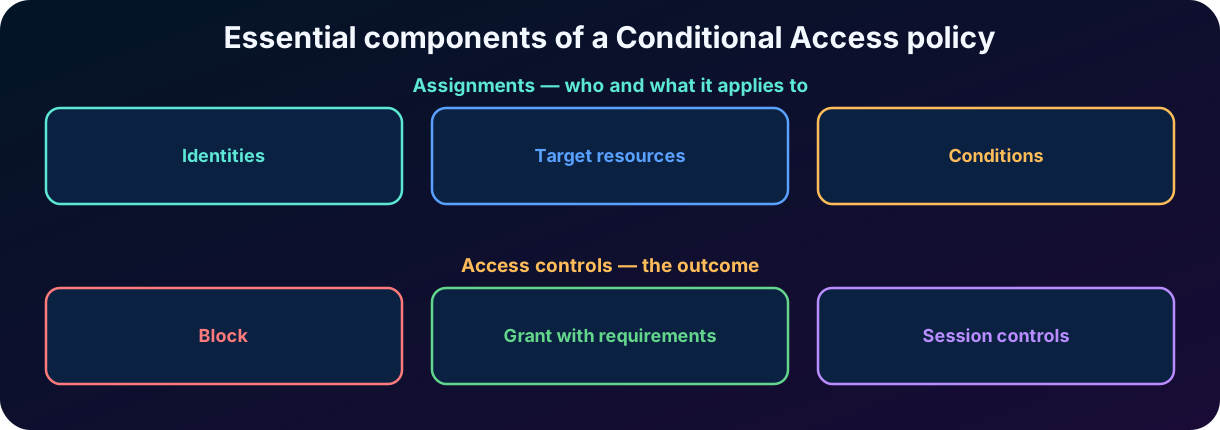
A policy has two major sides. Assignments define whom and what the policy applies to, including identities, target resources, and conditions. Access controls define the outcome: block, grant with requirements, or restrict the session. For a policy to be applicable, its assignments must match the sign-in scenario.
In a simple policy, an administrator selects users or groups, chooses an application, and requires . In a more refined policy, they can include all administrative identities, exclude emergency accounts, apply only to the management portal, evaluate network and device, and require a phishing-resistant .
Figure 2 — Essential components of a policy.
5. Included and excluded identities
The policy can target all users, specific people, groups, directory roles, guests, and external users. Certain scenarios also allow policies for workload identities, such as , with appropriate features and licensing. The must be broad enough to cover the risk, but controlled enough to be tested.
Exclusions must be used with intent. A critical practice is to keep emergency access accounts, known as break-glass, out of policies capable of blocking all administrators. These accounts are not shortcuts for everyday use: they must be strongly protected, monitored, and used only for recovery. Service and synchronization accounts also require analysis, because non-interactive flows may not satisfy controls designed for people.
Common pitfall
Excluding too many users to avoid problems reduces the policy's coverage. Excluding no one in a block policy can cause a lockout. The goal is to use minimal, justified, and monitored exclusions.
6. Target resources and protected actions
Target resources are the applications, services, or actions to which the controls will be applied. Microsoft Entra allows selecting all resources, specific applications, integrated applications, applications published by Application Proxy, and other compatible targets. The current term "target resources" replaces older references to "cloud apps", but the idea remains: the policy needs to know what is being protected.
It is also possible to protect actions, such as security information registration, and use authentication context to raise the protection of a sensitive operation within an application. adds traffic forwarding profiles as targets, allowing controls to be applied to Microsoft, internet, and private resource traffic.
7. Conditions: the context of the request
Conditions refine when a policy will be triggered. They do not grant permission; they describe the context that makes the policy relevant. The more signals are combined, the more specific the decision becomes. However, an overly complex policy is hard to test and troubleshoot. In real projects, it is common to prefer smaller policies with a clear objective and consistent naming.
Conditions and signals that refine when a policy is triggered.
Condition or signal
What it represents
Typical use
Probability that the account is compromised.
Require remediation or block high risk.
Probability that the request is not from the owner.
Require for a suspicious sign-in.
Network / location
IP, country, region, named location, or compliant network.
Block regions or distinguish a trusted network.
Device platform
Windows, Android, iOS, macOS, Linux.
Block an unsupported platform.
Device filter
Attributes of the device identity.
Apply the policy to privileged workstations.
Client apps
Browser, modern clients, or legacy authentication.
Block legacy protocols.
State and compliance
Registration, join, and Intune evaluation.
Require a managed and healthy device.
8. Location is not synonymous with security
can use IP ranges, countries, regions, and named locations. A location can be marked as trusted, but that does not automatically make all access originating from it secure. Addresses can be shared, networks can be compromised, and users can work outside the office. Location must be an additional signal, not an absolute proof of identity.
A policy can block countries where the organization does not operate or require outside known networks. Even so, stronger decisions combine location with authentication method, device compliance, and risk. adds the idea of a compliant network, proving that traffic passed through the 's service and its network policies.
9. and
expresses the probability that the identity has been compromised, for example after detection of leaked credentials or anomalous behavior. expresses the probability that a specific request was not made by the legitimate owner. Both are signals produced by Microsoft Entra ID Protection and require the corresponding licensing features for risk-based policies.
An organization can require when is medium or high and require a secure password change when indicates compromise. The password change control has specific combinations and requirements; at the fundamental level, memorize the goal: proves the identity again in the face of a suspicious sign-in, while the secure password change helps remediate a compromised account.
10.
determine what must happen for access to be allowed. The administrator can block directly or grant subject to one or more requirements. When multiple controls are selected within the same policy, it is possible to require all or at least one, depending on the configuration. In addition, multiple policies can reach the same sign-in, and all applicable policies must be satisfied.
and usage examples.
Control
Purpose
Example
Block access
Stop the request.
Block a legacy protocol or a prohibited region.
Require
Add factors to the identity proof.
Administrator accessing Azure management.
Require
Restrict which methods satisfy the policy.
Only phishing-resistant methods.
Require compliant device
Use the state sent by Microsoft Intune.
Financial app only on a healthy device.
Require hybrid joined device
Confirm a hybrid corporate link.
Legacy corporate application.
Require approved app / app protection
Protect data on mobile devices.
Outlook with an Intune app protection policy.
Require password change
Remediate .
Account with signs of compromise.
Require terms of use
Record acceptance of conditions.
Partner access to a sensitive resource.
11. Compliant device and hybrid joined device
A compliant device is evaluated by a management solution, usually Microsoft Intune, according to rules such as OS version, , screen lock, and absence of threats. Intune sends the state to Microsoft Entra ID, and uses that signal. The policy does not remediate the device; it requires that the compliance requirement is already met.
A Microsoft Entra hybrid joined device has a relationship with the on-premises Active Directory and a registration in Microsoft Entra ID. Requiring this state is different from requiring compliance. A device can have a hybrid identity and still fail a compliance policy. In questions, look for the keyword: "managed and healthy" points to compliance; "joined to the on-premises domain and registered in the cloud" points to hybrid join.
12.
act after access is granted and limit the experience or the duration of the session. They help reduce exposure without completely blocking work. Examples include sign-in frequency, persistent browser session, app-enforced restrictions, and App Control with Microsoft Defender for Cloud Apps.
Sign-in frequency defines when the user must re-authenticate. Persistent whether the browser can stay signed in after being closed. App-enforced restrictions can offer a limited experience, such as web-only access. Defender for Cloud Apps can monitor the session and block download, copy, or print of sensitive content. Current features also include token protection, customization of Continuous Access Evaluation, and use of security profiles.
vs : decide access or shape the session.
Decide whether access can be granted.
Shape what happens after the grant.
,, compliance, password change.
Sign-in frequency, persistent session, restrictions, and monitoring.
If the requirement fails, the sign-in is blocked.
Can allow a limited experience or re-evaluation.
Answer "what must be satisfied?"
Answer "how will the session be maintained?"
13. How multiple policies are evaluated
Microsoft Entra evaluates all policies applicable to the request. They are not processed as a list where the first replaces the others. If one policy requires and another requires a compliant device, the user must satisfy both. If an applicable policy blocks access, the request is blocked even if another policy grants access with requirements.
Within a single policy, can be combined by "require all" or "require one". Outside it, requirements from different policies accumulate. This difference explains many design errors: two controls configured as an alternative in the same policy do not cancel an additional requirement from another policy.
Memorization rule
Applicable policies accumulate. Block wins. Requirements from different policies must be satisfied together.
14. Secure deployment, report-only, and the What If tool
is powerful enough to block the entire organization. Therefore, deployment must be gradual: define the objective, identify dependencies, create a pilot group, exclude emergency accounts, use report-only mode, review logs, and only then enable it. Report-only mode evaluates what would happen without enforcing the controls on the user, allowing you to measure impact before real enforcement.
The What If tool simulates a sign-in with identity, resource, platform, client app, and other conditions. It shows applicable policies, non-applicable policies, and grant or session requirements. Sign-in logs display the result per policy and help distinguish an authentication failure, a policy block, and a lack of authorization on the resource.
Define the risk and the expected outcome in one sentence.
Choose identities and target resources; keep emergency accounts excluded.
Add only the conditions necessary for the objective.
Select grant or and confirm the "all" or "one" logic.
Put the policy in report-only and test with pilot users.
Use What If, sign-in logs, and reports to analyze impact.
Enable in stages, monitor, and keep a rollback procedure.
15. Classic scenarios
Classic scenarios and the most likely control.
Need
Signals / target
Likely control
Protect administrators
Directory roles + management portals.
Require or a phishing-resistant strength.
Protect a financial app
App + all users + device.
Require and a compliant device.
Remediate a compromised account
High .
Secure password change and strong authentication.
Block a legacy protocol
Client app types.
Block access.
Restrict an unused country
Network / location.
Block access.
Allow with limitation
Unmanaged device + SharePoint.
and limited web access.
Protect registration
Registration action + trusted location.
or block outside the allowed location.
16. What is role-based access control ()
Role-Based Access Control, or , is an authorization model in which permissions are grouped into roles and assigned to identities in a . Instead of granting dozens of permissions directly to each person, the organization creates or uses roles consistent with job responsibilities. This simplifies administration, auditing, and access removal.
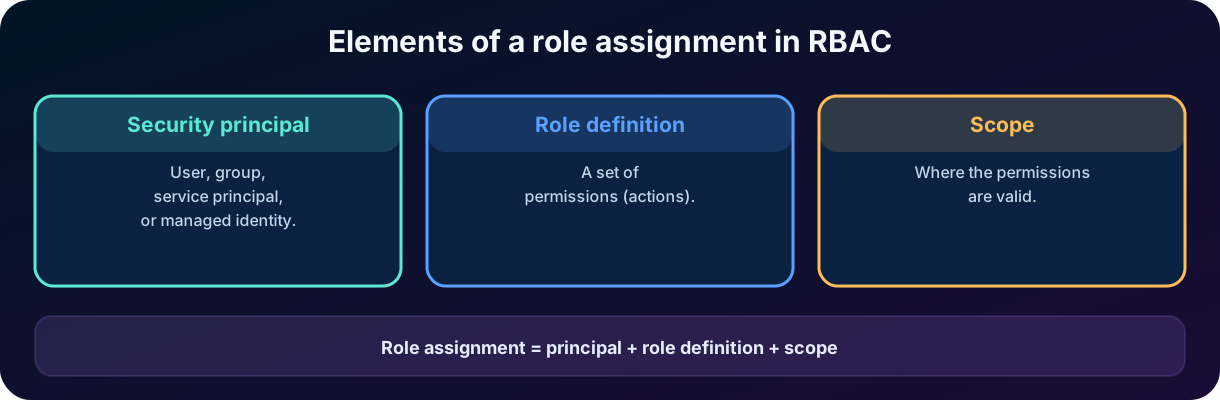
A role combines three elements: ,, and . The principal is who receives access; the definition is the set of permissions; the is where they apply. The is the link that brings the three together. Removing the revokes that access path.
Figure 3 — Elements of a role in .
17. and
A can be a user, group, , or managed identity. Using groups reduces individual assignments and makes team changes easier. and managed identities allow applications and automations to receive only the necessary permissions, avoiding the use of personal accounts in code.
The gathers allowed actions. Built-in roles serve common scenarios; custom roles allow selecting specific permissions when the built-in ones are too broad or insufficient. Creating custom roles increases precision, but also the responsibility of maintaining and reviewing permissions as services evolve.
18. Microsoft Entra roles
Microsoft Entra roles control administrative tasks over directory resources, such as users, groups, applications, authentication methods, policies, and roles. Examples include Global Administrator, User Administrator, Application Administrator, and Administrator. They operate mainly in the identity plane and use permissions exposed by Microsoft Graph.
The can be the entire , an administrative unit or, for supported roles, a specific object, such as an application. Administrative units allow delegating tasks to a part of the organization: a regional administrator can manage only users and groups of that region. Not all roles or settings can be limited by administrative unit, so the needs to be verified.
Least privilege in Entra
Prefer the specialized role that fits the task. Global Administrator should be rare, protected and, ideally, activated only when necessary through , a topic explored in depth in the next chapter.
19. Azure and resource scopes
Azure is the authorization system based on Azure Resource Manager for resources such as virtual machines, networks, vaults, databases, and storage accounts. Broad roles include Owner, Contributor, and Reader. Owner manages resources and access assignments; Contributor manages resources but does not assign roles; Reader only views. There are service-specific roles, which usually serve least privilege better.
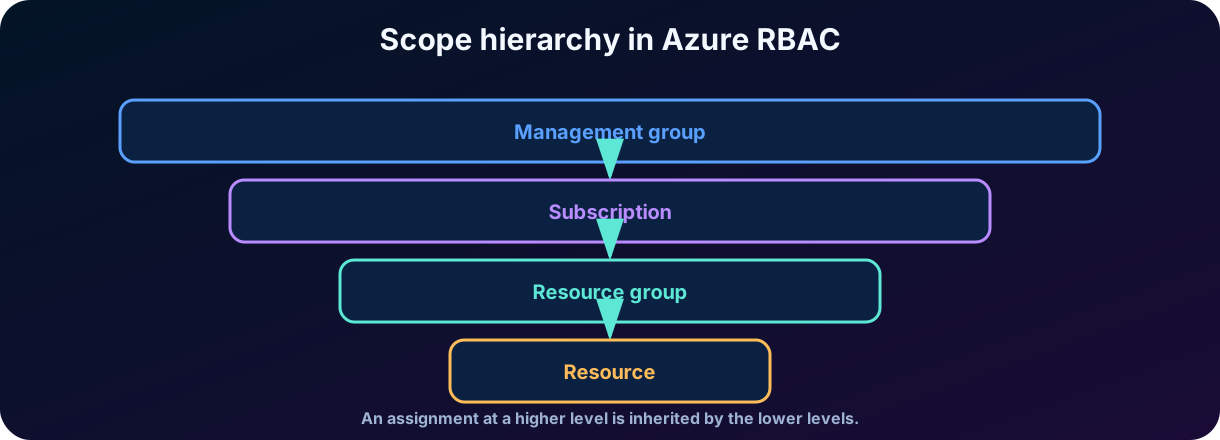
The four main levels are management group, subscription, resource group, and resource. An at a higher level is inherited by the lower levels. Thus, granting Contributor on the subscription is much broader than granting Virtual Machine Contributor to a machine or resource group. Azure is predominantly additive: effective permissions result from the sum of assignments, although deny assignments and conditions can limit actions in specific scenarios.
Figure 4 — hierarchy in Azure .
20. Microsoft Entra roles vs Azure roles
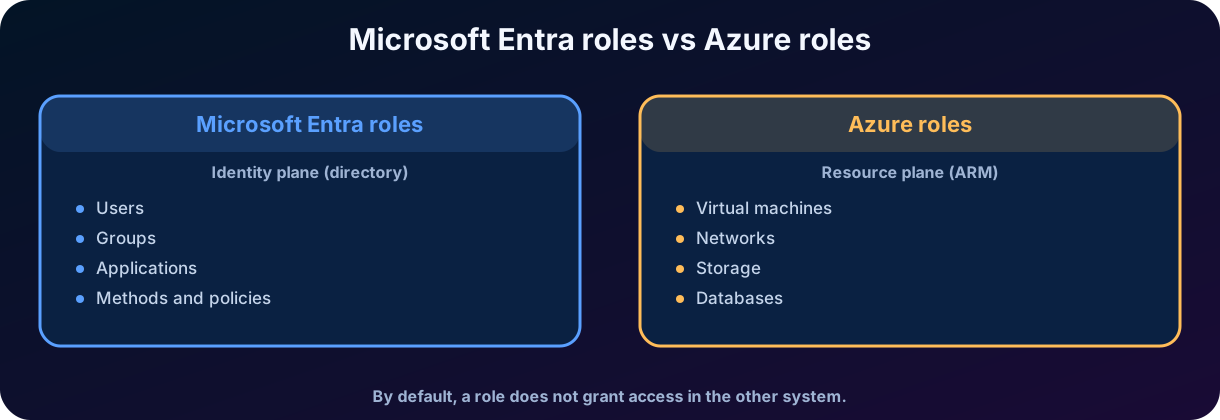
The names "role" and "" appear in both systems, but they protect different types of resources. Microsoft Entra roles administer the directory and identities. Azure roles administer subscription resources through Azure Resource Manager. A person can be a User Administrator in Entra and Reader on a resource group, or have only one of these roles.
By default, Global Administrator does not receive automatic access to Azure resources. Likewise, being Owner of a subscription does not make the person a Global Administrator of the . There is an elevation mechanism for access recovery, but it is an explicit and highly privileged action. For the SC-900, the correct answer usually depends on identifying the managed object: a user, group, or application points to an Entra role; a VM, network, or storage points to an Azure role.
Figure 5 — Differences between Microsoft Entra administrative roles and Azure roles.
21. The principle of least privilege
Least privilege means granting only the necessary permissions, in the smallest and for the shortest appropriate period. An can be technically functional and still be insecure. Giving Owner on a subscription to someone who needs to restart a machine solves the task, but creates the ability to change resources and grant access far beyond the need.
Least privilege dimensions and how to improve each one.
Dimension
Control question
Improvement
Permission
Does the role contain actions beyond what is needed?
Use a more specific or custom role.
Does access need to apply to the entire subscription?
Reduce to a resource group or resource.
Identity
Should the be on a person or a group?
Use a group for a team role and lifecycle.
Duration
Does the permission need to be permanent?
Use eligible access and activation with .
Review
Is access still needed?
Perform reviews and remove stale assignments.
Separation
Does a single person control everything?
Separate identity, resource, and audit administration.
22. From to : cloud-delivered access security
Security Service Edge, , is a security category that delivers access controls and traffic protection through the cloud. It brings policies closer to the user and the resource, regardless of which office the person is in. Secure Access Service Edge, , is a broader architecture that combines security capabilities with wide-area network connectivity, such as SD-WAN.
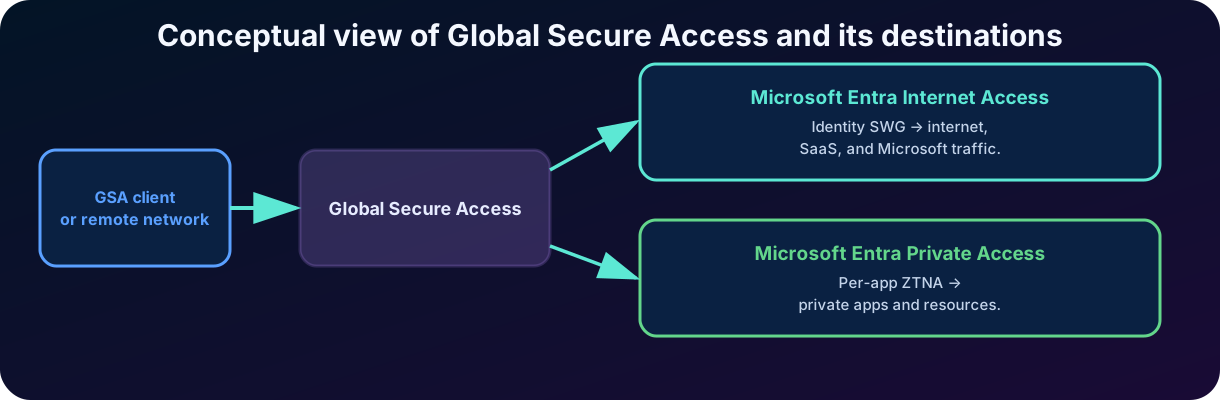
In the Microsoft ecosystem, Microsoft Entra Internet Access and Microsoft Entra Private Access form the solution and are unified under in the Microsoft Entra admin center. The proposal is to converge identity, device, and network signals, using consistent policies for Microsoft, internet, SaaS, and private application resources.
Figure 6 — Conceptual view of and its destinations.
23. Microsoft Entra Internet Access
Microsoft Entra Internet Access protects access to the internet and SaaS applications with an identity-based Secure Web Gateway, or . Traffic can be acquired by a client installed on the device or by a remote network, such as a branch office. Policies can block malicious content, restrict site categories, and log destinations, users, devices, and applied rules.
Integration with allows using identity, risk, device, and network context in decisions that reach internet destinations, including services that are not directly federated to Microsoft Entra ID. The service also has a profile for Microsoft traffic, with controls such as compliant network check, universal restrictions, and enriched logs.
Exam keyword
Internet Access is associated with the public internet, SaaS applications, Secure Web Gateway, content filtering, and identity-driven network policies.
24. Microsoft Entra Private Access
Microsoft Entra Private Access offers Zero Trust access to private applications and resources in data centers, hybrid environments, and multicloud. Instead of opening broad connectivity to the network, the organization can grant access per application, FQDN, IP range, port, and protocol. The service uses private network connectors and the client to forward authorized traffic.
The goal is to modernize or replace scenarios with a approach, Zero Trust Network Access. A traditional often places the device inside a network segment; Private Access seeks to connect the identity only to authorized resources. Quick Access covers broader sets of internal addresses, while Private Access applications allow per-application segmentation.
Exam keyword
Private Access is associated with private applications, internal resources, per-application access, , and reduced dependence on broad .
25. How and come together
decides which requirements the identity must satisfy. acquires and forwards traffic, applies network policies, and provides additional signals. Together, they create a policy that follows the user's request to the destination. A private application can require and a compliant device; an internet destination can receive a security profile; a Microsoft service can require that traffic comes from a compliant network.
This integration reduces the historical separation between identity and network teams. Even so, the controls continue to have different roles: does not replace content filtering, and the does not replace an authorization function in the application. The secure architecture combines layers, logs, and clear responsibilities.
How ,, and complement each other.
Feature
Mainly protects
Technology / idea
Sign-in decision and contextual requirements.
Zero Trust policy engine.
Actions allowed after access.
Role + principal + .
Entra Internet Access
Internet, SaaS, and Microsoft traffic.
Identity-driven .
Entra Private Access
Private applications and resources.
Per-application .
Unified administration of the solution.
Convergence of identity, network, and endpoint.
26. Integrated practical scenario
Consider the company Contoso Finance, with , Azure resources, and a financial system hosted in the on-premises data center. Analysts work in the office and remotely. Administrators need to manage identities and infrastructure, but the company wants to reduce standing privileges, prevent access from insecure devices, and replace the broad of the financial system.
26.1 Access design
All users receive a baseline policy that blocks legacy authentication.
The financial application requires and a compliant device.
High-risk sign-ins are blocked or forwarded for remediation, according to the policy.
Administrators are targeted by a separate policy with a phishing-resistant .
Emergency accounts are excluded from the block policies, protected, and monitored.
Analysts receive only the business role in the application; they do not receive administrative roles.
The identity team receives specialized Microsoft Entra roles, not standing Global Administrator.
The infrastructure team receives specific Azure roles on the corresponding resource group.
Microsoft Entra Private Access publishes the financial system per application, without granting general access to the internal network.
Microsoft Entra Internet Access protects browsing and SaaS applications with network policies and logs.
26.2 How to analyze a user's request
The user authenticates to Microsoft Entra ID.
identifies user, application, network, device, and risk signals.
The policy requires and compliance; all applicable policies must be satisfied.
forwards only the authorized traffic to the private application.
The application or Azure checks the role and to decide which actions are allowed.
Sign-in, traffic, and audit logs record the decision and the activities.
Logic for scenario questions
Ask in order: was the identity authenticated? Does the policy allow the sign-in? Does the role authorize the action? Does the network path deliver only the necessary resource?
27. Frequent conceptual pitfalls
is evaluated after first-factor authentication; it does not replace the authentication method.
confirms with more assurance who the user is; decides what they can do.
Compliant device and hybrid joined device are different conditions.
A trusted location is a signal, not an absolute guarantee of security.
Multiple applicable policies accumulate; a block policy is not canceled by another grant policy.
Within a policy, "require one" is OR; "require all" is AND.
Report-only evaluates impact, but does not force the user to satisfy the controls.
Microsoft Entra roles do not automatically administer VMs and storage.
Azure roles do not make the user a Global Administrator of the .
Owner is broader than Contributor because it also manages access assignments.
Internet Access protects internet and SaaS; Private Access protects internal and private resources.
is the security layer; also includes the network connectivity architecture.
28. Quick review for the SC-900
Quick matching guide for the SC-900 exam.
When the question mentions...
Think first of...
If... then..., signals and requirements
Microsoft Entra .
only in a risk context
A policy.
Managed and healthy device
Require device to be marked as compliant.
Possibly compromised account
and a secure password change.
Specific suspicious request
and / block.
Simulate a policy without enforcing it
Report-only and the What If tool.
Who, what, and where can administer
: principal, role, and .
Manage users or applications
Microsoft Entra role.
Manage a VM or storage
Azure role.
Smallest possible reach
Principle of least privilege.
Internet and SaaS with an
Microsoft Entra Internet Access.
Private application without broad
Microsoft Entra Private Access / .
Unifying term of the solution
.
One-sentence summary
decides under which conditions the identity signs in; limits the actions in the ; carries these decisions to Microsoft, internet, and private application resources.
29. Conclusion
Modern access control does not depend on a single password, network, or role. It combines signals about identity, device, location, application, and risk. Microsoft Entra turns these signals into adaptive decisions: block, require , request stronger authentication, require compliance, remediate risk, or limit the session. The value is in applying proportional protection, avoiding both excessive trust and unnecessary friction.
complements this decision by limiting what the authenticated identity can do. Principal, role, and form an ; least privilege reduces the three to what is necessary. Differentiating Microsoft Entra roles from Azure roles avoids one of the most common errors: confusing directory administration with cloud resource administration.
extends the same reasoning to the network. Internet Access protects public and SaaS traffic with an identity-driven ; Private Access offers per-application for internal resources. My assessment is that the great evolution of this chapter is convergence: identity, authorization, and connectivity stop being silos and start participating in a continuous decision. For the exam, memorizing purposes is essential; for practice, the goal is to create simple, testable, auditable policies consistent with Zero Trust.
Next step in the track
After controlling conditions and permissions, the next chapter goes deeper into governance, privileged access, ,, and risk-based identity protection.
30. Review questions
1. A company wants to allow access to the financial system only when the user completes and is on a compliant device. Which feature directly meets the requirement?
A) An Azure Reader role applied to the subscription.
B) A policy with both required.
C) Microsoft Entra Private Access without any identity policy.
D) An administrative unit in Microsoft Entra ID.
Answer explained
Correct answer: B. combines identity and resource with . The policy must require all selected controls so that and compliance are mandatory.
2. Which statement correctly differentiates Microsoft Entra roles and Azure roles?
A) Microsoft Entra roles manage resources such as VMs, and Azure roles manage users.
B) The two roles are equivalent and always apply to the same .
C) Microsoft Entra roles administer directory resources; Azure roles administer resources via Azure Resource Manager.
D) Global Administrator is automatically Owner of all subscriptions.
Answer explained
Correct answer: C. The systems use the concepts of role and , but they protect different planes. By default, a role does not grant permissions in the other system.
3. An organization wants to assess the impact of a new block policy before affecting users. Which combination is most appropriate?
A) Enable the policy for everyone and wait for tickets.
B) Use report-only, the What If tool, and sign-in logs.
C) Assign Global Administrator to the pilot users.
D) Replace with an role.
Answer explained
Correct answer: B. Report-only calculates the result without enforcing the requirements, What If simulates scenarios, and the logs show applied policies and results.
4. Which service is most directly associated with per-application access to private resources without granting broad connectivity?
A) Microsoft Entra Internet Access.
B) Azure .
C) Microsoft Entra Private Access.
D) Microsoft Entra User Administrator.
Answer explained
Correct answer: C. Private Access is the capability of aimed at private applications and resources, with granular control per application, address, port, and protocol.
Essential glossary
Essential glossary for Chapter 5.
Term
Short definition
Zero Trust policy engine that combines signals and controls.
Part of the policy that defines identities, resources, and conditions.
Requirement to block or allow a sign-in.
Limitation applied after access is granted.
Probability that the identity is compromised.
Probability that the request is not from the owner.
Model that grants permissions through roles in scopes.
User, group, , or managed identity.
A collection of permissions.
The set of resources where the role is valid.
Cloud-delivered access security.
Architecture that combines and WAN connectivity.
Secure Web Gateway to protect web traffic.
Granular Zero Trust access to private applications.
Unifying term for Internet Access and Private Access.
Official references and update notes
The content was prepared based on the provided study plan and official Microsoft documentation consulted on July 23, 2026. Cloud services, control names, licensing, and preview features can change; validate the documentation before a deployment.
Official sources consulted on July 23, 2026. As cloud services evolve continuously, licensing details, regional availability, menu names, and preview features should be confirmed in the current documentation before a real implementation.