Data Security and Protection with Microsoft Purview
Discover, classify, label, and protect data with Microsoft Purview, ,,,, and AI-assisted investigations
Suggested study time: 70 minutes • Beginner level • Updated August 12, 2026 from the current SC-900 Microsoft Learn module
By João Ricardo Dutra••Complete material
1. Introduction: from the perimeter to the data
For decades, was mainly associated with the place where it was stored. Files remained on internal servers, private networks, and physical cabinets. With the internet, mobile devices, cloud collaboration, and remote work, data began to circulate through email, SaaS applications, endpoints, and partner organizations. The old perimeter no longer kept up with the content.
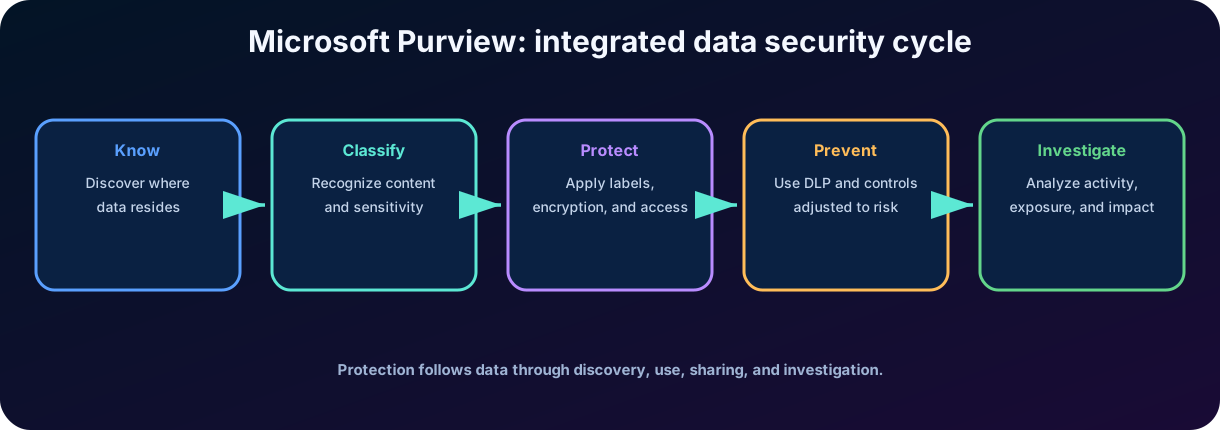
The modern response is a data-centered strategy: discover what exists, recognize sensitivity, apply persistent protection, control risky movements, and investigate exposures. Microsoft Purview brings together capabilities to carry out this cycle across services, endpoints, hybrid environments, and selected integrations.
For the reader, this knowledge helps to distinguish tools that look similar but solve different problems. For society, classification controls, exposure minimization, and responsible research reduce leaks of personal, financial, medical, and intellectual information. The challenge is not only to prevent sharing: it is to allow legitimate collaboration without losing visibility and control.
Figure 1 - Data security is a continuous cycle of knowledge, protection, prevention, and investigation.
2. Microsoft Purview portal and conceptual architecture
The Microsoft Purview portal offers a unified experience for data security, solutions. It centralizes navigation, functions, reporting, policies, and investigations, although each solution maintains its own concepts, permissions, and licensing requirements.
2.1 The three verbs of
Verb
Question answered
Main capabilities
Know the data
What data exists, where is it, and what is its sensitivity?
Classification, types of information, classifiers, and .
Protect the data
What protection should remain with the content?
Labels, , permissions, headers, footers, and watermarks.
Prevent loss
Which movements or shares should be monitored or blocked?
in services, endpoints, browsers, and compatible repositories.
2.2 Complementary solutions
classifies and protects. controls actions and destinations. correlates behavioral signals. adjusts controls based on risk. consolidates posture and exposure. supports incident analysis and impacted data. None of these capabilities, on their own, represents the entire strategy.
Key point for the SC-900
The exam tests the purpose of the solutions. Memorizing the name is insufficient: identify which question each resource answers.
3. Data discovery and classification
Classifying data means associating content with a category that represents its meaning, sensitivity, or processing obligation. This classification can be detected automatically, applied by people, recommended by policies, or imported from integrations. The result guides protection, , retention, investigation, and reporting.
Classification also reaches AI interactions. Sensitive information types and can recognize protected information in and responses when people use Copilot. The resulting signals appear in Microsoft Purview reports, , and Data Security Posture Management so teams can evaluate oversharing and decide whether additional controls are needed.
3.1 Classification is not the same as a label
A classification mechanism recognizes content features, such as a card number, contract, or offensive language. A is a persistent mark chosen or applied to the item and can enforce protection. Content can be classified without receiving a label, and a label can be applied manually even when no automatic detector found a match.
3.2 Trust, quantity, and proximity
Classification rules evaluate evidence. A single number may not be enough; nearby words, format, checksum, and number of occurrences increase confidence. Setting confidence levels helps balance and false negatives.
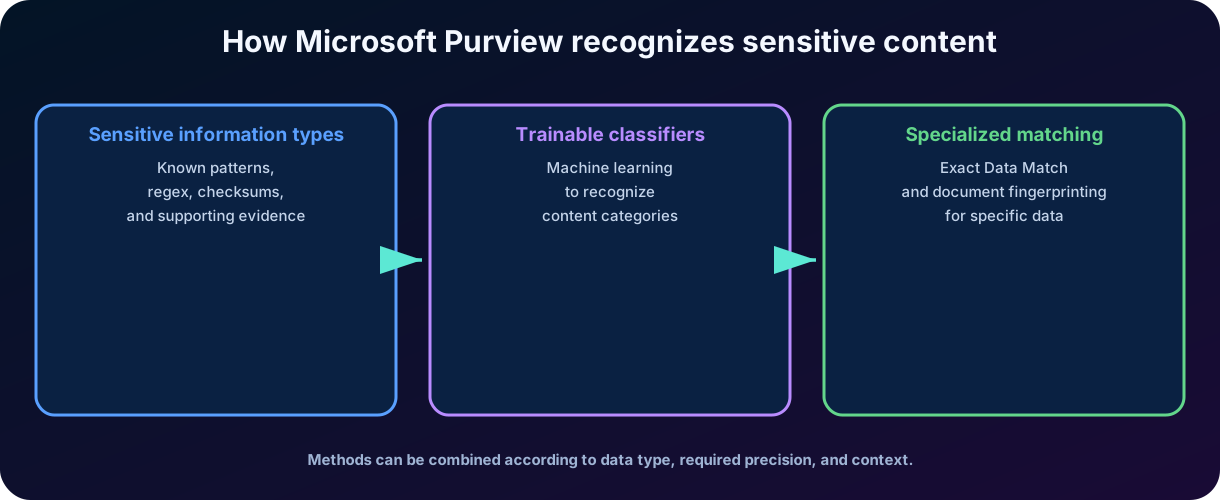
Figure 2 - Purview combines patterns, learning, and specialized matches to recognize data.
4. Sensitive information types
sensitive information types, or , identify patterns associated with sensitive data. Microsoft provides built-in types for personal, financial, health information, and identifiers from various countries. Administrators can also create custom types or adjust the existing ones.
Built-in are maintained by Microsoft and can be copied as templates for organization-specific variations.
Named-entity detect people, addresses, and medical terms in bundled forms with a narrow focus or unbundled forms with broader coverage.
Custom combine regular expressions, keywords, dictionaries, checksums, confidence, and proximity for an organization's own patterns.
compare protected values with a reference database to identify specific records with fewer .
Element
Function
Example
Main element
Central pattern that must be found.
Regular expression, function, or structured identifier.
Corroborative evidence
Terms or standards that increase confidence.
Words like 'card', 'validity', or 'client'.
Proximity
Allowed distance between element and evidence.
Keyword found up to a certain number of characters.
Confidence level
Formatting strength.
Low, medium, or high confidence.
Quantity
Minimum number or range of occurrences.
Block when there are ten or more records.
Exception
Condition that prevents inappropriate matching.
Ignore training models or authorized accounts.
4.1
increases accuracy when the organization needs to detect values that truly belong to a known database, such as customer identifiers. Instead of blocking any sequence with a similar format, the policy seeks a match with data prepared and protected by the organization.
4.2 Digital printing of documents
Document fingerprinting creates a type of information from a form or standard template. It is useful when many documents share the same structure, such as regulatory forms, contracts, or intellectual property templates.
5.
identify categories by the overall meaning of the content, and not just by fixed sequences. Microsoft provides built-in classifiers, and organizations can train custom classifiers using sets of positive and negative examples selected by people.
5.1 Training process
Collect representative items that belong to the desired category.
Collect similar items that do not belong to the category.
Train the model and test the ability to distinguish the groups.
Review and false negatives before use in production.
Apply the classifier in compatible scenarios, such as labeling, retention, or specific policies.
5.2 When to use
They are suitable for contracts, resumes, legal documents, communications, or content whose meaning depends on context. An is better for structured patterns; a classifier is more useful for categories without a simple textual signature.
Microsoft supplies pretrained classifiers that can be used immediately or may still show a Ready to use status while additional training finishes. If these options do not fit, a custom classifier starts with a seed set of clearly positive examples and a contrasting set of negative examples. After training and verification, publishing sorts matching items in SharePoint Online, Exchange, and OneDrive. Classifiers operate only on items that are not encrypted and can be conditions in auto-labeling, retention, , and policies.
Approach
Strong point
Typical limitation
Precision in structured and explainable patterns.
It can fail when the meaning is not in a pattern.
Recognizes context and semantics of entire documents.
It depends on good examples and validation.
Reduces when validating actual values.
It requires preparation and governance of the dataset.
Fingerprint
Recognizes documents based on templates.
Less useful when the structure varies a lot.
6. and
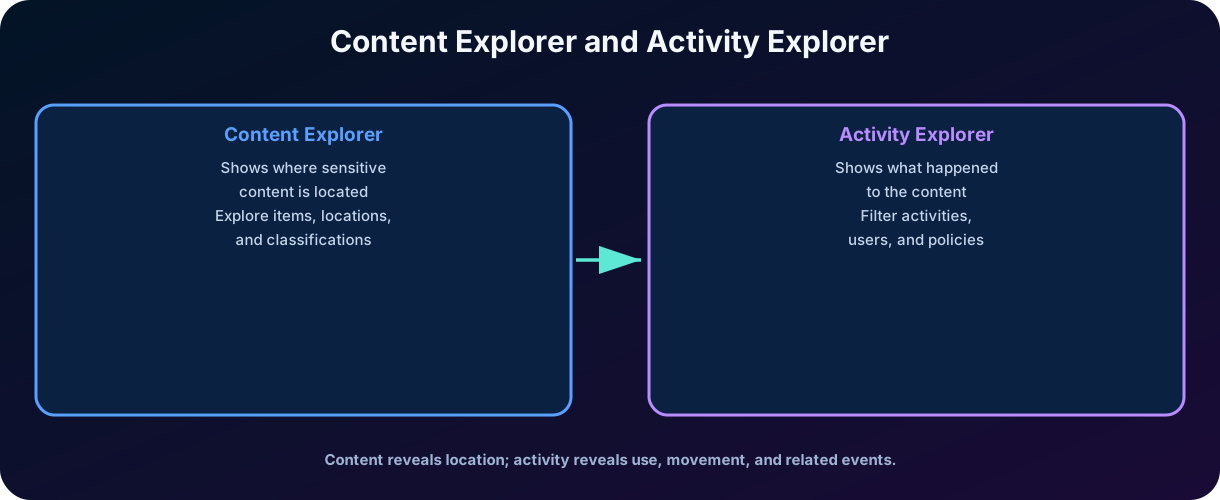
Classification creates value when administrators can turn detections into visibility. The two explorers offer distinct and complementary perspectives on the data assets.
Figure 3 - shows where the content is; shows what happened to it.
6.1
Allows browsing by classified items, labels, information types, classifiers, and locations. Depending on the role and configuration, authorized users can examine metadata or content to validate policies. Access must follow least privilege, segregation of duties, and auditing.
6.2
It presents labeling events, label changes or removals, sharing, matches, and other recorded activities. Filters by user, location, activity type, label, and period help identify trends and anomalies.
answers how many items match, where they reside, which labels or classifications apply, and how highly sensitive data is distributed across Exchange, SharePoint, and OneDrive. answers what happened: users can drill into file types, people, devices, policy matches, and endpoint events such as printing, copying to removable media, or using an unapproved app on supported Windows and macOS devices.
Privacy and governance
The ability to view sensitive content is powerful. Therefore, permissions, justification, auditing, and periodic review are essential.
7. Sensitivity labels
Sensitivity labels classify and can protect content, containers, and compatible experiences. They act as a persistent mark stored in the item's metadata. An organization can create a taxonomy aligned with the business, such as Public, Internal, Confidential, and Highly Confidential.
7.1 Essential properties
Customizable for the language and hierarchy of the organization.
Stored in plain text in the metadata, allowing integration with applications and services.
Persistent: remain associated with the content when it is moved or copied.
They can be applied without protection, only for classification and reporting.
They can control documents, emails, meetings, sites, groups, and other supported containers.
7.2 One item and two different objectives
A document can simultaneously have a and a . The first deals with classification and protection; the second deals with lifecycle, retention, and disposal. Confusing these concepts is a common trap.
7.3 Scopes, containers, external apps, and Copilot
Label scopes separate files and other data assets, emails, meetings, and groups or sites so settings apply only to compatible content.
A label on a Team, group, SharePoint site, or Viva Engage community protects the container settings, but does not automatically label every file inside it.
The Microsoft SDK lets compatible third-party applications read labels and enforce protection settings.
Labels can set a default SharePoint sharing-link type and can classify content without applying or another protection setting.
Copilot respects labels and permissions. When a response uses several sources, it inherits the most restrictive supported label, and it does not return protected content to a person who lacks access.
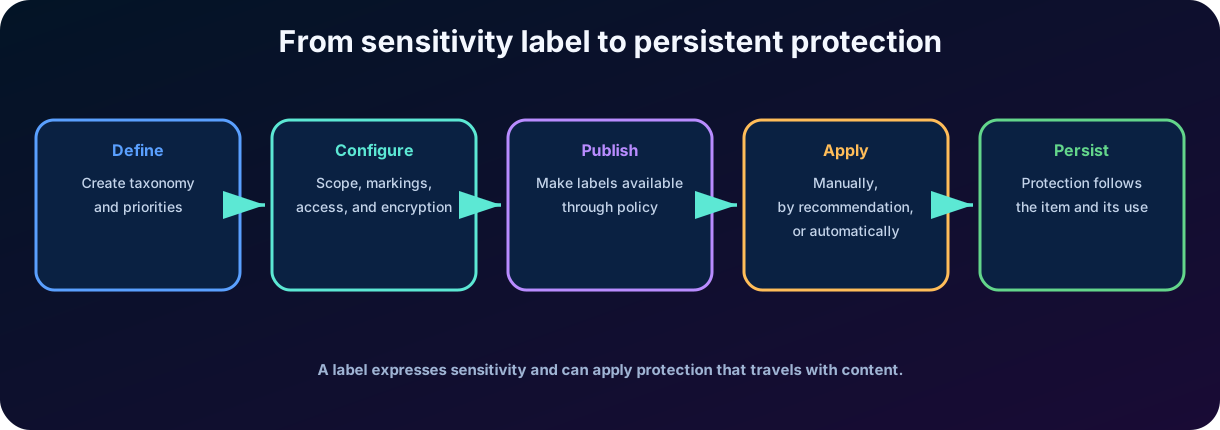
Figure 4 - Protection is born in taxonomy, is published through policy, and follows the content.
8. Publication and enforcement policies
Creating a label does not automatically make it available. A label policy determines which users and groups can see it and which experience settings will be applied.
Configuration
Purpose
Policy scope
Select users and groups who will receive the labels.
Standard label
Apply an initial classification to new items or containers.
Obligation
Require the user to select a label before saving or sending.
Downgrade justification
Request a reason when the user removes or reduces the sensitivity.
Help and description
Guide the user on when to apply each label.
Priority
Resolve the behavior when multiple policies affect the same user.
8.1 Manual, recommended, and automatic application
In manual application, the user decides. In recommendation, the system finds sensitive content and suggests a label. In automatic application, the policy labels when the conditions are met. Automation increases scale, but it requires testing, simulation, and impact review.
8.2 Standard labels do not replace classification
A standard label reduces unclassified content, but it does not understand the context by itself. The organization should combine standards, training, communication, and automation proportional to the risk.
9. , permissions, and tags
9.1 Identity-based cryptography
A label can encrypt documents and emails and restrict which users or groups can open, edit, copy, print, or forward. Authorization is verified by the protection service; thus, the file can remain protected outside the original repository.
9.2 Permissions set by the administrator or user
The administrator can predefine who will have access, or allow the user to choose recipients when applying the label. The first option standardizes; the second offers flexibility, but requires guidance and governance.
9.3 Headers, footers, and watermarks
Content markings communicate sensitivity visually. Headers and footers can include the label name, owner, or other variables. Watermarks discourage misuse, but do not replace or access controls.
Control
What does (it/he/she) do
What doesn't [he/she/it] do
Label without protection
Classifies and produces metadata and events.
Does not prevent unauthorized access.
Cryptography
Restricts access and actions according to identity and permission.
Does not prevent all screenshots or exposure by authorized users.
Visual brand
Informs sensitivity and reinforces behavior.
It is not technical authorization control.
Controls actions and destinies according to context.
Does not replace classification or investigation.
10.
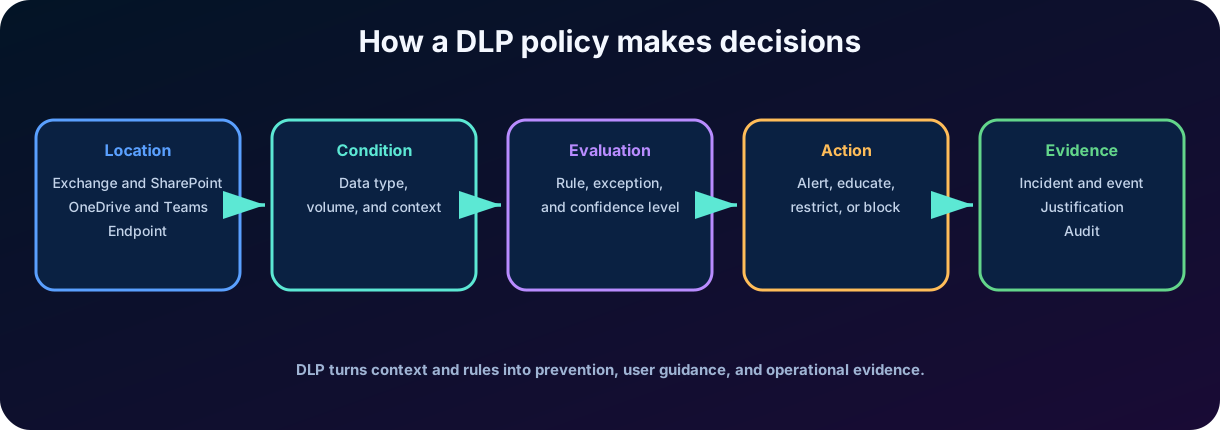
, or , helps to identify and control the use and sharing of sensitive items. A policy combines locations, conditions, exceptions, actions, alerts, and user experience. The goal is not to block indiscriminately, but to apply proportional and observable protection.
Figure 5 - A policy transforms context into action and evidence.
10.1 Possible actions
Audit the occurrence without interfering in the action.
Show Policy Tip to educate the user at the moment of the activity.
Send alert to administrators or persons in charge.
Block sharing or restrict access to the item.
Allow replacement with justification in authorized scenarios.
Generate events that feed reports, alerts, and investigations.
10.2 Test mode and gradual deployment
Before imposing blocks, an organization can simulate or test policies to measure impact. This step allows adjusting confidence, quantity, groups, exceptions, and destinations without disrupting legitimate processes.
10.3 Coverage, evidence, and alert correlation
can evaluate services, Office applications, supported Windows and macOS endpoints, non-Microsoft cloud apps, on-premises file shares and SharePoint repositories, Microsoft Fabric and Power BI workspaces, and inline web traffic to unmanaged cloud apps. The exact locations depend on configuration and licensing. Monitored activity is written to the audit log and surfaced in . Alerts can be grouped automatically into incidents so analysts see related events instead of isolated notifications.
10.4 ,, and
also helps stop sensitive information from being pasted into unapproved services. When a compatible browser or app is covered, a policy can warn or block the action. Microsoft Purview integrates with through standalone and embedded experiences: analysts can summarize alerts, obtain details about AI-matched data, retrieve alert information, and use the Alert Triage Agent to analyze and prioritize alerts while keeping human review in the process.
11. in Exchange, SharePoint, OneDrive, and Teams
Local
What can be evaluated
Examples of response
Exchange Online
Body and attachments of email messages.
Tip, block, alert, restriction, and justification.
SharePoint Online
Files stored on sites and libraries.
Restrict access, alert, and record correspondence.
OneDrive
Corporate personal files and shares.
Control links, external access, and sensitive content.
Teams
Chat/channel messages and files stored in SharePoint/OneDrive.
Block message, guide user, and protect file in the repository.
Power BI and other scenarios
Coverage varies by feature and licensing.
Apply protection and governance according to supported integration.
11.1 Teams Files
Files shared in Teams are stored in SharePoint or OneDrive; therefore, the protection of these repositories also applies to the files. Chat and channel messages have their own handling and specific licensing requirements.
11.2 and labels
A policy can use information types, classifiers, or labels as a condition. A label can encrypt; can prevent the item from being sent to a prohibited destination. The controls work together.
12. Endpoint
Endpoint extends policies to activities performed on supported and integrated Windows devices. The focus shifts from the repository to the user's local action.
Monitored or controlled activity
Example of risk
Copy to removable media
Exfiltration via USB drive.
Copy for network sharing
Movement to an unauthorized location.
Print
Physical exposure of confidential information.
Copy to clipboard
Transfer to unauthorized app or session.
Send to cloud service or browser
Upload for personal storage or third-party site.
Access through app not allowed
Use of software without corporate controls.
Create or rename file
Format change to try to avoid detection.
12.1 Restrictions by group and context
Administrators can differentiate applications, domains, browsers, printers, shares, and devices. The policy must reflect real processes; overly broad rules can cause fatigue, manual workarounds, and loss of productivity.
Endpoint does not replace , antimalware, device control, or identity management. It adds sensitivity context to actions on data.
13.
Microsoft Purview correlates signals to identify potentially malicious or accidental activities, such as intellectual property being copied before shutdown, unusual sharing, policy violations, or misuse of data. The solution is policy-driven and incorporates privacy controls, such as pseudonymization by default, roles, and auditing.
13.1 Main components
Component
Function
Policy
Define users, triggers, indicators, content priorities, and analysis window.
Indicator
Observed activity that may contribute to risk.
Alert
Signal generated when conditions and score meet criteria.
Case
Investigation space centered on a user and their alerts.
Action
User warning, further investigation, referral, and organizational measures.
Forensic evidence
Optional and controlled feature for visual context in specific scenarios.
13.2 Risk does not mean blame
An alert indicates activity that deserves analysis, not proof of malicious intent. Investigations must respect privacy, labor laws, proportionality, segregation of duties, and human review.
13.3 From analytics to action
Insider risk analytics can reveal potential risk areas before policies are configured. The operational workflow then moves through policy, alerts, triage, investigation, and action. Reviewers can open a case, combine alerts, filter user activity, examine captured files or messages in , add case notes, and use the Microsoft Sentinel-powered data risk graph to map relationships between users, devices, cloud resources, and data flows. Outcomes include reminders, escalation, export for additional analysis, or closure when the evidence does not support a violation.
13.4 Scenarios, AI risk, and Copilot assistance
Common templates address departing users, intentional or accidental leaks, security-policy violations, priority users, healthcare misuse, stressful employment events, risky agent activity, and optional forensic evidence. AI Risky Usage policies can detect -injection attacks, access to protected material, or sensitive data sent to services outside organizational control. Risk signals can also reach Microsoft Defender . can summarize alerts, while the embedded Triage Agent evaluates alert context, classifies it into a managed queue, and helps analysts focus on higher-risk activity.
14.
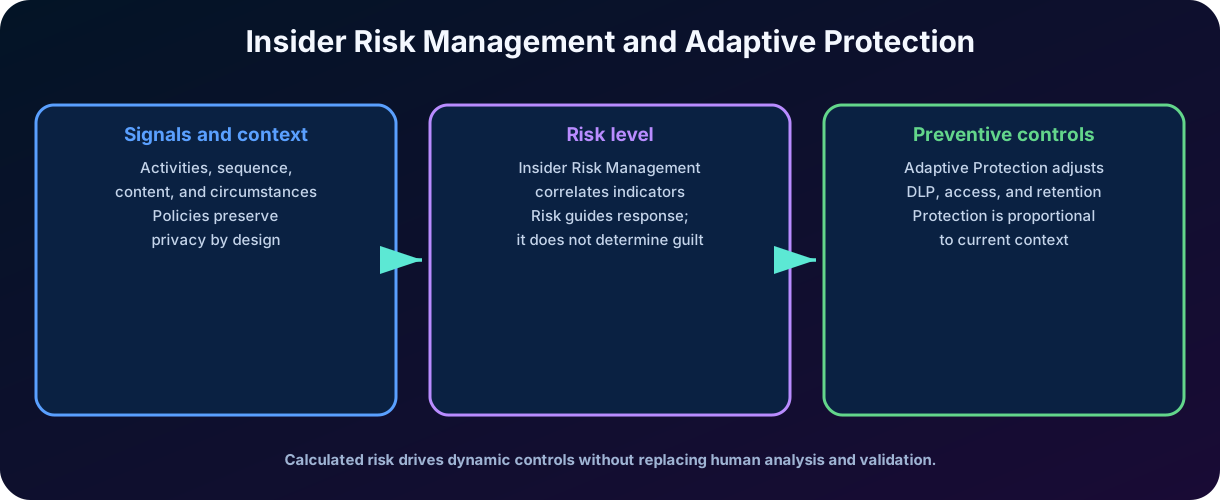
connects internal risk to preventive controls. Depending on the factors defined by the organization and the observed signals, users receive adaptive levels, which can change continuously. , lifecycle, or policies can respond to these levels.
Figure 6 - The calculated risk feeds preventive controls adjusted to the context.
14.1 Example of adaptive behavior
A lower-level user may only receive education and auditing. At a moderate level, sending sensitive data may require justification. At a high level, the organization may block exfiltration to personal destinations and apply additional access controls. The exact configuration is defined by the administrators.
14.2 Difference between risk level and alert severity
The adaptive level represents the dynamic condition assigned to the user for the application of controls. The severity of an alert represents the priority of an investigable event. They are related, but they are not the same metric.
14.3 Three levels and coordinated controls
continuously assigns elevated, moderate, or minor insider-risk levels from policy indicators and user behavior. A minor level may trigger education, a moderate level may require justification, and an elevated level may block saving or sharing outside the organization. The same level can coordinate ,, and Data Lifecycle Management. For example, when a high-risk user deletes content from SharePoint, OneDrive, or Exchange Online, a lifecycle policy can preserve it automatically for 120 days.
15. Data Security Posture Management
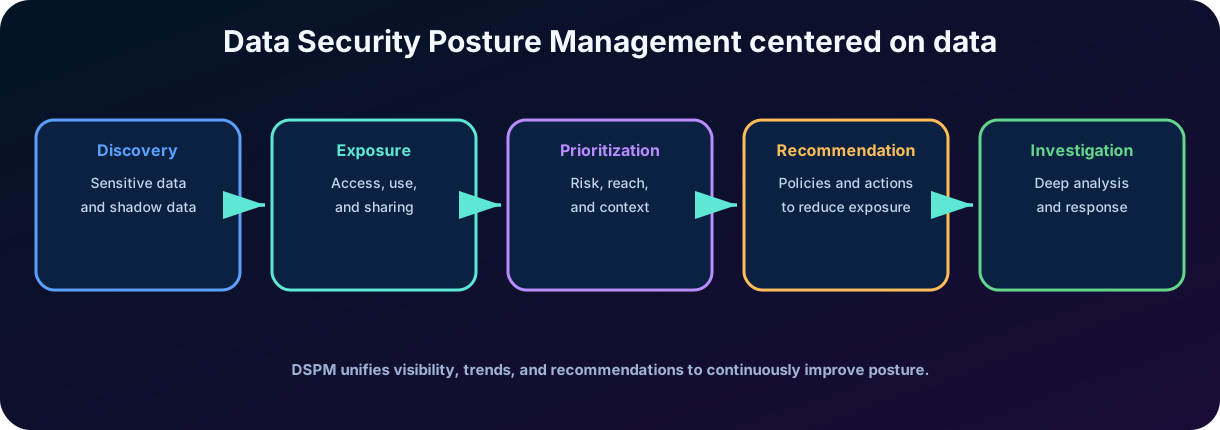
Data Security Posture Management, or , adopts a data-centered view. It helps to discover sensitive information, assess exposure, policy coverage, accesses and movements, and recommend actions to reduce risk. Instead of only looking at infrastructure, it asks where the data resides, who can access it, how it is used, and if it is properly protected.
Figure 7 - consolidates discovery, exposure, prioritization, recommendation, and investigation.
15.1 Posture is not a single control
uses signals and insights from ,,, and investigations. It provides a consolidated view, but remediation usually occurs by configuring these underlying solutions.
15.2 Objectives and recommendations
The organization can track data security objectives, trends, coverage gaps, and risky destinations. Recommendations help prioritize labels, policies, access governance, and investigations, according to availability and licensing.
15.3 Objectives, estate visibility, and AI observability
organizes work around objectives such as preventing exposure in Copilot and interactions, reducing oversharing, preventing exfiltration to risky locations, and discovering sensitive data. It extends visibility across , Azure, Microsoft Fabric, integrated SaaS and infrastructure platforms such as Google Cloud Platform, Snowflake, and Databricks, and partner solutions including Varonis, Cyera, BigID, and OneTrust. Asset Explorer exposes both labeled and shadow data.
AI observability tracks oversharing, exfiltration, and unusual access for Microsoft and third-party AI applications and agents. A 30-day view shows how many agents accessed the organization's data, which sensitive interactions occurred, and which policies govern those agents. AI-driven insights can recommend one-click policies or investigations; autonomous agents may remove public links, apply , or review permissions only within the actions an administrator authorizes, and those actions remain auditable.
15.4 Main pages and operational reporting
Posture combines suggested , key metrics, risk-based objectives, estate-wide usage, and a 30-day posture trend.
Objectives provides a guided remediation plan with one-click policies and recommended actions.
AI observability inventories AI apps and agents and evaluates their activities, risk assessments, and governing policies.
Asset Explorer unifies labeled and unlabeled data across Microsoft and integrated non-Microsoft locations.
Reports tracks sensitive-data usage, labeling, policy usage, user or AI-agent risk, and posture trends. Impact previews, progress indicators, role-based access, and audit logs support controlled remediation.
15.5 One management plane, several enforcement systems
brings classification, labels, ,,, eDiscovery, and into a coordinated experience. It can also guide independent setup tasks, such as connecting the Microsoft Sentinel data lake or partner data sources. The value is a common context for prevention and investigation, not a replacement for the underlying controls.
16.
helps security teams analyze incidents involving exposure of sensitive data, risky users, and breaches. The solution can use capabilities to locate impacted items, analyze content, summarize findings, and support collaboration between security, privacy, legal, and business.
16.1 Questions answered by an investigation
Which files, messages, or data were affected?
What types of sensitive information were present?
Who accessed or moved the content?
To which destinations was the data sent?
What is the potential impact and which actions should be prioritized?
What evidence needs to be preserved and shared with the responsible teams?
16.2 AI with human validation
AI-generated analyses can accelerate screening and discovery, but do not replace validation. Results need to be confirmed against evidence, permissions, and context. Disciplinary, legal, or communication decisions require human process and governance.
16.3 AI analysis, common scenarios, and integrations
is a purpose-built workspace for teams that need to examine many impacted items without assembling the evidence manually. supports vector search by meaning, automatic categorization by subject and risk, and examination of files for hazards such as exposed credentials, vulnerabilities, or threat-actor discussions. Teams can investigate a data breach, expand an case, or proactively assess a sample of users or locations. Cases can start from Microsoft Defender ,, or a exfiltration finding, and every investigation action is recorded in the .
16.4 Response actions and consumption-based billing
Investigators can purge items, which moves them to a recoverable deleted state; the investigation service itself cannot restore them or permanently erase them from the source. Findings can drive access revocation, extra , IT remediation, user notification, or regulatory documentation. The service uses pay-as-you-go billing for AI analysis powered by large language models and Microsoft Copilot for Security, so organizations pay for investigation storage and processing rather than a fixed per-user license.
Important distinction
identifies and prioritizes posture and exposure. delves into a concrete case to understand impacted data and support remediation.
17. Integrated practical scenario
A financial services company prepares reports containing client data and strategic projections. The goal is to enable internal collaboration and with an external audit without allowing for sending to personal accounts or misuse by employees in the process of leaving.
Figure 8 - Several capabilities share context to protect the same data.
17.1 Implementation
A identifies financial information and personal data; a classifier recognizes planning reports.
The Highly Confidential label applies , header, and watermark.
The publication policy requires justification to reduce the label.
allows sharing with the audit domain, but blocks personal email and unauthorized storage.
Endpoint controls USB, printing, and browser upload.
correlates repeated attempts and termination context.
increases the strictness of for high-risk users.
shows exposure and gaps; an investigation analyzes the affected items and destinations.
18. Comparisons and pitfalls of the SC-900
Concept
Main question
Not to be confused with
Type of confidential information
Does the content contain a sensitive pattern?
Persistent label.
Does the document belong to a semantic category?
Simple regular expression.
Where are the sorted items?
.
What activities occurred with the data?
Content inventory.
How to classify and protect persistently?
.
Which action or fate must be controlled?
Isolated cryptography.
Insider Risk
What user behavior deserves investigation?
Proof of guilt.
How to adjust controls according to risk?
Alert severity.
What is the stance and exposure of the data assets?
Investigation of a specific case.
What data was affected in an incident?
General posture panel.
18.1 Recurring traps
To claim that is just blocking; it also audits, guides, alerts, and allows controlled substitution.
Confusing a watermark with .
Confusing with .
Confusing sensitivity labels with .
Treat insider alert as evidence of malicious action.
To claim that replaces protection and prevention policies.
Ignore licensing, permissions, privacy, and gradual rollout.
19. Quick review for the SC-900 exam
Term
Objective memorization
Discover, classify, and protect sensitive information.
Detector based on patterns, evidence, proximity, and trust.
Recognizes categories by examples and semantic context.
Explore where items are classified.
Explores activities carried out with data.
Persistent classification that can apply protection.
Label policy
Publishes labels and configures the user experience.
Detects and controls the use or sharing of sensitive data.
Correlates signals to investigate internal risks.
Applies controls according to the level of risk.
Consolidates a vision of posture and exposure centered on data.
Analyzes impacted data and supports incident response.
Final mind map Know = classification and explorers. Protect = labels, , and markings. Prevent = . Understand behavior = Insider Risk. Adjust dynamically = . Prioritize posture = . Investigate impact = .
20. Conclusion
Microsoft Purview turns data security into a continuous cycle. The organization starts by discovering and classifying content, applies labels and persistent protection, controls risk movements with , monitors internal behaviors, adapts controls, and investigates exposures. This integration is more important than any isolated feature.
The main takeaway is that sensitive data still requires protection when it moves between device, application, or organization. Labels follow the content; assesses context and destination; Insider Risk adds behavior; provides posture visibility; investigations deepen the impact. Quality depends on clear taxonomy, testing, least privilege, privacy, and human review.
In my assessment, Microsoft Purview represents a necessary evolution: moving from controls focused solely on infrastructure to governance centered on the value and risk of the data. When implemented with balance, this approach protects people and organizations without hindering legitimate collaboration.
Next step on the trail
As a next step, review the chapter summaries and complete timed practice tests. Later SC-900 modules deepen compliance, governance, and data lifecycle concepts.
21. Review questions
Question 1: Which classifier should a policy use to recognize patterns such as credit-card numbers?
A) B) Sensitivity labels C) Sensitive information types D)
Commented answer
Correct answer: C. Sensitive information types recognize structured patterns with primary elements, supporting evidence, confidence, and proximity.
Question 2: Which control can classify confidential email and encrypt it for authorized readers?
A) B) Sensitivity labels C) Records Management D) Service Trust Portal
Commented answer
Correct answer: B. A persists with content and can apply , permissions, and visual markings.
Question 3: Why does an organization use ?
A) To identify and investigate risky or malicious internal activity. B) To stop all malware. C) To replace . D) To host .
Commented answer
Correct answer: A. It correlates signals to investigate accidental or intentional internal risks, including sensitive-data leakage.
Question 4: What is the main purpose of ?
A) Create reports. B) Adjust preventive controls according to insider risk levels. C) Replace human investigation. D) Manage only record retention.
Commented answer
Correct answer: B. uses risk levels to apply , lifecycle, or controls according to the configuration.
Question 5: Which solution provides a unified view of sensitive-data risk across Microsoft and integrated third-party platforms?
A) Data Security Posture Management B) Microsoft Sentinel C) Azure Bastion D) Service Trust Portal
Commented answer
Correct answer: A. unifies visibility into data assets, exposure, policy coverage, and prioritized remediation.
22. Essential Glossary
Term
Meaning
Integrates internal risk into dynamic preventive controls.
View of activities carried out with classified data.
Model trained with examples to recognize content categories.
View of classified items and locations.
Policies that detect and control the use or sharing of sensitive data.
Data- and exposure-centered security posture management.
Matching sensitive values with a known base of the organization.
Capabilities to know, classify, and protect data.
Solution to correlate signals and investigate internal risks.
Persistent classification that can apply protection.
Type of confidential information based on standards and evidence.
Investigation of incidents involving the exposure of sensitive data.
Official references consulted
Microsoft Learn - Study guide for Exam SC-900: Microsoft Security, Compliance, and Identity Fundamentals. Updated in June 2026.
Microsoft Learn - Protect your sensitive data with Microsoft Purview. Updated in February 2026.
Microsoft Learn - Learn about sensitivity labels. Updated in April 2026.
Microsoft Learn - Get started with .
Microsoft Learn - Data classification, and documentation.
Microsoft Learn - Microsoft Purview and Endpoint documentation.
Microsoft Learn - and documentation.
Microsoft Learn - Data Security Posture Management. Updated in 2026.
Microsoft Learn - . Updated in 2026.
Note about update
Names, licensing, portals, and resource availability may change. For actual deployment, always check the current documentation and requirements.