Authentication, authorization, human, device, workload and agent identities, identity providers, tokens, claims, SSO, directories, AD DS, Microsoft Entra ID, and federation
Beginner level • Complete chapter with compact summaries for every topic
By João Ricardo Dutra••Full material
1. Introduction
Identity management was born from the need to answer a simple question: who is trying to use a system? In the first computers, few operators worked in physically controlled environments. As systems came to serve hundreds or thousands of people, user accounts, passwords, centralized directories, and access control mechanisms emerged. The rise of the Internet, cloud computing, and mobile applications turned this problem into a strategic discipline known as ().
This knowledge contributes directly to the protection of companies, governments, and citizens. When an organization manages identities centrally, it can reduce forgotten accounts, apply consistent policies, remove access quickly, and offer more secure digital services. For the reader, understanding identity is learning to look at security from the point of view of who is requesting access, which resource is being requested, and what evidence must be verified before allowing the action.
Throughout this chapter, the idea of “identity as the new perimeter” will stop looking like just a slogan. You will see how authentication, authorization, directories, identity providers, tokens, SSO, and federation form a logical chain. When this chain is well understood, many SC-900 scenarios become predictable: you just need to find out who asserts the identity, who verifies it, who trusts the result, and who decides what can be done.
2. A brief evolution of digital identity
At the beginning of corporate computing, security relied mainly on physical barriers and control of the internal network. A user who was inside the building, connected to the domain, and using corporate equipment was frequently treated as trusted. Active Directory Domain Services, introduced by Microsoft with Windows 2000, consolidated accounts, computers, groups, policies, and authentication into on-premises domains. It solved a central challenge of the time: uniformly managing many resources of a Windows-based infrastructure.
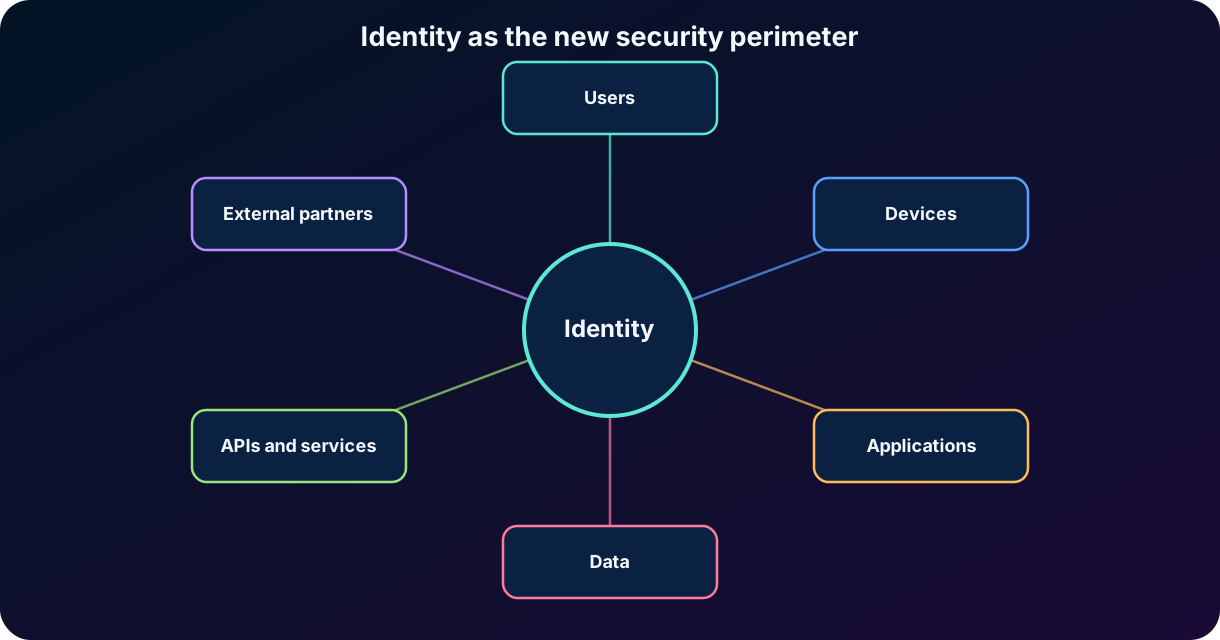
The Internet and SaaS applications broke the correspondence between “being on the network” and “being trusted.” Users began to access data from home, from mobile devices, from public networks, and from partner organizations. Applications came to exist outside the datacenter. APIs and automated services began to act without a person present. In this context, the IP address and physical location were no longer sufficient to represent trust. Identity became the common element among all these interactions.
The change does not eliminate firewalls, segmentation, or network controls. It changes the order of priority: identity is the first line of decision, while the network works as complementary protection. In a modern architecture, each request is evaluated according to the subject, the device, the application, the risk, the resource, and the context. This reasoning brings identity closer to the principles of Zero Trust and least privilege.
Figure 1 — Security stops depending exclusively on the network boundary and comes to follow identities, devices, applications, and data.
3. What digital identity is
Digital identity is the electronic representation of an entity within a system. The entity can be a person, a device, an application, a service, a workload or, in current solutions, an artificial intelligence agent. This representation contains an identifier and a set of attributes that make it possible to differentiate the entity from the others and to make access decisions.
An identity is not just a username. It can contain a unique identifier, display name, email address, job title, department, groups, roles, registered devices, authentication methods, account status, and relationships with applications. Some attributes describe the entity; others directly influence permissions. The quality, timeliness, and protection of these attributes affect the entire security of the environment.
Elements that make up a digital identity.
Element
Description
Example
Subject or principal
Entity that requests access.
User, group, application, device, or workload identity.
Identifier
Value that distinguishes the identity.
, email address, object ID, or account name.
Attributes
Information associated with the identity.
Department, job title, location, groups, and user type.
Credential
Evidence used to prove the identity.
Password, certificate, key, biometrics, or application secret.
Permission
Specific action allowed on a resource.
Read a file, call an API, edit a user, or start a VM.
Role
Set of permissions associated with a responsibility.
Reader, user administrator, security operator.
Context
Signals evaluated during the request.
Risk, location, device, time, application, and resource sensitivity.
Important principle
An identity describes who or what is acting. A credential is just one of the means used to demonstrate that the entity controls that identity. Changing the password does not create a new identity; it changes a credential associated with it.
4. Identification, authentication, authorization, and administration
4.1 Identification
Identification is the act of an entity declaring who it is. When you type joao@company.com, select a certificate, or present an application identifier, the requester states which identity it wants to use. Identification, on its own, proves nothing. Anyone can write someone else's name; that is why it needs to be followed by authentication.
4.2 Authentication
Authentication is the process of verifying whether the entity really is who it claims to be. The system validates one or more pieces of evidence: something the person knows, such as a password; something they have, such as a phone, token, or key; something they are, such as a biometric characteristic; or a cryptographic element, such as a certificate. When the verification succeeds, the system establishes a session or issues a token that represents the result.
Authenticating does not mean allowing any action. Authentication only provides a level of confidence about the identity. A user can be authenticated and still not have permission to open a report, change a setting, or access a particular .
4.3 Authorization
Authorization is the decision about what an authenticated identity can do. This decision can consider roles, groups, policies, scopes, resource ownership, data classification, and context conditions. The result normally allows or denies an action. In modern systems, authorization can also require stronger authentication, limit a session, or request approval.
A simple way to memorize it is: authentication answers “who are you?”; authorization answers “what can you do?”. The logical order is to authenticate first and authorize afterward, although applications may evaluate part of the policy before starting the sign-in process.
4.4 Identity administration
Identity administration is the set of processes used to create, maintain, provision, review, and remove identities and access. It includes registering users, groups, roles, credentials, devices, applications, guests, and service accounts. It also covers role changes, transfers between areas, leaves of absence, access expiration, and offboarding.
The term () is broader: it combines administration, authentication, authorization, governance, auditing, and protection. An organization can have technically strong authentication and still present high risk if it does not quickly remove former employees' accounts or if it keeps permissions incompatible with current roles.
4.5 Auditing
Auditing is recording and analyzing who did what, when, where, and how. In the context of identity, it answers, after the fact, the question the previous steps do not: was the access used as it should have been? Every sign-in, failed attempt, permission change, account creation or removal, and administrative action produces a recorded event with the identity, the time, the source, and the result.
These records support incident investigation, detection of anomalous behavior, reporting, alerts, and demonstrating compliance to auditors and regulators. In Microsoft Entra ID, sign-in logs record authentications and audit logs record changes to the directory; they can be sent to a , such as Microsoft Sentinel, for correlation and longer retention. Without auditing, an organization may control access, but it cannot prove how that access was used or reconstruct what happened during an incident.
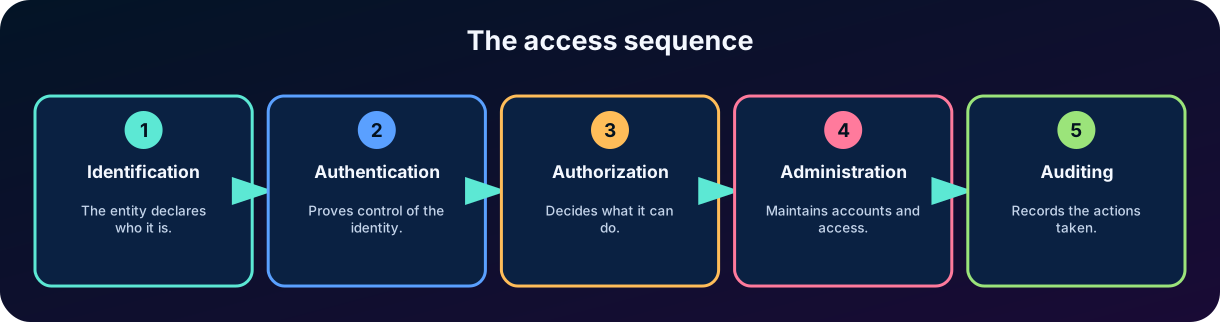
Figure 2 — Access is the result of a sequence: declare the identity, prove it, issue evidence, evaluate permissions, and record the actions.
Identity concepts and what each one answers.
Concept
Central question
Typical result
Identification
Who do you claim to be?
An identifier is presented.
Authentication
Can you prove that identity?
Session or identity token.
Authorization
What can that identity do?
Access allowed, denied, or conditioned.
Administration
How are that identity and its access maintained?
Creation, change, review, and removal.
Auditing
What happened and who performed the action?
Logs, event trail, and evidence.
5. Why identity is the new perimeter
The traditional perimeter was a network boundary: on one side, the internal network; on the other, the Internet. This model worked better when applications, data, users, and devices were in the same location. Today, corporate applications are distributed across Azure, , other providers, and on-premises datacenters. People work from anywhere and partners need to collaborate without being part of the internal network. The boundary is no longer fixed.
Identity remains present in all these scenarios. It is possible to evaluate the identity of a person accessing a SaaS application, of a virtual machine calling a service, of an application consuming an API, or of a guest from another organization. For this reason, controls and detections are centralized around identities. The decision does not depend only on where the request came from, but on who is requesting, from which device, with what level of risk, and for which resource.
Applications and data are outside the traditional corporate network.
Personal and mobile devices make location less reliable.
External users and partners need to access specific resources.
Automated services and APIs require their own identities.
Stolen credentials can allow remote access without breaching a firewall.
A central identity makes it possible to apply policies and auditing consistently.
Relationship with Zero Trust
Treating identity as the perimeter does not mean automatically trusting whoever has an account. On the contrary: each request must be verified explicitly, receive the least privilege necessary, and be monitored under the assumption that a breach can occur.
6. Identity infrastructure and its pillars
An identity infrastructure is the set of services, processes, policies, and integrations that supports the lifecycle and access decisions. The official Microsoft Learn module highlights four conceptual pillars: administration, authentication, authorization, and auditing. They work as interdependent parts of the same system.
The four pillars of an identity infrastructure.
Pillar
Function
Risk when it is weak
Administration
Creates, updates, and removes identities, attributes, credentials, and links.
Orphan accounts, old access, incorrect data, and accumulated privileges.
Authentication
Verifies the identity and establishes enough trust for the session.
Attackers use stolen credentials or weak methods.
Authorization
Determines permissions, scopes, and access conditions.
Authenticated users access resources beyond what is necessary.
Auditing
Records sign-ins, decisions, changes, and actions for investigation.
The organization does not detect abuse or demonstrate compliance.
These pillars need to share a source of truth. If the human resources system records an offboarding, administration must disable or remove the identity; authentication must prevent new sign-ins; authorization must revoke tokens and access; and auditing must record the process. The failure of any step leaves an opening.
7. Identity providers and modern authentication
An identity provider, or Identity Provider (IdP), is a central service that creates and maintains identity information and offers authentication, authorization, and auditing for applications and services. Instead of each application storing its own list of users and implementing password rules, applications delegate the process to the IdP. Microsoft Entra ID is an example of a cloud-based identity provider.
When a user tries to sign in to an application, it redirects them to the identity provider. The IdP verifies the credentials and applies policies. If the process is approved, it issues a security token. The application validates the token based on its trust relationship with the IdP and uses the information contained in it to create the session and decide access.
Centralizing authentication brings clear benefits: consistent policies, across multiple applications, unified visibility of sign-ins, reduction of independent passwords, faster deprovisioning, and a greater ability to detect suspicious patterns. It also reduces the risk of each team trying to develop its own authentication mechanism, a complex and sensitive task.
Authentication without and with a central identity provider.
Without a central IdP
With a central IdP
Each application creates its own accounts and passwords.
The application trusts a common corporate identity.
Password and policies vary between systems.
Policies can be applied consistently.
Offboarding requires removing access in each application.
Disabling the identity can block multiple applications.
Logs are fragmented.
Sign-ins and risks can be analyzed centrally.
Greater password reuse and resets.
SSO support reduces and improves the user experience.
8. Tokens, claims, and protocols
8.1 Security tokens
A security token is a structured package of data issued by a trusted authority after authentication. The token prevents the application from receiving and validating the user's password directly. Instead, it receives evidence signed by the identity provider. Tokens normally have an issuer, an audience, an issuance time, an expiration, and information about the subject.
Two types are important for conceptual understanding. The ID token proves that the user was authenticated and states who they are. The access token represents authorization to access a resource or API. An ID token should not be used as a substitute for an access token when calling an API; they have distinct purposes.
8.2 Claims
Claims are individual statements carried in a token. Examples include the user identifier, name, email, groups, roles, , authentication method, time, and authorized scope. The application should not accept a claim just because it exists; it must validate the token signature, the issuer, the audience, the validity, and other protocol requirements.
Main claims of a JWT issued by Microsoft Entra ID (fictitious example values).
Identifies the token service that issued the token and the in which the user was authenticated. The application must confirm that the issuer is trusted.
sub
Subject
AAAAAAAAAAAAAAAAAAAAAIkzqFVrSaSaFHy782bbtaQ
Identifies the principal the token is about, such as the user. It is immutable and specific to each application: the same user gets different values in different apps.
aud
Audience
11112222-bbbb-3333-cccc-4444dddd5555
States the intended recipient: the application ID in an ID token, or the API's ID in an access token. The token must be rejected if the audience doesn't match.
exp
Expiration time
1759248000
Date and time, in Unix time, on or after which the token can no longer be accepted.
nbf
Not before
1759244400
Date and time, in Unix time, before which the token can't be processed.
iat
Issued at
1759244400
Date and time, in Unix time, when the authentication behind the token occurred.
oid
Object ID
00001111-aaaa-2222-bbbb-3333cccc4444
Immutable identifier of the user or in the . Unlike sub, it is the same across all applications in the .
tid
ID
aaaabbbb-0000-cccc-1111-dddd2222eeee
Identifies the Microsoft Entra the user is signing in to.
name
Display name
Ana Souza
Human-readable name of the user, for display only: it can change and isn't unique.
preferred_username
Preferred username
ana@contoso.com
The user's primary username, useful as a hint in the UI. Because it is mutable, it must not be used for authorization decisions.
nonce
Nonce
7362CAEA-9CA5-4B43-9BA3-34D7C303EBA7
Value the application sent in the authentication request that comes back in the ID token. If it doesn't match, the token must be rejected, which helps prevent token replay.
scp
Scopes
User.Read Mail.Read
Delegated permissions that the client application was granted consent to use on the API on behalf of the user. Present in user access tokens.
roles
Roles
["Orders.Approve"]
App roles assigned to the user or, in application tokens, permissions granted to the calling application.
groups
Groups
["22223333-cccc-4444-dddd-5555eeee6666"]
Object IDs of the groups the subject is a member of, when the application is configured to emit this claim.
azp
Authorized party
33334444-dddd-5555-eeee-6666ffff7777
Application ID of the client using the token, acting as itself or on behalf of a user. Present in v2.0 access tokens.
amr
Authentication methods reference
["pwd", ""]
Methods used to authenticate the subject, such as password (pwd) and (). Included by default in v1.0 tokens; optional claim in v2.0 tokens.
8.3 Modern authentication protocols
Identity and authentication protocols.
Protocol
Main purpose
Common use
OpenID Connect (OIDC)
Authentication and obtaining basic identity information.
Modern web, mobile, and native applications.
OAuth 2.0
Authorization delegation and issuing access tokens.
Allowing an application to access an API on behalf of the user or of itself.
SAML 2.0
Exchange of authentication assertions and attributes in XML.
Enterprise SSO and integration with business applications.
Kerberos
Ticket-based authentication within a trusted domain.
Active Directory Domain Services and Windows integrated authentication.
Querying and changing directory information.
Applications that access directories, especially in on-premises environments.
Standardized provisioning and deprovisioning of identities.
Synchronizing users and groups between an IdP and SaaS applications.
A frequent trap
OAuth 2.0 is an authorization framework. OpenID Connect adds an authentication layer on top of OAuth 2.0. SAML can also provide SSO, but uses a different model and format.
9. Single Sign-On (SSO)
Single sign-on is the ability of a user to authenticate once with an identity provider and access several trusted applications without providing the credentials again at each sign-in. This is possible because the IdP maintains a session and issues tokens specific to the requested applications. Each application validates the token and trusts the result of the authentication performed by the IdP.
SSO improves the experience and can strengthen security. Fewer password reduce reuse, fatigue, and exposure to fake pages. The organization can apply and policies at a central point. However, centralization increases the importance of protecting the account and the IdP: if a central identity is compromised, multiple applications can be affected. For this reason, SSO must be accompanied by strong authentication, monitoring, and least privilege.
Benefits of single sign-on.
Benefit
Explanation
Productivity
The user does not need to repeat sign-ins in each application.
Fewer passwords
Reduces the number of independent credentials and reset requests.
Consistent policy
, blocking, and risk can be evaluated centrally.
More reliable offboarding
Disabling the identity interrupts access to the integrated applications.
Central auditing
Sign-in events are available in a more unified view.
SSO is not the same as federation. SSO describes the experience of authenticating once and accessing several applications. Federation describes the trust relationship between distinct identity systems. A federated solution can provide SSO between organizations, but SSO also exists within a single provider.
10. Directory services
A directory service is a system specialized in storing, organizing, searching, and managing information about identities and resources. It works as a structured source for users, groups, computers, applications, and other objects. Unlike a simple list of accounts, a directory offers hierarchy or relationships, attributes, policies, query mechanisms, and integration with authentication and authorization.
Directories help maintain a consistent identity. A group can represent a team; a role can grant permissions; an attribute can drive provisioning. Applications query the directory or trust the identity provider connected to it. The directory, by itself, does not replace all components, but it is a central piece of the infrastructure.
Store identity objects and attributes.
Organize users, groups, devices, and applications.
Allow efficient searches and queries.
Support authentication and access policies.
Provide a common source for provisioning and auditing.
Maintain membership relationships, such as users belonging to groups.
11. Active Directory Domain Services (AD DS)
Active Directory Domain Services is Microsoft's directory service for Windows Server domains. It organizes objects into a structure made up of forests, domains, and organizational units. Domain controllers store the directory, authenticate users and computers, and replicate information among themselves. AD DS is deeply integrated with DNS and uses protocols such as Kerberos, , and .
A forest represents the broadest boundary of an AD DS deployment and can contain several domains. A domain gathers objects that share a database, policies, and a namespace. Organizational units help organize objects and delegate administration, but they are not security boundaries equivalent to a forest. Groups are used to assign permissions and simplify administration.
Active Directory Domain Services terms.
Term
Brief definition
Forest
A set of one or more domains that share schema, configuration, and internal trust relationships.
Domain
A logical unit that contains users, computers, groups, and policies under a namespace.
Domain controller
A server that hosts AD DS, authenticates, and replicates directory information.
Organizational unit (OU)
A container used for organization, delegation, and application of policies.
A mechanism for configuring users and computers joined to the domain.
Kerberos
A ticket-based authentication protocol used as the standard in modern domains.
A protocol used to query and modify directory information.
AD DS is especially suitable for on-premises resources, Windows integrated authentication, servers, domain-joined workstations, and legacy applications. The organization is responsible for installing, updating, protecting, monitoring, and ensuring the availability of the domain controllers.
12. Microsoft Entra ID
Microsoft Entra ID is Microsoft's cloud-based solution. It connects people, devices, applications, and data and works as an identity provider for , Azure, and thousands of applications. It is a service operated by Microsoft and offered as Identity as a Service (IDaaS).
The central administrative unit is the , also called the Microsoft Entra directory. The has a unique identifier and contains users, groups, devices, application registrations, , roles, and policies. Modern authentication uses protocols such as OAuth 2.0, OpenID Connect, and SAML. The service offers SSO, ,, identity protection, governance, and provisioning integrations.
Microsoft Entra ID is not simply a domain controller in the cloud. It does not use forests, domains, and organizational units like AD DS and does not depend on Kerberos or as the main interface for modern applications. Its architecture was created for the Internet, SaaS, APIs, and distributed environments. When applications require traditional domain features, other solutions, such as on-premises AD DS or Microsoft Entra Domain Services, may be necessary.
Central identity management for cloud and hybrid environments.
Authentication for , Azure, and integrated applications.
SSO and federation with organizations and external providers.
Identities for users, devices, applications, and workloads.
Access policies based on context and risk.
Sign-in logs, auditing, governance, and identity protection.
13. Active Directory Domain Services vs. Microsoft Entra ID
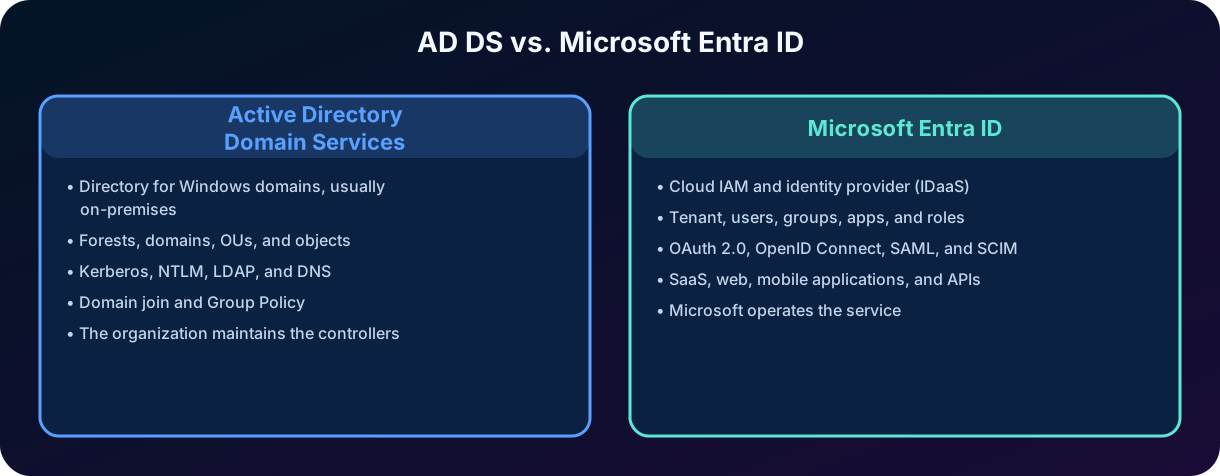
Figure 3 — AD DS and Microsoft Entra ID meet related needs, but have different architectures, protocols, and operating models.
Comparison between AD DS and Microsoft Entra ID.
Aspect
AD DS
Microsoft Entra ID
Model
Directory service for Windows domains, usually on-premises.
and identity provider as a cloud service.
Organization
Forests, domains, OUs, and objects.
, users, groups, applications, devices, and roles.
Common protocols
Kerberos, ,, and DNS.
OAuth 2.0, OpenID Connect, SAML, and .
Devices
Domain join and .
Microsoft Entra join/registration and integration with device management.
Applications
On-premises applications and integrated authentication.
SaaS, cloud, web and mobile applications, and APIs.
Operational responsibility
The organization maintains controllers and replication.
Microsoft operates the service; the customer configures its and access.
External relationships
Trusts between domains and forests; AD FS can federate.
Federation, B2B, social providers, and thousands of integrations.
Combined use
An on-premises source can synchronize identities to the cloud.
Can represent hybrid identities and access cloud resources.
Watch the terminology
Microsoft Entra ID was called Azure Active Directory (Azure AD). The name change did not turn the service into AD DS. In exam questions, note whether the scenario involves a Windows domain and traditional protocols or cloud identity and modern authentication.
14. Trust between domains
In Active Directory Domain Services, a trust relationship allows identities authenticated in one domain to be recognized to access resources in another domain, according to the configured permissions. Trust does not grant access automatically; it creates a path for the authentication to be accepted. Authorization on the target resource is still necessary.
Trusts can have direction and transitivity. A one-way trust allows one side to accept identities from the other in a specific direction. A two-way trust establishes recognition in both directions. Transitive trusts can extend the path between related domains, while a non-transitive trust is limited to the configured parties.
Characteristics of trust relationships.
Characteristic
Meaning
One-way
The trust works in only one direction. The fact that A trusts B does not imply that B trusts A.
Two-way
Each domain trusts the other for the configured scenarios.
Transitive
The trust can extend through a chain within the allowed scope.
Non-transitive
The trust exists only between the explicitly configured domains.
Authentication vs. authorization
Trust allows the authentication to be recognized; the permissions on the resource still determine access.
In the SC-900, the most important thing is to understand the idea of trust and not to memorize all the administrative variations of AD DS. The same general notion appears in federation: one party accepts evidence of identity issued by another trusted party.
15. Identity federation
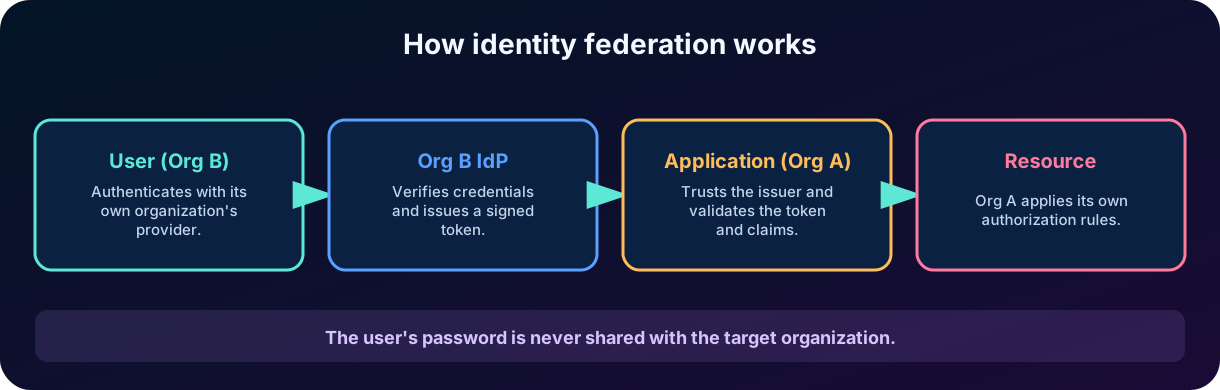
Federation is the establishment of trust relationships between separate identity systems to allow access across organizational or domain boundaries. The user authenticates with their organization's provider and uses that identity to access an external resource. The target system does not need to store the user's password or manage a separate credential.
The passport analogy is useful: one country issues a document and another accepts it as evidence because it trusts the issuer and can verify its authenticity. In federation, the identity provider issues a token or assertion; the target application or provider validates the signature, the issuer, the audience, and the claims. Then, it applies its own authorization rules.
Figure 4 — Federation allows one organization to accept the authentication performed by another identity provider, without sharing the user's password.
Federation can use SAML, OpenID Connect, , or other compatible protocols. Active Directory Federation Services (AD FS) is a server role that makes it possible to issue tokens from AD DS identities and integrate them with external applications. Microsoft Entra ID also offers federation and external collaboration without requiring each application to implement all these details directly.
16. Authentication between organizations, applications, and external providers
16.1 Collaboration between companies
In a partnership between companies, employees of Organization B can access a project hosted by Organization A using their corporate credentials. Organization A trusts the authentication performed by B's provider or uses B2B collaboration features. Authorization remains under A's control: only the necessary documents, groups, and applications should be released.
16.2 Social and consumer providers
A public-facing application can allow sign-in with Microsoft, Google, GitHub, or other provider accounts. The application trusts the external provider to authenticate the person and receives basic claims. This reduces registration friction, but the application still needs to create its internal profile, apply consent, protect personal data, and define permissions.
16.3 An application accessing an API
An application can receive authorization to call an API on behalf of the user or on its own behalf. In the first case, the access token represents a combination of the application, the user, and the granted scopes. In the second, the application uses a service identity, certificate, or managed identity. In both, the API validates the token before authorizing the operation.
16.4 Hybrid identity
Hybrid identity allows the same person to have a consistent representation in on-premises and cloud environments. Organizations that use AD DS can synchronize users and attributes to Microsoft Entra ID. Depending on the design, authentication can occur in the cloud, use agents, or be federated with on-premises infrastructure. The goal is to offer a common identity without forcing the user to maintain disconnected accounts.
16.5 integrated with Microsoft Entra ID
When an is integrated with Microsoft Entra ID, Entra ID acts as the application's identity provider. The user signs in once with their work credentials and opens the applications assigned to them without signing in again, through single sign-on (SSO). Entra ID verifies the identity, applies policies such as and , and confirms that identity to the application through protocols such as SAML 2.0 or OpenID Connect. Authorization remains with the application or target service: the organization can require users and groups to be assigned to the and, when the application exposes app roles, assign each user the role that defines what they can do.
Who authenticates and who authorizes in different scenarios.
Scenario
Who authenticates
Who authorizes the resource
Corporate application integrated with Entra
Microsoft Entra ID.
The application and/or the target service.
A partner accesses another company's resource
The partner's IdP or a B2B flow accepted by the target.
The organization that owns the resource.
Social login
Social provider chosen by the user.
The consuming application.
An application calls an API
The IdP issues an access token for the user/application.
The API validates the token, scope, and policies.
Hybrid user
Service defined by the hybrid architecture.
On-premises or cloud resource according to their permissions.
17. Lifecycle, provisioning, and deprovisioning
Identity security does not end at sign-in. Each identity goes through a lifecycle: joining, changes, and leaving. This model is often described as joiner, mover, and leaver. On joining, the organization creates the identity, assigns attributes, and grants initial access. On a role change, old permissions must be removed and new permissions granted. On leaving, sessions, tokens, devices, and access need to be revoked quickly.
Provisioning is the creation and updating of identities and accounts in target systems. It can be manual, automated by HR integrations, or standardized with . Deprovisioning is the coordinated removal or deactivation. A forgotten account in a non-integrated application can remain accessible even after the central identity has been disabled; for this reason, inventory and automation are important.
An authoritative source records the person's link, such as the HR system.
The directory or IdP creates the identity and its attributes.
Groups, roles, and grant the minimum necessary.
Applications receive or create accounts through provisioning.
Role changes trigger a review and adjustment of permissions.
Offboarding disables authentication, revokes sessions, and removes access.
Logs and reviews verify that the process was completed.
The principle of least privilege
An identity should receive only the necessary permissions, in the necessary scope, and for the necessary time. The lifecycle prevents privileges from accumulating indefinitely.
18. Identity-based risks and attacks
If identity is the new perimeter, attackers will try to cross it. The goal may be to steal a credential, deceive the user, reuse a session, register an authentication method, or obtain additional privileges. Knowledge of these risks helps to understand why centralization, , short-lived tokens, auditing, and deprovisioning are relevant.
Identity-based risks and attacks.
Risk
Description
Conceptual controls
Phishing
The user is induced to reveal credentials or approve a fake sign-in.
Phishing-resistant , training, policies, and detection.
Password spray
A few common passwords are tested against many accounts.
Password protection, ,, and monitoring.
Credential stuffing
Credentials leaked in another service are reused.
Unique passwords, methods, , and risk detection.
Token theft
A token or session cookie is captured.
Expiration, device protection, revocation, and context validation.
Excessive privilege
A legitimate account has more access than necessary.
Least privilege, , review, and temporary access.
Orphan account
Access remains after a change or offboarding.
Lifecycle automation and deprovisioning.
Malicious application
The user grants excessive permissions to an application.
Controlled consent, permission analysis, and .
No isolated control eliminates all risk. reduces the value of a stolen password but does not fix excessive authorization. SSO reduces the number of credentials but requires rigorous protection of the central provider. Auditing allows detecting and investigating, but needs to be accompanied by response processes.
19. How the concepts connect
Consider an employee's access to a cloud payroll application. The identity was created from the hiring process and received department attributes. When opening the application, she provides her identifier. The application redirects the browser to Microsoft Entra ID, which authenticates the user and applies policies. An ID token states who she is; an access token allows calling a specific API. The application analyzes the claims and authorizes only the screens appropriate to her role.
If the employee accesses a partner application, a federated relationship can allow the use of the same identity. If the organization maintains on-premises AD DS, the identity can be synchronized to Microsoft Entra ID and used in a hybrid way. When the employee changes areas, administration updates attributes and groups; permissions are recalculated. On offboarding, the account is disabled, sessions are revoked, and integrated applications remove access.
This example shows that directory, IdP, SSO, and federation are not independent concepts. The directory organizes identities; the IdP authenticates them and issues tokens; SSO improves the experience across trusted applications; federation extends trust between distinct systems; authorization protects each resource; and auditing records the entire path.
20. Common traps in the SC-900
Incorrect statements and their corrections.
Incorrect statement
Correction
“Identification and authentication are the same thing.”
Identification declares who you are; authentication verifies the declaration.
“Once authenticated, the user can access any resource.”
Authorization evaluates permissions and conditions after authentication.
“SSO means that all applications share the password.”
Applications trust tokens issued by the IdP; they do not need to receive the password.
“OAuth 2.0 is an authentication protocol.”
OAuth 2.0 deals with authorization; OpenID Connect provides authentication on top of it.
“Microsoft Entra ID is a domain controller hosted in the cloud.”
It is an /IdP service for the cloud, with an architecture and protocols different from AD DS.
“Federation automatically creates permission on the external resource.”
It allows the authentication to be accepted; the target still needs to authorize access.
“If A trusts B, B necessarily trusts A.”
Trust relationships can be one-way.
“Disabling an account resolves all local application accounts.”
Only integrations and proper deprovisioning ensure coordinated removal.
“Directory and identity provider are always the same thing.”
They may be integrated, but the directory stores/organizes identities and the IdP provides authentication and token services.
21. Integrated scenario: collaboration between two companies
Company Alpha uses and hosts a project portal. Company Beta participates in the project and needs to grant access to twenty consultants. The goal is to avoid separate accounts and passwords on the portal, ensure that Beta remains responsible for authenticating its professionals, and allow Alpha to control exactly which resources can be accessed.
21.1 Identity architecture
Each company maintains its own identity provider and user lifecycle.
Alpha establishes B2B collaboration or a compatible federated relationship.
The consultants sign in with Beta's corporate credentials.
Alpha receives an external identity and assigns groups or roles limited to the project.
The portal trusts Alpha's IdP and receives tokens with relevant claims.
21.2 Access flow
The consultant provides their identity on Alpha's portal.
The flow identifies that the authentication must be performed by Beta's trusted provider.
Beta authenticates the user and issues evidence or participates in the federated flow.
Alpha validates the trust and represents the consultant as an external user.
The portal receives a token and authorizes only the project workspace.
Sign-ins and actions are recorded for auditing.
21.3 Change and offboarding
If a consultant leaves Beta, their identity provider must prevent new authentications. Alpha should also have and expiration to reduce dependence on manual processes. At the end of the project, the group and external access are removed. This design combines federation, SSO, local authorization, least privilege, and lifecycle governance.
Result
Beta controls the authentication of its professionals; Alpha controls the authorization over its resources. No corporate password needs to be shared with the other company's portal.
22. Quick review for the exam
Summary of the chapter's topics.
Topic
What to memorize
Identity as the perimeter
Identity follows access inside and outside the network and becomes the central point of control.
Identification
Declares who you are.
Authentication
Proves the identity.
Authorization
Decides which actions are allowed.
Administration
Maintains the lifecycle of accounts, attributes, credentials, and access.
IdP
Centralizes authentication, issues tokens, and provides SSO and auditing.
ID token
Proves authentication and states who the user is.
Access token
Represents authorization to access a resource or API.
SSO
One sign-in for several applications that trust the same IdP.
Directory service
Stores and organizes identities and resources.
AD DS
Windows domains, Kerberos, , controllers, and .
Microsoft Entra ID
Cloud /IdP, , SaaS, OAuth, OIDC, and SAML.
Trust
Allows recognizing authentication from another domain; does not grant permission by itself.
Federation
Extends trust between providers or organizations through standard tokens and protocols.
OAuth 2.0 vs. OIDC
OAuth 2.0 = authorization; OIDC = authentication on top of OAuth 2.0.
Lifecycle
Joining, moving, and leaving: provision, review, and deprovision.
23. Conclusion
Identity became the new perimeter because modern security cannot depend only on a network boundary. People, devices, applications, and services access resources distributed across cloud, SaaS, and on-premises environments. Identity offers a common point to verify who requests access, evaluate the context, apply least privilege, and record decisions.
In this chapter, we differentiated identification, authentication, authorization, and administration; we analyzed the pillars of an identity infrastructure; we explained the role of the identity provider, tokens, and claims; and we separated SSO from federation. We also compared Active Directory Domain Services and Microsoft Entra ID and showed how trust and standardized protocols allow collaboration between organizations.
In my assessment, identity is the topic that most helps the candidate understand the rest of the SC-900. ,, identity protection, ,, governance, and external collaboration are natural extensions of the fundamentals studied here. When you can narrate the complete flow - from account creation to token issuance and resource authorization - you stop memorizing isolated products and start understanding the architecture. This change of perspective makes the study more consistent and paves the way for the next chapters on Microsoft Entra ID.
24. Review questions
Try to answer before consulting the commented answer key.
Question 1
A user enters their email address and then confirms a request in Microsoft Authenticator. Which steps occurred, respectively?
A) Authorization and auditing.
B) Identification and authentication.
C) Authentication and identification.
D) Provisioning and authorization.
Commented answer key
Correct answer: B. Entering the address declares the identity; confirming the evidence verifies that the user controls that identity.
Question 2
Which statement correctly describes single sign-on?
A) All applications store the same user password.
B) The user receives unrestricted authorization after the first sign-in.
C) The user authenticates with the IdP and trusted applications accept tokens without requiring the credentials again.
D) SSO only works between two AD DS domains.
Commented answer key
Correct answer: C. SSO depends on trust in the identity provider and on tokens; it does not share the password or eliminate authorization.
Question 3
Which difference between AD DS and Microsoft Entra ID is correct?
A) Microsoft Entra ID is just a domain controller operated by Microsoft.
B) AD DS mainly uses OAuth 2.0, while Entra ID uses Kerberos.
C) AD DS serves Windows domains and traditional protocols; Entra ID is a cloud /IdP for SaaS, applications, and modern APIs.
D) The two products have exactly the same structure of forests and OUs.
Commented answer key
Correct answer: C. They deal with identity, but have different architectures, protocols, and scenarios, and can coexist in hybrid environments.
Question 4
A company accepts tokens issued by a partner's identity provider. What does this represent?
A) Symmetric .
B) Identity federation.
C) Only local identification.
D) Automatic permission to all resources.
Commented answer key
Correct answer: B. Federation establishes trust between identity systems. The target company must still authorize each resource.
Question 5
An organization needs one identity approach for employees who use both on-premises applications and cloud SaaS services. Which option is designed for that mixed environment?
A) Active Directory Domain Services by itself.
B) A single domain controller by itself.
C) Microsoft Entra ID connected to the on-premises directory in a hybrid identity design.
D) A separate local account in every SaaS application.
Commented answer key
Correct answer: C. Microsoft Entra ID is built for cloud and SaaS access and can synchronize with AD DS so the same workforce can reach both cloud and on-premises resources.
25. References and further reading
Content of the SC-900 study plan provided by the user: Chapter 2 - Identity as the New Security Perimeter.
You have completed the conceptual foundations of identity. The natural next step is to study the structure of Microsoft Entra ID, its identity types, and the integration between on-premises and cloud environments.