Identity Governance, Privileged Access, and Identity Protection
Microsoft Entra ID Governance, the cycle, ,,,, Privileged Identity Management, access, Microsoft Entra ID Protection, , and
Suggested study time: 44 minutes • Beginner level • Aligned with the Describe the identity protection and governance capabilities of Microsoft Entra module of the SC-900 exam
By João Ricardo Dutra••Full material
Introduction
For decades, administering identities mainly meant creating accounts in a directory, adding users to groups, and removing access when someone left the company. This model worked better when systems were concentrated in a local network and organizational changes happened at a relatively predictable pace. The expansion of the cloud, remote work, software as a service, and collaboration with partners transformed this scenario: a single person can accumulate access to dozens of applications, teams, sites, subscriptions, and administrative roles.
It was in this context that identity governance consolidated as a discipline. Its purpose is to continuously answer four questions: who has access, to what, for what reason, and for how long. The answer cannot depend only on spreadsheets or the memory of administrators. It must be sustained by policies, automation, approvals, reviews, and audit evidence.
For the reader, understanding this topic means seeing identity as a living process. A correctly created account can become risky months later if the person changes roles, accumulates permissions, or remains with permanent administrative privilege. For society, better governance practices reduce leaks, fraud, disruptions, and data misuse, strengthening trust in public and private digital services.
Guiding question
Is the most dangerous problem an attacker with no access or a legitimate user who received too much access, for too long, and without review? Throughout the chapter, we will see that both risks meet at the same layer: identity.
1. From account administration to identity governance
Identity administration is the set of operational tasks used to create, change, enable, disable, and delete identities. Identity governance is broader: it defines how access should be requested, approved, granted, reviewed, expired, and evidenced. In other words, administration answers “how to execute”; governance answers “why, under which policy, and with what evidence”.
Governance connects areas that were previously treated separately: human resources, security, technology, audit, compliance, and business owners. HR knows the employment relationship and the person's dates; the manager knows the role; the resource owner knows the sensitivity; security knows the risk; the identity platform applies the controls. When these signals are integrated, access can follow the reality of the organization.
Concepts that separate administration, access, governance, protection, and privilege.
Concept
Main question
Example
Identity administration
How to create or change the object?
Create a user, reset an attribute, add to a group.
Access management
How to grant or block use of a resource?
Assign a role, application, or membership.
Identity governance
Who should have access, why, and until when?
Approval, expiration, review, and audit trail.
Identity protection
Are there signs of compromise or abuse?
,, and remediation.
Privilege management
How to reduce and control administrative access?
Eligibility, temporary activation, and approval in .
2. Microsoft Entra ID Governance
Microsoft Entra ID Governance is the set of Microsoft Entra capabilities intended to control the lifecycle of identities and access. The goal is to increase productivity without losing security: new employees need to start with the right resources; people who change areas need to receive new access and lose the old; offboardings require quick removal; guests and vendors need scoped access; administrators need to elevate privilege only when necessary.
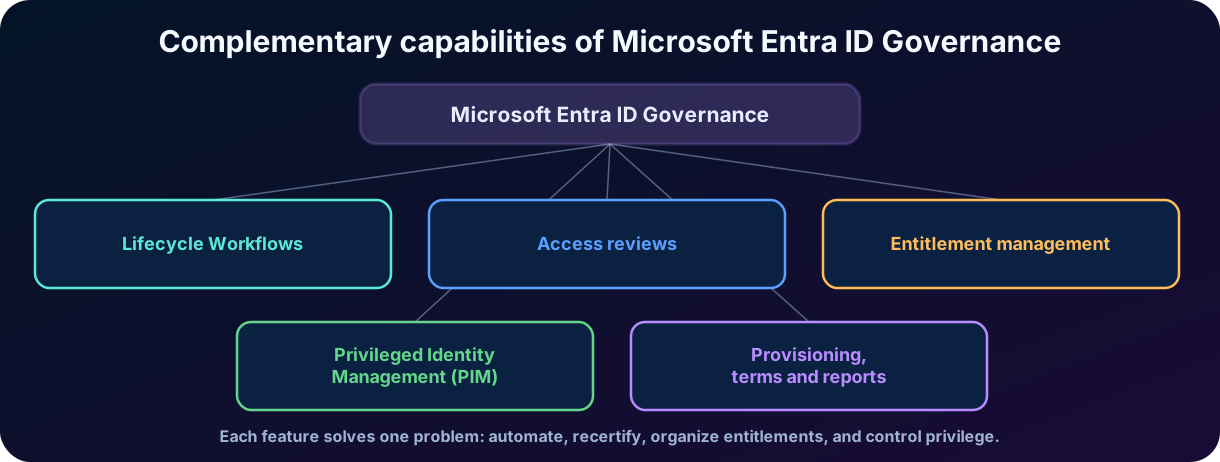
The capabilities most relevant to the SC-900 are ,,, and Privileged Identity Management. They complement each other. Workflows automate lifecycle-driven tasks. organize resources and policies. Reviews verify whether access is still needed. governs privileged roles and groups. Provisioning, terms of use, reports, and logs reinforce the solution.
Figure 1 — Complementary capabilities of Microsoft Entra ID Governance.
SC-900 focus
The exam usually assesses the purpose of each feature. recertifies; organizes and automates entitlements; controls privilege; ID Protection detects and remediates risk.
3. lifecycle
The model, often abbreviated as JML, describes three essential phases of the relationship between an identity and the organization. Joiner is the entry; Mover is a relevant change; Leaver is the exit. The value of the model is in treating access changes as a consequence of business events, and not as isolated requests that can be forgotten.
3.1 Joiner: onboarding and first-day preparation
In the Joiner phase, the organization receives reliable data about the new person, creates their identity, and prepares resources. This can include account, groups, license, team, application, device, initial credential, training, and acceptance of terms. A mature process avoids two extremes: the employee arriving without access and losing productivity, or receiving generic and excessive access “to make sure it works”.
3.2 Mover: change of role, manager, or location
Mover is the most neglected phase. Promotion, transfer, project change, leave, or change of employment relationship may require new access. The common error is adding the new without removing the old, generating privilege creep, or the progressive accumulation of privileges. Governance should recalculate what is necessary, apply separation of duties when relevant, and start additional reviews for sensitive resources.
3.3 Leaver: offboarding and access termination
Leaver requires coordination and speed. Depending on the scenario, the account can be blocked, sessions and tokens revoked, roles and groups removed, application access deprovisioned, devices collected, and data transferred. Immediately deleting the account is not always the first appropriate action, because the organization may need to preserve a mailbox, files, logs, or evidence. The principle is to prevent misuse without destroying information needed for continuity and compliance.
Figure 2 — Access must follow the identity's onboarding, changes, and departure.
4.
are governance capabilities that automate tasks associated with the JML phases. A workflow combines scope, trigger, and tasks. The scope defines who will be affected; the trigger defines when execution occurs; the tasks define what will be performed. An example is sending a message to the manager seven days before the hire date and, on the first day, enabling the account and adding the user to an initial group.
Workflows can run on demand or on a schedule when the conditions are met. Attributes such as hire date, leave date, department, and employee type help select identities. For more complex scenarios, extensions can integrate external processes. Run history and audit logs allow verifying what ran, for whom, and with which result.
Elements of a : scope, trigger, task, history, and extension.
Element
Function
Example
Scope
Determines which identities enter the workflow.
Users in the Finance department with an employee relationship.
Trigger
Determines when the workflow starts.
Seven days before employeeHireDate or on employeeLeaveDateTime.
Task
Action performed by the workflow.
Send email, add to a group, remove access, or disable an account.
History
Shows executions and results.
Check a failure in an offboarding task.
Extension
Connects additional processes.
Trigger a Logic App to open a ticket or integrate an external system.
Best practice
Automation does not eliminate responsibility. Incorrect HR attributes or poorly defined rules can automate the error at scale. Therefore, source data, testing, piloting, and monitoring are parts of governance.
5.
An is a recertification process: someone evaluates whether users, guests, or identities still need to keep a certain access. The review can cover groups, applications, and, in privileged scenarios, roles. It can be one-time or recurring and can delegate the decision to the manager, the resource owner, specific reviewers or, in some cases, the user themselves.
The reviewer usually chooses to approve or deny continuation. Suggestions and context help the decision, but they do not replace business knowledge. At the end, the results can be applied to remove denied or unreviewed access, according to the configuration. The value of a review is not only in producing a report: it is in reducing unnecessary access and generating evidence that the organization controls its permissions.
5.1 What can be reviewed
Groups: members of security or groups can be recertified.
Applications: assignments of users to can be evaluated.
Guests: B2B access can be reviewed and removed when the collaboration ends.
: assignments granted by can have periodic reviews.
Privileges: Microsoft Entra roles, Azure resource roles, and -managed groups can be reviewed.
5.2 Decisions and automation
A review must define frequency, duration, reviewers, reminders, behavior for no response, and application of results. “No response” is not a universal synonym for approval or denial; it depends on the chosen policy. For high-impact access, the absence of a decision usually requires conservative handling and follow-up.
Design decisions of an and the risk when poorly defined.
Setting
Design decision
Risk if poorly defined
Reviewer
Manager, resource owner, user, or designated reviewer.
A person without context approves by routine.
Recurrence
Monthly, quarterly, semiannually, or per criticality.
Stale access remains for long periods.
No response
Keep, remove, or use the recommendation, depending on the scenario.
Automatic result incompatible with the risk.
Application
Manual or automatic after completion.
The review becomes a report with no operational effect.
Scope
Everyone, guests, inactive users, or specific groups.
Excessive volume reduces the quality of the analysis.
6. and
automates how identities request, receive, keep, and lose access to sets of resources. Instead of processing separate requests for each group, application, or site, the organization creates an that represents a business need, such as “Project Atlas”, “Audit vendor”, or “Regional marketing team”.
An can include memberships to groups and teams, application roles, and SharePoint site roles. The package in a catalog, which organizes resources and delegates their administration. One or more policies determine who can request or receive the package, whether approval is required, who approves, how long the access is valid, whether there are questions or terms, and whether reviews will be performed.
6.1 Essential components
Essential components of .
Component
What it represents
Example
Catalog
Container of resources and packages administered by a business domain.
“Strategic Projects” catalog.
Resource
Group, application, site, or other permission made available in the catalog.
Teams group and financial application.
Set of resource roles delivered as a unit.
“External auditor - read”.
Assignment policy
Rules for eligibility, request, approval, duration, and review.
Partners approved by the sponsor for 60 days.
Connected organization
External organization recognized for collaboration scenarios.
Vendor company with its own .
Assignment
Effective link between identity and package.
Guest receives the package after approval.
6.2 Request, approval, expiration, and review
The flow can be by request, direct assignment, or automatic rule, depending on the scenario. The policy can require approval in one or more stages and collect justifications. The duration can be defined by date, number of days, or another supported window. Before or during expiration, a review can confirm continuation. When the entitlement ends, the service removes the related assignments, reducing guest accounts and forgotten permissions.
Essential difference
An grants a governed set of entitlements. An asks whether the entitlement should continue. A performs tasks on lifecycle events. The three features can work together.
7. Privileged access and administrative risk
Privileged access is the ability to perform actions that change security, identity, configuration, data, or availability of systems. Accounts with administrative roles are valuable targets because a single compromise can affect the entire organization. Even without an external attack, standing privileges increase the chance of error, abuse, or use outside the process.
The principle of least privilege determines that each identity receives only the necessary permissions, in the necessary scope, and for the necessary time. In administrative roles, this leads to two complementary ideas. grants the privilege only when the task needs to be executed. limits the set of actions to the minimum sufficient. mainly materializes the first principle through eligibility and temporary activation, while reinforcing the second with appropriate roles and scopes.
8. Microsoft Entra Privileged Identity Management
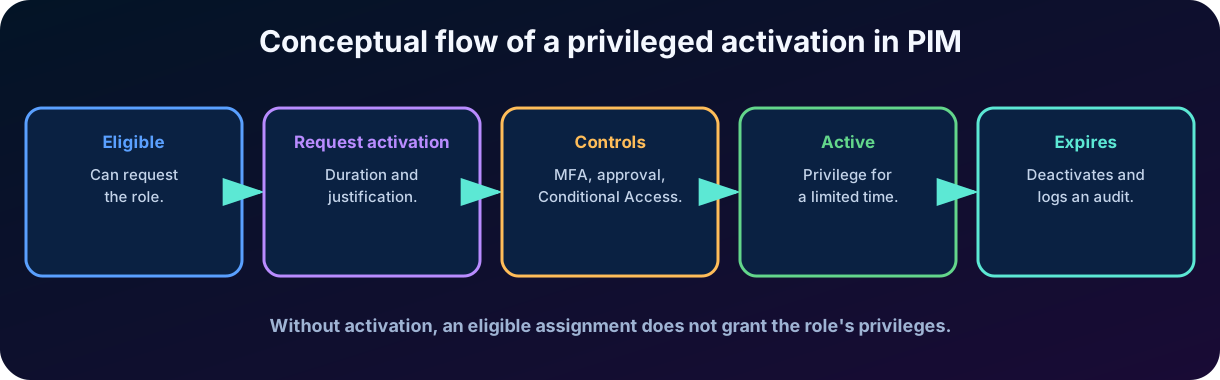
Microsoft Entra Privileged Identity Management, or , is a service to manage, control, and monitor privileged access to Microsoft Entra roles, Azure resource roles, and memberships or ownership of -enabled groups. Instead of keeping all administrators permanently active, the organization can make them . The person remains authorized to request the role, but the privilege only becomes active after an activation flow.
8.1 , active, permanent, and time-bound
States of an assignment in and their implications.
Term
Meaning
Implication
assignment
The identity can activate the role when necessary.
Without activation, it does not have the role's privileges.
Active assignment
The identity already has the role's privileges.
Can perform actions while the assignment is valid.
Permanent
Has no defined end date.
Increases exposure and requires strong justification.
Time-bound
Has a start and an end.
Reduces standing access and enables automatic expiration.
Activation
Temporarily turns eligibility into active access.
May require additional controls.
8.2 Activation flow
When activating a role, the user selects a duration within the configured limit and provides a justification. Depending on the role policy, it may be necessary to perform , satisfy a policy, provide a ticket number, or wait for approval. After approval and activation, the role is available for the defined window. When the period ends or deactivation occurs, active access is removed and the event remains logged.
Figure 3 — Conceptual flow of a privileged activation in .
8.3 Controls and evidence
Approval: one or more approvers evaluate the need before activation.
and : reinforce verification at the moment of elevating privilege.
Justification and ticket: record the business reason and link the activity to a process.
Maximum duration: limits how long the role can remain active.
Notifications and alerts: report activations, permanent assignments, and situations considered insecure.
History and audit: allow investigating who activated, when, for how long, and under which justification.
: recertify privileged eligibilities and assignments over time.
Exam pitfall
is not the same as Azure . defines which actions a role allows and in which scope. governs when and under which conditions a privileged assignment becomes active.
9. Microsoft Entra ID Protection
Microsoft Entra ID Protection helps detect, investigate, and remediate identity-based risks. The service analyzes signals and behaviors to identify suspicious events. These risks can feed reports, investigations, and policies, allowing the access decision to adapt to the context instead of relying only on a correct password.
9.1 Risk detection, , and
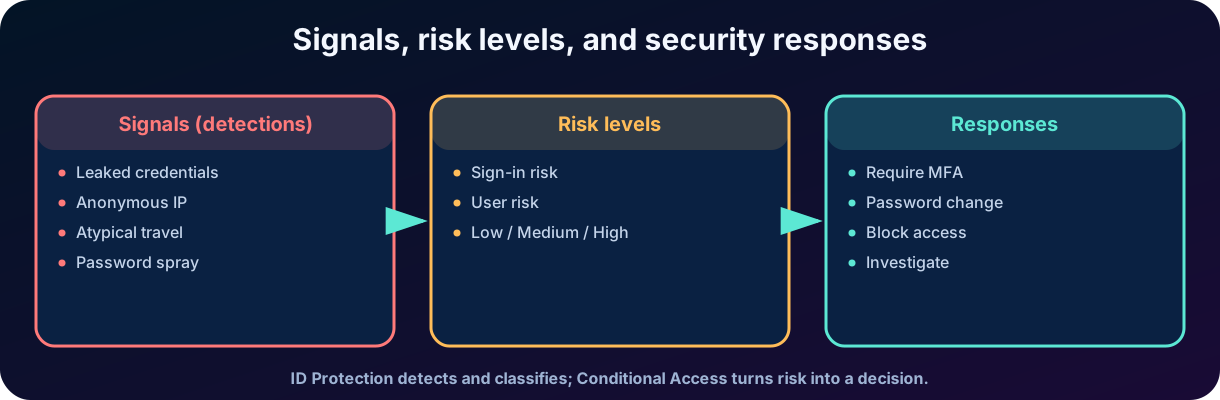
A risk detection is evidence or behavior considered suspicious, such as leaked credentials or use of an anonymous IP address. is the probability that a specific authentication request was not made by the legitimate owner. is the probability that the identity is compromised, considering evidence associated with the user. The first is tied to the session; the second represents the broader state of the account.
Figure 4 — Relationship between signals, risk levels, and security responses.
9.2 Examples of detections
Examples of risk detections and the correct reading of each one.
Detection
What it indicates
Correct reading
Leaked credentials
Valid credentials were found in a leak source and match the .
It is strong evidence of exposure; for hybrid identities, the detection depends on password hash synchronization.
Anonymous IP
Sign-in originating from a service that hides its origin, such as an anonymous proxy or anonymization network.
It is a risk signal, not isolated proof of an attack.
Atypical travel
Sign-ins geographically distant or unusual for the user's pattern.
Algorithms consider time, behavior, and possible .
Password spray
Many accounts are tested with a few common passwords.
The attacker tries to avoid lockouts by distributing attempts.
Unfamiliar sign-in properties
Browser, device, network, or location characteristics diverge from the pattern.
May require a learning period and contextual investigation.
Not every detection means confirmed compromise. The service assigns levels and provides context for investigation. Some detections are calculated in real time, during sign-in; others are calculated offline after additional correlation. The administrator must distinguish ,, and unusual legitimate activity.
10. Risk-based remediation policies
Risk levels can be used in policies. For , a common response is to require or an adequate . For , the policy can require risk remediation, such as a secure password change, or block access when the organization cannot accept the exposure. The modern configuration concentrates these decisions in , integrating ID Protection with the .
Risk situations and possible responses with clear objectives.
Situation
Possible response
Objective
Medium- or high-risk sign-in
Require or a phishing-resistant method.
Prove again that the request belongs to the legitimate user.
User with high risk
Require risk remediation or a secure password change.
Invalidate a compromised credential and reduce the user's risk.
Risk not automatically remediable
Block and forward for investigation.
Prevent access while the team confirms the incident.
Confirmed
Mark the user as safe or dismiss the risk as appropriate.
Remove impact without disabling future detections.
Confirmed compromise
Confirm compromise, reset credentials, and revoke sessions.
Contain the account and start incident response.
10.1 Leaked credentials and hash synchronization
In hybrid identities, the detection of leaked credentials requires that relevant password hashes are available for comparison through password hash synchronization. This does not mean that the plaintext password is synchronized. The mechanism works with derived and protected material. For the SC-900, the important conceptual relationship is: without the necessary synchronization, the service may not be able to correlate leaked credentials of hybrid users with the current on-premises password.
10.2 Anonymous IP and context
An anonymous IP address can be used by an attacker, but also by someone using a private network or privacy service. Therefore, the detection must be combined with other signals: device, location, history, authentication method, and resource sensitivity. Zero Trust neither presumes trust nor automatic condemnation; it verifies explicitly and responds proportionally to the risk.
Key idea
ID Protection detects and classifies risk. turns risk into a decision. , password change, block, and investigation are possible responses.
11. Governance, privilege, and protection: how they connect
Governance responds to expected access; protection responds to suspicious behavior; controls administrative elevation. A person can be correctly assigned to an but present and be challenged by . An administrator can have legitimate eligibility but need approval and justification to activate the role. A guest can have valid access today and lose it automatically at the next review or expiration.
This integration avoids two insufficient models. The first is static: grant access once and trust indefinitely. The second is purely reactive: wait for an incident to remove permissions. The mature approach combines prevention, time limitation, continuous review, risk signals, and audit evidence.
How governance, lifecycle, review, , and protection answer different questions.
Question
Main capability
Expected result
Did the person join, change roles, or leave?
and provisioning.
Access follows the relationship and attributes.
Which resources should be delivered together?
and .
Standardized granting with policy and expiration.
Is access still needed?
.
Recertification or removal.
Does the administrative privilege need to be active now?
.
Temporary and auditable activation.
Does the account or sign-in seem compromised?
ID Protection and .
Challenge, remediation, block, or investigation.
12. Microsoft Entra
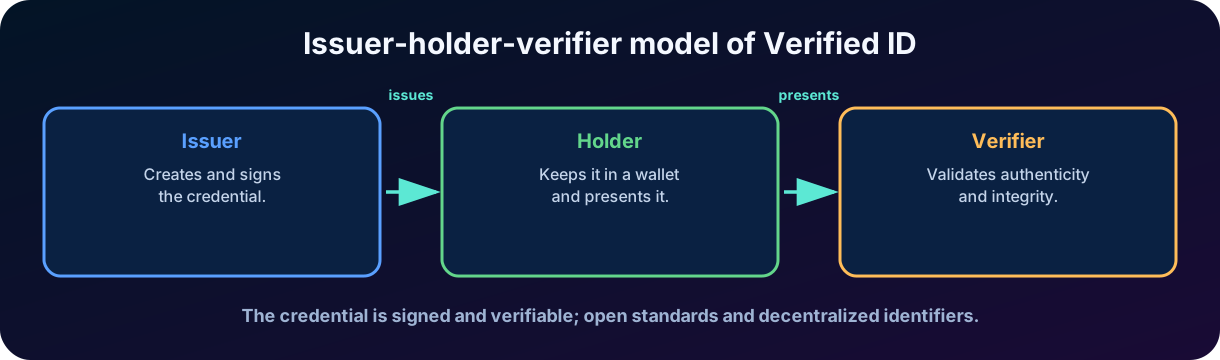
Microsoft Entra is a service for issuing and verifying verifiable credentials. The idea is to allow an organization to issue a signed digital claim, for the person to keep that credential in a wallet, and to present it to another organization or application when they need to prove something. The verifier validates authenticity, integrity, and status of the credential without depending on an account previously created in the same directory as the issuer.
12.1 Issuer, holder, and verifier
Issuer: organization that creates and signs the credential, such as a university, employer, or certifying entity.
Holder: person or entity that receives, controls, and presents the credential.
Verifier: organization or application that requests a proof and validates the presented credential.
Figure 5 — Conceptual model of verifiable credentials in Microsoft Entra .
12.2 A verifiable credential is not a visual badge
The value is not in the appearance of a card, but in the signed and verifiable claims. A credential can prove a relationship, qualification, training, or authorization. Open standards, digital signatures, and decentralized identifiers allow verifying who issued it and whether the content was altered. The holder presents only the necessary proof according to the solution design, favoring control and data minimization.
12.3 Example
An outsourced company completes mandatory security training and receives a verifiable credential. When requesting access to an environment, the professional presents the credential. The verifier confirms that it was issued by the trusted entity, is valid, and matches the request. After that, access can proceed to approval or granting by other controls. provides verifiable proof; it does not by itself replace authorization, , or .
13. Microsoft Entra and
combines generative artificial intelligence with Microsoft's security data and capabilities. In the context of Microsoft Entra, it can help administrators explore risky sign-ins and users, summarize context, suggest investigation steps, query information about users and groups, and support governance tasks. There are also experiences aimed at ,, and governance optimization.
The integration reduces the time spent reading logs and preparing queries, but it does not transfer responsibility to the AI. Responses must be validated, permissions need to follow least privilege, and high-impact actions require human confirmation. A convincing summary may be incomplete; a suggestion may not consider a business exception. Copilot is an analysis accelerator, not an autonomous source of authority.
Uses of in Microsoft Entra, benefits, and cautions.
Use
Benefit
Caution
Investigate a risky user
Summarizes signals, sign-ins, and relevant context.
Confirm evidence before blocking or dismissing risk.
Explore logs with natural language
Reduces the barrier to locate events and patterns.
Validate filters, period, and interpretation.
Support
Helps analyze data and highlight unusual situations.
The business owner remains responsible for the decision.
Create or explain workflows
Accelerates design and understanding of JML automations.
Test in a pilot and review scope, triggers, and tasks.
Optimize governance
Makes it easier to locate packages, policies, and resources.
Apply least privilege and change control.
14. Integrated practical scenario
Consider Contoso Health, which hires employees, temporary doctors, and vendors. The goal is to reduce manual requests and prevent access from remaining after the end of the relationship.
14.1 Onboarding
The HR system records the hire date and the department. A sends guidance before the first day, enables the account on the correct date, and adds the employee to a basic group. For a vendor, offers the “Vendor - Clinical Project” package, with a Teams group, a ticketing application, and a documents site. The policy allows requests only from a connected organization, requires sponsor approval, and limits access to 90 days.
14.2 Change of role
An analyst is promoted to coordinator. The workflow updates lifecycle tasks and the new role requires access to reports. A review confirms the previous access; incompatible permissions are removed to avoid accumulation. She receives eligibility in for a limited administrative role. When she needs to perform a task, she requests activation for one hour, performs , provides the ticket, and waits for approval.
14.3 Risk event
ID Protection detects a sign-in from an anonymous IP and unusual properties. The triggers , which requires strong authentication. At another time, leaked credentials raise the user's risk; the policy requires remediation and a secure password change. The team uses to summarize signals and prepare the investigation, but confirms the logs before concluding that there was a compromise.
14.4 Offboarding
When the contract ends, the leave date triggers the workflow. The account is blocked, sessions are revoked, and access is removed. The package assignment expires and the guest does not keep permissions. Logs and review results demonstrate to the audit that access was granted, used, and removed under a defined policy.
Scenario outcome
No capability solves everything on its own. Security emerges from the composition: lifecycle + packages + reviews + + risk detection + access policies + audit.
15. Comparisons that tend to appear on the SC-900
Frequent comparisons on the exam and the correct difference between the concepts.
Do not confuse
Correct difference
vs
The review decides whether access continues; the package organizes and grants a set of access.
vs
governs activation and the privilege cycle; defines allowed actions and scope.
vs
Sign-in is a specific request; user represents the probability that the identity is compromised.
Detection vs policy
The detection produces a risk signal; the policy uses the signal to require a control, remediate, or block.
vs active
can request activation; active already has the privilege.
vs password change
proves possession of additional factors; a password change replaces a possibly compromised credential.
vs Microsoft Entra ID
provides verifiable credentials; Entra ID is the 's identity and access service.
vs administrator
Copilot assists analysis; the administrator validates, decides, and is accountable for the controls.
16. Quick review for the exam
Identity governance controls who has access, to what, why, and for how long.
represents entry, change, and exit; Mover is crucial to avoid privilege accumulation.
automate tasks using scope, trigger, and actions.
recertify access and can remove unnecessary permissions.
uses catalogs, resources, packages, and policies to govern requests and assignments.
refers to a specific authentication; refers to the possibly compromised identity.
Leaked credentials, anonymous IP, and atypical travel are examples of detections; an isolated signal requires context.
policies can require , risk remediation, password change, or block.
works with issuer, holder, and verifier; the credential is signed and verifiable.
helps with investigation and governance, but does not replace human validation.
Conclusion
Governance, privilege, and identity protection form a logical sequence. First, the organization defines and automates the expected access throughout the cycle. Then, it reviews and expires entitlements to prevent accumulation. Next, it limits administrative privilege with eligibility and temporary activation. Finally, it observes risk signals and adapts the access decision when the identity or the session seem compromised.
In my assessment, this is one of the most important chapters of the SC-900 because it transforms isolated products into a coherent strategy. The central point is not to memorize portals, but to recognize which problem each capability solves. A mature organization does not ask only “is the password correct?”. It asks whether the person should have the access, whether they still need it, whether the privilege should be active now, and whether there are signs that the identity is no longer trustworthy.
The natural next step is to study how artificial intelligence, investigation, and automation extend security operations. By mastering this chapter, the reader begins to see each access as a temporary, contextual, and verifiable decision - exactly the mindset required by Zero Trust and modern identity security.
Practice questions
1. A company wants administrators to have a role available only when they need to perform a task, requiring , justification, and approval. Which feature best fits the scenario?
A) Microsoft Entra
B) Microsoft Entra Privileged Identity Management
C)
D) Microsoft Defender for Cloud Apps
Comment
Correct answer: B. allows assignment and temporary activation with controls such as , justification, approval, duration, and audit.
2. Which option correctly describes and ?
A) Both represent exactly the same state.
B) evaluates a specific request; evaluates the probability that the identity is compromised.
C) exists only for guests.
D) defines permissions.
Comment
Correct answer: B. is tied to the authentication session; represents the broader state of the identity.
3. An organization wants to offer vendors a set of groups, applications, and sites for 60 days, with sponsor approval. Which capability is the most appropriate?
A) with an and an assignment policy
B) Only an
C) Only a permanent role in Azure
D) Microsoft Entra ID Protection
Comment
Correct answer: A. An brings resources together, while the policy defines eligibility, approval, duration, and review.
4. What is the main role of an ?
A) Create a verifiable credential.
B) Synchronize password hashes.
C) Recertify whether identities still need to keep access and apply removals when necessary.
D) Automatically activate all privileged roles.
Comment
Correct answer: C. verify the continued need for access and can apply changes to remove unnecessary permissions.
Essential glossary
Essential glossary for Chapter 6.
Term
Short definition
Process of recertifying access.
Governed set of resource roles granted as a unit.
Automation of the request, approval, assignment, review, and expiration cycle of entitlements.
Model of entry, change, and exit of identities.
Automation of identity tasks based on scope, trigger, and actions.
Service to manage, control, and monitor privileged access.
Can activate a role but does not yet have the active privilege.
Privilege granted only at the moment and for the period needed.
Probability that a specific authentication does not belong to the legitimate user.
Probability that the identity is compromised.
Service for issuing and verifying verifiable credentials.
AI platform to support investigation and security operations.
Material prepared for educational purposes. Names, features, interfaces, and licensing requirements may evolve; for implementation, always consult the most recent official documentation.