Microsoft Defender XDR Services and Unified Security Operations
A complete guide to Microsoft Defender , its specialized services, vulnerability and exposure management, threat intelligence, the Microsoft Defender portal, and integration
Suggested study time: 55 minutes • Beginner level • Aligned with the SC-900 study plan and official Microsoft Learn documentation
By João Ricardo Dutra••Complete material
1. Introduction: from isolated tools to a defense ecosystem
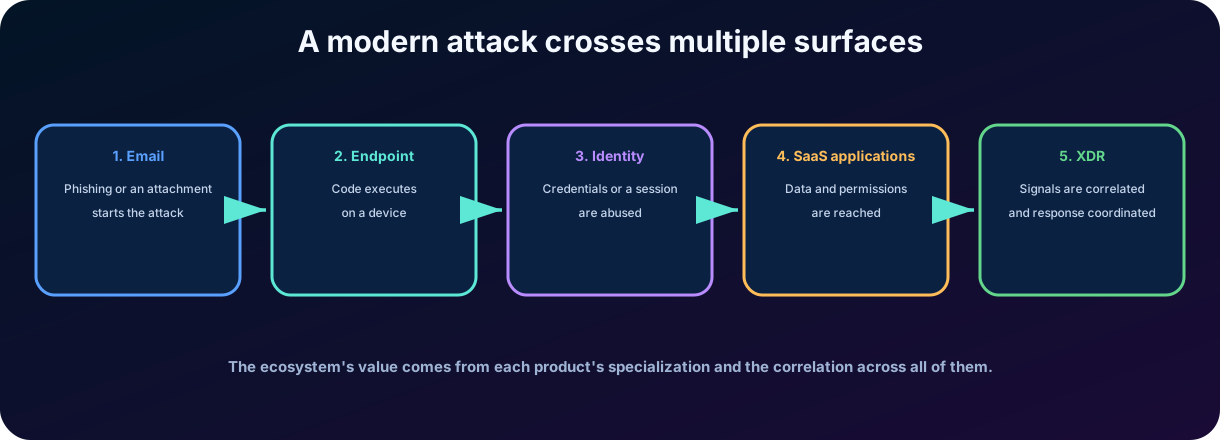
Corporate security started with relatively isolated controls: email filters, antivirus on computers, directory audits, and network locks. This model reflected an environment where boundaries were more stable. With the expansion of the cloud, hybrid work, SaaS applications, and distributed identities, attacks began to cross multiple surfaces in a single chain.
Microsoft has developed specialized products to observe these surfaces in depth. Microsoft Defender for Office 365 protects email and collaboration; Microsoft Defender for Endpoint protects devices; Microsoft Defender for Cloud Apps protects the use of SaaS and data in applications; and Microsoft Defender for Identity monitors identity signals. The evolution to Microsoft Defender connects these products and turns separate alerts into a correlated .
For the reader, understanding this ecosystem prevents the mistake of looking for a single product that solves all problems. For society, integration reduces the response time to attacks that affect hospitals, schools, businesses, public services, and personal data. In the end, you will be able to look at an incident and identify which product detects each stage and how they all cooperate.
Figure 1 - A modern attack can go through email, endpoint, identity, and SaaS applications.
2. The Microsoft Defender ecosystem
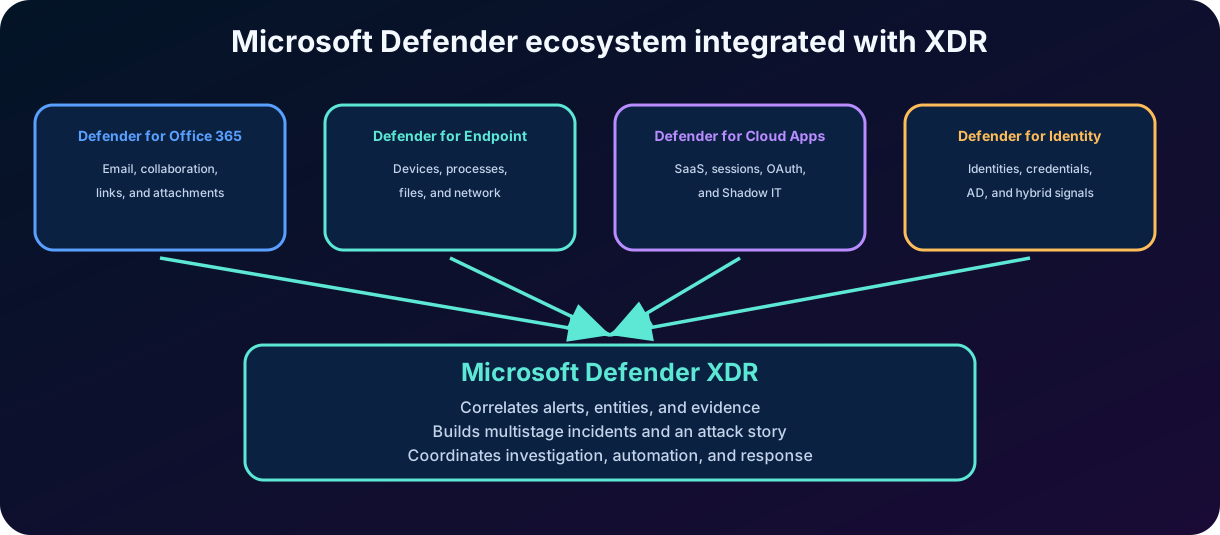
The name Microsoft Defender represents a family of security solutions. Each component has its own telemetry, prevention mechanisms, detections, and actions. Integration with Microsoft Defender provides a common layer of correlation, incidents, investigation, and response in the Microsoft Defender portal.
Figure 2 - Specialized products feed the capabilities of Microsoft Defender .
2.1 Specialization and integration
Specialization means that each product understands its surface deeply. An email product knows senders, URLs, attachments, and mailboxes; an endpoint product knows processes, memory, files, and connections; an identity product knows authentications, groups, and domain controllers; a SaaS product knows sessions, files, permissions, and OAuth applications.
Integration means that these views do not remain isolated. Related alerts can be correlated in an incident, entities are shared between investigations, and response actions can be coordinated in the portal. does not replace the products: it uses the signals and capabilities of each one.
2.2 Complementary capabilities in the family
The ecosystem is not limited to the four products compared in this chapter. Microsoft Defender Vulnerability Management discovers vulnerabilities and misconfigurations, prioritizes risk, and tracks remediation across assets; Microsoft Defender Threat Intelligence organizes information about threat actors, campaigns, indicators, and malicious infrastructure. These capabilities enrich prevention and investigation in Defender and are explained in depth in Chapter 13. Defender for Cloud protects cloud posture and workloads, while Microsoft Sentinel adds and capabilities; they can be integrated into the same operational flow but retain their own objectives.
Surface reduction, antivirus, , automated investigation, response, and hunting.
Defender for Cloud Apps
SaaS applications and cloud data
,,, policies, ,, and OAuth .
Defender for Identity
Identities and directory infrastructure
Sensors, behavioral analysis, recognition, credential abuse, , and identity posture.
3.1 The same asset can appear in several products
A user can receive a malicious message, click on a link, authenticate in a SaaS application, and perform an activity on a device. Therefore, user, device, mailbox, application, and IP address can appear as related entities in the same incident. Correlation reduces the manual work of reconstruction.
Key point for the SC-900
Match each name to its surface: Office 365 protects email and collaboration; Endpoint protects devices; Cloud Apps protects SaaS, sessions, and ; Identity protects identities and Active Directory signals. Defender correlates all of this.
4. Microsoft Defender for Office 365
Microsoft Defender for Office 365 is the advanced protection solution for email and collaboration tools. It complements the basic protections of cloud mailboxes with controls against advanced phishing, impersonation, malicious links, unknown files, and coordinated campaigns.
4.1 Why does email remain critical?
Email combines human trust, external content, links, attachments, and identity. An attacker can spoof appearance, urgency, and context to convince the user to reveal credentials or open content. Defense needs to analyze sender, infrastructure, text, attachments, URLs, and post-receipt behavior.
4.2 EOP and Defender for Office 365
Exchange Online Protection, known as EOP, provides the foundation for anti-spam, anti-malware filtering, and message flow protection for cloud mailboxes. Defender for Office 365 adds advanced features such as ,, expanded anti-phishing policies, investigation, automation, and campaign visibility, according to the licensed plan.
Layer
Objective
Examples
Email authentication
Check if the domain and infrastructure are authorized.
SPF, DKIM and DMARC.
Reputation and filtering
Analyze sender, IP, domain, volume, and content.
Anti-spam, anti-malware, and threat intelligence.
Anti-phishing
Detect counterfeiting and impersonation.
User/domain protection and mailbox intelligence.
Advanced protection
Analyze unknown URLs and files.
and .
Security operations
Investigate, contain, and learn.
Explorer, campaigns, quarantine, alerts, and .
5. Email authentication and protection against phishing
5.1 SPF, DKIM and DMARC
SPF publishes which servers can send on behalf of a domain. DKIM adds a cryptographic signature to the message to allow verification of integrity and domain origin. DMARC defines how to handle failures and provides reports, using alignment with SPF and/or DKIM. These mechanisms reduce domain spoofing, but do not replace analysis of content, links, and behavior.
5.2 Spoofing, impersonation, and real compromise
Concept
Description
Conceptual example
Spoofing
The sender appears to be using a domain or address that they do not control.
Header or similar domain tries to deceive the recipient.
Impersonation
The attacker impersonates a trusted person or domain.
Visual name and writing style simulate an executive.
Compromised account
The message comes from a legitimate account controlled by the attacker.
Domain authentication may pass, but the behavior is malicious.
Business Email Compromise
Fraud aimed at business process, payment, or sensitive data.
Urgent request for bank change or document submission.
Anti-phishing protection combines authentication, reputation, mailbox intelligence, relationship analysis, language patterns, and other signals. The goal is not only to block a fake domain but to recognize when a message tries to exploit organizational trust.
Business email compromise (BEC) is a type of cybercrime in which the attacker uses email to impersonate a trusted person or organization and trick employees into wiring money, revealing sensitive information, or performing other risky actions. It combines the techniques in the table: impersonation of executives or suppliers and use of compromised legitimate accounts, which the attacker may monitor for weeks before striking during a high-value transaction. Because it often requires no malware or suspicious links, relying instead on social engineering, urgency, and predictable processes such as invoice payments and wire transfers, the defense combines , email authentication with DMARC, impersonation protection, training, and verification of unusual requests before acting on them.
Attention
SPF, DKIM, and DMARC help validate domain and sending flow. They do not guarantee that every authenticated message is safe, because legitimate accounts can also be compromised.
6. and
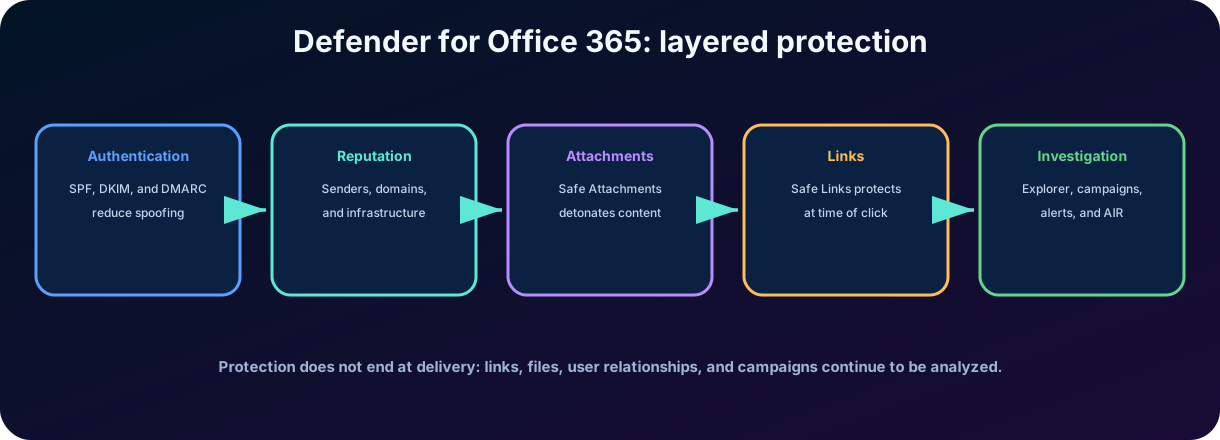
Figure 3 - Layered protection in Defender for Office 365.
6.1
adds a layer for files that have already passed the antimalware check. The file can be opened in an isolated virtual environment to observe its behavior, a process called detonation. This helps detect unknown malware, ransomware, and zero-day content before it reaches the user or is analyzed in supported collaboration repositories.
6.2
protects against malicious URLs used in phishing and other attacks. The solution can analyze and rewrite URLs during the message flow and check the destination at the moment of the click. This re-evaluation is important because a site that is initially benign can be changed after the message is delivered.
6.3 Protection of collaboration
The controls also extend, depending on configuration and licensing, to links and files in Microsoft Teams, SharePoint, OneDrive, and supported Office applications. The goal is to protect the content where users collaborate, and not just the inbox.
7. Investigation and response in Defender for Office 365
7.1 Alerts, Explorer, and real-time detections
The Microsoft Defender portal brings together email and collaboration alerts. Explorer and detection experiences allow searching messages, senders, recipients, URLs, attachments, and actions taken. The analyst can check reach, identify who received or clicked, and assess whether there is a larger campaign.
7.2 Campaigns and threat context
The campaigns view groups related messages by characteristics and infrastructure, helping to understand volume, target, technique, and impact. Instead of treating each message as an isolated event, the team observes the attack pattern.
7.3 Response and automation
Place messages or files in quarantine, when applicable.
Remove or correct messages after delivery using supported mechanisms.
Investigate users, URLs, senders, and related attachments.
Use automated investigation to reduce repetitive work, according to plan and configuration.
Use user reports as an additional signal, without assuming that every report is malicious.
Test reasoning
is associated with URLs and click verification. is associated with files and detonation in a virtual environment. Anti-phishing is associated with spoofing, impersonation, and identity-based fraud.
8. Microsoft Defender for Endpoint
Microsoft Defender for Endpoint is a security platform for corporate devices. It brings together preventive protection, attack surface reduction, endpoint detection and response, automated investigation, hunting, and intelligence. The endpoint can be a computer, server, mobile device, or another supported platform.
8.1 Endpoint is not synonymous with antivirus
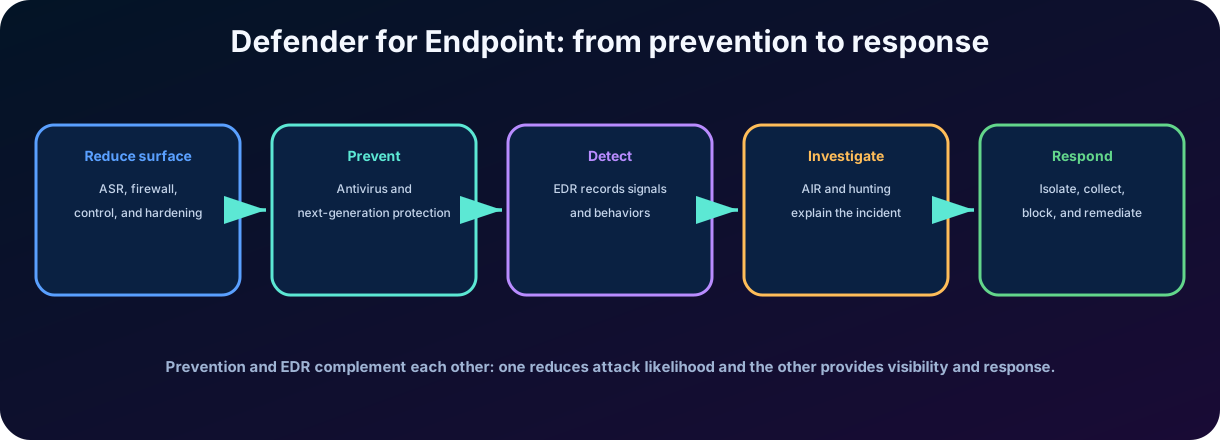
Antivirus is an important layer, but the product goes beyond that. An records activities and behaviors to detect attacks that bypass preventive controls, reconstruct what happened, and enable containment actions. This is especially relevant for fileless attacks, misuse of legitimate tools, and credential compromise.
Figure 4 - Layers of Microsoft Defender for Endpoint.
9. Endpoint protection layers
9.1 Reduction of the attack surface
Reducing the attack surface aims to decrease the paths available to an intruder. rules can block risky behaviors frequently used by malware, such as certain chaining between documents, scripts, and processes. Other controls include network protection, firewall, device control, application control, and exploit protection, depending on the platform and configuration.
9.2 Next-generation protection
Microsoft Defender Antivirus uses real-time protection, heuristics, behavioral analysis, cloud intelligence, machine learning, and security updates to detect known and emerging threats. The goal is to block the attack as early as possible.
9.3 Endpoint Detection and Response -
collects behavioral signals from devices, applies analyses, and generates alerts when it identifies suspicious activity. The analyst can examine the device timeline, processes, files, connections, users, and other entities to understand the scope and origin.
Capacity
Question that answers
How do you reduce opportunities for the attack to start or progress?
Antivirus and cloud protection
How to block malware and known or emerging malicious behavior?
What happened to the device and what signs indicate compromise?
Which evidence can be investigated and which corrections can be applied?
Hunting
Are there related signs that have not yet triggered alerts?
10. Endpoint investigation, response, and operation
10.1 Automated investigation and response
Automated investigation examines alerts, processes, files, and related entities, produces verdicts, and can execute or recommend remediation actions according to the level of automation and permissions. Automation reduces operational time but does not eliminate the need for human validation.
10.2 Response actions
Isolate a device from the network while preserving communications necessary for the service, as supported.
Contain indicators or block malicious files and hashes.
Quarantine files or terminate supported processes.
Perform investigation packet collection and consult timeline.
Restrict application execution or apply other containment actions.
10.3 Threat analytics and hunting
Threat analytics presents information about threats, potential impact, exposure, and guidance. allows querying telemetry from endpoints and other integrated domains to investigate hypotheses and look for activities that have not yet generated alerts.
10.4 Onboarding and sensor health
To produce telemetry, devices need to be integrated with the service and maintain healthy protection components. Incomplete coverage, outdated sensors, or inconsistent configurations reduce detection quality. Therefore, endpoint security also involves deployment, configuration, and continuous monitoring.
11. Microsoft Defender for Cloud Apps
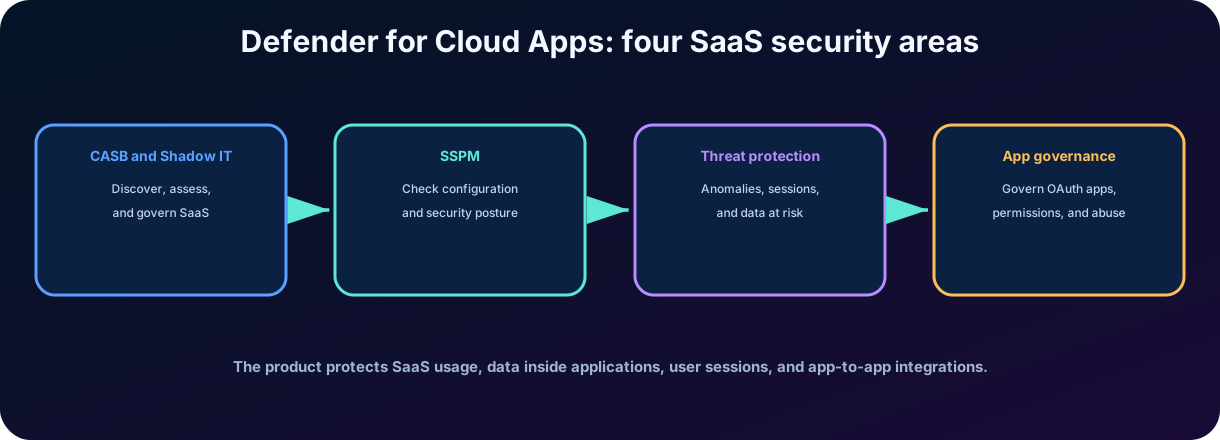
Microsoft Defender for Cloud Apps protects SaaS applications and the data used in them. The product combines Cloud Access Security Broker () functions, SaaS Security Posture Management (), advanced threat protection, and application governance that access data through APIs and OAuth.
Figure 5 - Protection fronts of Microsoft Defender for Cloud Apps.
11.1 What is ?
is a layer of visibility and control between users, devices, and cloud services. It helps discover applications, assess risks, enforce policies, protect data, and detect anomalous behavior. The does not replace the identity provider, firewall, or ; it complements these controls with cloud application-specific context.
11.2 SaaS Security Posture Management ()
SaaS Security Posture Management () is one of the pillars of Defender for Cloud Apps. It offers detailed visibility into the security state of SaaS applications and actionable guidance to strengthen the security posture. After the application is connected through an app connector, the product runs security configuration assessments on the SaaS environment, such as a Salesforce environment, and generates recommendations based on Microsoft benchmarks. These recommendations appear in Microsoft Security Exposure Management and in the recommended actions of Microsoft . While observes usage, sessions, and activities, checks whether the application itself is configured securely.
12. and Cloud Discovery
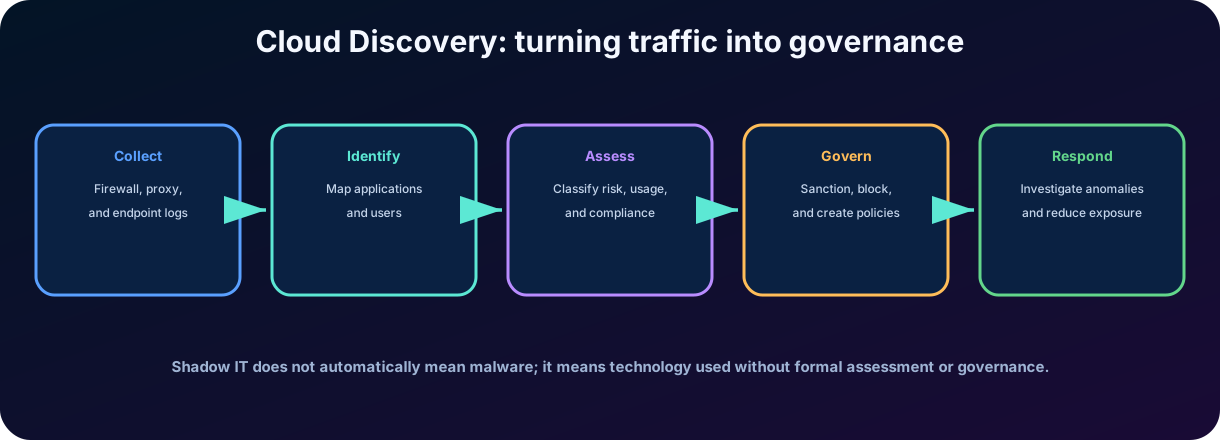
is the use of applications, services, or infrastructure without formal evaluation, approval, or governance by the organization. An unapproved service may store data in an inappropriate location, use weak controls, require excessive permissions, or not meet regulatory requirements. However, does not automatically mean that the application is malicious.
Figure 6 - Conceptual flow of Cloud Discovery.
12.1 Discover, assess, and govern
Cloud Discovery analyzes usage telemetry, relates traffic to an application catalog, and presents users, devices, transactions, and risk indicators. The team can classify applications as sanctioned or unsanctioned, create policies, and guide users to approved alternatives.
12.2 Risk assessment
The assessment considers factors such as security, compliance, privacy, authentication, auditing, data protection, and vendor maturity. The score helps prioritize analysis but does not replace legal, contractual, and business evaluation.
13. Policies, sessions, data, and OAuth applications
13.1 Connectors and policies
Application connectors use provider APIs to offer visibility over activities, users, files, settings, and threats. Policies can identify anomalous activities, external sharing, risky access, suspicious changes, and other behaviors, generating alerts or governance actions.
13.2 App Control
Integration with Microsoft Entra allows directing sessions to real-time controls. Access policies can allow or block access; session policies can allow access and limit specific actions, such as downloading, uploading, copying, printing, or using sensitive files, depending on the application and configuration.
13.3 Data protection
The product can identify sensitive information, integrate with Microsoft Purview, apply policies, and perform actions such as applying a label, blocking download on an unmanaged device, or removing external sharing, as supported.
13.4
OAuth applications can receive permissions to access data on behalf of users. provides visibility into the permissions, behavior, and usage of these applications, allowing identification of inactive, overly privileged, or suspicious apps and the enforcement of governance policies.
Control
Example of purpose
Activity policy
Alert about mass download or anomalous behavior.
Archive policy
Identify sensitive file shared externally.
Access policy
Block access to the application under certain conditions.
Session policy
Allow access, but block download on unmanaged device.
Monitor and limit OAuth app with excessive permissions.
14. Microsoft Defender for Identity
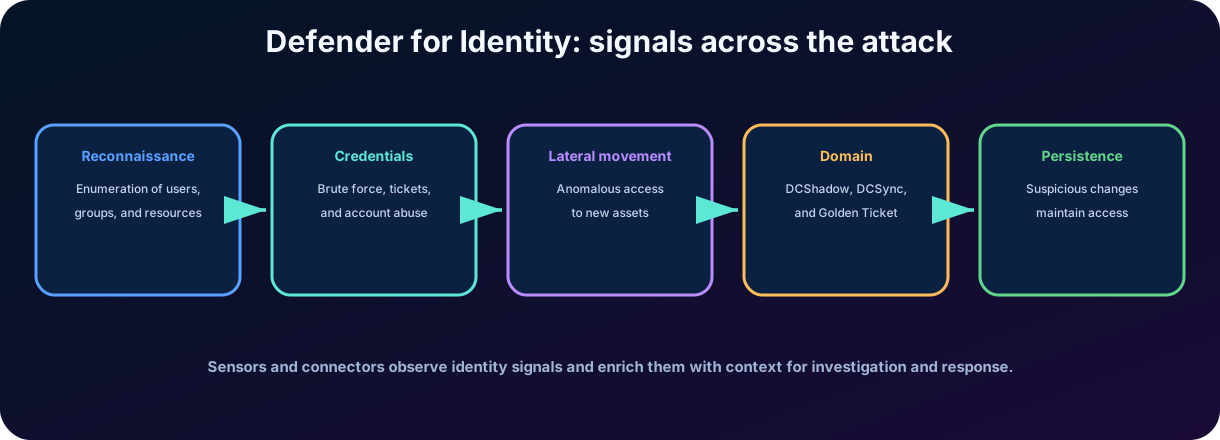
Microsoft Defender for Identity helps detect, investigate, and respond to identity-based attacks in on-premises, hybrid, and cloud environments. In the classic context of the SC-900, it monitors signals from the Active Directory Domain Services infrastructure through sensors and integrates these detections into the Microsoft Defender portal.
Figure 7 - Phases, signs, and sources of attacks observed by Defender for Identity.
14.1 Sensors and signal sources
Sensors can be deployed on domain controllers and, depending on architecture and version, on servers such as AD FS, AD CS, and Microsoft Entra Connect. They monitor authentication, directory queries, changes, traffic, and behavior. The analysis combines signals, threat intelligence, known patterns, and behavioral profiles.
15. Identity and posture attacks
15.1 Reconnaissance
In reconnaissance, the attacker tries to discover users, groups, computers, services, and privilege relationships. Unusual queries or enumerations may indicate preparation for later stages.
15.2 Credential Compromise
Attacks can exploit weak passwords, repeated authentications, tickets, or hashes. Pass-the-hash is a technique where material derived from the credential is reused for authentication without the attacker needing to know the password in clear text. The focus of the exam is to recognize that Defender for Identity detects signs of credential abuse and anomalous behavior.
15.3 and escalation
After gaining initial access, the attacker attempts to reach other devices and identities, escalate privileges, and access sensitive accounts or assets. Defender for Identity analyzes relationships and behaviors to detect , suspicious changes, protocol abuse, and attempts to take over the environment.
15.4 Domain dominance and persistence
With elevated privileges, the attacker tries to control Active Directory itself and ensure that access survives password changes and cleanup. Defender for Identity groups these detections under the persistence and privilege escalation category. In a DCSync attack, the attacker uses replication permissions to request directory data from a domain controller, including password hashes; the alert is triggered when the replication request comes from a computer that is not a domain controller. In a DCShadow attack, the attacker registers a machine as a rogue domain controller and uses malicious replication to change directory objects. With a Golden Ticket, someone who has compromised the KRBTGT account forges a Kerberos ticket-granting ticket (TGT) and achieves persistence on the network. Suspicious additions to sensitive groups also indicate attempts to keep or expand access.
15.5 Identity posture
In addition to alerts, the product provides posture assessments, risky configurations, and paths that can allow progression to critical assets. Correcting exposure reduces the likelihood of the attack being successful, while detection helps identify when the abuse has already started.
Stage
Example signal
Defensive objective
Reconnaissance
Unusual enumeration of accounts, groups, or resources.
Identify preparation of the attack.
Credentials
Suspicious authentications or abuse of credential material.
Detect takeover.
Anomalous access between systems and identities.
Contain the attacker's expansion.
AD Domain
Behavior associated with broad control of the directory.
Protect high-privilege assets.
Persistence
Golden Ticket, suspicious additions to sensitive groups, or malicious directory changes.
Prevent the attacker from keeping access after containment.
Posture
Delegations, paths, or exploitable settings.
Reduce exposure before the incident.
16. Integration in Microsoft Defender
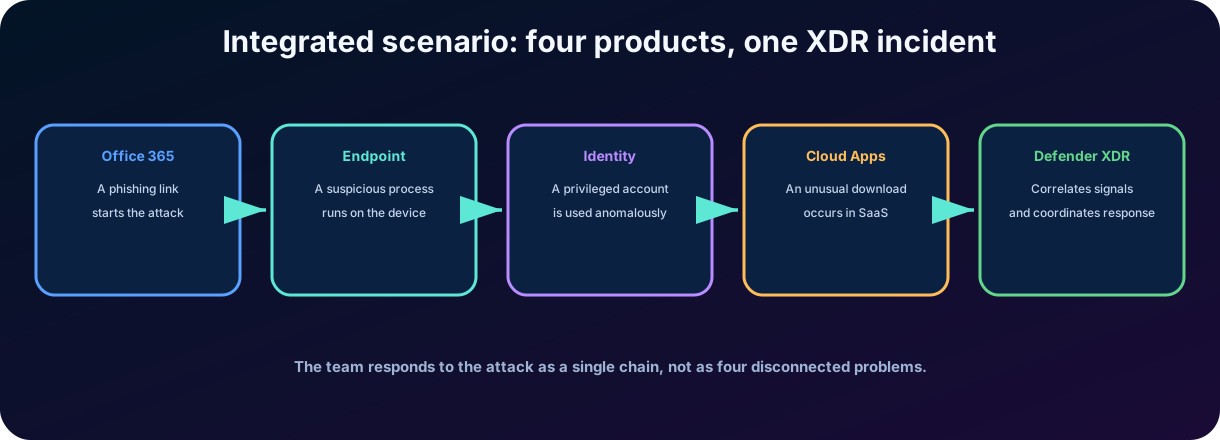
Each product can generate its own alerts, but the integration correlates signals by time, entity, infrastructure, and behavior. A phishing link, a suspicious process, an anomalous authentication, and a download in SaaS can be gathered into an incident with an , evidence, and affected assets.
16.1 Shared entities
Users and service accounts.
Devices, servers, and IP addresses.
Mailboxes, messages, URLs, and files.
Cloud applications, sessions, and OAuth apps.
Domains, processes, hashes, and other indicators.
16.2 Coordinated response
The response may combine message removal, URL or file blocking, device isolation, identity containment, session revocation, application restriction, and other supported actions. The exact set depends on the product, license, integration, permissions, and configured automation.
Important limit
Integration does not mean that all controls are identical or that one license automatically enables all features. correlates and coordinates capabilities of the products that are present and configured.
Figure 9 - Specialized services contribute signals and coordinated actions to Microsoft Defender .
16.3 Cross-product protection
A combined incident queue correlates alerts and entities into a complete .
Automatic response can remove malicious messages, isolate devices, contain identities, block indicators, and self-heal supported compromised assets.
Automatic attack disruption uses high-confidence signals to contain an attack in progress and give analysts more time to respond.
can query up to 30 days of raw cross-product signals and alert data with Kusto Query Language ().
17. Microsoft Defender Vulnerability Management
Microsoft Defender Vulnerability Management continuously discovers assets, assesses weaknesses, prioritizes risk, supports remediation, and tracks progress. It covers Windows, macOS, Linux, Android, iOS, and supported network devices, so vulnerability work is not limited to a periodic list of .
Figure 10 - Continuous visibility, risk-based prioritization, and remediation feed the broader exposure view.
17.1 Continuous discovery and assessment
Software, browser extension, digital certificate, hardware, and firmware inventories reveal what exists and where it runs.
Authenticated Windows scans and network-device assessments extend visibility beyond endpoints already onboarded.
Security baselines compare configurations with benchmarks such as CIS and STIG and identify insecure network-appliance settings, expiring certificates, and vulnerable extensions.
Threat analytics and event timelines add context about active exploitation and the history of exposure on an asset.
17.2 Risk-based prioritization
Priority combines threat intelligence, likelihood of breach, business context, asset criticality, exposed-device counts, and technical severity such as and data. This helps teams address weaknesses that are actively exploited or affect high-value assets instead of treating every finding as equally urgent.
17.3 Remediation and tracking
Security recommendations can become remediation requests for IT, including workflows through Microsoft Intune. Where an immediate fix is unavailable, teams can block a vulnerable application or apply an alternative mitigation. The portal tracks status in real time through the overview, vulnerabilities, inventories, recommendations, remediation, and security-baseline pages. Microsoft summarizes endpoint posture.
can summarize a vulnerability, explain organizational impact, suggest remediation, and turn natural-language questions into threat-hunting queries. Analysts must still validate the evidence and proposed action.
18. Microsoft Defender Threat Intelligence
Threat intelligence converts external and internal observations into context about threat actors, campaigns, malicious infrastructure, tools, indicators of compromise, vulnerabilities, and tactics, techniques, and procedures. In the Defender portal, this context supports triage, incident response, proactive hunting, and vulnerability prioritization.
18.1 Four investigation experiences
Threat analytics highlights recent, high-impact, and high-exposure threats and shows their relevance to the organization.
Intel profiles provide curated research about threat actors, malicious tools, and important vulnerabilities.
Intel Explorer searches keywords, indicators, and and returns reputation, infrastructure relationships, exploitability, and priority context.
Projects group indicators and artifacts, preserve investigation history, support collaboration, and monitor selected infrastructure.
Current product transition
The standalone Microsoft Defender Threat Intelligence experience was scheduled to retire on August 1, 2026. Its capabilities are converging into Microsoft Defender and , while eligible existing customers access the integrated experience through the Microsoft Defender portal. For the exam, focus on the purpose of threat intelligence rather than a legacy portal location.
can use threat-intelligence and built-in such as Vulnerability Impact Assessment and Threat Actor Profile. The Threat Intelligence Briefing Agent can produce customized briefings autonomously from relevant threat context.
19. Microsoft Security Exposure Management
Microsoft Security Exposure Management builds a unified, pre-breach view across users, endpoints, identities, cloud workloads, SaaS applications, data, and third-party sources. It aggregates signals from products such as Defender for Endpoint, Defender for Cloud, Defender for Cloud Apps, Defender for Identity, Microsoft Entra ID, and supported non-Microsoft connectors.
19.1 Graph, attack surface, and paths
The models assets and the relationships an attacker could traverse.
The attack-surface map lets analysts explore resources and connections visually.
Attack paths show plausible routes to critical assets; identify shared steps whose remediation can break several paths.
estimates how far compromise could spread from an exposed resource.
19.2 Critical assets, initiatives, and metrics
Critical-asset classification can identify domain controllers, file servers, databases, sensitive-data stores, privileged users and groups, and important resources in Azure, AWS, or Google Cloud. Built-in and custom classification rules use the graph and query builder. organize goals by workload, horizontal control, threat, or Zero Trust objective, while metrics, recommendations, domain scores, and Microsoft measure progress over time.
Connectors such as ServiceNow CMDB, Tenable, Qualys, and Rapid7 can enrich the graph. Vulnerability Management concentrates on individual weaknesses and misconfigurations; Exposure Management connects those findings to business-critical assets and cross-workload attack paths. A can therefore be one step in a much larger route to compromise.
20. The Microsoft Defender portal
Figure 11 - One portal brings together pre-breach posture and post-breach security operations.
The Microsoft Defender portal is the unified location for prevention, posture, detection, investigation, response, threat hunting, and service configuration. What a user sees depends on licensing, onboarding, and role. Typical Microsoft Entra roles include Global Reader or Administrator, Security Reader or Administrator, and Security Operator; least privilege remains the preferred model.
20.1 Investigation and response
Incidents group related alerts, affected assets, evidence, investigations, and remediation into the complete story of an attack.
queries raw Defender and connected Microsoft Sentinel data with ; Copilot can help translate a question into a query, but analysts must review it.
The unified tracks pending and completed response actions, while Submissions handles reported messages, URLs, and attachments.
Partner catalog, reports, Learning hub, and system settings support integrations, operations, skills, and configuration.
20.2 Service-oriented navigation
Exposure Management presents overview, attack surfaces, insights, , and data connectors. Threat intelligence provides analytics, profiles, and exploration. Assets inventory devices, identities, and cloud resources. Dedicated areas expose identity, endpoint, email and collaboration, cloud-app, cloud-security, Microsoft Sentinel, , optimization, and reporting capabilities. Navigation is customizable and role-aware.
21. with Defender
Figure 12 - Copilot assists analysts in the workflow while autonomous agents handle selected recurring security tasks.
is available as an embedded experience in Microsoft Defender and as a standalone workspace. The Microsoft Defender provides security context, while the Natural Language to helps create advanced-hunting queries. A can sequence reusable for an incident investigation.
21.1 Embedded analyst workflows
Summarize incidents containing up to 100 alerts and highlight the essential timeline and affected assets.
Generate guided responses for triage, containment, investigation, and remediation and identify similar incidents.
Analyze PowerShell and other scripts, explain suspicious behavior, and summarize devices or identities.
Generate , place it in the advanced-hunting editor, and help analysts refine the query before execution.
Create incident reports, analyze files from an incident or file profile, and move the conversation to the standalone experience when a broader investigation is needed.
21.2 Autonomous security agents
Available agents evolve, but the module highlights the Phishing Triage Agent, Threat Intelligence Briefing Agent, Threat Hunting Agent, and Dynamic Threat Detection Agent. They preserve human control by showing evidence, reasoning, verdicts, and feedback paths. The phishing agent requires the applicable Defender for Office 365 Plan 2 and entitlements.
Dynamic Threat Detection is an always-on adaptive capability that correlates alerts, events, anomalies, and threat intelligence to uncover gaps and false negatives without requiring analysts to define a fixed query first. When it finds suspicious behavior, it produces an alert with natural-language reasoning, relevant , mapped techniques, context, and tailored remediation. AI accelerates analysis; accountability and final decisions remain with people.
22. Integrated practical scenario
Figure 8 - Integrated scenario between products and correlation by .
22.1 Step 1 - Email Entry
An employee receives a message that imitates a supplier. Defender for Office 365 identifies a phishing URL and relates the message to other similar attempts. Even if the click occurs before the final classification, click-time verification and investigation help measure reach.
22.2 Step 2 - Activity on the endpoint
On the device, Defender for Endpoint logs unusual process, external connection, and persistence attempt. generates an alert and the team can isolate the device and investigate the timeline.
22.3 Step 3 - Identity abuse
Identity Defender observes directory recognition and lateral access incompatible with normal user behavior. The identity is treated as the central entity of the incident.
22.4 Step 4 - Access to SaaS
Defender for Cloud Apps detects mass download in a connected app and a risky session. Controls can restrict the activity, revoke the session, or block downloading according to policy.
22.5 Correlation and response
Microsoft Defender brings alerts together into a story. The team removes messages, blocks indicators, isolates the endpoint, protects the account, and investigates the accessed data. The incident stops being four separate alerts and becomes a coordinated response.
23. Best practices, comparisons, and pitfalls of the exam
23.1 Good operational practices
Deploy the products with adequate coverage and monitor the health of the sensors and connectors.
Apply least privilege and strong authentication to portal administrators.
Use recommended policies as a starting point, test impact, and adjust exceptions.
Treat user reports, alerts, and automations as signals that require context.
Review , improve rules, and document lessons learned.
Connect prevention, investigation, and approach: correct exposure before it becomes an incident.
23.2 Recurring traps
Incorrect statement
Correction
analyzes attachments.
protects URLs; analyzes files and can detonate them in a virtual environment.
Defender for Endpoint is just antivirus.
It includes surface reduction, , investigation, response, hunting, and other capabilities.
is always malware.
It is technology used without governance or formal approval; the risk must be assessed.
Defender for Cloud Apps replaces Entra .
The products integrate; decides access conditions and Cloud Apps can apply access/.
Defender for Identity only protects cloud logins.
He monitors identity signals, with an emphasis on Active Directory and hybrid environments.
A unique product observes the entire chain with the same depth.
Each product is specialized; Defender correlates its signals.
23.3 Quick review
Office 365: email, links, attachments, and collaboration.
Endpoint: prevention, , investigation, and response on devices.
Cloud Apps: SaaS, , sessions, data, and OAuth apps.
Identity: directory signals, credentials, and .
Vulnerability Management: discovery, prioritization, and remediation of vulnerabilities and misconfigurations.
Threat Intelligence: context about threat actors, campaigns, indicators, and malicious infrastructure.
Defender : correlation, incidents, and coordinated response.
24. Conclusion
The Microsoft Defender ecosystem represents a defense architecture based on specialized products and operational integration. Defender for Office 365 protects the email and collaboration channel; Defender for Endpoint protects devices; Defender for Cloud Apps expands visibility and control over SaaS; Defender for Identity monitors the attack cycle against identities and directories.
When connected to Microsoft Defender , these products stop producing only isolated alerts. Signals are correlated into incidents, entities are shared, and the team can investigate and respond with a view closer to the actual attack chain. This integration improves detection time, prioritization, and coordination, but depends on proper deployment, licensing, configuration, and governance.
In my assessment, the most important lesson is that modern security cannot be organized solely by tools. It needs to follow the attacker's journey and relate people, devices, messages, applications, and data. Knowing the function of each product is the first step; understanding how they cooperate is the knowledge that turns a list of services into a protection strategy.
Summary in one sentence Microsoft Defender products protect different surfaces and feed Microsoft Defender , which correlates signals and coordinates investigation and response.
To continue studying The next chapter delves into vulnerabilities, threat intelligence, and exposure management, complementing the detection perspective with the preventive prioritization of risks.
25. Review questions
Question 1
An organization wants to protect against malicious URLs in messages and reassess the destination when the user clicks. Which feature is most suitable?
A)
B)
C) Cloud Discovery
D) Rules
Commented answer
Correct answer: B. protects URLs and can check the destination at the time of the click. is associated with files and detonation in a virtual environment.
Question 2
Which product is most directly associated with , device timeline, and endpoint isolation?
A) Microsoft Defender for Endpoint
B) Microsoft Defender for Identity
C) Microsoft Defender for Cloud Apps
D) Microsoft Purview
Commented answer
Correct answer: A. Defender for Endpoint provides prevention, , investigation, and response actions on devices.
Question 3
Which capability helps to discover SaaS applications used without formal evaluation and assign risk indicators?
A)
B) Cloud Discovery in Defender for Cloud Apps
C) Windows Hello for Business
D) Azure Bastion
Commented answer
Correct answer: B. Cloud Discovery provides visibility into , users, transactions, and the risk of cloud applications.
Question 4
Which solution monitors identity signals and can detect reconnaissance, credential abuse, and in Active Directory?
A) Defender for Office 365
B) Defender for Endpoint
C) Defender for Identity
D) Service Trust Portal
Commented answer
Correct answer: C. Defender for Identity analyzes signals from the identity infrastructure and detects attack steps against accounts and directories.
Questions 5 to 9 - Module assessment
Which service protects email, malicious links, attachments, and collaboration workloads? Answer: Microsoft Defender for Office 365, which protects Exchange Online, SharePoint, Teams, and OneDrive collaboration surfaces.
Within Defender for Cloud Apps, which responsibility safeguards sensitive information in SaaS services? Answer: data security, through labels, download and sharing controls, and content protection.
Which service investigates compromised identities, malicious insiders, reconnaissance, and ? Answer: Microsoft Defender for Identity.
Which metric gives a quick, action-oriented view of security posture? Answer: Microsoft . It summarizes posture and but does not guarantee that a breach cannot occur.
Which product prioritizes critical vulnerabilities and misconfigurations with asset, threat, and business context? Answer: Microsoft Defender Vulnerability Management.
26. Glossary and official references
26.1 Essential Glossary
Term
Meaning
Protection against malicious URLs, including click-time checking.
Protection that analyzes files and can detonate them in a virtual environment.
Telemetry- and behavior-based endpoint detection and response.
Controls to reduce paths and explorable behaviors on the device.
Layer of visibility and control over the use of cloud services.
Use of technology without formal evaluation, approval, or governance.
Management of SaaS application security posture.
OAuth application governance and app-to-app access.
Attacker progression between identities, systems, and resources.
Detection and response correlation across multiple security surfaces.
26.2 Microsoft Learn References
Study guide for Exam SC-900 - learn.microsoft.com/credentials/certifications/resources/study-guides/sc-900
Microsoft Defender for Office 365 overview - learn.microsoft.com/defender-office-365/mdo-about
in Microsoft Defender for Office 365 - learn.microsoft.com/defender-office-365/safe-links-about
in Microsoft Defender for Office 365 - learn.microsoft.com/defender-office-365/safe-attachments-about
Microsoft Defender for Endpoint documentation - learn.microsoft.com/defender-endpoint/
App Control - learn.microsoft.com/defender-cloud-apps/conditional-access-app-control-how-to-overview
Microsoft Defender for Identity overview - learn.microsoft.com/defender-for-identity/what-is
Microsoft Defender for Identity deployment overview - learn.microsoft.com/defender-for-identity/deploy/deploy-defender-identity
Microsoft Defender Vulnerability Management - learn.microsoft.com/defender-vulnerability-management/defender-vulnerability-management
Microsoft Threat Intelligence in Microsoft Defender - learn.microsoft.com/defender-/defender-threat-intelligence
Editorial note
Content validated in July 2026. Microsoft continuously updates features, licensing, integrations, and portal experiences; for deployment decisions, always confirm the current documentation and terms.