Suggested study time: 55 minutes • Beginner level • Aligned with the Microsoft Entra ID domain of the SC-900 exam
By João Ricardo Dutra••Full material
1. Introduction
The first corporate identity systems were born in a world where users, computers, and servers stayed, for the most part, inside the company network. Local directories, especially Active Directory Domain Services, made it possible to centralize accounts, computers, groups, and policies. The adoption of cloud services, mobile devices, SaaS applications, and remote work changed that landscape: identity needed to follow the user and the application beyond the organization's physical domain. Microsoft Entra ID emerged from that transition, initially as Windows Azure Active Directory, then Azure Active Directory, and, since 2023, under its current brand.
Understanding this evolution helps the reader see why identity is not just “creating users.” A modern platform must represent people, devices, applications, automations, partners, and AI agents; authenticate each entity; issue tokens; apply policies; record activities; and keep the lifecycle coherent. For society, this model supports remote collaboration, digital services, online education, connected healthcare, digital government, and financial transactions with greater control and traceability.
Throughout this chapter, the central question will be: how does an organization represent, connect, and govern such different entities without multiplying credentials, privileges, and blind spots? The answer starts in the Microsoft Entra ID , passes through the identity objects, and reaches hybrid and external scenarios. Understanding these relationships avoids superficial memorization and lets you solve SC-900 questions through reasoning.
Guiding idea of the chapter
An identity is the representation of an entity; a is an identity that can be granted permissions; a is the logical boundary in which those identities, policies, consents, and records are administered.
2. A brief evolution: from the local directory to Microsoft Entra
Active Directory Domain Services, introduced with Windows 2000 Server, consolidated an enterprise directory model based on domains, forests, organizational units, domain controllers, and protocols such as Kerberos and . This model remains essential for many organizations, especially for Windows workstations, on-premises servers, , and legacy applications. However, it was designed for an environment in which the corporate domain and connectivity to domain controllers were central references.
When and Azure began to host applications and data outside the local network, a cloud-native identity service became necessary. Windows Azure Active Directory was launched as that service. Despite its historical name, it was not simply “a hosted Active Directory”: its architecture was built for Internet-based authentication, APIs, modern applications, tokens, and multiple . The name Azure Active Directory was replaced by Microsoft Entra ID to reduce that confusion and position the product within a broader family of identity and access.
The name change did not remove integrations nor automatically alter licenses and configurations. It reinforced a conceptual difference important for the exam: AD DS is a traditional domain directory service; Microsoft Entra ID is a cloud-based service. They can coexist and form a hybrid identity, but they are not the same product.
Comparison between Active Directory Domain Services and Microsoft Entra ID.
Aspect
Active Directory Domain Services
Microsoft Entra ID
Main model
Domains and forests on Windows infrastructure
Cloud-based identity
Common protocols
Kerberos, ,, and DNS
OAuth 2.0, OpenID Connect, SAML, and HTTPS APIs
Central objects
Users, computers, groups, and OUs
Users, groups, devices, applications, and
Administration
Domain controllers, , and local tools
Entra admin center, Microsoft Graph, and automation
Typical use
Workstations, servers, and local applications
, Azure, SaaS, apps, and modern access
Relationship
Can be the source of synchronized identities
Can receive and govern local and cloud identities
3. The Microsoft Entra family
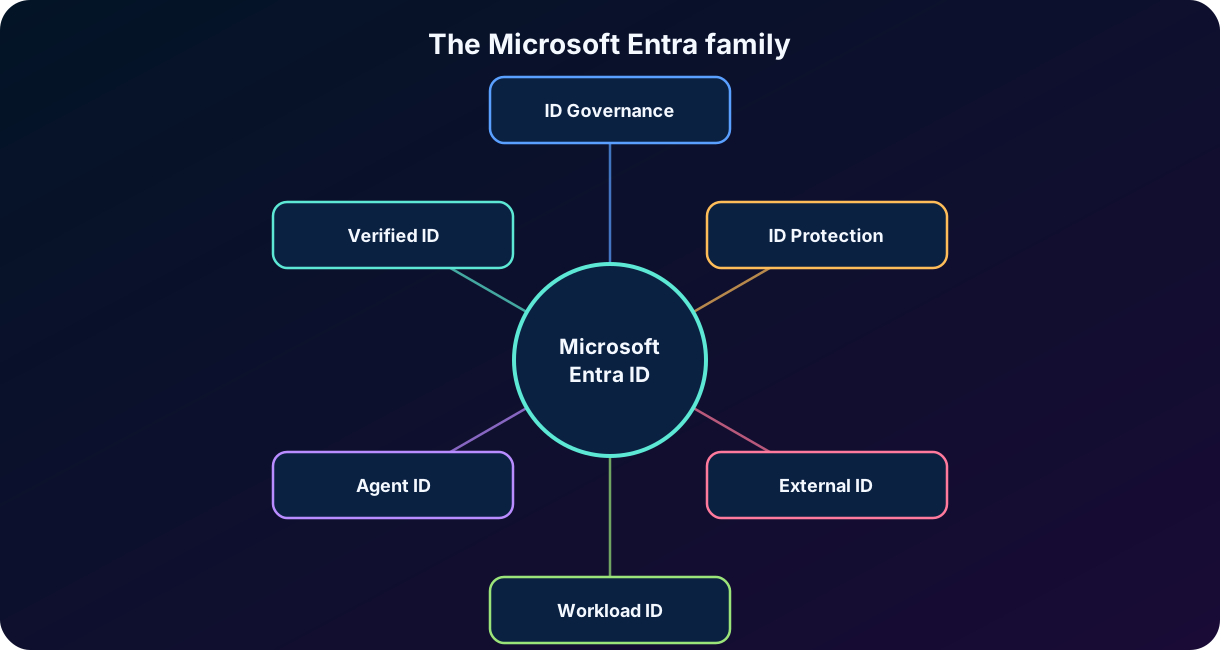
Microsoft Entra is Microsoft's product family focused on identity, access, governance, and connection security. Entra ID is its foundational product: it authenticates users and workloads, issues tokens, applies policies, and maintains directory objects. Other products extend this core for specific needs, such as lifecycle governance, external collaboration, network access, application identities, and AI agents.
Figure 1 — Conceptual view of the Microsoft Entra family and the central role of Microsoft Entra ID.
Products in the Microsoft Entra family and their conceptual purposes.
Component
Conceptual purpose
Microsoft Entra ID
Cloud-based for users, devices, applications, and resources.
Microsoft Entra ID Governance
Lifecycle automation, requests, packages, reviews, and access entitlements.
Microsoft Entra ID Protection
Detection of user and , with support for risk-based remediation.
Microsoft Entra External ID
Collaboration with partners and management of customer identity in applications.
Microsoft Entra Workload ID
Protection and governance of non-human identities used by apps and services.
Microsoft Entra Agent ID
Identity, authorization, governance, and auditing for AI agents.
Microsoft Entra
Issuance and verification of verifiable digital credentials.
Internet Access and Private Access
Secure access control to the Internet, SaaS, and private resources under .
SC-900 focus
The exam does not require deep administration of every product. It requires recognizing their purpose and, in this chapter, understanding the function of Entra ID and the identity types it represents.
4. What Microsoft Entra ID is
Microsoft Entra ID is Microsoft's cloud-based service. It connects people and non-human identities to applications, devices, data, and resources. When an entity tries to access a protected resource, Entra ID can authenticate that entity, evaluate policies, issue a token with claims, and let the resource make an authorization decision.
The service is used directly by , by Azure, and by thousands of SaaS applications. It can also protect custom applications, internal APIs, and multicloud solutions. This means Entra ID is not limited to “signing in to the Azure portal”: it acts as an identity provider, directory, token issuer, policy engine, and source of signals for access decisions.
Some capabilities depend on specific licenses, but the conceptual logic remains: objects represent identities; credentials and authentication methods prove who or what is requesting access; roles, permissions, and policies control access; and logs record events. Services such as , Identity Protection, , and governance will be explored in later chapters.
Functions performed by Microsoft Entra ID.
Function
What happens
Directory
Stores objects and attributes of users, groups, devices, applications, and other identities.
Authentication
Verifies identity using password, certificate, key, federation, , or other methods.
Token issuance
Creates tokens that contain claims and are presented to applications and APIs.
Authorization and policy
Provides roles, permissions, consents, and signals used to allow or deny access.
Auditing
Records sign-ins, administrative changes, consents, and relevant activities.
Integration
Connects local, external, SaaS application, and workload identities across different environments.
5. , directory, domains, and subscriptions
5.1
A is a dedicated and isolated instance of Microsoft Entra ID associated with an organization. It contains objects, domains, configurations, policies, application registrations, and logs. Each has a , the ID, usually represented by a . That identifier is different from the name and the domains used for sign-in.
When creating a , the organization receives an initial domain, such as contoso.onmicrosoft.com. Custom domains, such as contoso.com, can be added and verified. Verification demonstrates that the organization controls the DNS domain and allows using it in sign-in names, such as ana@contoso.com. The domain does not replace the ID, and a single organization may administer more than one for legal, geographic, technical, or segregation reasons.
5.2 Directory
In everyday use, “” and “directory” appear almost as synonyms. The difference in emphasis is useful: highlights the isolated instance and the administrative boundary; directory highlights the organized set of objects and attributes existing in that instance. An object has its own object ID within the , while certain types also have specific identifiers, such as the application (client) ID of an application.
5.3 A and an Azure subscription are not the same thing
An Azure subscription is a boundary for billing, quotas, and resource organization. For authentication and authorization, the subscription trusts a Microsoft Entra ID . A can be associated with several subscriptions, and each subscription maintains a relationship with a at a given moment. Creating a subscription does not mean creating a new identity for each user; the 's identities receive roles over subscriptions, resource groups, or specific resources through Azure .
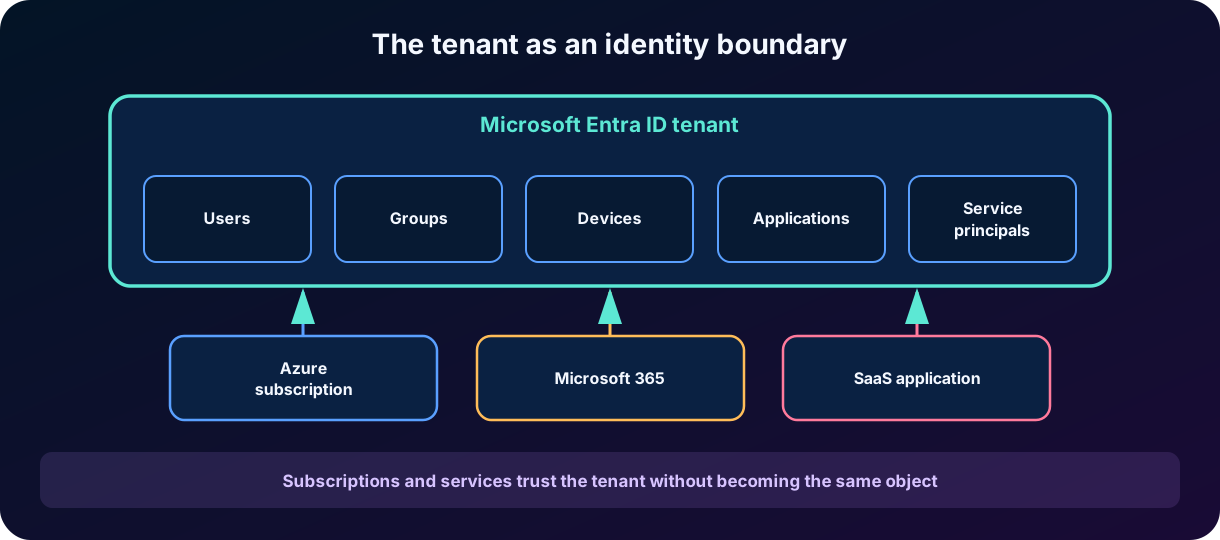
The same reasoning applies to the other elements in the figure. Multiple Microsoft cloud offering subscriptions, such as , Azure, and , can use the same Microsoft Entra , which acts as a common identity provider: the user accounts and groups for those offerings are stored in the . SaaS applications integrated with Microsoft Entra ID also rely on the to authenticate users through single sign-on and receive tokens. Subscriptions and services therefore trust the without becoming the same object.
Figure 2 — The is the identity boundary; subscriptions and services can trust it without becoming the same object.
Identifiers used in Microsoft Entra ID and Azure.
Identifier
Represents
Example of use
ID
The Microsoft Entra ID instance
Direct authentication or configure an integration.
Object ID
A specific object within the
Locate a user, group, or .
Application (client) ID
The logical identity of an
Request tokens for a registered application.
Subscription ID
An Azure subscription
Select the scope of resources and billing.
A user's sign-in name
ana@contoso.com.
Exam pitfall
, subscription, and domain are related but distinct concepts. The contains identities; the subscription contains resources and billing; the domain provides a namespace of names and must be verified.
6. Identity types and
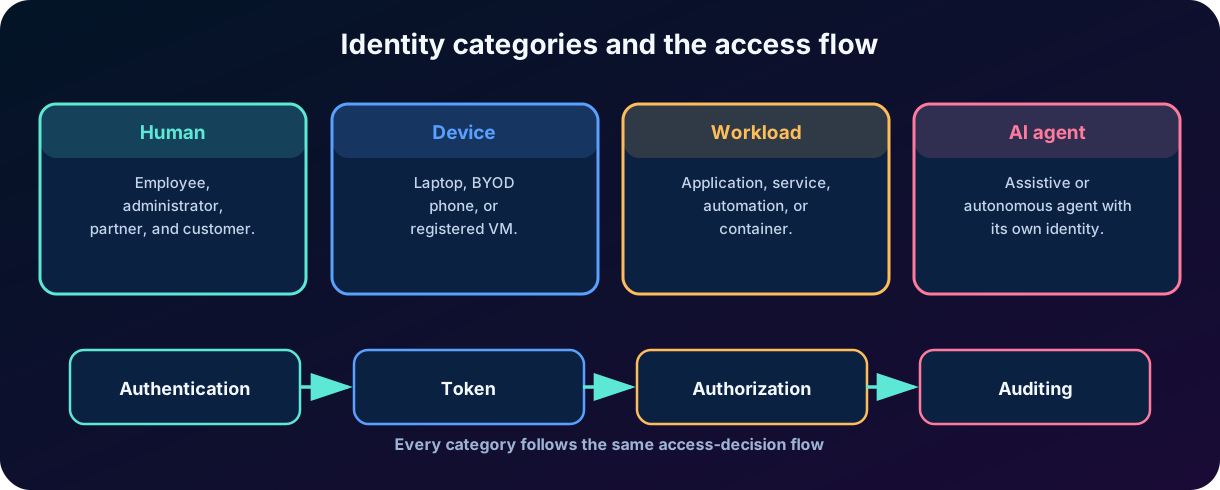
An identity is a digital representation of an entity. In Microsoft Entra ID, that entity can be a person, a device, an application, a service, an automation, or an AI agent. For an identity to receive permissions and take part in access decisions, it must be represented as an appropriate . Users are ; applications and several non-human identities are represented by or specialized types built on that infrastructure.
Classification helps choose authentication and governance mechanisms. People can use and methods; devices build device trust; workloads should avoid human accounts and static secrets; AI agents need their own identity, a sponsor, specific permissions, and an audit trail. Treating all these entities as “users” leads to shared credentials, excessive privileges, and little traceability.
Figure 3 — Identity categories and the common flow of authentication, token, authorization, and auditing.
Identity categories in Microsoft Entra ID.
Category
Examples
Main characteristic
Human
Employee, administrator, partner, and customer
Interacts directly or represents a person.
Device
Corporate laptop, phone, registered VM
Provides context and trust about the equipment.
Workload
Application, automation, service, container
Runs code and accesses resources without being a person.
AI agent
Assistive or autonomous agent
Needs granular identity, delegation, and its own auditing.
7. Users, groups, and external identities
7.1 User objects
A user object represents a person or, in legacy cases that should be avoided, an account used by a process. The object contains attributes such as name, , email address, job title, department, status, authentication methods, groups, and roles. The identity's origin can be cloud-only, synchronized from an on-premises Active Directory, or external.
Types and origins of user objects.
Type or origin
Description
Example
Cloud-only
Created and administered directly in the .
Employee of a fully cloud organization.
Synchronized
Originated in AD DS and provisioned into Entra ID.
Employee with local access and .
Member
User treated as a member of the organization in the directory.
Internal employee.
Guest
External user represented by an object in the resource .
Consultant from a partner company.
Customer in an external
Consumer or application customer identity in a scenario.
User of a services portal.
Member and Guest are user type properties, not absolute proof of employment or origin. A guest user usually has default restrictions and is created through B2B collaboration, but administrators can change properties and grant access. Security depends on policies, groups, roles, and reviews, not just the label.
7.2 Groups
Groups simplify administration by allowing permissions, licenses, and application access to be assigned to a set of identities. Security groups are used mainly for access control. groups also provide collaboration features such as a mailbox, calendar, and shared space. Membership can be assigned manually or, in compatible editions, calculated dynamically based on attributes.
The best practice is to grant access to groups whenever it makes sense, instead of creating many individual assignments. However, groups also need owners, membership criteria, and review. A dynamic group with an incorrect rule can grant mass access; a group without an owner can keep departed users for too long.
Operational principle
The user is the individual identity; the group is a mechanism for organization and assignment. In general, a group does not “sign in,” but it can receive permissions that become effective for its members.
8. Device identities
A device identity is an object in Microsoft Entra ID that represents a piece of equipment. It provides information used in access and management decisions, such as device ID, owner, registration state, operating system, and link to management services. The device identity does not replace the user's identity; it adds context. A policy can require the user to be authenticated and the device to be registered, managed, or compliant.
Device identity states in Microsoft Entra ID.
State
Conceptual description
Typical scenario
Microsoft Entra registered
The device is registered in the , but the user does not need to sign in to the operating system with a corporate account.
, phones, and personal computers.
Microsoft Entra joined
The device is joined directly to Entra ID and uses an organizational account for sign-in.
Cloud-oriented corporate equipment.
Microsoft Entra hybrid joined
The device remains joined to the local AD DS and is also registered in Entra ID.
Transition or coexistence in a hybrid environment.
These states are often confused with management. Registering or joining a device creates an identity and a trust relationship; managing it with Microsoft Intune involves policies, configurations, and compliance evaluation. The concepts can work together, but they are not synonyms.
Exam point
A registered device is associated with Entra ID; a joined device belongs to the organization's sign-in model; a hybrid joined device maintains a relationship with AD DS and Entra ID. Device state can be an access signal.
9. Applications, registrations, and
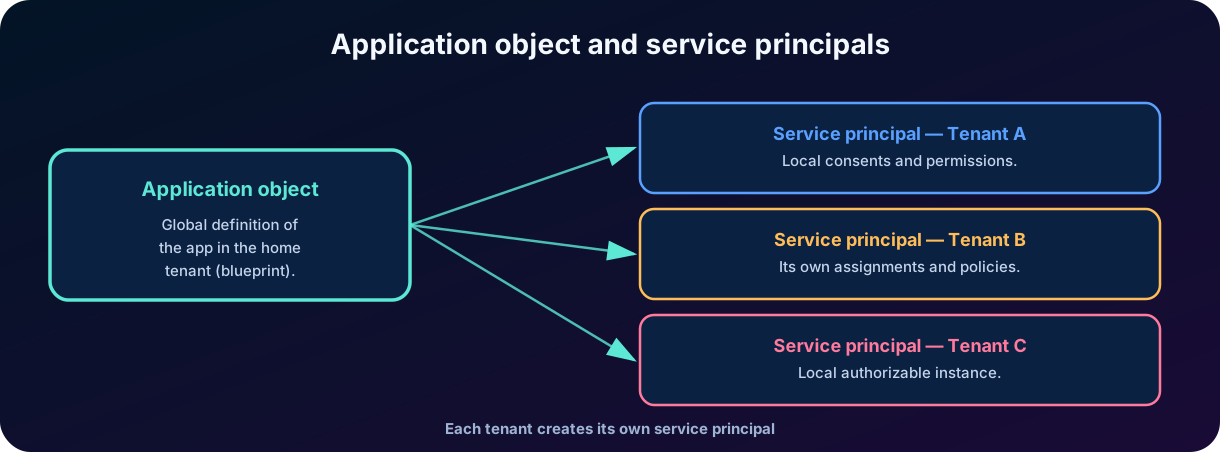
Applications also need identity. When a developer registers an application in Microsoft Entra ID, an is created in the home . That object works as a definition or : it contains identifiers, redirect URIs, supported account types, requested permissions, and other metadata used by the identity platform.
For the application to be used in a , there is a local representation called a . In the admin center, the area displays from the home ; the area displays , that is, local instances of applications used in the . This distinction is one of the most important for administrators and appears in conceptual questions.
In a application, use is restricted to the intended . In a application, other can consent to its use; each consuming creates its own , with local consents, assignments, and policies. Thus, a single can give rise to several .
Figure 4 — The is the ; the is the concrete, authorizable representation within a .
Terms related to applications in Microsoft Entra ID.
Term
Brief definition
Where it appears
Logical and global definition of the application in the home .
.
Local representation of the application in a , able to receive permissions.
.
Administrative experience used to manage and SSO.
Entra admin center.
Consent
Acceptance of requested delegated or application permissions.
During integration or administration.
Client ID
Public identifier of the .
Application authentication configuration.
10. and workload identities
A workload is software that performs a function: web application, API, background service, pipeline, serverless function, virtual machine, container, or automation. A workload identity is the identity used by that software to authenticate and access resources. In Microsoft Entra, applications, , and managed identities are part of this universe.
A can authenticate with a secret, certificate, federated credential, or another supported mechanism. Once authenticated, it receives a token and acts with granted permissions. Because no person is typing credentials, the controls are different: certificate rotation, scope restriction, permission review, sign-in logs, and removal of unnecessary credentials become essential.
Using a user account for an automation is a fragile practice. The password can expire, can interrupt the process, the account can accumulate permissions, and logs stop distinguishing person from workload. A workload identity makes the purpose explicit and enables independent governance.
Authentication options for workload identities.
Authentication option
Advantage
Risk or caution
Client secret
Simple to configure.
It is a static secret; requires secure storage and rotation.
Certificate
More robust than a text secret.
Requires lifecycle, private key protection, and renewal.
Federated credential
Avoids a local secret by trusting an external identity, such as GitHub or Kubernetes.
Requires configuring issuer, subject, and audience correctly.
Managed identity
The credential is managed by the Azure platform.
Available on supported resources and scenarios; permissions still need to be minimal.
11. Managed identities
Managed identities for Azure resources solve a recurring problem: how to let code access Key Vault, Storage, SQL, or another protected API without putting a password, secret, or certificate in a configuration file. When you enable a managed identity, Azure creates an appropriate representation in Microsoft Entra ID. The code requests a token from the hosting environment, and the platform takes care of the underlying credential.
11.1 System-assigned
The system-assigned managed identity is created together with the Azure resource and shares its lifecycle. A virtual machine or App Service receives a unique identity; when the resource is deleted, the corresponding identity is also removed. It cannot be shared across multiple resources. It is suitable when the identity clearly belongs to a single resource.
11.2 User-assigned
The user-assigned managed identity is created as an independent resource and can be associated with one or more Azure resources. Its lifecycle does not depend on a specific VM or application. This allows pre-authorizing an identity, reusing it across instances that are recreated, and keeping consistent permissions. Microsoft currently recommends this type for many services when reuse and independence are desirable.
System-assigned versus user-assigned managed identity.
Characteristic
System-assigned
User-assigned
Creation
Enabled directly on a resource.
Created as an independent Azure resource.
Lifecycle
Tied to the source resource.
Independent of the resources that use it.
Sharing
Only one resource uses the identity.
Can be associated with several resources.
Deletion
Automatic with the resource.
Must be deleted explicitly.
Typical use
Single application or VM.
Fleet of resources, pre-authorization, and persistent identities.
Security rule
A managed identity eliminates credential management but does not eliminate the need for authorization. It will only access the target resource if it receives the appropriate role or permission.
12. AI agent identities
AI agents are software capable of interpreting goals, planning actions, and interacting with tools, data, and services. When an agent reads documents, queries APIs, creates tickets, or performs tasks on behalf of users, treating it as a generic application can produce little granularity and auditing. Microsoft Entra Agent ID extends the identity infrastructure to represent and govern agents at scale.
In the current architecture, agent identities are built on the infrastructure but constitute a distinct type. An agent identity describes shared properties and capabilities and can give rise to several agent identities. The holds credentials and performs token acquisition or exchange on behalf of the identities; each agent can have its own permissions and audit records. This model separates the platform that runs agents from the concrete identity that acts.
The notion of a sponsor, or responsible owner, is important for governance. A non-human identity needs a person or unit responsible for its purpose, access, and lifecycle. Without that responsibility, agents can remain active after the project ends, keep excessive permissions, or perform actions that are hard to attribute.
Elements of AI agent identity.
Element
Conceptual function
Agent identity
Shared model that supports creating and operating agent identities.
Agent identity
Specific identity that receives permissions and appears in activity records.
Sponsor
Human or organizational owner responsible for the agent and its lifecycle.
Permissions
Can reflect autonomous operations or actions delegated on behalf of a user.
Auditing
Distinguishes the agent identity, the , and, when applicable, the represented user.
For the SC-900
Focus on the reason: AI agents need their own identity, least privilege, governance, and auditing. The implementation is recent and evolves quickly; administration details may change beyond the exam's fundamental scope.
13. Hybrid identity
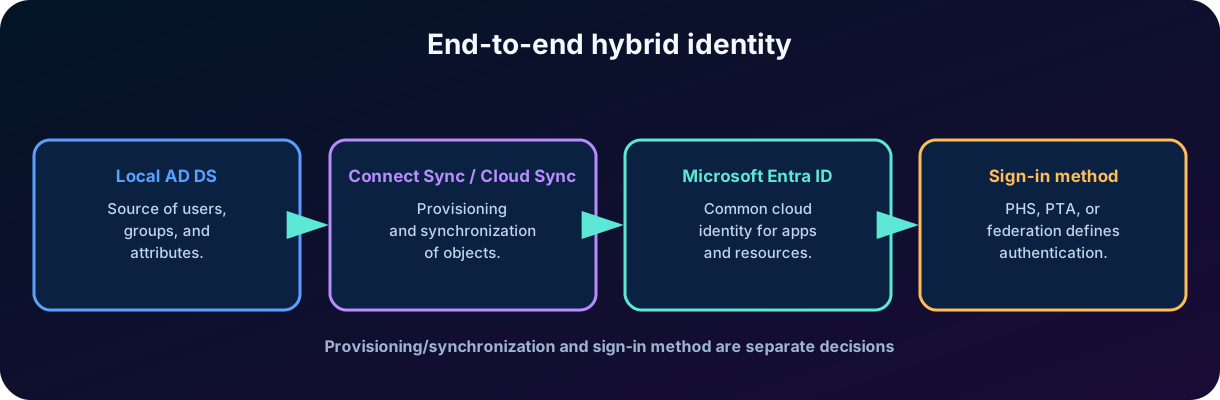
Hybrid identity is the model in which an organization connects local and cloud capabilities to provide a common identity. The user may exist initially in AD DS, be provisioned into Microsoft Entra ID, and use the same sign-in name to access local workstations, , Azure, and SaaS applications. The goal is not to keep two independent accounts manually, but to coordinate lifecycle and attributes.
Provisioning is the process of creating, updating, enabling, disabling, or removing objects according to rules. Synchronization keeps matching attributes between directories. Authentication is the process of proving identity during sign-in. These three words are related, but they are not synonyms. An organization can synchronize users and choose different hybrid authentication methods.
13.1 Source of authority
The source of authority indicates where a given attribute or object is administered. For a synchronized user, several attributes continue to be controlled in AD DS and sent to Entra ID. Changing them only in the cloud may be prevented or overwritten by the next synchronization. In cloud-only environments, the source is Entra ID itself. Clearly defining that authority avoids divergences and lost changes.
13.2 Matching and source anchor
The synchronization mechanism must associate the local object with the correct object in the cloud. To do so, it uses matching attributes and a stable identifier, often called the source anchor. Changes to , email, or name should not automatically create a new person. Matching errors can produce duplicate objects or connect the wrong identities, which is why domain planning and directory cleanup are critical steps.
Figure 5 — Hybrid identity combines provisioning and synchronization with an appropriate sign-in method.
14. and
14.1
Microsoft Entra Connect is an application installed in the local environment to meet hybrid identity objectives. Its synchronization component, , reads objects and attributes from local directories, processes rules in the synchronization engine, and exports changes to Microsoft Entra ID. It succeeded historical tools such as DirSync and Azure AD Sync.
offers mature features and complex scenarios but requires a server, a local database, updates, monitoring, and high-availability planning. Staging mode allows keeping an additional server prepared without exporting changes until it is activated. Connect Health provides monitoring of hybrid components in licensed scenarios.
14.2
is a modern, cloud-managed approach. Lightweight agents installed locally connect AD DS to the cloud provisioning service. This architecture reduces the dependency on a full synchronization server, makes it easier to use multiple agents, and can serve scenarios with disconnected forests. Microsoft presents as the strategic direction for hybrid synchronization, although the choice depends on the organization's resources and requirements.
Comparison between and .
Criterion
Architecture
Full synchronization engine running on a local server.
Configuration and processing mostly in the cloud with lightweight local agents.
Operation
Greater responsibility for the server, updates, and local database.
Less local infrastructure and multiple agents for availability.
Maturity and features
Broad set of documented features and customizations.
Fast evolution; check scenario compatibility.
Direction
Still supported in compatible scenarios.
Presented by Microsoft as the strategic direction for new synchronizations.
Decision
Suitable when requirements demand its specific features.
Preferable when it meets the scenario with a simpler architecture.
Do not memorize “one always replaces the other”
For the exam, recognize that both enable hybrid identity. In a real project, use the official feature matrix and the assessment tool to choose. Compatibility and migration change as the product evolves.
15. Hash synchronization and hybrid sign-in methods
15.1 Password Hash Synchronization - PHS
In password hash synchronization, Microsoft Entra Connect processes a representation derived from the existing password hash in AD DS and sends an additional hash to Microsoft Entra ID over a protected channel. The plaintext password is not synchronized, and the original AD DS hash is not sent directly. When the user signs in to the cloud, Entra ID validates the password using the value stored in its infrastructure.
A useful way to remember it is “hash of the hash,” although the implementation includes salt and additional functions. The conceptual goal is to allow cloud authentication with the same password without depending on the local domain controller for each sign-in. This improves resilience and reduces dependency on connectivity, and it also allows leaked-credential signals to be applied to hybrid identities in supported scenarios.
15.2 Pass-through Authentication - PTA
In pass-through authentication, the user provides the password to the Entra ID sign-in experience, and local agents validate the credential against Active Directory. Validation depends on the local infrastructure and the available agents. PTA can serve organizations that do not want to keep a hash representation for cloud authentication, but it requires availability and connectivity planning.
15.3 Federation
In federation, Microsoft Entra ID trusts a federation service, such as AD FS or another compatible provider, to authenticate the user. The federated IdP applies its logic and issues an assertion or token recognized by Microsoft. The model offers control and integration with specific requirements but adds infrastructure, certificates, availability, and operational complexity.
15.4 and SSO
allows certain password changes or resets performed in the cloud to be written back to AD DS in configured and licensed scenarios. This is different from PHS: PHS sends material derived from the local password for cloud authentication; writeback sends a new password defined in the cloud to the local environment. Seamless SSO can reduce credential on corporate devices, but it is also a capability distinct from the synchronization method.
Where validation occurs and the local dependency for each hybrid sign-in method.
Concept
Where the main validation occurs
Local dependency during sign-in
PHS
In Microsoft Entra ID.
Low: cloud sign-in can continue without AD DS available.
PTA
In AD DS via local agents.
Yes: agents and connectivity must be available.
Federation
In the federated identity provider.
Yes: the federated service must respond.
Important pitfall
Synchronizing users does not automatically determine how they will authenticate. Provisioning/synchronization and sign-in method are separate decisions, even though they are configured in the same hybrid project.
16. Microsoft Entra External ID and B2B collaboration
Microsoft Entra External ID brings together capabilities to work with people outside the organization. In a workforce , B2B collaboration lets you share corporate applications and resources with partners and guests without creating and managing a separate internal password for each person. The user usually authenticates with their own home identity, while the resource controls authorization and local policies.
16.1 Invitation and redemption
In the traditional flow, a user or administrator sends an invitation. The partner redeems that invitation and authenticates using a corporate account, a Microsoft account, a one-time passcode by email, or another configured provider. After redemption, the resource keeps a user object that usually has userType Guest. In historical representations, the may include the #EXT# marker, but the guest continues to use their home credentials.
This separation is powerful: the home organization administers the credential and lifecycle of the home account; the resource organization decides which applications, groups, sites, and data the guest accesses. If the partner leaves the company, cross- signals and governance processes can reduce risk, but the resource must still review and remove access that is no longer needed.
16.2 Cross- settings
Cross- access settings control trust and inbound/outbound restrictions between Microsoft Entra organizations. They can determine B2B collaboration, trust in another 's or device state, and access per organization. External collaboration settings control, among other things, who can invite guests and which domains can be allowed or blocked. They are complementary layers, not synonyms.
16.3 B2B direct connect
B2B direct connect creates a mutual trust relationship for direct collaboration between . The best-known current scenario is Teams shared channels, in which users collaborate with their home identities without being added as traditional guests in the other . The feature requires configuration between the organizations and should not be confused with a common B2B invitation.
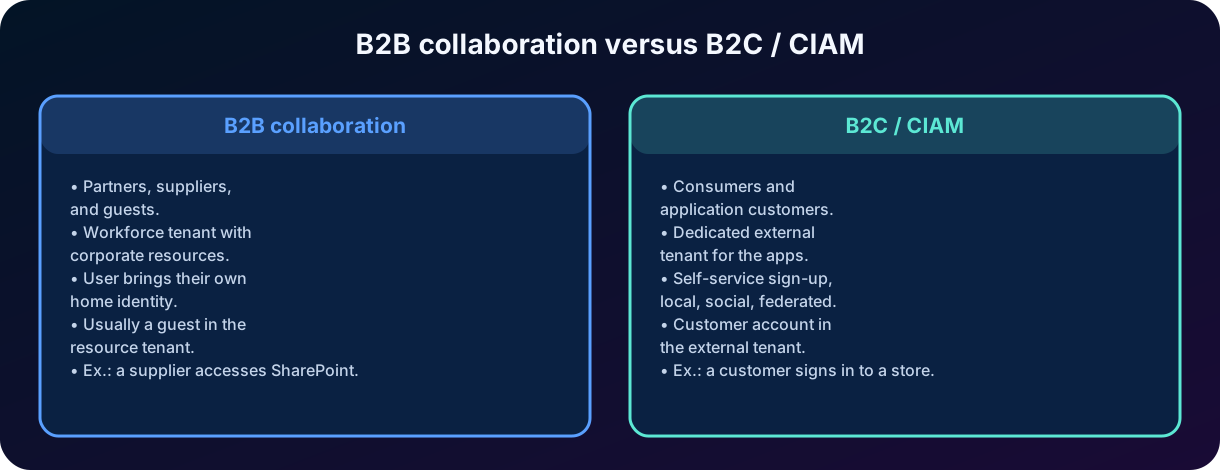
B2B means business-to-business and describes collaboration between organizations. The external user accesses a workforce's resources, generally keeping their home identity. B2C means business-to-consumer and describes the relationship between an organization and consumers. In identity, that domain is often called - - and involves self-service sign-up, account recovery, social providers, consent, brand customization, and large scale.
In the current architecture of Microsoft Entra External ID, the organization uses a workforce for employees and B2B collaboration. For applications aimed at consumers or commercial customers, it creates a separate external , configured for . That contains the applications' users and offers its own sign-up and sign-in flows. Separating the scenarios reduces exposure of internal resources and allows policies appropriate to the external audience.
Azure AD B2C is the legacy product known to many professionals. Microsoft states that it is not available for purchase by new customers as of May 1, 2025; existing continue to be handled by the applicable migration and support documentation. For new projects, the direction is Microsoft Entra External ID in external . For the SC-900, the conceptual distinction is more important than commercial details: B2B is collaboration with partners; B2C/ is customer identity in applications.
Conceptual differences between B2B collaboration and B2C/.
Aspect
B2B collaboration
B2C /
Audience
Partners, suppliers, consultants, and guests.
Consumers and application customers.
Typical
Workforce that contains corporate resources.
External dedicated to customer applications.
Sign-in
User brings a corporate, social, or allowed-method identity.
Self-service sign-up, local, social, or federated identity.
Object
Usually a guest in the resource .
Customer account in the external 's directory.
Experience
Collaboration and access to enterprise resources.
Brand journey, consent, and consumer support.
Example
A supplier accesses a SharePoint site.
A customer signs in to an e-commerce application.
18. Integrated practical scenario
Consider Contoso, a company with a local Active Directory, , workloads in Azure, and a customer portal. It wants to reduce technical passwords, collaborate with suppliers, and prepare AI agents for internal support. The identity architecture can be reasoned in layers.
Contoso uses a Microsoft Entra ID workforce . Its domains contoso.com and subsidiaries are verified in the .
AD DS users and groups are provisioned into Entra ID. The company evaluates for new environments and keeps where there are requirements not yet covered.
PHS is chosen as the primary cloud sign-in method for simplicity and resilience. is configured to integrate password reset with AD DS.
Modern corporate laptops are Microsoft Entra joined and managed; equipment in transition remains hybrid joined; personal devices are registered when allowed.
An internal application is registered in the . Its defines authentication; the local receives assignments and policies.
An App Service uses a user-assigned managed identity to read secrets from Key Vault. No client secret is stored in the code.
Suppliers are invited via B2B and added to specific groups. and reviews will be used to limit duration and confirm need.
The customer portal is registered in a external , separate from the workforce , with self-service sign-up and social providers.
Each AI agent receives an agent identity and minimal permissions for the necessary tools, with a sponsor and specific logs.
How to solve scenario questions
First identify the entity: person, device, application, partner, customer, or agent. Then identify the boundary: internal , external , or AD DS. Finally, choose the mechanism: synchronization, , managed identity, B2B, or .
19. Architecture and security best practices
19.1 Use least privilege and specific identities
Grant only the necessary permissions, in the necessary scope, and for the necessary time. Separate administrative accounts from productivity accounts. For workloads, create identities per function or component when that improves isolation and auditing. Avoid a single highly privileged identity shared by many automations.
19.2 Eliminate secrets whenever possible
Prefer managed identities for workloads in Azure and federated credentials for compatible external platforms. When a secret or certificate is unavoidable, use a vault, expiration, rotation, and alerts. Never embed credentials in source code, a container image, or a distributed file without protection.
19.3 Control the lifecycle
Every identity needs creation, maintenance, and termination. Define owners for groups, applications, , and agents. Disable orphan identities, remove old credentials, and review consents. In B2B, external access should have a deadline and justification when possible.
19.4 Plan the source of authority
In hybrid environments, document which attributes are administered in AD DS and which are cloud-managed. Test changes, mergers, offboarding, and recovery. Monitor synchronization errors and keep procedures for hybrid component failure.
19.5 Use logs and signals
Sign-ins of users, , and managed identities produce distinct records. Audit administrative changes, consents, and assignments. Modern identities are valuable precisely because they let you attribute actions to a specific entity; sharing an account or credential destroys that capability.
Common identity architecture risks and corresponding improvements.
Risk
Sign of weak design
Improvement
Exposed credential
Secret in code or a pipeline.
Managed identity, workload federation, or a vault with rotation.
Excessive privilege
Application with global administrator access.
Minimal permission and specific scope.
Orphan object
with no known owner.
Owner, sponsor, review, and expiration.
Hybrid duplication
Local and cloud-only user for the same person.
Plan matching, , and source anchor.
Permanent guest
Partner keeps access after the contract ends.
Review, , and automated removal.
Low traceability
Many automations use the same human account.
Specific workload identities and separate logs.
20. Review for the SC-900 and exam pitfalls
Question keywords and the concept to think of first.
When the question mentions...
Think first of...
Microsoft's cloud-based service
Microsoft Entra ID.
Isolated instance of an organization
.
Definition of an application in the home
/ .
Local, authorizable representation of an application
/ .
Azure application without a secret managed by the developer
Managed identity.
The same identity in AD DS and the cloud
Hybrid identity and synchronization.
Derived hash sent for cloud authentication
Password Hash Synchronization.
Password validation in AD DS via an agent
Pass-through Authentication.
A partner uses their own identity on a corporate resource
B2B collaboration.
Customers sign up in a consumer application
External and .
Non-human identity for software
Workload identity.
AI agent with its own permissions and auditing
Microsoft Entra Agent ID.
20.1 Frequent confusions
Microsoft Entra ID is not a hosted domain controller and does not automatically replace all AD DS functions.
A and an Azure subscription are not the same boundary.
and are not two independent applications; they usually represent an and a .
A managed identity is a special type of workload identity, not a human user without a password.
Hybrid identity does not mean the plaintext password is copied to the cloud.
B2B is not a portal for consumers; B2C/ is not the standard way to invite a supplier to SharePoint.
Registered, joined, and managed devices are different concepts, even though they can coexist.
An authenticated identity still needs to be authorized for each resource.
Summary in one sentence
Microsoft Entra ID keeps the identity boundary in the cloud; represents people and non-human entities; integrates local directories; and extends trust to partners, customers, workloads, and agents with policies and auditing.
21. Conclusion
Microsoft Entra ID is the identity core of the Microsoft cloud. Its value lies not only in storing accounts, but in representing different entities within a logical boundary, authenticating those entities, issuing tokens, applying policies, and recording activities. , users, groups, devices, , and form the basic language used to understand the product.
Non-human identities are gaining increasing importance. Workload identities and managed identities allow applications to access resources without depending on human accounts and, in many cases, without manually managed secrets. Agent ID extends this logic to AI agents, adding separation between the , the agent identity, permissions, the sponsor, and auditing.
Hybrid environments show that modernization rarely happens all at once. AD DS and Entra ID can coexist through provisioning and synchronization, using or and sign-in methods such as PHS, PTA, or federation. External ID, in turn, separates B2B collaboration from customer experiences in . My assessment is that mastering these distinctions is more valuable than memorizing names: when the reader understands which entity exists, in which , and with what responsibility, the architecture becomes predictable and SC-900 questions stop looking like a disconnected list of products.
Next step on the track
With the identity types and hybrid environments understood, the next chapter goes deeper into how these identities prove who they are: authentication methods, , Microsoft Authenticator, , Windows Hello for Business, , and technologies.
22. Review questions
1. An organization registers a application in A. When B grants consent to use that application, which object represents the local instance in B?
A) A new Microsoft Entra ID .
B) A .
C) A guest user.
D) A device identity.
Explained answer
Correct answer: B. The remains in the home ; each consuming creates its own , which receives local consents and permissions.
2. Which option allows an App Service to access Azure Key Vault without the developer storing a client secret in the code?
A) A B2B guest user.
B) A dynamic group.
C) A managed identity.
D) Password hash synchronization.
Explained answer
Correct answer: C. A managed identity gives the resource an identity in Entra ID and allows obtaining tokens without exposing credentials to the code. The identity still needs to receive authorization in Key Vault.
3. A company wants AD DS employees to use the same password to authenticate directly in the cloud, even during unavailability of the local domain controllers. Which method is most compatible with this goal?
A) Password Hash Synchronization.
B) Pass-through Authentication.
C) B2B direct connect.
D) Only federation with AD FS.
Explained answer
Correct answer: A. With PHS, a representation derived from the hash is kept in Entra ID, allowing cloud validation without querying AD DS for each sign-in.
4. Which statement correctly differentiates B2B from B2C/?
A) B2B is for anonymous customers; is only for administrators.
B) B2B shares corporate resources with partners; manages sign-up and sign-in of customers in applications.
C) B2B and are different names for the same configuration.
D) requires every customer to have an employee account in the workforce .
Explained answer
Correct answer: B. B2B serves collaboration with partners and guests. B2C/ serves consumers and application customers, usually in a dedicated external .
23. References and further reading
Primary scope basis: SC-900 study plan provided by the user, Chapter 3 - Microsoft Entra ID, Identity Types, and Hybrid Environments.
Official sources consulted on July 23, 2026. Because cloud services evolve continuously, details of licensing, regional availability, menu names, and preview features should be confirmed in the current documentation before a real implementation.
Chapter wrap-up
You have completed the identity types and hybrid environments of Microsoft Entra ID. The natural next step is to study modern authentication methods: , Microsoft Authenticator, , Windows Hello for Business, , and technologies.