Microsoft Security Copilot and AI-Assisted Security
,,,,, agents, embedded experiences, , incident investigation, permissions, privacy, responsible AI, and human validation
Suggested study time: 42 minutes • Beginner level • Aligned with the SC-900 study plan and official Microsoft Learn documentation
By João Ricardo Dutra••Complete material
1. Introduction: From rules-based automation to
The application of computing to security didn't start with generative models. For decades, detection systems have worked with signatures, rules, reputation lists and correlations defined by experts. Later, machine learning techniques began to identify anomalous patterns in large volumes of telemetry. The most recent transformation has occurred with large-scale language models capable of interpreting questions, summarizing evidence, and producing natural language explanations.
On March 28, 2023, Microsoft introduced the then-. The product became generally available on April 1, 2024, and has evolved from a chat-centric experience to a platform that combines , embedded experiences, ,, and agents. This evolution does not eliminate tools like ,, identity controls or professionals; it creates an assistance layer that helps people navigate and correlate data from these tools.
For the reader, understanding this change means learning to use AI without confusing textual fluency with technical certainty. For society, tools of this type can reduce response time to attacks, democratize specialized knowledge and help smaller organizations deal with a shortage of professionals. The benefit, however, only appears when automation is accompanied by governance, privacy, appropriate permissions and human review.
Chapter Guide Question
How do you use AI that produces answers quickly without allowing a convincing answer to replace evidence, access controls, and professional judgment?
1.1 Why security needs assistance at scale
Modern environments generate alerts from endpoints, identities, emails, applications, networks and clouds. The problem is not just collecting signals, but transforming them into actionable context. Analysts need to reconstruct timelines, identify affected entities, query indicator reputation, interpret scripts, write queries, and communicate conclusions to different audiences. can reduce the mechanical effort of these steps and free up time for higher-value decisions.
1.2 Copilot as an amplifier, not as a final authority
The term copilot indicates assistance. The system can suggest, summarize, explain and organize, but it does not have legal responsibility, perfect knowledge or complete understanding of the business. A professional remains responsible for validating evidence, evaluating impact, respecting procedures and authorizing actions. This boundary between algorithmic speed and human responsibility will be revisited throughout the chapter.
2. Artificial intelligence fundamentals to understand
Concept
Definition in the context of security
Example
Artificial intelligence (AI)
Broad field dedicated to systems capable of performing tasks associated with perception, reasoning, language or decision.
Classify alerts and assist investigations.
Machine Learning
Methods that learn patterns from data rather than relying solely on manually written rules.
Detect unusual input behavior.
Deep Learning
Subarea based on neural networks with many layers, useful for language, image and complex patterns.
Analyze large sequences of events.
Models capable of producing new content, such as text, code, summaries or queries, based on instructions.
Generate a query from natural language.
Large-scale language model trained to predict and generate text strings.
Explain a script and write a report.
Inference
The moment in which the model processes an input and produces an output.
Respond to a during an investigation.
Token
Textual unit processed by the model; Context limits restrict how much content can be considered at once.
An extensive investigation may require division into steps.
2.1 : connecting the model to relevant information
A general language model does not automatically know alerts, internal policies, or the current state of an incident. is the process of providing relevant context at the time of the request. In , this context can come from Microsoft product , third-party services, threat intelligence, uploaded files, or organizational knowledge bases. Instead of relying solely on what the model learned during training, the response is based on data retrieved for that task.
2.2 Hallucination and uncertainty
Hallucination is the production of plausible but incorrect, unproven or non-existent content. In security, this may appear as a contrived indicator, an overinterpretation of a script, or a recommendation that ignores environment dependencies. reduces this risk, but does not eliminate it. Therefore, answers must indicate sources, evidence, limitations and, when possible, level of confidence.
Rule of thumb
Well-written text is not evidence. Confirm data in the alert, incident, log, asset, query, or intelligence source before taking action.
3. What is
is a -based IT and security solution. Its purpose is to increase the efficiency and capability of defenders by combining natural language, language models, security expertise, global threat intelligence, and the organization's authoritative data. It offers a standalone experience and experiences built into products across the Microsoft portfolio.
The service combines large language models delivered through Azure OpenAI Service with Microsoft's security-specific orchestration, , knowledge connections, and global threat intelligence informed by more than 65 trillion signals each day. In the standalone portal, a person submits natural-language requests through the bar and can receive text, images, or documents; embedded experiences bring selected capabilities directly into products such as Microsoft Defender . Customer information remains scoped to the organization and is protected by enterprise security and compliance controls; it is not used to train the foundation models.
3.1 What the solution seeks to do
Reduce the time spent reading, correlating and summarizing large volumes of signals.
Help less experienced professionals perform technical tasks with guidance and context.
Allow experts to transform repetitive procedures into ,, or agents.
Facilitate collaboration through briefs, shareable sessions, and audience-tailored reports.
Connect investigation, identity, devices, data and threat intelligence in an assisted experience.
3.2 What the solution is not
Does not replace Microsoft Defender , Microsoft Sentinel, Microsoft Entra, Intune, or Purview; uses these products as sources and work surfaces.
Does not automatically grant access to data that the user could not query in the originating product.
It does not guarantee that every answer is correct, complete or up-to-date.
Does not transfer responsibility for containment, communication, compliance, or operational impact to AI.
It does not transform every incident into a completely autonomous process; Critical actions require controls and supervision.
Figure 1 - acts as an assistance layer connected to different security domains.
Product update
In more recent experiences, agents may be the main gateway; the chat remains available for interactive exploration. For the SC-900, focus on purpose, terminology, processing, integrations, and responsible use.
4. How processes a request
Although the internal implementation is sophisticated, the conceptual flow can be understood in seven stages. This view helps answer exam questions and, most importantly, avoids imagining that the model queries all data without control.
1. The user submits a . 2. The orchestrator interprets it, establishes the initial context, selects available capabilities, and builds a plan. 3. Copilot executes that plan to assemble the context required for the answer. 4. Enabled and data sources are analyzed to supply security-specific evidence and insights. 5. The language model combines that evidence and composes a human-readable result. 6. The platform formats and checks the output under Microsoft's responsible AI safeguards. 7. The user receives the response and validates it. A visible process log identifies capabilities and sources used, processing details, and completed safety checks so the analyst can assess provenance.
Figure 2 - Conceptual flow for processing and checking a request in .
4.1 Permissions remain the border
Microsoft use authentication, known as . This means that the platform queries data using the connected professional's identity and permissions. Having access to is not equivalent to receiving unrestricted access to Defender, Sentinel, Entra, Intune, or Purview. To get results, the user needs a role and the necessary permissions on the data source.
4.2 Iterative process
A session does not have to end on the first response. The analyst may ask for details, restrict the period, change the format, select another source or request comparison with a hypothesis. This progressive interaction is important because real investigations rarely fit into a single question.
5. Essential Terminology
Term
Meaning
Point of attention
Natural language input that expresses a question or instruction.
The clearer the objective and context, the better the response tends to be.
Response
Content generated for the .
It must be reviewed and compared with evidence.
Session
Set of related interactions, preserving conversational context.
Old session information may influence subsequent .
Source
Source of information used to support the answer.
It can be , file, knowledge base or authoritative content.
Collection of tools that connect Copilot to external data and capabilities.
It can be Microsoft, non-Microsoft, website or personalized.
Tool/skill
Specific capability exposed by a .
For example: querying reputation or generating hunting queries.
Retrieval and inclusion of relevant context in processing.
Increases relevance, but does not guarantee absolute accuracy.
Organized sequence of for a repeatable task.
Standardizes investigations and reduces variation between analysts.
Process log
Visible record of steps, sources and capabilities used.
It helps to review how the response was produced.
Workspace
Organizational context used for collaboration, settings, and capacity.
Configurations and availability depend on the environment.
Goal-oriented component that executes structured or repetitive flows.
Must operate with defined identity, permissions, limits, and oversight.
Security Compute Unit, unit of computational capacity of the service.
Usage, inclusion and billing depend on the current model.
Common proof trap
is not just a visual extension. It provides data and/or capabilities that allow you to support and expand what Copilot can do.
6. How to Write Effective
The quality of the directly influences the usefulness of the response. Microsoft's documentation organizes a good into four elements: goal, context, expectations, and source. Not every question needs to mention all four explicitly, but this model is especially useful when the task is critical or complex.
Figure 3 - Recommended structure for effective in the security context.
6.1 Goal
State the desired outcome. Verbs such as summarize, compare, explain, identify, prioritize, generate and validate reduce ambiguity. “Review this incident” is generic; “summarize the timeline, identify the three most affected entities and propose next steps” is more accurate.
6.2 Context
Enter the period, business objective, investigation phase and audience. The same incident may require a technical explanation for the , an executive summary for leadership, and a timeline for audit.
6.3 Expectations
Define format, level of detail, restrictions and criteria. Examples: table, numbered list, language for non-technical audiences, separation between facts and hypotheses, inclusion of confidence level and citation of evidence.
6.4 Source
Indicate relevant , products, files or knowledge bases. The source guides the and reduces answers based only on general knowledge.
6.5 Example : from vague to verifiable
Version
Assessment
Vague
What happened?
It does not inform incident, period, source or format.
Better
Summarize the INC-1042 incident and tell me what I should do.
Defines the object, but does not yet specify evidence or audience.
Effective
Using Microsoft Defender and Sentinel, summarize incident INC-1042 from the last 24 hours. Separate confirmed facts, hypotheses and gaps. Deliver a table with timeline, entities, evidence, impact, level of trust and five prioritized actions for the duty.
Combines goal, context, expectations and sources; facilitates validation and operational use.
6.6 Good prompting practices
Start with a goal and refine in steps, rather than trying to solve the entire investigation in a single .
Use concrete identifiers: incident number, user, device, domain, IP address, , and time range.
Ask for separation between observed evidence, inference, and recommendation.
Request citations from sources or indication of the data used when the scenario allows.
Specify the audience and output format.
Avoid entering unnecessary secrets, credentials, or personal data into the .
Do not automatically accept generated commands, scripts or queries; review syntax, scope, and impact.
Provide feedback and rephrase when the response does not meet the objective.
6.7 and standardization
group into a task-oriented sequence, such as phishing investigation, vulnerability analysis, or report preparation. They help codify team procedures, reduce forgotten steps, and create consistency. However, a should be revised when products, threats, or internal processes change.
example
1) summarize incident; 2) extract entities and indicators; 3) check reputation; 4) generate hypotheses; 5) list gaps; 6) propose actions; 7) produce a report for the chosen audience.
7. , data sources and organizational knowledge
are the mechanism that extends Copilot beyond the language model. They can provide context, query services, seek intelligence, or expose specialized tools. The organization can enable or disable , apply filters, and in some cases, customize settings such as the default Microsoft Sentinel workspace.
7.1 categories
Category
Description
Example of value
Microsoft
Pre-installed integrations with Microsoft products and content.
Defender incidents, Sentinel data, Entra signals.
No Microsoft
Supported integrations with partner products.
Add context from external ITSM or security tools.
Websites
Public or authoritative sources consultable.
Vulnerability publications and technical references.
Customized
created for your own APIs, processes and data.
Consult an internal incident management platform.
7.2 Organizational knowledge
Internal policies, response playbooks, procedures, libraries, and historical records represent context that a general model does not have. may use files or knowledge base connections to reference this material. Quality depends on up-to-date, well-organized and user-authorized content.
7.3 authentication
In Microsoft , the model preserves the identity context: the query occurs on behalf of the logged in user. Therefore, Copilot should not be treated as a shortcut to bypass . The user may have a Contributor role in Copilot and still be unable to read a specific incident if they do not have permission on the product that contains the data.
Security principle
Connecting more sources increases context and also expands the governance surface. Enable only necessary integrations, apply least privilege, and review data that may appear in responses.
8. Standalone Experience and Embedded Experiences
can be used in a standalone portal and within Microsoft products. The standalone experience favors broad investigations, chat sessions, combined use of , and collaboration. Embedded experiences present capabilities in the context of the work already being done, reducing tool change.
Experience
Typical context
Usage examples
Standalone portal
Inquiry that combines multiple sources or requires conversational exploration.
Ask about indicators, compare hypotheses, prepare a report, use .
Microsoft Defender
Alerts, incidents, endpoints, identities and email.
Generate or explain , summarize incidents and guide investigation.
Microsoft Enter
Identities, entries, risks, groups and access controls.
Investigate risky users, interpret events and evaluate access.
Microsoft Intune
Devices, policies and endpoint management.
Explain policy conflicts and support troubleshooting.
Microsoft Purview
Data protection, compliance and insider risk.
Summarize alerts, investigate exposure, and support compliance tasks.
8.1 Context does not mean automatic trust
An embedded experience can automatically populate incident, alert, or open policy information. This improves relevance, but the professional must still check the scope. An incident summary may omit events, and a generated query may search for a different time period than necessary.
8.2 Agents
Agents perform goal-oriented, structured, and repeatable tasks. On current platform versions, they may be the recommended starting point. Conceptually, an combines instructions, identity, permissions, , triggers, and operational limits. The greater the autonomy, the greater the need for auditing, approvals and review of results.
9. Use cases in security operations
9.1 Incident investigation and summary
Copilot can consolidate observed alerts, entities, assets, schedules, and techniques into a narrative. This summary helps with triage and shift handover, but should be compared to the original incident page and alerts. The main value is to reduce initial reading time and highlight relationships worthy of investigation.
Figure 4 - Copilot speeds up steps, while validation and response remain under the analyst's control.
9.2 Threat intelligence
Intelligence allow you to query threat actor profiles, malicious infrastructure, analysis reports, and vulnerability publications. Copilot can summarize context, relate indicators and adapt the explanation. The analyst must verify currency, attribution, source reliability, and relevance to the environment.
9.3 Analysis of scripts and files
Upon receiving a suspicious script, Copilot can explain commands, techniques, persistence, network communication, and possible indicators. This capability improves accessibility for those who do not speak the language, but does not replace static analysis, dynamic analysis, sandboxing, endpoint telemetry, or expert review.
9.4 Generation and explanation of queries
Kusto Query Language is used in Microsoft Sentinel and Defender . Copilot can turn a natural language question into a query, explain operators, correct syntax, and suggest variations. Before running, confirm tables, field names, time range, volume queried, and whether the query only reads data or integrates a stream with after-effects.
Objective
Sample request
Validation required
Hunting
Generate to locate encoded PowerShell executed in the last 24 hours.
Confirm available tables, fields, period and .
Explanation
Explain this query line by line and identify filters that can hide events.
Compare explanation with documentation and with result samples.
Optimization
Rewrite the query to reduce cost and preserve logic.
Test equivalence, performance and loss of coverage.
9.5 Reporting and communication
The same investigation needs different formats. Copilot can create executive summary, technical timeline, action list, communication to users, or draft post-incident report. The professional must remove unnecessary data, adapt tone, confirm facts and follow the formal process of the organization.
9.6 Response and Remediation
The system may suggest containment, further investigation and corrections. Examples include isolate device, reset credential, revoke session, block indicator, or adjust policy. The recommendation should not be executed without verifying impact, authority, dependencies, reversibility, and evidence. In critical environments, changes require approval and a return plan.
9.7 IT operations, policy, lifecycle, and stakeholder support
The same assistance layer can synthesize technical evidence to troubleshoot IT issues, compare a new security policy with existing policies to expose conflicts, guide the creation of groups and access parameters in secure , and prepare concise stakeholder reports that cover environment context, open issues, and protective measures in the language expected by the audience. These capabilities increase analyst productivity; they do not remove the need for service owners, reviewers, or approvals.
Recommended default
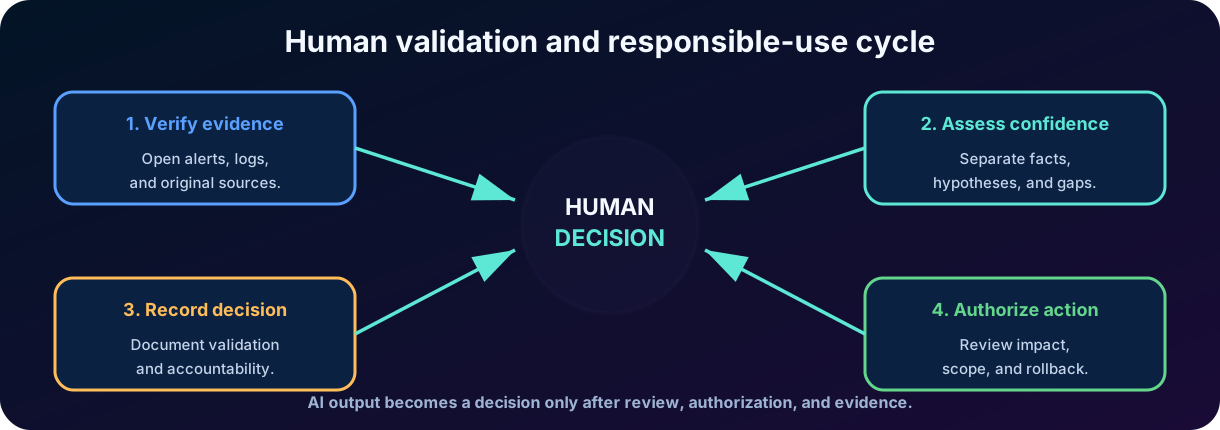
Copilot proposes -> analyst validates -> responsible authorizes -> tool executes -> team confirms result -> evidence is recorded.
10. Activation, capacity, roles and permissions
Onboarding has four parts: identify the customer category, make capacity available when required, configure the default workspace environment, and assign permissions. Eligible E5 and E7 receive a seven-day advance notice before Microsoft performs zero-click provisioning and receive included capacity without manual Azure setup. Other customers manually provision Security Compute Units () and use provisioned plus overage capacity. Commercial quantities can evolve, so always verify the current offer before implementing it.
10.1 Security Compute Units
measure the compute power used by standalone and embedded experiences, , Microsoft or partner agents, and other capabilities. Provisioned capacity is purchased ahead of time and billed by the hour; overage is consumed and billed on demand and can be capped or unlimited. In the source module's manual model, an organization could provision from 1 to 100 , with three and unlimited overage suggested for an introductory exploration. Capacity can be increased or reduced without a long-term commitment, and requests can stop when all available capacity is exhausted.
10.2 roles
Role
General liability
Does not replace
owner
Manage service settings, roles, associated capacity, and administrative options.
Azure Owner/Contributor when the action involves the capacity resource in Azure.
contributor
Use the platform, create sessions and work with allowed capabilities.
Read or action permissions on the products and data consulted.
10.3 Two layers of authorization
6. Platform access: User needs proper role in . 7. Data access: the user needs roles and permissions in Defender, Sentinel, Entra, Intune, Purview or external service.
10.4 Least privilege
Microsoft recommends using roles with the lowest permission set. Highly privileged global roles should be reserved for situations where no specific role exists. It is preferable to assign access by groups, periodically review members and separate platform administration from daily investigative work.
10.5 Manual provisioning and capacity monitoring
Manual onboarding requires an Azure subscription, at least Azure Owner or Azure Contributor on the resource group, and Security Administrator or a higher role in the . A Microsoft Entra Global Administrator does not automatically receive Azure resource permissions; when appropriate, that administrator can elevate access in the Microsoft Azure portal and then assign the required Azure role. Capacity can be created with the onboarding wizard or through in the Microsoft Azure portal. Both paths collect the workspace name, subscription, resource group, region, capacity name, quantity, and overage choice, then deploy the as Azure resources in the selected resource group.
Capacity owners can adjust from either portal and use the usage dashboard to review up to 90 days of consumption by workspace, capacity, , session, and initiator. Filters and export support cost analysis and capacity planning. Included E5/E7 capacity follows the current inclusion terms; provisioned and overage capacity follow their respective billing models.
Figure 6 - Licensing determines the capacity path; workspace configuration and least-privilege access complete onboarding.
10.6 Workspace environment and data controls
Each workspace is a -bound work environment and must have its own capacity. Workspaces help map costs to teams and budgets and support geo-specific storage requirements.
At setup, select capacity and data-storage geography. The source module lists Azure datacenters in the European Union Data Boundary, United Kingdom, United States, Australia and New Zealand, Japan, Canada, and South America.
Choose whether are evaluated only within the selected geography or may be evaluated elsewhere when needed for availability.
-wide owner settings can allow Microsoft Purview to process and retain administrative actions, user actions, and Copilot responses for auditing. Organizations without Microsoft Purview must complete the documented limited setup.
Per-workspace sharing controls decide whether Microsoft may use human review to validate product performance or improve the security AI model. Opting in does not authorize customer data to train foundation models.
Per-workspace controls define who may add personal or organization-wide custom , which are available to everyone or owners only, and whether may access services. Microsoft Purview use currently depends on that access setting.
10.7 Role inheritance and source-product permissions
Copilot owner and Copilot contributor are platform roles, not Microsoft Entra ID roles, and grant no security-data access by themselves. Billing Administrator, Microsoft Entra Compliance Administrator, Global Administrator, Intune Administrator, Security Administrator, Purview Compliance Administrator, Purview Data Governance Administrator, and Purview Organization Management inherit owner access so the service retains administrative coverage. Global Administrators, Security Administrators, and Copilot owners can change workspace role membership. The Recommended Microsoft Security roles group can quickly add eligible Microsoft Entra security-role holders as contributors.
A platform role still does not replace permissions in the connected product. For example, using Microsoft Sentinel incident data can require Microsoft Sentinel Reader, while device, privilege, and policy data from Microsoft Intune can require Intune Endpoint Security Manager. Microsoft generally use the model, so Copilot acts with the signed-in user's entitlements; some configured use their own authentication parameters. enablement and configuration are scoped to each workspace.
To memorize on SC-900
License or capacity enables the service; Copilot role enables the use of the platform; role in the source product enables access to data. They are related but different controls.
11. Privacy, data protection and responsible AI
, information retrieved to generate responses, replies, pinned items, and uploaded files may constitute customer data. In addition, the service creates system-generated logs for operation, security, and performance. Administrators need to understand where data is processed and stored, what sharing options are enabled, how auditing is configured, and what organizational policies apply.
11.1 Essential controls
Apply lower privilege and review roles in and integrated products.
Activate only required and verify their authentication methods.
Avoid including secrets, credentials or personal data without operational need.
Define who can upload files and which documents are appropriate as fonts.
Monitor capacity, usage, sessions, settings and audit logs.
Learn about data sharing options and feedback.
Use applicable retention, classification, and compliance policies.
Train users to verify responses, sources and impact of actions.
11.2 Principles of Responsible AI
Responsible use involves reliability and security, privacy, inclusion, transparency, accountability and fairness. In practice, this means making it clear that the content was AI-generated, recording human decisions, testing behavior in real-world scenarios, limiting autonomy, protecting data, and offering avenues to contest or correct results.
Figure 5 - Human review transforms an AI response into a controlled and auditable decision.
11.3 Limitations that the professional must recognize
limitation
Risk
Secured response:
Hallucination
Create non-existent facts, indicators or relationships.
Require evidence and open the original source.
Incomplete context
Ignore relevant logs, period, , asset or procedure.
Rephrase the and add authoritative sources.
Excessive automation
Perform containment that affects legitimate service.
Use approvals, limited scope and return plan.
Confirmation bias
Produce a response in line with the analyst's initial hypothesis.
Ask for alternative hypotheses and contrary evidence.
Outdated content
Use knowledge that does not reflect current threat or product.
Consult up-to-date intelligence and documentation.
Data exposure
Include sensitive information in , files, or reports.
The Contoso company receives an incident correlating outlier location entry, email forwarding rule creation, and PowerShell execution on a user device. The analyst opens the incident in Microsoft Defender and uses the embedded experience to get a first synthesis.
8. Initial summary: request timeline, affected entities and alerts that support the correlation. 9. Identity: Use the Microsoft Entra to review relevant inputs, risk, devices, and changes. 10. Script: ask for PowerShell explanation, extraction of indicators and observed techniques. 11. Hunting: Generate to find similar execution on other devices and users. 12. Intelligence: Consult reputation of domains, IPs and hashes found. 13. Validation: Compare each statement with alerts, logs, query results, and internal procedures. 14. Response: Propose prioritized actions; obtain authorization to revoke sessions, reset credentials, isolate device, and block indicators. 15. Communication: produce executive summary and technical record, removing unnecessary data and identifying facts, hypotheses and gaps.
Expected Result
Copilot reduces the time to organize and explain information. The analyst preserves control over evidence, hypotheses, decisions and execution of actions.
13. Review directed to SC-900
You must know how to differentiate
Core Idea:
vs. Security Product
Copilot generates and organizes content; Defender, Sentinel, Entra, Intune, and Purview provide controls and data.
x
is a request; is a reusable sequence of .
x font
connects capabilities and data; source is the source used to support a response.
x model training
adds context at the time of response; it does not mean retraining the model with the .
Standalone vs. embedded experience
Standalone combines sources and broad chat; embedded works in the context of a product.
owner x Contributor
Owner manages the platform; Contributor uses it according to permissions.
Role of Copilot x permission in the product
The first allows you to enter the platform; the second determines what data can be accessed.
Suggestion x decision
AI recommends; the professional validates, authorizes and takes responsibility.
13.1 Conceptual pitfalls
To think that Copilot accesses all data only because the user has a role on the platform.
Confuse reasoned answer with guaranteed correct answer.
Imagine that replaces or .
Treat and as synonyms.
Consider sufficient vague for a critical investigation.
Run script or query generated without revision.
Forgetting that capacity, licensing, Copilot role, and permission at source are different requirements.
Ignore privacy and classification because the tool is corporate.
14. Conclusion
represents a major shift in the way professionals interact with security data. It transforms natural language into an interface for investigation, intelligence, queries, explanations, and reporting. Its value is born from the combination of language models with ,, authorized fonts and integration into the Microsoft ecosystem.
In my assessment, the solution's greatest contribution is not “automating the analyst” but closing the gap between a technical signal and an understandable decision. This can increase productivity and learning, as long as the organization preserves lower privilege, traceability, , and human validation. The more compelling AI becomes, the more important it is to cultivate the habit of asking: What evidence supports this answer?
15. Review questions
1. Which alternative best describes the role of in ?
A) Replace the permissions of the integrated products.
B) Connect Copilot to specialized data and capabilities used in and task execution.
C) Exclusively store the history of .
D) Automatically convert any recommendation into action.
2. What are the four elements recommended for an effective ?
A) Model, token, license and .
B) User, password, session and audit.
C) Goal, context, expectations and source.
D) Alert, incident, evidence and asset.
3. A user has the contributor role but is unable to query an incident in Defender . What is the most likely explanation?
A) Contributor only allows to create .
B) The Copilot role allows to use the platform, but the user also needs permission in the product containing the incident.
C) Every incident requires Global Administrator role.
D) does not integrate with Defender .
4. What is the safest conduct in the face of a containment recommendation generated by Copilot?
A) Run it immediately because it was supported by .
B) Copy the recommendation to a script and run it on all assets.
C) Validate evidence, impact, authority, scope and reversibility before authorizing action.
D) Ignore all AI-generated recommendations.
Answer key with explanations
1. B. connect Copilot to fonts and tools. They do not automatically elevate permissions or make the response foolproof.
2. C. Goal, context, expectations, and source help the system understand what to produce, why, in what format, and with what data.
3. B. Access has layers: role on the platform and authorization on the products of origin. The model preserves user permissions.
4. C. Recommendations should be confronted with operational evidence and controls. Human validation is part of responsible use.
16. Quick glossary
Term
Summary Definition
A goal-oriented component that performs structured tasks using instructions, identity, , and controls.
Inclusion of context retrieved from relevant sources at the time of generating the response.
Class of AI capable of producing text, code, images or other content.
Kusto Query Language, a language used in queries and hunting in Microsoft services.
Large-scale language model used to interpret and produce text.
Access to a source on behalf of the user, respecting their permissions.
Collection of tools that integrate data or capabilities into the platform.
Question or instruction in natural language.
Reusable sequence of for a workflow.
computational capacity unit.
Security Operations Center, security operations team or function.
Content revised August 2026. Features, interfaces, regional availability, licensing, and capacity may change. Consult official documentation before deployment decisions.