Microsoft Sentinel, SIEM, SOAR, and Incident Response
,, AI-assisted detection, Microsoft Sentinel data lake, graph, server, incident response, , and autonomous security agents
Suggested study time: 40 minutes • Beginner level • Aligned with the SC-900 study plan and official Microsoft Learn documentation
By João Ricardo Dutra••Complete material
1. Introduction: from log centralization to context-driven response
Security management began with logs produced separately by servers, operating systems, firewalls, and applications. As organizations connected more networks and services, it became unfeasible to analyze each log manually. Event management platforms emerged, followed by solutions, capable of centralizing data, correlating signals, and supporting investigations. With the growth in alert volume, added automation and orchestration so that security teams could respond more quickly and consistently.
This evolution directly contributes to the continuity of digital services, the protection of personal data, and the reduction of the impact of attacks. Hospitals, schools, banks, companies, and public agencies rely on systems that produce millions of events. Transforming these records into investigable context allows for discovering threats earlier, prioritizing what really matters, and reducing the time between detection and containment.
Microsoft Sentinel materializes this approach in a cloud-native solution. It collects data from Microsoft and non-Microsoft sources, performs analysis, generates alerts, organizes incidents, enables proactive hunting, and automates responses. AI and machine learning add anomaly detection, alert correlation and prioritization, false-positive reduction, multistage attack recognition, and natural-language assistance. The real value appears when these capabilities form a cycle: an investigation improves detection; detection triggers automation; automation frees the analyst to investigate more complex cases.
Guiding question
If a single failed login can be normal, at what point do hundreds of failures, an anonymous IP, and a privileged change come to represent an incident? The exists to gather scattered signals and provide context for this decision.
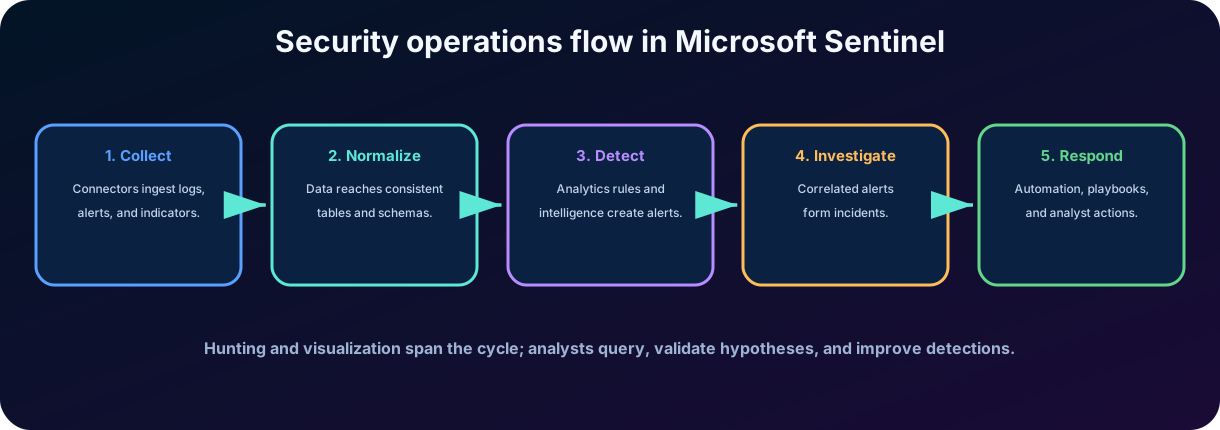
Figure 1 - Security operations flow in Microsoft Sentinel.
2. ,, and the role of the
2.1 Security Operations Center ()
is the organizational function responsible for monitoring, detecting, investigating, and responding to threats. It can be an internal team, an outsourced service, or a hybrid model. People, processes, and technology need to work together: tools without procedures generate inconsistency; processes without telemetry lead to late decisions; automation without supervision can amplify errors.
2.2 Essential definitions
Concept
Main objective
Example of result
-
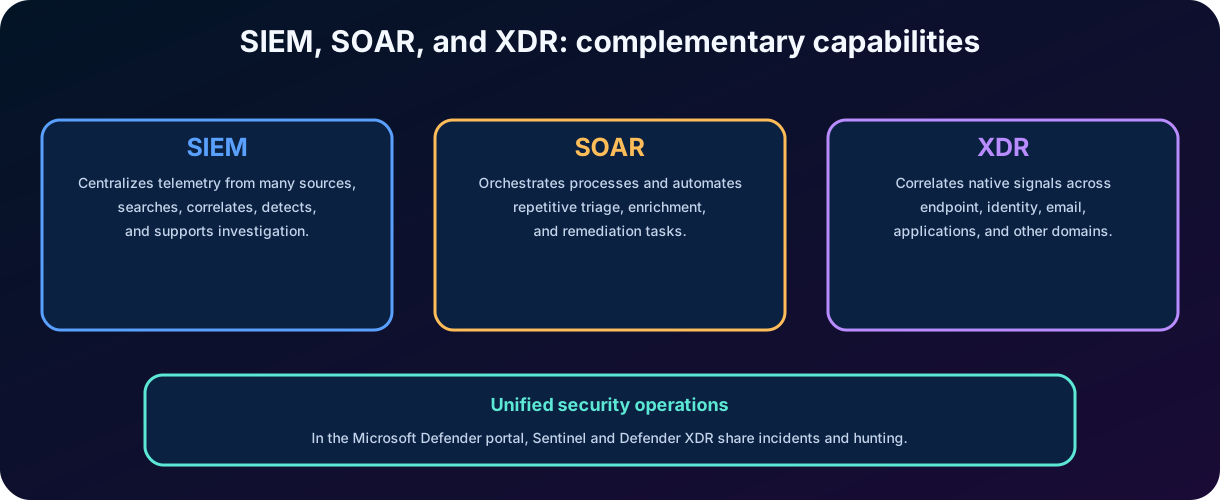
Centralize, search, and correlate telemetry from various sources for detection, investigation, and compliance.
query, analytics rule, alert, incident, dashboard, and report.
-
Standardize and automate tasks and responses involving different systems.
Enrich IP, open a ticket, assign incident, notify team, or contain an account.
- Extended Detection and Response
Correlate native signals and responses across various protection domains.
Unified incident involving endpoint, identity, email, and application.
Threat intelligence
Provide context on indicators, infrastructure, campaigns, and threat actors.
IP reputation, malicious domain, known hash, or association with a campaign.
Figure 2 - ,, and are complementary.
Evidence trap
is not just log storage. is not just a script. does not automatically replace the broad visibility of . Each concept solves a different part of security operations.
3. What is Microsoft Sentinel
Microsoft Sentinel is Microsoft's native cloud and a security operations platform. Its purpose is to provide scalable collection, analysis, detection, investigation, hunting, visualization, and automated response in multi-cloud and multi-platform environments. Being a cloud service, it reduces the need to maintain the traditional infrastructure of an on-premises , but it still requires data architecture, governance, permissions, rules, and well-defined operational processes.
3.1 Functional components
Component
Function
Workspace and data layer
They receive, retain, and make consultable the records necessary for security operations.
Content hub and solutions
They distribute packaged content, such as connectors, analytic rules, parsers, hunting queries, workbooks, and playbooks.
Analytics
They apply queries and logic to recognize suspicious patterns and generate alerts.
Incidents and investigation
They group signals and provide context about entities, evidence, timeline, and actions.
Hunting and notebooks
They allow proactive threat hunting and advanced analysis.
Automation
Uses automation rules and playbooks to orchestrate triage and response.
3.2 Cloud-native does not mean automatic by default
Sentinel provides ready-made content, but the organization needs to choose sources, retention, coverage, permissions, detections, responsible parties, and response criteria. Collecting everything without a goal can increase cost and noise. Collecting too little can create blind spots. A mature deployment starts with use cases: which critical assets exist, which threats are relevant, which data support detection, and what action will be taken when the signal appears.
Platform update
The current experience converges on the Microsoft Defender portal, bringing together Sentinel, Defender , and AI features. Microsoft announced that, after March 31, 2027, Sentinel will no longer be supported on the Azure portal. For the SC-900, mainly memorize the capabilities, not the exact position of the menus.
3.3 Analytics tier and Microsoft Sentinel data lake
Sentinel stores security information in two complementary tiers. The analytics tier is optimized for near-real-time alerts, , incident management, and other operational queries. Data ingested there is mirrored into the Microsoft Sentinel data lake, which becomes the unified, open-format repository for large-scale and long-term analysis without maintaining a separate infrastructure. The data lake can retain information for up to 12 years and supports , graph analysis, Microsoft Modeling Language, AI-assisted notebooks in Visual Studio Code, and other multimodal analytics over one copy of the data.
Platform component
Purpose
Exam distinction
Analytics tier
Low-latency operational analysis, alerts, hunting, and incidents.
Optimized for active security operations.
Microsoft Sentinel data lake
Cost-efficient storage, long retention, and deep analysis at scale.
Central historical foundation for AI-ready security data.
Microsoft Sentinel graph
Models relationships among assets, identities, activity, and threat intelligence.
Reveals paths and context that isolated tables can hide.
Microsoft Sentinel server
Hosted, Microsoft Entra-protected interface for natural-language tools and security agents.
Provides contextual access without custom infrastructure or schema expertise.
Figure 2A - Microsoft Sentinel data and AI platform, from telemetry to analysts and autonomous agents.
3.4 Graph and hosted server
The Microsoft Sentinel graph represents users, devices, resources, data, activities, and attacker actions as connected nodes and relationships. It helps analysts and AI agents reason about impact, exposure, and possible attack paths instead of examining isolated rows. The hosted Model Context Protocol () server exposes scenario-focused tools for data exploration, incident triage, threat hunting, and agent creation. It uses Microsoft Entra for identity, integrates natively with Sentinel data and Microsoft Defender, and does not require the customer to deploy a separate infrastructure.
4. Data connectors and ingestion
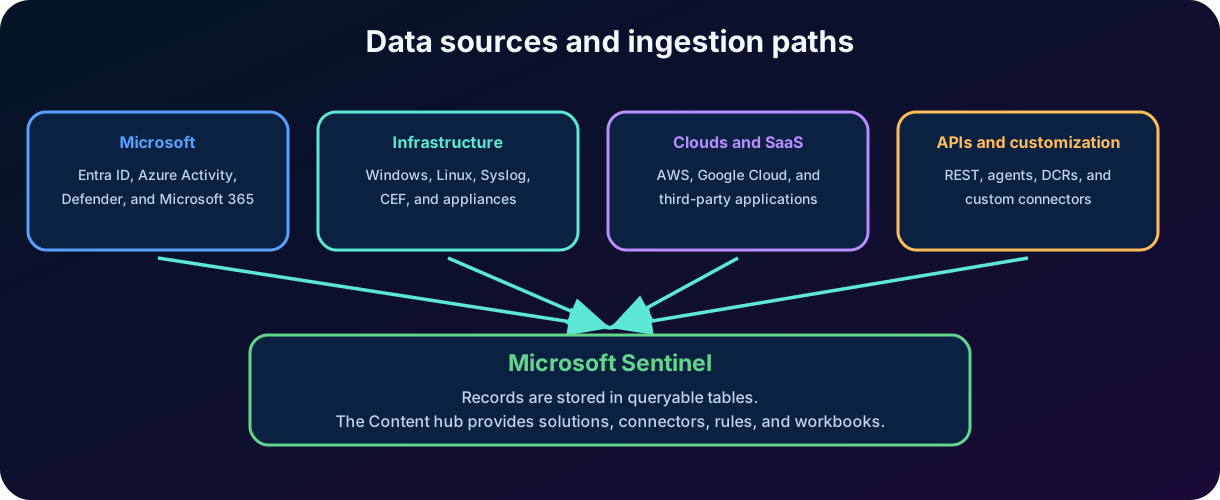
A depends on telemetry. Microsoft Sentinel offers more than 350 built-in connectors for Microsoft and non-Microsoft platforms, plus custom and no-code options. Connectors guide or automate the entry of logs from cloud services, on-premises systems, network appliances, security products, and SaaS applications. Some sources send data directly; others use agents, Syslog, Common Event Format (), APIs, collection rules, or specific integrations. Normalization translates different formats into a more uniform view for correlation.
Figure 3 - Sources and ingestion paths in Microsoft Sentinel.
4.1 What a connector can provide
Deployment instructions, permissions, and prerequisites.
Tables or destinations where the records will be stored.
Parsers and normalization to make events from different sources more consistent.
Analytics rules, hunting queries, workbooks, and other related content.
Integrity, volume, and last data reception indicators.
4.2 Content hub and solutions
The Content Hub works as a solutions catalog. A solution can group several artifacts for a product or scenario, preventing the analyst from having to create everything from scratch. Installing a solution does not guarantee that the data is arriving or that all rules should be enabled without adjustment. The content needs to be configured, tested, and adapted to the environment.
Operating principle
Without relevant and intact data, the best analytics rule detects nothing. Before adjusting alerts, confirm coverage, latency, schema, volume, retention, and source quality.
5. Data organization, Log Analytics and
5.1 Tables, columns, and records
Security data is organized into tables. Each row represents a record, and the columns store attributes such as time, user, IP address, device, action, and result. Common examples include login records, Azure activity, security events, and alerts. The correct table depends on the connector and the type of data ingested.
5.2 Kusto Query Language ()
is the query language used to search and transform data in Sentinel and in other services based on Azure Data Explorer and Azure Monitor. It is declarative: the analyst describes which data they want to filter, summarize, combine, and project. In SC-900, the most important thing is to recognize that supports queries, hunting, and many analytics rules; it is not necessary to master advanced syntax.
SigninLogs | where TimeGenerated > ago(1h) | where ResultType != 0 | summarize Failures=count() by , IPAddress | where Failures >= 10 | order by Failures desc The query above looks for unsuccessful entries in the last hour, groups the attempts by user and IP, keeps groups with at least ten failures, and orders the results. It does not prove an attack: it could represent an old password, a misconfigured application, or password spray. The investigation context decides.
Operator
Purpose
where
Filter records by a condition.
project
Select, remove, rename or calculate columns.
summarize
Group and calculate counts, averages, maximums, and other aggregations.
join
Relate records from different tables.
extend
Create calculated columns.
sort/order by
Sort results.
6. Analytics rules and threat detection
Analytics rules transform data into security signals. They define what to look for, how often to evaluate, which period to consult, how to map entities, and when to create alerts and incidents. A useful detection needs to balance sensitivity and accuracy: overly broad rules generate alert fatigue; overly restrictive rules let threats pass.
6.1 Types and approaches of detection
Approach
How it works
Typical use
Scheduled
Executes a query at defined intervals and periods.
Known patterns, correlation, and aggregations.
Near-real-time ()
Performs queries with near real-time frequency and a short window.
Activities that require quick detection.
Microsoft security
Creates incidents from alerts received from Microsoft security products.
Integration with Defender and Defender for Cloud.
Advanced analysis and correlation
Uses models, intelligence, and correlation to match related signals.
Complex attacks and reduction of isolated alerts.
6.2 Elements of a rule
Query or source that defines the detection logic.
Execution frequency and observation window.
Threshold that determines when the result becomes an alert.
Severity, tactics, and techniques.
Mapping of entities, such as account, host, IP, URL, file, and process.
Grouping of alerts and creation of incidents.
Suppression and adjustments to reduce duplication or noise.
6.3 AI, , and threat-intelligence matching
Sentinel combines three broad detection approaches. Rule-based detection matches known patterns and defined conditions. AI and machine-learning detection establishes behavioral baselines and uses capabilities such as to link lower-severity signals from multiple sources into a coherent incident. Threat-intelligence matching compares observed IP addresses, domains, URLs, hashes, and other indicators with known malicious infrastructure. Detection coverage can be mapped to the framework, and Content hub solutions package connectors, rules, hunting queries, parsers, workbooks, and playbooks for common scenarios.
Detection quality
A rule needs to be testable and actionable. Before enabling it widely, validate whether the data exists, whether legitimate behavior has been considered, and whether the knows what to investigate and respond to.
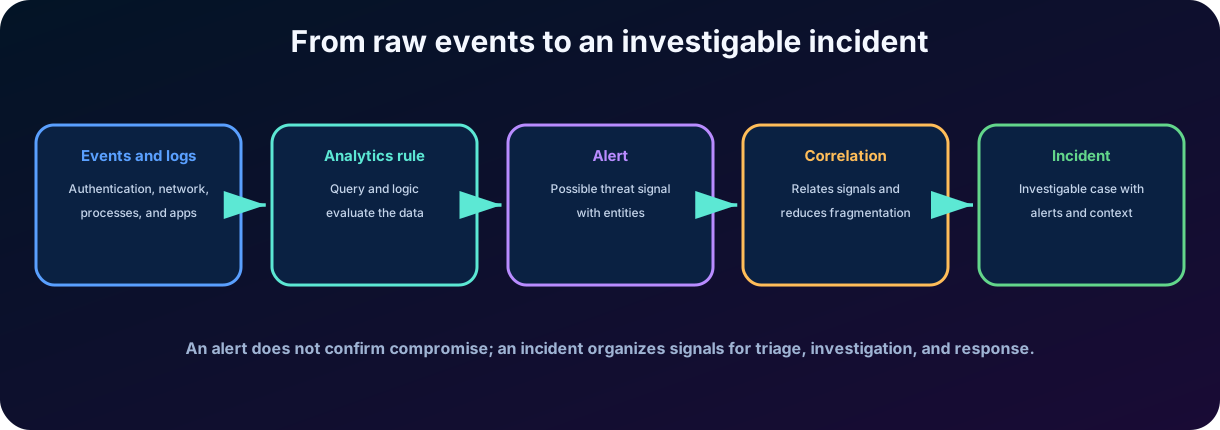
7. Events, alerts, incidents, entities, and evidence
Figure 4 - Relationship between events, alerts, and incidents.
Element
Correct interpretation
Event or log
Logging an activity. Most events are not malicious.
Alert
Sign of a possible threat produced by a detection or integrated product.
Incident
Investigative container that groups alerts and related context.
Entity
Object involved, such as user, host, IP, mailbox, URL, process, or file.
Evidence
Data or artifact that supports the investigation and helps confirm or refute hypotheses.
Severity
Estimate of signal importance; does not replace the assessment of the actual impact.
Status and classification
They represent the progress and the result of the analysis, such as active, closed, , or .
7.1 Why correlate?
An intruder can generate signals at different times and in different products: phishing email, anomalous login, process creation, file access, and network communication. Correlating these signals reduces fragmentation and helps to reconstruct the attack chain. However, correlation does not mean certainty; the analyst still needs to validate the timeline, the legitimacy of the actions, and the affected scope.
Evidence trap
Alerts are signals; incidents are cases organized for investigation. An incident can contain one or several alerts and can end up classified as a , expected activity, or true incident.
8. Investigation and incident response
Investigation turns a set of signals into operational understanding. The analyst seeks to answer: what happened, when it started, which entities were involved, what the initial vector was, what actions were taken, which assets were affected, and what containment is needed. Sentinel provides incidents, timeline, relationships between entities, queries, comments, tasks, and action history to organize this work.
8.1 Simplified response cycle
1. Triage: check severity, context, duplication, asset criticality, and signal credibility. 2. Investigation: reconstruct the timeline, consult additional data, and assess entities and evidence. 3. Containment: limit the damage, for example by isolating a device, blocking an indicator, or disabling a credential. 4. Eradication: remove persistence, malware, malicious rules, vulnerabilities, or configurations used in the attack. 5. Recovery: restore operations with enhanced monitoring and validation of a secure state. 6. Learning: record cause, impact, decisions, and improvements in rules, playbooks, and preventive controls.
8.2 Important metrics
Metric
Meaning
MTTD - Mean Time to Detect
Average time to detect a threat.
MTTA - Mean Time to Acknowledge
Average time until the alert or incident is recognized by the team.
MTTR - Mean Time to Respond/Remediate
Average time to respond, contain, or correct, according to the adopted definition.
rate
Proportion of signs that do not represent a real threat.
Coverage of use cases
Percentage of risks and relevant techniques that have data, detection, and response defined.
Good practice: Preserve evidence and record decisions. Responding quickly is important, but containment without context can interrupt services, destroy evidence, or allow the intruder to change strategy.
9. Threat hunting and proactive investigation
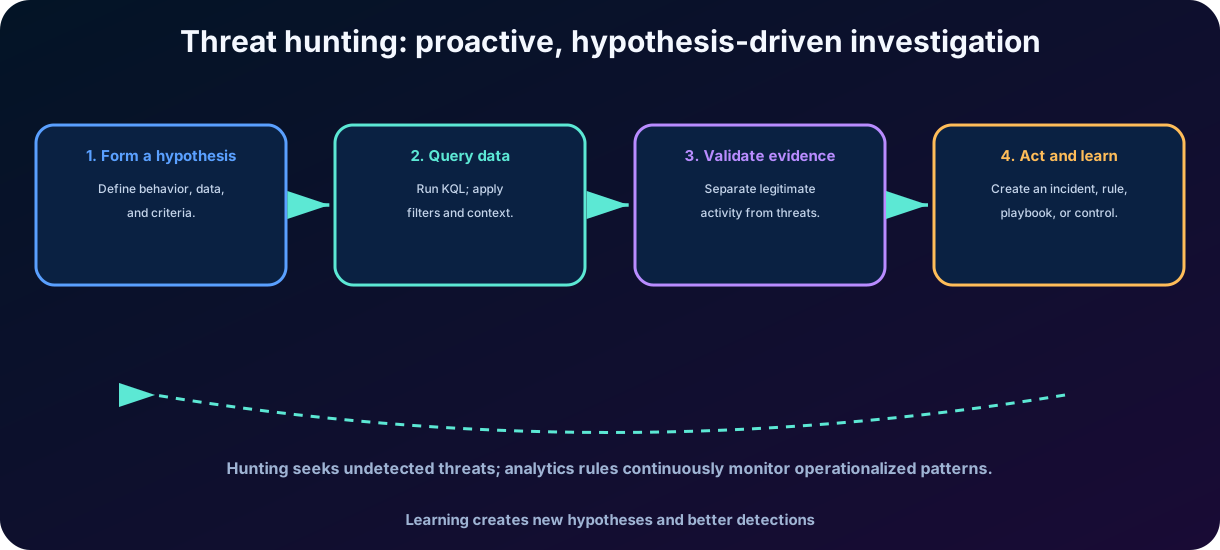
Threat hunting is the proactive search for threats that have not yet produced a reliable alert. Instead of waiting for a rule to trigger, the analyst starts from a hypothesis based on intelligence, changes in the environment, unusual behavior, or adversary technique. The result can confirm legitimate activity, reveal an incident, or lead to a new automated detection.
Figure 5 - Hypothesis-driven hunting cycle.
9.1 Hunting query, hunt and bookmark
Resource
Use
Hunting query
Reusable query to look for suspicious behavior. Can be provided by solutions or created by the team.
Hunt
Structure a proactive investigation with hypothesis, participants, consultations, and follow-up.
Bookmark
Mark relevant results to preserve context and support investigation.
Vocabulary for relating queries and detections to adversary tactics and techniques.
Notebook
Environment for advanced analytics, machine learning, visualizations, and integration with external data.
Hunting should not be confused with random research. A clear hypothesis defines the expected behavior, the necessary data, the validation criteria, and the subsequent action. Without this discipline, queries can produce many results without generating knowledge or operational improvement.
10. Workbooks, visualizations, and monitoring
Workbooks are interactive experiences for data visualization and analysis. They can combine queries, charts, tables, metrics, filters, and explanatory texts to track operational posture, incident trends, identity activity, data source coverage, or detection performance. Solutions installed from the Content hub often include ready-made workbooks for specific sources.
10.1 Workbooks are not detection rules
Resource
Question that answers
Workbook
How do the data behave and which trends deserve attention?
Analytics rule
When should a pattern generate an alert or incident?
Hunting query
What evidence supports or refutes a hypothesis?
Playbook
Which actions must be performed manually or automatically?
Watchlist
Which reference list should be used in consultations and correlations?
10.2 Useful Visualization
Define the audience and decision that the panel should support.
Shows trends and context, not just isolated numbers.
Allows filtering by period, severity, origin, entity, or environment.
Avoid excessive charts and metrics without corresponding action.
Documents queries, limits, and possible data gaps.
Example
A workbook can show authentication failures by country and user. It helps to observe trends, but it does not block access or necessarily create an incident. An analytics rule or identity policy performs that other function.
11. : automation rules and playbooks
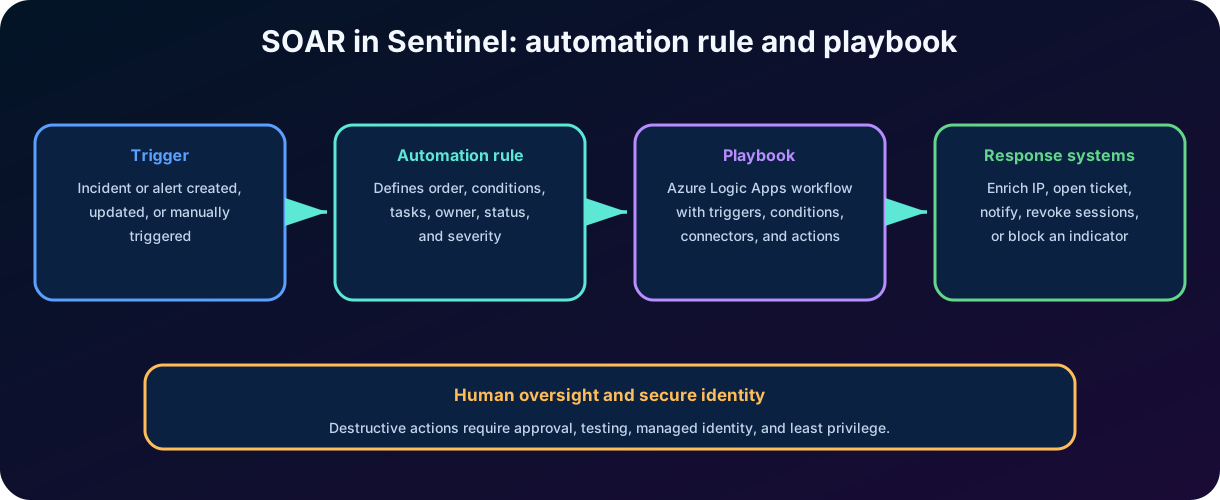
Sentinel implements capabilities mainly through automation rules and playbooks. Automation rules manage the flow of incident and alert handling in a central point. They can assign responsibility, change severity or status, add tags, create tasks, and execute playbooks in a defined order.
Playbooks are workflows built in Azure Logic Apps. They use triggers, conditions, connectors, and actions to interact with Sentinel and external systems. A playbook can be executed automatically by an automation rule or manually by an analyst on an incident, alert, or entity.
Figure 6 - Relationship between automation rule, playbook, and response actions.
Resource
Main responsibility
Automation rule
Decide when and in what order to perform treatment actions.
Playbook
Execute logic and response integrations through Azure Logic Apps.
Automation rule action
Assign, tag, close, change status, create task, or call playbook.
Logic Apps connector
Authenticate and interact with Sentinel, email, Teams, ServiceNow, Entra, Defender, and other services.
12. Designing safe and reliable automations
Automation can reduce response time, but it also performs actions at scale. Therefore, it should be treated as production software: have an owner, version control, testing, monitoring, error handling, minimal permissions, and a rollback procedure. The decision to automate depends on the confidence in detection and the impact of the action.
12.1 Example: possible account compromise
7. An analytic rule identifies multiple failures followed by a successful login from anonymous infrastructure. 8. Sentinel creates an alert, maps the account and IP address, and groups the signal into an incident. 9. An automation rule adds the “Identity” tag, assigns the incident to the appropriate queue, and creates triage tasks. 10. A playbook queries IP reputation, identity risk data, and recent account activity. 11. If high-confidence criteria are met, the playbook revokes sessions and notifies the team; account disabling may require human approval. 12. The analyst validates impact, completes containment, and records the outcome to adjust the rule and playbook.
12.2 Levels of automation
Level
Examples
Operational risk
Enrichment
Check reputation, asset owner, and criticality.
Low; usually does not change the environment.
Coordination
Open ticket, notify team, assign and create tasks.
Delete resource, erase evidence, block a large range, or disable service.
High; usually requires approval and strict controls.
Automation identity Playbooks should use secure authentication, preferably managed identity when applicable, and receive only the necessary permissions. An over-privileged automation can become a new .
13. Integration with Microsoft Defender
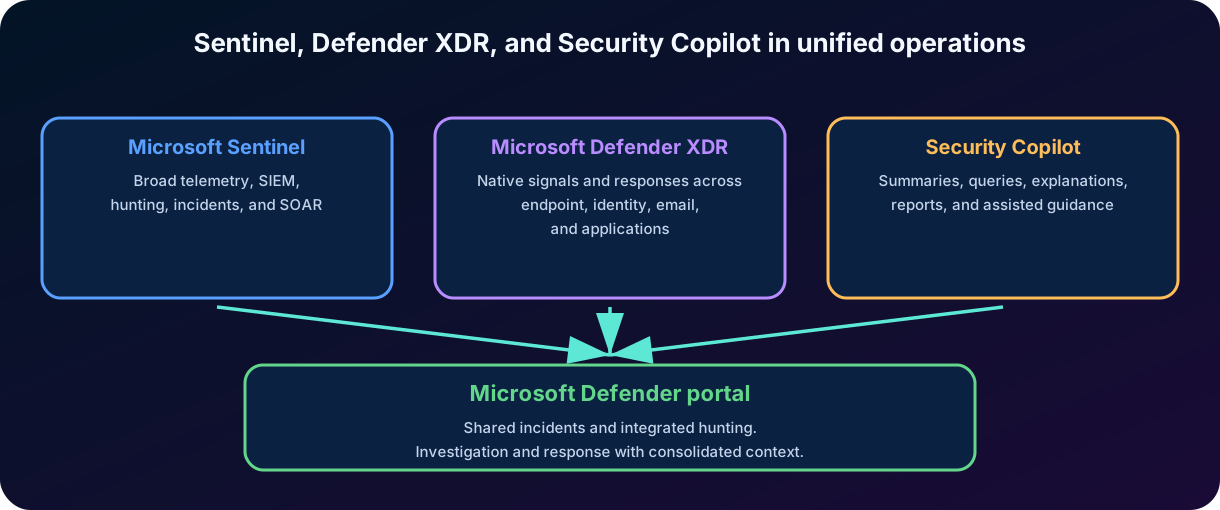
Microsoft Defender gathers native signals from endpoints, identities, email, applications, and other Defender products. Integration with Sentinel allows combining this depth with the breadth of , which receives Microsoft and non-Microsoft data. Incidents and events can be synchronized and investigated in the Microsoft Defender portal, reducing tool switching.
Figure 7 - Sentinel, Defender , and in unified operations.
13.1 Benefits of unification
More consolidated incident and investigation queue.
Correlation between Defender ecosystem signals and external sources.
over integrated data.
Better context of entities and attack chain.
Automation and coordinated response.
Access to built-in experiences of , when licensed and enabled.
Essential difference
Defender offers deep detections and responses in protected domains. Sentinel expands collection, correlation, hunting, and to a broader ecosystem. The integration combines depth and breadth.
14. in the context of Sentinel
uses and security data to assist analysts. In the context of Sentinel and the Microsoft Defender portal, it can summarize incidents, explain scripts and commands, assess suspicious files, summarize identities and devices, generate reports and queries, consolidate threat intelligence, and guide investigation and response. The integration surfaces context faster without replacing analyst judgment; results must still be checked against the organization's evidence, permissions, and procedures.
14.1 Embedded and standalone experiences
In the embedded experience, Sentinel incidents are unified with Microsoft Defender incidents in the Defender portal, so analysts can use Copilot while investigating without changing tools. In the standalone portal, Sentinel is connected as a data source through the Microsoft Sentinel and Natural language to for Microsoft Sentinel . That conversational experience lets analysts ask about incidents, entities, reputation, and stored data. Licensing, capacity, permissions, and onboarding determine availability in both experiences.
14.2 Analyst-driven capabilities
Task
Possible contribution of AI
Validation required
Incident summary
Organize alerts, entities, attack timeline, affected assets, , likely impact, and threat actors when available.
Confirm that no critical evidence was omitted or misinterpreted.
Natural language to
Translate an intention in an initial consultation.
Review tables, filters, period, cost, and meaning of the results.
Script analysis
Explain obfuscated scripts or PowerShell command lines in plain language and map behavior to .
Compare with the actual file, execution context, and available intelligence.
File analysis
Summarize detections, file certificates, API calls, and strings found in a suspicious file.
Validate the sample, provenance, hash, and analysis limitations.
Identity and device summaries
Surface roles, role changes, sign-ins, authentication methods, risk flags, device posture, unusual activity, vulnerable software, and Microsoft Intune context.
Confirm the entity identity, time range, and source freshness.
Report
Compile the summary, response actions, timestamps, analysts, and classification reasoning for PDF export or the incident activity log.
Review accuracy, data classification, and language appropriate for the audience.
Guided response
Suggest incident-specific actions grouped into triage, containment, investigation, and remediation.
Apply runbooks, operational impact, and human approval.
Threat intelligence
Consolidate relevant threats, exposure context, and actors that may target the organization's industry.
Corroborate recency, confidence, and applicability to the environment.
14.3 Natural language, , and
Natural language to lowers the entry barrier to threat hunting: an analyst describes the desired search, receives a ready-to-run query, and can execute or refine it in the standalone experience or . The generated query still needs validation of tables, filters, time range, permissions, meaning, and cost. The Microsoft Sentinel incident investigation assembles a structured sequence of that retrieves the incident report, related alerts, reputation scores, and user and device details, giving the analyst a consistent starting point rather than a final verdict.
14.4 Autonomous AI agents
Agent
Role
Result
Security Alert Triage Agent
Applies AI reasoning across evidence to triage supported phishing, identity, and cloud alerts at scale.
Clear verdicts, identification of true attacks versus , and transparent step-by-step reasoning.
Dynamic Threat Detection Agent
Continuously correlates alerts, events, anomalies, and threat intelligence to find gaps in traditional rule-based detection.
Dynamic alert with full context, natural-language explanation, mapped techniques, and recommended remediation.
14.5 Human control and safeguards
Answers may contain incorrect inferences or incomplete information.
Access respects permissions, but the user must avoid exposing data beyond what is necessary.
Generated queries need to be executed and interpreted by someone who understands the environment.
Containment actions continue to require responsibility and human supervision.
Clear should indicate objective, context, source, and expected format.
Principle of responsibility
accelerates analysis; it does not transfer the responsibility of the decision. In high-impact incidents, the evidence and the approved process prevail over the fluency of the generated response.
15. Integrated practical scenario: attack on a privileged account
Consider a company that connects to Sentinel records from Microsoft Entra ID, Defender , firewall, Linux servers, and a financial application. An administrative account experiences multiple authentication failures, followed by a successful login from an unusual location. Minutes later, there is a privilege change and atypical access to the application.
Stage
How the Sentinel participates
Collection
Connectors send inputs, administrative changes, endpoint, network, and application events.
Detection
Rules identify a sequence of failures, anomalous success, and privileged change.
Correlation
Alerts are grouped into incidents and associated with the account, IP, device, and resources.
Enrichment
Playbook checks IP reputation, account criticality, and recent history.
Investigation
Analyst uses timeline, entities, , and hunting to check persistence and .
Containment
Sessions are revoked, credentials are reset, the device is isolated, and indicators are blocked as approved.
Recovery
Permissions are reviewed, applications validated, and monitoring strengthened.
Learning
Team adjusts rules, creates new hunting query, updates playbook, and documents root cause.
15.1 What could go wrong
The auditing connector was not active, hiding the privilege change.
The rule generated so many that the alert was ignored.
The playbook had excessive permissions or failed silently.
Logs had insufficient retention to reconstruct the timeline.
The incident was closed without recording classification and lessons learned.
Systemic vision
Sentinel alone does not compensate for an identity without , a vulnerable device, or excessive permissions. It integrates signals and response, but risk reduction depends on preventive controls, detection, people, and processes.
16. Conclusion and review for the SC-900
Microsoft Sentinel represents the evolution of into a cloud-native, AI-ready security operations platform. It collects and organizes data from various sources, uses rules, AI, and threat intelligence to detect threats, correlates signals into incidents, offers investigation and hunting with , stores long-term context in its data lake, represents relationships in the Sentinel graph, exposes hosted tools, and automates responses with automation rules and Azure Logic Apps playbooks.
In my assessment, the main value of Sentinel is not in a single feature, but in the ability to transform scattered telemetry into a repeatable operational process. A mature organization does not measure success by the number of logs or alerts, but by the coverage of relevant risks, the quality of detections, the speed of investigation, the consistency of response, and continuous learning.
Integration with Defender expands the context between identities, endpoints, email, and applications. accelerates summaries, analysis, queries, reports, and guided responses, while autonomous agents help triage alerts and identify detection gaps. Even so, technology does not eliminate the need for analysts, governance, reliable data, and human validation.
16.1 Quick review
Theme
Memorize
Collection, research, correlation, detection, investigation, and hunting on multiple sources.
Orchestration and automation of tasks and responses.
Connector
Integrate a data source with Sentinel.
Analytics rule
Transforms patterns in the data into alerts and, according to configuration, incidents.
Alert
Sign of possible threat.
Incident
Investigative case that groups alerts and context.
Hunting
Hypothesis-driven proactive search.
Workbook
Interactive visualization and analysis.
Automation rule
Coordinates treatment actions and playbook calls.
Playbook
Response workflow in Azure Logic Apps.
Defender
Depth and native correlation between Defender domains.
AI assistance that requires human validation.
Data lake, graph, and
Long-term data foundation, relationship context, and hosted tools for natural-language exploration and agents.
AI agents
Autonomous triage and dynamic detection with transparent evidence and human oversight.
17. Review questions
1. Which Microsoft Sentinel feature is primarily used to connect log and alert sources?
A) Workbook B) Data connector C) Playbook D) Incident
Answer with explanation
Correct answer: B. Data connectors integrate sources into Sentinel and guide ingestion. Workbooks visualize data; playbooks automate responses; incidents organize investigation.
2. Which alternative correctly describes the relationship between alert and incident?
A) Every event is an incident. B) Incidents are used only to store dashboards. C) An alert is a signal of a possible threat, and an incident organizes one or more alerts and context for investigation. D) Alerts are created only by playbooks.
Answer with explanation
Correct answer: C. Alerts represent signals. Incidents group alerts, entities, evidence, and actions for triage, investigation, and response.
3. Which statement correctly differentiates an automation rule from a playbook?
A) Both are just queries. B) The automation rule coordinates when and in what order actions occur; the playbook executes a workflow based on Azure Logic Apps. C) Playbooks only create charts. D) Automation rules are only used for ingestion.
Answer with explanation
Correct answer: B. The rule manages the treatment flow and can call a playbook, while the playbook implements integrations and response logic.
4. What is the main objective of threat hunting?
A) Replace all preventive controls. B) Proactively search for threats not yet detected, based on hypotheses and queries. C) Create digital signatures. D) Configure virtual networks.
Answer with explanation
Correct answer: B. Hunting is proactive investigation of existing data and can result in an incident, a new rule, or an improved response.
5. What are the four interconnected security-operation areas emphasized by Microsoft Sentinel?
A) Collect, detect, investigate, and respond. B) Collect, encrypt, purchase, and archive. C) Design, compile, deploy, and debug. D) Identify, invoice, migrate, and retire.
Answer with explanation
Correct answer: A. Sentinel collects and normalizes telemetry, detects suspicious behavior, organizes investigation context, and supports response and containment.
6. Which capability provides a structured starting point with the incident report, related alerts, reputation, users, and devices?
A) Jupyter notebook B) Microsoft Sentinel incident investigation C) Workbook gallery D) Automation rule
Answer with explanation
Correct answer: B. The chains a sequence of to assemble incident and entity context for the analyst.
7. Which modern / capability most directly reduces alert fatigue?
A) Generating more unprioritized alerts B) AI and machine learning that correlate incidents, assign severity, and reduce C) Disabling low-priority sources D) Keeping every signal isolated
Answer with explanation
Correct answer: B. Correlation, contextual prioritization, anomaly detection, and false-positive reduction help analysts focus on the most meaningful cases.
8. What best describes ?
A) A replacement for analyst decisions B) A security solution that helps investigate threats, summarize incidents, and build with natural language C) A data connector only D) An automatic ticketing system
Answer with explanation
Correct answer: B. assists investigation and response through while analysts remain responsible for validation and final decisions.
18. Glossary and references
Essential glossary
Essential glossary for the chapter.
Term
Meaning
Common Event Format.
Data Collection Rule.
Microsoft Sentinel machine-learning correlation engine.
Indicator of compromise.
Kusto Query Language.
Model Context Protocol.
Knowledge base of adversary tactics and techniques.
Near-real-time.
Reusable sequence of coordinated .
Security Operations Center.
.
.
Extended Detection and Response.
Official references consulted
Microsoft Learn. Study guide for Exam SC-900: Microsoft Security, Compliance, and Identity Fundamentals. Updated on June 26, 2026.
Microsoft Learn. What is Microsoft Sentinel? / What is Microsoft Sentinel ? Updated in May 2026.
Microsoft Learn. Microsoft Sentinel data lake, Microsoft Sentinel graph, and Microsoft Sentinel support for Model Context Protocol. Updated in 2026.
Microsoft Learn. Connect data sources to Microsoft Sentinel by using data connectors. Updated in 2026.
Microsoft Learn. Threat hunting in Microsoft Sentinel. Updated on June 15, 2026.
Microsoft Learn. Automation in Microsoft Sentinel; Azure Logic Apps for Microsoft Sentinel playbooks; Create and manage Microsoft Sentinel playbooks. Updated in 2026.
Microsoft Learn. Microsoft Defender integration with Microsoft Sentinel. Updated in 2026.
Microsoft Learn. integration with Microsoft Sentinel, incident summarization, autonomous agents, and natural language to . Updated in 2026. Editorial note: the content was written for conceptual study of the SC-900. Menu names, availability, licensing, and preview features may change; consult the official documentation before making deployment decisions.