Protecting Networks, Applications, and Secrets in Azure
Azure Virtual Network, subnets, NSGs, Azure Firewall, Web Application Firewall, Azure DDoS Protection, Azure Bastion, Key Vault, and
Suggested study time: 36 minutes • Beginner level • Aligned with the SC-900 study plan and official Microsoft Learn documentation
By João Ricardo Dutra••Complete material
1. Introduction: from the physical perimeter to software-defined infrastructure
Network security was born in environments where servers, users, and equipment were concentrated inside buildings and data centers. Routers, access control lists, and firewalls formed a relatively stable perimeter between the internal network and the internet. With virtualization, web applications, mobile devices, and cloud computing, this perimeter has become distributed. Networks, traffic rules, load balancers, and secret vaults started to be configured by software and consumed as services.
This transformation contributes directly to organizations and to society because essential services - banks, hospitals, schools, governments, and communication platforms - depend on availability, confidentiality, and integrity. A well-protected architecture reduces interruptions, leaks, and fraud, while also enabling innovation with controlled risks. The challenge is understanding that 'being in the cloud' does not automatically make a system secure: Microsoft protects the platform, while the client must properly configure networks, identities, applications, and data.
Throughout this chapter, think of a three-tier application: a publicly exposed web interface, an internal API, and a database. Each service studied answers a different question. A volumetric attack requires DDoS mitigation; an HTTP exploitation requires ; traffic between subnets requires NSGs and, in centralized scenarios, Azure Firewall; VM administration requires Bastion; passwords, keys, and certificates require Key Vault. Understanding these boundaries is more important than memorizing names.
Guiding question
If an application uses , does it still need , Azure Firewall, DDoS Protection, and Key Vault? Yes. Each control acts on a distinct surface, layer, or purpose.
1.1 Security as an architecture, not as an isolated product
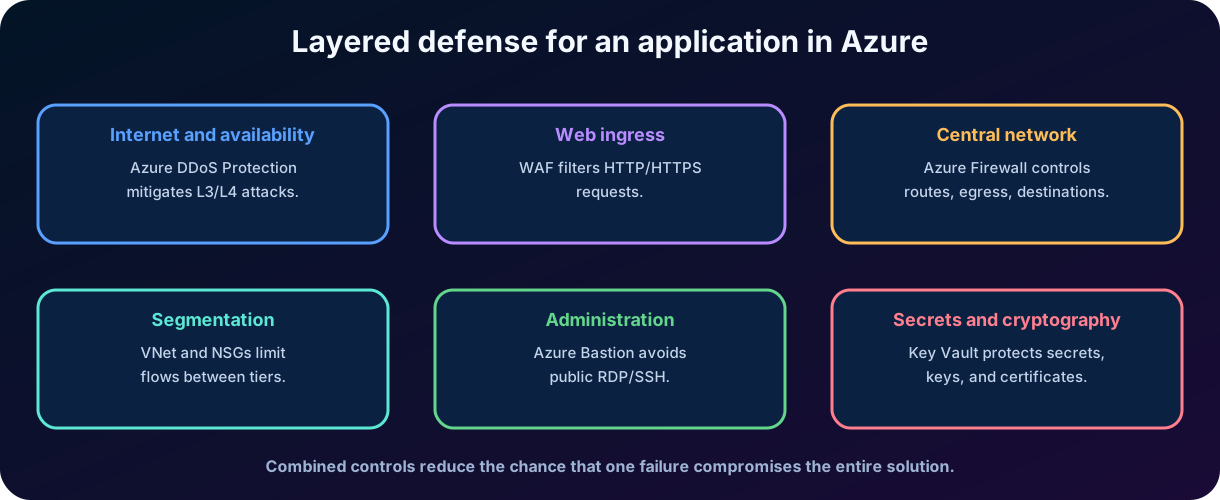
means combining preventive, detective, and responsive controls. A control can fail, be bypassed, or not detect a certain type of traffic. Segmentation limits ; a central firewall controls routes and destinations; the understands web protocols; the Key Vault reduces credential exposure. The result is a sequence of complementary barriers, not a promise of invulnerability.
Figure 1 - Complementary infrastructure security services in Azure.
2. Technical foundations: layers, flows, and state
2.1 Network and application layers
For the SC-900, it is not necessary to memorize the entire OSI model, but it is essential to differentiate network and application controls. Layers 3 and 4 mainly deal with IP addresses, transport protocols, and ports, such as TCP 443 or UDP 53. Layer 7 interprets the application protocol, for example methods, headers, paths, and HTTP content. DDoS Protection primarily acts against L3/L4 network attacks; NSGs filter flows by IP, port, and protocol; the inspects HTTP/HTTPS at L7. Azure Firewall combines inspection, network rules, and rules oriented to applications and destinations.
2.2 and traffic
traffic enters or leaves the environment, such as users accessing a website or servers querying the internet. traffic circulates between internal components, such as an API accessing a database or two virtual networks exchanging information. A secure architecture controls both: the edge should not be the only barrier, as an attacker who compromises a component may try to move internally.
2.3 and stateless filtering
A control tracks the state of a connection. When a permitted outbound flow initiates a session, the corresponding response traffic can be recognized without a manual mirrored rule. NSGs and Azure Firewall are . This does not mean that "all return traffic is allowed"; it means that the service associates the packets with the authorized connection. Stateless controls evaluate packets independently and usually require explicit rules for each direction.
2.4 Five elements of a flow
Element
Question
Origin
From which address, subnet, service, or group does the traffic originate?
Source port
Which ephemeral or defined port initiates the communication?
Destination
Which address, subnet, service, or group will receive the traffic?
Destination port
Which service is being requested, like 443, 22, or 3389?
Protocol
TCP, UDP, ICMP or another allowed protocol?
Key concept for exam
Port 443 does not automatically mean 'secure traffic.' TLS protects the communication, but an HTTPS request can still carry an SQL injection attempt. That is why the remains relevant.
3. Azure Virtual Network, subnets and segmentation
Azure Virtual Network, or VNet, is the foundation of the private network in Azure. It provides a logical and isolated space in which resources can communicate using private IP addresses. A VNet exists in a region, can span availability zones within that region, and can connect to other networks via peering, , or ExpressRoute. Isolation between VNets is an important property: different networks do not communicate automatically, unless a connection is created.
3.1 Address space and
When creating a VNet, one or more address blocks are defined, usually private according to RFC 1918, such as 10.20.0.0/16. The notation indicates how many bits identify the network. A /16 block contains more addresses than a /24. Planning avoids overlap with local networks and other VNets, as overlapping ranges make peering, , and routing difficult.
3.2 Subnets as functional and security boundaries
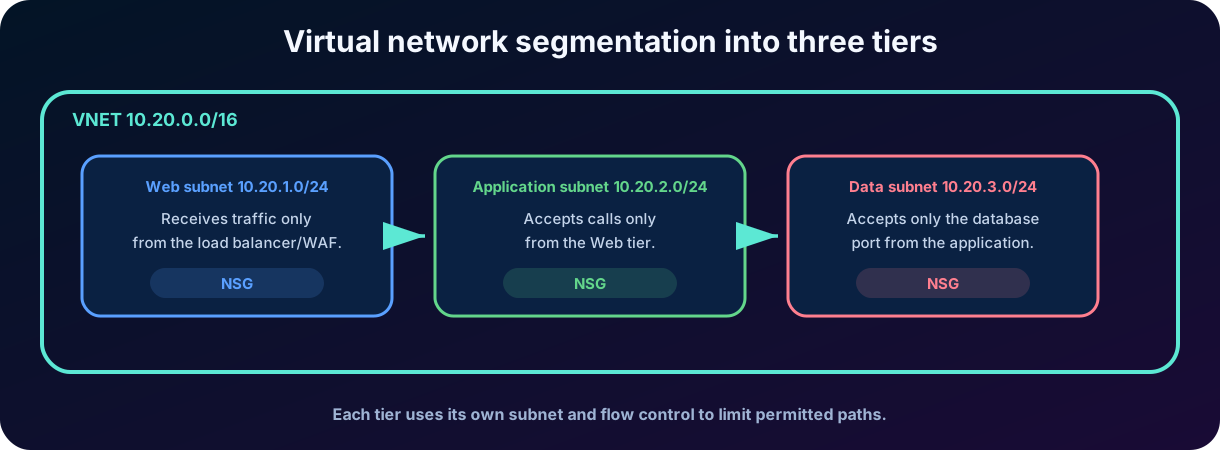
A subnet divides the VNet space. Instead of placing all resources in the same segment, the organization separates components by function, sensitivity, or communication need. a web layer can accept traffic from the load balancer; the application layer only accepts web calls; the data layer only accepts the database port from the application. This organization reduces the attack surface and facilitates the application of NSGs and routes.
Figure 2 - Example of subnetting by function and level of exposure.
3.3 Connectivity does not equal authorization
VNet and peering create network paths; they do not replace authentication, authorization, or application controls. Similarly, blocking a port does not replace the principle of least privilege in identities. Network security limits "who can reach the service"; identity and authorization define "who can use the service and what they can do".
3.4 Connectivity capabilities of a VNet
Resources can initiate outbound communication with the internet; inbound publishing requires an explicit mechanism such as a public IP address or load balancer.
Resources in the same VNet communicate privately, and peering connects separate VNets—including global peering across regions—through the Microsoft backbone rather than the public internet.
Site-to-site , point-to-site , and Azure ExpressRoute extend private connectivity to on-premises environments.
NSGs and Azure Firewall filter traffic, while system routes and custom routes determine the path taken by each flow.
4. Network Security Groups (NSGs)
A Network Security Group filters incoming and outgoing traffic associated with subnets or network interfaces. It contains rules that allow or deny flows based on priority, direction, protocol, source, destination, and ports. NSGs are distributed and controls: they are close to the resources and are suitable for restricting communication between layers.
4.1 Components of a rule
Property
Function
Priority
Number that determines the evaluation order. Lower priorities are evaluated first.
Direction
Entrance or exit.
Action
Allow or deny.
Protocol
TCP, UDP, ICMP, ESP, AH or any, according to support.
Origin and destination
Address, range, service tag, or application security group.
Doors
A gate, interval, or set of gates.
4.2 Default rules
An can be associated with one subnet and one network interface at each attachment point, while the same can be reused by many subnets and interfaces. Rules are processed from the lowest priority number to the highest and evaluation stops at the first match. The six immutable default rules can be overridden by a custom rule with a lower priority number.
Allows VNet and internet destinations, then denies every remaining outbound flow.
4.3 Service tags and application security groups
Service tags represent sets of IP prefixes maintained by Azure, such as Internet, VirtualNetwork, or specific services. application security groups allow grouping virtual machine interfaces by logical function, such as WebServers or DatabaseServers, reducing dependence on individual addresses. These resources make rules more readable and adaptable.
Example
The application subnet can accept TCP 443 only from the WebServers group and deny other sources. The database subnet can accept TCP 1433 only from the AppServers group. Thus, even if a web host is compromised, the path to other resources remains limited.
4.4 What an does not do
Does not analyze SQL injection, XSS, or HTTP semantics.
It is not an application proxy nor a web publishing service.
It does not replace a central firewall solution when egress control, NAT, advanced inspection, or policies between many networks are required.
Does not store secrets and does not authenticate end users.
5. Azure Firewall
Azure Firewall is a firewall as a service, cloud-native, fully , and with built-in high availability. It can inspect and traffic, functioning as a central control point in hub-and-spoke architectures. Instead of managing virtual appliances individually, the organization uses a managed service that scales with the platform.
5.1 Types of rules
Rule
Purpose
Example
Network rules
Filter traffic by IP, port, and protocol.
Allow DNS or TCP connection between specific networks.
Application rules
Control destinations by domain names and supported protocols.
Allow servers to access approved repositories.
NAT rules
Translate address and port to publish or redirect streams.
DNAT from a public IP to an internal service.
Threat intelligence
Alert or block traffic to known malicious domains and IPs.
Block communication with command and control infrastructure.
5.2 Azure Firewall versus
is a distributed filter applied to subnets and interfaces. Azure Firewall is a centralized service through which traffic can be routed. In small environments, NSGs can meet several basic requirements. In corporate architectures, the firewall centralizes egress, inspection, NAT, logs, and policies across multiple networks. Both are often used: the firewall controls central paths and NSGs enforce local micro-segmentation.
5.3 SKUs and depth
Azure Firewall is offered in Basic, Standard, and Premium tiers. Basic targets smaller environments, uses fixed capacity with two backend instances, supports threat intelligence in alert mode, and is recommended around 250 Mbps. Standard adds layer 3 through layer 7 filtering and real-time Microsoft threat-intelligence alerting and blocking. Premium adds advanced features such as TLS inspection and a signature-based intrusion detection and prevention system (IDPS), with tens of thousands of continuously updated signatures for regulated or highly sensitive workloads.
Exam trap
Azure Firewall and are not synonyms. The Firewall protects network flows and destinations broadly; the is specialized in attacks against web applications and interprets HTTP/HTTPS.
5.4 User-defined routes
To ensure that traffic passes through the Azure Firewall, subnets can use route tables and user-defined routes, known as UDRs. This pattern is called forced tunneling when the organization forces certain traffic through an inspection point. Without route planning, creating a firewall does not guarantee that all flows will go through it.
5.5 Central management, telemetry, and
A common design places Azure Firewall in a central VNet so that Azure and on-premises networks across subscriptions route through one control point. The managed service scales with traffic, includes high availability, and can span availability zones. Azure Firewall Manager applies shared firewall policies to firewalls in VNets and Virtual WAN secure hubs. Activity and decision logs can be sent to Azure Monitor, Log Analytics, or Event Hubs, and the service also integrates with Azure Policy and Microsoft Defender for Cloud.
Organizations onboarded to can investigate malicious traffic intercepted by threat intelligence and IDPS with natural-language . The Azure Firewall must be enabled; users need permissions and the required Azure access; and the selected firewalls must send resource-specific structured IDPS logs to a Log Analytics workspace. Built-in are available, and analysts can also write supported by the integration.
6. Azure Web Application Firewall ()
The Azure Web Application Firewall provides centralized protection for web applications against common exploits and vulnerabilities. It operates at the application layer, understanding HTTP and HTTPS requests. It can be deployed with Azure Application Gateway for regional ingress, Application Gateway for Containers for container workloads, Azure Front Door for global edge ingress, and Azure Content Delivery Network. The reduces the need to implement the same protection separately in each application, although it does not eliminate the need for code fixes.
6.1 Attacks and anomalies observed
SQL injection: attempt to manipulate database queries through malicious inputs.
Cross-site scripting (XSS): insertion of scripts into pages consumed by other users.
File inclusion, command injection, and HTTP protocol violations.
Bots, scanners, IP reputation patterns, and excessive volume, according to available resources and rules.
Headers, paths, methods, and parameters incompatible with defined policies.
6.2 Managed rules and custom rules
Managed rule sets are maintained to detect known classes of attacks, often aligned with OWASP categories. Custom rules allow blocking or allowing based on address, country/region, header, path, size, rate, and other conditions. In detection mode, the logs matches; in prevention mode, it can block requests. Deployment should start with observation and tuning to reduce .
6.3 does not replace secure development
A is a compensatory layer. It can block a known payload, but it does not fix authorization flaws, business logic issues, undue exposure of APIs, or secrets in the code. Applications still need input validation, authentication, authorization, dependency fixes, and security testing.
6.4 Layer 7 availability and
The OWASP core rule set gives the a baseline for threats such as SQL injection, cross-site scripting, remote file inclusion, and other common exploits. It also complements Azure DDoS Protection by detecting application-layer DDoS patterns such as HTTP floods, which network- and transport-layer mitigation alone does not cover.
With the Azure enabled and configured in , analysts can use natural language to investigate events and logs, identify frequently triggered rules and offending IP addresses, and understand related attack vectors. Built-in are provided, while supported custom can be entered in the standalone experience.
Network firewall
Interprets HTTP/HTTPS and request content.
Controls protocols, ports, addresses, routes, and destinations.
Protects applications against web attacks.
Protects networks and workloads against unauthorized traffic.
Normally positioned in front of web applications.
Normally centralized between networks, subnets, and the internet.
Examples: SQL injection, XSS, and bots.
Examples: egress, segmentation, NAT, and threat intelligence.
7. Azure DDoS Protection
A distributed denial-of-service attack, or DDoS, tries to exhaust bandwidth, connections, CPU, memory, or other resources to make a service unavailable. It is distributed because it uses many sources, often compromised devices. Any publicly accessible endpoint can be a target.
Volumetric attacks overwhelm available bandwidth with traffic that appears legitimate.
Protocol attacks exhaust servers or network devices by abusing layer 3 or layer 4 behavior.
Resource or application-layer attacks target web request processing and the exchange of application data.
7.1 Infrastructure protection and enhanced protection
The Azure platform has infrastructure protection against common attacks. Azure DDoS Protection adds enhanced features tailored to protected resources. Current documentation differentiates DDoS Network Protection, associated with virtual networks through a plan, and DDoS IP Protection, enabled per public IP. Both share core engineering features but differ in business model and additional services.
7.2 How the service works
Always-on monitoring analyzes traffic continuously and, when an attack is detected, diverts traffic through mitigation checks, discards malicious flows, and forwards legitimate traffic.
Adaptive real-time tuning learns the expected traffic profile and adjusts thresholds as the application changes.
Azure Monitor exposes metrics and alerts within minutes; logs can be integrated with Event Hubs, Azure Monitor Logs, and Azure Storage.
Layer 3 and 4 vector protection, such as TCP, SYN, and UDP floods.
7.3 Tiers, analytics, and rapid response
DDoS Network Protection is enabled for a VNet and automatically tunes mitigation to its protected resources. DDoS IP Protection uses a pay-per-protected-public-IP model and retains the same core engineering, but excludes value-added services such as DDoS Rapid Response, cost protection, and discounts. Default platform protection uses broader thresholds and offers no customer telemetry or alerting, so it is not equivalent to a dedicated protection tier.
During an attack, analytics reports are updated in five-minute increments, followed by a complete post-attack report. Azure Monitor exposes summarized attack metrics and start, stop, and in-progress alerts; mitigation flow logs can be streamed to Microsoft Sentinel or another . DDoS Network Protection customers can engage the DDoS Rapid Response team during an active attack and receive investigation and post-attack analysis.
7.4 DDoS Protection and are complementary
DDoS Protection specializes in availability and volumetric network attacks. The protects HTTP/S logic and can apply rate limiting or rules against bots and exploits. A critical web application often uses both: DDoS for L3/L4 and for L7. Azure Front Door also offers edge protection and integration with , but the examinable concept remains the use of complementary layers.
Do not confuse
DDoS does not mean a successful intrusion or data theft. The main objective is unavailability. However, attacks can be combined with other techniques or used as a distraction, so monitoring and response are still necessary.
7.5 Resilience is part of the defense
Mitigation does not replace resilient architecture. Regional distribution, availability zones, load balancing, autoscale, caching, and response plans reduce impact. Availability security depends on a protection service and on a design capable of continuing to operate during failures or spikes.
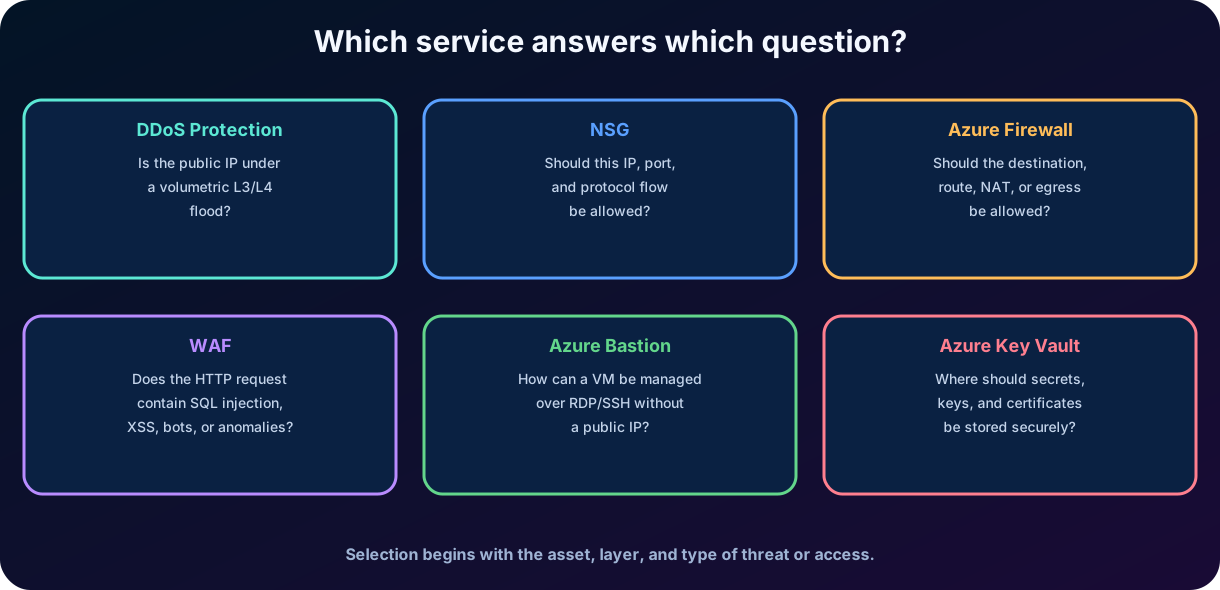
8. Comparing DDoS Protection, , Azure Firewall, and
Figure 3 - Distinct questions answered by the main infrastructure controls.
Service
Layer/focus
Main decision
Typical case
Azure DDoS Protection
L3/L4 and availability
Mitigate volumetric malicious traffic against public IPs.
Keep a public service available during floods.
L3/L4 and segmentation
Allow or deny traffic by source, destination, port, protocol, and direction.
Restrict web -> app -> data within a VNet.
Azure Firewall
Central firewall
Control traffic between networks and the internet, network/application rules, and NAT.
Centralize egress and inspection in a hub-and-spoke.
L7 HTTP/HTTPS
Detect or block web application attacks and anomalies.
Protect website or API against SQL injection and XSS.
Azure Bastion
Safe administration
Provide a managed path for / using a private IP.
Manage VM without a public IP and without opening ports directly.
Azure Key Vault
Secrets, keys, and certificates
Securely store and control access to secrets, keys, and certificates, with authentication by Microsoft Entra ID, authorization by Azure , and logging of operations.
Keep an application's connection string and TLS certificate out of the code.
8.1 How to solve questions by elimination
1. Identify the asset: public IP, subnet, network flow, HTTP application, or virtual machine. 2. Identify the threat: flooding, improper port, unauthorized destination, web exploitation, or administrative exposure. 3. Observe the layer: L3/L4 favors DDoS, or Firewall; L7 favors . 4. Look for keywords: “no public IP for /” points to Bastion; “secrets, keys, and certificates” points to Key Vault.
Mental rule
Volumetric availability = DDoS. Distributed filtering = . Central network control = Azure Firewall. HTTP attack = . Private administration = Bastion. Secret material = Key Vault.
9. Azure Bastion
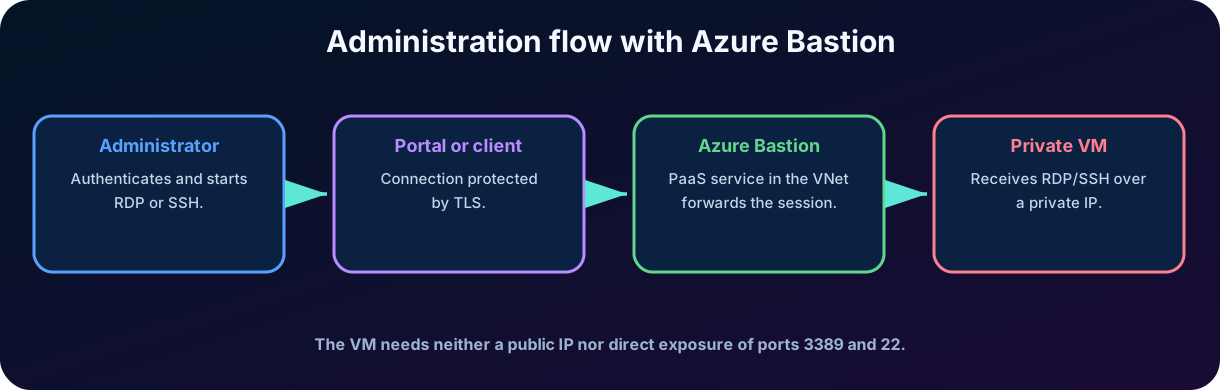
Azure Bastion is a managed PaaS service for and connection to virtual machines via TLS on port 443. It is deployed per virtual network—not per subscription or VM—and reaches machines in that VNet and peered VNets through private IP addresses. The central benefit is to avoid public IPs, agents, special client software, and direct exposure of administrative ports 3389 and 22 on the VMs.
Figure 4 - Virtual machine management through Azure Bastion.
9.1 Why opening / to the internet is risky
Exposed administrative services receive scans, password attempts, vulnerability exploitation, and automated attacks. Even with restricted to certain addresses, changes in origin and rule errors can increase exposure. Bastion creates a managed entry point, while the VMs remain private.
9.2 What Bastion offers
or sessions protected by TLS.
Single-click browser sessions through the Azure portal and, depending on the tier, native clients or shareable links.
Absence of a special agent within the VM for the main scenario.
Reduction of public IPs and exposed administrative ports.
Protection against internet port scanning and centralized platform hardening against zero-day vulnerabilities.
No customer-managed is required on the Azure Bastion subnet for the service's managed connection path.
9.3 Tiers and connection methods
Azure Bastion tiers
Tier
Best fit and notable capabilities
Developer
No-cost shared infrastructure for development and testing in selected regions; one VM connection at a time.
Basic
Dedicated fixed-capacity deployment with core browser-based / for moderate production use.
Standard
Adds host scaling, IP-based and custom-port connections, shareable links, native clients, and file transfer.
Premium
Adds session recording and private-only deployment for stronger compliance and isolation requirements.
Browser-based HTML5 connections are available across tiers. Native / clients and shareable links are available in Standard and Premium. Every method carries the session over TLS on port 443, allowing traversal of firewalls that permit standard HTTPS without exposing management ports on each VM.
9.4 What Bastion can't solve on its own
Bastion does not replace strong authentication, , operating system updates, endpoint protection, logs, and the principle of least privilege. An excessively privileged administrator continues to be a risk. The service protects the network path; the identity and the operating system still need their own controls.
Architectural detail
Dedicated deployments use a reserved subnet called AzureBastionSubnet. This subnet must be planned according to the current service requirements and should not host common workloads.
10. Azure Key Vault: secrets, keys, and certificates
Azure Key Vault is a cloud service for storing and accessing sensitive material with strict control. It reduces the insecure practice of embedding passwords, tokens, or keys in source code, shared variables, configuration files, pipelines, or container images. The service separates the application from the lifecycle of credentials and provides authorization, auditing, and integration with Microsoft Entra identities.
10.1 Three main types of objects
Object
What does it represent
Examples
Secret
Protected value that the application needs to retrieve.
Password, connection string, token, API key, or SAS token.
Cryptographic key
Material used in operations such as encrypting, decrypting, signing, or verifying.
RSA, EC, and keys protected by software or .
Certificate
X.509 object with policy and lifecycle, supported by related key and secret.
TLS certificate for application or mutual authentication.
10.2 Vault and Managed
Key Vault vaults store secrets, keys, and certificates. The Standard tier protects keys with software, while Premium offers -protected keys for stricter compliance requirements; both tiers retain the same core secret, key, and certificate capabilities. Managed is a separate dedicated service for hardware-protected keys and stricter cryptographic control.
10.3 Control plane and data plane
The control plane manages the Azure resource: create the vault, configure the network, diagnostics, and policies. The data plane accesses the objects: read a secret, sign with a key, or obtain a certificate. An identity can have permission to manage the resource without having permission to read the secrets, and vice versa. This separation applies least privilege.
Secret versus key
A password needs to be revealed to the application for use and is usually stored as a secret. A cryptographic key can remain inside the service: the application requests a signing or decryption operation without receiving the private material.
Certificate in Key Vault
The certificate is the third type of object. Key Vault manages X.509 certificates and, when a certificate is created, also creates an addressable key and secret with the same name: the key allows cryptographic operations, and the secret allows retrieval of the certificate value. A certificate policy defines properties such as the subject name and key type and directs the lifecycle, including automatic renewal with partner certificate authorities such as DigiCert and GlobalSign, and notifications about expiration and renewal sent to the defined contacts.
10.4 Availability, segregation, and Azure integrations
Key Vault replicates vault contents within a region and to a secondary region so that the platform can provide high availability and handle failover without an administrator initiating replication. Teams can create separate vaults per application and grant each identity only the specific operations and secrets it needs. Microsoft designs the service so that it cannot view or extract customer secrets, keys, or certificates.
Common integrations include Azure Disk for VM disk keys, Azure SQL Database and SQL Server for database keys, Azure App Service for retrieving connection strings and API keys at runtime, and certificate authorities for enrollment and automatic renewal of public or private TLS/SSL certificates. Access logs can be routed to monitoring or storage for retention, compliance evidence, and incident investigation.
11. Secure access and lifecycle in Key Vault
11.1 Authentication and authorization
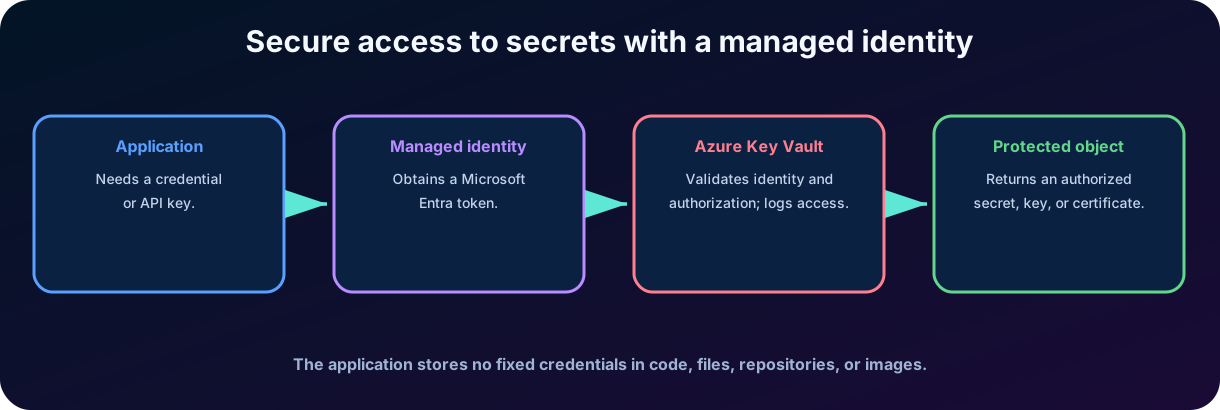
Microsoft Entra authenticates users, applications, and managed identities. Then, Key Vault authorizes the operation through Azure or, in legacy environments, access policies. allows assigning roles at scopes such as subscription, resource group, or vault. The modern recommendation is to apply minimal roles and separate infrastructure administrators from secret consumers.
Figure 5 - Application accessing the Key Vault with managed identity.
11.2 Managed identities
A managed identity eliminates the need for a fixed credential for the application to authenticate to Entra. The Azure feature receives an identity and automatically obtains tokens. The application uses the token to request only the authorized object or operation. Thus, it is not necessary to store a 'Key Vault password' in the code itself.
11.3 Network protection
In addition to authorization, the vault can restrict network paths. Key Vault firewall, selected networks, and allow private access from a VNet. This combination reduces public exposure but does not replace : being on the correct network does not grant the right to read a secret.
11.4 Versioning, rotation, and recovery
Objects have versions, allowing updates without reusing the same value indefinitely.
Rotation reduces the period during which a compromised credential remains valid.
Expiration and alerts help avoid expired certificates and forgotten secrets.
Soft delete keeps deleted objects for a retention period.
Purge protection prevents permanent deletion during the configured period, protecting against malicious or accidental destruction.
Logs and diagnostics record requests for auditing and investigation.
Good practice
Use separate safes by application, environment, and region when this reduces impact and simplifies
12. Integrated architecture: how services work together
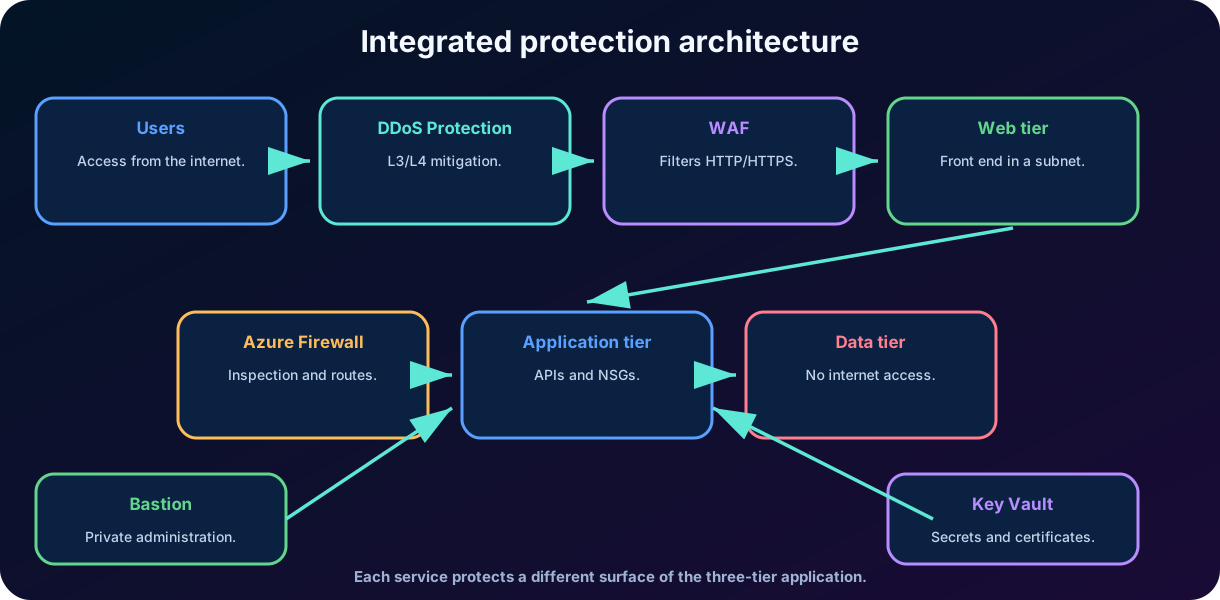
Figure 6 - Integrated example of protection of a three-tier application.
Consider an e-commerce application. Users arrive via the internet. The edge layer absorbs and distributes traffic; DDoS Protection helps against volumetric network attacks; the blocks malicious HTTP requests. The front-end is in its own subnet, the API in another, and the database in a third. NSGs allow only the necessary flows between these layers.
The Azure Firewall in the hub controls outbound traffic to the internet, access to approved destinations, and communication between networks. Administrators reach virtual machines through Bastion, without a public IP on the VMs. The application uses a managed identity to retrieve the connection string from the Key Vault or to perform an operation with a key. ,, Firewall, Bastion, and Key Vault logs are forwarded for monitoring and investigation.
12.1 Normal flow of a request
5. The user sends HTTPS to the public entry point. 6. DDoS protection monitors the volume and mitigates L3/L4 attack patterns. 7. The inspects the HTTP/S request and applies managed and custom rules. 8. The front-end calls the API only through the authorized port in the . 9. The API authenticates with managed identity and retrieves the necessary secret from the Key Vault. 10. The API accesses the database only through the allowed flow between subnets.
12.2 Flow during an incident
If a source tries to exploit SQL injection, the can detect and block it. If the volume grows abnormally, DDoS Protection acts on availability. If a compromised server tries to access a malicious destination, Azure Firewall can alert or deny with threat intelligence. If someone tries to read a secret without the appropriate role, the Key Vault denies and logs the request. The architecture turns a broad incident into observable events and containment boundaries.
13. Project decisions, monitoring, and common mistakes
13.1 Start with requirements, not with products
The selection of controls should start from assets, threats, data paths, and regulatory requirements. An internal application without a public IP may not need the same edge design as a global portal. An environment with few networks can start with NSGs; an organization with dozens of subscriptions may need hub-and-spoke, Azure Firewall, and centralized policies. Key Vault is useful whenever there are secrets, but the way to isolate and use depends on the risk.
13.2 Observability
Controls without logs limit detection and investigation. Diagnostics can be sent to Log Analytics, Storage, Event Hubs, and solutions like Microsoft Sentinel, depending on the service. DDoS metrics show mitigation; logs record triggered rules; flow logs or equivalent resources help understand flows; Firewall records decisions; Key Vault records operations; Bastion can provide session auditing in compatible offerings.
Common error
Conceptual correction
“ protects any traffic.”
is specialized in HTTP/HTTPS and layer 7.
and Azure Firewall are the same service.
is a distributed filter; Firewall is centrally managed control.
“DDoS Protection prevents SQL injection.”
DDoS focuses on L3/L4 availability; SQL injection is the domain of and secure code.
“Bastion makes the VM completely secure.”
Bastion protects the administrative path; identity, patches, and endpoint protection are still required.
“Key Vault automatically encrypts all application data.”
Key Vault manages secret material and cryptographic operations; the application and services must integrate correctly.
“ grants access to the secret.”
Private network reduces exposure, but Entra/ authorization remains mandatory.
13.3 Principle of least privilege in all layers
Least privilege is not limited to identity functions. In a network, it means allowing only the necessary sources, destinations, ports, and protocols. In , it means publishing only expected paths and methods. In administration, it means reducing the people and machines that can start sessions. In Key Vault, it means granting only specific actions on the necessary objects.
Deployment strategy
Plan, implement in observation mode when applicable, validate logs, adjust , automate through infrastructure as code, and periodically review rules and permissions.
14. Integrated practical scenario
A company migrates its service portal to Azure. The portal is public, has internal APIs, a database, and two support virtual machines. The organization wants to reduce downtime, prevent administrative exposure, limit communication between layers, and remove passwords from the code.
14.1 Proposed solution
Requirement
Service/control
Justification
Mitigate volumetric attacks against public IP
Azure DDoS Protection
Adaptive availability protection in L3/L4.
Block SQL injection and XSS
HTTP/S content inspection at layer 7.
Separate web, API, and database
VNet, subnets, and NSGs
Segmentation and minimum flow rules.
Centralize output to the internet
Azure Firewall
Controlled egress, centralized rules and logs.
Manage VMs without a public IP
Azure Bastion
/ via managed path and private IP.
Remove passwords and certificates from the repository
Azure Key Vault + managed identity
Central storage and authentication without fixed credentials.
14.2 Deployment sequence
11. Plan blocks without overlap and create subnets by function. 12. Apply NSGs with explicit rules for web, application, data, and administration. 13. Create the entry point with and validate rules in detection mode before blocking. 14. Enable DDoS protection appropriate for critical public IPs. 15. Deploy Azure Firewall and routes when there is a requirement for central inspection and controlled egress. 16. Deploy Bastion and remove unnecessary public IPs from VMs. 17. Create Key Vault, enable recovery, configure networking, assign minimal , and use managed identity. 18. Send logs to a monitoring platform and test failure and response scenarios.
14.3 Result
The environment does not become invulnerable, but gains clear boundaries. Volumetric attacks find mitigation; web attacks find inspection; internal compromises find segmentation; administration does not depend on public ports; credentials stop circulating in code. Each event generates evidence for operation and audit. This is the essence of applied to Azure infrastructure.
Test point
The best answer is usually the service that is most specific to the presented requirement, not the 'most advanced' product. Read the verb: mitigate DDoS, filter traffic, inspect HTTP, manage VM, or store secret.
15. Quick review for the SC-900 exam
VNet is the logical private network in Azure; subnets divide its address space and organize workloads.
is and filters inbound/outbound traffic by priority, direction, protocol, source, destination, and port.
Azure Firewall is a central firewall as a service, , with network, application, NAT rules, and threat features.
protects web applications against HTTP/HTTPS attacks and anomalies at layer 7.
Azure DDoS Protection mitigates distributed denial-of-service attacks, mainly at layers 3 and 4.
Bastion allows / to VMs via private IP without direct exposure of a public IP on the machine.
Key Vault stores secrets, keys, and certificates and integrates with Entra, , and managed identities.
restricts the network path, but does not replace authorization.
The services are complementary and implement .
16. Conclusion
Protecting cloud infrastructure requires understanding flows, layers, and responsibilities. Virtual networks and subnets create isolation; NSGs restrict local communication; Azure Firewall centralizes network policies; interprets web traffic; DDoS Protection preserves availability; Bastion reduces administrative exposure; Key Vault protects secrets and cryptographic material. Security emerges from the coherent combination of these services with identities, monitoring, and human processes.
In my assessment, the most valuable concept of this chapter is the specialization of controls. Unsafe projects often try to make a product solve all risks. Mature projects ask which asset is exposed, which layer is being attacked, which flow needs to exist, and what evidence will be generated. This way of thinking prepares the student not only for the SC-900, but also for real architectural decisions.
17. Review questions
1. A company needs to block SQL injection attempts on an HTTPS portal. Which service is the most directly indicated?
A) B) Azure Web Application Firewall C) Azure Bastion D) Azure Key Vault
Answer with explanation
Correct answer: B. The interprets HTTP/HTTPS at layer 7 and has rules for web attacks, including SQL injection.
2. Which service allows connecting via or to a VM using a private IP, without directly exposing a public IP on the VM?
A) Azure Bastion B) Azure DDoS Protection C) D) Network Security Group
Answer with explanation
Correct answer: A. Azure Bastion provides a managed pathway for / over TLS to private VMs.
3. Which statement best describes the difference between and Azure Firewall?
A) protects only HTTP and Firewall only databases. B) stores secrets and Firewall issues certificates. C) is a distributed filter in subnets/interfaces; Azure Firewall is a central control for traffic between networks and the internet. D) There is no functional difference.
Answer with explanation
Correct answer: C. They can be used together: for local segmentation and Azure Firewall for centralized policies and inspection.
4. An application needs to access a database password without maintaining fixed credentials in the code. Which combination is most suitable?
A) and DDoS Protection B) Azure Key Vault and managed identity C) Bastion and D) Azure Firewall and public IP
Answer with explanation
Correct answer: B. The managed identity authenticates the application, and the Key Vault delivers only the authorized secret.
5. An 's default inbound rules deny from the internet. How should an administrator allow from an approved source?
A) Delete DenyAllInBound B) Add a custom allow rule with a lower priority number than the default deny rule C) Disable processing D) Use an outbound rule
Answer with explanation
Correct answer: B. Default rules cannot be deleted, but a higher-priority custom inbound rule can match the approved flow before DenyAllInBound.
6. Which option provides dedicated DDoS monitoring, metrics, alerts, and attack telemetry for resources in a VNet?
A) Default platform protection B) DDoS Network Protection C) Azure Bastion D) An application security group
Answer with explanation
Correct answer: B. DDoS Network Protection supplies resource-specific mitigation and visibility; the default platform layer does not expose customer telemetry or alerting.
7. What deployment scope should be remembered for Azure Bastion?
A) One deployment per VM B) One deployment per subscription C) One deployment per VNet, with access to that VNet and peered VNets D) One deployment per user
Answer with explanation
Correct answer: C. Azure Bastion is provisioned in a VNet and can serve private-IP connections to its VMs and VMs in peered networks.
18. Essential Glossary
Term
Definition
Notation to represent a block of IP addresses and the size of its network.
Control that monitors the state of connections and recognizes response traffic.
Traffic that enters or leaves the environment.
Traffic between components and internal networks.
Firewall specialized in web applications and HTTP/HTTPS.
Security rule group to filter flows in VNets.
used to protect cryptographic keys.
Private network interface that connects a VNet to a service via Private Link.
Remote desktop protocol, usually associated with TCP port 3389.
Secure system access protocol, usually associated with TCP port 22.
19. Official references for further study
Microsoft Learn - Study guide for Exam SC-900: Microsoft Security, Compliance, and Identity Fundamentals. Updated on June 26, 2026.
Microsoft Learn - Azure DDoS Protection overview.
Microsoft Learn - What is Azure Firewall?
Microsoft Learn - Introduction to Azure Web Application Firewall.
Microsoft Learn - Azure network security groups overview.
Microsoft Learn - Azure virtual networks and subnets.
Microsoft Learn - What is Azure Bastion?
Microsoft Learn - Azure Key Vault basic concepts.
Microsoft Learn - Overview of Azure Key Vault keys, secrets, and certificates.
Microsoft Learn - Secure your Azure Key Vault.
Note about update
Cloud services evolve continuously. For pricing, SKUs, regions, limits, and available features, always refer to the latest official documentation. The focus of this chapter is the purpose and conceptual differentiation required in the SC-900.